Tag: releases

  • Top 3 Themes for Dynamics 365 in 2017

    Top 3 Themes for Dynamics 365 in 2017

    The first day of the new year is a good moment to reflect on what 2017 gave us (or didn’t give) in the Dynamics 365 business. Here are the top 3 themes that came to my mind when I looked backed at the last 12 months of news, releases and overall directions coming from Microsoft.

    Business Applications

    A major theme that emerged this year and found its way into most of the communication coming from Redmond was Business Applications. Those two words on their own of course don’t mean anything very revolutionary, but it’s rather the way in which they were used to broaden the context of Microsoft’s business software beyond just Dynamics that’s of greater significance. If 2016 was the year when CRM and ERP were commercially bundled into Dynamics 365, then in 2017 the scope began to reach further beyond that. At the start of the year the XRM platform was given the Customer Engagement name, with the absolute minimum fanfare allotted for the occasion, so the true focus for product marketing was obviously somewhere else.

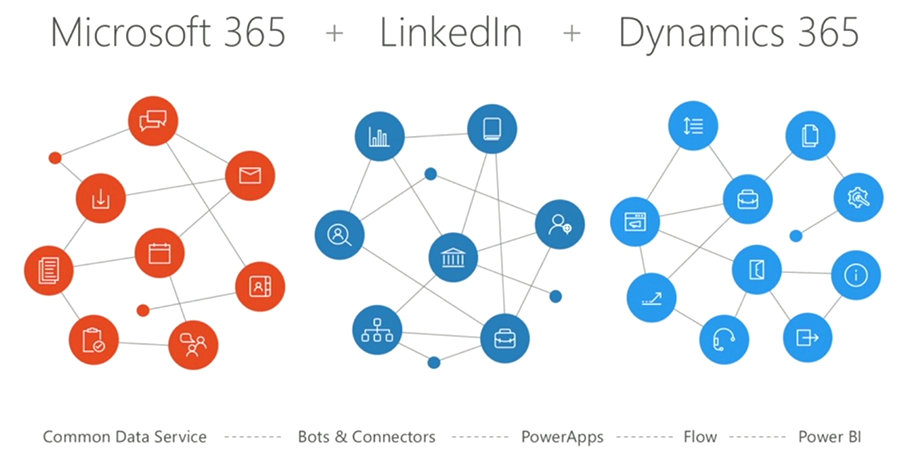
    Looking around at what specific software products sit alongside Dynamics 365 in the high level MS technology stack illustrations, it’s quite logical that we’re now seeing the “Power Suite” tied into pretty much every commercial narrative around Microsoft’s business cloud. More precisely, the technology grouped under this suite with no official name is very central to the story being told to both business and technical decision makers for one reason: its purpose is to connect the big three MS clouds. Office 365, Dynamics 365 and Azure are all equal beneficiaries from the toolkit that is provided by PowerApps, Flow, Power BI, CDS and their numerous connectors.

    On an everyday level it may still not be all that common for the real life CRM solutions to heavily rely on the Power Suite technology, like using MS Flow instead of D365 workflows. Because it was first rolled out as a power user focused set of tools for an individual information worker rather than something you’d deploy across a large organization, the practical as well as perceived maturity of this technology has formed a barrier of sort for full-on adoption. The long term outlook for it does look bright in my opinion, however. There’s only so much that Dynamics 365 as a platform can do on its own (be it the XRM, AX or NAV flavor), but if you can connect it with the outside world of MS and non-MS services without the traditional integration development effort, that opens up the door to a world of possibilities. I’m pretty sure customers will be interested in taking a step through that doorway and having a look around during 2018.

    App/Plat Separation

    Taking a few steps down from the higher level clouds and diving into the platform formerly known as XRM, 2017 was a busy year. This didn’t really come as a surprise to me, since I had a wonderful opportunity to get a peak at what the product team had planned for this calendar year already in the last MVP Summit in November 2016. My initial reaction to it was “are you guys SERIOUSLY going to push all of this out in the next release?” Well, a clear majority of the planned features and changes was indeed shipped during 2017 eventually, although the naming of V9 as the “July 2017 Update” didn’t turn out to be such a great idea.

    There were massive changes introduced to XRM (which I’ll continue to call for what it is), both above and beneath the surface. Rolling out Unified Interface initially to the mobile devices and eventually to every UI is going to change the client side of XRM in ways that are even greater than the previous user experience overhaul in CRM 2013. Opening up the client UI to custom extensions with the Custom Control Framework (CCF) sometime later (hopefully in 2018) is a major step in enabling and encouraging the reuse of configurable UI controls for data visualization. Finally, the App/Plat Separation that has moved the previously built-in application features of Sales, Service etc. into optional solution packages is now turning XRM into the type of generic application platform that it has earlier often been depicted as – in the technical decision maker slide decks from MS, at least.

    The combined effect of this transformation which materialized largely in V9 is that XRM should now be a lot more future proof. Having the individual applications as their own packages is a bit like how at one point in the late Windows Phone operating system’s lifecycle the Office apps needed to be separated from the OS, so that they could be serviced and updated without having to ship a new WP build. (Naturally I hope that the fate of D365 will be considerably more glorious than that of WP.) The new UI controls in CCF that now aren’t tied to a single app feature but can rather consume any data coming from XRM database or from external sources via Virtual Entities are bound (pardon the pub) to be more useful in delivering solutions to varying customer needs. Sharing the same client framework across different devices and embedded apps is going to reduce the amount of effort needed to get these solution features in the hands of different user groups.

    Licensing Model

    Sometimes the planned features take a little longer to ship than was originally estimated, which certainly is no surprise to anyone working in the business of software. Other times it turns our that what you initially promised to deliver isn’t actually going to meet the needs of the outside world after all. The delays experienced in getting V9 out to the customers represent the former scenario, while what happened to the Business Edition is an example of the latter.

    There’s no denying that with the growth of the platform and all the new cloud services attached to it, Dynamics CRM had grown from humble beginnings to enterprise scale in the recent years. Therefore the idea of labeling the suite as a true enterprise product and building a different lightweight offering for the needs of smaller CRM environments probably made a lot of commercial sense when MS announced the Dynamics 365 branding with the Enterprise and Business licensing plans to the world in WPC 2016. Only the practical problem remained of how to actually mold a new offering out of the big suite – at least without taking several shots at one’s own foot while setting up constraints for customization and expansion for those customers who’d initially start their exercise from the lower end of the license pool.

    Those 14 months from announcement to eventual cancellation of a separate Business Edition were filled with confusion on all sides – from partners to customers, and probably within Microsoft, too. Although this did leave an unfortunate stain on the year 2017 for Dynamics 365, the long term outcome from the decision to NOT roll out an artificially separated lower tier may turn out to be a better choice after all. It’s all still wide open on how the promised “lower price point” licenses and apps will be packaged, but at least it sounds to me like MS has acknowledged they need to build bridges instead of walls around the growing set of applications in Dynamics 365. For instance: just take a look at the documentation of the upcoming Dynamics 365 for Marketing application and tell me if it looks like an SMB only -product that no existing (Enterprise) customers would have any use for? Exactly. Sanity must prevail and customers be given a chance to license the technology that best fits their needs.

    Hello 2018

    What can we expect to see from Dynamics 365 in this new year then? There are no definite product roadmaps from Microsoft that would publicly disclose what’s planned for be released in which year, since the software business no longer operates on the type of schedule that we saw when products were shipped in shrink wrap every 2-3 years. It now looks more like a mesh of forever updating cloud applications and web services that move along according to their own backlogs and team velocity. Given that the real business applications that customer organizations deploy are a combination of several products that in turn use a variety of back end services, who can actually tell when a certain feature will be “ready”? For example, Dynamics 365 for Marketing utilizes Customer Insights, which in turn relies on the following Azure services:

    • Azure Data Lake Store
    • Azure Data Lake Analytics
    • Azure HDInsight (Spark, Phoenix, HBase)
    • Azure SQL Database
    • Azure Key Vault
    • Azure Secret Store
    • Azure Event Hub
    • Azure Stream Analytics
    • Azure Redis Cache
    • Azure Service Fabric
    • Azure Active Directory
    • Azure Monitoring
    • Azure Metrics
    • Azure Websites
    • Azure Service Bus
    • Azure Storage

    That’s what the future is made of, and that’s why it is so unevenly distributed. We may well see MS announce the next Dynamics 365 Customer Engagement capabilities before existing customers are even able to update their instances to V9. The specific points in time where a particular capability is 1) announced, 2) in private preview, 3) in public preview, 4) available for new environments and 5) deployed for live customer environments may therefore be spread out over a time period that makes even assigning a proper year to it challenging at times – let alone a calendar month like “July 2017”. In this light, I’m personally mainly expecting to see how the above three themes from 2017 will play out as they get closer to impacting the real life scenarios of customer organizations all over the globe that get to put it all into action in their digital business processes.
  • XRM Rebooted with Dynamics 365 Embedded?

    XRM Rebooted with Dynamics 365 Embedded?

    The next major release of Microsoft Dynamics 365 Customer Engagement, the July 2017 Update, has been called “the biggest release to date” by the product team. If you look at the number of features that a single release now touches, with the product offering being further divided into Enterprise Edition and Business Edition, the number of work streams sure is massive. It’s amazing to think how much wider the scope of Dynamics 365 is today compared to “just” five years ago when it was still Dynamics CRM and the primary target seemed to be making the traditional sales-service-marketing CRM package to work with modern browsers (non-IE), devices (mobile) and infrastructure (cloud). Here’s the roadmap presented in WPC 2012:

    Times change and even the Worldwide Partner Conference has evolved into Microsoft Inspire now – which I think is far too close to Microsoft Ignite as a name, since I’ve found myself mixing #MSInspire with #MSIgnite all the time. Anyway, this annual MS partner conference launched on July 10th with a keynote led by Satya Nadella. The recording of this is naturally already available, but you could also check out my Storify collection of the most interesting tweets from the event:

    One of the announcements that didn’t get much space on the big stage but certainly has big potential implications for the Dynamics ecosystem was the announcement of a new ISV Cloud Embed program for partners. With a reference to their earlier success with offering Azure IaaS and PaaS services as the foundation for ISV applications, Microsoft now states that it will offer also higher level services available as building blocks for ISV apps. The list shown below includes “Dynamics 365 Embedded”.

    Yes, it shows a number of other embeddable products too, like PowerApps and Flow, but c’mon – those are newcomers to the Microsoft product portfolio. Dynamics as in CRM and later Customer Engagement has been around for a decade and a half now! One does not simply rip the CRM roots out of the platform (assuming that it even is the CRM part and not AX/NAV) and then use the remaining parts as a building block for an ISV app. Except that it might just be happening soon.

    This is not a brand new concept of course. Since I have a tendency of documenting the platform evolution of Dynamics CRM/XRM/365/CE/etc. onto my blog posts, all I have to do is search and reference my earlier writings these days. Back in 2010 when Office 365 was launched, I posted the first reference to the concept of “Dynamics CRM Services”. This is turned out to be pure slideware in the end, as the early illustrations of what the high level Azure services architecture was planned to be never quite materialized in that format. Read this post from Simon Hutson for a great overview of the buzz and confusion around CRM Services.

    The statement in 2008 was:

    “In the future, developers will have access to SharePoint & CRM functionality for collaboration and building stronger customer relationships. With the flexibility to use familiar developer tools like Visual Studio, developers will be able to rapidly build applications that utilize SharePoint and CRM capabilities as developer services for their own applications. Developers can expect a breadth of SharePoint & CRM capabilities across the spectrum of on-premises, online & the Azure Services Platform.”

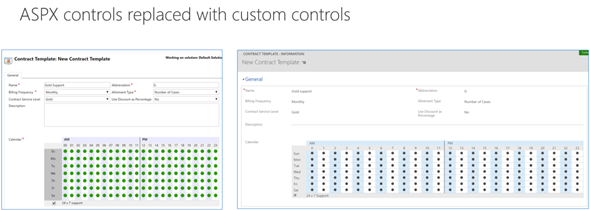
    With this week’s statement on Dynamics 365 Embedded, could the “future” referenced in the original text actually arrive ten years later? We don’t know for sure yet, but there are a lot of signs pointing towards that direction. If you followed the V9 Preview Executive Briefing or skimmed through my collected tweets from it, then you might already be aware of the concept of App/Plat Separation that’s taking place right this very moment. The earlier built-in application functionality of sales, marketing and services that you always got preinstalled with a CRM instance are now being moved into solutions like the newer Field Service etc. already are. Not only that, but also the built-in ASPX controls for data presentation components like grids and dialogs are now being rewritten with the new Custom Control Framework.

    And what about Azure? Well, it’s everywhere you look now with the new features built for Dynamics 365. Then there’s also… something that will become more clear as the GA of V9 approaches. With all of this technical architecture being lined up for the next generation XRM, it looks like the only thing missing really is a commercial model for selling Dynamics 365 without the CRM. Now that we have the ISV Cloud Embed program announced at Inspire 2017, I would say the time has come to give the people what they want:

    That Twitter poll ain’t open anymore, but please feel free to place your bets in the comments section of this post! What might the Embedded future of Dynamics 365 be and what still needs to happen in your opinion?

  • The Long Road to Unified Interface in Dynamics 365

    The Long Road to Unified Interface in Dynamics 365

    On June 20th Microsoft started taking the cover off its next major release of Dynamics 365 Customer Engagement (formerly known as CRM): v9.0. The biggest announcements in the first day of the Dynamics 365 Preview Executive Briefing were around the client story. With the new Unified Interface (sometimes also referred to as “UCI” for Unified Client Interface/Infrastructure) the plan is to bring a single client technology to cover all the different UI’s across devices. Web, Outlook, Mobile, Tablet.

    This is very exciting news, but there’s a lot of details and footnotes that people in the Dynamics ecosystem need to be aware of. Let’s dive right in!

    The Client Fragmentation of Dynamics CRM

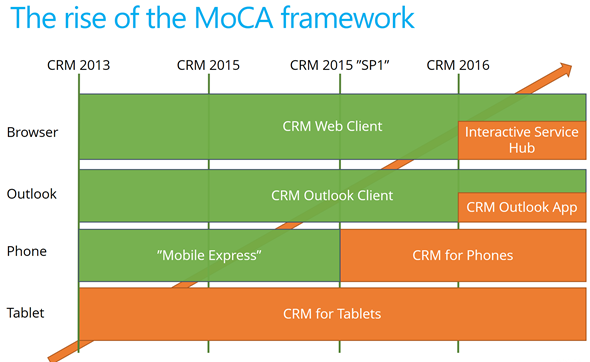
    Most of you will have probably been around when the previous big UX refresh took place with CRM 2013. We then received the MoCA Framework based tablet app with Windows 8 style tile UI and later saw this framework being used in many other places. We even received a brand new client to be used on the (desktop) web, the Interactive Service Hub (ISH). In fact, one year ago it almost looked like MoCA would be eating the world:

    The only problem with this strategy seemed to be that all of these individual parts never formed a sensible whole. Instead, there were so many “seams” visible everywhere you looked in the Dynamics CRM client landscape that many times you just wanted to keep your focus on the traditional web client and wait for things to clear up in these newer areas of the platform. A few examples:

    • Knowledge Articles were introduced only on ISH, but at the same time ISH was too limited/buggy to be used in most of the existing customer service scenarios with customizations in place.
    • Visual Controls were introduced in the phone and tablet, but the main web app forms just kept getting more and more white with nothing but text fields.
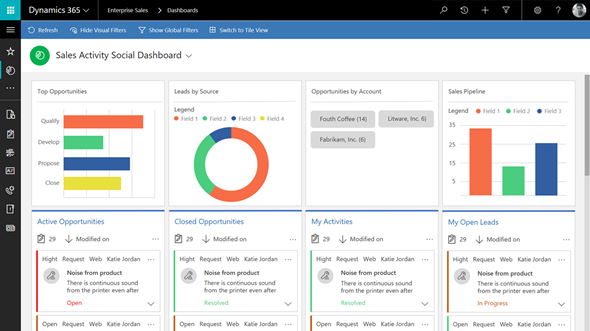
    • Dashboards with filters were made available on ISH, but much of the entities (i.e. sales) that typically are analyzed with dashboards were not allowed on the ISH side.

    MoCA was born for the mobile first era of touch UI and understandably it didn’t have all of the traditional capabilities from the web client. However, there were plenty of gaps that didn’t make it ideal for mobile use either. One of the biggest issues I had with MoCA was the “configure once, deploy everywhere” principle, which tried to force the same full CRM configuration onto the mobile device screens. MoCA brought the CRM into your pocket, but most of the time what a user would need in their pocket is a simplified app focused on a limited set of tasks. The limitations with MoCA meant that Microsoft had to rely on a Resco based client for their Field Service app in which the use cases are primarily mobile only.

    This Time It’s Different

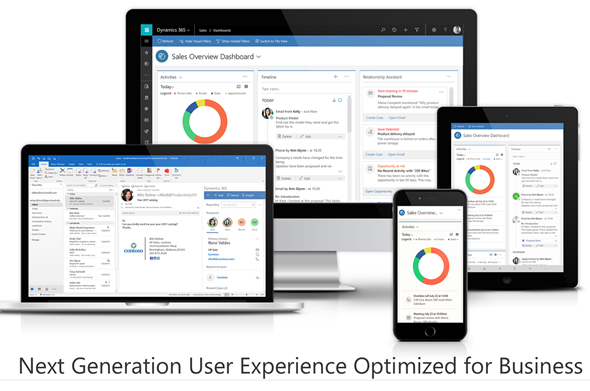
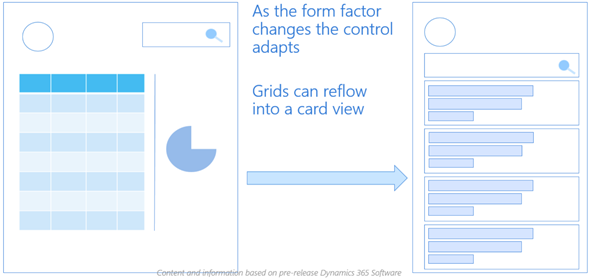
    The promise of Unified Interface is that the era of web vs. mobile is over and now we’ll see a UI that’ll both adapt to the device or screen in use, as well as offer the same customization options in each of them. Content will be presented in a way that will reflow into different states of the control as the space available to it changes.

    Unlike with MoCA, this time there can be multiple different apps also accessed on a mobile device. Also web-only features like form switching are now available on all devices which makes it far less challenging for the system customizer to design a solution when all the exceptions and limitations of specific client types are (in theory) no longer in the way. It’s important to set the expectations on a realistic level, though, since I’m quite sure we’ll need to make some more compromises on the web side of the house with this new Unified Interface, but hopefully it’ll be a price worth paying for true mobility of Dynamics 365 business apps.

    For an even more customized experience, the Custom Control Framework that has been gradually introduced as part of the application (like the Editable Grid, for example) is going to introduce a design surface for developers to extend Dynamics 365 Customer Engagement apps in exciting new ways. Not only that, the existing ASPX based UI controls that have been in the core CRM application since forever are now also being transformed into Custom Controls. This is a part of the larger application/platform separation initiative that’s a whole topic of its own. On a high level, the developers should soon have access to basically the same tools for building new UI controls as what Microsoft is using to build their business apps.

    All of this should help in removing many of the gaps that have currently stopped the rolling out of the individual application features in earlier releases for real life business scenarios. There are plenty of promises that MS is making on performance improvements of this new client technology, too. That’s an important aspect to keep in mind and realistically evaluate as the Unified Interface becomes available, since all of the eye candy in the world won’t be of much value if the actual user experience of working with the application isn’t meeting the ever growing expectations of fluid interaction with the data stored in and managed via Dynamics 365.

    Are We There Yet?

    So, all of this looks great – now can we have it by tomorrow, please? The short answer is “no” and the expanded one is “it depends”. As mentioned in my earlier blog post, much of the new features in Dynamics 365 will now be rolled out via Private Previews and Preview programs before general availability. Hopping on to the preview train will shorten the time it takes for gaining hands on experience with the new UI. However, there’s more to it.

    Earlier I mentioned the previous UI refresh of CRM 2013 release (“Orion”), but some of you might still remember the intermediate release of “Polaris” (whereas the official name December 2012 Service Update isn’t something even I remembered anymore). That was perhaps the first Online-only release that Microsoft developed, with a target of not even trying to upgrade all of the application features into the new UI concept but instead just a selected few entities (“COLAC”) received the refreshed forms and Business Process Flow. You could build a simple CRM demo for a new customer with it, but trying to upgrade existing systems into Polaris or building anything with more customization requirements was a no-no. They had to wait until the full CRM 2013 release became available.

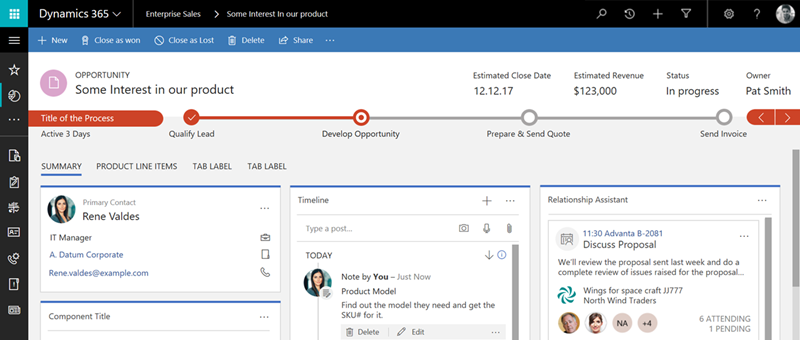
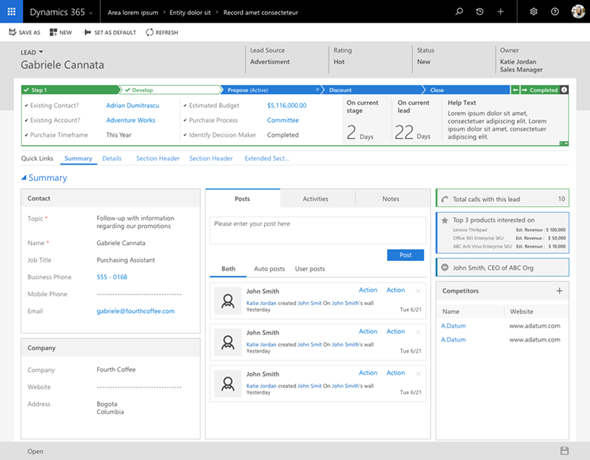
    The reason I’m bringing up this is that initially the Unified Interface is likely to be a bit like Polaris. It’s going to be made available only to brand new instances with the Business Edition licensing, or for new Apps that are either built by Microsoft (Customer Service Hub, a.k.a. ISH v2) or by the customer. It will also be available on the Phone and Tablet apps as well as in the lightweight Dynamics 365 App for Outlook (which officially replaces Outlook Client that’s now deprecated). Everywhere else, though, it’s not going to be the time for Unified Interface yet, but instead a refresh of the web client that’ll look something like this:

    Starting to get confused? I don’t blame you! There’s a hint of irony in the fact that the “Unified” Interface will initially be yet another interface variation for the Dynamics 365 application. I’m sure it’s not the way Microsoft would prefer to have these things introduced but reality is usually a bit more messy than PowerPoint presentations. The new client technology simply represents such a major shift in how Dynamics 365 works that upgrading all the complex customizations of existing Enterprise customers into it in one go would not be a smart move. Remember that “everyone’s an enterprise customer” until the Business Edition finally is out the door.

    To truly understand the client strategy that Microsoft is pursuing, you simply have to look at the Business Edition now, regardless of your deployment’s size. It is the dreamy wonderland in which MS can cut back on unnecessary complexity of application features and not worry about breaking any existing deployments, since there is hardly any legacy there. A fresh start that doesn’t need to carry all of the overlapping functionality (like Contracts vs. Entitlements) or provide all the admin options necessary for hybrid environments. It’s not all pure bliss in the sense that all of this will eventually have to live in harmony with the more complex custom UI’s and business logic of big corporations with “non-simplified” CRM systems running on the Dynamics platform. Still, right now we’re seeing a move from “cloud first” to “Business Edition first” when it comes to client innovation.

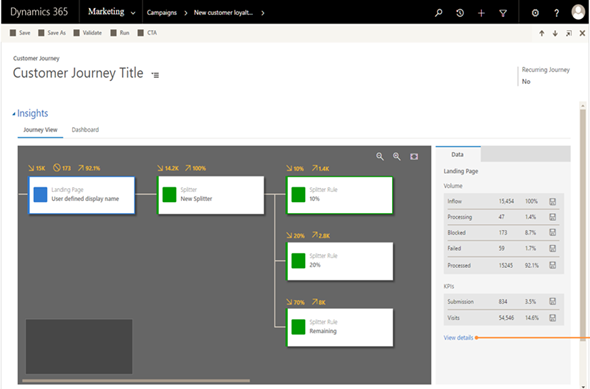
    Just because the Business Edition is targeting the lower end of the product licensing fees doesn’t mean you should dismiss the functionality that is being introduced in it. If the Sales app mainly streamlines many of the unnecessary complexities of current opportunity management in Dynamics 365 Enterprise, then the Marketing app will bring advanced logic like Customer Journey management that many existing larger customers would surely love to get their hands on. Unified Interface is the big story here that’s driving the release policy. I suspect that it’s the primary reason why the new XRM based Marketing app is only available for Business Edition customers initially, since features like integration with Customer Insights based segmentation and scoring mechanisms are not a feature anyone would build solely with the SMB segment in mind.

    It will all make sense in the end (hopefully), but in the near future both the customers as well as Microsoft will have some work ahead of them before the new promised land of Unification is reached. This is of course not all that different from what other business application platforms with a long market presence must go through every once in a while. Some may claim that Microsoft is following the Salesforce Lightning UI concept here with their Unified Interface and the similarities are surely there to be found. In fact, what I wrote about this the last time when Salesforce was following Microsoft’s lead is still pretty relevant when it comes to user experience evolution, so why not revisit that blog post for some perspective: The Irresistible Force of Great User Experience in CRM Applications.

  • All You Need to Know About Dynamics 365 v9.0 (For Now)

    All You Need to Know About Dynamics 365 v9.0 (For Now)

    The truth is out there. “There” meaning the social networks in this case. Unlike with previous beta programs (TAP’s or whatever they used to be called), the July 2017 release of Microsoft Dynamics 365 Customer Engagement (in short, “CRM”) was announced to the world in a three day event called Preview Executive Briefing that didn’t come with any NDA ties. As a result, the content from the live stream of these 37 sessions presented to us by the product team PM’s was free to be tweeted out into the world.

    That’s exactly what happened then. Community members like #CCOGNETTABOT didn’t settle for only capturing screenshots from the sessions into their own OneNotes but also shared it with the world under the #MSDyn365 hashtag. As the amount of information was approaching Big Data, I in turn tried my best to capture the most relevant pieces of the social stream and compile it into Storify. Not only did we end up getting a “best of” from the slides and live demos, also the most interesting Q&A responses from the product team were recorded here.

    Below is a link to each individual Storify collection, as well as the embedded story for a preview (ha!) of the content included there (if you’re viewing this on survivingcrm.com and not Dynamics Community).

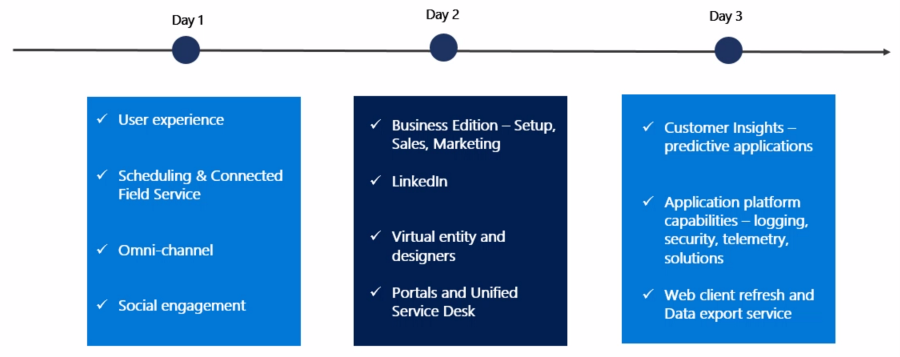
    Day 1, 2017-06-20

    Topics included Unified Interface (earlier names “Unified Client” or UCI), mobile, field service, Unified Resource Scheduling (URS), CafeX, Social Engagement (MSE).

    Storify: Microsoft Dynamics 365 July 2017 Release Preview, Part 1


    Day 2, 2017-06-21

    Business Edition for sales & marketing (i.e. differences compared to Enterprise Edition), event management, LinkedIn, portals, USD, App Modules, Virtual Entity.

    Storify: Microsoft Dynamics 365 July 2017 Release Preview, Part 2

    Day 3, 2017-06-22

    Customer Insights, Organization Insights, Relationship Insights (notice a pattern here?), business process automation (BPF, MS Flow), multi-select option sets, security and compliance, Web UI refresh (for Enterprise Edition), Application/Platform separation (“solutionizing CRM”), Power BI, Data Export Service (DES), Common Data Service (CDS).

    Storify: Microsoft Dynamics 365 July 2017 Release Preview, Part 3

    What’s Next?

    This v9.0 is a major release, not just by the version number but by the sheer amount changes happening in the platform, the client, the apps and the services connected to Dynamics 365. Most of this will NOT arrive in July, instead it’ll be rolled out via Private Preview and Preview programs towards the eventual GA. I believe it’s definitely the right thing to do, seeing the number of moving parts involved here. Also, the investments made to the platform are specifically designed to make it more modular and less of a monolith that you have to upgrade in one big bang. Oh, and v9.0 is online only, with on-prem updates coming for the applicable areas after these things are tested in the cloud.

    You can still sign up for the preview program here. In fact, if any of this Dynamics 365 stuff is of interest, you MUST sign up, or risk being left seriously behind. After three long nights of watching the non-stop live stream from the Preview Executive Briefing of v9.0, at least I feel like I’m now just starting to know what I don’t know. No single developer ninja or superhero consultant can grasp all of this, so it’s important that you also make it a team effort and spread out the responsibility of keeping yourselves educated. My advice would be for everyone to review these summaries from the three days, let people pick out the areas that seem most interesting/relevant for their current and potential projects, then agree to start poking around with the preview environments and reading the related documentation as soon as they become available. And most importantly: share with the world what you have learned!

  • Spring in The Dynamics 365 World

    Spring in The Dynamics 365 World

    The recent Business Forward event with a keynote from Satya Nadella served as the launch event for the Spring 2017 wave of Dynamics 365 product functionality. If you didn’t catch the live stream, you can see the recordings of the various presentations here. Of if you just wants some snacks from the event, why not take a look at my Storify collection of tweets shared on the event backchannel:

    Let’s explore some of the most exciting pieces of news that we know about the upcoming release.

    I’d Like To Add You To My Professional Network on LinkedIn

    LinkedIn is naturally a big focus for Microsoft, after paying some seriously big money for the network. The first commercial offering from MS on the sales side seems like more of an evolutionary step in bringing the LinkedIn Sales Navigator product closer to Dynamics 365 Customer Engagement. The familiar iFrames will still be how LinkedIn content is displayed in the context of accounts and opportunities, but now also the activities from LinkedIn will show up on the standard Social Pane of Dynamics 365 entities.

    If you think of the old “democratizing social” message we’ve heard with capabilities like Microsoft Social Engagement offered at no extra charge, LinkedIn won’t follow exactly the same pattern. The bundle of Sales Navigator + Dynamics 365 Sales App (not Plan) now called Microsoft Relationship Sales solution still comes with a price tag that will not lead into everyone having unlocked LinkedIn tools and network data at their disposal. Not a huge surprise, since why would you give away this “new oil” for free to customers who’ve just bought the car from you? Those target groups who see value in these sales acceleration tools may still find this to be a better deal than the earlier offers.

    The other new product seems to be a bigger step forward as MS enters the Human Capital Management (HCM) game with their Dynamics 365 for Talent app. Again, the foundation here is sure to have a lot of the LinkedIn recruiter functionality covered in a new coat of Dynamics paint, but at least based on the Business Forward live demo this looks like quite a thorough paint job. The sales guys will apparently still be kept largely in the familiar LinkedIn territory in terms of the user experience, but Talent seems like an “authentic” MS app following their design language.

    There probably won’t be so much beef in Talent for the XRM people, but the ERP integration with existing AX/Operations HR features surely has great potential.

    It’s The Insight That Counts

    Talking about other Dynamics products outside of the XRM platform, one new entrant into the scene that has been popping up quite frequently on the recent slides is Dynamics 365 Customer Insights. Judging by what MS showed to the industry analysts at the BF event, there will be some UI changes from the current Preview that will bring this closer to Dynamics and further away from the initial “Azure Customer Insights” version that we saw last fall.

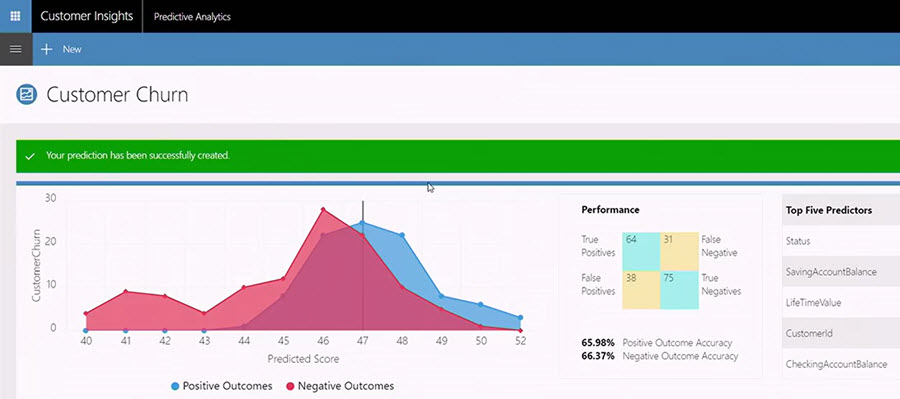
    It’s been a bit difficult to evaluate the true capabilities of the Customer Insights application up until now, since actually connecting it with Dynamics 365 data hasn’t been possible earlier. Once all the Azure Data Lake and other elements that this application depends on are fully available across different regions, perhaps we’ll soon get some hands-on experience to contrast with all the big words that have been associated with Customer Insights so far. At least all the segmentation and visualization features appear to be much more targeted towards real life CRM scenarios than some of the more generic analytics capabilities in products like Power BI.

    Speaking of which: I almost missed this announcement, but Power BI now as a connector to Customer Insights, which opens up some new scenarios. If the various analytics options didn’t have your head spinning yet, then the new Power BI Premium with on-prem server deployment options might just do the trick.

    What About XRM?

    Looks like there are shiny new applications coming for the Dynamics 365 product portfolio, some of which are leveraging the Common Data Service (CDS) as the backbone. It makes a whole lot of sense to use the latest technology for brand new apps, but that doesn’t mean the XRM platform would have been forgotten. To get a glimpse of what the Spring release will be introducing on this front, you can head over to the Dynamics 365 Roadmap site and pick an XRM based app like Sales, then see the “In Development” lane. Below are a few examples of the items currently listed:

    • Virtual Entities. “With Virtual Entities, System Customizers and Developer have the power to build complex business applications to view external data in Dynamics 365 at runtime without having to make multiple copies of the data.”
    • Portal interaction tracking. “Track your customer’s interactions with your Portal and funnel it to Dynamics 365 Customer Intelligence to plot a 360 view.”
    • Support Azure AD-B2C for Portal authentication using a single sign-on (SSO) configuration.
    • Source code for Portals. “A one time release of Portals code will be released to the Microsoft Download Center under MIT license for developers to download. This feature enables Portals to be deployed to Dynamics 365 on-premise environments, and allows developers to customize the code to suit their specific business needs.”

    Expect to see the list grow as we move closer to the planned release date. A lot of great features have already been presented in MS events, like in-context Flows in Dynamics 365, or improvements to the user experience. If you want to be the first to gain access to the upcoming features, then be sure to check out the recently announced Dynamics 365 Insider Program.

  • Everything as a Service – Not Just Your CRM

    Everything as a Service – Not Just Your CRM

    CRM_goldfishSpring is in the air, at least if the Dynamics CRM 2016 Spring Wave announcement is anything to go by. It’s pretty amazing that only 2 days after we were given the 2016 update for our CRM Online environment there’s already the next batch of updates to pay attention to. Now here I was thinking about spending some time experimenting with the new v8.0 functionality like the Interactive Service Hub or Knowledge Articles and OH, LOOK, A NEW RELEASE WAS ANNOUNCED! (Welcome to my goldfish bowl…)

    Another thing that further contributes to the growing inability to concentrate on just a single CRM version at a time is that, well, there aren’t really any proper versions anymore. Sure, there are still official announcements regarding the major (Fall) and minor (Spring) releases, but it’s not like there would be a single point in time when the product bits become available for you to download. To a certain extent they still do, for the type of software that’s shipped as bits on MSDN, but if you’ve been working with Dynamics CRM for a while you might have found yourself thinking “all the fun stuff’s in the cloud”. I certainly have, and I don’t even see anything wrong with this, because pulling off this type of continuously updated application delivery is in practice only really feasible for customers when it’s consumed purely as a service.

    By the time the CRM 2016 version became generally available, as in new CRM Online trial orgs were provisioned with v8.0, there was a slight feeling of “meh” when you discovered that most of the coolest new features touted in the Release Preview Guide were actually not yet there. No Mobile Offline, no Voice of the Customer surveys, no Relevance Search, no External Party Access… Many of the features being developed didn’t appear to have made the release train of v8.0 and were instead moved to what seemed like a Plan B, meaning rolling them out in limited Previews rather than the big fanfare of the GA. This would have been quite controversial back in the days of “one release every three years”, but these days it’s not really such a big source of concern at the end of the day, because there is no “gold master” disc to signify an RTM product anymore.

    CRM_Roadmap_Site

    Recently Microsoft released an official Roadmap site for Dynamics CRM, which may be a small step for content management but a giant leap for the release policy around the CRM product. Following on the footsteps of many other MSFT product teams, like Office 365, this further moves Dynamics CRM into the service delivery model as the traditional product versioning gets pushed behind the scenes and the application functionality is brought to the forefront. Yes, the sysadmin will still need to be aware of the specific release that his or her CRM Online instance is running on, but from a business perspective this is becoming less and less relevant. New things will arrive in a continuous stream and the decisions for how to deploy a particular application functionality and what actions are needed for ensuring user adoption is an ongoing task for the persons in charge of making their workforce more productive and building customer facing processes that meet or exceed their ever going demands.

    I guess it’s fair to say the world of CRM software reflects the bigger picture of how we the individuals are also operating when it comes to acquiring the things we desire: as a service. Instead of making big upfront investments in gaining the full possession of physical goods or property, our consumption patterns are increasingly leaning towards making a few clicks in an electronic environment and gaining access to the missing piece that will fulfill the needs we’ve identified. Our magic wands with wireless connectivity can be used to conjure up pretty much anything that you can imagine via a “buy now” button somewhere, almost at the exact moment you’ve thought of it. The end product may still be a physical package that gets delivered to your door, but the experience that the customer receives from your company is increasingly being evaluated against not how well the physical gizmo has been crafted but rather how well the various interactions around the customer lifecycle stages of information acquisition, financial transaction and ownership/service consumption are in line with the expectations that the customer had when he or she embarked on this journey. (more…)

  • CRM Hindsight Is 20/20 – My Blogging Retrospective

    CRM Hindsight Is 20/20 – My Blogging Retrospective

    It’s the end of another year, which means the blogosphere is filling up with “looking back” type of articles that examine the various topics discussed during the year. Analyzing past actions is activity that we all should probably spend time on a bit more frequently, although one day out of 365 is a good start. Following this pattern, I also ended up having a look back at some of my earlier writings during the Xmas break.

    Conan_2010_appsSo, how was 2015 for Dynamics CRM? Beats me, because that’s not where I was looking at! Via a seemingly random navigation path that started with me exploring the brand new PowerApps announced by Microsoft a few weeks ago, I actually ended up reading some of my Surviving CRM writings from the year 2010. I’ll perhaps describe the events behind this abrupt jump back in time in a post covering the future of mobile business apps and CRM, but for now that’s not on the agenda. No, instead I found plenty of interesting material covering quite a wide spectrum of CRM related topics that in many ways are as relevant today as they were five years ago.

    My journey with Microsoft Dynamics CRM started almost exactly 10 years ago, when the MS CRM 3.0 version with Finnish language support was introduced and my then forward thinking organization decided to adopt this system instead of a proven, industry specific solution tailored for the Nordic markets. I did not start blogging about my experiences right from day one, since back in 2005 that wasn’t how any normal person would behave (today it would be something I’d encourage everyone to consider). As my focus gradually moved away from generic marketing and IT topics into a more tightly defined domain of business applications and the MS ecosystem in particular, more and more material started accumulating on my blog, on Twitter, on SlideShare and so on. By 2010 it looks like I had already sunk pretty deep into these waters, which makes it interesting (at least for myself!) to see how I envisioned the world around Dynamics CRM to evolve.

    I picked out a few topics from my 2010 writings and reflected back on what I thought was going to be their impact vs. what we now know five years later. In (mostly) the order of the original blog posts, the themes ended up being the following:

    • Cloud
    • Mobile
    • Portals
    • MS Office
    • Social
    • Business app development/XRM
    • Outlook
    • SharePoint
    • ISV ecosystem
    • Solution management
    • Charts & dashboards
    • MSFT organization

    Here’s a presentation that contains excerpts from the original blog posts and some notes 5 years later on the topic:

    Luckily I’m not in the habit of making bold, precise predictions like “by year N+2 the market size of technology X will have grown by 300%”, since those are better left for the industry analysts who are paid for such statements. I’m of course completely biased in evaluating how accurately my own writings matched with the future reality, but it’s easy to find a number of observations from there we one could arrogantly say “I told you this was going to happen” and “some things never change, now do they”. What’s not so apparent from looking at past articles are the things that actually did change at a blinding speed.

    Just think about it: only five years ago the big new CRM 2011 release was being developed for an “Internet Explorer only” world and the thought of MS favoring competing OS’s in their own apps over Windows would have been simply ludicrous. Getting new CRM versions released every 6 months instead of a 3 year upgrade cycle sounded like something the customers could never cope with, but here we are with CRM Online. Mastering the whole Dynamics CRM product in 2010 was a perfectly realistic goal for consultants, whereas in 2015 you’re not going to find a person who’s fluent in CRM, MDM, MSE, Parature, FieldOne, Adxstudio and the rest of the current MS product stack in this area. All these changes and more mean that a CRM project starting today may not have much in common at all with the one you were working on in 2010.

    The future isn’t ever exactly what you would think, but that doesn’t mean you wouldn’t benefit from the effort of trying to project the possible paths forward in your mind. I personally find the best way to build up clarity into your vision on where things are going is spending some time on connecting the dots between what information you’ve just recently acquired and what analysis you’ve performed earlier. It’s all too easy to just launch a news app or log into a social feed and start taking in new announcements of what someone else thinks is noteworthy right now, but those bits & pieces are fairly unlikely to carry significance to you in the long term – unless you’re able to put them into context with the knowledge structures built from prior pieces. That’s why it doesn’t hurt to recap the history of how the technologies you’re working with have evolved over time, when thinking about what might be coming next on the road ahead.

  • My New “CRM Rocks” Podcast Episode Is Out!

    My New “CRM Rocks” Podcast Episode Is Out!

    Do you enjoy reading news and thoughts from the world of Microsoft Dynamics CRM but wish that you could consume such content also in a “hands free” mode, by having someone talk about them rather than publish their thoughts in writing? Well hey: that’s what podcasts are for! If you’re looking for episodes to download to your favorite podcast app on your smartphone, then here’s a couple of channels to subscribe to: CRM Rocks by Markus Erlandsson, started already back in 2013, and a newcomer from this year called CRM Audio, hosted by everyone’s favorite CRM Tipsters: Joel Lindstrom, George Doubinski and Shawn Tabor.

    Why did I bring this topic up then? It just so happens that I’ve done yet another guest appearance on CRM Rocks! Yes, you might remember yours truly from classic episodes like “CRM 2013 User Interface Changes” or “Who Is The Customer in Your CRM?” This time I had the pleasure of joining Markus in the studio and discussing a topic I had blogged about a while earlier, meaning The State of Microsoft Dynamics CRM in 2015.

    CRM_Rocks_State_of_Dynamics_CRM_in_2015

    The topics on our agenda for this episode included the following:

    • Release cadence & CRM 2015 Update 1
      • Office 365 integration points with Excel Online, OneNote, Office Groups
      • The arrival of the CRM web client for Outlook (3 years after its announcement)
      • Cloud first: why is on-premises lagging behind
    • The new organization structure at Microsoft
      • Dynamics moving from the old MBS unit to Cloud + Enterprise
      • Why CRM product development needs better alignment with MS Data Platform
      • The remaining divide between Office and Dynamics
    • Microsoft & Salesforce partnership
      • New MS co-opetition strategy on devices, now also in the business cloud
      • What the rumored acquisition of Salesforce would have meant
      • The two horse CRM race and competitors pushing each other to innovate (and imitate)
    • CRM 2016 Release Preview Guide highlights
      • New modern API & next generation web client
      • Improvements in document generation and content search
      • Mobility with offline, task based applications

    Yeah, so many interesting things going on in the world of Dynamics and only an hour to discuss them. So, what did Markus and me end up covering in our talk? There’s only one way to find out and that is listening to the latest episode of CRM Rocks. By the way, if you have any thoughts on who you’d like to see (well, hear) make an appearance on the show and what CRM related topic should get some air time, then be sure to leave a comment either here or ping Markus directly.

    Oh, I almost forgot to mention: I also took part in a recent CRM MVP Panel on MSDynamicsWorld.com with Chris Cognetta, Donna Edwards, Alex Fagundes and Gretchen Opferkew. We talked about some of the same topics as in the podcast, with a focus around the upcoming Dynamics CRM 2016 release and how to prepare for it, so in case you missed the live event, be sure to check out the recording available on YouTube.

  • What Convergence 2014 Europe Tells Us About 2015

    What happens at Convergence rarely stays there. So was the case with Convergence 2014 Europe held this week in (supposedly) sunny Barcelona. There was a flood of #CONV14 tweets shared by the friendly attendees of this conference, which give us quite an accurate picture of what Microsoft’s got in store for the beginning of the year 2015 when it comes to Dynamics CRM and the related products.

    CRM 2015

    Given that the new major version, Dynamics CRM 2015, is scheduled to become available in December, Convergence was naturally the place where this release was to be shown live in action to customers and partners. The actual contents of the release isn’t such a big secret anymore, given that the Release Preview Guide became available already quite some time ago. Although new features like Global Search and Hierarchy Visualization provide some nice looking screens for the demos, there’s also plenty of enhancements buried inside the platform that will make the system customizer’s life easier, like calculated fields and rollup fields.

    Product_hierarchy_2_small

    For anyone wanting to learn in more detail about the upcoming release, Microsoft has made available an unprecedented amount of content on CRM 2015. Check out all the links on this blog post about CRM 2015 prerelease content to keep yourself occupied with Get Ready pages, ebooks and videos for the next week or so.

    Mobility

    What wasn’t previously covered in the Preview Guide was how MS plans to take the mobile client capabilities forward with this latest release. At Convergence 2014 Europe we saw a couple of interesting features being demoed on this front. The first was a Windows Phone exclusive, as Microsoft announced the coming integration between Dynamics CRM and Cortana. While this voice guided WP8 digital assistant is currently only available in limited markets and languages, the CRM integration is a fine example of the type of extensibility and the potential that these new types of user interfaces have on our personal mobile devices.

    CRM_MOWA

    Another far more immediately useful feature that was shown in a demo (and a Youtube video) was the ability to finally track emails from a mobile device into records in CRM. As we know, up until today the only way to select emails to be tracked has been to run a PC with the Outlook client, since CRM activity synchronization options do not cover the use case of promoting new items from you mailbox into CRM. As seen from the image above, the MOWA app (as in Mobile OWA, OWA as in Outlook Web Access) shown at Convergence now promises to deliver a way to do this via your smartphone screen, alongside showing the details about the regarding record such as an opportunity. While you obviously can’t inject a “track” button into the native iPhone email app and the likes, this sure seems like an option worth exploring (at least for Office 365 users) once more details about it become available.

    Marketing and Social

    Gone are the days when there was only the Dynamics CRM product in the Dynamics CRM portfolio. As we saw in the US Convergence event this spring, the product roadmap these days consists of four different lanes, with Dynamics Marketing, Social Listening and Parature (the customer service component yet to be re-branded) having their own releases lined up alongside CRM itself.

    On the Dynamics Marketing side there has been some catching up to do for the features that didn’t originate from the marketing resource management product (Marketing Pilot) that Microsoft acquired a couple of years ago. While the Mira release this spring was the first version to give us a package with the core marketing automation features for email and web content, the next release (Electra) is starting to look a lot fancier, with advanced features from competing solutions being replicated there (graphical email editors, A/B testing, inbox previews) as well as new areas like the Sales Collaboration Panel (included in CRM Professional license now) and integrated Social Listening data making the MDM product an interesting offering for many existing Dynamics CRM customers.

    Microsoft_Social_Engagement_2_small

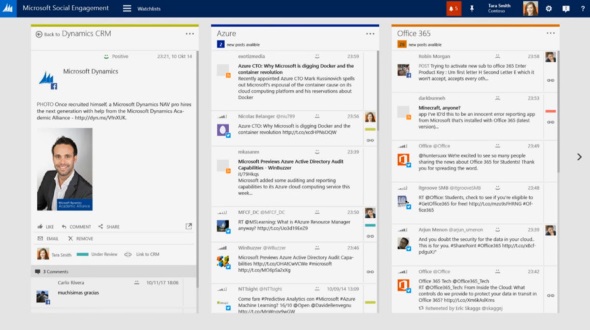
    Speaking of the social side, one highly interesting concept that Microsoft demonstrated during the sessions at Convergence was a social tool targeted not only for listening to the data streams from a central tower but also for bringing out this information to a wider range of CRM users. Labelled as “Microsoft Social Engagement” in the demos, this application offered both a dashboard with KPI charts as well as a stream based view for presumably any CRM user who’s interested in following certain topics on the social networks. Whether this is Microsoft’s version of Hootsuite or something completely different remains to be seen, but simply having the social feeds integrated into the CRM UI and then providing a “track in CRM” button for engaging with the people who are having the discussion on these networks seems to make some of the “social looking glass” visions from 3 years ago finally a reality. Definitely something to keep an eye on for 2015. (more…)

  • Update Rollups, Service Packs, Major Releases: Understanding Dynamics CRM Versioning

    When it comes to commercial software, there’s often times a difference between what the engineering department calls their product versions and how the marketing department decides to label the product for the end customers. For example, after Windows 3.1 the commercial name of the product changed to “Windows XP” while the underlying version number progressed to 4.00. After various changes in both product and naming strategy of the OS, we’re now using a product called “Windows 8.1” when its actual technical version number is 6.3…

    Just like with Windows, Dynamics CRM also has version numbers that are different from the names you’ll see in marketing materials and end user documentation. These numbers are relevant to anyone who needs to either maintain and administer a Dynamics CRM environment or customize and develop solutions for the product, since you need to be aware of the changes introduced by various updates to Dynamics CRM.

    Before CRM 2013 there wasn’t a convenient way through which you could have determined the installed updates by just looking at the version number, since each Update Rollup just had a seemingly random four digit build number assigned to it. Luckily the latest releases have made the version numbers much more user friendly, by starting to follow the standard “major.minor.update.build” pattern. There’s still a few CRM specific things you need to be aware of, especially with the very latest releases, which is why I thought now’s a good time to draw some attention to the topic.

    CRM_version_numberStarting with CRM 2013, the version numbering scheme follows a pattern like this (notice the bold numbers):

    • Major Release
      • Name: Microsoft Dynamics CRM 2013
      • Version number: 6.0.0.xxxx
    • Service Pack:
      • Name: Microsoft Dynamics CRM 2013 Service Pack 1
      • Version number: 6.1.0.xxxx
    • Update Rollup:
      • Name: Microsoft Dynamics CRM 2013 Update Rollup 1
      • Version number: 6.0.1.xxxx

    The build numbers are of course not “xxxx” in reality but I left them out since they’re not something you should actively need to remember. Just bookmark this page and reference it whenever you need to know the detailed number of a particular release: Microsoft Dynamics CRM 2013 and 2011 Update Rollups and Service Packs: Release Dates, Build Numbers, and Collateral.

    I’ll go through these levels in a reversed order, since I think that makes up for a more exciting story line here. Also, I think it’s more likely to resemble the real life process via which you’ll encounter each of these versions of Microsoft Dynamics CRM after your initial deployment. You’ll certainly need to be aware of the different versions even prior to setting up your very first demo/test/development environment, but keeping up with the Dynamics CRM releases is a job that never ends!

    Update Rollups

    These are collections of hotfixes to existing product functionality. When you open a support ticket with Microsoft for an issue you’ve encountered with the software, sometimes you might receive an individual hotfix package from them that fixes your specific issue (and nothing else). Normally you wouldn’t need to install each and every hotfix separately, however, as most of these fixes will eventually be released in an Update Rollup package. You’ll see a list of “issues that are resolved” in the Microsoft Knowledge Base article of each Update Rollup, which is normally your best indication of whether the software bug you’ve encountered has been squashed.

    <rant>Since the official name of these releases is “Update Rollup”, the official acronym for them would logically be “UR”. However, some people seem to happily forget about the first word and instead call them “RU”, presumably as a shorthand from “RollUp”. Fine, call them whatever you want, even give each of the releases your very own pet names if you wish, but you’ll never, ever see me use anything but “UR” on my blog.</rant>

    At the time of writing, the latest released version for CRM 2013 is Update Rollup 3, version number 6.0.3.0106. It was released on July 15th and contains over 200 hotfixes as listed on the KB article. Normally there would be a UR3 package released for all the server and client components, but this time there’s no Outlook version available, since apparently none of the hotfixes required the client bits to be updated. Update Rollups are usually cumulative, so CRM 2013 UR3 also contains the fixes from UR1 and UR2.

    If you don’t manually download and install the UR’s, they will also be distributed via Windows Update later on once Microsoft makes them available via this channel. Since you should always test the effects of each UR prior to production deployment, it’s usually never a good idea to just let things run on autopilot. For example, letting your Outlook clients get the UR’s via the Windows Update schedule without keeping your server components up to date will soon land you in unsupported territory.

    Service Packs

    During it’s first 11 years of existence, there weren’t any official Service Packs released for Dynamics CRM, unlike many other Microsoft products. This changed a couple of months ago when CRM 2013 Service Pack 1 was released on May 28th. Even though MS is mostly referring to it by the name Spring ’14 release in their marketing messages, based on the naming policy of CRM Online, the SP1 version is essentially Spring ’14 for on-premises customers and the Outlook client components (even for CRM Online customers).

    While the CRM 2013 SP1 KB article looks like any UR article we’ve come to know, with a list of resolved issues, this isn’t just a collection of hotfixes. Service Packs are the delivery mechanism for new product features as well as changes to existing functionality of the product. An example of this would be the case creation and routing features introduced in SP1. For a more complete list of SP1 contents, refer to the “What’s New” page on CRM Customer Center. Note that in order to access some of the new features, you’ll not only need to install the SP1 bits onto the server but also go to the CRM organization’s settings menu and apply “Install Product Updates” from there.

    Service Packs are cumulative in the sense that they contain the previously released Update Rollup hotfixes. So, while CRM 2013 UR1 and UR2 were released prior to SP1, you don’t need to install them separately when setting up a new Dynamics CRM 2013 environment. Just grab the Service Pack and you’re all patched up to that point.

    Update Rollups for Service Packs

    Now this is where it really gets interesting. Remember that latest CRM 2013 Update Rollup 3 I linked to a few paragraphs earlier? Based on our discussion so far, would you assume it to contain all the fixes, updates and new features released for CRM 2013 so far? I see quite a number of nodding heads out there and I’m not at all surprised if your initial assumption would be “of course”. The correct answer, however, is “no”. Due to the counter-intuitive nature of this situation for any Dynamics CRM veterans, an explanation is surely in order here. (more…)