Tag: releases

  • Something to look forward to in 2023 Release Wave 1

    Something to look forward to in 2023 Release Wave 1

    Last time when the 2022 Release Wave 2 was announced, I wrote about why you should not pay too much attention to these bi-annual release plans. Instead I was encouraging everyone to start using the Release Planner website that listing all the planned and recently launched features as a roadmap site with no artificial boundaries between “waves”.

    Now when the 2023 Release Wave 1 materials were launched today, Microsoft defaulted to pointing people to this Release Planner site (here’s the Power Platform 2023 RW1 link). Of course the challenge with that approach is that all the hot new stuff is just behind one small “release wave” filter in the list:
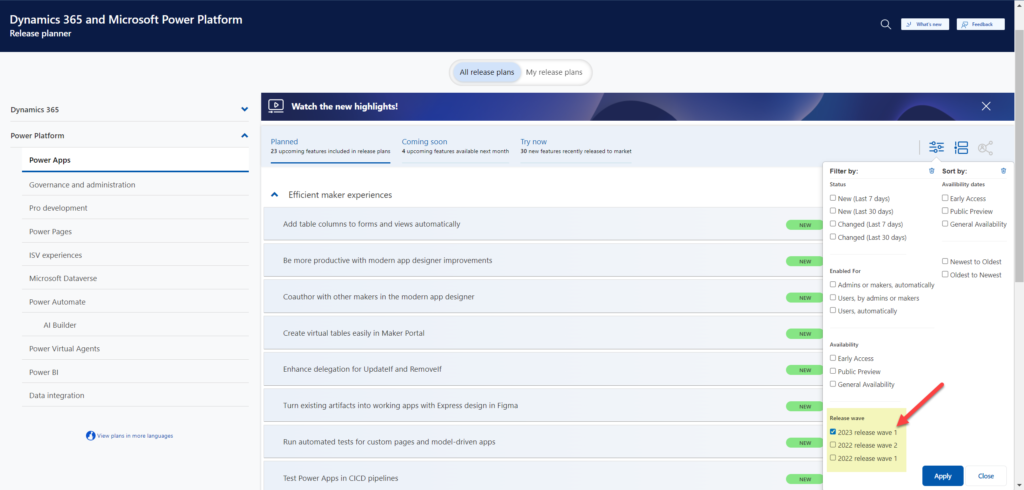
    There are still some usability challenges with the Release Planner site that have kept me browsing through the Microsoft Docs Learn when looking for release item information. So, here’s the “switch to classic” bookmark that will take you to the MS Learn edition of the same release wave information: https://learn.microsoft.com/en-us/power-platform/release-plan/2023wave1/

    There was now a nice higlights video made on the Power Platform 2023 Release Wave 1 launched on the very same day as the release plans were published. The challenge with this kind of material is that you can’t really show realistic demos about features that might be launched half a year from now, so keep that in mind when watching the video.

    As always, there’s a lot to digest in the plan and you might therefore be interested in reading the hand picked top items by some trusted folks in the Power Platform community. As a purely subjective opinion, here are the top 5 items in 2023 RW1 that I was initially most excited about when reading through the plan.

    Fluent UI everywhere

    We’ve seen the concepts and components from Microsoft’s Fluent Design System introduced here and there when it comes to Power Apps and Dynamics 365 app UIs. The Power Platform Creator Kit has brought Fluent UI controls available to canvas apps built by advanced makers. Demos of the future model-driven app UI have included features like dark mode that are familiar from the more modern product UIs on the Microsoft 365 side. Now with 2023 RW1 there should finally be a wider roll-out of these modern controls for the MS low-code application platform, too.

    You may remember that small tweaks to the model-driven UI have been taking place in pretty much every release wave. This update should be a lot more impactful than the previous ones – which is why it will be rolled out behind an opt-in switch initially. You can expect some things to break in the process, so it may take a while before MS will dare to push it out to all users by default.
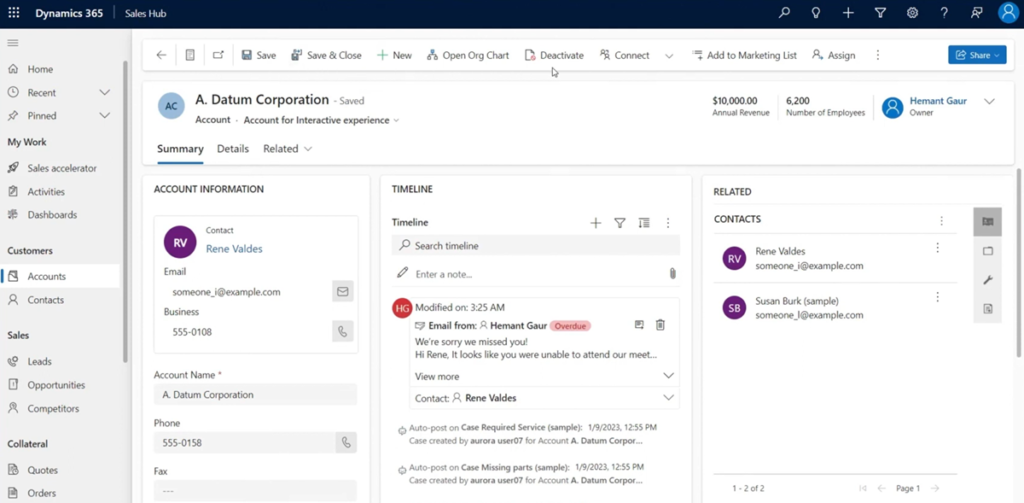
    Canvas apps, on the other hand, have been living in a split reality for a long time already. Dataverse for Teams based Power Apps have used the Fluent UI controls since forever, causing friction for app development across Teams vs. full Power Platform environments. Hopefully this coming update will now bridge the gap and get us closer to the dream of “Run One UI”.

    Responsive canvas pages design experience

    The one place where model-driven apps have felt clearly superior to canvas apps in their UI capabilities has been the responsiveness of the screen layout. Their many constraints on adjusting how the menus and forms can (or rather can’t) be configured have in turn made it amazingly simple to adjust to different screen sizes. The platform handles it out of the box, the maker doesn’t have to worry about it much at all.

    Building responsive canvas apps has been technically possible, yet something that feels quite tedious. I’ve mostly had to deal with responsiveness in apps built in Dataverse for Teams, where worrying about which fields, columns and buttons fit onto the screen when surrounded by the Teams UI chrome has been one of the unavoidable everyday frustrations.
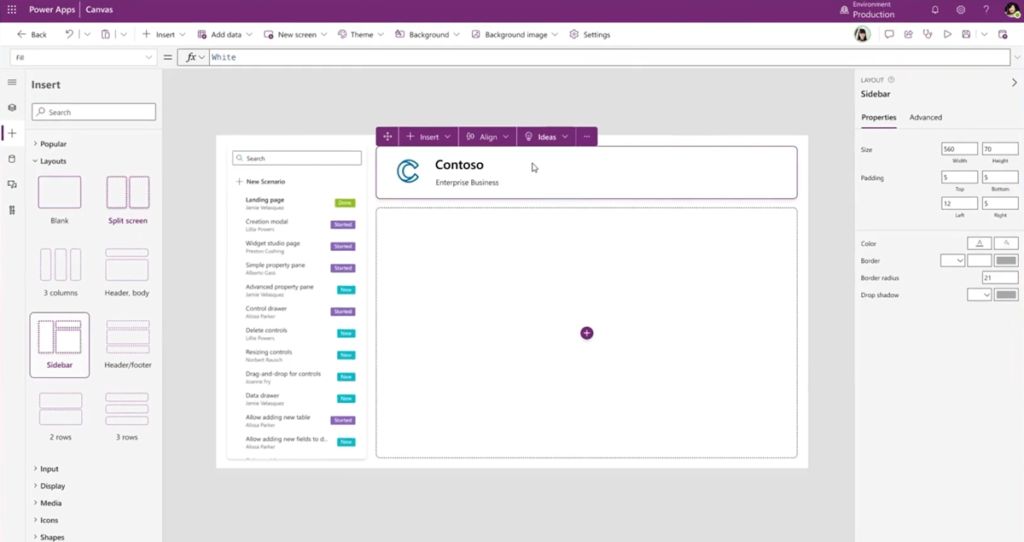
    2023 RW1 release plan gives us a glimmer of hope by showing a screenshot of the coming responsive layouts and spacer tools in the canvas studio. The ability to resize controls and spacing directly in the authoring canvas could greatly reduce the effort needed in achieving sufficient levels of app UI responsiveness. Not on the same level as model-driven for sure, yet it could offer a decent compromise between precise control positioning and responsive reflow of controls on the page.

    Control system administrator role assignment

    No matter how granular the security model in Dataverse is, this granularity has vanished when you go up to the admin roles. Every Global Admin or Power Platform Admin will automatically be granted the sysadmin role for every Power Platform environment in the tenant. While it makes sense that people with powerful roles get wide access, it is often not desirable that such user accounts would by default see all data, be it via UI or API. After all, usually the admin roles need the power to change settings and work on the metadata – not the actual business data managed in Dataverse.
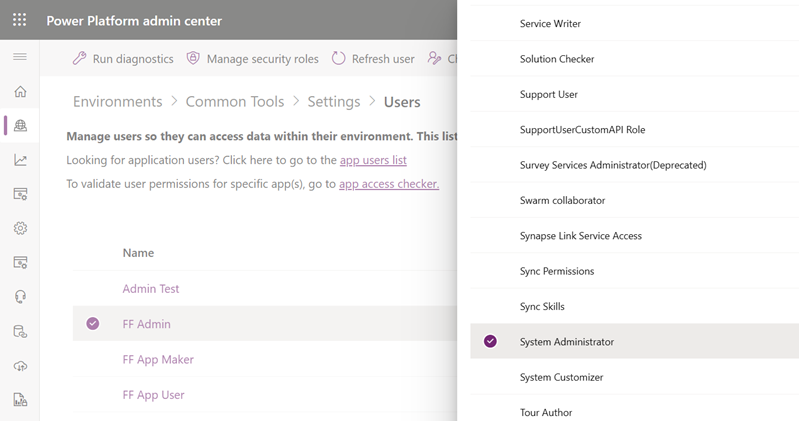
    Now MS is promising that customers will be able to manually assign the System Administrator role to appropriate users in the environment. This is a very welcome feature to have control over the auto assignment, even though we don’t yet know now exactly what process will be built around this. Also keep in mind that certain governance features like this might get bundled into the Managed Environments capability, which would limit its available to premium licensed users only. Let’s see how it goes.

    Personal environments with Dataverse

    It has already been possible for users to sign up for the Power Apps developer plan – as long as they are aware such a thing exists and find the right path to acquire it. Now MS is going to promote these type of environments to Power Platform makers much more prominently within the product. They will be called “personal environments” and the idea is to lower the barrier for all makers to experience premium capabilities like Dataverse.
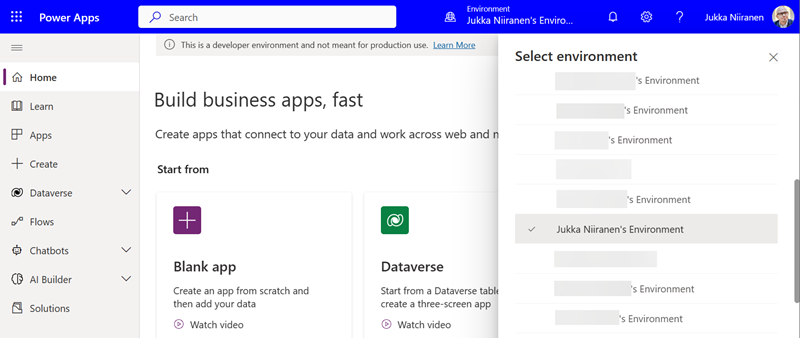
    Unlike trials, personal environments won’t expire. Unlike sandboxes, the makers won’t need help from the Power Platform admins of the tenant to get a personal environment provisioned. There will be new governance capabilities introduced that give admins the possibility to disable this feature if required, yet hopefully most organizations wouldn’t need to introduce such a limit. Personal environments don’t consume tenant level capacity, so as long as there’s a solid governance plan in place to apply DLP policies, the risks should be fairly low with these personal environments.

    Check out this Power CAT Live video for more details about the developer plan and its enhancements (YouTube embedding disabled by Microsoft): https://youtu.be/yXRSnN2AWTs

    Paginated reports editing on the web

    Back in 2006 when I got introduced to the technology that later became Power Platform, the one area that struck to me as incredibly difficult was report creation. SQL Server Reporting Services had just replaced Crystal Reports with a native Microsoft technology in the stack. While there was plenty of advanced features available for summarizing data, the number of hoops you had to jump through to get any of the business data from the relational database onto a PDF output made sure that only the bare minimum number of reports were ever created.

    The age of Power BI unlocked this precious data from the enterprise reporting tools and allowed basically anyone to slice & dice it to their heart’s content. Yet the paginated report design tools didn’t seem to evolve quite as rapidly. Neither was there much (well, any) progress made on the Word mail merge side for making it easier to produce documents with dynamic data. Recently many Makers have gone ahead with Power Automate and used HTML as the intermediate format on the road toa PDF output. None of these methods have really been very citizen friendly.

    Is this about to change now? In 2023 RW 1 Microsoft is going to allow you to create and share paginated reports on the web, through a WYSIWYG design experience. “Create invoices, financial statements, and other operational reports with low code, drag-and-drop experiences on the web. You can share these in a variety of formats or just print them out!” That sure sounds like something most customers would prefer over the existing options for using dynamic data in documents. Let’s see how far this first iteration of the new editor in Power BI will get us once it arrives in the summer.

    What’s missing from the plan?

    To better understand the direction of Microsoft products, you should not just get excited about the features MS actively advertises. You should also search for things that are not mentioned. This will help in seeing behind the product marketing hype and making smarter decisions on your own investments of time and other resources.

    Microsoft Teams doesn’t get much love in the Power Platform release plan. On the Power BI side there is the new teams meetings integration and enhancements to multi-tasking in the Power BI app for Teams. Power Automate touches on Teams in the sequential approvals feature. And that’s pretty much it. No word whatsoever on whether MS plans to keep investing in Dataverse for Teams, for example, which seems to have been largely abandoned after the initial launch 2 years ago.

    If we ignore AI Builder, there aren’t too many mentions of products delivering shiny new features with the help of AI. Given how much talk there has been about Microsoft investing billions of dollars more into OpenAI and bringing ChatGPT features into their existing products, this could surprise the reader. Now, it’s important to understand that these release plans for the release waves are hardly ever the place where big splashy announcements like that are made. They are more about the incremental improvement of existing products.

    Remember: new things will appear into the release wave between now and September 2023 (end of the wave). Similarly, we can expect a certain percentage of items in the release plan get delayed, postponed to a future release wave or cancelled entirely. Remember to keep an eye on those changes on a regular basis, instead of just studying the Power Platform roadmap twice a year.

    Of the things that were added to the plan during the 2022 release wave 2, Cards for Power Apps does not exist at all in the new release plan. Does that mean it’s “done and ready”? No, it’s just sitting in the release plan from the previous round with no GA date and still a lot of things to be improved before being ready for real life use.

    Looking at much higher profile initiatives on the same area, Microsoft Loop still doesn’t seem to be a thing either. ContextIQ is mentioned on the Dynamics 365 Business Central release plan, though. It’s kinda amazing that BC will now be the first Dynamics 365 product to actually deliver on the “no additional license required when working in Teams” promise from 1.5 years ago.

    Header photo by Fabian Møller on Unsplash
  • A few notes on the Timeline: model-driven Power Apps form tweaks

    A few notes on the Timeline: model-driven Power Apps form tweaks

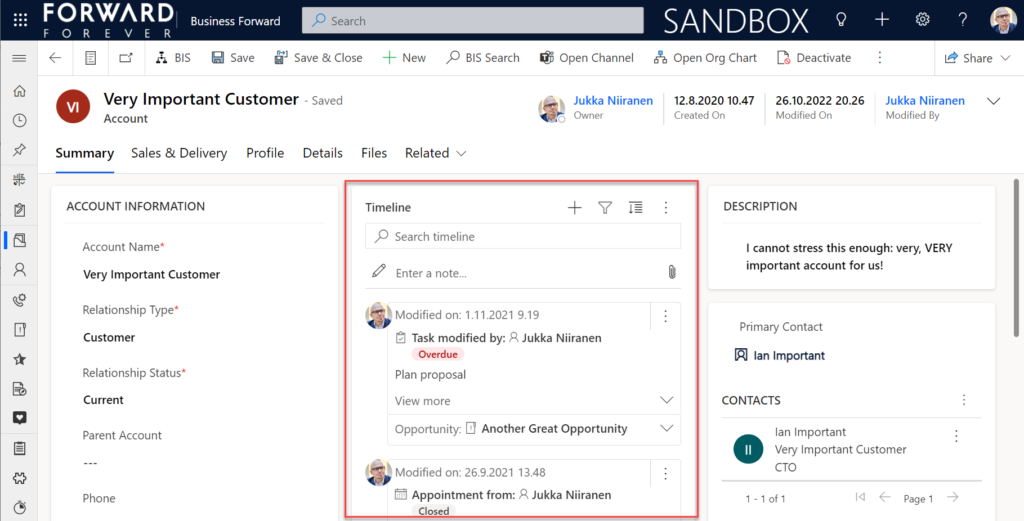
    In the default form components arrangement for tables in model-driven Power Apps or Dynamics 365 CE apps, the Timeline is usually front and center. This makes perfecet sense. Scenarios that revolve around accounts and contacts typically include the need to show activities and notes related to these records.

    Compared to how things used to be just a few years ago, meaning mostly hard coded, we now have an amazing amount of configuration options for the Timeline control. This is reflected in the MS Learn article “set up the Timeline control” which has an estimated reading time of 32 minutes! And that’s just the “how” part of official documentation, not the “why” that you’ll learn as the settings are applied in real world business application context.

    This blog post is my attempt to highlight the recent, most useful features that the modern Timeline form component enables for improving the user experience of your model-driven apps.

    Rolling up the notes

    The one huge feature that 2022 Release Wave 2 has delivered for model-driven Power Apps has been buried deep into the release plan. It seems almost like an intentional “let’s hope no one notices this” move since the feature is listed under Dynamics 365 Customer Service and called “Improve agent productivity with timeline enhancements”:

    Notes that work like other activities and roll up on contact, account, and opportunity form timelines.

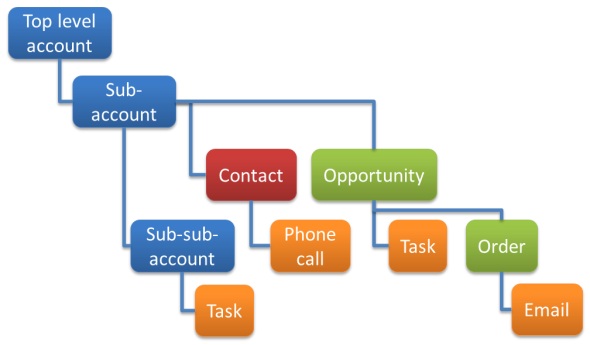
    Woohoo! We’ve been waiting for this feature close to 2 decades already! If you haven’t experienced the Dynamics CRM era, then the significance of the rollup capability in the platform may not be immediately obvious. I won’t go deep into it now, instead I’ll dig up an illustration that I created 11 years ago for a blog post I wrote about the native activities associated views vs. form subgrids:

    Unlike other standard or custom tables in Dataverse, activities have one superpower: they can be shown not just from the directly related child records but also rolled up from deeper in the hierarchy across many different record types (tables, entities, you pick the terminology). This means that in the account Timeline you’re able to see tasks, phone calls, emails, appointments that are set regarding a child record, like an opportunity where that account is the potential customer.

    While the same form component has been used to display both activities and notes (and activity feed posts, in case someone’s still using them), the rollup functionality has been exclusive to activity data. This has lead to a classic CRM functional gap where a note record added onto a lead will not be carried over once the lead is qualified and becomes an account/contact/opportunity. Notes have been “sticky” in the sense that you slap them on a specific record and that’s where they’ll forever stay.

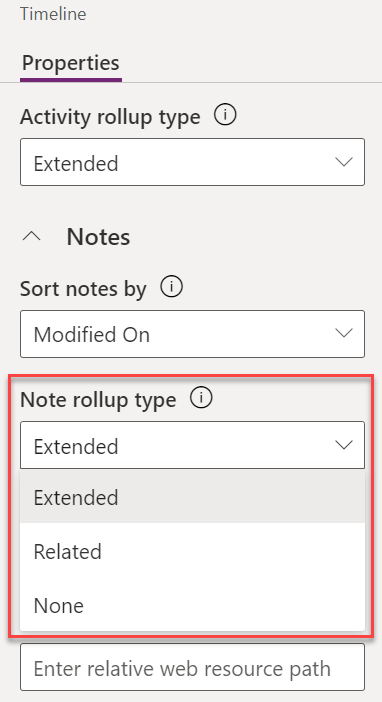
    Well not anymore! While the official docs on Learn are still pending to be updated to describe the feature in more detail, the “Notes rollup type” setting already appears on the Timeline component properties:

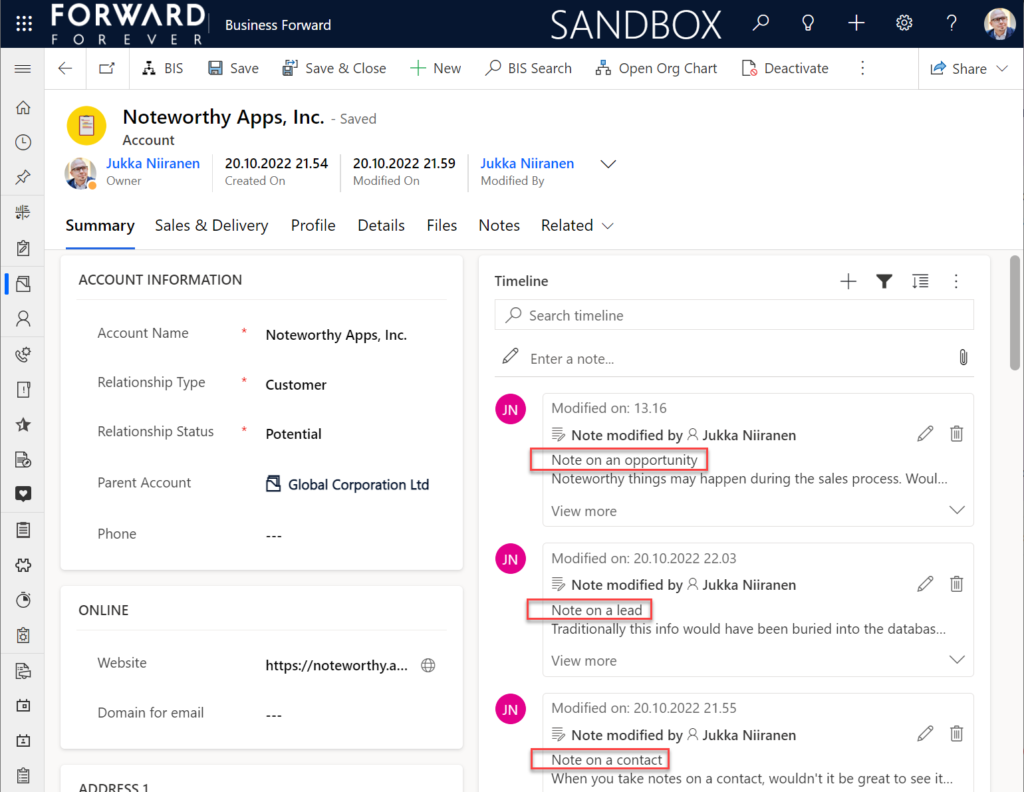
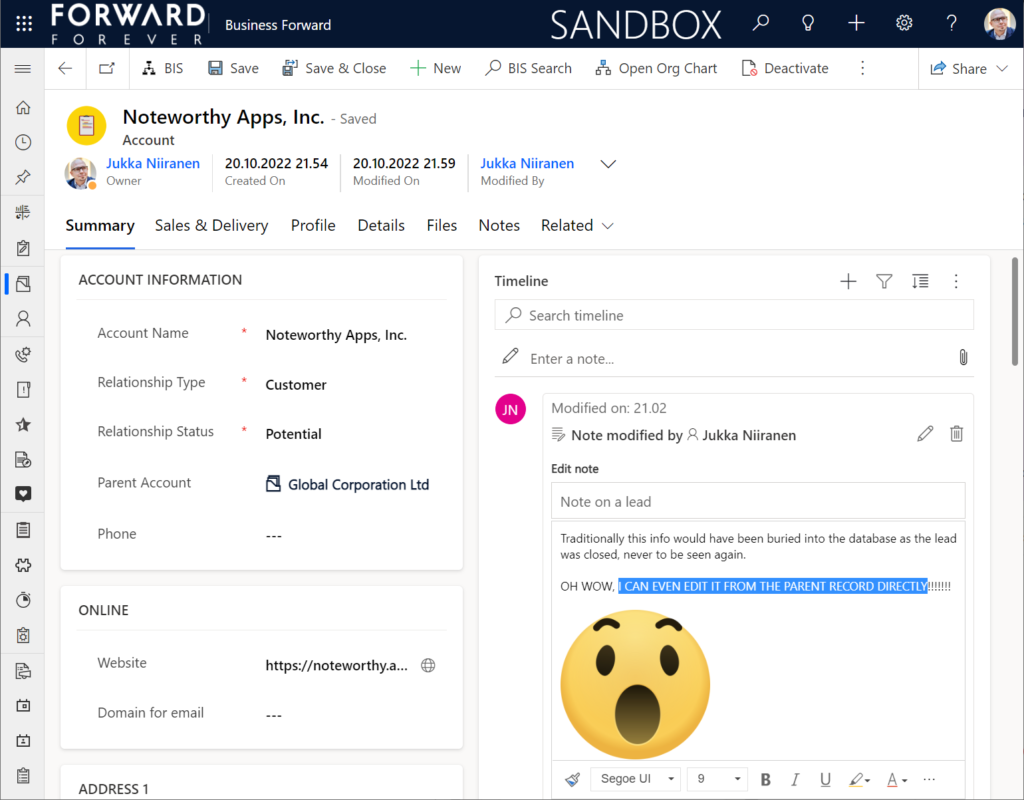
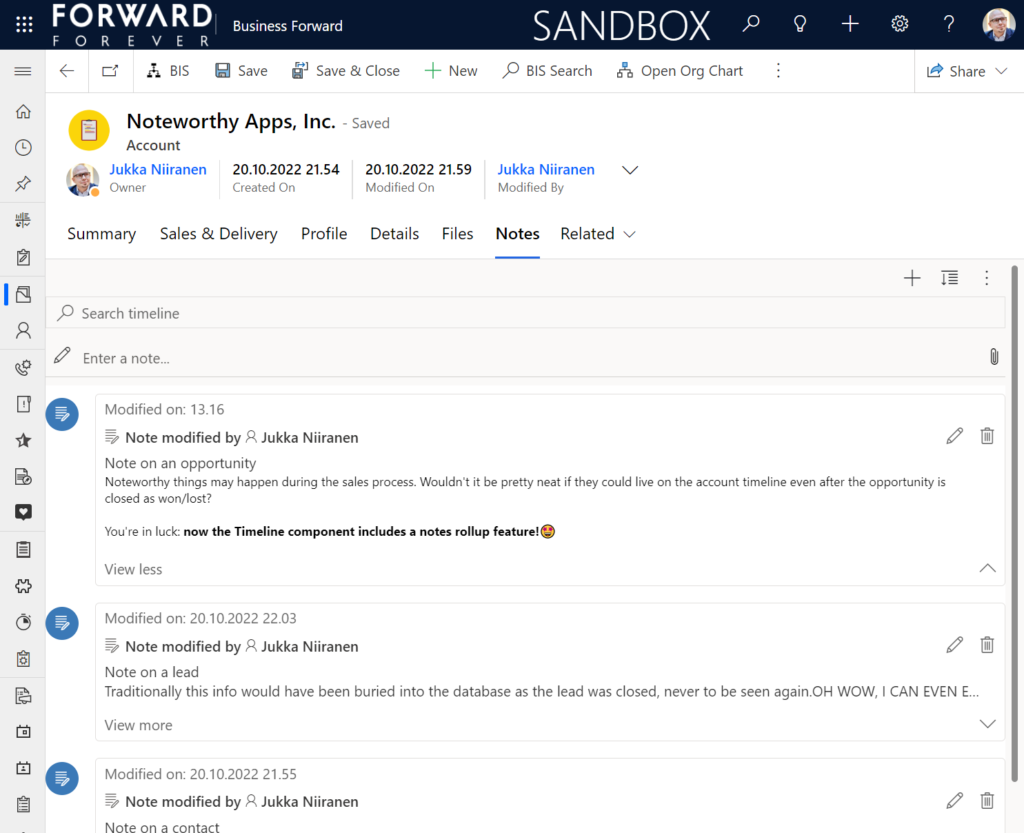
    Setting this to “Extended” for the Timeline control on the account means that we’ll now see notes that have been added to the originating lead, any of the account’s contacts or opportunities. Here’s an example where there are zero notes on the account itself, yet we can see 3 notes on the Timeline:

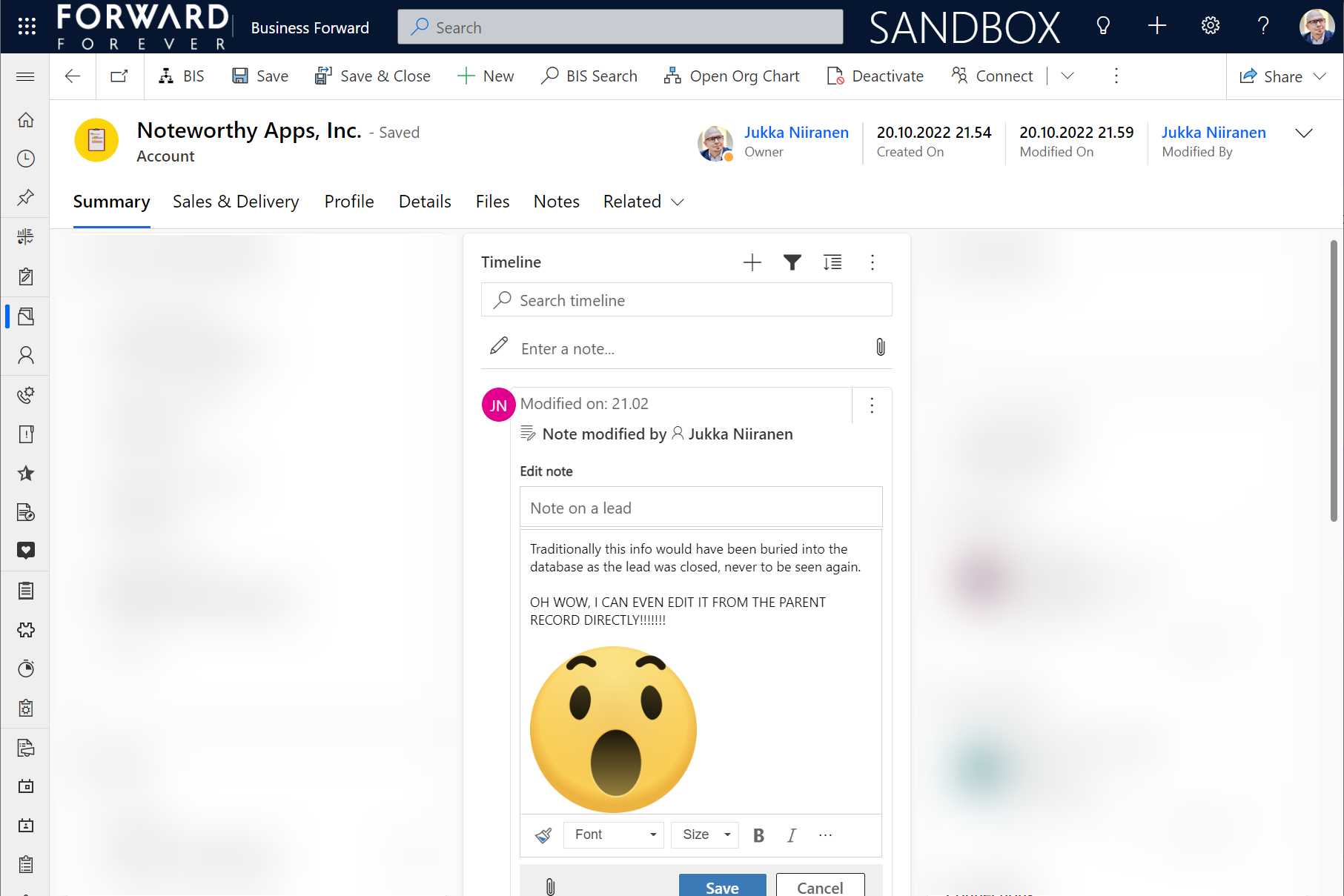
    All the notes from these child records appear just as like they were the traditional notes on the account record itself. In fact, you can simply click the pen icon to start editing a note on the account form Timeline, even if it has originally been added via a different record:

    This can be a bit confusing for the user, since there’s no visual indication on the Timeline card on which exactly is the original hosting record of that note. Which probably is due to the Dataverse data model that doesn’t treat the notes (annotation) table as something where the users could freely set the Regarding record information. With such a non-standard implementation it might be tricky even for the team developing the Timeline to surface this information in the UI.

    You need to keep in mind that this notes rollup isn’t applicable to custom tables, nor across all system tables either. Just like the activity rollup, this is feature of showing relational data from beyond a single relationship “hop” is not a generic platform capability in Dataverse. It works in these basic CRM style scenarios using predefined record types. And when it does, it can be hugely beneficial to end users.

    Alternative Timelines

    There are more goodies in 2022 Release Wave 2 under the release item “Try enhancements to timeline maker experience”. One of them is the support for having multiple Timelines on a single form. This means you could add a dedicated “Notes” tab on the account form and configure it to include only notes data, not activities or posts. The benefit from this would be to tailor the display settings in the main Timeline differently than in the Timeline dedicated for notes only.

    In the example above I’ve ticked the box “expand first component to full tab” in the tab settings. This removes all the whitespace and labels around the Timeline, giving it maximum space. Yeah, it’s not the prettiest tab in the world when applying this technique to the Timeline. Yet from a purely functional perspective it’s an option worth trying out.

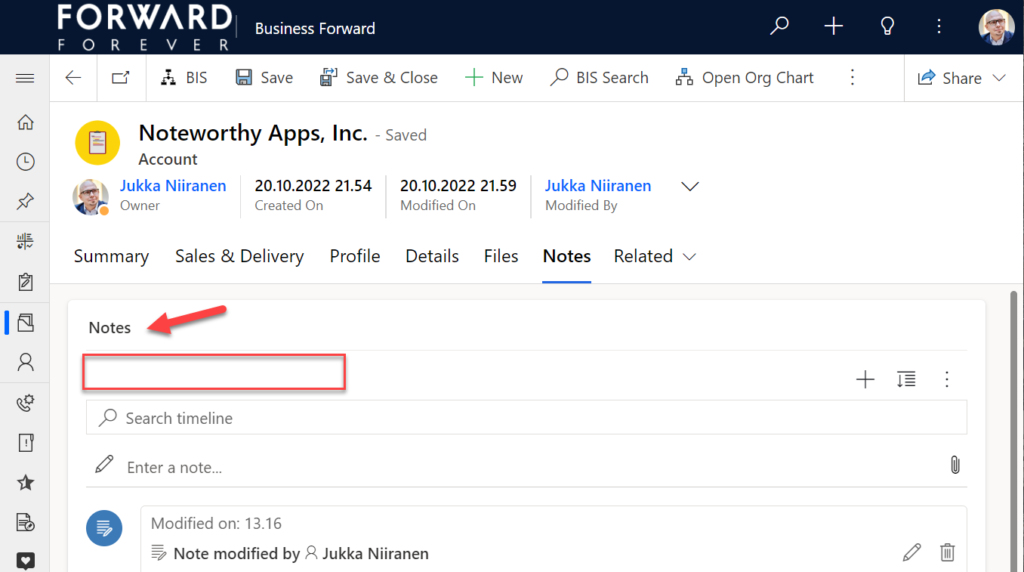
    One common question from customers who want to customize their CRM system’s terminology has been “can we rename the Timeline to something else”? The answer is still: no. However, now that you can have multiple Timelines on a form, the workaround you can apply is this: 1) under Timeline – Properties – Advanced – Additional Settings, check the box “Hide Timeline label”, 2) set your form column label to show the string you want.

    Now the custom text will appear and the place where it used to read “Timeline” is blank:

    Native controls like search or options menu will still use the timeline terminology, though. It’s always worth asking a few times whether it’s absolutely necessary to try and change such native features of a SaaS product like Dynamics 365. (The argument “because we had it like that in our previous system” is always the wrong answer.)

    Timeline forms and actions

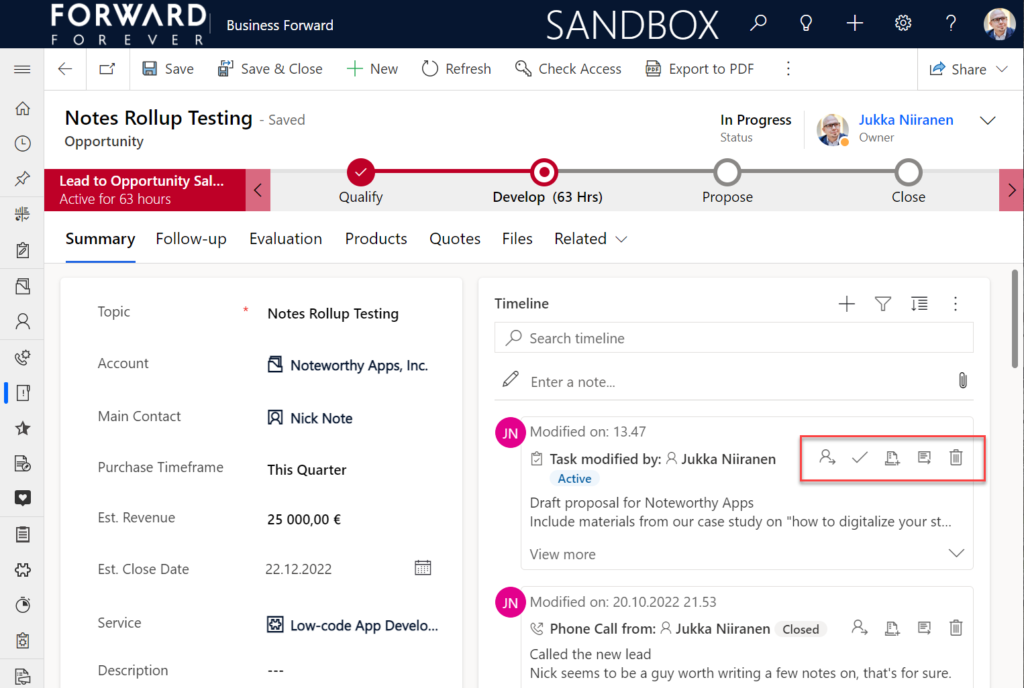
    An area of the Timeline that has really exploded in terms of configuration options is the forms used for interacting with records shown on or created from the Timeline. Let’s look at one example of how the default functionality for tasks could be optimized on the opportunity form Timeline. Without any customizations, it looks like this:

    Looking at the standard Timeline, there’s a bunch of command buttons available for every activity. Problem 1 is: it’s not easy to spot which icon opens the task’s detail form (at least I’ve never learned to immediately pick the right one). Problem 2: when we open the task, it takes us to a whole different web page, thus we lose the context of the original business record (opportunity).

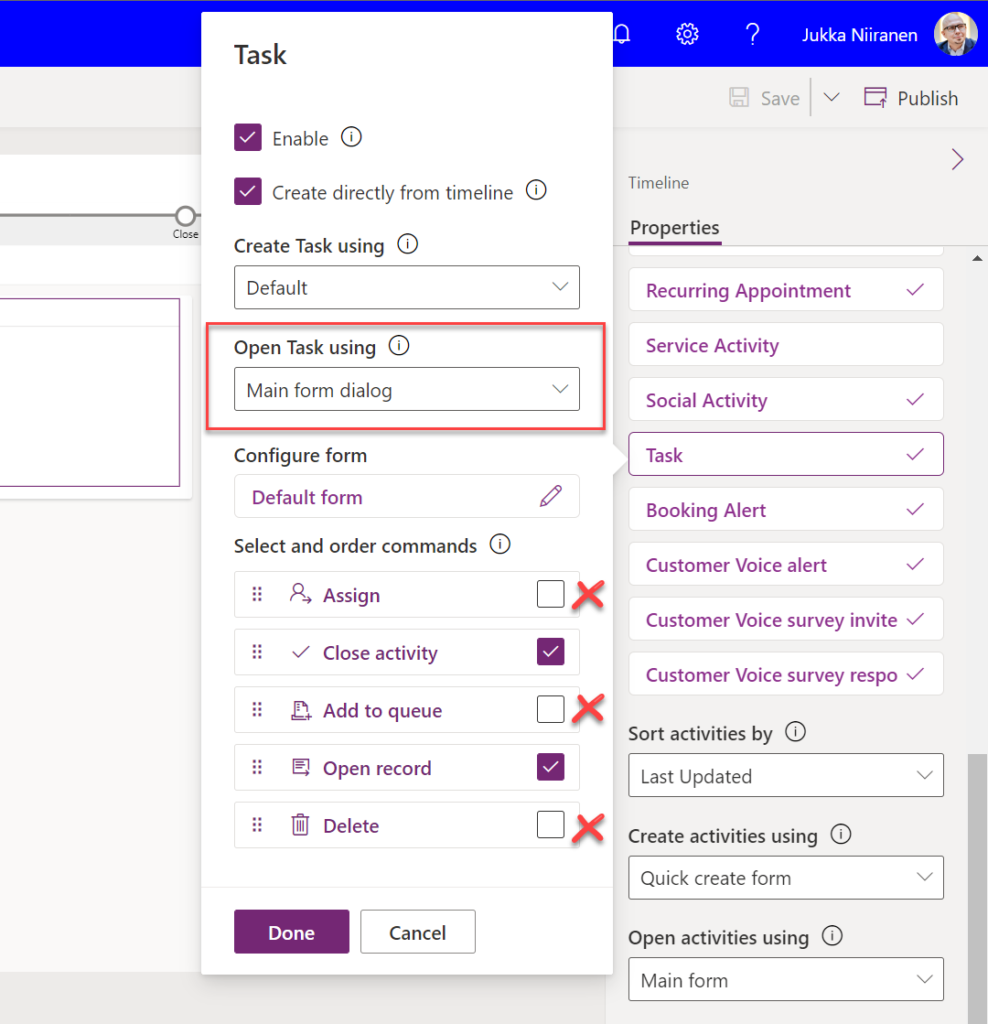
    The Timeline allows us to fix both these problems by changing the settings just a bit. By going to Record settings – Activities and clicking on Task, we get a flyout pane with options specific to that activity type in this specific Timeline instance. Problem 1 can be fixed by disabling rarely needed actions like “Assign”, “Add to queue” (who uses queues anyway?) and “Delete” (deletion of data in CRM does not need to be easy!).

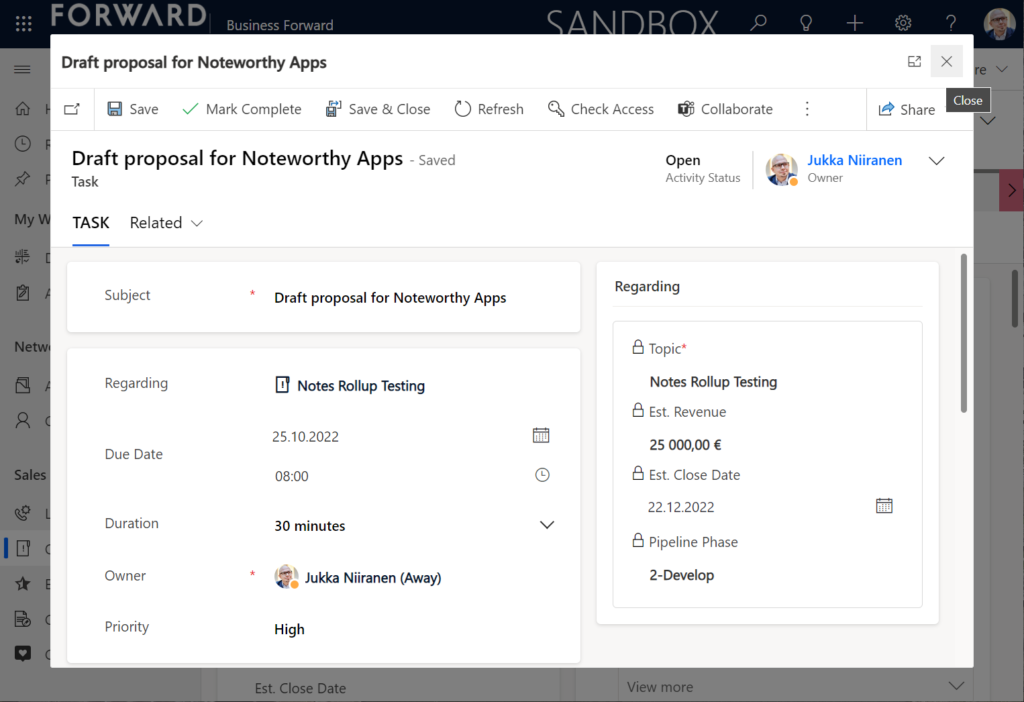
    Problem 2 is resolved by changing the “Open Task using” setting to “Main form dialog”. What does that do exactly? It gives you a modal window on top of the current record, which is a much less jarring experience than bouncing between full forms. Closing it from the X icon will allow you to keep working on the opportunity without forcing any page refresh.

    Want to learn about the Power Apps main form dialog? Read my earlier blog post on how to leverage MFDs for making it easier to work with relational data.

    Timeline configuration sprawl

    The one caveat of all this configurability that we’ve received via the modern Timeline control is that we now have a huge number of different settings we must remember to change. Performing any of the above mentioned changes is relatively easy as an isolated task, but we need to do it for all the tables and their forms where the Timeline control is used. There is no global system setting or “apply to all” option to help us. With any larger business application you’ll quickly need your own Excel sheet just to keep track of all the N settings and N forms that you must manually harmonize.

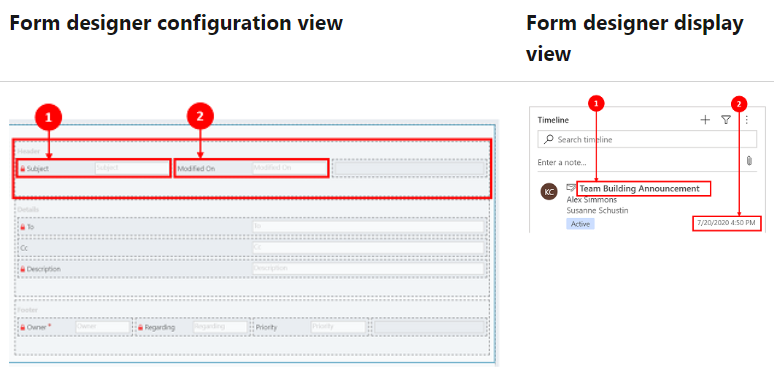
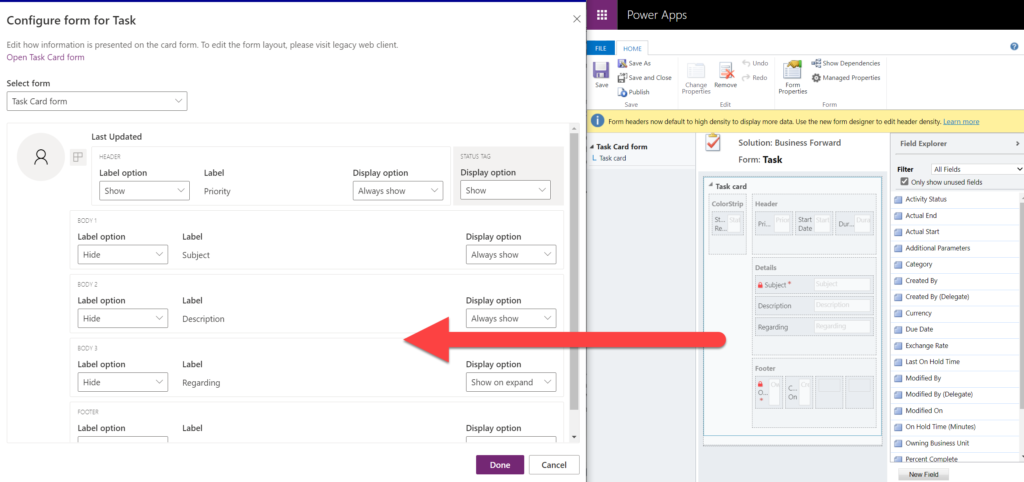
    Where things can potentially get really laborious is modifications to the card forms used for displaying activity and note data on the Timeline. If the standard date fields aren’t what we want to show, for example (created on vs. modified on vs. due date etc.), there’s a way to change most of them. However, as you can quickly see after browsing through the documentation, the card form editor from the CRM 2011 era and the modern Timeline control have nothing in common when it comes to rendering the visible UI:

    If you want to include some custom columns from your activity tables into the Timeline cards, the good news is that it’s supported. The bad news is, you’ll likely need to keep the documentation on one screen as a reference, the form editor one the second screen, and the card form legacy editor on the third one. Good luck doing these tweaks from only your laptop screen while working away from the office!

    These configuration tasks start to quickly add up. Let’s say we need to change one date field on the task card and configure its display options and label options. Perhaps our application has 20 tables where the Timeline is used for showing this activity type. Maybe we’ve also created role based forms and targeted them via different model-driven app modules, like “Sales” and “Admin”. That single requirement could mean updating the settings on maybe 30 different forms. With all the loading, saving and navigating in the Maker portal – it could easily take more than an hour to complete.

    Now, let’s say that in a Dynamics 365 project you’ve been assigned the responsibility to take care of all the details for activity and notes management features on every Timeline in the system. Sorting, filtering, control display options, supported activity types, form types per activity, actions per activity… Planning, configuring and validating all these changes will quickly consume many days, even in an SMB level CRM system. And because it’s so easy to miss a few clicks in performing this repetitive work over & over again, you’ll also need to reserve time for fixing the things that were missed.

    Achieving a consistent user experience requires plenty of work – this simple truth has not changed from the early days of Dynamics CRM projects. As Microsoft invests money in modernizing their client controls and introducing more no-code configuration options, the customers must also do their part in ensuring the changes and new possibilities in the evergreen cloud platform are taken into use in a controlled manner. Striking a balance between what can be customized and what should be customized – this remains the eternal question.

  • Forget static plans, use the Release Planner for Power Platform roadmap info

    Forget static plans, use the Release Planner for Power Platform roadmap info

    It’s that time of the year again when Microsoft have published their plans for the upcoming 2022 Release Wave 2 for Power Platform and Dynamics 365. “How exciting! New PDF documents with hundreds of pages to read!”

    I’m sure many of you have learned to skip the static PDF files by now and instead add bookmarks to quickly get to the online version of these plans. Like these:

    That’s much better, but it isn’t really optimal either. I don’t know about you, but personally I’ve had a hard time getting very excited about the new Release Plan drops for a couple of years now. There’s just something not quite right with this “wave” model.

    Everything changes, always

    Don’t get me wrong. It’s great that the Power Platform community members are curating their own top lists from these Release Plans twice a year. There’s plenty of value in seeing what items people are actually excited about, not just reading MS corporate style “excitement” on everything included in the Plan.

    Yet the reality is this: the contents of these Releases Plans is likely to reflect less than 50% of what will actually be delivered into the products over the course of the wave. If you need proof, then check out the most important page of the online Release Plans: change history.

    At any given time, Microsoft product teams are working on several new features and enhancements that they are not yet ready to disclose. They’ll get added to release plan later (or sometimes launched without it). As a very recent example, Managed Environments was announced as a preview feature on the same day as the 2022 wave 2 plans came out. The feature is not yet in either wave 1 or wave 2 documentation. It’s very natural that the product marketing’s need for making feature specific big announcements is a higher priority. After all, diligently maintaining the long list of similar release items won’t bring that much attention to any single feature.

    Then there’s the inevitable reality of planning / estimating in software development. Things can get delayed due to too optimistic estimates, dependencies to other items/products, changes in MS product strategy, acquisitions, and so on. Ultimately the Release Plans are just a publicly visible backlog of what the team is working to deliver. It’s better not to get too excited about any specific feature on the list – often those will be the ones that get eventually postponed / removed…

    While it’s kinda nice that we have a steady rhythm of 2 release waves per year that can be easily communicated to customers, the reality is more messy. These waves are forcing an artificial structure onto the ongoing product development work. Remember: the “wave” is not any actual release in itself. October 2022 will deliver a tiny fraction of the items listed in the 2022 wave 2 plan, as the wave lasts for 6 months.

    While the waves themselves are sequential, Microsoft’s communication model has overlap for the waves. The fact that the wave 2 plans are first announced when there’s still 3 months worth of wave 1 to go (until end of September) can make it complex to keep track of items. You can’t tell whether a feature is in the product roadmap just by looking at the latest plan since it might be in the previous pipeline still. Here’s one example:

    If only we had a more dynamic view into the Power Platform and Dynamics 365 product backlog, without these artificial “waves” to confuse us…

    Say hello to the Release Planner website!

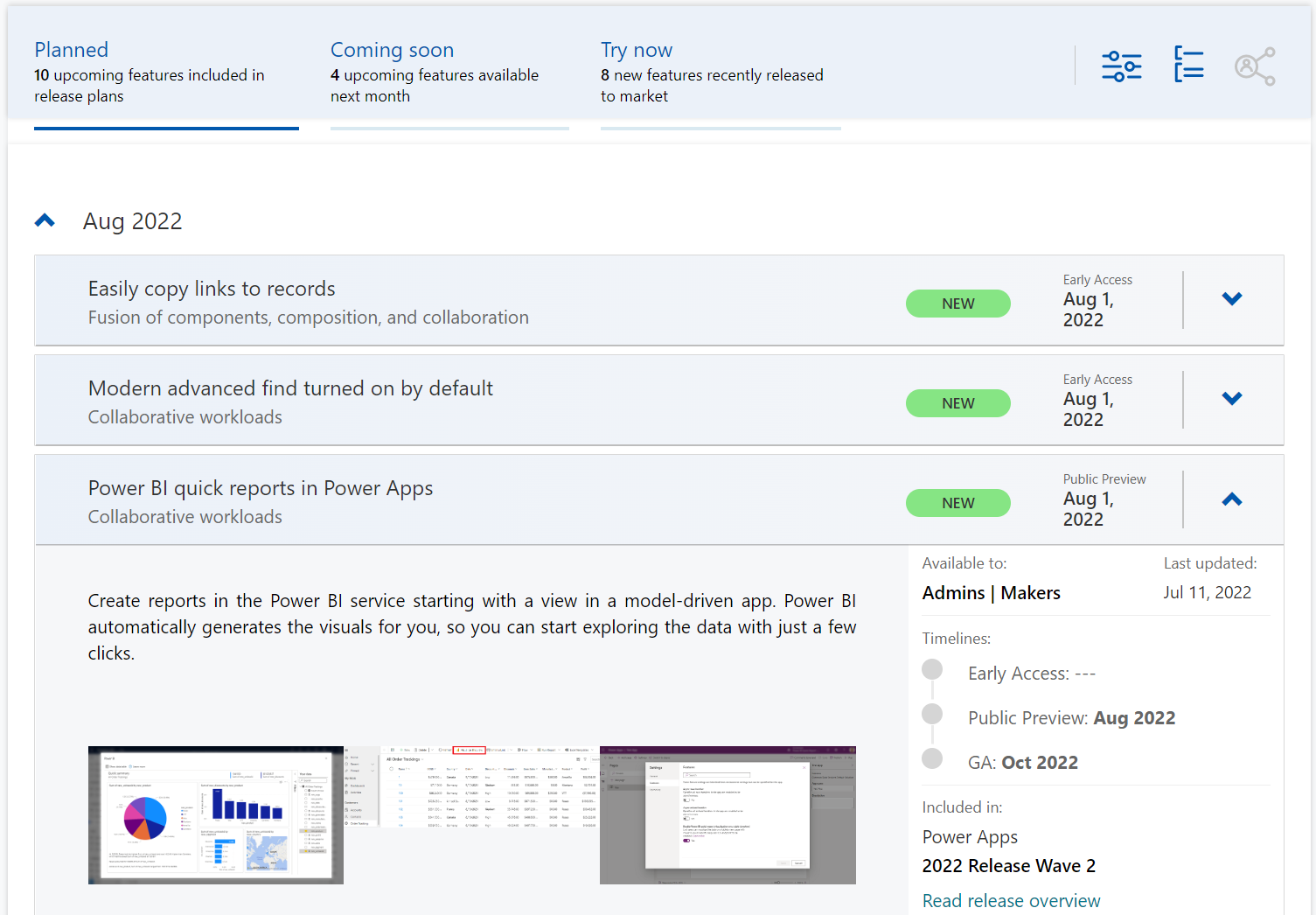
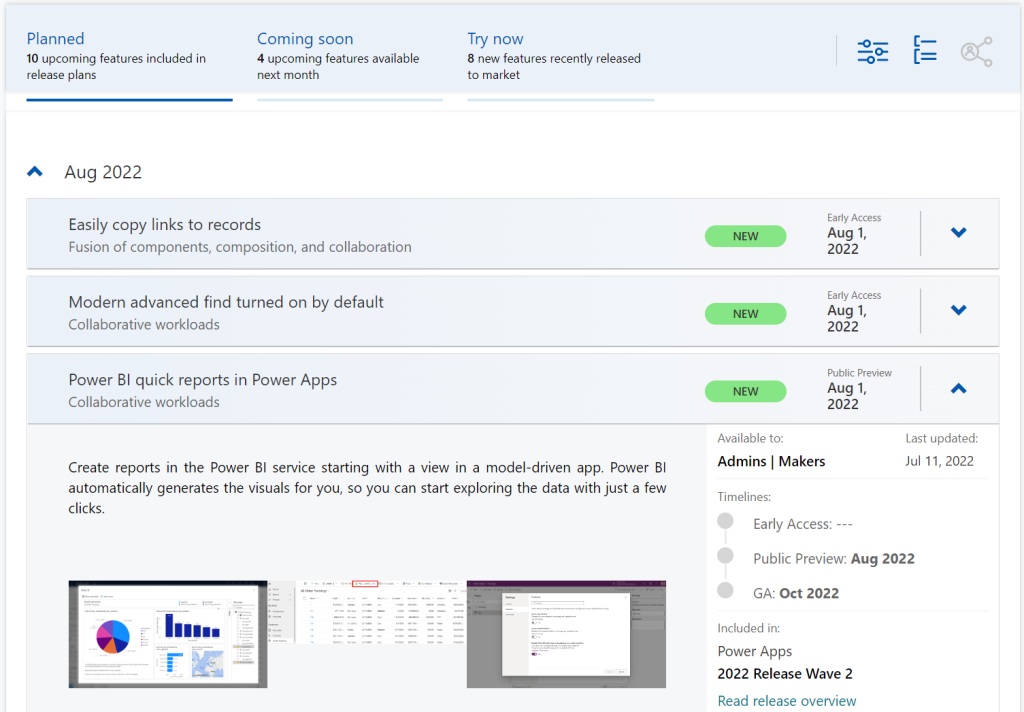
    Although it’s still a preview in itself, the Dynamics 365 and Microsoft Power Platform release planner is already a very worthy rival to the familiar Release Plans. If you’re familiar with the Microsoft 365 roadmap, then this a similar website that provides the current state of what features are being planned, rolling out or recently delivered.

    The data on release items is largely identical to what the official release plans already offer. However, it’s not wrapped within the wave concept, meaning everything can be found under a single site.

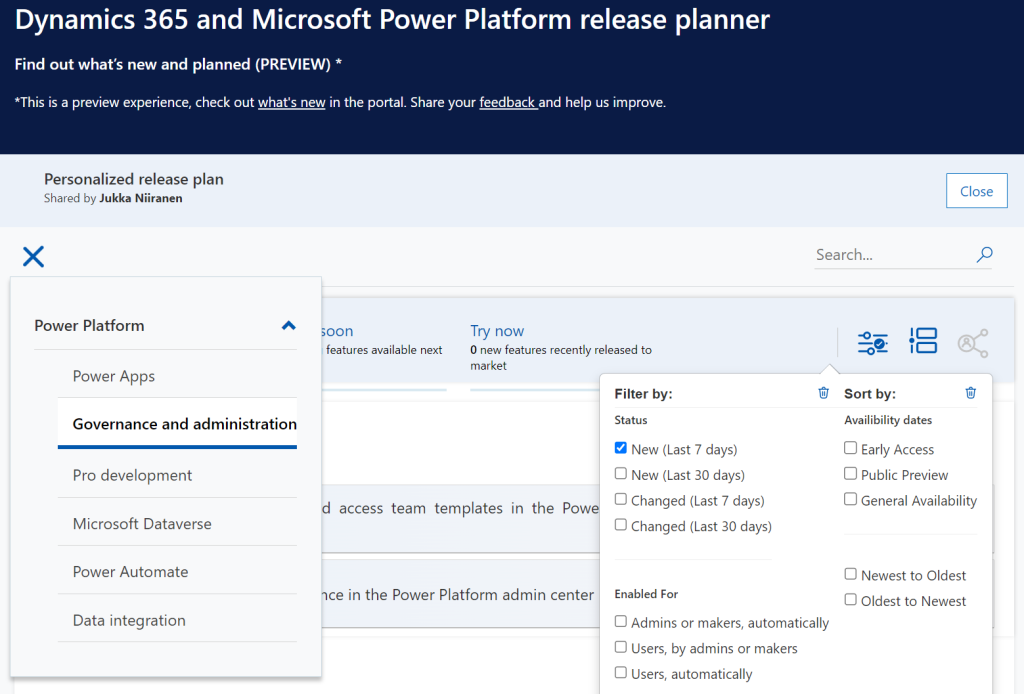
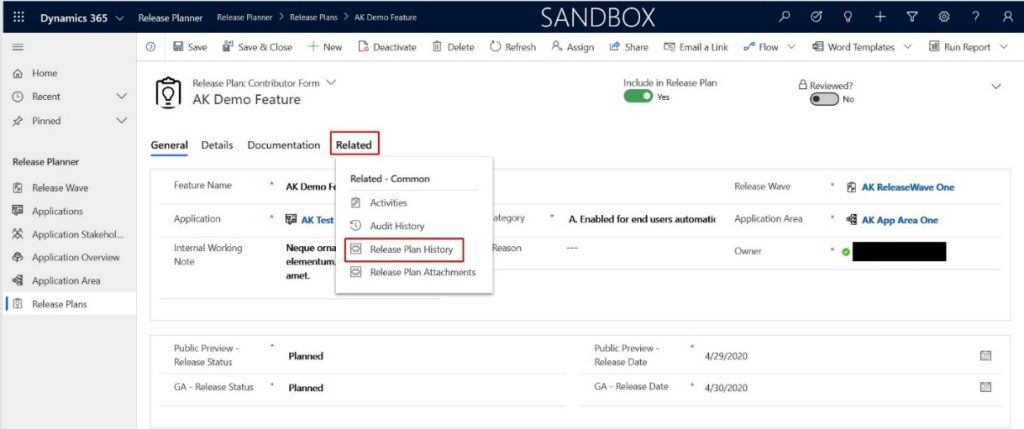
    There have been recent enhancements made to the Release Planner (listed here). Searching the release plan items with keywords is now possible. There’s a change history to reflect updates made to delivery milestones (i.e. delays in early access / preview / GA dates). Finally, filters and sorting options have been introduced, so you can view only the latest additions (7/30 days) or updated items across Dynamics 365 and Power Platform.

    Since the Release Planner is a Power Apps Portal Power Pages website instead of a Microsoft Docs site, it is much easier to implement such features that are intended for working with a list of records. Docs is great for documentation of course, as well as version control through its GitHub back end.

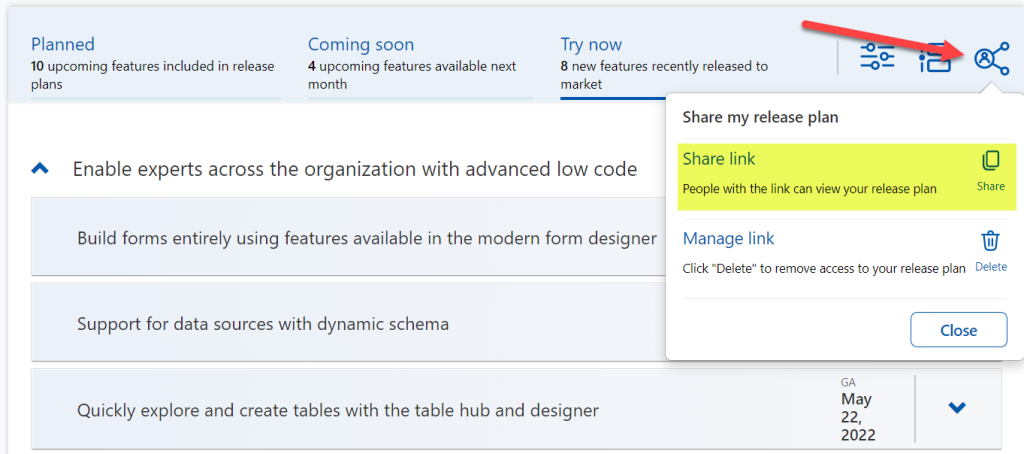
    One really neat feature in Release Planner is the personalization option. When I log into the site, I have the ability to pick items into “my release plan”. Essentially its a way to create a list of favorite items to follow. Because let’s face it: we all focus on some corner of Power Platform or Dynamics 365, not the entire MS BizApps cloud. Creating a personal release plan also provides an option to copy a public share link for it:

    Using a short URL service, I can now create an easy to remember link that will always take me to the list of Power Platform release plan items I’ve flagged for myself to follow. You can of course have a look at it, too:

    https://ff.tips/releaseplan

    With this link, I can now spend less energy on A) remembering if an item has been in wave 1 or 2, and B) stop hunting through the change history page for status updates. Oh, and it also works fairly well on a mobile device, whereas trying to navigate the legacy release plans on MS Docs seems to be impossible (at the moment at least, on Android/Chrome).

    Of course any dynamic website is only as good as the underlying data that is used for rendering it. At the time of viewing, there seem to be tens of release plan items from 2022 wave 1 that have not yet been updated to reflect the current status. The Release Planner site says they should be available/GA when in reality they’ve been delayed, postponed or even cancelled. This is something that technology in itself won’t fix. I hope as Microsoft’s release planning process matures beyond thinking about “waves” we’ll see more up to date information in the Release Planner site, too.

    Did you know?

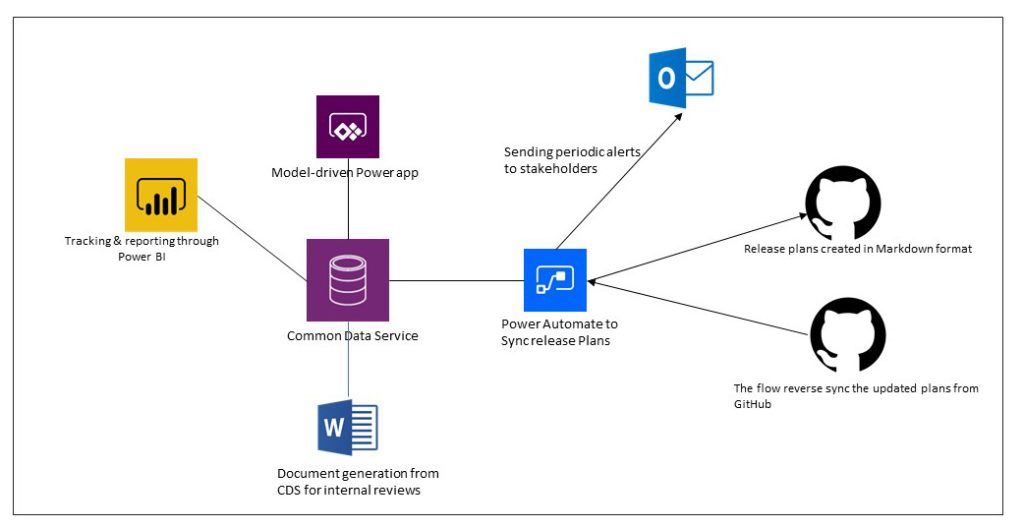
    This Release Planner isn’t the first step for Microsoft to use the Power Platform to manage the product development of the very same platform. Already back in 2019 the process and tools used by the BizApps team for release planning was published in a blog post. There’s a sample app on GitHub that contains a solution with the tables, forms, plugins, PCF controls, cloud flows etc. for deploying your own copy of the release management tools.

    This process was designed to dynamically produce outputs from the release items data managed in Dataverse. Both the release plan document as a Word output as well as the Docs pages as markdown files on GitHub were generated with Power Automate cloud flows:

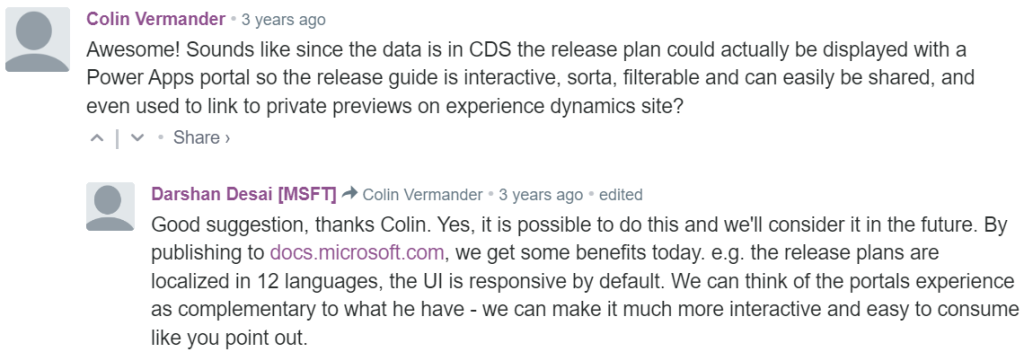
    Since the solution was built on top of a solid platform designed for managing business process data, there were of course other opportunities to leverage it. As was pointed out in the comments section of the 2019 blog post, by a certain ex-MVP (now at MSFT) with a long history on Portals in the form of Adxstudio:

    Which brings me back to an even more ancient blog post of mine, from 2015, called XRM Strikes Back. Inspired by Microsoft’s acquisition of Adxstudio, I argued why in the long term it would be a more successful strategy for MS to bet on the platform, rather than trying to integrate SaaS products from outside the ecosystem into the Business Applications portfolio.

    Success doesn’t happen overnight either way. Looking at the XRM based acquisitions, Adxstudio is now the 5th product in the Power Platform family, with the new name Power Pages. FieldOne Sky turned into Dynamics 365 Field Service that has quite a solid position in the market (from what I know). Mojo Surveys evolved into Dynamics 365 Customer Voice, which may not have an extensive roadmap right now, yet it’s still widely used by the customers we are working with at least.

    Back in 2011 when Dynamics CRM Online itself was used for managing the Dynamics CRM Online launch website, backed by (Windows) Azure, so might have considered that a crazy thing to do with a business application platform like XRM. Well, who’s laughing now?!?😁

    The journey up to this point has been long, but that’s exactly what such low-code application platform journeys are for customers, too. Microsoft is now in the process of also migrating their third party Ideas sites for product feedback into the Dynamics 365 Customer Service Community portal template (meaning Power Pages). The Power Automate Ideas site is moving there next week. Dynamics 365 Ideas already lives on this platform, so I’d imagine other products will soon follow. Another piece of the digital feedback loop coming together, through the power of the platform.

  • First impressions on Power Platform 2020 Release Wave 2

    First impressions on Power Platform 2020 Release Wave 2

    At the start of this year, we made the decision to go all-in on Microsoft Power Platform and founded a company that focuses on helping organizations on their journey to take ownership of this low-code business application platform. You could therefore say that it’s pretty darn important for us that there is compelling roadmap for the products that represent the technical foundation of our services.

    Luckily Microsoft doesn’t show any signs of slowing down the investments into Power Apps, Power Automate, Power BI, Power Virtual Agents and all the underlying elements of the platform. Our MVP team at Forward Forever already did a “Top 3 x 3” highlights article on what each of us found to be the most exciting feature announcements in the 2020 Release Wave 2 release plans that Microsoft published yesterday. I wanted to expand a bit on that top list and reflect on how I see Power Platform evolving based on this new roadmap information.

    But first: what happened to Wave 1?

    Ah, true. We’re actually only halfway through the April-September period that 2020 Release Wave 1 represents. This means that many of the features I highlighted in my earlier first impressions posts have not yet shipped. Just because there’s a virtual launch event every six months doesn’t mean that it would be the exact time when a big box full of new software is made available. There are no version numbers in the cloud, it’s a continuous release train that runs on its endless route.

    It’s important to keep in mind that these are release plans, not release notes. The thing with plans is that they tend to change, and such is also the fate of some items in 2020 Wave 1 that I picked as the higlights in my post back in January. If we look at the change history page in the release plan, for Power Apps alone we see that 15 items had their release schedule changed and 7 were removed from Wave 1. And remember we’re only a bit over 50% through the April-September period, so more changes are bound to still occur.

    Changes do happen for the better, too. 8 new features have been added for Power Apps already after the initial release plan. In total there are one hunderd new features added to 2020 Release Wave 1 after January 27th. Wow! I can’t recall how many items in total there were originally, but this really highlights two things:

    1. The Release Plan is not a static document, rather it’s an evolving backlog of planned features.
    2. Microsoft has been very actively maintaining the online version of the Release Plan over on docs.microsoft.com.

    This is what the product roadmaps for clour services are like today. You can’t simply have a look every 6 months and then forget about them, rather you should always refer to the latest information online. Also, you can be 100% sure that there will be a lot more coming for Power Platform between October 2020 and March 2021 than this first Release Plan version reveals. Just look at Wave 1: we would not have seen from the plan that MS would acquire an RPA vendor like Softomotive, or that they would announce T-SQL support for CDS during MS Build. Get ready to be taken by surprise during Wave 2 as well!

    Wave 2 features to keep an eye on

    Portals Web API with CRUD support was big news in Wave 1, but the GA date for the feature isn’t until February 2021. It’s all part of the story where Portals is being made more compatible with the two other app types in the family. Wave 2 now promises a preview of PCF control support for Portals in December 2020, which should certainly be a nicely wrapped Xmas present for pro devs if that schedule will hold.

    If Portals is getting closer to the mainstream Power Apps types, then the unification of Canvas and Model-driven apps into “Run One UI” is also moving along. By the time the custom pages feature hits public preview in December 2020 it will have been 18 months since we saw the roadmap, but I’m not actually that surprised it’s taking a while for making these 2 very different client technologies work in harmony. It’ll surely be worth the wait from an UX perspective, as the Canvas app embed story has been somewhat limited in its impact so far.

    To gain something new means you often must let go of something old, in this case the legacy web client. Transition to Unified Interface has been delayed a bit due to COVID-19, but it is definitely happening. While it will bring a more stict licensing enforcement on app module level, the benefits from features like improved global search experience and improved app header, sitemap and app switching should make it easier for anyone familiar with Microsoft tools to be productive when using CRM “Model-driven apps in Dynamics 365”.

    Once Canvas apps can be natively placed on pages that appear inside the app navigation, they’ll be ever more likely to become an integral part of more complex enterprise applications. This means that also Canvas development practices need to become more mature, which is exactly what the reusable components for business logic are aiming for. PCF components for Canvas apps are also critical to allow the pro dev audience to contribute into low-code app development projects. Code components have already been in preview for a while and GA is expected in March 2021, so obviously injecting custom code into what was originally designed as a “PowerPoint + Excel” experience for citizen developers is a big investment that takes time to polish.

    Power Automate has grown into an all-encompassing process automation service that covers both API and non-API (meaning RPA) scenarios. I have to say that for me personally it’s one of the scariest parts of this “low-code” platform due to how much secret formula knowledge one must posses to achieve something where XRM workflows offered a full GUI experience. I’m glad to see that MS is investing not only in the UI flows territory from their Softomotive acquisition but also in making Power Automate work more seamlessly with Power Apps. Simplifying things even further, the coming “diet designer” and templates desined for Microsoft Teams users is an example of how broadly the PaaS foundation of Azure Logic Apps is being productized via its Power Automate UI experiences across the whole MS stack.

    From the Data Platform side, we will finally be seeing the ability to use Power BI on system dashboards for Model-driven apps. It’s one of those things that the vast majority of customers probably would have assumed to be possible for ages already. Getting proper support for parameters like environment variables has been a prerequisite to make these components play well together in the Power Platform ALM story. Now, this still doesn’t mean PBI would replace the built-in visualizations from CRM 2011 era, rather we see that MS is actually only working on catching up with the year 2011 when it comes to Unified Interface charts customization (i.e. supporting ASP.Net chart XML based features with the new Highcharts).

    Come to think of it, there isn’t a single mention of the TDS endpoint / T-SQL support in either 2020 Wave 1 or 2020 Wave 2 release plans. It’s a good reminder to everyone that despite of the huge volume of information in the release plans, they don’t reveal the complete story of what’s happening with Business Applications beyond the immediately visible end user and app maker features. You’ll still need to do a bit of 1+1 yourself to figure out how things like DirectQuery support enabled by the TDS endpoint might have a dependency on unlocking more modern visualizations on top of CDS data in Power Apps.

    While creating charts on a sales pipeline etc. could be seen as just doing old stuff with new tech, what’s really net new in terms of data analysis capabilties is all the goodies coming into CDS integration with Azure Data Lake. Time series data: get the full historical values of business record in a format that you can actually report on (i.e. not audit logs). Soft delete support: instead of keeping all historical data in that fairly expensive CDS database storage, delete the transactional record but still keep the data in the analytical system. Support for entities with attachments: if you’d like to get some value out of the annotation data clogging up your CRM system, push it into the Data Lake where AI can crunch it and generate new insights from it. All in all, this built-in continuous replication of data from the Power Apps / Dynamics 365 app database into Azure Data Lake seems to be truly delivering on the vision of The Real Common Data Service that goes far beyond the boundaries XRM used to have.

    If getting data out of CDS is evolving, so are the mechanisms for getting data in. Power Platform dataflows have a lot of potential for sure, yet just like with Power Automate, it’s been difficult for these new generic cloud services to complete with the built-in XRM tools when it comes to feature completeness for CRM customers to achieve their common business goals (use a GUI to automate a process, run a Wizard to import relational data). Power Automate already has the path to “upgrade” the business logic into Azure Logic Apps and now also Power Platform dataflows can grow up to Azure Data Factory, once the March 2021 preview arrives. In the big picture, this ability to start from citizen developer tools and then transition to pro dev methods and systems is a very powerful value proposition from Microsoft to all their customer organizations who are looking to empower their subject matter experts to take steps forward in the day-to-day digital transformation. App creation & automation is where this Maker revolution has started, and I bet we’ll see more and more data driven features in the next phase of Power Platform evolution.

    Finally, as the number of apps grows and they become an irreplaceable part of critical business processes, there’s a growing demand for tools to ensure the digital machine is well oiled. As we know, data is the new oil and in this context that means organizations need broader access to telemetry data on how their business apps are working. The 2020 Wave 2 feature that promises to deliver CDS errors, performance data, and diagnostics data in customer’s own Azure Application Insights should do exactly this, by complemeting the built-in metrics available in PPAC with a way for customers to build their own alert systems for both proactive and reactive maintenance. Yet another “grow up to Azure” path that illustrates how closely the low-code application platform-as-a-service will be intertwined with Microsoft’s PaaS offering.

  • Catching the Wave 2 for 2019 Power Platform Updates

    Catching the Wave 2 for 2019 Power Platform Updates

    Today, June 10th, at Microsoft Business Application Summit 2019 the release plan for the next wave of Dynamics 365 and Power Platform features was announced. It’s of course no surprise that this main event of the year for #MSBizApps would be used as the forum for showing what’s coming next. What kind of did surprise myself was that we actually are already at a point when the focus starts to move to the upcoming release, formerly known as October 2019 release. Wasn’t April 2019 just a few weeks ago? Where did all the time go? And when exactly were we supposed to have taught ourselves all about the current release features, let alone deploy them to real life customers?

    If I had to guess what people working professionally with MS Business Applications would list as their biggest challenge, I bet keeping up the product updates would be on the number one spot – if only for the simple reason that it’s a topic that touches everyone regardless of their role. The pace of change on the technology side isn’t going to slow down, but it’s the breadth of impact from these changes that has grown immensely. The biannual release cadence in itself isn’t anything new, since that’s how the cloud service has been updated from already the Dynamics CRM 2011 days. It’s just that we’re no longer operating within that familiar CRM box, thanks to what Dynamics 365 and Power Platform have become. So, the release waves hit the shore on their steady cadence, but instead of a fun little beach break wave to surf on it may start to look like a tsunami that you should run away from. It’s not, and you shouldn’t, but this can be a very natural reaction when presented with a 350 page release plan document to plough through.

    Lucky for us, this time there’s also a streamlined version of this document, focusing solely on the Power Platform side. If you’re a #PowerAddict like me then this is probably the more exciting part to start from. So, we’ll leave all the first party app goodies for later and have a look at where & how the platform is heading to.

    Release Terminology

    Microsoft has now changed their official terminology on how they speak about these releases for Business Applications products. Instead of the earlier names like October 2018 Release, April 2019 Release, we’re now going to get release waves. Yes, still 2 times a year, so what we’ve now seen a peek of is 2019 Release Wave 2. Nothing actually changed about the process itself, but since the updates covered in these releases are not meant to be delivered on a single date (or one specific month), the terminology is now much better aligned with the reality. 2019 Release Wave 2 will be hitting the shores from October 2019 to March 2020.

    The other tweak in terminology is that now instead of Release Notes we’re getting a Release Plan from the product teams. This is also a much more natural way to describe the intent of the documentation that goes with a release wave. It’s not the exact description of what has been shipped, like you would have seen on a piece of software distributed on a DVD. Rather it’s a near term roadmap of what will be built and delivered, if everything goes as planned. Instead of a static document the Release Plan (and actually the current Release Notes, too) is a living publication reflecting the current status. Have a look at the change history for the current April 2019 release to get an idea of how much things have moved around since V1 of the Release Notes.

    Finally, there’s an added piece of information for each of the items in the Release Plan, referring to the Early Access availability. This will indicate weather the feature will be available to try already on August 2nd. You can read about the latest release schedule and early access policy from this documentation page.

    AI Comes to Power Platform

    The biggest new announcement from 2019 Release Wave 2 is the arrival of the AI Builder. No, PowerApps didn’t become self-aware just yet, but it is nevertheless a major milestone to see the AI capabilities earlier provided via Azure Cognitive Services to now find their way into  the citizen developer world of Power Platform tools. While the data scientists and pro-devs out there probably won’t be resorting to AI Builder in their own projects, the total addressable market for Microsoft’s AI services has now grown significantly thanks to these entry level AI features available in the PowerApps maker portal.

    Is this something that all the PowerApps makes will immediately jump into using then? Probably not at first, since the use cases for machine learning technologies always rely on having a suitable data set to work on. Whereas with a Canvas app you can just start building the features, logic, data model and UI of an application before you’ve got the actual data to be used in it, in AI Builder you’re gonna need to start from the data. It’s going to be hard to fake this thing for a quick technology demo unless it’s tightly linked with a real life business scenario.

    Reaching the people who do have the data and understand its structure and meaning is where a product like AI Builder can undoubtedly lower the barrier for starting to experiment with AI. Just like the earlier PowerApps tools helped people become app makers without any formal training on the subject, why couldn’t something similar happen on the machine learning side, too? As a nice added bonus, coupling the AI Builder configuration and model data with CDS is will help in promoting it as the default storage place for structured business data.

    Features like Form Processing where you can train the machine to understand the contents of documents following a common template (like invoices) offer a way to further digitalize processes that can’t yet jump to 100% structured data interchange via modern APIs. You may not be able to force all your business partners or customers to jump into using the tools and data formats that would be most convenient for your internal processes, but could significantly reduce the need for manual data entry by taking a service like PowerApps AI Builder into use.

    (more…)
  • What’s Coming in April 2019? Start from PowerApps & Flow

    What’s Coming in April 2019? Start from PowerApps & Flow

    As promised, Microsoft published the release notes for the April 2019 release wave on January 21st. Instead of just a high level blog post, there’s a huge list of items in 16 top level categories at the docs.microsoft.com site. If you want to consume the content in an offline mode, there’s a PDF version available of the same content, with 315 pages of April 2019 release notes.

    315 pages? Ain’t nobody got time for that!

    Yeah, I know. Whether you’re working with Dynamics 365, PowerApps or Power BI, you probably aren’t just sitting around, waiting for some work to come your way. These are all high demand technologies that pull in pretty much all of the available consulting resources into actual project work with the tools. To make things worse, the communities around them grow larger every day and flood our social streams with blog posts, podcasts, videos, webinars, conferences full of “can’t miss this” information.

    The problem is, though, that you haven’t got all that much time to get into grips with April 2019. It may sound far away, but the preview availability of many of these features (but not all) will start already on February 1st – 10 days from now at the time of writing. What’s even more important is that this time the features will be rolled out immediately to all customers, once Microsoft thinks they are ready. There’s also a date available for this particular moment and that is April 5th. You’ve got around 2 months from preview to GA.

    How should an ex-XRM pro / Dynamics 365 Customer Engagement specialist then optimize the available time to learn the important parts about April 2019 release? I’ve got one tip for you, which may sound unintuitive at first, if you spend your working days mostly with things that say “Dynamics”. Here goes: Start reading the release notes from where it says “PowerApps”:

    For real? Yes. We no longer live in a world where PowerApps would refer to the quickly generated mobile apps that you’d connect with SharePoint lists. It is the platform on top of which much of the “Dynamics 365 for X” products listed at the beginning of the release notes now live. Whereas each of these 1st party apps touches just those environments that happen to be using them, PowerApps and Flow are relevant for everyone. Common Data Service for Apps a.k.a. CDS is bundled within those two topics. If you’re operating in Dynamics 365 Online environments, you are working with CDS.

    In the PowerApps section you’ll find platform and customization features like:

    • New form and view designers GA
    • Canvas app embed in model-driven apps GA
    • PowerApps Control Framework (PCF) preview
    • Unified Interface as the default UI
    • Offline data access
    • Azure AD Groups for security roles & record sharing
    • New tooling for plug-ins and solution packaging

    Those are examples of the traditional XRM side of the house being extended under the new PowerApps brand. Microsoft Flow is equally important for any Dynamics 365 CE system customizer going forward, due to enhancements like:

    • Parity with CDS (XRM) asynchronous workflows
    • Calling XRM workflow actions from Flow
    • Batch operations for CDS records
    • Transaction support via change set scopes
    • Calling child Flows
    • Multiple trigger events
    • Flow parameters inside solutions

    Sure, there are great new features and improvements listed for each of the Dynamics 365 apps, too. Also a wealth of opportunities for further expanding our Dynamics pro footprint in business application development on the Office 365 side (thanks to PowerApps, Flow). Not to mention the growing data integration capabilities via CDM, or the whole world of BI and big data. Still, we know that there’s probably not enough time to try and absorb these things right away. Which is why my recommendation is to start by looking at what the common business application platform is forming into. Then once the preview is available, update your sandbox into the latest bits and start experimenting with these things in practice (and possibly hunting down those features that actually shipped in the preview version).

    OK, I have to admit it: even I didn’t dive straight into PowerApps myself, instead spent a bit of time with the full release notes document. If you want to know which items caught my eye, then you’ll find them in this Twitter Moment collection.

  • The End Is Near for Dynamics 365 (Customer Driven) Updates

    The End Is Near for Dynamics 365 (Customer Driven) Updates

    Have you been administering organizations running on the online version of Dynamics CRM / Dynamics 365 Customer Engagement for a while now? If so, you will be familiar with this screen:

    That is essentially CDU in flesh. CDU of course stands for Customer Driven Update, the process through which Microsoft has allowed online customers to decide when their instances are updated to the latest available version of Dynamics 365 CE. While it hasn’t been a completely open schedule of “pick whichever date you want”, the availability of update slots for a period of up to six months has formed the backbone of how many organizations plan the dates on their business application development roadmaps.

    This is all about to change very soon, as CDU will be going away. The plan was laid out on a post in the beginning of July already, but I suspect not everyone has yet quite grasped the practical impact of what “Modernizing the way we update Dynamics 365” truly means. Admins of online tenants with v8.2 orgs will have been receiving the following notifications into their mailbox recently:

    Those who have reacted to this request to schedule their V9 updates will have seen a fairly familiar calendar with update time slots all the way up until January 2019. The thing you should keep in mind is that this is the last time you will ever see that CDU calendar. You cannot freely schedule your Dynamics 365 CE online updates ever again, once you’re on V9+. Enjoy your final Customer Driven Update, folks!

    “What’s going on here?!? Is Microsoft giving up on maintaining their Dynamics 365 CE cloud? Will we no longer get updates for this product?”

    It’s exactly the opposite, in fact. Microsoft is so determined to get all of their online customers to run the latest & greatest bits that they’re transforming their update delivery model into continuous deployment. From February 2019 onward, everyone will (in theory) be running the exact same version and no org will be left behind – or be allowed to. Then shortly after, it’s time for the next major release, V10, coming in April 2019:

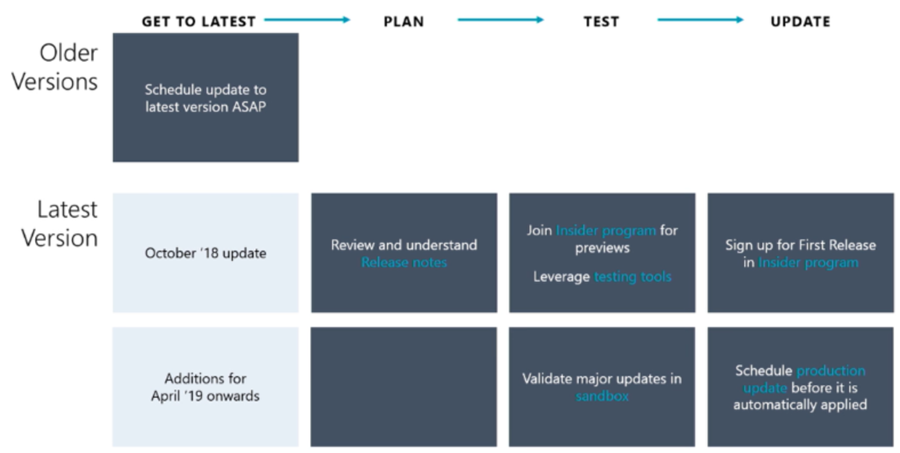
    Alright, so there is no way of opting out from major releases and waiting for the dust to settle for a while before rolling it into your own instances. This just means you better be ready for the changes as they take place, so preparation and thorough understanding of the releases notes for the coming versions is going to be crucial. And how will we be able to test the new version in advance, you might ask. The answer is you can’t do that just yet, but before V10 rolls out there will be a new mechanism in place for a First Release instance:

    As we can see from the Release Stations diagram above, the updates will be rolled out to different “rings” over a period of several weeks. Not even Microsoft wants to deploy the updates to every single environment at the click of one button, so they start from the smaller geos like Japan and Canada, gather telemetry on the update process and then gradually move to the largest geos of North America and Europe.

    Telemetry will also play a key role in how Microsoft plans to deal with the inevitable need to deprecate and remove older functionality from the platform. Although the new Dynamics 365 update policy aims to preserve backward compatibility and present new features as “off by default”, there are going to be scenarios where it’s not just a matter of adding more and more stuff onto the ever expanding cloud platform. Since MS hosts all of the online instances, they can also measure how much each product feature or platform component is utilized by the customers. Decisions on how to deal with deprecation will therefore be much more data driven than it could have been in the past.

    Just because the product is moving into an ever more “cloud native” delivery model doesn’t mean that there’s no need to test your customizations, extensions and integrations. While the process aims to reduce the chances of breaking changes interfering with the day-to-day use of Dynamics 365, there will of course be some changes that break stuff in reality. While the First Release environment will only give you a few weeks notice for performing your own changes in preparation of the version update, the Insider programs for Dynamics 365 will be your best hope to have earlier access to the information on what’s coming & how it may impact you.

    To fully grasp the how, why and when of this new update policy for Dynamics 365, I highly recommend you to watch the session from Business Applications Summit 2018 on Dynamics 365 and Update Cadence. I’m hoping that Microsoft will make this information available in more convenient formats than live recordings in the future, so that this bold “one version for all” vision can be better understood by partners and customers. After all, we’re only in the process of digesting the October ’18 releases notes highlights, but in reality the V10 update isn’t that far away in the horizon anymore.

    For all of us who are used to thinking about Dynamics 365 version updates as projects, it’s time to start shifting our thought process to the continuous delivery mode. Many of the “born in the cloud” products like Dynamics 365 Business Central or PowerApps are already now operating according to this one version principle, so it makes perfect sense to try and align the Common Data Service for Apps platform and the Dynamics 365 Customer Engagement applications with this new reality. Not just from a technical standpoint, but also the adoption of new product features that can be enabled when needed is going to be quite different from the traditional way of features arriving at the very moment a version update is deployed.

  • Discussing Spring 2018 Highlights at CRM Rocks

    Discussing Spring 2018 Highlights at CRM Rocks

    The amount of new information that was launched upon the world in the 2018 Spring Wave for Microsoft Business Applications was overwhelming, to put it short. When you’ve got a 245 page release notes document that covers not just the Dynamics 365 stack of CRM and ERP apps but also related platform functionality like PowerApps and Power BI, there’s certainly a lot to digest for even the experienced professionals in this field.

    If you want to know what I consider to be the highlights of this release wave and what my thoughts are around them, then check out the latest episode of CRM Rocks podcast where I discuss the Spring 2018 Release together with Markus Erlandsson. For an index of the topics we covered in this 1h session, below are  my show notes:

    You can find the podcast on iTunes or just head over to crmrocks.com to grab the audio recording. Enjoy!

  • Microsoft Business Forward 2018 Event and Spring Wave for Dynamics 365

    Microsoft Business Forward 2018 Event and Spring Wave for Dynamics 365

    The public launch of the Dynamics 365 Spring Wave was at the Microsoft Business Forward event in Amsterdam on March 21st, 2018. Here are some highlights from the event, shared over on Twitter with the #MSBusinessFwd and #MSDyn365 hashtags. (If you’re viewing this post on Dynamics Community page then you might want to visit the original post on Surviving CRM site to see the embedded content.)

    There’s A LOT to chew on in this release and there’s literally 10+ blog posts released today by Microsoft, spanning from traditional Dynamics 365 Customer Engagement team blog to PowerApps to even Power BI. You can start drilling down into this wealth of new information from the announcement by James Phillips: Accelerating digital transformation with the spring 2018 release for Dynamics 365 and Business Application Platform.

  • Look Out for The End Of Outlook Client

    Look Out for The End Of Outlook Client

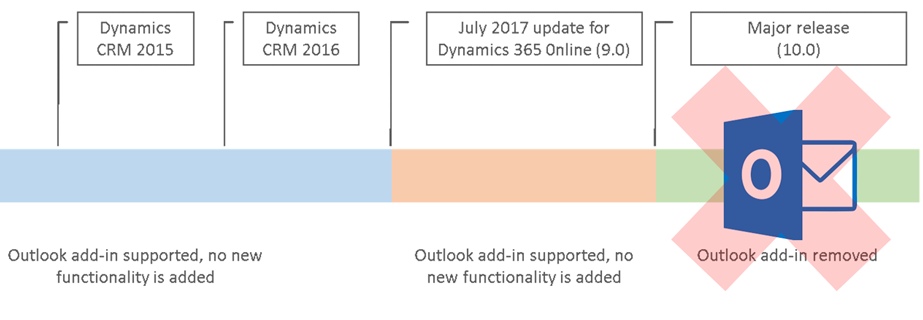
    It’s been a while already since Microsoft announced they were deprecating the Outlook Client for Dynamics 365. This announcement applied to the release formerly (and partially still) known as July 2017 Update, which everyone should rather be calling by its version number, i.e. v9.0. Since this version has only very recently become available for existing customers to schedule their CDU dates, it’s a good moment to remind everyone what this means in practice.

    You’ve Been Replaced By An App

    They all keep saying that robots will take away our jobs, but in the meantime it’s apps that are taking over Dynamics 365. Like I explained in my earlier blog post “What’s An “App” in Dynamics 365 Anyway?”, one of the many uses for the term “app” is now the way you integrate Outlook with your CRM system. Unlike the earlier COM add-in of Outlook Client for Windows PCs, this App will now work in any client environment – both in the browser and in mobile environments. That’s why the App is the future and the Client is the past. Well, actually that’s just one of the reasons, but let’s keep it simple for now, since the outcome remains the same nonetheless.

    So, if we’re just getting more of everything then isn’t this the easiest thing to sell in the world? It probably is a no-brainer for the IT guys who’ve had to struggle with the installation, configuration and updating of the locally installed Outlook Clients for years, as the administration overhead is reduced significantly. For the real end users of the CRM system, the perspective may differ, though. A user will immediately see the things that work differently with the App than they did before. Regardless of all the improvements, it will mean changes to their personal workflow, which is why you should pay attention to how the replacement is communicated and what support the users will need in this process.

    In your initial tests of the new features with a V9 environment and the App for Outlook, it’s good to keep in mind that this is still work in progress. The V9 Readme / Know Issues page has a list of technical glitches and unsupported environments for the App that is today still in Preview mode. It’s expected that by the time the current customers get their V9 updates the fully supported App version would also be available. Even with these hotfixes, you should prepare to see some usability gaps remain in the product for a while, as we’re dealing with a technology that’s fresh from the oven: the Unified Interface.

    In The Name Of Unification

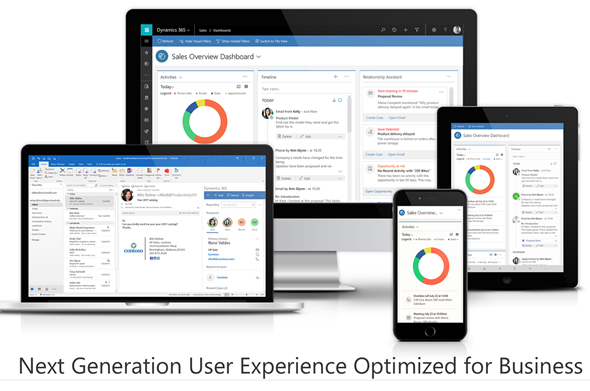
    The Dynamics 365 App for Outlook is one step on the long road towards a Unified Client Infrastructure. The earlier v8.x incarnation of the App was a limited side pane that would show information about records related to the email while browsing your inbox. The V9 App is a miniature app module built on the same Unified Interface that will power all the Dynamics 365 Customer Engagement UI’s in the future. This means that the feature set available is far greater, with the ability for you to scroll through the entire contents of a contact form while remaining in your inbox – or even navigate to related records. Similarly the commands at your disposal will allow completing tasks like adding new competitor records into your CRM database from within the single UI.

    For anyone who’s used the Outlook Client mainly for tracking items from their mailbox, calendar or contact list into the shared Dynamics 365 customer database, this will surely seem like a big step forward in terms of the new contextual actions being offered. These users will have gotten used to opening a browser tab whenever they’ve needed to actually view and search the contents of the CRM database in full screen mode.

    Then there is the group of users who’ve been in the Dynamics game for a longer time – at least from the CRM 2011 version. Back in those days the whole concept of Dynamics CRM might have been sold to them as “never leave your Outlook”. These people may not have actually seen a lot of the UX enhancements that have taken place in the browser and mobile clients in the past few years, since to them CRM has always looked like this:

    A “next generation Microsoft Outlook Experience” revealed seven years ago. Yeah, you probably wouldn’t buy a Customer Engagement solution today that looked like an ERP built into Office 2010. That doesn’t mean there wouldn’t be power users out there who still rely on the feature set of the trusty old Outlook Client to keep them productive, because they have mastered the Ribbon, the panes, the tabs, the whole shebang.

    The End Is Near …ish

    Microsoft has stated that by the time V10 rolls out, the client UI pictured above won’t work with Dynamics 365 anymore. That’s kind of understandable we consider that the Unified Interface will also replace the web client at some point in the future – possibly at the very same moment. If that is the case, we might not yet be all too close to the final removal of the Outlook Client yet.

    There’s going to be a lot of work needed before every last bit of legacy client infrastructure will have been replaced with the UCI based components. Microsoft remains committed to the guidance they’ve given to customers about the update schedule, which states there should be two new releases per year. However, we don’t really know much anything about at what point in time the next major release will arrive. Even things like rebranding Dynamics CRM to Dynamics 365 were handled over a minor update of v8.2, so who knows if we’ll see v9.1, v9.2, v9.3 etc. before the plug is finally pulled on the Outlook Client and (presumably) a whole bunch of other deprecated features in V10.

    It also remains to be seen whether Microsoft intends to evolve the desktop experience of using Dynamics 365 Customer Engagement. For example, at the moment the documentation states that the offline functionality is available via the phone and tablet apps. The table app for Windows 10 could of course be used on a regular PC as well, but it’s not completely unrealistic to expect some more targeted client applications appear for the desktop environments. When it comes to the App for Outlook on a PC, the current version still installs an add-in to manage your contacts, for example. So, just because the UI controls are being unified now, this doesn’t necessarily mean we’d be forced to use an “oversized phone app” on our big monitors.

    No More Updates – But Don’t Forget To Update!

    Even though the Outlook Client is now deprecated and there will not be any feature enhancements made to it, that doesn’t mean it would be completely left to rot. In fact, it is very important that once your Dynamics 365 Customer Engagement instances moves up to V9 also your Outlook Clients are using the latest version. This version is now the 8.2.2.137 Update for Dynamics 365 for Microsoft Outlook, available for download here. Yes, it’s V8 and not V9, but don’t let that mismatch distract you.

    You see, with V9 the XRM platform has moved up to using TLS 1.2 protocol for securing the connections between the clients and the server. The earlier Outlook Client versions do not support TLS 1.2 and the V9 server will not accept anything but 1.2 as the cryptographic protocol, which means you’re going to need the latest bits. If you have developed your own clients or code that relies on an earlier TLS version, then be sure to read this in-depth description provided by Matt Barbour of the possible errors you’ll encounter with V9 and the ways how you can avoid those by recompiling your code.

    Update on 2018-01-29: Deprecation of Deprecation

    Against all odds, Microsoft actually decided that they would reverse their previous decision to deprecate the Outlook Client. Read the following blog post and draw your own conclusions:

    Continued support for Outlook add-in (Dynamics 365 for Outlook)