Tag: PowerApps

  • Why Power Platform licensing is complex, part 2: multiplexing

    Why Power Platform licensing is complex, part 2: multiplexing

    In my previous post in this series on Power Platform’s sources of licensing complexity I explored the internal product structure at Microsoft and why changes in this commercial packaging of different technnologies may lead to confusing messages. Now it’s time to move further into the actual usage of these products and discuss how the depth of integration that you – the customer – build between the systems can affect the licensing requirements.

    Multiplexing is a term that isn’t necessarily familiar to anyone who hasn’t worked with either selling or buying enterprise software. This is the core definition that Microsoft is using in all of its documentation:

    “Multiplexing refers to the use of hardware or software that a customer uses to pool connections, reroute information, or reduce the number of devices or users that directly access or use the [X] service. Multiplexing does NOT reduce the number of subscription licenses of any type required to access the [X] service. Any user or device that accesses the [X] service – whether directly or indirectly – must be properly licensed.”

    There’s has never been that much information made publicly available by Microsoft on how the multiplexing topic – probably because it’s a hairy beast that no one would want to let out of the closet. But the beast is there nonetheless, an if you’re not careful in how you design the technical solution architecture and the software products included in it, that beast may jump at you when you’re not ready and mess up all your plans.

    The price of data entry

    Let’s look at a simple example first, one that is a very common requirement from customers. Imagine there are employees out there in the field that work with customers and may hear about their future plans or identify current needs for which the organization could offer services or products to. They’re not in a sales role themselves but would love to pass on the info to the actual salespersons who manage these customer accounts. The lead entity in Dynamics 365 would be the obvious place to record such information, but this would require the employee in question to have the necessary license for creating new records into it. So, even if these field employees would be equipped with a Team Member licenses or even the Field Serivce Enterprise app, this is not an operation that they’re allowed to perform, according to the Dynamics 365 licensing guide.

    “But wait, we don’t need to actually have the users themselves interact with the lead record in the Dynamics 365 application in order to achieve this!” you might think, if you’d be viewing it purely as a functional requirement. Yes, technically we could create a custom entity like “Incoming Sales Information” and store its records into CDS, then run a workflow or Power Automate to copy that data into the lead entity’s corresponding fields automatically. Commercially speaking this would not reduce the need for licensing the users who are initiating the process. You’ve just designed a software solution that does the multiplexing, but the end result is still exactly the same, thus the actual problem remains. First of all, you are automating the data entry into CDS, and second, you are indirectly using an entity that is not covered by all Dynamics 365 license types (funnily enough, it IS covered by Power Apps, but that’s another story).

    The important thing to remember about multiplexing is that it essentially only concerns the internal users of an organization (this includes employees, contractors, vendors, agents). You can have a “Contact Us” web form on a public site with the same fields as you have on your Dynamics 365 lead entity, then have that form call a webhook and use Power Automate to write the submitted form’s data as a new lead record. Everyone else in the world can use that, but if any of your internal users would go onto this public web form and use it for data entry into Dynamics 365, they would have to have a user license that grants them sufficient privileges. (How would you in practice stop employees from using a web form that requires no user identification? Good question.)

    Multiplexing within Dynamics 365

    As Microsoft is making their Dynamics 365 apps more & more tightly integrated, we’re encountering scenarios where the traditional boundaries between the CRM product and the ERP product get very much blurred. The GA launch of the Dual-write feature means that Microsoft now provides an out-of-the-box way for entities common to both sides to have near real-time two-way synchronization. For example, you might modify the field of an account record in CRM (or “model-driven apps in Dynamics 365”) and this will right away be reflected on the customer record in ERP (“Dynamics 365 for Finance & Operations apps”). From an end user perspective, there is only a single system to work with. Awesome!

    How does this align with Dynamics 365 product licensing then? As of today, I haven’t seen Microsoft make any announcements on the multiplexing definition being relaxed as a result of their Dual-write feature. So, if a user creates or edits any record in one of the entities on the CRM side that gets almost instantaneously replicated over on the ERP side, they are using two systems at once and should be licensed for them both. All of a sudden, that $95 Sales Enterprise app license isn’t enough and you’d need something bigger. With Dynamics 365 Finance or SCM App starting at $180 as the base licenses, then adding a bit more of attach licenses to cover the Sales App, you’d be looking at a doubling in costs for the users who are stil working in the one and the same user interface but leveraging functionality that now connects seamlessly with another Dynamics 365 system behind the scenes.

    Setting the licensing dilemma aside for a moment, there are scenarios with very clear benefits from having the CRM and ERP side work together hand in hand, where the cost from the current way of working may well be higher. For example, being able to transiently call the product data and pricing engine of the ERP system to produce the details needed for quoting a customer on the CRM side can potentially remove a lot of context switching from the end users as well as reduce the amount of custom code you need to build and maintain. In the far end of the spectrum, brand new product offerings like Project Operations can emerge from this unified platform that can now replace the prior mix of apps like PSA, Finance and MS Project. They don’t actually need to suffer from the multiplexing “tax”, since all Microsoft needs to do is design a targeted commercial model for offering this functionality.

    Power Multiplexing

    The concept of charging for access to data that has originated from of flowing to another system has been invented at a time when software was deployed to dedicated servers and data had clear boundaries of the system in which it resided. Back when the old Dynamics CRM era rules on multiplexing were defined, I bet most of the Microsoft people working with the product surely couldn’t have imagined that the data used in managing the business processes for sales, marketing or service might one day also be stored elsewhere than the application’s own SQL database. We are living in very different times today.

    With Power Platform the whole purpose of these new cloud native tools is to combine data sources and manipulate their contents by sometimes bypassing the original application altogether – at least on an UI level, when talking to an API via Connectors. It’s effectively a whole platform designed to multiplex all the things!

    In today’s world many of us no longer perceive the value of a software application to be delivered only via the user direclty interacting with the user inteface. Especially in the context of business processes, we’re more concerned with the outcomes from the digital orchestration of data, business logic, and users – both the internal ones and the actual end customer. Despite of this, on commercial level we still need to pay attention to the number of individual systems involved in a process that’s triggered by the user. In a recent interview, Charles Lamanna from Microsoft stated that you should be able to instinctively know when you’re crossing the line to multiplexing.

    “At its core, if you’re using or doing something to circumvent a user license and you’ll know you’re doing it because it will feel unnatural because the system’s not built to behave that way, that’s multiplexing and not allowed. Everything else, the intent is to have it be allowed.”

    The question of whether data is replicated between systems in real-time or in scheduled batches used to be a reasonable criteria for evaluating whether something was multiplexing or not. Today when any citizen developer can build a Flow that pushes data across systems almost immediately, or construct a custom app that pulls & pushes data via Connectors and presents it in potentially a much better UI than the originating enterprise systems, the lines have blurred down to a level where they become almost useless in trying to navigate the licensing maze. The systems are built one way but the business users are now armed with low-code tools that they’re going to use to try and get the systems to work their way. Governance of remaining compliant in this new world is certainly going to become more and more challenging for organizations as a result.

    The business of software

    We can’t escape the fact that while the code based PaaS of Azure is mainly charged by API and resource consumption, the low-code application platform (aPaaS) of Microsof Power Platform is founded on the per-user licensing model. The pricing dynamics of a platform are such that the more workloads you can move away from individual applications (be it legacy on-prem systems or SaaS point solutions) onto a common app platform with a Per User licensing model, the more cost savings you can achieve. However, if you were to try and automate the processes up to a level where the number of licensed employees needed in total is reducing as a result, then that’s actually not a favourable result to the platform provider financially. Hence the strong stance on requiring every user involved in the business process someway to have a license.

    It’s not only Microsoft that has this complexity built into its product licensing. SAP is known for chasing the Indirect Access of data that has touched their system. Oracle talks about Named User Plus. It is one of the core principles through which enterprise software vendors have traditionally defined the rules under which their IPR can be made to be a part of the digital processes of an organization. What this means is that any modern platform which strives to connect these type of systems as data sources or targets in the new application UIs or automations built as low-code solutions is subject to the same licensing impact. Creating new avenues to use the data and business logic of these third party systems may well incur new costs as a result of extended usage.

    It’s tempting to argue that systems like CRM and ERP should not be able to place down a commercial lock on access to core information like the organization’s customers or the pricing of the products they sell. We should still keep in mind that often there would be no such single source of valid records that reflect the business reality in a digital form, had there not been the design and implementation of an enterprise system that can govern all the various processes around it. The API to any system may look deceptively simple, precisely because it abstracts the complexity behind it. Managing that data and process complexity is one of the key reasons why these systems exist, and why companies are usually willing to pay their licensing fees in exchange for the value they get. Unfortunately this tends to push down the complexity to those scenarios where power users and citizen developers might want to build new, creative solutions to that tap into the data managed in these systems.

    Other parts in this article series can be found here:

    Read more about Microsoft Business Applications licensing

    There are plenty of articles in my blog for you to browse in this category: Licensing.

  • Why Power Platform licensing is complex, part 1: products

    Why Power Platform licensing is complex, part 1: products

    It’s hard to avoid this question whenever people discuss the business scenarios for Microsoft Power Platform. The tools and experiences for creating apps are getting more & more streamlined, yet it feels like the complexity of rules on what licenses are needed for each specific scenario just keeps growing. With great powers for designing creative new solutions comes also great responsibility for understanding the commercial factors of implementing them. This means that the solution architecture needs to take the licensing aspects into consideration, even if many technical people aren’t very comfortable with the topic.

    The main factors I consider to be sources of complexity in the licensing discussion around Power Platform, Dynamics 365 and Office 365 are these:

    • Protection of intellectual property as well as development budgets across Microsoft product portfolio
    • The old world of apps as data silos & the concept of multiplexing
    • Light use scenarios for information workers vs. “Real Business Applications”
    • The role of CDS (now: Dataverse) as the platform, not just a data source/target

    I’ll cover each of these dimensions in a separate blog post, to avoid building up too many stress factors into a single post and scaring away people. None of these obstacles are insurmountable, instead I believe raising awareness of them will make it easier for everyone to answer the question of “why” and move on to the “how” part of planning the actual solutions and business cases for leveraging the full potential that lies within the Power Platform.

    Let’s begin from the complexity source nr. 1: Microsoft’s product portfolio structure.

    Protecting the products & investments

    XRM, the predecessor of CDS and partially also Power Apps, was never sold as a platform. The business model was built around selling a suite of CRM applications, which you could then customize and extend to cover business processes not originally within the scope of the product shipped by Microsoft. This meant that a lot of money was left on the table because customers that weren’t looking for a new CRM system didn’t really have much reason to consider XRM as a platform their other business apps needs. From the perspective of Dynamics CRM as a product, there wasn’t much threat of competing apps within the MS ecosystem, but unfortunately it also meant that investments into the core platform weren’t likely to grow very fast if the Dynamics offering was to remain outside the mainstream product portfolio of Microsoft.

    Now that Power Apps is offered specifically as a platform where your citizen developers, pro developers and ISVs alike can all come and build their apps, the upside to everyone is that the common infrastructure for data and application management is evolving crazy fast. The new problem that arises from this is the battle of the internal buckets where money should be flowing in. Unless all customers unanimously purchase both the platform (Power Apps premium licenses) and the first party applications (Dynamics 365 Enterprise Apps), someone could easily consider their bucket to have a leak caused by these new buckets. Cannibalization of revenue is a rational fear to have when there is overlap between product offerings within the organization.

    The way how Power Platform has been positioned as the extensibility layer for both Office 365 and Dynamics 365 is undoubtedly one of its key strenghts from the business perspective on Microsoft level. PP is everywhere because so many customers already have it, underneath their existing information worker tools and CRM systems, whereas low-code competitors like OutSystems or Appian will need to find a way to get their foot in the door somehow. However, this mechanism of having “seeded” Power Apps and Power Automate features inside other products just delays the commercial discussion to a later point in time. “Why do we need to buy these new premium plans if we already have the Office/Dynamics features?”

    Before Power Apps merged with XRM, what we know call “Canvas apps” were introduced to the markets as a technology that could easily work with the ubiquitous Office 365 services as data sources. The same with Microsoft Flow. I believe this really was more of a marketing positioning strategy rather than a deep architectural commitment from MS, since many experiences weren’t really that seamless once you got down to working with SharePoint, for example. Still, this approach made it possible for the community of citizen developers to start gathering around Power Apps, when power users all over the world discovered how they could go beyond Office 365 standard capabilities with these no-code tools – while still remaining within the existing corporate licensing of Office tools offered by IT.

    Had Power Apps and Power Automate (Flow) remained there as just tools in the Office waffle that come with the subscription, we would have likely seen only a tiny fraction of the features that now are rolling out into Power Platform. After all, if you’re not paying any additional licensing fees for the products, then are they really products in themselves at all? “Freebies” like Sway or Bookings that we’ve seen appear in the cloud service nowadays known as Microsoft 365 are examples of what you could expect from technology that isn’t large enough to warrant a SKU of its own in the MS product portfolio. Not a very lucrative position for any ambitious app team in the long run.

    There’s this dilemma that if you raise the barrier of entry too high for a product, the adoption curve is going to take a hit and you’ll miss out on the viral effect of “free” software. At the same time, if you can’t directly tie the usage rate into a visible stream of new money, it’s difficult to collect funding for product development investments beyond the initial hype and excitement of launching something new & cool. In the enterprise software business you can’t even monetize the users by exploiting their data and eyeballs for selling ads, because privacy and confidentiality tend to be bigger factors here than in the consumer market (where unfortunately everything is moving to “pay with your data” business model). Just look at the example of Google, who did build up their own App Maker product into the G Suite, then saw too low usage numbers for it and ended up killing the service and customer apps built on top of it. Now they’ve acquired the low-code application development platform provider AppSheet and are trying to gain a foothold in this growing market.

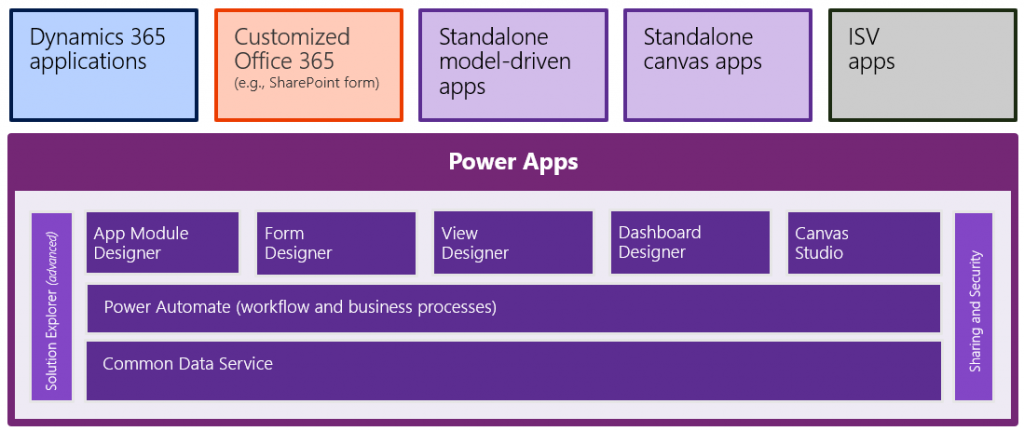
    While this explains why Microsoft couldn’t just keep the doors open for ever more advanced Power Apps development on top of exisiting Office 365 subscriptions, there’s also the other direction to consider. At some point these apps become so advanced that they’ll start to challenge the Dynamics 365 applications formerly called “CRM” or “Customer Engagement”. These commercial apps from MS are nowadays just called “model-driven apps in Dynamics 365”, which further underlines the role of Power Apps Model-driven Apps as the infrastructure that makes these apps tick. They are preconfigured instances of applications on top of CDS, but they are not the same as the platform itself. Therefore, starting from October 2019, buying a Dynamics 365 Enterprise App no longer gives you an Access All Areas pass to using apps in just any vanilla CDS environment that hosts a custom app for process X. You’ll need to be wearing the lanyard that specifically says “Power Apps” if there’s not Dynamics 365 applications installed in the environment you want to enter.

    In short, buying the Dynamics 365 product doesn’t give you the Power Apps product, just a “seeded plan” to work within the boundaries defined by the application context. The same holds true the other way around: buying a Power Apps Per User license doesn’t grant you the rights to use everything that’s running on the platform within the tenant. Similar to how ISVs (independent software vendors) would charge you a fee to use their application features via their own licensing mechanism, Microsoft is setting up mechansims that will control who can access which App Module.

    Regardless of how that might sound like initially, I believe it could actually be a good thing in the long run. The reason being that the way how Microsoft has previously attempted to limit access to the schema and data of CDS by drawing lines on restricted entities available only to Dynamics 365 license holders (aside from data read operations) isn’t really going to be a sustainable model. In his third chat with MVP Steve Mordue, the Corporate Vice President of what MS internally refers to “Citizen Application Platform”, Charles Lamanna, has stated that an alternative licensing model is being prepared right now:

    “So there is something in the works that we’re working towards and I would say at a high level, restricted entities as a concept are largely antithetical to our common data service, common data model and vision. And they were just like the least bad option to go make sure that we appropriately can license Dynamics apps. So we are working feverously on many proposals to get out of that restricted entity business, but still have a model which more appropriately captures and protects the value of the Dynamics apps without introducing restricted entities.”

    I’ll dive deeper into the whole Common Data Model (CDM) discussion in the next part of this blog series. In general, what I believe to have been a big barrier for the licensing options available to MS work with is the amount of effort needed in making the application/platform separation initiative a technical reality. It has surely been also holding back many teams in terms of how a specific Dynamics 365 App like Sales can deliver features that differentiate it from the sea of business applications that are to be built on Power Platform, by citizens, by customer development teams, by ISVs. A level playing field is needed for the future solution ecosystem to bloom, yet in the short term it requires work behind the scenes that doesn’t surface as application features directly.

    The fact that such investments and also compromises have been made during the past couple of years is a clear signal of how Microsoft believes the demand for its different services will evolve & how they will be competitive because of their dedicated low-code application platform product offering. Customers will continue collaborate via Office 365 productivity tools, likewise they’ll keep on adopting readymade business applications from the Dynamics 365 family of Apps for scenarios like omnichannel customer service. There in between lies the opportunity for 450 million new low-code apps to be built within the next 5 years, as Charles Lamanna states in the recent CNBC article “Next frontier in Microsoft, Google, Amazon cloud battle is over a world without code”.

    It is not a market that the Office products could easily rise to cover, nor is this bottom-up innovation a natural fit for the Dynamics way of delivering top-down enterprise systems. A dedicated product offering is needed here, which is why the Power Platform exists. Since Microsoft has chosen not to follow the “buy” path of Salesforce, Google and other competitors, but has rather adopted a “build” strategy to create their low-code application development platform from in-house technology, many of the elements in this platform have already been used somewhere else, and as a result also commercially licensed for scenarios that predate this new low-code era. This is the reason we’ve seen so frequent changes in the licensing model across Power Apps and Dynamics 365. It is a source of licensing complexity that is difficult to avoid when the different apps don’t live in their dedicated silos but rather share so much of the common platform capabilities.

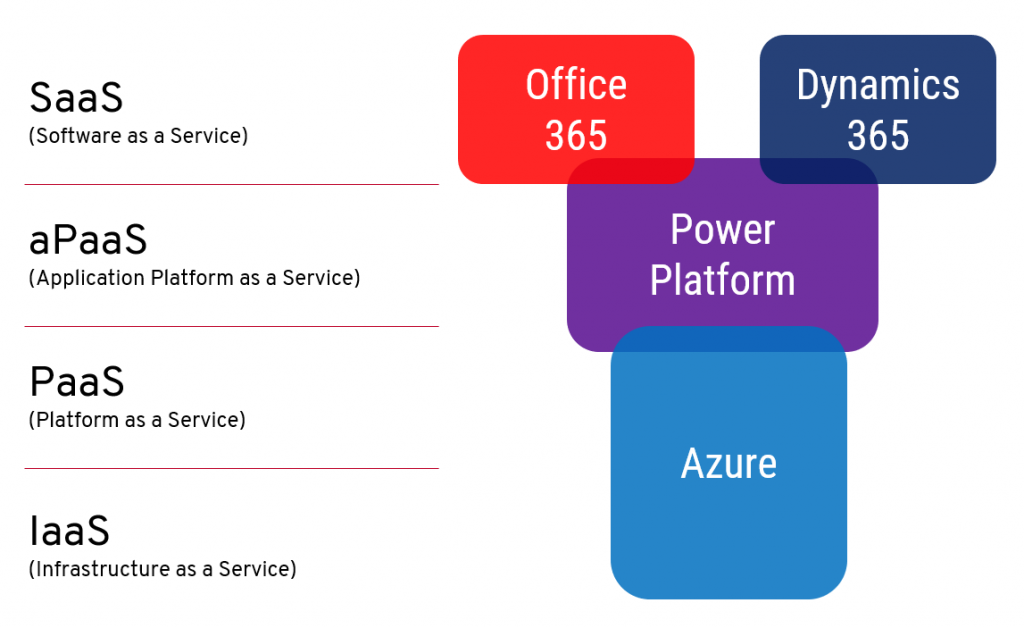
    Microsoft talks a lot about having three clouds: Office 365, Dynamics 365 and Azure. Where Power Platform fits in is right smack in the middle, and with plenty of overlap in relation to the existing clouds. It’s a new “aPaaS” layer added between the SaaS apps of Office & Dynamics and PaaS/IaaS offered by Azure. As a result, the relative position of existing products needed to shift a bit, which created a before/after dimension into both how Microsoft envisions each cloud to be used and as well as how they commercially offer the services to be licensed.

    Other parts in this article series can be found here:

    Read more about Microsoft Business Applications licensing

    There are plenty of articles in my blog for you to browse in this category: Licensing.
  • Time to go Forward with 2020 Wave 1 (webinar)

    Time to go Forward with 2020 Wave 1 (webinar)

    Our company, Forward Forever, is 1 month old today!🥳 It’s truly been exciting times starting a company that goes all-in on Microsoft Power Platform. And that’s even without considering all the surprise elements that COVID-19 is bringing into the equation right now…

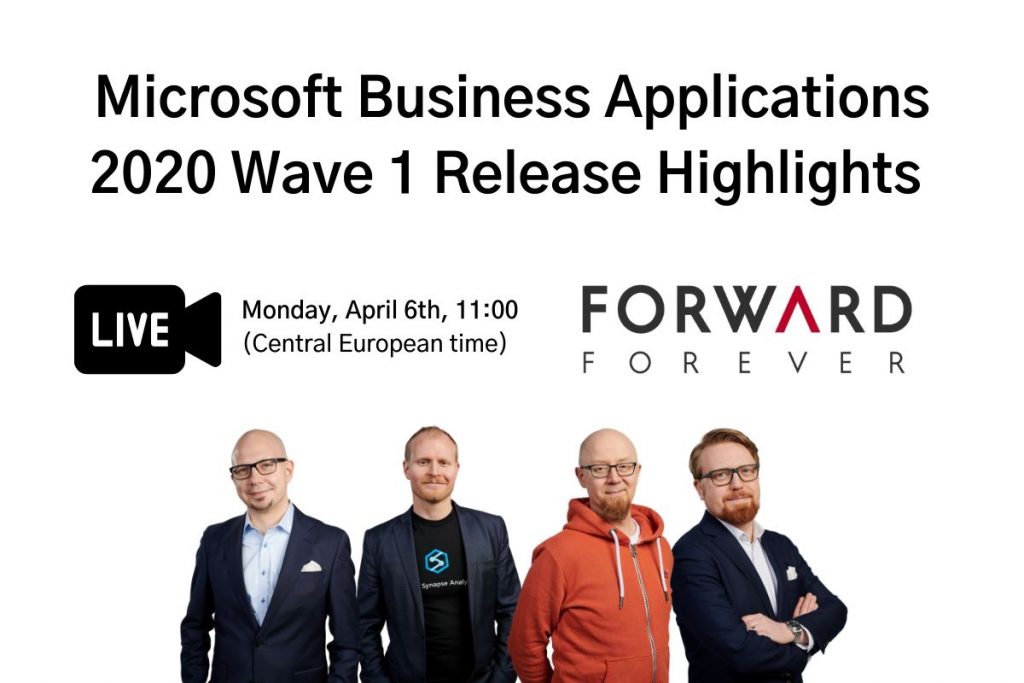
    The start of April also happens to be the official launch moment for Microsoft Business Applications 2020 Release Wave 1. Since MS will host their own Virtual Launch Event on April 2nd, we though this is a good moment to also set up the first ever FF webinar. So, without further introducions, here it is:

    Please join me, MVP Timo Pertilä, Jouko Nyholm and Lasse Teeriaho in our 2020 Wave 1 Release Highlights webinar on Monday, April 6th, 11:00 AM (Central European Time). We’ll be talking about the coolest Power Apps, Power Automate, Power BI and Dynamics 365 features in this April-September release wave, as well as analyzing the many demos that MS will undoubtedly show in their own event.

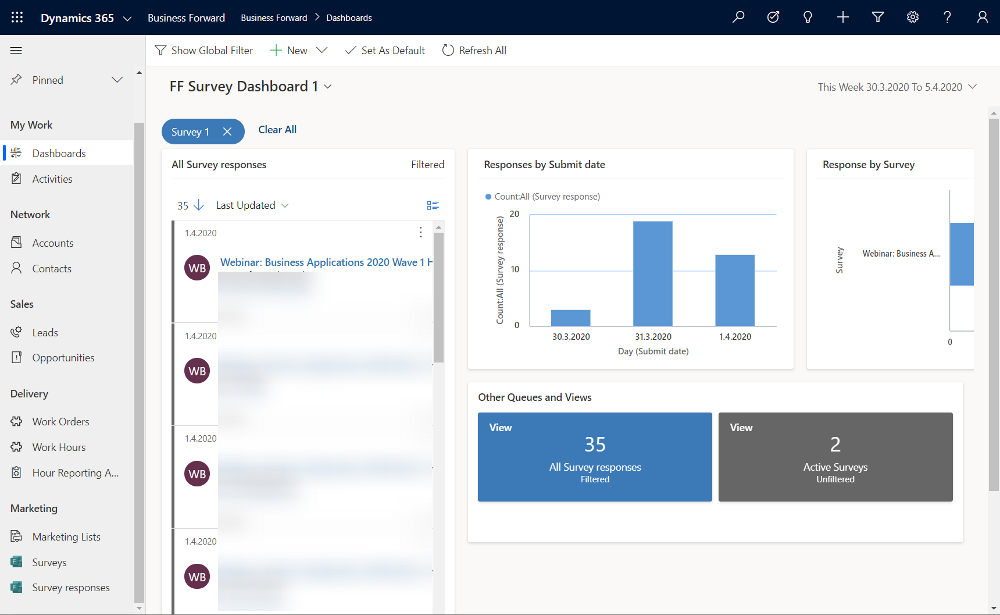
    Just fill this Forms Pro form, which will create a record in our CDS, then trigger Power Automate to send you an ICS calendar invite file hosted on my OneDrive. The link for the Teams Live Event will go live on Monday, if everything works according to plan. Yes, obviously we need to be dogfooding these tools in everything we do😊

    Register for our webinar!

    First 50 people get in for free, the rest will have to… Oh, alright then – you’re all welcome to join our event, no strings attached.

  • CDS FAQ for the Power Apps Makers

    CDS FAQ for the Power Apps Makers

    Microsoft is commited to making Common Data Service the flagship data source for Power Apps scenarios, as well as delivering advanced enterprise application lifecycle management (ALM) features via CDS. What can make the role of CDS somewhat difficult to approach for app makers is the fact that it hasn’t originally been built for Power Apps, like CDS “v1.0” was. The current CDS “v2.0” is based on XRM, the business appliciation platform that was born alongside the Microsoft Dynamics CRM product.

    I’ve been working with this plaform technology for close to 15 years now, whereas the world of Power Apps Canvas apps (and Power Automate) is a much more recent acquaintance of mine. To put my experience into good use and to also learn to see things from outside the XRM walls, I decided to share answers to a few questions that I’ve heard from #PowerAddicts that are exploring the CDS world.

    Q1: Why should I use CDS as my data source instead of SharePoint or SQL Server?

    Because it is not just a data source. Yes, in Power Apps Canvas apps you do connect to it just like any other data source in the app Studio, but this is misleading. CDS is the complete platform that can orchestrate how your app works when it comes to business logic, security model, integration, administration, governance and many more areas. Compared to raw SQL Azure, the SQL relational data is actually just one of the storage types that CDS leverages behind the scenes. Ultimately it’s a bundle of the latest Microsoft cloud technology for compute, storage and eventing/extensibility – offered as a single service that you don’t have to configure nor manage. You consume it either via built-in integrations to Power Platform, Dynamics 365 and Office 365, or alternatively via an API that is automatically generated to match your customized schema.
    The topic of “why CDS” would easily warrant a whole series of extensive blog posts on its own, which I may well do later on, but not inside an FAQ like this. For now, I recommend that you watch this Ignite 2019 session from Ryan Jones to understand the big picture of Common Data Service:

    Q2: What’s the difference between the 2 connectors for Common Data Service?

    The current environment connector is a native connection. This is the misleading part. It’s not a real Connector at all, rather every Power App knows how to talk with the environment that hosts it, which essentially is the current CDS environment. This leads to numerous benefits in performance and available features, as the technical implementation behind the scenes is quite different. I haven’t come across a Power Apps specific comparison yet, but MVP Sara Lagerquist has done a thorough analysis of the two CDS Connectors in the Power Automate context.

    Q3: Is there any reason to use the non-current environment CDS connector then?

    Yes, if you want to connect to a CDS environment that’s not the one which is hosting your app configuration. Meaning, if there is busness data out there in another CDS database and you need to reference it in addition to the “native” data in your app’s environment, the old CDS Connector might well do the trick. However, this is an area to keep a close eye on for the detailed functionality over time, as MS is very much wanting everyone to “go current” and some issues might arise from remaining on the old Connector.

    Q4: Why should I use solutions for building my app functionality in CDS?

    Even if you’re working in just a single environment, building a simple app directly in production (which is what a citizen developer often might do), solutions offer you the logical grouping of elements that are part of your project. In fact, at some point MS experimented with changing the Maker UI to read “projects” instead of “solutions”, but luckily that change was reverted back. It can stil be a helpful concept to illustrate the purpose of solutions for those who aren’t familiar with CDS. The act of building an app needs to manifest itself somehow within the environment, so always start by creating at least one solution for your project. (Real life projects may well have more than one solution, thouh.)

    What solutions really are designed for is shipping the elements of applications into other environments, in a process that is easy to manage and possible to automate. Microsoft is aiming to make solutions the packaging story across all of Power Platform, which means it’s not an optional concept. It’s how things are built within this business application platform.

    Q5: I’ve read about this thing called “managed solutions”. When should I use them?

    There’s the saying “if you have to ask how much it costs, you can’t afford it”. In my opinion, this fits perfectly with managed solutions, too. Unless you are really, really well educated with how the solution system in CDS works (meaning you’ll probably have an XRM developer background), don’t touch managed solutions – yet.

    When delivering complex enterprise CRM systems with multiple full time developers writing custom code and leveraging Azure DevOps for automated CI/CD pipelines, managed solutions are the way to go. Similarly if you’re building an ISV app for many different customer organizations and hope to publish it on AppSource, you simply have to go managed. We’ll most likely see Microsoft making the managed solution concept more approachable for other audiences in the future, too, so please do educate yourself on their possibilities and get ready for building more complex apps at scale.

    Q6: Couldn’t I use managed solutions to lock down my app components from other makers?

    Yes, but not in the environment you’re probably working in right now. When building apps, you’re always working in unmanaged mode. It’s only when you export your solution from the current environment that you get a choice to make the solution package either managed or unmanaged. Shipping configurations from dev to test & prod is what this mechanism is for. If you only have a single environment for the app makers where the small departmental or personal productivity apps are built by citizen developers, none of this stuff applies to you.

    No. Don’t ever re-import the managed solution back to the environment where it came from. That’s locking yourself in and throwing away the key. It’s not what you want.

    Q7: Is there any other way to restrict specific entities to be only customizable by certain app makers if we’re working in a shared CDS environment?

    No. The metadata of CDS doesn’t have such security mechanism that would allow you to say that “Group A owns the account and contact entities, Group B is responsible for the project, task and resource allocation custom entities”. Within a single environment, there can be only one god, and that is the System Administrator. System Customizer also comes close, as both have the rights to create and delete new entities on a whim.

    Records stored within an entity always have an owner. An account is owned by User X, which can be used for determining what other users can do with it. The actual account entity i.e. the table that holds the records doesn’t have this type of ownership construct, as it applies only to data and not metadata. If you need more granluar control over metadata, then the answer is to set up different environments for the different groups.

    Q8: How can I see what privleges a particular user has been given in CDS?

    Security roles are a central construct in CDS, as everything you attempt to do in the database is verified against two key parameters before execution:

    1. Do you have rights for the specific action against the entity where the data is stored?
    2. Who is the owner of specific the record that you are trying to perform the action on and what’s the relationship to the calling user?

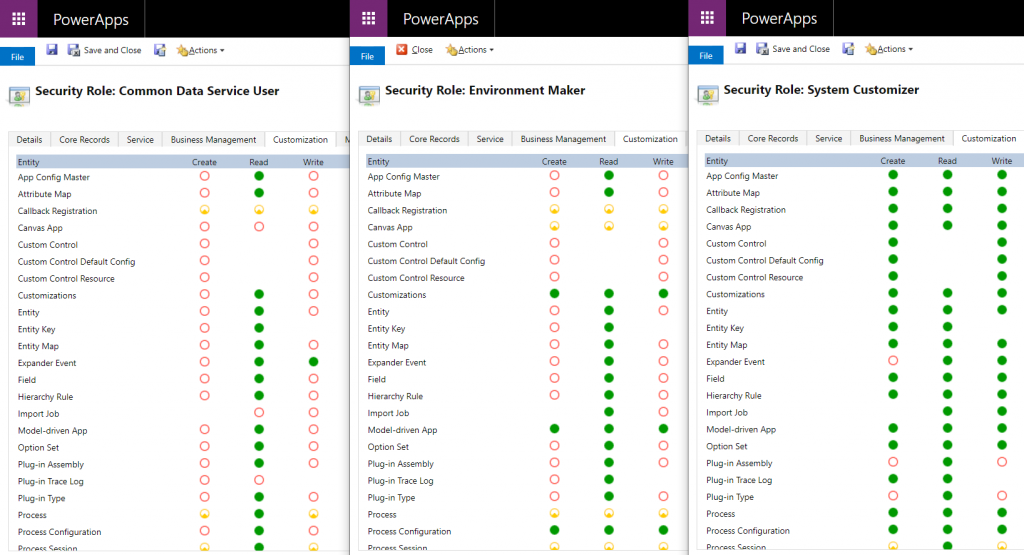
    The UI for security roles dates back to MS CRM v.X days and is scary both due to the legacy experience as well as the variety of options found in even a blank CDS org. Nevertheless, it is logical and will tell you what you need if you know what you’re searching for. Let’s compare 3 standard roles of Common Data Service User, Environment Maker and System Customizer and their privileges on the Customization tab:

    The CDS User has mostly just read access to the metdata, like Entity, Field, Option Set and so on. An Environment Maker is allowed to create new items like Canvas Apps & Model-driven Apps – like a Maker should. To actually create new Entities and Fields, you’ll need to be a System Customizer or Administrator.

    This is where the platform aspect of CDS (and its predecessor XRM) comes into play, though. You can create your own security roles, preferably via copying an existing system role that’s close enough. So, you could create a new “Environment Super Maker” that would have the right to create new fields, but not new entities, nor delete any fields. So, security roles are not only the gatekeeper to business data but also metadata.

    Q9: Looks like these security roles are environment specific. Do the IT admins really to go and manage the security settings via this MS CRM Power Apps UI?

    Not anymore! Last year Microsoft finally brought Azure AD integration into the system administration features of Dynamics 365 and thus CDS. You can now leverage the Group Teams to assign CDS security roles to an Azure Active Directory group (security or Office group) and the users will inherit the privileges of that role when added to the group.

    While Azure AD groups definitely streamline the administration process, please keep in mind that there’s more to CDS security model than just the security role assignment. Business Unit structures, Field Level Security, Hierarchical Security are some aspects that may require admin actions directly within the environment to get them set up properly.

    Q10: Why do all these user accounts from across the organization appear in the CDS environment meant for department X only? Can they all access it?

    You probably didn’t assign a security group to the CDS environment right at the start when it was created. Therefore every licensed user account in your tenant was copied over to the environment. If you assigned a security group to the environment after its creation, then those user accounts will be automatically disabled. They will forever remain in the database tables as inactive users, though, since user record deletion is not something XRM nor CDS has ever supported.

    Just because a user exists inside the CDS environment’t systemuser table doesn’t mean they can do anything in that environment. Not even if they haven’t yet been disabled. Everyone needs a security role to have a chance to read both the metadata and the business data from CDS, so the user record is just a prerequisite to opening the door to the environment but it doesn’t provide the key to the lock.

  • Price points of Power Platform (2022 pricing and licenses)

    Price points of Power Platform (2022 pricing and licenses)

    NOTE: This post was originally published in March 2020, the last revision of pricing information is from November 2022.

    As of today, there isn’t a single place from where to check the actual prices of the different license types covered by the Microsoft Power Platform suite of products – like there is for Dynamics 365, for example. The information of prices vs. what paying that price actually entitles you to is distributed across several information sources and formats – starting from the individual product pages, to the learn.microsoft.com documentation pages, to the PDF licensing guides.

    To stop myself from having to always use a search engine to discover these pricing details, I decided to compile a list of links to the places where each individual Power Platform product team has made their pricing information public, as well as write out the current subscription prices in US Dollars and Euros. I’ve also included a few relevant licensing model elements that describe what the particular subscription entitles you to do (capacity, features and so on).

    Most of Power Platform product licensing is done via the prepaid subscription model familiar from Microsoft 365 (Office 365). More recently the pay-as-you-go (“PAYG”) option has been introduced for some of the services, allowing payment via an Azure subscription (read more about the November 2021 announcement here). It’s important to note that in general prepaid subscription prices are cheaper than pay-as-you-go. The PAYG option is primarily aimed as an option for customers to use, before they know the true consumption level and are ready to commit to a prepaid subscription. Where applicable, I’ve included the PAYG prices here for comparison.

    Your actual licensing costs will of course depend on the types of agreements your organization has with Microsoft. So, consider the prices on this page as mainly a starting point for understanding the relative costs of different Power Platform services.

    Power Apps / Pages

    Power Apps pricing

    Power Apps per app plan: $5 (€4.20)

    • Allows you to access one Power Apps app (canvas, model-driven, portal/website).
    • The same app in different Power Platform environments (dev/test/prod) requires a per app license for each environment.
    • Pay-as-you-go option: $10/monthly active user/app/month

    Power Apps per user plan: $20 (€16.90)

    • Allows you to access an unlimited number of Power Apps (canvas, model-driven, portal/website) in your tenant.
    • Can also be used for accessing canvas apps shared to guests in another tenant (not applicable to other app types).

    Power Apps pricing change on October 2021

    Before Oct 1st 2021, the Power Apps per app list price was $10 and Power Apps per user $40. See this blog post for more details on the price reduction as well as changes in the per app license entitlements. Note that your license agreement may still apply to the old terms, based on the contract duration.

    Power Pages (formerly Power Apps Portals)

    Power Pages pricing

    • Power Pages authenticated user capacity, 100 monthly active users: $200 (€168.70)(see also discount tiers).
      • Pay-as-you-go option: $4/user/site/month
    • Power Pages anonymous user capacity, 500 monthly active users: $75 (€63.20) (see also discount tiers).
      • Pay-as-you-go option: $0.30/user/site/month
    • Internal users (employees) can be licensed separately, via Power Apps or Dynamics 365 licenses, or as authenticated users.

    Licensing FAQ: Power Pages

    Power Apps portals (old licensing model, before Power Pages)

    Differences between Power Pages and Power Apps portals licensing model

    • Power Apps portals login capacity add-on, 100 logins per month: $200 (€168.79)(see also discount tiers).
    • Power Apps portals page view capacity add-on, 100,000 page views per month: $100 (€84.30).
    • Internal users must be licensed separately, either via Power Apps or Dynamics 365 licenses.

    Dataverse capacity (formerly “Common Data Service” / CDS)

    Power Apps and Power Automate licensing FAQ: Add-ons

    Storage
    • Dataverse Database Capacity (1GB) $40 (€33.70) per month
      • May still show up as “Common Data Service Database Capacity”
      • Pay-as-you-go option: $48 per GB used per month
    • Dataverse File Capacity (1GB) $2 (€1.69) per month
      • May still show up as “Common Data Service File Capacity”
      • Pay-as-you-go option: $2.40 per GB used per month
    • Dataverse Log Capacity (1GB) $10 (€8.40) per month
      • May still show up as “Common Data Service Log Capacity”
      • Pay-as-you-go option: $12 per GB used per month

    See also: What Dataverse capacity is included with the Power Apps and Power Automate plans?

    Power Platform / Dataverse API calls / API requests:
    • Power Platform Requests add-on: 10,000 daily API requests for $50 (€42.20) per month
      • Formerly known as “Power Apps and Power Automate capacity add-on”

    See also: Requests limits and allocations

    Power Automate (formerly “Microsoft Flow”)

    Power Automate Pricing

    Power Automate per user plan: $15 (€12.60)

    • Allows individual users to create unlimited flows, execution is limited based on available API requests per day (40,000 included)
    • Note: while Power Apps per app and per user plans includes similar rights, they are tied to the context of a canvas or model-driven app

    Power Automate per flow plan: $500 (€421.50) for five flows per month

    • Allows the organization to implement 5 flows, regardless of the number of users who trigger them
    • Child flows triggered by a parent flow do not need to be licensed
    • Execution is limited based on available API requests per day (250,000 included)
    • Additional flows can be purchased at $100 (€84.30)per flow per month
    • Pay-as-you-go option: $0.60 per each cloud flow run

    Power Automate per user plan with attended RPA: $40 (€33.70)

    • Allows individual users to run an attended RPA bot on their workstation
    • Presumably also contains similar rights as the standard Power Automate per user plan
    • Pay-as-you-go option: $0.60 per each attended desktop flow run

    Power Automate unattended RPA add-on: $150 (€126.50)

    • Allows the organization to run a single unattended RPA bot, no dependencies to users or workstations
    • Add-on requires either per user plan with attended RPA or per flow plan
    • Pay-as-you-go option: $3 per each unattended desktop flow run

    See also: Power Automate licensing FAQ.

    AI Builder

    Power Apps and Power Automate licensing FAQ: AI Builder

    AI Builder capacity add-on: $500 (€421,70) per unit per month

    • Each unit contains 1 million service credits on the tenant level
    • Allows the organization to use any of the AI model types included in AI Builder
    • AI models consume service credits when they are trained, used in an app or flow, or scheduled to periodically run. The amount of capacity consumed varies based the AI model, as well as the size and complexity of the data set. See AI Builder calculator to estimate the capacity requirement and cost of your model.
    • Add-on requires at least one paid Power Apps, Power Automate or Dynamics 365 license
    • For the built-in Business Card scanning feature in Dynamics 365 Sales, there is free capacity included in Sales Enterprise App licenses: 10 scans per user per month, pooled at tenant level. Sales Insights has a capacity limit for business card scanning of 200/user/month. If additional Business card scanning capacity is required, Sales Enterprise customers may purchase additional Sales Insights licenses. (Taken from Dynamics 365 Licensing Guide PDF document.)

    Power Virtual Agent

    Power Virtual Agents pricing

    Assign licenses and manage access to Power Virtual Agents

    Power Virtual Agent: $1,000 (€843.20) per 2,000 sessions per month

    • Allows the organization to have an unlimited number of bots
    • In addition to the tenant license, internal users will need to be assigned a user license. The tenant license costs money, but the user licenses that are purchased via the same mechanism are apparently free.
    • “A session is an interaction between the customer and the bot, and represents one unit of consumption. The session begins when an authored topic is triggered. These sessions are referred to as ‘billed sessions’ in the product. Sessions are deducted for both testing and production usage.”

    Power BI

    Power BI licensing in your organization

    Power BI Pro: $9.99 (€8.40) per user

    • Included in Office 365 E5 subscriptions for no additional charge
    • Each Pro license gets 10 GB of data storage capacity

    Power BI Premium per capacity: starting from $4,995 (€4,212,30) per organization

    • Offers dedicated compute and storage resources for your organization
    • No per-user license assignment needed for report consumption, report creation and sharing still requires Pro licenses for users
    • Required for advanced features, see comparison table
    • See What is Power BI Premium and Power BI Premium FAQ for more details

    Power BI Premium per user: $20 (€16.90)

    • New option to access premium features without organizational capacity purcahase requirement.

    Dive deeper into the licensing details

    Microsoft usually posts monthly updates to their licensing guide PDF documents. Here’s where you can grab the latest copies: Power Apps and Power Automate Licensing Guide & Dynamics 365 Licensing Guide.

  • Highlights from TechDays Finland 2020

    Highlights from TechDays Finland 2020

    March 5-6 marked the annual conference for Microsoft geeks in Finland to gather in Messukeskus Convention Center and enjoy two days full of expert sessions on the latest MS technologies and real life stories on how all this tech is making an impact out there. In this blog post I’ll reflect on the sessions that I attended at TechDays this year and share some thoughts on what I think are topics worth exploring more. You’ll also find links to slides and a few social media posts from the event.

    Let’s get one thing straight first: Power Platform is everywhere these days. Even a Microsoft IT & Dev conference like TechDays 2020 was opened with a keynote presentation that stared with the 4 pillars we’ve come to know from the Digital Feedback Loop, familiar to all Dynamics 365 professionals by now. Engage customers. Empower employees. Transform products. Optimize operations. The goal of digitally transforming organizations has become the overarching theme of Microsoft’s product offering, supported by global cloud infrastructure, enabled by Azure services, integrated with Office 365 productivity tools and ultimately unlocked by the apps created on top of Power Platform.

    For many of the attendees, the journey of how exactly we’ve reached this tipping point of low-code applications isn’t necessarily familiar yet. For us at Forward Forever, a new technology agency focused 100% on Power Platform, being able to participate in discussions with MS tech professionals around this theme was of course of highest importance. Our whole team was present for the 2 days of the event, to ensure we’ve got a thorough understanding of the state of the ecosystem. Thanks to everyone we had a chance to meet at TechDays! Lots of great dialogue and awesome feedback to encourage us to push forward with the vision that we have for our new company.

    Our very own Power Platform guru Timo Pertilä had two sessions at this year’s event. The first one was aimed at the broader audience of non-PP professionals, to help them get started on creating Power Apps Canvas apps. Timo gave us the kind of tips he wished he had been given back in 2016 when starting to explore these tools. When it comes to Canvas apps, the most important step is to A) decide on an app that you would actually want to use yourself and then B) just creating it! Following along the lines of a simple IT asset management app built on top of a SharePoint list, Timo’s session went through all the common areas that an app maker should be aware of. I encourage everyone to pick a training lab from one of the many Power Apps learning resources and just follow through a scenario, to understand how these new tools can really democratize the creation of simple business apps on top of existing data sources.

    [Slides]

    The second session by Timo was about exploring the capabilities of the new UI Flows in Power Automate. RPA, Robotic Process Automation, is a smoking hot topic and the addition of such capabilities into Microsoft Power Platform has gotten even cool-headed Finns like Timo excited about the new opportunities. Yes, while integrating software properly via API based automation remains the core of what Power Automate excels at, the option to connect to systems that for one reason or another can’t be accessed via APIs can close the final gaps and turning manual processes fully digital. In the TechDays session we saw a demo story of an employee onboarding process for HR deparments. Using UI Flows to create user accounts in a non-API enabled legacy system such as Microsoft Access is now possible with these graphical tools that record the steps in the UI and then execute them by using variables like employee name as inputs from other parts of the Power Automate flow.

    [Slides]

    Although the use of a “proper” relational data management system like CDS would be preferable in building apps for enterprise wide use, the fact is that SharePoint remains both a commonly used as well as easily accessible data store for many citizen developers. The session by Mikko Koskinen showed us how you can leverage tools from the Power Platform to improve the user experience and also auditability of actions that users take on SP list and document data. Custom forms built as Canvas apps and process automation implemented as Flows can do wonders to your SharePoint based business apps, and of course they also open up the connectivity to many other Microsoft services to further extend the feature set as the demands of enterprise customers evolve beyond Office. Having a common set of low-code customization tools across the whole MS stack is where the real Power of the Platform lies.

    Microsoft Teams is becoming ubiquitous in the business world as pretty much all organizations on Office 365 are moving away from Skype for Business. The end result of this mass exodus towards Teams may not always be the automatic improvement of teamwork and employee productivity, if all you do is enable the licenses and activate the new services. The Teams MVP duo Vesa Nopanen and Karoliina Kettukari delivered an entertaining story of the rogue cowboys (end users) vs. the central command center (IT department) and how their perspectives on how Microsoft Teams should be implemented and managed can differ wildly. There are plenty of smart settings that the IT guys could automate behind the scenes for a more productive workday experience, but at the end of the day, a lot of the everyday usage of Teams relies on the real life teams to agree on common practices and expectations on how everyone will use the software tools. Educating and encouraging both parties to do their part is therefore essential for achieving success with MS Teams adoption.

    [Slides]

    Teams is not just a communication tool, though. It is quickly becoming a platform, which from my perspective is the most exciting aspect in its rise to popularity, since this paves way for a wealth of scenarios to better leverage Power Platform tools for a broad information worker audience. MVP Christina Wheeler presented us to path on how to get started with developing Apps for Microsoft Teams. It’s worth exploring the wealth of Teams App Templates that MS has published on GitHub, as these will give you many ideas on how to link various Azure services into the UI that your people are spending a growing part of their days working in. From a low-code development perspective, though, the options for bringing in Power Apps into the Teams navigation experience is the low-hanging fruit that you’ll also want to explore.

    Another super hot MS technology alongside the low-code Power Platform and ubiquitous Teams is Azure Synapse Analytics. In the TechDays 2020 keynote, Data Platform MVP Vesa Tikkanen and Anne Komscha from Stora Enso presented what opportunities this brand new cloud analytics offering from Microsoft opens up for organizations to rethink their data architecture. Vesa demonstrated the unique capabilities that Synapse brings to the table by connecting to and from a SQL Server 2000 virtual machine to the modern data cloud. It’s therefore not a “rip & replace all the things!!1!” type of a scenario where Microsoft is aiming at here, rather they are playing on the compatibility card here and ensuring that your complete data estate can connect with Synapse. Thinking about the Customer Data Platform scenarios where this same underlying technology will be leveraged to identify customer profiles from various sources, it’s easy to understand why MS is so bullish on their position in the emerging CDP market.

    As your data and your apps are all either moving to or at least being connected with Azure, it’s no wonder that questions on how should we secure all of this are bound to surface more and more. Azure MVP Karl Ots explained the role of security in the cloud adoption journey to a packed room full of MS tech professionals that probably have all done hands-on experimentation with many Azure services yet not necessarily paid attention to how to limit access instead of enabling it for their own super admin accounts. Role-based Access Control (RBAC) gives you a comprehensive toolkit to configure the permissions in alignment with the identified parties who need to access resources in your subscription, but it may still come as a surprise how much rights can be inherited from the top down to the individual resources if your model isn’t well planned out.

    [Slides]

    Rob Kuehfus from Microsoft presented a possible solution for approaching the wider journey to the cloud: Cloud Adoption Framework for Azure. This represents MS efforts to consolidate their earlier fragmented whitepapers and information sources (up to 40 earlier, based on what Rob told) into a single source of guidance and best practices on what to do on each step towards the cloud. From planning the organizational roles needed on the journey to building focused “landing zones” where the first customer workloads can be dropped on, this framework should become the go-to resource for establishing common understanding between customers and partners on what’s actually needed when adopting Azure at scale inside an enterprise organization.

    [Docs: Microsoft Cloud Adoption Framework for Azure]

    As an example of one customer organization that has taken the steps recently, the Azure adoption story of Terveystalo was presented by Development Director Ilari Richardt and Polar Squad’s Azure Lead Masi Malmi. Terveystalo is one of the two private healthcare giants in Finland and their history is full of consolidation projects, which makes it all the more impressive how throughout history they have aimed at having a single patient information system in place. The decision to choose Dynamics 365 as their CRM and ERP systems actually ended up driving also the custom software development investments towards Azure and now building modern DevOps practices in the MS cloud are a key focus area. Bridging the cloud and on-prem wolds in healthcare naturally involved building a lot of APIs and Masi’s exploration of the capabilities of Azure API Management has produced some interesting findings on what the challenges are on this front.

    Last and probably least… OK, definitely not the least. Mr. Järjestelmänvalvoja a.k.a. firsname.lastname, also referred to as Sami Laiho, wrapped up TechDays 2020 with his packed session on the main arena. Even though I myself have very little to do with managing endpoint security on a professional level, it’s always interesting to hear what the world of securing the Windows laptops and the Azure resources accessed via the credentials used on those laptops actually looks like out there in the enterprise space. It doesn’t make much sense to aim for 100% security, but you just need to be better secured than your neighbor. Considering that just by enabling multi-factor authentication you’re already more secure than 99.9% of the compromised accounts out there, this isn’t always rocket science but rather behavioral science. Sami’s examples of the extent to which people (employees and CIOs alike) go to in their effort to remove inconveniences that could actually put them into near 100% safety is a welcome reminder to all of us that any new innovations we come up with in the information technology space will need to pass the “but what would humans do with it” test before achieving real, tangible results.

    [Slides]

  • Dynamics 365 & Power Platform licensing FAQ, February 2020

    Dynamics 365 & Power Platform licensing FAQ, February 2020

    Here’s a collection of recent questions from the Dynamics 365 and Power Apps use community on licensing topics. The answers are my own interpretations, based on what I’ve seen from MS or other community members. It’s a point-in-time blog post that may well be outdated tomorrow already. Please do also leave a comment if you see errors in the answers I’ve written.

    As always with enterprise software licensing, ultimately the answers need to come from materials published by the software vendor, i.e. Microsoft. At the end of the day the customer is always responsible for being compliant with their own legal agreements that may have specific terms included.

    Team Members

    Q1: What’s changing in the 2020 Release Wave 1 for users equipped with Dynamics 365 Team Member license?

    The release plan contains several items that talk about licensing enforcement. So, the actual rights for Team Member licenses are not changing, but there will be technical limitations on what the users are actually allowed to do. I’ve blogged about the underlying mechanism for linking service plans to application types, which will first be used for Team Members and down the line probably also for other licensing types.

    2020 Release Wave 1 will introduce three new App Modules with pre-configured experiences for Team Members: Sales Team Member, Customer Service Team Member and Project Resource Hub. See my review of the early access version of these New Team Member Apps for Dynamics 365 for more details.

    Q2: When will the technical enforcement be enabled in our Dynamics 365 environment?

    For new customers, Microsoft intends to switch on the restrictions in April 2020. For existing customers with Team Member users, the change won’t happen overnight. Expect to see further communication from MS on this if your organization is affected by the changes.

    Update: On Feb 24th Microsoft published the following “Dynamics 365 – Team Member License Enforcement Notification” in the Microsoft 365 Message Center (MC204622) visible to administrators:

    To facilitate a smooth transition to the new Team Member app experiences, all existing customer organization instances, which will be impacted by this change, will be granted an additional grace period until June 30, 2020.

    Update 2: due to COVID-19, Microsoft has postponed several deadlines for updates and deprecations. The latest guidance for Team Member licensing enforcement is now:

    To facilitate a smooth transition, all customer organization instances that are created before April 1, 2020 have been granted an additional grace period until January 31, 2021.

    Q3: The entities we use with Team Member license in our environment are not included in the standard apps, can we add them?

    Yes. Customizing the aforementioned App Modules is allowed, as long as you follow the instructions given by Microsoft:

    “Team Member apps can be tailored to more closely fit your organization’s industry, nomenclature, and unique business processes, just like other model-driven apps built on Common Data Service. However, these customizations will need to conform to the Dynamics 365 Team Members use rights detailed in the licensing guide. While customizing the app, you can add 15 additional entities. These additional entities can be any Common Data Service core entities, or you can create custom entities.”

    Q4: The new Team Member apps ship with dedicated security roles. Does it mean we’re only able to assign these to the TM users and nothing else?

    There is currently no restriction on what roles you can assign to users with a Team Member license. The way I see it, the OoB security roles are primarily used for granting access to the App Modules and stripping down features within the app that are not within the original design scope.

    Q5: If we need users to access more than 15 entities, what are our options?

    The App Modules for Team Members will technically enforce a limit on how many entities can be added. Now, keep in mind that the App Module itself doesn’t restrict what’s actually visible in the UI when looking at an entity form. For example, an account form can have many related entities shown that are not part of the App Module specification. If you don’t directly need to navigate to the entity but rather use them to describe properties of the main entity (say, account plans related to an account), then there might not even be a problem here.

    If you need to browse through lists of tens of different entities, then you’re really pushing the boundaries of what Team Member licenses are intended for. Anyway, you could consider alternative access mechanisms alongside the Unified Interface App Module to cover these scenarios. Reporting tools could be a better way to present large quantities of data that are going to be read-only for the users. By purchasing a Power BI license for users that are equipped with Team Member licenses already, you would have full access to read the business data in CDS via reports and dashboards – as well as use Power BI for any other analytics needs within the organization.

    Q6: Our users are accessing data mainly via the Dynamics 365 App for Outlook, is this going to be available to Team Members?

    Yes. The Licensing Guide specifically lists this as the first use right for Team Members in Appendix A: “Access Anywhere: Web App, Mobile App, Tablet App, via Outlook.”

    Q7: Can we also leverage Canvas apps with the Team Member license?

    Yes and no. You can use embedded Canvas apps within a Model-driven app entity form, since these are just customizations within the app itself. However, you can’t access standalone Canvas apps with just a Team Member license.

    Q8: What about if we have Office 365 license that gives access to Power Apps AND a Team Member license, could we then build a Canvas app that reads Dynamics 365 data?

    Probably not, as this would require access to Premium Connectors. The CDS Current Environment Connector is the only non-deprecated way to access Dynamics 365 data (in the “product formerly known as Customer Engagement”, not talking about Operations or Business Central here), so this will likely be the technical blocker that stops you from building the custom app.

    Power Apps

    Q9: If we were to move our licenses from Team Members to Power Apps per App plan, what will the main differences be in the user experience?

    Power Apps licenses are meant for custom apps, meaning there will not be a preconfigured App Module from Microsoft. That’s no big deal, since creating new Model-driven App Modules is very simple. You can choose the entities you need in the app, design a sitemap to provide the navigation experience for accessing these, give your app a name, hit “publish” and have a custom App Module available to the users. There aren’t any fundamental differences between what a Sales Team Member app and “Our Customer Management app” look like to the users, as they’ll all be Model-driven apps presented via Unified Interface.

    Q10: Are there still restricted entities in Dynamics 365 that you can’t access with Power Apps licenses?

    Yes, there are, but no one knows exactly which entities. We are still waiting for Microsoft to update the list of Restricted entities requiring Dynamics 365 licenses, to align with what was supposed to be the October 2019 licensing model update. Eventually there will be new information published, but the current situation is quite challenging for both customers and ISVs to navigate past the Power Apps potholes.

    Compared to Team Member rights, a Power Apps premium license grants you access to create-read-update-delete (CRUD) entities like accounts, leads and opportunities that are read-only for Team Members. Also there are no 15 entity max limits in the Power Apps world, so your custom app can have a CDS data model that’s very complex. When you’re working with entities you create yourself, there are no restrictions at all. When you touch something built by MS for their first party apps, there’s a chance that limitations will apply at some point.

    Q11: If we would like to allow also external users to access Power Apps in our tenant, can we do that without buying a Power Apps Per App Plan or Per User Plan for everyone?

    With Canvas apps, there is the option for “bring your own license” (BYOL) available, which I’ve covered in this blog post. For Model-driven apps, this isn’t possible today. Power Apps Portals is always an option if you’re willing to re-build your app as a portal UI. (See also the Capacity topics below.)

    Q12: We’ve bought Power Apps per App Plan licenses for our users, now how do we assign these to the custom Model-driven app we’ve built?

    This is currently a tricky process, since Microsoft is still working on the proper mechanism to associate app passes with Model-driven apps. Follow these steps published on Magnetism Solutions blog and you should be able to pull it off. The Canvas app side is much easier and better documented by Microsoft.

    Q13: It seems that we can’t assign the app passes to both our production and test environments. Is this a bug or a feature?

    It’s a feature. While Dynamics 365 licenses like Team Member grant access to any number of environments in your tenant, the Per App Plan is actually a “Per App Within an Environment Plan”.

    Q14: From a licensing perspective, what are the differences between a Dynamics 365 environment and a pure CDS environment without Dynamics 365 Apps?

    Power Apps users can access any environment, if they have the Per User Plan or a Per App Plan app passes assigned in that environment. Dynamics 365 users are only allowed to use environments that have one or more Dynamics 365 Apps installed. So, if you build a small expense tracking app in a pure CDS environment, a user with $10 or $40 Power Apps licenses can use it, but a user with a $95 Dynamics 365 Enterprise App license can’t.

    Q15: If we start with a pure CDS environment to build a custom data model for our custom apps and later want to add a Dynamics 365 first party App from Microsoft, how does that work?

    Today you can’t deploy Dynamics 365 Apps into a pure CDS environment, so the only way would be a data migration project from your CDS environment to a new Dynamics 365 environment. It’s a technical limitation that MS surely wants to remove at some point, but right now you can’t step up from custom app to first party app via a license purchase alone.

    Capacity

    Q16: We want to build solutions that go beyond the personal productivity apps that the Default Environment is really only good for. What do we need for adding more environments, to leverage CDS and do proper ALM?

    Creating a new environment requires database storage capacity, since every blank environment consumes 1 GB before you even store any data there. This is the only cost associated with environment creation, you don’t need any instance licenses for sandboxes anymore like Dynamics 365 used to require earlier.

    If you purchase even a single Dynamics 365 license or a Power Apps Per User Plan license, you’ll get the 10 GB default capacity for database storage. If you only purchase Power Apps Per App Plans, it’s 1 GB. Each additional user accrues 250 MB more, if you buy Dynamics 365 Enterprise Apps or Power Apps Per User Plans. With Power Apps Per App Plan or Power Automate Per User Plan the users only accrue 50 MB. With Dynamics 365 Team Member or Professional App licenses, there’s no accrual per user.

    The default environment already burns 1 GB of your database capacity, so creating new environments may not possible without buying a capacity add-on license – unless you’ve bought one license that increases your default capacity to 1o GB (hint: always buy one).

    Q17: We have integrated other systems with Dynamics 365 / CDS and are now worried about the cost of API calls. How much will we have to pay for these?

    If the integration is accessing CDS as a non-licensed application user, the number of API calls that you have available for free is determined based on the types of licenses in your tenant. With at least one Dynamics 365 Enterprise App user, you get in total 100k requests per 24h, every day of the month. With Professional licenses this falls to 50k and with Power Apps / Automate it’s 25k. Anything beyond that requires buying dedicated capacity add-on licenses.

    Now, even though you can buy the license already, you can’t assign it yet. Since there also isn’t any API usage telemetry available to customers yet, we’re not in a situation right now where the system usage would be technically limited based on overage.

    Q18: Power Apps Portals, is the login capacity license starter level of 100 logins / $200 per day or per month?

    That’s 100 logins per month. A login session lasts 24 hours, after which a new login is consumed from the licensed capacity. If a user logs in every first day of the month, that’s a $2 per month cost. If they log in every working day of the month, the cost would be around $20 per month for Portal access, which is twice the price of a Power Apps Per App Plan. For higher volumes of Portal usage, there are discount tiers available to bring down the costs. Note that you need to purchase a sufficient amount of capacity in advance, based on how many logins you expect to have in any given month, because unused capacity does not roll over to the next month.

    There’s more!

    I’ve written several blog posts about the licensing topic, which you can browse through right here. If you want to keep up with the latest news around Power Platform, please feel free to subscribe to the Thinking Forward blog updates.

  • First impressions on Power Platform 2020 Release Wave 1

    First impressions on Power Platform 2020 Release Wave 1

    It’s that time of the year again when all us Microsoft Business Applications geeks are blessed with two huge documents to consume: the Release Plans for both Power Platform and Dynamics 365. While I gotta say that it’s awesome to have this level of transparency on what specifically is in the next 6 month release cycle, the amount information does feel overwhelming – at least if you’re trying to cover more than a few specific products within the stack.

    Ultimately we should at least aim to have a general idea of how each piece of the BizApps puzzle is evolving. Especially the Power Platform side is very relevant for anyone who’s not strictly focused on training/delivering/administering just a single app from the Dynamics 365 portfolio, because this is your low-code toolkit for making those applications meet the real life needs of customers. Unlike with past CRM projects, the customization tools are not part of single server installation, rather they can be discovered from all around the Microsoft cloud.
    To make the Release Plan easier to digest, I’ve picked out the new/improved features that jumped out when I went through it for the first time. Instead of the PDF versions (which are coming a bit later anyway), I prefer the online documentation, so below are links to each of those items for you to drill deeper into – and also keep track of possible changes to the original plan.

    I’ve added my comments on why I consider these to be the most important items in the Release Plan. Time will tell how they actually land and what the impact will be. It’s going to be fun to review this list October 2020 when Wave 1 is over!

    Power Apps

    Single mobile app player for Canvas & Model: very much needed in order to break free from the assumption that Model-driven apps are only for Dynamics 365 customers.

    Offline improvements: the need for accessing data without a live connection is still very real in mobile scenarios. What is somewhat of a bummer is that the efforts here are targeting Model-driven apps only for now.

    Modern solution explorer makeover: Yes! There are a lot of areas where app maker productivity could be improved, so it’s great to see investments are being made here.

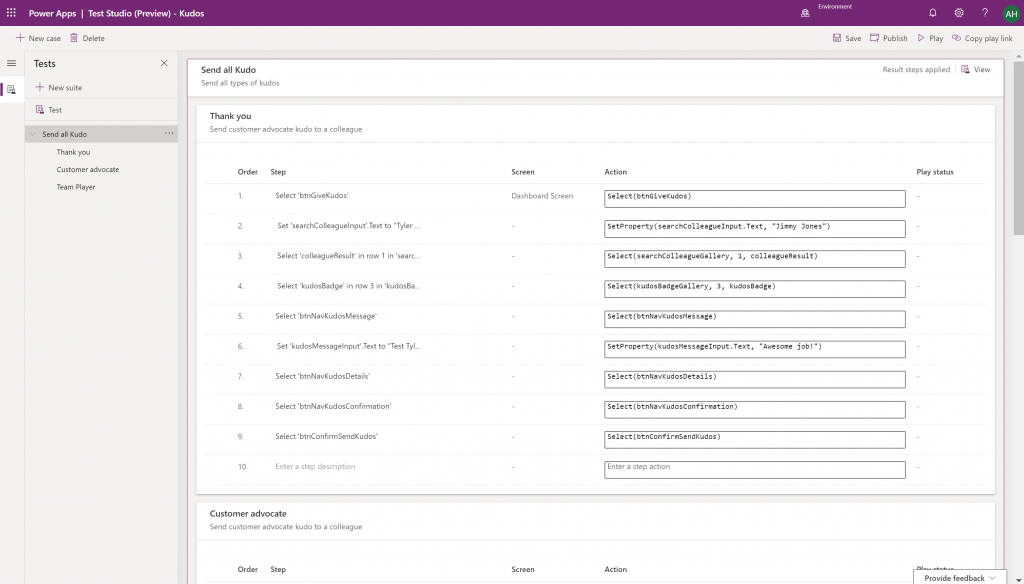
    Canvas app Monitor tool & Test studio GA: the wave of the future. Low-code app development isn’t going to be restricted to personal productivity scenarios, we’ll have much of the same needs as in the pro dev side.

    Azure Application Insights telemetry in Canvas: a great example of how the existing tools from Azure should be harnessed to offer shortcuts for Power Apps makers.

    Generate app from data with responsive layout for phone and tablet: it’s been an awkward limitation before to only support phone layouts. The bigger story is in bringing out these templates for how to actually make Canvas apps responsive, as it has been quite a mountain to climb for citizen developers. In 2020 Wave 1 we’ll also see a preview of the awaited responsive Canvas app pages.

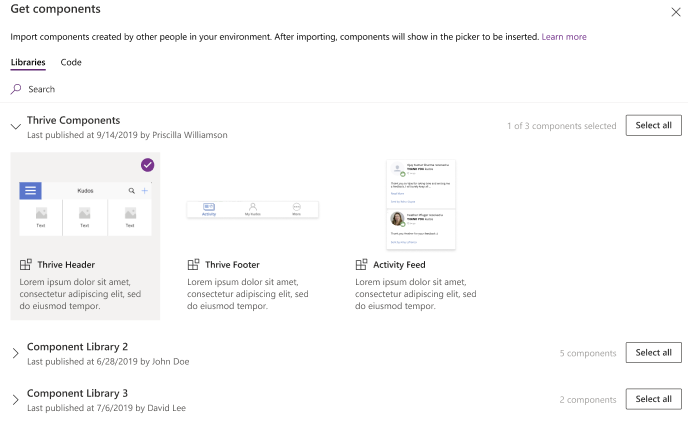
    Canvas Components GA: very impactful stuff here. Component libraries, solution awareness, support for galleries and forms, using collections and media files. These are big steps in bringing the two app types of Canvas and Model-driven closer together.

    Power BI embed component in Portals: oh yeah, there’s that third app type, too… Definitely looks a lot more approachable than the current embed experience. As for Portals extensibility for pro devs, the CRUD Web API sure made Nick Doelman excited, so keep an eye on that one.

    Unified Interface enhancements: important for many Dynamics 365 experiences. Forms as modal dialogs in particular looks useful, better filters are about closing the gaps to legacy web client, search in this view is an age old requirement.

    Improved themes reflecting modern Microsoft Fluent themes: UI matters, the power of the Apps is not just in the logic, data and automation. MS should be more aggressive here when competing against other low-code development platforms.

    Power Automate

    Interactive adaptive cards: we’ve surely been waiting for this. Very important for bridging the user experiences across different tools in different MS clouds (Office, Dynamics, Power Apps). Could 2020 be the year of the Adaptive Cards? Potentially yes, if you look at how Teams & Power Automate can make use of this feature.

    UI Flows solution awareness: aligning RPA with the common shipping vehicle of Power Platform. Being a new preview feature, there’s of course a lot of other parts moving around still, but the important bit from a platform play perspective is getting everything to play nice with solutions (including non-UI Flows…)

    Use business process flows in Office 365 apps: interesting yet logical step. From a process automation perspective there’s no reason to keep BPF functionality tied too closely with the familiar CRM sales process stages mentality. Again, it’s the platform that counts.

    Power Platform governance and administration

    Environment life cycle support: much needed in the real world implementations. To be able to test new standard and custom features in complex business systems, copying and deleting environments needs to be compatible with all the platform components used. Power Automate, Canvas apps etc. have to support healthy ALM patterns for enterprise development scenarios.

    User access diagnostic experience: again, very much needed for keeping larger environments operating the way IT would want them to. The process of managing access to applications should be isolated from the actual app maker tools or features specific for Dynamics 365 admins, to ensure there’s help available on a broad enough level when users encounter problems.

    Admin connectors & PowerShell cmdlets Generally Available: because they need to be. Low-code Application Platforms for enterprise customers will have to provide automation tools for not just app creation but app governance and administration. If the number of business apps within an organization will explode thanks to these tools, trying to scale the old admin practices isn’t going to be the answer.

    Bring your own data lake: allowing customers to control their own adoption metrics for Power Apps. Just like the GUI for admin tools might not meet the requirements of all organizations, it makes sense for Microsoft to allow customers to also take the telemetry data from apps and use Azure services to put it into their own reporting context.

    Power BI

    Paginated reports enhancements: the next generation SSRS has been a long time coming. The new features like API to render a paginated report to any format (e.g., PDF, Excel) and subreport support will bring the cloud reporting powers of Power BI close to what you could do in on-prem 15 years ago. They might not be the coolest of features, but for many CRM scenarios these “pixel perfect” A4 outputs are still a very practical solution.
    Copy and paste visuals into other applications: supporting the modern flow of information. If the paginated reports represent the PC era way of working, then being able to grab a part of your analysis and quickly paste it to a conversation in Teams with a link back to the full report is the way today’s information workers expect these cloud apps to work with one another.

    Data lineage GA & enhancements: when cross-referencing data from anywhere is a breeze, how can you tell if the analysis is actually accurate? The lineage visualization is an effective way to illustrate how this modern world of self-service BI operates and bring tools to do meta-analysis on what’s the actual source of the truth being presented to you.

    Power Virtual Agent

    Add a Power Virtual Agents bot into Power Apps canvas app: because bots are not just for customer service. Internal scenarios for app users would be very interesting, although the starting price for using bots is probably going to scare most customers away.

    Adaptive Cards: see my comment in Power Automate section.

    Single Sign-On: if attempting to go beyond generic website chat popups, strong identity management features are a must.

    Pass context to a bot from the calling site: “Hi, how may I help you?” That’s not how a smart agent would initiate the chat, so after identity comes context management. Bridging the gaps between apps is where I see bots being particularly powerful, so URL query string support is a good start for making this happen.

    AI Builder

    Power Automate integration: building the Cognitive Service for citizen developers. The patterns from Azure need to become more accessible in the BizApps frame of reference.

    New models like anomaly detection and receipt scanning: making AI Builder ready for business. Training AI for unique data sets is one thing, but where I believe wider adoption will start is through these more “ready to go” scenarios.

    Common Data Model

    Empower out-of-the-box analytics: delivering on the promise of CDM. It’s all just theory until we see Microsoft deliver on those promises about making it easier to integrate data sources and analytics/AI via a common semantic model.

    CDM visualization and management experience: making CDM more than a GitHub repo. “Increased focus on growing the Common Data Model ecosystem requires enabling users to work with Common Data Model in their native data environments, such as Power Query, Insights Apps, Synapse, and Power BI.” Yes, it certainly does.

  • Using CSS color names for SVG icons in Power Apps Canvas app

    Using CSS color names for SVG icons in Power Apps Canvas app

    In my previous post we took the contents of an open source SVG icon library from GitHub and imported that into a Canvas app as a static Excel table, with the help of Power Query. This time we’ll explore how working with the icon colors can be expanded compared to the standard functionality offered by Power Apps Maker Studio.

    Standard color picker

    If we are inserting any of the out-of-the-box icons into our app screen, Power Apps offers a color picker that works the same as when defining the color of a text font. The first option is the standard palette with theme colors and, um, “standard” colors:

    Then there’s the “any color you could imagine” option where you can either pick the color from the sliders, type in the hex code or use the RGBA code:

    The third option is a bit more hidden, so you’ll only find it when using the formula bar. You see, Power Apps actually supports also the CSS color names, so you could type in the value as “DarkBlue” and get exactly that for your icons:

    The Power Apps documentation contains a list of built-in colors supported and their CSS color names. Now, the idea of having the standard CSS palette with its easy to understand color names instead of cryptic Hex codes or RGB values sounds attractive for a low-code citizen developer like me. However, there isn’t really any convenient way to browse through these colors and see the results in the Canvas app UI. Unless we build one for ourselves!

    Custom color picker

    Just like with the SVG icon definitions, we can use the option for importing static reference data from an Excel table to enhance the app maker experience. What we’d need first is a suitable list of the CSS color names, alongside their attributes. Rather than searching for the perfect table online, I just grabbed the data from this CSS Color Codes page on RapidTables. What I especially liked about this page was that the colors were grouped based on the color “family”, meaning different tables for red colors, orange colors, yellow colors and so on. That’s the way I’d really want the colors to be organized, rather than the alphabetic list over on docs.microsoft.com. With some copy & paste, I ended up with an Excel table like this:

    You can grab my .xlsx file here. Let’s import that into our app via the Excel static data connector, as a table called ColorTable:

    We can now add a gallery control into our app and use the columns from our ColorTable as values for the fields in this palette browsing gallery:

    “Wait, how did that visual color indicator get there?” Oh, that’s easy! We just added a rectangle into the gallery and used the ColorValue function to reference the Color Name column from the table that we imported from Excel:

    What I didn’t add there into our gallery yet was the Color Group information. That’s because I want to have this as a separate parameter that I can use to narrow down the list of CSS color names presented in the list. Let’s name the first gallery to “galColors” and create a second horizontal gallery called “galColorGroup”, which will contain a list of all the group names included in our Excel table.

    How do we get just a single “Green” and not all of the 19 different instances of that same text string in the source table’s “Color Group” column? We use the Distinct function and tell it we’re looking for data in the ColorTable data source and the distinct values should come from this particular column:

    The Distinct function returns a table with the single column “Result” as seen from the formula bar preview. We’ll add label into our gallery and populate the text value with this Result directly. To set the fill of the label’s rectangle area we’ll use the same ColorValue function as in our first gallery and point that to the Result column. Now we’ve got ourselves a galColorGroup gallery with 11 distinct values visualized:

    Let’s use the selected Color Group now as a filter to list only that group’s CSS color names in the other gallery. For galColor the Items parameter should read:

    Filter(ColorTable, 'Color Group' = galColorGroup.Selected.Result)

    While we’re at it, let’s also add labels on top of each gallery to state the currently selected value. For galColorGroup, we’ll want both the group’s name as well as the number of items returned after the Filter has been applied in the galColor gallery. We’ll concatenate the selected item’s name plus the CountRows result from the galColor gallery into a single text string like this:

    "Color group: " & galColorGroup.Selected.Result & " (" & CountRows(galColor.AllItems) & ")"

    For the second label, the selected color’s CSS name is enough for us:

    "Color: " & galColor.Selected.'Color Name'

    Now we can click on a value in the Color Group gallery like “Gray” and be presented with a filtered list of the 10 available shades of grey:

    Using selected CSS color name as SVG icon color

    The last bit is connecting the color with the icon library we imported in my earlier blog post. As a quick recap, the SVG icon shapes can be defined in the image property of a Power Apps image control by constructing the XML in the following way:

    "data:image/svg+xml;utf8, " & EncodeUrl(
        "<svg version='1.1' id='Layer_1' xmlns='http://www.w3.org/2000/svg' xmlns:xlink='http://www.w3.org/1999/xlink' x='0px' y='0px'
    	 viewBox='0 0 24 24' style='enable-background:new 0 0 24 24;' xml:space='preserve'>
    <path fill='" & "Black" & "' d='" & ThisItem.path & "'/>
    </svg>"
    )

    You’ll notice that while we pulled the path’s attribute “d” from the dynamic value of ThisItem.path, we had left the path’s fill attribute hardocded as “Black”. Changing this to a dynamic value will allow us to render the SVG icons in any color we’ve chosen elsewhere. To make this work in conjunction with the CSS color name picker functionality we’ve built into our app, let’s add a button above galColor and use the OnSelect event to set a variable called SelectedColor to be the CSS color name of our choice:

    Now we’ll just change the SVG icon’s XML definition to reference this variable’s value as the fill color:

    This allows us to combine the earlier SVG icon gallery with our CSS color name gallery and make the color choice reflected visually immediately on all the visible icons:

    The visual part is what I love about this example of working with icons and colors in Power Apps. It’s a great exercise for learning how to work with data sources from the outside world and seeing how the Power Apps Canvas app UI changes as you modify your formulas and shape your galleries. Being able to inject dynamic values into XML that the app then renders in real time is a demonstration of how the low-code app development tools available in Power Platform can serve to unlock your creative powers, even if you have no skills on actual “pro code” development. Understanding how different color values can be passed on from one place to another and transformed via functions along the way also teaches you a lot more than using the standard color picker to set the static fill value of a single control.

    For me personally, it’s also an exploration of how to leverage configuration data when building Canvas apps. Coming from the Model-driven app customization world of XRM, my mind is still somewhat fixed on thinking via metadata, even though I’m trying to make the leap into UX first Canvas apps building (see this presentation for some of my tips on surviving that leap from Dynamics 365 to Power Apps). The possibility of importing static tables from Excel that are then preserved within the app is an interesting option to try and make the app building process a bit more structured than what the maker tools in Power Apps offer. I’m going to continue my experimentation and try to turn this example app into something that could offer reusable logic and configuration data when generating brand new apps.

  • Using SVG icons in Power Apps Canvas apps

    Using SVG icons in Power Apps Canvas apps

    When creating business applications on Microsoft Power Platform, a major difference between the traditional “CRM style” Model-driven apps and the modern “mobile first” Canvas apps is the possibility of visualizing data and available features in the app. Yes, having well-structured data to begin with is of course a fundamental requirement of being able to construct a meaningful business app. The freedom of pixel perfect visuals that Power Apps can deliver in the Canvas style apps is, however, an important factor when it comes to the perceived value that the end users can get from accessing the app.

    If you’re willing to spend time in generating static images for all the different areas of your app UI and, more importantly, to reflect the state of your app in relation to the data that the user is viewing, then the sky’s the limit for what you could achieve with Power Apps. Now, considering that these low-code/no-code tools aren’t exactly targeted for professional app development teams that would have designers equipped with the tools & skills to create amazing graphics on demand, we often need to explore more frugal ways to make the app visuals serve their purpose. For those of us with next to zero skills in graphic design, sources of free / open source digital illustrations like IconFinder are like a gift from above. There are also a number of awesome icon libraries available on GitHub. Here’s an example of Simple Icons:

    Static graphics like PNG files can already do wonders to your Power App UI, but wouldn’t it be nice if you could also leverage the more scalable and adaptable SVG’s (Scalable Vector Graphics)? Especially for monochrome line drawings like the ones you’ll see a lot in today’s flat app UI, an SVG with transparent background and also a configurable color would be highly useful. Unfortunately, Power Apps today doesn’t support SVG file manipulation when imported as images. There’s a built-in set of icons that come with the Maker studio, which most probably are vector graphics, but you cannot add your own icons into that list. What this means is that if you import an SVG image into your app, there’s not going to be any more parameters available for you to adjust than if you had brought in a JPEG. Doh!

    A Canvas app that I’m currently building requires a large number of icons that should be dynamically changed based on a variable. For the purpose of mapping the suitable icon with a specific value and testing the UI, I wanted to bring in a whole library of icons and play around with it in Power Apps Maker Studio. In order to have better control over the icon appearance, I wanted to be able to modify the actual XML definition that makes up the SVG icon. Here are the steps how I managed to get the data inside the app and also how to render the SVG icons from the XML that I dynamically modify with formulas.

    Combining your SVG files into an Excel table

    Excel is a data source in Power Apps that allows you to import a static table of data into the app and store it there for all the app users to consume, without having to work with connections to external data sources. This type of resource file was quite convenient for my purposes, so the first thing I had to figure out was how to get a folder full of SVG files imported into an Excel table where each icon’s definition is represented on one row. In the above example of Simple Icon library, this would be the contents of the folder “\simple-icons-develop\icons”.

    Power Query in Excel has the “From Folder” option available when using “Get Data / From File”, which brings in not just a single file but rather all the files inside a specific folder. Great, that’s what I needed! Oh, but the source files I have are SVG which Excel doesn’t understand. No problem, let’s just change the file type to XML by renaming the files with by running this in the Command Prompt after navigating to that folder:

    ren *.svg *.xml

    This is what we should now have:

    Now we’re ready to consume the folder contents in Excel. Using “From Folder” and selecting “Transform Data” in the import prompt, we see a view like this:

    A good start, but we need to do some transformations to this data. First, in the Content column, click on the two downward arrows for “Combine Files” and see the results:

    Awesome, now we’re actually inside the XML file structure! What we’re really after is the <path> element in SVG , which is the ultimate drawing that creates the lines, curves and shapes. We don’t have to understand anything about its syntax (well, at least I don’t) but we need this data to get Power Apps to render the SVG shape inside an image control. Since it’s currently a table in the Power Query Editor, we click on the two parting arrows to expand its contents, which consists of a single attribute called “d”.

    We’ve now got everything we need, so the last steps are in removing unnecessary columns and renaming the existing ones. The first three ones are what we want to save into our Excel table, so let’s simplify the column names to “name”, “title” and “path”, then click Close & Load. You should have a beautiful Excel file with as many rows as you had files in the source folder. Before saving and closing the .xlsx, give the table a sensible name that you want to have showing up as the data source name in Power Apps.

    Visualizing SVG data from Excel inside Power Apps

    How does one actually turn the XML definition data into a visible image in Power Apps? There’s a great blog post from Laura GB titled PowerApps – SVG Introduction, which gives us all the details needed to make the Image control render our SVG data. To see how it works in practice, let’s first bring in our Simple Icons Excel table into Power Apps as a data source:

    Next we can add a horizontal gallery onto our screen an choose to use the imported table “icons” as our data source:

    Our table has the three columns we left in there when working with Power Query. From the default mapping we can see that the gallery item’s Subtitle1 label has “ThisItem.path” as the Text value. This is the data we’ll want to use in the image control of the gallery item, but first we’ll need to wrap it into something that gives Power Apps the context around it needed to render the SVG image, since we only imported the one attribute and not the complete XML. However, since this XML part will be exactly the same for any icons that we want to display from this Excel table, it can consist of static text, inside which we’ll inject a few dynamic values with the Power Apps formulas. Adapted from Laura’s post, this is how the Image property of the Image control inside the Gallery item should look like:

    "data:image/svg+xml;utf8, " & EncodeUrl(
        "<svg version='1.1' id='Layer_1' xmlns='http://www.w3.org/2000/svg' xmlns:xlink='http://www.w3.org/1999/xlink' x='0px' y='0px'
    	 viewBox='0 0 24 24' style='enable-background:new 0 0 24 24;' xml:space='preserve'>
    <path fill='" & "Black" & "' d='" & ThisItem.path & "'/>
    </svg>"
    )

    The important part is how we construct the “d” attribute from ThisItem.path on line 4, as that will be the only dynamic value in our SVG for now. Here’s what the result will look like:

    It works! We can now design a gallery that will allow us to conveniently browser through the complete collection of 1007 icons in the library, by having a live “thumbnail” of the icon in a smaller 100*100 image control. To then view the selected icon in a larger format, let’s add a new image control outside the gallery and set it’s Image property to reference the Image of the selected item from Gallery1. Since these are vector graphics, there should be no loss of quality, no matter how large we set the image size to be:

    If we now want to use these imported SVG icons from anywhere else in our app, we can just do a LookUp to the data source with the icon name and return its path, like this:

    LookUp(icons, name = "microsoftexcel", path)

    Using this when wrapped within the same formula we used earlier for showing the gallery’s selected item’s path will now give us a rendering of the SVG icon that matches our LookUp function:

    “Hmm, wont this kind of library of a thousand icons make our app size huge?” Not really. Since we are only storing the shapes instead of the pixels, the payload will actually be very compact for each icon. In this example with the Simple Icons library, here’s how much storage the different parts consumed:

    • Icons folder from the GitHub project: 1.5 MB
    • Excel file with icon XML imported via Power Query: 661 KB
    • .msapp file of the example app with static Excel data imported: 592 KB

    By taking just what we need (the shape information) and leaving out the static XML file’s overhead we’ve actually managed to shrink the 1007 icons into a much smaller space with our Power App. The other benefit is that further adjustment like icon color can now be set in our own formulas. In a follow-up post I’ll continue adding features into this icon library browser app to make use of exactly this capability.