I’ve got a confession to make: even though I’ve been building Model-driven apps long before they even were Power Apps (back in the XRM era), I’ve struggled to understand how I can make them visible to the end users in the modern experiences Microsoft offers.
In this post I’ll address two different challenges. First, how to enable end users to have access to your Model-driven app. Second, how to protect them from seeing irrelevant apps.
“Why isn’t the app sharing menu working?”
Once you’ve built your Model-driven app are ready to release it, you need to make it visible not just to the app makers and system admins but also regular users. This involves using the Share menu from the list of apps available in the environment.
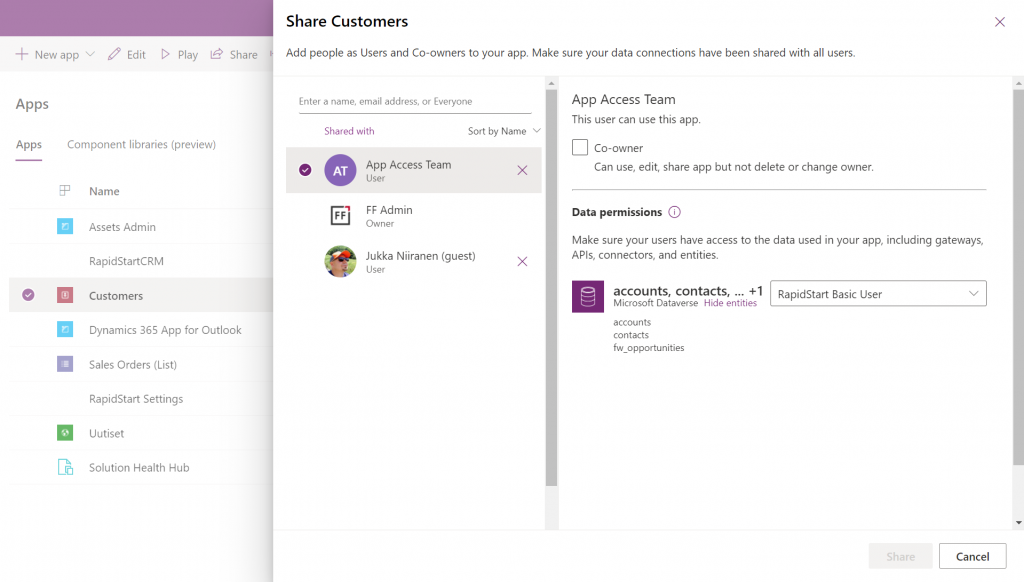
Working in the Power Apps Maker portal, it’s pretty obvious the things we see here have been built with Canvas apps in mind. When it comes to sharing a Canvas app, the steps are fairly logical. You click the 3 dots next to the app, select “Share” and are shown this dialog:
You add users or groups, set their data permissions via the many available security roles within Dataverse, click Share, after which the users get an (optional) email message. All good!
Try the same steps with a Model-driven app and your users will see… nothing. It’s not just that there isn’t an email message with the app URL sent to them. They actually don’t have access to the app at all, even if you provide them the URL directly. Why isn’t the share action working from here?
If you’ve worked with the Dynamics 365 App Modules before, you might remember that you needed to specify which security roles have access to which app. Just like with role-based forms, too. Now, that particular role assignment UI existed in the legacy web client that has been deprecated and there doesn’t seem to be an equivalent in the Maker portal anymore. Does this mean we don’t have to perform this step, rather the sharing of the app to the users takes care of this automatically?
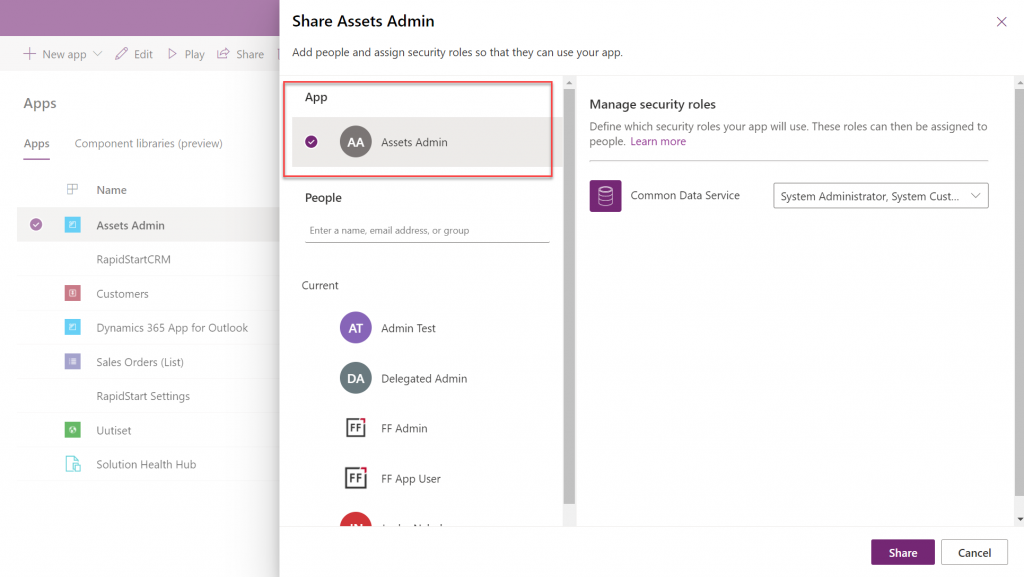
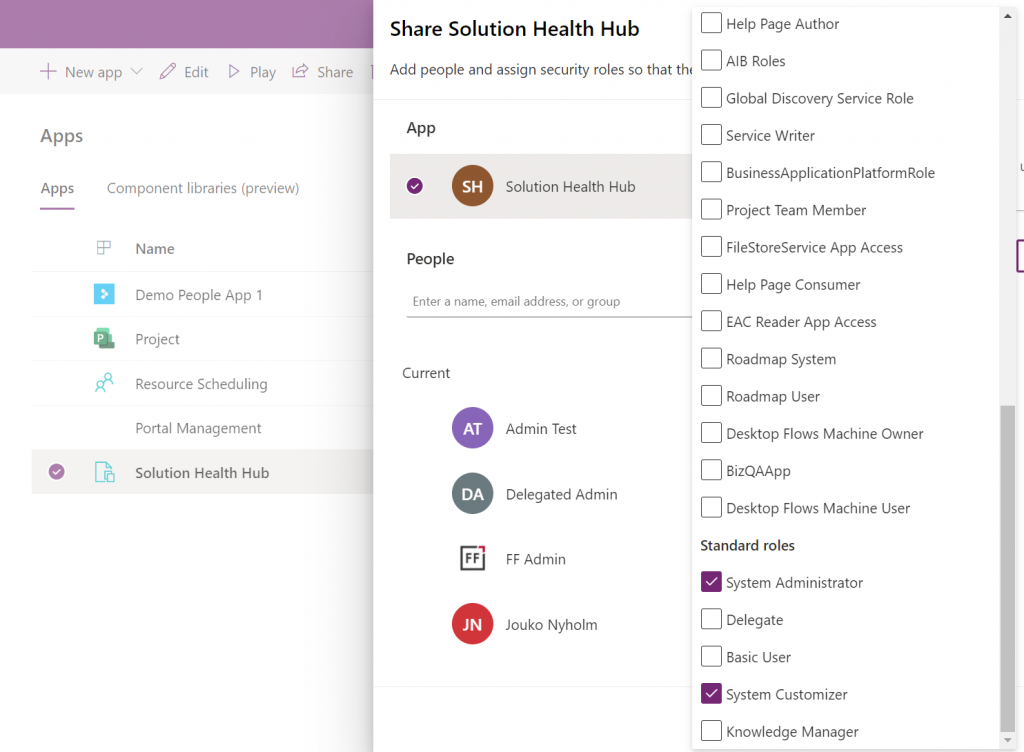
At some point I assumed so, but this isn’t actually the case. After a long hard look at the documentation, I finally realized that the MS product team had squeezed this functionality into the Canvas sharing dialog in quite an unintuitive way. You see, you’re not only using it to share the app to the users, but also for “sharing” the app to a security role:
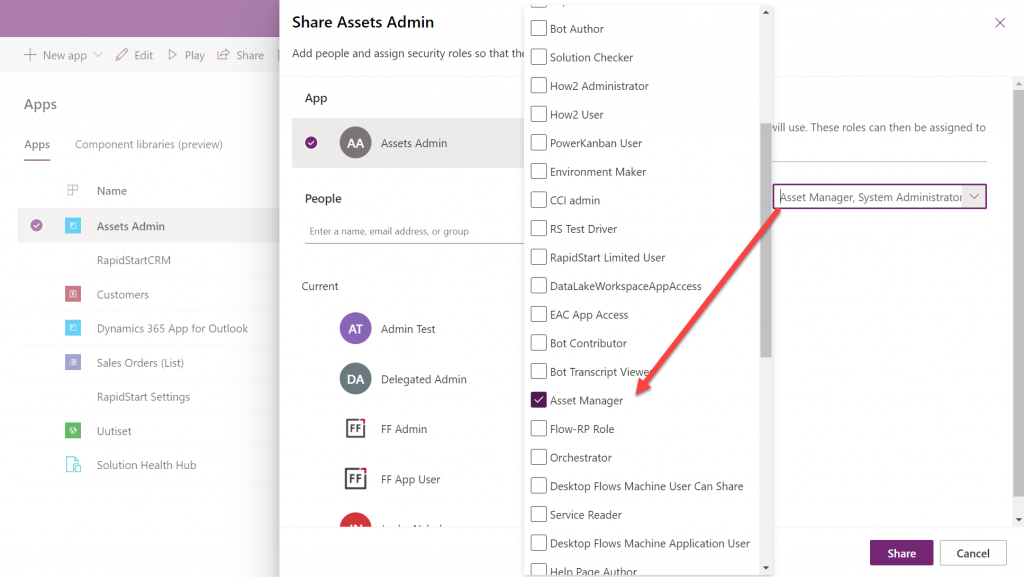
So, rather than sharing the app to the users, stay on the higlighted App section that’s at the top of the list. Pick the correct security role from the list and then click “Share”:
Now all users with the specified security role will have access to the app when trying the URL shared with them. Yes, you didn’t actually need to explicitly share the app to them via this menu at all! Sure, you can use it for adding the required security roles for these users, if they haven’t already acquired through other means, like group membership. But the whole concept of “app sharing” is still completely irrelevant to Model-driven apps, from what I can see. It’s only this misleading UI that may give you the impression that you can achieve visibility to Model-driven apps via a sharing action when in fact it’s still security role based like it was back in XRM.
This leads us to the next question around Model-driven app visibility that has been puzzling me:
“Where can I find the apps I have access to?”
If the app user is not a maker in the particular environment, they logically won’t have access to the Power Apps Maker portal to view the list of apps in it. So, from where exactly should they be viewing the list of all the apps shared to them?
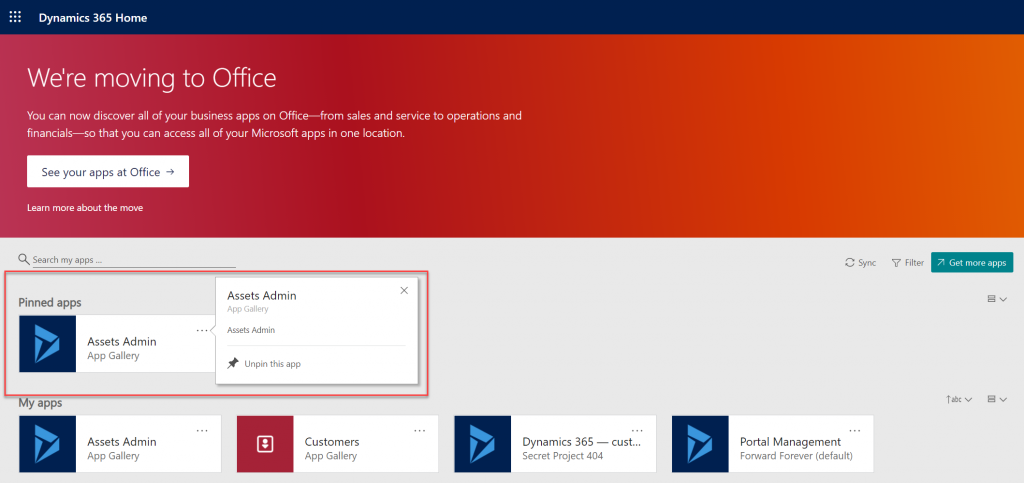
If we have past experience from the world of XRM then we’d probably navigate to the Dynamics 365 Home page at home.dynamics.com. This page should be showing all the apps that the user has access to, which it currently does. We can pin our newly shared Model-driven app to the top of the list for easy access:
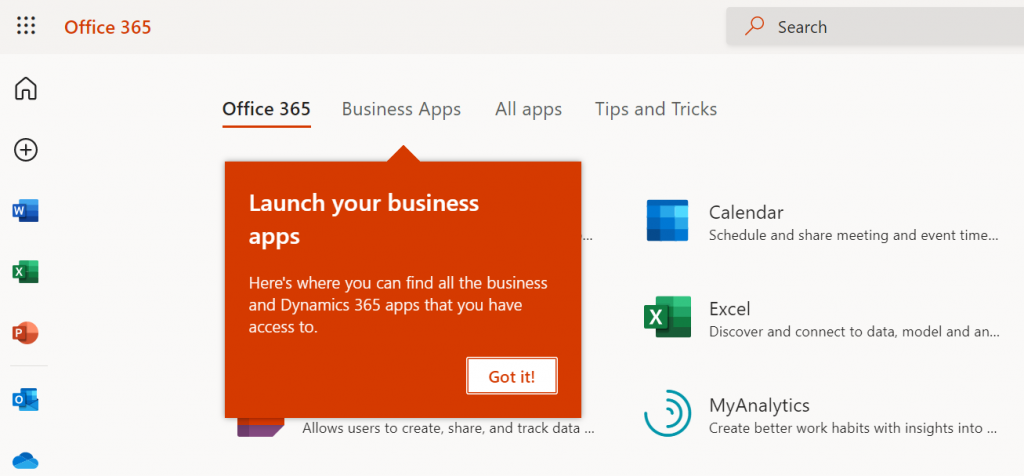
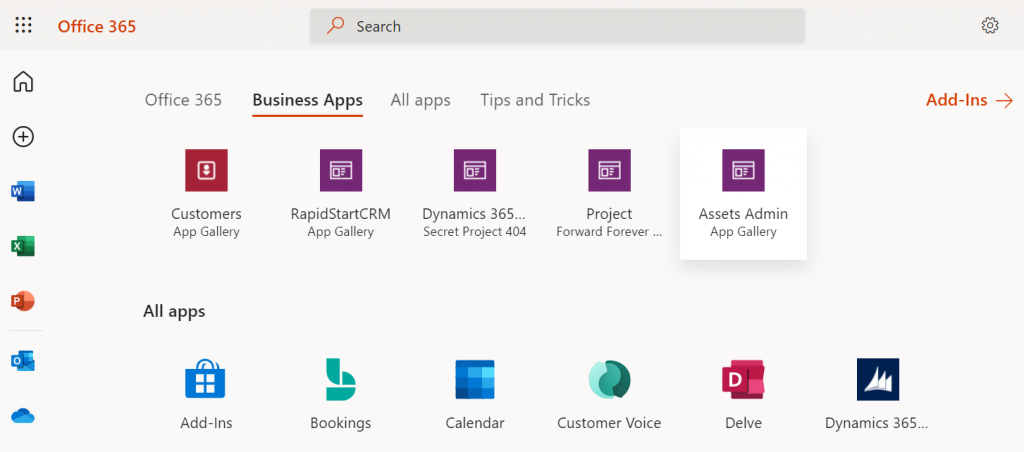
Oh, right. “We’re moving to Office” says the banner, since this Dynamics 365 Home page has been deprecated a while ago. In fact, based on the original deprecation message this page should have started to automatically redirect you to office.com/apps already. Today we still have the option to visit the legacy page, but let’s move over to the modern Office experience. We’re greeted with the “launch your business apps” onboarding dialog that points us to the Business Apps tab at the Office 365 home page:
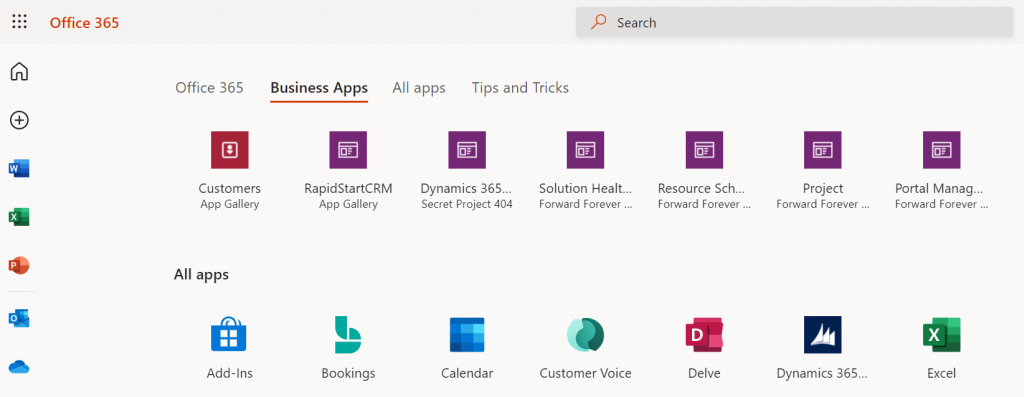
Looking at the list of apps, though, we probably won’t see our brand new app here right away. There’s a pretty significant delay in the list of business apps getting updated here. Unlike the old Dynamics 365 Home, which suffered from a similar delay, we don’t have a “Sync” button to make this process any quicker.
While we’re waiting for our new Model-driven app to show up on the Office 365 home page, we may start to wonder what apsp actually are listed here. For instance, why is Solution Health Hub showing up there for a normal user with no admin nor maker roles?
Perhaps the Model-driven apps visibility isn’t entirely security role based after all. Whatever the reason why these Microsoft built apps like Solution Health Hub or Resource Scheduling from the default environment show up for a non-admin user, it’s not exactly a pleasant user experience. The Office 365 home page doesn’t offer us any pinning or filtering features like the old Dynamics 365 home page did, so there’s not much an end user could do to clean up the mess.
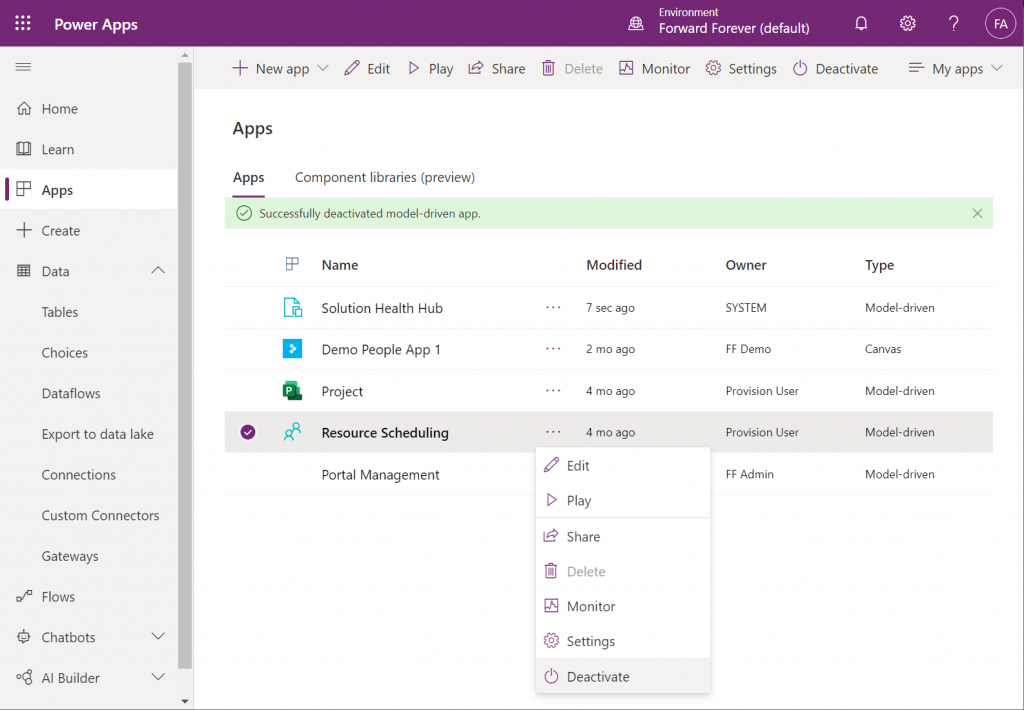
As a system administrator, though, we actually do have a way to trim the list of apps – even when they are first-party MS apps. Thanks to fellow MVP Alex Shlega, I recently learned that Model-driven apps can now be deactivated and activated. So, let’s go to the Maker portal in the default environment, pick the apps we want to hide from office.com/apps and select “Deactivate”:
Much better! Not only have the unwanted apps disappeared from the Business Apps list, but also our newly configured Model-driven app has appeared there during our small exercise.
There still remains one item on that app list that I can’t figure out a way to remove from the user. That “Dynamics 365 – custom” app from the Secret Project 404 environment is actually the result of a Dataverse for Teams environment provisioned by this end user. Now, since we have no way to directly navigate to the full Maker portal of such an environment and they shouldn’t support any Model-driven apps to begin with, these apps are something only MS can clear away in a future update hopefully
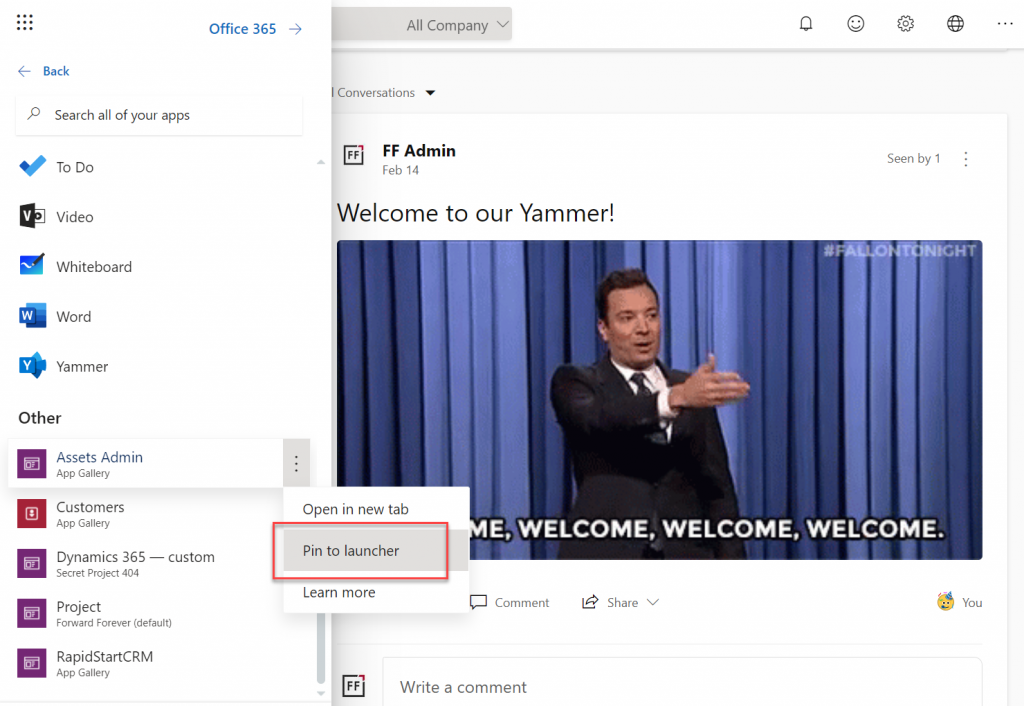
Thankfully there’s another place where the end user has more control over the app list than the Office 365 home page. Whenever you’re using some other Microsoft 365 service and need to open up a Power App, it’s a lot more convenient to use the waffle menu from the top left corner rather than the full home page.
Thanks to Thomas Sandsør for reminding me about the customizability of this app launcher. This is of course the place where a user should be instructed to pin their new Model-driven app for easy access:
One final point to make about Model-driven apps visibility is around Microsoft Teams. You should definitely consider pinning the apps into relevant Teams channels as tabs, to maximize the likelihood of the end users remembering to use them. As for a complete list of Power Apps available to the user, currently no such place exists within Teams, so you should pay attention to the Office menus as the portal to display your Power Apps app catalog for desktop users.
Update 2021-12-07: Office App Launcher new visibility criteria defined
Microsoft has recently changed the behavior of their app lists, with an update communicated via Microsoft 365 Message center message MC290818. Since many people will not have access to MC content and it will probably disappear at some point, I’ll post the contents here in full:
To help improve the app exploration and discovery experience for users, beginning mid-November 2021, the Office App Launcher, All Apps (https://office.com/apps), and app search experiences will be updated to only list relevant Dynamics 365 apps, Power Apps apps, and Azure Active Directory integrated apps.
Following this update, the Office App Launcher, All Apps, and app search experiences will only list Dynamics 365 apps, Power Apps apps, and Azure AD integrated apps that meet one of the following criteria:
Dynamics 365 apps and Power Apps apps:
Apps a user has launched in the last 7 days
Apps created by a user
Apps an admin has marked as ‘featured’ in the tenant
User accessible Microsoft published Dynamics 365 apps
Dynamics 365 apps or Power Apps apps that meet the above criteria will be shown in the App Launcher, the Business Apps section of the All Apps experience, and in app search results. Note that the time between when an app is shared with a user and when it appears in an Office experience is expected to be 24 hours.
Azure AD Integrated Apps:
Apps an admin or user has added to an Azure AD collection
Azure AD integrated apps meeting the criteria above will be shown grouped by collection name in the All Apps experiences, as well as individually listed in the App Launcher and in app search results. A link to the My Apps portal where users can create Azure AD collections will be added to the All Apps experiences as part of this update.
How does this affect me? Dynamics 365 apps, Power Apps apps, and Azure AD integrated apps that don’t meet the above criteria will no longer be listed in the Office App Launcher, All Apps, and app search experience. Users can take the following steps to access these apps and have them listed again in their experiences.
For Dynamics 365 apps and Power Apps apps, if a user cannot find an app they are looking for will need to first launch it in the browser via its Uniform Resource Identifier (URI). Note that admins and makers can get an app’s URI by selecting an app in the Power Platform admin center or via https://make.powerapps.com by selecting details, then selecting web link. Once the app is launched, it will be listed in the Office App Launcher, All Apps, and app search experiences.
For Azure AD integrated apps, a user can locate the full list in the “Apps” collection of the My Apps portal. Users can create collections for quick access to their favorite or most often used Azure AD integrated apps. Once the Azure AD integrated app is added to a collection, it will be listed in the Office App Launcher, All Apps, and app search experiences.
What action do I need to take? This message is to inform you of an upcoming change, no action is required. However, if you want to guarantee specific Dynamics 365 apps, Power Apps apps, and Azure AD integrated apps are available to users following this update, please perform either of the following:
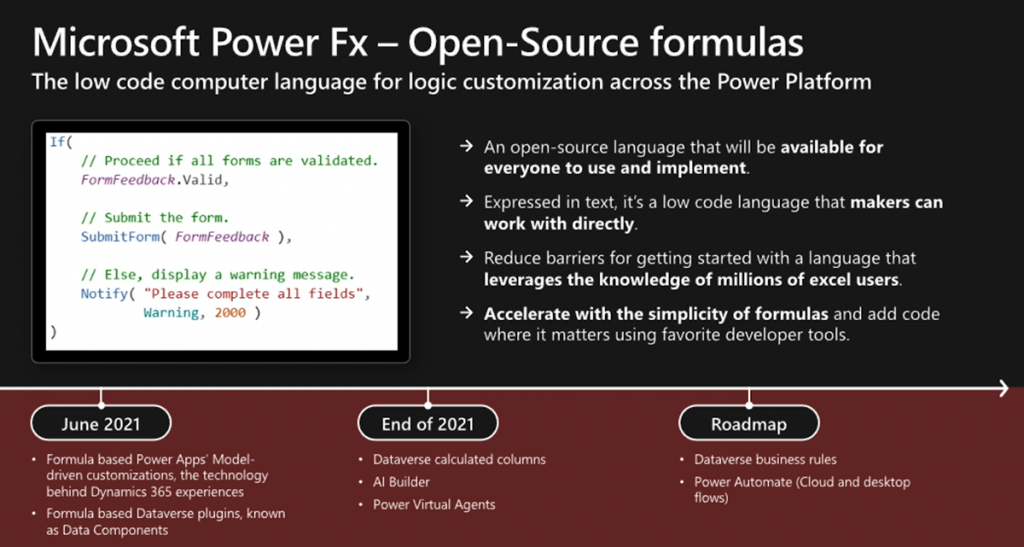
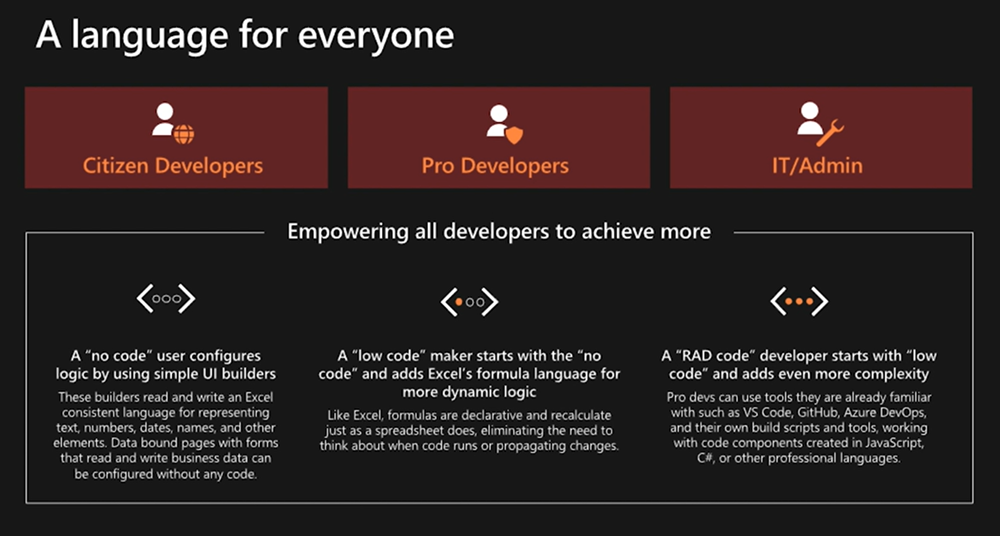
By now many of you will have read about the announcement Microsoft made at Ignite 2021 on their “low-code programming language for everyone”. I’ve written about the wider role of Power Fx in the high level Power Platform story in the Forward Forever team blog, which will give you all the basic information on what/why/how/when:
— Jukka Niiranen mstdn.social/@jukkan (@jukkan) March 3, 2021
Recently I also recorded a quick 10 minute video discussion I had with Julie Yack from 365.training where I had a chance to verbally express some of my thoughts on Power Fx:
I’ve personally started my low-code journey with Microsoft Business Applications back when the concept of XRM was first promoted, which is why most of my hands-on experience with Power Apps lies firmly on the Model-driven side. Power Fx as a formula language originates from a time when the two app types (Canvas & Model-driven) were still completely separate product offerings. If you’ve always built Canvas apps, there’s essentially nothing new for you in Power Fx. If you’ve only worked with the Model-driven business apps (Dynamics 365), there will be plenty of changes ahead.
In this blog post I’ll share some initial thoughts on how I see the arrival of Power Fx potentially affecting the way Model-driven Power Apps are built.
Why Model-driven needs Power Fx
There has traditionally been a clear divide between no-code and pro-code tasks when building apps the XRM way – meaning customizing and extending Dynamics 365 Customer Engagement apps in most cases. You’ve had a GUI for clicking your way through a variety of configuration options the application platform offers, to perform tasks like:
Define entities, fields and relationships
Determine the layouts of your forms, sitemaps and views
Design business logic via workflows, business rules, BPF
Our reliance on the almighty mouse pointer as the sword with which we fight our way through a battle field full of fierce business problems might be considered a weakness. Sure, we’ve often managed to emerge as the no-code hero who’s been able to tackle a business requirement most bystanders would have expected to require custom code. Yet there’s frequent frustration to be experienced when the particular configuration option we would have needed was not present in the graphical user interface (GUI).
Such problems don’t need to be very complex to become unsolvable. All it takes is for the specific function to have fallen outside of the scope of features that the Microsoft product team has managed to squeeze into the platform’s built-in toolkit. Sometimes you might find a community tool that generates the required JavaScript for you, or a custom workflow activity comes and extends the built-in actions to let you implement that specific calculation your customer needs.
Yet it remains mostly a black box for the non-pro developers: the next time you run into a similar limitation, you’re likely to again need help from the pro-devs to move forward. Venturing beyond the GUI tends to always push us into uncharted territory.
What the announcement of Power Fx promises is far more empowering. “Formula based Power Apps Model-driven customizations” sounds like you could actually get a peek of the underlying logic layer in text format rather than a finite list of picklist options to choose from. At the same time you probably would not need to assume responsibility of any software code implementation details. The lower level of how the conditions defined by your formula are actually met by the big computer running in the cloud would not be your concern.
The maker describes what they want their logic to do, not exactly how or when to do it. This allows the compiler to optimize by performing operations in parallel, deferring work until needed, and pre-fetching and reusing cached data.
Power Fx documentation on the language’s design principles
For me, the big reason to steer clear from copy-pasting JavaScript snippets from websites and tweaking them to be used in business applications built for customers is that I’m all too aware of what I don’t know. While I can often read what the specific scripts are doing, I don’t fully understand why they work vs. why they would not work under different circumstances. It would be far too easy for me to accidentally create something that breaks in the near future – not because of a bug in Microsoft’s code but a bug in my code.
Formulas that are written in Power Fx (today only in Canvas apps) are very different. Sure, they can be very complex as well, but there’s no knowledge required from outside the domain of Power Apps. If I pick a tutorial video from Shane Young’s YouTube catalog that explains the usage of a particular function in Canvas apps, most of the time I get it. I can immediately adapt it for my own scenarios, and get helpful Intellisense error messages from Power Apps Maker Studio when there’s something missing from my function (well, not always helpful messages, but at least an indicator of “keep trying”).
Taking the step to writing your Power Fx formulas instead of just clicking around the GUI helps in unleashing your creativity in app design and significantly expanding the realm of what’s possible. There’s also big potential in improving the efficiency of the app building process when you can copy-paste text based formuals instead of having to repeat a series of clicks in the MS admin portals that seem to only get slower and slower as years go by…
Why Power Fx may be scary for Model-driven app makers
Canvas apps have been promoted as the way to create “pixel perfect experiences” tailored to the end users’ specific requirements and needs. This is a completely different starting point for low-code app creation than the traditional business apps in CRM style projects where you are mostly customizing an existing application. On a high level, everything will look & behave pretty much the same way every time.
I’d argue that many of the limitations in Model-driven apps are in reality a safety net for the no-code app makers. Back in 2019 I did a presentation on the topic “Canvas apps for the Model-driven mind”, which describes the kind of leap that is needed both on mental and practical level for an XRM pro to turn into a modern Power Apps app maker. Power Fx will now play a big role in this transformation.
The relational Dataverse data model that sits behind every Model-driven Power App largely dictates how the app UI will function. As a result, there’s not too much creativity required nor allowed in creating the visual side of your business application. Navigation and Command Bar buttons will be generated for you, and you can rely on them being constantly presented to the user. Everything’s responsive out of the box, too.
The other side of Power Apps that’s not built on relational data structures and predefined UI grids is the world where everything runs on Power Fx. In Canvas apps the buttons don’t exist until you drop them on the screens and they do absolutely nothing until you add a piece of Power Fx text into the OnSelect property. Any dynamic behavior that’s desired for the app’s controls (visibility, size) must be expressed in Power Fx for their respective properties.
Building Canvas apps doesn’t require you to have programming skills, but it does quickly push you much closer to the experience of custom app development. You’re no longer merely a system customizer like in Dynamics 365 scenarios, now you’re an app maker. The whole purpose of the low-code tooling is that it blurs the lines between traditional developer roles, thus powering the new “fusion teams” that may share many of their tools – and now also the programming language.
As a result, it becomes less obvious what you can & can’t do without custom code extensions when building Power Apps. Configuration expressed as text based formulas can be vastly more powerful than GUI based options, allowing the most creative makers to achieve functionality that others might assume to be impossible with the available tools.
Journey towards “just Power Apps”
Back in Summer 2019 Microsoft revealed their long term roadmap on how the two types of Power Apps would eventually converge into one. We haven’t yet seen much concrete changes on how Model-driven and Canvas could coexist within a single app, apart from the embedding feature. The original plans for launching custom pages as a “canvas” within Model-driven apps were removed from 2o20 release wave 2 and no new target dates have been announced for it.
There is likely a wealth of moving parts in this puzzle that have dependencies between each other, so it’s no wonder this merging of Model and Canvas apps is taking time. Power Fx is a clear step towards making the new app building story consistent. Plenty of new functionality is likely to be needed, though, as you’re not simply replacing one programming language with another. Rather it’s the case of expanding bespoke GUI tools with a low-code programming language that can also be used to express the same logic.
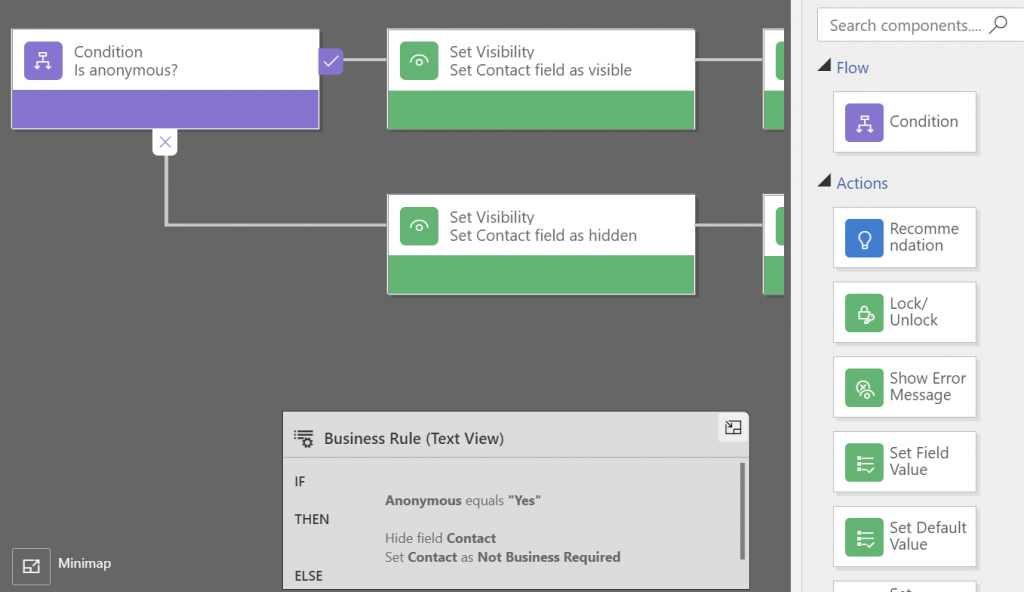
Exactly what the new Power Fx based “form and commanding customization in Power Apps” promised at Ignite will consist of remains to be seen. Calculated columns defined with Power Fx are much easier to grasp. The same goes for the conversion of Business Rules into Power Fx formulas, since already today the Text View in the editor looks a bit like these.
Making that If-Then-Else box editable would be a simple step. However, turning the actions in Business Rules into something that you could define with Power Fx and apply on a Model-driven form will surely require some more platform unification work. Show/hide fields, set required, prompt for errors… They all sound straightforward from a logic perspective, but how will such concepts be extended to cover not just Canvas sceen controls but Model form controls is going to be interesting to watch.
This is probably why Business Rules are in the same “future roadmap” bucket as the Power Automate flows for receiving Power Fx coverage. It’s not yet easy to envision how the declarative logic of Excel that Power Fx tries to follow wherever possible is going to be applicable to these more imperative scenarios. What would a flow written in Power Fx look like and is it really going to be easier for app makers to grasp than the current GUI?
Address Input control which suggests the correct address based on partial street names and autocompletes attributes like city, postal code, country, latitude/longitude.
Interactive Map control to show one or more records from a dataset as pins or cards on a visual map .
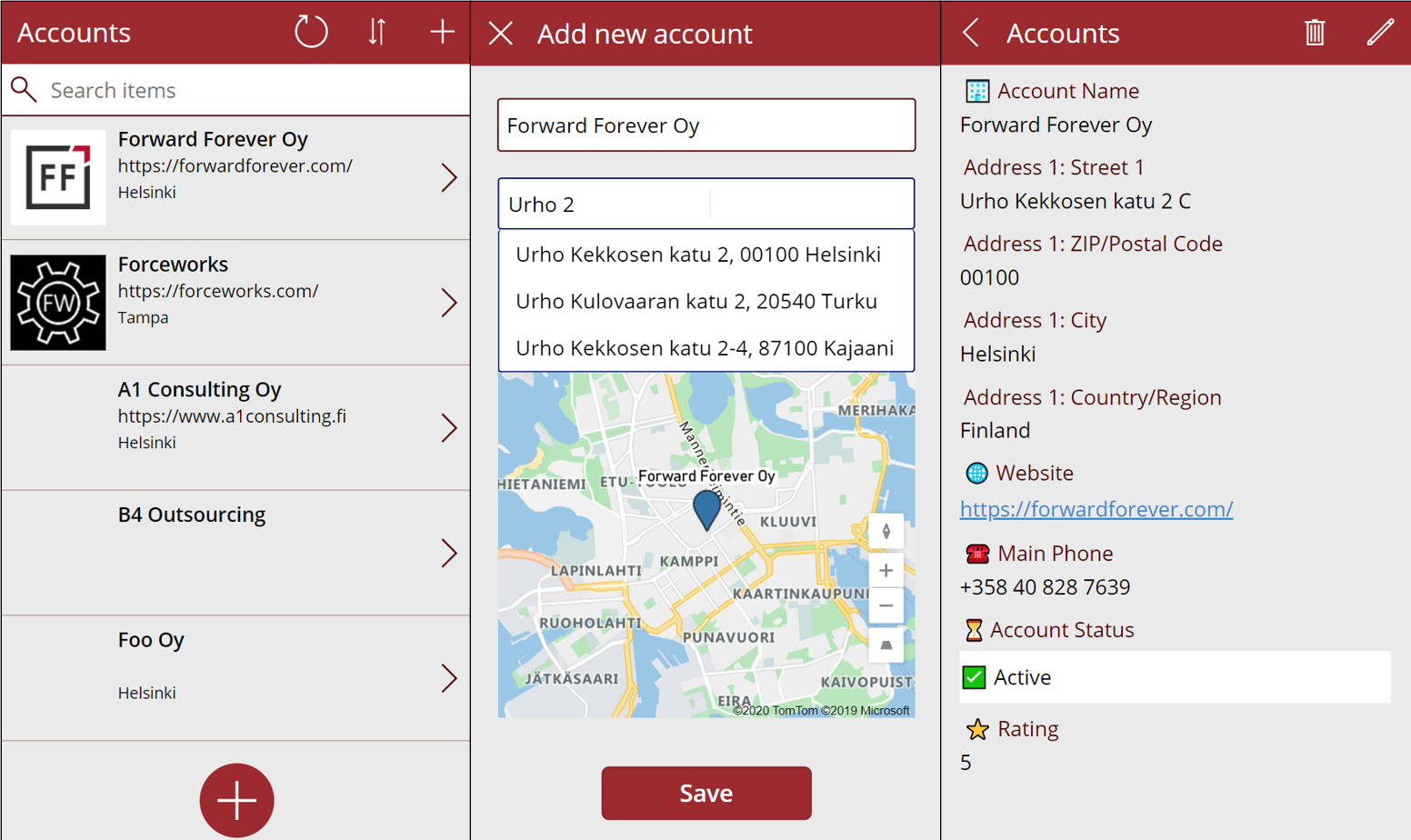
I decided to do a quick test of how to leverage these new capabilities in a simple scenario where we are managing account address information via a Canvas app running on a phone screen. Here is the end result:
Simple yet effective! Let’s explore the steps I needed to perform to achieve this functionality.
Source data
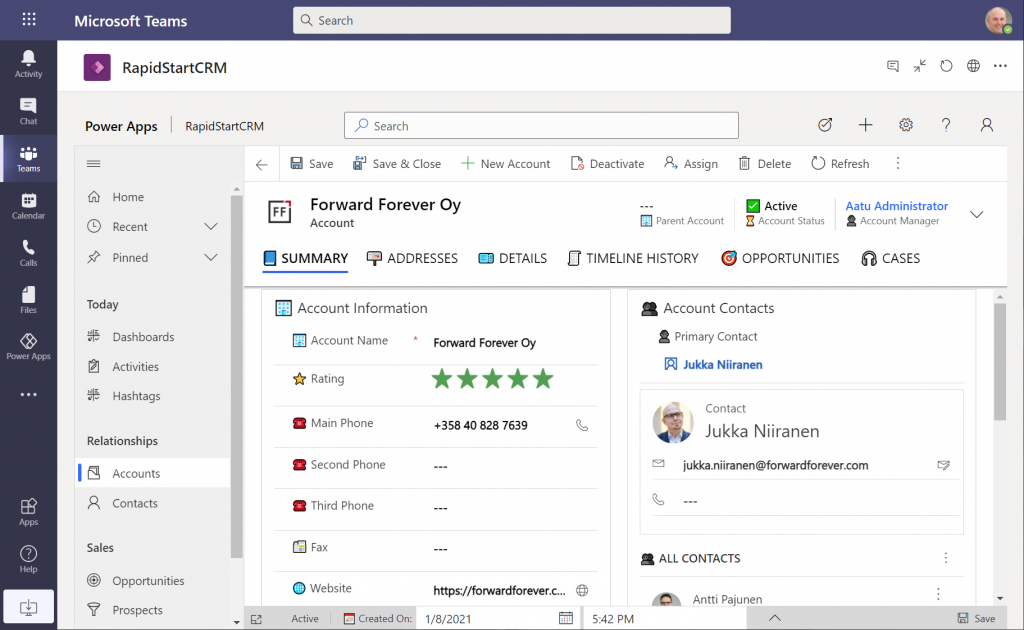
As a starting point, I’m using a pure Dataverse environment with no Dynamics 365 components. Instead, I’ve installed the free RapidStartCRM solution to give me a simplified CRM data model, plus a fully working Model-driven Power App. I could embed this inside Microsoft Teams and use it via a channel tab, for example:
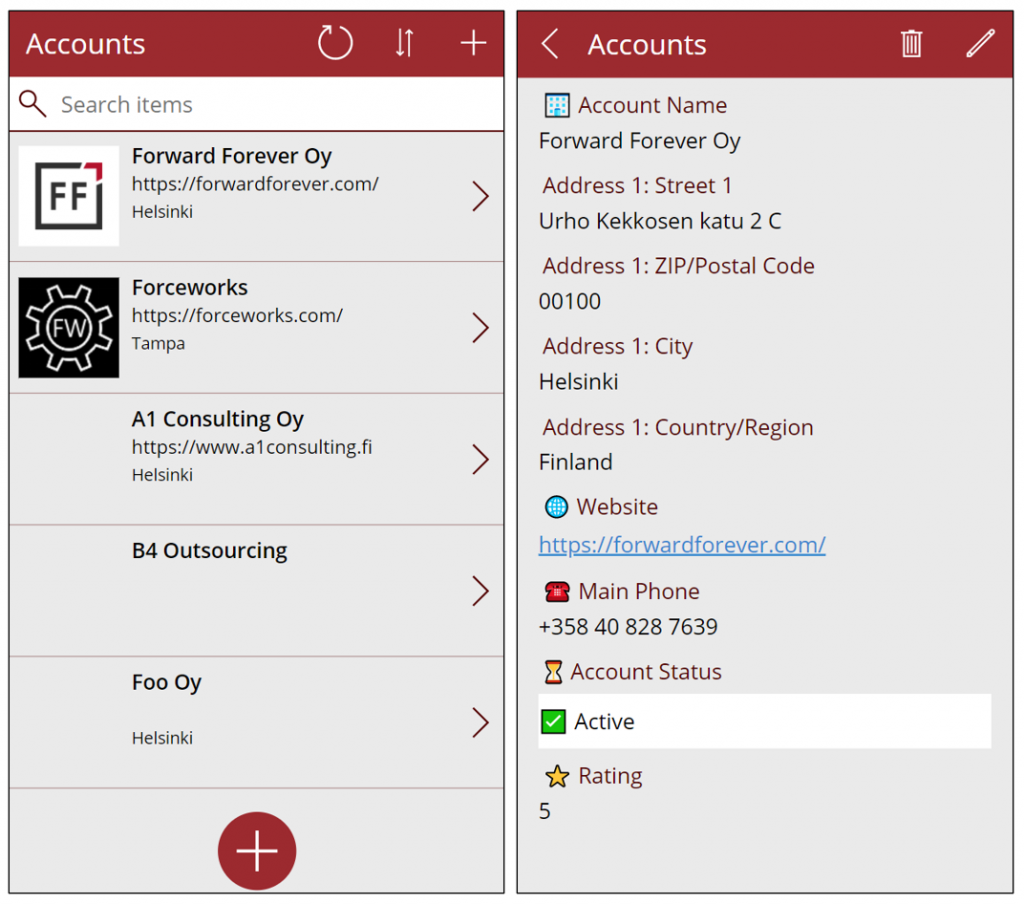
In our scenario I want to offer the users a simplified UI to be used on a phone screen, with only a small subset of the full features found in the Model-driven app. I’ll focus just on the account data, which means I can simply start by going to make.powerapps.com and choose to generate the mobile app based on a data source. In this case I’ll select the account table in the Dataverse environment where RapidStartCRM is deployed. This gives me the basic 3-screen UI for browsing, viewing and editing records (yeah, I know, “rows” – but I refuse to adopt this part of the latest MS BizApps naming bingo results just yet).
I want to create a custom data entry UX for this demo scenario, so I’ve added a “+” button at the bottom of the gallery screen to launch a new screen where I’ll be leveraging the geospatial features.
Address Input control
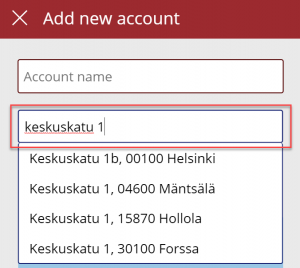
It’s never a fun task to enter the address details when creating new account records, especially when on a mobile device. Instead of asking the user to fill the various fields included in an address, we’ll add the new Address input control from the Input menu onto our “Add new account” screen. From the control’s documentation page we can see there are a number of input properties we could use, but it works quite well just by dropping it as a field onto the form and starting to enter text:
In my case, I did limit the country set to “FI” to give me just Finnish streets for my demo app. It looks like you need to enter the street name and number before anything is suggested by the Azure Maps API, but you’re allowed to have small typos in the street name, so there’s some fuzzy matching logic applied here.
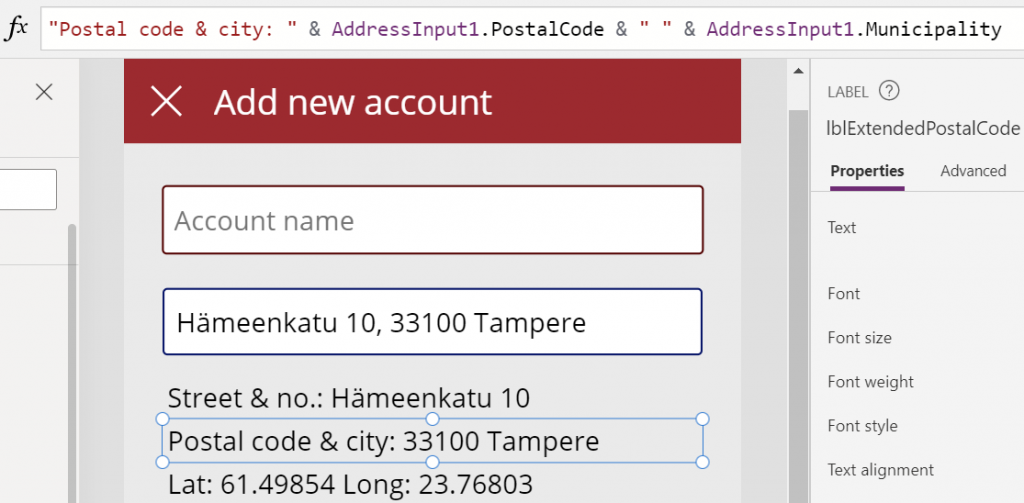
The real benefit of the Address input control is in the 19 output properties you get from it. Ultimately I’ll want to use them to A) show the map control based on lat/lon and B) store the data onto the new account record the app will create. But first, it’s nice to see the control’s output on the screen while updating values, so I’ve added a few labels where I display the results from the selected address. To do this, I’ll reference properties like AddressInput1.PostalCode and AddressInput1.Municipality to construct a nice looking string for the text property of the label:
This exercise will also help me in identifying how I’ll need to concatenate properties like StreetName and StreetNumber to create a valid value for the Dataverse account table’s Street 1 field eventually.
Map control
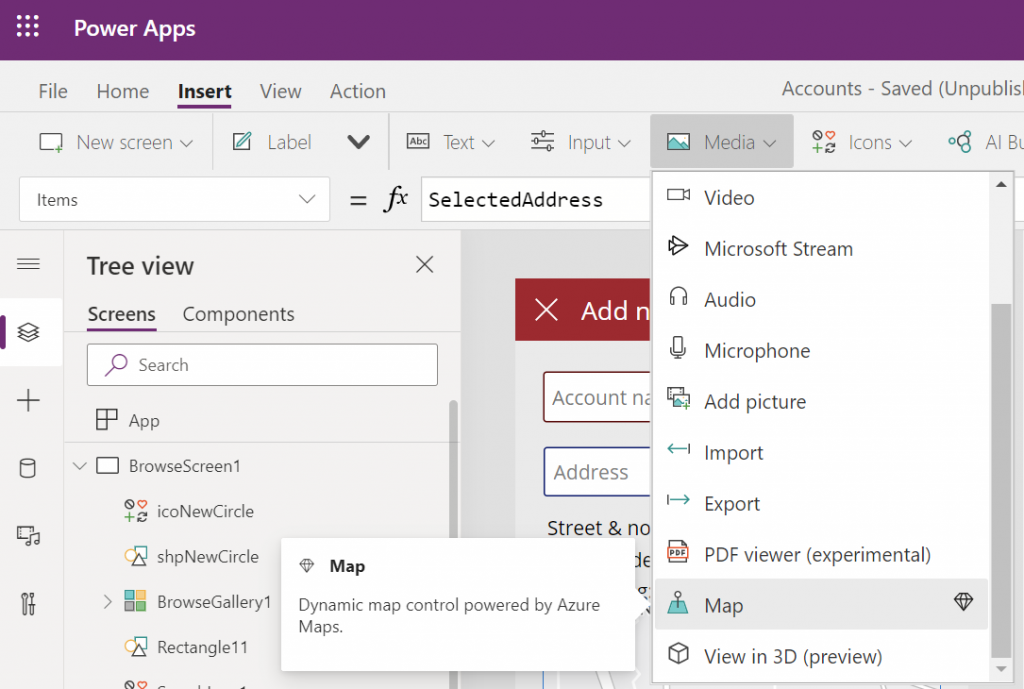
Seeing a map view where the address we’ve inputted is physically located is a big factor in the app’s user experience. We’ll want to give visual confirmation to the user that the address is actually at a location where they expected it to be, plus the ability to zoom in/out on the map to explore the surroundings. So, while in the Power Apps maker studio, let’s click on the Media dropdown and add the Map control onto our screen.
Hmm, how do we then tell the Map control to zoom in to the address we’ve selected in the Address input control? I had to browse the Interactive map component documentation for quite a while to figure out a way to do this, as it wasn’t entirely obvious how to visualize an individual address rather than a table of records. What I ended up doing was to go into the OnChange property of the Address input control and create a SelectedAddress variable to be set to the chosen address whenever the field’s value changes:
Note that in my app I’ve got a Text input control tiAccountName into which the user is requested to type in the name of the new account being created, before proceeding to work with the Address input control. I’m picking that name as the label to be shown on the map pin.
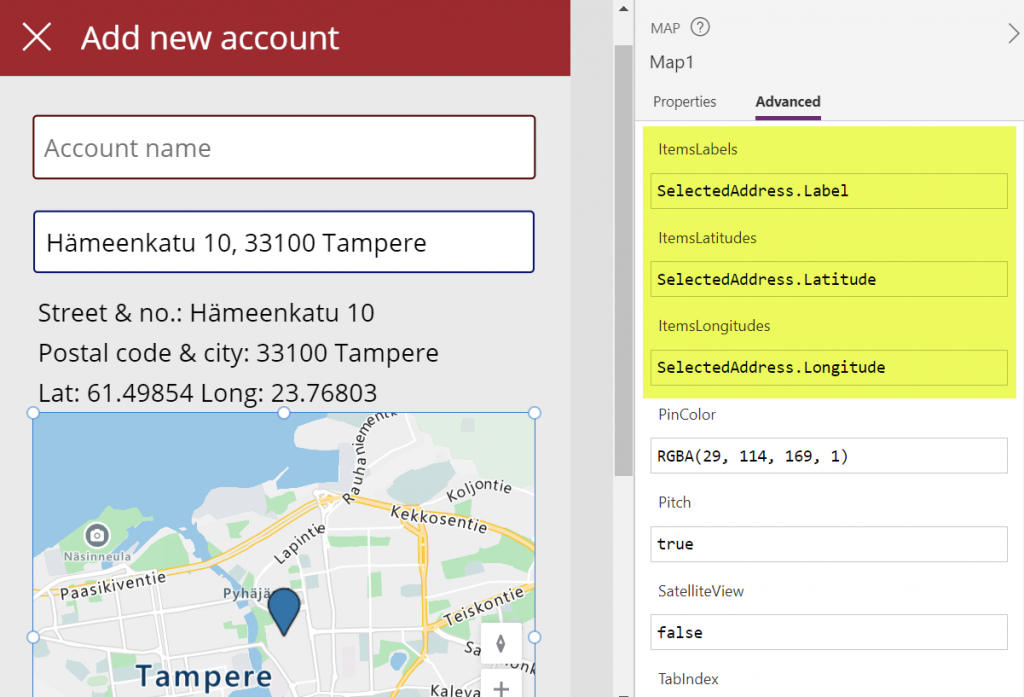
Then in the properties of the Map control I’m setting the values of ItemsLabels, ItemsLatitudes and ItemsLongitudes properties to reference my SelectedAddress variable’s respective properties:
There’s a variety of other input properties for the Map control, many of which I didn’t yet tweak in my demo app. For example, setting the default location to be that of the current location of the user’s device might be a good idea, but a quick test in the browser didn’t yet tell me how exactly I’d then replace that with my custom location from the variable. I’m sure the will be plenty of ways to optimize these map parameters when connecting them with your app’s business logic and data.
Saving the account + address
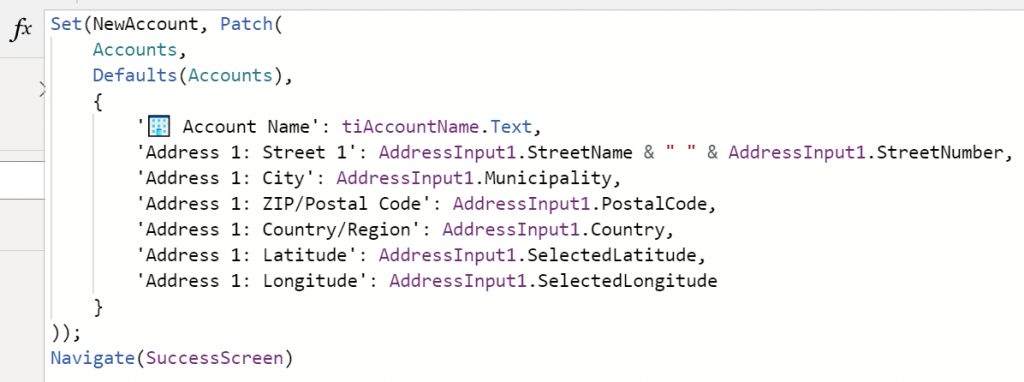
Finally we need to store the account name and address details onto a new Dataverse record in the account table. As we aren’t working with the form control here, it’s time to use the Patch function. I always need to check the Docs page for the exact syntax, but when working with simple text fields in the target table, the formula isn’t all that complex. On my Save button of the “Add new account” screen I’m running this:
I’m storing the results of the Patch function also inside a NewAccount variable, so that I could reference the values further in the UI if needed (confirmation dialogs, for example). No error handling or anything else fancy here in the demo app, instead I’m just navigating the user to a “Success!” screen after the record has (hopefully) been saved in Dataverse:
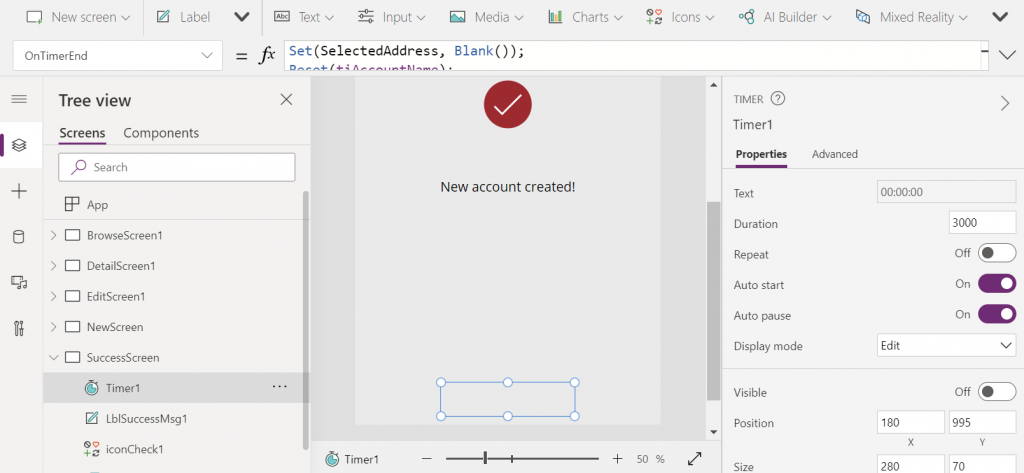
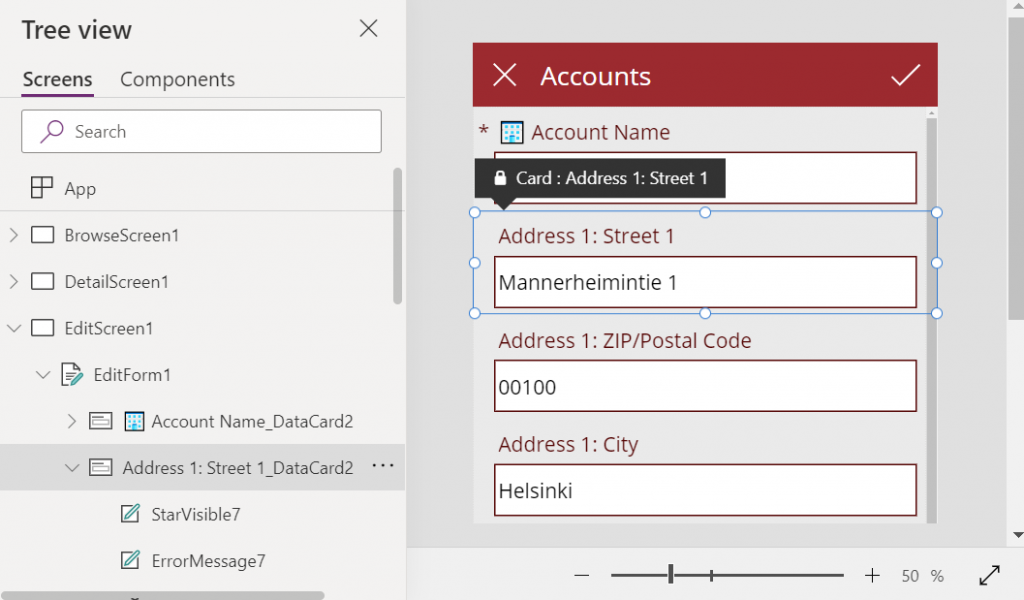
The “Success!” screen has an invisible timer control set to auto start and a duration of 3000 milliseconds. In the OnTimerEnd I’m doing housekeeping like setting the SelectedAddress variable to Blank(), resetting the Account name text input, then navigating the user onto the account browse screen that will show our newly created account somewhere in the gallery. Another option would of course be to take the user onto the full Edit Screen of the record, to enter further details via the standard form control if needed:
That’s all there is to it! All in all, my first impression from these new geospatial features is quite a positive one. It’s important to note that since they are using Azure Maps service behind the scenes, these controls have the “premium diamond” next to them in the UI. This means you’ll need to have a premium license like Power Apps Per App or Power Apps Per User for users who are taking advantage of these address mapping features. Also keep in mind that the Power Platform environment where your app lives in must be enabled for geospatial features by the admin.
On the first business day of each month, I have one routine that I’ve been following for quite some time now: check the latest Licensing Guides that Microsoft has published. I have two short URLs that I use for quickly downloading them:
I also have a habit of storing each historical version of these documents (and other licensing materials from MS) onto my OneDrive. I’ve found this to be the only way you can actually keep track of what’s going on in the rapidly moving world of BizApps licensing. Well, these days there is also the GitHub history of commits made on Microsoft Docs pages covering licensing (like this one), if you’re into comparing the diffs of each change made in the detailed wording.
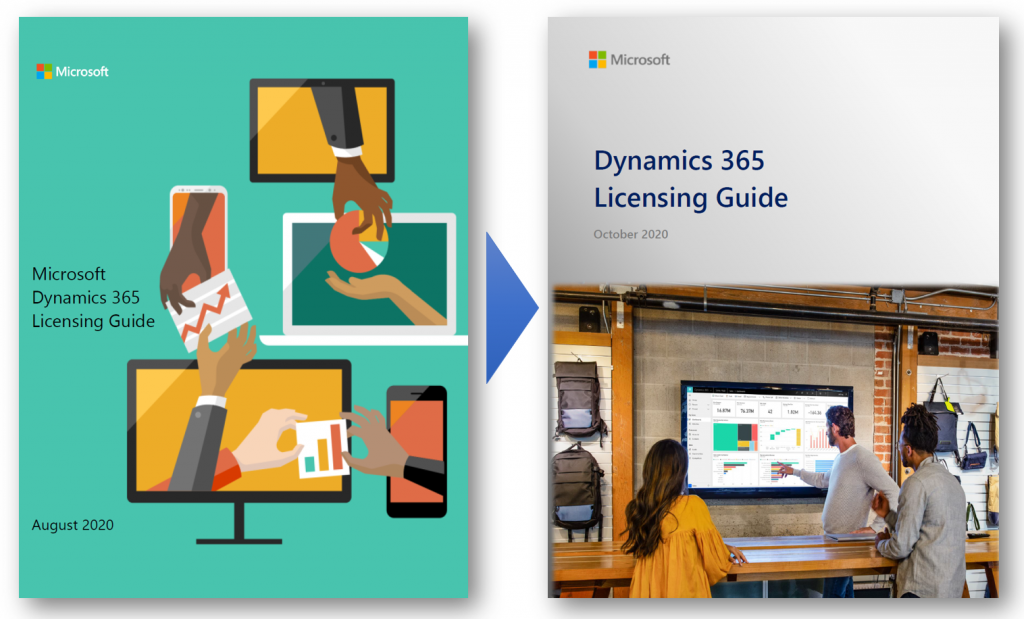
Fresh new look for October 2020
This time the latest PDF for Dynamics 365 Licensing Guide offered quite significant changes, which are clearly visible right from opening the document:
“Big deal, just another cover page update like they do with Release Plans.” This time there’s more to it, though. Here’s what MS says:
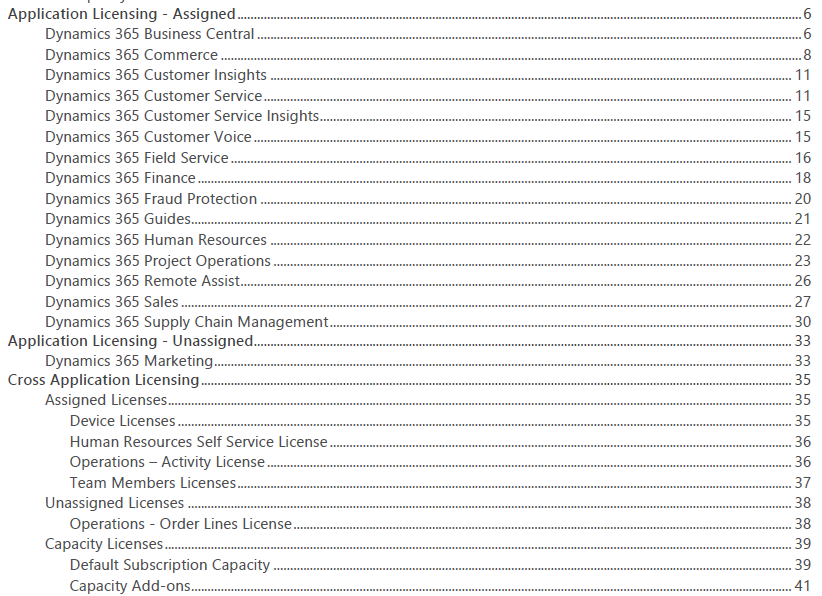
The Dynamics 365 Licensing Guide has been reformatted and renewed for October 2020. We hope you will find it consistent and easier to consume. Applications are presented in alphabetical order, and each section covers the full story including licensing model, additional applications, and user rights. Dynamics 365 Business Central and Mixed Reality offers are now included in this guide and duplicative information has been removed. Product licensing information that is legally binding is presented in the Product Terms and Online Services Terms (OST). Power Platform licensing information is referenced in Power Platform licensing documents.
Previously Business Central was excluded from the Dynamics 365 Licensing Guide, which of course sounded a bit strange. After all, the historical plans for having separate Business Edition and Enterprise Edition product tiers for Dynamics 365 were scrapped before these products ever launched, so preserving such division in the licensing documentation did not seem justified.
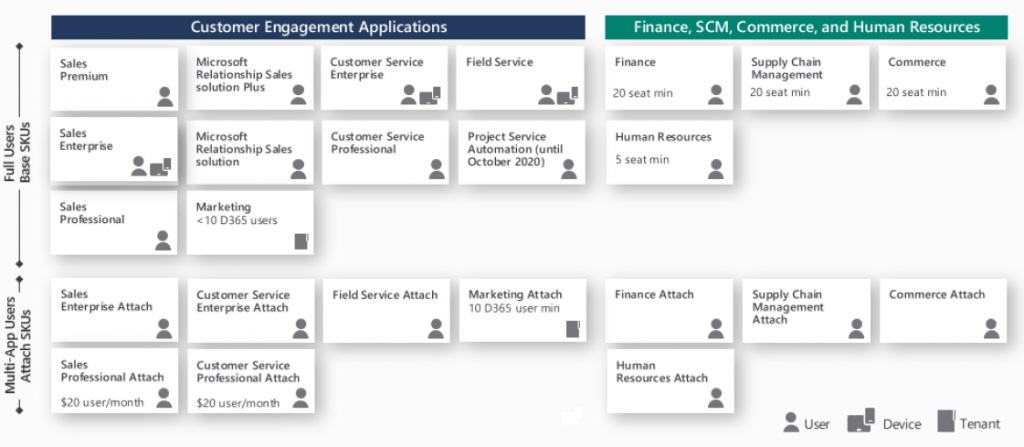
This was not the only division that existed in the earlier Dynamics 365 Licensing Guide, though. For old time’s sake, here’s how the last August 2020 version of the Guide illustrated the different types of Base and Attach licenses available:
We had a split between “Customer Engagement Applications” and “Finance, SCM, Commerce and Human Resources”. Go back a full year and the right side said “Finance and Operations, Retail, and Talent” – because it’s apparently a great idea to change software product names at least as often as their licensing model… Anyway, the logical grouping was still the same, meaning we had the XRM/CRM apps on the left and AX/ERP on the right.
This wasn’t exactly the way Microsoft would like to present their Dynamics 365 suite of products, as instead of CRM on one side and ERP on the other it should be one seamless plaform. Related to this, MS had stated in October 2019 already that they would no longer be using the term “Dynamics 365 for Customer Engagement apps” to refer to any cloud services, leaving CE as the term for legacy on-prem versions only. Despite of this, up until the August 2020 version the Licensing Guide for these cloud apps still had 47 occurrences of the term “Customer Engagement” in it.
Customer Engagement is gone for good
Now in the lastest Licensing Guide version we have a truly flat list of all the different Dynamics 365 apps presented in an alphabetical order. If you didn’t know the origin of each application and what technical platform it actually runs on, there wouldn’t be anything in the Licensing Guide to highlight this.
From a commercial perspective this makes a lot of sense. The whole idea behind Dynamics 365 today is that instead of subscribing to a “plan” that opens on set of apps that share a common server origin, your organization’s users could subscribe to any combination of apps that suit the needs of a particular subset of your users. The Base/Attach licensing model makes the cost of additional apps an attractive option to explore. While not all data might be in the same physical place for each app, this may not even be an issue for unrelated business processes like Sales and Human Resources.
From a technical perspective, things aren’t necessarily getting any easier to grasp by this removal of a familiar layer like CE (or CRM). Yet on a factual level the Dynamics 365 suite hasn’t been about the combination of CRM and ERP for a while anymore.
Think about Customer Insights, for example. That’s a service built to ingest data from multiple different systems (like CRM or ERP) and manage it on Azure Data Lake. Or how about Customer Voice. It was born from the feature set of Microsoft Forms, then merged with the legacy of now-deprecated Voice of the Customer. The resulting product isn’t exactly pure XRM nor is it an extended Office app.
We can expect most new Dynamics 365 products to be hybrids built out of multiple technologies. In the process it’s becoming difficult to assign them into buckets based on established enterprise systems.
What’s my name again…?
People with a Dynamics CRM background have fairly broadly adopted CE as the descriptor to identify which part of Dynamics 365 they specialize in. As Microsoft erases the last instances of Customer Engagement from their terminology, this can cause some further identify crisis for long time professionals who are experienced with XRM yet can’t quite place themselves on the long list of current Dynamics 365 app names.
The way I see it, there isn’t any need for a new replacement term to cover what used to be CE, and XRM before that. It’s just simply Power Apps! All of the common features of the platform are essentially included under the Power Apps umbrella, and there’s a data platform called Common Data Service as one key element of it. Everything up from there is the app specific layer where the Dynamics 365 X product team has implemented functionality with a business process in mind. CE isn’t such a useful concept here anymore, because knowing about Sales doesn’t guarantee you’re fluent in Marketing or Field Service apps.
So that things wouldn’t be all too simple, Power Apps does of course cover a wide array of functionality that CE professionals may not be familiar with. For starters, alongside the Model-driven apps there are Canvas apps and Portals – each with very specific logic that could be compared to CRM vs. ERP. Power Automate as the candidate for replacing traditional CE process automation is a fair bit wider than just workflows. If you’d then expand beyond Power Apps and call yourself a Power Platform specialist, would that indicate fluency in Power Virtual Agents and Power BI, too?
Licensing just Dynamics 365 ain’t enough
The extensive list of apps and their pricing elements in the current Dynamics 365 Licensing Guide is a bit like the Terms & Conditions of any online service: no one is going to read through it all. At the same time, though, it doesn’t go deep enough in explaining how the first-party Dynamics 365 apps relate to the platform capabilities licensed via Power Apps. Unfortunately there is no single Power Platform Licensing Guide document to provide answers, because no such product is actually being sold by Microsoft. You license various pieces of it and then assemble them into your own unique structures.
The trickiest questions around business applications licensing aren’t usually about the app specific details that you can read from the Dynamics 365 Licensing Guide. It’s about those scenarios which involve using the Power Platform as the means to customize, extend and integrate Dynamics 365 apps. On this front nothing has really changed nor improved, as Microsoft continues to treat these two sides as separate products (see my blog post on why Power Platform licensing is complex). Often you’re left between browsing the two separate Licensing Guides, digging through FAQ answers and sometimes tracing the underlying intent of the licensing model into something that a MS representative has informally stated in an interview.
As it just so happens, I’ll be speaking at the CDS Saturday event on October 24th about Making Sense of CDS Licensing. This will be a live event with no recording to catch later so be sure to sign up and be there if you’re interested in diving deeper into the key aspects of licensing Dynamics 365 & Power Apps when building CDS based solutions.
At the virtual Microsoft Ignite 2020 event I had chance to join many fellow Finns in our FIgnite session and spend 5 minutes on highlighting a topic that I considered to be important in the MS ecosystem right now. It turned out to be an easy choice to make.
Project Oakdale (briefly known as Dataflex) is bringing the low-code/no-code functionality from Power Platform into the hands of pretty much all the information workers leveraging Microsoft 365 tools in their day-to-day job. This is not so much about any single technical feature as it is a change in mindset about who the app makers should be. So, I set out to explain this my 5 minute presentation titled How Power Platform Now Empowers All Teams Users.
https://www.youtube.com/watch?v=Dj_IH4yq1dE
This is all part of the larger Microsoft Teams as a platform story that I covered in my previous pre-Ignite blog post. It’s no surprise that MS has created much more content around this topic than you could have ever expected to see on Power Apps or Power Automate as independent technologies. It’s a sign of the size of the audience to which this “no cliffs” application platform message is now targeted at.
Will the inclusion of “CDS Lite” in the Microsoft Teams subscriptions prove to be a gateway drug that makes Common Data Service a household name in Microsoft 365 customer organizations? And if so, what will the actual brand name be for Project Oakdale once wre’re past the preview phase? Time will tell!
2020 became the year of #WFH (work from home) and for many organizations also the turning point when Microsoft Teams became the primary place where being “at work” happens. This is accelerating the evolution of Teams from being merely a communication tool that connects human beings into a foundational service layer for many types of business applications.
How the concept of Teams as a platform contrasts with Microsoft’s Power Platform suite of technology is something I’ve been thinking about a lot lately. In this post I’ll first reflect on the relatively short history of where Teams came from. I’ll then examine how the recent feature announcements are brining apps front & center in Teams. Finally, a few words on the possible future for Teams as part of Microsoft’s broader strategy.
The road that lead to Teams
Looking back ~10 years, the real-time communication & instant messaging tools from MS seemed to be going through an endless renaming cycle: from OCS to Lync to Skype for Business. The core feature set presented to the end user didn’t seem to evolve nearly as much as product branding did. On a broader level, the communication activities of information workers within an organization still typically took place within Outlook’s inbox, and different servers like SharePoint and Dynamics CRM all packed their own features for posting short messages to other users.
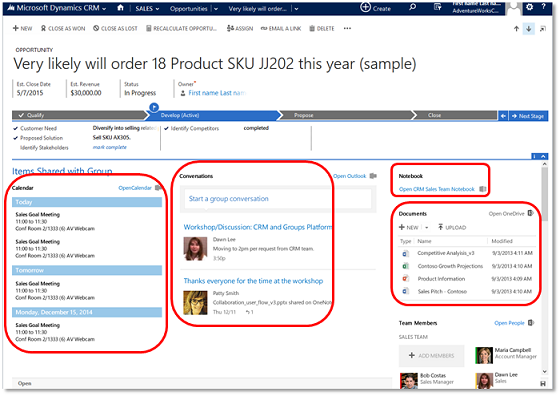
4 years ago, when the first images of what was then called “Skype Teams” started to leak out, we were already waiting for MS to create something a bit more ambitious than just another online meeting tool. Office Groups had began to emerge in various different places inside the MS Cloud, but they were primarily a technical construct with no sensible UX for everyday people to approach them. Even Dynamics CRM had it’s own solution that attempted to bring together the dicussion, calendars, notes, documents and team memberships from under an Office 365 Group associated with a record like account or opportunity:
I remember having many discussions with our CRM customers where I attempted to steer people away from deploying this Groups solution. Instead I wanted to encourage them to wait for something a bit more polished that I knew had to be on it’s way sooner or later.
At one point there was a clear & present danger of another “Yammer moment” taking place, as Microsoft was reportedly quite serious about their plans to acquire Slack. In retrospect it was a blessing for both parties that MS decided to keep investing in building their own product, instead of trying to retrofit an established service like Slack into their existing software offering.
I would argue that this “build over buy” strategy which Microsoft has since then followed across their business software stack has been a key success factor for BizApps in particular. It has enabled MS to move from merely chasing CRM competitors like Salesforce into redefining the business apps playing field with Power Platform. There’s a stark difference between acquiring companies and bundling them as “X Cloud” versus engineering your own software stack to act as a true platform.
Teams: the collaboration chapter
Initially the first version of the Microsoft Teams product that became generally available in Spring 2017 was pretty much focused on being three things:
Replacement for Skype for Business
Alternative to Slack
UI layer for Office 365 Groups
From a business applications perspective there wasn’t all that much you could do to hook Teams up with Dynamics 365, until Fall 2018 when the previews for the first integrated features were launched. In particular the integrated file sharing experience that Teams offered seemed almost like the Holy Grail for many CRM professionals, offering to fix the glaring hole in the SharePoint integration story that lacked any security model synchronization. The roadmap image below presents the plans from 2 years ago on how Teams and Dynamics 365 were going to be integrated:
The last item on the roadmap has still not been delivered, which is the visibility of Teams conversations inside the Dynamics 365 record form. Why this hasn’t been a higher priority for MS to implement seems to me like a sign of how Microsoft Teams is nowadays positioned as the primary UI for all information work. MS probably would prefer if everything always started from inside Teams. You pin record tabs into channels, you show previews of records inside teams discussions, you interact with records via bot interfaces and so on. As long as Teams is that big umbrella under which all work takes place.
The lack of a deep 2-way integration does not therefore mean that investments aren’t being made into the products involved. It can simply be a reflection of the new vision that is being built, by aligning many existing services to form a whole that aims to be greater than the sum of its parts.
As an example, if you look at Microsoft’s task management story, you’ll see that features and data from across various apps like To Do, Planner and Outlook tasks / flagged emails are currently being collapsed into a central location that is the Tasks app for Teams. Tasks as a generic construct don’t necessarily need to be fully controlled by a single database, yet they very much need to be logically represented within “the hub for teamwork” that Teams is positioned as.
Going forward, when new apps appear into the MS cloud product portfolio and they need to offer task management features to users, the logical integration point to focus on would be Teams. For activity feed type of functionality the choice is even more clear for product development: choose to piggyback on Teams instead of inventing yet another stream of short messages.
Teams: the platform chapter
Moving beyond simply integrating Teams with products X, Y and Z, we’re now seeing the rise of a model where apps are built specifically to be used in Teams. This has of course been possible for a long time already, by developing custom web services and using the SDKs. Now there are many features coming up that will amplify the platform story around Teams on the no-code/low-code front specifically.
Microsoft Lists app has been the first to reach GA and offers an ultra low barrier for users to process data in a single table through a configurable, readymade UI. When accessed via Teams, the list data gains one more special dimension: discussions to be had regarding a list item. This is pretty much the same as the usage pattern offered for a Dynamics 365 record with the integration mentioned earlier.
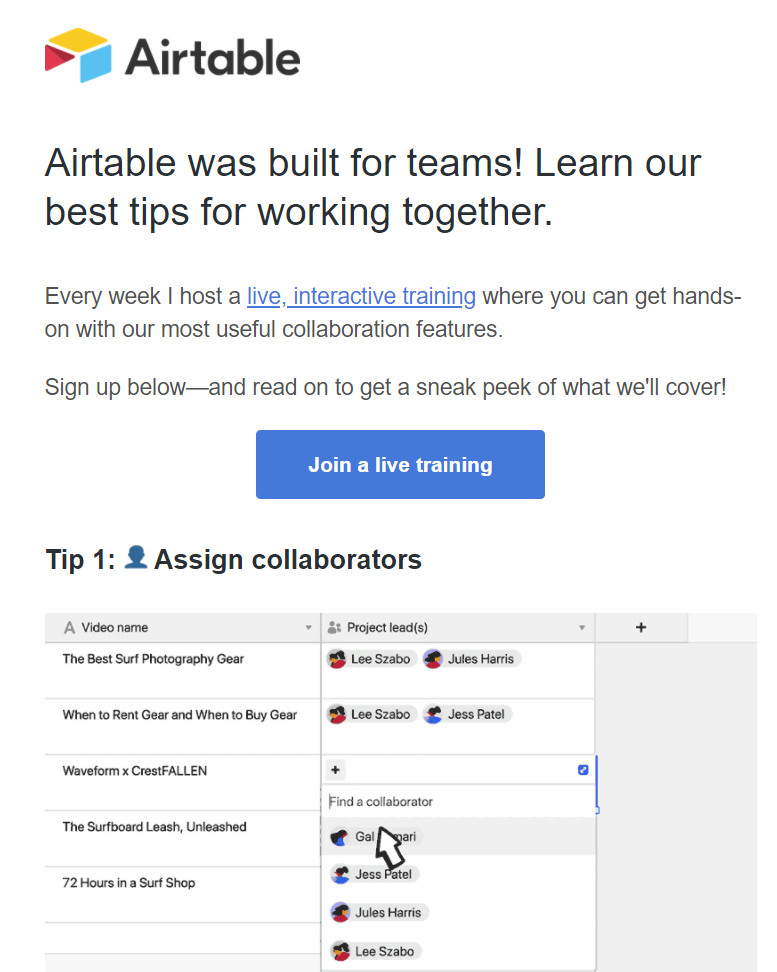
Underneath the new covers of MS Lists is the technology familiar from SharePoint lists. If we were to only examine the UI layer, there is actually a remarkable similarity to a popular no-code service called Airtable. So much that the accusations of MS simply copying the visuals and core features from this competitor don’t seem entirely unjustified.
Comparing these two offerings gives us some perspective on what exactly is the market position these tools are aiming to conquer. Simple lists themselves are not a particularly unique feature, rather it’s the team collaboration capabilities and ease of data sharing that turns these tables into what you’d call an actual app. Incidentally, just this week Airtable announced they were building a full platform with apps offering JavaScript based extensibility, a marketplace for sharing apps, automations for executing business logic, and finally a sync service to transfer data across environments (“bases”).
Collaboration scenarios around semi-structured data like lists and Excel style tables can be seen as a gateway drug. They allow turning email or paper based manual processes into a quick first draft of what the digital process could be like. If there are indeed clear business benefits in automating the said process, the requirements for more complex app features will soon begin to emerge from the user base. Hence the collaboration platform should offer an obvious path to grow these pre-built app experiences into more advanced no-code/low-code apps.
Project Oakdale a.k.a bringing CDS to Teams
If Microsoft Lists is the equivalent of an Excel table within the Teams context, then Project Oakdale / “CDS Lite” could be though of as bringing SQL Server inside Teams. Now, obviously Microsoft has zero intent on actually replacing Excel nor SQL with features built into Teams. They only need to introduce those parts that make sense from a team collabocation perspective.
Microsoft Lists is a far cry from what a real Excel workbook can do, yet it can offer much more value in a collaboration scenarios that those lone .xlsx files ever could. Similarly, the version of CDS that will very soon be available for building Power Apps within Teams is nowhere near as powerful as the services powering enterprise CRM systems like Dynamics 365 (or the raw power offered by SQL). Still, the fact that it can be found from within every team and used by a much larger audience than what Power Apps citizen developer tools could hope to capture – those are the factors that can truly make CDS a mainstream service that most information workers in the Microsoft 365 cloud interact it.
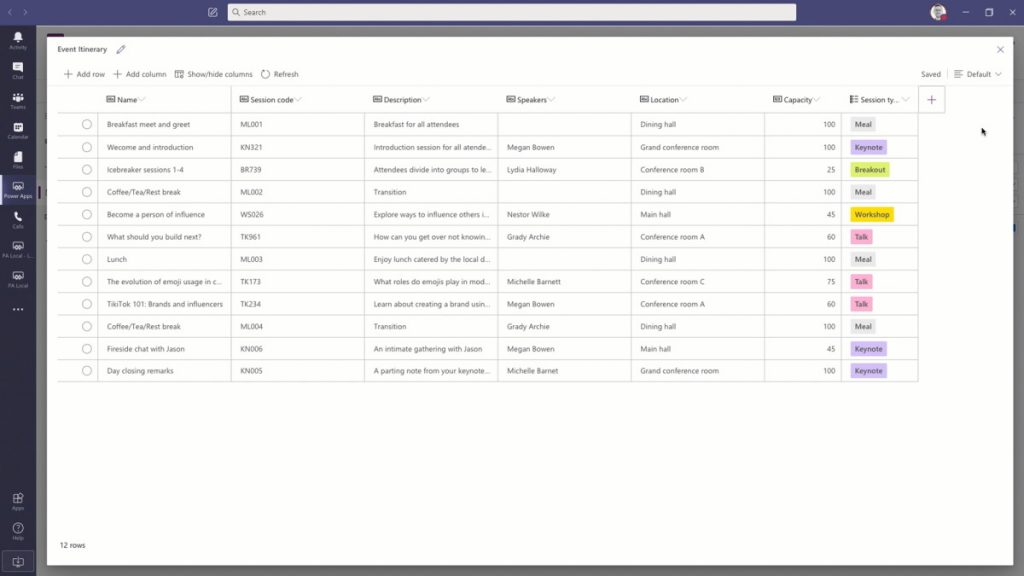
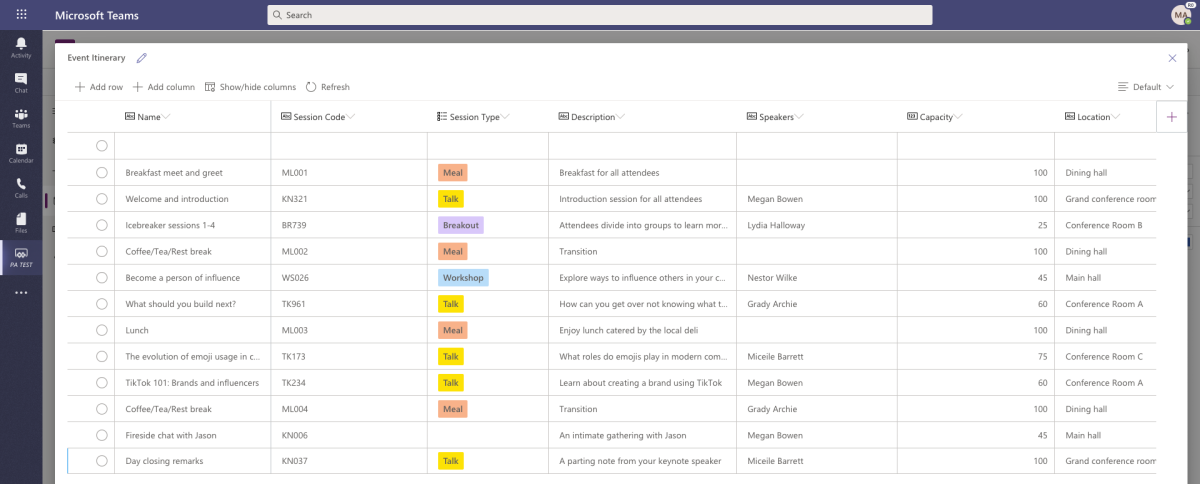
The experience of defining the CDS data model in Project Oakdale will be very different from the path that Power Apps makers have gone through – let alone the XRM veterans. In fact, you could easily mistake the table design and row entry UX to be that of Microsoft Lists rather than CDS. This highlights a key aspect that not all Power Platform experts may yet have grasped: for MS this “CDS Lite” is not so much about deciding what premium features of the full Power Platform to give away for free to Teams subscibers – rather it’s about how to best simplify the enterprise CRM features of CDS into a new product that Teams users could adopt on their own.
This doesn’t mean that Microsoft Teams should be viewed only as a mechanism for MS to scale Power Platform to the masses, by “dumbing it down”. If the app platform story of Teams plays out like it ought to, there should also be clear benefits from it to enterprise business applications development.
Capabilities like messaging, notifications, task management, documents or group memberships are not something the Power Platform tools are very good at. For historical reasons there has been the need to build standalone features into XRM for these type of common requirements found in business application scenarios. For the future generations of apps being created, it’s easy to see the benefits of having these non-core capabilities offloaded onto a platform more suitable for managing them – meaning Teams.
It doesn’t really even matter if the feature set offered by Teams couldn’t cover all the deep business logic integration of native Dynamics 365 functionality. Ultimately it’s not about supporting the system-of-record legacy but rather encouraging the new low-code scenarios that will generate 100x more apps onto the platform.
Teams is the new Windows?
The concept of an operating system is something many of us may relate back to the origins of the Personal Computer era, even if OS’s of course have existed far longer than the IBM PC. Windows was the first runaway success in the OS space when it comes to both awareness and commercial results, shaping the fate of Microsoft for roughly three decades. Then along came the era of mobile computing and Android & iOS took over in the number of devices running them. MS could no longer hope to regain that position so they decided to take over a different layer in the computing space: the (business) app cloud.
Azure has been called “the world’s computer” and this does offer some perspective on how the computing concept has evolved since the PC days. Still, Azure is not something most people will ever interact with directly. To remain relevant in the decades to come, MS needs to have presence in the minds of the end users, too. Now that Windows has become merely an optional part of the modern computing stack, it would be pretty darn critical to gain a strong enough foothold on a level that’s above the traditional OS but still below the individual apps. A platform that spans across all the devices people in the business world are using.
Teams is now the closest thing that Microsoft has at its disposal to transform into an OS style fabric that connects a significant share of information workers globally. Nothing like the glory days of Windows, of course, but we should expect to see very conscious steps from MS to further the goal of Teams becoming more OS like. The place where the user interacts with a multitude of apps, share their work context with those apps, a “service bus” for the various apps to exchange data with one another, and finally a unified communications channel for notifications and messaging.
It’s still a long, long way to go for this type of shift to happen where the collaboration tools become the true center of gravity for the multitude of other apps and services that people use today in their #WFH offices. Personally, I can’t live with the limitations on multitasking that the MS Teams content embeds enforce upon the user and much prefer a collection of separate browser tabs to freely switch between. Nevertheless, it’s not an entirely crazy though that the resulting congnitive load for the user isn’t everyone’s ideal way of working. Which means organizations need to be looking for ways to optimize the employee experience via common information work hubs like Teams.
Dion Hinchcliffe has written an excellent analysis on Microsoft’s platform strategy with Teams, where he talks about seeing Teams as the operating system for work. While it may indeed be difficult to get the current owners of the collaboration tools in customer organizations to accept the business app side of Teams onto their plate (especially now with the #WFH boom and its unexpected requirements), the perspectives may change when the time is right from both the technical capabilities side as well as the organizational targets. In the same way as the MS CRM foundation evolved into a key element of the broader low-code application platform known today as Power Platform, the barriers between collaboration tools and business apps should not be perceived to be carved in stone.
Microsoft dropped a big bomb this week with their Dataflex announcement. I don’t think I’ve ever had as many notifications on my social media apps as there were after I posted my two Dataflex articles on this blog and our company blog.
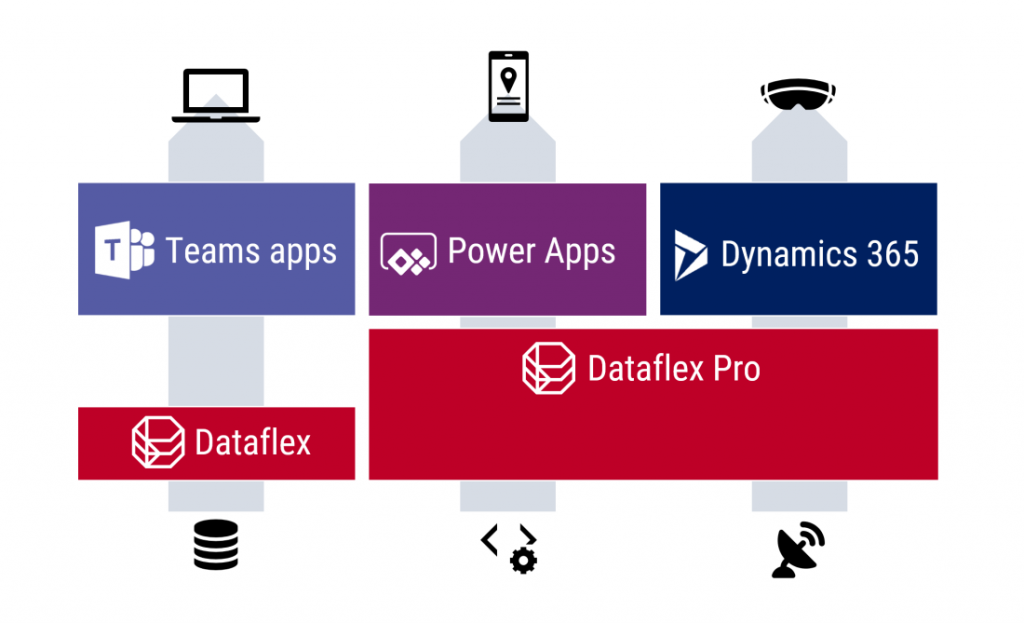
Knowing that it wouldn’t be a simple topic for outsiders to grasp, with the many different dimensions that Microsoft’s various product teams would use in their own messaging, I wanted to make sure there was at least one article out there that would explain what Dataflex means for Teams, Power Apps and Dynamics 365 in the big picture of business applications. It was great to see that this explanation I came up with was also adopted elsewhere in the mainstream tech media:
Here are some of the topics that the community has raised up since the July 21st announcement, based on the still fairly limited amount of public information that is out there on the coming Dataflex and the rebranded Dataflex Pro (formerly CDS).
Yeah, about that name…
For the small minority of techies who have actually heard of the Common Data Service (or XRM), the need for inventing a new name for their beloved service that remains the same (i.e. Dataflex Pro) wasn’t very obvious. For the larger crowd that works with Office tools and Microsoft Teams, Dataflex is a brand new thing, which understandably has made MS think whether a brand new brand would also be useful at this point.
Unfortunately the name “Dataflex” isn’t so unique that there wouldn’t be some clashing with non-MS products out there. In this case, there has been an existing trademark within pretty much the same application development domains since the year 1981 already.
What do you think about the following post from the owners of the #Dataflex trademark? https://t.co/WAPd9UA6Ut some people say the new #CDS name is ”Microsoft Dataflex” if I started using ”Microsoft nz365guy” I am sure I would get a letter from a lawyer. What do you think?
21 days after launching their Dataflex product name, Microsoft had to cancel their original plans due to litigation from the lawful owner of the Dataflex trademark (Data Access Worldwide). Read this blog post for more details: There never was a “Microsoft Dataflex”.
Why not call it “Power Dataflex” or “Power [anything]” then? Wouldn’t that have been better in line with the whole Power Platform story, as well as reduce the chances of a legal dispute? Probably so, but it’s important to understand that this Power thing actually isn’t the only purpose that Microsoft has in mind for the platform:
#MicrosoftDataflex it is – that is key because it applies to all of the Microsoft Cloud (that’s why no Power Dataflex :)).
The entry level offering of Dataflex for all Teams users is an important milestone for XRM/CDS/MDF (not sure I want to adopt “MDF” as the acronym just yet, actually). Don’t be surprised if the same technology will pop up in more & more places within the MS Cloud in the coming months and years.
Licensing details: TBC = “To Be Confusing”
The specifics of what is and isn’t included with Dataflex didn’t get released yet, as this new service is still pending for the public preview to start sometime in August. At the announcement day it has clearly been more important for MS to higlighlight what you can do with the non-Pro Dataflex vs. what you can’t. Even after the eventual GA, we can expect to see Microsoft use just the term “Dataflex” when referring to Pro capabilities like API access and custom code. When raising this issue of one additional source of Power Platform licensing complexity, Charles Lamanna confirmed that this is indeed intentional:
PowerApps with no spaces is just bad… I am hanging my head right now. Definitely unintentional 🙂
On Dataflex – Dataflex Pro is a licensing option (like Power BI Pro) and not actually a different thing.
This comparison to Power BI actually makes a lot of sense. In fact, much of what has happened with the platform side of MS Business Applications has been taken from the Power BI playbook used in conquering the Nr. 1 spot in business intelligence products within a relatively short period of time. So, here’s how the product levels are positioned over there:
Power BI: free for anyone to use, also for publish to web
Power BI Pro: user specific license required for sharing reports across the organization (non-public)
Power BI Premium: capacity based offering that allows enterprise customers to remove the per-user element from the licensing equation
What Dataflex and Dataflex Pro are going to offer is quite similar to this structure. No, I don’t quite expect the completely free edition of Teams to offer Dataflex features anytime soon, but the bundling into Office 365 & Microsoft 365 effectively makes it free for a huge pool of organizations to start using. When you then need to build some apps that go beyond the scenarios of team specific use cases and want to enforce some organization wide policies on it, Dataflex Pro may quickly become a requirement.
What may initially sound like not a very profitable business model (give stuff away for free) can result in a lot of positive effects on the company wide revenue streams of Microsoft if played right. After all, we’ve already seen the plumbing from under the Dynamics products to being reused as a platform for DIY apps (Power Apps), so this strategy of exposing as many users to Dataflex as possible is a clear continuation of that path.
It's the same question as "why buy Dynamics 365 Enterprise apps when I can build my own on Power Apps". Ultimately it's the scale of Teams that will bring in revenue, even if MS is (again) cannibalizing their previous offering to some extent with #MicrosoftDataflex non-Pro.
— Jukka Niiranen mstdn.social/@jukkan (@jukkan) July 23, 2020
Following the Power BI model, the next logical step after Dataflex and Dataflex Pro would now be to offer a Dataflex Premium service for enterprise customers who are more willing to pay for the capacity rather than for each and every seat. Whether MS ever launch this or not, the question of capacity consumption in terms of storage and API calls is bound to become a big source of confusion with the “free” vs. paid plans for Power Apps. Luckily the team behind Power Platform Center of Excellence Starter Kit is already working on making some of these governance tools compatible with the non-premium resources:
We're still working on the final details, but the plan is for at least the Admin (Core) components to work in Teams with Dataflex & no need for a premium license. With the idea being you have a Teams for your Power Platform admins where they can chat, share files and use the kit
The debate on why you should not use SharePoint lists as your app’s data source vs. why they area a perectly valid option has been going on for probably longer than Power Apps has existed. The inclusion of Dataflex into the core services of O365/M365 subscriptions has now prompted people to claim that app development inside SharePoint should be avoided altogether.
There are plenty of greant points in the blog post by Andrew Welch on the impact that Dataflex will have on the app strategy for organizations. Certainly the old reality of avoiding CDS due to licensing costs will need to be replaced with a more modern view into the low-code application development landscape in Microsoft 365. SharePoint will remain as the service most well known in the Modern Workplace technology category for sure, but questioning whether it’s the right tool for managing structured data should now become a mandatory step in all app plannign discussions.
One thing that’s clearly stealing the thunder from the Dataflex announcement and making the M365 folks even more confused is the GA announcement of Microsoft Lists that took place at the very same time. Yeah, this is just classic MSFT – having multiple products with overlapping feature sets and competing marketing messages.
Teams: your business app platform?
No matter how cool the apps that we build for customers (and ourselves) may be, it’s important to keep in mind that the majority of the average information worker’s time is spent inside applications that are exactly the same for everyone – like Microsoft Teams. This recent news about Slack first claiming Teams is not even a competitor to them, then moving to filing a lawsuit against Microsoft for bundling Teams with O365/M365 subscriptions, tells a lot about the game being played:
After claiming Microsoft wasn't a competitor, Slack is now filing a competition complaint against Microsoft in the EU, claiming it is illegally tying Teams to Office 365: https://t.co/tRdoqCj6yz
It’s a fight for the future of work, which will largerly be remote work. The digital transformation of business processes will require many, many apps that are tailored for a specific task inside a particular organization. Nevertheless, it’s the umbrella above them, meaning the platform for teamwork, that will drive a lot of the technology choices and licensing dollars into the online meeting and remote work ecosystem that provides the different business apps the common context.
If there would indeed be a significant uptake on the modern task based “mini” apps that do one thing well and we’d see organizations abandond their earlier enterprise system monoliths, then the question is where would all these apps logically land in? I haven’t really seen the enterprise app store concept being heavily utilized out there in the real world yet. Nor has there been much hope for Windows to enjoy a similar success with users installing apps from Microsoft Store, like they do all the time with iOS and Android.
It’s been already a decade since the app store concept was first launched for Microsoft Business Applications. AppSource is a great channel for distributing Dynamics 365 and Power Apps solutions in theory, but in practice it’s a lousy marketplace for most ISVs to do business in:
The #MSBizApps store that's been in the making since 2010 and still hasn't been able to deliver results: Microsoft AppSource. If even @stevemordue can't get customers via this channel, it's hard to imagine any other #MSpartner can make a buck from it either. https://t.co/13QzpELulM
— Jukka Niiranen mstdn.social/@jukkan (@jukkan) June 13, 2020
I’m not yet going to claim “this time it’s different” on the Teams app store and the Dataflex powered apps that can soon be published there by both 3rd party vendors and internal citizen developers. The idea however does sound like something that might scale better. Instead of deploying add-ons or templates into the single system of record like CRM, the new Teams based deployment model could allow a smaller group of users to install apps into an environment with a lot more narrow impact on organization-wide processes and data models. This could well be a more logical approach for Power Apps based solutions to find their way into more and more tenants.
It’s that time of the year again when big announcements have been lined up for Microsoft Inspire, the (virtual) conference for the MSFT partner ecosystem. Last year the Inspire announcements gave us a wealth of changes for the way how the Power Apps, Power Automate and Dynamics 365 licensing model worked, but all the product names remained the same (as far as I recall, at least). This year from Inspire 2020 the Business Applications part of Microsoft’s cloud is getting a bit of both. Say hello to Microsoft Dataflex!
I have written an introductory post over on Forward Forever blog, “What is Microsoft Dataflex and who is it aimed at”, which you can check out to understand the impact from a customer organization perspective. Here on my personal blog I’m exploring the topic when viewed through the eyes of a long-time XRM professional.
Abort mission!
Microsoft will NOT use the name “Dataflex” to refer to the services described here, due to a blunder they’ve made with trademarks. Read this post for more details: There never was a Microsoft Dataflex.
Dataflex Pro is the new CDS
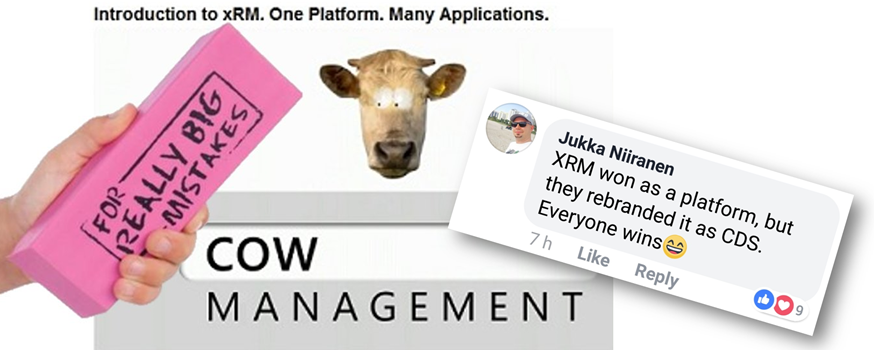
Let’s face it: “Common Data Service” wasn’t exactly the finest product name invented at Redmond. Originally it was introduced as Common Data Model, then later this name was switched to reference only the open source schema of CDM whereas the application platform and data management features became a service called CDS. In March 2018 the v1.0 of CDS was effectively put to rest as the far more established platform behind the Dynamics CRM / Dynamics 365 Customer Engagement apps, known as XRM, was rebranded to be “the new” Common Data Service (without the “new” or “v2.0” labels, of course, because why make things precise complicated). Actually it was called “Common Data Service for Apps” (CDS-T), since there was originally supposed to be a “Common Data Service for Analytics” (CDS-A) alongside the transactional platform. There never was, as CDS-A was rebranded as “Power BI dataflows” before GA, so we only had one Common Data Service left to talk about. Whew!
After these adventures in the great platform shuffle of 2018, we did have some product name related announcement in 2019 as well, like the deprecation of Customer Engagement in the cloud, rebranding Microsoft Flow into Power Automate (where you still create Flows), and finally the “space program” for making PowerApps be spelled as Power Apps instead. In 2020, it had been eerily quiet in the product brand front, so I guess everyone was already expecting to see something once FY21 kicked off. As of today, July 21st, CDS is no more and the Dataflex chapter has begun.
“Microsoft Dataflex” is not perhaps the most exciting name ever, but it’s certainly a better choice than Common Data Service. In part 4 of my series on Power Platform licensing complexity, I wrote that CDS should have rather been called “Power Platform”, due to its central role as the glue that ties the various MS low-code tools into a coherent platform. It’s a very unCommon service and it does a lot more than just host application data. Now, Dataflex on the other hand plays with the words “flexible” and “-plex”. The latter, when used as a noun combining form is described in Wiktionary as having the following origin:
From the Latin past tense of plectere (“to weave, braid, twine, entwine”).
Yes! That’s exactly what this technology does! It’s a platform that allows you to weave a set of processes, interfaces and data together, into an intertwined whole that is greater than the sum of its parts. It offers every developer flexible, no-code/low-code tools for achieving this. That’s how at least I intend to explain the meaning of Dataflex from now on, unless MS product marketing comes up with something even more compelling.
Oh, there is of course one tiny detail to keep in mind: it’s actually Dataflex PRO. What Microsoft announced today at Inspire is a new service called Dataflex that is a subset of what CDS always used to offer. So, everyone who’s using CDS today is already on the Dataflex Pro version, whereas we’re about to get a preview of the non-Pro Dataflex in the coming weeks.
Application platform for the masses: Dataflex (with Teams)
If you’re coming from a Dynamics 365 background, the introduction of a “lite” version alongside the CDS/XRM platform capabilities might not sound so exciting at first. After all, from a pure functionality prespective Microsoft is taking away capabilities from the existing platform, to establish the baseline offering of Dataflex that customers can then upgrade to Dataflex Pro when needed. Some might dismiss it as just another licensing hurdle to worry about when trying to develop apps.
From a commercial perspective, Dataflex is possibly the biggest thing that has ever happened to the platform formerly know as CDS/XRM. Biggest in terms of the number of potential app makers that will now have the possibility to build Power Apps on top of a true relational database instead of the dreaded SharePoint Lists. This is obviously the major immediate benefit from the announcement of Dataflex non-Pro, since in the previous licensing model the lines were drawn in a way that discouraged the use of CDS (or Azure SQL) databases for any Power Apps designed for light use scenarios – unless you had already acquired the full Power Platform license for your entire organization. With Dataflex usage rights bundled into Microsoft Teams at no extra cost, any user (internal or guest) with the necessary Office 365 / Microsoft 365 base license can now access Power Apps that leverage the true powers of a modern low-code application platform.
You won’t get everything that CDS used to offer with just a Teams license now, of course. For starters, the only place from where you can access these app built on the non-Pro version of Dataflex is from within Microsoft Teams. None of the existing “players” for Power Apps will be supported, neither is embedding the apps to other UIs like SharePoint pages. Data types, security model, business logic, integration points, ALM… All of these will be far more limited on the “free” Dataflex than with the “real” application platform that is Dataflex Pro. For small apps aimed to be used by small-ish teams, though, I bet the Dataflex version will be good enough for a large percentage of use cases. It certainly is more advanced than SharePoint Lists, although the restrictions on app access points is more limited with the Teams based approach.
Limitations can sometimes be a good thing. Dataflex is a simplified version of what CDS was, not just in terms of features but also the maker & admin experience. Do not underestimate how important this aspect can be in getting the citizen developers to make the right choice. Experienced CDS/XRM professionals may have been reluctant to move over to the new Maker Portal that is still missing features from the classic Solution Explorer. The new generation of app makers who have never even heard of these acronyms will most likely be happier within the Teams embedded app creation experience and give a higher NPS score to Power Apps as a result. Less is more, as they say.
There’s going to be one Dataflex environment per Team that you can create, and the users will then map to the members of that Team, with a simplified user security role structure of Owner-Member-Guest (a.k.a. OMG). No business units or custom security role privileges to worry about, nor any complex data types like activities, polymorphic lookups, currencies etc. Yes, I know, most of the apps you’ve built already probably depend on those, but remember that this is not aimed at you! Dataflex Pro will have all of it and the non-Pro environments can be promoted to full capabilites, at which point they will require the same licenses as CDS does today.
This is still a Big Deal. With the “free” Dataflex included in Teams, Model-driven apps can soon be created by an equally large crowd as Canvas apps before. Eventually it might no longer be an awkward moment when you need to talk about “that Power Apps app type that looks like Dynamics, not like all the other apps you have”, since every app maker can generate those beautiful, structured UIs on top of the database tables they’ve added into Dataflex. Since Model-driven apps are so metadata driven, I’d imagine this route would actually be a lot easier for many power users of Excel that haven’t necessarily been comfortable with building pixel-pefect mobile UIs in Canvas apps before.
Despite of everyone having the possibility to store app data inside Dataflex, it’s not by any means imperative that a single database is established as the place for all business data. That is the traditional CRM approach of doing things, but with the modern tools like Power Apps and Power Automate the source and target of data operations could be a number of different systems if needed, thanks to Connectors. However, I’ve understood that Premium Connectors will still not be included with the Teams license, so the options for data connectivity will be more limited here. This may again be perfectly fine for the simple apps that the non-Pro Dataflex is aimed to serve.
One thing the free access to Dataflex should make ubiquitous is the usage of solutions for app packaging and ALM. As the solution framework is a concept from the XRM era, replacing the earlier standalone .zip packaging of apps and Flows required that everyone would get access to this layer in the underlying platform. From an administration perspective it should be a clear step forward to standardize all the work to be done with Dataflex tools. There is also the promise of further deployment options being introduced with the Teams app store and its “single click” app installation, so this is an area for everyone to keep an eye on.
The business impact of Dataflex
The launch of non-Pro Dataflex can be expected to generate a wealth of questions from those professionals who’ve been working with CDS based solutions. What is & isn’t supported in Dataflex, where do the license and capacity limits actually get drawn, how are they enforced, where can apps be created for different Dataflex environment types, what admin controls are available on the tenant level, and so on. It’ll be confusing initially, but in the end I bet it’s gonna be woth it for all parties in this ecosystem.
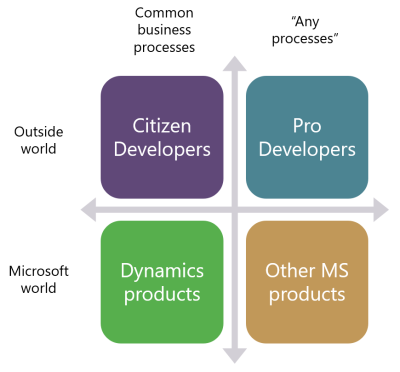
One year ago I wrote a blog post examining the possible growth directions for Power Platform. This launch of Dataflex + Teams now broadens the scope of the platform both on the Citizen Developer dimension (number of potential app makers) but also in the “Other MS products” axis. Earlier I’ve enjoyed making the joke that one day Microsoft would build the next version of SharePoint on top of CDS. Well, that hasn’t quite happened yet (and most likely never will), but we did see a major step now in Power Platform catching up with the mainstream productivity apps in Office. After all, every time you create a new Teams team, a new SharePoint site is provisioned for it. We’re now at a point where technically each team could also have a Dataflex environment provisioned at the same time. Knowing this, what’s stopping future Teams features from being built on top of CDS Dataflex?
Because every Team will have Power Apps with a robust platform behind it, this also means you'll be able to package up an entire solution — apps, flows, bots, tables, etc — and publish it to the Teams app store. Users can find and install in a single click.
As we can see from Ryan’s example, there are interesting synergies between Power Apps and Teams that are made possible by having Dataflex “on by default”. From a partner ecosystem perspective, over 500.000 organizations around the world who use Microsoft Teams just became a potential target for no-code solutions that could be dropped inside various teams. I’m saying no-code here instead of low-code because presumably the non-Pro Dataflex environment wouldn’t support custom code. Anyway, there’s a lot to investigate here with the Dataflex public preview coming in August and GA planned for September timeframe, so I will definitely be returning to cover the topic more closely once detailed feature lists are publicly available.
At the start of this year, we made the decision to go all-in on Microsoft Power Platform and founded a company that focuses on helping organizations on their journey to take ownership of this low-code business application platform. You could therefore say that it’s pretty darn important for us that there is compelling roadmap for the products that represent the technical foundation of our services.
Luckily Microsoft doesn’t show any signs of slowing down the investments into Power Apps, Power Automate, Power BI, Power Virtual Agents and all the underlying elements of the platform. Our MVP team at Forward Forever already did a “Top 3 x 3” highlights article on what each of us found to be the most exciting feature announcements in the 2020 Release Wave 2 release plans that Microsoft published yesterday. I wanted to expand a bit on that top list and reflect on how I see Power Platform evolving based on this new roadmap information.
But first: what happened to Wave 1?
Ah, true. We’re actually only halfway through the April-September period that 2020 Release Wave 1 represents. This means that many of the features I highlighted in my earlier first impressions posts have not yet shipped. Just because there’s a virtual launch event every six months doesn’t mean that it would be the exact time when a big box full of new software is made available. There are no version numbers in the cloud, it’s a continuous release train that runs on its endless route.
It’s important to keep in mind that these are release plans, not release notes. The thing with plans is that they tend to change, and such is also the fate of some items in 2020 Wave 1 that I picked as the higlights in my post back in January. If we look at the change history page in the release plan, for Power Apps alone we see that 15 items had their release schedule changed and 7 were removed from Wave 1. And remember we’re only a bit over 50% through the April-September period, so more changes are bound to still occur.
Changes do happen for the better, too. 8 new features have been added for Power Apps already after the initial release plan. In total there are one hunderd new features added to 2020 Release Wave 1 after January 27th. Wow! I can’t recall how many items in total there were originally, but this really highlights two things:
The Release Plan is not a static document, rather it’s an evolving backlog of planned features.
Microsoft has been very actively maintaining the online version of the Release Plan over on docs.microsoft.com.
This is what the product roadmaps for clour services are like today. You can’t simply have a look every 6 months and then forget about them, rather you should always refer to the latest information online. Also, you can be 100% sure that there will be a lot more coming for Power Platform between October 2020 and March 2021 than this first Release Plan version reveals. Just look at Wave 1: we would not have seen from the plan that MS would acquire an RPA vendor like Softomotive, or that they would announce T-SQL support for CDS during MS Build. Get ready to be taken by surprise during Wave 2 as well!
Wave 2 features to keep an eye on
Portals Web API with CRUD support was big news in Wave 1, but the GA date for the feature isn’t until February 2021. It’s all part of the story where Portals is being made more compatible with the two other app types in the family. Wave 2 now promises a preview of PCF control support for Portals in December 2020, which should certainly be a nicely wrapped Xmas present for pro devs if that schedule will hold.
If Portals is getting closer to the mainstream Power Apps types, then the unification of Canvas and Model-driven apps into “Run One UI” is also moving along. By the time the custom pages feature hits public preview in December 2020 it will have been 18 months since we saw the roadmap, but I’m not actually that surprised it’s taking a while for making these 2 very different client technologies work in harmony. It’ll surely be worth the wait from an UX perspective, as the Canvas app embed story has been somewhat limited in its impact so far.
Once Canvas apps can be natively placed on pages that appear inside the app navigation, they’ll be ever more likely to become an integral part of more complex enterprise applications. This means that also Canvas development practices need to become more mature, which is exactly what the reusable components for business logic are aiming for. PCF components for Canvas apps are also critical to allow the pro dev audience to contribute into low-code app development projects. Code components have already been in preview for a while and GA is expected in March 2021, so obviously injecting custom code into what was originally designed as a “PowerPoint + Excel” experience for citizen developers is a big investment that takes time to polish.
Power Automate has grown into an all-encompassing process automation service that covers both API and non-API (meaning RPA) scenarios. I have to say that for me personally it’s one of the scariest parts of this “low-code” platform due to how much secret formula knowledge one must posses to achieve something where XRM workflows offered a full GUI experience. I’m glad to see that MS is investing not only in the UI flows territory from their Softomotive acquisition but also in making Power Automate work more seamlessly with Power Apps. Simplifying things even further, the coming “diet designer” and templates desined for Microsoft Teams users is an example of how broadly the PaaS foundation of Azure Logic Apps is being productized via its Power Automate UI experiences across the whole MS stack.
From the Data Platform side, we will finally be seeing the ability to use Power BI on system dashboards for Model-driven apps. It’s one of those things that the vast majority of customers probably would have assumed to be possible for ages already. Getting proper support for parameters like environment variables has been a prerequisite to make these components play well together in the Power Platform ALM story. Now, this still doesn’t mean PBI would replace the built-in visualizations from CRM 2011 era, rather we see that MS is actually only working on catching up with the year 2011 when it comes to Unified Interface charts customization (i.e. supporting ASP.Net chart XML based features with the new Highcharts).
Come to think of it, there isn’t a single mention of the TDS endpoint / T-SQL support in either 2020 Wave 1 or 2020 Wave 2 release plans. It’s a good reminder to everyone that despite of the huge volume of information in the release plans, they don’t reveal the complete story of what’s happening with Business Applications beyond the immediately visible end user and app maker features. You’ll still need to do a bit of 1+1 yourself to figure out how things like DirectQuery support enabled by the TDS endpoint might have a dependency on unlocking more modern visualizations on top of CDS data in Power Apps.
While creating charts on a sales pipeline etc. could be seen as just doing old stuff with new tech, what’s really net new in terms of data analysis capabilties is all the goodies coming into CDS integration with Azure Data Lake. Time series data: get the full historical values of business record in a format that you can actually report on (i.e. not audit logs). Soft delete support: instead of keeping all historical data in that fairly expensive CDS database storage, delete the transactional record but still keep the data in the analytical system. Support for entities with attachments: if you’d like to get some value out of the annotation data clogging up your CRM system, push it into the Data Lake where AI can crunch it and generate new insights from it. All in all, this built-in continuous replication of data from the Power Apps / Dynamics 365 app database into Azure Data Lake seems to be truly delivering on the vision of The Real Common Data Service that goes far beyond the boundaries XRM used to have.
If getting data out of CDS is evolving, so are the mechanisms for getting data in. Power Platform dataflows have a lot of potential for sure, yet just like with Power Automate, it’s been difficult for these new generic cloud services to complete with the built-in XRM tools when it comes to feature completeness for CRM customers to achieve their common business goals (use a GUI to automate a process, run a Wizard to import relational data). Power Automate already has the path to “upgrade” the business logic into Azure Logic Apps and now also Power Platform dataflows can grow up to Azure Data Factory, once the March 2021 preview arrives. In the big picture, this ability to start from citizen developer tools and then transition to pro dev methods and systems is a very powerful value proposition from Microsoft to all their customer organizations who are looking to empower their subject matter experts to take steps forward in the day-to-day digital transformation. App creation & automation is where this Maker revolution has started, and I bet we’ll see more and more data driven features in the next phase of Power Platform evolution.
Finally, as the number of apps grows and they become an irreplaceable part of critical business processes, there’s a growing demand for tools to ensure the digital machine is well oiled. As we know, data is the new oil and in this context that means organizations need broader access to telemetry data on how their business apps are working. The 2020 Wave 2 feature that promises to deliver CDS errors, performance data, and diagnostics data in customer’s own Azure Application Insights should do exactly this, by complemeting the built-in metrics available in PPAC with a way for customers to build their own alert systems for both proactive and reactive maintenance. Yet another “grow up to Azure” path that illustrates how closely the low-code application platform-as-a-service will be intertwined with Microsoft’s PaaS offering.
Application Lifecycle Management, ALM, is a topic rarely covered in the mainstream pitch for how low-code/no-code solutions are transforming app development practices. This is understandable, since the initial time-to-value, from an identified business need to a working application (or at least a functioning prototype of one) is where the major difference to the traditional software development initiatives are easiest to demonstrate. It’s the “five minutes to WOW” effect that gets most of the attention.
Relying on configuration and formulas over custom code does promise also a lower maintenance overhead for the post go-live phase where the apps are used and evolved gradually to remain in line with the business requirements. There is less to worry about the potential impact of changes in each of the underlying components that keep the app running when you’re subscribing to a service like Power Platform that aims to abstract away many of the moving pieces in Azure and other related cloud services.
You shouldn’t assume life to be completely worry free, though. If you don’t plan ahead on what type of work is needed after the creation of your low-code app, then a nasty surprise may lie ahead for someone, somewhere, at the most inconvenient time. In the worst case your organization has become reliant on an app that no one owns & no one knows how it works, only to realize that your processes have already stopped due to errors caused by a change either inside or outside the system. Updates to the cloud components or changes in APIs used via Connectors, for example. A slower yet equally frustrating problem can arise from identifying a future change you’d really need to implement for the app in question, yet you don’t have the means to make that happen in practice.
The rise of low-code application development and the forecasted arrival of 500 million new apps in the next 5 years is making IT organizations very aware of the need for setting up governance models to address this new reality. Having baseline knowledge of what apps are created, by whom, for which audience, for what purpose, through what technologies, on what data sources etc. is often the discussion that needs to be done first to analyze the current situation. A great tool for facilitating this is the Power Platform Center of Excellence (CoE) Starter Kit, which gives you an overview of the big picture for Power Apps and Flows in your tenant. To go deeper and actually manage the lifecycle of an individual (potentially business critical) application, we need to start discussing ALM.
What is this ALM thing anyway?
Microsoft has published fresh new documentation on ALM with Power Platform that could be viewed as a similar Starter Kit for this topic as the aforementioned CoE. It briefly covers the high level summary of what ALM means:
ALM is the lifecycle management of applications, which includes governance, development, and maintenance. Moreover, it includes these disciplines: requirements management, software architecture, development, testing, maintenance, change management, continuous integration, project management, deployment, and release management.
A very broad concept then. What I like most about this intro chapter is the definition of the goal of ALM: “driving efficiency through predictable and repeatable software delivery”. That’s the essence right there. Anything that reduces the differences between how individual app makers / developers perform common tasks within the whole lifecycle of a specific business application will improve the state of your ALM practices. Those with a software development background may immediately venture into thinking about various DevOps methods and tools at this point, whereas I’m always most concerned about how the business can get a grip of what exactly is happening to their applications over time. Who built what, based on which specification, when was it deployed & where to, how were the changes documented, what impact did it have on others systems, how were users educated on the new features, and so on.
Microsoft’s ALM guidance is mostly revolving around the technical level specific to Power Platform, meaning how solutions and environments should be used. If you haven’t heard it before, then the solution framework that was born in 2010 for the XRM era has been actively expanded to cover more & more areas that are not a part of the Dynamics 365 Customer Engagement on-premises server. Canvas apps, Flows, AI Builder models, Power Virtual Agent chatbos, Export to Data Lake configs, pretty much everything in the Power Platform is now manifested as solution component. More is on the way, based on how Matt Barbour has stated things like Power BI and integration services being “on the radar” for the Power Platform solution system.
The expanding technical capabilities and scope of components shipped via solutions is of course great news. However, as we are now talking about the platform for every developer, not just pro devs, my number one question about Power Platform ALM is not “will it scale up to new products and features” but rather “will it scale down to new types of apps that don’t follow the lifecycle of a CRM system?” So, there’s two dimensions I feel will be critical for the ALM story to succeed: 1) unifying the mechanisms to manage configuration & code across the different app teams within MS Business Applications Group, and 2) democratizing healthy ALM practices by making them accessible to citizen developers. The first one is well underway with the solutionization of everything, but how about the second one?
Managing your “source low-code”
The fundamental challenge with why ALM tools aren’t already a part of every Power Apps maker’s or Dynamics 365 customizer’s core workflow is that they don’t exist within the context where these people do their work. This audience doesn’t need Visual Studio for anything, nor would there be anything familiar with the terminology used by version control systems like Git. This is alien technology from Planet Developer, which the no-code app makers would have to learn specifically for the purpose of managing how their configuration deliverables are moved from one environment to another. Compare that to the “export solution as .zip” / “import solution .zip” actions availble in the Power Apps Maker GUI that gets the job done for them. Many of these app makers surely understand the value that a formal deployment process and solution versioning could offer, but the barrier has been much too high for them to make that leap.
There have been tools for pro-code developers working with XRM solutions for many years already, some provided by MS and many built by the community. Today there are official Microsoft Power Platform Build Tools available for Azure DevOps, which offer readymade tasks like solution export, import, unpack, pack, publish, with more features to come. Rather than tweaking PowerShell scripts, it would seem like there’s a way to visually configure the cloud to do some ALM magic for our low-code apps. Sure, this is not within Power Apps directly, but could this be considered just another admin portal that the citizen developers might learn to navigate?
Setting up an Azure DevOps pipeline that pulls solutions from your dev environment, commits them into a repository for version control and then deploys that same solution to test or prod still isn’t exactly a next-next-next process. However, following a Power Platform specific tutorial, even a non-developer like me can get this up & running in a few hours. MVP Nick Doelman has written exactly what I needed, so if you’re interested in building your very first ALM pipeline, I recommend you to try this out:
Combining this with a recent update to the Power Apps Build Tools that also introduced support for MFA protected environments (meaning you can log in with an Application User identity), I was able to get our company’s “CRM” solution’s customization changes from from Dev to GitHub and Dev to Prod. Here’s what it looks like now when adding a new field on the accout entity:
“Woo-hoo, we now have proper ALM in place!” Well, not quite. All that we really achieved with this was the possiblity of doing it “right”, meaning there are DevOps pipelines that could be used for handling configuration changes automatically instead of manually by individual low-code developers. Until I actually go and remove all Power Platform service admin roles from my colleagues, anyone of them could still go and mess up the production customizations directly. So, proper ALM is only partially about the tooling and automation – you still need to the exact same thing as without DevOps, meaning defining the processes and agreeing on the practices for how the business applications are managed.
Regardless of this, it does makes perfect sense for low-code app development projects to evaluate if they would get benefits from leveraging automation tools like Azure DevOps. You’ll need to have the solution configuration stored somewhere anyway, so why not put it in a version control system that’s designed for “real code” and gain access to things like viewing the changes of individual solution components – rather than just dumping the files on OneDrive/SharePoint. Who knows, taking that step might even unlock further opportunities to automate and harmonize your application management processes.
We should keep in mind that automation is a double-edged sword. In theory it can save you a lot of time, yet in practice it may often turn into an additional time sink of its own. The legendary webcomic XKCD beautifully illustrated this dilemma of Automation, which I think is especially true here in the ALM discussion. The tasks that you’re trying to automate need to happen on a frequent enough basis for a long enough time before you could achieve a positive ROI from investing in setting up your pipelines. A single citizen developer building a one-off app may not yet meet that threshold, so preferably in your automation scenario there should be a team of developers who will do several planned releases for the app in question.
ALM for a team of low-code developers
Microsoft likes to promote the stories of Power Apps Champions who have managed to make digital transformation a reality for their organizations by building low-code apps that would have earlier required a team of software developers. This marketing approach higlights the role of an individual hero, but from an ALM perspective the dependency to any individual person’s heroic actions and secret knowledge is rather a problem that should be solved. Once that initial app idea and first PoC starts turning into something business critical, you should have a team in place that can ensure its continuity.
This team may not resemble your typical software development team. Yes, it’s quite likely that there will also be people with programming skills either working in the team or closely with it, but the primary competence on the technology side for this team is in assembling the features and components of the chose application platform into solutions that solve a wide variety of business problems. They are less likely to be all working with the single code base of a large application, doing pull requests, commits and all that Git jazz, simply because a fair share of Power Apps aren’t going to be built that way at all.
If you look at Power Apps Canvas apps today, they are essentially a document made of JSON that cannot be simultaneously worked on by multiple developers. This is very different from a traditional app project on the Model-driven side (let’s say in a CRM context) where one person could be building the customer data management features while another team member is working on products and order management. All with their own dedicated entities, having so little overlap that simultaneous work within the same dev environment is often doable. Even though Components promise to offer a more modular way to build capabilities for the Canvas world (and Model, too), I suspect that the client side experience of a single app will typically remain a “one maker show” in the near future.
Sharing elements and patterns across different apps built and managed by the team is, on the other hand, in a much greater role in the low-code approach. Here components, template apps and other reusable pieces of configuration can be of high value. Power Apps began its journey as a citizen-first app creation experience yet is gradually accumulating more of these features that mean every app doesn’t have to be a unique project. We’re getting more & more possibilities to see beyond the Maker GUI, like “peek code” in a Flow or use Monitor to debug Canvas app formulas. However, based on what Microsoft representatives have publicly said, it doesn’t sound likely that these low-code tools would evolve into allowing app makers to directly manipulate the configuration files in VS Code, for example. There are community tools like CanvasAppPackager from MVP Daryl LaBar that will help app developers understand complex Canvas apps, but these are NOT meant for building or modifying apps.
Even in Model-driven apps the list of supported modifications for customizations.xml is fairly limited. So, keep this in mind when thinking if the pro-dev tools and ALM practices that are based on direct source code manupulation are going to be a fit for the low-code app developer team or not. Your Power Platform experts need to be primarily fluent with the admin tools from MS and the community (always start from XrmToolBox), plus they’ll need excellent skills for using collaborative tools like Teams within your org to share their lessons learned. Once you’ve got this side is covered, then you can move onto Azure DevOps and the likes.
Environment management is another big topic for low-code apps on Power Platform. Having a separate CDS environment for every developer working on their corner of an application is Microsoft’s recommended approach to keep changes isolated. As your number of “ALM enabled” apps in the tenant will grow, the total number of environments will grow even faster. Assuming a theoretical 5 GB size for the CDS database of an environment, the $200/month storage cost itself wouldn’t actually be that significant if it saves a few hours of work from those developers. What you don’t want to happen, though, is having dormant dev environments consuming CDS capacity for many months with no actual deliverables from them – especially when your CDS quota is defined on a tenant level with no control available for reserving it to specific apps/environments.
There are remedies to this problem. The “governance way” is managing the environment creation/deletion though a process that provides transparency to environment usage and enables allocating costs accordingly, for example via custom apps built on top of the CoE Starter Kit. The “ALM way” is provisioning on-demand environments from the source code in your repo via DevOps automation, then scrapping them after the active development work stops. While I sort of fancy this idea of “everything as code” where all of the infrastructure and configuration is managed via the same pipeline, I can’t help thinking that the most difficult thing about environments for business app development isn’t necessarily the configuration or the code. It’s the valid test data needed for making the app come alive. Yes, of course you could also script the perfect test data set to be generated alongside the environments, but again, we’re taking the level of effort needed in achieving deployment automation onto a very non-citizen developer level and approaching the XKCD scenario.
Managed Solutions: what do you REALLY want to manage?
Whenever Microsoft talks about ALM, usually you’re going to hear their statement on “use only managed solutions in production” sooner later than later. It’s not surprising that also the latest guidance, such as the MBAS 2o20 sesssion on Advanced Application Lifecycle Management capabilities lists this high up on the ALM Health Check list:
In the user community around XRM there’s been an endless debate around whether unmanaged or managed solutions are really the way to go, and we’re not going to find the ultimate answer to it here in my blog. Personally, I’ve always had a hard time understanding the exact benefit that a customer organization would get from self-imposing the limitations of managed solutions onto themselves. It just sounds to me like installing a different lock with a dedicated key onto the window blinds in every room of your house. Expensive, overly complex, and very likely to leave you in the dark when someone forgets which key was used for which lock. It can also give you a false sense of security, as the main door to your house is still left completely unlocked, because Microsoft doesn’t yet offer a way to protect your production environments from the deployment of unmanaged customizations by anyone with sysadmin rights.
In the context of low-code specifically, if you don’t have a seriously mature ALM process in place, I’d say you’re fairly likely to hurt yourself when playing with the sharp objects that are managed solutions. This is why during my 10 years of working with Dynamics CRM, XRM and now Power Apps, I haven’t yet deployed a single managed solution inside a customer specific project. On the other hand, I have worked with removing managed solutions created by the customers’ previous partners, after the ALM process has broken down for one reason or another (“not existing” being one of them), then replacing them with an unmanaged layer of customizations that has been a better fit for their overall CRM landscape. Yes, those other partners probably defaulted to following MS instructions on using managed solutions in every production environment – this guidance remained the same since CRM 2011 days, after all.
Please do note that I’m not saying managed solutions wouldn’t serve a purpose. When you are building an actual app product that is meant to be deployed across multiple environments for different customers, managed solutions are of course the way to go. They offer the container for keeping your stuff separate from the stuff delivered by other app vendors, when deployed into the single CRM system that’s used widely across the enterprise by different user groups for different processes. Any proper commercial product development initiative should also be able to absorb the ALM overhead from environments, automation etc. and turn that into increased revenue from being able to ship software releases faster and more reliably as time goes by, thanks to the upfront investment made. It all makes sense here, but this is a very different landscape than how I perceive the typical use cases for low-code apps within organizations to evolve as Power Platform becomes more widely adopted.
Remember: you’re no longer building “one place for all customer data”, rather you’re often creating several targeted apps for very specific purposes and audiences. Most of these app experiences will likely be fully developed by either savvy citizen developers, an in-house team of Power Apps champions, or an external consultant brought in to get that job done. The app lifecycle can be very short, even targeted to be used in one-off events (or under temporary disruptions such as COVID-19 social distancing), whereby some apps may actually be “disposable by design”. These are pretty much the opposite of monolithic CRM systems where a wealth of different ISV solutions need to peacefully co-exist throughout the years. So, whichever solution strategy you choose for your Power Platform environments, make sure it solves a real problem that your low-code app developers and admins are facing, rather than directly adapting practices that have been designed for the ALM needs of pro-developer teams working full-time on shipping a sizeable amount of custom code alongside the low-code application platform configuration information.
A different approach to ALM: Power BI deployment pipelines
The broad umbrella of Microsoft Power Platform covers also technology that isn’t (currently) built on the solution framework: Power BI. Since it is in practical terms more part of MS Data Platform, the mechanisms used on the BI side are understandably quite different than those originating from the citizen-dev PowerApps (back when it was still spelled together) or CRM systems. What makes this an interesting area to observe is that from what I’ve understood, the traditional development of reporting solutions hasn’t exactly followed the typical software development path either. Checking in reports to source control systems may not be the natural workflow of a Power BI content author or data analyst, so the barrier for adopting advanced ALM practices is likely to be pretty high for this audience, too.
Power BI deployment pipelines is a feature that has recently been launched in preview. Labelled as an ALM solution, as also Power BI now packages report content into “apps”, this functionality is actually baked right in to the native user interface of the PBI service:
Reading the introductory text gives us an idea of how this feature is positioned:
Deployment pipelines help enterprise BI teams build an efficient and reusable process by maintaining development, test, and production environments. BI creators can incrementally transition new or updated content between environments, reconfiguring them with the appropriate data connections and permissions. Pipelines are very easy to use and take only few minutes to setup. No previous expertise or coding skills required.
Wouldn’t it be nice if we could take the term “BI” from that paragraph, replace it with “App” and have a similar story to tell for low-code business app developers? A targeted experience that would be readily available for each & every customer environment right out of the box would certainly be the most effective way to democratize healthy ALM practices.
You’ll need Power BI Premium capacity for using deployment pipelines, so the reporting ALM story is aimed towards the enterprise audience. If there ever was a native deployment pipeline functionality for Power Apps, I’m sure the usage would require consuming some type of paid for capacity from the Power Platform product subscriptions. I believe this would still be a lot easier approach for selling the idea of why customers need to invest in having proper ALM infrastructure and capabilities in place, since it wouldn’t be just an extra layer of billable hours added on top of app development project budgets but rather something much more tangible.