Tag: Power Platform

  • Why You Should Become a #PowerAddict

    Why You Should Become a #PowerAddict

    Recently I was tagged to do a “confession” in the #WeArePowerAddicts challenge, started by MVP Vivek Bavishi. There’s been a massive amount of support for this over on Twitter, where many of the finest members of the community are enforcing the message that is bringing all of us together. In this post I’ll cover three aspects that I find so intriguing with this movement that is forming around Microsoft Power Platform and why professionals with a Dynamics 365 Customer Engagement / XRM background should seriously consider getting involved with it.

    The Return of the Community

    Community was the biggest single reason why Dynamics CRM became such a defining part of my professional life, starting way back in 2005. Sure, I had already earlier enjoyed the business/marketing side of customer relationship management, but it wasn’t until I had to dive deep into a specific technology that I realized the massive value of an active, global user community. The growing blogosphere around Dynamics CRM and especially the social layer of #MSDynCRM Twitter on top of it first empowered me to turbocharge my own speed of learning, then later presented me a medium for expressing my own thoughts. And here we are now.

    Lately I’ve been having this feeling of premonition combined with dejavu. Like being special agent Dale Cooper, investigating the events that are taking place in a strange town in Pacific Northwest, far away from your normal surroundings, encountering The Giant in a dream sequence and being told that “it is happening again”. Only this time the Giant is Power Platform and the place isn’t Twin Peaks but rather Redmond. Big things are happening and it’s still difficult to see exactly how the story line will play out, but you just can’t wait to see what the next episode will reveal.

    The cast of this show isn’t just made up of Microsofties. Just like in Season 1 that brought us Dynamics CRM (and XRM), the biggest stars are actually the community members who keep you engaged with exploring the many wonders of this new world of Power Platform that Community Season 2 has introduced. They eagerly demonstrate their skills with the cloud toolkit of PowerApps, Flow, Power BI, CDS, Connectors, Azure services, in combination with the more familiar Office and Dynamics products, infecting you with their enthusiasm. Some would call them PowerAddicts.

    Be a Maker, Not a Customizer

    When implementing a CRM system based on Dynamics 365, you’re always more or less adjusting the functionality of an existing application to meet the specific needs of the customer’s business processes. The starting point is always the same, and the end result depends on how much budget you’ve got for customizing the OoB experience. In general, the CRM systems deployed for various different organizations resemble one another far more than you might have initially expected, considering the great amount of effort invested in the projects to build them. It’s not a bad thing – especially since many customization requirements may not end up delivering a positive ROI anyway.

    Switch from the preconfigured first party Dynamics 365 apps into the pure platform play of PowerApps and it’s a completely different ball game. PowerApps Canvas apps start with a blank canvas, just like the name suggests. There is nothing in the tool itself that would dictate how exactly your app is supposed to look like and what features it should contain. With this massive power comes a great deal of responsibility, as you truly are the maker of the application that needs to have a vision of what you’re building as well as the capabilities to make it all come alive.

    To come up with a vision of your own, the most important ingredient is exposure to the work of others. You need to see what the #PowerAddicts community has built, get inspired by it, and then take a shot at building something new from those pieces + the ideas and requirements that are unique to your project. You may well need to have a number of hobby projects, too, since delivering a made-to-order application without first practicing how to work with your tools is going to be tough. The concept of Maker Culture describes the community’s approach to Power Platform quite accurately:

    “Maker culture emphasizes learning-through-doing in a social environment. It emphasizes informal, networked, peer-led, and shared learning motivated by fun and self-fulfillment. Maker culture encourages novel applications of technologies, and the exploration of intersections between traditionally separate domains and ways of working.”


    Wikipedia

    Sure, it’s not like you didn’t need the forums and search engines as a basic survival kit in Dynamics 365 projects, too. That’s still more of a unidirectional way of using the community to get the job done, whereas how this new generation of Power Platform Makers seems to have an intrinsic motivation to build things together.

    Escape from Planet CRM

    Dynamics 365 as a product family is constantly evolving and the number of different applications in it is growing like never before. Despite of all these exciting new opportunities that the technology stack and Microsoft’s commercial offering seem to be opening up, in the everyday life of a consulting organization it’s still frighteningly easy to fall back into doing “just CRM”. What I mean by this is the process of repeatedly solving the same problems for different organizations, through pretty much the same methods as before, just with an updated version of the tools you’ve been using for years. While it may sound like a lucrative business area, in the long run such repeated problem solving via manual labor (i.e. burning your cognitive fuel reserves) really ought to be taken over by machines – be it an app, an “AI”, or simply an innovative, repeatable service offering delivered by a commercial machine instead of a project team.

    After 13 years of Dynamics CRM experience under my belt, I often find myself torn between the value of my accumulated knowledge and the burden that it imposes on me. I pretty much know in advance what challenges a customer will have with Dynamics 365 Customer Engagement when hearing about their expectations for a CRM system and how it should fit with their organization’s existing tools and practices. I’m painfully aware of the ever expanding solution areas I don’t know well enough to give the right answer immediately when presented with a specific problem. Sure, there are the many small victories to celebrate when I can use my prior knowledge to solve problems – be it a blog article by myself on the very topic, or the ability to quickly find the right link where someone else has presented the solution. Still, with the scope of work included in a typical CRM projects it feels like I’m at a saturation point where it’s no longer possible to gain new generalist skills without starting to lose my grip on the skills I’ve gained earlier. This is of course the point where a common sense advise would be to go specialize on a more narrow area to further advance your skills – but what if you just find the role of a generalist more fulfilling in the grand scheme of things?

    What Power Platform offers to people like me is a fresh new start. Here we have a toolkit that comes with zero hard dependencies on doing things the way they’re done in the CRM business. You can take PowerApps and build a solution to pretty much any business problem that revolves around improving the processes between the employees of an organization and the data sources they have access to (or should have). There are no assumptions here about the right way to solve such problems, unlike with CRM where you are in a way competing against the long legacy of prior systems, processes, best practices. It’s not a vacuum of course, as there are always alternative solutions out there.

    The important difference here is that the boundaries of your work are truly undefined at this moment. No one knows how far these things will go, but if you have faith in the competitiveness of Microsoft cloud and its ability to attract both the right kind of commercial players to form an ecosystem as well as those inspired professionals that build up the community around it (hello #PowerAddicts!) then you know it’s going to be far bigger than CRM ever could have reached.

    Power Platform allows the seasoned CRM professionals to return back to the role of a student. With new tools like PowerApps and Flow you are pretty much starting from scratch and you need to ramp up your skills in the same way as you might have done with MSCRM vX.0 back in the days. If you just can mentally position this work the right way and approach it primarily as a learning experience instead of a ToDo item in a project backlog, then OH MY GOD how much fun it is! Seriously, these tools can give a motivated citizen developer the kinds of superpowers that I couldn’t have even imagined just a couple of years ago. It ain’t all just marketing – it’s the real deal.

    Now’s Your Turn

    If what I’ve said here resonates with you and you’ve been hoping to find a way to get back into the game 100%, then you owe it to yourself to get truly involved with the Power Platform. Become an Addict.
  • Building The Platform for Every Developer

    Building The Platform for Every Developer

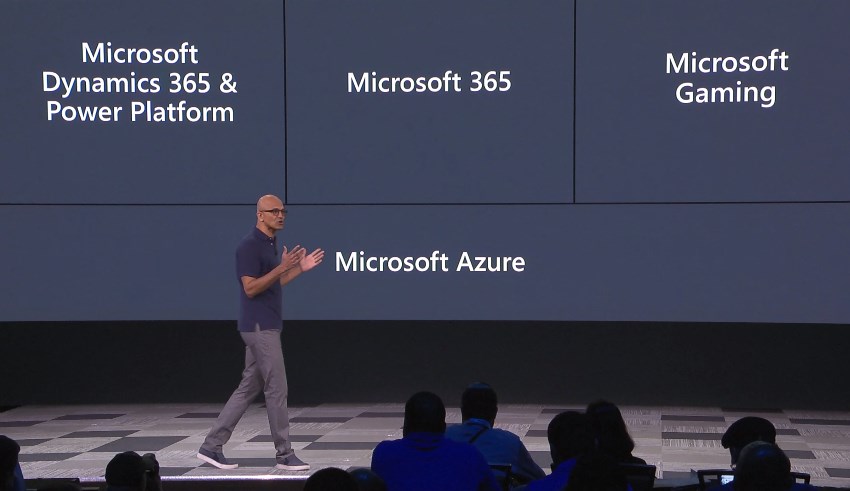
    For the first time ever at Microsoft Build conference, the Power Platform was presented right at the start of Satya’s keynote this year! Woo-hoo!

    Of course this time last year there wasn’t yet the name “Power Platform” to even reference at Build. We had only just seen the merger of XRM and PowerApps into something that was a bit of a puzzle to communicate to partners, let alone customers. Well, the puzzle hasn’t exactly been solved yet, but it is still quite remarkable how far we’ve come in one year already.

    Last year’s sessions at Build 2018 were mostly about introducing the concepts like Common Data Service to a .NET developer audience that probably had zero hands-on experience with any Dynamics product for the most part. Not a whole lot of noise was made about this entry into the #MSBuild space. Fast forward to 2019 and now the vision of uniting pro developers with “every developer” is already touted at the keynote sessions. Not just that, but Satya is saying that recent re-architecting of Dynamics 365 on top of Azure infrastructure and services should be examined as an excellent reference for anyone who’s planning to build their own products on SQL Azure.

    During the week of Build, the product team behind Citizen Application Platform (“CAP”) puts aside their Citizen caps and pulls on the pro dev hoodies to talk about topics like solution management, PCF component development, Azure Functions, DevOps pipelines and all the nerdy stuff that would scare away the folks who normally create PowerApps. It’s inevitable that as the tools for app makers get more mature the next barrier to world domination will be in getting not just the IT admins to build the necessary automation and governance around Power Platform in enterprise environments but also in finding a way to make pro-coders play with low-coders.

    If you look back at XRM, then there’s really nothing new about this division of roles. It has always been the case that code illiterate business analysts do the point & click configuration work for data models and business processes, while the XRM developers spend their time with the SDK enabled client-side extensions, server-side logic and system integration tasks. Fundamentally what the Power Platform does is it enables everyone to level up in their game. Application design on the UI level and interfaces to connected data sources can now be handled by those business analysts who are willing to learn new low-code tricks. Similarly, the developers get to break free from the boundaries of the IIS and SQL Server boxes, to harness the amazing power of The World’s Computer (Microsoft’s nickname for Azure) to hook into new AI services and crunch the contents of The Real Common Data Service.

    If the app builders are about to step up their game, so must the sales machine of Microsoft. The big push from Redmond is now on ensuring that an ecosystem will emerge on top of Power Platform. The new partner program for Business Application ISVs, lead by Steve Guggenheimer, is trying to make a bigger splash by combining the earlier models of Azure Marketplace and the Dynamics 365 focused AppSource into a single channel that could actually serve the grand vision of a no-cliffs development platform. As always, you should check out what The Other Steve has to say about the upsides to the new program, before making your conclusions on whether it’s just a new tax on ISVs or an opportunity worth pursuing for a growing number of MS partners.

    To summarize the announcements and buzz around Power Platform at Microsoft Build 2019 conference, I’ve compiled this handy lil’ Twitter Moment for you to enjoy:

  • PowerApps “Starter” Plans Capabilities Demystified

    PowerApps “Starter” Plans Capabilities Demystified

    There are many ways to get started with PowerApps on the cheap. What I mean by cheap here is the types of licenses that have certain limitations on what you’re allowed to do with the PowerApps platform and apps, in exchange for their lower cost. In other words, “less than PowerApps P2 capabilities.” In this article I’ll try to illustrate what these limitations are, especially when working with data in the Common Data Service (CDS).

    As was announced already one year ago, PowerApps Plan 2 at $40/user/month is the official platform SKU that allows you to build and run highly complex custom applications, on top of the same platform that also powers Dynamics 365 Customer Engagement (CE) applications. If you have a license for any CE Enterprise App or Plan, you’ve also got the full power of PowerApps P2 at your disposal. As long as you can afford to fork out at least $95/user/month, then you’ll get both the first party Dynamics 365 App plus the unlimited platform usage, which of course is the best scenario in terms of how to digitally transform your business processes with the help of MS Cloud.

    When building custom PowerApps, often times the audience that would need to have access to these apps is much larger than your team of sales people who would use the CRM application manage customer interactions and sales pipeline, for example. The apps may be replacements of legacy Excel sheets or even paper forms, which are not all that complex when compared to full Enterprise Sales applications, and they might not even be used that often per single user. However, you may still need to enable each and every employee in the organization to use the application to complete the task it’s designed to manage.

    For these kind of scenarios the licenses should preferably fall more into the Office 365 (or Microsoft 365) territory, so that they can be standardized as the tools that all information workers in the company have at their disposal. Luckily there is a plan called “PowerApps for Office 365” that already provides the basic capabilities for app building and usage bundled into the license that almost everyone has these days. The limitations are that it’s really meant only for working within the Office 365 stack of services. The next level up from there, PowerApps Plan 1, is also priced at $7/user/month which is only a fraction of the price of Enterprise Sales App, for example. Here you get access to CDS and various types of connectors to other systems where your business data may reside.

    Up until this point, the PowerApps plans and capabilities line up nicely into a stacked Venn diagram with these layers:

    Where it starts to get more complex is the Dynamics 365 CE licenses that are below the Enterprise Apps and Plans. These do NOT include the PowerApps P2 capabilities but a different plan called “PowerApps for Dynamics 365 Applications”. In the CE product portfolio, this plan is included with the following licenses:

    • Dynamics 365 for Team Members ($8)
    • Dynamics 365 for Customer Service Professional ($50)
    • Dynamics 365 for Sales Professional ($65)

    You should look into the PowerApps & Flow Licensing Guide to get the full details about what the limitations for different plans are. Now, since these type of long documents aren’t great at highlighting what the “gotchas” in the licensing model are, here’s my attempt at drawing a picture around these lower end PowerApps plans and key capabilities. Please note that I’m only covering the Team Member license here when referencing the “PowerApps for Dynamics 365 Applications” plan, as it’s more in line with the price range of the aforementioned “starter” plans.

    Let’s start from the left, meaning the one capability that is included even in the “PowerApps for Office 365” plan: run standalone Canvas apps. For some peculiar reason, this is not allowed for users with the “PowerApps for Dynamics 365 Applications” plan. The only thing that they can do is “run extended first-party Dynamics 365 (Model-driven) apps within the context of the application use rights”. So, an embedded Canvas app on the account entity form is allowed, but launching any app directly from either web.powerapps.com or the PowerApps mobile app is forbidden.

    This leads to an interesting scenario, because essentially the “PowerApps for Dynamics 365 Applications” plan doesn’t give the users the right to run any type of app that says “PowerApps” in the header bar. Only the applications with “Dynamics 365” branding are within the boundaries of this plan, which makes you wonder why it even need to be a plan in the PowerApps licensing model when the Dynamics 365 licensing should in theory cover it.

    (more…)
  • The Real Common Data Service Emerges

    The Real Common Data Service Emerges

    When Microsoft announced one year ago that XRM would become CDS v2.0 (officially Common Data Service for Apps), there wasn’t yet any big system redesign implemented to make this a physical reality. Today we are much further down that road where CDS truly becomes a Service that has less and less to do with the familiar XRM databases that we’ve previously been working with. In this blog post I’ll explore the three data related dimensions that give us an indication of where CDS is heading as a part of the Microsoft Power Platform.

    CDS is now Dataverse!

    While reading this article, you can translate the term “Common Data Service” to now refer to its new name, Microsoft Dataverse. See this post for comparison between CDS vs. Dataverse.

    Dynamics 365 Storage Model Changes

    As a part of the April 2019 release train, MS is changing the way how data storage is managed for both Dynamics 365 and PowerApps customers. It hasn’t been an official feature bullet on the release notes document, but that doesn’t mean its significance would be any less than what the shiny apps demonstrated in the April 2nd Virtual Launch event have.

    A new version of licensing guides for Dynamics 365 and also for PowerApps and Flow (for the first time ever!) was released in April. This outlines the commercial impact of the new model to customers, which is probably what most of us will have first paid attention to. Yeah, whenever the pricing mechanism of a widely used MS cloud service changes, it will be a big deal. What makes it even trickier is that MS considers storage as a “subscription add-on” for which they don’t publicly disclose any per GB list prices. I’m not entirely sure this model is beneficial for their ambitions of turning Power Platform into an actual foundation for building third party and customer specific apps, but I guess the shadow of the old CRM and ERP world still looms above this world when it comes to licensing and pricing practices.

    Let’s forget licensing for a moment and focus on the technical changes for Dynamics 365 online environments. All of the existing data that used to be stored in the Azure SQL relational database will in the future be divided into three specific storage types: database, file, log. This should have no immediate impact to customers, as the migration will be taken care of by MS. Their promise is that nothing should change in the way how users and developers work with data, since the APIs that govern access to this data will remain unaffected.

    File data will be in Azure blob storage, as this is the most efficient way to handle miscellaneous documents, images and other “stuff” that may end up inside a typical Dynamics 365 system via features like email tracking that carries over the attachments. Why would you ever store this in a relational SQL database to begin with? Well, the simple reason is that the original on-prem architecture of XRM had no other secure place to put these items, so it was all lumped up there. Now when CDS is a native cloud service, there are much more options available.

    Log data will be in Cosmos DB. This will probably offer a more suitable architecture for managing things like plugin trace logs, audit data and other items of similar nature. What should be noted is that Microsoft’s plans don’t just stop at this IT admin activities level. In a recent podcast by MVP Mark Smith, we heard the General Manager of Power Platform, Charles Lamanna, describe this storage type to be designed as the future place for other types of observational data, too. Charles referred to things like IoT device sensor data, which should give you an idea of how this again is data that is A) relevant to many CRM use cases and B) in no way optimal to be stored inside that relational XRM database.

    One significant and very welcome change that is introduced as a part of this new model is that there will no longer be any license cost tied to the number of instances you have in the cloud. Previously you had to buy add-on licenses for acquiring production and non-production (sandbox) instances for developing, testing, training and in general managing your complex Dynamics 365 online environment. Once the new subscription terms kick in, you’ll have the ability to create as many instances as you like, provided that you have sufficient database capacity available. A major driver behind this change is surely the PowerApps side, in which the licensing terms already granted any user with PowerApps P2 license to create 2 CDS environments for their applications. (For more details, see my presentation on Demystifying Dynamics 365 & Power Platform licensing.)

    In the short term, this storage model change should not result in much functional changes for the Dynamics 365 customers. Depending on when your current subscription renewal date is, the new terms will be applied either at that point in time or the renewal after that (if you choose to hold on to the old model for one more subscription period). Any new customer will likely be leveraging the new pricing model starting from April 2019.

    It’s important to understand that the actual data storage technology change and the commercial terms that are applied are not tied to one another. Migration of your Dynamics 365 data to the new database/file/log model will probably take place much sooner than what you’ll see in your subscription fees. Refer to the admin documentation on Common Data Service storage capacity for details on how you’ll be able to analyze and manage your storage consumption in this new model.

    Diving Into The Data Lake

    When looked at purely from the storage license model changes for Dynamics 365 customers, the story would end here, with the three storage types. However, the bigger picture of how data is used as a part of the Customer Engagement systems that cover various digital touchpoints is much broader. Or should I say “bigger” as in Big Data? As much as I dislike the casual use of tech marketing hype terms like Big Data and Artificial Intelligence, there’s no escaping the fact that the familiar world of CRM systems founded on SQL databases is being disrupted by what machine learning models and big data systems can offer today.

    (more…)
  • New Courses for Learning Power Platform & Dynamics 365

    New Courses for Learning Power Platform & Dynamics 365

    Microsoft announced in December 2018 that they were retiring many of the Dynamics 365 exams that previously were part of the MCSA and MCSE Business Applications certifications.

    Shortly after that, there was a brand new set of certifications and their associated exams announced. The exams are:

    • Microsoft Dynamics 365 Customer Engagement Core (MB-200)
    • Microsoft Dynamics 365 for Sales (MB-210)
    • Microsoft Dynamics 365 for Customer Service (MB-230)

    By passing the exams you can claim the following certifications:

    • Dynamics 365 for Sales Functional Consultant Associate (MB-200 + MB-210)
    • Dynamics 365 for Customer Service Functional Consultant Associate (MB-200 + MB-230)

    Just today I took the new MB-200 Core exam as beta and I have to say the content has evolved nicely into a much more rich format than what the previous “pick 1/2 out of 4” questions types were. There’s a lot to cover in one exam, as this new MB-200 essentially combines the earlier Online Deployment and Customization & Configuration exams into one. Still, these are all essential skills for anyone who’s working on this ever evolving business application platform from Microsoft.

    So, where does one go to learn these skills for passing the brand new exams? While Microsoft did release the list of new courses that link to these exams, there wasn’t an online learning option made available initially. Traditionally the content would have been published via the Dynamics Learning Portal (DLP) that has been limited only to Microsoft partners (and notoriously difficult for gaining access to). However, going forward the DLP course catalog will not be updated, based on the notification shown on the portal:

    Great, lets head to Microsoft Learn then! Except that this isn’t where the course material for the Dynamics 365 certification exams seems to be landing. You see, Microsoft has also been publishing newer online learning materials on an open platform called edX, like this Power BI course.

    Oh, but that’s actually a different edX than the one we’re talking about here. While edX.org is a platform common to many training content providers, there’s a dedicated Microsoft site at openedx.microsoft.com which served as the hosting platform for the first non-DLP Dynamics 365 course one year ago:

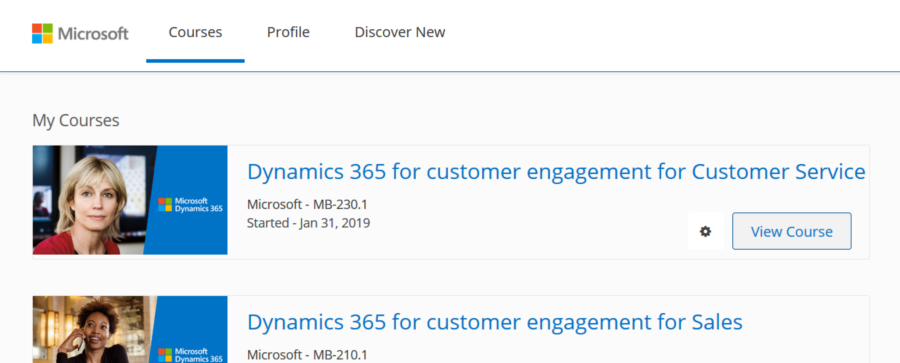
    At the moment there isn’t a visible catalog of the new Dynamics 365 and Power Platform courses on that site yet, but it is fully possible to sign up for the courses via direct links. Here’s what my dashboard at openedx.microsoft.com looks like after picking all the new courses:

    Here are links that should work for accessing the online courses:

    • MB-200T01: Dynamics 365: Power Platform applications
    • MB-200T02: Dynamics 365: Power Platform automation
    • MB-200T03: Dynamics 365: Power Platform integrations
    • MB-200T04: Dynamics 365: Power Platform test and deploy
    • MB-210T01: Dynamics 365 for Customer Engagement for Sales
    • MB-230T01: Dynamics 365 for Customer Engagement for Customer Service

    What’s interesting is that due to the open nature of Open edX, there appears to be a whole network of training service providers that have partnered with Microsoft and distribute these same courses on their portals. As an example, the Finnish IT training company Sovelto has these courses available for free on their SoveltoX portal:

    We may get more clarity on the roles of each channel in the future, but since so many Dynamics 365 professionals are eagerly looking to start preparing for the latest exams, here’s at least a way for everyone to quickly get started on their learning journey. Refer to this post by Mark Smith for a more comprehensive list of links regarding the Dynamics 365 & Power Platform training and exams in 2019.

  • Demystifying Dynamics 365 & Power Platform Licensing: Part 2

    Demystifying Dynamics 365 & Power Platform Licensing: Part 2

    In the previous post I highlighted some of the recent updates on Dynamics 365 licensing. Now let’s have a look at how the birth of Power Platform has further expanded the licensing options for delivering business applications to customers. Just like before, the content is taken from my session at Dynamics Power 365 Saturday London 2019 and you’ll find the complete slide deck on SlideShare my Slides archive:

    PowerApps vs. Dynamics 365 CE licensing

    Common Data Service for Apps (CDS) environment is essentially the same as a Dynamics 365 Customer Engagement instance, just without the first party apps from Microsoft. If you can get CDS both via PowerApps license as well as Dynamics 365, then it’s important to understand what the subtle differences there may be. Currently at least these features are missing from a pure CDS environment when you provision it for PowerApps and not Dynamics 365:

    There are interesting differences in how the licenses grant you resources when comparing Dynamics 365 CE and PowerApps. On the storage side you get the same starting 10 GB per tenant and as you purchase more user licenses they give you more storage quota. As for the actual instance/environment count, on the Dynamics 365 side you need to pay for additional sandbox and production instances (roughly €125 & €460 per month). PowerApps is far more generous in this sense, as each P2 user license gives you 2 environments. With 100 users you could therefore have 200 environments for your organization, which sound like a ludicrous amount if you’d think of them as CRM instances. That’s where the broader business application scope of Power Platform and the citizen developer mindset clearly differs from the Dynamics way of doing things in a controlled, centralized manner.

    One area which Microsoft has left very unclear in their licensing documentation is what level of PowerApps user rights are included in the non-Enterprise Dynamics 365 licenses. A recent presentation finally listed the restrictions that licenses like Team Member, Sales Professional and Customer Service Professional face in their ability to leverage PowerApps. With the new feature that allows embedding canvas apps into model-driven app forms, the rights of all Dynamics 365 licenses now do include access to these embedded experiences. However, running any standalone PowerApps canvas app is NOT included in these cheaper licenses, so you’ll need a separate license for those scenarios (like PowerApps P1, or the rights bundled in Office 365).

    Looking at it the other way around, what Dynamics 365 style of functionality you get access to with a PowerApps license, the differences between P1 and P2 can be a bit tricky to understand in real world scenarios. Sure, P1 is limited to canvas apps usage only, but also on that side we have exclusions for restricted entities and complex entities. The concept of “complex business logic” is the real gotcha, though, as enabling real-time workflows or plug-ins for an entity will instantly switch the requirement level to P2 license. Here’s how you might fall into this trap:

    For anyone who’s either been building more advanced apps or has planned to do this and has stayed within the PowerApps & Flow licenses bundled in with Office 365 subscriptions, you’ll need to pay close attention to the updated license terms that came into effect on February 1st. In short, usage of custom connectors, HTTP custom actions and on-premises data gateway were moved to PowerApps P1 level and are no longer “free” with Office 365 plans. For a deeper dive into the practical implications of this change, be sure to check out this comprehensive licensing guide to Microsoft Flow and PowerApps by MVP Jussi Roine.

    The push for getting organizations to adopt CDS environments as the basis for their PowerApps canvas apps and therefore upgrading their license package to the paid tier of PowerApps P1 will be a milestone Microsoft undoubtedly wants to reach. This can initially be a hard sell if there aren’t that many apps in production use and the cost of these advanced features would have to be absorbed into their business case calculations. However, if this can be viewed as a proper platform story that is about acquiring licenses for the common foundation of hundreds of apps to come, then the math is far more favorable.

    Model-driven apps and P2 of course represent another big jump in the relative cost of a single license vs. P1 and “free” Office 365 license. Then again, when viewed from a Dynamics 365 perspective, the ~€34 price of P2 is so much cheaper than a Sales Enterprise app license at €80 (and with none of the Sales Professional limitations) that even building your custom Sales app on top of the platform becomes an interesting scenario. That’s one of the changes that has take place with the Dynamics 365 licensing guide wording, as the earlier restrictions about replicating existing 1st party app features have been removed:

    That’s it for the licensing mysteries that I had the pleasure of covering in my 365 Saturday session. Grab the full deck from SlideShare and keep in mind that by the time you read it these licensing terms may well have changed already! For example, the PowerApps licensing page on docs.microsoft.com was updated on Feb 1st and there was a new January 2019 version of the Dynamics 365 Licensing Guide published already.

  • 4 Stages of MS Cloud Business Apps Evolution

    4 Stages of MS Cloud Business Apps Evolution

    In the past I’ve written about the History of Microsoft CRM from it’s first 10 years. I’ve also explored how the platform evolution up until Dynamics CRM 2013 had changed the product and how we worked with it. This time I want to focus on specifically the Microsoft Cloud era.

    I started to think about the different focus areas that we’ve seen on the journey that’s taken us from the early CRM Online days into what the current roadmap for Dynamics 365 and the greater Power Platform look like. In my mind these “snap” into four logical stages that describe what the main ambition at any given time seems to have been for Microsoft’s product team:

    Why bother looking back? Well, I could insert a “those who cannot learn from history” quote here, but really it’s more about putting the present into perspective. There are still plenty of customers who’ve either stayed with Dynamics CRM on-premises (now 365 CE by name, too) or who are still viewing the online service as just a “CRM in the cloud”. Hopefully this post will help in understanding the magnitude of change that has taken place in the greater Microsoft cloud during the past few years and why it would be better for them to embrace it rather than just observe it.

    1. Parity

    The very first versions of Dynamics CRM Online in 2008 wasn’t exactly the same product that you could get by installing it on your own application servers. The limitations on features and customizability meant this was a “CRM lite” that saved you the effort of infrastructure investments and server management, but there were a lot of trade-offs. You gotta start somewhere, but obviously this wasn’t exactly up to the vision that Microsoft saw as what the cloud services should offer to their customers.

    Upon the global launch of Online we received the updated CRM 2011 version and most importantly the solution framework that after several iterations now powers the ALM story behind Power Platform. Closing down the gaps between Online and on-prem was the primary goal for product development, with the “Power of Choice” being a key selling point against server-only or cloud-only competition.

    While the customization capabilities in CRM Online were surprisingly powerful already in 2011, the gaps in actually managing the environments you had no direct access to took a longer time to close. For the enterprise customers to consider moving from fully controlled servers and databases to the MS hosted cloud, a lot of investment was needed in building self-service features for instance management – not to mention ensuring the cloud apps were reliably available and updated in a controlled manner.

    Today the flexibility of spinning up new instances, copying them for test & dev, taking backups, syncing data to Azure SQL for reporting, and many other self-service features available for admins make the cloud environment quite attractive. In exchange of giving up full control over your servers and databases, you have the luxury of not having to think about them at all. There are no servers to patch up and keep running. As for the updates, it’s now a continuous delivery of new & improved features that puts an end to the concept of an upgrade project altogether. Sure, you’ll still need to do your part to ensure customer specific customizations and integrations keep working – that’s just another service that needs a continuous delivery mindset.

    2. Integration

    Once the cloud version was sufficiently close to the on-premises Dynamics CRM server, the next stage was all about making it better than on-prem. This was the era in which Office 365 was really taking over the business productivity market, so you could say the low-hanging fruit was in tapping into these existing services in the MS Cloud and making Dynamics CRM a more attractive application through those.

    Sure, we had heard the “better together” story for Dynamics + Office already in the on-prem days, but this wasn’t exactly the way we today expect cloud apps to just work with one another. Complex server configuration tasks were surely a nice source of revenue for the IT consulting companies, since very few customers were able to know all the ins & outs of how to properly deploy an Internet Facing Deployment of your Dynamics CRM server and make it talk with other MS server products. From Microsoft’s perspective, having useful product features available for everyone in theory doesn’t scale into real world customer success if there simply isn’t enough skill out there to deploy everything the way MS engineers do it in their labs. Well, when it’s all run by MS from beginning to end, this made it a solvable problem.

    Making common online services like Exchange and SharePoint available for Dynamics CRM admins to click & configure on their own was one key part of this journey. What this Cloud + Cloud combo also meant was that new features from the latest versions of each service could be rolled out at a much faster pace than the server bits could ever follow. Oh, and since all the services were by default available via the public Internet, mobile clients became an everyday tool for accessing your CRM information.

    (more…)
  • Top 3 Themes for Dynamics 365 in 2018

    Top 3 Themes for Dynamics 365 in 2018

    This time last year I wrote my Top 3 themes of 2017 article on what were the major events and directions from the year for the Dynamics 365 ecosystem. The start of a brand new year always feels like the logical moment to reflect back on the past 365 days, so this sounds like a worthy tradition to keep going. Here are my Top 3 picks from 2018 and some thoughts on how they might influence the direction of the year 2019 ahead.

    Power Platform

    The biggest single announcement of 2018 came in March when the Dynamics 365 Customer Engagement and PowerApps platforms were merged into one. It wasn’t until July that we began to see the Power Platform term used in describing this new suite of tools that now is the way to extend both Dynamics 365 and Office 365 apps, as well as building brand new apps for customer specific scenarios.All of a sudden the technology that had been bubbling under in the Dynamics CRM corner room is now brought onto the main stage of MS business software show.

    The immediate impact was that XRM became CDS 2.0 (Common Data Service for Apps),which probably hasn’t been all that easy for non-Dynamics professionals to understand if they only paid attention to official MS information sources covering the topic. For the Dynamics partners a nice upside in this merger was PowerApps P2 becoming the “naked XRM” platform license they had been asking for many years (compared to the earlier Dynamics 365 Plan license for bundling CRM + ERP, which I don’t think was in as high demand).

    A more subtle but equally important change was the birth of model-driven app and canvas app concepts. No, not the marketing terms nor the division into two app types, rather the fact that these different client technologies now had a clear need to start approaching one another in terms of how they behave, what data sources they support and how they are administered. Examples of these have become visible through recent announcements like:

    It would be perfectly justified to call 2018 “the year of the platform”, considering how significantly the investments from MS side seem to have shifted from Dynamics 365 to the Power Platform. During 2019 we’ll see if the partner channel can follow along, to transform their offering into something more in line with the PowerApps story than the traditional CRM business models that have mostly been just revised for the cloud based environments during recent years.

    A similar challenge awaits the professionals who’ve been working in this business and now need to figure out how to put their existing skills into use in projects that may not even mention the Dynamics product name anywhere. Plenty of new skills will also need to be acquired for leveraging the broader toolkit. The recent announcement of Dynamics 365 exams certifications to be retired gives an indication of the looming new requirements that await the MCP’s wanting to remain current with their certification record.

    One Version

    My Nr. 2 theme from 2017 was the App/Plat separation that largely took place as part of version 9 release. Now that Dynamics 365 CE is running purely on Azure after all orgs get to v9, the next logical step is to start delivering new releases on it the same way a modern cloud native product would. PowerApps, Flow and Power BI have already been operating as a service with a single version for all customers and now the platform underneath Dynamics 365 as well as the Apps on top of it are set to transition into this model. The July announcement of how Microsoft plans to deliver predictable updates with continuous deployment for both Customer Engagement and Finance & Operations is another major event of 2018 that will shape the future of these product lines and introduce a new reality for customers who build their digital business processes on top of them. The old CDU process for version update scheduling is no more and everyone will get the April 2019 update bases on the public release schedule.

    (more…)
  • Keeping Dynamics 365 Apps Up to Date

    Keeping Dynamics 365 Apps Up to Date

    We’re living in the “post-October” era where many of the new Dynamics 365 Customer Engagement features promised in the Oct ’18 Release are materializing into the live environments. Not all of them, though, since that space train carrying the Business Applications release bits has been scheduled to run from October 2018 to March 2019, as you can clearly see: 

    While some features arrive in preview and only for a specific geographic region, there is plenty of stuff that’s being deployed to nearly all Dynamics 365 CE online orgs. While we’re not quite yet at the target state of having every customer running the same version of the application, there’s no longer a process for scheduling the update for your own environments on a particular date in the distant future. v9.1 has most likely now been rolled out in all but the most exotic geos.

    This lack of CDU calendars to pick the dates from doesn’t mean that everything would automatically get switched to the latest version. Remember that in addition to the underlying platform (now called Common Data Service for Apps, CDS) there are also the actual Apps to update. For example, if you’re running the Sales Hub a.k.a. the Unified Interface app for Dynamics 365 for Sales, the menu items in the App Settings section might look like the following:

    Whereas what you should be seeing in the latest version currently is this:

    How do we get there? Let’s dive into the world of solutions and find out.

    Applying Solution Updates

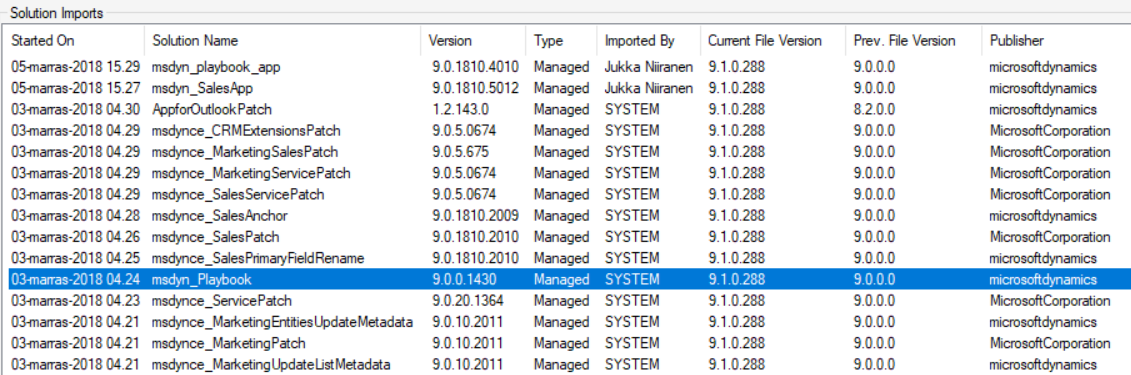
    How do we know which solution versions carry which new features? We don’t have a central place for such information right now, since the Microsoft Dynamics 365 Online releases page only lists fixes and changes to existing functionality (in theory at least). When we browse the documentation for specific features like Playbooks for example, we may see details like this:

    OK, that gives us a hint about what versions we should be seeing inside Dynamics 365. Getting the platform version is easy enough via the About menu behind the configuration cog, and everyone who’s customized Dynamics CRM should know where to look for the solution version number.

    (more…)
  • Ignite 2018 & The Power of Microsoft’s Platform

    Ignite 2018 & The Power of Microsoft’s Platform

    Just like last year, I was fortunate to be able to escape the chilly Finnish autumn weather to sunny and warm Orlando this September, to attend the Microsoft Ignite 2018 conference. This time my visit to Florida did not contain a whole lot of sunlight, though, as my stay in that region was focused strictly on the days of the event, which meant I was mostly wandering back and forth the endless corridors of Orange County Convention Center. With 1600+ sessions crammed into 5+1 days, you’re always going to have a packed agenda at a conference like Ignite where 30,000 fellow Microsoft geeks are swarming around to gather the latest announcements and demos from their favorite technologies and evangelists.

    I’ve written a summary over on LinkedIn of what were the main themes I picked up from Ignite this year. In short, Power Platform was front and center in the story of how Microsoft is further helping organizations to digitally transform their business processes. Not just from the traditional CRM and ERP scope of Dynamics 365 but on a much broader scope that speaks to the audiences that might not have otherwise ended up exploring how PowerApps, Flow, Power BI and CDS can connect their existing Office tools into a more automated flow of data through predefined pipes – as opposed to the more free-form processes that information workers previously had to agree on, to efficiently collaborate with their colleagues.

    On the one end we saw a lot of praise for the unlikely heroes that have managed to pick up a toolkit like PowerApps without any developer background or formal position in IT, and build applications that their organizations have adopted into their day to day routines. Even though these citizen developer scenarios may not seem all that complex for professional software people, the key lesson is that these manual processes would have been unlikely to get digitalized with off-the-shelf or custom built software anytime soon. Making the tools for digital problem solving accessible to the people who intimately know the problem is what’s really shortening the time to value, which in turn drives the growth of the community around the Power Platform. It’s not capped by the number of companies looking for a CRM deployment project, rather it’s fueled by the amount of data and cloud based services that make this data available to the platform via connectors.

    At the other end of the spectrum there was the true enterprise scale where this data needs to be harnessed with advanced tools and technologies to remain competitive in today’s global business. AI is the kind of buzzword that cloud was in the beginning of this decade, but in the same way as cloud computing became an everyday commodity, we’re bound to see if not artificial intelligence (AI) but at least machine learning (ML) algorithms find their way into everyday tools in the very near future. All of the major apps in the Dynamics 365 CE suite recently received their AI extensions that aim to bring intelligence built into the packaged applications, not just via Cognitive Services from Azure that developers and data scientists must plug into the business applications. Another example of the enterprise application providers’ focus on squeezing more value out of data was the Open Data Initiative by Microsoft, SAP and Adobe that took the center stage in the opening keynote were the three CEO’s explained why it’s in their best interest to help customers “deliver unparalleled business insight from their behavioral, transactional, financial, and operational data.” It’s really interesting to see that the Common Data Model (CDM) may be evolving into something that actually connects applications across big tech vendors.

    Among all these tech giants, there was also a 20 minute slot where an ordinary Dynamics 365 guy like me got a chance to tell a bit about what we’re building in this small country of ours. My session was called “Onboarding customers to Microsoft Dynamics 365 for Sales via PowerApps” and you can catch the YouTube recording of the session or just check out the slides if you’re interested in knowing how we at Elisa aim to make use of the Power Platform as part of our product offering. It was the first time for me to be a speaker at an event the scale of Ignite, so a big thanks to Microsoft for providing me this exciting opportunity!

    Even though Ignite wasn’t really a Dynamics 365 themed event like the Business Applications Summit a couple of months earlier, there were a lot of interesting demos about the brand new functionality rolling out as a part of the October 2018 release shortly. I compiled some of the highlights tweeted out on the #MSIgnite hashtag during the event onto this Wakelet collection for you to check out if you missed the live event excitement.

    Just like in previous Microsoft conferences, the learning doesn’t stop with the closing of the venue doors. The Ignite on demand sessions provide a library of videos and slides that you definitely should be browsing through to keep up with the latest news around what’s coming to Microsoft Business Applications and the many connected products. Now, if you just happen to be located in Helsinki next week, then I have to promote the brand new Finland Dynamics User Group (#FDUG) and our very first Meetup event on October 18th where I’ll be doing a “whole Ignite in 30 minutes” summary of what I found most interesting in the various Power Platform related sessions I attended. See you there!