Tag: Power Platform

  • Microsoft FY20 Q2 earnings and the rise of CDP

    Microsoft FY20 Q2 earnings and the rise of CDP

    Yesterday, January 29th, Microsoft reported on their earnings for the Oct-Dec 2019 quarter, which is Q2 in their fiscal calendar. It didn’t come as a huge surprise that the cloud revenue keeps growing at an impressive pace everywhere you look. 12% growth for Dynamics products and cloud services revenue is nice, and 42% for Dynamics 365 is… even nicer!
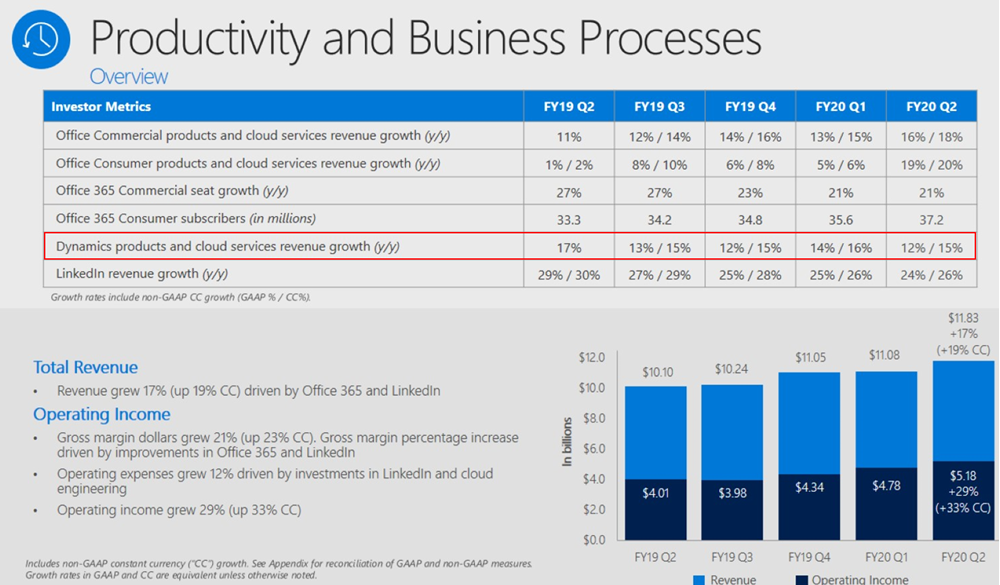
    What I find more interesting than these financial numbers is the earnings call transcript, where we get the opportunity to hear CEO Satya Nadella and CFO Amy Hood describe how they see the Microsoft business evolving. Picking up the terms and products from here should give us a better understanding of not just the past (i.e. the quarterly revenue and operating income) but especially the future outlook of what the company considers to be the shining stars in its portfolio. So, in the spirit of Thinking Forward, here’s a summary of what I though was relevant in that earnings call from a Business Applications perspective.

    Power Platform

    “We are empowering not only professional developers but those closest to the business problem – from citizen developers to business decision makers – with no code, low code tools so they can create apps and intelligent workflows that solve unique needs. Today, 2.6 million citizen developers use our Power Platform to make better decisions using self-service analytics, build a mobile app, automate a business process, or even create a virtual agent – all with no coding experience.”

    The new type of market for app makers that previously could have only been app users is of course a very critical area of success for Microsoft. Low-code development is one of the hottest games in town, where also other tech giants are looking to grab a seat at the table. A couple of weeks ago Google acquired AppSheet to provide no-code/low-code tools for their customers. Almost right after it, they announced that their in-house equivalent Google App Maker would be shut down within less than a year. Google cited low usage as the reason for running down App Maker, which gives us an indication that you can’t succeed here merely by having just any citizen developer tool available out there.

    Meanwhile, Microsoft is investing heavily into ensuring Power Apps plays nice with their whole productivity stack. Satya especially highlighted the platform effect that Microsoft Teams carries with it, so expect this to be the UI through which the broad user base will discover Power Apps and Power Automate. At the same time, Power Platform’s role as the shared extensibility model for both Microsoft 365 and Dynamics 365 is also of high strategic importance:

    “There’s no such thing as a canonical business, and no such thing as a canonical business over time, right? Business processes change. The question is how rapidly can people and domain experts keep up with the change. And that’s where Dynamics 365 absolutely shines.”

    Dynamics 365

    Even though many XRM professionals have shifted into blogging and talking more about Power Platform these days (myself included), that doesn’t mean the role of Dynamics 365 in Microsoft’s product portfolio would have decreased one bit. No, of course Dynamics 365 is not “dead” – it just isn’t the platform product anymore. The rapid launch of new first-party Apps under the Dynamics 365 brand is a key source for revenue growth, as described by Microsoft CFO Amy Hood:

    “The Dynamics 365 excitement we have, when I think about the comment I made around adding workloads, what’s so important about what Satya just talked about is how this reaches into new budgets for us, new opportunity for us in terms of being able to tap growth that we had not been able to access before.”

    Many of these new workloads are about going beyond what the traditional CRM + ERP suite of Dynamics 365 covered. While I suspect that we haven’t yet seen much actual license revenue come in from this next generation of business applications, Satya firmly believes that the new opportunities in this field will rise out of the not-so-secret magic ingredient: data.

    “We are very excited about what’s happening with Dynamics 365, in particular, because when I look at what the world needs is it needs a business application suite that is more comprehensive that can turn what is the real currency of this next era, which is data, into predictions, insights, and automation without boundaries.”

    Customer Data Platform

    Now we get to the interesting, forward looking part, which I believe hasn’t yet been fully grasped by the general tech media. What specific products and technologies is Microsoft using as the spearhead for getting the message across when they talk about data and AI being brought into business applications?

    “The competitiveness of every business going forward will be defined by their ability able to harness the full value of their data. Dynamics 365 enables organizations to move from reactive, siloed transactional processes – to proactive, repeatable, and predictable business outcomes. Dynamics 365 Customer Insights, that’s layered and built on Azure Synapse, is the only Customer Data Platform operating at scale today.”

    Let’s highlight the CDP part first. What is it, to begin with? Well, we don’t have time to dig into the dirty details here, but in short: a Customer Data Platform is about creating a unified customer profile from a number of structured and less structured data sources, deriving new insights from it and then performing smarter (automated) actions towards the customer as a result of this. It’s not a single relational database like CRM, it’s more like a database of databases, ad-hoc data sources and APIs that change rapidly over time. The common use cases for CDP have mostly been in the marketing space, but the concepts and scenarios are evolving fast into other areas, too. As Satya Nadella points it out:

    “There is a new category, in fact, and a new race starting with CDP, and we’re leading.”

    Why is Microsoft so confident about being a leader in CDP already? Yes, we’ve seen Dynamics 365 Customer Insights being demonstrated at every MSFT event for the past half a year already, but is it really such a revolutionary application in its own? The real source of Microsoft’s competitive advantage is found from within their Data Platform in the cloud, and how all the new Insights products in the Dynamics 365 family are leveraging the very latest Azure tech. Looking at the earnings call transcript and the order in which the different categories were addressed during the session, before Satya even mentions Power Platform or Dynamics, he highlights the importance of Azure Synapse:

    “Azure Synapse is our new limitless analytics service. It brings together big data analytics and data warehousing with unmatched performance, scale, and security. In concert with Power BI, it enables data scientists to generate immediate insights from structured and unstructured data, and build custom AI models.”

    These are some of the cornerstones in how Microsoft envisions it can enable organizations to “build their own digital capability and tech intensity”. You can find a recent example from the Dynamics 365 product team blog about how the Customer Data Platform story fits in with the shifts in the retail industry: it’s not just about capturing the customer’s email at the checkout counter but rather offering a comprehensive solution to manage signal data from social channels, chatbot interactions and even augmented reality.

    So, if I were to summarize what’s happening here in a simplified formula, it would be:

    Azure Data Platform + Dynamics 365 = Customer Data Platform

    jukkaniiranen.com

  • First impressions on Power Platform 2020 Release Wave 1

    First impressions on Power Platform 2020 Release Wave 1

    It’s that time of the year again when all us Microsoft Business Applications geeks are blessed with two huge documents to consume: the Release Plans for both Power Platform and Dynamics 365. While I gotta say that it’s awesome to have this level of transparency on what specifically is in the next 6 month release cycle, the amount information does feel overwhelming – at least if you’re trying to cover more than a few specific products within the stack.

    Ultimately we should at least aim to have a general idea of how each piece of the BizApps puzzle is evolving. Especially the Power Platform side is very relevant for anyone who’s not strictly focused on training/delivering/administering just a single app from the Dynamics 365 portfolio, because this is your low-code toolkit for making those applications meet the real life needs of customers. Unlike with past CRM projects, the customization tools are not part of single server installation, rather they can be discovered from all around the Microsoft cloud.

    To make the Release Plan easier to digest, I’ve picked out the new/improved features that jumped out when I went through it for the first time. Instead of the PDF versions (which are coming a bit later anyway), I prefer the online documentation, so below are links to each of those items for you to drill deeper into – and also keep track of possible changes to the original plan.

    I’ve added my comments on why I consider these to be the most important items in the Release Plan. Time will tell how they actually land and what the impact will be. It’s going to be fun to review this list October 2020 when Wave 1 is over!

    Power Apps

    Single mobile app player for Canvas & Model: very much needed in order to break free from the assumption that Model-driven apps are only for Dynamics 365 customers.

    Offline improvements: the need for accessing data without a live connection is still very real in mobile scenarios. What is somewhat of a bummer is that the efforts here are targeting Model-driven apps only for now.

    Modern solution explorer makeover: Yes! There are a lot of areas where app maker productivity could be improved, so it’s great to see investments are being made here.

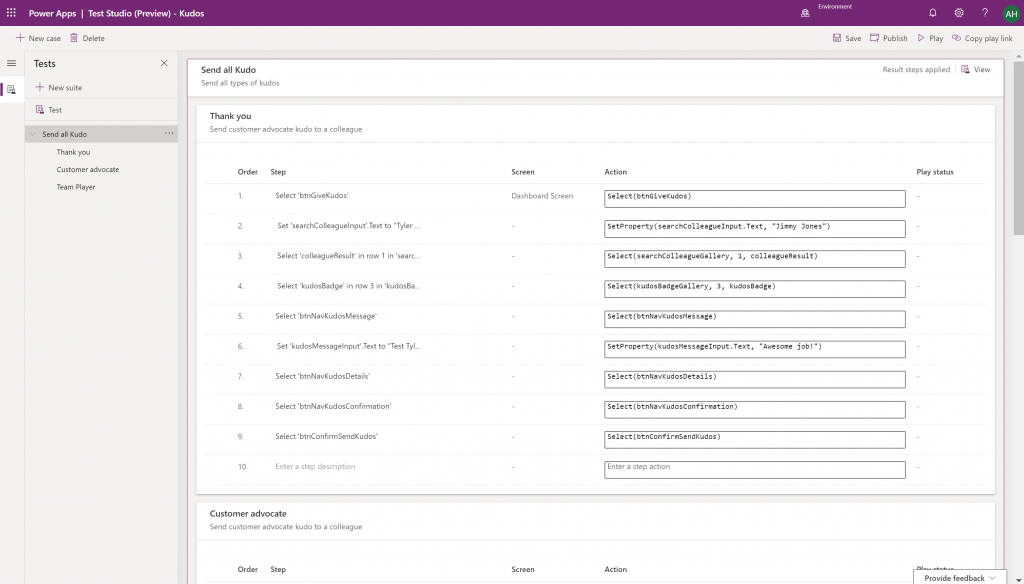
    Canvas app Monitor tool & Test studio GA: the wave of the future. Low-code app development isn’t going to be restricted to personal productivity scenarios, we’ll have much of the same needs as in the pro dev side.

    Azure Application Insights telemetry in Canvas: a great example of how the existing tools from Azure should be harnessed to offer shortcuts for Power Apps makers.

    Generate app from data with responsive layout for phone and tablet: it’s been an awkward limitation before to only support phone layouts. The bigger story is in bringing out these templates for how to actually make Canvas apps responsive, as it has been quite a mountain to climb for citizen developers. In 2020 Wave 1 we’ll also see a preview of the awaited responsive Canvas app pages.

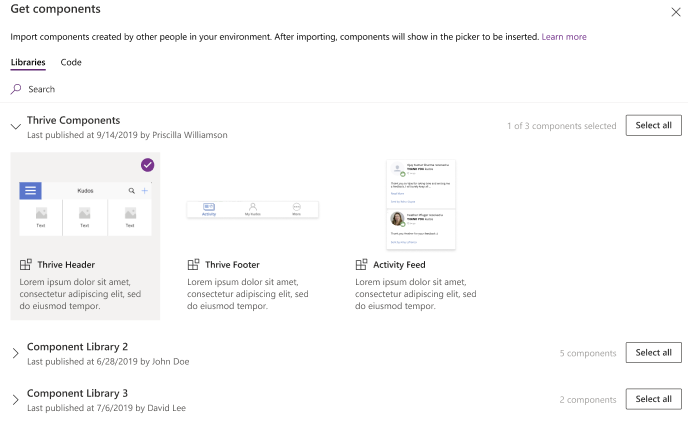
    Canvas Components GA: very impactful stuff here. Component libraries, solution awareness, support for galleries and forms, using collections and media files. These are big steps in bringing the two app types of Canvas and Model-driven closer together.

    Power BI embed component in Portals: oh yeah, there’s that third app type, too… Definitely looks a lot more approachable than the current embed experience. As for Portals extensibility for pro devs, the CRUD Web API sure made Nick Doelman excited, so keep an eye on that one.

    Unified Interface enhancements: important for many Dynamics 365 experiences. Forms as modal dialogs in particular looks useful, better filters are about closing the gaps to legacy web client, search in this view is an age old requirement.

    Improved themes reflecting modern Microsoft Fluent themes: UI matters, the power of the Apps is not just in the logic, data and automation. MS should be more aggressive here when competing against other low-code development platforms.

    Power Automate

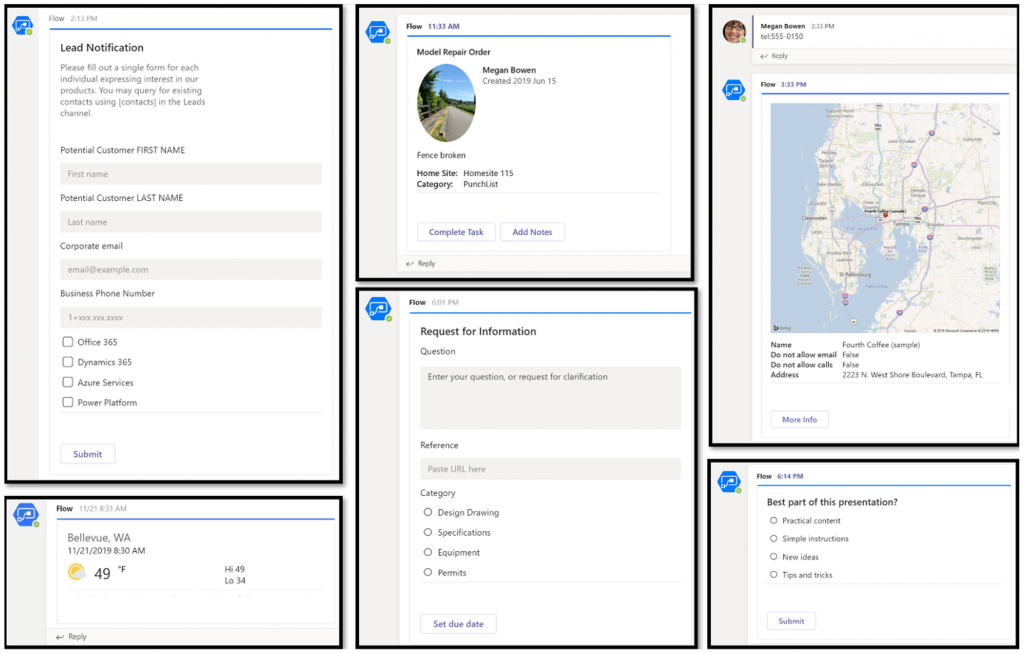
    Interactive adaptive cards: we’ve surely been waiting for this. Very important for bridging the user experiences across different tools in different MS clouds (Office, Dynamics, Power Apps). Could 2020 be the year of the Adaptive Cards? Potentially yes, if you look at how Teams & Power Automate can make use of this feature.

    UI Flows solution awareness: aligning RPA with the common shipping vehicle of Power Platform. Being a new preview feature, there’s of course a lot of other parts moving around still, but the important bit from a platform play perspective is getting everything to play nice with solutions (including non-UI Flows…)

    Use business process flows in Office 365 apps: interesting yet logical step. From a process automation perspective there’s no reason to keep BPF functionality tied too closely with the familiar CRM sales process stages mentality. Again, it’s the platform that counts.

    Power Platform governance and administration

    Environment life cycle support: much needed in the real world implementations. To be able to test new standard and custom features in complex business systems, copying and deleting environments needs to be compatible with all the platform components used. Power Automate, Canvas apps etc. have to support healthy ALM patterns for enterprise development scenarios.

    User access diagnostic experience: again, very much needed for keeping larger environments operating the way IT would want them to. The process of managing access to applications should be isolated from the actual app maker tools or features specific for Dynamics 365 admins, to ensure there’s help available on a broad enough level when users encounter problems.

    Admin connectors & PowerShell cmdlets Generally Available: because they need to be. Low-code Application Platforms for enterprise customers will have to provide automation tools for not just app creation but app governance and administration. If the number of business apps within an organization will explode thanks to these tools, trying to scale the old admin practices isn’t going to be the answer.

    Bring your own data lake: allowing customers to control their own adoption metrics for Power Apps. Just like the GUI for admin tools might not meet the requirements of all organizations, it makes sense for Microsoft to allow customers to also take the telemetry data from apps and use Azure services to put it into their own reporting context.

    Power BI

    Paginated reports enhancements: the next generation SSRS has been a long time coming. The new features like API to render a paginated report to any format (e.g., PDF, Excel) and subreport support will bring the cloud reporting powers of Power BI close to what you could do in on-prem 15 years ago. They might not be the coolest of features, but for many CRM scenarios these “pixel perfect” A4 outputs are still a very practical solution.

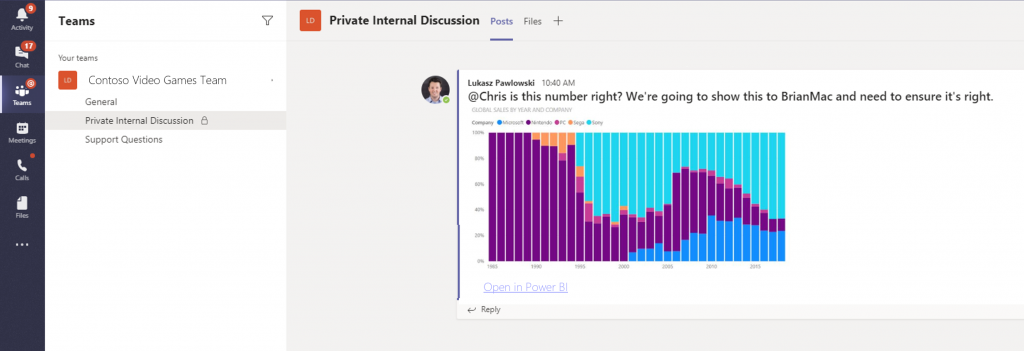
    Copy and paste visuals into other applications: supporting the modern flow of information. If the paginated reports represent the PC era way of working, then being able to grab a part of your analysis and quickly paste it to a conversation in Teams with a link back to the full report is the way today’s information workers expect these cloud apps to work with one another.

    Data lineage GA & enhancements: when cross-referencing data from anywhere is a breeze, how can you tell if the analysis is actually accurate? The lineage visualization is an effective way to illustrate how this modern world of self-service BI operates and bring tools to do meta-analysis on what’s the actual source of the truth being presented to you.

    Power Virtual Agent

    Add a Power Virtual Agents bot into Power Apps canvas app: because bots are not just for customer service. Internal scenarios for app users would be very interesting, although the starting price for using bots is probably going to scare most customers away.

    Adaptive Cards: see my comment in Power Automate section.

    Single Sign-On: if attempting to go beyond generic website chat popups, strong identity management features are a must.

    Pass context to a bot from the calling site: “Hi, how may I help you?” That’s not how a smart agent would initiate the chat, so after identity comes context management. Bridging the gaps between apps is where I see bots being particularly powerful, so URL query string support is a good start for making this happen.

    AI Builder

    Power Automate integration: building the Cognitive Service for citizen developers. The patterns from Azure need to become more accessible in the BizApps frame of reference.

    New models like anomaly detection and receipt scanning: making AI Builder ready for business. Training AI for unique data sets is one thing, but where I believe wider adoption will start is through these more “ready to go” scenarios.

    Common Data Model

    Empower out-of-the-box analytics: delivering on the promise of CDM. It’s all just theory until we see Microsoft deliver on those promises about making it easier to integrate data sources and analytics/AI via a common semantic model.

    CDM visualization and management experience: making CDM more than a GitHub repo. “Increased focus on growing the Common Data Model ecosystem requires enabling users to work with Common Data Model in their native data environments, such as Power Query, Insights Apps, Synapse, and Power BI.” Yes, it certainly does.

  • Year 2019 in Microsoft Business Applications

    Year 2019 in Microsoft Business Applications

    For the past couple of years I’ve done a “top 3 themes” post at the end of the year, to reflect back on what were the key topics that shaped the coming direction of Dynamics 365. Just because this is no longer a “CRM blog” doesn’t mean I should give up on that tradition, so let’s do some exploration on what has happened in the past 365 days.

    One year ago I described 2018 as the year of the platform and listed the top themes to be 1) Power Platform, 2) One version, and 3) AI journey. What will 2019 be remembered from? Just like before, it was fairly easy to select three bullets that I think have been most impactful on the Business Applications ecosystem:

    • Low-code movement
    • Licensing confusion
    • Data story evolved

    Let’s discuss what happened under each of these themes in 2019 and do some forward thinking on why they’ll continue to be relevant in 2020.

    Low-code movement

    This first topic is a much broader phenomenon than just Microsoft’s Power Platform offering. During 2019 we’ve seen the general tech media and industry analysts give plenty of attention to the rise of low-code/no-code development and how organizations are exploring its possibilities to augment (or even replace) traditional software development methods when it comes to internal app development. Microsoft receiver recognition from both Forrester in March 2019 and Gartner in August 2019 for its position as a leader in the low-code application platform market.

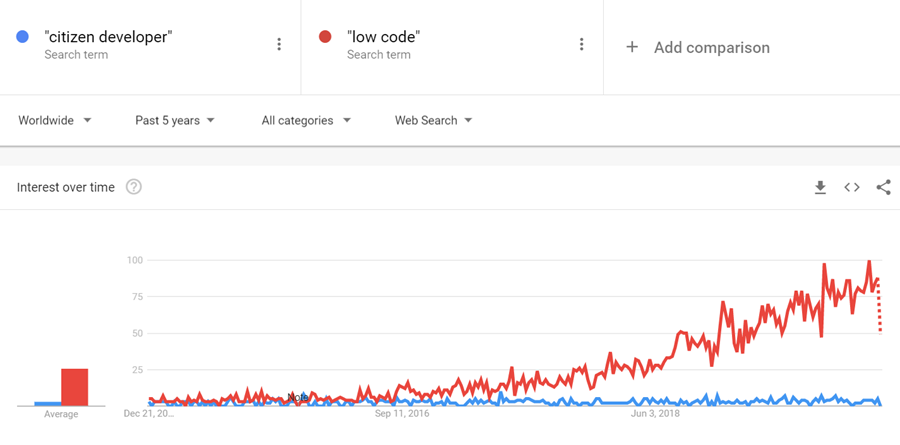
    The term “citizen developer” had of course been used already much earlier in Microsoft’s description of the target group for Power Apps (earlier “PowerApps”) and Power Automate (formerly known as “Microsoft Flow”). However, it’s safe to say that the general interest on low-code is rising much faster, if you look at what people are googling:

    What has propelled Microsoft to the top right corner in the analysts’ charts is not just the functionality aimed at everyday information workers / power users in these tools. Making their low-code offering enterprise ready has been a clear goal for Microsoft, as can be seen from how the pro developer audience is being presented Power Platform + Azure as the platform for every developer. On the IT administration side the efforts to put together a Center of Excellence (CoE) toolkit for Power Apps are showing Microsoft’s commitment to providing a governance story to address both the common admin needs of organizations as well as adapting to the varied support needs of the new breed of app makers.

    There is a wealth of functionality that’s still just in the MS product team’s pipeline to land sometime in 2020 which will make the Power Apps development process much more like “real” app building. Built-in tools like Power Apps App Monitor will be the go-to place for debugging formulas, analyzing performance and in general taking a peek under the hood of what the low-code declarative app development studios actually produce. The coming Power Apps Test Framework will allow the authoring and execution of proper test cases, to ensure the app quality doesn’t erode as new features and platform functionality are introduced. There will be Power Apps telemetry data available in a similar way as Azure Application Insights provides to custom apps today.

    All these platform investments together with the growing interest from customers (and presumably partners, too) should mean that low-code app development will become increasingly mainstream in 2020. This will boost the awareness of different vendors in the category and may well steer us a bit further away from the ever so familiar head-to-head comparison of Salesforce vs. Microsoft that’s founded in their CRM product offering. Dedicated low-code players like OutSystems or Appian may start to appear more frequently on the radar, as well as companies like ServiceNow that are running towards the citizen developer territory from a slightly different background. Oh, and you should definitely expect there to be even more heated debates ahead on the possibilities, limitations and roles of no-code, low-code and pro code!

    Licensing confusion

    This second theme is in part related to the growing pains of how the Power Platform tools are turning into self-sustained products rather than just an extension method for Office 365 and Dynamics 365. Yes, they are still very much the toolkit for how you customize applications in the aforementioned suites. However, building extensive custom apps with the full low-code platform capabilities is no longer something that “comes with Office” when looking at the latest licensing terms. Citizen developers can still easily get started with the “seeded” plans in Office 365 for their personal productivity explorations, but for the organization wide deployment of low-code solutions, customers should prepare to purchase dedicated Power Apps and/or Power Automate licenses.

    In 2019, removing the earlier included rights from Office 365 seeded plans to use custom connectors, HTTP custom actions, on-prem gateway, Azure SQL was understandably something that irritated those early adopters who had dived deep into building Power Apps and utilizing flows on a wider scale in their organization. While I bet many had suspected there would eventually be limitations designed to drive customers towards the paid plans, it might have been a surprise that minimum price point for the required Power Apps user license was kept at $40/month. From the Office 365 point of view, this can sure look like quite a “cliff” for taking app development further.

    Another big surprise was the way how Microsoft introduced a new $10 per app pricing model as an option for basically any custom apps built on top of Power Platform. With rights to full feature set of CDS, Model-driven apps and pretty much everything that you’d need for running an app that looks like the native Dynamics 365 apps, it seemed almost too good to be true – if you’re coming from the Dynamics side of traditional CRM style business applications where the enterprise apps cost $95. A great example of the two different realities clashing, when Power Platform can simultaneously be seen as crazy expensive or dirt cheap, depending on the frame of reference.

    The policy of licensing the low-code Power tools from Microsoft via primarily a per-user model with upfront payment requirement is sometimes challenging when talking about the business cases for an application platform that would be gradually adopted for more and more app scenarios. There’s no pay-as-you-go option like with raw Azure resources, because Power Platform is a value-added abstraction layer that should remove any direct dependencies to those resources. However, in 2019 we saw MS take things towards capacity based licensing, with the introduction of explicit Power Platform API request limits per user license type, plus the option to purchase additional capacity if needed. Although MS has stated that normal users should be well within the included API quota, there have been many concerns raised from developers on how custom apps and integrations will be impacted. The fact that these new consumption based limits were announced before any metrics were made visible to customers for evaluating their existing scenarios didn’t exactly help in alleviating concerns.

    I’ve never spent as much time investigating the details of Microsoft licensing as I did in 2019, and honestly I hope that 2020 would be at least a bit lighter on the licensing changes side. Seeing the rate at which the product portfolio of Microsoft Business Applications is growing, though, I’m not sure if it’s realistic to hope for the size of the licensing guides to shrink anytime soon. We’re also still waiting for some of the October 2019 licensing announcement details to be finalized, like the promised API usage metrics in Power Platform Admin Center, or the updated list of restricted entities requiring Dynamics 365 license. Oh, and I bet in 2020 we’ll see the launch of technical enforcement for the types of apps that each license holder is able to use (1st party, custom, Team Member etc.).

    From the customer and partner perspective, the licensing of Power Platform is often perceived as its most complex part, based on feedback from various community members. Although many of the recent changes have been undoubtedly necessary to align the very different Power Apps and Dynamics 365 licensing models into a coherent and future proof platform licensing model, unfortunately the continuous adjustments on what these services actually cost to run has clearly eroded the customers’ trust on being able to predict the operating costs of their solutions built on top of Microsoft’s cloud. After shaking things up on the licensing front in 2019, let’s hope that 2020 would see less drama. Who knows, Microsoft might actually study their own data on how the latest licensing and pricing decisions have impacted service consumption and calibrate the model on those areas that could be better balanced to drive greater adoption of the platform and the apps.

    Data story evolved

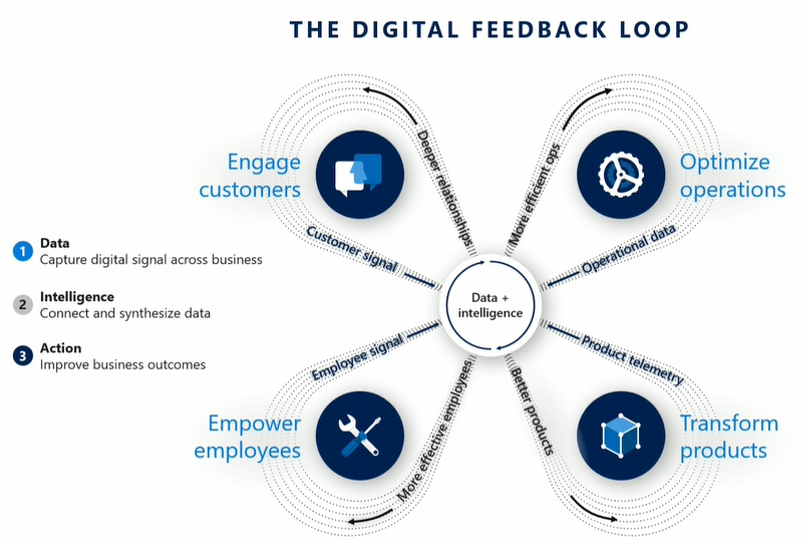
    Basing business decision on larger and larger pools of data, gathered from an exponentially growing number of sources, processed closer and closer to real time is the Digital Feedback Loop story that Microsoft has been preaching in basically every Business Applications themed event for the past couple of years. The underlying message is that you must have applications so well integrated with one another that you can establish such a loop in real life – which of course the products in Dynamics 365 and Power Platform portfolios promise to deliver.

    Back in 2018 we saw the birth of many “AI for X” products that have since then been rebranded as “[something] Insights”. I called this out as the start of the business AI journey in last year’s summary blog post, since we hadn’t yet seen much of these new intelligent features find their way into actual customer environments. Based on my observations today, it’s still fairly rare to find these premium Dynamics 365 licenses for Sales Insights or Customer Service Insights deployed in real life scenarios (let alone Market Insights that’s still a bit of a mystery product in its preview state). So, it appears that at least these core CRM processes didn’t just magically get transformed by adding some AI frosting on top. A big practical blocker seems to be lurking in the availability of clean enough data in large enough quantities that these packaged AI features could show concrete results to business decision makers in customer organizations.

    What 2019 did deliver is a set of new products that are aiming to leverage business data in a way not previously covered by Microsoft’s business apps offering. In the second half of 2019, the headline Dynamics 365 product demonstrated in all MS events was Customer Insights. Built as a Customer Data Platform (CDP), its purpose is to enable marketing users to combine customer and transaction data from numerous different sources, to form a 360 degree profile of that customer and use it in better segmenting offers and providing personalized service. Pouring data into Azure Data Lake & CosmosDB is designed to be effortless from any source, be it Microsoft’s or other vendors’ solutions, with intelligent matching algorithms generating “keys where keys don’t exist”. While it can be used with Dynamics 365 apps, there’s no requirement for the customer to have a specific CRM system in place. It’s also not a black box like some of the earlier Insights products, since the built-in templates like churn prediction can be replaced with custom Azure ML models to take advantage of machine learning models built and trained by your own data scientists.

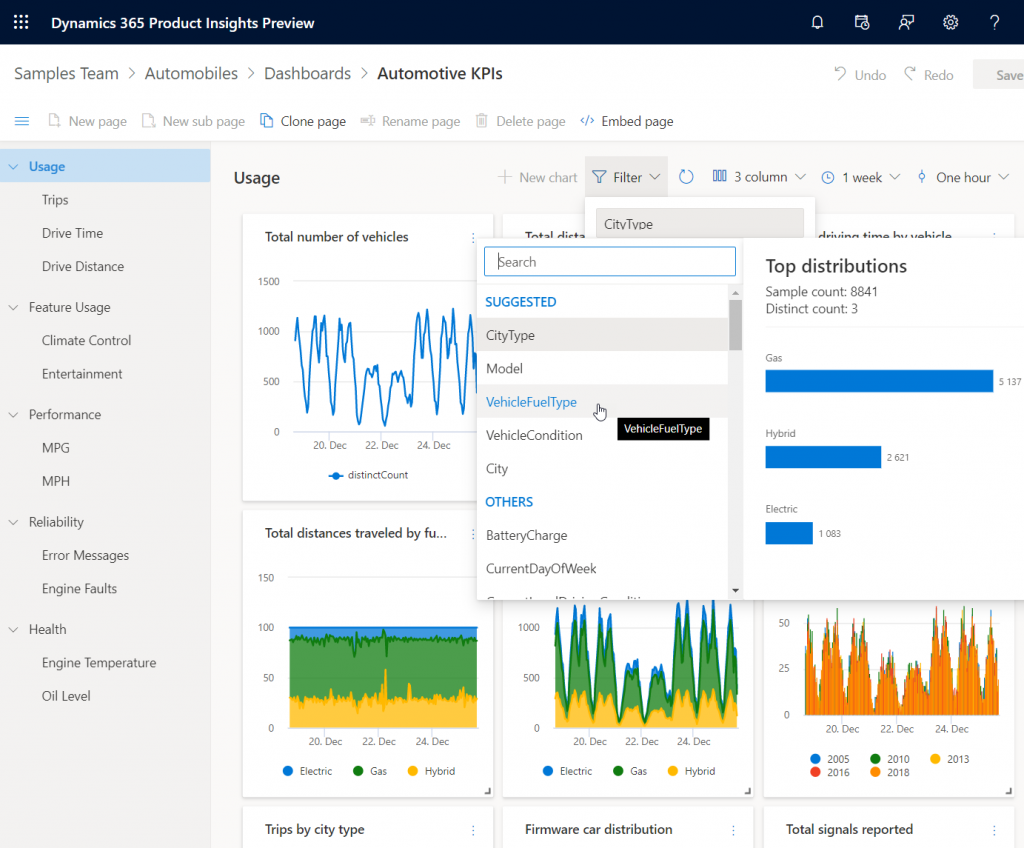
    Another similar data intensive new product launched as preview in 2019 was Dynamics 365 Product Insights. The origins of this application lay in Microsoft’s own telemetry data management systems, where services like Xbox, Skype, Bing and Office have been sending up to 25 million events per second to be processed by the same technology that’s now offered as a Dynamics 365 SaaS product to customers. Yes, you could use Azure Event Hub to push all that product telemetry data into the PI service, but there’s a Signals SDK for Java, Objective-C or Python, too, if and when the whole product architecture of the customer organization isn’t based on MS technology. Insights derived from processing the signal data could be consumed via Power BI or embedded inside Dynamics 365.

    These kind of new services that are aimed at exposing business users to data that previously used to exist outside the reach of the Digital Feedback Loop sound a lot more transformative than the earlier “AI for X” products. Sure, there’s also value in bringing predictive opportunity scoring into the traditional sales funnel management in CRM. However, those kind of features will likely become the new norm for the type of smart business apps that users will expect to be interacting with everywhere. The customer specific implementation of solutions based on Customer Insights or Product Insights, on the other hand, have the potential to be a source of true differentiation if organizations can learn unique ways to use their data for proactively serving their customers. It also aligns with the ambitions that Satya Nadella has on how organizations can break traditional data processing barriers with the help of Azure:

    We are building Azure as the only cloud with limitless data and analytics capabilities across our customers’ entire data estate, bringing hyperscale capabilities to our relational database services.

    Satya Nadella, September 2019 post on LinkedIn

    New services like Azure Synapse will naturally be the toolkit for creating highly specific, cutting edge analytics solutions on the MS data platform, but I can imagine the SaaS style Dynamics 365 products to follow pretty close by when it comes to covering repeatable business scenarios for big data – with the same underlying Azure tech, of course. In 2019 we already saw CDS data export to Azure Data Lake becoming available both via Dataflows as well as through a standard feature (preview). The traditional relational world of business application data is intermingling with the less structured analytical data systems at a rapid pace, with Microsoft building these services that blur the lines of what specific type of data is being used in which business scenario. Is 2020 going to be the year when Dynamics 365 professionals must step out of their comfort zone of having everything in one database and start connecting to all these strange new services, to deliver those much sought after actionable insights to their business user audience? We’ll know that in approximately 365 days!

  • End of Dynamics 365 Customer Engagement Online

    End of Dynamics 365 Customer Engagement Online

    I always prefer to use precise terminology when talking about the technologies that are part of my trade. Some might consider me a pedantic guy who’s always correcting some insignificant details in documents or presentations that cover Microsoft technologies but aren’t using their correct names. Yeah, the customers reading them probably wouldn’t notice the difference, but if you let go of your standards then sooner or later the lazy writing will lead to unnecessary confusion. Since I don’t write any actual computer code for a living, I guess this is my way of “debugging” the deliverables that I actually ship.

    Like with actual coding, sometimes there are breaking changes introduced into the concepts that are used in technical writing, too. This happens when the product branding gets updated by Microsoft as part of their evolving commercial offering, or when existing technologies are realigned to be used in a new context. You could think of it as a new API version that MS product marketing releases, which means you need to perform updates to your “code” to keep its API references compatible with the surrounding reality. A slide deck created by Microsoft in 2016 for the Dynamics product offering would hardly pass the code validation today – yet you still see some partners out there just happily using these legacy materials in customer dialogue. Yes, I cringe a lot when seeing those.

    The actual topic of this post is about what the title says: Dynamics 365 Customer Engagement is now officially gone from the Microsoft cloud. That is all. Thanks for coming, have a save ride home!

    Wait, WHAT?

    Oh, alright then. Let’s dive a bit deeper into the what, starting with a look back at what has happened in our earlier episodes of Microsoft business applications branding.

    In the beginning there was CRM…

    …And then suddenly there wasn’t. Yes, you’ll still find the term “CRM” all over my blog. I’ve had trouble deciding on what comes after it – and sticks around for longer than a year or two. Anyway, in 2016 Microsoft decided to let go of the Dynamics CRM brand and replace it with Dynamics 365 instead. There was a popular article written on LinkedIn at that time about it:

    Deprecating the term “CRM” was probably a good move, but replacing it with something that didn’t specify if the technology underneath was ex-CRM or ex-AX (the enterprise ERP product) caused a bit of a mess. From that mess, the term Dynamics 365 Customer Engagement rose from the ashes of Dynamics CRM in the first half of 2017, to reference the platform that was XRM under the hood but wasn’t allowed to be called that.

    A year went by and it was time to reimagine things again, with the merging of PowerApps and XRM. The platform was given the name Common Data Service, which had actually already been given to a completely different platform a bit earlier in the pre-merger world of PowerApps. Since in the cloud there are no version numbers, let’s not refer to “v1” or “v2” here either then. There can only be one CDS!

    (Well, actually there were 2 after this merger still: “CDS for Apps” and “CDS for Analytics”, in short “CDS-T” and “CDS-A”, but then…) OH SHUT UP ALREADY you pedantic geek!

    Summer 2018 saw the Power Platform brand emerge, and we’ve been hearing quite a lot from it since. You could say it’s been stealing the show from the previous business applications primary brand that was Dynamics 365. It would be foolish to think that we’re anywhere near the end of this Power wave that’s sweeping across the MS cloud offering.

    Dynamics 365 CE Online vs. On-premises: the game is over

    As part of the October 2019 updates coming in the form of Release Wave 2, there have been some subtle changes to product branding for Microsoft Business Applications. For starters, MS is dropping “for” from the product names, so what used to be “Dynamics 365 for Sales” is now just “Dynamics 365 Sales”. Certification and exam names have already changed, next we’ll wait and see when the official SKU names in MS price lists will reflect this.

    Another visual change you’ll see when visiting the documentation site for Dynamics 365 is that many of the apps received shiny new icons. Woo-hoo!

    Then when we scroll down the page, there’s this small section with no bold graphics, dedicated to the on-premises products:

    Let’s click on it, if only for old times sake. Hey, hold on! There’s actually something interesting here right on the Overview page for on-prem:

    Effective October 2019, the Dynamics 365 for Customer Engagement SKU/license plan is no longer available for “online” customers. More information: Dynamics 365 Licensing Update

    With this change for online customers, we are no longer using the term “Dynamics 365 for Customer Engagement apps” to refer to the collection of following apps and its related services:
    * Dynamics 365 Sales
    * Dynamics 365 Customer Service
    * Dynamics 365 Marketing
    * Dynamics 365 Field Service
    * Dynamics 365 Project Service Automation


    For online customers, these apps are model-driven apps running on Common Data Service. You can build model-driven apps using PowerApps. More information: What are model-driven apps?

    For on-premises customers, “Dynamics 365 Customer Engagement (on-premises)” is the official name of the product that provides sales, service, and marketing features. Customer Engagement (on-premises) shares many features in common with Common Data Service and PowerApps.

    That’s it then. Customer Engagement is now exclusively the name of the old legacy product that you can deploy on the server infrastructure you manage. If you use anything called Dynamics 365 that’s coming from the actively developed Microsoft Cloud, then it’s not CE anymore. It’s “[Insert Dynamics 365 app name] running on Common Data Service”.

    Why?

    Even though some of you might feel that Microsoft keeps renaming things simply because that’s what they always do, there is a justification for the axing of the Customer Engagement brand. For those of you that work with configuring and developing solutions for the platform, you will have noticed that the cloud version resembles the old server product less and less every day. Environment administration tasks have been moving over to Power Platform Admin Center, the solution configuration work is done under make.powerapps.com, the new editors for forms, views and everything new is being introduced only to the Power side.

    None of these new investments into admin and customizer tools are such that you could easily port them over to the on-premises world. There isn’t a Power Platform you could install locally, so the gap between these 2 worlds cannot ever be bridged. From a training and documentation perspective you can’t claim that “it’s all just CE, don’t worry about the small things” when the architecture of one platform no longer physically aligns with the other. CDS, PowerApps, Flow, Connectors etc. aren’t just extra pieces in the cloud, they’re an altogether different puzzle that requires new skills and fresh thinking.

    (more…)
  • Licensing is NOT a security mechanism

    Licensing is NOT a security mechanism

    Licensing remains a topic that no one claims to like yet everyone keeps on talking about. October 2019 saw what was undoubtedly the biggest number of changes to Microsoft Business Applications SKUs (i.e. items that MS sells), with the end of Dynamics 365 Plan licenses and new models for licensing PowerApps & Flow. Not to mention the new structure that ties licenses closely to API call limits. Oh, and we’re still waiting for the new restricted entities definition that should have gone along with October 1st licensing terms.

    We’re not even past the month of October and there’s already a new licensing discussion heating up in the MS customer and partner community. The announcement of Self-service purchase capabilities for Power Platform products, made via Microsoft 365 Messaging Center (only visible to admins), seems to have pretty much angered everyone who saw it.

    I gotta say, you simply could not find a worse channel to announce something like this, because it’s aimed squarely at getting around a problem that IT administration (and sometimes consultants like me) are a part of. But like we’ve seen so many times before, communication isn’t exactly the strongest part of Microsoft’s software licensing management efforts, so let’s just move on and start analyzing what is happening here, why it is happening and what possible outcomes there might be from it.

    Empowering every individual to acquire applications

    To get an overview of what exactly is going on, you can read the article from Mary Jo Foley: “Microsoft to enable end users to buy Power Platform licenses without administrative approval”. In short, starting in November 2019 (in the US), any user that has an account in your organization’s Azure AD tenant will be able to go and buy Power BI licenses directly from MS. Later this will expand to PowerApps & Flow, and other regions. Essentially this will be an “insert your credit card here to unlock Power Platform functionality” type of experience.

    How is this different from any of the popular SaaS products from other vendors then? It isn’t. That’s the model that every consumer app and most business apps support, since it represents the lowest barrier to entering a commercial relationship. Usually you would start with a free trial period to try out the capabilities of the SaaS product. If it’s a good fit for the problem you’re trying to solve, the next problem you face is the procurement of the app. Buying things for personal use is easy, whereas the bigger the organization you’re working in is, the longer you can expect this purchasing stage to be. During it you’re basically standing behind the store window, staring at the product you know you’d really need, yet the door to the store is being kept shut. Often there’s even no opening hours sign to give you any clue on how long this will take (or if you’ll ever get what you wanted).

    In such a scenario, it’s not uncommon for problems to get solved with a credit card and an expense claim. The ease of taking this route is how Shadow IT came to be, and I bet we’re just going to see more & more of this Bring Your Own App (BYOA) activity in organizations as the information workers become more savvy about what’s actually out there in the cloud. If one store is closed, there are tens of other options with 24H service.

    But they can’t do this! They’re MICROSOFT!!!

    It’s one thing being an enterprise software startup and trying to get onto the radar of potential customers via the Bring Your Own App strategy. When you’re Microsoft, though, the expectation is that things work in a completely different way. Since pretty much every bigger company is a MSFT customer, the licensing game has been a process of long negotiations and complex agreements. This is the procurement norm of how Microsoft software finds its way into the hands of the end users. Well, it sometimes does, and other times it doesn’t, because the needs of individual users may get lost in the big corporate IT machine that’s trying their best to keep things under control, with the growing amount of regulations, systems and requirements.

    What’s Microsoft on about here with self-service purchases, specifically with this chosen set of products? Imagine you’re the world’s most valuable company, you happen to be producing software & you’ve recently discovered a huge new market in the Low-code Application Platform space. You’ve built up a strong community of advocates (or addicts even) and your target is to empower the next 10 million application developers to digitally transform their organizations with the help of your global cloud infrastructure and AI driven insights. You’ve got all these key buzzwords lined up, there’s a seemingly endless sea of citizen developer opportunity ahead of you. The only thing standing in the way of your success is this nasty thing that looks like Niagara Falls, sucking in many of the smaller boats that the poor citizens attempt to use to sail to this promised land of Power Platform. That thing has a name and it’s called Enterprise Software Licensing Models. So much for the “no cliffs” experience then – hope you packed a life vest on this journey!

    To avoid this vortex that Microsoft themselves have largely caused over the past decades with the swirls of their enterprise software sales strategies, it makes perfect business sense to open up new, alternative routes for those power users who seek to merely use the software tools – instead of catering only to those who are tasked with managing the whole lifecycle of IT tools in the organization.

    There’s only so much you can do with the PowerApps and Flow features bundled into Office 365 subscriptions, after which you’ll need a premium plan. Why on earth would Microsoft willingly push the users to look for alternative tools like Zapier or IFTTT to automate processes that connect to data sources that are outside Office 365? Why shouldn’t it be possible to enter the very same credit card details into a form provided by MS, to keep the tools within the same MS cloud that’s already used by the organization? Isn’t this actually a way to reduce the problems resulting from Shadow IT? Keep the rogue users closer to the official IT world and you’ll have a better chance of converting the tools into non-shadow status at some point.

    Rogue citizens

    Obviously there are some valid concerns with a model that might encourage users to acquire MS software via an alternative channel than the officially sanctioned one. The self-service shop won’t give the same negotiated prices for licenses as the company wide agreements. Handling the expenses from various different sources will be an overhead. The boundaries between supported and unsupported IT will become blurry. Even with the promised central visibility into who’s bought what licenses in the tenant, initially it will all just look like more work to those persons who have traditionally managed Microsoft licenses in the organization. There’s an FAQ document from MS for this self-service purchase model that attempts to address some of these concerns, but with a change like this there’s bound to be far more Q’s than A’s at this point.

    There shouldn’t be a need for the self-service purchase channel to exist, but in reality there is. If you have only spent time working in roles that represent the centrally planned deployment of IT systems, you may not realize the challenges that can stand in the way of you and the software license you would need for getting your job done in a larger organization. Sure, there might be a theoretical process in place for how the needs of business users are identified and then eventually turned into a working piece of software that everyone happily uses. In reality a fair share of the people on the business side who live in the world of needs may not be seeing such processes in action. They may well be unaware of any development initiatives on the IT side, nor have contacts with those professionals that could help them navigate these processes. If IT systems can be complex, then the inner workings of an enterprise organization can represent a whole new dimension of complexity. No one is at fault, yet everyone pays the price.

    (more…)
  • Licensing by consumption: pricing model of Power Platform online services

    Licensing by consumption: pricing model of Power Platform online services

    On the topic of Dynamics 365 and PowerApps licensing changes coming in October 2019, I earlier wrote about the biggest change in how Microsoft is separating the first party applications and the underlying platform in the new Per App pricing model. There’s another aspect in the coming licensing updates that has also caused a lot of concern among partners and customers: the API call limits. While the existence of limits on how much load one can place on the online service are not an entirely new construct, it’s the first time that the amount of API calls available is directly tied to the type of licenses bought.

    In their August 29 blog post, Microsoft stated the following:

    “A single, integrated approach for daily capacity limits will be implemented to help maintain a consistent quality of service for customers with PowerApps and Flow plans. These capacity limits should not impact standard or reasonable usage of PowerApps or Flow. Organizations that require additional capacity for heavy usage scenarios will be able to purchase add-on capacity and assign it to specific users or processes.”

    Updates to Microsoft 365, Dynamics 365, PowerApps and Flow Licensing

    The finer details of the new model are outlined in the PowerApps and Microsoft Flow licensing FAQs for October 2019 as well as the Requests limits and allocations pages over on docs.microsoft.com. You should keep an eye on these documentation pages, since further information will be made available, based on the incoming questions from customers. There have already been a lot of blog posts around this topic and I’m not expecting the debate to die out anytime soon. Rather than speculating about what the exact policies will be, I will instead try to set this new consumption based licensing into context with what’s happening in the Microsoft Cloud.

    Users aren’t the only thing that matters

    USL, user subscription license, has been the dominant model for pricing applications from Microsoft in the online services era. Of course they’ve been a key component ever since the personal computing revolution started with PCs running DOS, then Windows and many productivity applications like those found in the Office suite. The networked computing era extended the pricing models to server software that wasn’t always purely a per-user play, as the complexity and robustness of your back-end services determined how expensive that side was. In the initial wave of SaaS business applications, we saw a return to the simplicity of just paying a fixed fee like $50 per user and getting all of that server stuff covered for you. Oh bliss! Isn’t this exactly the way the cloud should be sold?

    Those first SaaS services also were in themselves quite simple. A replica of the server software you could have either in your own closet or the data center run by companies like Amazon and MS. You just offloaded the complexity involved in managing hardware redundancy, backups, storage etc. and instead payed for all that in the USL. This is all fine and dandy as long as the value from the applications can be closely linked to the number of licensed users accessing it. Using CRM as a simple tool to improve sales person productivity might map into this type of cost-value structure. But how about when you take a step further on the digital transformation path and start to actually replace those tasks carried out by human employees with something that is almost fully automated? Hmm, perhaps the PC business model isn’t optimal for a future that looks like this.

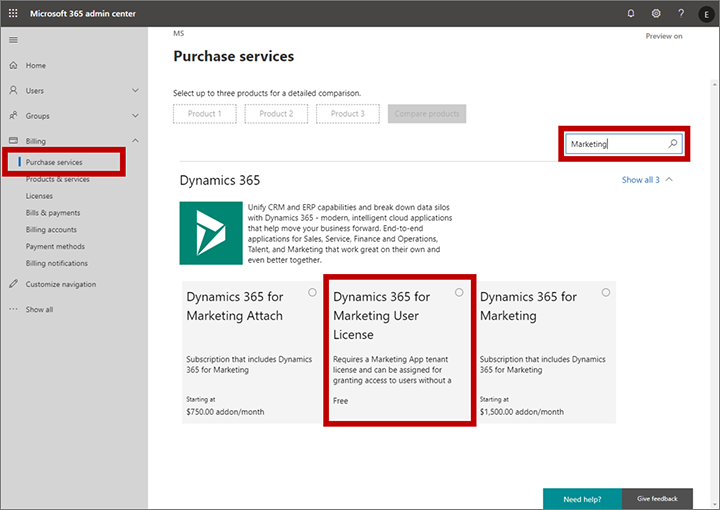
    Let’s look at some of the new services in the Dynamics 365 cloud. The commercial launch of Dynamics 365 for Marketing in Spring 2018 was a bit of a shock for anyone who always though these applications are licensed per user. Instead, Microsoft chose the model that HubSpot any many other vendors in the marketing automation space apply, by setting the pricing per contact. Yes, initially they were way off with this thinking by applying the pricing logic to the entire contents of the CRM database, but based on market feedback the model was adjusted to now count only for marketing contacts actually used by the specific application (i.e. where business value should be generated). Also, you actually don’t need any Dynamics 365 user license for those marketing people who build the customer journeys and analyze the results, since free user licenses are available to unlock the door into the system. Licensing is done on the environment level, after all.

    Purchase a free user license for Marketing

    Dynamics 365 Customer Insights is a CDP (Customer Data Platform, for those not keeping up with the latest acronyms) that allows customers to bring in customer related data from various different sources and unify them into a “customer 360” profile that links all those activity entries into a single view of the customer. You can then leverage big data processing features of a CDP to generate target segments like customers most likely to churn, select them to be a target group in Dynamics 365 for Marketing customer journeys and preserve your revenue streams by holding on to these customers identified by the intelligent machine in the cloud. How is this service priced? Per number of profiles: starting at 100k profiles for $1.5k, so 1.5 cents USD per profile. Any user in the tenant can be simply authorized to access the application, since the dedicated UI doesn’t have any dependency to the USL construct found on the Model-driven application side.

    Forms Pro is a professional version of the personal/team productivity app found in the Office 365 suite, storing its data into CDS entities for process automation and data analysis. Do you need a USL for the Pro features? Nope. The pricing is based on the number of responses to surveys, at $100 per 2k, making it $0.05 per response. If you want to listen to your customers and improve business outcomes as a result of that, it’s not about how many people you have looking at the data but rather how smart and how automated your feedback management processes are.

    AI Builder will go GA in October 2019. Guess how that’s going to be priced? That’s right: not per user. You buy a capacity license at $500/month for 1M “service credits”. When it comes to machine learning models as a service, with no pre-packaged Dynamics 365 app on top of them, there isn’t even any concept like contact or survey response that would tie the pricing to the physical world. You literally extract value directly from the data you put in there, with the help of apps and automation that builds on top of and integrates with your unique business processes.

    The consumption pricing model is already here. Future products in the Business Applications portfolio are more likely to gravitate towards that, rather than finding a user to attach a price tag on.

    Sandcastles in the sky and how to draw the lines

    In the cloud era, Microsoft can see everything. No, they don’t have employees looking at any customer’s private data or anything like that. What I mean is they have telemetry data on everything that happens on the service, because they are hosting all the moving parts involved. This gives them the opportunity to be very data driven in analyzing how products are adopted, what people actually do with them. It is essentially their own implementation of the digital feedback loop that you see James Phillips preaching to Microsoft’s customers and partners in every keynote he does. There’s the “transform products” part that is all about aligning product features to meet customer needs, but you can be sure MSFT also want to “optimize operations” when it comes to the logistics of delivering the cloud services and how to price them appropriately.

    Was gibt es Neues vom Microsoft Business Application Summit?

    Dynamics 365 is claimed to be the biggest service running on Azure today. Now, even though at Microsoft they both fall under the Cloud & AI that Scott Guthrie runs, there’s not a single bucket where all the costs would be thrown. The more Business Applications products are built that consume data storage and compute capacity, the higher the bill from Azure will be. The term COGS (cost of goods sold) is being used frequently when talking about the resources needed to keep cloud services up and running on these platforms like Azure. Power Platform is a platform on top of another, and while it often uses higher levels of abstraction that its raw Azure counterpart, API calls from the citizen developer PowerApps do turn into API calls against Azure services. Whatever product is generating this consumption must also front the bill.

    The vast majority of Dynamics 365 business today is still done based on user licenses, regardless of what our AI & big data driven future may look like. These are sold as SaaS apps you can just sign up and start using, rather than a complex solution that needs a technical architect to build the blueprint for. As such, the message Microsoft wants to get out there (but isn’t always so good in phrasing) is that the app user license should cover all normal usage for real human beings interacting with Dynamics 365 CE. Yes, anytime a user opens a contact form on a Model-driven app there are around 10 API calls made, which count against the quota for that particular user account. All CRUD operations theoretically count, but for an end user you shouldn’t need to count them. This is not the intention of MS.

    What is the idea behind setting the API call limits then? Well, the situation is this: the platform has evolved from the early days of being a simple CRM database for sales user productivity improvement into something that can connect OoB to a vast number of external (non-CDS) data sources and run complex automation on this data without anyone sitting in front of their PC and opening those contact record forms. When sold as Power Platform, there will be a massive amount of this non-CRM style consumption of computing resources running on the platform (unless MS completely fails with capturing this new business potential). Building all of this abstraction on top of the underlying Azure services and then giving it a way with essentially a per-identity flat monthly fee just wouldn’t be a sensible business model.

    (more…)
  • Canvas Apps for the Model-driven mind: how to make that leap

    Canvas Apps for the Model-driven mind: how to make that leap

    Business applications come in all shapes and sizes. In the Microsoft ecosystem, we now have a broader set of tools to choose from, compared to the past strategies of Build vs. Buy, i.e. writing code to develop a custom application vs. using an application platform to configure the desired functionality. The birth of Power Platform and especially PowerApps as the underlying platform technology for creating business apps brought together two very different methods of configuration: Canvas Apps and Model-driven Apps.

    It’s safe to say that hardly anyone in the world is currently a master of both application types. If you’ve been introduced into world of business applications via Dynamics CRM, XRM and Dynamics 365 Customer Engagement, then you will by default solve the customers’ problems with a Model-driven approach. For those that have been working with tools like SharePoint, InfoPath and the Office 365 suite of information worker productivity apps, the solution is very likely to be envisioned as a Canvas App. Persons with less professional history from either of these MS clouds will probably gravitate towards the mobile-first experience of Canvas Apps when getting to know the capabilities of PowerApps today.

    There is very real value in being able to identify the logical objects involved in the functionalities required from a business app and turning that into a sensible, scalable data model. This is the XRM mindset of starting from the back end data and processes when designing solutions. If you have been developing these skills in the classic CRM style projects for several years, then you possess superpowers that few Citizen Developers could ever match. Congratulations! However, now you need to start practicing the exact opposite approach for how to solve problems: forget the data and start from the user experience.

    You may already be aware of how massively Microsoft is investing in the new business models that Power Platform unlocks. Hopefully this has lead you to at least experiment with creating Canvas Apps based on existing data sources like CDS (if you still call it Dynamics [something], then hey: that’s perfectly alright!). While exploring these tools, perhaps you’ve also noticed how parts of the old XRM admin and customization features have started appearing in the PowerApps (and Flow) maker experiences. This level of awareness is a great start, but it’s not taking you very far yet in the process of changing how you think about solving business problems. You need to go much deeper, to unlearn the limits our model based world and embrace the possibilities of a modern Enterprise Low-Code Application Platform.

    At 365 Saturday Kyiv and more recently at Power Platform Saturday Oslo I’ve done sessions on this transformation process, aimed at the XRM professionals. These include setting the scene on how & why the different app types are merging together, what are the key differences in solution design process for Canvas vs. Model, and how to get started in being part of this new #PowerAddicts movement. The slide deck includes a “Top 10 tips for starting Canvas App development on top of CDS” section, which should hopefully make the journey a bit easier than it has been for me, back when I started on it around one year ago. See below for the presentation or go directly to SlideShare my Slides archive to enjoy it in full fidelity.

    Now the question is: have YOU already started your journey into the UX driven Canvas App world? If yes, what have been the biggest revelations or obstacles that you have encountered? If not, what are some of the roadblocks that have kept you from making that leap from the familiar Model-driven business applications into the expanding opportunities that PowerApps Canvas apps have to offer? Please do share your experiences in the blog comments, as I’m quite sure this an area where many professionals are searching for guidance and peer support.

  • Application/Platform Separation in New PowerApps Licensing Model

    Application/Platform Separation in New PowerApps Licensing Model

    Ever since Spring 2018 when the XRM and PowerApps platforms merged on a commercial level, I’ve found myself spending an ever increasing number of hours per week involved in licensing discussions and scenario planning. My initial exploration of the platform licensing back then came to the conclusion that many of the crucial details for actually determining what you can & can’t do with PowerApps licenses vs. Dynamics 365 CE licenses were simply not available at the time. Obviously this was not an ideal starting point for Microsoft to start pushing their Power Platform into new business areas that should see it capture the next 10 million developers from outside the traditional CRM field. But still, it is the legacy that came with the underlying platform that was designed to be sold as Sales, Service, Marketing etc. solutions delivered via traditional enterprise projects via partners that mostly had started back in the Microsoft Business Solution (MBS) days. What can you do about that, huh?

    This year at the Inspire 2019 partner conference, Satya Nadella framed the role of Business Applications and Power Platform in particular with the following numbers:

    (Click here to watch this segment of his Inspire 2019 Corenote.)

    If there are indeed 500 million new apps that will be created in the coming five years, then those sure ain’t gonna emerge from the MBS style business model and development methodology. Today the world is full of both cloud service providers that offer low-code/no-code tools for building your own apps very rapidly, as well as savvy power users who are interested in seeing if they could take their Excel workbook desktop wizardry to the next level with these cool new tools that promise to deliver modern apps for this smartphone era. Since MS has obviously identified this new business potential that Power Platform can unlock for them, are they going to let the prior licensing model of Dynamics 365 stand in their way? Probably not.

    It just so happens that Inspire 2019 was also the place where the upcoming licensing changes for both Dynamics 365 and Power Platform were introduced to the partner audience. Since Inspire is a public conference that anyone can attend, it also meant that any customers paying attention to the Microsoft ecosystem are already aware of the changes announced to take effect on October 1st, 2019. The slide decks for both sessions are available for download on the Inspire website for a more detailed look. On the PowerApps blog there is also a summary of these changes, which is nice. What’s really nice is that the comments section is open, which often isn’t the case for corporate announcements related to licensing (is it even a “blog” if there is no reader interaction opportunity given?). The product team has been responding to a lot of the feedback around the topic, which makes me optimistic about the possible fine tuning of the licensing model to align with what the outside world thinks about it.

    Pay per App

    As with licensing always, there’s far too many details in the Inspire 2019 news to cover in one blog post. Maybe I’ll eventually do a revised version of my “Demystifying Dynamics 365 & Power Platform Licensing” session from January, but right now I want to focus on one aspect: the price of an App. This is something the new PowerApps licensing model highlights in particular:

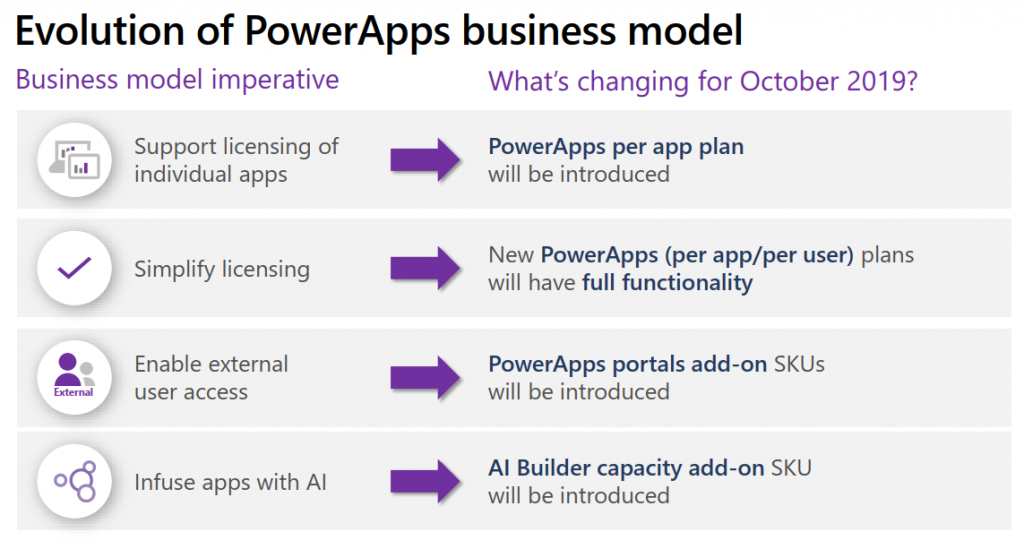
    In short, what Microsoft will do in October is to retire the earlier PowerApps P1 and P2 plans and introduce new “Per App” and “Per User” plans. Nothing (major) is going to change with how the rights bundled into Office 365 and Dynamics 365 licenses work. The “Per User” plan will be the same price ($40) and mostly the same capabilities as the earlier P2, whereas the earlier “lite edition” of PowerApps P1 at $7 will be discontinued completely.

    “What?!? How can they just take away the $7 plan and push everyone to buy a license that’s almost six times the price of that?” Yes, this is the hardest part about the changes, no doubt. I was a bit surprised to see this as the direction where Power Platform is heading, given how the citizen developers who’ve been playing around with the seeded Office 365 PowerApps license should rather be pushed into learning more about CDS, solutions and all those “real” application development tools that P1 previously offered. Nevertheless, after letting the new model sink in for a few days, I believe that this pricing mechanism makes a lot more sense than the earlier version.

    A fundamental problem with the current P1/P2 divide was that it attempted to draw the line on app complexity. There were limitations like the inability to attach real-time custom business logic (workflows, plugins) on entities that were used by PowerApps P1 license holders. This was particularly problematic when operating within CDS environments that also serve as the Dynamics 365 CE app database (yes, they’re all CDS now): any developer or 3rd party app registering a plugin step on an entity like account would instantly have put all P1 users attempting to access it out of compliance with the license terms. Also the rights on “complex entities” and “restricted entities” differed between P1 & P2. Sounds complex? Yup. I had to write a blog post for demystifying these PowerApps “starter” plan capabilities just to get my head around on where the lines were drawn.

    Something that would have eventually become a big problem with the old P1 definition was that it only allowed the users to run Canvas apps. Sure, those pixel-perfect mobile-first applications are what most people think PowerApps is made of, but that is a view of the world that needs to be deprecated. Model-driven apps are just as important area of what Power Platform represents (on CDS in particular), but that capability was reserved for P2 license holders only. Given that Microsoft is aiming to remove all of these artificial limitations between app types and eventually get all PowerApps customers to Run One UI, keeping P1 users locked from this future app convergence simply wasn’t a viable option anymore.

    (more…)
  • 4 directions for Power Platform business growth

    4 directions for Power Platform business growth

    It’s now roughly one year since Microsoft launched the concept of Power Platform. It’s been extremely interesting in the past 12 months to watch how this new platform strategy starts to play out in the world outside Redmond, as the pieces of this grand puzzle begin to become visible here and there. Having worked in the MS ecosystem on customer & partner side for 14 years now and coming from the Dynamics CRM side originally, this is the biggest single shift I have witnessed in their product strategy to date.

    Putting all the puzzle pieces together is surely not easy for anyone who isn’t devoting a sizable share of their time on consuming information from the various events, announcements, blog posts and documentation released by Microsoft. The thing that really makes it tricky is that this Power Platform thing isn’t confined inside a single bucket. It’s not Dynamics 365, it’s not Office 365, it’s not Azure. It’s all of them and yet none of them. Every MS partner and every customer decision maker will increasingly run into the product messaging, but they’ll hear it presented in a different way – and most likely interpret it uniquely based on what their background is.

    The only reason Microsoft would be investing so heavily in building and promoting the Power Platform is that they see a massive new business opportunity in it. As Steven Guggenheimer wrote in his recent blog post:

    “The Business Applications Total Addressable Market (TAM) is predicted to be at $125B by 2022, and 57 percent of this will be driven by ISVs. Dynamics 365 and the Power Platform are an important area of investment for the company, and represent a significant growth opportunity for partners in this market.”

    Accelerating opportunities for ISVs with new programs and technology – Steven Guggenheimer

    Big numbers, but that’s what they always are in these grandiose statements about global market potential. What I need to understand when talking with customers, partners and internal stakeholders at our company about the strategic direction of Power Platform is from where specifically might this growth come from? To help these discussions I ended up drawing the following diagram about the four different dimensions where I see this Microsoft application platform strategy creating new business:

    The way I see it, the growth will happen both A) inside Microsoft’s product offering and B) the outside world of customers and partners, within 1) the traditional business process management scenarios as well as 2) those processes that you wouldn’t have tried solving with any CRM style application/platform in the past. Let’s dive into each of these areas and I’ll explain what the impact of Power Platform might be in generating new business to run on top of this new Microsoft aPaaS (Application Platform as a Service) foundation.

    1. Dynamics products

    Let’s start from the most familiar ground. The place where the most concrete changes resulting from the Power Platform strategy have been felt during the past year must be Dynamics 365, and the Customer Engagement apps specifically. The platform formerly known as XRM is in the process of being replaced by what is sometimes referred to as “PowerApps platform”, although that may not be any official term that would stick. Regardless of the marketing lingo, the customizers and developers of Dynamics 365 CE solutions are right now facing a lot of pressure to adopt brand new concepts and tools that will replace those ~10 year old building blocks that XRM solutions were made out of. Compared to the earlier transition from on-premises to Online products, that may well have been a much easier shift to adjust to than this new Power Platform whirlwind that’s moving everything around on its path, from licensing to UI to SDK.

    From the perspective of the internal Microsoft world, the Dynamics product teams have previously been somewhat captive of the CRM legacy that came along with the XRM platform. As a commercial software product, it wasn’t originally built to be a pure platform, rather the design choices and customer requirements drove it more towards being an extendable CRM application first and platform second. In the process of migrating Dynamics 365 CE Online to run on Azure services, the platform and the applications were separated from one another. To balance things off, there’s also been a huge unification process initiated with the client side technologies, where the target is to remove the barriers between Model-driven and Canvas apps, to Run One UI. The platform tools like PowerApps Component Framework (PCF) now give also the internal product teams a far more agile path forward in deciding what kind of features and experiences the specific apps like Sales or Customer Service should contain. What this means is that the stagnation period where everyone had to just wait for the new platform capabilities to become available may be coming to an end and in the next release waves we can expect a significant growth in new app functionality being shipped to Dynamics 365 customers. In other words, a growth in application depth.

    Alongside this internal platform development, another huge benefit that Dynamics 365 as a business has gotten from the new direction at Microsoft is the closer connection with the Azure teams. A few years ago there was still the MBS silo to keep up the walls between CRM & ERP business and the mainstream MS product business, which explained a lot why we didn’t see so much of the Azure innovation trickling down to the business applications built by the same corporation. Now the tables have truly turned as we’ve witnessed all of the new applications like Dynamics 365 for Marketing betting heavily on the very latest Azure services. AI is getting infused into every product at Microsoft, but it also gives birth to brand new products like Sales Insights or Virtual Agent for Customer Service. To link all this with the Power Platform story, it’s important to understand that this platform side is what eventually allows customers and partners to customize these new apps and services to meet their real life business requirements. The growth potential in this Dynamics products segment is being amplified by the fact that PowerApps, Flow, Power BI and CDS give it the extension points needed for going beyond packaged SaaS apps. The growth in Dynamics 365 app portfolio width is therefore driven by the Power Platform connectivity with Azure.

    2. Other Microsoft products

    While the merger of Dynamics 365 CE and PowerApps platforms is a great boost for the Dynamics products, that’s not the only area within Microsoft that is touched by the Power Platform strategy. Office 365 has of course been the biggest product display window for PowerApps and Flow, due to how services like SharePoint and OneDrive have been deeply integrated with these tools. There is a Microsoft 365 Business Applications partner program that interestingly enough doesn’t seem to align with the “actual” Microsoft Business Applications group’s activities at this moment, as it sits within a different organizational box, the Modern Workplace solution area. When you think about the origins of how the previous generation apps for information workers were often built on top of the ubiquitous SharePoint Server, this arrangement does make sense, but I wouldn’t expect these separate boxes to remain forever in place. After all, what’s been happening to PowerApps recently in terms of commercial success is “like SharePoint all over again” (according to Charles Lamanna), so all roads here lead to the Power Platform being the growth engine for Office 365 and Microsoft 365 to reach further into the customers’ information management needs.

    (more…)
  • Catching the Wave 2 for 2019 Power Platform Updates

    Catching the Wave 2 for 2019 Power Platform Updates

    Today, June 10th, at Microsoft Business Application Summit 2019 the release plan for the next wave of Dynamics 365 and Power Platform features was announced. It’s of course no surprise that this main event of the year for #MSBizApps would be used as the forum for showing what’s coming next. What kind of did surprise myself was that we actually are already at a point when the focus starts to move to the upcoming release, formerly known as October 2019 release. Wasn’t April 2019 just a few weeks ago? Where did all the time go? And when exactly were we supposed to have taught ourselves all about the current release features, let alone deploy them to real life customers?

    If I had to guess what people working professionally with MS Business Applications would list as their biggest challenge, I bet keeping up the product updates would be on the number one spot – if only for the simple reason that it’s a topic that touches everyone regardless of their role. The pace of change on the technology side isn’t going to slow down, but it’s the breadth of impact from these changes that has grown immensely. The biannual release cadence in itself isn’t anything new, since that’s how the cloud service has been updated from already the Dynamics CRM 2011 days. It’s just that we’re no longer operating within that familiar CRM box, thanks to what Dynamics 365 and Power Platform have become. So, the release waves hit the shore on their steady cadence, but instead of a fun little beach break wave to surf on it may start to look like a tsunami that you should run away from. It’s not, and you shouldn’t, but this can be a very natural reaction when presented with a 350 page release plan document to plough through.

    Lucky for us, this time there’s also a streamlined version of this document, focusing solely on the Power Platform side. If you’re a #PowerAddict like me then this is probably the more exciting part to start from. So, we’ll leave all the first party app goodies for later and have a look at where & how the platform is heading to.

    Release Terminology

    Microsoft has now changed their official terminology on how they speak about these releases for Business Applications products. Instead of the earlier names like October 2018 Release, April 2019 Release, we’re now going to get release waves. Yes, still 2 times a year, so what we’ve now seen a peek of is 2019 Release Wave 2. Nothing actually changed about the process itself, but since the updates covered in these releases are not meant to be delivered on a single date (or one specific month), the terminology is now much better aligned with the reality. 2019 Release Wave 2 will be hitting the shores from October 2019 to March 2020.

    The other tweak in terminology is that now instead of Release Notes we’re getting a Release Plan from the product teams. This is also a much more natural way to describe the intent of the documentation that goes with a release wave. It’s not the exact description of what has been shipped, like you would have seen on a piece of software distributed on a DVD. Rather it’s a near term roadmap of what will be built and delivered, if everything goes as planned. Instead of a static document the Release Plan (and actually the current Release Notes, too) is a living publication reflecting the current status. Have a look at the change history for the current April 2019 release to get an idea of how much things have moved around since V1 of the Release Notes.

    Finally, there’s an added piece of information for each of the items in the Release Plan, referring to the Early Access availability. This will indicate weather the feature will be available to try already on August 2nd. You can read about the latest release schedule and early access policy from this documentation page.

    AI Comes to Power Platform

    The biggest new announcement from 2019 Release Wave 2 is the arrival of the AI Builder. No, PowerApps didn’t become self-aware just yet, but it is nevertheless a major milestone to see the AI capabilities earlier provided via Azure Cognitive Services to now find their way into  the citizen developer world of Power Platform tools. While the data scientists and pro-devs out there probably won’t be resorting to AI Builder in their own projects, the total addressable market for Microsoft’s AI services has now grown significantly thanks to these entry level AI features available in the PowerApps maker portal.

    Is this something that all the PowerApps makes will immediately jump into using then? Probably not at first, since the use cases for machine learning technologies always rely on having a suitable data set to work on. Whereas with a Canvas app you can just start building the features, logic, data model and UI of an application before you’ve got the actual data to be used in it, in AI Builder you’re gonna need to start from the data. It’s going to be hard to fake this thing for a quick technology demo unless it’s tightly linked with a real life business scenario.

    Reaching the people who do have the data and understand its structure and meaning is where a product like AI Builder can undoubtedly lower the barrier for starting to experiment with AI. Just like the earlier PowerApps tools helped people become app makers without any formal training on the subject, why couldn’t something similar happen on the machine learning side, too? As a nice added bonus, coupling the AI Builder configuration and model data with CDS is will help in promoting it as the default storage place for structured business data.

    Features like Form Processing where you can train the machine to understand the contents of documents following a common template (like invoices) offer a way to further digitalize processes that can’t yet jump to 100% structured data interchange via modern APIs. You may not be able to force all your business partners or customers to jump into using the tools and data formats that would be most convenient for your internal processes, but could significantly reduce the need for manual data entry by taking a service like PowerApps AI Builder into use.

    (more…)