Tag: cloud

  • My New “CRM Rocks” Podcast Episode Is Out!

    My New “CRM Rocks” Podcast Episode Is Out!

    Do you enjoy reading news and thoughts from the world of Microsoft Dynamics CRM but wish that you could consume such content also in a “hands free” mode, by having someone talk about them rather than publish their thoughts in writing? Well hey: that’s what podcasts are for! If you’re looking for episodes to download to your favorite podcast app on your smartphone, then here’s a couple of channels to subscribe to: CRM Rocks by Markus Erlandsson, started already back in 2013, and a newcomer from this year called CRM Audio, hosted by everyone’s favorite CRM Tipsters: Joel Lindstrom, George Doubinski and Shawn Tabor.

    Why did I bring this topic up then? It just so happens that I’ve done yet another guest appearance on CRM Rocks! Yes, you might remember yours truly from classic episodes like “CRM 2013 User Interface Changes” or “Who Is The Customer in Your CRM?” This time I had the pleasure of joining Markus in the studio and discussing a topic I had blogged about a while earlier, meaning The State of Microsoft Dynamics CRM in 2015.

    CRM_Rocks_State_of_Dynamics_CRM_in_2015

    The topics on our agenda for this episode included the following:

    • Release cadence & CRM 2015 Update 1
      • Office 365 integration points with Excel Online, OneNote, Office Groups
      • The arrival of the CRM web client for Outlook (3 years after its announcement)
      • Cloud first: why is on-premises lagging behind
    • The new organization structure at Microsoft
      • Dynamics moving from the old MBS unit to Cloud + Enterprise
      • Why CRM product development needs better alignment with MS Data Platform
      • The remaining divide between Office and Dynamics
    • Microsoft & Salesforce partnership
      • New MS co-opetition strategy on devices, now also in the business cloud
      • What the rumored acquisition of Salesforce would have meant
      • The two horse CRM race and competitors pushing each other to innovate (and imitate)
    • CRM 2016 Release Preview Guide highlights
      • New modern API & next generation web client
      • Improvements in document generation and content search
      • Mobility with offline, task based applications

    Yeah, so many interesting things going on in the world of Dynamics and only an hour to discuss them. So, what did Markus and me end up covering in our talk? There’s only one way to find out and that is listening to the latest episode of CRM Rocks. By the way, if you have any thoughts on who you’d like to see (well, hear) make an appearance on the show and what CRM related topic should get some air time, then be sure to leave a comment either here or ping Markus directly.

    Oh, I almost forgot to mention: I also took part in a recent CRM MVP Panel on MSDynamicsWorld.com with Chris Cognetta, Donna Edwards, Alex Fagundes and Gretchen Opferkew. We talked about some of the same topics as in the podcast, with a focus around the upcoming Dynamics CRM 2016 release and how to prepare for it, so in case you missed the live event, be sure to check out the recording available on YouTube.

  • The State of Dynamics in 2015

    The State of Dynamics in 2015

    There’s been a lot going on in the world of Microsoft Dynamics during the past few months. As the summer vacation period is now here for many of us (hopefully), this feels like a good moment to reflect back a bit, discuss how the world has turned and share some thoughts on what I think it potentially means for people working with Dynamics CRM. The topics I’ll explore in this post are:

    • Practical impact of the cloud for Dynamics CRM customers
    • Dynamics as a business for Microsoft
    • The intersection of CRM and Azure
    • The platform aspects in the Dynamics CRM product

    CRM at The Speed of Cloud

    For a long time Microsoft had to work hard in convincing customers that their CRM Online cloud offering was functionally on par with the on-premises version, instead of it being a “Lite Edition”. After all, how could a public cloud service ever offer the same level of customer specific customization as the application bits sitting on your very own server’s hard drive? “The power of choice” as a unique selling point for the Dynamics CRM platform has certainly played a central role in reducing the perceived risk of choosing Microsoft over some other cloud-only vendors or traditional enterprise software rooted heavily in the isolated server environments. While this still remains an advantage, it’s less strategic these days when the cloud is the clear default in the minds of most customers.

    During the past couple of years MS has been applying a policy where many of the new CRM features become available first in the cloud. Not only does this make logistic sense for MS as they can control the application delivery more tightly and reduce the time it takes to get a feature from design to deployment stage. It also caters for the kind of audience that is likely to be more receptive to application updates in general, meaning the organizations who have already made their leap to the cloud – or who have never known any other way. This crowd won’t get so easily paralyzed with changes that affect how their tools work and they’re also more likely to adopt new services and features. This in turn helps Microsoft gather user feedback much faster, collect telemetry data from application usage, author case studies highlighting the business benefits from latest product releases, and so on.

    Now, since the cloud has become the default deployment option, it does still mean that not everyone who’s “up there” will want to immediately deploy the latest version once it becomes available. Luckily Microsoft has made some great improvements on how CRM Online customers can manage their environments, effectively building the capabilities for the next generation “power of choice”. For starters, the latest update policy now states that “in Spring of 2015, customers will have the choice to take the two updates as they become available, or take only one update per year.” Thanks to the features available for non-production (sandbox) instance management it’s also easy for customers to create copies of the CRM Online production org and test the upgrades as many times as needed before go-live. What used to be a scary leap of faith into a cloud platform where MS decides what happens to your precious CRM is changing more and more into the “on demand” type of service that you’d expect from the cloud, also in the deployment administration side of things.

    CRM2015U1_Groups

    The latest CRM Online 2015 Update 1 (a.k.a. Spring ’15 Release, codename “Carina”, version 7.1) has made it very clear how the cloud accelerates also interoperability between different applications. Being an Online only release, v7.1 has allowed MS to introduce a great number of new features that don’t live purely within Dynamics CRM but rather Office 365. OneNote integration leverages the SharePoint Online server-side sync, similarly as Folder-based Email Tracking relies on Exchange Online sync. The new CRM App for Outlook is also delivered via Exchange Online into OWA and Outlook 2013. The ability to open views in Excel Online for editing right inside the browser window and submit back the changes is naturally all thanks to Office Online. The brand new Office 365 Groups collaboration feature is, you guessed it, all orchestrated by the O365 platform. So, even though there are many important enhancements in CRM v7.1 application itself, this release really does highlight the fact that if you’re using CRM Online but not taking advantage of other Office 365 applications yet, then… Well, perhaps you should consider if your strategy with productivity tools is giving the best return on your investment.

    Another thing that has also become more apparent is that it’s not just a single batch of CRM application bits that gets delivered in a release. The dependencies to related systems have meant that some of the new features announced for Spring ’15 have rolled out only after the CRM v7.1 application and DB updates became available. Certain features like the CRM App for Outlook or the new CRM for Phones still aren’t available, even though we’re in CY15 (calendar year) H2 already. As the cloud service starts to consist of a growing number of separate components and each product has rapid release cadence instead of a 3 year plan, we’re bound to see more of a continuous stream of updated functionality instead of big bang launches.

    MS Business Applications Reorganized

    This leads us conveniently to the hot topics related to the organization around Microsoft Dynamics. As many of you must have noticed, Satya Nadella announced a major reorganization of MSFT leadership team in mid-June. For the Dynamics folks, here’s a quote of the most relevant part of the press release:

    “Executive Vice President Scott Guthrie will continue to lead the Cloud and Enterprise (C+E) team focused on building the intelligent cloud platform that powers any application on any device. The C+E team will also focus on building high-value infrastructure and business services that are key to managing business processes, especially in the areas of data and analytics, security and management, and development tools. As a part of this announcement, the company will move the Dynamics development teams to the C+E team, enabling the company to accelerate ERP and CRM work and bring it into the mainstream C+E engineering and innovation efforts.”

    In short, MBS is no more and its leader Kirill Tatarinov will “explore what’s next for him”. Microsoft Business Solutions unit was always a bit of an island at MS when observed from the outside, and I’m sure people inside will have run into plenty of invisible walls that haven’t exactly helped in delivering the very finest business applications that seamlessly connect with everything else Microsoft builds. Now the engineering, sales and marketing functions for Dynamics CRM and ERP products will be consolidated into the broader MS organization, with Scott Guthrie (C+E leader), Kevin Turner (COO) and Chris Capossela (CMO) taking care of the Dynamics business. There’s an excellent piece written on the reorg from Dynamics perspective by Frank Scavo, which I encourage you to read for further details: Microsoft Unbundles Its Dynamics Business Unit.

    Guthrie_Azure

    Throughout the history of Microsoft’s ERP and CRM product lines, there’s pretty much always been speculation about whether MS would spin off the MBS business if the right amount of money was offered for it. Being an island of its own certainly helped in envisioning how such a transaction could take place, since the bidder would have gotten not just a piece of source code but the whole organization and partner network around the products. When you put your Dynamics CRM glasses on (hey, even I don’t wear them all the time!) such idea never seemed like a very happy path for neither MS nor the potential buyer. There’s hardly any other product in the MS portfolio that pulls in such a broad range of the Microsoft technology stack when deployed for a customer organization, so trying to untangle it from these roots would be potentially disastrous for the product, in addition to causing MS to lose far more revenue than direct CRM license sales. I can’t speculate much about the Dynamics ERP products due to lack of hands-on experience in deploying them, but spinning off Dynamics CRM after the most recent move seems even less likely than it was to begin with.

    Nadella_BenioffThen again, we should keep in mind that just a while ago Nadella was seriously considering to acquire its nr. 1 competitor, Salesforce, if we are to believe the reports about the $55 billion offer made. If the results of these talks would have been different, we might have been now talking about Microsoft with not just 1 CRM and 4 ERP products but with two huge CRM platforms in its pocket. Not to mention all the underlying infrastructure and technology with which Salesforce competes with Azure, the world’s largest developer conference Dreamforce etc. This would have surely been a very different “State of Dynamics” post in that alternate reality. So, it’s good for us to keep in mind that at the end of the day it’s really just business, not software, and strange things can happen when the big boys are competing with one another.

    The Dynamics of Azure

    Back to the present day, what we now know for sure to be the near term agenda for Microsoft is to move the Dynamics CRM and ERP engineering teams to the Cloud + Enterprise group. So, what do they actually build there in C+E? Well, obviously anything to do with Azure, for starters. Then there’s the server & tools side of things, like SQL Server and Visual Studio. Power BI and BizTalk must also be familiar names for anyone who’s worked in Dynamics CRM projects. What doesn’t fall under C+E is all things Office, meaning products like SharePoint, Exchange, Skype, OneDrive and other productivity tools commonly found from Office 365 subscriptions – and naturally used alongside Dynamics CRM. So why is Dynamics being grouped together with the platform tech and not the productivity apps?

    Nadella_IntelligentCloudC+E is actually the group that Nadella used to run before being appointed as MSFT CEO. In case you’ve forgotten, Nadella was also leading MBS up until spring 2007 (at which point Kirill Tatarinov was appointed as his successor). For old times sake, here’s a snippet from his farewell post on the “Frontiers of Business Applications” blog:

    “We made tremendous progress with Dynamics ERP, CRM and Office Small Business product lines. Six years ago we were not a player in biz apps… the acquisitions in ERP got us to leadership position in mid market and now we are contender in Enterprise. CRM has helped us grow the fastest server product line in Microsoft’s history and now poised to offer “choice” of LIVE service.”

    I think it’s safe to say that Nadella understand a fair bit about not just the Dynamics of Microsoft’s CRM & ERP but also the general market dynamics behind how organizations today are deploying, extending and integrating their business applications. If we look at all the shiny new things that C+E has been launching into their cloud back-end portfolio, like Azure App Services or the Azure IoT (Internet of Things) Suite, then it’s not so difficult to envision that technology like this will also need front-end services for organizations to adopt them as part of their core business processes. If these processes happen to be managed with Dynamics applications today, then hey, perhaps Microsoft could do something on this front to speed up the adoption, right? Reading this blog post from C+E Chief Strategist James Staten sure seems to indicate that Redmond is well aware of the business opportunity.

    How soon will we see concrete evidence from Scott Guthrie and his team that being part of the C+E organization means Dynamics “C&E” (as in CRM & ERP) customers will gain new some next generation capabilities into their own business applications? Knowing the current release cadence with MS products, I hope this reorg would have already started to show up as new priorities being reflected in the backlogs of various product teams in C+E. The thing is, we don’t even need any brand new product features for Dynamics specifically, but we sure could use some higher visibility for Dynamics as the go-to solution for demonstrating how the MS cloud stack can be put into use in practical terms.

    For example, the Power BI story has been unraveling far too slowly for any Dynamics CRM Online customer that would have been interested in leveraging MS products for some cloud based data analytics. Commercial offerings like the Sales Productivity license promotion have been bundling these products for a long time, yet there’s been very little you’ve actually been able to do with the two together, due to lack of support for CRM Online as an automatically refreshable data source. Another example could be Azure Logic Apps, which were announced back in March, but as of today Dynamics CRM or ERP connectors are still unavailable for anyone wanting to configure these workflows to connect with their cloud business applications. Fine, you can support Salesforce and other partner solutions at launch time by all means, but punishing customers for choosing Microsoft is something I hope the new C+E family will put an end to.

    Azure_Logic_Apps_Dynamics

    Platforms and Products

    Back in the early days of XRM a.k.a. “Any Relationship Management” the concept of having Dynamics CRM serve as the foundation on top of which organizations could build their own relational business applications and potentially replace legacy LoB systems sounded perfectly valid. The XRM idea was conceived in the on-premises days, though, where the business owners couldn’t just go and subscribe to a cloud app of their choice to solve their problem with a bit of shadow IT. Sure, they could have also requested an XRM org to be customized for this purpose, but 99% of them probably weren’t familiar with the concept. Oh well. The capability is nevertheless there in the platform that all Dynamics CRM applications run on today, and MS even hinted at more emphasis being put onto the XRM toolkit during Convergence 2015 presentations.

    These days when we think of business application platforms, the image in our minds isn’t probably limited to just a relational database with a few entities and forms for data entry. Thanks to the aforementioned explosion of cloud apps and our many mobile devices, the modern platform concept is, in my humble opinion, a network of connected services that allow you to get your job done, no matter where you are or in which particular app you are. So, rather than looking at how the business application itself is implemented on a technical level (as an XRM solution package deployed to your company’s CRM Online org, for example), in practice more important questions are how does it relate to the other apps the business is using, how it communicates with the outside world and how it fits with the workflow of the end-to-end business process? When observed from this perspective, some might argue that Office 365 with its growing collection of integrated apps is actually more of a business application platform than CRM is.

    Office_365_app_launcher

    Do I see CRM turning into just another icon in the O365 app launcher then – becoming a packaged, ready-to-use product like OneNote or Sway? No, and I think the new organization structure at Microsoft also highlights the fundamental difference between such products. Sure, MS is investing more and more resources in making Dynamics CRM more easily approachable as a “mainstream” product, by creating sites like the new Microsoft Dynamics CRM Online Onboarding Success Center​​ (for comparison, check out the Office 365 Onboarding Center).  We’ll surely see increasing effort put into lowering the entry barrier for especially SMB customers as MS tries to become less reliant on their Dynamics partner network to acquire and retain customers for CRM. The way I see it, turning Dynamics CRM into a packaged application that you can just sign up for and start using for common tasks that businesses tend to perform with their customer and sales data sounds both like a low hanging fruit and mission impossible at the same time. Sure, in terms of application features Dynamics CRM is ready to cater for a whole variety of different types of guests, but just like people do not prefer dining with a Swiss knife, I think there will remain the need for experts to plan the correct eating utensils for the meals, present them on the table and if needed, instruct how to operate them in the most elegant manner. Anyway, making the whole process of attending this grand CRM dinner more straightforward and educating the guests on what they can expect to find on the menu will surely benefit all the parties, so hopefully this type of mainstreaming will be done for Dynamics CRM.

    If we accept the fact that Dynamics CRM is still very much a platform in itself (although delivered under the broader O365 platform), then we must also acknowledge that the platform part doesn’t means just building customer specific XRM deployments. Strategically an even more important factor for Microsoft is the number of partners that develop solutions for connecting Dynamics CRM with their services and apps. Although there are a number of established ISV’s operating in the Dynamics ecosystem that offer the kind of add-ons and integrations that are essential ingredients in today’s CRM implementations, I think it’s safe to say that when it comes to the amount of apps available for Dynamics CRM customers to buy, we’re nowhere near the level that could have been expected back in 2011 when the current solution framework and the Dynamics Marketplace were introduced. It’s also far too common to see vendors develop a v.1 app and then not invest sufficiently in maintaining it as the CRM platform evolves (at an ever growing speed, thanks to the cloud era).

    crmwatchlist_eliteBroadening Microsoft’s own offering to marketing automation, social channels, customer service and other recent additions in the Dynamics product family has surely helped in improving the credibility of Dynamics CRM as an enterprise level player (that has a distinct Enterprise licensing tier now, compared to many years of “all you can eat” pricing model). We’ve also seen announcements from the Dynamics team about partnerships formed with established players like Adobe and Lithium, with the promise of more announcements to follow in the near future. I’m sure these are all beneficial moves for Microsoft in their broader strategy for CRM, validated by evidence like the CRM Watchlist 2015 Elite award from Paul Greenberg (a.k.a. Mr. CRM himself) where he’s confident in stating that “Microsoft gets ecosystems”. This just isn’t quite enough, in my humble opinion, if MS isn’t able to attract and grow the kinds of ISVs that will help the Dynamics CRM customers to connect with the latest services that the “cool kids” out there are using, or affordably bridge the smaller functional gaps that aren’t strategic for MS in terms of the Dynamics CRM product roadmap. As Greenberg also states in his Watchlist results analysis:

    “Microsoft has to be much more cognizant, consistent and proactive about seeing their Dynamics product portfolio as an end to end platform – which will make them competitive in the 21st century.”

    This is the area where I place my biggest expectations from the new MS organization structure to make some visible changes. If we observe what Scott Guthrie and the numerous product teams under Cloud + Enterprise have managed to do to Microsoft’s image in the eyes of the broader developer community in the past couple of years, by open-sourcing their work as well as embracing existing standards rather than inventing their own, then that’s certainly the kind of whole new appeal and earned good will the Dynamics ecosystem could use, too. Making Dynamics CRM more accessible for new vendors to connect with and build their IP on, while at the same time increasing its financial attractiveness by better driving customers to explore the add-on market offering is the kind of virtuous cycle that a thriving business application platform truly needs. If the new “mainstream” position of Dynamics in MS’s portfolio means that the CRM & ERP products would be considered as the de facto tools for solving the business agility challenges that MS talks about when pitching its Azure technologies, this would also help a lot in solidifying Dynamics as the premier platform to build your business processes on.

  • Previewing the New Power BI Experience with Dynamics CRM

    Previewing the New Power BI Experience with Dynamics CRM

    Around one year ago Microsoft introduced the capability to access CRM Online data via Power Query, one of the client side components of the Power BI suite. More precisely, the capability to authenticate with the already existing CRM OData feeds via Office 365 credentials was introduced into PQ, which then allowed us to use CRM Online as one data source in our Power Pivot data models driving Power View visualizations. No Dynamics CRM specific feature had really been developed, but it was the first step on the road of unlocking the cloud data from the analysis limitations that the previous tools (CRM charts & dashboards, SQL Server Reporting Services reports with Fetch XML queries) had imposed on CRM Online customers.

    There was a lot left to be desired still. Building reports from the raw OData feeds can be a cumbersome process, since no built-in tools existed for filtering the amount of data pulled from the entity tables. Also, not all the components needed in basic reports, such as optionset labels, were available to be retrieved dynamically from the OData feed. The biggest gap, however, has been the inability to automatically refresh the reports published onto Power BI portal, which means that each report end users would have needed to perform this refresh manually. As a result, Power BI has so far not been a something that I would have suggested to CRM Online customers as a company wide reporting solution, since it’s mainly been suitable for fairly advanced CRM power users building their own reports via Excel 2013.

    The Next Generation of Power BI

    Just before Christmas Microsoft announced the new Power BI Public Preview, which has a number of impressive looking enhancements to the service offering:

    Include in this announcement was also the statement: “In addition to the existing seamless connection with Microsoft Dynamics CRM Online, with today’s release customers can also connect to their data in Salesforce, Zendesk, Marketo, SendGrid, and GitHub with many more to come in the months ahead.” Upon first read, it was easy to interpret it as “nothing new for you Dynamics CRM folks out there right now, better luck in the next update!” This, however, isn’t the case.

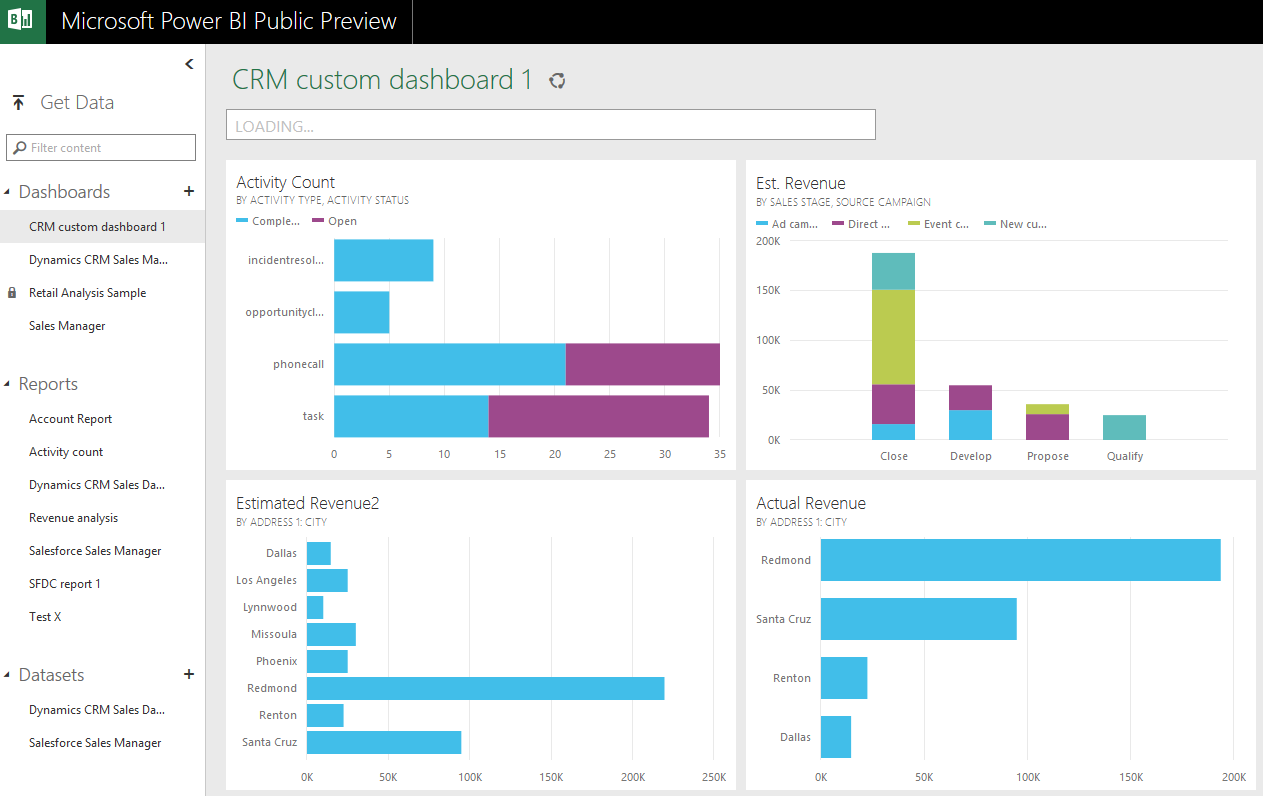
    PowerBI_Preview_CRM_app

    When browsing through the new support site for Power BI I came across a posted idea on supporting Dynamics CRM as a data source, and a very recent comment from a Power BI product manager that the new Public Preview actually included native support for Dynamics CRM. Here’s the article where you can find the exact steps needed for connecting your Power BI Preview instance to Dynamics CRM. As this Preview is only available in the US for now, I decided to spin up a new CRM Online trial org from across the pond and try it out.

    What’s in Store for Dynamics CRM Cloud BI?

    After going through the process of enrolling for the Power BI Public Preview program with my Office 365 US trial tenant, I completed the steps for connecting to CRM Online. This really is quite a simple process with not too many options. You only have to dig up the OData feed URL from your CRM Online instance. After you’ve added this Microsoft Dynamics CRM app into your Power BI environment, the data retrieval process will start uploading your CRM Online records from one cloud to another. (more…)

  • Access Option Set Labels in Dynamics CRM OData Feeds via Power Query

    Access Option Set Labels in Dynamics CRM OData Feeds via Power Query

    If you’re using Dynamics CRM Online without direct access to the underlying SQL Server database, there may have been a few occasions when you’ve wished for more flexible options for reporting and customer data analytics than what is possible via configuring CRM charts or developing Fetch XML based reports in Visual Studio. Late last year Microsoft enabled support for accessing the secured OData feeds from CRM Online via the Excel Power Query tool, which opened up some interesting options for building modern BI solutions on top of the CRM data up in the Microsoft cloud.

    CRM_OData_Excel

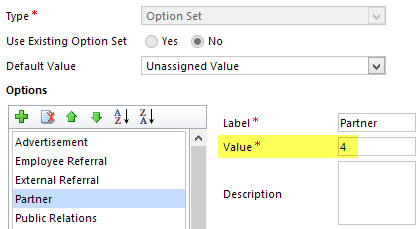
    For a non-developer who hasn’t leveraged OData before it might come as a bit of a surprise that not all of the business data is necessarily readily available via the feeds when examining a particular CRM entity. One crucial thing that’s missing is the option set values. More specifically, it’s the label values that are not accessible via the entity tables retrieved via the OData feed, as all we have access to are the numerical values representing the labels (1, 2, 3, 4… 10001), but not the human readable versions.

    CRM_OptionSet_Value_Label

    From a reporting perspective, it’s very likely that any chart or table that you wish to build is going to leverage one or more option set fields. Formerly known as picklists, these are basically the dropdown fields on CRM entity forms that allow the user to select one value from a list of predefined values. Much more convenient for reporting purposes than free text fields, as I’m sure you’d agree.

    So, what are our options then? We could of course manually create new tables into the Excel workbook that store the mapping of ID values and labels, but that just doesn’t sound like a fun exercise at all. More importantly, that would only give us a static list of option set values that couldn’t adapt to the changes in CRM customizations. Nope, not a good approach from report maintenance perspective, so let’s not go there.

    As a bit more efficient workaround we could be adventurous and import a copy of the CRM solution file containing the entity customizations as an XML data source into Power Query and then pick out the necessary mappings from there. Due to the power of Power Query, this would actually technically work, and we could even set it to reference a file location from where the latest customizations would dynamically be imported upon workbook refresh. Still, that would leave us the burden of setting up an automated export system that would produce the customizations.xml file to reflect the latest changes.

    After a bit of poking around in the OData feed data source, it turns out the optionset labels are actually included there. The tricky part is that they’re not simply a [Record] link that you can drill into and expose the values from your existing entity data set. Nope, they reside in a specific table of their own, called PicklistMappingSet. In this tutorial I’ll show you how to retrieve the data for a “Leads by Source” chart created with Power View, taken from an OData feed data source pointing to Dynamics CRM Online, using Power Query to pull the data into a data model built with Power Pivot.

    1. The Data Source: Power Query

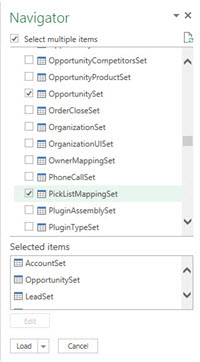
    PowerBI_CRM_Odata_1To follow the steps you should have the latest Power Query version installed in your Excel client. I’ve already covered how to access CRM OData feeds from Power Query in a previous article, so please refer to that one if you haven’t done the exercise before. After connecting to the OData feed URL we should select the tables that we want to work with from the data source navigator pane. By minimum you should grab the LeadSet and PicklistMappingSet to build the chart.

    The problem with CRM and OData is that by default the feed will pull down each and every record in the table. The query performance is less than stellar with CRM Online and if you have a high number of leads (status doesn’t matter, also the closed ones will get downloaded), you might be waiting for a while before the query is completed. If you want to move on a bit faster then check out this great tip by Andre Margono on how to set up a query filter for the Dynamics CRM OData query (for example, only active leads).

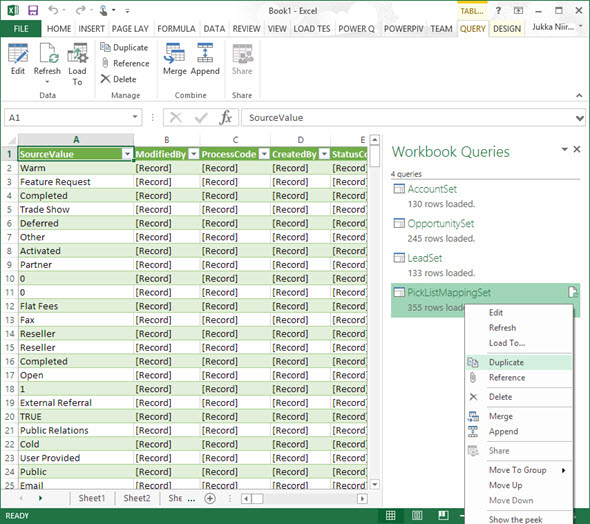
    The real beauty of Power Query is in the query steps you can use for manipulating the workbook queries. Before we go there, though, let’s create a duplicate of the PicklistMappingSet query. This will make it easier for us to map the values into our actual leads table later on, as well as preserve the original option set value table available for further queries.

    PowerBI_CRM_Odata_2

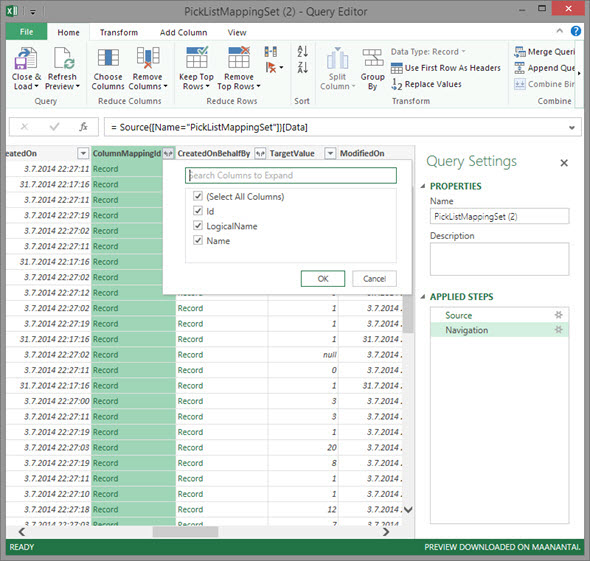
    Open up the new duplicate query you’ve added into the edit mode by double clicking on it, which launches the Power Query query editor (yes, query is the word of the day). The first step we’re going to add for the query involves expanding a column that only shows a green “Record” value by drilling into it from the small icon next to the column label. Do this to the ColumnMappingId column and just load up all the columns found from behind it.

    PowerBI_CRM_Odata_3

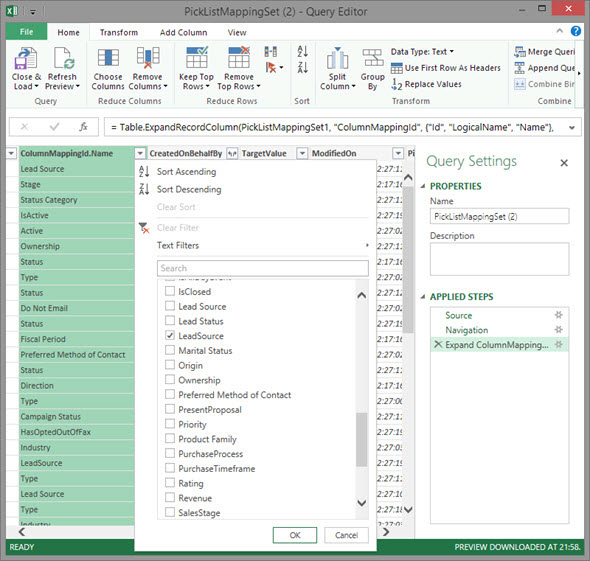
    You’ll see the Record column transformed into three new columns as a result of drilling down into the data. The column we’re interested in is ColumnMappingId.Name, which has the names for all option set fields in our source CRM system. For this example we want to see the LeadSource field, so add a new filter for this value, just as you would in a normal Excel data table.

    PowerBI_CRM_Odata_4

    By now you might have noticed that the Applied Steps box in the Query Settings pane is collecting all of the actions that we’re performing on the query and storing them as steps. If you make an error in your selection, just click the delete symbol next to the steps to get rid of it. (more…)

  • Synchronization vs. Tracking: Understanding Activity Management Options in Dynamics CRM

    Synchronization vs. Tracking: Understanding Activity Management Options in Dynamics CRM

    Long before a company has any CRM system in place they will already have a bunch of customer facing activities like emails and appointments in the personal mailboxes and calendars of their employees. Once a CRM system is implemented, these activities will not magically disappear but rather they will continue to be a key element in how the customer relationships is managed on a practical, day-to-day level. Typically companies would like to have these communications stored in the CRM database to accumulate a better understanding of both which customers are being contacted by which representatives of the company as well as the detailed information of what’s been said and agreed with the customer in these acts of communication.

    CRM_2013_Activities

    Maintaining two separate systems for entering the same information is never an attractive option for information workers who just wish to stay on top of their daily agenda and commitments, without having to worry about keeping multiple calendars in sync manually. Rather than entering an appointment in your own calendar first, then entering the same data into your CRM system for activity tracking purposes, every single user would rather have the ability to promote their selected calendar entries related to customers into their CRM system for meeting the activity reporting requirements expected by their managers. Similarly, instead of copy-pasting information from their inbox onto forms in a CRM system, anyone presented with the option to click one button in their inbox and get the full message tracked into CRM would surely prefer to take this route.

    This has been one of the founding principles behind the design of Microsoft’s CRM system since day one. With the market dominance of Microsoft’s activity management related software both on the client (Outlook) and server side (Exchange), making the flow of this data across different systems as seamless as possible can be seen as a low hanging fruit to grab when entering the CRM market with the Dynamics product. Looking back, offering users the possibility of remaining within their familiar and personal Outlook inbox and tracking information into the organization-wide CRM database has been a very compelling user experience at best. Yes, regardless of the countless hours I’ve had to spend solving Outlook related issues during my professional career in CRM, I’m still perfectly willing to admit that this type of UX is definitely worthy of pursuing in a CRM product, because it’s simply how it should work.

    How Dynamics CRM actually tracks your data

    What most organizations planning to deploy Dynamics CRM often find surprising is that up until CRM 2013 there hasn’t been much functionality on the server side related to managing the flow of activities between different systems. Even though Microsoft owns both Outlook and Exchange, they have decided to build deep hooks only onto the client side of Outlook and not the server side of Exchange. The positive side of this is that you don’t necessarily need an Exchange server for leveraging most of the activity management features of Dynamics CRM. The downside has been that you very much need the CRM Outlook client in place for things to work as you’d expect.

    When it comes to sending and receiving email, the CRM Outlook client can act as the component that takes care of all the inbound and outbound emails for CRM. However, for any organization that needs to have emails flowing directly into CRM (such as a customer support email address that feeds items into a CRM support queue) or relies on workflow based email notifications to go out even when the Outlook client of an individual user is not connected to a network, the deployment of the Dynamics CRM Email Router has been in practice a compulsory step to take. Again, this component is independent of Exchange server and can be used also with other email systems via SMTP or POP3 connections. The Email Router can replace some of the email management features of the CRM Outlook client (but not all, we’ll get to that later) and basically “email enable” your Dynamics CRM server, so that it can independently communicate with the outside world via email.

    One thing to note is that even customers who’ve chosen CRM Online as their deployment model instead of deploying an on-premises Dynamics CRM server have needed to separately deploy the CRM Email Router if they wish to send/receive email from/to CRM Online without routing all of the messages via the individual Outlook clients of their CRM users. Microsoft doesn’t offer an “Email Router in the cloud”, so you’ll either need to have a local machine available for deploying the router (doesn’t even need to be a Windows Server, also client OS like Vista or Windows 7 are supported) or get a virtual machine from some hosting service, such as Windows Azure. You can leverage the Exchange Online service in your Office 365 subscription for the actual email delivery, but the CRM Email Router cannot be purchased as a service directly from Office 365.

    CRM_2013_Server-side_SyncWith the latest CRM 2013 release Microsoft has started to address these challenges of dependency on either client machine components (Outlook client) or on-premises servers (Email Router) by introducing a feature called Server-Side Synchronization. This allows the Dynamics CRM server to communicate directly with the Exchange server, effectively replacing the email sending and delivery features of the CRM Email Router. In addition to that, server-side sync can also handle other Exchange items like appointments, tasks and contacts, which can also now flow between the CRM database and the users’ calendars and address books on various devices without any central dependency on a client-side component like the CRM Outlook client.

    Great! CRM 2013 server-side sync solves all our problems! End of blog post! Well, not quite. We’re actually just getting to the reason why I’m writing this post, which is the surprising complexity behind understanding the detailed feature sets of the various components that aim to deliver the seamless one-click UX that I was talking about earlier on. Based on what we’ve discussed so far, here’s how the big picture of synchronization methods for CRM 2013 looks like:

    CRM_2013_Synchronization_Methods_small

    As is often the case, the devil is in the details, so let’s proceed with pointing out the “gotchas” that you need to be aware when planning on managing activities in a Dynamics CRM environment. (more…)

  • Dynamics CRM OData Feeds and Power Query: What’s the [Record]?

    Dynamics CRM OData Feeds and Power Query: What’s the [Record]?

    Now that Power BI has hit the GA milestone (general availability), I decided to spin up a trial subscription for it and get familiar with the tools that it offers. My previous experiment with connecting to CRM Online OData feed with Excel 2013 Power Query seemed to be one of the very few blog posts that come up when you search for information on the topic. In that article I never bothered to go deeper into actually working with the CRM data as the big news really was that the latest version of Power Query was finally able to access data from CRM Online, thanks to the added support for Office 365 authentication on the OData feed.

    I repeated the steps for connecting my Excel 2013 Power Query to a CRM 2013 organization hosted on CRM Online and started to think about a simple report I could build. Opportunities tend to be a nice entity for demonstrating your typical reporting needs on summing money values based on sales process stage, owner etc. so I selected the OpportunitySet to be included in my workbook query. Scanning through the columns showed that I had every field I needed, but there was one problem: I couldn’t see the actual data in them. Instead of the Estimated Revenue figures or Owner names all I had was a link that read “Record”.

    Dynamics_CRM_Odata_Reporting_1_small

    “Hmm, well, a link’s a link so let’s click on it then. (Click) Okay, so now I’ve drilled down into an individual value. I no longer have a grid of opportunity records and columns, which kinda sucks. Oh, and also I can’t see any Undo button to take me back.”

    Life would be so much easier if you just read the manual before starting to use new tools, but ain’t nobody got time for that in the fast paced IT consulting world, right? After a bit of trial and error I figured out what the procedure for turning that [Record] link into actual data values is. Since it’s not immediately obvious, I decided to write it down onto this blog post, so that anyone else experimenting with using Power Query and Dynamics CRM Odata feeds can move on faster than I did.

    In all the columns that display the record link you can see a small icon with two parting arrows on the right side of the column header. This is where you can drill down to the column contents and choose which attributes for that field you would like to include in your query data. For example, when I click on the CustomerId column on the OpportunitySet query, the following menu opens up:

    Dynamics_CRM_Odata_Reporting_2_small

    Once you click OK, the values for the chosen columns to expand will be shown on the query editor grid. Repeat this for each column you plan to leverage on your report. As you expand more columns, you’ll notice that the Applied Steps dialog in the query settings pane will list each of them as a step. You can also see that these fields will be included on the formula bar, which will read something like Table.ExpandRecordColumn and then a list of our chosen attributes.

    Dynamics_CRM_Odata_Reporting_4_small

    After we’ve expanded all the necessary columns, we can then proceed with using this data in our report. While Power Query is the component in Excel 2013 that pulls the data into our Data Model, it doesn’t necessarily offer all the tools that we’d want to use for working with the data set. Move over to Power Pivot instead to define relationships between different tables, rename the columns, create calculated columns and do any other manipulation with the data before presenting it on a report layout. Then finalize your work on the Power View canvas and design the report that you wanted.

    Dynamics_CRM_Odata_Reporting_5_small

    There’s an excellent tutorial available on the U2U Blog that covers all of the steps in more detail: Dynamics CRM 2013 and Power BI for Office 365 – Part 1 and Part 2. Wish I had also found that earlier on, but better late than never…

    There should also be a Part 3 coming up that will talk about how to upload the report onto Office 365 Power BI for publishing it to the end users. I’m quite interested in seeing what will be the procedure here, because I’ve not seen much information about how to consume OData feeds in the Power BI portal. In fact, this tweet by Jamie Thomson implies that some OData features would have been dropped from the product:

    PowerBI_OData_suppor

    When I click around in the Power BI Admin Center, I don’t see any options for adding a new data source that would be an OData feed. If I’d like my report contents to get updated after I’ve uploaded it, I’d need to set up the Scheduled Data Refresh feature. However, the list of supported data sources doesn’t mention anything about Dynamics CRM. This leads me to believe that the current version of Power BI doesn’t yet support using CRM OData feeds as data sources in reports published on the Power BI portal.

    With an on-premises Dynamics CRM instance you could of course set up a direct SQL Server data source and publish it to Power BI via the Data Management Gateway component. However, the much more interesting cloud scenario of building Power View reports that leverage data from CRM Online directly seems to be beyond the current feature set offered by Power BI, unless I’m mistaken. Let’s hope that we get more information about the possibilities of Power BI for CRM Online customers when Microsoft presents their latest Dynamics product roadmaps at Convergence 2014 in a few weeks time.

  • Connecting to CRM Online OData feed with Excel 2013 Power Query

    The latest version of Excel contains a Get External Data menu option for linking the workbook to an OData data feed. Knowing that Dynamics CRM 2011 and 2013 both provide an OData endpoint, this would seem like a great option for retrieving data from a CRM Online based system for reporting purposes, since direct database connections aren’t available in the cloud. Unfortunately, if you try to enter the CRM Online OData URL as a feed link, you’ll get this error message:

    CRM_OData_feed_Excel_error

    “We can’t use the data from this feed.” Bummer. The reason behind the error messages is that Excel and PowerPivot have not been able to support the authentication mechanism required for accessing the CRM Online OData feed. There is a workaround that you could apply if you’ve got the CRM Outlook client installed on the same machine, as described in this video by Ed Martinez, but in general using PowerPivot for CRM Online reporting has been quite restricted.

    Power BI December 2013 Update

    Last summer Microsoft announced the preview program for Power BI, their cloud based business intelligence suite, containing tools for publishing reports in Office 365. The Power BI umbrella also covers client side components, including Power Pivot (now spelled as two separate words apparently) and Power Query, that bring new capabilities to Excel. To get an understanding of the features included or under development, I encourage you to watch this Power BI demo from WPC 2013, which definitely deserves the Coolest Tech Demo of 2013 trophy if you ask me.

    PowerBI

    The latest December 2013 Update for Power BI announcement mentions the following enhancements:

    “Power Query can now connect to more data sources:

    • Sybase IQ
    • Exchange
    • Dynamics CRM Online

    Hey, that last part sounds great! So, what does it mean in practice for us CRM people? Well, the Power BI Preview subscription still doesn’t provide the option to provision a CRM Online instance for the same Office 365 instance, so there’s not that much new things visible on the cloud side yet if you spin up a preview org. On the client side, however, there is now an updated version of Power Query Preview for Excel 2013 that gives us the possibility to finally connect to a CRM Online OData feed directly. Let’s explore that in more detail. (more…)

  • Setting up a Microsoft Dynamics CRM 2013 development server on Windows Azure

    Setting up a Microsoft Dynamics CRM 2013 development server on Windows Azure

    First the great news: Microsoft Dynamics CRM 2013 has been officially released today, on October 8th 2013! Not only can you sign up for a brand new Fall ’13 trial environment in CRM Online but you can also download the on-premises bits for the RTM release (build number 06.00.0000.0809). Here are the download links:

    Microsoft Dynamics CRM Server 2013
    http://www.microsoft.com/en-us/download/details.aspx?id=40341

    Microsoft Dynamics CRM 2013 Language Packs
    http://www.microsoft.com/en-us/download/details.aspx?id=40340

    Microsoft Dynamics CRM 2013 Email Router
    http://www.microsoft.com/en-us/download/details.aspx?id=40342

    Microsoft Dynamics CRM 2013 Report Authoring Extension (with SQL Server Data Tools support)
    http://www.microsoft.com/en-us/download/details.aspx?id=40343

    Microsoft Dynamics CRM 2013 for Microsoft Office Outlook (Outlook Client)
    http://www.microsoft.com/en-us/download/details.aspx?id=40344

    Microsoft Dynamics CRM 2013 List Component for Microsoft SharePoint Server 2010 and Microsoft SharePoint Server 2013 (for multiple browsers)
    http://www.microsoft.com/en-us/download/details.aspx?id=40345

    Servers in the cloud

    Now then, what should we do with these shiny new CRM 2013 bits? If you haven’t got any spare hardware lying around but you do have an active MSDN subscription, then why not leverage the subscriber benefits and set up a development/test server in Windows Azure? It’s easy, it’s fast, and if you have the MSDN credits, it’s also FREE!

    Azure_MSDN_benefit

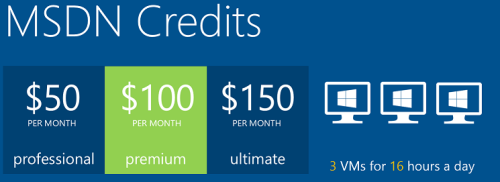
    The discounted rates for MSDN subscribers make it up to 97% cheaper to run a virtual machine on Azure compared to the standard rates, leaving the cost at only $0.06 per hour for a VM (small instance). Combine this with the fact that Azure VM’s are nowadays charged by the minute and they incur no charges when the VM is stopped, you can stretch a few $ worth of Azure credits for quite a long period of testing. If you haven’t yet looked into the MSDN benefits, go and read this article on Scott Guthrie’s blog for all the details.

    Not only does MSDN provide you with free credits to spend on your favorite Azure service, you can also leverage the MSDN usage rights for software running on a Windows Azure virtual machine. For a great review of the licensing options for setting up Dynamics CRM development and test environments by using MSDN, look no further than this recent blog post by Leon Tribe.

    Preparing a development server for CRM 2013

    While you can’t just directly provision an Azure VM image pre-configured with CRM 2013 (at least not yet), you can skip a few steps by starting with an image from the Azure VM Gallery that comes with SQL Server 2012. You will need to setup Active Directory and IIS before starting the CRM 2013 server installation, which requires a set of clicks and a couple of reboots.

    To make this process faster, I decided to take notes of the steps needed in installing the required components for CRM 2013 and share them with anyone who’s interested in doing the same. So, here’s a 50 slide presentation with screenshots of the configuration tasks and options to install a working CRM 2013 dev/test/demo server on a Windows Azure VM:

    Do take note of this fact before proceeding any further: this is NOT the “how to” of deploying a live CRM 2013 server. These are the minimum steps needed to get the Dynamics CRM server installation process to complete without errors – nothing more. When considering setting up a proper test and production environment, the first thing you need to do is read the Microsoft Dynamics CRM 2013 Implementation Guide.

    For taking CRM 2013 on a casual test drive and seeing what your current CRM 2011 organization looks like when imported into the latest server version, the steps outlined in the presentation are all you need to get started. I’ve timed the process and the last time it took around 1.5 hours from provisioning a new VM from the Azure Gallery to having a fully working test instance of CRM 2013 in the cloud. Not quite the couple of minutes that spinning up a new CRM Online organization takes, but short enough to set up an ad-hoc test environment for development and configuration tasks that are more easily accomplished with full CRM server and SQL database access.

  • eXtreme CRM 2013 Rome takeaways

    eXtremeCRMThere are no more Microsoft Convergence events held in Europe, but luckily the eXtreme CRM organization has stepped in to arrange a bi-annual conference where all the Dynamics CRM professionals can meet up and share information & thoughts on what’s happening around the product and the surrounding ecosystem. Last year in Berlin was the first time I attended the eXtreme CRM conference and this year it was time to head down south to Rome for eXtreme CRM 2013. Here’s my travel report from the event, focusing on the product roadmap details that were revealed and the direction that Microsoft Dynamics CRM seems to be heading towards, based on my interpretation.

    It’s been a bit rough

    The opening keynote by Bob Stutz, corporate vice president of Microsoft Dynamics CRM, was a somewhat unusual appearance compared to the traditional Microsoft way of highlighting their past achievements and future opportunities. From the European viewpoint, the typical US style keynotes often go over the top in building up hype for the success of the products, but Bob came onto the stage with a different kind of a message. Basically he apologized for all the problems that have surrounded Dynamics CRM recently: the delay of cross-browser support, CRM Online performance/reliability issues and the sad saga of recent Update Rollups being pulled.

    Bob_Stutz_eXtremeCRM_keynoteI think most of the MS partners in the room had shared the pain from these issues, especially when having to explain them on a day-to-day basis while working with customers. In the software business it’s of course nothing unheard of that  such problems may occur, but there’s been an elevated sense of frustration recently with the lack of information given to partners on what’s going on at Microsoft. Communication is the most effective cure in recovering from such events and I bet that it would have been far easier for all parties if there had been more transparent exchange of information on each of these issues earlier on, but it’s good to see the top management acknowledge this now and hopefully do what is necessary to straighten these things out.

    One thing that Bob Stutz promised to change was to return the Update Rollups back to pure hotfix packages instead of vehicles for new feature delivery that they’ve turned into after Microsoft adopted the agile release policy for Dynamics CRM shortly after the 2011 version came out. What this means in practice is that MS will need to come up with a new delivery vehicle for introducing the new features into on-premise CRM environments at least once a year. While this can potentially improve the stability of those environments, the gap between CRM Online and on-premise feature release schedule can also grow even larger as a result of this, which could introduce it’s own challenges through an increased platform fragmentation.

    The mobility story

    This time last year Microsoft made a big announcement of their upcoming “CRM Anywhere” prodcut offering. Following the aforementioned turn of events, the cross-browser support got eventually delayed up until Polaris / Update Rollup 12 while the mobile strategy was gradually revised, scrapping their planned partnership with CWR Mobility and opting to develop in-house mobile apps instead. Individual pieces of news around the mobility offering have become available during the past fall and now at eXtreme CRM 2013 Rome the following mobility roadmap slide was presented:

    Dynamics CRM Mobility Roadmap & Vision

    From this slide and the accompanying presentation I was able to pick out the following pieces of data:

    • The iPad Safari web client that was postponed from the actual Polaris rollout is arriving this month for CRM Online customers, on-premise support will be in Orion
    • Tablet devices will receive a dedicated app, not only the Windows 8 Sales Workspace but also a similar iPad native app appears to be scheduled for Orion, with further Service and Marketing apps in the horizon
    • iPhone and Android support will be limited to the Mobile Express client even after Orion, all the way until Leo
    • No details on whether Windows Phone will receive any new features in addition to the WP7 Activity Feeds app that was released a bit over year ago
    • Customization options as well as offline data support will be rolled out gradually to these clients

    One thing that Bob was emphasizing during the keynote was Microsoft’s decision not to charge additional licenses for access to these mobile and tablet applications. Choosing to take the longer route of build vs. buy in the mobile CRM gives MS a wider range of options to adjust their commercial offering to market needs, but the prolonged period of uncertainty means that many customers will also be postponing their investment decisions on mobile CRM deployment until they have facts available on what level of functionality is going to be baked into the core platform. At the same time ISV’s like Resco and more recently also CWR Mobility are working hard to be able to offer a HTML5 platform for developing customized mobile and tablet apps for Dynamics CRM for those customers who need to equip their mobile workforce with CRM solutions already today.

    Update 2013-02-16: Microsoft partners can now download the Microsoft Dynamics CRM Mobility Roadmap slide deck from PartnerSource (login required).

    From Polaris to Orion via Gemini

    The new “Flow” UI of Dynamics CRM has been rolled out to existing CRM Online customers. This has caused both a lot of excitement as well as anxiety, since the new design and integrations (Bing Maps, Yammer etc.) are very tempting to be demonstrated as the next generation user experience, but the feature set of Polaris takes away many of the standard customization options that rely on form event scripting. I’ve covered the Polaris new features & gotchas in a previous post, in case you haven’t had a chance to dig deeper into the updated CRM Online version yet. Just to repeat once more what I’ve been trying to emphasize ever since latest Statement of Direction document was released: on-premise customers won’t get the new UI with Update Rollup 12, it arrives in the Orion release.

    Orion_the_next_version_of_Dynamics_CRMWith that in mind, let’s get the big news out of the way before digging any deeper: Orion is not an Update Rollup or even Service Update type of a release, it is the next major version of Dynamics CRM. In his closing keynote Bill Patterson pretty much confirmed that it would be called “Microsoft Dynamics CRM 2013” (or 2014) for the on-premise customers. Not a whole lot of other details were shared, apart from the fact that the target release date is in Q3 2013. Although Bob Stutz was hesitant on giving any dates in his speech, July was mentioned more than once, but whether that refers to general availability or CRM Online is anybody’s guess as of now.
    Before that, we’ll have time for another star in the spring sky: Gemini. Yes, it looks like there will be even more frequent releases for CRM Online than previously communicated. Gemini arrives in Q2 2013 and will focus on bringing the Marketing Pilot features acquired last October available to Dynamics CRM users. The feature set was shown in a very brief run through of slides, since the network issues that plagued the whole eXtreme CRM 2013 Rome event held at Marriott Park Hotel forced Bill to skip the live demo and resort to screenshots instead. Not much can be said about what to expect from Marketing Pilot at this stage, but here are some facts I picked up: (more…)

  • Signing up for CRM Online in the Microsoft Online Services era

    Starting from July 19th, you no longer can/need to use a Windows Live ID to sign up for a 30 day trial of Microsoft Dynamics CRM Online. Instead you’re directed to the Microsoft Online Services Portal (a.k.a. MOP) to follow the same registration steps as you would when starting an Office 365 trial subscription. So, how does it work in practice then? Let’s sign up and see.

    There are a few additional steps in the registration process now. In addition to specifying the name of your company, you also need to select a new domain name, such as “yourcompany.onmicrosoft.com”. You’re given the chance to check for domain name availability, but it’s important to note that this only checks the .onmicrosoft.com domain. Your actual CRM Online organization will still be at yourcompany.crm.dynamics.com (depending on the region) and if the name given already exists on that side, the CRM provisioning process will automatically adjust the URL (I sure hope it’s better than those org85fs321nad type of CRM organization name monsters we had before). Additionally, since we don’t yet have a Microsoft Online user account in this case (if we did, the process would be somewhat easier), we’ll need to provide a user name and password.

    Once the data input has been accepted, we’re greeted with the administration portal that’s familiar to anyone who’s been managing an Office 365 subscription. Instead of the Exchange, Lync and SharePoint services we’ll see Dynamics CRM as the only available option. The actual provisioning process can take a while, so you may need to keep your eye on the spinner and refresh the screen quite a few times. In the US data centers the process took just a couple of minutes, but in EMEA I had to wait for half an hour before CRM was enabled in the Microsoft Online trial subscription. Presumably things will speed up as CRM becomes an everyday part of the Online portal.

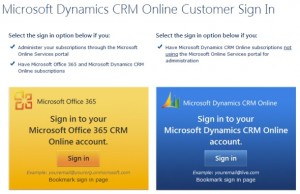
    Under Dynamics CRM there’s a Manage link, so let’s click on that and off we go… Ouch, grey screen! You weren’t using a non-IE browser, now were you? Just because Office 365 web apps are compatible with most browsers, doesn’t mean Dynamics CRM would be. Remember how that cross-browser support was re-scheduled to Q4 2012? That’s ok, it’s easy to forget such minor details. Also, since Microsoft still doesn’t want to make it clear to the potential customer what the system requirements for Dynamics CRM are, many of them will surely be greeted with the below screen once they login to their CRM Online trial with Chrome, Firefox or Safari, puzzled about why they’re seeing this mobile UI instead of the pretty charts and familiar Office experience they were promised.

    After we click on the CRM link inside MOP with Internet Explorer, we get an additional dialog that used to be a part of the CRM Online sign-up form: selecting the base currency for the CRM organization. Once done, the familiar CRM provisioning screen is presented, alongside the promotional WMV video telling us how Dynamics CRM will improve your productivity etc. Wait a couple of minutes and you’re given the button to launch CRM Online.

    From this point onward the user experience is exactly the way it used to be back in the Windows Live ID days. Once you go to add more users into your CRM Online subscription there is however something new in the UI: instead of allowing you to add new CRM user records, a popup window will instruct you that in order to add more users to Microsoft Dynamics CRM Online, you’ll need to go to the Microsoft Office 365 Admin Portal.

    Ok, let’s click on the Add and Licenses Users button. We’re taken to the Online Services portal and get to specify a name for the new user. There’s also a “bulk add” option available, but since that would require creating and uploading a CSV file, we’ll skip that for now. Similarly to the subscription administrator (the first CRM user you created), the new users will be given a user@yourcompany.onmicrosoft.com user name. You can enter more details for the user, but not an email address (more on that later).

    Moving forward, we’re given the option to grant a CRM user license to the user. However, unlike the native CRM dialog windows for adding users, the MOP dialogs won’t allow you to assign any CRM security roles to the new users. Instead, you’ll need to go back to the Dynamics CRM administration menus to perform this operation. Don’t forget this part, as otherwise your users will have a user account but no access rights to CRM.

    Ok, we’re now almost done and are presented with the option of sending details of the new user name and temporary password by email. By default the recipient will be the admin user. Don’t send it there. Why? Because even though it looks like an email address and MOP considers it to be one, there is no email service available for you to access this inbox. Remember: you’re just configuring a CRM Online trial, not Exchange Online. So put a real email address in there, or then just copy & paste the data from the next screen.

    Once the new user account becomes available in the CRM users view (it can take a couple of minutes), you can open up the record and assign the required security roles to the user. Another thing you should do is to specify the real email address of the new user, so replace the @onmicrosoft address with a proper business email. While you’re at it, you may notice that not all user profile fields are available for editing on the CRM user form like they would normally be. Changing details like job title, main phone, mobile phone etc. needs to be done in the Microsoft Online Services portal and not CRM, as these are part of the user information maintained in MOP’s directory. Unlike in a traditional on-premises implementation with Active Directory, changes to the user profile fields will actually be updated onto the corresponding CRM user record after it has been created. See the following MSDN article for details: Sychronized Users in Microsoft Dynamics CRM Online and Office 365.

    In addition to user management, also the subscription management for CRM Online now utilizes the Office 365 platform capabilities rather than the old system that was used for billing Xbox Live credits and other consumer services. What this means is that a potential customer might as well go and sign up for an Office 365 trial to go alongside their CRM Online trial. All it takes is finding the link under Subscriptions – Purchase – Microsoft Office 365 (Plan E3) – Trial and they can take the Exchange, SharePoint and Lync functionality for a test drive. Cross-sell opportunities galore!

    Are there any benefits then for a customer who just wants CRM from the public cloud and not Office 365? Yes, because the new Microsoft Online based authentication allows setting up an integration with the existing Active Directory that the customer has. No need to manage separate credentials for CRM Online anymore if you configure AD federation between your domain and the cloud services hosted in Microsoft’s data centers to offer the users a single sign-on (SSO) experience. It requires some level of effort, though, so start by getting to know the following article: Plan for and deploy AD FS 2.0 for use with single sign-on.

    Another nice addition is the access to a CRM Online Service Health dashboard. Similar to what Office 365 has offered, you can now also see information about the current status and pas issues related to various CRM Online service components. While Microsoft has actively promoted the new CRM Online Trust Center, effectively it’s just a static page with information regarding security policies and certifications. In comparison, the Office 365 (and now CRM Online) Service Health dashboard will tell you what’s going on with the service right now and what maintenance breaks are planned. Compared to, say, trust.salesforce.com, it’s less transparent due to the requirement of having an administrator login to access the information, but it’s a good start.

    What if you’ve already implemented CRM Online and want to take advantage of the integration with Office 365 user accounts or on-premises AD? At the moment, there’s not much you can do. The changes introduced on July 19th only apply to new CRM Online organizations, which will now be provisioned onto the Online Services Delivery Platform (OSDP). Existing organizations on the old Commerce Transaction Platform (CTP) will eventually be migrated, but there is no official schedule for this yet.

    My guess would be that we’re not going to see any updates for existing CRM Online customers until the Office 2013 wave of updates rolls out to Office 365 customers, as Microsoft will surely put all its resources behind ensuring the Windows 8 launch with the accompanying business apps is a success. With plenty of other things on the Dynamics CRM development roadmap, it may take another year before we can finally say goodbye to the Windows Live ID based authentication in CRM Online. In the meantime, why not sign up for an Office 365 Enterprise Preview to see what the 2013 wave has to offer on SharePoint, Office and other products?

    Edit 2012-07-31: here’s a list of a few Office 365 issues that can cause problems for new CRM Online organizations:

    • Setting an integration user account to Non-Interactive access mode doesn’t reduce the count of assigned CRM licenses in MOP, as there are no free service accounts on Office 365 at the moment. In the past CRM Online allowed 5 free non-interactive user accounts. This is no longer the case, so any integrated application with its dedicated credentials will consume a full license on CRM Online. Unless this policy changes, it will increase the license cost for existing customers when they are eventually migrated from CTP to the new OSDP environment.
    • Developer toolkit and plugin registration tool cannot connect to CRM Online, default discovery service URL has changed from dev.crm.dynamics.com to disco.crm.dynamics.com (see thread on CRM forum)
    • Internet Lead Capture functionality is currently unavailable for new organizations in US (other regions have never had this functionality to begin with)
    • Instead of *.live.com, now you’ll need to add *.microsoftonline.com and *.accesscontrol.windows.net into IE Trusted Sites alongside *.dynamics.com to avoid prompts during the authentication process