Tag: cloud

  • 4 Stages of MS Cloud Business Apps Evolution

    4 Stages of MS Cloud Business Apps Evolution

    In the past I’ve written about the History of Microsoft CRM from it’s first 10 years. I’ve also explored how the platform evolution up until Dynamics CRM 2013 had changed the product and how we worked with it. This time I want to focus on specifically the Microsoft Cloud era.

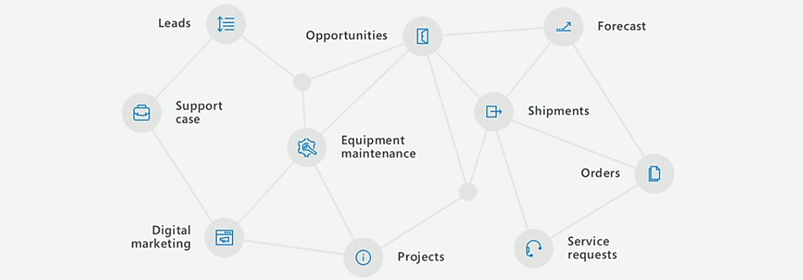
    I started to think about the different focus areas that we’ve seen on the journey that’s taken us from the early CRM Online days into what the current roadmap for Dynamics 365 and the greater Power Platform look like. In my mind these “snap” into four logical stages that describe what the main ambition at any given time seems to have been for Microsoft’s product team:

    Why bother looking back? Well, I could insert a “those who cannot learn from history” quote here, but really it’s more about putting the present into perspective. There are still plenty of customers who’ve either stayed with Dynamics CRM on-premises (now 365 CE by name, too) or who are still viewing the online service as just a “CRM in the cloud”. Hopefully this post will help in understanding the magnitude of change that has taken place in the greater Microsoft cloud during the past few years and why it would be better for them to embrace it rather than just observe it.

    1. Parity

    The very first versions of Dynamics CRM Online in 2008 wasn’t exactly the same product that you could get by installing it on your own application servers. The limitations on features and customizability meant this was a “CRM lite” that saved you the effort of infrastructure investments and server management, but there were a lot of trade-offs. You gotta start somewhere, but obviously this wasn’t exactly up to the vision that Microsoft saw as what the cloud services should offer to their customers.

    Upon the global launch of Online we received the updated CRM 2011 version and most importantly the solution framework that after several iterations now powers the ALM story behind Power Platform. Closing down the gaps between Online and on-prem was the primary goal for product development, with the “Power of Choice” being a key selling point against server-only or cloud-only competition.

    While the customization capabilities in CRM Online were surprisingly powerful already in 2011, the gaps in actually managing the environments you had no direct access to took a longer time to close. For the enterprise customers to consider moving from fully controlled servers and databases to the MS hosted cloud, a lot of investment was needed in building self-service features for instance management – not to mention ensuring the cloud apps were reliably available and updated in a controlled manner.

    Today the flexibility of spinning up new instances, copying them for test & dev, taking backups, syncing data to Azure SQL for reporting, and many other self-service features available for admins make the cloud environment quite attractive. In exchange of giving up full control over your servers and databases, you have the luxury of not having to think about them at all. There are no servers to patch up and keep running. As for the updates, it’s now a continuous delivery of new & improved features that puts an end to the concept of an upgrade project altogether. Sure, you’ll still need to do your part to ensure customer specific customizations and integrations keep working – that’s just another service that needs a continuous delivery mindset.

    2. Integration

    Once the cloud version was sufficiently close to the on-premises Dynamics CRM server, the next stage was all about making it better than on-prem. This was the era in which Office 365 was really taking over the business productivity market, so you could say the low-hanging fruit was in tapping into these existing services in the MS Cloud and making Dynamics CRM a more attractive application through those.

    Sure, we had heard the “better together” story for Dynamics + Office already in the on-prem days, but this wasn’t exactly the way we today expect cloud apps to just work with one another. Complex server configuration tasks were surely a nice source of revenue for the IT consulting companies, since very few customers were able to know all the ins & outs of how to properly deploy an Internet Facing Deployment of your Dynamics CRM server and make it talk with other MS server products. From Microsoft’s perspective, having useful product features available for everyone in theory doesn’t scale into real world customer success if there simply isn’t enough skill out there to deploy everything the way MS engineers do it in their labs. Well, when it’s all run by MS from beginning to end, this made it a solvable problem.

    Making common online services like Exchange and SharePoint available for Dynamics CRM admins to click & configure on their own was one key part of this journey. What this Cloud + Cloud combo also meant was that new features from the latest versions of each service could be rolled out at a much faster pace than the server bits could ever follow. Oh, and since all the services were by default available via the public Internet, mobile clients became an everyday tool for accessing your CRM information.

    (more…)
  • The End Is Near for Dynamics 365 (Customer Driven) Updates

    The End Is Near for Dynamics 365 (Customer Driven) Updates

    Have you been administering organizations running on the online version of Dynamics CRM / Dynamics 365 Customer Engagement for a while now? If so, you will be familiar with this screen:

    That is essentially CDU in flesh. CDU of course stands for Customer Driven Update, the process through which Microsoft has allowed online customers to decide when their instances are updated to the latest available version of Dynamics 365 CE. While it hasn’t been a completely open schedule of “pick whichever date you want”, the availability of update slots for a period of up to six months has formed the backbone of how many organizations plan the dates on their business application development roadmaps.

    This is all about to change very soon, as CDU will be going away. The plan was laid out on a post in the beginning of July already, but I suspect not everyone has yet quite grasped the practical impact of what “Modernizing the way we update Dynamics 365” truly means. Admins of online tenants with v8.2 orgs will have been receiving the following notifications into their mailbox recently:

    Those who have reacted to this request to schedule their V9 updates will have seen a fairly familiar calendar with update time slots all the way up until January 2019. The thing you should keep in mind is that this is the last time you will ever see that CDU calendar. You cannot freely schedule your Dynamics 365 CE online updates ever again, once you’re on V9+. Enjoy your final Customer Driven Update, folks!

    “What’s going on here?!? Is Microsoft giving up on maintaining their Dynamics 365 CE cloud? Will we no longer get updates for this product?”

    It’s exactly the opposite, in fact. Microsoft is so determined to get all of their online customers to run the latest & greatest bits that they’re transforming their update delivery model into continuous deployment. From February 2019 onward, everyone will (in theory) be running the exact same version and no org will be left behind – or be allowed to. Then shortly after, it’s time for the next major release, V10, coming in April 2019:

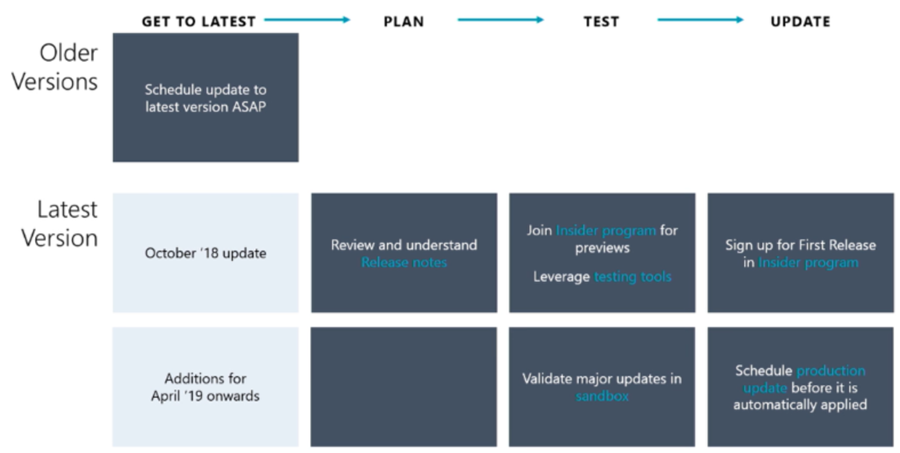
    Alright, so there is no way of opting out from major releases and waiting for the dust to settle for a while before rolling it into your own instances. This just means you better be ready for the changes as they take place, so preparation and thorough understanding of the releases notes for the coming versions is going to be crucial. And how will we be able to test the new version in advance, you might ask. The answer is you can’t do that just yet, but before V10 rolls out there will be a new mechanism in place for a First Release instance:

    As we can see from the Release Stations diagram above, the updates will be rolled out to different “rings” over a period of several weeks. Not even Microsoft wants to deploy the updates to every single environment at the click of one button, so they start from the smaller geos like Japan and Canada, gather telemetry on the update process and then gradually move to the largest geos of North America and Europe.

    Telemetry will also play a key role in how Microsoft plans to deal with the inevitable need to deprecate and remove older functionality from the platform. Although the new Dynamics 365 update policy aims to preserve backward compatibility and present new features as “off by default”, there are going to be scenarios where it’s not just a matter of adding more and more stuff onto the ever expanding cloud platform. Since MS hosts all of the online instances, they can also measure how much each product feature or platform component is utilized by the customers. Decisions on how to deal with deprecation will therefore be much more data driven than it could have been in the past.

    Just because the product is moving into an ever more “cloud native” delivery model doesn’t mean that there’s no need to test your customizations, extensions and integrations. While the process aims to reduce the chances of breaking changes interfering with the day-to-day use of Dynamics 365, there will of course be some changes that break stuff in reality. While the First Release environment will only give you a few weeks notice for performing your own changes in preparation of the version update, the Insider programs for Dynamics 365 will be your best hope to have earlier access to the information on what’s coming & how it may impact you.

    To fully grasp the how, why and when of this new update policy for Dynamics 365, I highly recommend you to watch the session from Business Applications Summit 2018 on Dynamics 365 and Update Cadence. I’m hoping that Microsoft will make this information available in more convenient formats than live recordings in the future, so that this bold “one version for all” vision can be better understood by partners and customers. After all, we’re only in the process of digesting the October ’18 releases notes highlights, but in reality the V10 update isn’t that far away in the horizon anymore.

    For all of us who are used to thinking about Dynamics 365 version updates as projects, it’s time to start shifting our thought process to the continuous delivery mode. Many of the “born in the cloud” products like Dynamics 365 Business Central or PowerApps are already now operating according to this one version principle, so it makes perfect sense to try and align the Common Data Service for Apps platform and the Dynamics 365 Customer Engagement applications with this new reality. Not just from a technical standpoint, but also the adoption of new product features that can be enabled when needed is going to be quite different from the traditional way of features arriving at the very moment a version update is deployed.

  • Trial & Error: Understanding Dynamics 365 CE Trials

    Trial & Error: Understanding Dynamics 365 CE Trials

    With SaaS products like Dynamics 365, getting the process of running a free trial right is crucial for the commercial success of products. This is why you may have seen Microsoft also perform a lot of changes into the process how you’ve been able to spin up trials of CRM Online instances, nowadays known as Dynamics 365 Customer Engagement. Or “Dynamics 365 for X”, with the “X” being an App like Sales, Customer Service, Field Service or Project Service.

    This App model is one of the reasons why the seemingly simple process of provisioning a new cloud database to host your CRM trial data has turned into a bit of a beast recently. It’s no longer a one-size-fits-all offering, rather Microsoft is trying to tailor the trial experience based on the business process that is most relevant for the potential customer. The intentions are good, but the results can lead to a lot of confusion when dealing with an inherently complex platform like XRM where users never follow just a single track through a few predetermined use cases. Here’s a few notes on what I recently learned about how the trials currently work.

    Classic Trials

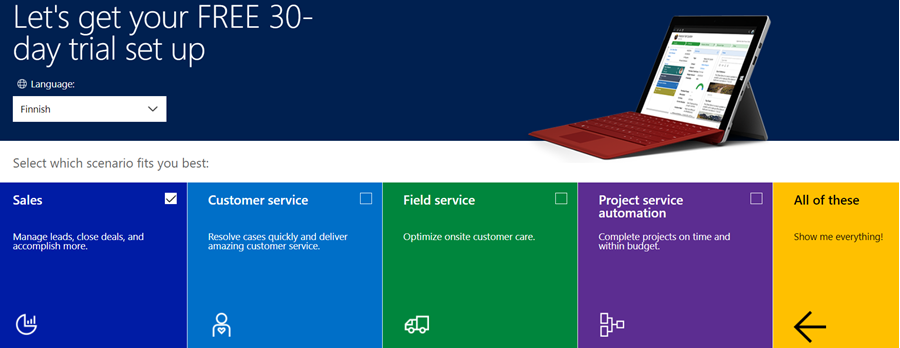
    If you’ve been working with Dynamics 365 recently, either by deploying it for customers, managing your internal instances or studying to become a certified Dynamics 365 professional, you’ve probably encountered this selection:

    Here you get an option to select either one of the Apps, go for the full suite of “all of these”, or if you’re really paying close attention, skipping the App selection by ticking the box “none of these, don’t customize my organization”. Today when I was in need of setting up a new trial to test the Sales related features specifically, I opted to install the Sales App via this provisioning screen.

    After a short while, I was able to access this new trial instance. That in itself can of course be a challenge, since there’s no guarantee that the Office 365 App launcher or the home.dynamics.com screen will refresh to show you the link to the Dynamics 365 instance. Knowing the direct URL of the instance picker (https://port.crm4.dynamics.com/G/Instances/InstancePicker.aspx in EMEA) speeds up this process, and soon I was faced with the Sales specific clean app list. My Finnish language “Myynti” app for the legacy web UI was there, as was the less elegantly named “Sales-keskus” hybrid of English/Finnish, which of course points to the Sales Hub based on Unified Interface.

    Since I needed to do some solution installation here, the first thing I had to do was to promote myself to the Admin role. That’s something you’d never need to do outside of the trial experience, as being the user who provisioned the Dynamics 365 instance you’d most likely have sufficient roles in the Office 365 administration side to see the admin menus directly here. But these are trials we’re talking about and the whole point of the tailored experience is that you DON’T see things that are not relevant to you, because that’s a scary UX for people not familiar with the platform.

    Now that I had the power to configure the instance to my liking, I proceeded to first checking out the default UI on the account form. Here I noticed that actually my nice’n clean Sales UX was cluttered with stuff that I didn’t ask for. Taken from the English UI here, you’ll notice that the account form tab actually has sections for Project Price Lists, Field Service and Scheduling. Not to mention the related records navigation that was at least 20 items long. Where did my sleek Unified Interface “Sales Hub” go?

    When going to the Solutions menu, it’s obvious where these items are coming from. The “Sales trial” in fact contains in total 16 solutions, which is equivalent to choosing the “all of them” option on the trial setup screen. It’s all here, even though you didn’t ask for it: Customer Service, Field Service, Project Service and their accompanying trial customizations. No, none of these will actually show up as installed solutions for the instance if you view them via the Dynamics 365 Admin Center. The same laws of physics obviously don’t apply for trial instances as they would for actual production or sandbox instances. (more…)

  • Postcards from Microsoft Ignite 2017, part 2

    Postcards from Microsoft Ignite 2017, part 2

    Back to Florida again – at least on a mental level. In part 1 of my Microsoft Ignite conference diary I described the overall setting of Dynamics 365 in the context of the Business Applications story. This time let’s have a look at some of the details on what the XRM platform can do now and in the near future. The live tweet content can be found from my #MSIgnite Storified collection part 2, but here’s the story behind those social posts.

    The GA (general availability) target of Dynamics 365 Customer Engagement V9 was set to the week after Ignite. This was indeed the case, as I didn’t even have a chance to arrive back home from Ignite before I had my first V9 trial instance running the in the cloud. People who had participated in the Dynamics 365 Insider program were already granted access to the preview instances of this major release but now each and every new trial is provisioned with the V9 bits. A few days later there also was an official blog post that announced the availability of “Dynamics 365 October service update”. The naming of course is a bit confusing, since up until this point Microsoft had stuck to the “July 2017 Update” name – and that’s what still shows up in the D365 Admin Center UI. Don’t you agree that life would be much simpler if we’d all just use the version numbers instead of marketing names? Oh, and if we had the KB article already available for the 9.0.0.1103 GA build, that would be even sweeter.

    After the initial Preview Executive Briefing sessions for V9 that were conducted before the summer holiday season, Ignite was the place where the next big presentation on Unified Interface took place (at least to my knowledge). Oren Ryngler and Linda Simovic took us through a detailed demo of all the UX goodies that V9 has to offer. Unfortunately the slide deck is not available for download even for Ignite attendees, but you can view the full recording of the presentation on YouTube. I bet that even if you participated in the preview program, you’d be hard pressed to recall all the wonderful details packed into the Unified Interface. Principles like “Gradual exposure to complexity”, AI capabilities like Grid Recommendations or the new chart types are something you can expect to discover in the video.

    There was another excellent session where Linda discussed what the underlying motivations behind the Unified Interface initiative (or “Unified Client Infrastructure” / UCI) were. Even more interesting was the quick peak at the Custom Control Framework (CCF) that is a significant benefit unlocked by UCI. Described as “extensibility framework for building UI components that visualize data”, we’ve already heard that Microsoft has been busy rebuilding everything in the default app UI as Custom Controls (“but if it’s default then how can it be custom?” Ah, never mind the semantics…). What we don’t yet have is a definitive date for when the APIs for building true Custom Controls will be opened up to customers and partners. What’s REALLY interesting is that the product team’s roadmap includes a “Control Gallery” marketplace for viewing and purchasing these as solutions. If it all works out, then the Unified Interface in V9 is just the start of the true transformation of XRM UI into something more than fields and grids on an entity form.

    While the UI story is always going to get far more social media coverage due to fancy screenshots from the visible application, there’s a lot more bubbling under in V9 than just the promise of a Custom Control Framework. Matt Barbour presented the Microsoft Dynamics 365 CE Platform Update for Developers, delivering a concise “what you need to know” package for people working with XRM solutions or API based extensions. Now that everything in the OoB apps has been separated from “system” into actual solutions, managing the dependencies via solution segmentation is actually a big deal. Why it’s even a bigger thing from application maintenance perspective is that the next V10 major version will ONLY accept V9+ solutions – so start getting used to them right away. In addition to the earlier announced V9 platform enhancements of Virtual Entities and Multi-Select Option Sets, we also received a “one more thing” with Auto Number fields! Thousands of custom numbering solutions can finally be put to rest, at least after you install the Auto Number Manager for XrmToolBox to access the configuration options for this new native field type.

    There were several shorter sessions in the Expo area of Ignite that offered practical tips for how to do more with less when it comes to Dynamics 365 Customer Engagement. While I remain firmly in the no-code territory myself, the PowerShell scripting capabilities available in the new Online Management API or the more familiar Microsoft.Xrm.Data.PowerShell module demonstrated by Shwan Dieken and Sean McNellis from the PFE team open up automation capabilities even I can easily relate to. Don’t forget to check out this huge link list put together by Shawn & Sean for the latest admin tips & tricks you need to be aware of. Over on the MVP powered sessions of Ignite, George Doubinski also showed a wealth of automation tips to reduce manual labor for Dynamics pros. What I bet you didn’t know how easy the integration of Dynamics 365 Customer Engagement with a WordPress website can be, thanks to the plugin developed by George & Co at AlexaCRM.

    Like I wrote on the back of my first Ignite postcard, the Business Applications story that Microsoft wants to tell us consists of a lot more than just Dynamics 365 these days. While it’s been all too easy to disregard the earlier sales pitch for PowerApps and Flow as just a citizen developer fable that doesn’t apply when working on Real Projects, they are gradually gaining the types of ALM capabilities that put them higher up on the list of tools to consider for solving customers’ business problems. While there were some disappointments, like the continuing non-story of Adobe Marketing Cloud + Dynamics 365, you could easily find yourself thinking “hmm, that’s actually pretty cool” while watching the demos for this “Power platform” of non-XRM business tools. Even though CDS still largely is “a box to connect other boxes on a PowerPoint”, the added features like embedded PowerQuery and the accompanying new data sources give us a sign that progress is being made.

    As always, the big questions is about when’s the right time to jump in to the new technology if you want to deliver successful customer projects with it. Events like Microsoft Ignite are great for calibrating your own perceptions and expectations, not just via the official product demos but also the community response to them. I know I walked away from the conference with a far better understanding of what Microsoft is pursuing with their latest product development investments – even though I’ll need to review a bunch of the session recordings to actually grasp the finer details of each individual technology.

  • Postcards from Microsoft Ignite 2017, part 1

    Postcards from Microsoft Ignite 2017, part 1

    Greetings from the Sunshine State! This Fall I was fortunate enough to have chance to attend my first ever Microsoft Ignite conference in Orlando, Florida. Staying true to my habits, I did tweet out quite a lot of content from the live event with #MSIgnite hashtag. If you missed that stream, feel free to revisit the collection over at Storify, where I curated a story called “#MSIgnite 2017: Business Applications”. (Unlike with the V9 preview, I’ve decided to refrain from embedding the infinite scroll version of the story into this blog post. You’re welcome!) Here’s a little written summary on my thoughts about the event’s contents.

    If you’ve been to or kept an eye on Microsoft Ignite before, you’ll know that it’s an event that has traditionally catered the more mainstream product lines like Office 365 and Windows. I did not expect any major announcements from the Dynamics 365 team at Ignite, so my intention was to explore the broader story around MS Business Applications. Most of us who are working in cloud environments with Dynamics products must be well aware of how much there is going on around the core XRM platform (still the best name for it), but rarely do we have a chance to focus on something that isn’t directly linked with the sales/service/marketing processes of CRM system development projects.

    That’s a bit of a shame, since at the end of the day that’s precisely where Microsoft’s big competitive advantage lies. The whole really is greater than the sum of its parts in this occasion, and if the size of the Ignite conference would be used as the yardstick, I’d say the whole is actually HUGE. Sure, it wasn’t anywhere near Dreamforce in terms of the attendee count, but if you’re not looking for a rock festival to hang out with your business partners but rather want to deepen your understanding of the current and future capabilities of a cloud technology platform, it doesn’t need to get any larger than this. I reached my 10k step target each day just walking between the sessions, which tells you the Orange County Conference Center floor space was truly put into full use in trying to fit in the complete MS business technology stack. You sometimes literally had to take a shuttle bus from one side of the conference to the other to make it to the sessions in time!

    The biggest piece of news for D365 was already from the earlier week’s Directions North America 2017 event, where Microsoft admitted that after 1 year of waiting, there was not going to be a Business Edition release of the XRM based apps at all. Or even for the ERP side of the house – at least from a product naming perspective. While none of the technology investments made in preparation of Business Edition was actually cancelled, it’s understandable that this caused a lot of stir among the Dynamics ecosystem. Without going deeper into the topic, I believe MS made the right choice and it’s only a shame it took them so long after the initial Dynamics 365 rebranding announcement to find the right path forward. While we wait for the new licensing model details, we still remain in a product naming limbo that was also very much present in any Dynamics related session at Ignite. You must remember that what we’re experiencing in the XRM space ain’t nowhere near the amount of confusion that our ERP colleagues must go through. Godspeed, Dynamics X!

    Of course the story is no longer just centered around what to call your CRM & ERP platforms. In practically all the Ignite sessions that touched my field of work, the solutions being demonstrated were always mashups of several MS technologies. Clearly the intention was to underline the possibilities of seamless integration between the latest cloud apps from almost any two product teams. Yeah, I hate the word buzzword “seamless” as much as any experienced IT consultant does, but my point is that it seems like the phase of inventing new MS cloud products has reached an end and now the focus is truly on ensuring they can connect with one another. This also means challenging the assumptions of what the role of each product is in the customer’s solution architecture. Instead of using XRM as the UI for business data presentation, could a better result be reached via a Power BI dashboard that has embedded Visio process visualization and PowerApps screens with record level drill-down? Possibly yes, and these alternatives are what MS wants us to actively explore.

    The floor space given to PowerApps at Ignite 2017 made it the clear headline product in the Business Applications track. Maybe it was just my session schedule planning, but it felt like all roads eventually lead to PowerApps. It’s of course a very neat way to demonstrate the benefits of having your business data in systems that are easily accessible by these low-code/no-code apps. What was somewhat confusing to hear, though, was that the current “UI first” approach of designing PowerApps on a free canvas was promised to get a new model-driven app design option alongside it. You know, with entity based forms, server-side business logic and even Business Process Flows. “But wait, weren’t those the defining characteristics of an XRM app?” Bingo. It literally was a set of Dynamics CRM customization UI screenshots snatched into a PowerApps roadmap presentation. These two paths are converging quickly now and you’re going to want to keep an eye on what the next chapter in the Business Applications has in store for us.

    I’ll need to go lie down in a brief coma now to recover from the jetlag caused by a Miami-Helsinki flight (cheers to Finnair for offering the direct connection, though!). I promise make a return with part 2 in a few days time, as there is a lot more souvenir sweets to digest from Microsoft Ignite 2017.

  • XRM Rebooted with Dynamics 365 Embedded?

    XRM Rebooted with Dynamics 365 Embedded?

    The next major release of Microsoft Dynamics 365 Customer Engagement, the July 2017 Update, has been called “the biggest release to date” by the product team. If you look at the number of features that a single release now touches, with the product offering being further divided into Enterprise Edition and Business Edition, the number of work streams sure is massive. It’s amazing to think how much wider the scope of Dynamics 365 is today compared to “just” five years ago when it was still Dynamics CRM and the primary target seemed to be making the traditional sales-service-marketing CRM package to work with modern browsers (non-IE), devices (mobile) and infrastructure (cloud). Here’s the roadmap presented in WPC 2012:

    Times change and even the Worldwide Partner Conference has evolved into Microsoft Inspire now – which I think is far too close to Microsoft Ignite as a name, since I’ve found myself mixing #MSInspire with #MSIgnite all the time. Anyway, this annual MS partner conference launched on July 10th with a keynote led by Satya Nadella. The recording of this is naturally already available, but you could also check out my Storify collection of the most interesting tweets from the event:

    One of the announcements that didn’t get much space on the big stage but certainly has big potential implications for the Dynamics ecosystem was the announcement of a new ISV Cloud Embed program for partners. With a reference to their earlier success with offering Azure IaaS and PaaS services as the foundation for ISV applications, Microsoft now states that it will offer also higher level services available as building blocks for ISV apps. The list shown below includes “Dynamics 365 Embedded”.

    Yes, it shows a number of other embeddable products too, like PowerApps and Flow, but c’mon – those are newcomers to the Microsoft product portfolio. Dynamics as in CRM and later Customer Engagement has been around for a decade and a half now! One does not simply rip the CRM roots out of the platform (assuming that it even is the CRM part and not AX/NAV) and then use the remaining parts as a building block for an ISV app. Except that it might just be happening soon.

    This is not a brand new concept of course. Since I have a tendency of documenting the platform evolution of Dynamics CRM/XRM/365/CE/etc. onto my blog posts, all I have to do is search and reference my earlier writings these days. Back in 2010 when Office 365 was launched, I posted the first reference to the concept of “Dynamics CRM Services”. This is turned out to be pure slideware in the end, as the early illustrations of what the high level Azure services architecture was planned to be never quite materialized in that format. Read this post from Simon Hutson for a great overview of the buzz and confusion around CRM Services.

    The statement in 2008 was:

    “In the future, developers will have access to SharePoint & CRM functionality for collaboration and building stronger customer relationships. With the flexibility to use familiar developer tools like Visual Studio, developers will be able to rapidly build applications that utilize SharePoint and CRM capabilities as developer services for their own applications. Developers can expect a breadth of SharePoint & CRM capabilities across the spectrum of on-premises, online & the Azure Services Platform.”

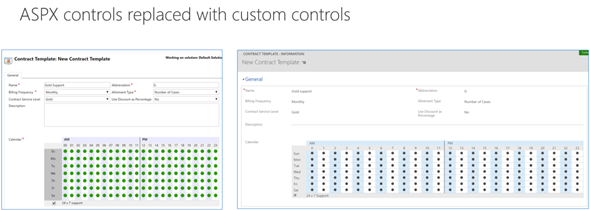
    With this week’s statement on Dynamics 365 Embedded, could the “future” referenced in the original text actually arrive ten years later? We don’t know for sure yet, but there are a lot of signs pointing towards that direction. If you followed the V9 Preview Executive Briefing or skimmed through my collected tweets from it, then you might already be aware of the concept of App/Plat Separation that’s taking place right this very moment. The earlier built-in application functionality of sales, marketing and services that you always got preinstalled with a CRM instance are now being moved into solutions like the newer Field Service etc. already are. Not only that, but also the built-in ASPX controls for data presentation components like grids and dialogs are now being rewritten with the new Custom Control Framework.

    And what about Azure? Well, it’s everywhere you look now with the new features built for Dynamics 365. Then there’s also… something that will become more clear as the GA of V9 approaches. With all of this technical architecture being lined up for the next generation XRM, it looks like the only thing missing really is a commercial model for selling Dynamics 365 without the CRM. Now that we have the ISV Cloud Embed program announced at Inspire 2017, I would say the time has come to give the people what they want:

    That Twitter poll ain’t open anymore, but please feel free to place your bets in the comments section of this post! What might the Embedded future of Dynamics 365 be and what still needs to happen in your opinion?

  • The Long Road to Unified Interface in Dynamics 365

    The Long Road to Unified Interface in Dynamics 365

    On June 20th Microsoft started taking the cover off its next major release of Dynamics 365 Customer Engagement (formerly known as CRM): v9.0. The biggest announcements in the first day of the Dynamics 365 Preview Executive Briefing were around the client story. With the new Unified Interface (sometimes also referred to as “UCI” for Unified Client Interface/Infrastructure) the plan is to bring a single client technology to cover all the different UI’s across devices. Web, Outlook, Mobile, Tablet.

    This is very exciting news, but there’s a lot of details and footnotes that people in the Dynamics ecosystem need to be aware of. Let’s dive right in!

    The Client Fragmentation of Dynamics CRM

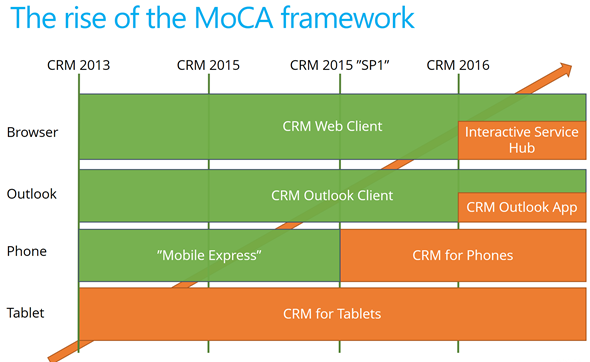
    Most of you will have probably been around when the previous big UX refresh took place with CRM 2013. We then received the MoCA Framework based tablet app with Windows 8 style tile UI and later saw this framework being used in many other places. We even received a brand new client to be used on the (desktop) web, the Interactive Service Hub (ISH). In fact, one year ago it almost looked like MoCA would be eating the world:

    The only problem with this strategy seemed to be that all of these individual parts never formed a sensible whole. Instead, there were so many “seams” visible everywhere you looked in the Dynamics CRM client landscape that many times you just wanted to keep your focus on the traditional web client and wait for things to clear up in these newer areas of the platform. A few examples:

    • Knowledge Articles were introduced only on ISH, but at the same time ISH was too limited/buggy to be used in most of the existing customer service scenarios with customizations in place.
    • Visual Controls were introduced in the phone and tablet, but the main web app forms just kept getting more and more white with nothing but text fields.
    • Dashboards with filters were made available on ISH, but much of the entities (i.e. sales) that typically are analyzed with dashboards were not allowed on the ISH side.

    MoCA was born for the mobile first era of touch UI and understandably it didn’t have all of the traditional capabilities from the web client. However, there were plenty of gaps that didn’t make it ideal for mobile use either. One of the biggest issues I had with MoCA was the “configure once, deploy everywhere” principle, which tried to force the same full CRM configuration onto the mobile device screens. MoCA brought the CRM into your pocket, but most of the time what a user would need in their pocket is a simplified app focused on a limited set of tasks. The limitations with MoCA meant that Microsoft had to rely on a Resco based client for their Field Service app in which the use cases are primarily mobile only.

    This Time It’s Different

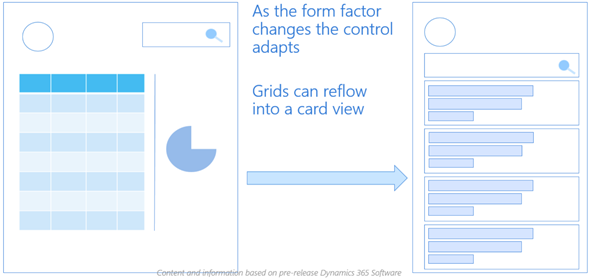
    The promise of Unified Interface is that the era of web vs. mobile is over and now we’ll see a UI that’ll both adapt to the device or screen in use, as well as offer the same customization options in each of them. Content will be presented in a way that will reflow into different states of the control as the space available to it changes.

    Unlike with MoCA, this time there can be multiple different apps also accessed on a mobile device. Also web-only features like form switching are now available on all devices which makes it far less challenging for the system customizer to design a solution when all the exceptions and limitations of specific client types are (in theory) no longer in the way. It’s important to set the expectations on a realistic level, though, since I’m quite sure we’ll need to make some more compromises on the web side of the house with this new Unified Interface, but hopefully it’ll be a price worth paying for true mobility of Dynamics 365 business apps.

    For an even more customized experience, the Custom Control Framework that has been gradually introduced as part of the application (like the Editable Grid, for example) is going to introduce a design surface for developers to extend Dynamics 365 Customer Engagement apps in exciting new ways. Not only that, the existing ASPX based UI controls that have been in the core CRM application since forever are now also being transformed into Custom Controls. This is a part of the larger application/platform separation initiative that’s a whole topic of its own. On a high level, the developers should soon have access to basically the same tools for building new UI controls as what Microsoft is using to build their business apps.

    All of this should help in removing many of the gaps that have currently stopped the rolling out of the individual application features in earlier releases for real life business scenarios. There are plenty of promises that MS is making on performance improvements of this new client technology, too. That’s an important aspect to keep in mind and realistically evaluate as the Unified Interface becomes available, since all of the eye candy in the world won’t be of much value if the actual user experience of working with the application isn’t meeting the ever growing expectations of fluid interaction with the data stored in and managed via Dynamics 365.

    Are We There Yet?

    So, all of this looks great – now can we have it by tomorrow, please? The short answer is “no” and the expanded one is “it depends”. As mentioned in my earlier blog post, much of the new features in Dynamics 365 will now be rolled out via Private Previews and Preview programs before general availability. Hopping on to the preview train will shorten the time it takes for gaining hands on experience with the new UI. However, there’s more to it.

    Earlier I mentioned the previous UI refresh of CRM 2013 release (“Orion”), but some of you might still remember the intermediate release of “Polaris” (whereas the official name December 2012 Service Update isn’t something even I remembered anymore). That was perhaps the first Online-only release that Microsoft developed, with a target of not even trying to upgrade all of the application features into the new UI concept but instead just a selected few entities (“COLAC”) received the refreshed forms and Business Process Flow. You could build a simple CRM demo for a new customer with it, but trying to upgrade existing systems into Polaris or building anything with more customization requirements was a no-no. They had to wait until the full CRM 2013 release became available.

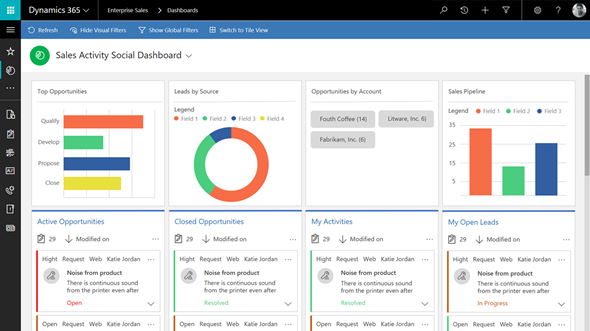
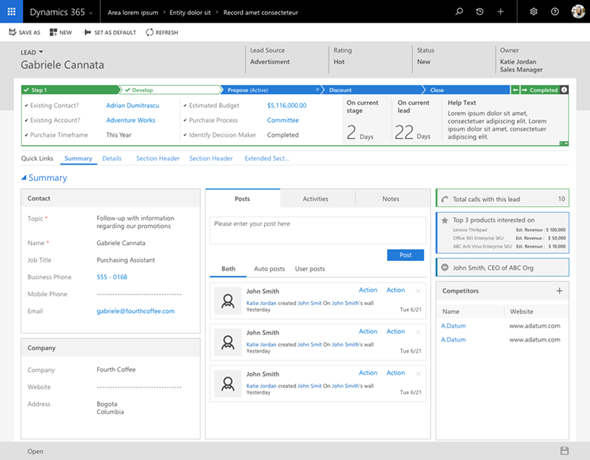
    The reason I’m bringing up this is that initially the Unified Interface is likely to be a bit like Polaris. It’s going to be made available only to brand new instances with the Business Edition licensing, or for new Apps that are either built by Microsoft (Customer Service Hub, a.k.a. ISH v2) or by the customer. It will also be available on the Phone and Tablet apps as well as in the lightweight Dynamics 365 App for Outlook (which officially replaces Outlook Client that’s now deprecated). Everywhere else, though, it’s not going to be the time for Unified Interface yet, but instead a refresh of the web client that’ll look something like this:

    Starting to get confused? I don’t blame you! There’s a hint of irony in the fact that the “Unified” Interface will initially be yet another interface variation for the Dynamics 365 application. I’m sure it’s not the way Microsoft would prefer to have these things introduced but reality is usually a bit more messy than PowerPoint presentations. The new client technology simply represents such a major shift in how Dynamics 365 works that upgrading all the complex customizations of existing Enterprise customers into it in one go would not be a smart move. Remember that “everyone’s an enterprise customer” until the Business Edition finally is out the door.

    To truly understand the client strategy that Microsoft is pursuing, you simply have to look at the Business Edition now, regardless of your deployment’s size. It is the dreamy wonderland in which MS can cut back on unnecessary complexity of application features and not worry about breaking any existing deployments, since there is hardly any legacy there. A fresh start that doesn’t need to carry all of the overlapping functionality (like Contracts vs. Entitlements) or provide all the admin options necessary for hybrid environments. It’s not all pure bliss in the sense that all of this will eventually have to live in harmony with the more complex custom UI’s and business logic of big corporations with “non-simplified” CRM systems running on the Dynamics platform. Still, right now we’re seeing a move from “cloud first” to “Business Edition first” when it comes to client innovation.

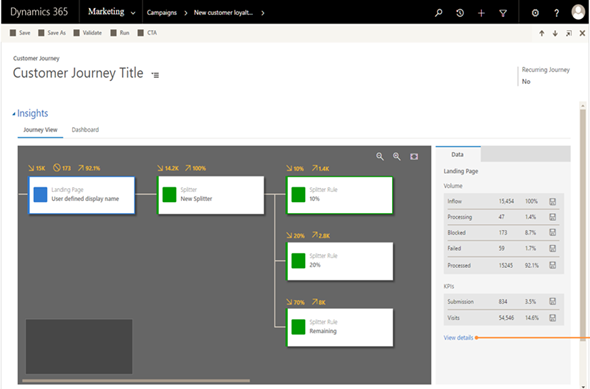
    Just because the Business Edition is targeting the lower end of the product licensing fees doesn’t mean you should dismiss the functionality that is being introduced in it. If the Sales app mainly streamlines many of the unnecessary complexities of current opportunity management in Dynamics 365 Enterprise, then the Marketing app will bring advanced logic like Customer Journey management that many existing larger customers would surely love to get their hands on. Unified Interface is the big story here that’s driving the release policy. I suspect that it’s the primary reason why the new XRM based Marketing app is only available for Business Edition customers initially, since features like integration with Customer Insights based segmentation and scoring mechanisms are not a feature anyone would build solely with the SMB segment in mind.

    It will all make sense in the end (hopefully), but in the near future both the customers as well as Microsoft will have some work ahead of them before the new promised land of Unification is reached. This is of course not all that different from what other business application platforms with a long market presence must go through every once in a while. Some may claim that Microsoft is following the Salesforce Lightning UI concept here with their Unified Interface and the similarities are surely there to be found. In fact, what I wrote about this the last time when Salesforce was following Microsoft’s lead is still pretty relevant when it comes to user experience evolution, so why not revisit that blog post for some perspective: The Irresistible Force of Great User Experience in CRM Applications.

  • All You Need to Know About Dynamics 365 v9.0 (For Now)

    All You Need to Know About Dynamics 365 v9.0 (For Now)

    The truth is out there. “There” meaning the social networks in this case. Unlike with previous beta programs (TAP’s or whatever they used to be called), the July 2017 release of Microsoft Dynamics 365 Customer Engagement (in short, “CRM”) was announced to the world in a three day event called Preview Executive Briefing that didn’t come with any NDA ties. As a result, the content from the live stream of these 37 sessions presented to us by the product team PM’s was free to be tweeted out into the world.

    That’s exactly what happened then. Community members like #CCOGNETTABOT didn’t settle for only capturing screenshots from the sessions into their own OneNotes but also shared it with the world under the #MSDyn365 hashtag. As the amount of information was approaching Big Data, I in turn tried my best to capture the most relevant pieces of the social stream and compile it into Storify. Not only did we end up getting a “best of” from the slides and live demos, also the most interesting Q&A responses from the product team were recorded here.

    Below is a link to each individual Storify collection, as well as the embedded story for a preview (ha!) of the content included there (if you’re viewing this on survivingcrm.com and not Dynamics Community).

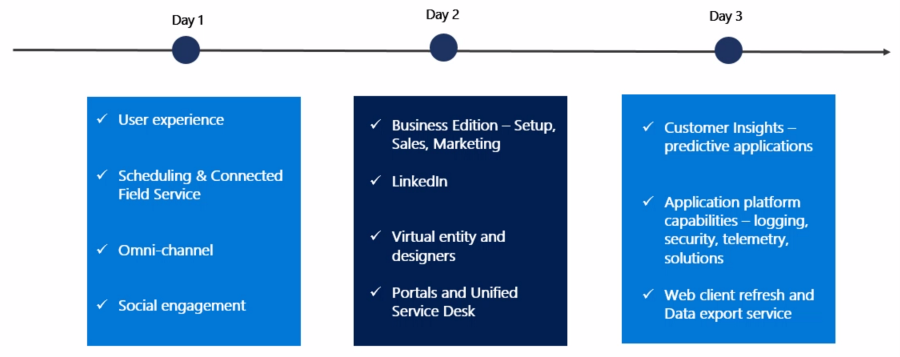
    Day 1, 2017-06-20

    Topics included Unified Interface (earlier names “Unified Client” or UCI), mobile, field service, Unified Resource Scheduling (URS), CafeX, Social Engagement (MSE).

    Storify: Microsoft Dynamics 365 July 2017 Release Preview, Part 1


    Day 2, 2017-06-21

    Business Edition for sales & marketing (i.e. differences compared to Enterprise Edition), event management, LinkedIn, portals, USD, App Modules, Virtual Entity.

    Storify: Microsoft Dynamics 365 July 2017 Release Preview, Part 2

    Day 3, 2017-06-22

    Customer Insights, Organization Insights, Relationship Insights (notice a pattern here?), business process automation (BPF, MS Flow), multi-select option sets, security and compliance, Web UI refresh (for Enterprise Edition), Application/Platform separation (“solutionizing CRM”), Power BI, Data Export Service (DES), Common Data Service (CDS).

    Storify: Microsoft Dynamics 365 July 2017 Release Preview, Part 3

    What’s Next?

    This v9.0 is a major release, not just by the version number but by the sheer amount changes happening in the platform, the client, the apps and the services connected to Dynamics 365. Most of this will NOT arrive in July, instead it’ll be rolled out via Private Preview and Preview programs towards the eventual GA. I believe it’s definitely the right thing to do, seeing the number of moving parts involved here. Also, the investments made to the platform are specifically designed to make it more modular and less of a monolith that you have to upgrade in one big bang. Oh, and v9.0 is online only, with on-prem updates coming for the applicable areas after these things are tested in the cloud.

    You can still sign up for the preview program here. In fact, if any of this Dynamics 365 stuff is of interest, you MUST sign up, or risk being left seriously behind. After three long nights of watching the non-stop live stream from the Preview Executive Briefing of v9.0, at least I feel like I’m now just starting to know what I don’t know. No single developer ninja or superhero consultant can grasp all of this, so it’s important that you also make it a team effort and spread out the responsibility of keeping yourselves educated. My advice would be for everyone to review these summaries from the three days, let people pick out the areas that seem most interesting/relevant for their current and potential projects, then agree to start poking around with the preview environments and reading the related documentation as soon as they become available. And most importantly: share with the world what you have learned!

  • Reflecting on Dynamics 365

    Reflecting on Dynamics 365

    The past couple of months leading to the Microsoft Dynamics 365 commercial launch have been interesting, to say the least. A lot of things happening, but in a way that hasn’t been all too easy to grasp. I’ve started a lot of draft blog articles around the topic yet I haven’t written that much about Dynamics 365 – because I haven’t really known what to say about it. After visiting Redmond last week for the annual MVP Summit and talking to all the awesome Dynamics C… sorry, Business Solutions MVPs, I’ve decided that it’s time to just start putting my thoughts out there. I believe this is the best way to gain more clarity on the topic, rather than trying to come up with the ultimate, complete definition on what Dynamics 365 is and how it will impact different parties.

    In Loving Memory of CRM

    Dynamics_sails_fade_away_sFirst, let’s get this thing out of the way: CRM is dead. Yes, believe it or not, but from a Microsoft product marketing perspective this is absolute the truth. There isn’t a single SKU available now after November 1st that would carry the three letter acronym we’ve come to know from the Microsoft business software offering during the past 13 years. I wrote an article on this change in branding and why I think it makes sense, so go and have a look at it if you’re interested in the details: “Why is Microsoft dropping ‘CRM’ from its Dynamics branding?”

    Second, Dynamics CRM as a technology is totally alive and kicking. It’s bigger than it’s ever been and about to get even more massive with the road ahead that is Dynamics 365. XRM remains the backbone on top of which most of the new Apps in Dynamics 365 will be built. In fact, it’s the non-XRM products in the portfolio that are being axed, with Dynamics Marketing being replaced by a new XRM based Marketing app for Dynamics 365 Business Edition, and Parature being discontinued as the features mostly already exist in the XRM service. So, the real reason why Dynamics CRM isn’t called “CRM” anymore is because it’s grown so far beyond what the humble beginnings of the product were back in 2003.

    Third(ly), all of this means we’ve ended up deep in the enterprise territory. The number of different applications included in the Dynamics “customer engagement” portfolio (which appears to be the unofficial new term for the CRM platform) is now so big that no single individual in the world can claim to be fluent in all those areas. As a result, fully deploying these applications into real life business processes is a task that will require significant investments from the customer organization – even if they are configurable cloud apps rather than custom software. The current offering + the new features are now sold under the Dynamics 365 Enterprise Plan for a good reason and the pricing of the whole package has been increased to reflect the potential value that can be derived from it. The SMB story around Dynamics 365 remains unclear as of now and we’ll need to wait a while before the dust settles. To get an understanding of what’s going on there, I recommend you to subscribe to the writings of one Dynamics 365 Fighter Pilot to keep up with the latest news.

    A Bigger Picture

    The whole story of Dynamics 365 isn’t just about taking two products, formerly known as Dynamics CRM and Dynamics AX, then offering them as a single subscription service. Yes, that ease of acquiring a full business application platform from Microsoft cloud is already a major step forward and a big competitive advantage. However, CRM + ERP <> 365. Don’t settle for that explanation if a Microsoft partner gives it to you, because there’s a lot more to it than meets the eye.

    The timing of Dynamics 365 commercial launch coincided with the general availability of two new Microsoft products, PowerApps and Flow. These two cloud services are so intertwined that I don’t actually think they are separate entities, but rather components of a single “thing”. What that thing is exactly is not so easy for even Microsoft to articulate, but I’m expecting the story to evolve quite rapidly on this front. Just recently, the Common Data Model that I covered in a past blog post during its first preview was renamed to Common Data Service, to better reflect the true nature of this piece of the cloud business apps puzzle that Microsoft is putting together.

    Customer_insights_360_view

    Since both PowerApps and Flow have been advertised not only as parts of the Dynamics story but also the broader productivity offering of Office, they’ve received far more attention in the blogs than a more recent entrant to the scene: Dynamics 365 for Customer Insights. Also known as “Azure Customer Insights”, or “Cortana Intelligence Customer Insights”, it is something that sits outside of the CRM platform, but when viewed from the perspective of business strategy, is definitely very much about CRM. You see, the purpose of Customer Insights is to deliver on the mythical “customer 360” promise that countless customer relationship management initiatives throughout the past two decades have aimed for – and often missed. It is the analytical CRM, where the traditional systems that some of us have spent their whole professional lives developing and deploying are firmly in the operational CRM territory.

    Rise of the Machines

    This leads us to the bigger vision that Microsoft has around more intelligent computing. While the existing business applications both in the Office and Dynamics product lines are being developed at a more rapid pace than ever before, they alone don’t reflect what the future of business software will be like. The term “transactional platform” has been used by Microsoft in reference to what XRM as we know it represents. This platform is not going away, rather it is becoming increasingly integrated into the direct interactions with customers via different channels, rather than the oldskool salesforce automation scenarios where a sales rep recorded information manually into the CRM system about these interactions. Alongside this platform, a new pillar is being built: the analytical platform.

    “What’s so special about that? We’ve had data warehouses and BI tools integrated into our CRM systems for years and years already.” A fair question to ask, my dear fictional reader voice. Data analysis systems are of course nothing new in the realm of CRM, but they have often focused on reporting on the old world of business data coming from CRM and ERP databases. What’s different this time around is that both the sources of data and the quantity of the actual data, which are growing faster than the traditional BI solutions can cope with. You don’t need a new platform to build an even fancier opportunity pipeline chart from the data your sales reps are entering. You do, however need a whole different approach once you start automating your business processes based on the IoT device data that millions of sensors will be sending in a million times a day.

    My_square_brain_on_machine_learningAlthough it may not seem like an everyday scenario just yet for most Dynamics customers out there, this is the future that Microsoft is very seriously preparing for. As one data point, the newly established Microsoft AI and Research Group has (or will shortly have) 5000+ computer scientists and engineers working on “democratizing AI”. What this means is that machine learning algorithms will be embedded into each and every service that Microsoft offers, to crunch the data inputs from various sources inside and outside your company, in an attempt to make the applications more intelligent. In Dynamics 365, Relationship Insights are the first taste of what added value Microsoft’s data cloud can provide when the algorithms get to work on the communication network data from both XRM as well as  your Exchange Online.

    This new form of intelligence will become both a built-in feature of the common business applications as well as a capability that the business application platform allows you to build on top of your customer data, business process data and, increasingly, sensor data. The first examples we’ll see might not be so glorious in practice yet (I’m totally expecting to see some less intelligent recommendations from Dynamics 365 Relationship Assistant), but the machines may well learn faster than many of us would predict. Also, even if your business wouldn’t be manufacturing any smart IoT devices to generate endless streams of data, there’s bound to be other valuable data sources out there that can be connected with your business processes. Microsoft didn’t spend $26B on LinkedIn just to get an excuse to spam you with email every day, so I bet we’re going to see some pretty compelling B2B insights being offered from this treasure trove of professional network data.

    Welcome All Species

    Back in the days of oldskool CRM things used to be simple: on one specific date a new package of bits would become available, people would find a server to install it on by following the deployment guide steps and… TA-DAA! Here was your business application! People would start entering letters and numbers into the system via their keyboards, to be later viewed by different people sitting in front of their own keyboards. Now we’ve got cloud software we can’t really touch, rolling out into our virtual subscription containers at an unspecified date, containing new functionality that we’ve barely seen for a few seconds in video stream broadcast online. New cloud apps keep popping up like mushrooms and they form a fungus-like network beneath the surface, communicating with one another in ways we can’t easily observe. They gradually find their way into new business processes and, thanks to the evolving AI capabilities, pretty soon start actively altering the behavior of us mere mortals who interact with these apps via any screen, keyboard not required.

    The future isn’t scary, but it’s different. There isn’t anything specifically forcing you to work differently than you did a decade ago with your CRM software, thanks to the backward compatibility of core features and the underlying stack of MS technology. If you’re paying attention, though, you’ll see everything around you being gradually replaced with something else, expanded beyond the borders that used to be there just a moment ago. Close your eyes for too long in this environment and when you open the curtains you might be shocked to see that your cozy lil’ cabin has been surrounded by an urban metropolis that grew around you while you were sleeping. That hectic new lifestyle out there is going to take some getting used to.

    It’s not a single thing like the Dynamics 365 commercial launch or the deprecation of CRM as a product name that’s responsible for the change. They are simply logical steps on the way towards a much broader set of tools for a universe of use cases that keeps expanding a lot like our physical one – at an increasing rate. Which means that unless you want to remain stuck on Planet CRM, there’s a lot of space exploration ahead for all of us.

  • Dynamics 365: The Next Chapter of MS Cloud Business Apps

    Dynamics 365: The Next Chapter of MS Cloud Business Apps

    Have you heard about this brand new thing called “Dynamics 365” yet? If you attended or followed the WPC 2016 conference, I bet you have, since it was the big headline news for Microsoft’s partners and corporate customers that kicked off their FY17. Satya Nadella spent a significant part of the WPC keynote explaining how Dynamics 365 is the service through which his vision of reinventing business processes comes to life. So, obviously there’s got to be some big things packaged into this new offering. But putting the visions aside for a moment, what exactly does this service contain in practice?

    WPC16_keynote_Dynamics_365

    In short, Microsoft Dynamics 365 is both the same old and brand new when it comes to the underlying components. As presented by many of the tech news sites, essentially Dynamics 365 is about taking the previous Dynamics CRM & ERP products and bundling them into a single cloud service. Comparing it to “the other 365”, meaning Office, it’s not an entirely different approach than taking established server applications like SharePoint & Exchange and making them easier to purchase via a single Office 365 plan. While the name is different and the tools to administer the applications are specific to the subscription service, beneath the portal there are many of the same bits as you could have on your own servers, too. In the case of Dynamics 365, you’ll be mostly getting the latest versions of CRM and AX/NAV from the Microsoft cloud.

    “Ok, so we’ll have a new SKU to purchase Dynamics products from the cloud. A bit like the earlier bundles for Sales Productivity then, where you bought CRM, Office 365 and Power BI for a discounted price. Got it, can I now go back to chasing nearby Pokémons with my phone ’cause I’d really want to catch them all?” Well, if you ask me, I think you should look a bit deeper into the Dynamics 365 story to understand how it really will impact CRM as a product as well as the ecosystem around it. I too was initially a bit skeptical about this whole thing when reading the first press release from Microsoft, but the more I’ve investigated the pieces of information available at this early stage, the more I’ve started to believe that what we have here isn’t a mere product marketing stunt but rather the next major chapter in the story of Microsoft Dynamics applications.

    Satya’s Masterplan

    One year ago when Microsoft announced that they were going to tear down the silo of MBS (Microsoft Business Solutions) and merge Dynamics product teams into C+E (Cloud and Enterprise), Nadella said he wanted to “enable the company to accelerate ERP and CRM work and bring it into the mainstream C+E engineering and innovation efforts.” It took a while before saw what this “mainstreaming” really means, but I believe Dynamics 365 is the major output from this process that started with the restructuring. It is elevating the Dynamics product offering from being just an app you can order via the Office 365 portal and turning it into a proper destination of its own.

    Back when I was starting my first gig as a Dynamics CRM consultant in 2010, I distinctly remember the day after I had returned home from the Convergence conference in Prague. I was about to sign the contract with my new employer and was riding in a cab with my boss to be, catching up on the latest tweets (with my Windows Mobile 6.0 device and whatever apps we had back then). I came across Microsoft’s announcement of Office 365 and said to him “have you heard about this already, might be kind of a big deal for the business”. Well, the business of my upcoming employer was largely about hosted MS business applications and it turned out to a big deal indeed, as the rationale for offering local CRM or Exchange instances eroded much faster than most service providers were willing to understand – let alone for them to adapt to this new reality.

    Connecting_your_solutions_small

    How I see this relate to the recent Dynamics 365 announcement is that when you stop to think about the tools we work with these days, it’s not just about the cloud as a delivery channel. If it were enough for the customer organizations to just use their business applications via a browser, from a server environment managed by someone other than your own IT department, then we’d still probably be happily working in the BPOS era of application servers hosted by “someone out there”. In reality, it rarely is about the servers or even the server application bits. It’s about services: how they can be consumed and how information flows between them. Sure, someone of course needs to set up the services, but once that problem has been solved (e.g. Dynamics CRM Online removing the need for manually installing customer specific CRM instances) it’s time to start solving problems higher up in the value chain. This, I believe, is what Microsoft is aiming to achieve with Dynamics 365. Making it more than just the sum of its parts, by lowering the barriers between the apps and encouraging customers to build solutions that consist of a network of apps – from MS and ISVs. The new AppSource portal is therefore a very important part of the Dynamics 365 story (even though at launch time it’s not yet that much better than the infamous Dynamics Marketplace).

    Front to the Back with Dynamics 365

    Once launched later this year, Dynamics 365 will be available as two editions. The Enterprise Edition will be made up of Dynamics CRM modules and Dynamics AX, whereas the Business Edition is being built on top of Project Madeira (brand new cloud version of Dynamics NAV, from what I know). Details about the pricing haven’t yet been disclosed, but at WPC there were slides shown that outline the different plans that the Enterprise Edition will offer. Since the Business Edition is clearly a lot more “work in progress” at this stage, and because it might not even contain any of the Dynamics CRM functionality (if I read the WPC materials correctly), it’s best for us to focus on analyzing the Enterprise Edition.

    Dynamics_365_vs_current_SKUs

    Looking at it from a CRM perspective, the platform formerly known as Dynamics CRM is being broken down into smaller modules that can be purchased separately. We’ve already seen how the recent CRM Online enhancements like Project Service and Field Service have been introduced as separately licensed modules (and their trials are now distributed via AppSource), but with Dynamics 365 this will be taken even further. A sales user can be assigned only a license to the “Sales app”, rather than needing a “CRM Online Professional” license to manage their opportunity pipeline. Even without knowing the price points for per app licenses in Dynamics 365, it’s easy to see that the barrier for consuming application features from the cloud will be lower when you can only select what you want. In the on-premises world the traditional “all you can eat” model of Dynamics CRM licensing probably made sense, but if Microsoft now has the option to make their cloud service available in various different shapes and sizes, why wouldn’t they?

    Even though there will be more individual apps to choose from, the main value proposition of Dynamics 365 is in the possibility of making the whole end to end business process visible to the users. Traditional licensing silos between the front office CRM system and the back office ERP system have often led to scenarios where employees need to ask another employee to check information from a system they can’t access – or needing to work with limited snapshots or static reports rather than the real-time dynamic data from the business application. Microsoft surely recognizes this as a great opportunity to move customers gradually away from using legacy ERP systems by offering a cloud platform where the licensing model is no longer determined by the server application barriers but rather the workloads of the users. The Enterprise Edition contains a “Dynamics 365 for Team Members” plan that covers read rights to each and every application, from marketing to operations (the ERP part), which specifically addresses the information silo issue.

    How Can It Actually Work?

    Knowing that all the CRM and ERP applications under the Microsoft Dynamics umbrella have been completely separate products with little in common when it comes to architecture, how is Microsoft going to turn these into a single business application platform all of a sudden? Well, that is the billion $ question to which we don’t yet have an exact answer, but let’s speculate a bit while we await for it.

    Microsoft has announced that underneath the Dynamics 365 apps there will be a platform layer called Common Data Model. On the official Microsoft Dynamics blog this CDM is described with the following words:

    The common data model is a cloud-resident business database, built on years of experience with our enterprise customers. It will come with hundreds of standard business entities spanning both business process (Dynamics 365) and productivity (Office 365). The standardization and consistency of schema enables partners to build innovative applications and to automate business processes spanning the entire business process spectrum with confidence their solutions can be easily deployed and used across Microsoft’s entire customer base.

    Hmm, okay, so there’s at least going to be a new database in addition to the application specific databases of CRM and AX, as we can see from the Dynamics 365 architecture image below. The promise of a “standardized, consistent schema”  also implies that at least the OoB entities will be connected across CRM and AX without any additional configuration effort required. Now, how exactly the integration of custom entities can be configured, or how the platform will handle the business logic involved in each connected app is something that isn’t very clear at this point.

    Dynamics_365_architecture

    Surprisingly enough, the most detailed information about CDM was first released not via the Dynamics product blogs but on the Power Apps blog. The post PowerApps and the Microsoft Common Data Model gives us the first practical view into what functionality the CDM part of the platform is expected to deliver. Some examples:

    • CDM will encompass not only CRM and AX but also the data model of productivity apps like Outlook.
    • CDM will include complex data types like address and auto-numbering.
    • CDM will contain features familiar to CRM admins, like field level security and auditing.

    Dynamics_365_Common_Data_Model

    Once the CDM Preview arrives in August we’ll hopefully get to explore the contents and functionality of this data model via the PowerApps Studio at least, even though Dynamics 365 itself will probably arrive a bit later. On another PowerApps blog post, it was announced that there will be a Dynamics 365 specific SDK, which should be launched in preview mode before the year ends.

    Why does the PowerApps team work so actively in bringing this information available? There’s a simple explanation: PowerApps, Power BI and Flow are a fundamental part of the Dynamics 365 product offering. They are included in the Enterprise Edition plans and they form the new business application platform that supports the 365 apps on top of them – to the extent that there is now even a dedicated site to describe the capabilities of these three products.

    Business_process_orchestration_small

    Since business process orchestration is fundamentally a cross-application domain, it makes a lot of sense that you don’t only rely on the workflow process engines found inside applications like CRM. Also, if you’ve tried to leverage these three tools with current Dynamics CRM Online application, it soon becomes obvious that working with the relational data and specific data types of CRM is not where Power BI, PowerApps or Flow currently excel. Therefore what CDM as part of Dynamics 365 can offer for the business process orchestration tools to make the interaction easier is surely very welcome.

    Farewell to On-prem

    All of this you see coming available for Dynamics 365 is exclusive to the Microsoft cloud. Period. While you could of course take many of the individual technologies like Dynamics CRM and build custom integrations to your own servers, a single commercial offering licensed and managed by Microsoft will not become available for that environment.

    In the past Microsoft has been using the “power of choice” as an argument on why investing in Dynamics CRM technology is a safer choice than going with a cloud-only platform like Salesforce. Six years ago when CRM Online was launched that certainly was an important benefit of the MS stack. Even though the business world is a lot more “cloud ready” today, there still are many scenarios where a service hosted outside the borders of the customer’s country is not a valid option. Nevertheless, the power of choice isn’t such a clear differentiator anymore if pretty much everyone is making the same choice. For those organizations who are able to move ahead at the speed of cloud, there just has to be a fast track available. Sure, CRM Online has already been developing at a faster release cadence than CRM on-prem, but with Dynamics 365 the ties are officially cut now.

    AX_cloud_firstIt isn’t a completely new situation, even within the Dynamics product family. From what I know about Dynamics AX, the latest “AX 7” version has been designed not only as a “cloud first” but pretty much “cloud only” approach. The application architecture has been heavily redesigned and now relies on services from Azure, so it’s not something you could ever install on a Windows Server. The strategy for on-premises support is based on the Azure Stack product, which will allow customers to run a version of the same services on their very own servers. (In related news, the Azure Stack release plans have recently been revised: it won’t arrive for another year yet and it will require specific hardware when it finally does.)

    Does the announcement of Dynamics 365 mean that no investment will be made to on-premises Dynamics products anymore? No, at least according to the official statement from Microsoft. CRM, AX and NAV, meaning the in-house application layer of Dynamics 365, will continue to be developed, sold and supported. For example, AX 2012 will be supported until 2021 which gives some indication about the expectations Microsoft has on when existing on-prem ERP customers would really be able to adopt the new cloud offering of Dynamics 365. I bet that the hybrid scenarios will be taken into consideration as well when driving the adoption of the 365 cloud service.

    Still, if you’re looking for the latest Microsoft product innovations and integrating your business applications with the coolest new services, it’s hard for me to see how remaining in the on-prem land would be a viable option anymore. While new server versions will still keep on coming, having a new product feature that doesn’t require you to be running Dynamics 365 is probably going to become an exception rather than a rule. Already many of the latest CRM Online features have been built on Azure based services (offline sync for mobile, Relevance Search, machine learning in product recommendations) and the 365 cloud platform is going to make it even easier for MS to hook these things up to their business apps. The gap is just going to grow wider and wider.

    What Will Happen to XRM?

    Looking at the Dynamics CRM application specifically, there’s been a reasonably good parity between the Online and on-premises editions when it comes to the core XRM platform features. With all of these new integration points and platform layers now being developed for weaving together the complete Dynamics 365 service, it raises the question of whether the “core” really is inside XRM anymore or is it being actively replaced by something completely different?

    While I don’t think Dynamics 365 signals the death of XRM, it certainly does give a clear indication about how it is positioned in Microsoft’s new business application platform architecture. It’s what the individual apps are still built on (sales, project service, field service, portals, Voice of the Customer and so on) but it may not deliver the full user experience anymore. The users may interact with data through a purpose built PowerApp rather than the standard CRM client apps. The business process automation may jump across different apps via Flow, with CRM workflows handling only a part of it. The process metrics will frequently be monitored and analyzed with Power BI charts and not the CRM dashboards. I don’t think the 365 platform will overnight replace too many of the traditional XRM features, but it will undoubtedly set a boundary for feature development at Microsoft’s end if the new capabilities could be leveraged also outside the XRM apps.

    The arrival of a Dynamics 365 SDK means that the wider ecosystem of partners and service providers who wish to connect with customer organizations using Dynamics 365 may well choose to integrate their apps via this new API and not the XRM specific Web API, as modern and RESTful as it might be. Without knowing the exact services available in 365 it’s of course impossible to say yet what functionality would move to the CDM part of the platform, but since the whole point of CDM is to make it easier to connect cloud apps together, that’s where much of the development effort will naturally gravitate towards. Extending a specific 365 app like Sales with new UI level functionality will surely still require XRM developer skills, similarly as modifying the Operations app’s logic requires knowledge of X++ (the programming language for AX). Now, if you’re an XRM developer with no experience of AX, imagine being tasked with building a custom feature that needs to talk with both the Sales and Operations apps. Would you rather dive right in to learning X++ or start by exploring the common 365 platform SDK instead? Exactly. That’s how our solution design practices get disrupted: first gradually, then suddenly.

    XRM_cow_managementHonestly, the direction that Microsoft appears to be taking with Dynamics 365 makes perfect sense to me, and I see it as a brighter future for Dynamics CRM to be a part of this cross-application business platform – rather than a self-sustained “any relationship management” toolkit. No matter how awesome it is, XRM can’t do it all. It could certainly use a lil’ help in certain areas where Microsoft has more advanced tools available. If the new platform gives a wider set of options for me when designing solutions for customers then sign me up for it! Even if the administration experience or depth of functionality may not be on quite the same level when working with a set of connected applications sitting on top of CDM rather than a single XRM solution, it’s probably a price worth paying in the long run.

    Dynamics 365 explains a lot of the shortcomings with the current pieces of the MS cloud puzzle. Like: why must Power BI try and consume the CRM Online data via the slow OData endpoint when Microsoft could surely open up a shortcut between their two clouds? Well, here you go! The answer is that instead of taking the easy way out, a brand new Azure based architecture has been designed to support the current and future needs of CRM and other cloud business apps. It’s impossible for us outsiders to know all the different dependencies that the Dynamics 365 product strategy has had on the CRM feature roadmap, but it’s easy to imagine quite a few of them. I’m not expecting the floodgates to open with the initial release of Dynamics 365 this fall (more likely it’s a preview than a fully baked V2 platform), but I do expect the pace to pick up as the new strategy is executed on the commercial delivery side.
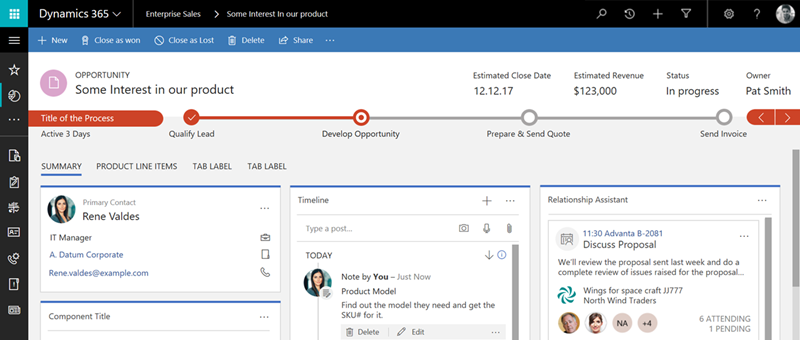
    How we’ll be able to transition an existing organization from Dynamics CRM Online to Dynamics 365 and connect to the Common Data Model is going to be a big question. I’m not worried about the application functionality really, as it might well be just a simple CDU experience of upgrading to the latest version. On the data model side, If there are some “best practices” implemented in CDM that don’t align with the customer specific entity model and attributes, then some refactoring of the existing CRM solutions may well be needed. While there may not be an immediate need to switch over, in the long run I expect there to be a number of services that target CDM specifically which cannot be used with a “legacy” CRM Online environment. As funny as it sounds, we may have indeed reached a point in the Dynamics CRM lifecycle where even the cloud based environments need a bit of a “reboot” to reach the next generation business application platform compatibility.

    It’s Always a Journey

    If we look at the history of Microsoft’s CRM software starting from 13 years back and analyze how the platform has evolved over time, we can see that up until the past couple of years, the progress made has been fairly product focused. Setting aside the app vs. platform debate on what the product is really about, the core package of what a Dynamics CRM server does has remained the same on a high level since the start, and I’d assume the story on the ERP side isn’t radically different either. It’s the world around it that has transformed into something quite different, and it’s this interface with the outside world of other apps and services where the most exciting stuff is happening.

    On the product code base level, Microsoft tried to merge their in-house CRM with the four acquired ERP products already over a decade ago with Project Green. As we now know, this never resulted in any “One Microsoft Dynamics” type of a platform nor new products being brought to market. When Satya Nadella (CVP of MBS at that time) was asked about why the ambitious initiative appeared to have stalled in 2007, his response was “we don’t have the goal of just convergence for convergence’s sake”. I can believe that while technically not an impossible task, there just wasn’t a clear enough business benefit for the customers to make them want to move into a single code base product merged from five existing applications, knowing how disruptive the migration could have been for their day to day operations. Fast forward ten years to the Dynamics 365 announcement and the business case now looks a lot more solid in this cloud era. Although the initial release of Dynamics 365 this fall is likely to be more of a preview than a fully functioning business application platform, it will already be a lot further in terms of visible platform harmonization than what Project Green achieved.

    While it’s easy to label almost anything in the IT business these days as “digital transformation”, there are quite a few signs that Microsoft is serious about aligning their set of different cloud products into a comprehensive toolkit for companies wanting to build and operate those digital business processes. How transformative will the end results be is something that we’ll see in time as the Dynamics 365 platform materializes. Whatever happens, Surviving CRM will be there to report on the progress of this journey!

    For a summary of what other community members have shared around the Dynamics 365 announcement and sessions from WPC, please have a look at this Sway presentation I’ve compiled from the #Dynamics365 tweets: