Category: News and events

  • 10 Tips for Designing a Great User Experience in Dynamics CRM

    Last week I had the privilege to talk at the Dynamics CRM Finland User Group meeting in Helsinki (quick recap available in Finnish here). When planning on what topic to choose for my presentation, I tried to think of something that would appeal to a wide audience of CRM users – both experienced consultants as well as key users who might still be relatively new to the product.

    The common denominator for the group was, as the name suggest, that we’re all CRM users in one way or another. In this role we interact with the software in a variety of different ways, most likely several times during the course of a typical working day. As information workers, systems like CRM are our tools to get the job done. How effectively we succeed in this is largely affected by how much cognitive effort is needed to use these tools to shape the expected output.

    So, I decided to talk about the many ways how we can sharpen our saws when it comes to Dynamics CRM. While every CRM environment is ultimately different from one another, due to the business processes we manage with it, the systems it integrates to, the user groups working with the application and so on, I believe there are still general design guidelines that apply to basically any organization using Microsoft Dynamics CRM. My presentation, “10 Tips for Designing a Great User Experience in Dynamics CRM“, introduces many of these guidelines that I personally try to follow when designing CRM solutions for customers. You can view the embedded presentation below, or if the content is not showing, then go and have a look at it on SlideShare.

    While UX has always been an important piece of the puzzle when trying to convince business users that using a CRM system can actually deliver tangible benefits to them, rather than just serve as a management tool for keeping track of what the employees are doing, the launch of the Dynamics CRM 2013 version has really heightened the importance of designing solutions with a polished user experience. This is due to the fact that the refreshed user interface and new customization points available in the UI can be leveraged to deliver a much more usable business application than the CRM systems of the past. But: you also need to plan the flow of user interactions with much more attention to detail, because sloppy customizations will now stick out like a sore thumb.

    The good news is that many of the new details in CRM 2013 (and CRM 2015, too) are easy to configure once you know the role of each platform component. You can do so much these days without writing a single line of custom code that the system customizer can easily have his or her plate full of CRM enhancement ideas to implement without ever consulting a .NET developer. That’s why it’s also good to think in advance how to prioritize the areas into which you invest your efforts. This Top 10 list of mine provides one example of such a tool, to help in identifying the low hanging fruit when it comes to making your CRM users happier and more productive with the system. If you have any topics on your mind that I forgot to include on my list, be sure to leave a comment below!
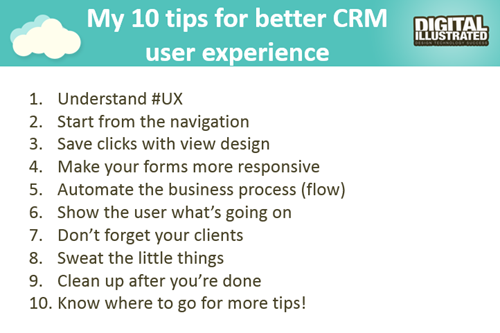
    10_CRM_UX_tips

    Oh, one more thing: if you’re a Microsoft Dynamics CRM user in Finland and would be interested in networking with other fellow CRM professionals, I’m glad to announce that there’s now a new Yammer network available for you: Dynamics CRM Finland User Group. Whether you’re from a customer or partner organization, please feel free to sign up for this network and come join the planning for future events and other ways to share Dynamics CRM knowledge and experiences with peers. Tervetuloa!

  • Our New Book: CRM 2013 QuickStart

    A few people have asked me for recommendations on what books they should get if they want to learn about the ins & outs of the current Microsoft Dynamics CRM 2013 version. Even though there’s a wealth of blog articles out there that study specific features and an ever growing library of content produced by Microsoft themselves, there’s not been a whole lot of material in traditional book format that would have covered the latest CRM 2013 functionality. Well, now there is a great title available that I can recommend: the CRM 2013 QuickStart.

    CRM_2013_QuickStart_cover_smallHow do I know the book is any good? Because I wrote a part of it! Aside from shameless self promotion, I can honestly say that the writing team behind this book is quite an extraordinary league of CRM experts:

    If that’s not a group of CRM MVP’s you’d trust for advice on how to work with the platform then I don’t know who you would!

    What exactly does the book cover then? As the title suggests, it’s not a complete A-Z of each individual feature included in the Dynamics CRM 2013 platform. Neither is it meant to be “my first Dynamics CRM manual” for people who are unfamiliar with any version of the product. Let me borrow some of the official intro text for the book here to explain the reason for its existence:

    The CRM 2013 Quick Start is a first look at Microsoft Dynamics CRM 2013 and all the new features that have been included.

    In the CRM 2013 Quick Start you will find details that can help administrators, customizers (functional consultants) and developers; not to mention power business users wanting to know all the details the admin never tells them. If you run CRM in the cloud or sitting in a server room at your office the information is useful.

    This book is targeted to someone who has some CRM prior experience. By that we simply don’t spend any time explaining the basics of Microsoft Dynamics CRM from a beginner’s point of view. That said, the information in this book would still be useful on your journey to become proficient.

    Imagine that you’re someone who’s started their Dynamics CRM journey with an earlier version like 4.0 or 2011 and you’re now faced with the upgrade project for moving the solutions onto the latest CRM 2013 version. Is this the right book for you to gain an understanding of what’s new & what has changed in the platform? Absolutely! How about if you’re a system administrator or a customizer that has some exposure to the new version (via CRM Online perhaps) but are looking to ramp up your knowledge about the platform for future projects, enhancements or admin tasks. Will the CRM 2013 QuickStart help you get up to speed faster than searching for random articles online? You bet!

    Now, this is actually the first book that I have ever written content for and it makes me immensely proud to have managed to make my debut in such a prestigious crowd of co-authors. My personal contribution to this title focused on describing the founding principles of how to design a great user experience for the CRM solution that you wish to deliver to your end users. While some of the topics I covered in the book are specific to the latest CRM 2013 version, many of the solution design guidelines are actually universally applicable to any Dynamics CRM version, representing best practices that I’ve personally learned over the past decade of working with the product. I’m really glad to have been given the opportunity to present them in a format that allows for a different type of discussion than your typical blog post.

    Being a newbie in authoring content for books, it was also a valuable learning experience for me. Although I’ve been writing down my thoughts  on all things Dynamics CRM on this blog for six years now, the project of producing close to 50 pages of content on a given topic to create a coherent book chapter that can stand on its own was still a very different kind of assignment. Let’s just say that I have new found respect for authors that have managed to create entire books for new software products on their own.

    The great thing about my writing project was that it provided me a really concrete reason to dig into the details of the various new customization options that Dynamics CRM 2013 offers and experiment with different scenarios that I’m likely to encounter in real life customer projects. As they say, the best way to learn a new topic is to teach it to someone else. If this content that I’ve put together as a part of my own learning process then ends up helping also other members of the Dynamics CRM community to discover better ways to solve customers’ problems with the application, then I consider that a win-win result.

  • Update Rollups, Service Packs, Major Releases: Understanding Dynamics CRM Versioning

    When it comes to commercial software, there’s often times a difference between what the engineering department calls their product versions and how the marketing department decides to label the product for the end customers. For example, after Windows 3.1 the commercial name of the product changed to “Windows XP” while the underlying version number progressed to 4.00. After various changes in both product and naming strategy of the OS, we’re now using a product called “Windows 8.1” when its actual technical version number is 6.3…

    Just like with Windows, Dynamics CRM also has version numbers that are different from the names you’ll see in marketing materials and end user documentation. These numbers are relevant to anyone who needs to either maintain and administer a Dynamics CRM environment or customize and develop solutions for the product, since you need to be aware of the changes introduced by various updates to Dynamics CRM.

    Before CRM 2013 there wasn’t a convenient way through which you could have determined the installed updates by just looking at the version number, since each Update Rollup just had a seemingly random four digit build number assigned to it. Luckily the latest releases have made the version numbers much more user friendly, by starting to follow the standard “major.minor.update.build” pattern. There’s still a few CRM specific things you need to be aware of, especially with the very latest releases, which is why I thought now’s a good time to draw some attention to the topic.

    CRM_version_numberStarting with CRM 2013, the version numbering scheme follows a pattern like this (notice the bold numbers):

    • Major Release
      • Name: Microsoft Dynamics CRM 2013
      • Version number: 6.0.0.xxxx
    • Service Pack:
      • Name: Microsoft Dynamics CRM 2013 Service Pack 1
      • Version number: 6.1.0.xxxx
    • Update Rollup:
      • Name: Microsoft Dynamics CRM 2013 Update Rollup 1
      • Version number: 6.0.1.xxxx

    The build numbers are of course not “xxxx” in reality but I left them out since they’re not something you should actively need to remember. Just bookmark this page and reference it whenever you need to know the detailed number of a particular release: Microsoft Dynamics CRM 2013 and 2011 Update Rollups and Service Packs: Release Dates, Build Numbers, and Collateral.

    I’ll go through these levels in a reversed order, since I think that makes up for a more exciting story line here. Also, I think it’s more likely to resemble the real life process via which you’ll encounter each of these versions of Microsoft Dynamics CRM after your initial deployment. You’ll certainly need to be aware of the different versions even prior to setting up your very first demo/test/development environment, but keeping up with the Dynamics CRM releases is a job that never ends!

    Update Rollups

    These are collections of hotfixes to existing product functionality. When you open a support ticket with Microsoft for an issue you’ve encountered with the software, sometimes you might receive an individual hotfix package from them that fixes your specific issue (and nothing else). Normally you wouldn’t need to install each and every hotfix separately, however, as most of these fixes will eventually be released in an Update Rollup package. You’ll see a list of “issues that are resolved” in the Microsoft Knowledge Base article of each Update Rollup, which is normally your best indication of whether the software bug you’ve encountered has been squashed.

    <rant>Since the official name of these releases is “Update Rollup”, the official acronym for them would logically be “UR”. However, some people seem to happily forget about the first word and instead call them “RU”, presumably as a shorthand from “RollUp”. Fine, call them whatever you want, even give each of the releases your very own pet names if you wish, but you’ll never, ever see me use anything but “UR” on my blog.</rant>

    At the time of writing, the latest released version for CRM 2013 is Update Rollup 3, version number 6.0.3.0106. It was released on July 15th and contains over 200 hotfixes as listed on the KB article. Normally there would be a UR3 package released for all the server and client components, but this time there’s no Outlook version available, since apparently none of the hotfixes required the client bits to be updated. Update Rollups are usually cumulative, so CRM 2013 UR3 also contains the fixes from UR1 and UR2.

    If you don’t manually download and install the UR’s, they will also be distributed via Windows Update later on once Microsoft makes them available via this channel. Since you should always test the effects of each UR prior to production deployment, it’s usually never a good idea to just let things run on autopilot. For example, letting your Outlook clients get the UR’s via the Windows Update schedule without keeping your server components up to date will soon land you in unsupported territory.

    Service Packs

    During it’s first 11 years of existence, there weren’t any official Service Packs released for Dynamics CRM, unlike many other Microsoft products. This changed a couple of months ago when CRM 2013 Service Pack 1 was released on May 28th. Even though MS is mostly referring to it by the name Spring ’14 release in their marketing messages, based on the naming policy of CRM Online, the SP1 version is essentially Spring ’14 for on-premises customers and the Outlook client components (even for CRM Online customers).

    While the CRM 2013 SP1 KB article looks like any UR article we’ve come to know, with a list of resolved issues, this isn’t just a collection of hotfixes. Service Packs are the delivery mechanism for new product features as well as changes to existing functionality of the product. An example of this would be the case creation and routing features introduced in SP1. For a more complete list of SP1 contents, refer to the “What’s New” page on CRM Customer Center. Note that in order to access some of the new features, you’ll not only need to install the SP1 bits onto the server but also go to the CRM organization’s settings menu and apply “Install Product Updates” from there.

    Service Packs are cumulative in the sense that they contain the previously released Update Rollup hotfixes. So, while CRM 2013 UR1 and UR2 were released prior to SP1, you don’t need to install them separately when setting up a new Dynamics CRM 2013 environment. Just grab the Service Pack and you’re all patched up to that point.

    Update Rollups for Service Packs

    Now this is where it really gets interesting. Remember that latest CRM 2013 Update Rollup 3 I linked to a few paragraphs earlier? Based on our discussion so far, would you assume it to contain all the fixes, updates and new features released for CRM 2013 so far? I see quite a number of nodding heads out there and I’m not at all surprised if your initial assumption would be “of course”. The correct answer, however, is “no”. Due to the counter-intuitive nature of this situation for any Dynamics CRM veterans, an explanation is surely in order here. (more…)

  • CRM 2013 and the Platform Evolution: Webcast Recording and Slides

    Last week I presented in a webcast for MSDynamicsWorld.com on the topic of “Microsoft Dynamics CRM 2013 Customization and the Platform Evolution”. If you weren’t able to attend this live event, then have no fear, because it has all been recorded and documented for future generations.

    First off, below are the slides that set the background for my presentation:

    Next we have the actual audio recording of the presentation on YouTube:

    So, what was the session all about? The key message which I’ve tried to convey here is that the Dynamics CRM platform has entered “the next chapter” with the release of CRM 2013. This will not only impact the end users but also place a lot of demands on the system customizer role to learn new tricks and approach the task of solution design with a different mindset than in traditional CRM implementation projects.

    The presentation includes a comparison of the old world vs. the new and also highlights some key elements in the CRM 2013 platform that you should pay attention to when building your solutions today. If you’ve got any questions or comments on the content, then please don’t hesitate to post them below. And if you attended the live webcast, then thank you very much for tuning in!

    Oh, and in case you’re interested in hearing my thoughts on the very latest CRM Online Spring ’14 release / CRM 2013 SP1, then you can catch me in a Google+ hangout hosted by CRM MVP Donna Edwards on Wednesday, June 4th. Check out more details here.

  • CRM 2013 SP1: Case Creation and Routing – The Big Picture

    The latest Dynamics CRM Online Spring ’14 release is now rolling out to existing and new customers (starting from the US data centers) and the on-premises equivalent of CRM 2013 Service Pack 1 will soon follow is now available from MS Download Center (here’s the KB article for more details about SP1). The quickest way to check if your CRM Online organization is already updated to the latest release is on the About screen, accessible via the gear icon in the top right corner. If your version reads 6.1.0.575 (or 6.1.anything) then you’ve got the Spring ’14 release available and you can proceed to the Install Product Updates menu to enable the new features.

    CRM2013SP1_version

    This release, previously known by the codename “Leo”, focuses on enhancing the service management capabilities of Dynamics CRM. There’s a great “What’s New” page on CRM Customer Center that provides a detailed listing of the new features launched now, including an eBook of the changes in service management. Instead of repeating all of this information, I’ll try and provide an overview of how the features align with one another and specifically how they could be applied in real world scenarios for managing incoming service cases from customers.

    Enhancements in Case Creation and Queues

    I guess we’ll still need to first list the new options we need to be aware of when configuring the service module in CRM 2013 SP1 to handle emails and cases  via queues. First off, there is now support for server side synchronization of emails (and other activities) between CRM Online and Exchange Online, without having to use the old Email Router technology (no support for hybrid deployments, though). Then there’s a new feature called Case Creation Rule that allows you to automatically convert an email message or a social activity record placed in a queue into a new case record. Finally, we have Routing Rules that can be leveraged for moving items into queues.

    The following is my own interpretation of how these three areas are aligned in CRM 2013 Spring ´14 Update / Service Pack 1. The picture illustrates how an email message from the customer would flow through the system automatically based on the configuration of the aforementioned features. It also includes a few bullet points about the supported actions for each component. (Feel free to click on the image to view a bigger version that won’t stress your eyes so much.)

    CRM2013SP1_Queue_Case_Configuration_small

    When going through the Leo release features I found it a bit challenging to get a clear view of the logical order in which the different functional areas found under the new Service Management settings menu should be applied. Also the relationships between them and the restrictions imposed on the number of records was something I only learned through trial and error. Hopefully this illustration makes it easier to identify the roles of case creation rules and case routing rules in the new release.

    Rules vs. Workflows & Plugins

    Looking at the picture, someone who has previously configured Dynamics CRM to be used in an email, queue and case based support process will surely find many familiar actions from the list. At the end of the day, pretty much everything here has already been possible with previous CRM versions. With those you just needed to leverage the workflow engine in the CRM platform to configure the case creation and routing activities. So, what’s really new here and why has Microsoft built this into the latest product release?

    Behind the scenes, what the case creation and routing rules do is they create the workflow processes for you. This can be seen from the release documentation where the administrator of those rules is reminded about the requirement to have sufficient security roles for performing the corresponding actions via workflows. So, taking a very simplistic view, you could think of these new features available in the Service Management as a dedicated UI for configuring common process automation actions for customer service scenarios.

    There’s definitely value in having these new features available right inside the core product. In previous versions, it has been far from trivial to build the necessary functionality for frequently encountered requirements, such as “email to case”. Several ISV add-ons have been developed to deliver such functionality and system customizers have surely spent a ton of time pushing the CRM workflow editor to its limits in an effort to automate the common tasks that a service organization would need to perform when managing cases in Dynamics CRM. Now there’s a new standard way to implement these processes via a method that is fully supported by Microsoft, which in turn will lead to far more customers taking a serious look at these case management capabilities in their business application platform.

    CRM2013SP1_Service_Management_Settings

    It’s important to keep in mind that these new features don’t replace any of the existing CRM platform functionality. They offer a default method to configure common features, but they will not cover every possible scenario that you’ll come across in real life implementation scenarios. That means you can still use workflows and plugins to extend the process automation for service case management. For example, while a case creation rule provides the possibility to set an auto response email to be sent to the customer upon case creation, there’s nothing stopping you from doing this via familiar workflow process if more complex business logic is needed than what the new Service Management UI in CRM makes available.

    In the next blog post I will take a more detailed look at how the case creation and routing features can be leveraged in practice, so stay tuned!

  • CRM 2013 Customization and the Platform Evolution (Webcast)

    MSDynamicsWorldOn Thursday, 22nd of May, I’ll be delivering a one hour webcast on MSDynamicsWorld.com, the leading independent online publication covering all things Microsoft Dynamics. The topic of my webcast is “Microsoft Dynamics CRM 2013 Customization and the Platform Evolution”. Here’s the official description of the session:

    During its 11 years of life, Microsoft Dynamics CRM has grown from simple sales force automation software into a comprehensive business application platform. At the same time, both the tools available for the typical knowledge worker as well as the general expectations for the functionality in web-based business applications like CRM have evolved considerably.

    Join Microsoft MVP and Dynamics CRM expert Jukka Niiranen for a live session that will:

    • Explore the implications of these solutions design trends with respect to Dynamics CRM 2013; 
    • Discuss how to fully leverage the latest platform capabilities;  
    • Examine ways to deliver a modern productivity application that works the way in which the user expects

    This event content is aimed at persons who are planning, designing or implementing customizations to Dynamics CRM. Whether you have already moved to CRM 2013 or are considering upgrading your existing system, this session will provide insights on key areas where the latest platform version is different from its predecessors.

    Sounds interesting? Then by all means sign up for the live webcast next week!

  • What’s on the 2014 Roadmap for Microsoft Dynamics CRM?

    The annual festivities of the Microsoft Dynamics Convergence event in the US have now been completed for the year 2014. This means that the outline for upcoming releases in this calendar year have also been presented to the 12K attendees in Atlanta as well as anyone watching the sessions via Virtual Convergence. The following roadmap slide shown at the event tells us the big picture: it’s going to be a busy year for Dynamics CRM!

    Microsoft Dynamics CRM roadmap 2014

    OK, so if the first “swim lane” in the CRM Roadmap schedule is titled “CRM”, then what’s with all the other lanes then and how do these non-CRM items relate to the Dynamics CRM roadmap? Well, here’s the thing: this ain’t the CRM you used to know. It’s no longer that IIS application you used to install on your own little Windows server along with a SQL database and maybe a client component in Outlook. It’s now a suite of services that cover not just your internal processes and tools for your employees but also a wealth of external touch points where your customers will also encounter your CRM system, be it directly or indirectly. Oh, and naturally most of it lives in the cloud, because that’s also where your customers are.

    Of course customer relationship management has never been about just that single CRM database where you keep your own contact records, but now it has become very obvious that also Microsoft’s offering in the field of CRM has grown way beyond that. Following on the footsteps of Oracle and Salesforce.com, the acquisition and integration of a growing number of tools to complement the traditional core Dynamics CRM platform means the future CRM product will be much more modular, as opposed to the earlier “one app & license for everybody” approach. Let’s go through each of these lanes in the CRM roadmap and look at what was announced for them at Convergence 2014, starting from the most familiar one: “CRM”.

    CRM

    After last fall’s release of the new Dynamics CRM 2013 major version (code name Orion), you might have been lead to believe that there wouldn’t be so much happening with the core platform this year, at least in the on-premises world. The earlier communication from Microsoft indicated that the plan was to introduce a new release for CRM Online twice a year and roll out an on-prem version once a year. The code names for these releases were also shared: Leo in Q2 2014 and Vega in Q4, one year after CRM 2013 RTM.

    This is no longer true. But wait! It’s not an R8 style cancellation but rather a positive piece of news. The Q2 2014 release Leo will be for both CRM Online and on-premises customers, as will Vega. It doesn’t mean all the features will be identical across deployment models but it does promise to deliver new functionality also to customers who are running CRM on their own servers. What exactly will be the delivery mechanism (Update Rollups were supposed to be clear of any new features) or how the official naming convention for different versions will evolve is not yet clear, but currently Microsoft is referring to this as the Dynamics CRM Spring Wave. Partners will have a training blitz session for this wave on April 8th/9th, so expect to see more details made public after this.

    The functional changes in Leo will focus on the service module of CRM. New features showcased in the Convergence sessions included SLA management with a timer control available on the case form, merging cases and linking parent/child cases, entitlement management, email to case automation and improvements in the queue feature usability. Considering how much these new features alter the case entity functionality and configuration options, it would have surely been quite difficult to continue supporting two different feature levels if Leo would have in fact been Online only. For callcenter scenarios the new Unified Service Desk (USD) will offer functionality similar to what has previously been delivered via components like the Customer Care Accelerator (CCA) or User Interface Integration (UII). Expect to see also other feature enhancements or tools released as a part of Leo that will not be customer service specific, as well as new capabilities for CRM Online subscription management.

    The contents of the Vega release had not really been disclosed prior to Convergence 2014. As this release is still further away in the future the details are not yet as clear as for Leo, but a number of very interesting enhancements to the core Dynamics CRM product were shown on the CRM roadmap slides. Calculated fields will finally be available without writing custom code, via a graphical editor with intellisense support. Business Process Flows (BF) will be enhanced with support for branching processes. On the UI side we can expect to see built-in capability for visualizing account hierarchies. These three features all address very common scenarios that Dynamics CRM customers require in their system implementations, so it’s great to see them introduced as configurable features that a system customizer can leverage right out of the box.

    Social

    Remember when Microsoft bought NetBreeze one year ago? Their service has now been integrated into the Redmond product portfolio and carries the name Microsoft Social Listening. Last month it was announced that Microsoft Social Listening will be offered as part of the CRM Online Professional licenses at no additional charge, whereas on-premises customers can get it for an incremental cost. This “incremental cost” was later specified to be $20 per user per month for CRM Professional CAL holders. So, while it’s not free for everyone, the pricing is still in line with Microsoft’s previous announcements of wanting to “democratize social” and integrate it as just another channel into their CRM product. (more…)

  • Bringing Customer Service Back to CRM with Parature

    In case you missed the big news last week, Microsoft has acquired a company called Parature. Similar to the two marketing related service providers MS has bought earlier, Marketing Pilot and Netbreeze, this latest acquisition is intended for expanding the footprint of Dynamics CRM on the customer service side.

    MS_Parature

    It’s been no secret that this was the next area where Microsoft was looking to build up some new capabilities for Dynamics CRM. Thinking about the existing feature set for customer service scenarios in the product, we basically haven’t had any significant enhancements to the service module since CRM 3.0. Sure, the recent platform enhancements on the process automation and UI side can be leveraged in customer service as well, but in terms of specific out-of-the-box functionality that would be aimed at helpdesk scenarios, it’s been pretty quiet so far. Case management and queues for email routing have been very useful features for many organizations using Dynamics CRM. Service scheduling and knowledge base articles… well, not so much.

    The world around CRM software has changed quite a bit from 2005 when CRM 3.0 came out. Not only have online service portals and support content websites become incredibly affordable for any company to set up via cloud based services like Zendesk, but the customers of those companies have also been given a whole range of independent social channels to reach out to one another. These days the customers are in charge of the conversation, which means that if you don’t offer a forum for them to submit feedback and questions, they’ll just set one up for your brand on GetSatisfaction on their own. Regardless of how many 1-to-1 contact points you offer them, they’ll still go and share their frustration over on public channels like Twitter.

    This is obviously not a world where back-office applications like traditional CRM systems that mainly offer features to your employees instead of the end customers provide a very comprehensive solution for customer service management. Sure, integrating with the customer account details, managing the support ticket process and collecting information about past interactions are all essential components of customer service in the new world, too, but they are becoming relatively less and less significant factors in the processes needed for delivering great customer experiences. When the customers no longer pick up the phone to call you when they have a problem but rather use it to search for answers on their own, call center automation software isn’t the area you should primarily be looking to invest in.

    Integrating the customer facing components of modern online customer service solutions to the internal CRM systems has been the way to build systems that are up for the challenge presented by the age of the social customer. While system integration is a natural part of any CRM implementation project, requiring each organization to come up with their own solution of how to put the pieces together isn’t perhaps the most effective way forward. For example, Parature had already launched their integration with Microsoft Dynamics CRM Online back in 2009, but how many people were actually aware of it? I might have stumbled across Parature a few times before, but they certainly didn’t occupy a space on my top-of-the-mind list for possible solutions to suggest to companies using Dynamics CRM. Merging these services into Microsoft’s Dynamics CRM offering is certainly going to expose them to a potential customer audience of a completely different scale. (more…)

  • Setting up a Microsoft Dynamics CRM 2013 development server on Windows Azure

    Setting up a Microsoft Dynamics CRM 2013 development server on Windows Azure

    First the great news: Microsoft Dynamics CRM 2013 has been officially released today, on October 8th 2013! Not only can you sign up for a brand new Fall ’13 trial environment in CRM Online but you can also download the on-premises bits for the RTM release (build number 06.00.0000.0809). Here are the download links:

    Microsoft Dynamics CRM Server 2013
    http://www.microsoft.com/en-us/download/details.aspx?id=40341

    Microsoft Dynamics CRM 2013 Language Packs
    http://www.microsoft.com/en-us/download/details.aspx?id=40340

    Microsoft Dynamics CRM 2013 Email Router
    http://www.microsoft.com/en-us/download/details.aspx?id=40342

    Microsoft Dynamics CRM 2013 Report Authoring Extension (with SQL Server Data Tools support)
    http://www.microsoft.com/en-us/download/details.aspx?id=40343

    Microsoft Dynamics CRM 2013 for Microsoft Office Outlook (Outlook Client)
    http://www.microsoft.com/en-us/download/details.aspx?id=40344

    Microsoft Dynamics CRM 2013 List Component for Microsoft SharePoint Server 2010 and Microsoft SharePoint Server 2013 (for multiple browsers)
    http://www.microsoft.com/en-us/download/details.aspx?id=40345

    Servers in the cloud

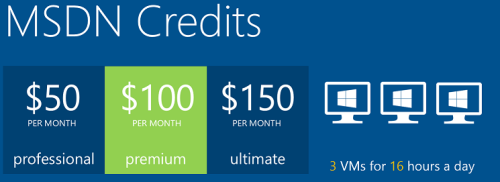
    Now then, what should we do with these shiny new CRM 2013 bits? If you haven’t got any spare hardware lying around but you do have an active MSDN subscription, then why not leverage the subscriber benefits and set up a development/test server in Windows Azure? It’s easy, it’s fast, and if you have the MSDN credits, it’s also FREE!

    Azure_MSDN_benefit

    The discounted rates for MSDN subscribers make it up to 97% cheaper to run a virtual machine on Azure compared to the standard rates, leaving the cost at only $0.06 per hour for a VM (small instance). Combine this with the fact that Azure VM’s are nowadays charged by the minute and they incur no charges when the VM is stopped, you can stretch a few $ worth of Azure credits for quite a long period of testing. If you haven’t yet looked into the MSDN benefits, go and read this article on Scott Guthrie’s blog for all the details.

    Not only does MSDN provide you with free credits to spend on your favorite Azure service, you can also leverage the MSDN usage rights for software running on a Windows Azure virtual machine. For a great review of the licensing options for setting up Dynamics CRM development and test environments by using MSDN, look no further than this recent blog post by Leon Tribe.

    Preparing a development server for CRM 2013

    While you can’t just directly provision an Azure VM image pre-configured with CRM 2013 (at least not yet), you can skip a few steps by starting with an image from the Azure VM Gallery that comes with SQL Server 2012. You will need to setup Active Directory and IIS before starting the CRM 2013 server installation, which requires a set of clicks and a couple of reboots.

    To make this process faster, I decided to take notes of the steps needed in installing the required components for CRM 2013 and share them with anyone who’s interested in doing the same. So, here’s a 50 slide presentation with screenshots of the configuration tasks and options to install a working CRM 2013 dev/test/demo server on a Windows Azure VM:

    Do take note of this fact before proceeding any further: this is NOT the “how to” of deploying a live CRM 2013 server. These are the minimum steps needed to get the Dynamics CRM server installation process to complete without errors – nothing more. When considering setting up a proper test and production environment, the first thing you need to do is read the Microsoft Dynamics CRM 2013 Implementation Guide.

    For taking CRM 2013 on a casual test drive and seeing what your current CRM 2011 organization looks like when imported into the latest server version, the steps outlined in the presentation are all you need to get started. I’ve timed the process and the last time it took around 1.5 hours from provisioning a new VM from the Azure Gallery to having a fully working test instance of CRM 2013 in the cloud. Not quite the couple of minutes that spinning up a new CRM Online organization takes, but short enough to set up an ad-hoc test environment for development and configuration tasks that are more easily accomplished with full CRM server and SQL database access.

  • Dynamics CRM 2013 Finally Revealed

    There were a couple of announcements made regarding the upcoming version upgrade of Microsoft Dynamics CRM (previously known as “Orion”) during the World Partner Conference 2013 event (WPC13) three weeks ago: 1) it was named as “Microsoft Dynamics CRM 2013 / Microsoft Dynamics CRM Online Fall ’13 (depending on your deployment model) and 2) the client licensing model was unified between Online and on-premises to consist of Professional, Basic and Essential license tiers. The CRM related sessions also presented several interesting facts about where Dynamics CRM is heading (see my WPC13 recaps of Day 1, Day 2 and Day 3 if you missed them), but all in all they were more about the product roadmap rather than detailed features of the next release.

    CRM2013_BlitzToday, on July 31st, Microsoft held the Dynamics CRM Training Blitz Day for all its partners. The sessions were split into two tracks, but for most of this blog’s audience I’m sure the track “Technical Overview for Application Consultants, Presales Consultants and Developers” was the preferred choice. The sessions presented by the Redmond allstars Eric Boocock and Girish Raja consisted of the following topics:

    • Reimagined User Experience in Microsoft Dynamics CRM 2013
    • Process Agility in Microsoft Dynamics CRM 2013
    • Microsoft Dynamics CRM 2013 Mobile Client Application
    • Yammer Integration in Microsoft Dynamics CRM 2013
    • Outlook Client and Exchange Sync in Microsoft Dynamics CRM 2013
    • Microsoft Online Portal Administration in Microsoft Dynamics CRM 2013
    • Upgrade Process in Microsoft Dynamics CRM 2013
    • Business Rules with Dynamics CRM
    • Client Extensibility in Microsoft Dynamics CRM 2013
    • Extensibility on the Server and Cloud with Dynamics CRM
    • Microsoft Dynamics CRM as a Platform for Business Apps

    If you’re a Microsoft partner and have access to the event site, you really need to schedule some time for going through the recordings and other content available, because this is effectively the “What’s new in Microsoft Dynamics CRM 2013” training kit that summarizes the new and updated features of the product you’ll be working with from Q4 onwards.

    Although this was a partner event, it was declared “free to tweet” and resulted in a wealth of content being shared over on Twitter. I collected the most interesting content related to new features of CRM 2013 onto a Storify post that you can view below, to get a quick overview of what was announced in the Blitz event.


    There will surely be more material made available to Dynamics CRM customers shortly, so that they’ll have a better understanding of what it means when they see the update notifications in their existing CRM Online instances. If I’d have to summarize the CRM 2013 release highlights in five bullet points, they would be:

    • The new UI that was previewed in the “public beta” of the Polaris release looks like a worthy successor to the previous forms & ribbons. The impact to user adoption and differentiation from competing CRM products is potentially huge, while the feared breaking changes to existing customizations may not be as big as the initial reaction might have suggested (things will break, of course, but I don’t foresee a catastrophe).
    • Business rules and synchronous workflows are the real killer feature of CRM 2013, since they expand the no-code capabilities of the product immensely. They will surely not cover all the common customization scenarios in the first release, but they point the way towards a declarative future where custom development efforts can be targeted to where they are really needed, meaning system integrations.
    • The mobility story with responsive design and “write once” business logic is far beyond what the “CRM Anywhere” path announced in February 2012 (and later cancelled) would have allowed to achieve.
    • Server side sync is long overdue and many organizations will surely be happy to replace the email router with this solution. Tracking individual items will still require Outlook, though. And while we’re at it, the new UI in Outlook client with its popups and hidden global navigation doesn’t look all that hot, but friends of Outlook and CRM 2011 may disagree with me.
    • Acquisitions of Yammer, Marketing Pilot and NetBreeze will play a significant role in the future of the product, but CRM 2o13 is still very early days for this feature set. It’s loosely coupled services like this which will surely make the most of the rapid release cadence of CRM Online (twice a year), so keep an eye on them.

    As with most new things, there’s a great deal of excitement I have towards the CRM 2o13 release based on what I’ve seen, and at the same time a healthy sense of fear on “is it all really going to work”. Lucky for us, we can now seek validation for the excitement and relieve our fears by downloading the beta for Microsoft Dynamics CRM that has been posted on Microsoft Connect today patiently waiting for a public beta to become available (if ever). Yes, the beta link shared by the CRM team previously was apparently not meant to be made available publicly, so you’ll still need wait for a while to get your hands on the latest version of Dynamics CRM.

    When will the actual Dynamics CRM 2013 product be released then? Many sources are pointing to The Partner Connections Event starting on October 20th as being the official launch event. Also many CRM Online customers have already received information on their organizations having been scheduled for updates to take place during Q4 2013, so I think it’s safe to assume this to be the time frame for general availability of the next version of Dynamics CRM.