Category: News and events

  • Something to look forward to in 2023 Release Wave 1

    Something to look forward to in 2023 Release Wave 1

    Last time when the 2022 Release Wave 2 was announced, I wrote about why you should not pay too much attention to these bi-annual release plans. Instead I was encouraging everyone to start using the Release Planner website that listing all the planned and recently launched features as a roadmap site with no artificial boundaries between “waves”.

    Now when the 2023 Release Wave 1 materials were launched today, Microsoft defaulted to pointing people to this Release Planner site (here’s the Power Platform 2023 RW1 link). Of course the challenge with that approach is that all the hot new stuff is just behind one small “release wave” filter in the list:
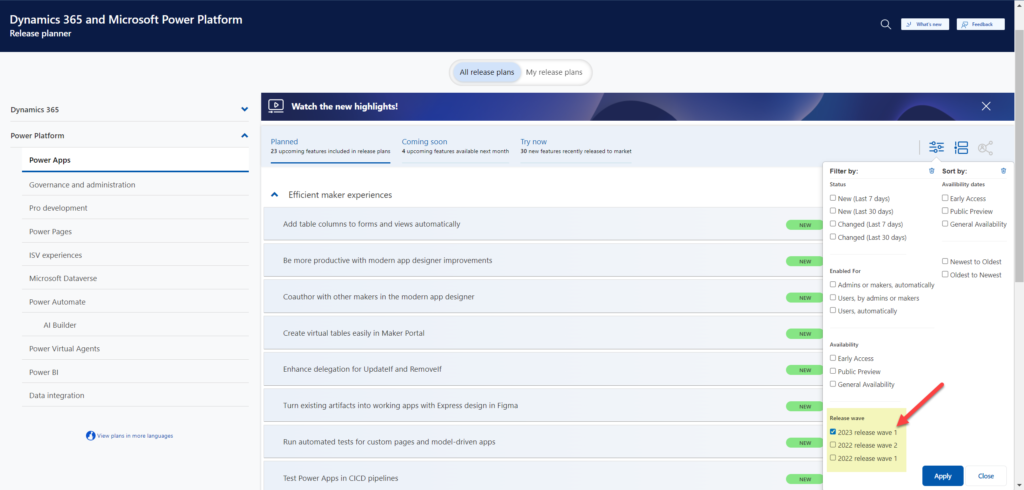
    There are still some usability challenges with the Release Planner site that have kept me browsing through the Microsoft Docs Learn when looking for release item information. So, here’s the “switch to classic” bookmark that will take you to the MS Learn edition of the same release wave information: https://learn.microsoft.com/en-us/power-platform/release-plan/2023wave1/

    There was now a nice higlights video made on the Power Platform 2023 Release Wave 1 launched on the very same day as the release plans were published. The challenge with this kind of material is that you can’t really show realistic demos about features that might be launched half a year from now, so keep that in mind when watching the video.

    As always, there’s a lot to digest in the plan and you might therefore be interested in reading the hand picked top items by some trusted folks in the Power Platform community. As a purely subjective opinion, here are the top 5 items in 2023 RW1 that I was initially most excited about when reading through the plan.

    Fluent UI everywhere

    We’ve seen the concepts and components from Microsoft’s Fluent Design System introduced here and there when it comes to Power Apps and Dynamics 365 app UIs. The Power Platform Creator Kit has brought Fluent UI controls available to canvas apps built by advanced makers. Demos of the future model-driven app UI have included features like dark mode that are familiar from the more modern product UIs on the Microsoft 365 side. Now with 2023 RW1 there should finally be a wider roll-out of these modern controls for the MS low-code application platform, too.

    You may remember that small tweaks to the model-driven UI have been taking place in pretty much every release wave. This update should be a lot more impactful than the previous ones – which is why it will be rolled out behind an opt-in switch initially. You can expect some things to break in the process, so it may take a while before MS will dare to push it out to all users by default.
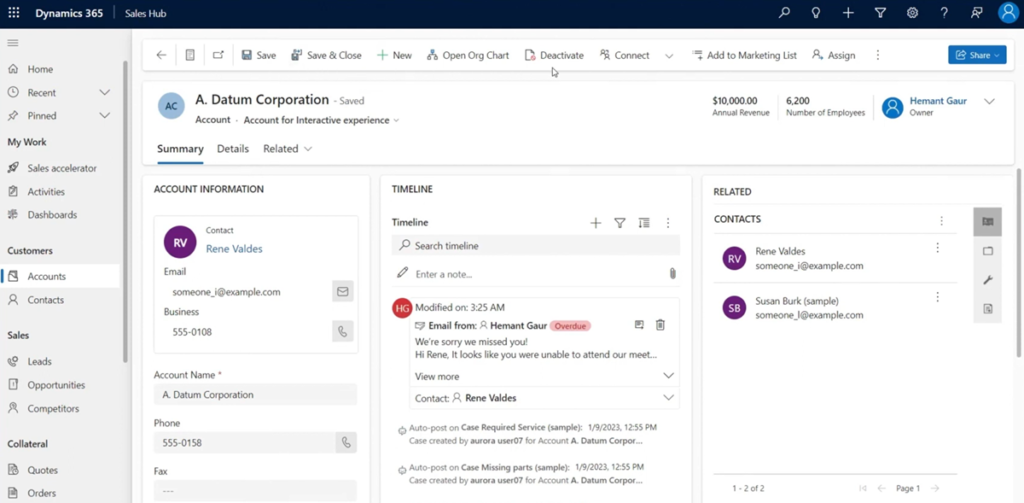
    Canvas apps, on the other hand, have been living in a split reality for a long time already. Dataverse for Teams based Power Apps have used the Fluent UI controls since forever, causing friction for app development across Teams vs. full Power Platform environments. Hopefully this coming update will now bridge the gap and get us closer to the dream of “Run One UI”.

    Responsive canvas pages design experience

    The one place where model-driven apps have felt clearly superior to canvas apps in their UI capabilities has been the responsiveness of the screen layout. Their many constraints on adjusting how the menus and forms can (or rather can’t) be configured have in turn made it amazingly simple to adjust to different screen sizes. The platform handles it out of the box, the maker doesn’t have to worry about it much at all.

    Building responsive canvas apps has been technically possible, yet something that feels quite tedious. I’ve mostly had to deal with responsiveness in apps built in Dataverse for Teams, where worrying about which fields, columns and buttons fit onto the screen when surrounded by the Teams UI chrome has been one of the unavoidable everyday frustrations.
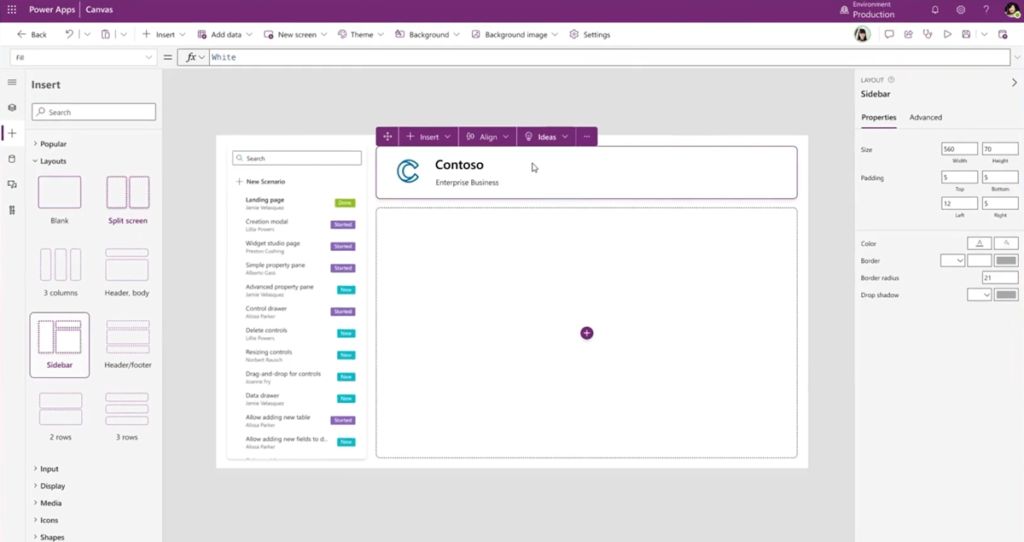
    2023 RW1 release plan gives us a glimmer of hope by showing a screenshot of the coming responsive layouts and spacer tools in the canvas studio. The ability to resize controls and spacing directly in the authoring canvas could greatly reduce the effort needed in achieving sufficient levels of app UI responsiveness. Not on the same level as model-driven for sure, yet it could offer a decent compromise between precise control positioning and responsive reflow of controls on the page.

    Control system administrator role assignment

    No matter how granular the security model in Dataverse is, this granularity has vanished when you go up to the admin roles. Every Global Admin or Power Platform Admin will automatically be granted the sysadmin role for every Power Platform environment in the tenant. While it makes sense that people with powerful roles get wide access, it is often not desirable that such user accounts would by default see all data, be it via UI or API. After all, usually the admin roles need the power to change settings and work on the metadata – not the actual business data managed in Dataverse.
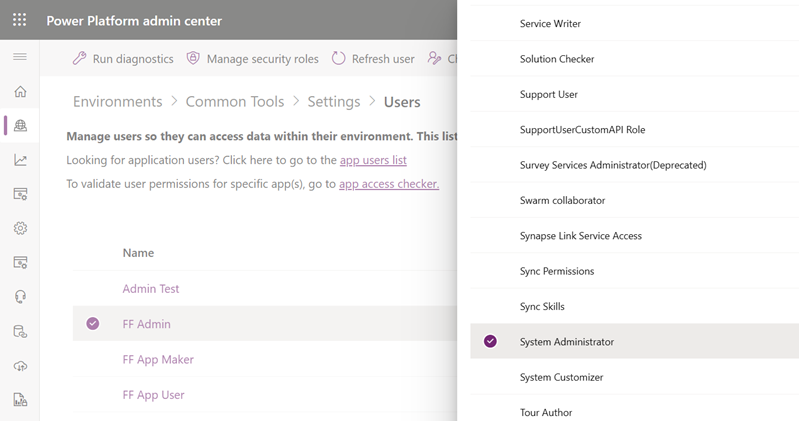
    Now MS is promising that customers will be able to manually assign the System Administrator role to appropriate users in the environment. This is a very welcome feature to have control over the auto assignment, even though we don’t yet know now exactly what process will be built around this. Also keep in mind that certain governance features like this might get bundled into the Managed Environments capability, which would limit its available to premium licensed users only. Let’s see how it goes.

    Personal environments with Dataverse

    It has already been possible for users to sign up for the Power Apps developer plan – as long as they are aware such a thing exists and find the right path to acquire it. Now MS is going to promote these type of environments to Power Platform makers much more prominently within the product. They will be called “personal environments” and the idea is to lower the barrier for all makers to experience premium capabilities like Dataverse.
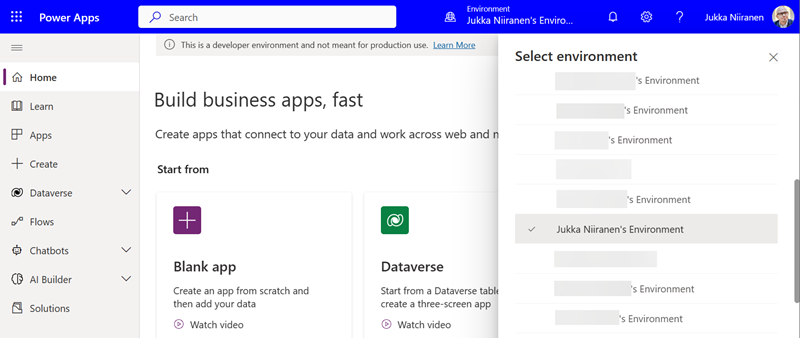
    Unlike trials, personal environments won’t expire. Unlike sandboxes, the makers won’t need help from the Power Platform admins of the tenant to get a personal environment provisioned. There will be new governance capabilities introduced that give admins the possibility to disable this feature if required, yet hopefully most organizations wouldn’t need to introduce such a limit. Personal environments don’t consume tenant level capacity, so as long as there’s a solid governance plan in place to apply DLP policies, the risks should be fairly low with these personal environments.

    Check out this Power CAT Live video for more details about the developer plan and its enhancements (YouTube embedding disabled by Microsoft): https://youtu.be/yXRSnN2AWTs

    Paginated reports editing on the web

    Back in 2006 when I got introduced to the technology that later became Power Platform, the one area that struck to me as incredibly difficult was report creation. SQL Server Reporting Services had just replaced Crystal Reports with a native Microsoft technology in the stack. While there was plenty of advanced features available for summarizing data, the number of hoops you had to jump through to get any of the business data from the relational database onto a PDF output made sure that only the bare minimum number of reports were ever created.

    The age of Power BI unlocked this precious data from the enterprise reporting tools and allowed basically anyone to slice & dice it to their heart’s content. Yet the paginated report design tools didn’t seem to evolve quite as rapidly. Neither was there much (well, any) progress made on the Word mail merge side for making it easier to produce documents with dynamic data. Recently many Makers have gone ahead with Power Automate and used HTML as the intermediate format on the road toa PDF output. None of these methods have really been very citizen friendly.

    Is this about to change now? In 2023 RW 1 Microsoft is going to allow you to create and share paginated reports on the web, through a WYSIWYG design experience. “Create invoices, financial statements, and other operational reports with low code, drag-and-drop experiences on the web. You can share these in a variety of formats or just print them out!” That sure sounds like something most customers would prefer over the existing options for using dynamic data in documents. Let’s see how far this first iteration of the new editor in Power BI will get us once it arrives in the summer.

    What’s missing from the plan?

    To better understand the direction of Microsoft products, you should not just get excited about the features MS actively advertises. You should also search for things that are not mentioned. This will help in seeing behind the product marketing hype and making smarter decisions on your own investments of time and other resources.

    Microsoft Teams doesn’t get much love in the Power Platform release plan. On the Power BI side there is the new teams meetings integration and enhancements to multi-tasking in the Power BI app for Teams. Power Automate touches on Teams in the sequential approvals feature. And that’s pretty much it. No word whatsoever on whether MS plans to keep investing in Dataverse for Teams, for example, which seems to have been largely abandoned after the initial launch 2 years ago.

    If we ignore AI Builder, there aren’t too many mentions of products delivering shiny new features with the help of AI. Given how much talk there has been about Microsoft investing billions of dollars more into OpenAI and bringing ChatGPT features into their existing products, this could surprise the reader. Now, it’s important to understand that these release plans for the release waves are hardly ever the place where big splashy announcements like that are made. They are more about the incremental improvement of existing products.

    Remember: new things will appear into the release wave between now and September 2023 (end of the wave). Similarly, we can expect a certain percentage of items in the release plan get delayed, postponed to a future release wave or cancelled entirely. Remember to keep an eye on those changes on a regular basis, instead of just studying the Power Platform roadmap twice a year.

    Of the things that were added to the plan during the 2022 release wave 2, Cards for Power Apps does not exist at all in the new release plan. Does that mean it’s “done and ready”? No, it’s just sitting in the release plan from the previous round with no GA date and still a lot of things to be improved before being ready for real life use.

    Looking at much higher profile initiatives on the same area, Microsoft Loop still doesn’t seem to be a thing either. ContextIQ is mentioned on the Dynamics 365 Business Central release plan, though. It’s kinda amazing that BC will now be the first Dynamics 365 product to actually deliver on the “no additional license required when working in Teams” promise from 1.5 years ago.

    Header photo by Fabian Møller on Unsplash
  • Dataverse meets Teams: my presentation at #TeamsNation 2022

    Dataverse meets Teams: my presentation at #TeamsNation 2022

    I had the pleasure of attending the Teams Nation conference on March 23rd, alongside more than 4000 Microsoft Teams community members. Not only that, they also allowed a former XRM geek like me to do a presentation on the Power Platform track. So I did.😄

    Since I’ve recenly been working a lot with Dataverse for Teams, that was a natural topic to cover in a Teams related event. My session was titled “Dataverse meets Teams: low-code app opportunities for everyone”.

    I first explained the big picture of what Dataverse means, the demonstrated three different apps our team has built on top of DV4T. Finally, a few words on the known limitations of the Teams based Dataverse environments and how you need to take them into consideration in your solution architecture design.

    The slides are available for download on SlideShare, or you can browse through them in the embedded version below:

    The session recording from Teams Nation 2022 is also now available on YouTube:

    If you’re planning to build apps into a Dataverse for Teams environment, then be sure to also check out my earlier blog post on the solution management experience in DV4T.

  • A Power Platform newsletter from our team

    A Power Platform newsletter from our team

    UPDATE 2023-01-03: After Twitter decided to shut down the Revue newsletter service, the Forward Forever newsletter was migrated to Ghost. The content remains available at the same forwardforever.news domain.

    Back in Spring 2020 when we launched Forward Forever, one of our guiding principles was to openly share with the outside world the new knowledge we gain when working with Microsoft Power Platform tools on a daily basis.

    Team FF has been quite active in community contributions, with content regularly shared both on our team blog as well as personal blogs like the ones written by Timo, Antti and myself. Sometimes when I’ve been looking at our social feeds, I’ve wondered “are people actually able to keep up with all these updates our team is sharing?”

    Now there is a place that brings together these streams of new Power Apps, Power Automate and Power BI related information: The Forward Forever Newsletter. This monthly email newsletter is available for anyone to subscribe to at forwardforever.news:

    To quote our team’s announcement of the newsletter:

    That’s what the Forward Forever Monthly newsletter is all about. A summary of both our own writings as well as the best bits from the Power Platform community. No ads, no hard sales push. Just the most relevant content that our passionate team of Power Apps, Power Automate and Power BI experts has discovered.

    Our newsletter runs on the Revue engine (recently acquired by Twitter). You might already be familiar with it, since there are at least a couple well-known weekly Power Platform related publications on that newsletter platform:

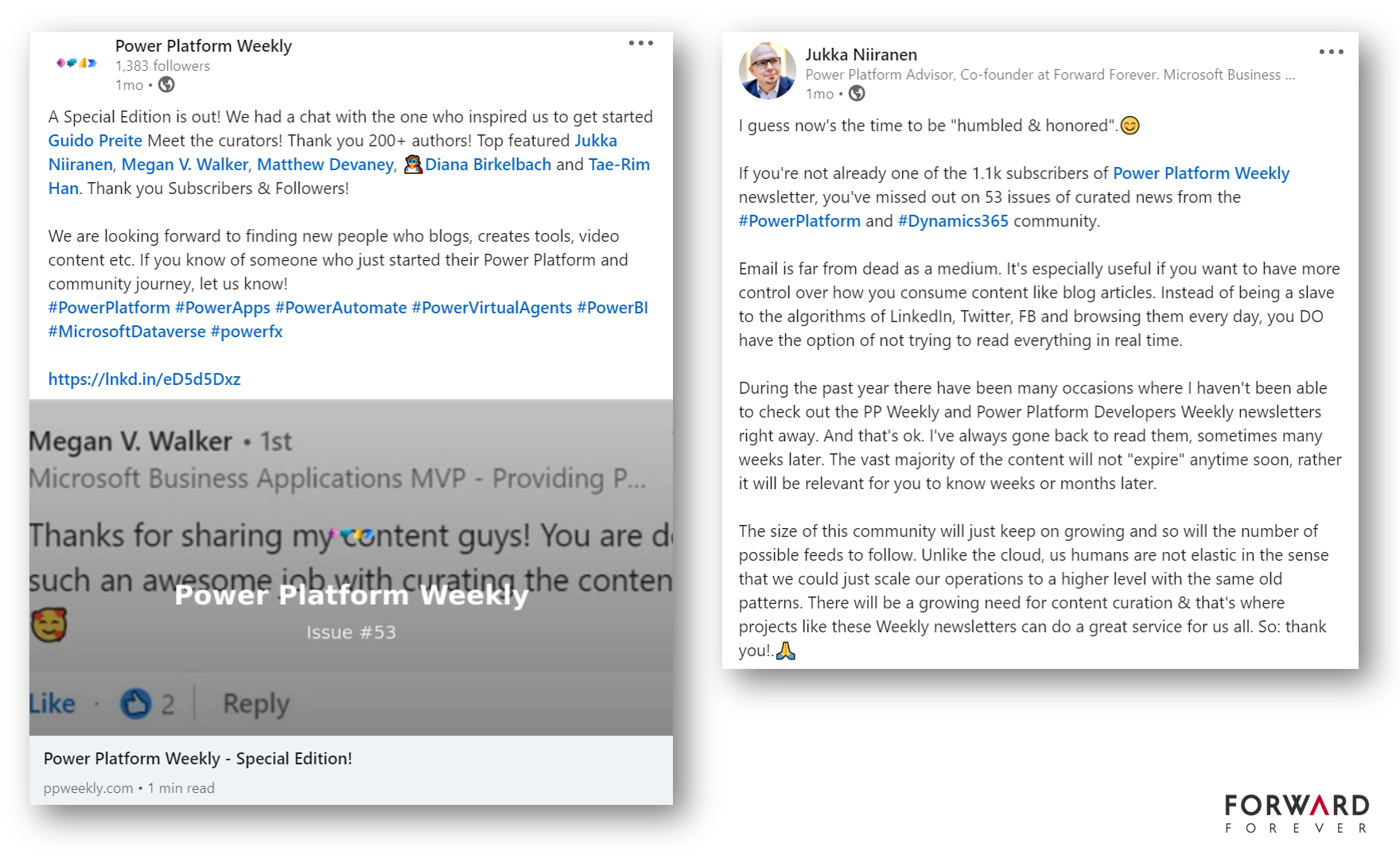
    We don’t intend to compete with these community driven newsletters, because they do such an awesome job already. Many of the FF team member blog posts have been covered in the issues over time. Recently PP Weekly celebrated its first full year in operation and I wrote a bit about the importance of such content curation initiatives over on LinkedIn:

    I encourage all customers and community members interested in the latest events around especially Power Apps, Power Automate, and also Dynamics 365, to add themselves as subscribers to these publications.

    There is no shortage of great blog posts, podcast, videos and free tools to cover in this ecosystem. What I do think we have a shortage of is ways take control of our precious attention and consume information at our own pace. A monthly email digest that doesn’t scroll past in your real-time feed may offer a calmer way to stay in the loop.

    Subscribe to Forward Forever Monthly

    Just one email per month on cool Power Platform things we’ve come across.

  • Did Power Apps really leak your customer data?

    Did Power Apps really leak your customer data?

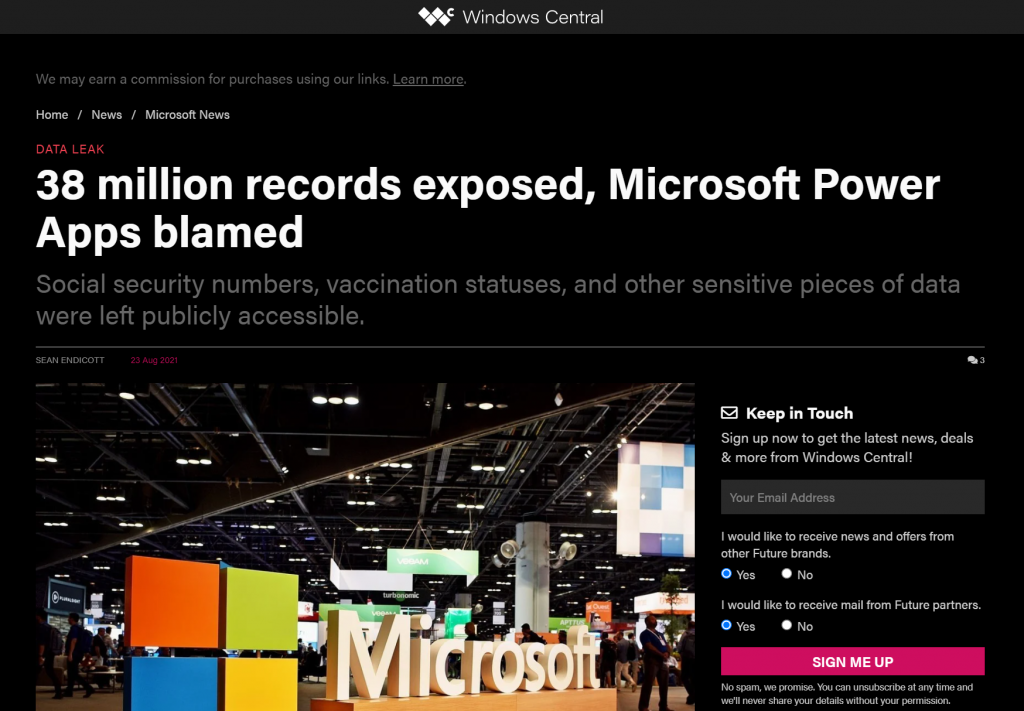
    Recently Power Apps made the headlines in a way that Microsoft would have liked to avoid at all cost:

    The news headlines today aren’t exactly the most neutral source of information, but luckily we also have access to the full report from the security research team at UpGuard. Here’s what happened according to them:

    The UpGuard Research team can now disclose multiple data leaks resulting from Microsoft Power Apps portals configured to allow public access – a new vector of data exposure. The types of data varied between portals, including personal information used for COVID-19 contact tracing, COVID-19 vaccination appointments, social security numbers for job applicants, employee IDs, and millions of names and email addresses.

    UpGuard

    Sounds serious, and it certainly shouldn’t be sweapt under the rug by anyone working with Microsoft Power Platform. We have a lot to learn from an incident like this and the concerns it may bring up along with it. As these low-code technologies become more widely used across different industries, not all publicity will be positive.

    There have of course been some concerns raised by IT practitioners already before this Portals incident on what’s the general impact that low-code platforms will have on business solutions development. How to secure customer data and to build proper governance practices around these tools is a topic that is often covered when talking about Power Platform with customers.

    I personally already used the above headline as an example in a governance workshop with a customer on the very next day after the report was published. The discussion was quite neutral and it served well in acknowledging both the important role that Power Platform tools can have in business processes, as well as the need for practices that allow them to be safely used in developing new solutions.

    The other alternative where such a topic would not be proactively addressed in a transparent manner could instead lead to more controversial reactions down the road. Some people may have negative experiences in their past that might lead to seeing these new events as an enforcement of their existing beliefs.

    It’s hard to prevent people from drawing the wrong conclusions based on incomplete information if we don’t bring all the relevant pieces into light. To help in such examination of the evidence, in this blog post I’ll present some fictitious statements that could potentially be made based on reading the news headlines. Then I’ll offer my own perspective on whether they would be justified or not.

    “Bugs in Microsoft’s software caused the data leak!”

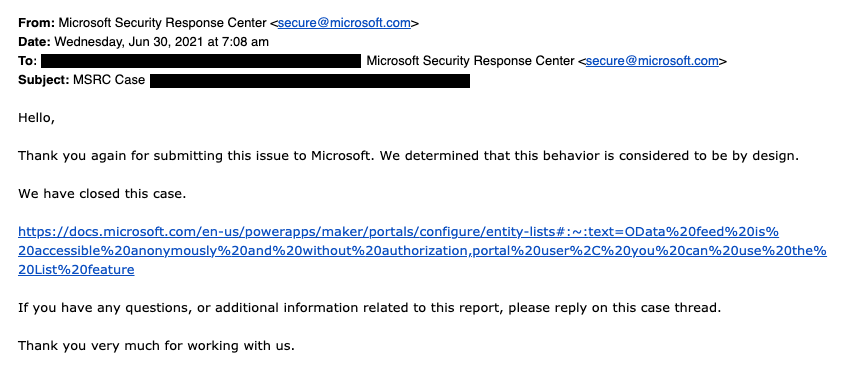
    This wasn’t an actual bug, rather an unfortunate feature. As the report title from UpGuard hints, it was “by design” when examined from a technical perspective. Also, that was the initial response from Microsoft’s side, as shown in the report:

    The above response is in my opinion the biggest mistake from Microsoft in this whole incident. Being tone deaf when presented with something that had already proven to be a pattern leading to unintended disclosure of confidential customer data via numerous Power Apps Portals out there is… Well, it’s what happens in large corporations, unfortunately.

    What was this “by design” feature then? In the state that the Portals configuration experience was at the time of the investigation, there wasn’t any strong push from the product side to make the data tables used in the portal as private. It was a neutral platform built specifically to take records from your organization’s internal Dataverse tables into a public website, then giving you the choice to either show all the contents to anyone, or limit the visibility through a very granular security model to only a small subset of records.
    As an example: you could show all the available locations where COVID-19 vaccinations were being offered (public table). Then you’d give the logged in user the ability to create an appointment record (private table with access control). Both are an integral part of the business process managed via a portal, yet the rules for showing them to the website visitors are directly opposite. The technical platform has to cater to both these requirements.

    As it happened, there was a way through which the portal developer could forget to enable the table permissions that the private data should have in all areas where it was used. Now, the reason why this mistake wasn’t immediately obvious was that the Power Apps Portal product included a feature that allowed publishing this data as OData feeds. These would not be visible in the website pages necessarily, but they were technically available as long as you knew the right path from where to search for them.

    In our example, a public OData feed of locations could have been useful for integration purposes. For reservations made by private individuals, an unauthenticated feed would never be a good idea. Yet the platform didn’t know what the developer wanted.

    After this incident was reported by UpGuard, Microsoft changed the defaults and made it require more conscious effort to publish the feeds for unauthenticated consumption.

    “Poor default settings in the Portal product were dangerous!”

    There’s no denying that discovering more than a thousand Power Apps Portals misconfigured to expose confidential data to unauthenticated users is a big number. Yet the total number of Portals out there is… well, let’s just say it’s certainly multiple times that.

    As part of their research, UpGuard enumerated through the various available powerappsportals.com and microsoftcrmportals.com subdomains to programmatically scan the sites with potential unintended OData feeds published. Many were found through this method, but still this problem affected only a small subset of all Portals websites out there.

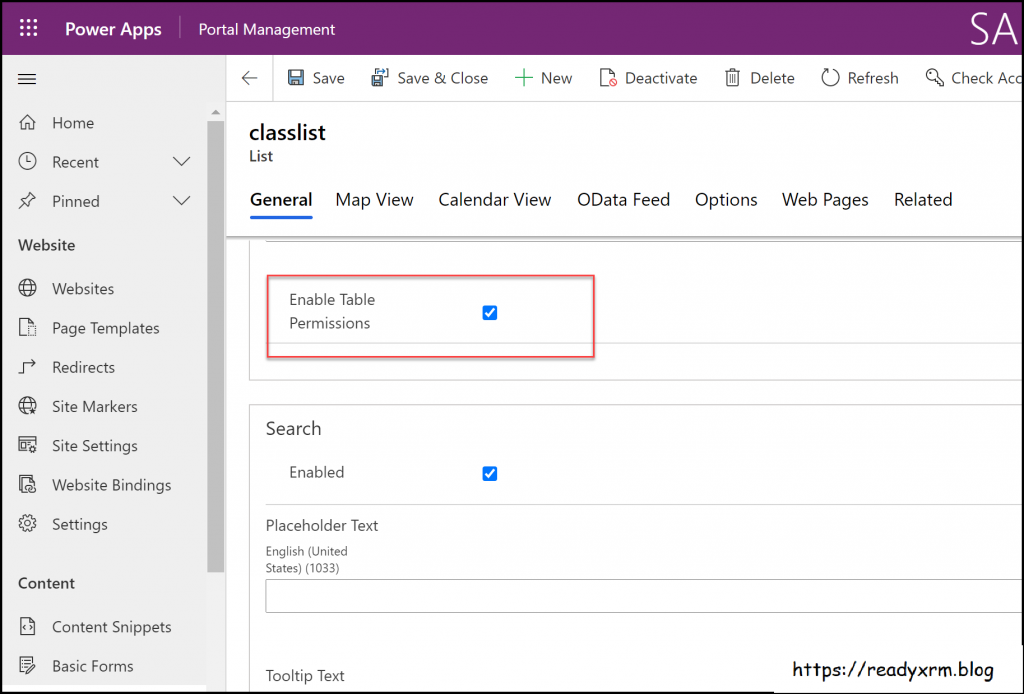
    The majority of Portals developers will have been aware of the setting that must be enabled for any data that you don’t want to be publicly available on your website. Nick Doelman explains the “Enable Table Permissions” setting very clearly in his excellent blog post. It’s not really fair to claim that this would have been impossible to notice while building your Portal app:

    If it has been news to you and you have built websites with Power Platform tools, then I seriously recommend you to take advantage of this generous offer by Nick and enroll for his Power Apps portals Security Deep Dive course:

    Update 2021-08-31: you should also check this video from George Doubinski about the Portals behaviour before & after the default setting change:

    “Microsoft should prevent such things from happening on their cloud service!”

    Power Platform is a suite of low-code tools that allows you to build your own apps. Whatever business logic the published app contains is ultimately the responsibility of the app creator. Same goes for the data you manage with that app. Technology providers can’t easily stop people from building unfit solutions with their products.

    There’s a great analogy in George Doubinski’s blog post “How to secure Power Apps portal from making the news” that I’ll repeat here. If you’re a company selling nail guns and a few unfortunate customers of yours shoot themselves in the foot – what should you do about it? Sure, your product probably came with all kinds of instruction manuals and warning signs that try to explain the importance of learning how to use such power tools. Similar to how Microsoft now shows a banner saying “table permissions should be enabled for this record or anyone on the internet can view the data”, to try and warn people not to hurt themselves.

    Let’s look at an example from another area of Power Platform that I cover frequently in my blog: licensing. Any customer could easily use this platform to build an automation that is a clear violation of the multiplexing rules of the very same platform’s licensing terms. Just create a Power Automate cloud flow that automatically pushes all new opportunities from your Dynamics 365 Enterprise Sales app into a SharePoint list accessible to your whole organization with no Dynamics licenses assigned to them. Congratulations, you’ve again used the powerful tool to hurt yourself in a way that the vendor couldn’t have stopped.

    “I knew citizen developers couldn’t be trusted to build real business applications. So much for low-code!”

    Did you look at the types of customers that suffered from this data leak? If not, I’ll list some of them from the UpGuard report here, to give perspective:

    • American Airlines
    • Ford
    • State of Indiana
    • New York City Municipal Transportation Authority
    • Microsoft

    These don’t sound exactly like the kind of organizations where a lone citizen developer who discovered a neat tool in his Office 365 app launcher just went ahead and built a portal on top of millions of rows of contact records and other sensitive data. If I had to guess, I’d assume there has been a proper development team working on many such customer facing services – not just citizens.

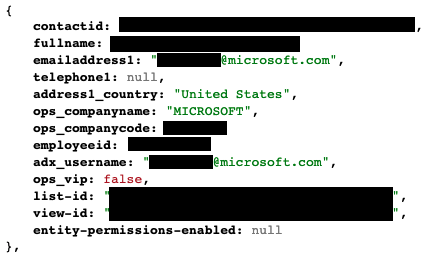
    The above picture is an example from the report’s contents that was captured via the unsecured OData feeds. It is from the Global Payroll Services Portal for Microsoft employees, built (presumably) by professionals working with software. Despite of all the resources and knowledge behind these, the misconfiguration of a Power Apps Portal still went into production sites.

    Although not directly related to this incident, on the very same week there was also another unfortunate data leak reported concerning the Microsoft cloud. Only this time it was around CosmosDB and the database primary keys that got leaked, exposing private data from thousands of Azure customer organizations. The misconfiguration seems to have been carried out by Microsoft software developers while they were integrating Jupyter Notebooks with CosmosDB to provide a new platform feature to customers.

    Regardless of whether you are clicking through low-code configuration pages or writing your own lines of custom code, mistakes can happen.

    “Suites like Power Platform are becoming way too complex for anyone to keep track of all these features & settings that can cause harm!”

    This is certainly true in the sense that a single person will not have an A-to-Z understanding of Power Apps in Canvas/Model-driven/Portals flavor, Power Automate in the cloud and on the desktop, Power Virtual Agent, Dataverse, AI Builder, Power BI and its data platform back-end… It’s way too much for anyone to consume as documentation, let alone master in practice.

    We should be asking where the assumption actually comes from that an app maker or developer should have end-to-end knowledge of the whole Microsoft low-code stack? Whether you’re a customer or a partner, it’s very important for you to not be blinded by all the flashy product demos and testimonials on “how company X digitally transformed themselves, using software suite ABC”. It doesn’t all happen thanks to this one mythical app hero who can take on any challenge – rather it’s the result of the right person finding the right tool to solve one specific problem at a time. Repeatedly, at scale.

    Low-code is a team sport and you will increasingly see the fusion development approach be promoted by Microsoft. This emphasizes the fact that an optimal mix of business domain expertise and technical software development skills is a better approach to achieving long term business value with low-code than relying on lone superheroes to do it all. In the end, just because you’re not writing as much code as earlier doesn’t mean the resulting systems would be simple:

    Low-code tools may be easy to approach, but the solutions you create with them can be as complex to manage as custom software.

    The data leak was the result of a feature built into the platform that the persons developing the customer specific solution were not aware of. They didn’t purposefully create the OData feeds, rather the software product generated them based on the underlying logic of how it was meant to streamline certain app development tasks. The best chances for having awareness of all these moving parts in the end solution is to ensure people have a realistic opportunity to focus on their primary tools and continuously sharpen their skills.

    “This incident proves you need product X / service Y from partner Z to be safe with Power Platform!”

    Events like these are bound to inspire companies working in the Microsoft ecosystem to try and gain exposure of their own by riding on the news wave. It never hurts to sprinkle a little FUD tactics on top of your marketing message, right?

    Now, I have to be transparent and admit right away that we are in the business where the questions and concerns coming from Microsoft customers are addressed via our advisory services. Even though we educate organizations on governance best practices and have delivered a few Power Apps Portals solutions to them, I would not make any statements like “buy from us and you’ll never have these kind of problems”. There’s two reasons for this:

    1. Our aim is to help customers take ownership of their digital tools, not to be the ones who build everything for them & maintain it. New app makers will make mistakes as they learn & grow, they just need a safe space for this (read: not a public website).
    2. I know how hard it would be to build a technical solution to audit every little detail that could go wrong in the various use cases where Power Platform is be used.

    Let’s examine the details of this particular data leak. First of all, to have any technical level protection, you would need a service that can tap into Power Apps Portals specifically. Running something that monitors only Canvas Apps or Model-driven Apps won’t help you here. Even the Power Platform Center of Excellence (CoE) Starter Kit from Microsoft only has the Portals data inventory as a backlog item as of now. If no public APIs are available to tap into a Microsoft cloud service, then you’re unlikely to find any software to do the required tricks for you.

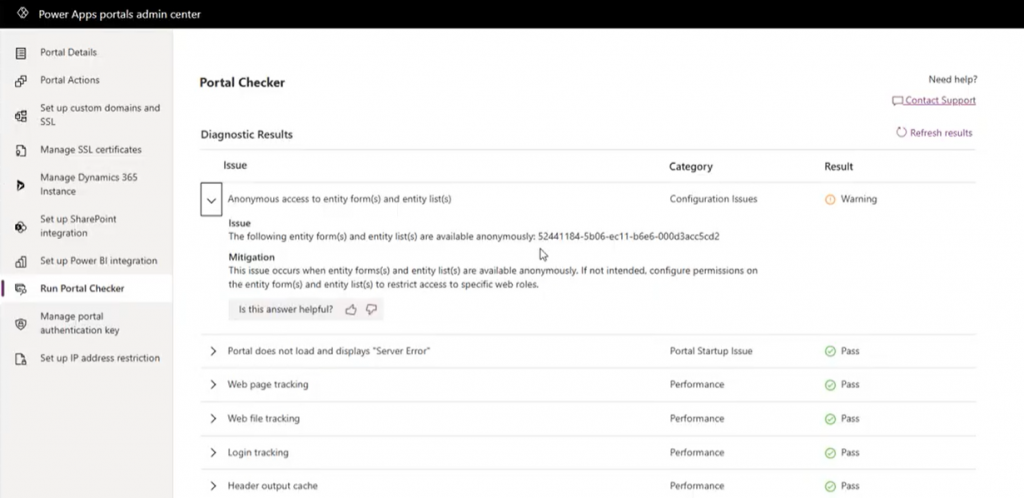
    Even if we’d have the same level of telemetry data access as Canvas Apps do, what’s the likelihood of the specific setting in question (Enable Table Permissions) to be exposed and monitored? Well, it is data stored inside Dataverse tables and could be queried via Advanced Find as showed by Nick, so in retrospect we could technically have audit tools built for it. But why would someone built such a third-party product when Microsoft already offers Portal Checker to all customers?

    So, there’s unlikely to be an easy & all encompassing solution out there that would address all your Power Platform security and governance concerns. I could even bet that some of the Portals websites that suffered from the OData leak will have been reviewed by security professionals from outside the Microsoft ecosystem and still the issue was not discovered. Probably because they didn’t know where to look.

    Because it’s an ever evolving cloud platform, it was possible for Microsoft to quickly react to the incident via a change in their original design, as well as by notifying the customers potentially affected by it. Today the risk of unintentional data exposure is technically lower and the public awareness of such possible misconfiguration among the Power Platform app maker community is much higher.

    Yet we have no way to guarantee what will happen tomorrow. Something similar may be discovered in a different part of the platform that will again require attention and action. I think all we can really do is to keep our eyes open and be ready to learn from the new discoveries shared by the network around us.

  • Is Dynamics 365 data now “free” in Microsoft Teams?

    Is Dynamics 365 data now “free” in Microsoft Teams?

    In the opening keynote for Microsoft’s partner conference Inspire 2021, Satya Nadella stated the following:

    Today, I’m excited to share that Microsoft Teams customers will receive access to Dynamics 365 data within Teams at no extra cost.

    Wow! That’s a major licensing related announcement – with not too much details to go with it yet. The feature is also covered in the summary blog post “From collaborative apps in Microsoft Teams to Cloud PC—here’s what’s new in Microsoft 365 at Inspire.”

    Together, Dynamics 365 and Teams offer powerful new ways for everyone across an organization to seamlessly exchange and capture ideas right in the flow of work. Today we announced a new collaborative app that brings together the best of Dynamics 365 and Teams. We’re also eliminating the licensing tax that has historically held organizations back from this kind of integration, making these experiences available within Teams to any user, at no additional cost. No other technology vendor offers this kind of integration and accessibility across the organization without the need to pay for multiple underlying software licenses.

    Clearly this is quite a big factor for Microsoft when competing against the likes of Salesforce. The features are therefore unlikely to be merely on a “check the box” level that the competition could undermine with their counter arguments. Obviously Teams is the platform that Microsoft is betting pretty much everything on, so a deeper integration with Dynamics 365 is hardly a surprise.

    The brand new 2021 Release Wave 2 release plans for Dynamics 365 that came out on the same day have multiple references to new Teams integrated features:

    …And I won’t even go to things like Mixed Reality. You get the idea by now: if a Microsoft product doesn’t have any Teams integration today then it might as well be nearing the end of its natural lifecycle.

    Collaborative apps in practice

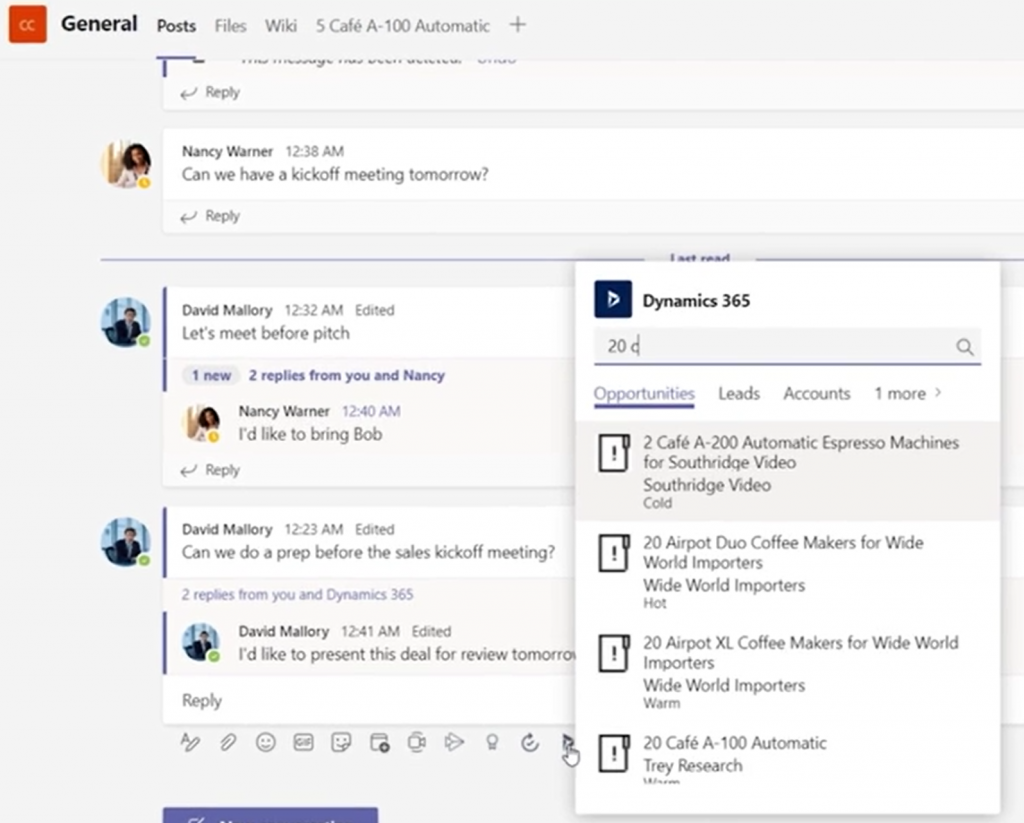
    Today we’re limited to the product marketing materials published by MS, but let’s try and make the most of it in our feature analysis and licensing speculation. Starting from the Dynamics 365 + Microsoft Teams landing page, we can watch a promotional video that includes some UI footage of the collaboration scenario. To start off, sharing Dynamics 365 records into a Teams channel is obviously a key to unlocking the collaborative scenarios, so a new experience for attaching records like opportunities or accounts will be provided:

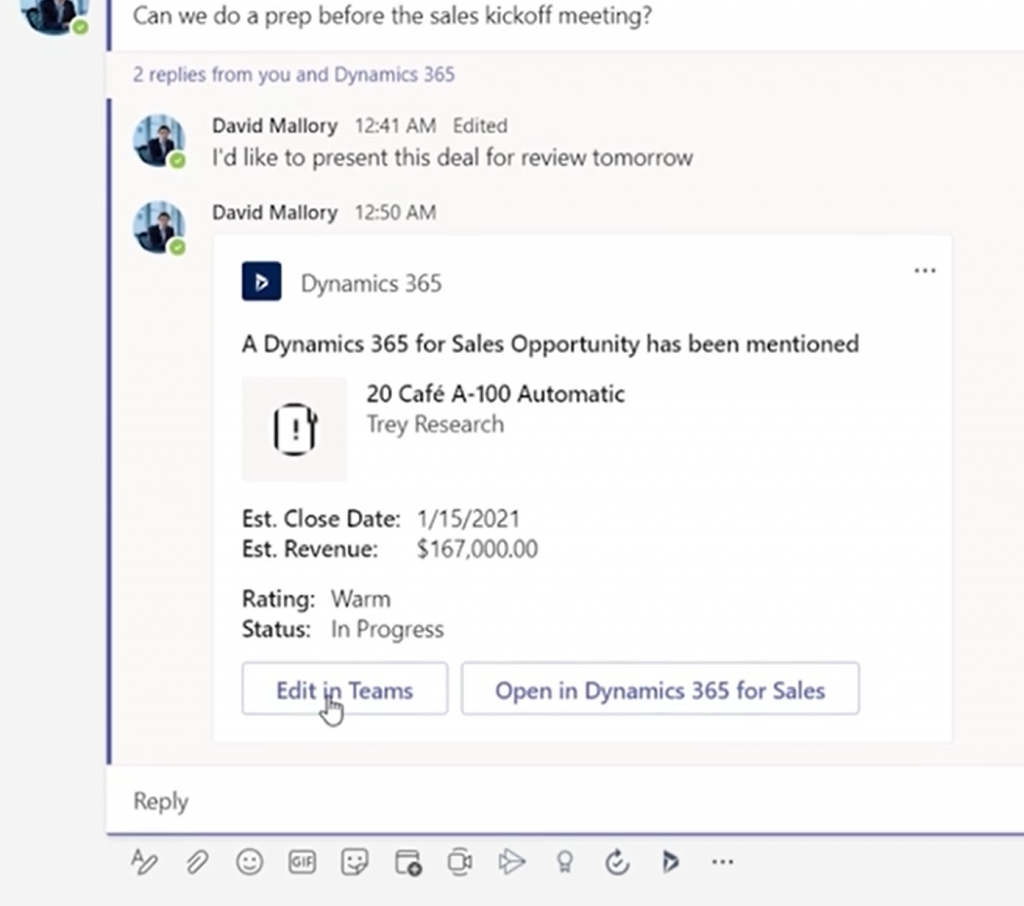
    From the resulting Adaptive Card we see that the user is offered not just an option to “open in Dynamics 365 for Sales” but also to “edit in Teams”:

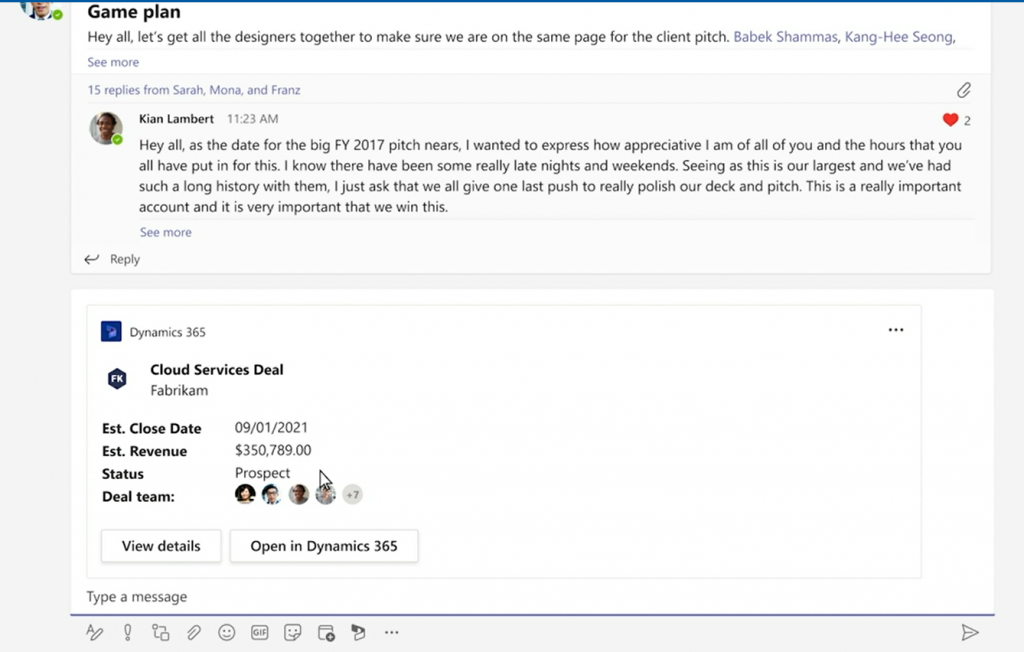
    We don’t get to go very deep in this video, so let’s switch over to the Inspire session called “The Cloud Built for a New World of Work” where Alysa Taylor introduces the Teams + Dynamics 365 story to the MS partner audience. The story has a similar “attach a Dynamics 365 record to a channel message” scenario. Here the button says “View details” rather than “Edit in Teams” but since these videos probably need to created well in advance, we can assume these two feature to be the same.

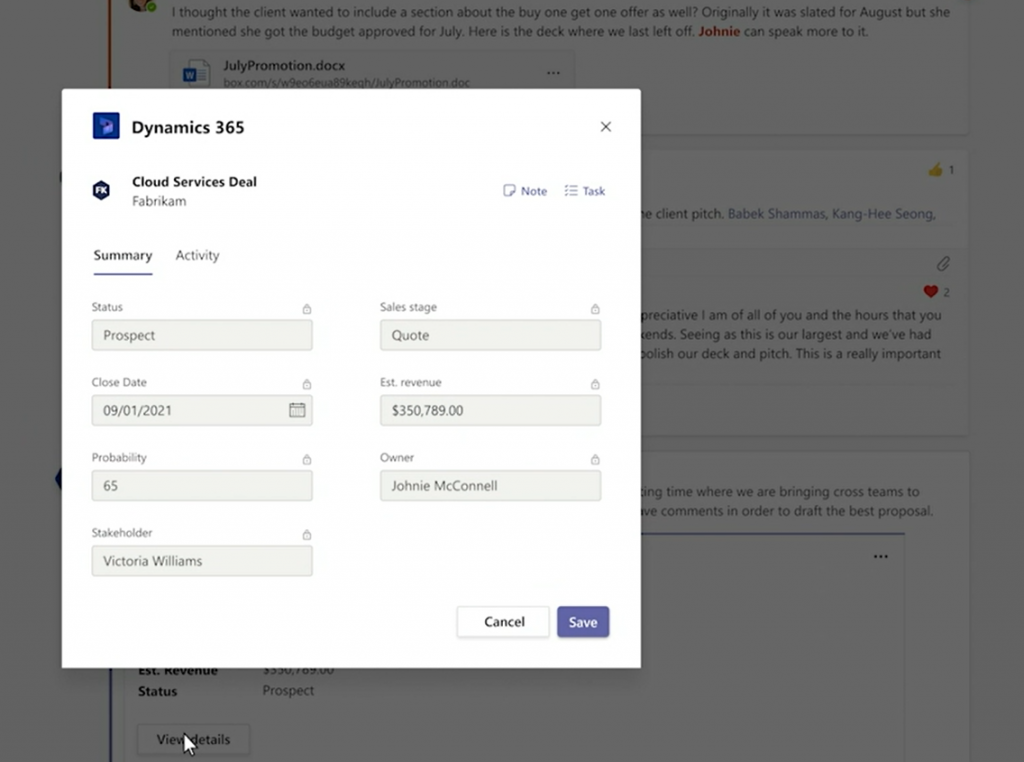
    Here we then get to see the actual details/editing experience. An opportunity record opens in a modal dialog within the Teams client’s channel context (no tabs) and presents a simplified form with key fields in the Summary tab. All the fields appear locked here, but the dialog has a Save button, so presumably the security roles from Dynamics 365 will be reflected here on the UI level already.

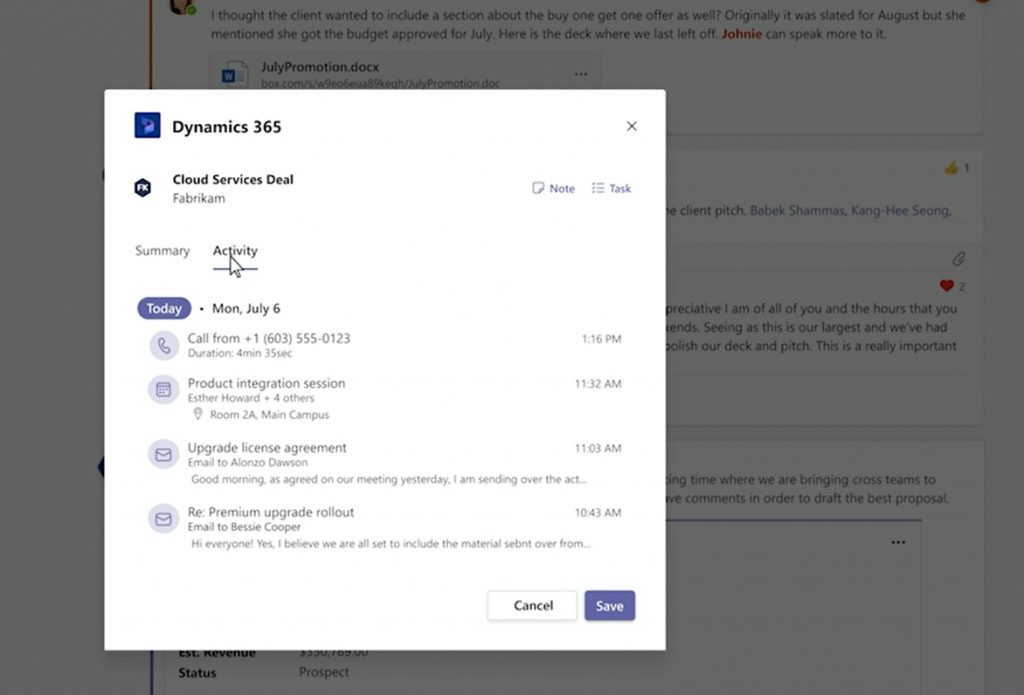
    Next we see the Activity tab, which is again a simplified version of the full Timeline view found on a Model-driven Power Apps form (meaning Dynamics 365 for Sales et al.).

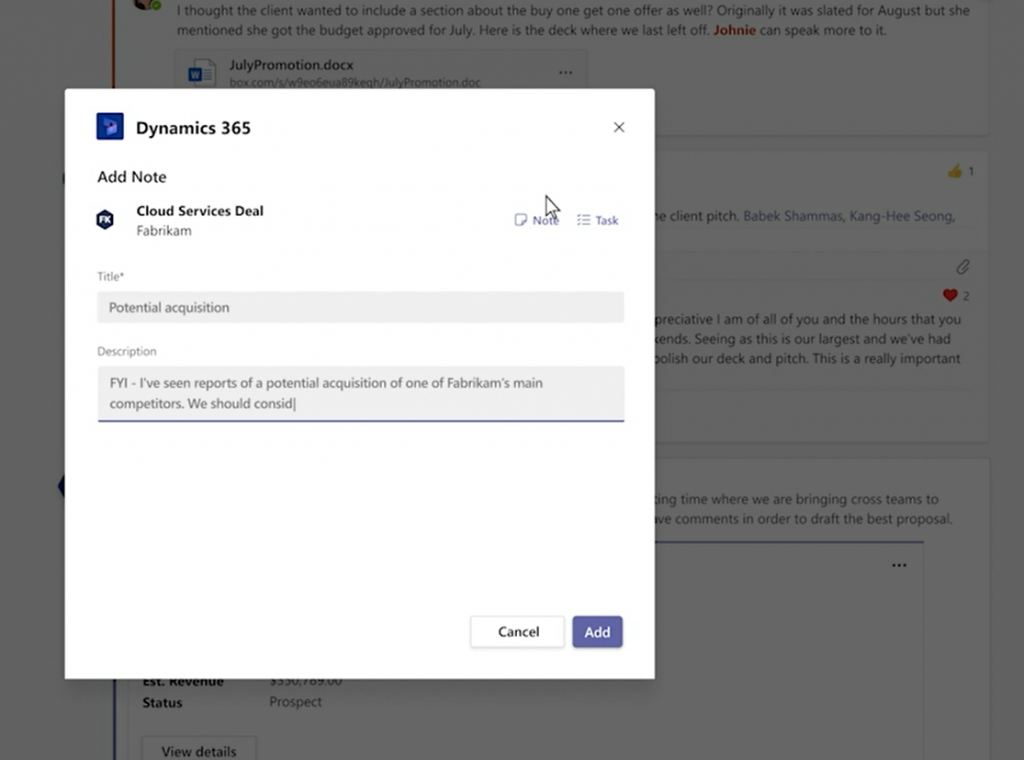
    The user in question has the ability to add a new note for the record, which will get stored within Dataverse rather than just the Teams thread. Tasks also appear to be an option presented in this modal window.

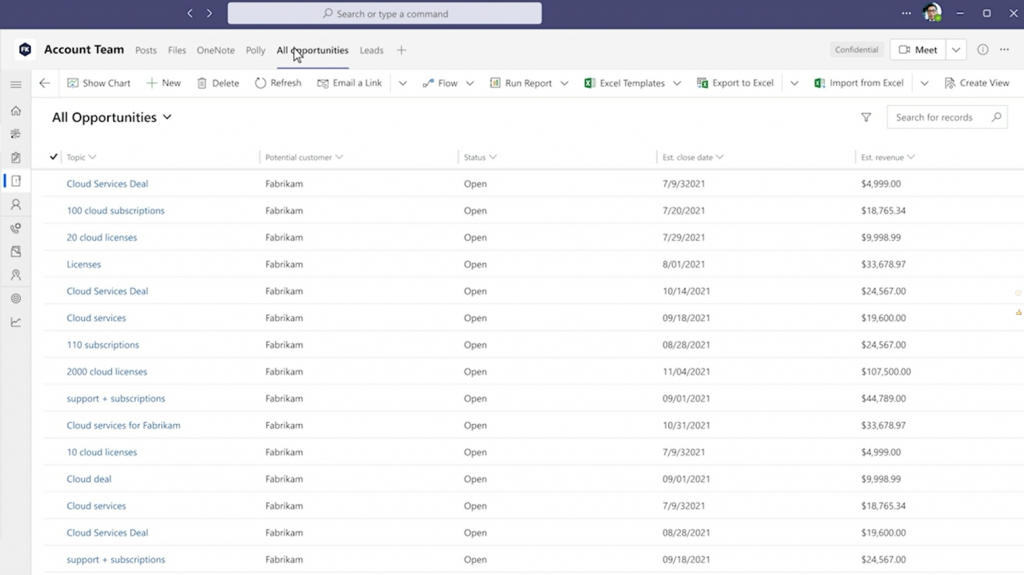
    What happens next in Alysa’s demo scenario is not entirely clear from a licensing perspective. The marketing executive performing the actions in this demo has also the access to any Dynamics 365 views pinned as Teams tabs. Also the full forms are accessible, including Command Bar buttons allowing record creation and editing.

    Whether these rights have been inherited merely from the Teams collaboration scenario depicted in the demo is not disclosed here. The user might as well be a fully licensed Dynamics 365 user and MS just wants to show off the seamless experience of working with CRM data within the Teams client.

    In addition to the licensing story, there’s also the access management angle that isn’t revealed in detail yet. Obviously not any person within your tenant will just automatically have access to records inside a Dataverse environment. Therefore the process of sharing the record with non-users of Dynamics 365 when attaching a record into a Teams message and mentioning users within a message is likely to have a lot of interesting new functionality for any Dynamics 365 admin or solution architect to consider.

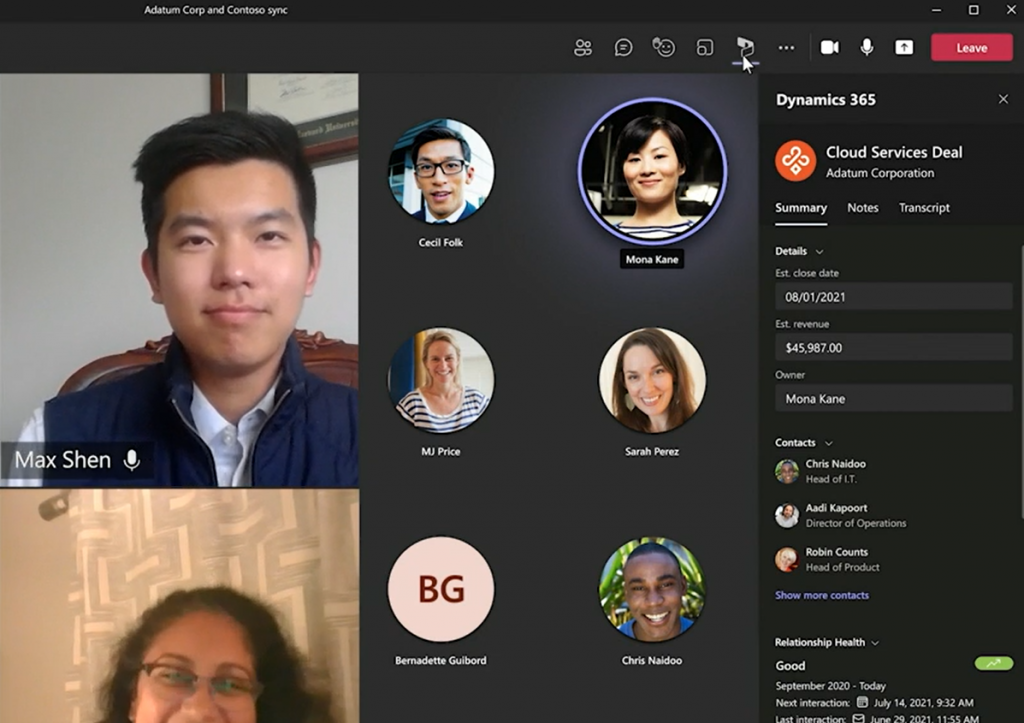
    Contextual presentation of business application data inside Teams is not limited only to channel messages or chat. Meetings can also be associated with Dynamics 365 records in the future, thus opening up further possibilities to make use of this new “free” access to Dynamics data for any Teams user.

    Licensing implications in practice

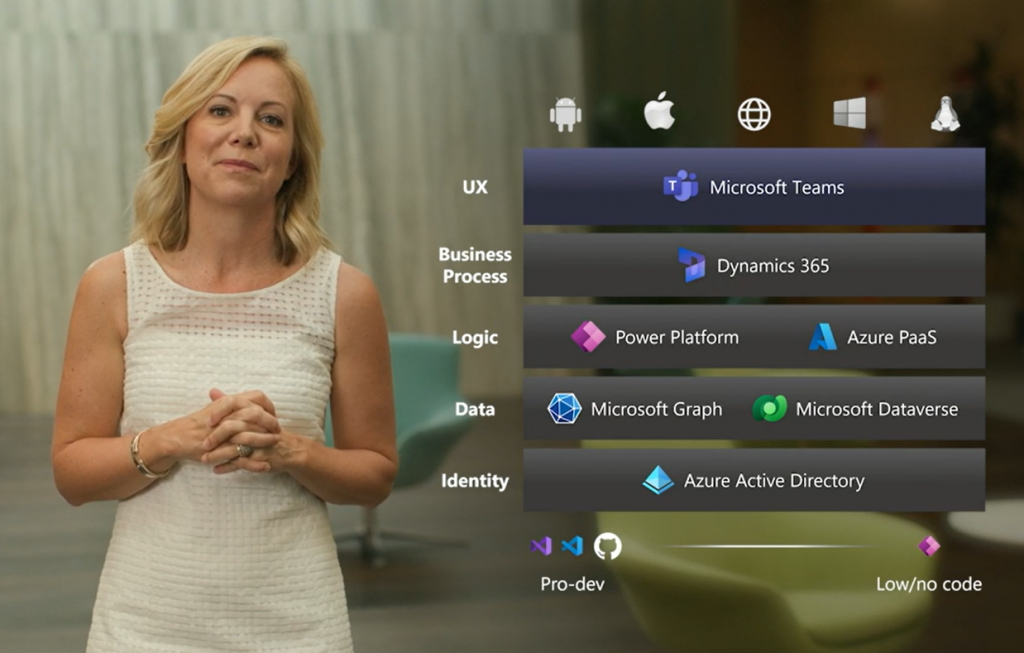
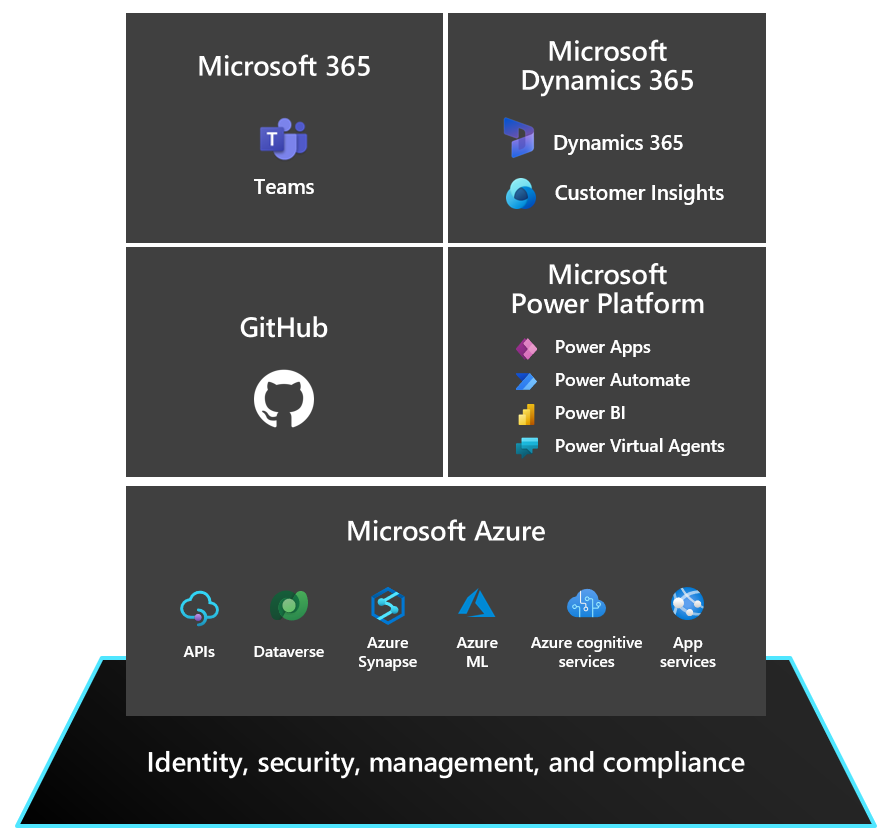
    Let’s think about the broader context of this licensing announcement. The big picture of what Microsoft wants to draw with their Collaborative Apps story is a stack like this:

    When I’ve drawn a similar diagram for customers I’ve labelled the top layer as “OS” rather than UX. Understandably MS may not want to rock the boat that much yet, keeping in mind that they also have concrete operating system announcements like Windows 365 and Windows 11 to pitch to the partner audience. Still, the logical layering is the same and that’s what matters. Teams is how MS can regain its relevance inside the users’ devices that are today running Android, iOS or even Linux. Therefore making things not just easy to use but “free” to use within Teams makes perfect sense.

    Dataverse for Teams has considerably lowered the barrier for organization wide usage of the low-code apps built on Power Platform tools, with its bundled rights to basic Dataverse features for no additional fee if used within Teams. To me, this Inspire announcement of unlocking access to Dynamics 365 data “without the licensing tax” (Microsoft’s words, not mine) is a logical continuation on this same path. You won’t get full features for free, but the upsell potential with the massive audience of Teams users globally is what makes this bargain lucrative for MS product teams.

    From a Dynamics 365 perspective, there are similarities here to the earlier Team Member licensing model that MS launched back when their CRM+ERP vision of a 365 cloud saw the light of day exactly 5 years ago. It was a $10 license that helped to close deals but ended up being a big headache for MS in practive. The launch of Power Apps as the official platform SKU eventually made the TM license pretty much redundant.

    Whereas Power Apps is the story for custom low-code apps, it isn’t exactly meant to be used for Dynamics 365 scenarios (if you ask MS). Yet the licensing terms currently do make it an interesting option for unlocking light use of Dynamics 365 data. Especially given the coming 50% price drop for Power Apps licenses, the fact that you can use these in a Dynamics 365 environment would certainly make them ever more interesting for customers to evaluate as an option.

    Depending on how far the read rights on Dynamics 365 data for Microsoft Teams users will actually go, this latest change might be able to deflect some of these Power Apps “misuse” threats. It’s a fact that not such a big share of a typical organization’s employees will need to work daily with updating CRM data, yet from a reporting and data referencing perspective it’s pretty darn valuable if you have access to the records within the customer data master system.

    If there’s one thing I hear from pretty much every customer (and many partners), it’s that they think Microsoft Business Applications licensing is complex. I’m hoping that whatever this new Dynamics 365 + Teams licensing announcement turns out to be in practice, it wouldn’t create more seemingly arbitrary lines for what data can be used in which context for what license. I’ll need to revisit this topic once we have the full story on today’s Inspire 2021 announcement, to see which way the licensing model is turning this time.

    Update 2021-07-22

    From the comments section in the original Dynamics 365 product team blog post for this announcement, we can gather the following details around Dynamics 365 privileges that will be embedded within Microsoft Teams:

    • Scope: “We are initially launching Teams experiences for Dynamics 365 Sales and Dynamics 365 Customer Service but working on the possibilities of additional experiences across the Dynamics 365 portfolio.” So, further CE scenarios like Field Service and the ERP side for HR, FinOps, BC will be covered later.
    • Schedule: “These experiences will start to become available as part of our Dynamics 365 Wave 2 release which begins in October.” As expected, 2021 Wave 2 release plan is where you should go and check the current target dates for public preview / early access / general availability dates for these Teams related features.
    • Technical implementation: “We are entitling all paid Microsoft Teams users with ‘Team Members’ level access to Dynamics 365 allowing Teams users to read Dynamics 365 data and action upon designated scenarios. These new connected experiences between Dynamics 365 and Teams will make it easier for Teams users to access Dynamics 365 records but only from within Microsoft Teams.” Quite similar then to the earlier technical enforcement of Team Member licensing on app module level. Except that direct browser access outside of Teams clients will be restricted, so presumably the current Dynamics 365 Team Member license SKU will still remain in place at $8 per user per month.

  • Power Apps pricing drops by 50%

    Power Apps pricing drops by 50%

    It’s not that common to see Microsoft make an announcement where the price of existing products is cut in half. Today, however, is a special day where we heard that the prices of Power Apps licenses are going to be reduced by 50% :

    • Power Apps per user: from $40/month to $20/month
    • Power Apps per app: from $10/month to $5/month

    Note that this is the new list price – not a temporary campaign price. Using Microsoft’s low-code application platform is therefore becoming considerably cheaper for all customers (eventually).

    More revenue via lower pricing

    What’s the story behind such a dramatic pricing change? Was Microsoft struggling with selling the platform to customers at the old price point? Well, we will of course never know the full details behind the business planning decisions and the calculations MS has been performing in their own Excels.

    My own interpretation is that there certainly hasn’t been any shortage of interest towards Power Apps from the customers’ side. What’s probably happening here is that the high ambitions Microsoft has set for scaling up the broad commercial coverage of Power Platform technologies within their customer base haven’t quite been met with the current pricing model introduced in October 2019. I can easily see how the speed at which low-code is taking over the world isn’t well aligned with the slow licensing agreement negotiation cycles around enterprise software. These are both a blessing and a curse for MS, compared to more nimble competitors in the low-code / no-code space.

    To address this need for pricing agility, Microsoft had already launched a promotional offer at the end of 2020 to give volume discounts on per user and per app licenses: $40 > $12 and $10 > $3 respectively. This offer basically made the previously confidential discount levels publicly available, giving a much better indication to larger customers about what the expected true cost level of Power Apps licenses would be. Since there are so many different potential user groups for low-code apps within a typical enterprise organization, it’s problematic if every team does their own business case calculations based on list prices. That doesn’t really deliver the optimal outcome for Microsoft who’d want to sell the one platform for the whole organization through a single high volume deal.

    Based on my discussions with customers, it’s pretty obvious that most of them are already confident with the technical abilities of Power Platform. What they are not very comfortable with is the complexity of how the platform has to be licensed. All the confusion and uncertainty is quite understandable, given the many moving parts and the licensing model that appears to have been in flux during the past couple of years.

    Any temporary campaign price isn’t necessarily going to alleviate the concerns customers have for the long term costs of licensing Power Platform premium features. Therefore I think Microsoft is looking to provide a clear signal that they’re targeting a very wide scale adoption of these low-code tools – not just for large business critical apps for specific audiences.

    Licensing implementation details

    Due to how the licensing contracts and MS price lists work, the new Power Apps license prices aren’t yet reflected in the public pricing site, as they’ll only come into effect on October 1st 2021. Any contracts made after that will get the new prices. Same for contracts that are renewed after October 1st. For any ongoing subscriptions the new price points are not applied automatically, because for good & bad, the prices for a customer are locked via these contracts. Keep that in mind when counting the near term costs of Power Apps for your users.

    The SKU (stock keeping unit) of the per user plan won’t change, the list price will just come down to $20. For the per app plan we’ll see the old SKU become discontinued and a brand new SKU launched on October 1st. This is because there is more to the changes than just a new figure on the price tag in the per app model.

    There’s been this peculiar twist in the original entitlement that allowed a single Power Apps per app pass to run 2 apps & 1 portal within a single environment. While the reasons for allowing both Canvas and Model-driven apps to be used in a single business scenario probably made sense in theory, this has been in practice very difficult for customers to comprehend. It must have also been a huge headache for MS to incorporate into their license reporting and technical enforcement within the platform. Changing the new per app license to cover a single app is therefore a very logical & welcome update. If you really need 2 apps, then just buy 2 per app passes for $10 – the total price is not increasing here, after all.

    These changes announced today are specific to Power Apps, which means that the Power Automate price points for per user and per flow remain untouched. This isn’t very surprising, since I believe Microsoft would rather see customers adopt both the app side and the automation side – not just run “invisible” flows behind the scenes. The Power Apps per user plan now gives you these for a small additional cost compared to Power Automate per user plan ($20 vs. $15). As for the other plans, the use cases for per flow process automation or the RPA capabilities are very distinct, in my opinion, so not much pressure should arise from this Power Apps pricing change for those.

    What about Dynamics?

    Two years ago when the per app plan was launched at $10, there was a lot of discussion on how this might cannibalize the Dynamics 365 products. Paying $95 for an Enterprise Sales license seemed pretty steep in comparison when you could build your own CRM on top of the same Power Platform tools and run it for a fraction of the cost. Well, it looks like the tribes of low-code cannibals didn’t take over the world and Dynamics 365 business has been growing nicely regardless of this move. There certainly is a growing number of “DIY CRM” type of solutions being used now via Power Apps, but one could argue that these customers and their scenarios might not have landed on MS cloud (or stayed there) if the lower priced option didn’t exist.

    During the past 1.5 years, after founding a company focused 100% on Power Platform and taking some distance from my prior Dynamics related work, it’s been eye-opening to talk with customers without wearing a CRM hat. Low-code application platforms are a discussion that concerns everyone, regardless of what systems they are using for managing their sales, marketing, service processes. You don’t really need to mention the word “Dynamics” at all in these discussions – unless the customer happens to be running them already. Whatever their CRM or ERP systems are, the Power Platform story is equally compelling when viewed from the broader Microsoft cloud perspective.

    When Ryan Cunningham, Power Apps product lead at MSFT, introduces the new pricing model announcement with the title “apps for everyone” – that should give you an idea of where the goals are set. You can’t sell Dynamics 365 to everyone, hence the higher pricing of these products. As for Power Apps, there aren’t many valid reasons why someone could not be target customer for them.

    The price will never be “right”

    Even with this 50% price reduction, I’m not expecting all customers (or even MS partners, strangely enough) to be happy with the licensing model for Power Apps premium features. As long as everything isn’t free, someone will always complain how the low-code platform pricing model of charging by app usage is “wrong” (instead of paying money for app development work and infrastructure operations).

    I don’t think we should expect that the full premium feature set of Power Apps would ever become a free bundle within Microsoft 365. More and more of these high value features like Dataverse for Teams are already “free” for existing customers. They help build up the scale of app usage (see the Teams as a platform story), but there has to be an upsell story to paid Power Platform services somewhere down the line. If there wasn’t, we wouldn’t see such huge investments into low-code capabilities from Microsoft.

    Platform licensing is the end game, not per app. Once customer organizations unlock the possibility for all their employees to run & build unlimited apps on the platform, that’s when the real transformation begins. There’s undeniable business value waiting behind that door, and that’s why it needs to have a price tag.

    Read more about Microsoft Business Applications licensing

    Check out my earlier blog posts in the licensing category.

  • Dataflex is more (and less) than CDS

    Dataflex is more (and less) than CDS

    It’s that time of the year again when big announcements have been lined up for Microsoft Inspire, the (virtual) conference for the MSFT partner ecosystem. Last year the Inspire announcements gave us a wealth of changes for the way how the Power Apps, Power Automate and Dynamics 365 licensing model worked, but all the product names remained the same (as far as I recall, at least). This year from Inspire 2020 the Business Applications part of Microsoft’s cloud is getting a bit of both. Say hello to Microsoft Dataflex!

    I have written an introductory post over on Forward Forever blog, “What is Microsoft Dataflex and who is it aimed at”, which you can check out to understand the impact from a customer organization perspective. Here on my personal blog I’m exploring the topic when viewed through the eyes of a long-time XRM professional.

    Abort mission!

    Microsoft will NOT use the name “Dataflex” to refer to the services described here, due to a blunder they’ve made with trademarks. Read this post for more details: There never was a Microsoft Dataflex.

    Dataflex Pro is the new CDS

    Let’s face it: “Common Data Service” wasn’t exactly the finest product name invented at Redmond. Originally it was introduced as Common Data Model, then later this name was switched to reference only the open source schema of CDM whereas the application platform and data management features became a service called CDS. In March 2018 the v1.0 of CDS was effectively put to rest as the far more established platform behind the Dynamics CRM / Dynamics 365 Customer Engagement apps, known as XRM, was rebranded to be “the new” Common Data Service (without the “new” or “v2.0” labels, of course, because why make things precise complicated). Actually it was called “Common Data Service for Apps” (CDS-T), since there was originally supposed to be a “Common Data Service for Analytics” (CDS-A) alongside the transactional platform. There never was, as CDS-A was rebranded as “Power BI dataflows” before GA, so we only had one Common Data Service left to talk about. Whew!

    After these adventures in the great platform shuffle of 2018, we did have some product name related announcement in 2019 as well, like the deprecation of Customer Engagement in the cloud, rebranding Microsoft Flow into Power Automate (where you still create Flows), and finally the “space program” for making PowerApps be spelled as Power Apps instead. In 2020, it had been eerily quiet in the product brand front, so I guess everyone was already expecting to see something once FY21 kicked off. As of today, July 21st, CDS is no more and the Dataflex chapter has begun.

    “Microsoft Dataflex” is not perhaps the most exciting name ever, but it’s certainly a better choice than Common Data Service. In part 4 of my series on Power Platform licensing complexity, I wrote that CDS should have rather been called “Power Platform”, due to its central role as the glue that ties the various MS low-code tools into a coherent platform. It’s a very unCommon service and it does a lot more than just host application data. Now, Dataflex on the other hand plays with the words “flexible” and “-plex”. The latter, when used as a noun combining form is described in Wiktionary as having the following origin:

    From the Latin past tense of plectere (“to weave, braid, twine, entwine”).

    Yes! That’s exactly what this technology does! It’s a platform that allows you to weave a set of processes, interfaces and data together, into an intertwined whole that is greater than the sum of its parts. It offers every developer flexible, no-code/low-code tools for achieving this. That’s how at least I intend to explain the meaning of Dataflex from now on, unless MS product marketing comes up with something even more compelling.

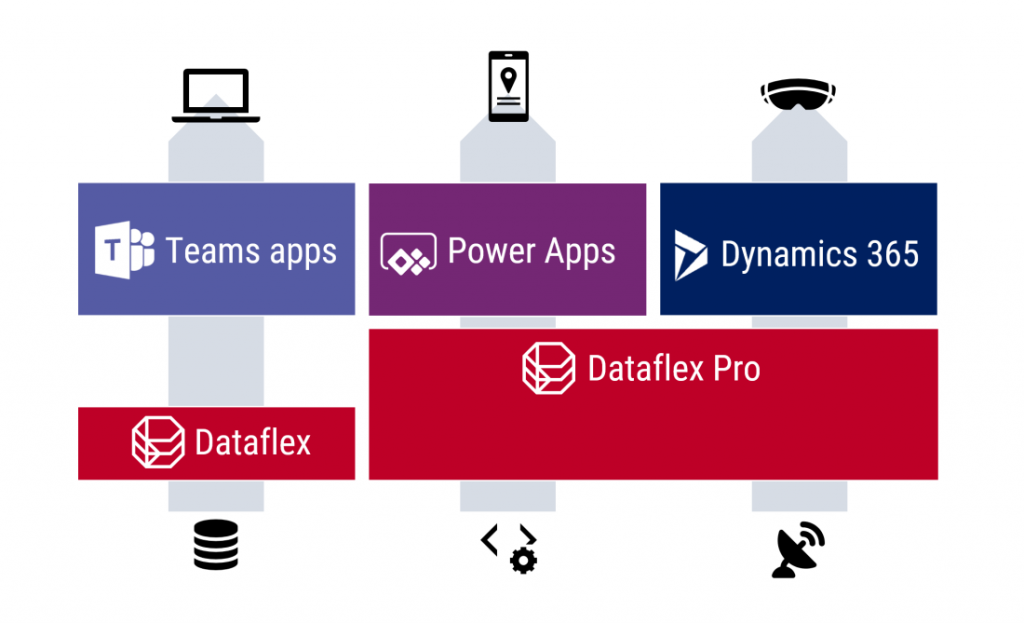
    Oh, there is of course one tiny detail to keep in mind: it’s actually Dataflex PRO. What Microsoft announced today at Inspire is a new service called Dataflex that is a subset of what CDS always used to offer. So, everyone who’s using CDS today is already on the Dataflex Pro version, whereas we’re about to get a preview of the non-Pro Dataflex in the coming weeks.

    Application platform for the masses: Dataflex (with Teams)

    If you’re coming from a Dynamics 365 background, the introduction of a “lite” version alongside the CDS/XRM platform capabilities might not sound so exciting at first. After all, from a pure functionality prespective Microsoft is taking away capabilities from the existing platform, to establish the baseline offering of Dataflex that customers can then upgrade to Dataflex Pro when needed. Some might dismiss it as just another licensing hurdle to worry about when trying to develop apps.

    From a commercial perspective, Dataflex is possibly the biggest thing that has ever happened to the platform formerly know as CDS/XRM. Biggest in terms of the number of potential app makers that will now have the possibility to build Power Apps on top of a true relational database instead of the dreaded SharePoint Lists. This is obviously the major immediate benefit from the announcement of Dataflex non-Pro, since in the previous licensing model the lines were drawn in a way that discouraged the use of CDS (or Azure SQL) databases for any Power Apps designed for light use scenarios – unless you had already acquired the full Power Platform license for your entire organization. With Dataflex usage rights bundled into Microsoft Teams at no extra cost, any user (internal or guest) with the necessary Office 365 / Microsoft 365 base license can now access Power Apps that leverage the true powers of a modern low-code application platform.

    You won’t get everything that CDS used to offer with just a Teams license now, of course. For starters, the only place from where you can access these app built on the non-Pro version of Dataflex is from within Microsoft Teams. None of the existing “players” for Power Apps will be supported, neither is embedding the apps to other UIs like SharePoint pages. Data types, security model, business logic, integration points, ALM… All of these will be far more limited on the “free” Dataflex than with the “real” application platform that is Dataflex Pro. For small apps aimed to be used by small-ish teams, though, I bet the Dataflex version will be good enough for a large percentage of use cases. It certainly is more advanced than SharePoint Lists, although the restrictions on app access points is more limited with the Teams based approach.

    Limitations can sometimes be a good thing. Dataflex is a simplified version of what CDS was, not just in terms of features but also the maker & admin experience. Do not underestimate how important this aspect can be in getting the citizen developers to make the right choice. Experienced CDS/XRM professionals may have been reluctant to move over to the new Maker Portal that is still missing features from the classic Solution Explorer. The new generation of app makers who have never even heard of these acronyms will most likely be happier within the Teams embedded app creation experience and give a higher NPS score to Power Apps as a result. Less is more, as they say.

    There’s going to be one Dataflex environment per Team that you can create, and the users will then map to the members of that Team, with a simplified user security role structure of Owner-Member-Guest (a.k.a. OMG). No business units or custom security role privileges to worry about, nor any complex data types like activities, polymorphic lookups, currencies etc. Yes, I know, most of the apps you’ve built already probably depend on those, but remember that this is not aimed at you! Dataflex Pro will have all of it and the non-Pro environments can be promoted to full capabilites, at which point they will require the same licenses as CDS does today.

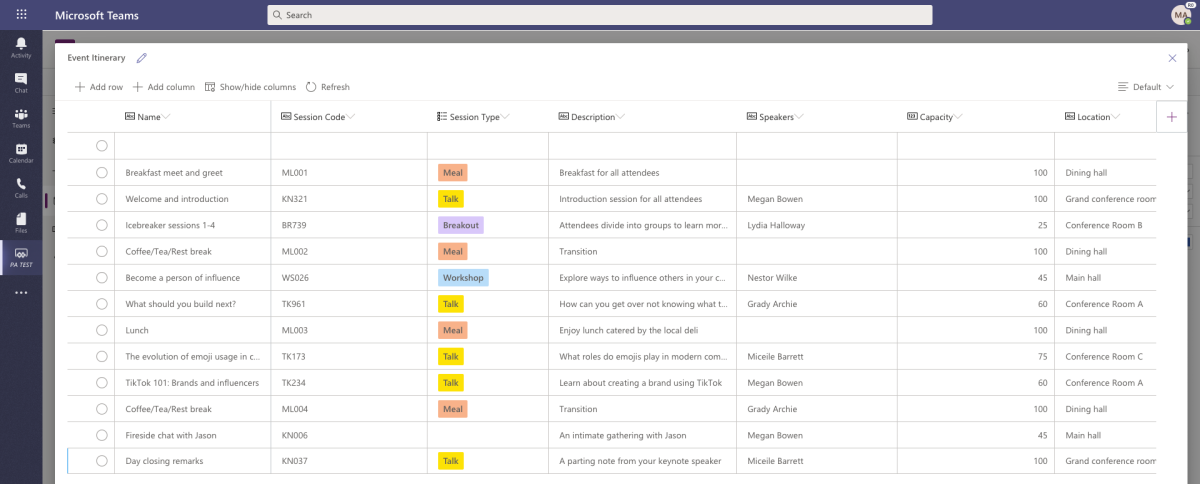
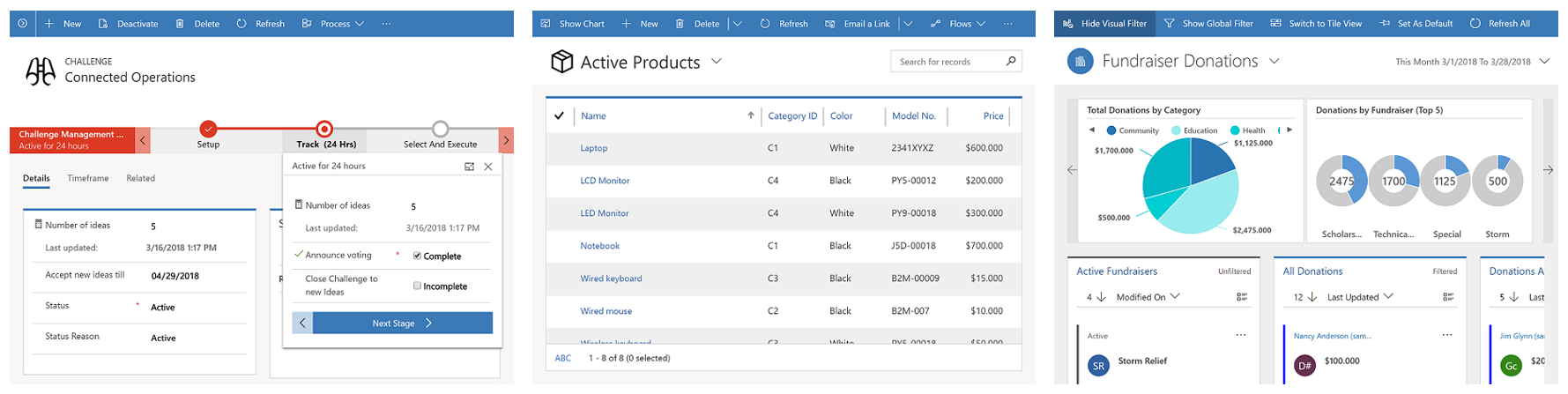
    This is still a Big Deal. With the “free” Dataflex included in Teams, Model-driven apps can soon be created by an equally large crowd as Canvas apps before. Eventually it might no longer be an awkward moment when you need to talk about “that Power Apps app type that looks like Dynamics, not like all the other apps you have”, since every app maker can generate those beautiful, structured UIs on top of the database tables they’ve added into Dataflex. Since Model-driven apps are so metadata driven, I’d imagine this route would actually be a lot easier for many power users of Excel that haven’t necessarily been comfortable with building pixel-pefect mobile UIs in Canvas apps before.

    Despite of everyone having the possibility to store app data inside Dataflex, it’s not by any means imperative that a single database is established as the place for all business data. That is the traditional CRM approach of doing things, but with the modern tools like Power Apps and Power Automate the source and target of data operations could be a number of different systems if needed, thanks to Connectors. However, I’ve understood that Premium Connectors will still not be included with the Teams license, so the options for data connectivity will be more limited here. This may again be perfectly fine for the simple apps that the non-Pro Dataflex is aimed to serve.

    One thing the free access to Dataflex should make ubiquitous is the usage of solutions for app packaging and ALM. As the solution framework is a concept from the XRM era, replacing the earlier standalone .zip packaging of apps and Flows required that everyone would get access to this layer in the underlying platform. From an administration perspective it should be a clear step forward to standardize all the work to be done with Dataflex tools. There is also the promise of further deployment options being introduced with the Teams app store and its “single click” app installation, so this is an area for everyone to keep an eye on.

    The business impact of Dataflex

    The launch of non-Pro Dataflex can be expected to generate a wealth of questions from those professionals who’ve been working with CDS based solutions. What is & isn’t supported in Dataflex, where do the license and capacity limits actually get drawn, how are they enforced, where can apps be created for different Dataflex environment types, what admin controls are available on the tenant level, and so on. It’ll be confusing initially, but in the end I bet it’s gonna be woth it for all parties in this ecosystem.

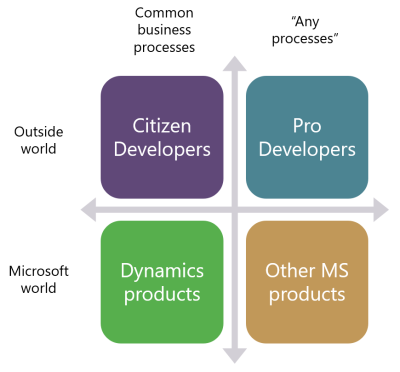
    One year ago I wrote a blog post examining the possible growth directions for Power Platform. This launch of Dataflex + Teams now broadens the scope of the platform both on the Citizen Developer dimension (number of potential app makers) but also in the “Other MS products” axis. Earlier I’ve enjoyed making the joke that one day Microsoft would build the next version of SharePoint on top of CDS. Well, that hasn’t quite happened yet (and most likely never will), but we did see a major step now in Power Platform catching up with the mainstream productivity apps in Office. After all, every time you create a new Teams team, a new SharePoint site is provisioned for it. We’re now at a point where technically each team could also have a Dataflex environment provisioned at the same time. Knowing this, what’s stopping future Teams features from being built on top of CDS Dataflex?

    As we can see from Ryan’s example, there are interesting synergies between Power Apps and Teams that are made possible by having Dataflex “on by default”. From a partner ecosystem perspective, over 500.000 organizations around the world who use Microsoft Teams just became a potential target for no-code solutions that could be dropped inside various teams. I’m saying no-code here instead of low-code because presumably the non-Pro Dataflex environment wouldn’t support custom code. Anyway, there’s a lot to investigate here with the Dataflex public preview coming in August and GA planned for September timeframe, so I will definitely be returning to cover the topic more closely once detailed feature lists are publicly available.

  • PPAC is your new Dynamics 365 Admin Center

    PPAC is your new Dynamics 365 Admin Center

    When talking to Microsoft cloud customers about Power Platform as the enabler for low-code app creation by citizen developers, we often find that also Dynamics 365 has already been deployed for one purpose or another within that organization. Typically it’s not the same people who are deeply engaged with the development of corporate wide CRM systems and these new type of agile solutions that Power Apps represents. Yet they share mostly the same architecture from a platform perspective (and increasingly on the client side, too), so the overlap and differences from an admin perspective are a source of confusion for many IT departments.

    Earlier it’s been perfectly possible to perceive the administrative tasks for these two ends of the MS Business Applications spectrum to be separete, since there has been different admin centers for all products. From now on, this will no longer be the case, as can be seen from a recent message posted by Microsoft in the M365 Message Center:

    Transition to Power Platform Admin Center (PPAC)

    We are reaching out to inform you that the Dynamics 365 admin center, Power Automate admin center and Power Apps admin center will be deprecated on June 30, 2020 and will be replaced with the Power Platform admin center. This change will provide a unified portal to manage your environments and settings within Dynamics 365 and Power Platform. To learn more about its capabilities, please visit this site.

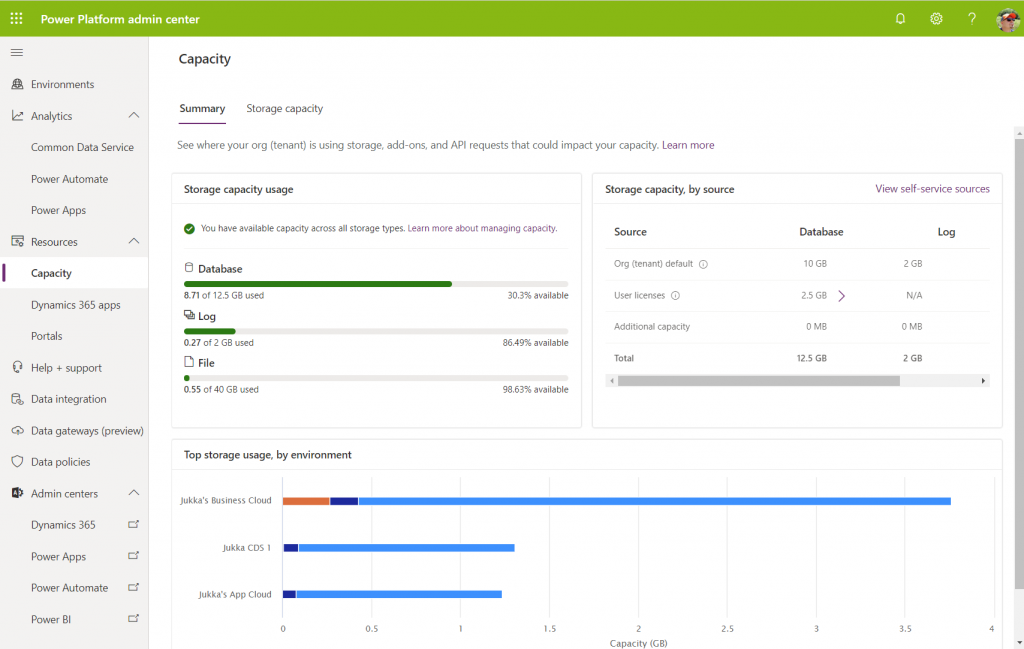
    I don’t think many people (well, anyone, to be honest) will miss the Power Apps or Power Automate admin centers, as these have always been corners of the Power Platform that mostly served to confuse admins rather than offer them a clear view of what they can & need to manage. The new Power Platform Admin Center (a.k.a. PPAC, accessible via https://aka.ms/ppac) has been an easy sell for this audience, as it has offered a single place for common features like capacity management and analytics.

    As for the Dynamics 365 Admin Center, that has been around much longer than the whole Power Platform concept. Originally built to be the CRM Online Admin Center, it has been the place for all instance management actions (sandbox copies/resets), version updates, features related to 1st-party apps and AppSource solutions, even Dynamics 365 Portals administration. It never was a sight for sore eyes either, but it served as the toolkit for Dynamics CRM pros to get the admin job done. And now it’s going away:

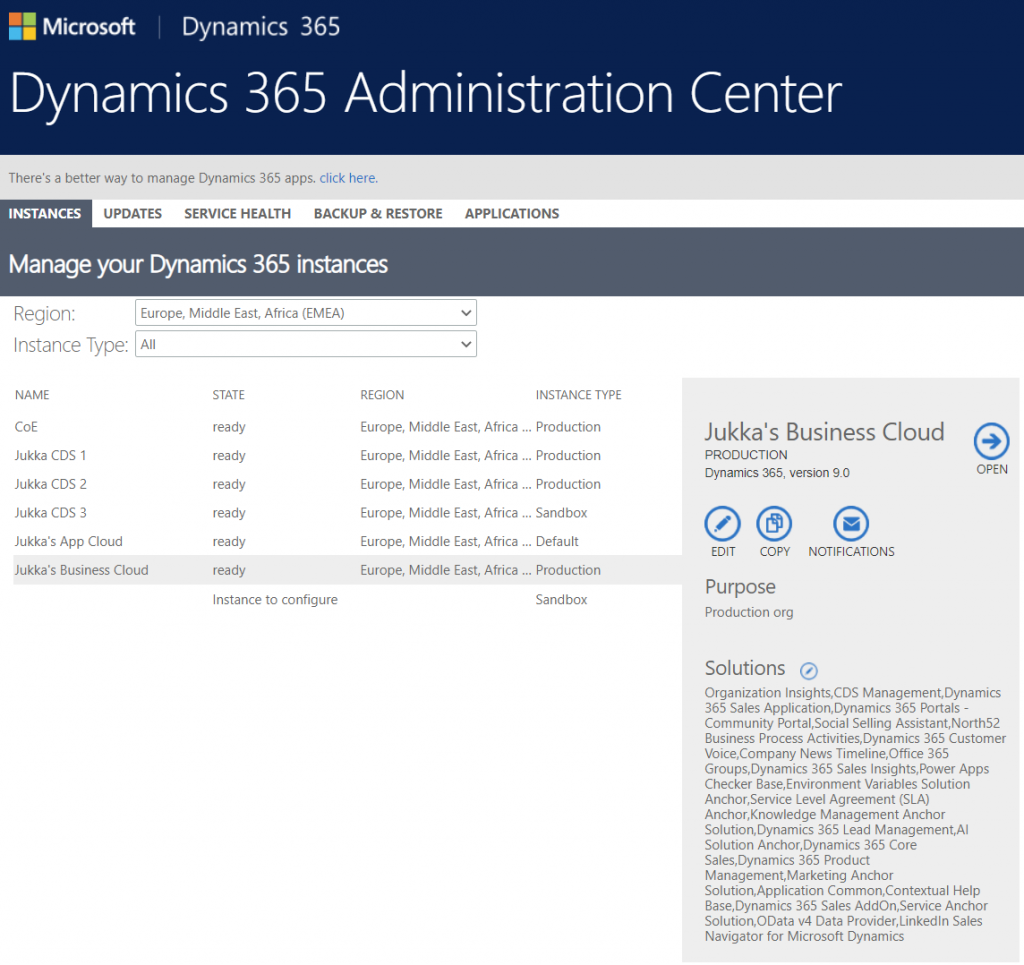
    Just in case you’re reading this after July 31st and you don’t get to admire the old Admin Center anymore, below is what the experience used to be like. Let’s have a look at each of the available tabs and how they now map to features in PPAC.

    Instances was the equivalent of what is nowadays called environments. Due to sharing the same back-end architecture, the Dynamics 365 Admin Center has displayed also CDS environments that had no relationship to Dynamics 365 products for over 2 years already. On the other hand, the new environments view in PPAC does not reveal the information about whether Dynamics 365 apps are in place or not, so prepare to have some other mechanism like the CoE Starter Kit to help you keep track of what apps are in which environments.

    Updates became a redundant tab some time ago, as Microsoft removed the need for customers to schedule their environment version updates via the Customer Driven Update mechanism. Today the continuous deployment mechanism will roll out the new versions to all customers on the same date (per geo), according to the timeline communicated on the Dynamics 365 release schedule and early access page, following the geo specific dates on the GA deployment page.

    Service health is of course an important topic, but the actual information about service outages and other issues has been incorporated into the Microsoft 365 Service Health dashboard common to all business services in the MS public cloud. PPAC environments list does have a “State” column that could presumably indicate if there is a specific issue that’s not affecting all customers, simliar to what the Dynamics 365 Admin Center view on instance health offered.

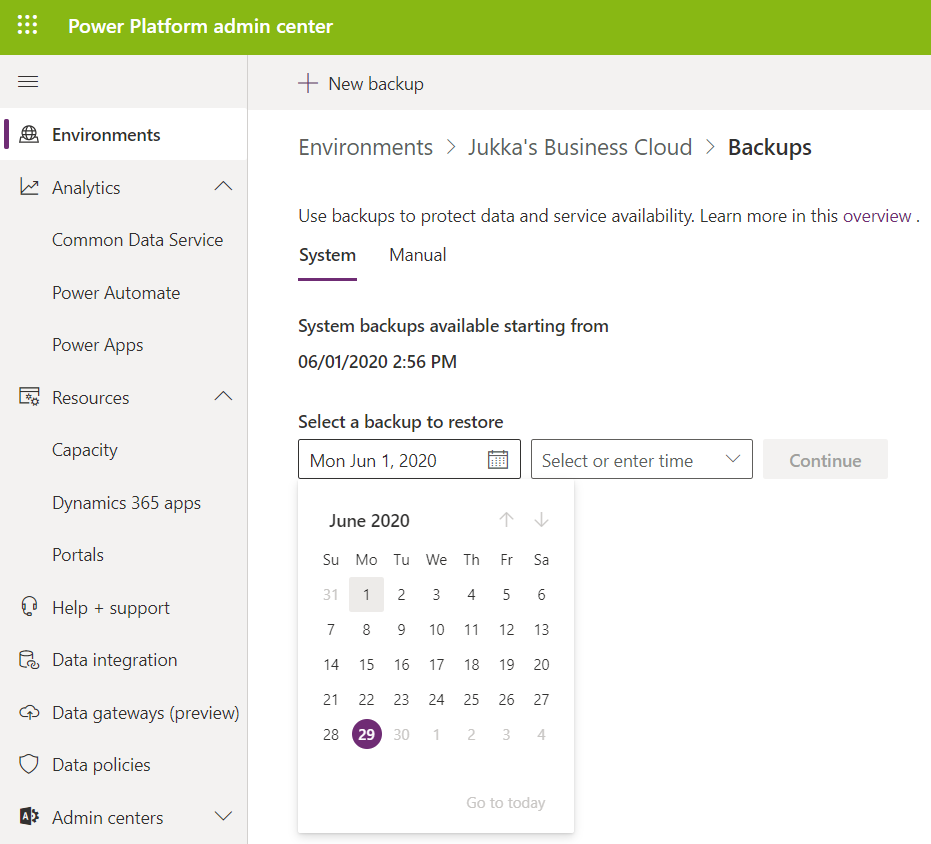
    Backup & restore has already been forwarding folks into PPAC for a while now, so obviously all the features needed for environment creation, copies etc. has been transitioned there. Backups is actually vastly improved compared to the Dynamics CRM days, since now we can freely choose any point in time from past 28 days to return to, with no specific backup actions needed from the admins. This is thanks to the Automated Backups feature of Azure SQL, now available for Dynamics 365 based business applications environments. It’s worth noting that “naked CDS” environments and sandboxes only get 7 days of backups, though.

    What about application updates?

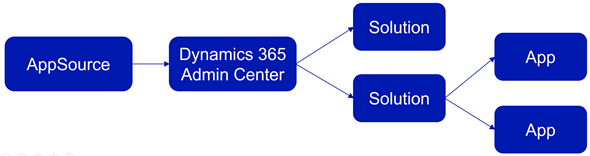
    The CDS core platform itself follows the update schedule outlined above, but the lifecycle of the actual apps that run on the platform has been a separate story. In fact, the whole concept of what an “App” exactly is was complex already before the merging of XRM and Power Apps into a single platform, thanks to what the App Module in Unified Interface and AppSource as a delivery channel were trying to use that particular concept for. Back in January 2018 I tried to explain this scenario with an illustration like the one below. Now with Canvas Apps and Model-driven Apps thrown into the mix, it’s probably a topic worth a whole blog post of its own to once again try and decypher the various meanings of those three innocent looking letters…

    The Applications tab in Dynamics 365 Admin Center was always a bit of a mystery. It seemed like a bin of random links to app specific configuration pages hosted outside of the Power Platform. Whatever was there can surely be put better into context somewhere else.

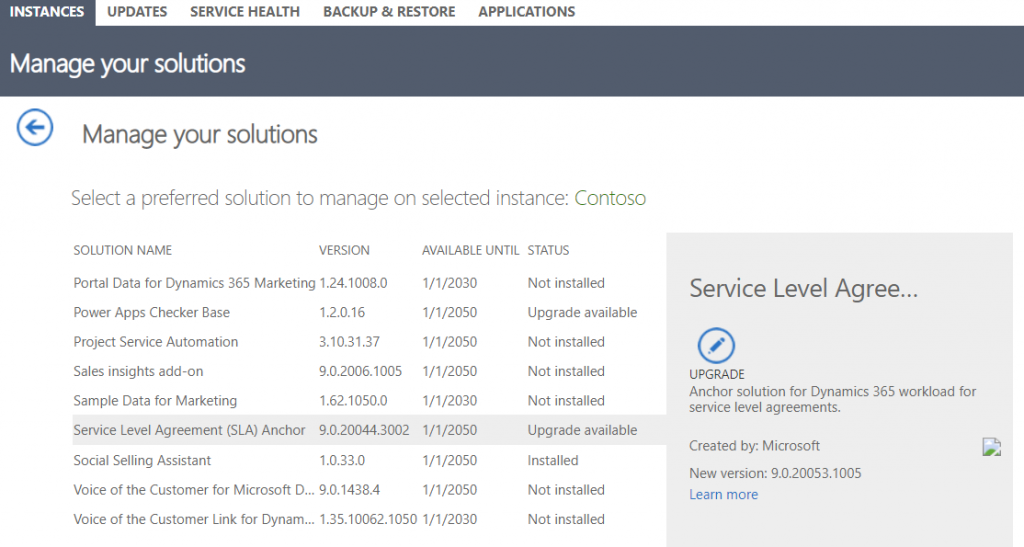
    Then there was that other place for your apps – meaning the environment specific list of solutions found inside Dynamics 365 Admin Center after you selected an instance. Clicking on the Solutions icon gave you a list of solutions that were either “installed”, “not installed”, “installation failed” or “upgrade available”. Here’s an example:

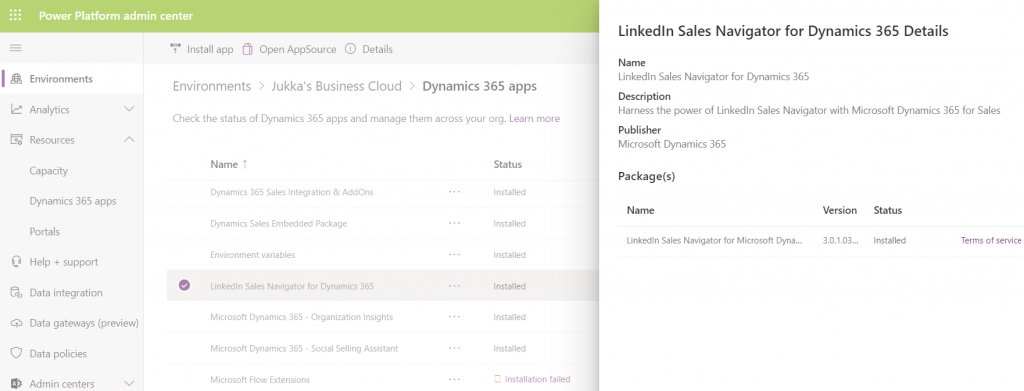
    Looking for this same information within PPAC, I see that I can select an environment, go to its Dynamcis 365 apps from the Resources box and browse through a list that resembles the old view (yet doesn’t have the exact same solutions). One thing that’s not very well presented is the version numbers, which you have to dig out via a hover action to get the last digits:

    As of today, there isn’t a way for you to upgrade solutions from here. Nor will you see if there is an upgrade available. In the example, there would actually be an update to LinkedIn Sales Navigator, which I see from the classic Admin Portal. I can also manually install that solution if I go to “install app”, select the app I already have, then re-install it (thanks for the tip, Joris!). I’ve been informed that there will be an fix applied to PPAC shortly that will make the Update option visible in the list of apps for the tenant, as described in the documentation page Manage Dynamics 365 apps.

    Regardless of the navigation path, though, I believe the concept of an Update button is from a bygone era. In the best case you should not see such an option anywhere. Zero-click updates are the way to go.

    Let’s step back for a moment and think about how the old solution upgrade experience worked. In order to know that there was something new for me as an admin to deploy, I had to open each environment’s Solutions list, browse through the paginated list of solutions that were either installed or not installed, then spot one that said “upgrade available”. OK, I see there is “Service Level Agreement (SLA) Anchor” that could be moved up from the deployed version 9.0.20044.3002. to 9.0.20053.1005. Great. So what’s new in that and how will that impact my applications?

    *Crickets*

    That’s the response to basically all solutions ever offered via the old Admin Portal. I don’t think the “Learn more” link associated with the solution upgrade has ever taken me to a page that had proper release notes specific to the solution in question. At best it’s a link to product documentation, at worst it’s a complete placeholder link to microsoft.com that was inputed because the field has been set as required in the solution publishing process.

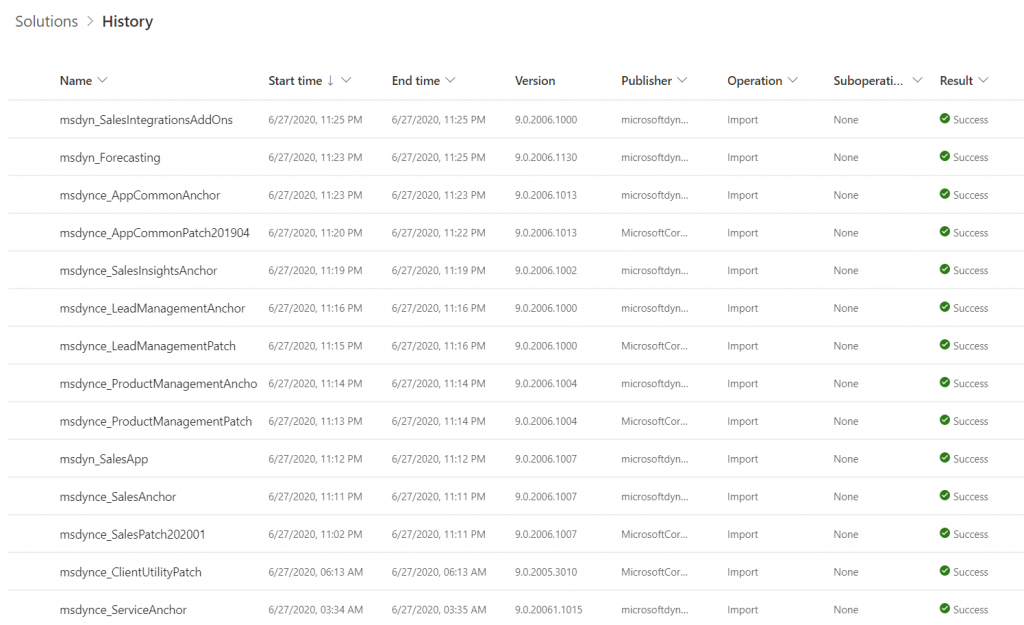
    Obviously this wasn’t the way to go, so a new direction was needed. After all, it makes no sense to require an admin to perform the upgrade steps for a solution when he or she cannot make a meaningful go/no-go decision about it due to lack of information. While there is a beautiful illusion of control in having an “Update” button to click, it’s important for everyone to understand that Microsoft has already been pushing weekly (sometimes daily) updates to tens and tens of internal solutions in your Dynamics 365 environments. You can view this list from the Power Apps Maker Portal (not directly from PPAC unfortunately), under Solutions – See history.

    Automatic updates are the way to go, not just for the platform but also the apps. Dynamics 365 app teams have published their Automatic Update Policy posts for Field Service, Project Service and most recently Marketing. Running manual solution upgrades through the Admin Portal isn’t really a part of this modern world anymore. Therefore it shouldn’t make much difference how or where this is presented in PPAC. What you should care more about in the new Admin Center is seeing how the various apps across all your tenant’s environments are doing in terms of capacity consumption, usage analytics, do you have the necessary DLP policies in place and so on. The role of a Power Platform Administrator can be quite different than what the traditional CRM admins were used to, so it’s natural that the admin tools will also need to evolve to better reflect this.

  • Time to go Forward with 2020 Wave 1 (webinar)

    Time to go Forward with 2020 Wave 1 (webinar)

    Our company, Forward Forever, is 1 month old today!🥳 It’s truly been exciting times starting a company that goes all-in on Microsoft Power Platform. And that’s even without considering all the surprise elements that COVID-19 is bringing into the equation right now…

    The start of April also happens to be the official launch moment for Microsoft Business Applications 2020 Release Wave 1. Since MS will host their own Virtual Launch Event on April 2nd, we though this is a good moment to also set up the first ever FF webinar. So, without further introducions, here it is:

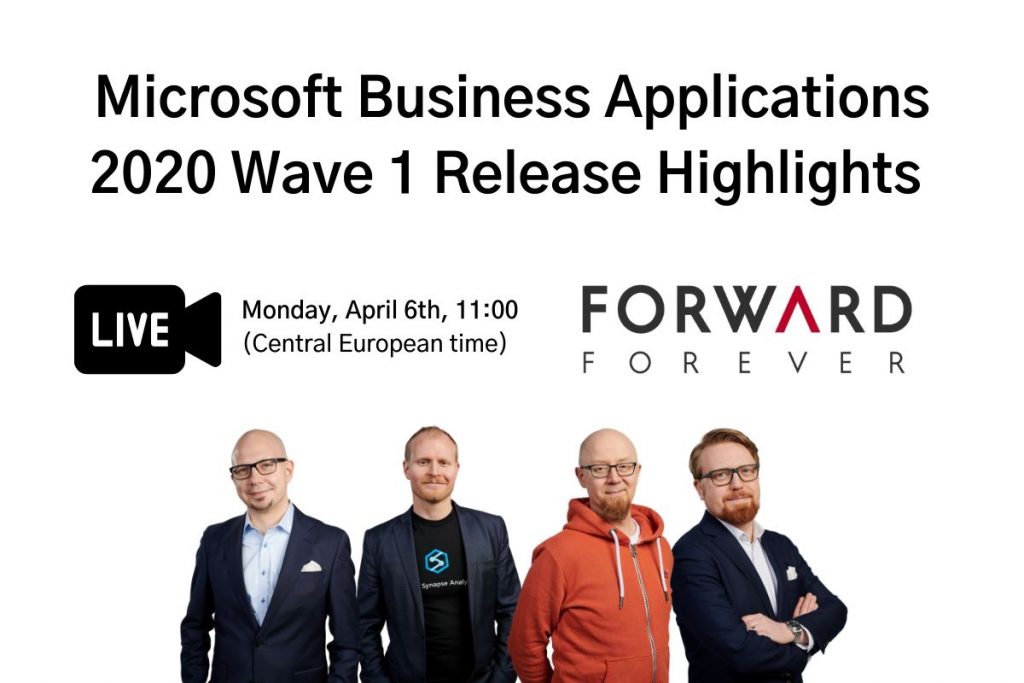
    Please join me, MVP Timo Pertilä, Jouko Nyholm and Lasse Teeriaho in our 2020 Wave 1 Release Highlights webinar on Monday, April 6th, 11:00 AM (Central European Time). We’ll be talking about the coolest Power Apps, Power Automate, Power BI and Dynamics 365 features in this April-September release wave, as well as analyzing the many demos that MS will undoubtedly show in their own event.

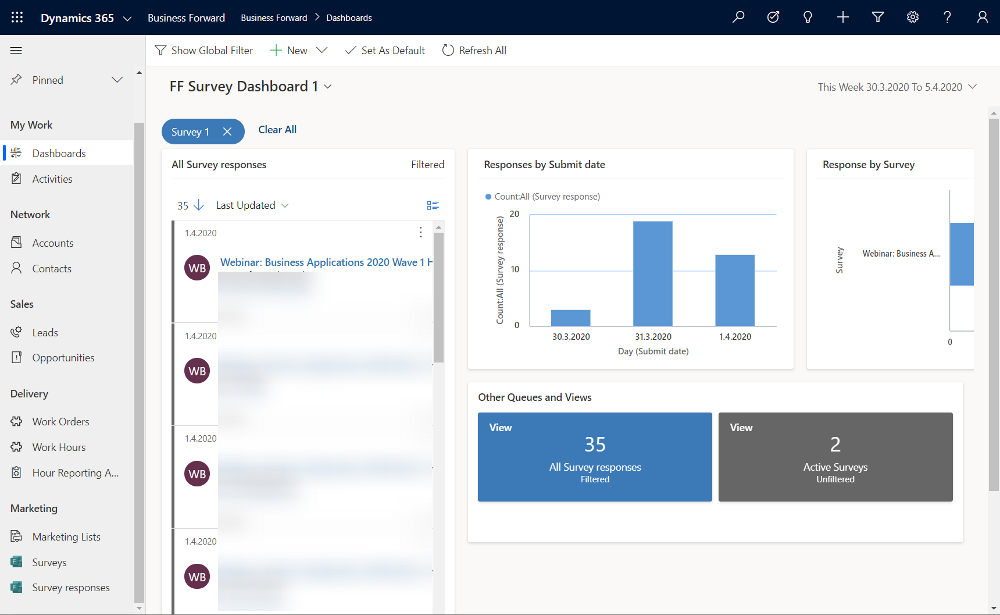
    Just fill this Forms Pro form, which will create a record in our CDS, then trigger Power Automate to send you an ICS calendar invite file hosted on my OneDrive. The link for the Teams Live Event will go live on Monday, if everything works according to plan. Yes, obviously we need to be dogfooding these tools in everything we do😊

    Register for our webinar!

    First 50 people get in for free, the rest will have to… Oh, alright then – you’re all welcome to join our event, no strings attached.

  • Highlights from TechDays Finland 2020

    Highlights from TechDays Finland 2020

    March 5-6 marked the annual conference for Microsoft geeks in Finland to gather in Messukeskus Convention Center and enjoy two days full of expert sessions on the latest MS technologies and real life stories on how all this tech is making an impact out there. In this blog post I’ll reflect on the sessions that I attended at TechDays this year and share some thoughts on what I think are topics worth exploring more. You’ll also find links to slides and a few social media posts from the event.

    Let’s get one thing straight first: Power Platform is everywhere these days. Even a Microsoft IT & Dev conference like TechDays 2020 was opened with a keynote presentation that stared with the 4 pillars we’ve come to know from the Digital Feedback Loop, familiar to all Dynamics 365 professionals by now. Engage customers. Empower employees. Transform products. Optimize operations. The goal of digitally transforming organizations has become the overarching theme of Microsoft’s product offering, supported by global cloud infrastructure, enabled by Azure services, integrated with Office 365 productivity tools and ultimately unlocked by the apps created on top of Power Platform.

    For many of the attendees, the journey of how exactly we’ve reached this tipping point of low-code applications isn’t necessarily familiar yet. For us at Forward Forever, a new technology agency focused 100% on Power Platform, being able to participate in discussions with MS tech professionals around this theme was of course of highest importance. Our whole team was present for the 2 days of the event, to ensure we’ve got a thorough understanding of the state of the ecosystem. Thanks to everyone we had a chance to meet at TechDays! Lots of great dialogue and awesome feedback to encourage us to push forward with the vision that we have for our new company.

    Our very own Power Platform guru Timo Pertilä had two sessions at this year’s event. The first one was aimed at the broader audience of non-PP professionals, to help them get started on creating Power Apps Canvas apps. Timo gave us the kind of tips he wished he had been given back in 2016 when starting to explore these tools. When it comes to Canvas apps, the most important step is to A) decide on an app that you would actually want to use yourself and then B) just creating it! Following along the lines of a simple IT asset management app built on top of a SharePoint list, Timo’s session went through all the common areas that an app maker should be aware of. I encourage everyone to pick a training lab from one of the many Power Apps learning resources and just follow through a scenario, to understand how these new tools can really democratize the creation of simple business apps on top of existing data sources.

    [Slides]

    The second session by Timo was about exploring the capabilities of the new UI Flows in Power Automate. RPA, Robotic Process Automation, is a smoking hot topic and the addition of such capabilities into Microsoft Power Platform has gotten even cool-headed Finns like Timo excited about the new opportunities. Yes, while integrating software properly via API based automation remains the core of what Power Automate excels at, the option to connect to systems that for one reason or another can’t be accessed via APIs can close the final gaps and turning manual processes fully digital. In the TechDays session we saw a demo story of an employee onboarding process for HR deparments. Using UI Flows to create user accounts in a non-API enabled legacy system such as Microsoft Access is now possible with these graphical tools that record the steps in the UI and then execute them by using variables like employee name as inputs from other parts of the Power Automate flow.

    [Slides]

    Although the use of a “proper” relational data management system like CDS would be preferable in building apps for enterprise wide use, the fact is that SharePoint remains both a commonly used as well as easily accessible data store for many citizen developers. The session by Mikko Koskinen showed us how you can leverage tools from the Power Platform to improve the user experience and also auditability of actions that users take on SP list and document data. Custom forms built as Canvas apps and process automation implemented as Flows can do wonders to your SharePoint based business apps, and of course they also open up the connectivity to many other Microsoft services to further extend the feature set as the demands of enterprise customers evolve beyond Office. Having a common set of low-code customization tools across the whole MS stack is where the real Power of the Platform lies.

    Microsoft Teams is becoming ubiquitous in the business world as pretty much all organizations on Office 365 are moving away from Skype for Business. The end result of this mass exodus towards Teams may not always be the automatic improvement of teamwork and employee productivity, if all you do is enable the licenses and activate the new services. The Teams MVP duo Vesa Nopanen and Karoliina Kettukari delivered an entertaining story of the rogue cowboys (end users) vs. the central command center (IT department) and how their perspectives on how Microsoft Teams should be implemented and managed can differ wildly. There are plenty of smart settings that the IT guys could automate behind the scenes for a more productive workday experience, but at the end of the day, a lot of the everyday usage of Teams relies on the real life teams to agree on common practices and expectations on how everyone will use the software tools. Educating and encouraging both parties to do their part is therefore essential for achieving success with MS Teams adoption.

    [Slides]

    Teams is not just a communication tool, though. It is quickly becoming a platform, which from my perspective is the most exciting aspect in its rise to popularity, since this paves way for a wealth of scenarios to better leverage Power Platform tools for a broad information worker audience. MVP Christina Wheeler presented us to path on how to get started with developing Apps for Microsoft Teams. It’s worth exploring the wealth of Teams App Templates that MS has published on GitHub, as these will give you many ideas on how to link various Azure services into the UI that your people are spending a growing part of their days working in. From a low-code development perspective, though, the options for bringing in Power Apps into the Teams navigation experience is the low-hanging fruit that you’ll also want to explore.

    Another super hot MS technology alongside the low-code Power Platform and ubiquitous Teams is Azure Synapse Analytics. In the TechDays 2020 keynote, Data Platform MVP Vesa Tikkanen and Anne Komscha from Stora Enso presented what opportunities this brand new cloud analytics offering from Microsoft opens up for organizations to rethink their data architecture. Vesa demonstrated the unique capabilities that Synapse brings to the table by connecting to and from a SQL Server 2000 virtual machine to the modern data cloud. It’s therefore not a “rip & replace all the things!!1!” type of a scenario where Microsoft is aiming at here, rather they are playing on the compatibility card here and ensuring that your complete data estate can connect with Synapse. Thinking about the Customer Data Platform scenarios where this same underlying technology will be leveraged to identify customer profiles from various sources, it’s easy to understand why MS is so bullish on their position in the emerging CDP market.

    As your data and your apps are all either moving to or at least being connected with Azure, it’s no wonder that questions on how should we secure all of this are bound to surface more and more. Azure MVP Karl Ots explained the role of security in the cloud adoption journey to a packed room full of MS tech professionals that probably have all done hands-on experimentation with many Azure services yet not necessarily paid attention to how to limit access instead of enabling it for their own super admin accounts. Role-based Access Control (RBAC) gives you a comprehensive toolkit to configure the permissions in alignment with the identified parties who need to access resources in your subscription, but it may still come as a surprise how much rights can be inherited from the top down to the individual resources if your model isn’t well planned out.

    [Slides]

    Rob Kuehfus from Microsoft presented a possible solution for approaching the wider journey to the cloud: Cloud Adoption Framework for Azure. This represents MS efforts to consolidate their earlier fragmented whitepapers and information sources (up to 40 earlier, based on what Rob told) into a single source of guidance and best practices on what to do on each step towards the cloud. From planning the organizational roles needed on the journey to building focused “landing zones” where the first customer workloads can be dropped on, this framework should become the go-to resource for establishing common understanding between customers and partners on what’s actually needed when adopting Azure at scale inside an enterprise organization.

    [Docs: Microsoft Cloud Adoption Framework for Azure]

    As an example of one customer organization that has taken the steps recently, the Azure adoption story of Terveystalo was presented by Development Director Ilari Richardt and Polar Squad’s Azure Lead Masi Malmi. Terveystalo is one of the two private healthcare giants in Finland and their history is full of consolidation projects, which makes it all the more impressive how throughout history they have aimed at having a single patient information system in place. The decision to choose Dynamics 365 as their CRM and ERP systems actually ended up driving also the custom software development investments towards Azure and now building modern DevOps practices in the MS cloud are a key focus area. Bridging the cloud and on-prem wolds in healthcare naturally involved building a lot of APIs and Masi’s exploration of the capabilities of Azure API Management has produced some interesting findings on what the challenges are on this front.

    Last and probably least… OK, definitely not the least. Mr. Järjestelmänvalvoja a.k.a. firsname.lastname, also referred to as Sami Laiho, wrapped up TechDays 2020 with his packed session on the main arena. Even though I myself have very little to do with managing endpoint security on a professional level, it’s always interesting to hear what the world of securing the Windows laptops and the Azure resources accessed via the credentials used on those laptops actually looks like out there in the enterprise space. It doesn’t make much sense to aim for 100% security, but you just need to be better secured than your neighbor. Considering that just by enabling multi-factor authentication you’re already more secure than 99.9% of the compromised accounts out there, this isn’t always rocket science but rather behavioral science. Sami’s examples of the extent to which people (employees and CIOs alike) go to in their effort to remove inconveniences that could actually put them into near 100% safety is a welcome reminder to all of us that any new innovations we come up with in the information technology space will need to pass the “but what would humans do with it” test before achieving real, tangible results.

    [Slides]