Category: News and events

  • My agenda for TechDays Finland 2020

    My agenda for TechDays Finland 2020

    One of the reasons why I changed my blog from “Surviving CRM” to “Thinking Forward” was to give me more space to cover topics that don’t necessarily fit under the umbrella of Dynamics 365. Yes, Power Platform is naturally one of the big drivers for this broadening of the scope, but I see a whole range of technologies in the Microsoft Cloud that are becoming more & more relevant for anyone who’s designing and delivering business solutions to customers. Broad awareness of the stack combined with deep expertise in specific fields is what I believe is needed to survive and thrive in my line of work. You could call this the path of the specialized generalist, or “T-shaped people who run the world”.

    How does one go about building up this awareness of Microsoft Cloud technologies? All the required information is of course out there in the great wide Internet, but the big questions are A) what would be the most relevant topics right now for me to search guidance on, and B) how could I make this new knowledge stick? In order to create a memory footprint that will still remain after I’ve moved on from one browser tab to the next, sometimes it helps when you can associate things with something tangible from the physical world. People, places, events, moments.

    The big event of the year for the Microsoft minded crowd of IT professionals in Finland is TechDays, which is on March 5-6 this year. I’ve got fond memories of the first time I attended this conference in 2011, when Dynamics CRM 2011 & CRM Online had just been launched and there was a dedicated track for this exciting new version & cloud service (which I naturally covered in my Finnish CRM blog at the time). Now, I have to admit that level of exposure to MS BizApps didn’t exactly become the norm for the event, because for a long time the MBS unit and its Dynamics products remained on the fringe of the mainstream Microsoft product portfolio.

    Today things are different. No, you still wouldn’t find a CRM session from the TechDays 2020 agenda, but you wouldn’t find one in Microsoft’s list of products sold, either. What you will find instead is Power Platform being promoted as the common customization layer for both Office and Dynamics products. You’ll encounter a growing number of Azure services being turned into Insights products in the Dynamics 365 portfolio. You’ll see Microsoft promoting a platform for every developer, from professionals to citizens. You’ll hear Satya being bullish in MSFT earnings calls about their Customer Data Platform, powered by Dynamics 365 + Data Platform.

    That’s how the story has evolved and this is the new reality in which the customer solutions must be designed: making use of all we have, not just what we’re familiar with. So, let’s look at the TechDays 2020 Finland session list with this in mind. Here are my top 3 sessions picked from the domains that I consider highly relevant for business applications professionals that want to understand the bigger picture of MS Cloud: Power Platform, Data Platform, Azure, Microsoft 365. I will also try to do a post event summary of the sessions I managed to attend and share the key takeways.

    Power Platform

    “Power Apps – Miten pääsen alkuun ja vielä pidemmälle?” by MVP Timo Pertilä. “Encrypted in Finnish” yet consisting 100% of demos, this session is going to help you kickstart your Power Apps (Canvas) app building journey for sure.

    “How to build RPA solutions with UI Flows” by Timo once again. Robotic Process Automation is one of the hottest areas in business software and MS has only very recently entered the game with Power Automate’s new UI Flows that are aiming for GA in June. How far are they already? We’re about to find out!

    “Developing enterprise-ready solutions with Power Platform and SharePoint” by Mikko Koskinen. Even if there is native support for CDS in Power Platform, the Connectors to SharePoint are bound to be the most common data source/target for apps today. Understanding how to leverage these in scenarios that go beyond citizen developed apps is therefore quite important.

    Data Platform

    “Azure Synapse: The day when relational and unrelational folks became friends forever!” by MVP Vesa Tikkanen. For us XRM folks who’ve had a fixation for building a relational data model for everything we do, it’s time to dip our toes into the lakes of non-relational business data that is needed in so many scenarios (like the CDP example).

    “Building an Empire – Implementing Power BI Step by Step” by MVP Alexander Arvidsson. I’ll be the first to admit that of all the key pillars in Power Platform, Power BI is where I have the least hands-on experience so far. Therefore the promise of crafting the PBI solution from the absolute beginning and working our way towards Power BI dataflows sounds like just the thing for me!

    “Introduction to Azure Databricks” by MVP Oskari Heikkinen. Going big in the data field requires courage to explore technologies like the Apache Spark based Databricks and understand how they relate to MS developed services in Azure.

    Azure

    “Selecting the right Azure products for your Azure PaaS project” by MVP Sakari Nahi. Just because I know how to sprinkle some #azure hashtags on my social media posts, that doesn’t mean I would have the capacity to keep an eye on all the products that are being launched there. I’m convinced that Sakke from Zure can give a Power Platform “aPaaS” guy like me a nice crash course on what the “PaaS with no training wheels” consists of.

    “Need to know Azure services as a Microsoft 365 developer” by MVP Laura Kokkarinen. I bet there are similar mental barriers in reaching into raw Azure, no matter if you’re extending Dynamics 365 or Office 365 based solutions. It’ always interesting to hear how the professionals from the cloud next door are tapping into “The World’s Computer” when delivering customer specific solutions.

    “Case Terveystalo: Terveydenhuollon digitaalisen palveluiden iteratiivinen kehitys Azuressa” by Ilari Richardt and Masi Malmi. The most interesting stories are from the real world projects, so I’m looking forward to learning what a large healthcare company like Terveystalo has encountered on their Azure journey.

    Microsoft 365

    “Lisenssit löytyy, #mitäsitten – ota Teams hallitusti haltuun!” by MVPs Karoliina Kettukari & Vesa Nopanen. User adoption has always been a hot topic / grave concern in CRM projects. Even though Microsoft Teams is now the fastest growing product in the software giant’s 45 year history, that hardly means users will just discover all the benefits on their own and live happily ever after. Tips for how to gracefully pull off the launch new technology affecting such a large crowd of information workers are always useful, even when developing and rolling out more targeted business apps.

    “Getting Started with Developing Apps for Microsoft Teams” by MVP Christina Wheeler. Speaking of business apps, it’s pretty clear that Microsoft is envisioning Teams to become the hub for teamwork, not just via common productivity tools but also unique applications made available through its UI. Understanding the options available and contrasting them with what Power Platform can offer is going to be key in building a solid app strategy for customer organizations.

    “Customizing Microsoft Teams Provisioning and Governance” by MVP Olli Jääskeläinen. Collaboration practices should be backed up by a smart system that can bring some structure into the otherwise so unstructured world of conversations and documents. Learning how to more tightly connect Microsoft Teams provisioning with the processes and data structures managed in systems of record like CRM is what I’m eager to see.

  • First impressions on Power Platform 2020 Release Wave 1

    First impressions on Power Platform 2020 Release Wave 1

    It’s that time of the year again when all us Microsoft Business Applications geeks are blessed with two huge documents to consume: the Release Plans for both Power Platform and Dynamics 365. While I gotta say that it’s awesome to have this level of transparency on what specifically is in the next 6 month release cycle, the amount information does feel overwhelming – at least if you’re trying to cover more than a few specific products within the stack.

    Ultimately we should at least aim to have a general idea of how each piece of the BizApps puzzle is evolving. Especially the Power Platform side is very relevant for anyone who’s not strictly focused on training/delivering/administering just a single app from the Dynamics 365 portfolio, because this is your low-code toolkit for making those applications meet the real life needs of customers. Unlike with past CRM projects, the customization tools are not part of single server installation, rather they can be discovered from all around the Microsoft cloud.

    To make the Release Plan easier to digest, I’ve picked out the new/improved features that jumped out when I went through it for the first time. Instead of the PDF versions (which are coming a bit later anyway), I prefer the online documentation, so below are links to each of those items for you to drill deeper into – and also keep track of possible changes to the original plan.

    I’ve added my comments on why I consider these to be the most important items in the Release Plan. Time will tell how they actually land and what the impact will be. It’s going to be fun to review this list October 2020 when Wave 1 is over!

    Power Apps

    Single mobile app player for Canvas & Model: very much needed in order to break free from the assumption that Model-driven apps are only for Dynamics 365 customers.

    Offline improvements: the need for accessing data without a live connection is still very real in mobile scenarios. What is somewhat of a bummer is that the efforts here are targeting Model-driven apps only for now.

    Modern solution explorer makeover: Yes! There are a lot of areas where app maker productivity could be improved, so it’s great to see investments are being made here.

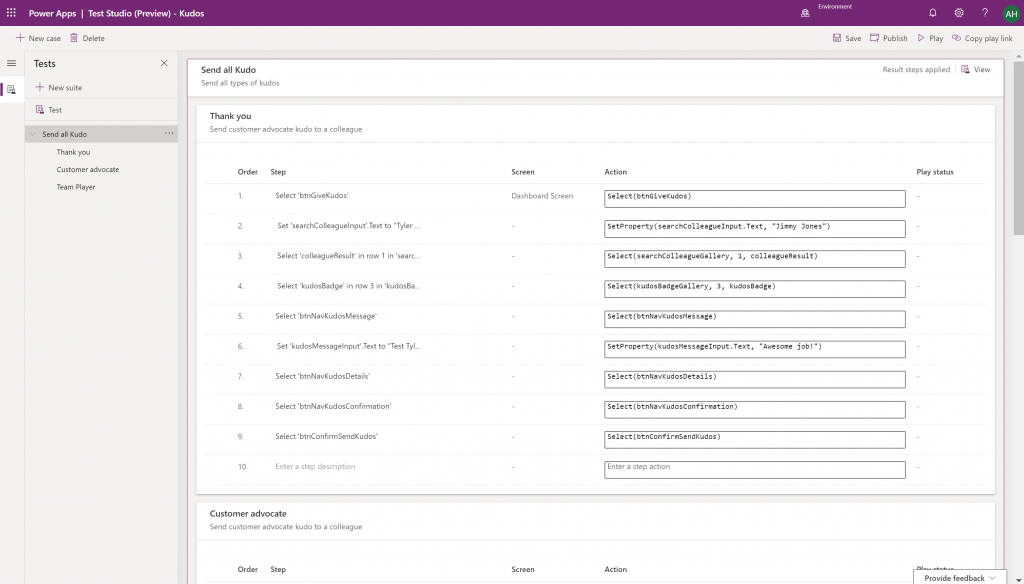
    Canvas app Monitor tool & Test studio GA: the wave of the future. Low-code app development isn’t going to be restricted to personal productivity scenarios, we’ll have much of the same needs as in the pro dev side.

    Azure Application Insights telemetry in Canvas: a great example of how the existing tools from Azure should be harnessed to offer shortcuts for Power Apps makers.

    Generate app from data with responsive layout for phone and tablet: it’s been an awkward limitation before to only support phone layouts. The bigger story is in bringing out these templates for how to actually make Canvas apps responsive, as it has been quite a mountain to climb for citizen developers. In 2020 Wave 1 we’ll also see a preview of the awaited responsive Canvas app pages.

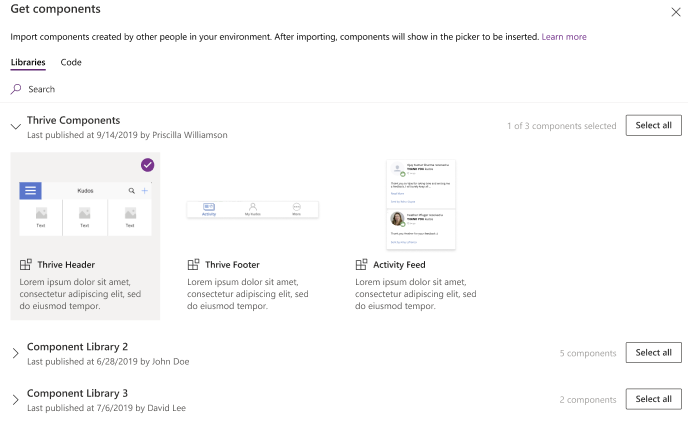
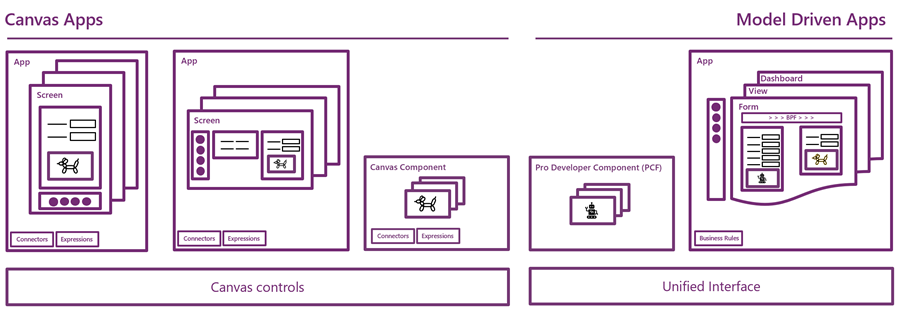
    Canvas Components GA: very impactful stuff here. Component libraries, solution awareness, support for galleries and forms, using collections and media files. These are big steps in bringing the two app types of Canvas and Model-driven closer together.

    Power BI embed component in Portals: oh yeah, there’s that third app type, too… Definitely looks a lot more approachable than the current embed experience. As for Portals extensibility for pro devs, the CRUD Web API sure made Nick Doelman excited, so keep an eye on that one.

    Unified Interface enhancements: important for many Dynamics 365 experiences. Forms as modal dialogs in particular looks useful, better filters are about closing the gaps to legacy web client, search in this view is an age old requirement.

    Improved themes reflecting modern Microsoft Fluent themes: UI matters, the power of the Apps is not just in the logic, data and automation. MS should be more aggressive here when competing against other low-code development platforms.

    Power Automate

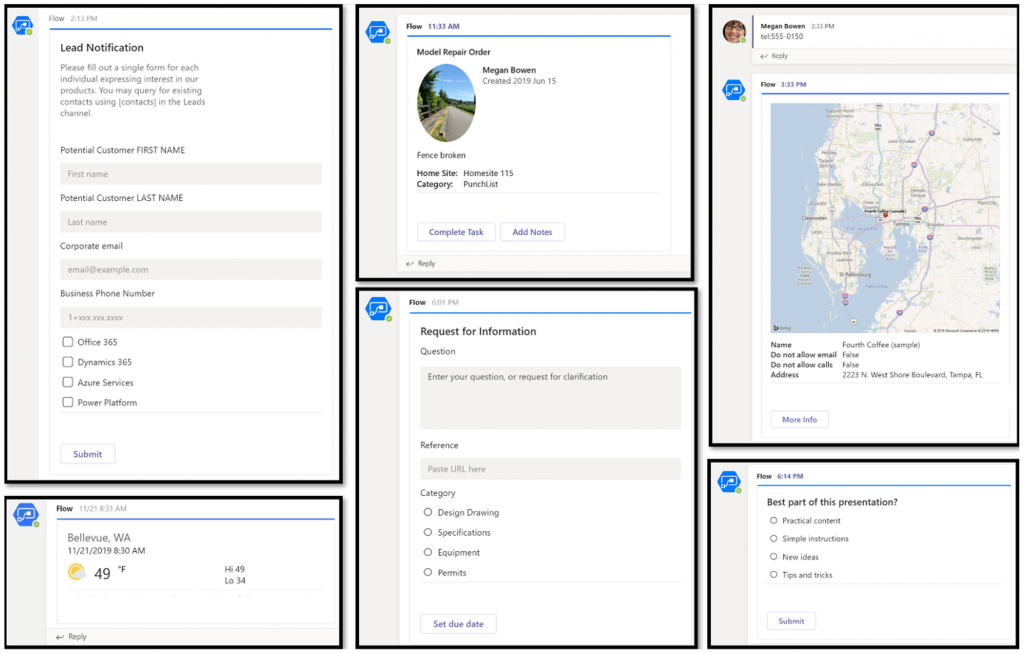
    Interactive adaptive cards: we’ve surely been waiting for this. Very important for bridging the user experiences across different tools in different MS clouds (Office, Dynamics, Power Apps). Could 2020 be the year of the Adaptive Cards? Potentially yes, if you look at how Teams & Power Automate can make use of this feature.

    UI Flows solution awareness: aligning RPA with the common shipping vehicle of Power Platform. Being a new preview feature, there’s of course a lot of other parts moving around still, but the important bit from a platform play perspective is getting everything to play nice with solutions (including non-UI Flows…)

    Use business process flows in Office 365 apps: interesting yet logical step. From a process automation perspective there’s no reason to keep BPF functionality tied too closely with the familiar CRM sales process stages mentality. Again, it’s the platform that counts.

    Power Platform governance and administration

    Environment life cycle support: much needed in the real world implementations. To be able to test new standard and custom features in complex business systems, copying and deleting environments needs to be compatible with all the platform components used. Power Automate, Canvas apps etc. have to support healthy ALM patterns for enterprise development scenarios.

    User access diagnostic experience: again, very much needed for keeping larger environments operating the way IT would want them to. The process of managing access to applications should be isolated from the actual app maker tools or features specific for Dynamics 365 admins, to ensure there’s help available on a broad enough level when users encounter problems.

    Admin connectors & PowerShell cmdlets Generally Available: because they need to be. Low-code Application Platforms for enterprise customers will have to provide automation tools for not just app creation but app governance and administration. If the number of business apps within an organization will explode thanks to these tools, trying to scale the old admin practices isn’t going to be the answer.

    Bring your own data lake: allowing customers to control their own adoption metrics for Power Apps. Just like the GUI for admin tools might not meet the requirements of all organizations, it makes sense for Microsoft to allow customers to also take the telemetry data from apps and use Azure services to put it into their own reporting context.

    Power BI

    Paginated reports enhancements: the next generation SSRS has been a long time coming. The new features like API to render a paginated report to any format (e.g., PDF, Excel) and subreport support will bring the cloud reporting powers of Power BI close to what you could do in on-prem 15 years ago. They might not be the coolest of features, but for many CRM scenarios these “pixel perfect” A4 outputs are still a very practical solution.

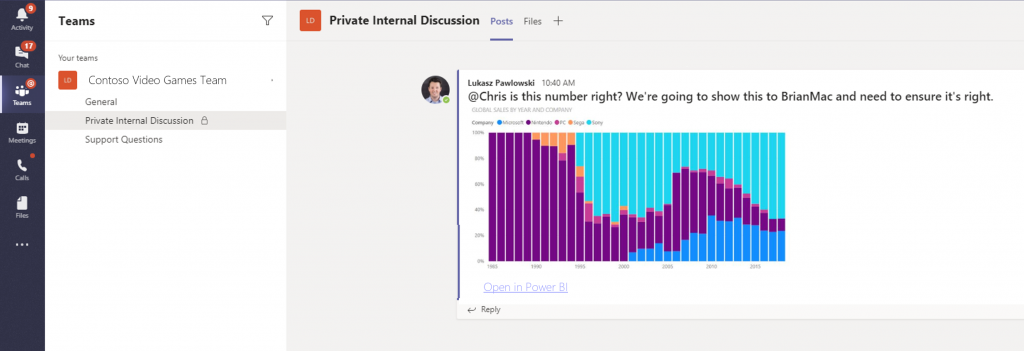
    Copy and paste visuals into other applications: supporting the modern flow of information. If the paginated reports represent the PC era way of working, then being able to grab a part of your analysis and quickly paste it to a conversation in Teams with a link back to the full report is the way today’s information workers expect these cloud apps to work with one another.

    Data lineage GA & enhancements: when cross-referencing data from anywhere is a breeze, how can you tell if the analysis is actually accurate? The lineage visualization is an effective way to illustrate how this modern world of self-service BI operates and bring tools to do meta-analysis on what’s the actual source of the truth being presented to you.

    Power Virtual Agent

    Add a Power Virtual Agents bot into Power Apps canvas app: because bots are not just for customer service. Internal scenarios for app users would be very interesting, although the starting price for using bots is probably going to scare most customers away.

    Adaptive Cards: see my comment in Power Automate section.

    Single Sign-On: if attempting to go beyond generic website chat popups, strong identity management features are a must.

    Pass context to a bot from the calling site: “Hi, how may I help you?” That’s not how a smart agent would initiate the chat, so after identity comes context management. Bridging the gaps between apps is where I see bots being particularly powerful, so URL query string support is a good start for making this happen.

    AI Builder

    Power Automate integration: building the Cognitive Service for citizen developers. The patterns from Azure need to become more accessible in the BizApps frame of reference.

    New models like anomaly detection and receipt scanning: making AI Builder ready for business. Training AI for unique data sets is one thing, but where I believe wider adoption will start is through these more “ready to go” scenarios.

    Common Data Model

    Empower out-of-the-box analytics: delivering on the promise of CDM. It’s all just theory until we see Microsoft deliver on those promises about making it easier to integrate data sources and analytics/AI via a common semantic model.

    CDM visualization and management experience: making CDM more than a GitHub repo. “Increased focus on growing the Common Data Model ecosystem requires enabling users to work with Common Data Model in their native data environments, such as Power Query, Insights Apps, Synapse, and Power BI.” Yes, it certainly does.

  • End of Dynamics 365 Customer Engagement Online

    End of Dynamics 365 Customer Engagement Online

    I always prefer to use precise terminology when talking about the technologies that are part of my trade. Some might consider me a pedantic guy who’s always correcting some insignificant details in documents or presentations that cover Microsoft technologies but aren’t using their correct names. Yeah, the customers reading them probably wouldn’t notice the difference, but if you let go of your standards then sooner or later the lazy writing will lead to unnecessary confusion. Since I don’t write any actual computer code for a living, I guess this is my way of “debugging” the deliverables that I actually ship.

    Like with actual coding, sometimes there are breaking changes introduced into the concepts that are used in technical writing, too. This happens when the product branding gets updated by Microsoft as part of their evolving commercial offering, or when existing technologies are realigned to be used in a new context. You could think of it as a new API version that MS product marketing releases, which means you need to perform updates to your “code” to keep its API references compatible with the surrounding reality. A slide deck created by Microsoft in 2016 for the Dynamics product offering would hardly pass the code validation today – yet you still see some partners out there just happily using these legacy materials in customer dialogue. Yes, I cringe a lot when seeing those.

    The actual topic of this post is about what the title says: Dynamics 365 Customer Engagement is now officially gone from the Microsoft cloud. That is all. Thanks for coming, have a save ride home!

    Wait, WHAT?

    Oh, alright then. Let’s dive a bit deeper into the what, starting with a look back at what has happened in our earlier episodes of Microsoft business applications branding.

    In the beginning there was CRM…

    …And then suddenly there wasn’t. Yes, you’ll still find the term “CRM” all over my blog. I’ve had trouble deciding on what comes after it – and sticks around for longer than a year or two. Anyway, in 2016 Microsoft decided to let go of the Dynamics CRM brand and replace it with Dynamics 365 instead. There was a popular article written on LinkedIn at that time about it:

    Deprecating the term “CRM” was probably a good move, but replacing it with something that didn’t specify if the technology underneath was ex-CRM or ex-AX (the enterprise ERP product) caused a bit of a mess. From that mess, the term Dynamics 365 Customer Engagement rose from the ashes of Dynamics CRM in the first half of 2017, to reference the platform that was XRM under the hood but wasn’t allowed to be called that.

    A year went by and it was time to reimagine things again, with the merging of PowerApps and XRM. The platform was given the name Common Data Service, which had actually already been given to a completely different platform a bit earlier in the pre-merger world of PowerApps. Since in the cloud there are no version numbers, let’s not refer to “v1” or “v2” here either then. There can only be one CDS!

    (Well, actually there were 2 after this merger still: “CDS for Apps” and “CDS for Analytics”, in short “CDS-T” and “CDS-A”, but then…) OH SHUT UP ALREADY you pedantic geek!

    Summer 2018 saw the Power Platform brand emerge, and we’ve been hearing quite a lot from it since. You could say it’s been stealing the show from the previous business applications primary brand that was Dynamics 365. It would be foolish to think that we’re anywhere near the end of this Power wave that’s sweeping across the MS cloud offering.

    Dynamics 365 CE Online vs. On-premises: the game is over

    As part of the October 2019 updates coming in the form of Release Wave 2, there have been some subtle changes to product branding for Microsoft Business Applications. For starters, MS is dropping “for” from the product names, so what used to be “Dynamics 365 for Sales” is now just “Dynamics 365 Sales”. Certification and exam names have already changed, next we’ll wait and see when the official SKU names in MS price lists will reflect this.

    Another visual change you’ll see when visiting the documentation site for Dynamics 365 is that many of the apps received shiny new icons. Woo-hoo!

    Then when we scroll down the page, there’s this small section with no bold graphics, dedicated to the on-premises products:

    Let’s click on it, if only for old times sake. Hey, hold on! There’s actually something interesting here right on the Overview page for on-prem:

    Effective October 2019, the Dynamics 365 for Customer Engagement SKU/license plan is no longer available for “online” customers. More information: Dynamics 365 Licensing Update

    With this change for online customers, we are no longer using the term “Dynamics 365 for Customer Engagement apps” to refer to the collection of following apps and its related services:
    * Dynamics 365 Sales
    * Dynamics 365 Customer Service
    * Dynamics 365 Marketing
    * Dynamics 365 Field Service
    * Dynamics 365 Project Service Automation


    For online customers, these apps are model-driven apps running on Common Data Service. You can build model-driven apps using PowerApps. More information: What are model-driven apps?

    For on-premises customers, “Dynamics 365 Customer Engagement (on-premises)” is the official name of the product that provides sales, service, and marketing features. Customer Engagement (on-premises) shares many features in common with Common Data Service and PowerApps.

    That’s it then. Customer Engagement is now exclusively the name of the old legacy product that you can deploy on the server infrastructure you manage. If you use anything called Dynamics 365 that’s coming from the actively developed Microsoft Cloud, then it’s not CE anymore. It’s “[Insert Dynamics 365 app name] running on Common Data Service”.

    Why?

    Even though some of you might feel that Microsoft keeps renaming things simply because that’s what they always do, there is a justification for the axing of the Customer Engagement brand. For those of you that work with configuring and developing solutions for the platform, you will have noticed that the cloud version resembles the old server product less and less every day. Environment administration tasks have been moving over to Power Platform Admin Center, the solution configuration work is done under make.powerapps.com, the new editors for forms, views and everything new is being introduced only to the Power side.

    None of these new investments into admin and customizer tools are such that you could easily port them over to the on-premises world. There isn’t a Power Platform you could install locally, so the gap between these 2 worlds cannot ever be bridged. From a training and documentation perspective you can’t claim that “it’s all just CE, don’t worry about the small things” when the architecture of one platform no longer physically aligns with the other. CDS, PowerApps, Flow, Connectors etc. aren’t just extra pieces in the cloud, they’re an altogether different puzzle that requires new skills and fresh thinking.

    (more…)
  • Application/Platform Separation in New PowerApps Licensing Model

    Application/Platform Separation in New PowerApps Licensing Model

    Ever since Spring 2018 when the XRM and PowerApps platforms merged on a commercial level, I’ve found myself spending an ever increasing number of hours per week involved in licensing discussions and scenario planning. My initial exploration of the platform licensing back then came to the conclusion that many of the crucial details for actually determining what you can & can’t do with PowerApps licenses vs. Dynamics 365 CE licenses were simply not available at the time. Obviously this was not an ideal starting point for Microsoft to start pushing their Power Platform into new business areas that should see it capture the next 10 million developers from outside the traditional CRM field. But still, it is the legacy that came with the underlying platform that was designed to be sold as Sales, Service, Marketing etc. solutions delivered via traditional enterprise projects via partners that mostly had started back in the Microsoft Business Solution (MBS) days. What can you do about that, huh?

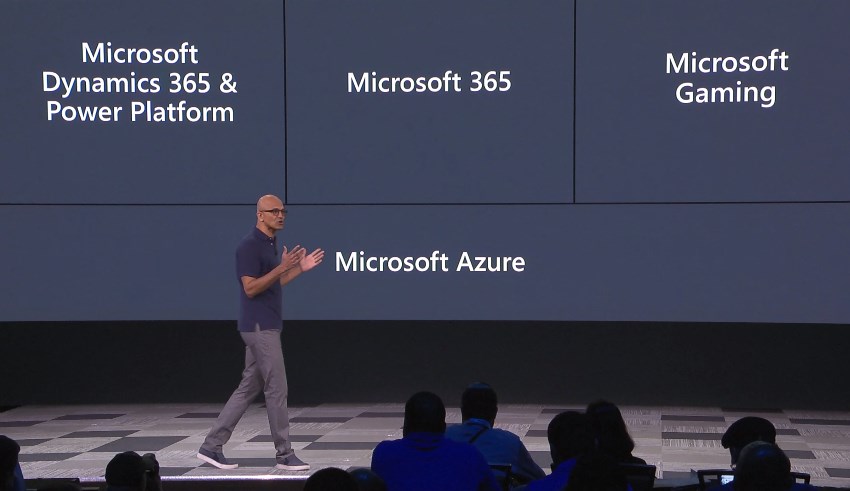
    This year at the Inspire 2019 partner conference, Satya Nadella framed the role of Business Applications and Power Platform in particular with the following numbers:

    (Click here to watch this segment of his Inspire 2019 Corenote.)

    If there are indeed 500 million new apps that will be created in the coming five years, then those sure ain’t gonna emerge from the MBS style business model and development methodology. Today the world is full of both cloud service providers that offer low-code/no-code tools for building your own apps very rapidly, as well as savvy power users who are interested in seeing if they could take their Excel workbook desktop wizardry to the next level with these cool new tools that promise to deliver modern apps for this smartphone era. Since MS has obviously identified this new business potential that Power Platform can unlock for them, are they going to let the prior licensing model of Dynamics 365 stand in their way? Probably not.

    It just so happens that Inspire 2019 was also the place where the upcoming licensing changes for both Dynamics 365 and Power Platform were introduced to the partner audience. Since Inspire is a public conference that anyone can attend, it also meant that any customers paying attention to the Microsoft ecosystem are already aware of the changes announced to take effect on October 1st, 2019. The slide decks for both sessions are available for download on the Inspire website for a more detailed look. On the PowerApps blog there is also a summary of these changes, which is nice. What’s really nice is that the comments section is open, which often isn’t the case for corporate announcements related to licensing (is it even a “blog” if there is no reader interaction opportunity given?). The product team has been responding to a lot of the feedback around the topic, which makes me optimistic about the possible fine tuning of the licensing model to align with what the outside world thinks about it.

    Pay per App

    As with licensing always, there’s far too many details in the Inspire 2019 news to cover in one blog post. Maybe I’ll eventually do a revised version of my “Demystifying Dynamics 365 & Power Platform Licensing” session from January, but right now I want to focus on one aspect: the price of an App. This is something the new PowerApps licensing model highlights in particular:

    In short, what Microsoft will do in October is to retire the earlier PowerApps P1 and P2 plans and introduce new “Per App” and “Per User” plans. Nothing (major) is going to change with how the rights bundled into Office 365 and Dynamics 365 licenses work. The “Per User” plan will be the same price ($40) and mostly the same capabilities as the earlier P2, whereas the earlier “lite edition” of PowerApps P1 at $7 will be discontinued completely.

    “What?!? How can they just take away the $7 plan and push everyone to buy a license that’s almost six times the price of that?” Yes, this is the hardest part about the changes, no doubt. I was a bit surprised to see this as the direction where Power Platform is heading, given how the citizen developers who’ve been playing around with the seeded Office 365 PowerApps license should rather be pushed into learning more about CDS, solutions and all those “real” application development tools that P1 previously offered. Nevertheless, after letting the new model sink in for a few days, I believe that this pricing mechanism makes a lot more sense than the earlier version.

    A fundamental problem with the current P1/P2 divide was that it attempted to draw the line on app complexity. There were limitations like the inability to attach real-time custom business logic (workflows, plugins) on entities that were used by PowerApps P1 license holders. This was particularly problematic when operating within CDS environments that also serve as the Dynamics 365 CE app database (yes, they’re all CDS now): any developer or 3rd party app registering a plugin step on an entity like account would instantly have put all P1 users attempting to access it out of compliance with the license terms. Also the rights on “complex entities” and “restricted entities” differed between P1 & P2. Sounds complex? Yup. I had to write a blog post for demystifying these PowerApps “starter” plan capabilities just to get my head around on where the lines were drawn.

    Something that would have eventually become a big problem with the old P1 definition was that it only allowed the users to run Canvas apps. Sure, those pixel-perfect mobile-first applications are what most people think PowerApps is made of, but that is a view of the world that needs to be deprecated. Model-driven apps are just as important area of what Power Platform represents (on CDS in particular), but that capability was reserved for P2 license holders only. Given that Microsoft is aiming to remove all of these artificial limitations between app types and eventually get all PowerApps customers to Run One UI, keeping P1 users locked from this future app convergence simply wasn’t a viable option anymore.

    (more…)
  • 2 become 1 UI: PowerApps Roadmap from MBAS

    2 become 1 UI: PowerApps Roadmap from MBAS

    Have you looked at the MBAS Gallery yet? Microsoft Business Applications Summit 2019 was last week and already the majority of sessions have been published online for also non-attendees to enjoy. Even if you attended the conference in Atlanta, there’s a chance that you may have missed a few sessions, with there being 200+ of them in 2+1 days.

    Live recordings of sessions are nice – if you have ~200 hours to sit through them, that is. As is the case with podcasts, I rarely come across a moment in my life where there would be empty space just waiting to be filled with a 1h chunk of audio/video of people talking about something that might or might not be valuable to me. On the other hand, I’m very comfortable with skimming through endless amounts of text & pictures, in search of something that warrants my real attention and further processing. That’s where PowerPoint slides are just awesome. Bullets, tables, charts, diagrams, screenshots, OH YES!

    Last week I started going through the MBAS session catalog and downloading the slide decks for interesting sessions. (I’m not the only one who hoards PPTXs from MS events, check out MVP Jussi Roine’s blog for his tips on learning quick as a consultant.) Now I’ve got a folder with 115 PowerPoint files weighing in at 4.5 Gigabytes. Hmm, looks like some further prioritization is still needed to narrow these down. Well, one thing’s for sure: I know where I want to start diving into the content. The future of business apps awaits in this session:

    Run One UI – the future of canvas, model-driven, and Unified Interface in PowerApps (BRK2073)

    For those with Dynamics 365 Customer Engagement background, the topic of user interface unification might lead your thoughts to Unified Interface. Originally announced 2 years ago, this new client infrastructure aims to do away with the earlier divide between web client, phone, tablet and Outlook. More importantly, it’s a foundation for unbundling the application specific UI controls from the platform and opening up the road for everyone to build the kinds of controls that Sales, Service, Marketing and all the other 1st party apps contain. That story is called PCF and it’s a big deal for sure, but something even bigger is on its way.

    This  “One UI” does not simply look at the Dynamics side of the house, rather it encompasses the whole app story in Power Platform. Ever since XRM merged with PowerApps, we’ve had this somewhat awkward divide between Canvas apps and Model-driven apps. These terms don’t mean much anything to customers when explaining them the platform capabilities. For the Dynamics professionals the concept of a “Model-driven PowerApp” sounds artificial. While on the back end the CDS, admin and developer story is coming together quite nicely, on the front end we see two experiences with not too much in common – today.

    We’ve already heard Charles Lamanna make a statement that Microsoft has no intentions of keeping the app types in PowerApps separate:

    “Artificial limitations in app features will be removed, so that choosing [File – New App] will give you model or canvas experiences and everything will work across both.”

    Power 365 Show: Power Platform Changes and Answering Community Questions with Charles Lamanna

    Sounds cool! But how exactly are they going to pull off this merging of the two client frameworks with a very different history? On the platform side it was fairly simple as XRM probably offered a lot of what CDS v1 was capable of and turning it into CDS v2 was not a big issue due to low adoption rate of the less mature technology of the two. PowerApps Canvas apps on the other hand have a huge momentum going on and the number of apps in production is exploding. Dynamics 365 CE ain’t doing too bad either when it comes to growth figures in the cloud, so messing too much with it sound very risky. After all, we’re still waiting for many existing customers to even move from the classic web client to Unified Interface, so do we really need more confusion in this space?

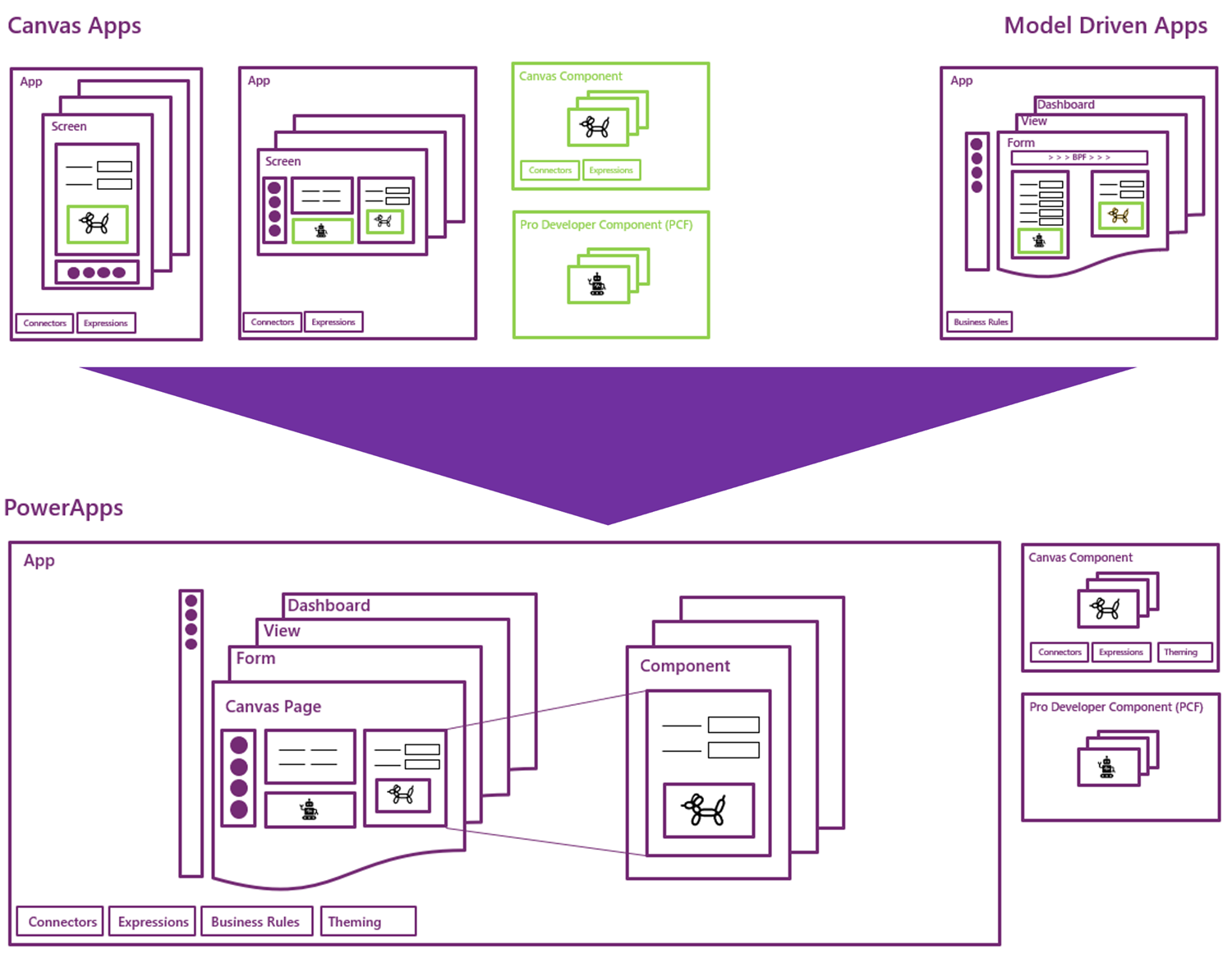
    In the Run One UI session at MBAS we heard Clay Wesener present the master plan of how the two different app types will gradually turn into one PowerApp. Here it is:

    This is really just mashing together the start and end state from Clay’s presentation, so this time you really should reserve an hour of your time and watch the recording, to understand the finer details. And grab the slides for reference, naturally.

    A key part of the plan is that this won’t happen in a big bang. There won’t be an “Even MORE Unified Interface” launched at some grandiose marketing event, rather Microsoft will introduce capabilities from one app type to the other in a gradual fashion. PCF just arrived on Model-driven Apps as a public preview, soon it will start showing up on the Canvas side, too. Canvas Components are bringing the more structured way to define the UI into the previously blank canvas where each pixel used to run free, making it more like the grown up version familiar from enterprise business applications. These new parts are all about blurring the lines between Canvas and Model.

    (more…)
  • Catching the Wave 2 for 2019 Power Platform Updates

    Catching the Wave 2 for 2019 Power Platform Updates

    Today, June 10th, at Microsoft Business Application Summit 2019 the release plan for the next wave of Dynamics 365 and Power Platform features was announced. It’s of course no surprise that this main event of the year for #MSBizApps would be used as the forum for showing what’s coming next. What kind of did surprise myself was that we actually are already at a point when the focus starts to move to the upcoming release, formerly known as October 2019 release. Wasn’t April 2019 just a few weeks ago? Where did all the time go? And when exactly were we supposed to have taught ourselves all about the current release features, let alone deploy them to real life customers?

    If I had to guess what people working professionally with MS Business Applications would list as their biggest challenge, I bet keeping up the product updates would be on the number one spot – if only for the simple reason that it’s a topic that touches everyone regardless of their role. The pace of change on the technology side isn’t going to slow down, but it’s the breadth of impact from these changes that has grown immensely. The biannual release cadence in itself isn’t anything new, since that’s how the cloud service has been updated from already the Dynamics CRM 2011 days. It’s just that we’re no longer operating within that familiar CRM box, thanks to what Dynamics 365 and Power Platform have become. So, the release waves hit the shore on their steady cadence, but instead of a fun little beach break wave to surf on it may start to look like a tsunami that you should run away from. It’s not, and you shouldn’t, but this can be a very natural reaction when presented with a 350 page release plan document to plough through.

    Lucky for us, this time there’s also a streamlined version of this document, focusing solely on the Power Platform side. If you’re a #PowerAddict like me then this is probably the more exciting part to start from. So, we’ll leave all the first party app goodies for later and have a look at where & how the platform is heading to.

    Release Terminology

    Microsoft has now changed their official terminology on how they speak about these releases for Business Applications products. Instead of the earlier names like October 2018 Release, April 2019 Release, we’re now going to get release waves. Yes, still 2 times a year, so what we’ve now seen a peek of is 2019 Release Wave 2. Nothing actually changed about the process itself, but since the updates covered in these releases are not meant to be delivered on a single date (or one specific month), the terminology is now much better aligned with the reality. 2019 Release Wave 2 will be hitting the shores from October 2019 to March 2020.

    The other tweak in terminology is that now instead of Release Notes we’re getting a Release Plan from the product teams. This is also a much more natural way to describe the intent of the documentation that goes with a release wave. It’s not the exact description of what has been shipped, like you would have seen on a piece of software distributed on a DVD. Rather it’s a near term roadmap of what will be built and delivered, if everything goes as planned. Instead of a static document the Release Plan (and actually the current Release Notes, too) is a living publication reflecting the current status. Have a look at the change history for the current April 2019 release to get an idea of how much things have moved around since V1 of the Release Notes.

    Finally, there’s an added piece of information for each of the items in the Release Plan, referring to the Early Access availability. This will indicate weather the feature will be available to try already on August 2nd. You can read about the latest release schedule and early access policy from this documentation page.

    AI Comes to Power Platform

    The biggest new announcement from 2019 Release Wave 2 is the arrival of the AI Builder. No, PowerApps didn’t become self-aware just yet, but it is nevertheless a major milestone to see the AI capabilities earlier provided via Azure Cognitive Services to now find their way into  the citizen developer world of Power Platform tools. While the data scientists and pro-devs out there probably won’t be resorting to AI Builder in their own projects, the total addressable market for Microsoft’s AI services has now grown significantly thanks to these entry level AI features available in the PowerApps maker portal.

    Is this something that all the PowerApps makes will immediately jump into using then? Probably not at first, since the use cases for machine learning technologies always rely on having a suitable data set to work on. Whereas with a Canvas app you can just start building the features, logic, data model and UI of an application before you’ve got the actual data to be used in it, in AI Builder you’re gonna need to start from the data. It’s going to be hard to fake this thing for a quick technology demo unless it’s tightly linked with a real life business scenario.

    Reaching the people who do have the data and understand its structure and meaning is where a product like AI Builder can undoubtedly lower the barrier for starting to experiment with AI. Just like the earlier PowerApps tools helped people become app makers without any formal training on the subject, why couldn’t something similar happen on the machine learning side, too? As a nice added bonus, coupling the AI Builder configuration and model data with CDS is will help in promoting it as the default storage place for structured business data.

    Features like Form Processing where you can train the machine to understand the contents of documents following a common template (like invoices) offer a way to further digitalize processes that can’t yet jump to 100% structured data interchange via modern APIs. You may not be able to force all your business partners or customers to jump into using the tools and data formats that would be most convenient for your internal processes, but could significantly reduce the need for manual data entry by taking a service like PowerApps AI Builder into use.

    (more…)
  • Building The Platform for Every Developer

    Building The Platform for Every Developer

    For the first time ever at Microsoft Build conference, the Power Platform was presented right at the start of Satya’s keynote this year! Woo-hoo!

    Of course this time last year there wasn’t yet the name “Power Platform” to even reference at Build. We had only just seen the merger of XRM and PowerApps into something that was a bit of a puzzle to communicate to partners, let alone customers. Well, the puzzle hasn’t exactly been solved yet, but it is still quite remarkable how far we’ve come in one year already.

    Last year’s sessions at Build 2018 were mostly about introducing the concepts like Common Data Service to a .NET developer audience that probably had zero hands-on experience with any Dynamics product for the most part. Not a whole lot of noise was made about this entry into the #MSBuild space. Fast forward to 2019 and now the vision of uniting pro developers with “every developer” is already touted at the keynote sessions. Not just that, but Satya is saying that recent re-architecting of Dynamics 365 on top of Azure infrastructure and services should be examined as an excellent reference for anyone who’s planning to build their own products on SQL Azure.

    During the week of Build, the product team behind Citizen Application Platform (“CAP”) puts aside their Citizen caps and pulls on the pro dev hoodies to talk about topics like solution management, PCF component development, Azure Functions, DevOps pipelines and all the nerdy stuff that would scare away the folks who normally create PowerApps. It’s inevitable that as the tools for app makers get more mature the next barrier to world domination will be in getting not just the IT admins to build the necessary automation and governance around Power Platform in enterprise environments but also in finding a way to make pro-coders play with low-coders.

    If you look back at XRM, then there’s really nothing new about this division of roles. It has always been the case that code illiterate business analysts do the point & click configuration work for data models and business processes, while the XRM developers spend their time with the SDK enabled client-side extensions, server-side logic and system integration tasks. Fundamentally what the Power Platform does is it enables everyone to level up in their game. Application design on the UI level and interfaces to connected data sources can now be handled by those business analysts who are willing to learn new low-code tricks. Similarly, the developers get to break free from the boundaries of the IIS and SQL Server boxes, to harness the amazing power of The World’s Computer (Microsoft’s nickname for Azure) to hook into new AI services and crunch the contents of The Real Common Data Service.

    If the app builders are about to step up their game, so must the sales machine of Microsoft. The big push from Redmond is now on ensuring that an ecosystem will emerge on top of Power Platform. The new partner program for Business Application ISVs, lead by Steve Guggenheimer, is trying to make a bigger splash by combining the earlier models of Azure Marketplace and the Dynamics 365 focused AppSource into a single channel that could actually serve the grand vision of a no-cliffs development platform. As always, you should check out what The Other Steve has to say about the upsides to the new program, before making your conclusions on whether it’s just a new tax on ISVs or an opportunity worth pursuing for a growing number of MS partners.

    To summarize the announcements and buzz around Power Platform at Microsoft Build 2019 conference, I’ve compiled this handy lil’ Twitter Moment for you to enjoy:

  • What’s Coming in April 2019? Start from PowerApps & Flow

    What’s Coming in April 2019? Start from PowerApps & Flow

    As promised, Microsoft published the release notes for the April 2019 release wave on January 21st. Instead of just a high level blog post, there’s a huge list of items in 16 top level categories at the docs.microsoft.com site. If you want to consume the content in an offline mode, there’s a PDF version available of the same content, with 315 pages of April 2019 release notes.

    315 pages? Ain’t nobody got time for that!

    Yeah, I know. Whether you’re working with Dynamics 365, PowerApps or Power BI, you probably aren’t just sitting around, waiting for some work to come your way. These are all high demand technologies that pull in pretty much all of the available consulting resources into actual project work with the tools. To make things worse, the communities around them grow larger every day and flood our social streams with blog posts, podcasts, videos, webinars, conferences full of “can’t miss this” information.

    The problem is, though, that you haven’t got all that much time to get into grips with April 2019. It may sound far away, but the preview availability of many of these features (but not all) will start already on February 1st – 10 days from now at the time of writing. What’s even more important is that this time the features will be rolled out immediately to all customers, once Microsoft thinks they are ready. There’s also a date available for this particular moment and that is April 5th. You’ve got around 2 months from preview to GA.

    How should an ex-XRM pro / Dynamics 365 Customer Engagement specialist then optimize the available time to learn the important parts about April 2019 release? I’ve got one tip for you, which may sound unintuitive at first, if you spend your working days mostly with things that say “Dynamics”. Here goes: Start reading the release notes from where it says “PowerApps”:

    For real? Yes. We no longer live in a world where PowerApps would refer to the quickly generated mobile apps that you’d connect with SharePoint lists. It is the platform on top of which much of the “Dynamics 365 for X” products listed at the beginning of the release notes now live. Whereas each of these 1st party apps touches just those environments that happen to be using them, PowerApps and Flow are relevant for everyone. Common Data Service for Apps a.k.a. CDS is bundled within those two topics. If you’re operating in Dynamics 365 Online environments, you are working with CDS.

    In the PowerApps section you’ll find platform and customization features like:

    • New form and view designers GA
    • Canvas app embed in model-driven apps GA
    • PowerApps Control Framework (PCF) preview
    • Unified Interface as the default UI
    • Offline data access
    • Azure AD Groups for security roles & record sharing
    • New tooling for plug-ins and solution packaging

    Those are examples of the traditional XRM side of the house being extended under the new PowerApps brand. Microsoft Flow is equally important for any Dynamics 365 CE system customizer going forward, due to enhancements like:

    • Parity with CDS (XRM) asynchronous workflows
    • Calling XRM workflow actions from Flow
    • Batch operations for CDS records
    • Transaction support via change set scopes
    • Calling child Flows
    • Multiple trigger events
    • Flow parameters inside solutions

    Sure, there are great new features and improvements listed for each of the Dynamics 365 apps, too. Also a wealth of opportunities for further expanding our Dynamics pro footprint in business application development on the Office 365 side (thanks to PowerApps, Flow). Not to mention the growing data integration capabilities via CDM, or the whole world of BI and big data. Still, we know that there’s probably not enough time to try and absorb these things right away. Which is why my recommendation is to start by looking at what the common business application platform is forming into. Then once the preview is available, update your sandbox into the latest bits and start experimenting with these things in practice (and possibly hunting down those features that actually shipped in the preview version).

    OK, I have to admit it: even I didn’t dive straight into PowerApps myself, instead spent a bit of time with the full release notes document. If you want to know which items caught my eye, then you’ll find them in this Twitter Moment collection.

  • Top 3 Themes for Dynamics 365 in 2018

    Top 3 Themes for Dynamics 365 in 2018

    This time last year I wrote my Top 3 themes of 2017 article on what were the major events and directions from the year for the Dynamics 365 ecosystem. The start of a brand new year always feels like the logical moment to reflect back on the past 365 days, so this sounds like a worthy tradition to keep going. Here are my Top 3 picks from 2018 and some thoughts on how they might influence the direction of the year 2019 ahead.

    Power Platform

    The biggest single announcement of 2018 came in March when the Dynamics 365 Customer Engagement and PowerApps platforms were merged into one. It wasn’t until July that we began to see the Power Platform term used in describing this new suite of tools that now is the way to extend both Dynamics 365 and Office 365 apps, as well as building brand new apps for customer specific scenarios.All of a sudden the technology that had been bubbling under in the Dynamics CRM corner room is now brought onto the main stage of MS business software show.

    The immediate impact was that XRM became CDS 2.0 (Common Data Service for Apps),which probably hasn’t been all that easy for non-Dynamics professionals to understand if they only paid attention to official MS information sources covering the topic. For the Dynamics partners a nice upside in this merger was PowerApps P2 becoming the “naked XRM” platform license they had been asking for many years (compared to the earlier Dynamics 365 Plan license for bundling CRM + ERP, which I don’t think was in as high demand).

    A more subtle but equally important change was the birth of model-driven app and canvas app concepts. No, not the marketing terms nor the division into two app types, rather the fact that these different client technologies now had a clear need to start approaching one another in terms of how they behave, what data sources they support and how they are administered. Examples of these have become visible through recent announcements like:

    It would be perfectly justified to call 2018 “the year of the platform”, considering how significantly the investments from MS side seem to have shifted from Dynamics 365 to the Power Platform. During 2019 we’ll see if the partner channel can follow along, to transform their offering into something more in line with the PowerApps story than the traditional CRM business models that have mostly been just revised for the cloud based environments during recent years.

    A similar challenge awaits the professionals who’ve been working in this business and now need to figure out how to put their existing skills into use in projects that may not even mention the Dynamics product name anywhere. Plenty of new skills will also need to be acquired for leveraging the broader toolkit. The recent announcement of Dynamics 365 exams certifications to be retired gives an indication of the looming new requirements that await the MCP’s wanting to remain current with their certification record.

    One Version

    My Nr. 2 theme from 2017 was the App/Plat separation that largely took place as part of version 9 release. Now that Dynamics 365 CE is running purely on Azure after all orgs get to v9, the next logical step is to start delivering new releases on it the same way a modern cloud native product would. PowerApps, Flow and Power BI have already been operating as a service with a single version for all customers and now the platform underneath Dynamics 365 as well as the Apps on top of it are set to transition into this model. The July announcement of how Microsoft plans to deliver predictable updates with continuous deployment for both Customer Engagement and Finance & Operations is another major event of 2018 that will shape the future of these product lines and introduce a new reality for customers who build their digital business processes on top of them. The old CDU process for version update scheduling is no more and everyone will get the April 2019 update bases on the public release schedule.

    (more…)
  • Ignite 2018 & The Power of Microsoft’s Platform

    Ignite 2018 & The Power of Microsoft’s Platform

    Just like last year, I was fortunate to be able to escape the chilly Finnish autumn weather to sunny and warm Orlando this September, to attend the Microsoft Ignite 2018 conference. This time my visit to Florida did not contain a whole lot of sunlight, though, as my stay in that region was focused strictly on the days of the event, which meant I was mostly wandering back and forth the endless corridors of Orange County Convention Center. With 1600+ sessions crammed into 5+1 days, you’re always going to have a packed agenda at a conference like Ignite where 30,000 fellow Microsoft geeks are swarming around to gather the latest announcements and demos from their favorite technologies and evangelists.

    I’ve written a summary over on LinkedIn of what were the main themes I picked up from Ignite this year. In short, Power Platform was front and center in the story of how Microsoft is further helping organizations to digitally transform their business processes. Not just from the traditional CRM and ERP scope of Dynamics 365 but on a much broader scope that speaks to the audiences that might not have otherwise ended up exploring how PowerApps, Flow, Power BI and CDS can connect their existing Office tools into a more automated flow of data through predefined pipes – as opposed to the more free-form processes that information workers previously had to agree on, to efficiently collaborate with their colleagues.

    On the one end we saw a lot of praise for the unlikely heroes that have managed to pick up a toolkit like PowerApps without any developer background or formal position in IT, and build applications that their organizations have adopted into their day to day routines. Even though these citizen developer scenarios may not seem all that complex for professional software people, the key lesson is that these manual processes would have been unlikely to get digitalized with off-the-shelf or custom built software anytime soon. Making the tools for digital problem solving accessible to the people who intimately know the problem is what’s really shortening the time to value, which in turn drives the growth of the community around the Power Platform. It’s not capped by the number of companies looking for a CRM deployment project, rather it’s fueled by the amount of data and cloud based services that make this data available to the platform via connectors.

    At the other end of the spectrum there was the true enterprise scale where this data needs to be harnessed with advanced tools and technologies to remain competitive in today’s global business. AI is the kind of buzzword that cloud was in the beginning of this decade, but in the same way as cloud computing became an everyday commodity, we’re bound to see if not artificial intelligence (AI) but at least machine learning (ML) algorithms find their way into everyday tools in the very near future. All of the major apps in the Dynamics 365 CE suite recently received their AI extensions that aim to bring intelligence built into the packaged applications, not just via Cognitive Services from Azure that developers and data scientists must plug into the business applications. Another example of the enterprise application providers’ focus on squeezing more value out of data was the Open Data Initiative by Microsoft, SAP and Adobe that took the center stage in the opening keynote were the three CEO’s explained why it’s in their best interest to help customers “deliver unparalleled business insight from their behavioral, transactional, financial, and operational data.” It’s really interesting to see that the Common Data Model (CDM) may be evolving into something that actually connects applications across big tech vendors.

    Among all these tech giants, there was also a 20 minute slot where an ordinary Dynamics 365 guy like me got a chance to tell a bit about what we’re building in this small country of ours. My session was called “Onboarding customers to Microsoft Dynamics 365 for Sales via PowerApps” and you can catch the YouTube recording of the session or just check out the slides if you’re interested in knowing how we at Elisa aim to make use of the Power Platform as part of our product offering. It was the first time for me to be a speaker at an event the scale of Ignite, so a big thanks to Microsoft for providing me this exciting opportunity!

    Even though Ignite wasn’t really a Dynamics 365 themed event like the Business Applications Summit a couple of months earlier, there were a lot of interesting demos about the brand new functionality rolling out as a part of the October 2018 release shortly. I compiled some of the highlights tweeted out on the #MSIgnite hashtag during the event onto this Wakelet collection for you to check out if you missed the live event excitement.

    Just like in previous Microsoft conferences, the learning doesn’t stop with the closing of the venue doors. The Ignite on demand sessions provide a library of videos and slides that you definitely should be browsing through to keep up with the latest news around what’s coming to Microsoft Business Applications and the many connected products. Now, if you just happen to be located in Helsinki next week, then I have to promote the brand new Finland Dynamics User Group (#FDUG) and our very first Meetup event on October 18th where I’ll be doing a “whole Ignite in 30 minutes” summary of what I found most interesting in the various Power Platform related sessions I attended. See you there!