
Tag: XRM

  • This Month in CRM: What Have I Been Up To?

    This Month in CRM: What Have I Been Up To?

    If you’re working with Microsoft Dynamics CRM then I bet you’ve had a busy spring so far! At least I have, due to the great buzz around the CRM ecosystem and an ever growing demand for customer solutions that leverage the latest & greatest Microsoft Dynamics product versions. Here’s a quick update on things I’ve been working on recently in the Dynamics CRM community.

    Our Book: CRM Field Guide v2

    Yay, I’m a published author (again)!  Long before I was awarded the CRM MVP title, this group of Dynamics CRM top experts put their smart heads together and came up with a must-have book on practical dos & don’ts of deploying Microsoft Dynamics CRM 2011 in real life scenarios: The CRM Field Guide. Now, after the big platform revolution that took place with CRM 2013, there is a much needed version 2 of the CRM Field Guide available that covers all updated, changed and expanded features of the product. A joint effort from 20+ CRM MVP’s has produced 29 chapters of brilliant content, with my humble contribution on the CRM user experience design aspects being one of them. Great job, guys, and especially Julie for making this V2 book happen!

    CRM_Field_Guide_v2“Hmm, I’m in CRM Online and we’ve already upgraded to the CRM 2015 release. Is there anything in this book for me?” You bet! I’d say 98% of the book’s ~1000 pages will be perfectly applicable for your environment, even though additional features have been introduced in the v7.0 update released at the end of last year. Just have a look at the book’s chapter descriptions to get a glimpse of what type of insights you can expect to gain from this book – and then click to purchase your copy for only $49.99!

    Our Podcast: Ikkunastudio Episode 4

    Even though the market for Finnish language content aimed at Microsoft professionals is a tiny fraction of the audience that all the text produced in English has, that doesn’t mean there wouldn’t be also some quality tech talk out there on the Internet that is catered in this quirky lil’ language of ours. One of the latest entrants into this space is the Ikkunastudio podcast series that focuses on covering the Microsoft scene in Finland. I was honored to be invited into the fourth episode titled “XRM to rule them all“.

    Ikkunastudio_episode_4

    So, who’s behind this Ikkunastudio thing anyway? The show is hosted by two distinguished gentlemen: Jouni is the Regional Director for Microsoft developer community in Finland and Sakari runs a company focused on Microsoft Azure based solution development. The three of us took over the Digital Illustrated HQ on one fine morning and explored a world that many of the MS developers and IT pros may not be so familiar with – Microsoft Dynamics CRM. In addition to explaining what business scenarios CRM is typically used for and how the latest announcements from Convergence 2015 are shaping up the platform’s future in Microsoft’s product portfolio, we also had an interesting discussion on the XRM side of things – where the platform is coming from, what you can do with it today and where it might be heading towards. Jos suomen kieli sujuu, niin kuuntelehan siis miksi Dynamics CRM:ään kannattaa perehtyä pintaa syvemmältä!

    My Webcast: Smarter Sales Process in CRM 2015

    In addition to this glamorous MVP lifestyle consisting of writing books and appearing on radio shows, I also need to spend a fair amount of time designing and configuring real life Dynamics CRM solutions for customer organizations out there. As you listen to the functional requirements coming from customers who want to make Dynamics CRM better serve their own sales processes, you gradually notice that many of these scenarios are dealing with CRM customization work that isn’t exactly unique to the organization in question. At the same time the Dynamics CRM platform has evolved to offer us an extensive toolkit for configuring solutions that can solve these business problems without needing any custom code development.

    When I look at some of the customization work I’ve been doing lately with CRM 2013 and 2015, using features like real-time workflows, business rules, rollup fields, quick view forms and BPF, it has become apparent that the crucial skill is not in just knowing the way a single Dynamics CRM feature works but rather how you can combine them in a creative way to come up with an end product that solves the customer’s business problem. The growing complexity of these no-code solutions means that it’s by no means a trivial task to figure out how they actually work and how they could be applied to different real world business processes that Dynamics CRM customers are looking to manage with the help of modern business software. So, instead of just writing individual blog posts I’ve decided to cover this topic in a one hour webcast: A Non-Developer’s Guide to Smarter Sales Processes in Dynamics CRM 2015.

    MSDynamicsWorld_Smarter_Sales_Process

    In this webcast hosted by MSDynamicsWorld.com I’ll be introducing a few scenarios that I believe are common needs for Dynamics CRM customers and show you how the graphical customization tools offered by the CRM platform’s latest versions can be put into use in building solutions for them. For example, would you want to bring back the ability to not always create a new sales opportunity from every qualified lead record? Or how about being able to use Dynamics CRM for tracking not just the current sales pipeline value but also storing historical data about how the pipeline has developed over time? Join me on May 6th to see a few tricks on how a system customizer could tackle such requirements and make the Dynamics CRM application support the sales process management work even better than the product does with out-of-the-box configuration.
  • A Few Notes on Convergence 2015 Announcements

    A Few Notes on Convergence 2015 Announcements

    Hey, did you notice what happened in Atlanta last week? Yup, it was again that time of the year when the Dynamics CRM & ERP crowd gathers together at Microsoft Convergence. Instead of packing my bags and hopping on a plane, I once again opted to staying at the comfort of my own home and instead opened up Tweetdeck to keep an eye on all the great content being shared by Dynamics community members on the social networks.

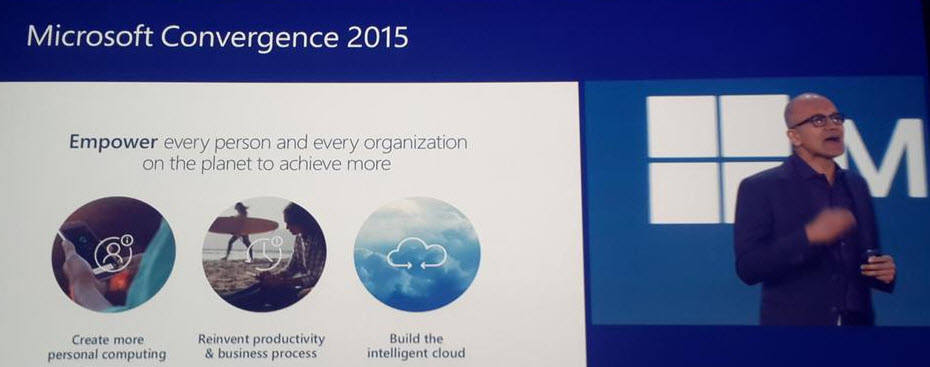
    With Satya Nadella himself opening up the event, it was clear that this year Convergence was going to be about a much broader spectrum of Microsoft solutions than just the Dynamics products. Although Satya is a former CRM blogger, he wasn’t there just to prove he still can build cool mashups with the XRM toolkit but rather to tell the higher level story of what business benefits companies can expect to gain from using the latest and greatest cloud technologies that Microsoft today offers. This is of course the fundamental reason behind why applications like Dynamics CRM are being deployed, and with the ever growing complexity of technologies intertwined together to support digital business, it’s important to increase the customers’ awareness of the types of end results they could be pursuing with the use of this technology.

    CRM_system_is_just_part_of_the_picture_2

    So, while technology is just the means to an end and CRM is just one (central) part of a modern business technology stack, it’s still the area in which I personally strive to deliver the biggest positive impact to our customers. That is why I’ve decided to write down a few notes about what Convergence 2015 announcements you should pay attention to if you also happen to work with Dynamics CRM.

    CRM Online Spring ’15 (v7.1) Is Almost Here

    Known by the codename “Carina”, the next CRM release scheduled for this spring was officially revealed at Convergence 2015. The “What’s New” page for the upcoming version is already live and so is the admin content on TechNet, as well as the developer content on MSDN. The official name for Spring ’15 appears to be “CRM Online 2015 Update 1“, which is a bit of an awkward choice since based on the aforementioned documentation Vega a.k.a. CRM 2015 was called “CRM Online 2015 Update” (without a number, so presumably “Update 0”). Oh well, we all know product marketing names at Microsoft are an eternal mystery, so it’s easier if we stick to the recently simplified version numbers instead. Vega was CRM 7.0 and this next update is CRM 7.1 (but before that we’ll still get UR1 which is 7.0.1…).

    Okay, enough with the numbers. Considering that 7.1 isn’t a new Dynamics CRM major version release but merely a minor version, there sure are plenty of new features and enhancements packed into this next release. I won’t try to list them here as you’re better of reviewing the above links, but the one feature that you simply can’t miss is the new Navigation Bar. You can see it live in action in this video and let me tell you from my experience with using a Carina preview org, it’s love at first click!

    CRM_Spring15_NavBar_1_small

    Arguably the single biggest gripe people had with the refreshed UI introduced in CRM 2013 was the Nav Bar with its ability to only show ~7 menu items on a single screen, then requiring you to scroll right and play really close attention to not moving your mouse cursor too far or the whole menu would collapse. Microsoft has now taken the menu structure introduced in Dynamics Marketing (which has a lot of menu items in its navigation) and brought it over to the world of Dynamics CRM. We now get a “hamburger” menu button that opens the first level (Sales, Service, Marketing, etc.) and clicking on one of them shows us all the included menus aligned vertically, broken down into subgroups. While this does show many more items to the user at once, it’s still a considerably smaller cognitive burden than trying to remember where you need to click to reveal a menu item that’s not on the screen, which happens all the time with the current version.

    The initial reaction to the new Nav Bar from the CRM folks over on Twitter was extremely positive. This feature in combination with the revised MRU menu (most recently used items) that supports pinning records and views into the Nav Bar is certainly going to improve the user experience of Dynamics CRM considerably. Although it’s still advisable to optimize the structure and contents of the Sitemap to remove unnecessary items and promote the most important menus, the larger menu canvas is very much needed in more complex environments with a high number of custom entities that simply need to be shown to the users somewhere.

    CRM_Spring15_NavBar_3_small

    The one thing that’s somewhat inconvenient about this updated navigation is that it will be initially made available only to CRM Online users. Yes, in case you have missed it, Carina / v7.1 is an Online-only release that will not be made available to on-premises customers. This was the initial plan already one year ago with the Leo release, but that then eventually turned into an Online+onprem release as Microsoft Dynamics CRM 2013 Service Pack 1 was made available for download to all CRM 2013 customers. Don’t expect to see such a change of heart this time around. The new features announced are expected to become available to on-premises customers in the next major release “Ara” (8.0) later this year. (more…)

  • Cloud XRM presentation from PDC 2010

    Andrew Bybee and Girish Raja had a pre-recorded session released on the PDC10 site, called Building Business Applications in the Cloud with Dynamics CRM Online. Not surprisingly, this presentation was revolving heavily around Microsoft Dynamics CRM 2011 and how it’s new features can help developers build XRM applications on top of Microsoft’s cloud architecture: Windows Azure, SQL Azure, AppFabric and, last but not least, CRM Online. You can view the full session here, below are a few takeaways from that session for the CRM crowd.

    The concept of XRM is probably pretty clear to most of us by know, but since PDC is not a Microsoft Dynamics event, an introduction was of course presented. The example used by Andrew here was the familiar HR scenario for processing job applications.

    In the next slide the MS pieces of the puzzle are laid over the solution components.

    With the native support for SharePoint integration in CRM 2011 (limited but extendable through SDK), drawing the document management box inside the XRM platform is already perfectly valid. ERP in the cloud is not a scenario actively promoted yet, but that’s where AppFabric and CRM 2011’s Azure aware plug-ins come into play, allowing the cloud apps to exchange data with on-premises apps. The whole Azure side of things is of course presented in less detail, as these are more of generic services rather than the XRM framework which Dynamics CRM 2011 tries to deliver us. Anyway, compared to the first application development platform talks around Dynamics CRM, it’s safe to assume that Microsoft’s cloud message will become inseparable from the XRM story and form a single Cloud XRM concept. In order to challenge SFDC and Force.com, the hybrid model and power of choice will of course remain in the marketing materials, but I’m sure no one wants to build a non-cloud demo for these kind of conferences anymore.

    (more…)

  • Dynamics CRM 2011 and the world of (cloud) apps

    On July 12th it was announced in the Microsoft Worldwide Partner Conference (WPC 2010) that there will be no CRM 5.0, instead we will have a product called Microsoft Dynamics CRM 2011. Not a huge surprise, considering the other Dynamics products like AX and NAV had already moved to this naming convetion followed by the Office family for quite some time now (actually 15 years, if we exclude the odd Office XP release in the middle).

    So much for the branding. Underneath it all we will have the “CRM5” engine evolving from CRM 4.0, with quite a few important improvements on how the application can be utilized as a platform for developing your own custom applications, a.k.a. the XRM mantra that Microsoft has been heavily promoting and showcasing between the product version releases. While this side of the coin will surely play an important part in gradually turning Dynamics CRM into part of the core enterprise infrastructure like SharePoint has become, the first thing most new users will see from the application will still be the Outlook client and traditional customer data management functionality. Which is why there have been some big investments from the Redmond boys on developing that side of the CRM product, as you can see from the picture below.

    Instead of merely wrapping the web client page into an Outlook frame, the new rich client interface introduces whole new components that attempt to follow the faimilar Outlook UI experience. Tabs will help in keeping the number of pop-up windows under control while the preview pane we’ve learned to take for granted in processing our email inboxes is now also available in the scope of CRM entity forms. Since Dynamics CRM 2011 now comes with the ribbon interface like most other MS products, the CRM functionality now blends into the Outlook toolbar and gets presented in all its context sensitive glory. (more…)