Tag: XRM

  • Dataflex is more (and less) than CDS

    Dataflex is more (and less) than CDS

    It’s that time of the year again when big announcements have been lined up for Microsoft Inspire, the (virtual) conference for the MSFT partner ecosystem. Last year the Inspire announcements gave us a wealth of changes for the way how the Power Apps, Power Automate and Dynamics 365 licensing model worked, but all the product names remained the same (as far as I recall, at least). This year from Inspire 2020 the Business Applications part of Microsoft’s cloud is getting a bit of both. Say hello to Microsoft Dataflex!
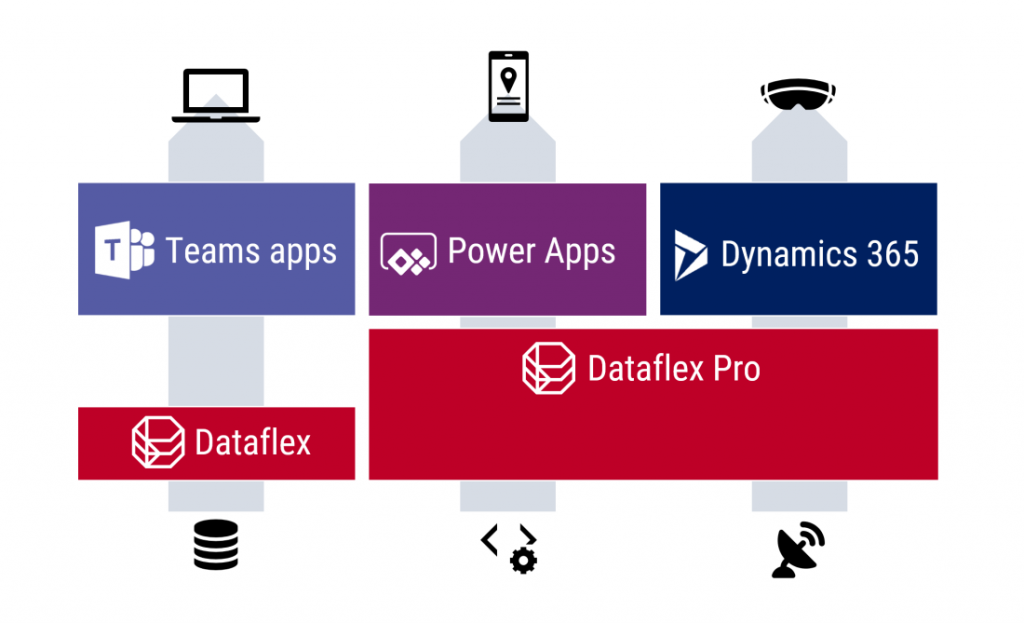
    I have written an introductory post over on Forward Forever blog, “What is Microsoft Dataflex and who is it aimed at”, which you can check out to understand the impact from a customer organization perspective. Here on my personal blog I’m exploring the topic when viewed through the eyes of a long-time XRM professional.

    Abort mission!

    Microsoft will NOT use the name “Dataflex” to refer to the services described here, due to a blunder they’ve made with trademarks. Read this post for more details: There never was a Microsoft Dataflex.

    Dataflex Pro is the new CDS

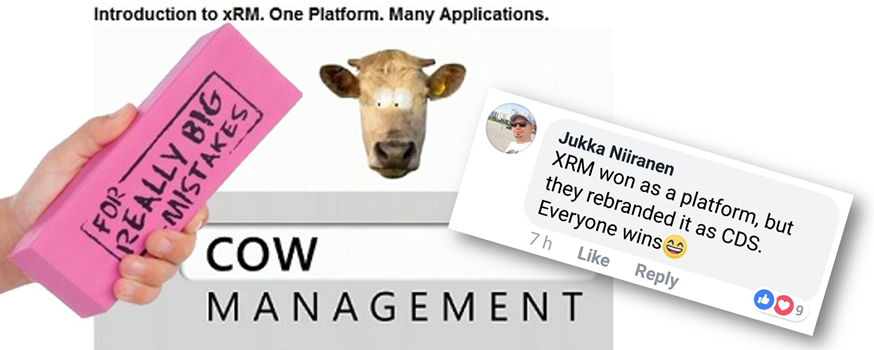
    Let’s face it: “Common Data Service” wasn’t exactly the finest product name invented at Redmond. Originally it was introduced as Common Data Model, then later this name was switched to reference only the open source schema of CDM whereas the application platform and data management features became a service called CDS. In March 2018 the v1.0 of CDS was effectively put to rest as the far more established platform behind the Dynamics CRM / Dynamics 365 Customer Engagement apps, known as XRM, was rebranded to be “the new” Common Data Service (without the “new” or “v2.0” labels, of course, because why make things precise complicated). Actually it was called “Common Data Service for Apps” (CDS-T), since there was originally supposed to be a “Common Data Service for Analytics” (CDS-A) alongside the transactional platform. There never was, as CDS-A was rebranded as “Power BI dataflows” before GA, so we only had one Common Data Service left to talk about. Whew!
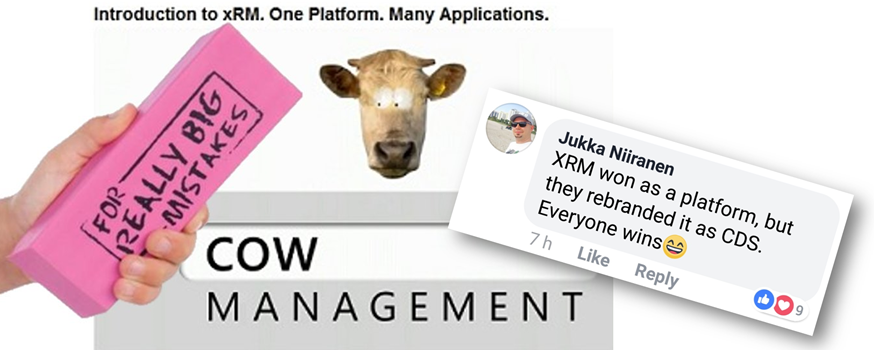
    After these adventures in the great platform shuffle of 2018, we did have some product name related announcement in 2019 as well, like the deprecation of Customer Engagement in the cloud, rebranding Microsoft Flow into Power Automate (where you still create Flows), and finally the “space program” for making PowerApps be spelled as Power Apps instead. In 2020, it had been eerily quiet in the product brand front, so I guess everyone was already expecting to see something once FY21 kicked off. As of today, July 21st, CDS is no more and the Dataflex chapter has begun.

    “Microsoft Dataflex” is not perhaps the most exciting name ever, but it’s certainly a better choice than Common Data Service. In part 4 of my series on Power Platform licensing complexity, I wrote that CDS should have rather been called “Power Platform”, due to its central role as the glue that ties the various MS low-code tools into a coherent platform. It’s a very unCommon service and it does a lot more than just host application data. Now, Dataflex on the other hand plays with the words “flexible” and “-plex”. The latter, when used as a noun combining form is described in Wiktionary as having the following origin:

    From the Latin past tense of plectere (“to weave, braid, twine, entwine”).

    Yes! That’s exactly what this technology does! It’s a platform that allows you to weave a set of processes, interfaces and data together, into an intertwined whole that is greater than the sum of its parts. It offers every developer flexible, no-code/low-code tools for achieving this. That’s how at least I intend to explain the meaning of Dataflex from now on, unless MS product marketing comes up with something even more compelling.

    Oh, there is of course one tiny detail to keep in mind: it’s actually Dataflex PRO. What Microsoft announced today at Inspire is a new service called Dataflex that is a subset of what CDS always used to offer. So, everyone who’s using CDS today is already on the Dataflex Pro version, whereas we’re about to get a preview of the non-Pro Dataflex in the coming weeks.

    Application platform for the masses: Dataflex (with Teams)

    If you’re coming from a Dynamics 365 background, the introduction of a “lite” version alongside the CDS/XRM platform capabilities might not sound so exciting at first. After all, from a pure functionality prespective Microsoft is taking away capabilities from the existing platform, to establish the baseline offering of Dataflex that customers can then upgrade to Dataflex Pro when needed. Some might dismiss it as just another licensing hurdle to worry about when trying to develop apps.

    From a commercial perspective, Dataflex is possibly the biggest thing that has ever happened to the platform formerly know as CDS/XRM. Biggest in terms of the number of potential app makers that will now have the possibility to build Power Apps on top of a true relational database instead of the dreaded SharePoint Lists. This is obviously the major immediate benefit from the announcement of Dataflex non-Pro, since in the previous licensing model the lines were drawn in a way that discouraged the use of CDS (or Azure SQL) databases for any Power Apps designed for light use scenarios – unless you had already acquired the full Power Platform license for your entire organization. With Dataflex usage rights bundled into Microsoft Teams at no extra cost, any user (internal or guest) with the necessary Office 365 / Microsoft 365 base license can now access Power Apps that leverage the true powers of a modern low-code application platform.

    You won’t get everything that CDS used to offer with just a Teams license now, of course. For starters, the only place from where you can access these app built on the non-Pro version of Dataflex is from within Microsoft Teams. None of the existing “players” for Power Apps will be supported, neither is embedding the apps to other UIs like SharePoint pages. Data types, security model, business logic, integration points, ALM… All of these will be far more limited on the “free” Dataflex than with the “real” application platform that is Dataflex Pro. For small apps aimed to be used by small-ish teams, though, I bet the Dataflex version will be good enough for a large percentage of use cases. It certainly is more advanced than SharePoint Lists, although the restrictions on app access points is more limited with the Teams based approach.
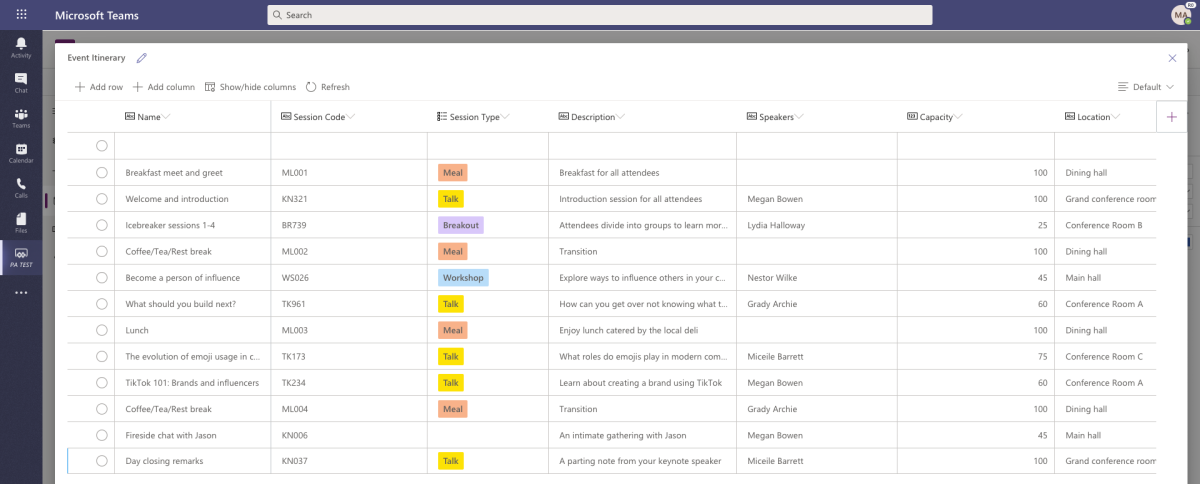
    Limitations can sometimes be a good thing. Dataflex is a simplified version of what CDS was, not just in terms of features but also the maker & admin experience. Do not underestimate how important this aspect can be in getting the citizen developers to make the right choice. Experienced CDS/XRM professionals may have been reluctant to move over to the new Maker Portal that is still missing features from the classic Solution Explorer. The new generation of app makers who have never even heard of these acronyms will most likely be happier within the Teams embedded app creation experience and give a higher NPS score to Power Apps as a result. Less is more, as they say.

    There’s going to be one Dataflex environment per Team that you can create, and the users will then map to the members of that Team, with a simplified user security role structure of Owner-Member-Guest (a.k.a. OMG). No business units or custom security role privileges to worry about, nor any complex data types like activities, polymorphic lookups, currencies etc. Yes, I know, most of the apps you’ve built already probably depend on those, but remember that this is not aimed at you! Dataflex Pro will have all of it and the non-Pro environments can be promoted to full capabilites, at which point they will require the same licenses as CDS does today.

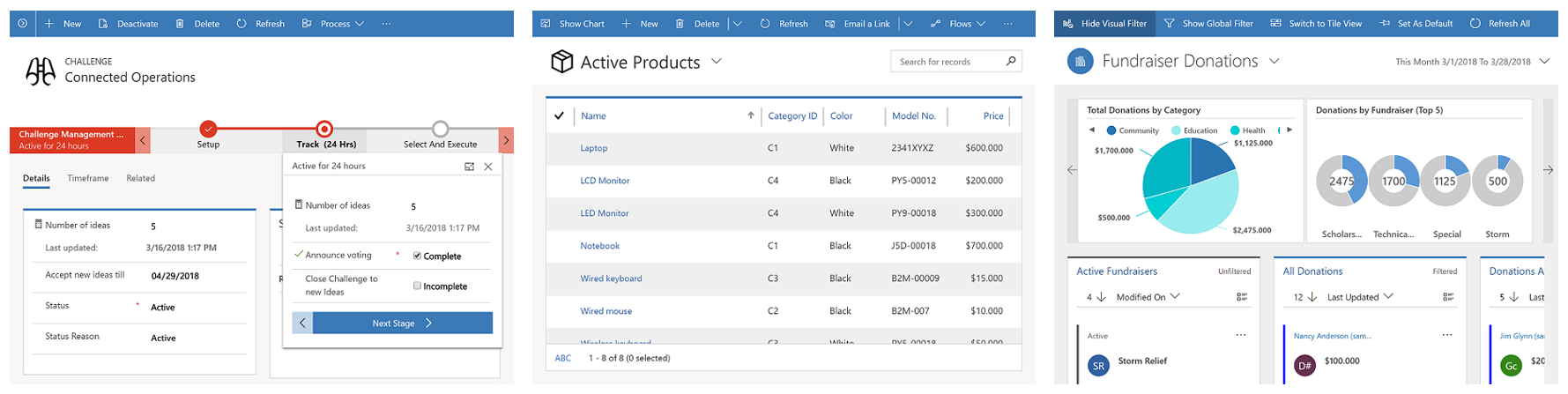
    This is still a Big Deal. With the “free” Dataflex included in Teams, Model-driven apps can soon be created by an equally large crowd as Canvas apps before. Eventually it might no longer be an awkward moment when you need to talk about “that Power Apps app type that looks like Dynamics, not like all the other apps you have”, since every app maker can generate those beautiful, structured UIs on top of the database tables they’ve added into Dataflex. Since Model-driven apps are so metadata driven, I’d imagine this route would actually be a lot easier for many power users of Excel that haven’t necessarily been comfortable with building pixel-pefect mobile UIs in Canvas apps before.
    Despite of everyone having the possibility to store app data inside Dataflex, it’s not by any means imperative that a single database is established as the place for all business data. That is the traditional CRM approach of doing things, but with the modern tools like Power Apps and Power Automate the source and target of data operations could be a number of different systems if needed, thanks to Connectors. However, I’ve understood that Premium Connectors will still not be included with the Teams license, so the options for data connectivity will be more limited here. This may again be perfectly fine for the simple apps that the non-Pro Dataflex is aimed to serve.

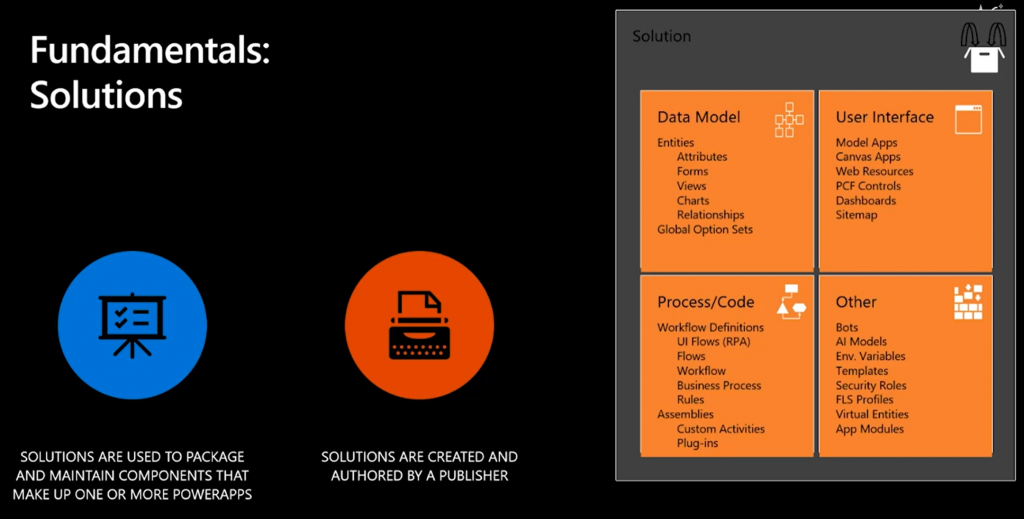
    One thing the free access to Dataflex should make ubiquitous is the usage of solutions for app packaging and ALM. As the solution framework is a concept from the XRM era, replacing the earlier standalone .zip packaging of apps and Flows required that everyone would get access to this layer in the underlying platform. From an administration perspective it should be a clear step forward to standardize all the work to be done with Dataflex tools. There is also the promise of further deployment options being introduced with the Teams app store and its “single click” app installation, so this is an area for everyone to keep an eye on.

    The business impact of Dataflex

    The launch of non-Pro Dataflex can be expected to generate a wealth of questions from those professionals who’ve been working with CDS based solutions. What is & isn’t supported in Dataflex, where do the license and capacity limits actually get drawn, how are they enforced, where can apps be created for different Dataflex environment types, what admin controls are available on the tenant level, and so on. It’ll be confusing initially, but in the end I bet it’s gonna be woth it for all parties in this ecosystem.
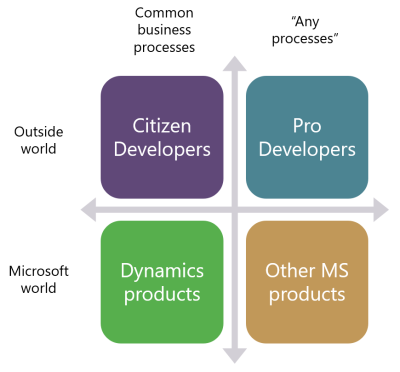
    One year ago I wrote a blog post examining the possible growth directions for Power Platform. This launch of Dataflex + Teams now broadens the scope of the platform both on the Citizen Developer dimension (number of potential app makers) but also in the “Other MS products” axis. Earlier I’ve enjoyed making the joke that one day Microsoft would build the next version of SharePoint on top of CDS. Well, that hasn’t quite happened yet (and most likely never will), but we did see a major step now in Power Platform catching up with the mainstream productivity apps in Office. After all, every time you create a new Teams team, a new SharePoint site is provisioned for it. We’re now at a point where technically each team could also have a Dataflex environment provisioned at the same time. Knowing this, what’s stopping future Teams features from being built on top of CDS Dataflex?

    As we can see from Ryan’s example, there are interesting synergies between Power Apps and Teams that are made possible by having Dataflex “on by default”. From a partner ecosystem perspective, over 500.000 organizations around the world who use Microsoft Teams just became a potential target for no-code solutions that could be dropped inside various teams. I’m saying no-code here instead of low-code because presumably the non-Pro Dataflex environment wouldn’t support custom code. Anyway, there’s a lot to investigate here with the Dataflex public preview coming in August and GA planned for September timeframe, so I will definitely be returning to cover the topic more closely once detailed feature lists are publicly available.

  • ALM for low-code: are we there yet?

    ALM for low-code: are we there yet?

    Application Lifecycle Management, ALM, is a topic rarely covered in the mainstream pitch for how low-code/no-code solutions are transforming app development practices. This is understandable, since the initial time-to-value, from an identified business need to a working application (or at least a functioning prototype of one) is where the major difference to the traditional software development initiatives are easiest to demonstrate. It’s the “five minutes to WOW” effect that gets most of the attention.

    Relying on configuration and formulas over custom code does promise also a lower maintenance overhead for the post go-live phase where the apps are used and evolved gradually to remain in line with the business requirements. There is less to worry about the potential impact of changes in each of the underlying components that keep the app running when you’re subscribing to a service like Power Platform that aims to abstract away many of the moving pieces in Azure and other related cloud services.

    You shouldn’t assume life to be completely worry free, though. If you don’t plan ahead on what type of work is needed after the creation of your low-code app, then a nasty surprise may lie ahead for someone, somewhere, at the most inconvenient time. In the worst case your organization has become reliant on an app that no one owns & no one knows how it works, only to realize that your processes have already stopped due to errors caused by a change either inside or outside the system. Updates to the cloud components or changes in APIs used via Connectors, for example. A slower yet equally frustrating problem can arise from identifying a future change you’d really need to implement for the app in question, yet you don’t have the means to make that happen in practice.

    The rise of low-code application development and the forecasted arrival of 500 million new apps in the next 5 years is making IT organizations very aware of the need for setting up governance models to address this new reality. Having baseline knowledge of what apps are created, by whom, for which audience, for what purpose, through what technologies, on what data sources etc. is often the discussion that needs to be done first to analyze the current situation. A great tool for facilitating this is the Power Platform Center of Excellence (CoE) Starter Kit, which gives you an overview of the big picture for Power Apps and Flows in your tenant. To go deeper and actually manage the lifecycle of an individual (potentially business critical) application, we need to start discussing ALM.

    What is this ALM thing anyway?

    Microsoft has published fresh new documentation on ALM with Power Platform that could be viewed as a similar Starter Kit for this topic as the aforementioned CoE. It briefly covers the high level summary of what ALM means:

    ALM is the lifecycle management of applications, which includes governance, development, and maintenance. Moreover, it includes these disciplines: requirements management, software architecture, development, testing, maintenance, change management, continuous integration, project management, deployment, and release management.

    A very broad concept then. What I like most about this intro chapter is the definition of the goal of ALM: “driving efficiency through predictable and repeatable software delivery”. That’s the essence right there. Anything that reduces the differences between how individual app makers / developers perform common tasks within the whole lifecycle of a specific business application will improve the state of your ALM practices. Those with a software development background may immediately venture into thinking about various DevOps methods and tools at this point, whereas I’m always most concerned about how the business can get a grip of what exactly is happening to their applications over time. Who built what, based on which specification, when was it deployed & where to, how were the changes documented, what impact did it have on others systems, how were users educated on the new features, and so on.

    Microsoft’s ALM guidance is mostly revolving around the technical level specific to Power Platform, meaning how solutions and environments should be used. If you haven’t heard it before, then the solution framework that was born in 2010 for the XRM era has been actively expanded to cover more & more areas that are not a part of the Dynamics 365 Customer Engagement on-premises server. Canvas apps, Flows, AI Builder models, Power Virtual Agent chatbos, Export to Data Lake configs, pretty much everything in the Power Platform is now manifested as solution component. More is on the way, based on how Matt Barbour has stated things like Power BI and integration services being “on the radar” for the Power Platform solution system.

    The expanding technical capabilities and scope of components shipped via solutions is of course great news. However, as we are now talking about the platform for every developer, not just pro devs, my number one question about Power Platform ALM is not “will it scale up to new products and features” but rather “will it scale down to new types of apps that don’t follow the lifecycle of a CRM system?” So, there’s two dimensions I feel will be critical for the ALM story to succeed: 1) unifying the mechanisms to manage configuration & code across the different app teams within MS Business Applications Group, and 2) democratizing healthy ALM practices by making them accessible to citizen developers. The first one is well underway with the solutionization of everything, but how about the second one?

    Managing your “source low-code”

    The fundamental challenge with why ALM tools aren’t already a part of every Power Apps maker’s or Dynamics 365 customizer’s core workflow is that they don’t exist within the context where these people do their work. This audience doesn’t need Visual Studio for anything, nor would there be anything familiar with the terminology used by version control systems like Git. This is alien technology from Planet Developer, which the no-code app makers would have to learn specifically for the purpose of managing how their configuration deliverables are moved from one environment to another. Compare that to the “export solution as .zip” / “import solution .zip” actions availble in the Power Apps Maker GUI that gets the job done for them. Many of these app makers surely understand the value that a formal deployment process and solution versioning could offer, but the barrier has been much too high for them to make that leap.

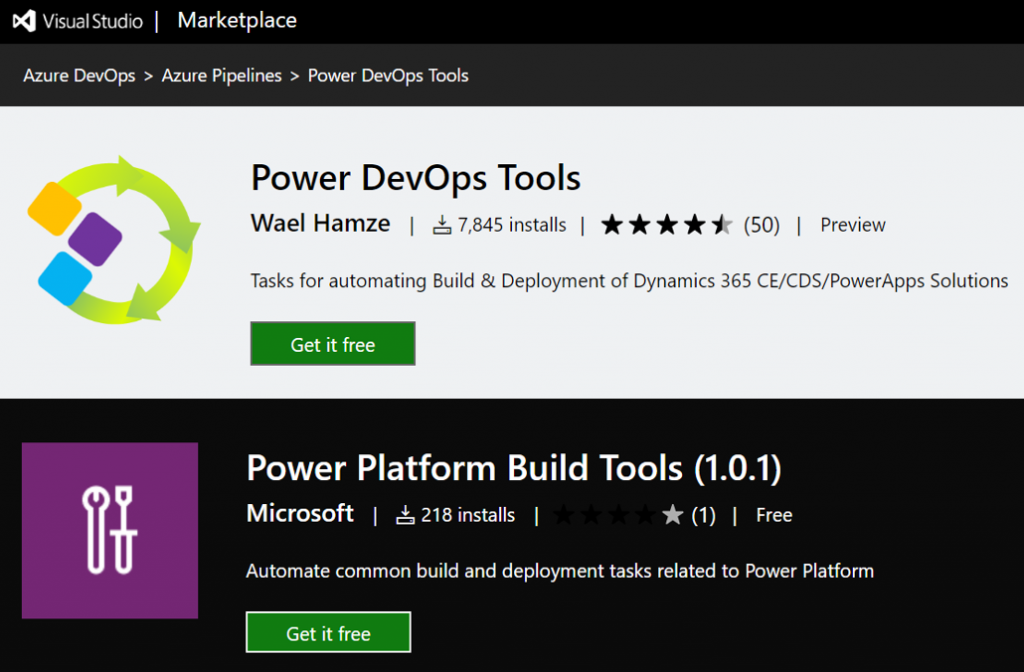
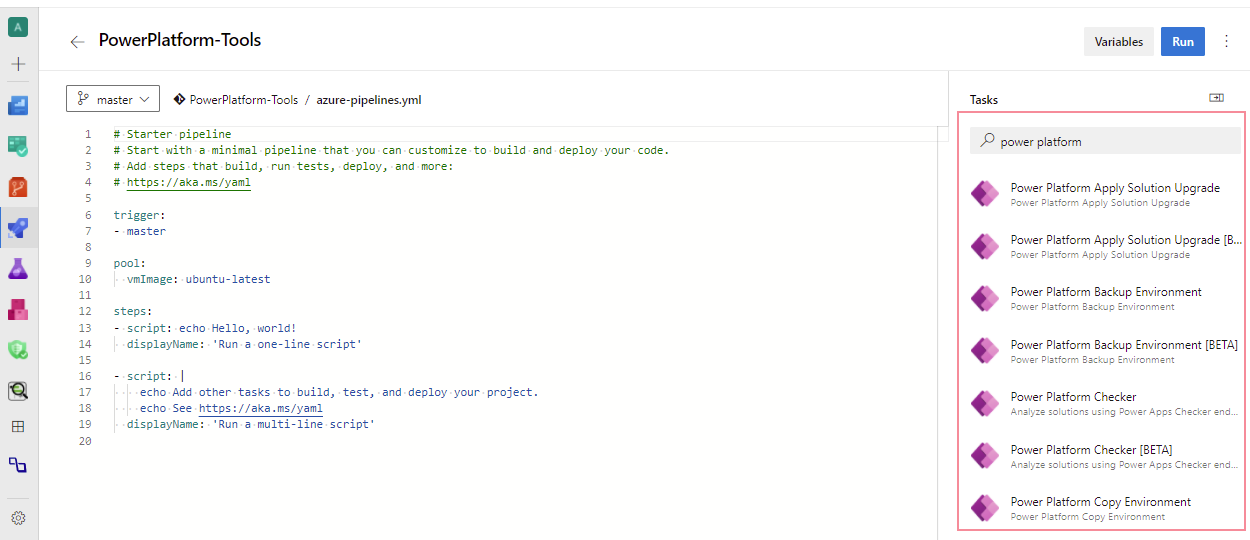
    There have been tools for pro-code developers working with XRM solutions for many years already, some provided by MS and many built by the community. Today there are official Microsoft Power Platform Build Tools available for Azure DevOps, which offer readymade tasks like solution export, import, unpack, pack, publish, with more features to come. Rather than tweaking PowerShell scripts, it would seem like there’s a way to visually configure the cloud to do some ALM magic for our low-code apps. Sure, this is not within Power Apps directly, but could this be considered just another admin portal that the citizen developers might learn to navigate?

    Get the Microsoft Power Platform Build Tools

    Setting up an Azure DevOps pipeline that pulls solutions from your dev environment, commits them into a repository for version control and then deploys that same solution to test or prod still isn’t exactly a next-next-next process. However, following a Power Platform specific tutorial, even a non-developer like me can get this up & running in a few hours. MVP Nick Doelman has written exactly what I needed, so if you’re interested in building your very first ALM pipeline, I recommend you to try this out:

    Simple ALM for Power Apps/Dynamics 365 Projects Revisited – Power Apps Build Tools edition

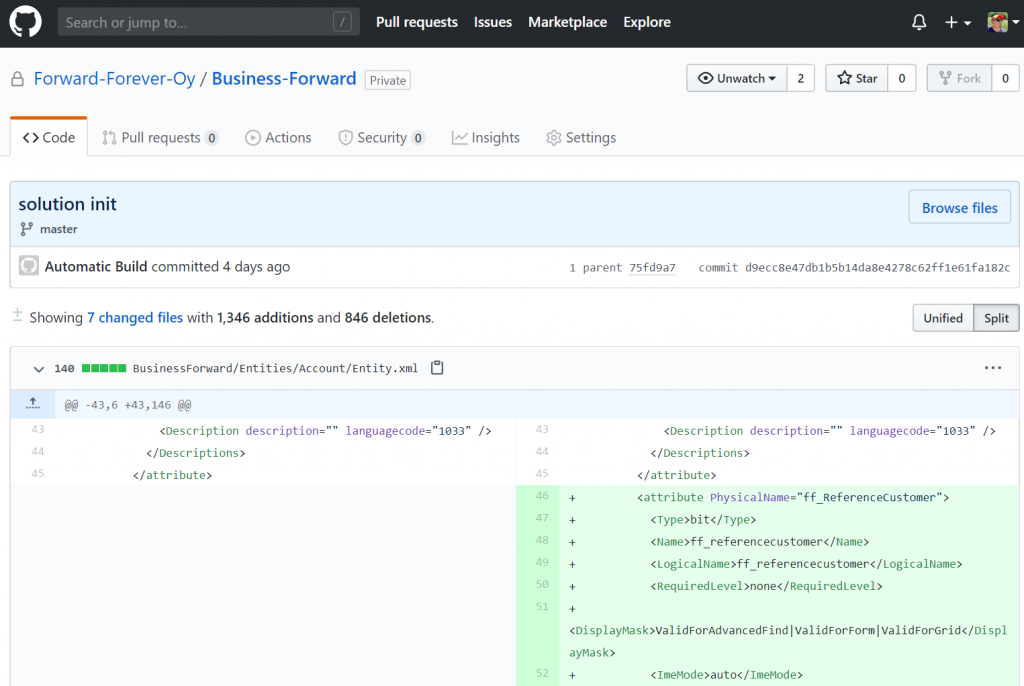
    Combining this with a recent update to the Power Apps Build Tools that also introduced support for MFA protected environments (meaning you can log in with an Application User identity), I was able to get our company’s “CRM” solution’s customization changes from from Dev to GitHub and Dev to Prod. Here’s what it looks like now when adding a new field on the accout entity:

    “Woo-hoo, we now have proper ALM in place!” Well, not quite. All that we really achieved with this was the possiblity of doing it “right”, meaning there are DevOps pipelines that could be used for handling configuration changes automatically instead of manually by individual low-code developers. Until I actually go and remove all Power Platform service admin roles from my colleagues, anyone of them could still go and mess up the production customizations directly. So, proper ALM is only partially about the tooling and automation – you still need to the exact same thing as without DevOps, meaning defining the processes and agreeing on the practices for how the business applications are managed.

    Regardless of this, it does makes perfect sense for low-code app development projects to evaluate if they would get benefits from leveraging automation tools like Azure DevOps. You’ll need to have the solution configuration stored somewhere anyway, so why not put it in a version control system that’s designed for “real code” and gain access to things like viewing the changes of individual solution components – rather than just dumping the files on OneDrive/SharePoint. Who knows, taking that step might even unlock further opportunities to automate and harmonize your application management processes.

    We should keep in mind that automation is a double-edged sword. In theory it can save you a lot of time, yet in practice it may often turn into an additional time sink of its own. The legendary webcomic XKCD beautifully illustrated this dilemma of Automation, which I think is especially true here in the ALM discussion. The tasks that you’re trying to automate need to happen on a frequent enough basis for a long enough time before you could achieve a positive ROI from investing in setting up your pipelines. A single citizen developer building a one-off app may not yet meet that threshold, so preferably in your automation scenario there should be a team of developers who will do several planned releases for the app in question.

    ALM for a team of low-code developers

    Microsoft likes to promote the stories of Power Apps Champions who have managed to make digital transformation a reality for their organizations by building low-code apps that would have earlier required a team of software developers. This marketing approach higlights the role of an individual hero, but from an ALM perspective the dependency to any individual person’s heroic actions and secret knowledge is rather a problem that should be solved. Once that initial app idea and first PoC starts turning into something business critical, you should have a team in place that can ensure its continuity.

    This team may not resemble your typical software development team. Yes, it’s quite likely that there will also be people with programming skills either working in the team or closely with it, but the primary competence on the technology side for this team is in assembling the features and components of the chose application platform into solutions that solve a wide variety of business problems. They are less likely to be all working with the single code base of a large application, doing pull requests, commits and all that Git jazz, simply because a fair share of Power Apps aren’t going to be built that way at all.

    If you look at Power Apps Canvas apps today, they are essentially a document made of JSON that cannot be simultaneously worked on by multiple developers. This is very different from a traditional app project on the Model-driven side (let’s say in a CRM context) where one person could be building the customer data management features while another team member is working on products and order management. All with their own dedicated entities, having so little overlap that simultaneous work within the same dev environment is often doable. Even though Components promise to offer a more modular way to build capabilities for the Canvas world (and Model, too), I suspect that the client side experience of a single app will typically remain a “one maker show” in the near future.

    Sharing elements and patterns across different apps built and managed by the team is, on the other hand, in a much greater role in the low-code approach. Here components, template apps and other reusable pieces of configuration can be of high value. Power Apps began its journey as a citizen-first app creation experience yet is gradually accumulating more of these features that mean every app doesn’t have to be a unique project. We’re getting more & more possibilities to see beyond the Maker GUI, like “peek code” in a Flow or use Monitor to debug Canvas app formulas. However, based on what Microsoft representatives have publicly said, it doesn’t sound likely that these low-code tools would evolve into allowing app makers to directly manipulate the configuration files in VS Code, for example. There are community tools like CanvasAppPackager from MVP Daryl LaBar that will help app developers understand complex Canvas apps, but these are NOT meant for building or modifying apps.

    Even in Model-driven apps the list of supported modifications for customizations.xml is fairly limited. So, keep this in mind when thinking if the pro-dev tools and ALM practices that are based on direct source code manupulation are going to be a fit for the low-code app developer team or not. Your Power Platform experts need to be primarily fluent with the admin tools from MS and the community (always start from XrmToolBox), plus they’ll need excellent skills for using collaborative tools like Teams within your org to share their lessons learned. Once you’ve got this side is covered, then you can move onto Azure DevOps and the likes.

    Environment management is another big topic for low-code apps on Power Platform. Having a separate CDS environment for every developer working on their corner of an application is Microsoft’s recommended approach to keep changes isolated. As your number of “ALM enabled” apps in the tenant will grow, the total number of environments will grow even faster. Assuming a theoretical 5 GB size for the CDS database of an environment, the $200/month storage cost itself wouldn’t actually be that significant if it saves a few hours of work from those developers. What you don’t want to happen, though, is having dormant dev environments consuming CDS capacity for many months with no actual deliverables from them – especially when your CDS quota is defined on a tenant level with no control available for reserving it to specific apps/environments.

    There are remedies to this problem. The “governance way” is managing the environment creation/deletion though a process that provides transparency to environment usage and enables allocating costs accordingly, for example via custom apps built on top of the CoE Starter Kit. The “ALM way” is provisioning on-demand environments from the source code in your repo via DevOps automation, then scrapping them after the active development work stops. While I sort of fancy this idea of “everything as code” where all of the infrastructure and configuration is managed via the same pipeline, I can’t help thinking that the most difficult thing about environments for business app development isn’t necessarily the configuration or the code. It’s the valid test data needed for making the app come alive. Yes, of course you could also script the perfect test data set to be generated alongside the environments, but again, we’re taking the level of effort needed in achieving deployment automation onto a very non-citizen developer level and approaching the XKCD scenario.

    Managed Solutions: what do you REALLY want to manage?

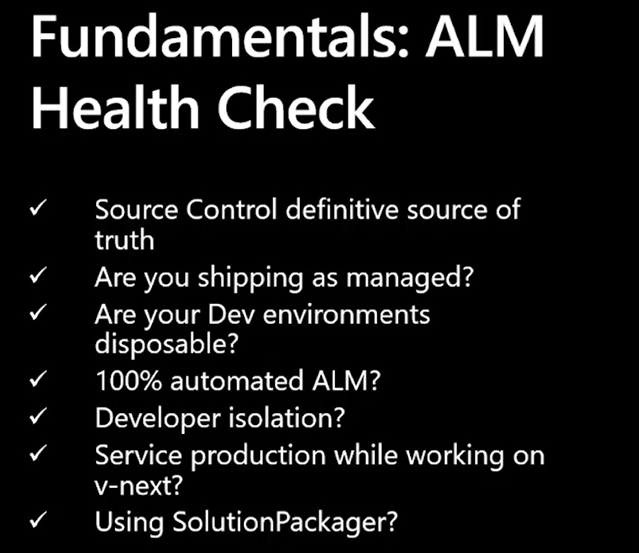
    Whenever Microsoft talks about ALM, usually you’re going to hear their statement on “use only managed solutions in production” sooner later than later. It’s not surprising that also the latest guidance, such as the MBAS 2o20 sesssion on Advanced Application Lifecycle Management capabilities lists this high up on the ALM Health Check list:

    In the user community around XRM there’s been an endless debate around whether unmanaged or managed solutions are really the way to go, and we’re not going to find the ultimate answer to it here in my blog. Personally, I’ve always had a hard time understanding the exact benefit that a customer organization would get from self-imposing the limitations of managed solutions onto themselves. It just sounds to me like installing a different lock with a dedicated key onto the window blinds in every room of your house. Expensive, overly complex, and very likely to leave you in the dark when someone forgets which key was used for which lock. It can also give you a false sense of security, as the main door to your house is still left completely unlocked, because Microsoft doesn’t yet offer a way to protect your production environments from the deployment of unmanaged customizations by anyone with sysadmin rights.

    In the context of low-code specifically, if you don’t have a seriously mature ALM process in place, I’d say you’re fairly likely to hurt yourself when playing with the sharp objects that are managed solutions. This is why during my 10 years of working with Dynamics CRM, XRM and now Power Apps, I haven’t yet deployed a single managed solution inside a customer specific project. On the other hand, I have worked with removing managed solutions created by the customers’ previous partners, after the ALM process has broken down for one reason or another (“not existing” being one of them), then replacing them with an unmanaged layer of customizations that has been a better fit for their overall CRM landscape. Yes, those other partners probably defaulted to following MS instructions on using managed solutions in every production environment – this guidance remained the same since CRM 2011 days, after all.

    Please do note that I’m not saying managed solutions wouldn’t serve a purpose. When you are building an actual app product that is meant to be deployed across multiple environments for different customers, managed solutions are of course the way to go. They offer the container for keeping your stuff separate from the stuff delivered by other app vendors, when deployed into the single CRM system that’s used widely across the enterprise by different user groups for different processes. Any proper commercial product development initiative should also be able to absorb the ALM overhead from environments, automation etc. and turn that into increased revenue from being able to ship software releases faster and more reliably as time goes by, thanks to the upfront investment made. It all makes sense here, but this is a very different landscape than how I perceive the typical use cases for low-code apps within organizations to evolve as Power Platform becomes more widely adopted.

    Remember: you’re no longer building “one place for all customer data”, rather you’re often creating several targeted apps for very specific purposes and audiences. Most of these app experiences will likely be fully developed by either savvy citizen developers, an in-house team of Power Apps champions, or an external consultant brought in to get that job done. The app lifecycle can be very short, even targeted to be used in one-off events (or under temporary disruptions such as COVID-19 social distancing), whereby some apps may actually be “disposable by design”. These are pretty much the opposite of monolithic CRM systems where a wealth of different ISV solutions need to peacefully co-exist throughout the years. So, whichever solution strategy you choose for your Power Platform environments, make sure it solves a real problem that your low-code app developers and admins are facing, rather than directly adapting practices that have been designed for the ALM needs of pro-developer teams working full-time on shipping a sizeable amount of custom code alongside the low-code application platform configuration information.

    A different approach to ALM: Power BI deployment pipelines

    The broad umbrella of Microsoft Power Platform covers also technology that isn’t (currently) built on the solution framework: Power BI. Since it is in practical terms more part of MS Data Platform, the mechanisms used on the BI side are understandably quite different than those originating from the citizen-dev PowerApps (back when it was still spelled together) or CRM systems. What makes this an interesting area to observe is that from what I’ve understood, the traditional development of reporting solutions hasn’t exactly followed the typical software development path either. Checking in reports to source control systems may not be the natural workflow of a Power BI content author or data analyst, so the barrier for adopting advanced ALM practices is likely to be pretty high for this audience, too.

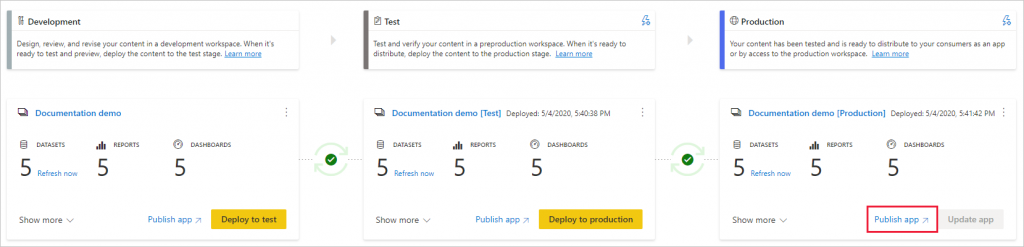
    Power BI deployment pipelines is a feature that has recently been launched in preview. Labelled as an ALM solution, as also Power BI now packages report content into “apps”, this functionality is actually baked right in to the native user interface of the PBI service:

    deployment pipelines landing page

    Reading the introductory text gives us an idea of how this feature is positioned:

    Deployment pipelines help enterprise BI teams build an efficient and reusable process by maintaining development, test, and production environments. BI creators can incrementally transition new or updated content between environments, reconfiguring them with the appropriate data connections and permissions. Pipelines are very easy to use and take only few minutes to setup. No previous expertise or coding skills required.

    Wouldn’t it be nice if we could take the term “BI” from that paragraph, replace it with “App” and have a similar story to tell for low-code business app developers? A targeted experience that would be readily available for each & every customer environment right out of the box would certainly be the most effective way to democratize healthy ALM practices.

    You’ll need Power BI Premium capacity for using deployment pipelines, so the reporting ALM story is aimed towards the enterprise audience. If there ever was a native deployment pipeline functionality for Power Apps, I’m sure the usage would require consuming some type of paid for capacity from the Power Platform product subscriptions. I believe this would still be a lot easier approach for selling the idea of why customers need to invest in having proper ALM infrastructure and capabilities in place, since it wouldn’t be just an extra layer of billable hours added on top of app development project budgets but rather something much more tangible.

  • CDS FAQ for the Power Apps Makers

    CDS FAQ for the Power Apps Makers

    Microsoft is commited to making Common Data Service the flagship data source for Power Apps scenarios, as well as delivering advanced enterprise application lifecycle management (ALM) features via CDS. What can make the role of CDS somewhat difficult to approach for app makers is the fact that it hasn’t originally been built for Power Apps, like CDS “v1.0” was. The current CDS “v2.0” is based on XRM, the business appliciation platform that was born alongside the Microsoft Dynamics CRM product.

    I’ve been working with this plaform technology for close to 15 years now, whereas the world of Power Apps Canvas apps (and Power Automate) is a much more recent acquaintance of mine. To put my experience into good use and to also learn to see things from outside the XRM walls, I decided to share answers to a few questions that I’ve heard from #PowerAddicts that are exploring the CDS world.

    Q1: Why should I use CDS as my data source instead of SharePoint or SQL Server?

    Because it is not just a data source. Yes, in Power Apps Canvas apps you do connect to it just like any other data source in the app Studio, but this is misleading. CDS is the complete platform that can orchestrate how your app works when it comes to business logic, security model, integration, administration, governance and many more areas. Compared to raw SQL Azure, the SQL relational data is actually just one of the storage types that CDS leverages behind the scenes. Ultimately it’s a bundle of the latest Microsoft cloud technology for compute, storage and eventing/extensibility – offered as a single service that you don’t have to configure nor manage. You consume it either via built-in integrations to Power Platform, Dynamics 365 and Office 365, or alternatively via an API that is automatically generated to match your customized schema.

    The topic of “why CDS” would easily warrant a whole series of extensive blog posts on its own, which I may well do later on, but not inside an FAQ like this. For now, I recommend that you watch this Ignite 2019 session from Ryan Jones to understand the big picture of Common Data Service:

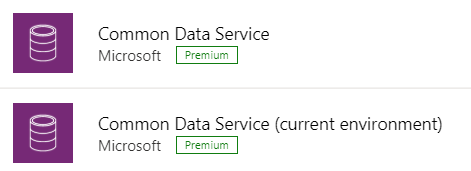
    Q2: What’s the difference between the 2 connectors for Common Data Service?

    The current environment connector is a native connection. This is the misleading part. It’s not a real Connector at all, rather every Power App knows how to talk with the environment that hosts it, which essentially is the current CDS environment. This leads to numerous benefits in performance and available features, as the technical implementation behind the scenes is quite different. I haven’t come across a Power Apps specific comparison yet, but MVP Sara Lagerquist has done a thorough analysis of the two CDS Connectors in the Power Automate context.

    Q3: Is there any reason to use the non-current environment CDS connector then?

    Yes, if you want to connect to a CDS environment that’s not the one which is hosting your app configuration. Meaning, if there is busness data out there in another CDS database and you need to reference it in addition to the “native” data in your app’s environment, the old CDS Connector might well do the trick. However, this is an area to keep a close eye on for the detailed functionality over time, as MS is very much wanting everyone to “go current” and some issues might arise from remaining on the old Connector.

    Q4: Why should I use solutions for building my app functionality in CDS?

    Even if you’re working in just a single environment, building a simple app directly in production (which is what a citizen developer often might do), solutions offer you the logical grouping of elements that are part of your project. In fact, at some point MS experimented with changing the Maker UI to read “projects” instead of “solutions”, but luckily that change was reverted back. It can stil be a helpful concept to illustrate the purpose of solutions for those who aren’t familiar with CDS. The act of building an app needs to manifest itself somehow within the environment, so always start by creating at least one solution for your project. (Real life projects may well have more than one solution, thouh.)

    What solutions really are designed for is shipping the elements of applications into other environments, in a process that is easy to manage and possible to automate. Microsoft is aiming to make solutions the packaging story across all of Power Platform, which means it’s not an optional concept. It’s how things are built within this business application platform.

    Q5: I’ve read about this thing called “managed solutions”. When should I use them?

    There’s the saying “if you have to ask how much it costs, you can’t afford it”. In my opinion, this fits perfectly with managed solutions, too. Unless you are really, really well educated with how the solution system in CDS works (meaning you’ll probably have an XRM developer background), don’t touch managed solutions – yet.

    When delivering complex enterprise CRM systems with multiple full time developers writing custom code and leveraging Azure DevOps for automated CI/CD pipelines, managed solutions are the way to go. Similarly if you’re building an ISV app for many different customer organizations and hope to publish it on AppSource, you simply have to go managed. We’ll most likely see Microsoft making the managed solution concept more approachable for other audiences in the future, too, so please do educate yourself on their possibilities and get ready for building more complex apps at scale.

    Q6: Couldn’t I use managed solutions to lock down my app components from other makers?

    Yes, but not in the environment you’re probably working in right now. When building apps, you’re always working in unmanaged mode. It’s only when you export your solution from the current environment that you get a choice to make the solution package either managed or unmanaged. Shipping configurations from dev to test & prod is what this mechanism is for. If you only have a single environment for the app makers where the small departmental or personal productivity apps are built by citizen developers, none of this stuff applies to you.

    No. Don’t ever re-import the managed solution back to the environment where it came from. That’s locking yourself in and throwing away the key. It’s not what you want.

    Q7: Is there any other way to restrict specific entities to be only customizable by certain app makers if we’re working in a shared CDS environment?

    No. The metadata of CDS doesn’t have such security mechanism that would allow you to say that “Group A owns the account and contact entities, Group B is responsible for the project, task and resource allocation custom entities”. Within a single environment, there can be only one god, and that is the System Administrator. System Customizer also comes close, as both have the rights to create and delete new entities on a whim.

    Records stored within an entity always have an owner. An account is owned by User X, which can be used for determining what other users can do with it. The actual account entity i.e. the table that holds the records doesn’t have this type of ownership construct, as it applies only to data and not metadata. If you need more granluar control over metadata, then the answer is to set up different environments for the different groups.

    Q8: How can I see what privleges a particular user has been given in CDS?

    Security roles are a central construct in CDS, as everything you attempt to do in the database is verified against two key parameters before execution:

    1. Do you have rights for the specific action against the entity where the data is stored?
    2. Who is the owner of specific the record that you are trying to perform the action on and what’s the relationship to the calling user?

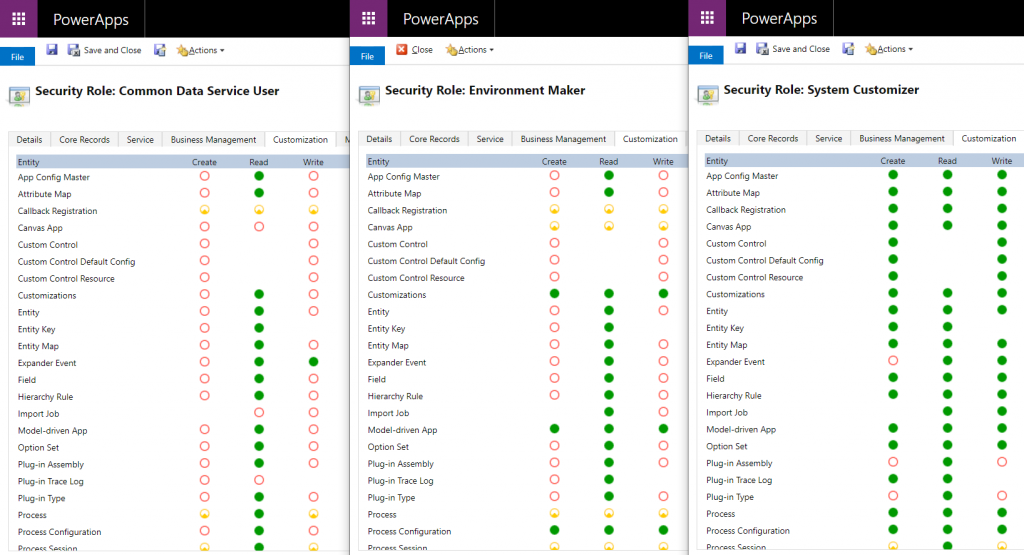
    The UI for security roles dates back to MS CRM v.X days and is scary both due to the legacy experience as well as the variety of options found in even a blank CDS org. Nevertheless, it is logical and will tell you what you need if you know what you’re searching for. Let’s compare 3 standard roles of Common Data Service User, Environment Maker and System Customizer and their privileges on the Customization tab:

    The CDS User has mostly just read access to the metdata, like Entity, Field, Option Set and so on. An Environment Maker is allowed to create new items like Canvas Apps & Model-driven Apps – like a Maker should. To actually create new Entities and Fields, you’ll need to be a System Customizer or Administrator.

    This is where the platform aspect of CDS (and its predecessor XRM) comes into play, though. You can create your own security roles, preferably via copying an existing system role that’s close enough. So, you could create a new “Environment Super Maker” that would have the right to create new fields, but not new entities, nor delete any fields. So, security roles are not only the gatekeeper to business data but also metadata.

    Q9: Looks like these security roles are environment specific. Do the IT admins really to go and manage the security settings via this MS CRM Power Apps UI?

    Not anymore! Last year Microsoft finally brought Azure AD integration into the system administration features of Dynamics 365 and thus CDS. You can now leverage the Group Teams to assign CDS security roles to an Azure Active Directory group (security or Office group) and the users will inherit the privileges of that role when added to the group.

    While Azure AD groups definitely streamline the administration process, please keep in mind that there’s more to CDS security model than just the security role assignment. Business Unit structures, Field Level Security, Hierarchical Security are some aspects that may require admin actions directly within the environment to get them set up properly.

    Q10: Why do all these user accounts from across the organization appear in the CDS environment meant for department X only? Can they all access it?

    You probably didn’t assign a security group to the CDS environment right at the start when it was created. Therefore every licensed user account in your tenant was copied over to the environment. If you assigned a security group to the environment after its creation, then those user accounts will be automatically disabled. They will forever remain in the database tables as inactive users, though, since user record deletion is not something XRM nor CDS has ever supported.

    Just because a user exists inside the CDS environment’t systemuser table doesn’t mean they can do anything in that environment. Not even if they haven’t yet been disabled. Everyone needs a security role to have a chance to read both the metadata and the business data from CDS, so the user record is just a prerequisite to opening the door to the environment but it doesn’t provide the key to the lock.

  • Yes, XRM Is The New Common Data Service

    Yes, XRM Is The New Common Data Service

    In November 2016 I wrote an article on LinkedIn with the title “No, Common Data Service is not the new XRM”. This was my response to the speculation that had emerged from Microsoft’s announcement of a new cloud-native platform to store, model and integrate business data with other (cloud) applications. This platform called CDS was seen as a potential replacement to XRM that had been born into the good ol’ on-premises server world already back in 2003. Given the transformative power of SaaS and PaaS, it wasn’t such an outlandish thought to imagine the days of XRM bits being numbered, with a new Azure based alternative being prepared behind the scenes to take over.

    Well, today we had the public launch of the Dynamics 365 Spring Wave in the Microsoft Business Forward event, which I summarized in my previous blog post. The most significant piece of news from this announcement wasn’t perhaps articulated so clearly in official Microsoft materials, so I’ll try and clarify it here and give some perspective on the what/why/how behind this change.

    XRM = CDS v2

    The platform known as XRM, which has served as the foundation for Dynamics CRM and later Dynamics 365 Customer Engagement, is now reimagined as Common Data Service, CDS. Or more specifically, “CDS for Apps”, but more on that later. The key things to understand here are that A) nothing from the current XRM is being removed while B) existing CDS v1 environments are migrated onto CDS v2 that effectively is XRM.

    The adoption of CDS as a component of solution architecture for live customer environments has likely not reached a very high level up until this point. Originally introduced as a concept back at the time when the whole Dynamics 365 concept was launched in 2016, the purpose of CDS has remained too fuzzy for many customers to explore it further. At the same time, the feature set offered by CDS v1 hasn’t yet covered many of the scenarios that Microsoft partners would have likely used it in. You could say that in their noble attempt to connect many of the existing boxes in the business application architecture, Microsoft ended up inventing yet another box. Which is pretty much the fear I had in my first blog post covering CDS, which back in those days was still called Common Data Model (CDM):

    Being the giant corporation that Microsoft is, there’s bound to be both plenty of overlap between different products developed by different groups within the organization, as well as the occasional lack of alignment between the roadmaps to where each of their countless products is heading to. I’m sure there was a clear need for introducing a foundation for managing all that business data which the Power Suite tools (PowerApps, Flow, Power BI) had to intimately work with, instead of just relying on distant services via APIs. Viewed from this perspective, the idea of CDS must have seemed pretty awesome. When looking at the feedback coming from outside the MSFT firewall, though, it’s obvious that the V1 product didn’t quite manage to meet the mark:

    This Ain’t The XRM of 2011 Anymore

    A lot of work remained ahead if CDS was to be built into what the real world requirements from enterprise customers were. At the same time, the XRM cloud platform was being transitioned to run on Azure services and the new target architecture was to allow the separation of the built-in applications (Sales, Service etc.) from the core platform. The CRM “legacy” of XRM was about to become an optional component you could remove and not break things, with previously hard-coded features being re-engineered as either core platform capabilities or implemented as reusable pieces within the in-house apps’ solution packages, built with Custom Control Framework (CCF) and presented via the Unified Interface.

    The people at Microsoft who actually design and build the functioning technical product were sure doing all they possibly could to prepare XRM to take a bigger role than just that boring old sales pipeline management engine with Outlook integration we’ve seen since forever. The community that had worked with Dynamics CRM and seen its potential to deliver custom business apps time & time again in actual customer projects were always asking for MS to deliver a “Pure XRM” SKU, to make it a true platform. Whether it would ever happen, though, was not for either of those groups to decide.

    At the end, as we now can see with the announcement of PowerApps Spring Update, the leadership team at Microsoft ultimately came to the right conclusion. XRM was chosen as the platform that would power the further expansion of PowerApps becoming more enterprise ready with the support for building model-driven apps alongside the familiar canvas apps. From a licensing perspective, “PowerApps P2 officially becomes the new platform SKU, moving away from being a admin and maker focused plan to becoming THE plan for users of stand-alone model driven apps.” So, there we have it then: Pure XRM at last.

    So Long, XRM!

    A legitimate question that some of you might as at this point is:

    “If the CDS v1 platform is replaced with XRM, then why is everyone talking about Common Data Service still?”

    Are we seeing yet another marketing spin that tries to blur our vision from what the underlying technologies really are, like with the Dynamics 365 “it might be CRM or ERP and you’ll never figure out which one we’re  talking about” rebranding pains? Well, that was my initial though when I first learned about the plans for this platform merge, but I’ve later come to the conclusion that it is actually a fairly sensible decision to replace XRM with CDS.

    For those of you who have been in the Dynamics game for long enough time to recall the first moments when Microsoft started throwing around the term XRM, you might still remember the excitement that was collectively felt around that letter “X” for describing the bold journey of going beyond the standard CRM feature set. The thrill of creating your very first custom entity via the customization GUI – man, what a rush! This truly felt like the future of business application development at the time.

    Fast forward to where we are today and the excitement of data model and UI customization has been replaced by the anxiety to get as many different apps and services to talk with one another with as little effort as possible. It’s not that focused on the Relationship Management part anymore, and instead of “X” we have X^N different things we need to manage and connect with (some are even IoT enabled things). To describe what we’re actually trying to use XRM for today, the Common Data Service is a pretty fitting name in the end. We’re trying to bring some common sense into the sea of data that everyone is swimming in, and we’d of course prefer to consume it as a service like we already do with movies or transportation, for example. And as for the visible UI part of the application that user interact with – well, there just happens to be this concept called PowerApps out there already. So, “XRM Part 2” = CDS + PowerApps.

    I think we’re at a point where we really should look at the road we’ve traveled with our trust ol’ XRM Swiss knife, appreciate all those countless times that we were able to find a tool from it that got the job done, but accept the fact that from this point onward we’re going to need a bigger knife. Which we might as well call CDS for the server side & PowerApps for the client side.

    One More Thing…

    Just so things wouldn’t be uncharacteristically clear for Microsoft’s product naming tradition, what we’re seeing here is actually a bit of a “SkyDrive moment”. By this I’m referring to the episode where after renaming SkyDrive to OneDrive due to a lawsuit from BSkyB, Microsoft then proceeded with launching another product called OneDrive for Business. So, “One Drive, many meanings”…

    With CDS the scenario is that while the XRM platform has now been rebranded as Common Data Service for Apps, there’s already another product on the way, called Common Data Service for Analytics. Regardless of the word “common” in the name, these two platforms are unlikely to share many characteristics when it comes to the technology under the hood. Here’s how the MSFT Technical Fellow behind Power BI describes it:

    So, we’ll soon have two awesome products from Microsoft named according to the pattern “Common Data Service for X”, which we can easily distinguish from one another by using the terms CDS-A and CDS-… Oh. Right. Well, there’s always the next round of rebranding we can look forward to!

  • Top 3 Themes for Dynamics 365 in 2017

    Top 3 Themes for Dynamics 365 in 2017

    The first day of the new year is a good moment to reflect on what 2017 gave us (or didn’t give) in the Dynamics 365 business. Here are the top 3 themes that came to my mind when I looked backed at the last 12 months of news, releases and overall directions coming from Microsoft.

    Business Applications

    A major theme that emerged this year and found its way into most of the communication coming from Redmond was Business Applications. Those two words on their own of course don’t mean anything very revolutionary, but it’s rather the way in which they were used to broaden the context of Microsoft’s business software beyond just Dynamics that’s of greater significance. If 2016 was the year when CRM and ERP were commercially bundled into Dynamics 365, then in 2017 the scope began to reach further beyond that. At the start of the year the XRM platform was given the Customer Engagement name, with the absolute minimum fanfare allotted for the occasion, so the true focus for product marketing was obviously somewhere else.

    Looking around at what specific software products sit alongside Dynamics 365 in the high level MS technology stack illustrations, it’s quite logical that we’re now seeing the “Power Suite” tied into pretty much every commercial narrative around Microsoft’s business cloud. More precisely, the technology grouped under this suite with no official name is very central to the story being told to both business and technical decision makers for one reason: its purpose is to connect the big three MS clouds. Office 365, Dynamics 365 and Azure are all equal beneficiaries from the toolkit that is provided by PowerApps, Flow, Power BI, CDS and their numerous connectors.

    On an everyday level it may still not be all that common for the real life CRM solutions to heavily rely on the Power Suite technology, like using MS Flow instead of D365 workflows. Because it was first rolled out as a power user focused set of tools for an individual information worker rather than something you’d deploy across a large organization, the practical as well as perceived maturity of this technology has formed a barrier of sort for full-on adoption. The long term outlook for it does look bright in my opinion, however. There’s only so much that Dynamics 365 as a platform can do on its own (be it the XRM, AX or NAV flavor), but if you can connect it with the outside world of MS and non-MS services without the traditional integration development effort, that opens up the door to a world of possibilities. I’m pretty sure customers will be interested in taking a step through that doorway and having a look around during 2018.

    App/Plat Separation

    Taking a few steps down from the higher level clouds and diving into the platform formerly known as XRM, 2017 was a busy year. This didn’t really come as a surprise to me, since I had a wonderful opportunity to get a peak at what the product team had planned for this calendar year already in the last MVP Summit in November 2016. My initial reaction to it was “are you guys SERIOUSLY going to push all of this out in the next release?” Well, a clear majority of the planned features and changes was indeed shipped during 2017 eventually, although the naming of V9 as the “July 2017 Update” didn’t turn out to be such a great idea.

    There were massive changes introduced to XRM (which I’ll continue to call for what it is), both above and beneath the surface. Rolling out Unified Interface initially to the mobile devices and eventually to every UI is going to change the client side of XRM in ways that are even greater than the previous user experience overhaul in CRM 2013. Opening up the client UI to custom extensions with the Custom Control Framework (CCF) sometime later (hopefully in 2018) is a major step in enabling and encouraging the reuse of configurable UI controls for data visualization. Finally, the App/Plat Separation that has moved the previously built-in application features of Sales, Service etc. into optional solution packages is now turning XRM into the type of generic application platform that it has earlier often been depicted as – in the technical decision maker slide decks from MS, at least.

    The combined effect of this transformation which materialized largely in V9 is that XRM should now be a lot more future proof. Having the individual applications as their own packages is a bit like how at one point in the late Windows Phone operating system’s lifecycle the Office apps needed to be separated from the OS, so that they could be serviced and updated without having to ship a new WP build. (Naturally I hope that the fate of D365 will be considerably more glorious than that of WP.) The new UI controls in CCF that now aren’t tied to a single app feature but can rather consume any data coming from XRM database or from external sources via Virtual Entities are bound (pardon the pub) to be more useful in delivering solutions to varying customer needs. Sharing the same client framework across different devices and embedded apps is going to reduce the amount of effort needed to get these solution features in the hands of different user groups.

    Licensing Model

    Sometimes the planned features take a little longer to ship than was originally estimated, which certainly is no surprise to anyone working in the business of software. Other times it turns our that what you initially promised to deliver isn’t actually going to meet the needs of the outside world after all. The delays experienced in getting V9 out to the customers represent the former scenario, while what happened to the Business Edition is an example of the latter.

    There’s no denying that with the growth of the platform and all the new cloud services attached to it, Dynamics CRM had grown from humble beginnings to enterprise scale in the recent years. Therefore the idea of labeling the suite as a true enterprise product and building a different lightweight offering for the needs of smaller CRM environments probably made a lot of commercial sense when MS announced the Dynamics 365 branding with the Enterprise and Business licensing plans to the world in WPC 2016. Only the practical problem remained of how to actually mold a new offering out of the big suite – at least without taking several shots at one’s own foot while setting up constraints for customization and expansion for those customers who’d initially start their exercise from the lower end of the license pool.

    Those 14 months from announcement to eventual cancellation of a separate Business Edition were filled with confusion on all sides – from partners to customers, and probably within Microsoft, too. Although this did leave an unfortunate stain on the year 2017 for Dynamics 365, the long term outcome from the decision to NOT roll out an artificially separated lower tier may turn out to be a better choice after all. It’s all still wide open on how the promised “lower price point” licenses and apps will be packaged, but at least it sounds to me like MS has acknowledged they need to build bridges instead of walls around the growing set of applications in Dynamics 365. For instance: just take a look at the documentation of the upcoming Dynamics 365 for Marketing application and tell me if it looks like an SMB only -product that no existing (Enterprise) customers would have any use for? Exactly. Sanity must prevail and customers be given a chance to license the technology that best fits their needs.

    Hello 2018

    What can we expect to see from Dynamics 365 in this new year then? There are no definite product roadmaps from Microsoft that would publicly disclose what’s planned for be released in which year, since the software business no longer operates on the type of schedule that we saw when products were shipped in shrink wrap every 2-3 years. It now looks more like a mesh of forever updating cloud applications and web services that move along according to their own backlogs and team velocity. Given that the real business applications that customer organizations deploy are a combination of several products that in turn use a variety of back end services, who can actually tell when a certain feature will be “ready”? For example, Dynamics 365 for Marketing utilizes Customer Insights, which in turn relies on the following Azure services:

    • Azure Data Lake Store
    • Azure Data Lake Analytics
    • Azure HDInsight (Spark, Phoenix, HBase)
    • Azure SQL Database
    • Azure Key Vault
    • Azure Secret Store
    • Azure Event Hub
    • Azure Stream Analytics
    • Azure Redis Cache
    • Azure Service Fabric
    • Azure Active Directory
    • Azure Monitoring
    • Azure Metrics
    • Azure Websites
    • Azure Service Bus
    • Azure Storage

    That’s what the future is made of, and that’s why it is so unevenly distributed. We may well see MS announce the next Dynamics 365 Customer Engagement capabilities before existing customers are even able to update their instances to V9. The specific points in time where a particular capability is 1) announced, 2) in private preview, 3) in public preview, 4) available for new environments and 5) deployed for live customer environments may therefore be spread out over a time period that makes even assigning a proper year to it challenging at times – let alone a calendar month like “July 2017”. In this light, I’m personally mainly expecting to see how the above three themes from 2017 will play out as they get closer to impacting the real life scenarios of customer organizations all over the globe that get to put it all into action in their digital business processes.

  • XRM Rebooted with Dynamics 365 Embedded?

    XRM Rebooted with Dynamics 365 Embedded?

    The next major release of Microsoft Dynamics 365 Customer Engagement, the July 2017 Update, has been called “the biggest release to date” by the product team. If you look at the number of features that a single release now touches, with the product offering being further divided into Enterprise Edition and Business Edition, the number of work streams sure is massive. It’s amazing to think how much wider the scope of Dynamics 365 is today compared to “just” five years ago when it was still Dynamics CRM and the primary target seemed to be making the traditional sales-service-marketing CRM package to work with modern browsers (non-IE), devices (mobile) and infrastructure (cloud). Here’s the roadmap presented in WPC 2012:

    Times change and even the Worldwide Partner Conference has evolved into Microsoft Inspire now – which I think is far too close to Microsoft Ignite as a name, since I’ve found myself mixing #MSInspire with #MSIgnite all the time. Anyway, this annual MS partner conference launched on July 10th with a keynote led by Satya Nadella. The recording of this is naturally already available, but you could also check out my Storify collection of the most interesting tweets from the event:

    One of the announcements that didn’t get much space on the big stage but certainly has big potential implications for the Dynamics ecosystem was the announcement of a new ISV Cloud Embed program for partners. With a reference to their earlier success with offering Azure IaaS and PaaS services as the foundation for ISV applications, Microsoft now states that it will offer also higher level services available as building blocks for ISV apps. The list shown below includes “Dynamics 365 Embedded”.

    Yes, it shows a number of other embeddable products too, like PowerApps and Flow, but c’mon – those are newcomers to the Microsoft product portfolio. Dynamics as in CRM and later Customer Engagement has been around for a decade and a half now! One does not simply rip the CRM roots out of the platform (assuming that it even is the CRM part and not AX/NAV) and then use the remaining parts as a building block for an ISV app. Except that it might just be happening soon.

    This is not a brand new concept of course. Since I have a tendency of documenting the platform evolution of Dynamics CRM/XRM/365/CE/etc. onto my blog posts, all I have to do is search and reference my earlier writings these days. Back in 2010 when Office 365 was launched, I posted the first reference to the concept of “Dynamics CRM Services”. This is turned out to be pure slideware in the end, as the early illustrations of what the high level Azure services architecture was planned to be never quite materialized in that format. Read this post from Simon Hutson for a great overview of the buzz and confusion around CRM Services.

    The statement in 2008 was:

    “In the future, developers will have access to SharePoint & CRM functionality for collaboration and building stronger customer relationships. With the flexibility to use familiar developer tools like Visual Studio, developers will be able to rapidly build applications that utilize SharePoint and CRM capabilities as developer services for their own applications. Developers can expect a breadth of SharePoint & CRM capabilities across the spectrum of on-premises, online & the Azure Services Platform.”

    With this week’s statement on Dynamics 365 Embedded, could the “future” referenced in the original text actually arrive ten years later? We don’t know for sure yet, but there are a lot of signs pointing towards that direction. If you followed the V9 Preview Executive Briefing or skimmed through my collected tweets from it, then you might already be aware of the concept of App/Plat Separation that’s taking place right this very moment. The earlier built-in application functionality of sales, marketing and services that you always got preinstalled with a CRM instance are now being moved into solutions like the newer Field Service etc. already are. Not only that, but also the built-in ASPX controls for data presentation components like grids and dialogs are now being rewritten with the new Custom Control Framework.

    And what about Azure? Well, it’s everywhere you look now with the new features built for Dynamics 365. Then there’s also… something that will become more clear as the GA of V9 approaches. With all of this technical architecture being lined up for the next generation XRM, it looks like the only thing missing really is a commercial model for selling Dynamics 365 without the CRM. Now that we have the ISV Cloud Embed program announced at Inspire 2017, I would say the time has come to give the people what they want:

    That Twitter poll ain’t open anymore, but please feel free to place your bets in the comments section of this post! What might the Embedded future of Dynamics 365 be and what still needs to happen in your opinion?

  • Dynamics 365: The Next Chapter of MS Cloud Business Apps

    Dynamics 365: The Next Chapter of MS Cloud Business Apps

    Have you heard about this brand new thing called “Dynamics 365” yet? If you attended or followed the WPC 2016 conference, I bet you have, since it was the big headline news for Microsoft’s partners and corporate customers that kicked off their FY17. Satya Nadella spent a significant part of the WPC keynote explaining how Dynamics 365 is the service through which his vision of reinventing business processes comes to life. So, obviously there’s got to be some big things packaged into this new offering. But putting the visions aside for a moment, what exactly does this service contain in practice?

    WPC16_keynote_Dynamics_365

    In short, Microsoft Dynamics 365 is both the same old and brand new when it comes to the underlying components. As presented by many of the tech news sites, essentially Dynamics 365 is about taking the previous Dynamics CRM & ERP products and bundling them into a single cloud service. Comparing it to “the other 365”, meaning Office, it’s not an entirely different approach than taking established server applications like SharePoint & Exchange and making them easier to purchase via a single Office 365 plan. While the name is different and the tools to administer the applications are specific to the subscription service, beneath the portal there are many of the same bits as you could have on your own servers, too. In the case of Dynamics 365, you’ll be mostly getting the latest versions of CRM and AX/NAV from the Microsoft cloud.

    “Ok, so we’ll have a new SKU to purchase Dynamics products from the cloud. A bit like the earlier bundles for Sales Productivity then, where you bought CRM, Office 365 and Power BI for a discounted price. Got it, can I now go back to chasing nearby Pokémons with my phone ’cause I’d really want to catch them all?” Well, if you ask me, I think you should look a bit deeper into the Dynamics 365 story to understand how it really will impact CRM as a product as well as the ecosystem around it. I too was initially a bit skeptical about this whole thing when reading the first press release from Microsoft, but the more I’ve investigated the pieces of information available at this early stage, the more I’ve started to believe that what we have here isn’t a mere product marketing stunt but rather the next major chapter in the story of Microsoft Dynamics applications.

    Satya’s Masterplan

    One year ago when Microsoft announced that they were going to tear down the silo of MBS (Microsoft Business Solutions) and merge Dynamics product teams into C+E (Cloud and Enterprise), Nadella said he wanted to “enable the company to accelerate ERP and CRM work and bring it into the mainstream C+E engineering and innovation efforts.” It took a while before saw what this “mainstreaming” really means, but I believe Dynamics 365 is the major output from this process that started with the restructuring. It is elevating the Dynamics product offering from being just an app you can order via the Office 365 portal and turning it into a proper destination of its own.

    Back when I was starting my first gig as a Dynamics CRM consultant in 2010, I distinctly remember the day after I had returned home from the Convergence conference in Prague. I was about to sign the contract with my new employer and was riding in a cab with my boss to be, catching up on the latest tweets (with my Windows Mobile 6.0 device and whatever apps we had back then). I came across Microsoft’s announcement of Office 365 and said to him “have you heard about this already, might be kind of a big deal for the business”. Well, the business of my upcoming employer was largely about hosted MS business applications and it turned out to a big deal indeed, as the rationale for offering local CRM or Exchange instances eroded much faster than most service providers were willing to understand – let alone for them to adapt to this new reality.

    Connecting_your_solutions_small

    How I see this relate to the recent Dynamics 365 announcement is that when you stop to think about the tools we work with these days, it’s not just about the cloud as a delivery channel. If it were enough for the customer organizations to just use their business applications via a browser, from a server environment managed by someone other than your own IT department, then we’d still probably be happily working in the BPOS era of application servers hosted by “someone out there”. In reality, it rarely is about the servers or even the server application bits. It’s about services: how they can be consumed and how information flows between them. Sure, someone of course needs to set up the services, but once that problem has been solved (e.g. Dynamics CRM Online removing the need for manually installing customer specific CRM instances) it’s time to start solving problems higher up in the value chain. This, I believe, is what Microsoft is aiming to achieve with Dynamics 365. Making it more than just the sum of its parts, by lowering the barriers between the apps and encouraging customers to build solutions that consist of a network of apps – from MS and ISVs. The new AppSource portal is therefore a very important part of the Dynamics 365 story (even though at launch time it’s not yet that much better than the infamous Dynamics Marketplace).

    Front to the Back with Dynamics 365

    Once launched later this year, Dynamics 365 will be available as two editions. The Enterprise Edition will be made up of Dynamics CRM modules and Dynamics AX, whereas the Business Edition is being built on top of Project Madeira (brand new cloud version of Dynamics NAV, from what I know). Details about the pricing haven’t yet been disclosed, but at WPC there were slides shown that outline the different plans that the Enterprise Edition will offer. Since the Business Edition is clearly a lot more “work in progress” at this stage, and because it might not even contain any of the Dynamics CRM functionality (if I read the WPC materials correctly), it’s best for us to focus on analyzing the Enterprise Edition.

    Dynamics_365_vs_current_SKUs

    Looking at it from a CRM perspective, the platform formerly known as Dynamics CRM is being broken down into smaller modules that can be purchased separately. We’ve already seen how the recent CRM Online enhancements like Project Service and Field Service have been introduced as separately licensed modules (and their trials are now distributed via AppSource), but with Dynamics 365 this will be taken even further. A sales user can be assigned only a license to the “Sales app”, rather than needing a “CRM Online Professional” license to manage their opportunity pipeline. Even without knowing the price points for per app licenses in Dynamics 365, it’s easy to see that the barrier for consuming application features from the cloud will be lower when you can only select what you want. In the on-premises world the traditional “all you can eat” model of Dynamics CRM licensing probably made sense, but if Microsoft now has the option to make their cloud service available in various different shapes and sizes, why wouldn’t they?

    Even though there will be more individual apps to choose from, the main value proposition of Dynamics 365 is in the possibility of making the whole end to end business process visible to the users. Traditional licensing silos between the front office CRM system and the back office ERP system have often led to scenarios where employees need to ask another employee to check information from a system they can’t access – or needing to work with limited snapshots or static reports rather than the real-time dynamic data from the business application. Microsoft surely recognizes this as a great opportunity to move customers gradually away from using legacy ERP systems by offering a cloud platform where the licensing model is no longer determined by the server application barriers but rather the workloads of the users. The Enterprise Edition contains a “Dynamics 365 for Team Members” plan that covers read rights to each and every application, from marketing to operations (the ERP part), which specifically addresses the information silo issue.

    How Can It Actually Work?

    Knowing that all the CRM and ERP applications under the Microsoft Dynamics umbrella have been completely separate products with little in common when it comes to architecture, how is Microsoft going to turn these into a single business application platform all of a sudden? Well, that is the billion $ question to which we don’t yet have an exact answer, but let’s speculate a bit while we await for it.

    Microsoft has announced that underneath the Dynamics 365 apps there will be a platform layer called Common Data Model. On the official Microsoft Dynamics blog this CDM is described with the following words:

    The common data model is a cloud-resident business database, built on years of experience with our enterprise customers. It will come with hundreds of standard business entities spanning both business process (Dynamics 365) and productivity (Office 365). The standardization and consistency of schema enables partners to build innovative applications and to automate business processes spanning the entire business process spectrum with confidence their solutions can be easily deployed and used across Microsoft’s entire customer base.

    Hmm, okay, so there’s at least going to be a new database in addition to the application specific databases of CRM and AX, as we can see from the Dynamics 365 architecture image below. The promise of a “standardized, consistent schema”  also implies that at least the OoB entities will be connected across CRM and AX without any additional configuration effort required. Now, how exactly the integration of custom entities can be configured, or how the platform will handle the business logic involved in each connected app is something that isn’t very clear at this point.

    Dynamics_365_architecture

    Surprisingly enough, the most detailed information about CDM was first released not via the Dynamics product blogs but on the Power Apps blog. The post PowerApps and the Microsoft Common Data Model gives us the first practical view into what functionality the CDM part of the platform is expected to deliver. Some examples:

    • CDM will encompass not only CRM and AX but also the data model of productivity apps like Outlook.
    • CDM will include complex data types like address and auto-numbering.
    • CDM will contain features familiar to CRM admins, like field level security and auditing.

    Dynamics_365_Common_Data_Model

    Once the CDM Preview arrives in August we’ll hopefully get to explore the contents and functionality of this data model via the PowerApps Studio at least, even though Dynamics 365 itself will probably arrive a bit later. On another PowerApps blog post, it was announced that there will be a Dynamics 365 specific SDK, which should be launched in preview mode before the year ends.

    Why does the PowerApps team work so actively in bringing this information available? There’s a simple explanation: PowerApps, Power BI and Flow are a fundamental part of the Dynamics 365 product offering. They are included in the Enterprise Edition plans and they form the new business application platform that supports the 365 apps on top of them – to the extent that there is now even a dedicated site to describe the capabilities of these three products.

    Business_process_orchestration_small

    Since business process orchestration is fundamentally a cross-application domain, it makes a lot of sense that you don’t only rely on the workflow process engines found inside applications like CRM. Also, if you’ve tried to leverage these three tools with current Dynamics CRM Online application, it soon becomes obvious that working with the relational data and specific data types of CRM is not where Power BI, PowerApps or Flow currently excel. Therefore what CDM as part of Dynamics 365 can offer for the business process orchestration tools to make the interaction easier is surely very welcome.

    Farewell to On-prem

    All of this you see coming available for Dynamics 365 is exclusive to the Microsoft cloud. Period. While you could of course take many of the individual technologies like Dynamics CRM and build custom integrations to your own servers, a single commercial offering licensed and managed by Microsoft will not become available for that environment.

    In the past Microsoft has been using the “power of choice” as an argument on why investing in Dynamics CRM technology is a safer choice than going with a cloud-only platform like Salesforce. Six years ago when CRM Online was launched that certainly was an important benefit of the MS stack. Even though the business world is a lot more “cloud ready” today, there still are many scenarios where a service hosted outside the borders of the customer’s country is not a valid option. Nevertheless, the power of choice isn’t such a clear differentiator anymore if pretty much everyone is making the same choice. For those organizations who are able to move ahead at the speed of cloud, there just has to be a fast track available. Sure, CRM Online has already been developing at a faster release cadence than CRM on-prem, but with Dynamics 365 the ties are officially cut now.

    AX_cloud_firstIt isn’t a completely new situation, even within the Dynamics product family. From what I know about Dynamics AX, the latest “AX 7” version has been designed not only as a “cloud first” but pretty much “cloud only” approach. The application architecture has been heavily redesigned and now relies on services from Azure, so it’s not something you could ever install on a Windows Server. The strategy for on-premises support is based on the Azure Stack product, which will allow customers to run a version of the same services on their very own servers. (In related news, the Azure Stack release plans have recently been revised: it won’t arrive for another year yet and it will require specific hardware when it finally does.)

    Does the announcement of Dynamics 365 mean that no investment will be made to on-premises Dynamics products anymore? No, at least according to the official statement from Microsoft. CRM, AX and NAV, meaning the in-house application layer of Dynamics 365, will continue to be developed, sold and supported. For example, AX 2012 will be supported until 2021 which gives some indication about the expectations Microsoft has on when existing on-prem ERP customers would really be able to adopt the new cloud offering of Dynamics 365. I bet that the hybrid scenarios will be taken into consideration as well when driving the adoption of the 365 cloud service.

    Still, if you’re looking for the latest Microsoft product innovations and integrating your business applications with the coolest new services, it’s hard for me to see how remaining in the on-prem land would be a viable option anymore. While new server versions will still keep on coming, having a new product feature that doesn’t require you to be running Dynamics 365 is probably going to become an exception rather than a rule. Already many of the latest CRM Online features have been built on Azure based services (offline sync for mobile, Relevance Search, machine learning in product recommendations) and the 365 cloud platform is going to make it even easier for MS to hook these things up to their business apps. The gap is just going to grow wider and wider.

    What Will Happen to XRM?

    Looking at the Dynamics CRM application specifically, there’s been a reasonably good parity between the Online and on-premises editions when it comes to the core XRM platform features. With all of these new integration points and platform layers now being developed for weaving together the complete Dynamics 365 service, it raises the question of whether the “core” really is inside XRM anymore or is it being actively replaced by something completely different?

    While I don’t think Dynamics 365 signals the death of XRM, it certainly does give a clear indication about how it is positioned in Microsoft’s new business application platform architecture. It’s what the individual apps are still built on (sales, project service, field service, portals, Voice of the Customer and so on) but it may not deliver the full user experience anymore. The users may interact with data through a purpose built PowerApp rather than the standard CRM client apps. The business process automation may jump across different apps via Flow, with CRM workflows handling only a part of it. The process metrics will frequently be monitored and analyzed with Power BI charts and not the CRM dashboards. I don’t think the 365 platform will overnight replace too many of the traditional XRM features, but it will undoubtedly set a boundary for feature development at Microsoft’s end if the new capabilities could be leveraged also outside the XRM apps.

    The arrival of a Dynamics 365 SDK means that the wider ecosystem of partners and service providers who wish to connect with customer organizations using Dynamics 365 may well choose to integrate their apps via this new API and not the XRM specific Web API, as modern and RESTful as it might be. Without knowing the exact services available in 365 it’s of course impossible to say yet what functionality would move to the CDM part of the platform, but since the whole point of CDM is to make it easier to connect cloud apps together, that’s where much of the development effort will naturally gravitate towards. Extending a specific 365 app like Sales with new UI level functionality will surely still require XRM developer skills, similarly as modifying the Operations app’s logic requires knowledge of X++ (the programming language for AX). Now, if you’re an XRM developer with no experience of AX, imagine being tasked with building a custom feature that needs to talk with both the Sales and Operations apps. Would you rather dive right in to learning X++ or start by exploring the common 365 platform SDK instead? Exactly. That’s how our solution design practices get disrupted: first gradually, then suddenly.

    XRM_cow_managementHonestly, the direction that Microsoft appears to be taking with Dynamics 365 makes perfect sense to me, and I see it as a brighter future for Dynamics CRM to be a part of this cross-application business platform – rather than a self-sustained “any relationship management” toolkit. No matter how awesome it is, XRM can’t do it all. It could certainly use a lil’ help in certain areas where Microsoft has more advanced tools available. If the new platform gives a wider set of options for me when designing solutions for customers then sign me up for it! Even if the administration experience or depth of functionality may not be on quite the same level when working with a set of connected applications sitting on top of CDM rather than a single XRM solution, it’s probably a price worth paying in the long run.

    Dynamics 365 explains a lot of the shortcomings with the current pieces of the MS cloud puzzle. Like: why must Power BI try and consume the CRM Online data via the slow OData endpoint when Microsoft could surely open up a shortcut between their two clouds? Well, here you go! The answer is that instead of taking the easy way out, a brand new Azure based architecture has been designed to support the current and future needs of CRM and other cloud business apps. It’s impossible for us outsiders to know all the different dependencies that the Dynamics 365 product strategy has had on the CRM feature roadmap, but it’s easy to imagine quite a few of them. I’m not expecting the floodgates to open with the initial release of Dynamics 365 this fall (more likely it’s a preview than a fully baked V2 platform), but I do expect the pace to pick up as the new strategy is executed on the commercial delivery side.

    How we’ll be able to transition an existing organization from Dynamics CRM Online to Dynamics 365 and connect to the Common Data Model is going to be a big question. I’m not worried about the application functionality really, as it might well be just a simple CDU experience of upgrading to the latest version. On the data model side, If there are some “best practices” implemented in CDM that don’t align with the customer specific entity model and attributes, then some refactoring of the existing CRM solutions may well be needed. While there may not be an immediate need to switch over, in the long run I expect there to be a number of services that target CDM specifically which cannot be used with a “legacy” CRM Online environment. As funny as it sounds, we may have indeed reached a point in the Dynamics CRM lifecycle where even the cloud based environments need a bit of a “reboot” to reach the next generation business application platform compatibility.

    It’s Always a Journey

    If we look at the history of Microsoft’s CRM software starting from 13 years back and analyze how the platform has evolved over time, we can see that up until the past couple of years, the progress made has been fairly product focused. Setting aside the app vs. platform debate on what the product is really about, the core package of what a Dynamics CRM server does has remained the same on a high level since the start, and I’d assume the story on the ERP side isn’t radically different either. It’s the world around it that has transformed into something quite different, and it’s this interface with the outside world of other apps and services where the most exciting stuff is happening.

    On the product code base level, Microsoft tried to merge their in-house CRM with the four acquired ERP products already over a decade ago with Project Green. As we now know, this never resulted in any “One Microsoft Dynamics” type of a platform nor new products being brought to market. When Satya Nadella (CVP of MBS at that time) was asked about why the ambitious initiative appeared to have stalled in 2007, his response was “we don’t have the goal of just convergence for convergence’s sake”. I can believe that while technically not an impossible task, there just wasn’t a clear enough business benefit for the customers to make them want to move into a single code base product merged from five existing applications, knowing how disruptive the migration could have been for their day to day operations. Fast forward ten years to the Dynamics 365 announcement and the business case now looks a lot more solid in this cloud era. Although the initial release of Dynamics 365 this fall is likely to be more of a preview than a fully functioning business application platform, it will already be a lot further in terms of visible platform harmonization than what Project Green achieved.

    While it’s easy to label almost anything in the IT business these days as “digital transformation”, there are quite a few signs that Microsoft is serious about aligning their set of different cloud products into a comprehensive toolkit for companies wanting to build and operate those digital business processes. How transformative will the end results be is something that we’ll see in time as the Dynamics 365 platform materializes. Whatever happens, Surviving CRM will be there to report on the progress of this journey!

    For a summary of what other community members have shared around the Dynamics 365 announcement and sessions from WPC, please have a look at this Sway presentation I’ve compiled from the #Dynamics365 tweets:

  • Voice of the Customer: Conditional Questions

    Voice of the Customer: Conditional Questions

    My favorite podcast by far is CRM Audio. In fact, it’s the only podcast I regularly follow, since whenever I put my headphones on, quite often it will be for playing something from Spotify or Mixcloud to keep me from being distracted by people talking around me. Anyway, the podcasts that Joel, George and Shawn record about the latest news from the Dynamics CRM world together with their guest stars always provide some interesting insights that you can’t catch from the blogosphere. If you haven’t subscribed to it yet, I encourage you to give it a go.

    In episode 21 of CRM Audio, titled “That’s Not A Survey”, these CRM tipsters explored the brand new Voice of the Customer solution and discussed how to position it in relation to other tools like ClickDimensions Surveys and the likes. As you may have noticed from my previous blog post, I’ve also spent a bit of time playing around with VoC, since I see quite a lot of potential with this XRM based survey engine.

    One of the misconceptions around VoC that I’ve come across a few times before was also mentioned in the podcast was about conditional questions in a survey. It’s quite a basic requirement from any more advanced online surveys that the remaining questions should be adapted based on the earlier answers that the user has given. Call it “skip logic” or conditional show/hide, this would be something that a well designed survey would often need to apply, so that it adapts to the customer’s scenario being studied and can branch into different directions if parts of the questions are not relevant in a particular path. The misconception here is that in the Voice of the Customer survey designer UI there doesn’t appear to be a way to define such conditional logic. However, VoC does have this functionality already today.

    Being a very recent addition to Microsoft’s portfolio, and having been delayed from the original CRM 2016 release schedule, the features of VoC aren’t very well documented at the moment, nor is there much training material available for instructing users how to get familiar with the tool. The regular readers of Surviving CRM might recall that VoC was actually called Mojo Surveys when MS acquired it one year ago. This means that documentation does exist, but it just hasn’t been remade into Microsoft’s format yet. Here’s a little tip: Google for mojo surveys filetype:pdf and see what you’ll find…

    How the “skip logic” is done in VoC surveys is via a feature/entity called Response Routing. Found from the related records menu under a survey record, this is where you can define both the response conditions under which the routing  should take place as well as the response actions that should be carried out when the conditions are met (or not met). A condition would be associated with the response given to a particular question and evaluated via “equal/greater/less” type of operators. Below you see a simple example of a single condition per response routing, but you could also group multiple conditions together via AND/OR operator.

    VoC_Response_Routing

    The actions that you can take based on the conditions are split into two categories: client and server. As you may guess, the client side actions are performed during survey runtime, similar to client side scripts on CRM forms. Server actions are not performed until the survey response is submitted into the CRM database (like plugins), at which time it will be too late to affect what questions were presented to the user. So, the most interesting actions will be client side, which allow us to determine show/hide actions for questions or sections of a survey page, skip to a specific page, end the survey or even direct the user to a whole different survey.

    VoC_Response_Action_client

    In the example of the eXtremeCRM MVP Survey which I published together with my previous post, I added a Response Routing on the page 1 question “are  you attending eXtremeCRM 2016 in Warsaw”:

    VoC_Response_Action_demo_1

    If the user selects the answer option “Definitely!” then a further set of three questions will be revealed underneath that question on the same page. Similarly, because I also built response actions for the reversed scenario, if they change the answer value and click “I’ll have to skip it” then these additional questions are again hidden in real time on the survey page.

    VoC_Response_Action_demo_2

    As you can see, VoC does already contain quite nice functionality in the first version that’s been released now. There are many more features to discover, such as piping dynamic data fields into surveys, so let’s hope that Microsoft will publish tutorials that showcase the real potential of these VoC surveys – not to mention the possibilities of what you can do with the response data as it flows into your XRM environment!

    VoC_Piping_dynamics_fields

    One word of warning is in order here: currently there’s a known issue with the Voice of the Customer solution that will break the CRM v8.0 OData feeds (the new OData v4 endpoint) if you install it into your environment. If you then try to build a report with Power BI Desktop and want to use CRM Online as the data source, you may run into an error dialog saying “The field ‘regardingobjectid_msdyn_surveyresponse’ already exists in the record.” Microsoft is aware of this bug and is working on a fix, but if you are relying on Power BI for your production CRM Online reporting, then it’s maybe better not to deploy VoC outside of your sandbox environment just yet. (more…)

  • XRM Strikes Back

    XRM Strikes Back

    Adxstudio_logoIn case you missed the announcement last week, Microsoft has acquired Adxstudio. This is simply wonderful news for anyone working with Microsoft Dynamics CRM, for a number of reasons. First of all, the Adxstudio Portals product brings in a critical piece of functionality that has so far been missing from Microsoft’s own portfolio, which is surfacing the information and processes of CRM to external parties via integrated web portals. Second, the amount of knowledge and real-life experience that will be brought into the Dynamics CRM product team on topics like solution management, ALM practices and in general the life of an ISV partner in the Dynamics ecosystem is bound to make Microsoft’s product offering even better in the future.

    The third point, and the main topic of this blog post, is that in my eyes this acquistion validates one very important aspect when it comes to Dynamics CRM as a business application platform: XRM is alive and kicking. In order to understand why I think that way & why it makes a big difference to the Dynamics CRM ecosystem, we need to look back a bit and understand what’s been happening on the acquisitions front during the past few years.

    Let’s Go Shopping

    It is not that uncommon for enterprise software vendors to grow their solution portfolio by acquiring companies rather than organically developing new products and features. This timeline from a few years ago demonstrated how Oracle and Salesforce were buying companies related to Social CRM technology. (Funnily enough, the company who posted the timeline was first acquired by ExactTarget, which then got sold to Salesforce within 1 year from that post.) Microsoft hasn’t been quite as active in this shopping spree as some of its competitors, but they do seem to have picked up the pace during the past few years.

    ThreeCommaClub_sAre acquisitions a smart way to spend cash then? Back in the days when Microsoft bought Yammer, the price of $1.2 billion was questioned by many. Three years later the valuation of Slack, which you could call “the Yammer of 2015”, is set at $2.8 billion. Once you get to the “three commas” level, the traditional laws of physics no longer apply, meaning it’s not about technology underneath the product or anything else tangible that sets the price tag for a company. So, instead of handing out investment tips to the big boys in the “,,,” club, let’s discuss a more down to earth aspect of software company acquisitions: integrating the new technology with the old.

    In these days of cloud based services with open API’s, it’s really not that difficult to develop a bit of code that will allow you add a bullet into your marketing materials, claiming “X now integrates with Z”! Heck, with services like Zapier or IFTTT, even a code illiterate geek like me could take two applications from the consumer or business space and make them talk with one another, just by setting up the business logic via point & click configuration in a browser window. If I’d want to push tweets with a negative sentiment into Dynamics CRM as support tickets, all I really need is to watch a video from Azuqua, sign up for their subscription service and click my way through the process shown below.

    In the marketing speak, any software integration will always described as “seamless”. The reality of what you can actually achieve via the integration (if anything) may not become apparent until it is validated in a real-life use case that takes into consideration the variations in configuration & data contents found in live systems, executing an end-to-end business process rather than a simple data exchange between two IT systems. In practice, a cloud application vendor that promises to integrate with 20 different CRM platforms is unlikely to understand very much at all about the built-in logic of each target system, nor the specific use cases in which organizations wish to leverage such integrated features.

    Integrating pieces of software together isn’t a very unique task. After all, that’s the origin behind the term “systems integrator” that’s sometimes used when referring to consulting companies that deploy enterprise IT systems like CRM software and stitch it together with other systems. Integrating actual products, on the other hand, is a much more challenging task than just integrating software. Not only do you need to deliver a solution that adapts to the needs of many customers instead of one, but you also must be able to align the capabilities of all the related products in your portfolio in such a way that makes sense to the customers and end users. Avoiding redundancy and overlap while still smoothly transitioning the old & new users towards the new, truly seamless experience that delivers on the promises made regarding the integration – yeah, I can imagine that being a bit of a product management challenge for sure.

    Microsoft’s Acquisition & Integration Track Record

    The list of acquisitions Microsoft has made in the recent years that involved product functionality related to Dynamics CRM includes the following notable examples:

    • Skype (2011) – At $8.5B, this was the biggest MSFT acquisition to date and the Skype brand has since then replaced Lync as the telephony/messaging brand for consumers and businesses alike.
    • Yammer (2012) – Another big one. The whole social revolution in information work meant MSFT needed to make both their products as well as product development processes more like that startup & viral model of Yammer and less like that traditional enterprise software world of Office & co.
    • MarketingPilot (2012) – Although not primarily a marketing automation solution for digital channels originally, the MP acquisition was transformed into Microsoft Dynamics Marketing (MDM) to attract the CMO’s with an technology budget that would soon pass that of the CIO.
    • Netbreeze (2013) – While Yammer targeted the internal social collaboration scenarios in organizations, monitoring the public social media channels needed a separate channel. Enter Netbreeze with it’s initial Microsoft Social Listening brand and the later reincarnation as Social Engagement (MSE).
    • Parature (2014) – Along with marketing resources targeted to social channels at a growing pace, the customer service work also moved away from call centers into online support portals and customer reps communicating via services like Facebook. Parature was the answer to meeting the market demand on this front.

    For each of these products it was easy to come up with numerous scenarios in which the organizations using Dynamics CRM could benefit from embedding this new technology into being a part of the sales, marketing and service processes managed via CRM, linked directly into the account & contact records, thus promising to deliver that a true 360 view of the customer relationship. Of course the mere change of ownership for the IPR behind these acquired technologies didn’t yet change anything in the physical world that would make such scenarios become reality. How would these new pieces of the puzzle in practice be fitted together with the existing big picture was the important question to ask. Would 1 and 1 be 2+, or closer to “one point something”?

    Yammer_endAt the time of acquisition, there were some existing integrations to Dynamics CRM available for Yammer and Parature. If we take the former as an example, then there was obvious overlap between Yammer and CRM’s own Activity Feeds feature that was introduced to the platform on the year before. While Yammer of course has far more end user functionality available in its own application, on the Dynamics CRM side there’s actually quite a lot less that we can do with these type of social posts in the business process context than with the native Activity Feeds feature of CRM. Since the posts are now split into two different feeds (Yammer and “System Posts”) inside two different databases with two different security models and several different client application UI’s, it’s not so obvious that this new integrated world is a better fit for all Dynamics CRM customer organizations. (For a discussion on the future of Yammer & CRM, check out this blog post from Gustaf Westerlund.)

    Looking at a larger integration effort, Microsoft took the foundation of MarketingPilot and rebuilt much of it to create Dynamics Marketing, but they still decided to keep it as a separate application that can be used with or without Dynamics CRM. So, what does this mean for CRM customers then? Looking at the surface, the main application navigation is identical between MDM and CRM, but the form and view controls presented to the end user have different logic in each application. The system administrator cannot perform similar UI and data model customization on MDM than what the CRM platform provides. Microsoft offers a connector service hosted on Azure that synchronizes data between CRM and MDM databases, but the scope is limited to a set of predefined record types. As an end result, while you get a wealth of marketing resource management functionality via MDM, there will be limitations on how you can integrate the solution to act as part of you specific business processes and data model configured into Dynamics CRM.

    Doing It The XRM Way

    If as an independent application architect it was clear to you from day one that the product you’ve set out to build should work in the most seamless way for Dynamics CRM customers, you probably wouldn’t first develop a separate application and then start thinking about how to connect it with the CRM database. In such a scenario your architecture design would most likely start from the core of the customer data and business processes that CRM is typically used for managing, as you would want to ensure that your solution is well aligned with the installed base of Dynamics CRM organizations out there. Next you would take a look at what functionality the XRM platform offers that could be leveraged as the building blocks of your own solution, to avoid time spent on developing the “plumbing” already available in each CRM deployment where your application would operate. Only after this would you go and build the external services needed in delivering your application’s functionality, by connecting to other systems, presenting data in non-CRM user interfaces where needed, enforcing licensing policies for your product etc.

    The XRM way of developing products has clear benefits not only to the solution provider but most importantly to the organization using the product. The user identities and access rights have a single administration point, the user experience is likely more familiar to your CRM users, you have no application interfaces to configure or manage and the data will (mostly) sit inside the same database as your existing customer account and contact information. Most importantly, from a functional perspective, you can keep on building your business specific processes and reporting for the XRM applications in the same way as you would customize your Dynamics CRM application. If you’re seriously investing in CRM as your business process hub, doesn’t that all sound quite tempting?

    Also Microsoft appears to have understood the temptation behind such a model, since the Dynamics related acquisitions it has made during this year for the most part have XRM written all over them:

    • Mojo Surveys: Design surveys inside CRM, by modeling the questionnaires as CRM entities and tracking the detailed response data back to the customer records. Will be include in CRM 2016 release as a Survey Designer / “Voice of The Customer” feature. Pure XRM ISV solution from Fusion Software, who still continue to work on similar non-MS products like CRM SalesFlow.
    • FieldOne: Field service solution that started out in 2001 with a bit more classic approach for their “Terra” product, then bet the farm on XRM and rewrote it as “Sky”. Built on top of Dynamics CRM and also leverages other leading ISV solutions like Resco for mobility and Scribe for integration. Oh, and coincidentally, Adxstudio for their service portals.
    • FantasySalesTeam: The only non-XRM product on this acquisition list. Well, I guess it doesn’t hurt MS to have some apps in their portfolio that integrate with Oracle Sales Cloud and the likes…
    • Adxstudio: If there ever was a prime example of an XRM application, it would have to be Adxstudio Portals. Their solution was already included as a part of CRM 2011 SDK to replace the earlier Portal Accelerator, and now the circle is complete. With up to 128 custom entities, Adx hasn’t been afraid to use Dynamics as a true XRM platform, all the while offering the critical missing piece that would connect the internal facing business applications with the customer facing websites.

    Depending on what’s the position of your application in relation to CRM, it’s of course not mandatory for it to be fully baked into the XRM platform for it to deliver great value to end users. Also, if Microsoft were to just keep on buying more and more ISV solutions into their product portfolio and assimilating them all into one big CRM suite, there’s a potential risk of ending up with a SAP-esque enterprise monolith that’s no longer serving the needs of the customers (by the way, for anyone interested on some insights on the current state of the “SAP nation”, I recommend reading the book by the same name).

    Still, I for one am much more optimistic about the recent XRM based acquisitions when it comes to the expected time to value for customers and partners, as there shouldn’t be a pressing need for MS to rearchitect these solutions to try and integrate them with the existing Dynamics CRM product offering. From our perspective, they’ve been done right from the start. In a couple of years time I think we should reflect back on these different acquisitions made, to see if XRM truly got its revenge or not.

  • The State of Dynamics in 2015

    The State of Dynamics in 2015

    There’s been a lot going on in the world of Microsoft Dynamics during the past few months. As the summer vacation period is now here for many of us (hopefully), this feels like a good moment to reflect back a bit, discuss how the world has turned and share some thoughts on what I think it potentially means for people working with Dynamics CRM. The topics I’ll explore in this post are:

    • Practical impact of the cloud for Dynamics CRM customers
    • Dynamics as a business for Microsoft
    • The intersection of CRM and Azure
    • The platform aspects in the Dynamics CRM product

    CRM at The Speed of Cloud

    For a long time Microsoft had to work hard in convincing customers that their CRM Online cloud offering was functionally on par with the on-premises version, instead of it being a “Lite Edition”. After all, how could a public cloud service ever offer the same level of customer specific customization as the application bits sitting on your very own server’s hard drive? “The power of choice” as a unique selling point for the Dynamics CRM platform has certainly played a central role in reducing the perceived risk of choosing Microsoft over some other cloud-only vendors or traditional enterprise software rooted heavily in the isolated server environments. While this still remains an advantage, it’s less strategic these days when the cloud is the clear default in the minds of most customers.

    During the past couple of years MS has been applying a policy where many of the new CRM features become available first in the cloud. Not only does this make logistic sense for MS as they can control the application delivery more tightly and reduce the time it takes to get a feature from design to deployment stage. It also caters for the kind of audience that is likely to be more receptive to application updates in general, meaning the organizations who have already made their leap to the cloud – or who have never known any other way. This crowd won’t get so easily paralyzed with changes that affect how their tools work and they’re also more likely to adopt new services and features. This in turn helps Microsoft gather user feedback much faster, collect telemetry data from application usage, author case studies highlighting the business benefits from latest product releases, and so on.

    Now, since the cloud has become the default deployment option, it does still mean that not everyone who’s “up there” will want to immediately deploy the latest version once it becomes available. Luckily Microsoft has made some great improvements on how CRM Online customers can manage their environments, effectively building the capabilities for the next generation “power of choice”. For starters, the latest update policy now states that “in Spring of 2015, customers will have the choice to take the two updates as they become available, or take only one update per year.” Thanks to the features available for non-production (sandbox) instance management it’s also easy for customers to create copies of the CRM Online production org and test the upgrades as many times as needed before go-live. What used to be a scary leap of faith into a cloud platform where MS decides what happens to your precious CRM is changing more and more into the “on demand” type of service that you’d expect from the cloud, also in the deployment administration side of things.

    CRM2015U1_Groups

    The latest CRM Online 2015 Update 1 (a.k.a. Spring ’15 Release, codename “Carina”, version 7.1) has made it very clear how the cloud accelerates also interoperability between different applications. Being an Online only release, v7.1 has allowed MS to introduce a great number of new features that don’t live purely within Dynamics CRM but rather Office 365. OneNote integration leverages the SharePoint Online server-side sync, similarly as Folder-based Email Tracking relies on Exchange Online sync. The new CRM App for Outlook is also delivered via Exchange Online into OWA and Outlook 2013. The ability to open views in Excel Online for editing right inside the browser window and submit back the changes is naturally all thanks to Office Online. The brand new Office 365 Groups collaboration feature is, you guessed it, all orchestrated by the O365 platform. So, even though there are many important enhancements in CRM v7.1 application itself, this release really does highlight the fact that if you’re using CRM Online but not taking advantage of other Office 365 applications yet, then… Well, perhaps you should consider if your strategy with productivity tools is giving the best return on your investment.

    Another thing that has also become more apparent is that it’s not just a single batch of CRM application bits that gets delivered in a release. The dependencies to related systems have meant that some of the new features announced for Spring ’15 have rolled out only after the CRM v7.1 application and DB updates became available. Certain features like the CRM App for Outlook or the new CRM for Phones still aren’t available, even though we’re in CY15 (calendar year) H2 already. As the cloud service starts to consist of a growing number of separate components and each product has rapid release cadence instead of a 3 year plan, we’re bound to see more of a continuous stream of updated functionality instead of big bang launches.

    MS Business Applications Reorganized

    This leads us conveniently to the hot topics related to the organization around Microsoft Dynamics. As many of you must have noticed, Satya Nadella announced a major reorganization of MSFT leadership team in mid-June. For the Dynamics folks, here’s a quote of the most relevant part of the press release:

    “Executive Vice President Scott Guthrie will continue to lead the Cloud and Enterprise (C+E) team focused on building the intelligent cloud platform that powers any application on any device. The C+E team will also focus on building high-value infrastructure and business services that are key to managing business processes, especially in the areas of data and analytics, security and management, and development tools. As a part of this announcement, the company will move the Dynamics development teams to the C+E team, enabling the company to accelerate ERP and CRM work and bring it into the mainstream C+E engineering and innovation efforts.”

    In short, MBS is no more and its leader Kirill Tatarinov will “explore what’s next for him”. Microsoft Business Solutions unit was always a bit of an island at MS when observed from the outside, and I’m sure people inside will have run into plenty of invisible walls that haven’t exactly helped in delivering the very finest business applications that seamlessly connect with everything else Microsoft builds. Now the engineering, sales and marketing functions for Dynamics CRM and ERP products will be consolidated into the broader MS organization, with Scott Guthrie (C+E leader), Kevin Turner (COO) and Chris Capossela (CMO) taking care of the Dynamics business. There’s an excellent piece written on the reorg from Dynamics perspective by Frank Scavo, which I encourage you to read for further details: Microsoft Unbundles Its Dynamics Business Unit.

    Guthrie_Azure

    Throughout the history of Microsoft’s ERP and CRM product lines, there’s pretty much always been speculation about whether MS would spin off the MBS business if the right amount of money was offered for it. Being an island of its own certainly helped in envisioning how such a transaction could take place, since the bidder would have gotten not just a piece of source code but the whole organization and partner network around the products. When you put your Dynamics CRM glasses on (hey, even I don’t wear them all the time!) such idea never seemed like a very happy path for neither MS nor the potential buyer. There’s hardly any other product in the MS portfolio that pulls in such a broad range of the Microsoft technology stack when deployed for a customer organization, so trying to untangle it from these roots would be potentially disastrous for the product, in addition to causing MS to lose far more revenue than direct CRM license sales. I can’t speculate much about the Dynamics ERP products due to lack of hands-on experience in deploying them, but spinning off Dynamics CRM after the most recent move seems even less likely than it was to begin with.

    Nadella_BenioffThen again, we should keep in mind that just a while ago Nadella was seriously considering to acquire its nr. 1 competitor, Salesforce, if we are to believe the reports about the $55 billion offer made. If the results of these talks would have been different, we might have been now talking about Microsoft with not just 1 CRM and 4 ERP products but with two huge CRM platforms in its pocket. Not to mention all the underlying infrastructure and technology with which Salesforce competes with Azure, the world’s largest developer conference Dreamforce etc. This would have surely been a very different “State of Dynamics” post in that alternate reality. So, it’s good for us to keep in mind that at the end of the day it’s really just business, not software, and strange things can happen when the big boys are competing with one another.

    The Dynamics of Azure

    Back to the present day, what we now know for sure to be the near term agenda for Microsoft is to move the Dynamics CRM and ERP engineering teams to the Cloud + Enterprise group. So, what do they actually build there in C+E? Well, obviously anything to do with Azure, for starters. Then there’s the server & tools side of things, like SQL Server and Visual Studio. Power BI and BizTalk must also be familiar names for anyone who’s worked in Dynamics CRM projects. What doesn’t fall under C+E is all things Office, meaning products like SharePoint, Exchange, Skype, OneDrive and other productivity tools commonly found from Office 365 subscriptions – and naturally used alongside Dynamics CRM. So why is Dynamics being grouped together with the platform tech and not the productivity apps?

    Nadella_IntelligentCloudC+E is actually the group that Nadella used to run before being appointed as MSFT CEO. In case you’ve forgotten, Nadella was also leading MBS up until spring 2007 (at which point Kirill Tatarinov was appointed as his successor). For old times sake, here’s a snippet from his farewell post on the “Frontiers of Business Applications” blog:

    “We made tremendous progress with Dynamics ERP, CRM and Office Small Business product lines. Six years ago we were not a player in biz apps… the acquisitions in ERP got us to leadership position in mid market and now we are contender in Enterprise. CRM has helped us grow the fastest server product line in Microsoft’s history and now poised to offer “choice” of LIVE service.”

    I think it’s safe to say that Nadella understand a fair bit about not just the Dynamics of Microsoft’s CRM & ERP but also the general market dynamics behind how organizations today are deploying, extending and integrating their business applications. If we look at all the shiny new things that C+E has been launching into their cloud back-end portfolio, like Azure App Services or the Azure IoT (Internet of Things) Suite, then it’s not so difficult to envision that technology like this will also need front-end services for organizations to adopt them as part of their core business processes. If these processes happen to be managed with Dynamics applications today, then hey, perhaps Microsoft could do something on this front to speed up the adoption, right? Reading this blog post from C+E Chief Strategist James Staten sure seems to indicate that Redmond is well aware of the business opportunity.

    How soon will we see concrete evidence from Scott Guthrie and his team that being part of the C+E organization means Dynamics “C&E” (as in CRM & ERP) customers will gain new some next generation capabilities into their own business applications? Knowing the current release cadence with MS products, I hope this reorg would have already started to show up as new priorities being reflected in the backlogs of various product teams in C+E. The thing is, we don’t even need any brand new product features for Dynamics specifically, but we sure could use some higher visibility for Dynamics as the go-to solution for demonstrating how the MS cloud stack can be put into use in practical terms.

    For example, the Power BI story has been unraveling far too slowly for any Dynamics CRM Online customer that would have been interested in leveraging MS products for some cloud based data analytics. Commercial offerings like the Sales Productivity license promotion have been bundling these products for a long time, yet there’s been very little you’ve actually been able to do with the two together, due to lack of support for CRM Online as an automatically refreshable data source. Another example could be Azure Logic Apps, which were announced back in March, but as of today Dynamics CRM or ERP connectors are still unavailable for anyone wanting to configure these workflows to connect with their cloud business applications. Fine, you can support Salesforce and other partner solutions at launch time by all means, but punishing customers for choosing Microsoft is something I hope the new C+E family will put an end to.

    Azure_Logic_Apps_Dynamics

    Platforms and Products

    Back in the early days of XRM a.k.a. “Any Relationship Management” the concept of having Dynamics CRM serve as the foundation on top of which organizations could build their own relational business applications and potentially replace legacy LoB systems sounded perfectly valid. The XRM idea was conceived in the on-premises days, though, where the business owners couldn’t just go and subscribe to a cloud app of their choice to solve their problem with a bit of shadow IT. Sure, they could have also requested an XRM org to be customized for this purpose, but 99% of them probably weren’t familiar with the concept. Oh well. The capability is nevertheless there in the platform that all Dynamics CRM applications run on today, and MS even hinted at more emphasis being put onto the XRM toolkit during Convergence 2015 presentations.

    These days when we think of business application platforms, the image in our minds isn’t probably limited to just a relational database with a few entities and forms for data entry. Thanks to the aforementioned explosion of cloud apps and our many mobile devices, the modern platform concept is, in my humble opinion, a network of connected services that allow you to get your job done, no matter where you are or in which particular app you are. So, rather than looking at how the business application itself is implemented on a technical level (as an XRM solution package deployed to your company’s CRM Online org, for example), in practice more important questions are how does it relate to the other apps the business is using, how it communicates with the outside world and how it fits with the workflow of the end-to-end business process? When observed from this perspective, some might argue that Office 365 with its growing collection of integrated apps is actually more of a business application platform than CRM is.

    Office_365_app_launcher

    Do I see CRM turning into just another icon in the O365 app launcher then – becoming a packaged, ready-to-use product like OneNote or Sway? No, and I think the new organization structure at Microsoft also highlights the fundamental difference between such products. Sure, MS is investing more and more resources in making Dynamics CRM more easily approachable as a “mainstream” product, by creating sites like the new Microsoft Dynamics CRM Online Onboarding Success Center​​ (for comparison, check out the Office 365 Onboarding Center).  We’ll surely see increasing effort put into lowering the entry barrier for especially SMB customers as MS tries to become less reliant on their Dynamics partner network to acquire and retain customers for CRM. The way I see it, turning Dynamics CRM into a packaged application that you can just sign up for and start using for common tasks that businesses tend to perform with their customer and sales data sounds both like a low hanging fruit and mission impossible at the same time. Sure, in terms of application features Dynamics CRM is ready to cater for a whole variety of different types of guests, but just like people do not prefer dining with a Swiss knife, I think there will remain the need for experts to plan the correct eating utensils for the meals, present them on the table and if needed, instruct how to operate them in the most elegant manner. Anyway, making the whole process of attending this grand CRM dinner more straightforward and educating the guests on what they can expect to find on the menu will surely benefit all the parties, so hopefully this type of mainstreaming will be done for Dynamics CRM.

    If we accept the fact that Dynamics CRM is still very much a platform in itself (although delivered under the broader O365 platform), then we must also acknowledge that the platform part doesn’t means just building customer specific XRM deployments. Strategically an even more important factor for Microsoft is the number of partners that develop solutions for connecting Dynamics CRM with their services and apps. Although there are a number of established ISV’s operating in the Dynamics ecosystem that offer the kind of add-ons and integrations that are essential ingredients in today’s CRM implementations, I think it’s safe to say that when it comes to the amount of apps available for Dynamics CRM customers to buy, we’re nowhere near the level that could have been expected back in 2011 when the current solution framework and the Dynamics Marketplace were introduced. It’s also far too common to see vendors develop a v.1 app and then not invest sufficiently in maintaining it as the CRM platform evolves (at an ever growing speed, thanks to the cloud era).

    crmwatchlist_eliteBroadening Microsoft’s own offering to marketing automation, social channels, customer service and other recent additions in the Dynamics product family has surely helped in improving the credibility of Dynamics CRM as an enterprise level player (that has a distinct Enterprise licensing tier now, compared to many years of “all you can eat” pricing model). We’ve also seen announcements from the Dynamics team about partnerships formed with established players like Adobe and Lithium, with the promise of more announcements to follow in the near future. I’m sure these are all beneficial moves for Microsoft in their broader strategy for CRM, validated by evidence like the CRM Watchlist 2015 Elite award from Paul Greenberg (a.k.a. Mr. CRM himself) where he’s confident in stating that “Microsoft gets ecosystems”. This just isn’t quite enough, in my humble opinion, if MS isn’t able to attract and grow the kinds of ISVs that will help the Dynamics CRM customers to connect with the latest services that the “cool kids” out there are using, or affordably bridge the smaller functional gaps that aren’t strategic for MS in terms of the Dynamics CRM product roadmap. As Greenberg also states in his Watchlist results analysis:

    “Microsoft has to be much more cognizant, consistent and proactive about seeing their Dynamics product portfolio as an end to end platform – which will make them competitive in the 21st century.”

    This is the area where I place my biggest expectations from the new MS organization structure to make some visible changes. If we observe what Scott Guthrie and the numerous product teams under Cloud + Enterprise have managed to do to Microsoft’s image in the eyes of the broader developer community in the past couple of years, by open-sourcing their work as well as embracing existing standards rather than inventing their own, then that’s certainly the kind of whole new appeal and earned good will the Dynamics ecosystem could use, too. Making Dynamics CRM more accessible for new vendors to connect with and build their IP on, while at the same time increasing its financial attractiveness by better driving customers to explore the add-on market offering is the kind of virtuous cycle that a thriving business application platform truly needs. If the new “mainstream” position of Dynamics in MS’s portfolio means that the CRM & ERP products would be considered as the de facto tools for solving the business agility challenges that MS talks about when pitching its Azure technologies, this would also help a lot in solidifying Dynamics as the premier platform to build your business processes on.