Tag: mobile

  • CRM Anywhere not here yet, Q2 2012 Service Update functionality delayed until Q4 2012

    The big question on the minds of many Dynamics CRM customers and consultants has lately been: when is the Q2 2012 Service Update / R8 / Update Rollup 9 / “CRM Anywhere” update going to be released? Even though Microsoft has a policy of not announcing any official dates for new software releases beforehand, the agile release policy they announced back in Q2 2011 as well as the name of the update announced in February 2012 were all indicating that a release was imminent before the end of Q2 2012. Since then, we’ve seen Q2 turn into Q3 and no news has been shared regarding the planned schedule for the release. Until now, that is. On July 6th 2012 we finally received an announcement on what’s going on. Let me quote the important bit for you:

    On July 19th, as we committed, our Q2 release will include Microsoft SQL Server 2012 support, Industry templates and certifications for our online service. After listening to the feedback from our customers and partners we are delaying availability of Microsoft Dynamics CRM Mobile and cross-browser support. These were previously scheduled to be delivered in the Q2 2012 Service Update, and we now plan to deliver them in the service update scheduled for Q4 2012.

    In short, “CRM Anywhere” has been postponed from Q2 2012 to Q4 2012. A six month delay on using Microsoft Dynamics CRM on Chrome, Firefox, Safari and any non-PC hardware. Well isn’t that just splendid. I’m sure none of the Microsoft partners had started selling the Dynamics CRM product to any Macintosh shops in preparation for Q2 2012…

    OK, I won’t bash MS about this any more than the above comment, because I fully understand the situation they are facing. To be honest, I’ve had some serious doubts about how the cross-browser support would have played out if delivered in Q2 as planned. Even though the standard UI of an out-of-the-box Dynamics CRM implementation can surely be transformed into a standards compliant version if given enough resources, it’s a very tricky situation when it comes to customizations and extensions created by the CRM ecosystem. VAR’s, ISV’s, sysadmins, basically anyone with access and know-how on tweaking Dynamics CRM to do what is required of it have been doing just that for several years now. As a result, there’s a huge amount of unsupported scripts out there that simply would not work in the brave new cross-browser world.

    Sometime ago (2 weeks ago, actually), the CRM team released a Custom Code Validation Tool that was designed to help these same people to resolve breaking script issues when upgrading to the next release of Microsoft Dynamics CRM. That’s certainly a great help in proceeding with the task at hand, but unfortunately it was a bit too late when compared to the original target schedule of “CRM Anywhere”. If you run the tool on even the official CRM Demo Builder environment created by Microsoft, it won’t pass without “red” and “blue” errors either. In short, there are not very many environments out there right now that are capable of demonstrating Microsoft Dynamics CRM on an Apple OS X machine running Safari, at least with any impressive customizations and integrations to external data sources.

    Would you have felt comfortable with releasing an update into the wild that would have wreaked havoc in many customer and demo environments? Would that have really conveyed the proper image of “CRM Anywhere” to the potential and existing customers? Most likely it would have not. There are times when you need to be able to announce breaking changes (like with current Windows Phone 7 devices not being able to run Windows Phone 8 apps due to a shared Win8 core architecture, as we’ve recently discovered), but probably this was not one of those times really. Ultimately, I think the decision that Dennis Michalis and his team has made must be the right one, as they certainly would not have made it lightheartedly. The business benefits of a CRM system must triumph the technological benefit of cross-browser support and the customers would presumably agree. Could the announcement have become sooner? Definitely it should have, but it didn’t, and that’s what we now need to adjust to now.

    Still, one may ask how did we end up in this situations? It’s a design decision Microsoft has made back in the days (as I’ve blogged about earlier) and now they’re paying the price for it. So, that’s how it is and that’s just life. You could find some resemblance to the situation from Dynamics CRM ISV’s and VAR’s investing their efforts on developing Silverlight add-ons and then finding out last fall that Windows 8 Metro browser would not be supporting any plugins (including Silverlight, but excluding Adobe Flash). Life, as we know, goes on nonetheless as the ecosystem will find ways to route around the problems, much like the Internet as a fault-tolerant system was originally designed to do.

    What’s up with the mobile support delay then? After all, CWR Mobility has built clients for iPhone, Android iPad etc. and has been selling them throughout the whole 1H/2012. In fact, since the Microsoft Dynamics CRM Mobile product delivered and supported by Microsoft was only going to cover CRM Online customers, not on-premises or hosted environments, it’s perfectly justified to present the question “what do you mean it’s delayed until Q4”? What exactly did the mobile client announced in Q2 2012 Release Preview guide contain from a functional perspective that customers couldn’t already acquire directly from CWR Mobility? If you ask me, this is more about adjusting the commercial story of “CRM Anywhere” rather than physical limitations, but we can of course hope that the Q4 2102 launch will bring us significant functional improvements as well as a more coherent process for customers wishing to deploy the mobile clients.

    How about the rest of the mobile/social/local/etc. CRM market in general, will that just run over Dynamics CRM now as a result of this? I personally don’t think so. If you look at some of the competing CRM products out there, we’ve seen Salesforce.com announce their Touch client for mobile and tablet devices already last September, but it remains in beta as of now. After all, it’s quite easy to create great looking concepts of the way the social business of the future should operate, but very rarely is there a chance to start from a pure, clean slate. If you have no legacy processes and apps to worry about, you probably have no valuable, long lasting customer relationships either, which sort of undermines the whole effort.

    Let’s remember another important aspect here: Windows Reimagined a.k.a Windows 8 is one of the biggest gambles Microsoft has ever made and it’s due out in Q4 2012 (unconfirmed, as usual, but you get the drift). If the next Dynamics CRM Service Update is scheduled to be released in the same timeframe, then do you think that there would be any chance of receiving an actual Metro client for CRM at the same time? We can always hope of course, and the Worldwide Partner Conference 2012 to be held next week could well shed some light on this topic, one way or another. Personally I think it’s a bit of a long shot still to make it into the same time frame as Windows 8, but even a preview/beta would be way cool. I guess we’ll learn about that soon enough as WPC 12 kicks off.

    Finally, if cross-browser support has now been delayed to Q4 2012, then I think there’s one favor that we can ask from the Dynamics CRM product team: could you please enable also the customization part of the UI to be cross-browser by the time Q4 2012 Service Update rolls out? It’s not that I have anything against Internet Explorer as such, but I think the #MSDYNCRM community deserves a tiny little upside in all this, don’t you think?

  • Dynamics CRM update & version madness explained

    Things used to be simple back in 2005 when I started working with Microsoft Dynamics CRM (known as only Microsoft CRM back then). You pretty much knew that there would be a version update every 2-3 years. In between, there would be a number of hotfixes created to address software bugs, which were packaged as “Update Rollups”. CRM 3.0 received in total three such packages. CRM 4.0 things kicked up a notch as we started getting these Update Rollups (UR) based on a regular schedule, one update every 2 months (until they were put on hold after UR21). CRM 2011 adopted the same UR release schedule, but in addition to that, Microsoft announced that they would adopt a new agile release model.

    Exactly one year after the announcement we find ourselves in situation that may seem quite confusing to the casual observer. There are new releases in the horizon on a continuous basis and it’s easy to lose track of what exactly is meant by which update. Well, here’s my shot at explaining what’s going on.

    What’s the “R” in R8?

    R8 means Release 8. OK, so what are the previous seven versions then? They don’t refer to CRM 1.0, 1.2, 3.0, 4.0 or 2011 (there never was a 2.0, as some of you will remember). This R-based naming policy comes from the CRM Online product, which used to have its own release schedule with no UR’s and a slightly different code base from the on-premises product. The first R was presumably released when CRM Online was announced in April 2008. Things changed when Microsoft Dynamics CRM 2011 was released on January 15th, 2011, after which both the Online and on-premises version have pretty much gone hand in hand.

    The “Rx” naming signifies a new functionality release and should never be used to refer to Update Rollup versions. Don’t shorten UR8 to R8, because the two are not the same (even though they are intertwined as we’ll later see). The Update Rollup version numbers always start from 1, so there’s been an Update Rollup 1 for both Dynamics CRM 2011, CRM 4.0 as well as CRM 3.0. Makes googling for information all the more merrier, eh? The Rx releases are a product of the cloud era and until we reach the next era beyond cloud apps, I don’t expect Microsoft to start the numbers from R1 all over again.

    What’s the Q2 2012 Service Update?

    Since it would have been confusing for on-prem customers to first release Microsoft Dynamics CRM 2011, then follow it up with a “Release 7” all of a sudden, Microsoft decided to come up with a different naming policy for these new, agile releases. Unfortunately, the naming policy they chose gave us monsters like “Microsoft Dynamics CRM 2011 Q4 2011 Service Update”. Wow, how catchy, and only 50 characters long! As a result of this, what was originally supposed to be just internal jargon became the preferred option for human communication and we learned to know the update as R7. 50 vs. 2 chars, which one would you expect to fly in the age of Twitter? ‘Nuff said.

    Most of you must surely be already familiar with the contents of R8, the next release, and if you’re not, here’s a link to the Release Preview Guide. The real catch is in how the promised new features will actually be delivered. The correct answers to this question are:

    • In multiple Update Rollup versions
    • As solution files
    • Through Microsoft hosted, subscription based services or 3rd party licensing
    • In other Microsoft products

    A, B, C, D – tick ’em all. This is the reason why there will not be any single place where you can “download R8”.

    What will the Update Rollup 9 contain?

    The official release announcement of Q2 2012 Service Update will most likely coincide with Update Rollup 9. However, if you study the contents of the Guide, you’ll find features that have already been released before UR9. Rapid View Forms were introduced in March as part of UR7 and re-labelled as Read-Optimized Forms. The same is true for SQL Server 2012 compatibility.

    As we know from the previous R7 release, Activity Feeds are delivered as a solution package that you will need to download from the Dynamics Marketplace and configure manually. The Activity Feeds solution is not a part of the “core” Dynamics CRM product. However, there are parts of it that have been built into the platform, which is why at least Update Rollup 5 is required in order to install the solution. Similarly, you will need to get an updated version of the Activity Feeds solution after installing Update Rollup 9, otherwise you won’t see the new features.

    A key deliverable of Update Rollup 9 will be the cross-browser compatibility that makes Dynamics CRM available on Chrome, Firefox and Safari. Since this is such a significant change to the platform, Microsoft has been kind enough to grant access to the R8 beta release for anyone who’s willing to follow these steps. Please note that the beta bits available for download cannot be upgraded to the final release of R8, so use them in a test environment only.

    Extended browser support is completely separate from the mobile device support promised in R8. While you will be able to run CRM on an iPad Safari browser, the mobile UI demoed by Microsoft in numerous occasions is only available as 1) a subscription service from Microsoft, if you’re running Online or IFD, or 2) a perpetual license to be purchased from CWR Mobility if you intend to host the required service on your own server. Trying to access your Dynamics CRM environment after UR9 installation with an iPhone will most likely just give you the simplified Mobile Express user interface already familiar from the CRM 4.0 days.

    Oh, and do note that the Microsoft Dynamics CRM Mobile released for Windows Phone 7 back in Q4 2011 Service Update is a completely separate product, even though it carries exactly the same name as the new offering developed by CWR Mobility and later on re-labelled by Microsoft. Since CWR Mobility didn’t have a Windows Phone client, this mobile app will likely remain on a separate development roadmap from the CWR-based offering.

    What’s the role of SQL Server 2012 in all this?

    If you haven’t seen the cool drag & drop report designer or the animated bubble chart demo of Power View, take a look at this video:

    Wow, wouldn’t that look nice on a Dynamics CRM dashboard! Well, even though Power View is listed as one of the R8 features, there’s a couple things you should know:

    • It’s not available in the cloud. Sorry, CRM Online users. Maybe in R9 then?
    • CRM dashboards are a different data visualization technique that will remain “as is” for R8, not integrated with Power View.
    The pre-configured Power View templates promised in R8 will be delivered as a Dynamics Labs solution, probably as a download from the Dynamics Marketplace. The same goes for the PowerPivot models to be included. Note that if you want to publish these PowerPivots to your organization, you’ll need an on-premises SharePoint Server 2010 with Enterprise CAL’s to view their contents on a browser window in your intranet.

    In addition, if you plan to use SQL Server 2012 for hosting your Dynamics CRM database and Reporting Services, it’s good to know that you can’t achieve this configuration with the RTM bits for Dynamics CRM 2011. Update Rollup 6 has established a new baseline for CRM and you’ll need to download the server installation files from Microsoft Download Center, otherwise you’ll run into the following error while trying to install the Reporting Extensions:

    Unable to validate SQL Server Reporting Services Report Server installation. Please check that it is correctly installed on the local machine.

    What time is Metro?

    Putting things into perspective, Dynamics CRM is a small fish in the tank compared to the big whale that is Windows 8. Since R8 will be out well before Windows 8, there isn’t yet a 100% support provided for the Internet Explorer 10 browser provided with it. Hopefully the remaining issues will be addressed by upcoming UR’s as Windows 8 is nevertheless just around the corner. Presumably we’ll see a proper Metro app for Dynamics CRM once R9 is released later this year. After all, the Windows RT tablets will not be able to run Outlook and we’ll need some solution for activity tracking to and from CRM.

    When it comes to Windows Server 8, official support has not been announced. However, that doesn’t mean you couldn’t install Dynamics CRM 2011 Server on a Windows 8. Daniel Cai has done just that and offers a tutorial for anyone wanting to test R8 on the very latest Microsoft products available.

  • Microsoft Dynamics CRM Mobile iPad screenshots

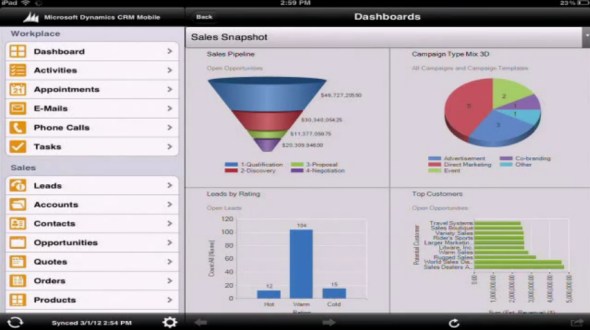
    Microsoft has released a YouTube video where Ruben Krippner talks you through the upcoming features of the Q2 2012 Service Update, a.k.a. Dynamics CRM R8. Since we already know much of the new release details through the Release Preview Guide, the most interesting part of the video is the live footage of Microsoft Dynamics CRM Mobile running on an iPad. For those of you who want to get a quick glimpse of what the client looks like, I took the liberty of taking a few screenshots from the video.

    Sitemap & Dashboards

    Microsoft Dynamics CRM Mobile iPad dashboards

    As we know, the “new” client is actually a rebranded version of the CWR Mobility client for Dynamics CRM. The UI looks almost identical, apart from a new set of Metro style entity icons. The sharp edges and “authentically digital” appearance look somewhat out of place in the otherwise iOS-style app, but let’s hope that there will be a full Metro app for Dynamics CRM available once the Windows 8 tablets hit the stores.

    Dashboards appear to be close to the web UI as far as charts go. If you have other types of web resources on your dashboard (say, a Silverlight component), the results may be a bit less so. Also, I’m assuming entity grids will not be rendered on the iPad Dashboard, at least not in their original format.

    Views

    Microsoft Dynamics CRM Mobile iPad views

    The iPad UI does support filtering data through views, just like you do on the web client. However, the views themselves will not be presented in the familiar grid style with columns, rather you’ll see a list of records with the primary field and some other data stacked on top of each other. Whether this is because of iOS limitations or an inherited design from the iPhone app, I’m not sure.

    Forms

    Microsoft Dynamics CRM Mobile iPad forms

    The standard fields are presented on a form that has a single column. Picklist and date fields use native iOS controls, also field types like phone numbers or email addresses will open native apps for respective actions. Why an iPad app shows you the options to dial a phone call or send SMS, I don’t know, because at least my iPad won’t allow me to do those without jailbreaking the device, but maybe Ruben has a special version of the Apple tablet 😉

    As you can see from the form, it’s not specifically optimized for landscape mode viewing on a tablet, but rather looks like a big iPhone app. Entity forms with many columns will therefore be presented as a long list the user has to scroll up & down.

    Maps

    Microsoft Dynamics CRM Mobile iPad Google Maps

    As a funny little detail that Ruben mentions on the video how the account address opens up on Google Maps. Why not Bing Maps? Well, because the native map application on an iOS device comes from Google…

    Off-topic: It’s great that the mobile clients for iOS, Android and Windows Phone now have the basic address mapping integration in place, now we just need to get it for the web and Outlook clients as well. While the integration itself is technically quite trivial, the requirement for purchasing a Bing Maps license for using the map data on a non-public application is currently a big barrier in the desktop world. But enough about that, let’s get back to the mobile client.

    Related records

    Microsoft Dynamics CRM Mobile iPad related records

    Because the sitemap navigation pane is permanently visible on the left hand side of the screen, which on a normal web client entity form would show the related records, in the mobile client these are accessed through a button on the lower right corner of the screen. Subgrid type of functionality is not available on the tablet UI, which can make it a bit cumbersome to navigate through long hierarchies of records. As a result, using the iPad client for tasks such as order entry while on the road is not really optimal in the Microsoft Dynamics CRM Mobile client. These types of use cases will still be better met with a custom developed tablet application equipped with specific data entry screens, so toolkits like Resco will remain relevant even after this official Dynamics CRM iPad client gets released.

    Configuration

    Microsoft Dynamics CRM Mobile iPad configuration

    The mobile client is not just an alternative UI for CRM, but there is a wealth of management options for user and client management, synchronization settings, usage reports etc. Since the way you use a mobile/tablet application is quite different from the normal desktop client usage scenario, it’s important that the information presented to the user can be optimized. Microsoft Dynamics CRM Mobile allows you to do this by defining different user groups and assigning them tailored mobile profiles containing only relevant entities in the sitemap. Also the contents of the mobile forms can be adjusted, so you don’t have to show all the tens of attributes that your entities contain.

    Microsoft Dynamics CRM Mobile iPad mobile profile and entities

    Conclusions

    The CRM Anywhere theme is definitely a step in the right direction for Microsoft Dynamics CRM to become an application that truly “works the way you do”. Even though the cross-browser compatibility will enable users to open up the CRM web client on their iPad Safari browser, for any serious work on a tablet you’ll want to have a client that is optimized for:

    1. touch based user interface
    2. streamlined data presentation to support the “working in short bursts” mode of mobile device usage
    3. offline access for those moments when 3G or WiFi just doesn’t reach you

    For the subscription price of $30 per user per month (or the perpetual license you can still acquire from CWR Mobility), you can install a fully capable Dynamics CRM mobile client on both your iPad and your iPhone, and still have one user license left for trying out the latest Android phone (whether the non-offline Windows Phone 7 client will consume a license, I don’t know yet).

    You can read more of my thoughts on Microsoft Dynamics CRM Mobile on this article I wrote after the announcement at eXtreme CRM 2012 Berlin.

  • To the eXtreme: thoughts on Dynamics CRM Mobile

    This is my first post on news and gossip that the eXtreme CRM 2012 Berlin conference brought to us. As there’s so many posts out there already that review the contents of the Q2 2012 Service Update (aka Dynamics CRM R8), I’m going to try and reflect on the topics based on my own observations and questions that these latest announcements have brought up. The first stop is mobile CRM.

    Every consultant knows that Microsoft’s initial offering, the Dynamics CRM Mobile Express client, wasn’t really something you wanted to draw the customers’ attention to. It was just barely good enough to tick the feature box of “yes, we have mobile CRM”. On a non-touch smartphone like the popular business products from Nokia or RIM the user experience might have matched the native apps and device capabilities, but in the age of the iPhone this wasn’t at all what the users had come to expect from their mobile apps.

    When Microsoft released the new Windows Phone 7 client application in CRM R7 release (2011 Q4 Service Update), we saw a glimpse of a brighter mobile future, but there was still hardly reason for true celebration. Ok, so we had a mobile optimized client now available, but it had it’s issues:

    • Only available for one niche (yet growing) smartphone platform
    • No ability to create or update any CRM records (except Activity Feed posts)
    • No offline support

    The path towards a credible mobile offering would have been quite long for Microsoft to walk all on its own. Therefore it wasn’t really a surprise that they chose to team up with an existing partner and rebrand their mobile applications and services to the new “CRM Anywhere” solution (which is still officially called Microsoft Dynamics CRM Mobile). Out of all the possible mobile CRM ISV’s out there, their partner of choice turned out to be CWR Mobility.

    This could of course be seen as a big blow to the other Dynamics CRM mobile ISV’s, who now have to compete against Microsoft’s own offering. However, in the long term this may actually be a positive turn of events for the whole ecosystem. The fact that there will be an official mobile app available from Microsoft to all the major smartphone platforms will surely drive up customer awareness as well as interest towards the possible use cases for “CRM on the road”.

    Considering how much talk there’s been around the mobile use of CRM applications in the past few years, in my opinion we haven’t yet seen it really bloom the way many of us would have expected it to. I think one of the reasons is that mobile CRM has often been considered mainly as “CRM lite” that offers a subset of the features the full application delivers, for those awkward moments when your “CRM full” is not available to you. If mobile CRM is an optional feature that does not tie into the processes you absolutely need to execute, how likely is it that companies will choose to invest in such an additional cost factor? Ben Mitchell from TenDigits said it really well in his presentation:

    “You’ve got a perfectly working address book on your phone already. If that’s all you’re trying to replace with mobile CRM, it’s always going to be too expensive. Always attach the price of a mobile CRM solution to the business value the customer is trying to achieve by deploying the solution. Mobile functionality pricing must be delivered in the context of business objectives, not just as a last minute addition to the quotation.”

    Mobile CRM is like Social CRM in this sense: companies know why they need to embrace it sooner or later, but they’re still having difficulties in articulating exactly how they plan to go about it. As the limitations of available software are quickly fading away, the focus on real life use cases must rise on top. No, mobile CRM isn’t just about replicating the desktop experience on a smaller device. It must support the mode of working in infrequent bursts and dealing with specific scenarios, such as order entry or survey answer recording while the user is at the customer’s site. The UI needs to be optimized for the process in question, not just equipped with big icons to be poked with your fingers. Whether it’s going to be packaged apps like the Microsoft Dynamics CRM Mobile growing beyond their current feature sets in customizability, platforms like the Resco Mobile CRM Studio gaining popularity as the basis for mobile app development, or even a future release of a HTML5 compliant version of the core Dynamics CRM browser app stealing the show with responsive web design, the playing field for a true CRM Anywhere solution that takes the “mobile first” thinking into everyday practice still looks wide open to me.

    One interesting thing to keep an eye on is what’s going to happen to the Microsoft developed Windows Phone 7 CRM client. The R8 release preview guide states that there will not yet be offline functionality available for Windows Phone devices when the new service launches. This means that Microsoft Dynamics CRM will initially work better on pretty much any other mobile platforms compared to Microsoft Windows Phone 7 (doh!). I’m assuming that the current client version will receive some minor feature updates (new Activity Feeds filters etc.) but a full integration into the CWR Mobile platform will take more time. I’ve noticed in some occasions the WP7 client has actually been referred to as the “Activity Feeds Mobile App”, but I’m not sure if Microsoft could get away with renaming product X to product Y, then launching a new product X and charging extra money for it.

    This leads us to the pricing model. Whereas the Windows Phone 7 client is a free download from the Marketplace, the CWR clients are based on a subscription fee. A company who buys licenses for Dynamics CRM, be it on-premises or CRM Online, will not receive any mobile client functionality as a part of the core product. Microsoft Dynamics CRM Mobile will therefore remain as an add-on that customers must purchase licenses for separately. Considering the price is $30 per user per month, compared to the base product price of CRM Online of $44, this means in many cases not all CRM users will be given mobile client licenses. Or perhaps they’ll just be given a midprice Windows Phone device, such as the Nokia Lumia 710, and access to the free WP7 version of Dynamics CRM Mobile. With a number of Dynamics CRM apps already out there in iOS and Android marketplaces that any user can purchase for themselves and point it to a CRM Online or IFD organization, I’m not even sure companies can effectively standardize on a single official mobile app anymore, thanks to the BYOD culture and shadow IT.

    The official Microsoft Dynamics CRM Mobile service won’t be able to match the 40 markets / 41 languages level of the core CRM product, as it will initially be available only in 24 markets and 10 languages. The explanation offered by Microsoft was that there are such regulatory limitations for mobile services in many markets that they simply can’t roll out their mobile CRM offering as quickly as a cloud app like CRM Online. We’ll see how fast they can catch up and bring the service to markets like Finland. It will also be interesting to see whether the initial unavailability will simply mean the lack of local languages or if MS will actually not offer the mobile app for download at all in these tier 2 regions’ marketplaces. I sure hope it won’t be the latter option, even if it would mean I’d have to temporarily return from WP7 to Android for doing proper presales demos of the new mobile service with offline capability. The sacrifices one needs to make for the love of CRM… 😉

  • Power of Choice or the Legacy of Outlook?

    The first selling point advertised for Dynamics CRM in almost any context is the user interface familiarity of Office users and the seamless integration to Outlook. Compared to other CRM applications, the feature set available in the Dynamics CRM 2011 client for Outlook is unsurpassed, no doubt about that. However, sometimes you do run into issues that break the illusion that CRM and Outlook would be the one and the same application. Here are a few features that you should be aware of when planning on how you’ll train your users to use the two different client versions available: web and Outlook.

    Issue 1: Dashboard ribbons are not context sensitive in Outlook

    If you build a dashboard out of grids that present the user with relevant data from various entities, this can significantly cut down their need for jumping between different menus and screens. Say, a customer service representative can easily view all the new items in the email support queue, active cases assigned to him/her and also other open activities. With the help of the context sensitive ribbon the user can then process these records in the same screen, by changing record status from open to closed, accepting items from the queue, creating new tasks etc.

    Except, in Outlook that won’t work. The user will only be able to create a new dashboard, but not any of the common tasks, like creating new records for the selected grid. This is because in Outlook the ribbon is not context sensitive within the dashboard. Why is this? It works elsewhere in Outlook, so why not here? I imagine the explanation is that while the normal grids are composed of native MAPI objects inside Outlook, the dashboards are merely web pages as far as the Outlook client can recognize them, so it can’t understand which ribbon should be shown in which part of the page. Bummer.

    As a result, if you want to create actionable dashboards that allow users to work on the items presented there, it’s better to instruct them to open CRM through the web client instead of the Outlook client.

    Issue 2: Different logic in Quick Find

    People who have worked with Dynamics CRM throughout several versions will surely have learned how the Quick Find operates and when you need to use wild cars. With the CRM 2011 Outlook client, this logic no longer holds true. Outlook has its own way of handling search terms, so now we can punch in a search word right from the middle of a field, such as the account name, without entering the asterisk wild card in front of the term.

    Great, easier for the user to perform searches, right? Well, it is if you only ever work inside the Outlook client. If you step into the web client views, you’ll discover that things work differently there. Not only do you need to remember to use the wildcard in Quick Find criteria, but there also is a specific Quick Find View. Whereas in the web client the search will cover every active record in the database, no matter from which view you start, in Outlook the search is conducted on the records in the selected view. So, if you’re in the My Contacts view in Outlook client and search for a contact that belongs to another user, the Quick Find results will not deliver any data. In the web client it will.

    Also the columns presented in the web client will always be the ones specified in the Quick Find View customizations, but in Outlook the columns will not change as you’re searching from within the current view. However, it appears that the search columns that the Outlook client performs the query on are still affected by the ones defined in the entity Quick Find View, even though this view is never actually presented to the Outlook user. Still following me? If the different search logic is hard for a consultant to remember, just imagine how confusing it can be to the CRM user.

    Issue 3: Writing emails from Outlook without Outlook

    One of the three core modules in Dynamics CRM is Service. The most typical scenario for utilizing CRM for customer service processes is directing the incoming emails for an address like support@company.com to a queue in CRM. This way the emails are automatically tracked under a contact record if the sender email exists in CRM. Also the queue allows you to see which items are already being worked on by customer service reps.

    If you’re working with the Outlook client for Dynamics CRM, then you can write all your emails with the normal Outlook email editor and make use of the rich tools for message formatting, signatures, attaching multiple files with at once etc. Right? Not in this case. If the email you are replying to does not exist inside your Outlook mailbox but rather as an email record inside a CRM view, you can’t send “Outlook” emails as a reply. When you click the reply button, the Outlook client will open the web client email editor form for you.

    There’s surely a reason why the email editor in the web client hasn’t been improved since CRM 3.0. Outlook is Microsoft’s premium experience editor that should be used wherever possible, whereas the web editor is a secondary feature. But if you’re using Outlook already, then it would be nice to be able to always remain within that rich client, even when replying to queue emails, wouldn’t it?

    Issue 4: Recently used and pinned records behind the File button

    Many users will normally be working with a selected few accounts, contacts and opportunities at a time, rather than the whole CRM customer database. This is why the Recently used records menu in CRM 2011 is a great usability enhancement, which is also familiar from many other CRM applications. Right from the CRM main window, from the top left corner where you first look, you’ll be able to open a rich pane that presents all the latest records as well as the views you’ve recently visited.

    So, when I’m in the Outlook client then, surely I’m able to access the same list? Well, you are, but you’ll have to open the Office Backstage menu by clicking on the Outlook File menu, then glazing past all the file manipulation options and settings menus, to finally reach the recently viewed CRM records. And even if you reach it, you won’t be able to launch any views from this menu, since again the way how Outlook treats grids is different from the web client. Anyway, you probably won’t be accessing this menu any more often than you tweak your CRM settings, simply because it’s so well hidden away.

    Desktop Outlook: how crucial is it still?

    Ok, so there are a few quirks to be aware of when jumping between the web client and Outlook client. But how essential is it really to use the Outlook client in the first place? (more…)

  • First preview of Dynamics CRM Q4 2011 Service Update (and more)

    There’s an immense amount of product news coming up from the WPC 2011 conference, due to the sheer size of Microsoft’s portfolio of different product lines. Luckily also Dynamics CRM had its 15 minutes on the WPC keynote stage and we saw a few bits and pieces of what lies ahead in the upcoming Q4 2011 Service Update that will become available to both CRM Online and CRM 2011 on-premise later this year. I already wrote a post in Finnish about the CRM news from WPC, but I thought I’d also share a few screenshots here to those who haven’t seen the keynote video.

    Social business remains a hot topic and Microsoft will add some of the much needed social aspects into the next release of Dynamics CRM. Activity feeds á la Twitter, Facebook, Yammer, Chatter and the likes will be integrated also into Dynamics CRM, as can be seen in the demo dashboard below.

    In addition to allowing status updates from colleagues, the functionality we saw earlier in CRM 4.0 as the Business Productivity Newsfeed Accelerator (though merely a report) and then later on implemented through 3rd party add-ons like Vibe from Sonoma Partners, now looks to become a core part of Dynamics CRM platform. I’d imagine these automatic feed items are still posted as a result of record updates triggering workflow process rules, like in the aforementioned examples.

    Office 365 will become the new home of CRM Online in Q4 as it integrates into the same infrastructure. In addition to subscription management and authentication provider improvements, there’s some interesting benefits for CRM in the Lync integration provided from the Office 365 cloud. No longer will you be limited to only have chats and video conferencing with your colleagues. If the customer contacts in your CRM database are also users of Office 365, their presence information can be federated across organizations (if they choose to, I’m sure) and presented right inside the CRM forms, allowing you to reach out to them through Lync with one click.

    Azure Data Market is now being marketed as the “one-stop shop for premium data and applications”. The Dynamics CRM demo included a custom button called Azure Enrich, which went out into the Data Market, opened up D&B’s company database and provided the missing address information for the Contoso account. I guess the big news here isn’t how you can retrieve company data through the API, but rather what the existence of a central marketplace can actually do in making data available to a whole new scale of potential customers, from a variety of global players. The cloud is not only for apps anymore.

    In the WPC keynote demo we saw again a Windows Phone 7 client for Dynamics CRM. This time there was also one new screen included, which presents the same activity feed information (labeled as “records feed”). It doesn’t quite compete with the other flashy WP7 Mango demos presented later on in the session, but definitely a useful way for mobile workers to keep an eye on what’s going on in the CRM database while outside the office.

    Oh, and of course there was the tablet app built for running Dynamics CRM on a Windows 7 slate. With all the Metro UI goodness, I’m wondering what the out-of-the-box experience could actually become like once we reach Windows 8…

  • More agile direction for Dynamics CRM future product releases

    During Convergence 2011 Atlanta we already heard the first pieces of news about an upcoming change in the release cycle of Microsoft Dynamics CRM product versions. Now we have the updated Statement of Direction May 2011 whitepaper in our hands and it lays out a roadmap for more rapid delivery of new features into both CRM Online as well as on-premises and partner hosted instances.

    What has now been labelled as the agile release model for Microsoft Dynamics CRM will mean that an update/upgrade to the core platform will become available every six months. Contrast that to the previous 2-3 years in between major releases and you can see it’s no minor readjustment but rather a whole new way from the Microsoft Dynamics team to deliver products to the business users.

    Funnily enough, the SoD whitepaper claims that CRM 2011 is the fifth major release of the product. While it goes by the 5.0 version number, I guess some of the folks in Redmond have already forgotten that there never was a CRM 2.0 realease, rather we saw the version number incremented from 1.2 to 3.0. Oh well, time flies when you’re having fun working in the field of CRM, so let’s move on…

    The new release cycle is of course a direct result of the Cloud Power in action. No longer can you spend years in designing and developing features for your new product behind closed doors, even if you are Microsoft. Cloud applications have taught us consumers into living in a world of perpetual beta products that constantly get updated with new functionality, without any effort required from us to physically upgrade the apps. If Google can do it for Gmail, then why would the enterprise users settle for working with a standarized XP/2003 toolset for almost a decade? In the scheme of CRM, if you’re competing against Salesforce.com that has a monthly release cycle (or so I’ve heard), delivering a huge box of new features once every three years (which is what 2011 does offer over 4.0) means you’d have to actually keep three years ahead in terms of development, just to avoid slipping behind your competitor again. Doesn’t quite sound like a winning strategy.

    Microsoft Dynamics CRM Statement of Direction May 2011

    During the CTP and Beta phases of the Dynamics CRM 2011 release process there were many times when I found either myself or someone else on the forums & blogosphere expressing their thoughts along these lines: “these new features are really awesome, but I just wish the small details of X and Y could be included before RTM, so I can really truly make the most of the product”. In the world of the old release cycle, hearing MSFT representatives reply back with the words “thanks, we’ll try to include it in v.Next” didn’t give much comfort. If the next version was three years away, it’s effectively the same as “forget about it”, if you contrast it with how fast the world of applications keeps turning these days. Facebook grew from 10 million to 310 million active users during a timeframe like that.

    Smaller packages of new features twice a year should definitely help Microsoft fill the gaps in product functionality that inevitably appear whenever a big release deadline approaches and planned features have to be dropped to meet the real life requirement of shipping a release. At the moment, Dynamics CRM 2011 is lacking some functionality on three distinct areas that the Statement of Direction says will be addressed in upcoming versions to be released within one year:

    • Cross-browser support. Transforming Dynamics CRM from an Internet Explorer only application to a true cross browser app through a new HTML5 UI, thus finally making the platform an option for Mac users as well.
    • Mobile devices support. The Mobile Express client in 2011 is identical to what we had in 4.0, but with more and more iPads and Android/iOS/WP7 smartphones found in the workplace, the out-of-the-box mobile experience should be much better, with possible 3rd party apps taking it on an even higher level (offline data access etc.).
    • Social CRM. There are two dimensions in which a CRM application needs to be “social enabled” these days: 1) internal collaboration on customer information and activity feeds á la Yammer and Chatter, and 2) capturing and enabling a dialog with the customers in social media channels like Twitter, Facebook, LinkedIn.

    Dynamics Marketplace will also presumably play a role in addressing some of the needs that don’t quite fit into the core product delivered by Microsoft. The accelerators that we saw released for CRM 4.0 were nice proofs of concept, but they weren’t proper add-on products that could have been deployed by the end user organizations without customization and development services provided by MS partners. The solution management framework included in CRM 2011 will make the distribution of apps much easier and I would expect to see development also on the Marketplace functionality as a channel for app delivery (eventually commerce). When the base platform of Dynamics CRM is built on one single product edition (meaning no separate standard/enterprise or sales/service versions), modularity is enabled throug the solution packages. While the verticals will likely remain a partner driven domain, I’m expecting to see some interesting releases coming from Microsoft Dynamics Labs as well.

    (more…)

  • Greetings from Microsoft Convergence 2010 EMEA

    Continuing with the format introduced in 2009, this year’s Microsoft Convergence for the EMEA region was split into three locations: London, Prague and The Hague. Out of all the options, Prague fit our schedules the best, so that became our destination of choice to hear the latest news and buzz around Microsoft Dynamics products.

    With the fairly recent release of Dynamics CRM 2011 public beta, there was certainly a lot for Microsoft to present on the CRM front. Having been working with the product since CTP3 already, I wasn’t expecting too many surprises for myself in the CRM 2011 session contents. It’s still interesting to observe what is being said about the new release and how the customers and partners react to it. There is such a wealth of new, important features included in CRM 2011 (see my walkthrough slides for starters) that you can’t really construct the one right pitch for the product. You could say that there’s something for everyone.

    We saw the first glimpse of CRM 2011 during Kirill’s keynote, when Reuben Krippner showed a bit of Process Dialogs in the Dynamic Business demonstration. From there on, Reuben was a busy man, since he was giving demos in the next four consecutive CRM sessions on the agenda. Great job pulling it off, Reuben! Let’s hope Liverpool picks up their pace in the Premier League, so we can see some more of them in future CRM demos 😉

    Barry Givens held the last CRM session of the day, focusing on data visualization in CRM 2011. Not like we hadn’t seen the charts a few times already during the day, but hey, I always enjoy hearing Barry talk about his favorite topic i.e. analytics in CRM. While the out-of-the-box charts in CRM 2011 certainly do deliver value, you should really look at the broader picture of what the visualization features introduced in the new version truly mean in terms of customization and application design. The charts are actually one alternative method of navigation, due to their tight integration with grids and the drill-down capability. They can be embedded not only on grids but also forms (through sub-grids), bringing visualizations to every part of the CRM UI. Oh, and don’t forget to check out my post about editing the .NET Chart Controls for CRM 2011. Dashboards, on the other hand, are not just an item in the main menu but rather a new form type. By allowing flexible arrangement of embedded components like grids, charts and web resources, the dashboard forms might actually one day become the next generation UI for navigating in Dynamics CRM. You know, something for the future ahead of us when every modern web app must be built in RIA fashion, with Silverlight controls and what have you.

    (more…)

  • Dynamics CRM Online: what does it look like?

    Dynamics CRM Online: what does it look like?

    Like I mentioned in my previous post, cloud-based services are quickly becoming the default mode that people expect a CRM application to be delivered to them. Microsoft is clearly focusing their efforts on responding to this change of environment, but so far the availability of Dynamics CRM Online has been strictly limited to North America. The international launch of the service has been promised to take place in the second half of 2010 (probably together with CRM 5.0 roll-out). Until then, there seems to be little for us Europeans to do, apart from reading CRM Online blog entries from the US colleagues.

    I was lucky to recently get access to a CRM Online development environment, provide to us by CoreMotives as a part of our evaluation use of their Marketing Suite. Here are some of my initial impressions on the differences and similarities between Dynamics CRM Online and the good ol’ on-premises Dynamics CRM.

    Outlook client setup

    Since my work laptop’s Outlook is connected to a production CRM instance, I decided to try the CRM Online with my home PC. The installation file download took a while, but soon we were on our way.

    I decided to skip the SQL Server installation to speed things up and settle for the online-only version. After all the patches had been applied, I was greeted with a login window for the Outlook client.

    From here onwards everything seemed to work just like in the familiar on-premises CRM world. Perhaps even a bit too closely, as the first prompt that greeted me when accessing CRM Online was a notice about scheduled maintenance downtime later on the same day.

    Oh well, I guess the cloud needs some regualr reboots, just like any Windows machine.

    CRM Online user inteface

    Like with the Outlook client installation, most things look very familiar inside the CRM Online UI. The home page does however present some new features to us.

    CRM Online contains a feature called Get Started Panes, which provide contextual information at the top of the main CRM window entity screens. By default these contain categorized instructions on common tasks a user might want to perform when working with e.g. accounts or opportunities.
    (more…)