Tag: low-code

  • What will Power Fx mean for Model-driven Power Apps?

    What will Power Fx mean for Model-driven Power Apps?

    By now many of you will have read about the announcement Microsoft made at Ignite 2021 on their “low-code programming language for everyone”. I’ve written about the wider role of Power Fx in the high level Power Platform story in the Forward Forever team blog, which will give you all the basic information on what/why/how/when:

    Recently I also recorded a quick 10 minute video discussion I had with Julie Yack from 365.training where I had a chance to verbally express some of my thoughts on Power Fx:

    I’ve personally started my low-code journey with Microsoft Business Applications back when the concept of XRM was first promoted, which is why most of my hands-on experience with Power Apps lies firmly on the Model-driven side. Power Fx as a formula language originates from a time when the two app types (Canvas & Model-driven) were still completely separate product offerings. If you’ve always built Canvas apps, there’s essentially nothing new for you in Power Fx. If you’ve only worked with the Model-driven business apps (Dynamics 365), there will be plenty of changes ahead.

    In this blog post I’ll share some initial thoughts on how I see the arrival of Power Fx potentially affecting the way Model-driven Power Apps are built.

    Why Model-driven needs Power Fx

    There has traditionally been a clear divide between no-code and pro-code tasks when building apps the XRM way – meaning customizing and extending Dynamics 365 Customer Engagement apps in most cases. You’ve had a GUI for clicking your way through a variety of configuration options the application platform offers, to perform tasks like:

    • Define entities, fields and relationships
    • Determine the layouts of your forms, sitemaps and views
    • Design business logic via workflows, business rules, BPF

    Our reliance on the almighty mouse pointer as the sword with which we fight our way through a battle field full of fierce business problems might be considered a weakness. Sure, we’ve often managed to emerge as the no-code hero who’s been able to tackle a business requirement most bystanders would have expected to require custom code. Yet there’s frequent frustration to be experienced when the particular configuration option we would have needed was not present in the graphical user interface (GUI).

    Such problems don’t need to be very complex to become unsolvable. All it takes is for the specific function to have fallen outside of the scope of features that the Microsoft product team has managed to squeeze into the platform’s built-in toolkit. Sometimes you might find a community tool that generates the required JavaScript for you, or a custom workflow activity comes and extends the built-in actions to let you implement that specific calculation your customer needs.

    Yet it remains mostly a black box for the non-pro developers: the next time you run into a similar limitation, you’re likely to again need help from the pro-devs to move forward. Venturing beyond the GUI tends to always push us into uncharted territory.
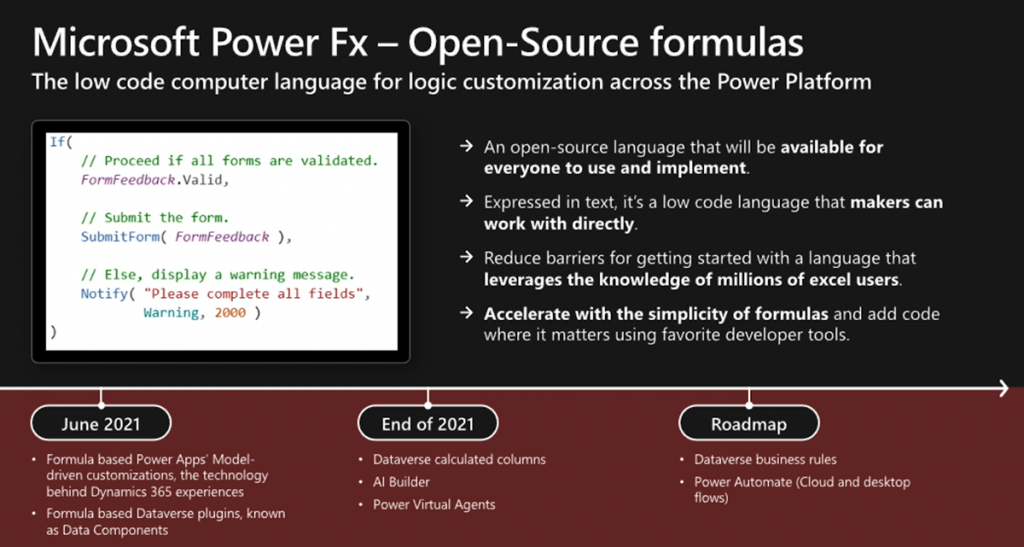
    What the announcement of Power Fx promises is far more empowering. “Formula based Power Apps Model-driven customizations” sounds like you could actually get a peek of the underlying logic layer in text format rather than a finite list of picklist options to choose from. At the same time you probably would not need to assume responsibility of any software code implementation details. The lower level of how the conditions defined by your formula are actually met by the big computer running in the cloud would not be your concern.

    This aligns with the promise of declarative programming:

    The maker describes what they want their logic to do, not exactly how or when to do it. This allows the compiler to optimize by performing operations in parallel, deferring work until needed, and pre-fetching and reusing cached data.

    Power Fx documentation on the language’s design principles

    For me, the big reason to steer clear from copy-pasting JavaScript snippets from websites and tweaking them to be used in business applications built for customers is that I’m all too aware of what I don’t know. While I can often read what the specific scripts are doing, I don’t fully understand why they work vs. why they would not work under different circumstances. It would be far too easy for me to accidentally create something that breaks in the near future – not because of a bug in Microsoft’s code but a bug in my code.

    Formulas that are written in Power Fx (today only in Canvas apps) are very different. Sure, they can be very complex as well, but there’s no knowledge required from outside the domain of Power Apps. If I pick a tutorial video from Shane Young’s YouTube catalog that explains the usage of a particular function in Canvas apps, most of the time I get it. I can immediately adapt it for my own scenarios, and get helpful Intellisense error messages from Power Apps Maker Studio when there’s something missing from my function (well, not always helpful messages, but at least an indicator of “keep trying”).

    Taking the step to writing your Power Fx formulas instead of just clicking around the GUI helps in unleashing your creativity in app design and significantly expanding the realm of what’s possible. There’s also big potential in improving the efficiency of the app building process when you can copy-paste text based formuals instead of having to repeat a series of clicks in the MS admin portals that seem to only get slower and slower as years go by…

    Why Power Fx may be scary for Model-driven app makers

    Canvas apps have been promoted as the way to create “pixel perfect experiences” tailored to the end users’ specific requirements and needs. This is a completely different starting point for low-code app creation than the traditional business apps in CRM style projects where you are mostly customizing an existing application. On a high level, everything will look & behave pretty much the same way every time.

    I’d argue that many of the limitations in Model-driven apps are in reality a safety net for the no-code app makers. Back in 2019 I did a presentation on the topic “Canvas apps for the Model-driven mind”, which describes the kind of leap that is needed both on mental and practical level for an XRM pro to turn into a modern Power Apps app maker. Power Fx will now play a big role in this transformation.

    The relational Dataverse data model that sits behind every Model-driven Power App largely dictates how the app UI will function. As a result, there’s not too much creativity required nor allowed in creating the visual side of your business application. Navigation and Command Bar buttons will be generated for you, and you can rely on them being constantly presented to the user. Everything’s responsive out of the box, too.

    The other side of Power Apps that’s not built on relational data structures and predefined UI grids is the world where everything runs on Power Fx. In Canvas apps the buttons don’t exist until you drop them on the screens and they do absolutely nothing until you add a piece of Power Fx text into the OnSelect property. Any dynamic behavior that’s desired for the app’s controls (visibility, size) must be expressed in Power Fx for their respective properties.

    Building Canvas apps doesn’t require you to have programming skills, but it does quickly push you much closer to the experience of custom app development. You’re no longer merely a system customizer like in Dynamics 365 scenarios, now you’re an app maker. The whole purpose of the low-code tooling is that it blurs the lines between traditional developer roles, thus powering the new “fusion teams” that may share many of their tools – and now also the programming language.
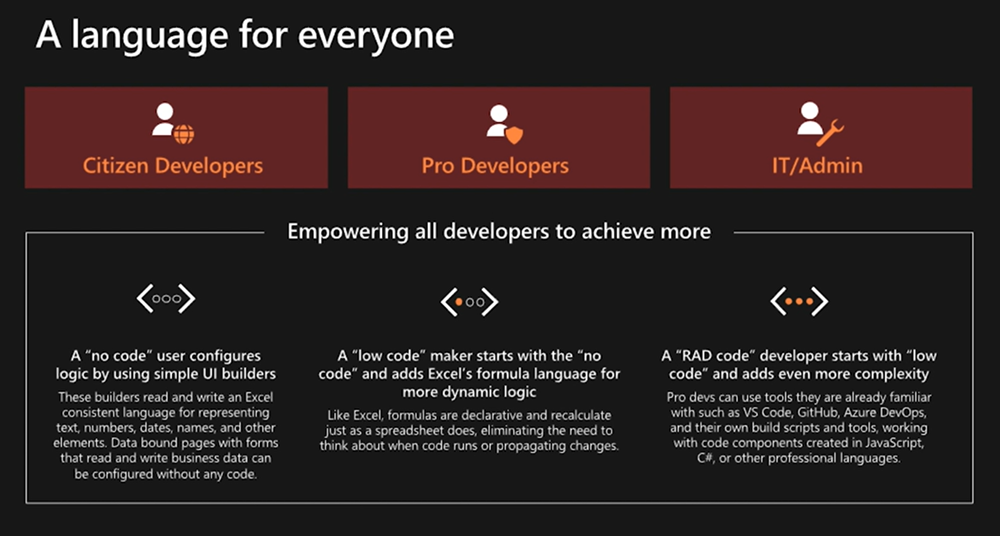
    As a result, it becomes less obvious what you can & can’t do without custom code extensions when building Power Apps. Configuration expressed as text based formulas can be vastly more powerful than GUI based options, allowing the most creative makers to achieve functionality that others might assume to be impossible with the available tools.

    Journey towards “just Power Apps”

    Back in Summer 2019 Microsoft revealed their long term roadmap on how the two types of Power Apps would eventually converge into one. We haven’t yet seen much concrete changes on how Model-driven and Canvas could coexist within a single app, apart from the embedding feature. The original plans for launching custom pages as a “canvas” within Model-driven apps were removed from 2o20 release wave 2 and no new target dates have been announced for it.

    There is likely a wealth of moving parts in this puzzle that have dependencies between each other, so it’s no wonder this merging of Model and Canvas apps is taking time. Power Fx is a clear step towards making the new app building story consistent. Plenty of new functionality is likely to be needed, though, as you’re not simply replacing one programming language with another. Rather it’s the case of expanding bespoke GUI tools with a low-code programming language that can also be used to express the same logic.

    Exactly what the new Power Fx based “form and commanding customization in Power Apps” promised at Ignite will consist of remains to be seen. Calculated columns defined with Power Fx are much easier to grasp. The same goes for the conversion of Business Rules into Power Fx formulas, since already today the Text View in the editor looks a bit like these.
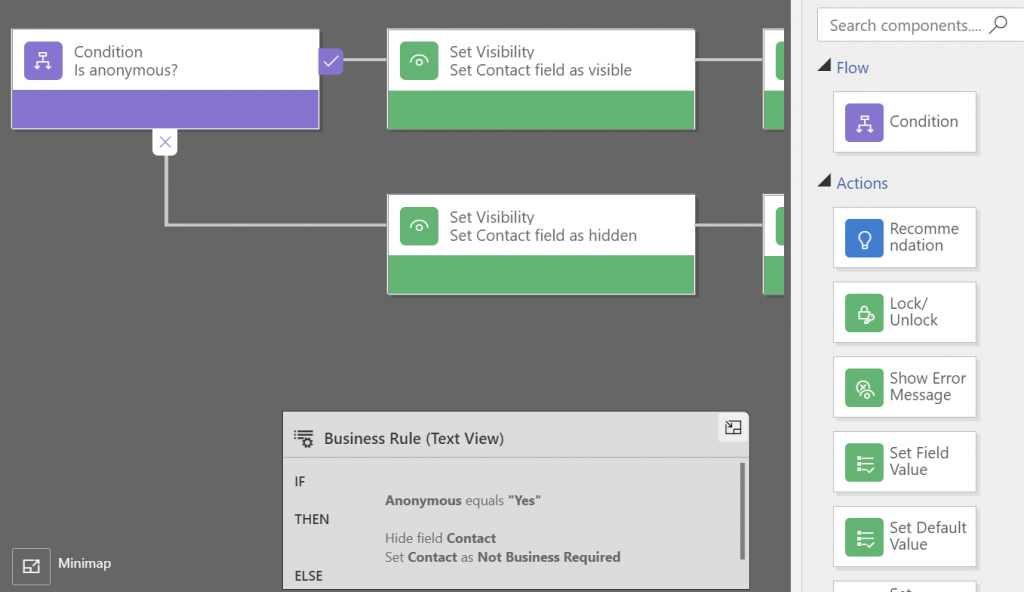
    Making that If-Then-Else box editable would be a simple step. However, turning the actions in Business Rules into something that you could define with Power Fx and apply on a Model-driven form will surely require some more platform unification work. Show/hide fields, set required, prompt for errors… They all sound straightforward from a logic perspective, but how will such concepts be extended to cover not just Canvas sceen controls but Model form controls is going to be interesting to watch.

    This is probably why Business Rules are in the same “future roadmap” bucket as the Power Automate flows for receiving Power Fx coverage. It’s not yet easy to envision how the declarative logic of Excel that Power Fx tries to follow wherever possible is going to be applicable to these more imperative scenarios. What would a flow written in Power Fx look like and is it really going to be easier for app makers to grasp than the current GUI?

  • Microsoft Teams as a platform

    Microsoft Teams as a platform

    2020 became the year of #WFH (work from home) and for many organizations also the turning point when Microsoft Teams became the primary place where being “at work” happens. This is accelerating the evolution of Teams from being merely a communication tool that connects human beings into a foundational service layer for many types of business applications.

    How the concept of Teams as a platform contrasts with Microsoft’s Power Platform suite of technology is something I’ve been thinking about a lot lately. In this post I’ll first reflect on the relatively short history of where Teams came from. I’ll then examine how the recent feature announcements are brining apps front & center in Teams. Finally, a few words on the possible future for Teams as part of Microsoft’s broader strategy.

    The road that lead to Teams

    Looking back ~10 years, the real-time communication & instant messaging tools from MS seemed to be going through an endless renaming cycle: from OCS to Lync to Skype for Business. The core feature set presented to the end user didn’t seem to evolve nearly as much as product branding did. On a broader level, the communication activities of information workers within an organization still typically took place within Outlook’s inbox, and different servers like SharePoint and Dynamics CRM all packed their own features for posting short messages to other users.

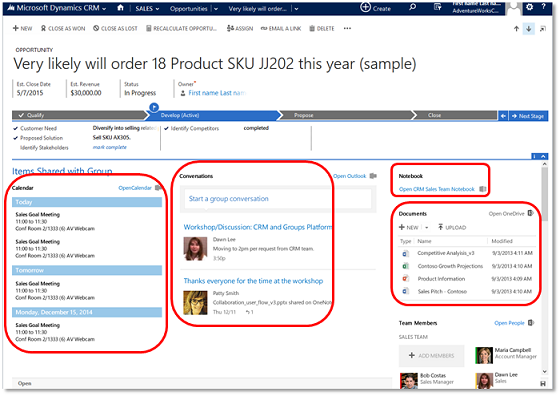
    4 years ago, when the first images of what was then called “Skype Teams” started to leak out, we were already waiting for MS to create something a bit more ambitious than just another online meeting tool. Office Groups had began to emerge in various different places inside the MS Cloud, but they were primarily a technical construct with no sensible UX for everyday people to approach them. Even Dynamics CRM had it’s own solution that attempted to bring together the dicussion, calendars, notes, documents and team memberships from under an Office 365 Group associated with a record like account or opportunity:

    I remember having many discussions with our CRM customers where I attempted to steer people away from deploying this Groups solution. Instead I wanted to encourage them to wait for something a bit more polished that I knew had to be on it’s way sooner or later.

    At one point there was a clear & present danger of another “Yammer moment” taking place, as Microsoft was reportedly quite serious about their plans to acquire Slack. In retrospect it was a blessing for both parties that MS decided to keep investing in building their own product, instead of trying to retrofit an established service like Slack into their existing software offering.

    I would argue that this “build over buy” strategy which Microsoft has since then followed across their business software stack has been a key success factor for BizApps in particular. It has enabled MS to move from merely chasing CRM competitors like Salesforce into redefining the business apps playing field with Power Platform. There’s a stark difference between acquiring companies and bundling them as “X Cloud” versus engineering your own software stack to act as a true platform.

    Teams: the collaboration chapter

    Initially the first version of the Microsoft Teams product that became generally available in Spring 2017 was pretty much focused on being three things:

    1. Replacement for Skype for Business
    2. Alternative to Slack
    3. UI layer for Office 365 Groups

    From a business applications perspective there wasn’t all that much you could do to hook Teams up with Dynamics 365, until Fall 2018 when the previews for the first integrated features were launched. In particular the integrated file sharing experience that Teams offered seemed almost like the Holy Grail for many CRM professionals, offering to fix the glaring hole in the SharePoint integration story that lacked any security model synchronization. The roadmap image below presents the plans from 2 years ago on how Teams and Dynamics 365 were going to be integrated:

    The last item on the roadmap has still not been delivered, which is the visibility of Teams conversations inside the Dynamics 365 record form. Why this hasn’t been a higher priority for MS to implement seems to me like a sign of how Microsoft Teams is nowadays positioned as the primary UI for all information work. MS probably would prefer if everything always started from inside Teams. You pin record tabs into channels, you show previews of records inside teams discussions, you interact with records via bot interfaces and so on. As long as Teams is that big umbrella under which all work takes place.

    The lack of a deep 2-way integration does not therefore mean that investments aren’t being made into the products involved. It can simply be a reflection of the new vision that is being built, by aligning many existing services to form a whole that aims to be greater than the sum of its parts.

    As an example, if you look at Microsoft’s task management story, you’ll see that features and data from across various apps like To Do, Planner and Outlook tasks / flagged emails are currently being collapsed into a central location that is the Tasks app for Teams. Tasks as a generic construct don’t necessarily need to be fully controlled by a single database, yet they very much need to be logically represented within “the hub for teamwork” that Teams is positioned as.

    Going forward, when new apps appear into the MS cloud product portfolio and they need to offer task management features to users, the logical integration point to focus on would be Teams. For activity feed type of functionality the choice is even more clear for product development: choose to piggyback on Teams instead of inventing yet another stream of short messages.

    Teams: the platform chapter

    Moving beyond simply integrating Teams with products X, Y and Z, we’re now seeing the rise of a model where apps are built specifically to be used in Teams. This has of course been possible for a long time already, by developing custom web services and using the SDKs. Now there are many features coming up that will amplify the platform story around Teams on the no-code/low-code front specifically.

    lists in teams1.png

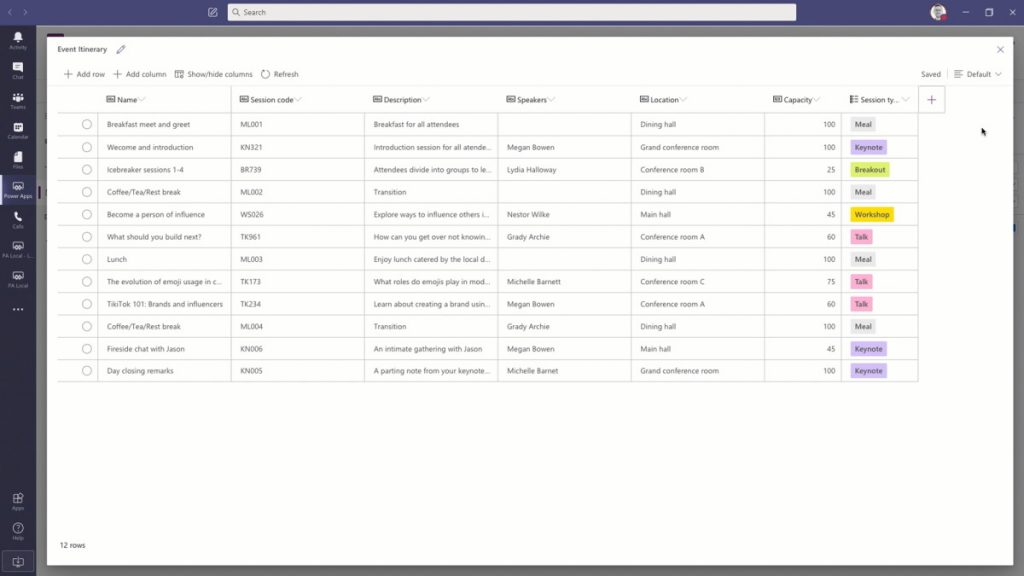
    Microsoft Lists app has been the first to reach GA and offers an ultra low barrier for users to process data in a single table through a configurable, readymade UI. When accessed via Teams, the list data gains one more special dimension: discussions to be had regarding a list item. This is pretty much the same as the usage pattern offered for a Dynamics 365 record with the integration mentioned earlier.

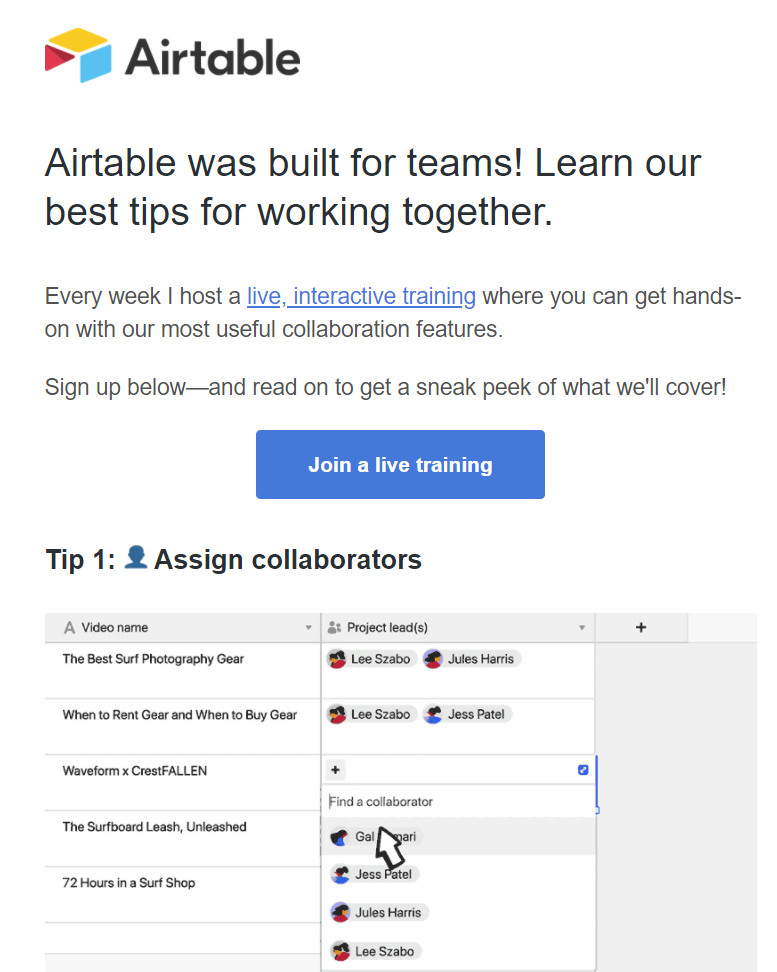
    Underneath the new covers of MS Lists is the technology familiar from SharePoint lists. If we were to only examine the UI layer, there is actually a remarkable similarity to a popular no-code service called Airtable. So much that the accusations of MS simply copying the visuals and core features from this competitor don’t seem entirely unjustified.

    Comparing these two offerings gives us some perspective on what exactly is the market position these tools are aiming to conquer. Simple lists themselves are not a particularly unique feature, rather it’s the team collaboration capabilities and ease of data sharing that turns these tables into what you’d call an actual app. Incidentally, just this week Airtable announced they were building a full platform with apps offering JavaScript based extensibility, a marketplace for sharing apps, automations for executing business logic, and finally a sync service to transfer data across environments (“bases”).

    Collaboration scenarios around semi-structured data like lists and Excel style tables can be seen as a gateway drug. They allow turning email or paper based manual processes into a quick first draft of what the digital process could be like. If there are indeed clear business benefits in automating the said process, the requirements for more complex app features will soon begin to emerge from the user base. Hence the collaboration platform should offer an obvious path to grow these pre-built app experiences into more advanced no-code/low-code apps.

    Project Oakdale a.k.a bringing CDS to Teams

    If Microsoft Lists is the equivalent of an Excel table within the Teams context, then Project Oakdale / “CDS Lite” could be though of as bringing SQL Server inside Teams. Now, obviously Microsoft has zero intent on actually replacing Excel nor SQL with features built into Teams. They only need to introduce those parts that make sense from a team collabocation perspective.

    Microsoft Lists is a far cry from what a real Excel workbook can do, yet it can offer much more value in a collaboration scenarios that those lone .xlsx files ever could. Similarly, the version of CDS that will very soon be available for building Power Apps within Teams is nowhere near as powerful as the services powering enterprise CRM systems like Dynamics 365 (or the raw power offered by SQL). Still, the fact that it can be found from within every team and used by a much larger audience than what Power Apps citizen developer tools could hope to capture – those are the factors that can truly make CDS a mainstream service that most information workers in the Microsoft 365 cloud interact it.

    The experience of defining the CDS data model in Project Oakdale will be very different from the path that Power Apps makers have gone through – let alone the XRM veterans. In fact, you could easily mistake the table design and row entry UX to be that of Microsoft Lists rather than CDS. This highlights a key aspect that not all Power Platform experts may yet have grasped: for MS this “CDS Lite” is not so much about deciding what premium features of the full Power Platform to give away for free to Teams subscibers – rather it’s about how to best simplify the enterprise CRM features of CDS into a new product that Teams users could adopt on their own.

    This doesn’t mean that Microsoft Teams should be viewed only as a mechanism for MS to scale Power Platform to the masses, by “dumbing it down”. If the app platform story of Teams plays out like it ought to, there should also be clear benefits from it to enterprise business applications development.

    Capabilities like messaging, notifications, task management, documents or group memberships are not something the Power Platform tools are very good at. For historical reasons there has been the need to build standalone features into XRM for these type of common requirements found in business application scenarios. For the future generations of apps being created, it’s easy to see the benefits of having these non-core capabilities offloaded onto a platform more suitable for managing them – meaning Teams.

    It doesn’t really even matter if the feature set offered by Teams couldn’t cover all the deep business logic integration of native Dynamics 365 functionality. Ultimately it’s not about supporting the system-of-record legacy but rather encouraging the new low-code scenarios that will generate 100x more apps onto the platform.

    Teams is the new Windows?

    The concept of an operating system is something many of us may relate back to the origins of the Personal Computer era, even if OS’s of course have existed far longer than the IBM PC. Windows was the first runaway success in the OS space when it comes to both awareness and commercial results, shaping the fate of Microsoft for roughly three decades. Then along came the era of mobile computing and Android & iOS took over in the number of devices running them. MS could no longer hope to regain that position so they decided to take over a different layer in the computing space: the (business) app cloud.

    Azure has been called “the world’s computer” and this does offer some perspective on how the computing concept has evolved since the PC days. Still, Azure is not something most people will ever interact with directly. To remain relevant in the decades to come, MS needs to have presence in the minds of the end users, too. Now that Windows has become merely an optional part of the modern computing stack, it would be pretty darn critical to gain a strong enough foothold on a level that’s above the traditional OS but still below the individual apps. A platform that spans across all the devices people in the business world are using.

    Teams is now the closest thing that Microsoft has at its disposal to transform into an OS style fabric that connects a significant share of information workers globally. Nothing like the glory days of Windows, of course, but we should expect to see very conscious steps from MS to further the goal of Teams becoming more OS like. The place where the user interacts with a multitude of apps, share their work context with those apps, a “service bus” for the various apps to exchange data with one another, and finally a unified communications channel for notifications and messaging.

    It’s still a long, long way to go for this type of shift to happen where the collaboration tools become the true center of gravity for the multitude of other apps and services that people use today in their #WFH offices. Personally, I can’t live with the limitations on multitasking that the MS Teams content embeds enforce upon the user and much prefer a collection of separate browser tabs to freely switch between. Nevertheless, it’s not an entirely crazy though that the resulting congnitive load for the user isn’t everyone’s ideal way of working. Which means organizations need to be looking for ways to optimize the employee experience via common information work hubs like Teams.

    Dion Hinchcliffe has written an excellent analysis on Microsoft’s platform strategy with Teams, where he talks about seeing Teams as the operating system for work. While it may indeed be difficult to get the current owners of the collaboration tools in customer organizations to accept the business app side of Teams onto their plate (especially now with the #WFH boom and its unexpected requirements), the perspectives may change when the time is right from both the technical capabilities side as well as the organizational targets. In the same way as the MS CRM foundation evolved into a key element of the broader low-code application platform known today as Power Platform, the barriers between collaboration tools and business apps should not be perceived to be carved in stone.

  • Why we’re betting on the Power Platform

    Why we’re betting on the Power Platform

    This Monday we publicly launched our new company: Forward Forever.

    There are many reasons for why we as a team of experienced professionals in Microsoft technologies wanted to build a company of our own, which I’ll talk about later once we are actually fully operational and have shown how we operate. Right now, though, I wanted to explain why we’ve decided to go all in with Microsoft Power Platform. It boils down to the interplay of three elements: data, apps, processes.

    Data

    James Phillips, President of Business Applications at Microsoft, said in a recent interview (behind a paywall):

    “These applications, Dynamics 365 and the Power Platform that sits beneath are designed to be data first, designed to allow you to collect data from across the organization, from all of your various systems and to analyze that, to deeply understand it and to predict. And that’s what’s leading to I think the success that we’re seeing in the market.”

    The idea of data-first design as opposed to app-first is very much in line with what we’ve seen happening in the Dynamics 365 product portfolio during the past 1-2 years. Microsoft has placed big emphasis on making the traditional systems of record more intelligent by building various Insights products to broaden the Business Applications stack as well as bringing Insights into the familiar sales, service and marketing apps. Since there is no AI without data, building the connectivity from Dynamics 365 and Power Platform into as many existing business data sources as possible is where the Business Apps are heavily relying on the R&D of MS Data Platform to outrun the competition.

    Even before James, the leadership team at Microsoft revealed their true ambitions of grabbing a much bigger share of the pie than what CRM & ERP as an app-first market could offer them. Already back in 2016 when I was visiting Redmond, the leaders of the product engineering for Dynamics CRM at the time were describing the two sides of the complete end-to-end offering as Transactional Stack (XRM) and Analytical Stack, giving us the following guidance:

    “Analytical Stack will be 10 times more powerful than the Transactional Stack. This is where you need to be. Transactional apps will be commoditized, monetization will happen on Analytical apps.”

    That moment really stuck with me. While I knew that such forward looking statement probably wouldn’t have a visible impact on Dynamics partner business within the next year or two, it was obvious that these targets Microsoft had on turning things around with their intense focus on data would eventually shake things up. The products would evolve into something different and so would the competence demands for anyone working with them.

    Apps

    There is a lot of power on the commoditization side of the stack, too. If we look at things only from the traditional business applications perspective, how Dynamics 365 capabilities are typically used by organizations who manage their sales, service, marketing processes, it might at times seem like we’re just in a race to the bottom. Packaged offerings replacing project work, ready-made integrations replacing customer specific code, online learning resources replacing in-person training. This is simply what naturally should happen, when technology and past experience allow us to move from solving unique problems to solving common problems in the most efficient and scalable way.

    Let’s look at another perspective, though: 500 million apps in the next 5 years. This is the statement Satya Nadella made about the exploding demand for new apps within organizations who are aiming to digitally transform their businesses. You don’t get to 500M with the normal software project methods and tools, which is why the no-code/low-code movement has such momentum behind it today. Because this is exactly the way. Turning the app users into potential app makers is the ultimate method of commoditizing business applications.

    So, this is the second major shift that will shake up the Microsoft partner business. What may well happen is that the existing partner channel for CRM and ERP based solutions that has formed around the Dynamics products over the years will not be the ones who can eventually cannibalize their own offering and grab this new space in the market. At the same time, it’s also difficult for me to see the Modern Workplace partners from the Office ecosystem all stepping up into a new area of higher business value consulting. It’s not exactly a walk in the park. Helping customers to define how a particular business process with all its actors, inputs and outputs should actually work in the digital domain, inside the frame of existing lines of business and different industries, isn’t necessarily the natural path for Microsoft 365 specialists to follow.

    Processes

    Regardless of all this new AI potential found in huge data sets and the possibilities of new app creation via citizen friendly tools, in the minds of the decision makers in customer organizations it still tends to boil down to the question of money: how to make more of it & how to spend less of it. The faster we can draw a line between these technological innovations and the financial results, the faster it starts to pay off and the more future investments will be made here. This is why the role of Dynamics 365 is still of highest strategic importance for Microsoft to turn the aforementioned vision into reality. In the above mentioned interview, James Philips described this alignment of products vs. platform:

    Our customers are telling us that, if we can give them an application to start with versus a collection of tools to go build solutions, they would strongly prefer that.

    James has communicated already at MS Ingite 2019 that they’ve recently tripled the size of their Dynamics 365 sales organization by adding 1000 new people in past 3 months (referred to as “D1000”). With the growing stack of first-party apps in the portfolio, it’s only natural that MS needs to assume a more active role in bringing these solutions in front of customers. The very nature of many of these data-first apps is incompatible with the kind of partner channel that Microsoft built back in the MBS era. For the system of record type of core business infrastructure you’ll still want a reliable service provide to steer the slow moving cargo ships. For these new speed boats that require quick maneuvering skills, a very different kind of crew is needed.

    The old model for Dynamics partners to sell a bit of everything that the product can do to anyone who happens to ask for it is becoming obsolete – or has already become, depending on how much competition there is in the local market you happen to be operating in. The new role of the Dynamics partner would appear to be in offering very specialized expertise on the delivery of application A, preferably focused on target industries X, Y and Z. Microsoft will have done the solution selling part for the latest cloud apps already before you step through the customer’s door. If you can’t fit your offering into this new role that’s being presented, then… Well, it isn’t really Microsoft’s problem but rather your very own problem as a partner.

    It’s time to go forward

    Based on this perception that I have about the business applications landscape around us, what kind of a partner would Microsoft customers then actually need in order to achieve business success with this technology? My first answer is: they will need many, I’m sure. The platform and the apps on top of it have grown well beyond the boundaries of what the initial deployment of a single CRM system may have been ~10 years ago. It’s time for the customer to own their digital business platform and then choose the suitable products and service providers for their different development initiatives that utilize this common stack. This needs to be an ongoing process, not a one & done deal for X years with a single company that got the best scores from your RFP Excel sheet a long while ago.

    The second answer is more to do with the skill set that the experts in the partner’s team should have. As I described in the Process part, each app in the Dynamics 365 suite will require deeper and deeper expertise. What about the horizontal aspect – the platform that connects all the apps? I would say that the partner you’re working with should posses the following traits:

    • Understand the Data Platform underneath the Power Platform.
    • Be citizen-ready in their business app development practices.
    • Know the past, present and future direction of Dynamics 365 products.

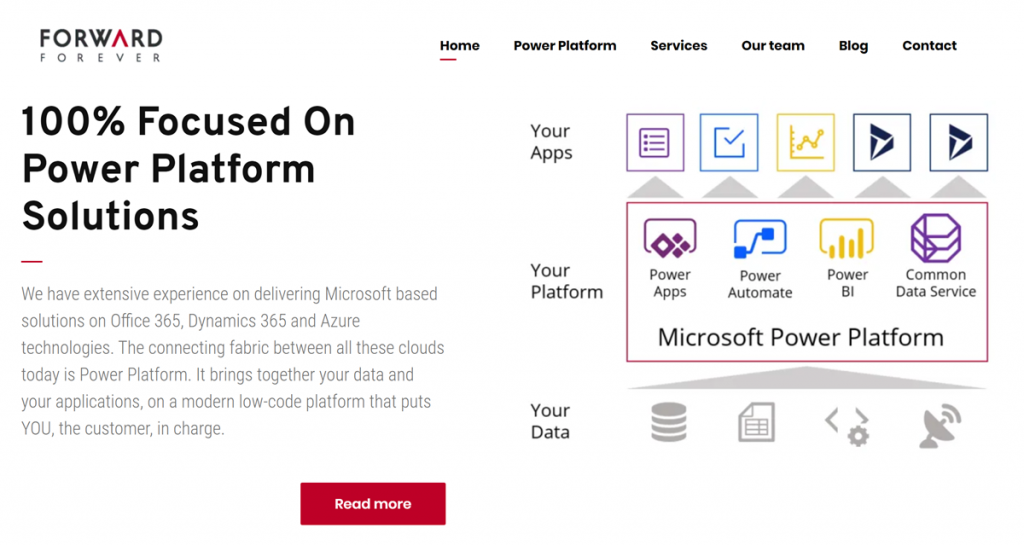
    At least that’s what we as Team Forward Forever are striving to achieve. We’ve decided that the competence we will build and the solutions we will offer are going to be 100% focused on Power Platform:

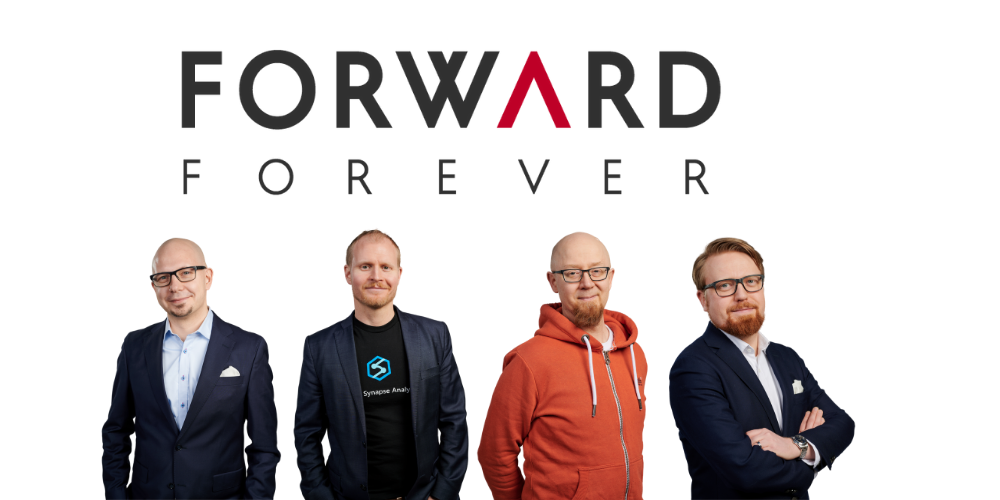
    This is the foundation that Forward Forever is built on. Our team consists of professionals with several years of experience on delivering customer solutions with Power BI, Power Apps and Dynamics 365. What we’re NOT planning is sticking to doing what we already know, though. The fact that we all see the clear need to evolve our skills towards the demands that the unstoppable onslaught of Power Platform will gradually force upon every partner out there is precisely why we are joining forces. This is how individuals like us can move forward as a team:

    • Timo Pertilä, a fellow Microsoft Business Applications MVP has a loooong history in Office 365 world and has jumped head-first into Power Apps and Power Automate in his 100+ blog posts over the past 2 years.
    • Jouko Nyholm is a leading expert in the local MS Data Platform scene, with background as a full stack developer who later decided to fully embraced Power BI well before it exploded into the dominant BI tool that it is in the market today.
    • Lasse Teeriaho is an entrepreneur with a solid Dynamics 365 CE background from both partner and customer roles, with hands-on experience on cutting edge MS technologies in machine learning, AI and bots.
    • Jukka Niiranen is… well, I am what I’ve become over the past 20 years.

    Honestly, I couldn’t hope for a better crew to sail with on this journey of helping our customers navigate the Power Platform seas. To quote the lyrics of a song by the late & great Andrew Weatherall:

    Fail we may, sail we must.

    Andrew Weatherall interview: “It’s bollocks, it’s discos, tell me tales of the sea.”
  • Microsoft FY20 Q2 earnings and the rise of CDP

    Microsoft FY20 Q2 earnings and the rise of CDP

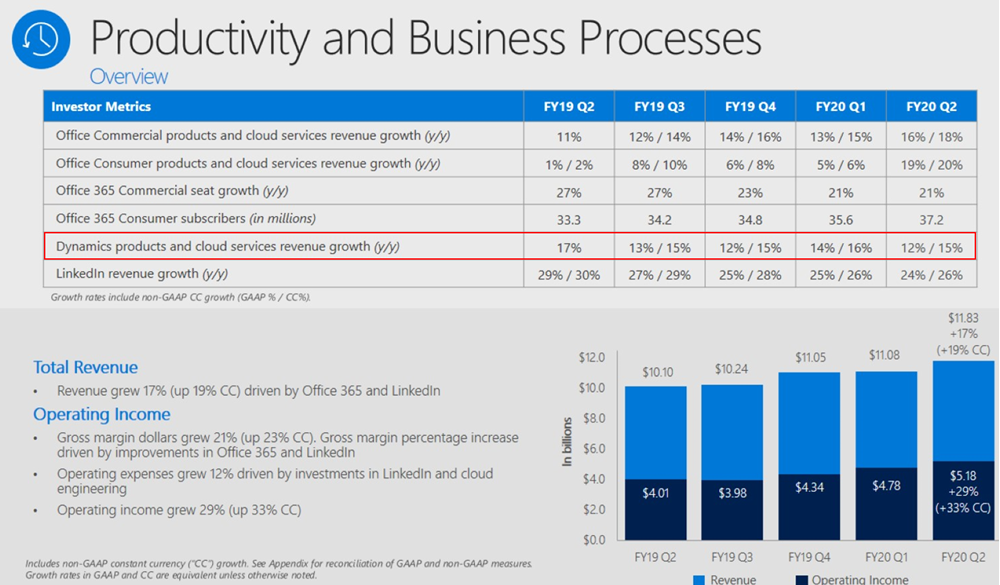
    Yesterday, January 29th, Microsoft reported on their earnings for the Oct-Dec 2019 quarter, which is Q2 in their fiscal calendar. It didn’t come as a huge surprise that the cloud revenue keeps growing at an impressive pace everywhere you look. 12% growth for Dynamics products and cloud services revenue is nice, and 42% for Dynamics 365 is… even nicer!

    What I find more interesting than these financial numbers is the earnings call transcript, where we get the opportunity to hear CEO Satya Nadella and CFO Amy Hood describe how they see the Microsoft business evolving. Picking up the terms and products from here should give us a better understanding of not just the past (i.e. the quarterly revenue and operating income) but especially the future outlook of what the company considers to be the shining stars in its portfolio. So, in the spirit of Thinking Forward, here’s a summary of what I though was relevant in that earnings call from a Business Applications perspective.

    Power Platform

    “We are empowering not only professional developers but those closest to the business problem – from citizen developers to business decision makers – with no code, low code tools so they can create apps and intelligent workflows that solve unique needs. Today, 2.6 million citizen developers use our Power Platform to make better decisions using self-service analytics, build a mobile app, automate a business process, or even create a virtual agent – all with no coding experience.”

    The new type of market for app makers that previously could have only been app users is of course a very critical area of success for Microsoft. Low-code development is one of the hottest games in town, where also other tech giants are looking to grab a seat at the table. A couple of weeks ago Google acquired AppSheet to provide no-code/low-code tools for their customers. Almost right after it, they announced that their in-house equivalent Google App Maker would be shut down within less than a year. Google cited low usage as the reason for running down App Maker, which gives us an indication that you can’t succeed here merely by having just any citizen developer tool available out there.

    Meanwhile, Microsoft is investing heavily into ensuring Power Apps plays nice with their whole productivity stack. Satya especially highlighted the platform effect that Microsoft Teams carries with it, so expect this to be the UI through which the broad user base will discover Power Apps and Power Automate. At the same time, Power Platform’s role as the shared extensibility model for both Microsoft 365 and Dynamics 365 is also of high strategic importance:

    “There’s no such thing as a canonical business, and no such thing as a canonical business over time, right? Business processes change. The question is how rapidly can people and domain experts keep up with the change. And that’s where Dynamics 365 absolutely shines.”

    Dynamics 365

    Even though many XRM professionals have shifted into blogging and talking more about Power Platform these days (myself included), that doesn’t mean the role of Dynamics 365 in Microsoft’s product portfolio would have decreased one bit. No, of course Dynamics 365 is not “dead” – it just isn’t the platform product anymore. The rapid launch of new first-party Apps under the Dynamics 365 brand is a key source for revenue growth, as described by Microsoft CFO Amy Hood:

    “The Dynamics 365 excitement we have, when I think about the comment I made around adding workloads, what’s so important about what Satya just talked about is how this reaches into new budgets for us, new opportunity for us in terms of being able to tap growth that we had not been able to access before.”

    Many of these new workloads are about going beyond what the traditional CRM + ERP suite of Dynamics 365 covered. While I suspect that we haven’t yet seen much actual license revenue come in from this next generation of business applications, Satya firmly believes that the new opportunities in this field will rise out of the not-so-secret magic ingredient: data.

    “We are very excited about what’s happening with Dynamics 365, in particular, because when I look at what the world needs is it needs a business application suite that is more comprehensive that can turn what is the real currency of this next era, which is data, into predictions, insights, and automation without boundaries.”

    Customer Data Platform

    Now we get to the interesting, forward looking part, which I believe hasn’t yet been fully grasped by the general tech media. What specific products and technologies is Microsoft using as the spearhead for getting the message across when they talk about data and AI being brought into business applications?

    “The competitiveness of every business going forward will be defined by their ability able to harness the full value of their data. Dynamics 365 enables organizations to move from reactive, siloed transactional processes – to proactive, repeatable, and predictable business outcomes. Dynamics 365 Customer Insights, that’s layered and built on Azure Synapse, is the only Customer Data Platform operating at scale today.”

    Let’s highlight the CDP part first. What is it, to begin with? Well, we don’t have time to dig into the dirty details here, but in short: a Customer Data Platform is about creating a unified customer profile from a number of structured and less structured data sources, deriving new insights from it and then performing smarter (automated) actions towards the customer as a result of this. It’s not a single relational database like CRM, it’s more like a database of databases, ad-hoc data sources and APIs that change rapidly over time. The common use cases for CDP have mostly been in the marketing space, but the concepts and scenarios are evolving fast into other areas, too. As Satya Nadella points it out:

    “There is a new category, in fact, and a new race starting with CDP, and we’re leading.”

    Why is Microsoft so confident about being a leader in CDP already? Yes, we’ve seen Dynamics 365 Customer Insights being demonstrated at every MSFT event for the past half a year already, but is it really such a revolutionary application in its own? The real source of Microsoft’s competitive advantage is found from within their Data Platform in the cloud, and how all the new Insights products in the Dynamics 365 family are leveraging the very latest Azure tech. Looking at the earnings call transcript and the order in which the different categories were addressed during the session, before Satya even mentions Power Platform or Dynamics, he highlights the importance of Azure Synapse:

    “Azure Synapse is our new limitless analytics service. It brings together big data analytics and data warehousing with unmatched performance, scale, and security. In concert with Power BI, it enables data scientists to generate immediate insights from structured and unstructured data, and build custom AI models.”

    These are some of the cornerstones in how Microsoft envisions it can enable organizations to “build their own digital capability and tech intensity”. You can find a recent example from the Dynamics 365 product team blog about how the Customer Data Platform story fits in with the shifts in the retail industry: it’s not just about capturing the customer’s email at the checkout counter but rather offering a comprehensive solution to manage signal data from social channels, chatbot interactions and even augmented reality.

    So, if I were to summarize what’s happening here in a simplified formula, it would be:

    Azure Data Platform + Dynamics 365 = Customer Data Platform

    jukkaniiranen.com

  • Year 2019 in Microsoft Business Applications

    Year 2019 in Microsoft Business Applications

    For the past couple of years I’ve done a “top 3 themes” post at the end of the year, to reflect back on what were the key topics that shaped the coming direction of Dynamics 365. Just because this is no longer a “CRM blog” doesn’t mean I should give up on that tradition, so let’s do some exploration on what has happened in the past 365 days.

    One year ago I described 2018 as the year of the platform and listed the top themes to be 1) Power Platform, 2) One version, and 3) AI journey. What will 2019 be remembered from? Just like before, it was fairly easy to select three bullets that I think have been most impactful on the Business Applications ecosystem:

    • Low-code movement
    • Licensing confusion
    • Data story evolved

    Let’s discuss what happened under each of these themes in 2019 and do some forward thinking on why they’ll continue to be relevant in 2020.

    Low-code movement

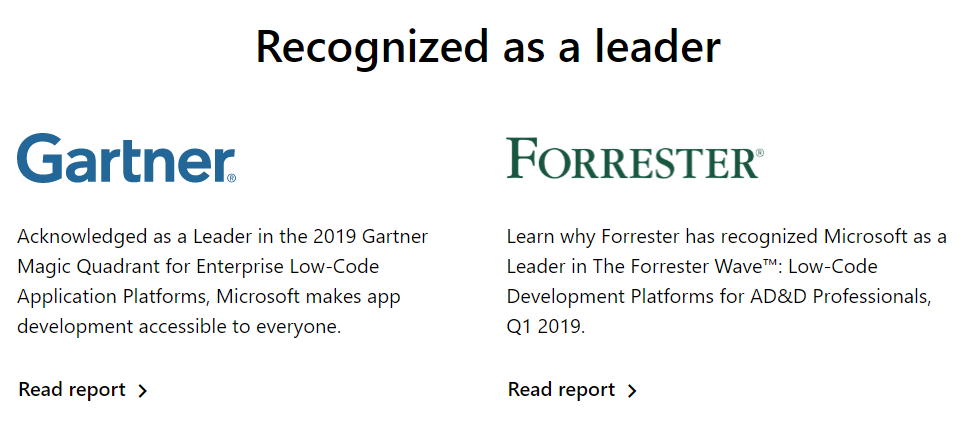
    This first topic is a much broader phenomenon than just Microsoft’s Power Platform offering. During 2019 we’ve seen the general tech media and industry analysts give plenty of attention to the rise of low-code/no-code development and how organizations are exploring its possibilities to augment (or even replace) traditional software development methods when it comes to internal app development. Microsoft receiver recognition from both Forrester in March 2019 and Gartner in August 2019 for its position as a leader in the low-code application platform market.

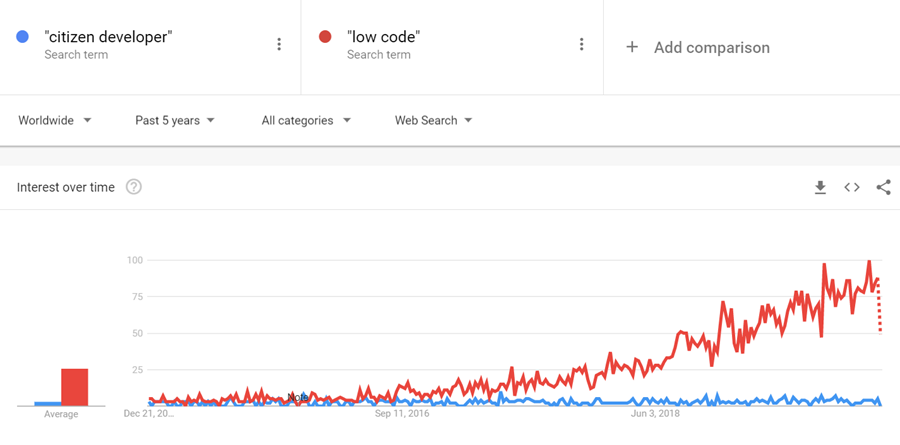
    The term “citizen developer” had of course been used already much earlier in Microsoft’s description of the target group for Power Apps (earlier “PowerApps”) and Power Automate (formerly known as “Microsoft Flow”). However, it’s safe to say that the general interest on low-code is rising much faster, if you look at what people are googling:

    What has propelled Microsoft to the top right corner in the analysts’ charts is not just the functionality aimed at everyday information workers / power users in these tools. Making their low-code offering enterprise ready has been a clear goal for Microsoft, as can be seen from how the pro developer audience is being presented Power Platform + Azure as the platform for every developer. On the IT administration side the efforts to put together a Center of Excellence (CoE) toolkit for Power Apps are showing Microsoft’s commitment to providing a governance story to address both the common admin needs of organizations as well as adapting to the varied support needs of the new breed of app makers.

    There is a wealth of functionality that’s still just in the MS product team’s pipeline to land sometime in 2020 which will make the Power Apps development process much more like “real” app building. Built-in tools like Power Apps App Monitor will be the go-to place for debugging formulas, analyzing performance and in general taking a peek under the hood of what the low-code declarative app development studios actually produce. The coming Power Apps Test Framework will allow the authoring and execution of proper test cases, to ensure the app quality doesn’t erode as new features and platform functionality are introduced. There will be Power Apps telemetry data available in a similar way as Azure Application Insights provides to custom apps today.

    All these platform investments together with the growing interest from customers (and presumably partners, too) should mean that low-code app development will become increasingly mainstream in 2020. This will boost the awareness of different vendors in the category and may well steer us a bit further away from the ever so familiar head-to-head comparison of Salesforce vs. Microsoft that’s founded in their CRM product offering. Dedicated low-code players like OutSystems or Appian may start to appear more frequently on the radar, as well as companies like ServiceNow that are running towards the citizen developer territory from a slightly different background. Oh, and you should definitely expect there to be even more heated debates ahead on the possibilities, limitations and roles of no-code, low-code and pro code!

    Licensing confusion

    This second theme is in part related to the growing pains of how the Power Platform tools are turning into self-sustained products rather than just an extension method for Office 365 and Dynamics 365. Yes, they are still very much the toolkit for how you customize applications in the aforementioned suites. However, building extensive custom apps with the full low-code platform capabilities is no longer something that “comes with Office” when looking at the latest licensing terms. Citizen developers can still easily get started with the “seeded” plans in Office 365 for their personal productivity explorations, but for the organization wide deployment of low-code solutions, customers should prepare to purchase dedicated Power Apps and/or Power Automate licenses.

    In 2019, removing the earlier included rights from Office 365 seeded plans to use custom connectors, HTTP custom actions, on-prem gateway, Azure SQL was understandably something that irritated those early adopters who had dived deep into building Power Apps and utilizing flows on a wider scale in their organization. While I bet many had suspected there would eventually be limitations designed to drive customers towards the paid plans, it might have been a surprise that minimum price point for the required Power Apps user license was kept at $40/month. From the Office 365 point of view, this can sure look like quite a “cliff” for taking app development further.

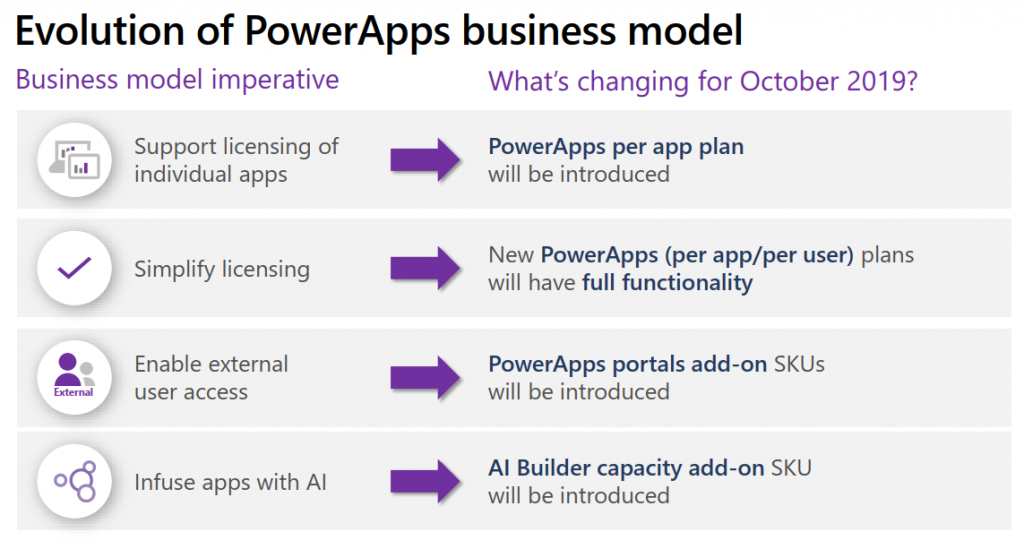
    Another big surprise was the way how Microsoft introduced a new $10 per app pricing model as an option for basically any custom apps built on top of Power Platform. With rights to full feature set of CDS, Model-driven apps and pretty much everything that you’d need for running an app that looks like the native Dynamics 365 apps, it seemed almost too good to be true – if you’re coming from the Dynamics side of traditional CRM style business applications where the enterprise apps cost $95. A great example of the two different realities clashing, when Power Platform can simultaneously be seen as crazy expensive or dirt cheap, depending on the frame of reference.

    The policy of licensing the low-code Power tools from Microsoft via primarily a per-user model with upfront payment requirement is sometimes challenging when talking about the business cases for an application platform that would be gradually adopted for more and more app scenarios. There’s no pay-as-you-go option like with raw Azure resources, because Power Platform is a value-added abstraction layer that should remove any direct dependencies to those resources. However, in 2019 we saw MS take things towards capacity based licensing, with the introduction of explicit Power Platform API request limits per user license type, plus the option to purchase additional capacity if needed. Although MS has stated that normal users should be well within the included API quota, there have been many concerns raised from developers on how custom apps and integrations will be impacted. The fact that these new consumption based limits were announced before any metrics were made visible to customers for evaluating their existing scenarios didn’t exactly help in alleviating concerns.

    I’ve never spent as much time investigating the details of Microsoft licensing as I did in 2019, and honestly I hope that 2020 would be at least a bit lighter on the licensing changes side. Seeing the rate at which the product portfolio of Microsoft Business Applications is growing, though, I’m not sure if it’s realistic to hope for the size of the licensing guides to shrink anytime soon. We’re also still waiting for some of the October 2019 licensing announcement details to be finalized, like the promised API usage metrics in Power Platform Admin Center, or the updated list of restricted entities requiring Dynamics 365 license. Oh, and I bet in 2020 we’ll see the launch of technical enforcement for the types of apps that each license holder is able to use (1st party, custom, Team Member etc.).

    From the customer and partner perspective, the licensing of Power Platform is often perceived as its most complex part, based on feedback from various community members. Although many of the recent changes have been undoubtedly necessary to align the very different Power Apps and Dynamics 365 licensing models into a coherent and future proof platform licensing model, unfortunately the continuous adjustments on what these services actually cost to run has clearly eroded the customers’ trust on being able to predict the operating costs of their solutions built on top of Microsoft’s cloud. After shaking things up on the licensing front in 2019, let’s hope that 2020 would see less drama. Who knows, Microsoft might actually study their own data on how the latest licensing and pricing decisions have impacted service consumption and calibrate the model on those areas that could be better balanced to drive greater adoption of the platform and the apps.

    Data story evolved

    Basing business decision on larger and larger pools of data, gathered from an exponentially growing number of sources, processed closer and closer to real time is the Digital Feedback Loop story that Microsoft has been preaching in basically every Business Applications themed event for the past couple of years. The underlying message is that you must have applications so well integrated with one another that you can establish such a loop in real life – which of course the products in Dynamics 365 and Power Platform portfolios promise to deliver.

    Back in 2018 we saw the birth of many “AI for X” products that have since then been rebranded as “[something] Insights”. I called this out as the start of the business AI journey in last year’s summary blog post, since we hadn’t yet seen much of these new intelligent features find their way into actual customer environments. Based on my observations today, it’s still fairly rare to find these premium Dynamics 365 licenses for Sales Insights or Customer Service Insights deployed in real life scenarios (let alone Market Insights that’s still a bit of a mystery product in its preview state). So, it appears that at least these core CRM processes didn’t just magically get transformed by adding some AI frosting on top. A big practical blocker seems to be lurking in the availability of clean enough data in large enough quantities that these packaged AI features could show concrete results to business decision makers in customer organizations.

    What 2019 did deliver is a set of new products that are aiming to leverage business data in a way not previously covered by Microsoft’s business apps offering. In the second half of 2019, the headline Dynamics 365 product demonstrated in all MS events was Customer Insights. Built as a Customer Data Platform (CDP), its purpose is to enable marketing users to combine customer and transaction data from numerous different sources, to form a 360 degree profile of that customer and use it in better segmenting offers and providing personalized service. Pouring data into Azure Data Lake & CosmosDB is designed to be effortless from any source, be it Microsoft’s or other vendors’ solutions, with intelligent matching algorithms generating “keys where keys don’t exist”. While it can be used with Dynamics 365 apps, there’s no requirement for the customer to have a specific CRM system in place. It’s also not a black box like some of the earlier Insights products, since the built-in templates like churn prediction can be replaced with custom Azure ML models to take advantage of machine learning models built and trained by your own data scientists.

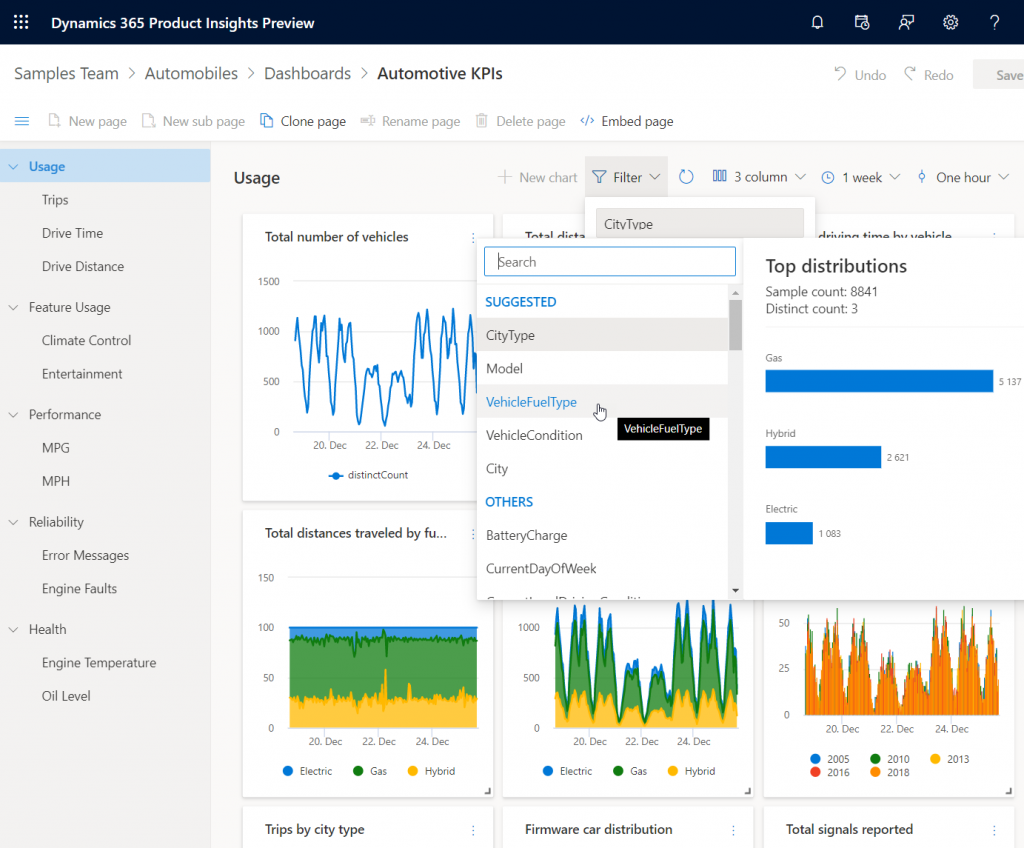
    Another similar data intensive new product launched as preview in 2019 was Dynamics 365 Product Insights. The origins of this application lay in Microsoft’s own telemetry data management systems, where services like Xbox, Skype, Bing and Office have been sending up to 25 million events per second to be processed by the same technology that’s now offered as a Dynamics 365 SaaS product to customers. Yes, you could use Azure Event Hub to push all that product telemetry data into the PI service, but there’s a Signals SDK for Java, Objective-C or Python, too, if and when the whole product architecture of the customer organization isn’t based on MS technology. Insights derived from processing the signal data could be consumed via Power BI or embedded inside Dynamics 365.

    These kind of new services that are aimed at exposing business users to data that previously used to exist outside the reach of the Digital Feedback Loop sound a lot more transformative than the earlier “AI for X” products. Sure, there’s also value in bringing predictive opportunity scoring into the traditional sales funnel management in CRM. However, those kind of features will likely become the new norm for the type of smart business apps that users will expect to be interacting with everywhere. The customer specific implementation of solutions based on Customer Insights or Product Insights, on the other hand, have the potential to be a source of true differentiation if organizations can learn unique ways to use their data for proactively serving their customers. It also aligns with the ambitions that Satya Nadella has on how organizations can break traditional data processing barriers with the help of Azure:

    We are building Azure as the only cloud with limitless data and analytics capabilities across our customers’ entire data estate, bringing hyperscale capabilities to our relational database services.

    Satya Nadella, September 2019 post on LinkedIn

    New services like Azure Synapse will naturally be the toolkit for creating highly specific, cutting edge analytics solutions on the MS data platform, but I can imagine the SaaS style Dynamics 365 products to follow pretty close by when it comes to covering repeatable business scenarios for big data – with the same underlying Azure tech, of course. In 2019 we already saw CDS data export to Azure Data Lake becoming available both via Dataflows as well as through a standard feature (preview). The traditional relational world of business application data is intermingling with the less structured analytical data systems at a rapid pace, with Microsoft building these services that blur the lines of what specific type of data is being used in which business scenario. Is 2020 going to be the year when Dynamics 365 professionals must step out of their comfort zone of having everything in one database and start connecting to all these strange new services, to deliver those much sought after actionable insights to their business user audience? We’ll know that in approximately 365 days!