Tag: low-code

  • The world beyond apps – my thoughts on AI’s impact

    The world beyond apps – my thoughts on AI’s impact

    This text was written by a human being, not AI – even if some of the images are AI generated.

    Adding such a disclaimer would have sounded ridiculous only a few months ago. Today, many of us are starting to be rightfully sceptical towards online content we come across that touches upon any current hot topic. Is it organic or at least partially machine produced?

    LLMs, large language models, struck earth like a meteorite in the end of 2022 and made some of us question what we really understand about the current capabilities of computers. If you’ve logged in to ChatGPT or signed up for the New Bing version now running on top of OpenAI’s GPT-4 model, you will have certainly experienced a “WTF?!?” moment or a few when seeing the kind of answers they can come up with.

    In this blog post I’ll reflect on the experiences I’ve had with this latest wave of AI capabilities and how I think they potentially will change the business I operate in. Meaning low-code application platforms (LCAP) and in my case the Microsoft stack of tools.

    Why didn’t we see this coming?

    When discussing the AI phenomenon over a pint of craft beer with a colleague of mine a couple of weeks ago, he asked a great question: “why didn’t anyone see this recent AI wave coming?” Indeed, how can people in the tech industry be so surprised about what took place in 2022 on the AI front? Where’s the catch? Is this real or just momentarily hype that will fade away once the next hot topic comes along and takes over our LinkedIn feeds – in the same vein as web3, crypto, metaverse etc.?

    One of my all time favorite phrases is “first gradually, then suddenly”. It applies to pretty much any disruptive change that the world of technology and business encounters. Things like AI don’t just emerge one day and immediately start wrecking havoc. Instead they remain in the “bubbling under” stage for quite some time, then they suddenly erupt.

    ChatGPT has been called the iPhone moment of AI. If we think about the technology that Apple put together to create the original iPhone as a product, key elements like touch screens or downloadable apps were all introduced many years before by the biggest player in the phone business (Nokia). It was not the existence of these technical capabilities that created the perfect storm. It was the way in which they were delivered to the market as a product that made people think: “wow!”

    Creating a web service like chat.openai.com and just casually making it available to the whole world on one day was completely different from having the GPT family of LLM published via the traditional APIs and researcher/developer focused forums. Unlike the iPhone as a physical product, no one needed to purchase anything or make a switch/commitment to experience the potential of generative AI. That’s how you grab the attention of the world in these always-on always-connected days.

    Even alpha geeks like Bill Gates didn’t believe it was going to happen this fast. Tech giants like Google had been sitting on much of the technology needed for building what became ChatGPT, yet they lacked the financial incentive to proceed with it. As a result, in 2023 I’m now using “just Bing it” in a non-ironic way. One year ago I would have given a below 0.1% chance for this being the year of Bing – and today it already clearly is such. Google has access to all the necessary tech to grab the lead, yet the dynamics of their business model (targeting search based ads) is a force very similar to that which took Nokia under once phones became computers. Google, like probably also Nokia, became a victim of their delusions of excellence.

    So, about the original question. No one saw this coming because that’s how disruption always happens. Which leads us to the next topic:

    OMG, they’re coming after us now!

    In the IT consulting business we’re accustomed to the endless talk about change. Everyone wants to change the way how people use technology, and many are surely fantasizing about being able to disrupt existing business models. Very rarely, if ever, do us tech people see ourselves as the target of such disruption. Until now, that is.

    What the recently discovered capabilities of LLM based AI systems have shown already is that a very, very significant share of what us knowledge workers spend our days doing while at work can be handled by computers. It should be a wake-up call to all of us: we have been wasting our wetware brain cycles for reading and writing things that generative AI should be processing instead.

    Shouldn’t we be happy about AI coming and promising to handle the mundane parts of the consulting business that we didn’t really enjoy all that much anyway? While everyone sort of cheers for the virtual assistant that can process our emails, summarize data, generate reports, (very shortly) do basic interactions with CRUD based systems – some might notice that this also sounds like an existential threat. Even Bing knows it:
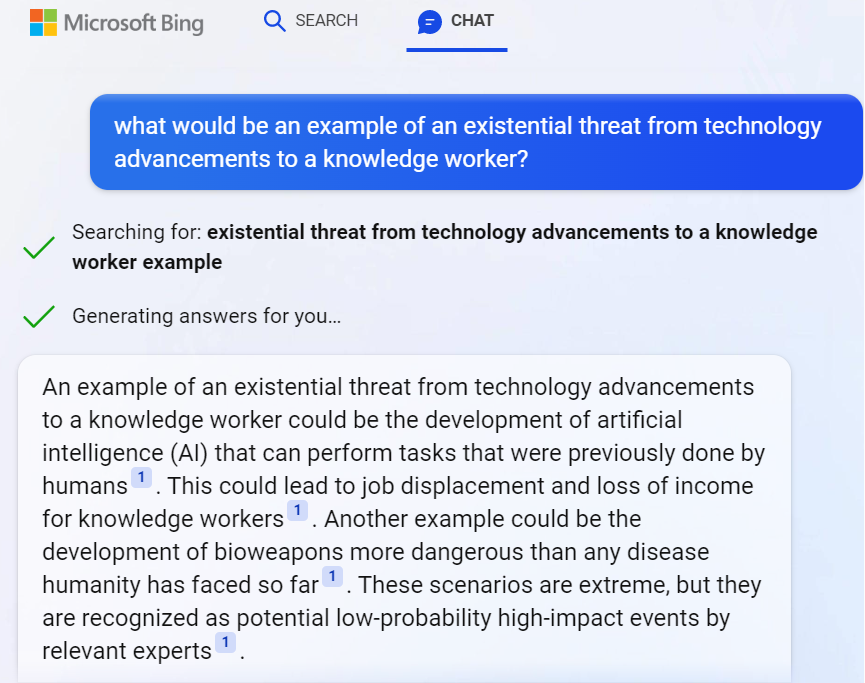
    Ah. AI skills and bioweapons nicely coexisting in one answer from a service that used to be just a dumb internet search engine a few months ago. Nothing to see here, folks! Move along!

    When I first started to explore this recent leap in AI’s capabilities, I was introduced to Moravec’s paradox. It states that high-level reasoning requires very little computation, while low-level sensorimotor skills require enormous computational resources. In short what this means is: replacing the driver in a car will require a huge amount of computing resources, whereas replacing the office worker sitting next to a computer all day is almost trivial in comparison.

    This is not what most of us have been taught about how technical advancements replace human workers with digital tools. Yet it makes perfect sense when you think about it. The natural selection of evolution has had billions of years to develop the skills we use for observing and operating inside a physical space. Email has existed for only 54 years. We are all really just helpless babies when it comes to processing data, yet we are quite advanced in our abilities needed when diving through the busy streets of a city full of physical objects / actors.

    The arrival of year 2022 level AI skills in the form of LLM was the first time many of us ever needed to take a look in the mirror and say:

    We used to be the ones disrupting the working life of others. Now we are gradually joining the ranks of disruptees. No, I still don’t regret one bit that I chose to pursue a career in the cross section of business and IT. This is a much better position to be in when thinking about what lies ahead and who’s got the possibilities of participating in building something new and exciting.

    Things have always evolved and we’ve seen technological leaps before. I just can’t help thinking that the world in which I grew up to understand what IT is about will now seem incomprehensible to the new generations who’ve yet to discover it.

    Backward never

    As a child, the first time I got the chance to physically interact with a computer was the ABC 80 that my dad bought. Serious computers seemed very complex to use, yet at that time I was young enough to entertain myself simply by typing on the keyboard and pretending to use the computer. Fake it till you make it, right?

    Photo by Frédéric BISSON: Pacman on Atari 800XL at RetroGaming Days IV

    When I got my first personal computer for myself, the Atari 800XL, it supported loading games from a cartridge that you just plugged in. That was the “instant gratification path” of using a computer. I did also start reading the magazines of the time and even typed in a few of the Basic games, transforming the code that was printed on the paper into bits that I typed in via the keyboard. It was interesting, yet it always felt too hard to achieve some tangible results. Code didn’t provide me a way to express myself. It wasn’t until I started creating music on the early PC tracker software that I saw computers as a tool for creativity.

    My kid is now 3 years old. As he’s getting exposed to how technology is used in our daily lives, I’m pretty sure he’ll never see computers as “hard to use”. Now as the natural language interaction pattern will presumably quickly take over most casual usage of smart devices, the concepts of programming or code may remain very distant to him. He’s already happily giving Google Assistant voice commands via a smart speaker in our living room. Why wouldn’t it work for everything by the time he’s old enough to start creating things with computers on his own?

    It goes far beyond the difference between punching keys vs. shouting commands. As of today, Google Assistant is a complete moron compared to ChatGPT. It won’t be that way for long, though. The idea of a computer that understands what you want to achieve without it having been programmed to fulfill that specific request is a shift so profound that such AI capabilities will be infused in every possible smart device. Because otherwise calling them “smart” with the 2021 level of skills would just get the vendors laughed out of our homes and businesses.

    Soon, no one will be given the opportunity to claim that they don’t know how to use computers. There may not be a single visible computer around, but everything around you will be processing data and adjusting itself to the sensors inputs. That’s likely the world in which our children will grow up in, regardless of what we as parents would do. Life without ubiquitous AI may soon be like trying to live without electricity.

    And now to Power Platform.

    Everyone as a developer

    The idea of how the low-code Power tools could eventually democratize the creation of applications is something very close to my heart. The products were introduced roughly a decade ago now. At around 2018 I started talking about the crazy idea of how in the future creating apps would be as commonplace as creating documents already was. I used it as a way to get my point across when talking with colleagues, claiming “every PowerPoint should really be a PowerApp”. I wanted to challenge their traditional idea about apps being something big and expensive created by professionals, insisting that they could also be small, disposable things created by anyone with a computer.

    MS has of course been talking about infusing AI into their product portfolio for a long time already. We’ve seen some neat little demos and product features introduced with what NLP (natural language processing) has been able to do, but in reality it hasn’t had almost any impact on the everyday life of the app/flow/report makers. Sure, AI Builder as a citizen friendly entry point into the world of Azure Cognitive Services has seen some real-life usage, yet it has hardly been a mainstream tool for citizen developers.

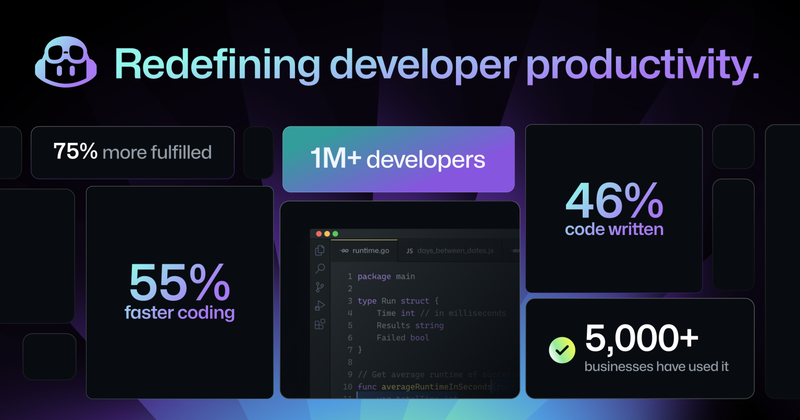
    The more powerful next generation AI features have first landed on the pro-code side, under the GitHub Copilot product. These stats from the announcement of the latest GPT-4 based Copilot X version give some indication about the adoption rate. It doesn’t sound like just a marketing gimmick anymore. A fair share of developers out there are probably at least considering taking it into everyday use for the process through which they produce their work output.
    Those of us who come from outside the world of programming and spend our days working with something other than raw programming code could soon be facing the same question: should I let AI do a part of the work for me? As anyone with more extensive experience on Power Platform probably agrees, low-code does not mean low complexity. Working with data, business logic and UI can present quite a cognitive load, even if you are “just point’n’clicking” or writing Power Fx formulas instead of JavaScript or C#.

    If anything, no-code/low-code should become the area in which safe usage of AI generated components would go mainstream a lot faster than in code generated without any productized guardrails around it. In the end it’s still all made of code and it all runs in the Microsoft cloud already (in the case of Power Platform). Training dedicated AI models to serve this well defined playground should be a very doable task for the platform provider. Of course the UX of how app makers interact with the generated results needs to be thought out, as direct manipulation of the generated code wouldn’t be quite ideal.

    If business users will learn to leverage Microsoft 365 Copilot to generate documents for them, how far can we be from the stage where they are also comfortable generating apps and automations in the same way? I believe were are definitely moving into the direction where questioning the abilities of non-programmers to design and develop their own tools isn’t a valid generalization to make anymore. I honestly did not believe we’d get so close to the state of “hey Copilot, turn this PowerPoint into an interactive Power App” being a possible reality this soon.
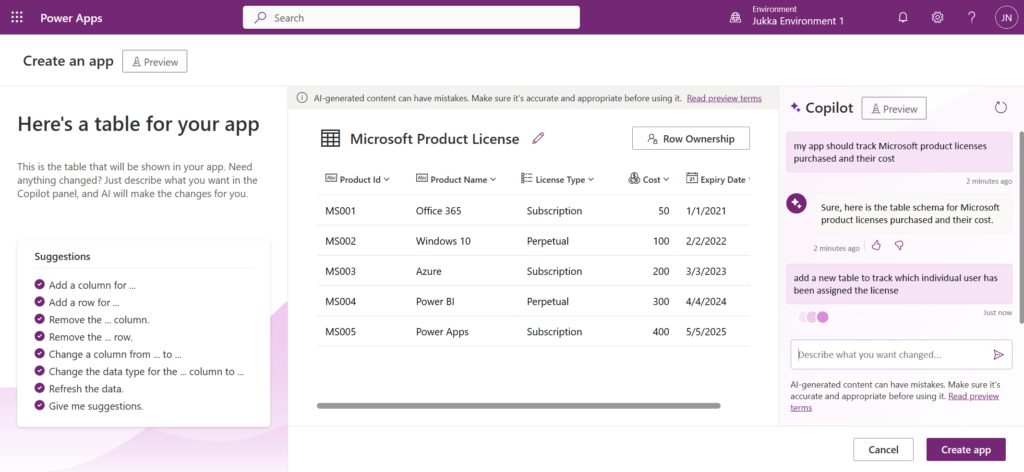
    This, in turn, will lead us to the question to think about: is this what the world really needs?

    The NoApps future

    In the end, people don’t need apps. In the same way as the record industry was formed around the concept of producing, promoting and selling physical items containing a representation of music created by the artists, our current business applications consulting industry is also focusing on the intermediate output. The actual value delivery is something we must never lose sight of. Else you may find yourself selling plastic discs when the world has decided to jump into streaming audio instead.

    Quicker creation of apps will initially have plenty of demand I’m sure. Besides, it really is a cool demo that you could draw a form design with pen & paper and then have AI generate a digital app’lified version of it (both Microsoft and OpenAI have used this scenario). Yet it’s still just a static data capture form. How many forms can employees or consumers navigate through during their days before getting exhausted with the “there’s an app for everything” experience?

    These UIs for standardized data capture and processing have been needed because our technology couldn’t previously work with anything more fuzzy. Well, we’ve now seen through ChatGPT that it most certainly could. Not only can the AI figure out what us humans mean, regardless of what language we type our text in. It can also figure things out from what anyone else out there in the world has written.

    There’s an interesting demo / research preview of “just some guy” applying GPT-4 to instruct the web browser on what to do. Not just writing out the instructions but actually performing the steps. In the example provided in this TaxyAI project, while on the GitHub website, giving a prompt “protect the main branch” will trigger the AI to do research on what that means, where it should be clicking, and then completing the steps as an RPA style bot:
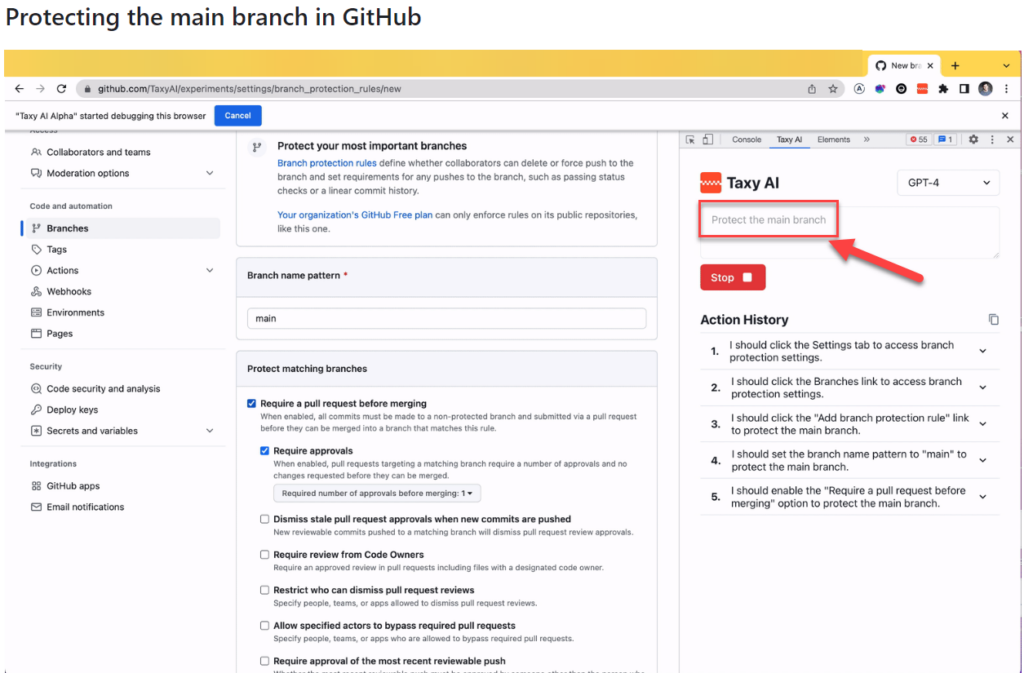
    I’m not saying this is a tool that would go mainstream. Rather it serves in giving ideas on what the tech giants out there will be creating with their 1000x budgets. The Copilots of tomorrow will not just return a box filled with text that they generated. They’ll probably do the actual work for you, rather than just providing instructions.

    Think about all the process documentation and ad-hoc instructions that has been created inside a medium size enterprise. It will never be realistic to turn each of them into dedicated apps and automations. Yet if we get an AI service that can read these instructions created in human language, turn that into actions for the computer, and then complete the chain of activities to move from the original process input to the final process output – that would be something.

    The concept of “working out loud” by proactively sharing our observations of the world and our accumulated knowledge with the community of colleagues meeting on a digital platform has been a great productivity booster and a source of professional & personal growth for me. Today with ChatGPT or Bing we can gain further benefits by “thinking out loud” with the machine, providing it a sequence of dialogue like prompts. The natural evolution from this could lead towards a world that actually supports “working by thinking”:

    • “Hey Copilot, I spent €50 on a cab ride.”
    • “I can see that you’re in a city where you had previously agreed to visit for a customer project. I’ve grabbed the Uber receipt from your email, filled all the details into our corporate systems and the reimbursement has been deposited back to your bank account.”

    Instead of this sounding like a scene from some flashy “World of Tomorrow” video created by IT companies to sell us boring & expensive tech of today by using a fictious scenario from the year 2060 or something – it doesn’t sound too far off anymore. An AI assistant that understands what we say we want & what others say we should do in order to get it is in theory here today already, in the form of LLM based chatbots.

    We just need to plug it in.

    Endless problems

    Cue the soundtrack from The Terminator. This is exactly how you create Skynet, isn’t it?

    “Defence network computers. New… powerful… hooked into everything, trusted to run it all. They say it got smart, a new order of intelligence”.
    “Skynet saw all humans as a threat; not just the ones on the other side” and “decided our fate in a microsecond: extermination”.

    Michael Biehn as Kyle Reese in The Terminator (1984)

    AI will introduce brand new problems for humanity. Some will be existential (“is there a place for us in the world after AGI arrives?”), others much more mundane. What I’m somewhat worried about is that we’ll be faced with them pretty much all at once in the greater scheme of things. Without the ability to identify what is a serious issue for the whole world, what is merely a speedbump on the road to innovation and business productivity, we’ll be mighty confused.

    The number of things we could be worrying about when it comes to AI is overwhelming already today. Use this list as an example and pick one item if your bag of worries is looking empty:

    • Copyright issues of imitating/borrowing content from original makers without permission.
    • Tech monopolies growing even bigger and stronger than they are today.
    • LLM hallucinations making it impossible for us to know what’s right & wrong.
    • The internet & every media getting flooded with machine generated content.
    • Biased data in the training sets inflicting harm on how minorities get treated.
    • Next generation surveillance society á la Minority Report.

    The challenge I see ahead is that AI may be unlike anything we have ever encountered before. Sci-fi literature and movies have attempted to provide at least some context to the phenomenon, enabling us regular human beings to talk about what’s happening around us by using references from popular culture. Yet where are the AI consultants that will help organizations of all shapes and sizes make sense of this? (I know: just open LinkedIn and everyone is an AI expert there these days. But anyway.)

    The range of reactions to AI that we can expect to encounter when starting to talk about it as just regular technology consultants is probably going to be all over the place. Many organizations will have legitimate legal and compliance concerns that will cause them to choose the “better safe than sorry” approach and put things on hold. Elsewhere, the gains from initial experiments with LLM powered information systems may turn out to be so compelling that AI becomes the next Digital Transformation that must be sprinkled on top of everything the company does.

    I suspect the divide between individuals will be even greater. Just like the low-code tools have enabled the new breed of app makers to stand out from the ranks of ordinary business people and create something few of their colleagues could have ever imagines, the same thing can happen with adoption of AI tools. One’s formal education nor professional background may not be the best criteria to identify those who’ll be able to apply this new technology into solving real life problems.

    If anything, I suspect it will be even more likely that the domain experts, the citizens, will be able to set aside all those “this AI generated code is garbage compared to what a true professional developer could write” complaints and just focus on the end results from using that code instead.

    Good enough is close enough

    We’ve been taught to believe that the world of computing is very binary by nature: it’s either 0 or 1. Computers either behave in a logical, repeatable manner and deliver the exact result they have been instructed to – or they deliver nothing but an error. People trust the computer to be right just as long as someone programmed it the right way.

    LLM’s have flipped these roles around. Now the computer is the creative one, generating an endless list of ideas and content variations, based on the simple prompts given to it by humans. Not instructions like code, as there’s no way to guarantee that the neural network would produce the same output the next time you provide the exact same input. This new generative AI is whimsy and unpredictable, which makes it so much closer to behaving like us humans do.

    If you work in a profession where any part of your output can be presented as text, there’s a high probability you’ve given ChatGPT a go and tested how it performs in producing similar outputs. It’s equally likely that you’ve seen the answers given by the machine to contain plenty of factual errors. “Hah! Nice try, AI, but no matter how much data they feed you, you’re still just a stochastic parrot.

    We should of course take pride in our craft. Many of us work in an environment where the professionals who can provide the most detailed answers to questions presented to them get the highest amount of respect. We gain trust from others, we build up our own confidence, we “level up” by being knowledgeable in our field and delivering high quality work outputs.

    Are you always right, though? Of course not, we’re all only human.

    Can you apply your expertise to any areas of business? Heck no, the deeper we go on topic Z the less time we have for studying topics A…Y.

    Can you work 24/7/365? Not possible, you know that.

    Communicate in any language? Why are you even asking these th…

    WILL YOU WORK FOR FREE?!?!? Okay, I prefer not to continue this discussion anymore.

    AI doesn’t have to be perfectly accurate to be of extremely high business value to companies. It only needs to be close enough, so that the superpowers it does possess over us living and breathing human beings can be put into use. Yes, it will very often need supervision and intervention from humans at some stage of the process. Yet the biggest financial gains will be achieved wherever the share of human work can be brought down to a minimum. Which means people will be very creative in finding ways to harness the creativity of AI in novel ways.

    AI can always be there for you when needed, whereas a human professional cannot. In my line of business, today the customers are googling for answers and following videos & blog posts to manually repeat the steps on a computer to get their job done. When it gets too tricky or they don’t even know what to search for, Power Platform Advisors can step in and ensure the desired results are achieved. Customers can rely on us, but they need to sacrifice both their time (adjusting to whenever we are available) and money (sorry, we also have to make a living).

    If you can take away all these nasty human constraints, AI will be a sweet enough deal to consider as an option for pretty much anything. People will try it because the barrier is almost non-existent. The tools for creating business solutions will have the Copilot capabilities baked into them, thus promoting them as the first resort. You’d be crazy not to use them.

    What about the possible damages, though? Let’s say that generative AI is right 90% of the time and a human professional gets to 99% accuracy. When your AI built business solution causes big problems for the first time, won’t everyone go back to the good ol’ professionals?

    There will undoubtedly be business models emerging that work a bit like insurance does. Since we can’t be sure that LLM based answers are correct, and we also can’t sue the AI for providing us wrong advise, someone needs to step in and become that middleman. Yes, accidents will happen and someone needs to cover the damages. Now, if your AI based service costs €20/month instead of €200/h and you’ve got a policy that promises to fix whatever issues were caused by unsupervised AI-driven decisions – it can be quite a lucrative model for both parties.

    Bicycle evolved

    Steve Jobs called the computer a bicycle for the mind.” It is a beautiful, powerful metaphor. In the early 80s, the democratization of computing through the rise of a personal computer that was available for work and personal tasks was presented as a huge leap in the capabilities of an individual. Just like hopping on a bicycle improves man’s efficiency on energy use per kilometer travelled beyond that of any animal in the world, our possibilities for cognitive work rose onto a new level as computers became an everyday tool within our reach.

    AI could lead to something of similar magnitude eventually. Is it just a faster bicycle, though? Did our computers become more powerful or did the tools change in a way that requires a new metaphor? When talking about LLM based tools like ChatGPT specifically, I quite like the analogy of “calculator for words”. It underlines the way in which these new tools of 2023 need to be approached as not the all knowing sources of truth but rather the wizards of words. They are extremely powerful in delivering combinations of words to represent most things us humans use text for (be it communication or code). However, assuming that they understand the world in the way that humans do is a mistake to be avoided when making use of their wizard skills.

    If the electronic calculator was brought into an office where everyone had previously been crunching the numbers with only pen and paper, what would be its impact? A thought exercise like this might help us in understanding why there will be both enthusiasm and scepticism expected as AI capabilities begin to appear in the applications and platforms used in organizations today. And just like what happened to the physical calculator devices, eventually we’ll get a next generation of machines where the ability to perform calculations is just one app among many.

  • The future of Power Platform – Steve has a chat with Jukka

    The future of Power Platform – Steve has a chat with Jukka

    If I had to choose only one blog I could follow in the Microsoft Business Applications ecosystem, it would be Steve Mordue’s blog.

    Why this blog? Because you’ll learn more about the true business of BizApps in Steve’s blog than you would from reading all the partner channel materials MS puts out there.

    It’s not just the unfiltered opinions and provocative comments from Steve that make the content unique. He manages to get Microsoft leaders like Charles Lamanna or Ryan Cunnigham speak openly about product roadmap and business strategy whenever he has a chat with them. It’s the kind of material you couldn’t hear from anywhere else – at least not without an NDA.

    When MVPs used to get together

    One unfortunate impact that COVID has had on the Microsoft MVP program is that our annual MVP Summit events have gone virtual. Even though the world is slowly opening up to physical events again, at the same time the world economy is sinking. This has pushed even the biggest tech corporations like Microsoft to announce cuts on their internal travel, training and event budgets. This means the next Summit, which will be my 10th, is probably done over Teams again.

    It’s better than nothing, of course. The Microsoft product team members do put in effort to share their plans with the MVPs and are open to receiving feedback from us, since the protective shield of the NDA agreement covers both digital and physical worlds. Making things digital can also help scale the amount of tech content that can be made available as well as the means through which to consume it.

    What the virtual events cannot in any meaningful way compensate for is the lack of informal interactions between MVPs. When you can’t go grab a drink with the smartest people in the business together at JOEY Bellevue, a large part of the Summit is wiped away. Sure, the product group interactions are valuable, but the MVP-to-MVP interactions are priceless.
    No, you can’t replicate this in the virtual Summits. When you’re first sitting 6-8 hours alone in front of your computer, from 6pm onwards after your normal working day, staring at the Teams screen – trust me, you’re in no mood for “virtual drinks” after that.

    Events quickly turn into non-events due to the lack of any changes in the physical surroundings. No travel costs, no jetlag, only a little loss of billable work during the week – it’s all very productive, to the point where you start asking yourself: why did I ever consider this “fun”? It sure helps to contribute to the feeling of being constantly tired.

    Time to move forward again

    You shouldn’t become too bitter about things not being what they used to be. The older you get, the more stuff like this is going to come at you every single day. You don’t have to like it, and you certainly are entitled to feel what you feel about it. That’s where our entitlements pretty much end, though.

    Choosing how we react to change is pretty much the essence of life – and business as well. This is an area where both me and Steve seem to have similar ideology that drives our behavior. If you know the only certain thing in life (and business) is constant change, it’s better to be someone who’s pushing that change to happen instead of becoming the object that must endure the change pushed upon it.

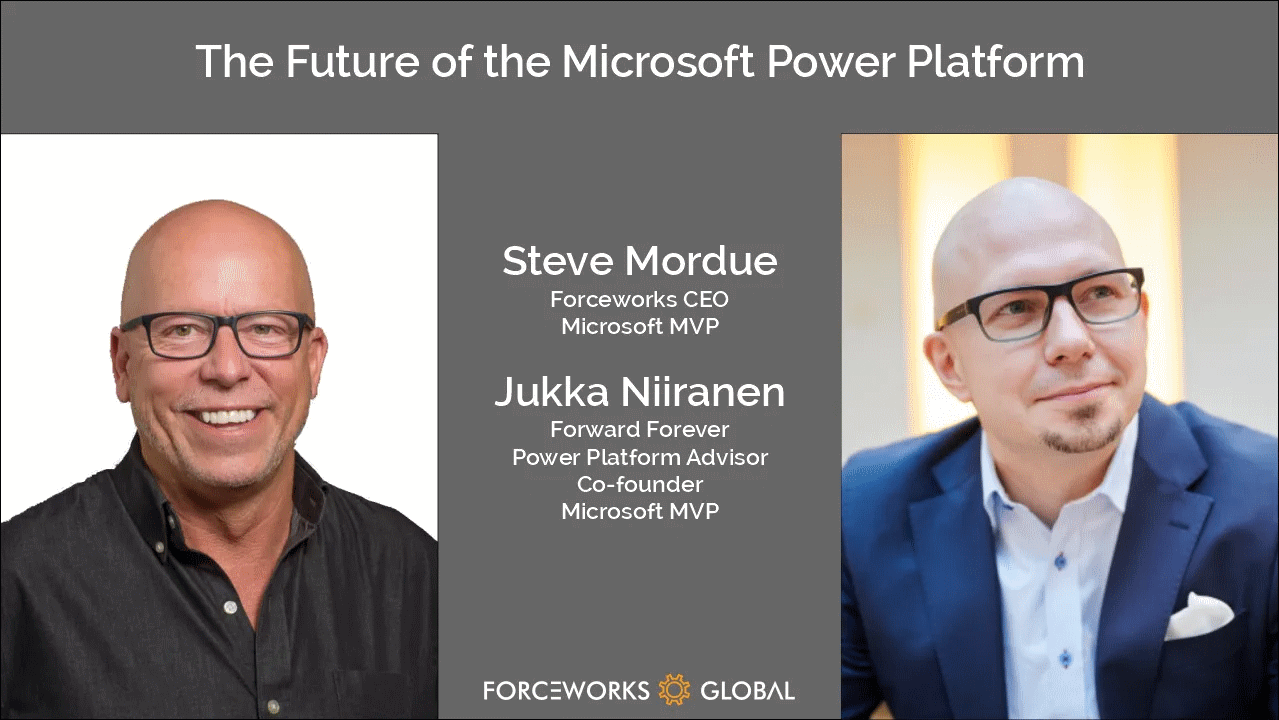
    So that’s one thing we share in addition to our hairstyle. With nothing more as a prepared agenda, we opened up Teams and stated recording a session on Steve has a chat with Jukka. It’s as close to an MVP-to-MVP informal interaction you can get to without flying to Redmond.

    You can listen to the audio track on Steve’s website or on Spotify / Apple Podcasts. Alternatively, you can watch two BizApps MVP baldies on your screen for one hour via the embedded Vimeo clip below:

    https://vimeo.com/742784310/7101b864c1

    Some of the topics we discuss with Steve include:

    • How different the world looks like when you choose to go all-in on Power Platform instead of being a Business Applications generalist
    • The struggle of convincing customers that a $5 app can actually give them more value than a $95 app
    • How to get the IT on board with the citizen developer movement and turn governance into an enabler instead of a blocker
    • What would be the ideal support model for a platform-first business that would reduce the customer/vendor tension and get everyone on the same side
    • Why Dynamics 365 partners have very little financial incentives to move their capacity into true low-code business
    • The difficulties in making the Fusion Team story sound attractive enough for pro-devs to find their place in the low-code world
    • Why Teams is the most important platform Microsoft has and why it isn’t yet quite the right platform for wide scale business applications usage

    That’s just a few things I remember off the top of my head, after our awesome chat session. So, if you’re interested in hearing what us two loudmouths think the future of Microsoft Power Platform is – you know what to do.

    There’s no sponsors in any of these chats nor either one of our blogs, so I’ll just leave you with two commercial call-to-actions:

    • Check out RapidStart CRM to experience what you can do with just a $5 Power Apps Per App license (the CRM part comes free, courtesy of Steve).
    • To keep up with what our 100% Power Platform focused team of pretty amazing experts is doing, subscribe to the Forward Forever Monthly newsletter.
  • Podcast: Understanding Power Platform’s evolution

    Podcast: Understanding Power Platform’s evolution

    Recently I was invited to the Demystifying Enterprise Innovation podcast run by AgilePoint. The podcast host Sharjeel Sohaib is interviewing experts from the field of digital process automation technologies and low-code platforms.

    Our topics covered not only the Microsoft specific technology in Power Platform but also the broader market around low-code/no-code platforms. How are they impacting the lives of citizen developers? What should organizations do to drive the low-code tools adoption? Where is the technology underneath these platforms heading towards?

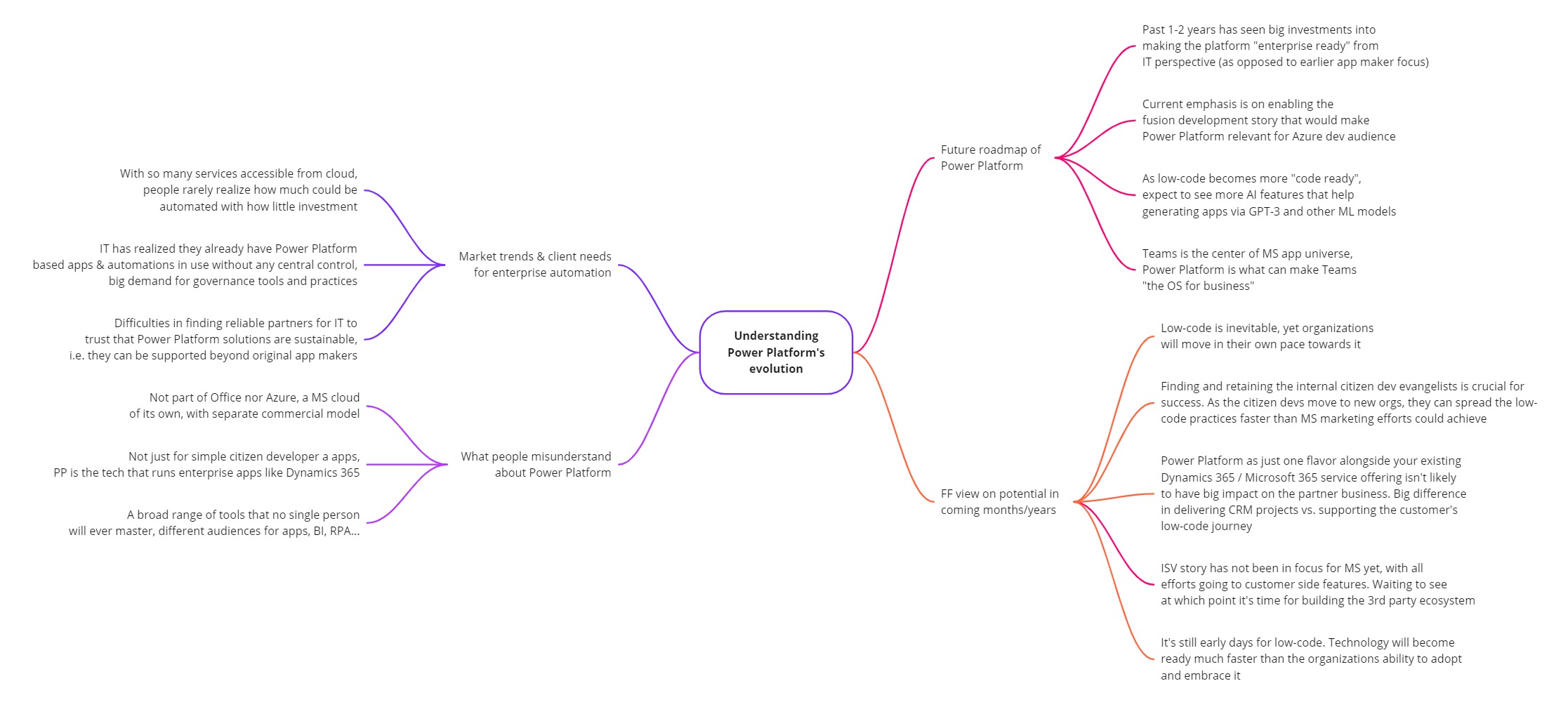
    This turned out to be quite a comprehensive “state of Power Platform in 2022” type of a discussion. I guess that’s just what tends to happen when someone asks me a question about it. Below is the mind map of what I planned to cover in the podcast episode (click for a bigger image):

    You can listen to the end result on your favorite podcast service – assuming it is either Spotify or Apple. The detailed show notes with a few quotes from me are available on the Transistor.fm page for the Demystifying Enterprise Innovation podcast.

    Notes and thoughts

    In the podcast episode we start by discussing my own journey as a citizen developer from 20 years ago, learning about CRM / marketing automation processes at a large B2C company (Nokia). This path then lead me to different Dynamics CRM consulting roles, and most recently going all-in with Power Platform in 2020.

    Being on the citizen side from day one instead of starting my career in formal IT projects has been undoubtedly one of the key reasons why I’ve found the low-code movement to be so close to heart. To me, the ability to democratize code is a much more worthy goal than just trying to get sales people to enter more information into the CRM database.

    Sure, such business apps may be the “what” but citizen development is the “why”. The way Microsoft has managed to infiltrate the existing toolkits of these citizens by bundling Power Apps and Power Automate into Office 365 is the prime reason why things have moved along so fast in this space. Merging PowerApps with XRM 4 years ago is what allows them to still keep moving fast today, even as more complex enterprise IT requirements now need to be met when the apps originally built by citizen devs are becoming more & more business critical.

    Despite of this move towards enterprise processes, bottom-up innovation is still what excites me the most. Grandiose digital transformation programs with their top-down agendas may have the big funding behind them, yet I believe the net impact from small apps built by citizens motivated to fix practical issues in their daily working lives is going to be greater in total. Teams as a platform is a story that may cause problems for us more experienced MS BizApps practitioners, and still this kind of simplification is definitely needed when you really want to scale low-code in practice.

    Power Platform governance topics are where I spend the majority of my working days on right now. When delivering our Power Platform governance advisory services, I’ve seen how difficult it can be for the IT organization to get a handle on citizen driven apps and automations – at least if no one was there to educate them on how Power Apps & Power Automate administration works in practice.

    This is not so much a challenge of the technology not being available. Rather it is the new roles and alignment of IT alongside the citizen developers that poses the biggest barrier for companies to feel safe enough to fully embrace what this corner of the MS cloud can offer them. The same gradual increase in maturity that has happened with Office 365, Azure, and also Power BI from the “power family” – all of it seems inevitable for Microsoft’s low-code products, too.

    This is why we’re now seeing less new maker focused features right now and a bigger push for admin & governance capabilities in Power Platform. The next big target for MS is in formalizing the fusion development story for low-code, to get the professional developers on board this new way how customer organizations address the growing demand for digital solutions that can’t all be met with custom code alone.

    The ISV opportunity in Power Platform has not yet been a true focus area for Microsoft. Their emphasis has been on the internal transformation of organizations via citizen developer solutions. Yet many MS partners are naturally interested in the huge opportunity of the low-code movement. They’d love to become a part of this new ecosystem where the number of low-code developers is growing by 40% every year. However, there’s a lot of work ahead before the mainstream wave of ISVs could be onboarded to Power Platform, both from commercial and technical perspective.

    We can’t just take the good ol’ Dynamics business model and apply it to Power Apps since the platform is designed to empower bottom-up innovation distributed all across the organization (who’s gonna do the top-down purchase decision on your project?). Neither can we make the Office style assumption that all these tools would be common to all information workers (justifying the premium licenses requires stepping outside the generic productivity story and quantifying the value from business specific processes). Experience from the other MS clouds is definitely a major advantage from an ecosystem insights perspective. At the same time, if you just sprinkle a bit of Power Platform technologies on top of your existing business model and projects, you can’t expect to see any radical growth or shift in how your customers are engaging with you.

    At Forward Forever we’ve been lucky to get the chance to educate several MS partner companies on the practicalities of developing apps for Power Platform in 1:1 coaching sessions over the past two years. It has affirmed our belief that this low-code movement is an infinite game where we aren’t competing against other players. There’s no sense in trying to be the winners once the final whistle blows. Rather we should do our best to keep the game going, helping the whole league around us to grow and build an audience (even a fan base) who wants to see us succeed.

    There are no winners or losers in an infinite game; there is only ahead and behind.

    Simon Sinek

    In addition to advising customers and partners on how to succeed with Power Platform, we’ve also invested resources into building products on top of it. Our offering in this field has recently reached a point where our Sustainability Action Pack is now listed on Microsoft AppSource for everyone to see. It’s a solution template that provides tools to drive environmental actions, make progress transparent and help organizations reach their social, environmental and climate targets (see SECAP).

    Power Pages, Power Apps, Power Automate, Power BI – the whole MS low-code stack is being used when we’ve delivered the solution to municipalities in Finland. The big difference compared to Azure based applications, for example, is that the end product truly runs on the customer’s platform. Modifying and extending our Sustainability Action Pack functionality can be done by business users – as long as they’ve got the willingness to learn how Power Platform works.

    This might have been just marketing talk a decade ago. Today the reality is that the persons who are willing and able to use these low-code tools to shape your business applications are likely to be among your most valuable employees. They probably haven’t been hired for this exact role, yet the organization should acknowledge the positive impact that they’re able to achieve by adopting Power Platform tools and thus adapting your tools to deliver better business outcomes. Otherwise they may quickly find a new place to work where such evangelism is appreciated.

    From the outside, as a consultant/advisor, we can only show you the direction to take. The real adoption journey for low-code relies on empowering internal personnel to build new things that create business value. Ownership of your own tools is the biggest difference in mindset when it comes to the traditional Dynamics business applications versus the new breed of Power Platform solutions. This is the revolution in low-code – the technology part is just evolution.

    For more of my thoughts on Microsoft Power Platform evolution / low-code revolution, go and check out the podcast episode:

    Demystifying Enterprise Innovation podcast
  • Year 2021 in Power Platform

    Year 2021 in Power Platform

    Time to start wrapping up another eventful year in the Microsoft Power Platform ecosystem. Here are the highlights that came to my mind when reflecting on 2021, looking at my own articles and social media posts.

    Power Fx: a programming language for low-code

    This is an announcement from 2021 that will grow up to be a much bigger deal in the years to come. When Microsoft launched Power Fx in March, the only thing we initially had was a new name for the formulas that Canvas app makers had already been working with for years.

    The more impactful side of Power Fx is the grand vision of an open source language built specifically for the low-code app makers and solution developers. Power Fx is a sign of things to come: a world where the concept of code is democratized and any unnecessary barriers for people to act as developers are actively torn down by the platform providers.

    Building Power Fx based command bar buttons was the most fun topic I had to blog about in 2021 (see posts one, two and three). Much of the functionality in modern commanding is still way too early for production use, yet the progress that’s going to happen on this front is inevitable. This is how the business logic that goes beyond the options available via a GUI will largely be written in the near-ish future.

    CoE Starter Kit: the admin product on top of the platform

    It never ceases to amaze me how something like the Center of Excellence Starter Kit can be built purely on top of the Power Platform – to administer and govern that very same platform. In 2021 CoE was updated to be compatible with Dataverse for Teams, which is a small miracle on its own. All you now need is one premium license to unlock the vast feature set of The Kit.

    Officially it of course still isn’t a Microsoft product, rather the CoE Starter Kit is delivered as a template on GitHub that is actively maintained by the Power CAT team. Yet in many ways this is a much better model than what “real” Microsoft software products have. There’s a public backlog of potential and upcoming features, you can get notified of the monthly releases, plus the team is incredibly responsive on triaging the reported issues. This level of transparency gained via working through open source tools and methods is something you can only dream of having for the commercial MS products for Power Platform or Dynamics 365.

    Teams as an application platform

    Dataverse for Teams was launched in late 2020, so 2021 was its first year for us to see the impact from empowering every Microsoft Teams user to build Power Apps with a Dataverse back-end.

    Today there are 10 sample apps from Microsoft that any team member can easily provision from the Teams app store. They’ll end up creating a new Dataverse for Teams environment in that process, which is certainly going to put some governance pressure on your Power Platform environments in general.

    I don’t think we’ve yet seen a huge explosion in more advanced apps being built on top of Dataverse for Teams. However, due to its attractive price point (“free!!!”), it has definitely become an option we always need to evaluate before deciding on full Dataverse or (*gasp*) SharePoint Microsoft Lists.

    With Microsoft Teams being the hub for teamwork in most organizations using MS tools, there’s growing pressure for all business app developers to understand how their solutions should exist and operate within the Teams context. The very least you should do is to consider how Teams can be leveraged for publishing your apps to end users.

    As for the Teams + Power Platform story on a commercial level, we didn’t yet reach a point in 2021 where partners could distribute their Power Apps based products via the public Teams app store. In fact, it is explicitly called out that you shouldn’t submit any such apps to the Teams team to evaluate. Let’s keep an eye on this in 2022 and see how the Teams app store will align with the traditional AppSource channel (that didn’t receive much love in 2021).

    Pay-as-you-go licensing

    You asked for it – you got it! There have been constant demands coming especially from people working on Azure based app development that we should have a way to pay for Power Platform resources on the same Azure bill. The announcement of PAYG for Power Apps app passes and Power Platform capacity was therefore the biggest news that came from November 2021 Ignite event.

    Is the PAYG model going to replace the earlier prepaid licensing options in real life, though? Probably not on a wider scale, since committing to a certain number of Power Apps seats upfront is naturally going to give you a better price point in your Microsoft licensing negotiations. The 100% premium in the Per App price when using PAYG highlights that this model is aimed at serving those app scenarios where the actual consumption volume isn’t well known yet. Great for new experiments, maybe not so great for established app usage patterns.

    With the 30 day minimum duration for the once activated Per App passes, PAYG as it stands today isn’t yet very close to a pure consumption based pricing model like raw Azure services are using. Still, it may be flexible enough to convince customers that the licensing risks in building Power Platform based apps aren’t that high anymore, compared to the more rigid MS Business Apps based model that used to be the only option.

    50% price cut for Power Apps

    As if the PAYG model wasn’t enough, in 2021 we also saw a rare moment when Microsoft slashed the price of Power Apps Per User and Per App licenses in half. In that process, the latter was also redefined to mean “Per 1 App” and not “1+1+1 Apps”, but that just made perfect sense in order to clarify the terminology. You could say in most scenarios the list price for running premium apps got reduced by 50%.

    Those of us who’ve worked with Power Platform on a daily basis have always known the crazy value for money that you could get from the platform, already before this price cut. When it comes to convincing the customers in large organizations that they should license every user with Power Apps premium, in the same way they’ve bought Microsoft 365 licenses, there’s probably been a need to move the price point a little lower still to make such deals happen.

    Looking at the global playing field of low-code application platform vendors, customers’ concerns over pricing and licensing are a common issue listed for all leading vendors in Gartner’s Magic Quadrant. MS may not be able to completely alleviate these concerns, yet it certainly helps to have a list price that isn’t an obstacle for starting the talks with anyone.

    Hello Azure Synapse, bye Data Export Service

    OK, so this doesn’t actually affect pure Power Apps environments but rather Dynamics 365 customers. However, since DES has been so widely utilized as the mechanism to gain SQL style access to the Dataverse tables for building reports, the announcement of its deprecation has to be considered one major event for the year 2021.

    This deprecation will mean many customers need to re-architect their reporting solutions, even when existing reports are happily running in production and possibly meeting all the current business requirements already. Thankfully you can still push the Dataverse data into the same SQL database. Using three Azure products (Synapse, Data Lake, Data Factory) instead of one DES can feel like more complexity to achieve the same results, though.

    There’s a bright side to this change, though. The old DES was always just a stop-gap solution that MS had to put in place, to address (primarily) the reporting concerns that CRM customers had when moving to the cloud. The new Azure Synapse Link, on the other hand, is a critical element for Microsoft’s vision of how customers will make better use of their business data via a multitude of new and future services in Azure. The incentives for maintaining and expanding such a service are obviously much higher. This should lead to positive outcomes for both customers and solution developers in the long term.

    Fusion Teams story

    The term “Fusion Team” in itself doesn’t tell very much at all, but in the context of Power Platform I would categorize pretty much all the integrations between Azure developer tools and Power Platform app maker tools under this umbrella. Much like the PAYG licensing model, this movement is crucial in evolving low-code development techniques beyond the citizen developer domain. People with an XRM background already know the enterprise level capabilities within the platform, but Microsoft needs to convince everyone that also pure Power Apps are credible in this territory.

    In 2021 we saw a Microsoft make a big push in promoting the techy side of Power Platform to the traditional software developer audience. Not only did we get the Power Fx programming language in isolation, there were also plenty of examples shown on how this will support source code versioning and manipulation inside VS Code. Screenshots of command-line interfaces became a regular part of product team blog posts. Supporting the pro-dev workflow via CI/CD pipelines in Azure DevOps remained a high priority, with still no signs of any citizen-friendly ALM story.

    The role where Microsoft seems to want the professional developers to focus on at the start of their Power Platform journey is in connecting to new data sources and custom APIs. This is what their Fusion Development e-book emphasized at least, which ended up becoming my tweet with most impressions in 2021:

    Inevitable complexity of low-code

    This leads us into the last topic I wanted to mention, which is more of a top-of-the-mind phenomenon rather than any individual event that happened in 2021. When we put together all these different growth directions of Power Platform (from Teams to Azure) and its expanding capabilities (from governance to software development), one can rightfully ask: at which point will all this spiral out of control?

    We have a broad variety of audiences that this platform wants to cater to. In one corner we have those heroic citizen app makers who’ve been empowered by the Power Apps & Automate icons found under the Office 365 menu, allowing them to solve business problems via new digital tools that no one expected them to deliver. In another corner we have the folks actually tasked with delivering enterprise wide software solutions – now looking for ways to keep the amount of custom code somehow manageable, by leveraging low-code alternatives where they’re a good enough replacement. More and more corners of this arena will get populated as ISVs and other players will join Microsoft’s low-code game.

    Creating your first apps and flows will remain an easy task. The problem is that the boundaries for what you can’t do and what isn’t supported with Power Platform keep moving further and further out. The rising complexity of apps built on low-code can already be seen everywhere and it will just keep growing in 2022. We need to stop endorsing the misconception that these would be “easy tools for creating simple solutions”. While low-code apps are easy to approach and can delivery quick results, in the end we’ll be faced with the same key task as with any business application landscape – managing the inevitable complexity.

    Could we expect to see some new innovation come along to help us address this growing pool of low-code complexity? Following the familiar People-Process-Technology framework, the biggest requirement I see out there in the real world is establishing the right kind of organization structure around low-code. Once we have people with dedicated roles in place, planning the delivery, admin and governance processes will then become possible. Finally, this will allow the new advancements in technological innovation – to bring better visibility into our growing app portfolio, reduce manual/duplicate configuration work, automate the recurring process and alert humans when their attention is required to address new exceptional events.

    As an example, by turning the low-code of Power Apps canvas apps into actual source code managed in GitHub repos, Microsoft has a chance to feed all this data to their machine learning algorithms. Things like GPT-3 from OpenAI may one day become smart enough to analyze what on earth all these millions of apps are trying to achieve and then offer suggestions to us mere mortals on what modifications and updates we should apply.

  • Find contact’s LinkedIn profile with Power Fx & custom command bar button

    Find contact’s LinkedIn profile with Power Fx & custom command bar button

    So far in my experiments with Power Fx and the modern commanding preview in Model-driven Power Apps, I’ve worked with changing record status and cloning a set of existing records. This time I’ll create a custom button for another common CRM scenario: viewing the contact’s LinkedIn profile information.

    In our internal CRM application (Business Forward app) I’ve earlier added a custom field “LinkedIn URL” for contact records, which can be used for storing the reference to the contact’s profile. Not all contacts will of course have this field filled, which is why it’s a common need to go and search for the information on linkedin.com. Could we save a few clicks in this manual process with a simple button? We certainly can!

    This scenario is straightforward enough that you could well use it as your first custom command bar button in your Model-driven Power App or Dynamics 365 CE app.

    Button 1: LinkedIn Search

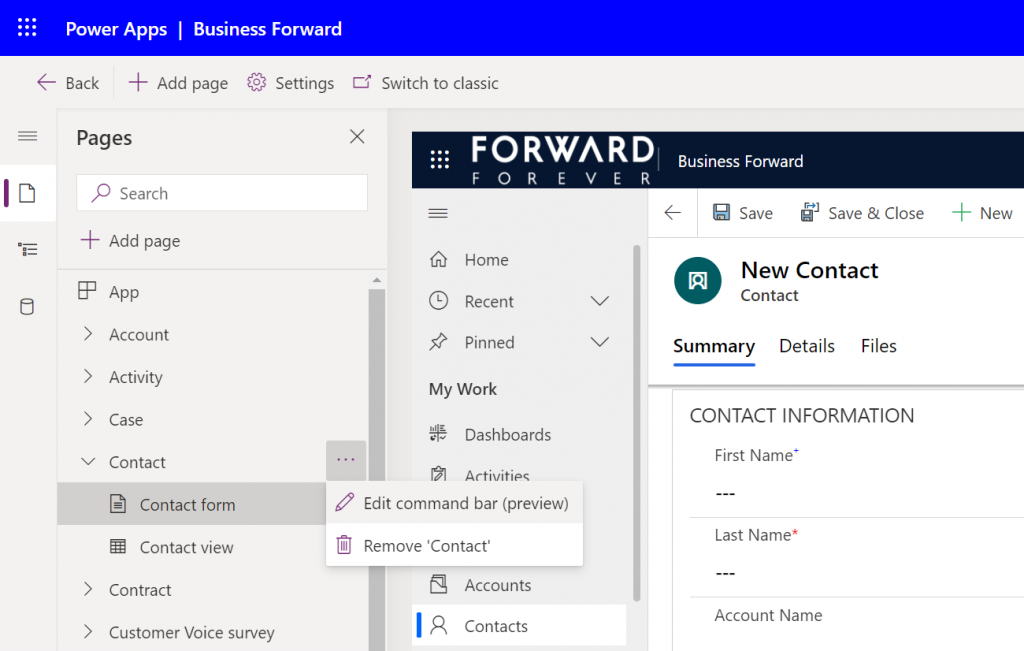
    Open up your Model-driven app in the preview editor that allows you to access the list of pages in the app. Then for the contact page select the three dots and click “edit command bar (preview)”:

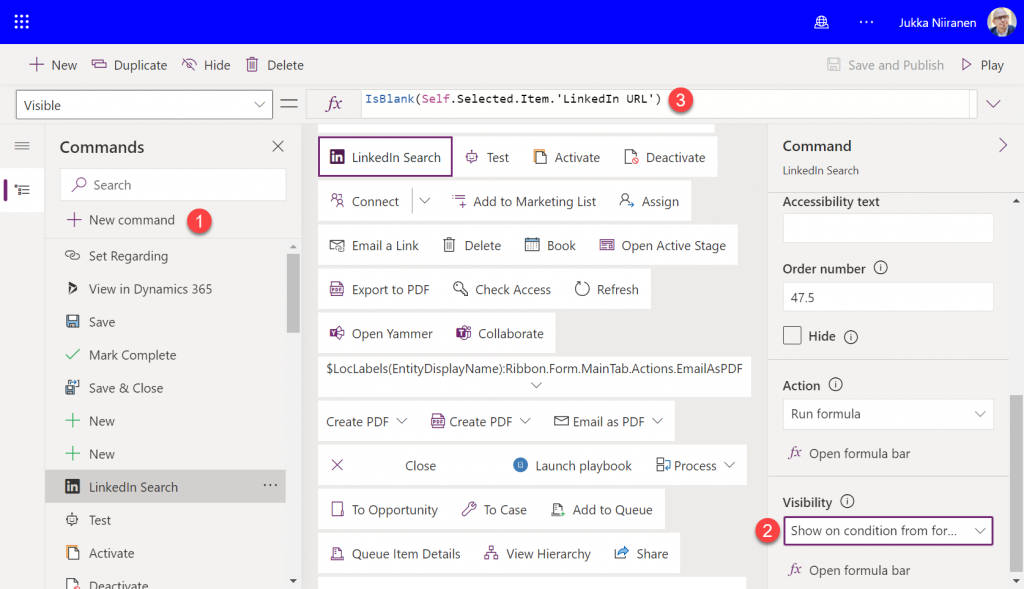
    Select the contact’s main form as the target and the command designer will open. Pick a suitable spot in the existing list of commands and add a new button called “LinkedIn Search”. You can choose the out-of-the-box “LinkedInLogo” icon for it.

    We will want to have a visibility rule that will conditionally show/hide the button, based on whether the contact’s custom text field “LinkedIn URL” contains data or not. The IsBlank function will return a true value when the field is empty, so we can directly input that into the Visible property of our button:

    IsBlank(Self.Selected.Item.'LinkedIn URL')

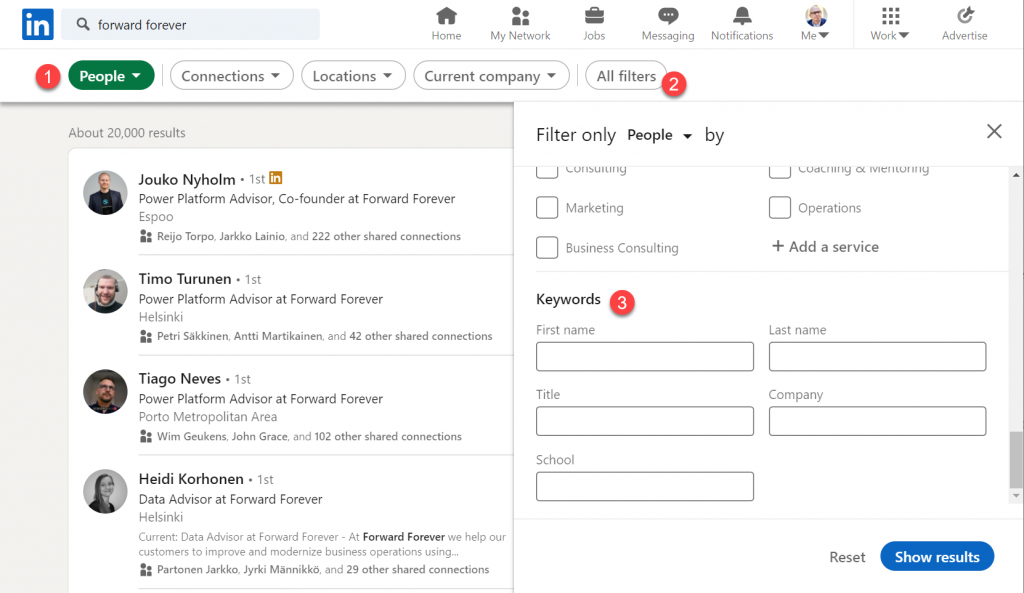
    Next, let’s go over to LinkedIn website and study how their search actually works. There is of course the global search box in the top navigation bar, but when looking at the search results page we discover additional options for applying specific filters.

    This is the faceted search page, which allows us to specify that we are interested in finding people (1) rather than companies or content. Clicking on “all filters” (2) reveals an even more granular search experience, allowing us to enter keywords (3) for fields like “first name” and “last name”.

    If we were to search for Satya Nadella as an example, the result page URL would turn into this:

    https://www.linkedin.com/search/results/people/?firstName=satya&lastName=nadella

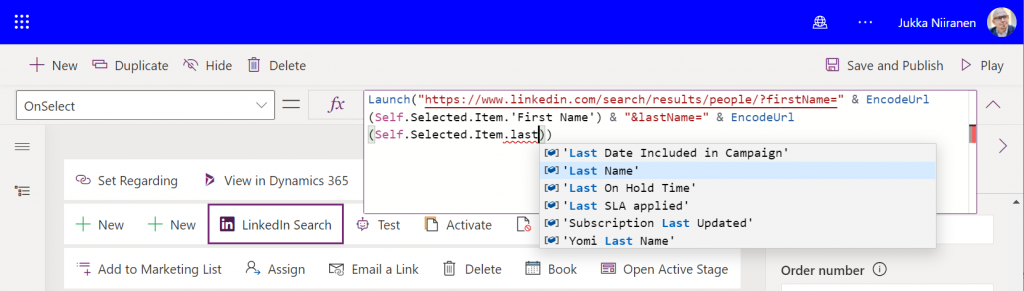
    This is a great scenario for using Power Fx to manipulate a text string for our app’s purposes and inject some dynamic values in there. We can now start designing our OnSelect formula needed for our LinkedIn Search button. It should do these things:

    • Open the LinkedIn search page in a new browser tab
    • Insert the contact’s name information into firstName and lastName query parameters
    • Ensure that any spaces in the name fields don’t mess up our URL validity

    The Launch function will take care of opening the browser tab. For joining the static and dynamic parts of the URL together, we use the string concatenation operator “&”. As for handling any non-URL friendly characters, we can use the EncodeURL function and pass the contact’s first & last name fields to it.

    Let’s save and publish these button configurations, which will generate a component library called “OurAppName_DefaultCommandLibrary” into our solution. Be sure to publish all customizations for your solution and also hit refresh a few times on the Power Apps application screen to make things come alive. (Note: you may also get an error the first time you click a custom command bar button, at least for me that happens every time, but then clears away.)

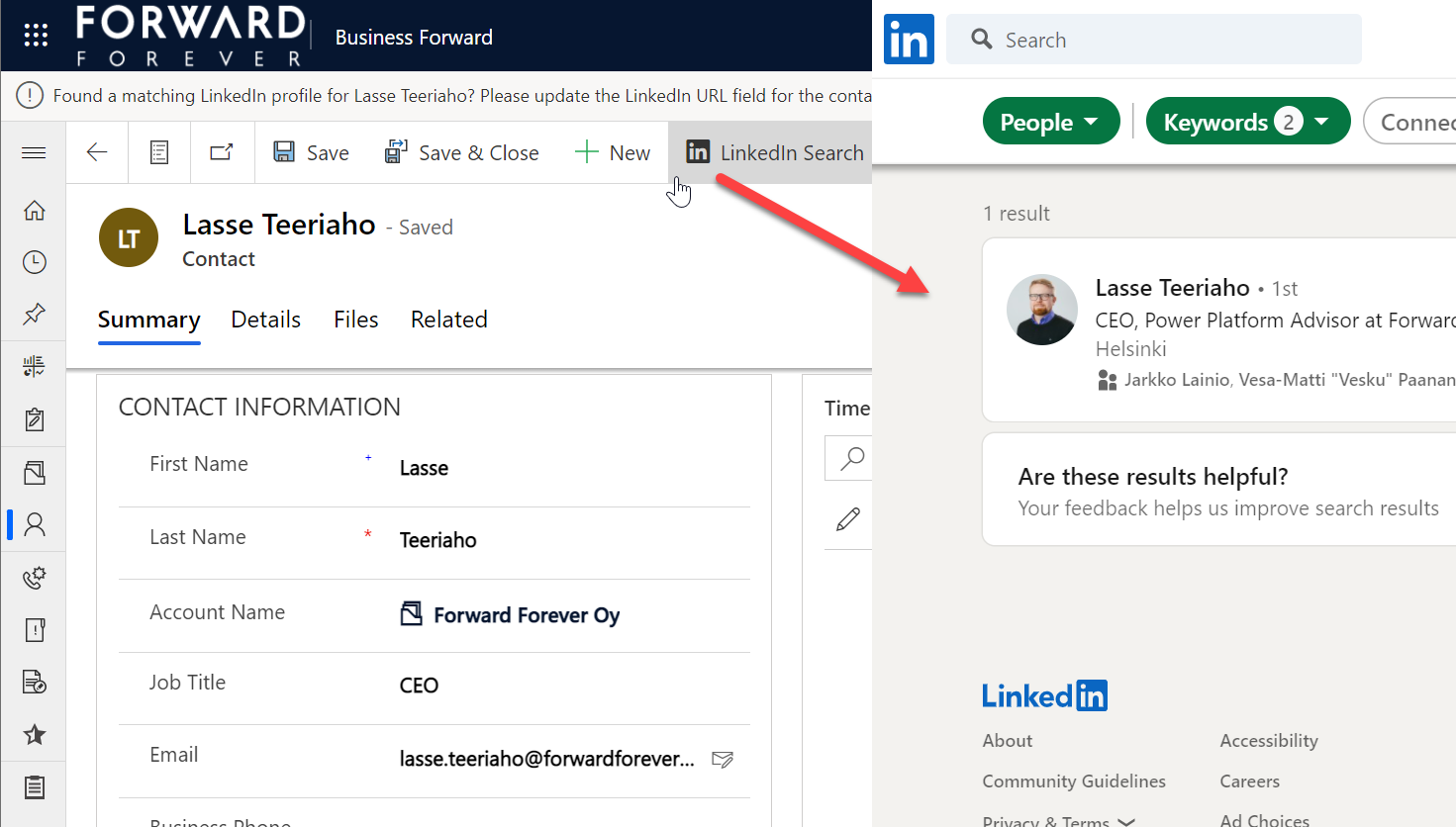
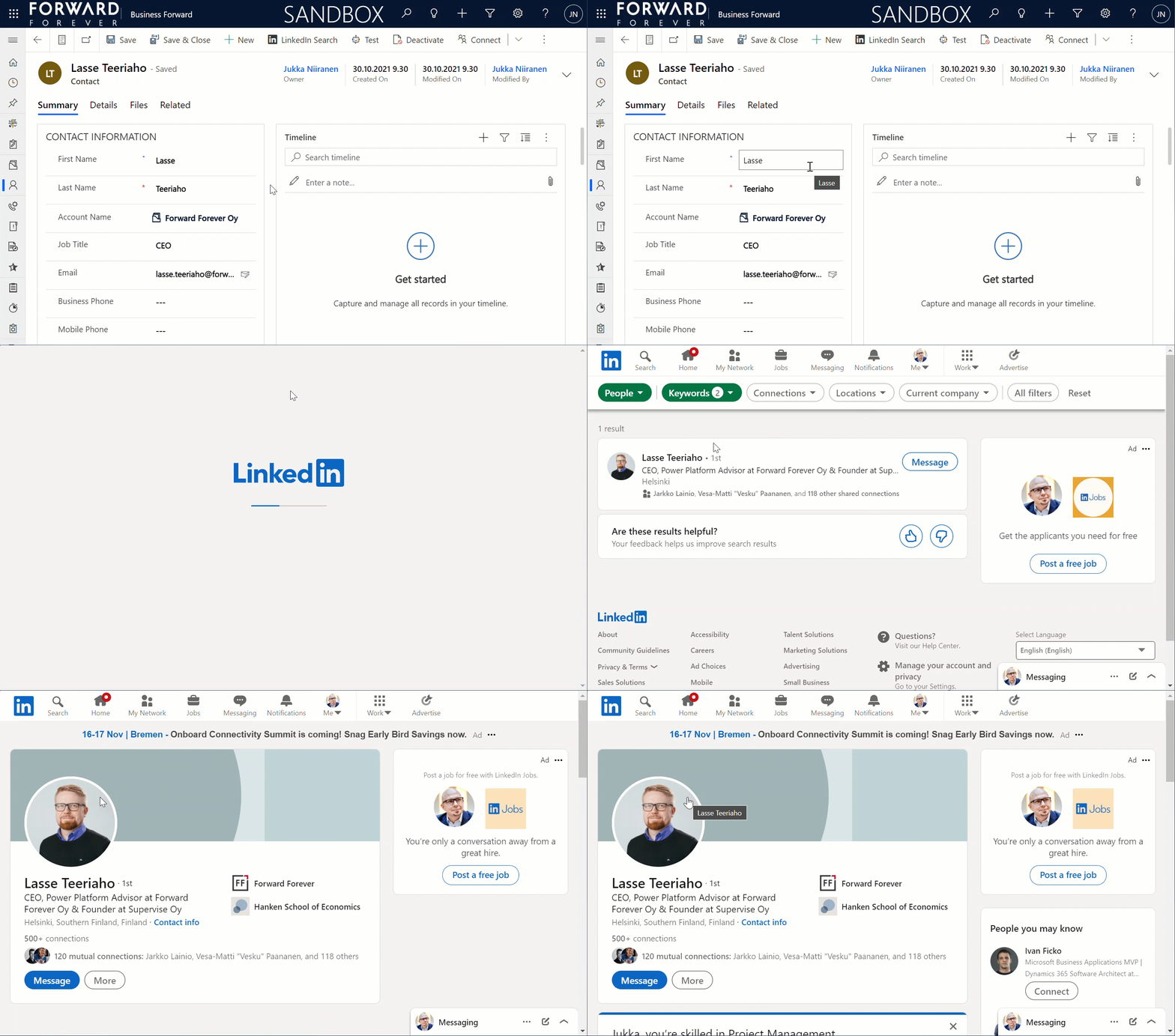
    Now when we open a contact record that doesn’t have a value in the “LinkedIn URL” field, the new button should be visible. Clicking on it will open up the LinkedIn people search page with results where the first & last name match the contact’s information:

    That was pretty easy!

    Button 2: LinkedIn Profile

    It would be nice if the next user of our CRM system wouldn’t have to browser through the people search results page to repeat the same query. Unfortunately there’s nothing we could grab with Power Fx from the first user’s new browser tab automatically, so we’ll need to ask the user to copy the URL and past it into our contact’s custom field.

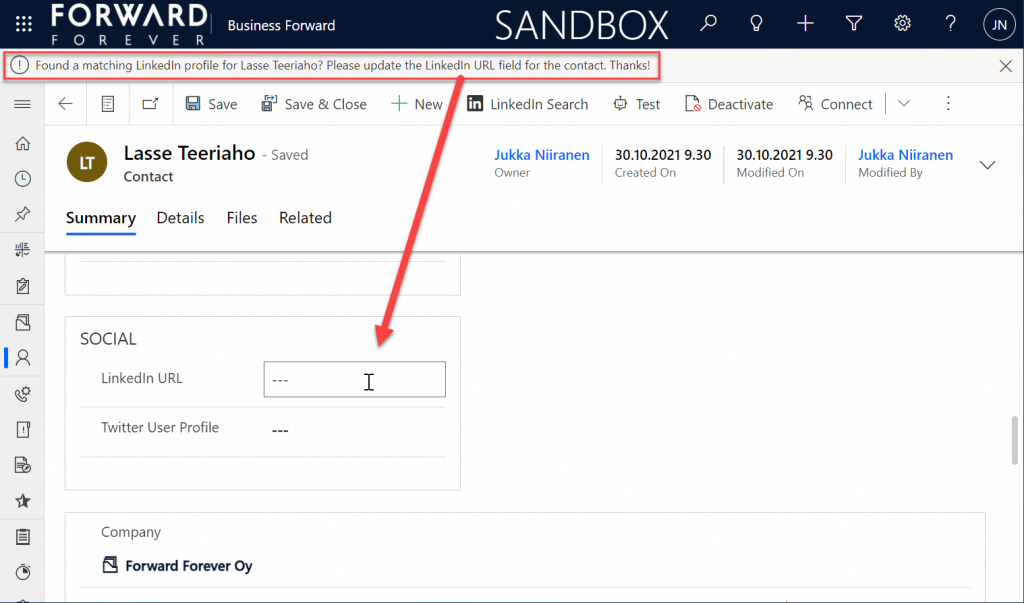
    To remind them about the importance of updating CRM contact data, let’s show a notification bar that’s waiting for the user once they return back to the Power Apps tab:

    With this additional step, the OnSave event of our button 1 will therefore have two actions: launch and notify.

    Launch("https://www.linkedin.com/search/results/people/?firstName=" & EncodeUrl(Self.Selected.Item.'First Name') & "&lastName=" & EncodeUrl(Self.Selected.Item.'Last Name'));
    Notify("Found a matching LinkedIn profile for " & Self.Selected.Item.'First Name' & " " & Self.Selected.Item.'Last Name' & "? Please update the LinkedIn URL field for the contact. Thanks!")

    Now we can move on to button number 2. If the contact record already has a LinkedIn URL, we’d of course want to skip the unnecessary search part and open the profile page directly.

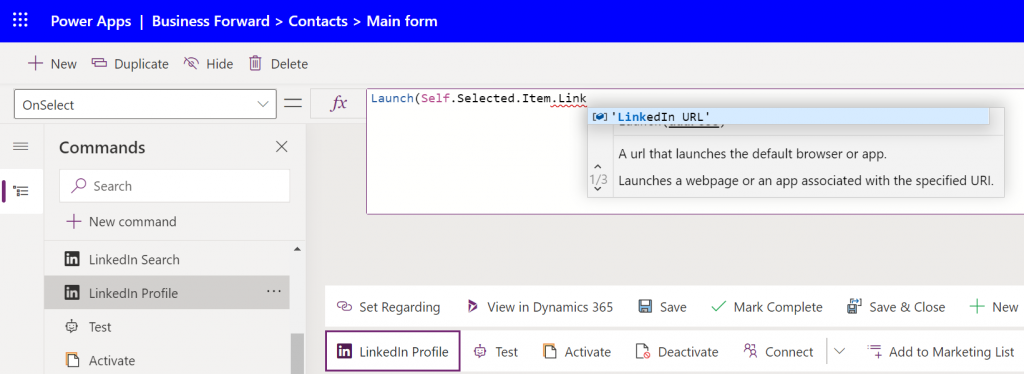
    Let’s add another command bar button called “LinkedIn Profile”. The OnSelect property will be very simple this time: we just pass the Launch function a parameter containing the value of the “LinkedIn URL” field.

    This second button should be visible only when the first button is not, to cover the two possible scenarios of the URL field having a value or not. While we could have conditional logic in our Power Fx to handle either scenario with a single formula, we don’t have the possibility to dynamically change the display names (or other properties) of the command bar buttons. So, two buttons with a similar feature is the approach we need to take.

    How do we reverse the visibility rule? For some reason adding a simple exclamation mark before the function doesn’t work as a negation operator in a custom button Power Fx formula like it would in a Canvas app formula, so I wrote the Visible formula of the new button in a less pretty format:

    If(IsBlank(Self.Selected.Item.'LinkedIn URL'), false, true)

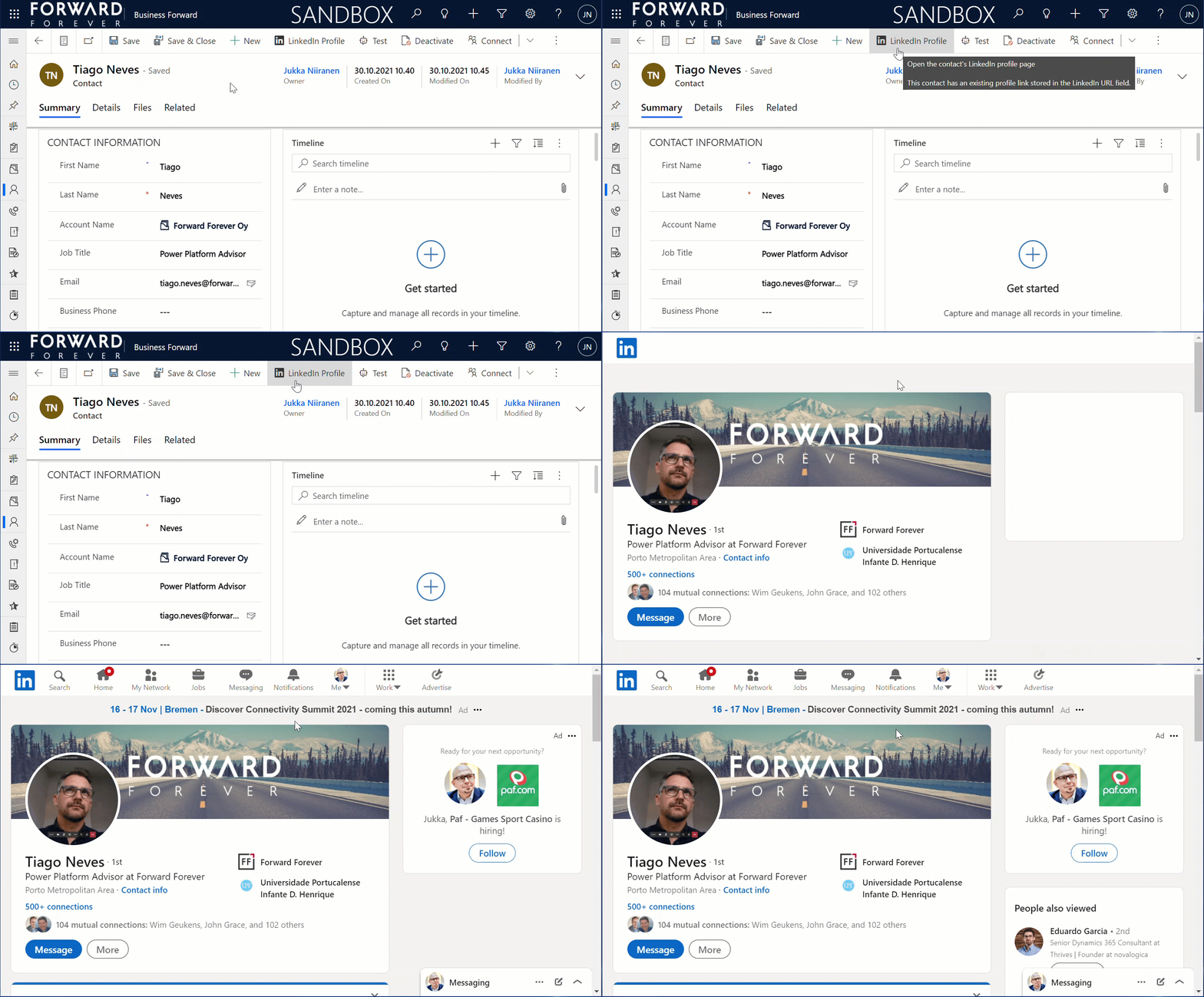
    Save, publish, hit F5 a few times & wait. Now let’s open a contact record that already has the URL field filled. We see that instead of “LinkedIn Search” the command bar button now says “LinkedIn Profile”. Clicking on it takes us straight into the correct profile page:

    That’s all there’s to it!

    Closing thoughts

    I would have actually wanted to write a bit more complex formula than this, but there are a number of limitations in the current modern commanding preview feature that have blocked my other scenarios.

    For instance, there doesn’t seem to be any way currently to access the parent account information of a contact. Since under the hood it’s a customer lookup, meaning a polymorphic relationship that can reference either an account or contact record, we’d need to use the AsType function. That doesn’t appear to be supported for command bar buttons, so I couldn’t even grab the name of the company to be injected into the LinkedIn search URL to get better matches. Not a showstopper, but definitely something to add into the button once it becomes supported.

    Due to its preview status, some things in custom commands that used to work earlier aren’t working anymore. The record cloning example I built three weeks ago used the Set function, but today that has been removed from the modern commanding preview supported functions. Now that we can’t use any variables, the resulting Power Fx formulas would have to be constructed via the With function. In the custom button scenarios I had originally planned to build, I can’t easily see how to build them without variables and not causing a headache for myself, so they are currently on hold until the feature matures a bit.

    One question that comes to mind when building this example LinkedIn button is “why do we have to do it ourselves?” After all, Microsoft owns LinkedIn, so it would kinda make sense if there was some built-in integration at least between Dynamics 365 and LinkedIn to cover such simple profile matching scenarios. In fact, back in the April 2019 release wave an out-of-the-box integration for Dynamics 365 contacts was initially promised, but later cancelled:

    Sure, there is the Relationship Sales package available at $162/user/month for those who need a hardcore social selling tool with Dynamics 365 Sales and LinkedIn Sales Navigator. Alternatively, there’s the “$0” feature built into Outlook that will show the matching LinkedIn profile previews for the contacts stored in your address book.

    In between, there’s… nothing. It was interesting to reflect back on this topic by reading my own blog post from 2013 on LinkedIn, Dynamics CRM and Social Selling. The world has of course changed a lot from those days, with data privacy concerns as well as legislation affecting the ways in which this type of contact information can be exposed for commercial purposes. All the old iFrame options and LinkedIn APIs have been shut down, meaning pretty much all you can do without the paid LinkedIn plan is to create a low-code shortcut button like the one I showed in this article.

  • Clone records with Power Fx & custom command bar button

    Clone records with Power Fx & custom command bar button

    In my previous post I built my very first command bar button based on the modern commanding feature currently in preview. This time we’ll continue creating similar generic features often requested yet missing in the standard Model-driven Power Apps or Dynamics 365 Customer Engagement apps.

    Repeated entry of data that already exists in the system should always be a task we aim to minimize in the business applications we build, to increase the likelihood of A) the data being recorded in the first place and B) reducing errors resulting from manual data entry. Sometimes there may be a perfectly valid business need why several nearly identical records should exist in the Dataverse database. In such scenarios, it’s common that users will at some point request a “clone this record” feature to be added into the app when they get tired of typing in the same values over and over again.

    Such functionality has traditionally been implemented via a custom command bar button added with Ribbon Workbench, which then runs JavaScript & possibly a plugin. You could also perform the action with an on-demand XRM workflow. How about the modern command designer, could we do all this in Power Fx? Let’s find out!

    Power Fx for cloning asset records

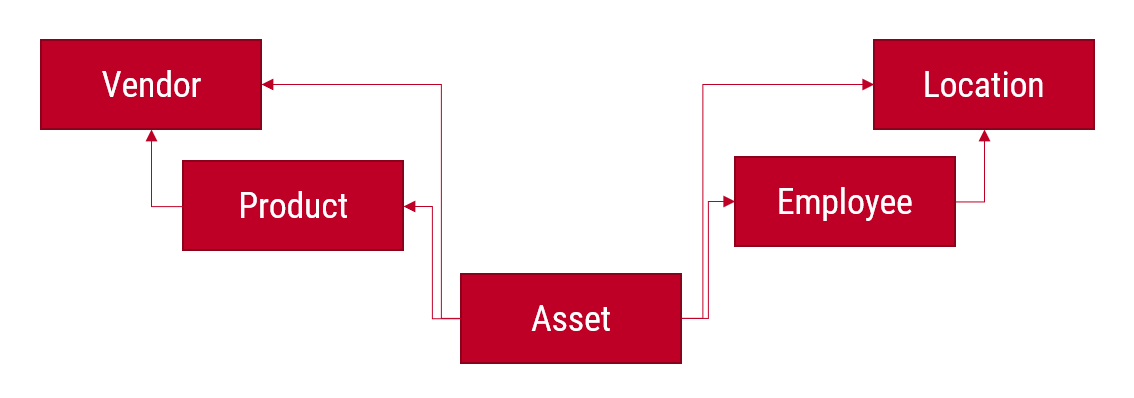
    In our scenario we are working with a custom IT asset management app that has the following Dataverse tables and relationships:

    Let’s say that we often provide our employees the same phone model and we’d therefore want to make it faster to add these as asset records by being able to clone an existing asset as the starting point.

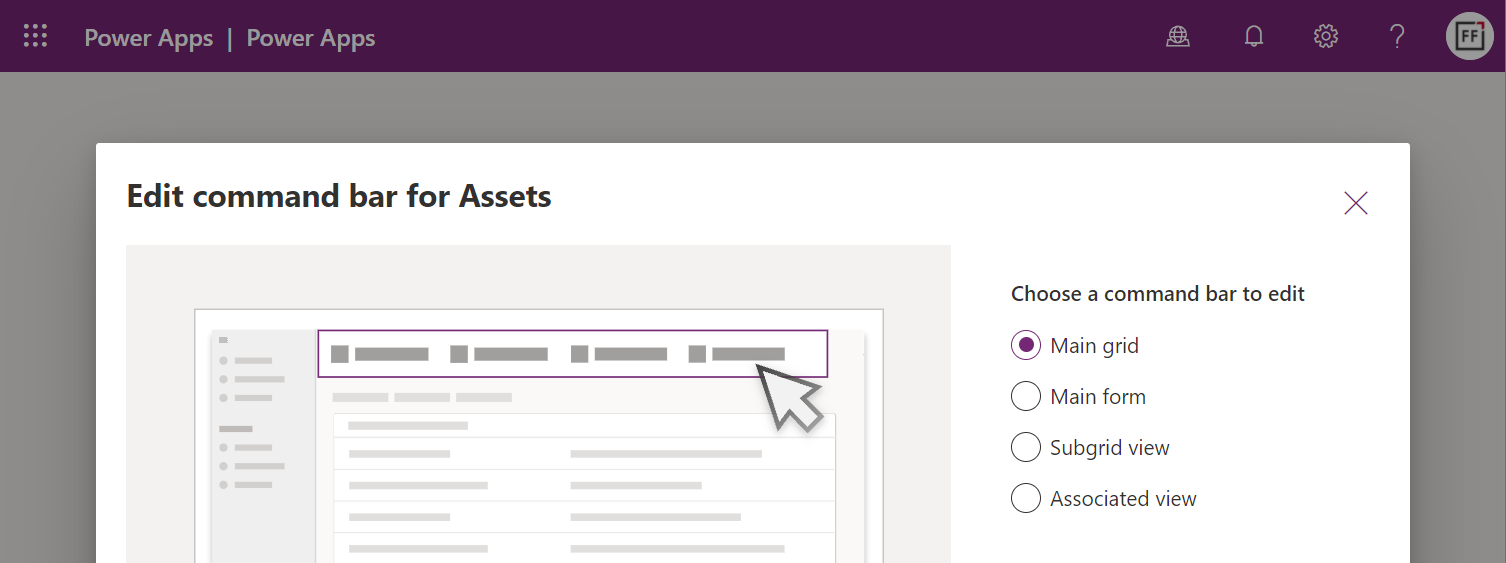
    First we’ll launch the preview version of the Model-driven app designer and choose to edit the command bar for the asset table. This time we’ll target the main grid:

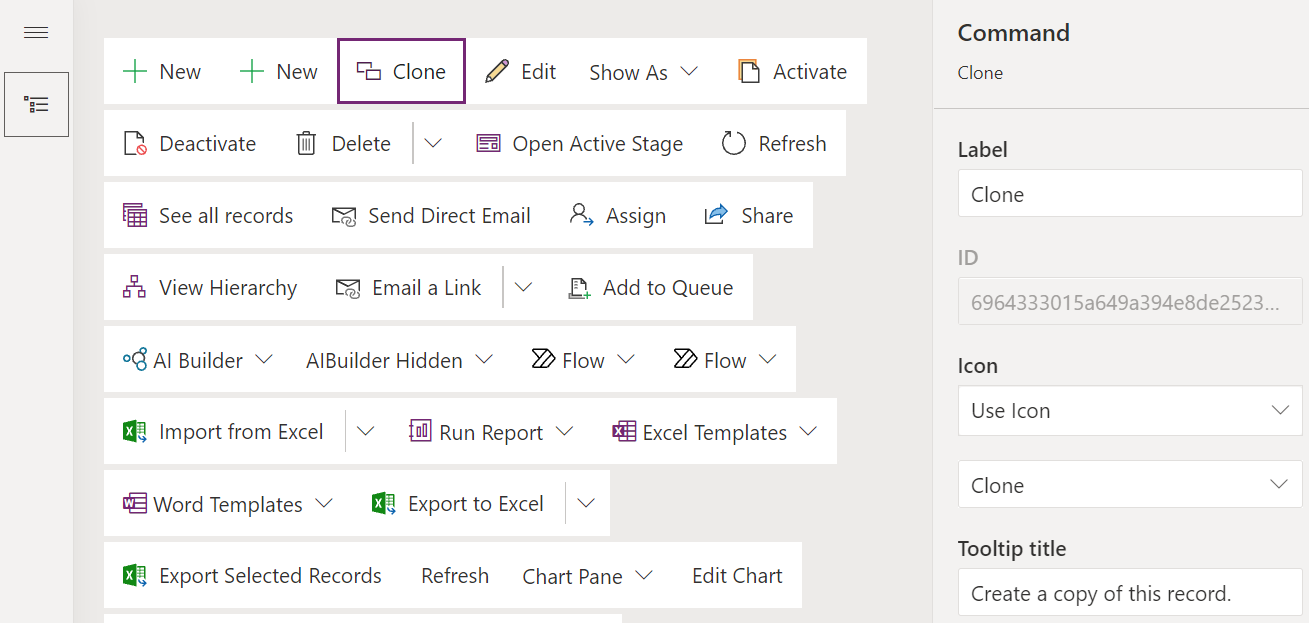
    In the command designer, let’s add a new command bar button called “Clone” and start thinking about the required configuration for it.

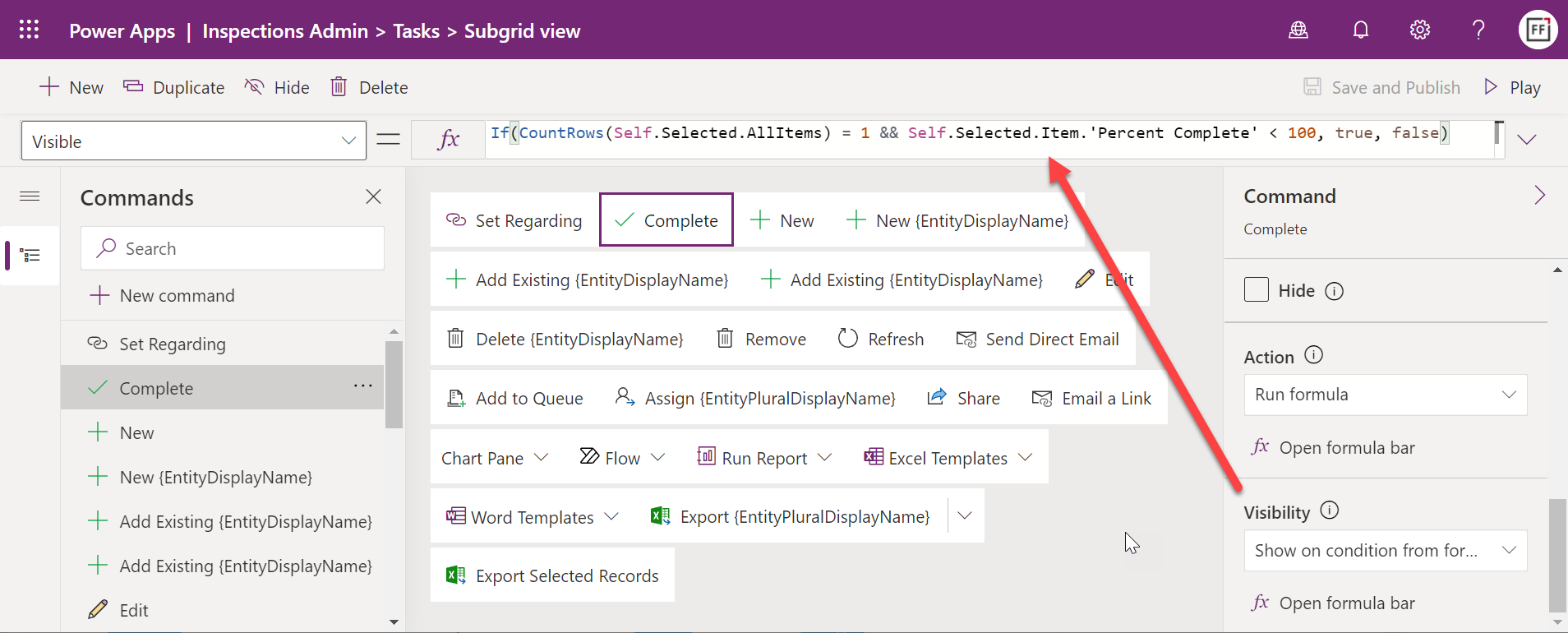
    We’re going to want to do a similar limitation of scope as in the previous article, by supporting only a single record at a time. Multi-record selection is beyond what we can currently process, so a visibility rule is needed for us to ensure that the button is clickable only when a single record from the table main grid has been selected. The way to achieve this is:

    CountRows(Self.Selected.AllItems) = 1

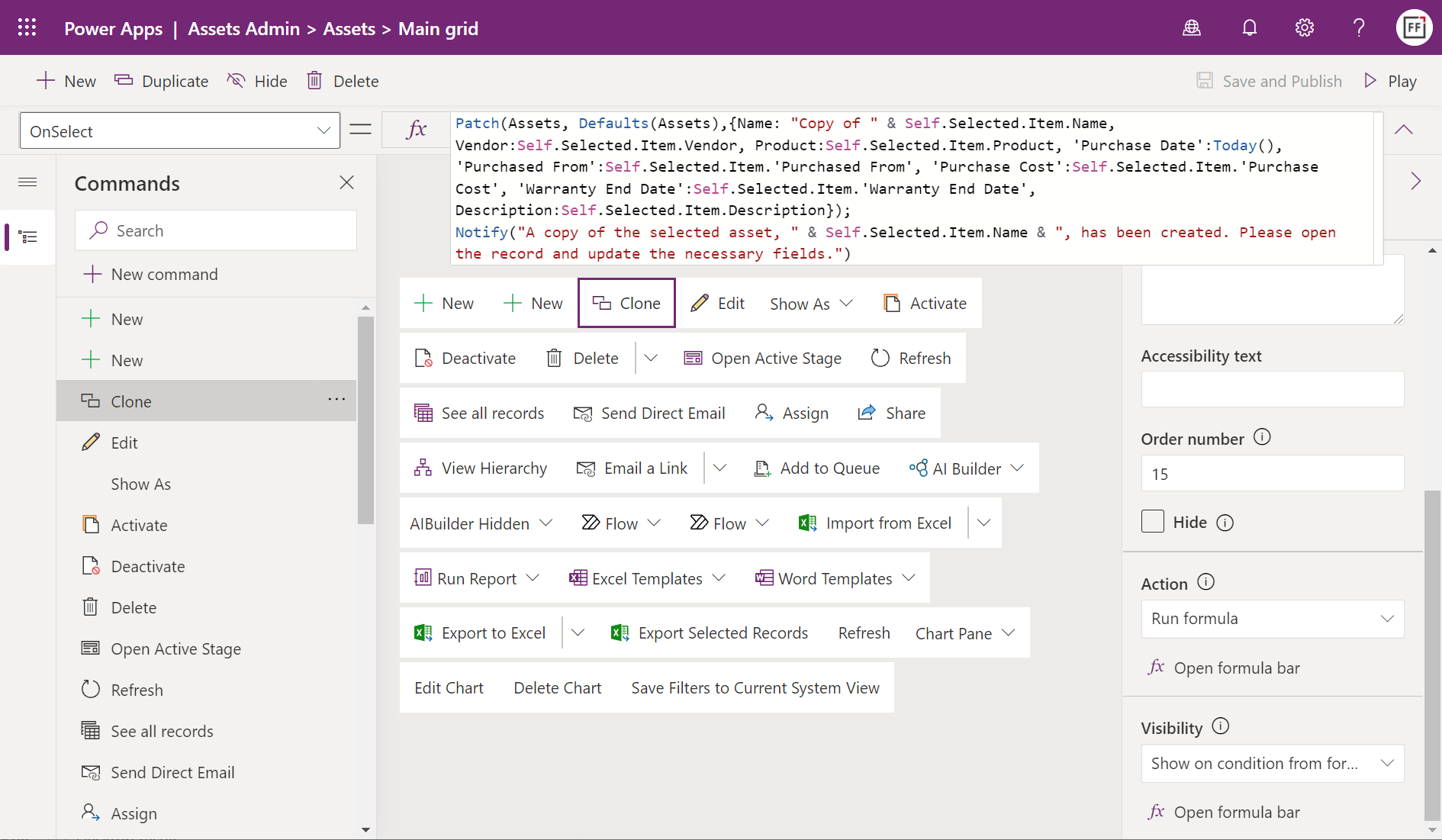
    Then for the button’s action part. The end result of what we need to create looks like this:

    Unlike in the previous article, we are now not updating the currently selected record but rather creating a brand new one. We’re able to use the exact same kind of Patch formula that any Canvas app would leverage when adding Dataverse records and not using the built-in create forms.

    Our assets table has fields than can be directly copied from the earlier asset record. These include text fields like description and lookup fields like vendor and product. The syntax for the formula is very straightforward for all these: just use “Self.Selected.Item.[YourFieldNameHere]” to populate the field on the new record to be patched.

    We can of course manipulate the field values for our cloned record via simple tweaks in the Power Fx formula. Let’s set the asset’s purchased date value to Today() and add a “Copy of” prefix to the asset name field. This ease of modifying the field values based on evolving business requirements is one of the key benefits from having the logic defined with a low-code programming language that a citizen developer can use with confidence.

    After the patch, we can call up the notification bar in the Model-driven app to display a confirmation message from the clone operation. That’s pretty much all there’s to it, so here’s our formula:

    Patch(Assets, Defaults(Assets),{Name: "Copy of " & Self.Selected.Item.Name, Vendor:Self.Selected.Item.Vendor, Product:Self.Selected.Item.Product, 'Purchase Date':Today(), 'Purchased From':Self.Selected.Item.'Purchased From', 'Purchase Cost':Self.Selected.Item.'Purchase Cost', 'Warranty End Date':Self.Selected.Item.'Warranty End Date', Description:Self.Selected.Item.Description});
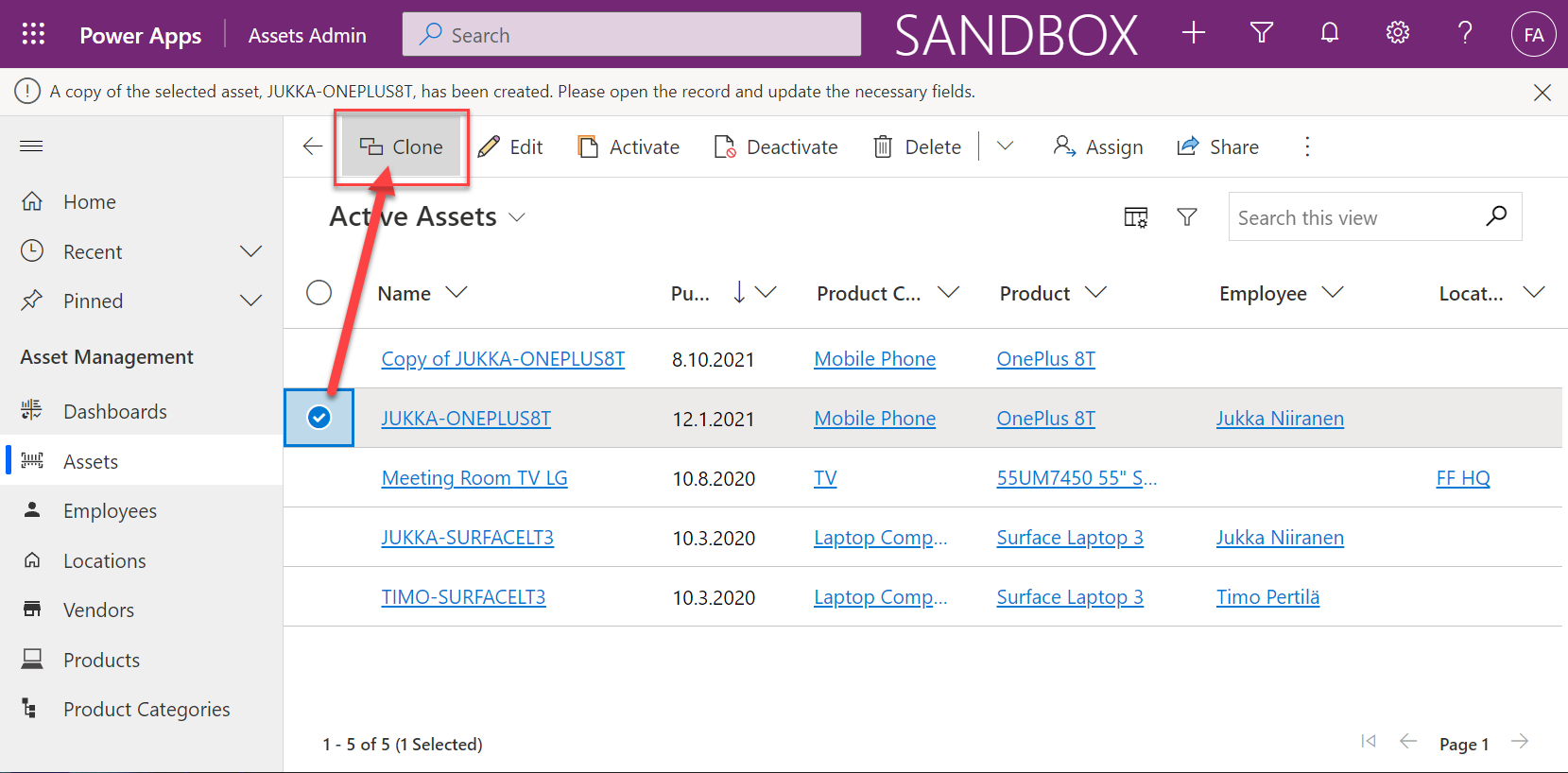
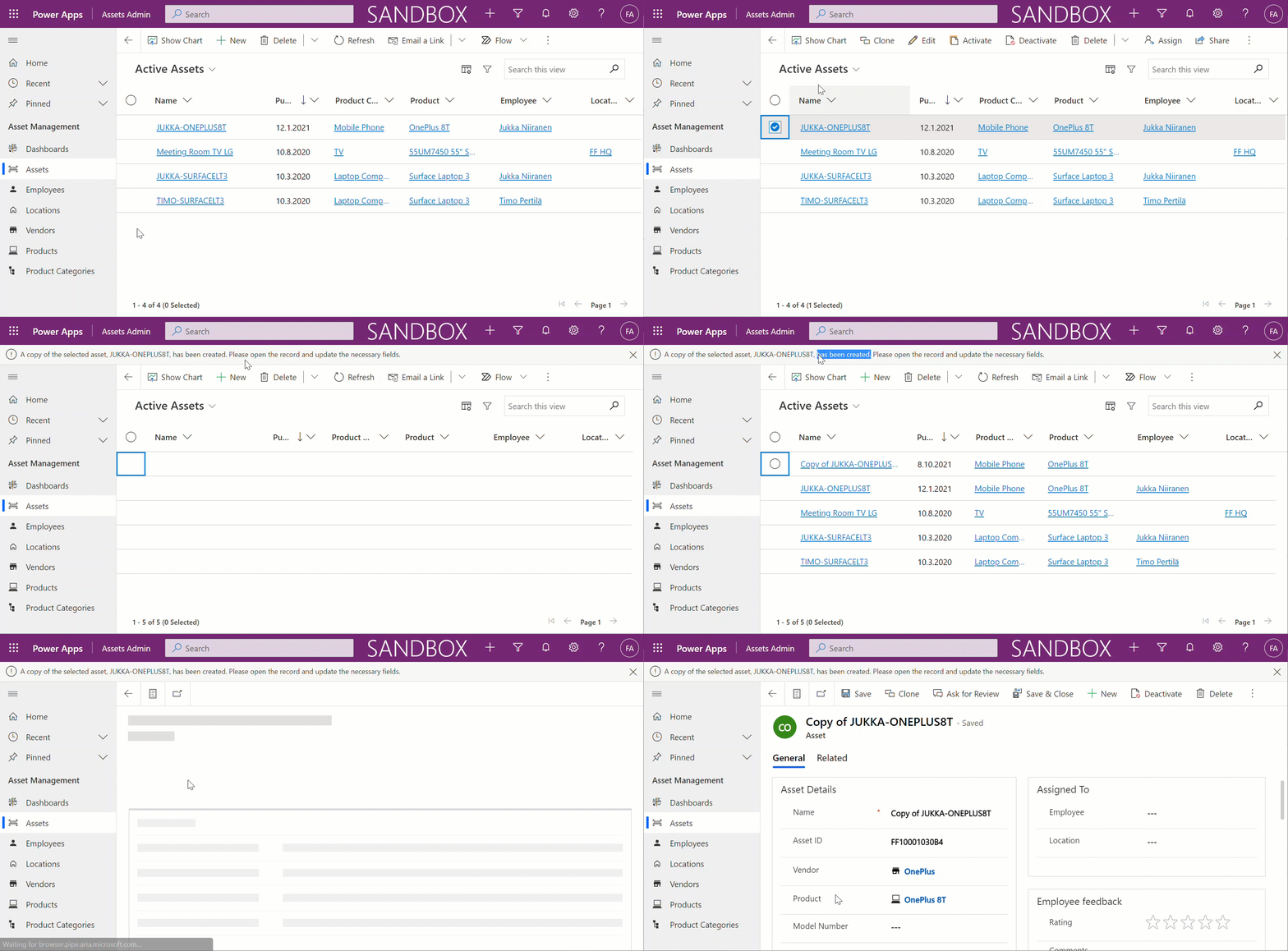
    Notify("A copy of the selected asset, " & Self.Selected.Item.Name & ", has been created. Please open the record and update the necessary fields.")

    Here’s the resulting end user experience for cloning a record from the main grid:

    Not too bad at all for a relatively simple formula, added as a command bar button via a visual editor available in the platform.

    Limitations of Power Fx commands today

    To be honest, the first cloning scenario that I actually set out to build was targeting the main form. Adding the custom button here is just as simple as the main grid. Actually, since you don’t even have to think about the visibility rules and multiple selection, it would be the logical place for any new Power Fx user to start customizing their Model-driven app command bar. However, I didn’t get exactly the result I hoped for there.

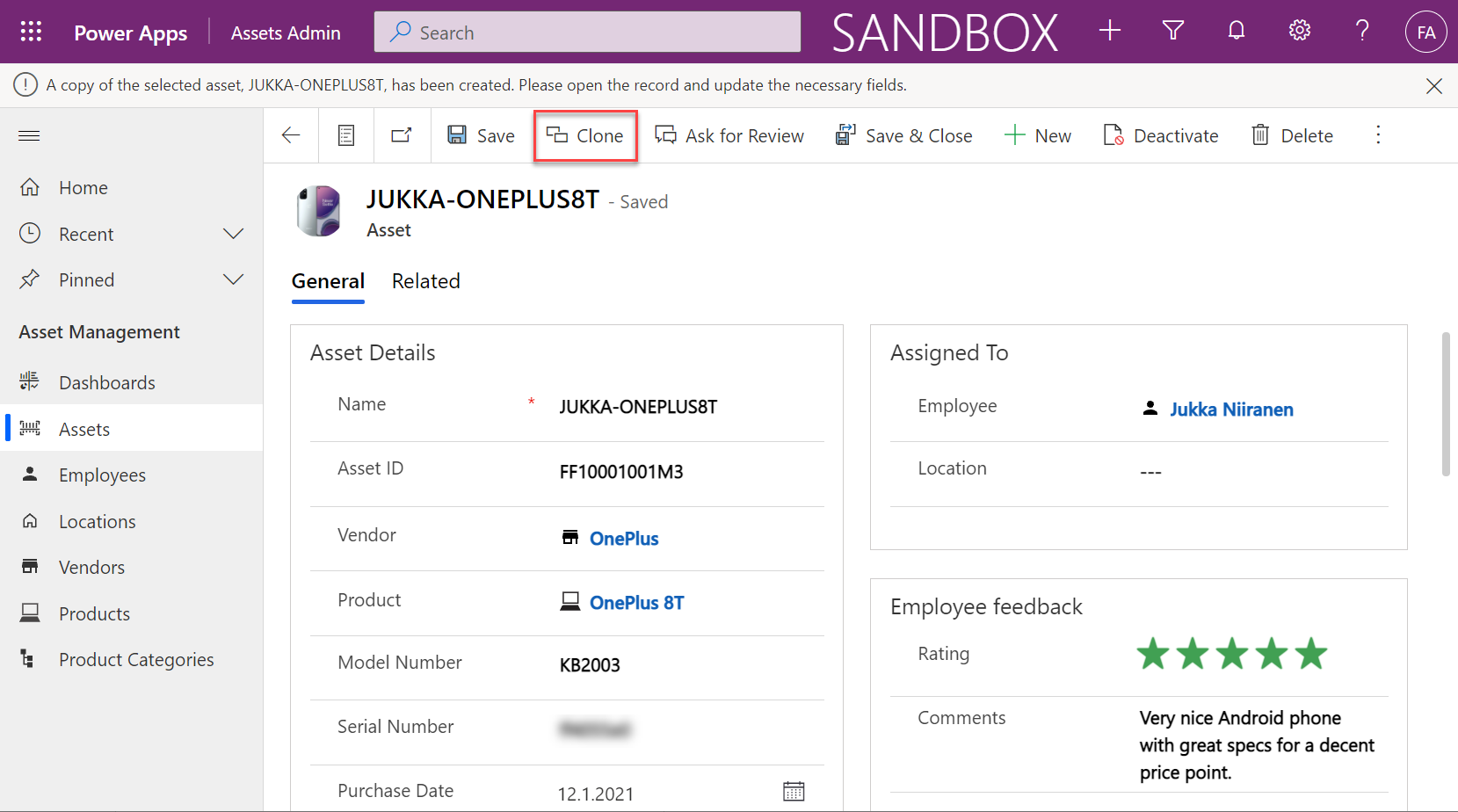
    The general cloning logic works on the form, too, but there is an unfortunate user experience issue. Can you spot it?

    In the above image, we have already clicked on the Clone button. We have a notification bar as a confirmation. However, we are still sitting on the original record form, not the cloned version of it. If a user would for a moment think that “ok here’s the new cloned record, let’s modify a few fields” the business data would be messed up.

    Could we take the user to the form of the newly created record instead? In theory, yes. In practice, nothing I’ve tried works as of today. The Navigate function that should be supported for custom command buttons doesn’t want to co-exist with any other function in the same action of a custom button. It doesn’t want to accept the newly patched record as the target to be navigated to. Even if we’d navigate to the view for all active assets after creating a new record, the UI will still return to the original record after everything in our button’s action formula has been run.

    With this current limitation in mind, I started to explore if we’d have any other method to take the user away from the original record form. Navigating to a dedicated “Cloned Assets” view was out of the question, due to the aforementioned feature/bug. Using the Model-driven app notification bar to display and action button with a link seems to not be an option since the documentation says the Notify function available in the command bar is actually that from the Canvas world. This doesn’t have the same action property as addGlobalNotification on the XRM side that can show a clickable link.

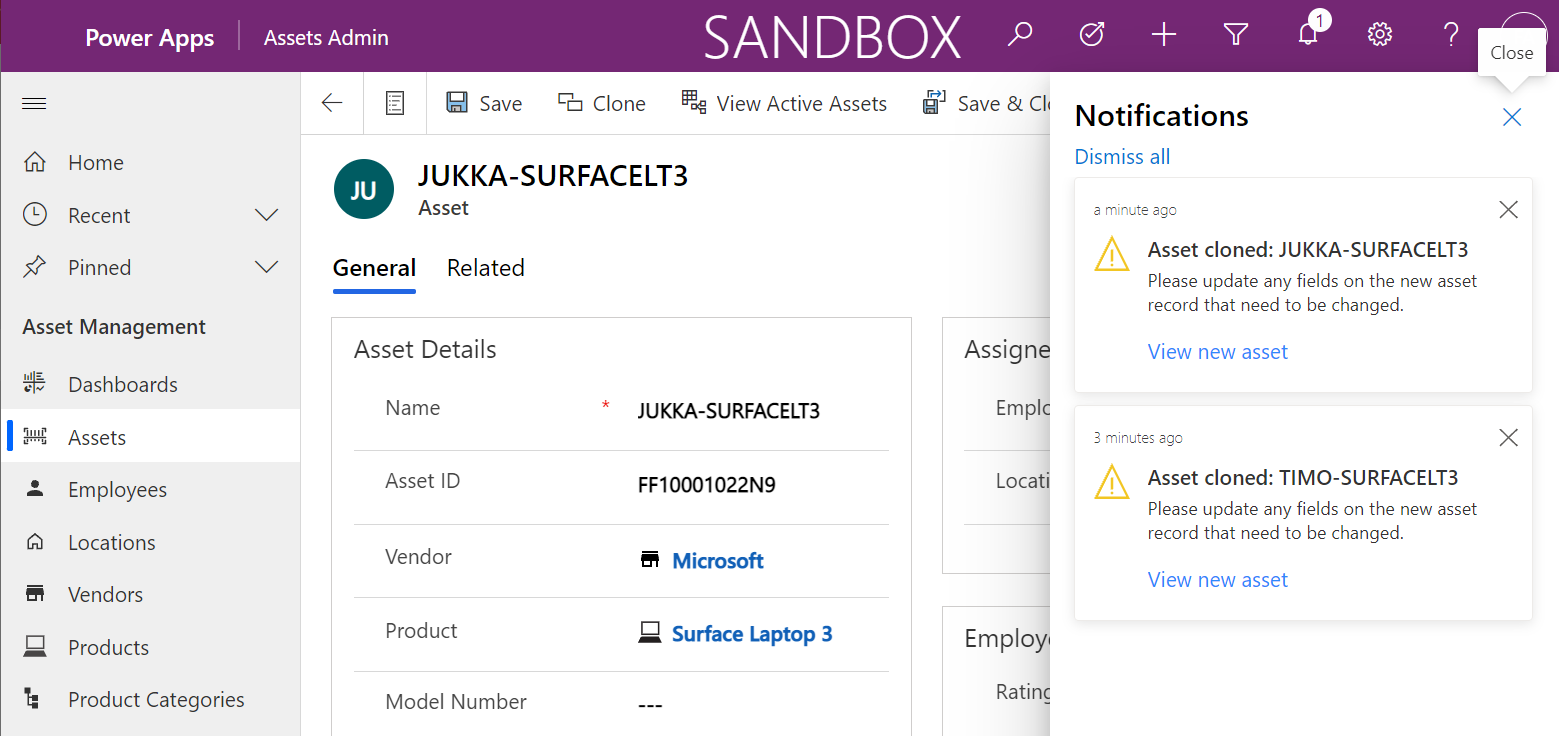
    One thing I really hoped would work is the new in-app notifications for Model-driven apps. This is such an excellent scenario for leveraging Power Fx to construct a rich message aimed at the specific user with targeted actions and helpful information. It could work the way shown below:

    But in the case of the command bar, it doesn’t work today. You see, the above examples of in-app notifications have been triggered from a dummy Canvas app I used for testing the notification feature in general. I took the Power Fx code from the awesome blog post by Diana Birkelbach that describes how to send in-app notifications from Custom Pages.

    The reason why you can’t make this work (at least to my knowledge) inside the command bar is the lack of support for collections. You see, in order to construct the JSON data needed for adding an action button into the notification, you would in practice need to feed a collection into the JSON function in your Power Fx. This will result in a “formula within canvas component manipulates collection” warning inside the command designer and this part of your formula will silently fail upon clicking the button.

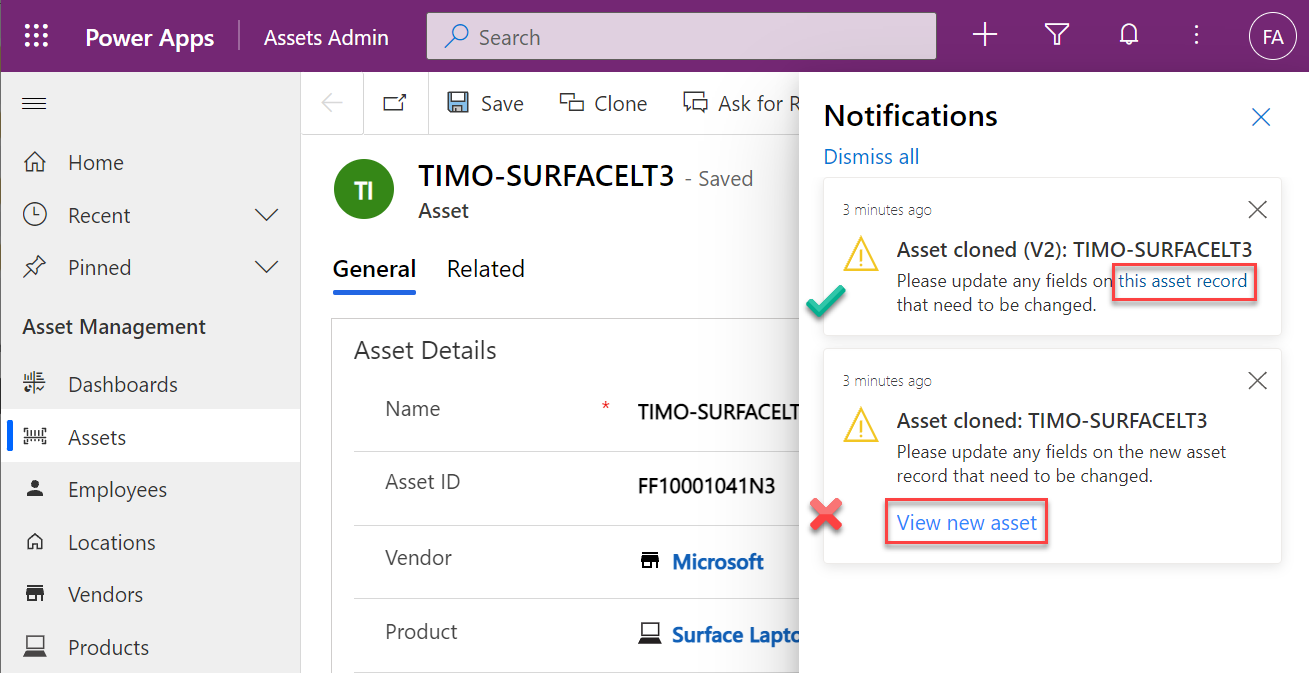
    Update 2021-10-10: Scott Durow gave me a great tip over on LinkedIn, reminding that the in-app notification body text actually supports Markdown syntax. This way you could include a dynamic link that points to the newly created record clone, without having to insert the more complex strings needed for displaying proper action buttons in the notification:

    Presumably all of these things will one day work, which will give you plenty of options to design a great user experience for your custom commands. Just be cautious when building on top of the preview feature of modern commanding.

    Cloning parent + child records

    The above example was a very simple case of record cloning, as we only needed to replicate data from one table. In real world scenarios we often run into a requirement where also the child records in related tables would need to be cloned together with the parent record. Can we achieve this with Power Fx?

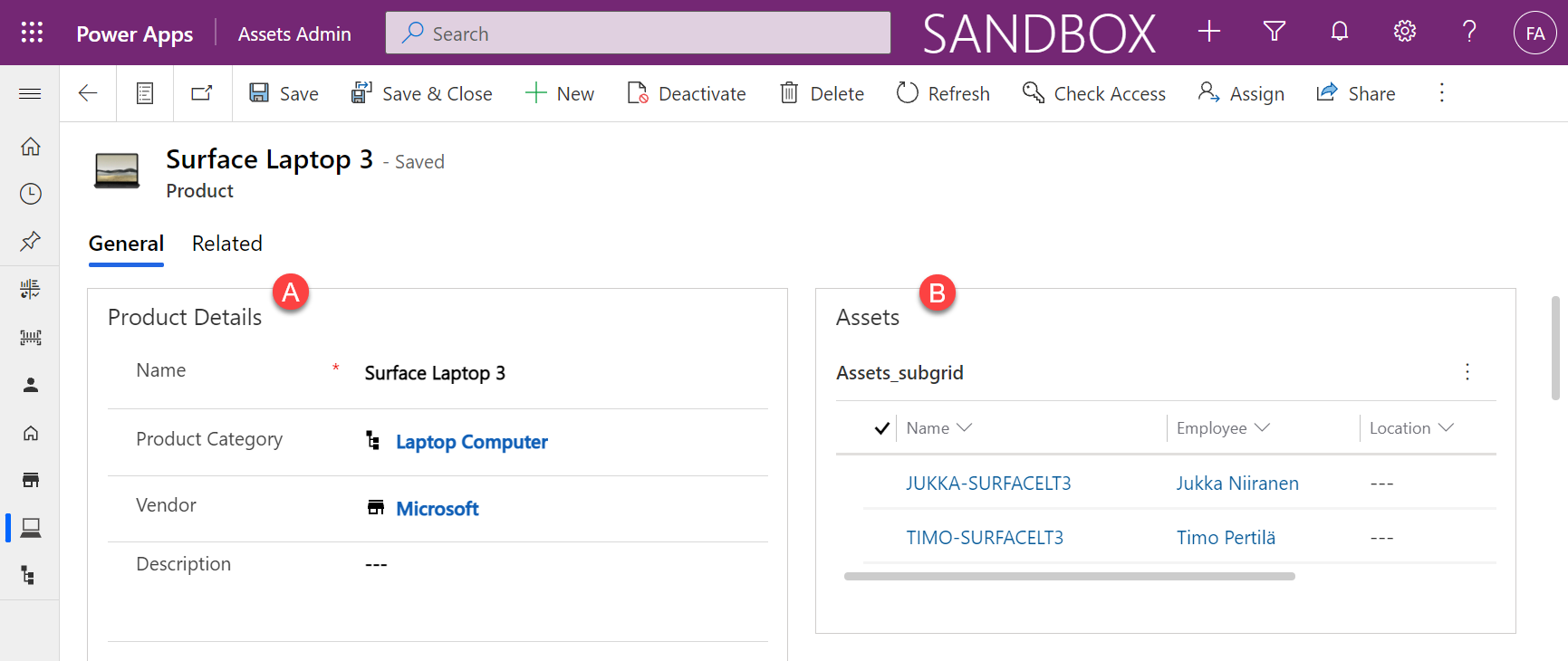
    Let’s use the same IT asset management data model but move one level higher and build a custom command button to clone a product record and its related asset records. Meaning, both A + B in this picture:

    So, we’d like to first create a new product record, which is the exact same Power Fx formula pattern as before. After that’s done, we’d then need to have one or more record create events, depending on how many assets (if any) there are under the original product.

    Let’s use the ForAll function to do a patch for each of the existing assets. To identify these records, we can reference them from under the current record with the familiar “dot notation” to travel down the Dataverse table relationships: Self.Selected.Item.Assets.

    Then what we need to do is to ensure we link these newly patched assets to the new product record we created in the first step. To achieve this, I’ve added a ClonedProduct variable that is set to the result of the first patch. We can then use this ClonedProduct object when setting values for the N asset records we create inside the ForAll loop.

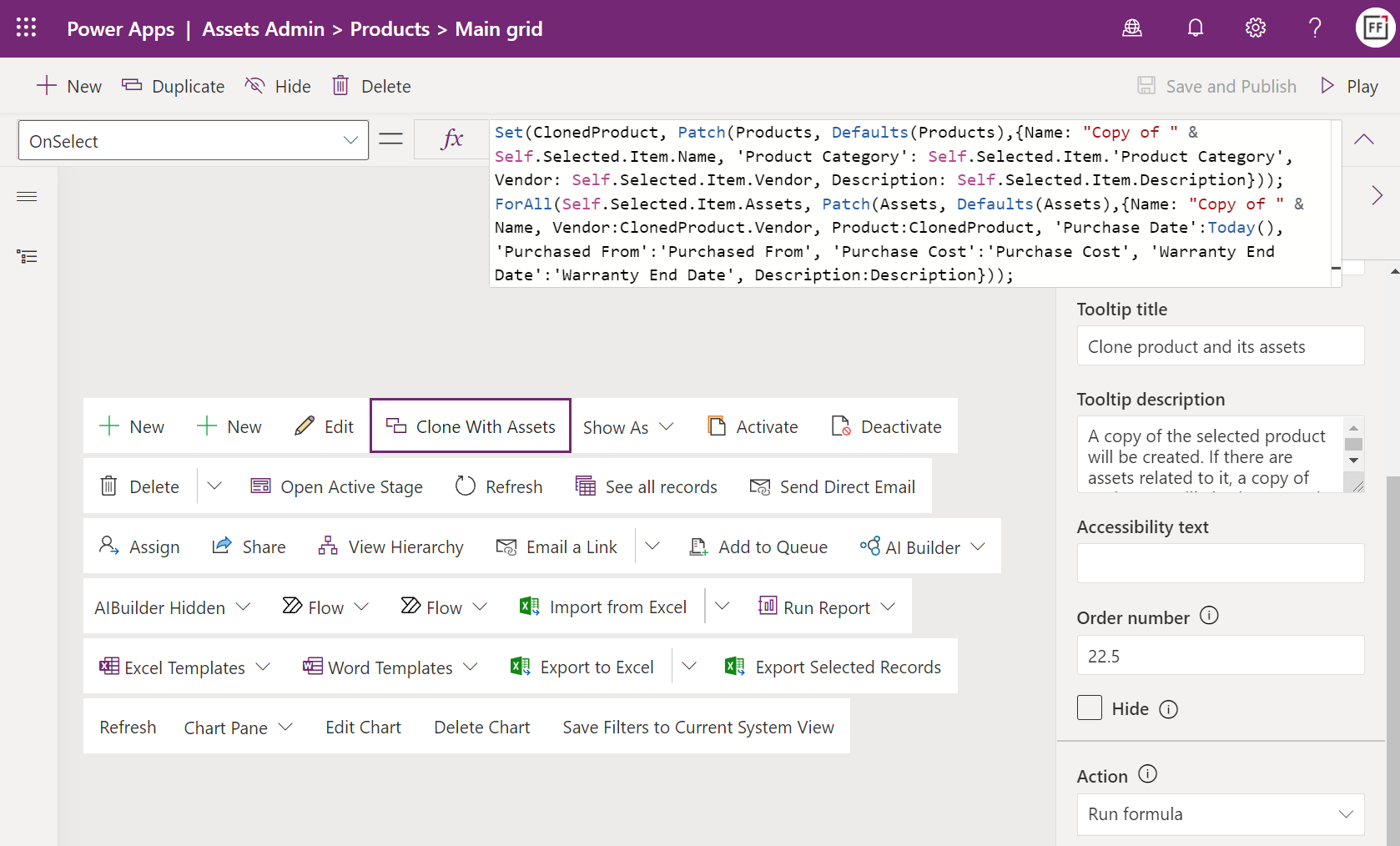
    Our formula for the “Clone With Assets” button on the product main grid is as follows:

    Set(ClonedProduct, Patch(Products, Defaults(Products),{Name: "Copy of " & Self.Selected.Item.Name, 'Product Category': Self.Selected.Item.'Product Category', Vendor: Self.Selected.Item.Vendor, Description: Self.Selected.Item.Description}));
    ForAll(Self.Selected.Item.Assets, Patch(Assets, Defaults(Assets),{Name: "Copy of " & Name, Vendor:ClonedProduct.Vendor, Product:ClonedProduct, 'Purchase Date':Today(), 'Purchased From':'Purchased From', 'Purchase Cost':'Purchase Cost', 'Warranty End Date':'Warranty End Date', Description:Description}));
    Notify("Product " & Self.Selected.Item.Name & " and its assets have been cloned. Please open the records and update the necessary fields.")

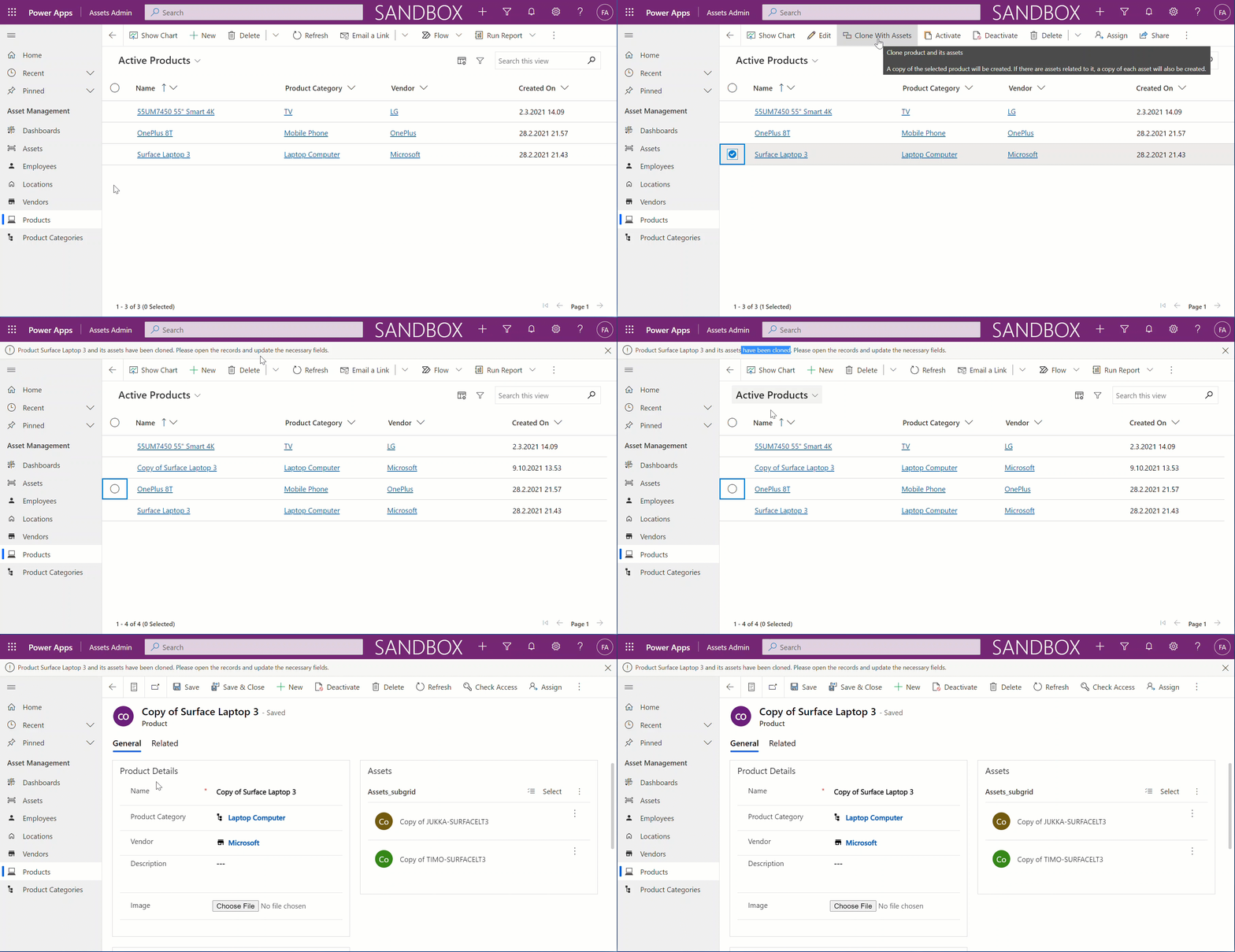
    When selecting a product from the grid and clicking on the button, here’s what the end user will see:

    This is already a much more powerful example of a low-code feature that can save time when users aren’t required to re-create similar sets of records over & over again. You will have the flexibility of easily adjusting the specific fields, field values and defaults used in your record cloning action.

    Sure, you need to understand the concepts used in the Power Fx formula first. I’d still say the barrier for app makers with no software development background is still lower here compared to building the same thing with client-side JavaScript or server-side C# plugins.

  • Reopen tasks with Power Fx & custom command bar button

    Reopen tasks with Power Fx & custom command bar button

    The preview feature for customizing command bars in Model-driven Power Apps is one of the most exciting examples of how the converging app types allow doing more with less code. Instead of having to learn how to write JavaScript, the low-code app maker can now leverage the Power Fx language familiar from Canvas apps development (and of course Excel formulas) to add custom business logic for command bar buttons.

    This preview was launched late July, but up until now I hadn’t come across a need to use it in an actual Power App. Today I encountered a familiar platform limitation that I though would be a great opportunity to try the new Power Fx based commanding in practice.

    The missing feature in Power Apps activity management

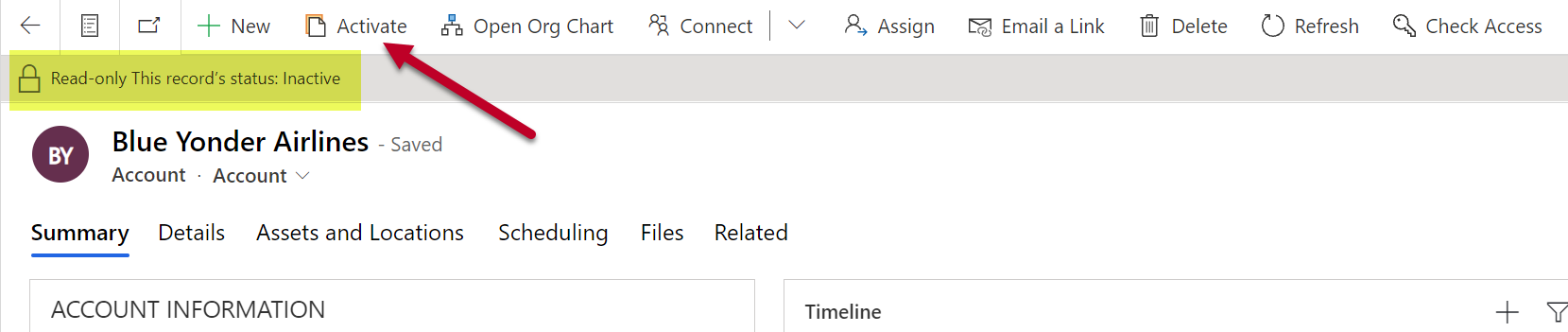
    The scenario is this: for any “normal” table in Dataverse, there’s usually the possibility for the user to change the status not just from active to inactive but also from inactive back to active. For example, re-activating an inactive account is a feature available natively in the command bar:

    The story is different when working with activity tables. Let’s say we have a task record that we’ve closed as completed but would want to append with further information. Hmm, where’s the “activate” button on this form’s command bar…?

    It’s not there. Activities like tasks, phone calls, appointments aren’t something you can easily reopen. This has been the situation for as long as we’ve had Dataverse / Common Data Service / XRM / Dynamics 365 / Dynamics CRM. It’s not that the user wouldn’t technically be allowed to perform the reactivation. There just isn’t a feature that would allow you to click on a button and start editing an activity that has already been closed.

    The traditional no-code way for making this available to the user would have been to create an on-demand XRM workflow for them to run. A more advanced option would have been to create a JavaScript web resource and use the Ribbon Workbench to add a custom button for the user to click on.

    Yeah, the Ribbon was cool in 2011, but let’s see if we would have a better way to achieve this with Power Apps functionality now in the year 2021.

    Adding a command

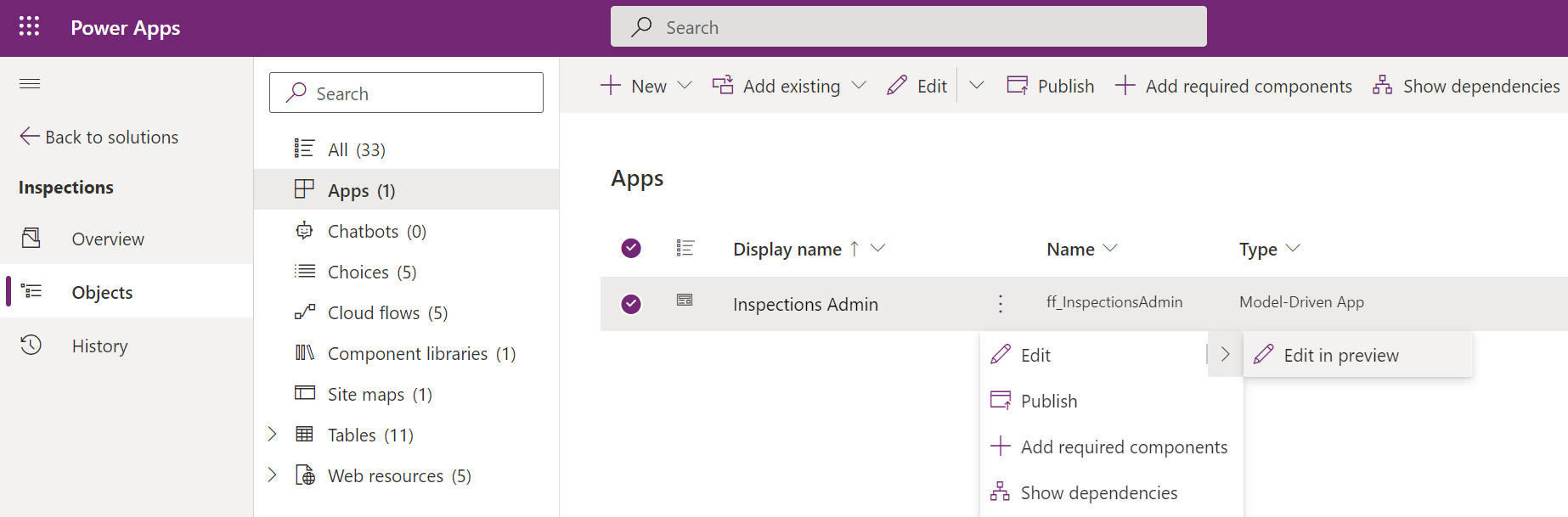
    The first thing we need to do is to locate the new command designer. Currently this lives inside another preview feature, the modern app designer. We can launch this designer when looking at the options for editing a Model-driven app module inside a solution:

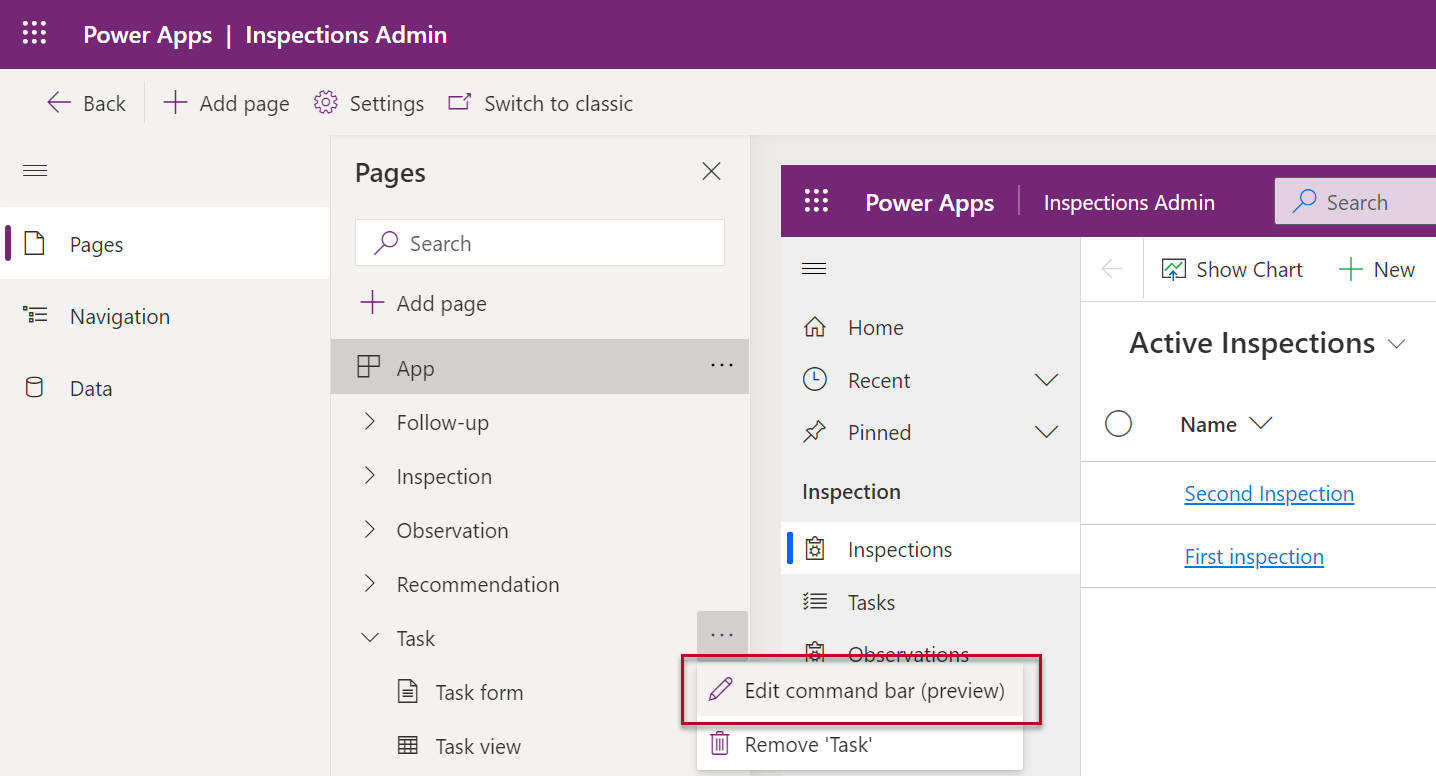
    In this new world the command bar is a component found from under a page in the app module. So, let’s look at the page for the task table and choose “edit command bar”:

    We need to keep in mind that we’ve got 4 different command bar locations to choose from. All of them are potentially relevant for such a generic feature, but to keep things simple we’ll focus on the main form command bar. This means that when we open a task record into a full window (or Main Form Dialog modal window), we want to see our new custom button there. It’s better to start from a command specific to a single record rather than any of the views where a command might need to apply to a number of different records from the same table at once.

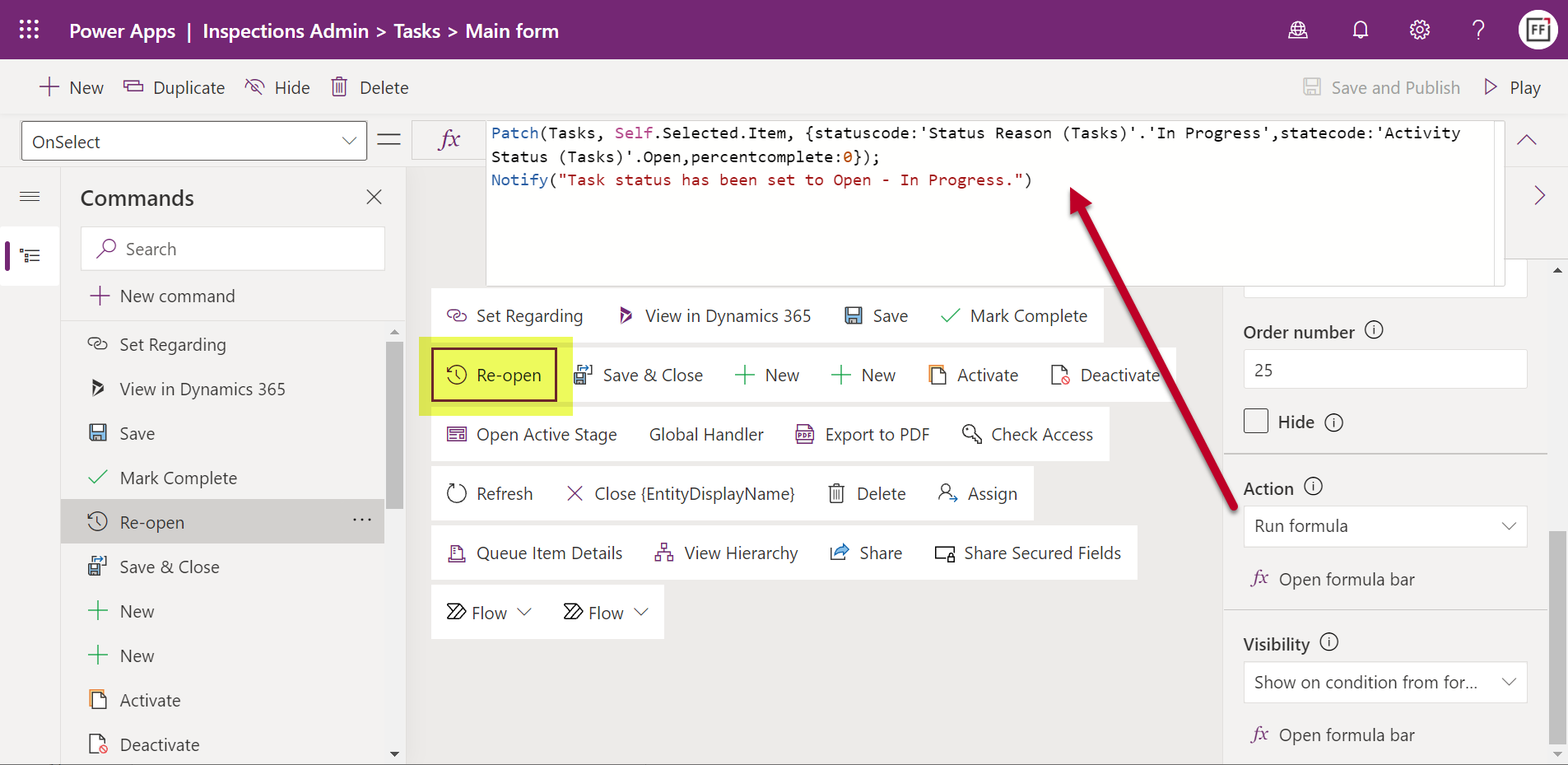
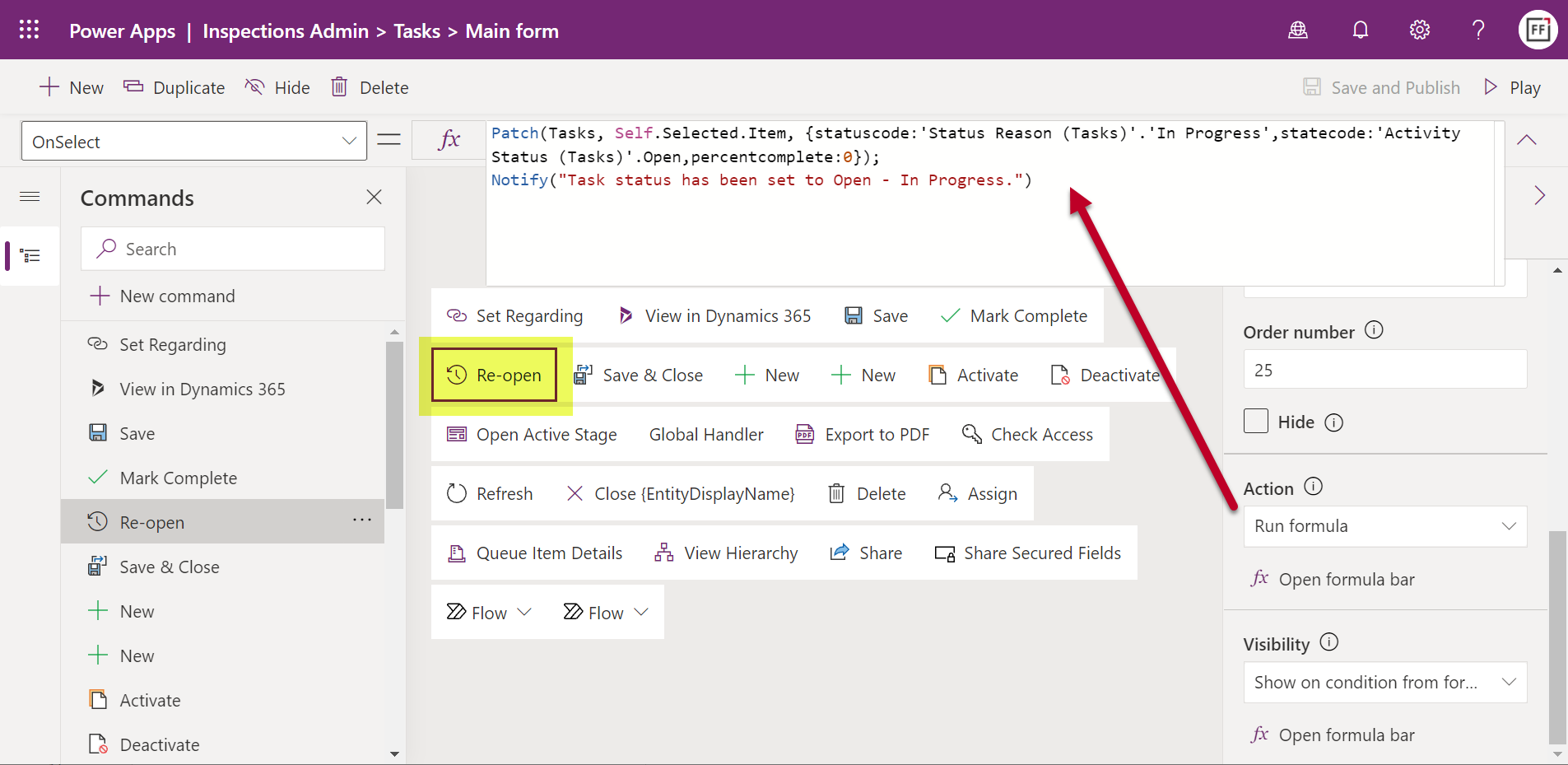
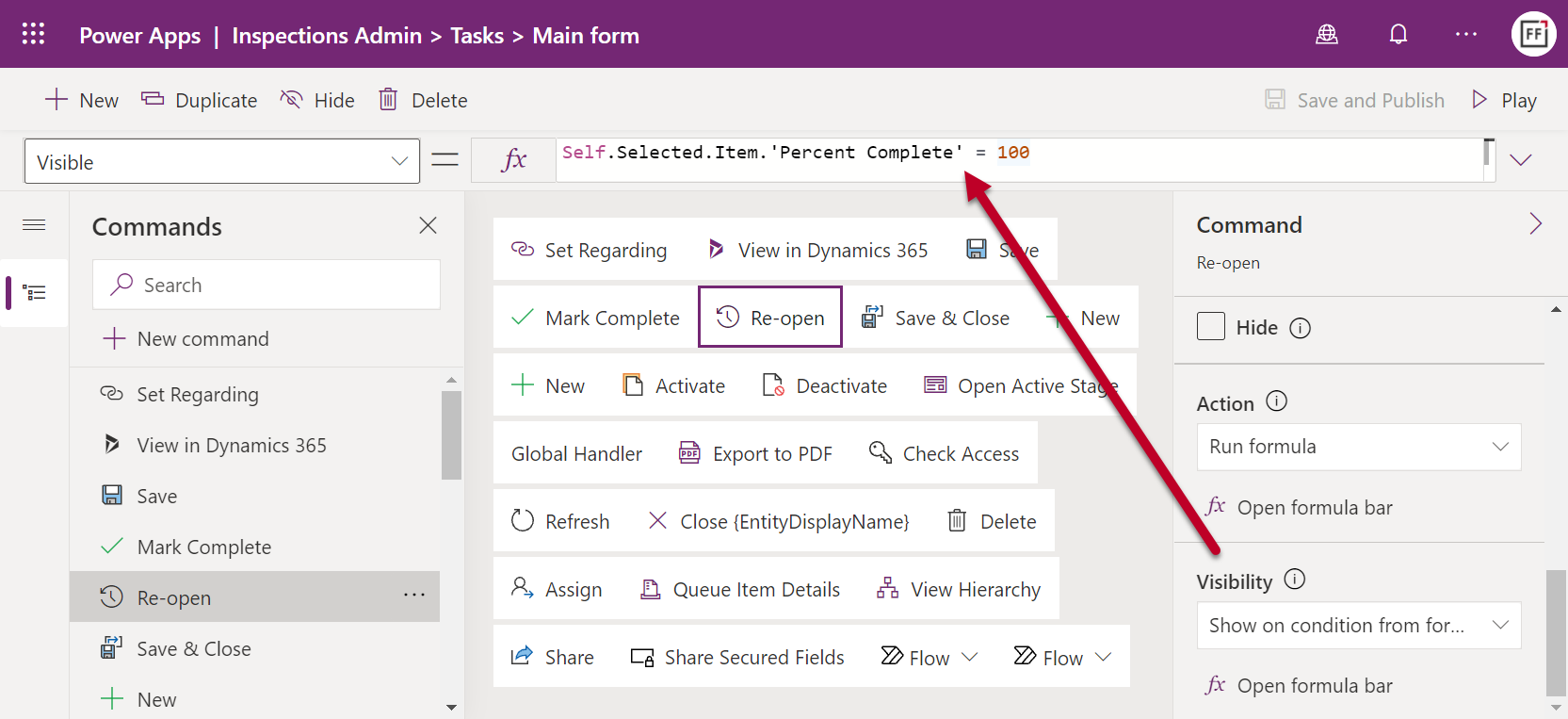
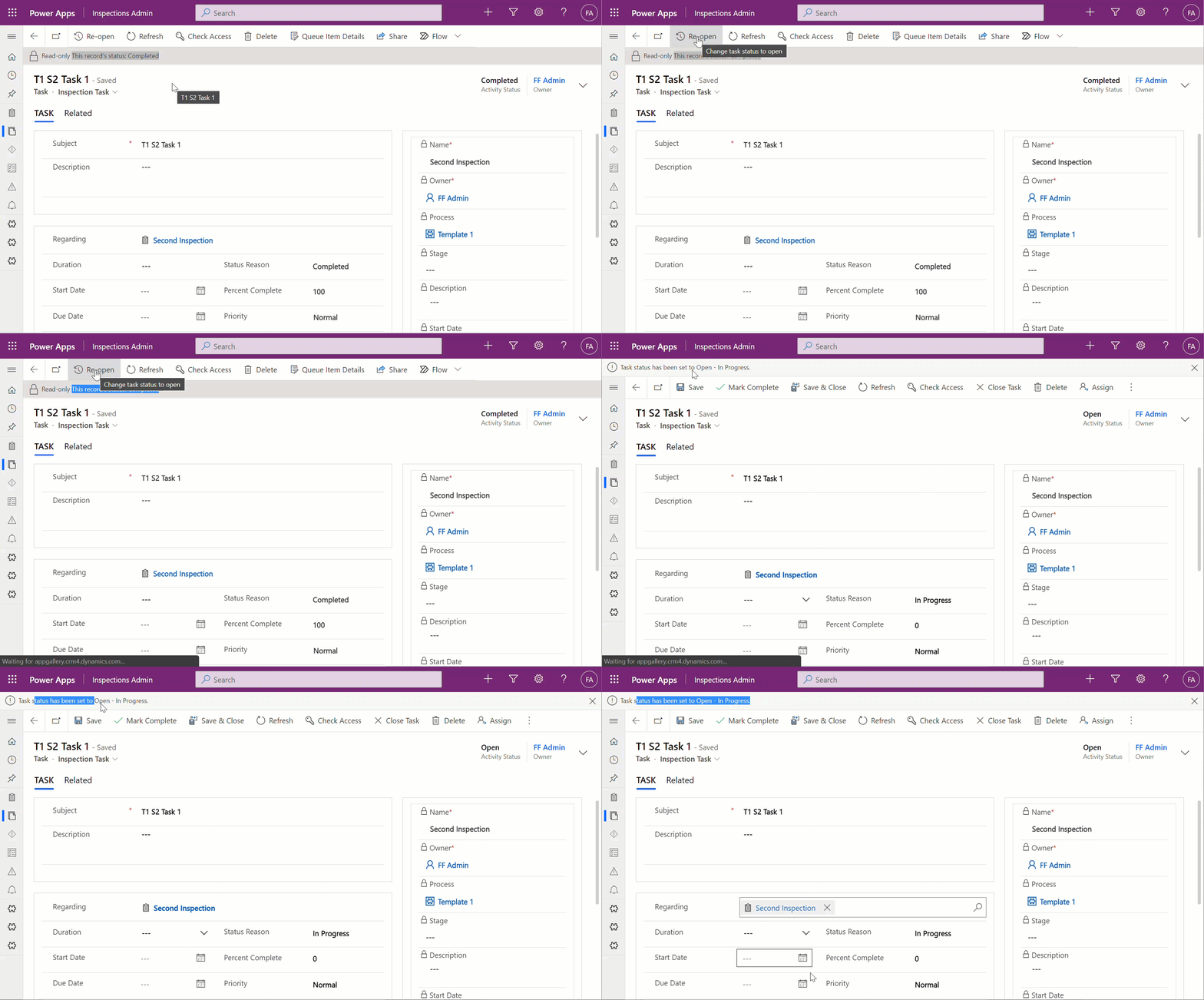
    In the command designer window we can add a new custom button. The simple no-code parts are the visual editing experience of giving the button a label, icon, tooltip and dragging it into the suitable relative position in the existing command bar for the task table. Once we get to the low-code part of writing the Power Fx formula to perform an action for this button, it’s a good idea to pause for a moment and think about what elements we need to work with.

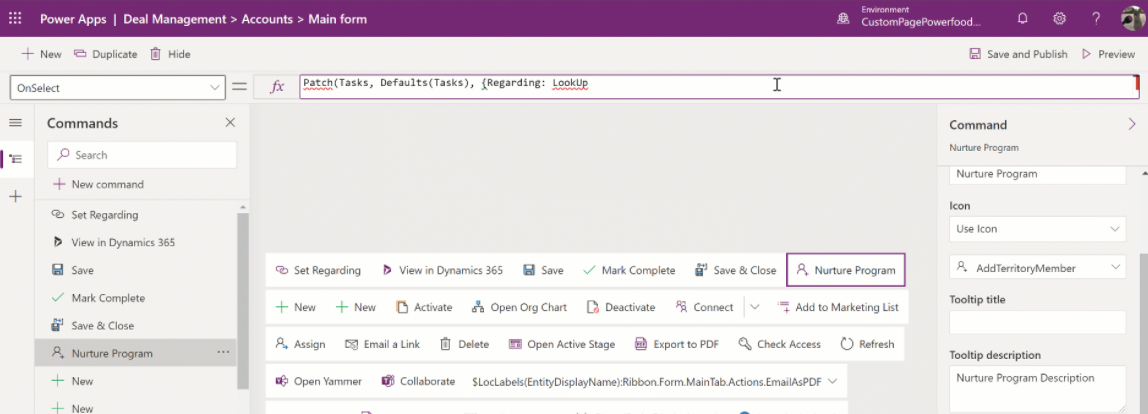
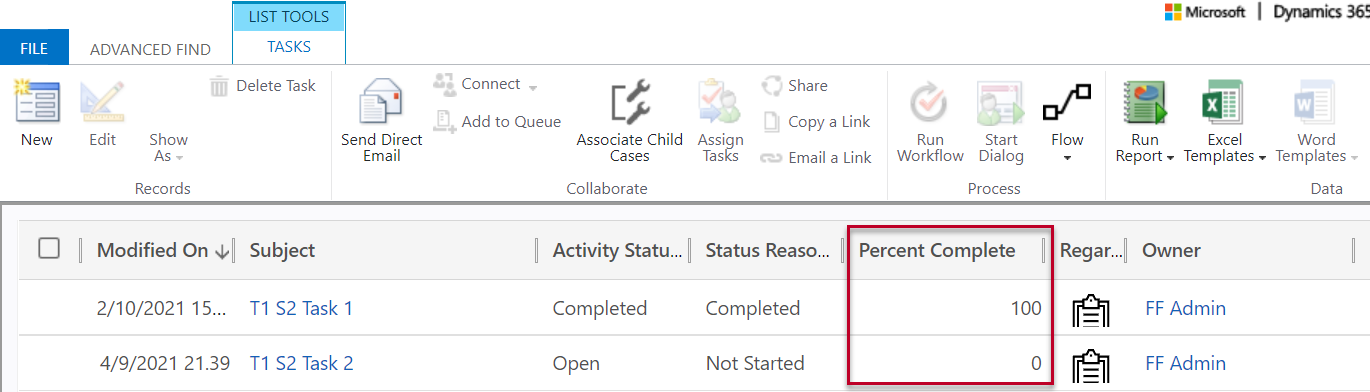
    First of all, what we want to do is to update the current record (rather than creating a new one). We need to use the Power Fx Patch function to accomplish this. The documentation gives us an idea of how to set the target object (Self.Selected.Items), but when it comes to the actual fields to be updated, we’re going to need to do some research on how activity tables in Dataverse behave.

    An important detail to understand is that the record status isn’t something that you just set with a single field value. It’s a combination of the Activity Status (statecode) and Status Reason (statuscode) that need to be aligned in order for the status change to go through succesfully on Dataverse side. A combination of Power Apps Community posts and the Dynamics 365 Customer Engagement developer docs for the task EntityType is needed here to figure out what values your Power Fx formula should use. The end result is:

    Patch(Tasks, Self.Selected.Item, {statuscode:'Status Reason (Tasks)'.'In Progress',statecode:'Activity Status (Tasks)'.Open,percentcomplete:0})

    Due to the funny data types for choice columns in Dataverse (formerly option sets in CDS / XRM), we need to reference the available values for a specific choice, as seen above. Now, this gets us to the question of “how do I make sure my command bar formula is correct?”

    Unlike with the traditional Canvas app Maker studio, you can’t easily run the formula on a test record and see whether you get an error or success. Which is why I very quickly proceeded to creating a dummy Canvas app to validate my Power Fx formula against a real record in Dataverse to see the results in action. I’d recommend you do the same for any custom command formula that you’re not 100% sure to work when added as an action onto a button.

    OK, looks like we’ve got the status change part nailed down. But what’s with that “percentcomplete” value in the formula? It has to do with how we control the button visibility later on.

    Setting command visibility

    While we can get the job done by just adding a button that will perform the action missing from default Power Apps / Dynamics 365 activity forms, we should also pay a little more attention to the user experience. In this scenario, the action for reopening a task isn’t going to be relevant for any task record that has not yet been closed. To make sure we don’t create unnecessary clutter in the UI, let’s hide our custom command from records that are not valid targets for its action.

    In theory we should be able to accomplish this by adding a visibility formula for our custom command that reads:

    Self.Selected.Item.'Activity Status' = 'Activity Status (Tasks)'.Completed

    This should be true only when the task record we’re looking at has been closed as completed. Yet it doesn’t work. Even though Mr. Ribbon Workbench himself, Scott Durow, uses this structure in his example of a “set visibility” expression, it didn’t produce the desired results in my app.

    How about the Microsoft docs then? Well, they claim that the formula to control visibility based on record data should be something like this:

    //Button will be visible for accounts with Account Rating > 20
    Self.ThisContext.SelectedItem.'Account Rating'>20

    Unfortunately “Self.ThisContext” isn’t something that the intellisense feature in the command designer editor recognizes at all, so we’re kinda stuck here. Unless we can figure out a way to identify the closed status of an activity record without referencing those pesky choice fields.

    Let’s do what an experienced XRM customizer would try and launch Advanced Find to explore all the column values in our task table rows to look for clues. A-ha! There we have it! The system apparently populates the Percent Complete (percentcomplete) integer field with the value 100 whenever the task status is changed to completed:

    Let’s use this information to design an alternative formula for our custom command’s visible property:

    Self.Selected.Item.'Percent Complete' = 100

    Now we only see the “Re-open” button on task forms where the record is in completed status. We should make sure that upon reopening the task we also set his value back to less than 100, which is what we’ve already got in our action formula.

    Notification to end user

    We now have functionality in place for both the action we want to perform and when we want it to be visible in the command bar. To add more polish into the user experience, we could take advantage of the confirm function and show the user an “OK / Cancel” confirmation dialog box before the action to reopen the task is performed.

    The only problem is: it doesn’t work. Once again, the intellisense feature for the Power Fx formula refuses to acknowledge that “Confirm” would be a valid function. Saving it into our action formula will not produce any visible results. OK, we need to keep in mind that modern commanding is still in preview, so let’s give Microsoft some time to fix these issues before using them in our production apps.

    Thankfully the notify function does work with custom commands already today. We can add this line into the action property of our button:

    Notify("Task status has been set to Open - In Progress.")

    When the user then goes and clicks on the button for a completed task, the experience will be the following:

    Showing the custom notification bar in the same location as where the default system message “Read-only – This record’s status: Completed” would normally be is actually a pretty nice experience. The user probably can’t distinguish this from a native command behaviour.

    Custom commands in grids

    With similar steps we are able to also make commands available outside the single record form. Now, the big difference here will be that instead of always being sure we have exactly one record to work with when on a form, grids provide users the opportunity for multi-select. Which can be a bit of a problem, since at least based on the current preview documentation for modern commanding in Model-driven Power Apps, I don’t know how the Power Fx formulas should be structured to loop through a record set.

    Let’s therefore build something that we know will work, based on the above example. On our custom table “inspection” we have a subgrid of tasks related to that parent record. To streamline the process of marking the tasks completed, we can add a button on the subgrid command bar that allows us to change the status without leaving the main inspection form. Here’s what it will look like:

    I’ve added a “Complete” button to the subgrid view commands for the task table. The action part is pretty much the same as before, only we’re setting the status & status reason to “Completed” this time:

    Patch(Tasks,Self.Selected.Item, {statuscode:'Status Reason (Tasks)'.Completed,statecode:'Activity Status (Tasks)'.Completed})

    As for the command visibility, I want to check that A) there is only a single record selected and B) the status is not “Completed”. We’ll use the same workaround with “Percent Complete” field as before and include a CountRows function:

    If(CountRows(Self.Selected.AllItems) = 1 && Self.Selected.Item.'Percent Complete' < 100, true, false)

    Now the command is ready for use in the subgrid. The visibility rule does work, although there seems to be a bit of a caching delay in determining the status of the chosen task. If immediately after closing a task as completed we go and select the same row again, the “Complete” button will still show there.

    Although the clicking on a command will perform AutoSave, it is run before the command itself is initiated. After we perform a manual refresh of the form, the button is correctly hidden for the recently completed task. Just a minor detail you should be aware of when testing your custom commands.

    Conclusion

    The modern commanding feature looks very promising. If you have been using Power Fx in Canvas apps, building the action and visibility rules in the command designer isn’t that big of a leap. Sure, it is low-code rather than no-code, meaning we’ll need a larger number of documentation samples to understand how the properties and functions can be used in the context of an app command bar specifically. However, it’s a much safer sandbox for app makers to work in than full blown JavaScript, which one of the reasons it makes sense for Microsoft to invest in developing their programming language for low-code.

    Ever since The Ribbon was introduced in 2011 (and later evolved into a Command Bar), I’ve always felt like it has been a missed opportunity for optimizing the user experience of business applications built on Power Platform / XRM. The barrier for modifying and extending it, even with awesome community tools like the Ribbon Workbench, has simply been too high for getting many of these nice-to-have features implemented in real life customer projects. The native command designer tool and common Power Fx logic can definitely help in lowering this barrier.

    At the same time, we need to keep in mind that the modern commands don’t yet replace the classic commands from the RibbonXML era. Common requirements for usability improvement like hiding irrelevant default buttons isn’t yet supported. Check out Scott’s article on Ribbon Workbench vs. Power Fx Command Buttons to understand what is & isn’t available in Power Apps modern commanding.

  • Did Power Apps really leak your customer data?

    Did Power Apps really leak your customer data?

    Recently Power Apps made the headlines in a way that Microsoft would have liked to avoid at all cost:

    The news headlines today aren’t exactly the most neutral source of information, but luckily we also have access to the full report from the security research team at UpGuard. Here’s what happened according to them:

    The UpGuard Research team can now disclose multiple data leaks resulting from Microsoft Power Apps portals configured to allow public access – a new vector of data exposure. The types of data varied between portals, including personal information used for COVID-19 contact tracing, COVID-19 vaccination appointments, social security numbers for job applicants, employee IDs, and millions of names and email addresses.

    UpGuard

    Sounds serious, and it certainly shouldn’t be sweapt under the rug by anyone working with Microsoft Power Platform. We have a lot to learn from an incident like this and the concerns it may bring up along with it. As these low-code technologies become more widely used across different industries, not all publicity will be positive.

    There have of course been some concerns raised by IT practitioners already before this Portals incident on what’s the general impact that low-code platforms will have on business solutions development. How to secure customer data and to build proper governance practices around these tools is a topic that is often covered when talking about Power Platform with customers.

    I personally already used the above headline as an example in a governance workshop with a customer on the very next day after the report was published. The discussion was quite neutral and it served well in acknowledging both the important role that Power Platform tools can have in business processes, as well as the need for practices that allow them to be safely used in developing new solutions.

    The other alternative where such a topic would not be proactively addressed in a transparent manner could instead lead to more controversial reactions down the road. Some people may have negative experiences in their past that might lead to seeing these new events as an enforcement of their existing beliefs.

    It’s hard to prevent people from drawing the wrong conclusions based on incomplete information if we don’t bring all the relevant pieces into light. To help in such examination of the evidence, in this blog post I’ll present some fictitious statements that could potentially be made based on reading the news headlines. Then I’ll offer my own perspective on whether they would be justified or not.

    “Bugs in Microsoft’s software caused the data leak!”

    This wasn’t an actual bug, rather an unfortunate feature. As the report title from UpGuard hints, it was “by design” when examined from a technical perspective. Also, that was the initial response from Microsoft’s side, as shown in the report:

    The above response is in my opinion the biggest mistake from Microsoft in this whole incident. Being tone deaf when presented with something that had already proven to be a pattern leading to unintended disclosure of confidential customer data via numerous Power Apps Portals out there is… Well, it’s what happens in large corporations, unfortunately.

    What was this “by design” feature then? In the state that the Portals configuration experience was at the time of the investigation, there wasn’t any strong push from the product side to make the data tables used in the portal as private. It was a neutral platform built specifically to take records from your organization’s internal Dataverse tables into a public website, then giving you the choice to either show all the contents to anyone, or limit the visibility through a very granular security model to only a small subset of records.

    As an example: you could show all the available locations where COVID-19 vaccinations were being offered (public table). Then you’d give the logged in user the ability to create an appointment record (private table with access control). Both are an integral part of the business process managed via a portal, yet the rules for showing them to the website visitors are directly opposite. The technical platform has to cater to both these requirements.

    As it happened, there was a way through which the portal developer could forget to enable the table permissions that the private data should have in all areas where it was used. Now, the reason why this mistake wasn’t immediately obvious was that the Power Apps Portal product included a feature that allowed publishing this data as OData feeds. These would not be visible in the website pages necessarily, but they were technically available as long as you knew the right path from where to search for them.

    In our example, a public OData feed of locations could have been useful for integration purposes. For reservations made by private individuals, an unauthenticated feed would never be a good idea. Yet the platform didn’t know what the developer wanted.

    After this incident was reported by UpGuard, Microsoft changed the defaults and made it require more conscious effort to publish the feeds for unauthenticated consumption.

    “Poor default settings in the Portal product were dangerous!”

    There’s no denying that discovering more than a thousand Power Apps Portals misconfigured to expose confidential data to unauthenticated users is a big number. Yet the total number of Portals out there is… well, let’s just say it’s certainly multiple times that.

    As part of their research, UpGuard enumerated through the various available powerappsportals.com and microsoftcrmportals.com subdomains to programmatically scan the sites with potential unintended OData feeds published. Many were found through this method, but still this problem affected only a small subset of all Portals websites out there.

    The majority of Portals developers will have been aware of the setting that must be enabled for any data that you don’t want to be publicly available on your website. Nick Doelman explains the “Enable Table Permissions” setting very clearly in his excellent blog post. It’s not really fair to claim that this would have been impossible to notice while building your Portal app:

    If it has been news to you and you have built websites with Power Platform tools, then I seriously recommend you to take advantage of this generous offer by Nick and enroll for his Power Apps portals Security Deep Dive course:

    Update 2021-08-31: you should also check this video from George Doubinski about the Portals behaviour before & after the default setting change:

    “Microsoft should prevent such things from happening on their cloud service!”

    Power Platform is a suite of low-code tools that allows you to build your own apps. Whatever business logic the published app contains is ultimately the responsibility of the app creator. Same goes for the data you manage with that app. Technology providers can’t easily stop people from building unfit solutions with their products.

    There’s a great analogy in George Doubinski’s blog post “How to secure Power Apps portal from making the news” that I’ll repeat here. If you’re a company selling nail guns and a few unfortunate customers of yours shoot themselves in the foot – what should you do about it? Sure, your product probably came with all kinds of instruction manuals and warning signs that try to explain the importance of learning how to use such power tools. Similar to how Microsoft now shows a banner saying “table permissions should be enabled for this record or anyone on the internet can view the data”, to try and warn people not to hurt themselves.

    Let’s look at an example from another area of Power Platform that I cover frequently in my blog: licensing. Any customer could easily use this platform to build an automation that is a clear violation of the multiplexing rules of the very same platform’s licensing terms. Just create a Power Automate cloud flow that automatically pushes all new opportunities from your Dynamics 365 Enterprise Sales app into a SharePoint list accessible to your whole organization with no Dynamics licenses assigned to them. Congratulations, you’ve again used the powerful tool to hurt yourself in a way that the vendor couldn’t have stopped.

    “I knew citizen developers couldn’t be trusted to build real business applications. So much for low-code!”

    Did you look at the types of customers that suffered from this data leak? If not, I’ll list some of them from the UpGuard report here, to give perspective:

    • American Airlines
    • Ford
    • State of Indiana
    • New York City Municipal Transportation Authority
    • Microsoft

    These don’t sound exactly like the kind of organizations where a lone citizen developer who discovered a neat tool in his Office 365 app launcher just went ahead and built a portal on top of millions of rows of contact records and other sensitive data. If I had to guess, I’d assume there has been a proper development team working on many such customer facing services – not just citizens.

    The above picture is an example from the report’s contents that was captured via the unsecured OData feeds. It is from the Global Payroll Services Portal for Microsoft employees, built (presumably) by professionals working with software. Despite of all the resources and knowledge behind these, the misconfiguration of a Power Apps Portal still went into production sites.

    Although not directly related to this incident, on the very same week there was also another unfortunate data leak reported concerning the Microsoft cloud. Only this time it was around CosmosDB and the database primary keys that got leaked, exposing private data from thousands of Azure customer organizations. The misconfiguration seems to have been carried out by Microsoft software developers while they were integrating Jupyter Notebooks with CosmosDB to provide a new platform feature to customers.

    Regardless of whether you are clicking through low-code configuration pages or writing your own lines of custom code, mistakes can happen.

    “Suites like Power Platform are becoming way too complex for anyone to keep track of all these features & settings that can cause harm!”

    This is certainly true in the sense that a single person will not have an A-to-Z understanding of Power Apps in Canvas/Model-driven/Portals flavor, Power Automate in the cloud and on the desktop, Power Virtual Agent, Dataverse, AI Builder, Power BI and its data platform back-end… It’s way too much for anyone to consume as documentation, let alone master in practice.

    We should be asking where the assumption actually comes from that an app maker or developer should have end-to-end knowledge of the whole Microsoft low-code stack? Whether you’re a customer or a partner, it’s very important for you to not be blinded by all the flashy product demos and testimonials on “how company X digitally transformed themselves, using software suite ABC”. It doesn’t all happen thanks to this one mythical app hero who can take on any challenge – rather it’s the result of the right person finding the right tool to solve one specific problem at a time. Repeatedly, at scale.

    Low-code is a team sport and you will increasingly see the fusion development approach be promoted by Microsoft. This emphasizes the fact that an optimal mix of business domain expertise and technical software development skills is a better approach to achieving long term business value with low-code than relying on lone superheroes to do it all. In the end, just because you’re not writing as much code as earlier doesn’t mean the resulting systems would be simple:

    Low-code tools may be easy to approach, but the solutions you create with them can be as complex to manage as custom software.

    The data leak was the result of a feature built into the platform that the persons developing the customer specific solution were not aware of. They didn’t purposefully create the OData feeds, rather the software product generated them based on the underlying logic of how it was meant to streamline certain app development tasks. The best chances for having awareness of all these moving parts in the end solution is to ensure people have a realistic opportunity to focus on their primary tools and continuously sharpen their skills.

    “This incident proves you need product X / service Y from partner Z to be safe with Power Platform!”

    Events like these are bound to inspire companies working in the Microsoft ecosystem to try and gain exposure of their own by riding on the news wave. It never hurts to sprinkle a little FUD tactics on top of your marketing message, right?

    Now, I have to be transparent and admit right away that we are in the business where the questions and concerns coming from Microsoft customers are addressed via our advisory services. Even though we educate organizations on governance best practices and have delivered a few Power Apps Portals solutions to them, I would not make any statements like “buy from us and you’ll never have these kind of problems”. There’s two reasons for this:

    1. Our aim is to help customers take ownership of their digital tools, not to be the ones who build everything for them & maintain it. New app makers will make mistakes as they learn & grow, they just need a safe space for this (read: not a public website).
    2. I know how hard it would be to build a technical solution to audit every little detail that could go wrong in the various use cases where Power Platform is be used.

    Let’s examine the details of this particular data leak. First of all, to have any technical level protection, you would need a service that can tap into Power Apps Portals specifically. Running something that monitors only Canvas Apps or Model-driven Apps won’t help you here. Even the Power Platform Center of Excellence (CoE) Starter Kit from Microsoft only has the Portals data inventory as a backlog item as of now. If no public APIs are available to tap into a Microsoft cloud service, then you’re unlikely to find any software to do the required tricks for you.

    Even if we’d have the same level of telemetry data access as Canvas Apps do, what’s the likelihood of the specific setting in question (Enable Table Permissions) to be exposed and monitored? Well, it is data stored inside Dataverse tables and could be queried via Advanced Find as showed by Nick, so in retrospect we could technically have audit tools built for it. But why would someone built such a third-party product when Microsoft already offers Portal Checker to all customers?

    So, there’s unlikely to be an easy & all encompassing solution out there that would address all your Power Platform security and governance concerns. I could even bet that some of the Portals websites that suffered from the OData leak will have been reviewed by security professionals from outside the Microsoft ecosystem and still the issue was not discovered. Probably because they didn’t know where to look.

    Because it’s an ever evolving cloud platform, it was possible for Microsoft to quickly react to the incident via a change in their original design, as well as by notifying the customers potentially affected by it. Today the risk of unintentional data exposure is technically lower and the public awareness of such possible misconfiguration among the Power Platform app maker community is much higher.

    Yet we have no way to guarantee what will happen tomorrow. Something similar may be discovered in a different part of the platform that will again require attention and action. I think all we can really do is to keep our eyes open and be ready to learn from the new discoveries shared by the network around us.

  • Power Apps pricing drops by 50%

    Power Apps pricing drops by 50%

    It’s not that common to see Microsoft make an announcement where the price of existing products is cut in half. Today, however, is a special day where we heard that the prices of Power Apps licenses are going to be reduced by 50% :

    • Power Apps per user: from $40/month to $20/month
    • Power Apps per app: from $10/month to $5/month

    Note that this is the new list price – not a temporary campaign price. Using Microsoft’s low-code application platform is therefore becoming considerably cheaper for all customers (eventually).

    More revenue via lower pricing

    What’s the story behind such a dramatic pricing change? Was Microsoft struggling with selling the platform to customers at the old price point? Well, we will of course never know the full details behind the business planning decisions and the calculations MS has been performing in their own Excels.

    My own interpretation is that there certainly hasn’t been any shortage of interest towards Power Apps from the customers’ side. What’s probably happening here is that the high ambitions Microsoft has set for scaling up the broad commercial coverage of Power Platform technologies within their customer base haven’t quite been met with the current pricing model introduced in October 2019. I can easily see how the speed at which low-code is taking over the world isn’t well aligned with the slow licensing agreement negotiation cycles around enterprise software. These are both a blessing and a curse for MS, compared to more nimble competitors in the low-code / no-code space.

    To address this need for pricing agility, Microsoft had already launched a promotional offer at the end of 2020 to give volume discounts on per user and per app licenses: $40 > $12 and $10 > $3 respectively. This offer basically made the previously confidential discount levels publicly available, giving a much better indication to larger customers about what the expected true cost level of Power Apps licenses would be. Since there are so many different potential user groups for low-code apps within a typical enterprise organization, it’s problematic if every team does their own business case calculations based on list prices. That doesn’t really deliver the optimal outcome for Microsoft who’d want to sell the one platform for the whole organization through a single high volume deal.

    Based on my discussions with customers, it’s pretty obvious that most of them are already confident with the technical abilities of Power Platform. What they are not very comfortable with is the complexity of how the platform has to be licensed. All the confusion and uncertainty is quite understandable, given the many moving parts and the licensing model that appears to have been in flux during the past couple of years.

    Any temporary campaign price isn’t necessarily going to alleviate the concerns customers have for the long term costs of licensing Power Platform premium features. Therefore I think Microsoft is looking to provide a clear signal that they’re targeting a very wide scale adoption of these low-code tools – not just for large business critical apps for specific audiences.

    Licensing implementation details

    Due to how the licensing contracts and MS price lists work, the new Power Apps license prices aren’t yet reflected in the public pricing site, as they’ll only come into effect on October 1st 2021. Any contracts made after that will get the new prices. Same for contracts that are renewed after October 1st. For any ongoing subscriptions the new price points are not applied automatically, because for good & bad, the prices for a customer are locked via these contracts. Keep that in mind when counting the near term costs of Power Apps for your users.

    The SKU (stock keeping unit) of the per user plan won’t change, the list price will just come down to $20. For the per app plan we’ll see the old SKU become discontinued and a brand new SKU launched on October 1st. This is because there is more to the changes than just a new figure on the price tag in the per app model.

    There’s been this peculiar twist in the original entitlement that allowed a single Power Apps per app pass to run 2 apps & 1 portal within a single environment. While the reasons for allowing both Canvas and Model-driven apps to be used in a single business scenario probably made sense in theory, this has been in practice very difficult for customers to comprehend. It must have also been a huge headache for MS to incorporate into their license reporting and technical enforcement within the platform. Changing the new per app license to cover a single app is therefore a very logical & welcome update. If you really need 2 apps, then just buy 2 per app passes for $10 – the total price is not increasing here, after all.

    These changes announced today are specific to Power Apps, which means that the Power Automate price points for per user and per flow remain untouched. This isn’t very surprising, since I believe Microsoft would rather see customers adopt both the app side and the automation side – not just run “invisible” flows behind the scenes. The Power Apps per user plan now gives you these for a small additional cost compared to Power Automate per user plan ($20 vs. $15). As for the other plans, the use cases for per flow process automation or the RPA capabilities are very distinct, in my opinion, so not much pressure should arise from this Power Apps pricing change for those.

    What about Dynamics?

    Two years ago when the per app plan was launched at $10, there was a lot of discussion on how this might cannibalize the Dynamics 365 products. Paying $95 for an Enterprise Sales license seemed pretty steep in comparison when you could build your own CRM on top of the same Power Platform tools and run it for a fraction of the cost. Well, it looks like the tribes of low-code cannibals didn’t take over the world and Dynamics 365 business has been growing nicely regardless of this move. There certainly is a growing number of “DIY CRM” type of solutions being used now via Power Apps, but one could argue that these customers and their scenarios might not have landed on MS cloud (or stayed there) if the lower priced option didn’t exist.

    During the past 1.5 years, after founding a company focused 100% on Power Platform and taking some distance from my prior Dynamics related work, it’s been eye-opening to talk with customers without wearing a CRM hat. Low-code application platforms are a discussion that concerns everyone, regardless of what systems they are using for managing their sales, marketing, service processes. You don’t really need to mention the word “Dynamics” at all in these discussions – unless the customer happens to be running them already. Whatever their CRM or ERP systems are, the Power Platform story is equally compelling when viewed from the broader Microsoft cloud perspective.

    When Ryan Cunningham, Power Apps product lead at MSFT, introduces the new pricing model announcement with the title “apps for everyone” – that should give you an idea of where the goals are set. You can’t sell Dynamics 365 to everyone, hence the higher pricing of these products. As for Power Apps, there aren’t many valid reasons why someone could not be target customer for them.

    The price will never be “right”

    Even with this 50% price reduction, I’m not expecting all customers (or even MS partners, strangely enough) to be happy with the licensing model for Power Apps premium features. As long as everything isn’t free, someone will always complain how the low-code platform pricing model of charging by app usage is “wrong” (instead of paying money for app development work and infrastructure operations).

    I don’t think we should expect that the full premium feature set of Power Apps would ever become a free bundle within Microsoft 365. More and more of these high value features like Dataverse for Teams are already “free” for existing customers. They help build up the scale of app usage (see the Teams as a platform story), but there has to be an upsell story to paid Power Platform services somewhere down the line. If there wasn’t, we wouldn’t see such huge investments into low-code capabilities from Microsoft.

    Platform licensing is the end game, not per app. Once customer organizations unlock the possibility for all their employees to run & build unlimited apps on the platform, that’s when the real transformation begins. There’s undeniable business value waiting behind that door, and that’s why it needs to have a price tag.

    Read more about Microsoft Business Applications licensing

    Check out my earlier blog posts in the licensing category.

  • Democratizing code

    Democratizing code

    Throughout my whole professional career, I’ve worked with technology that caters to information workers. Sometimes I’ve been the power user of these tools myself, then a manager responsible for defining the details how these systems should work. For the past decade I’ve been the guy who actually puts the technology pieces together to deliver that system.

    I have never written code in traditional programming languages for a customer project. Sure, I’ve done plenty of work that isn’t accomplished via point & click GUIs, but none of it resembles what the Wikipedia definition of computer programming says. In short: I don’t code.

    Every year it feels like I’m sinking deeper and deeper into the technology domain of Microsoft business applications, and at the same time it’s less & less likely that I’d start writing code for a living. The rise of low-code development platforms (LCDP / LCAP) like the Microsoft Power Platform means that there are more & more people like me out there. Citizen developers are taking over many application development tasks but they don’t do what traditional programmers used to do.

    The impact from this paradigm shift is potentially massive. Computer programming isn’t going away nor decreasing as a professional activity. However, application development as a task is being separated from the domain of programming. The output of what “code” used to create is therefore being democratized:

    Democratization of technology refers to the process by which access to technology rapidly continues to become more accessible to more people.

    Wikipedia: Democratization of technology

    In this article I want to write down a few observations and thoughts on this topic, which I’ll hopefully get to drill deeper into in future writings.

    From code-first to low-code

    Things have moved along surprisingly fast. Just three years ago there was a small debate in the Dynamics 365 community on whether all functional consultants should know how to write code. Neil Benson’s excellent article called “Three forbidden words: I don’t code” popped up in my Timehop stream a while ago to remind me about this. (I must stress that despite of the title, Neil actually argues against the need for every consultant in the project team to write code.)

    https://twitter.com/customery/status/981128432384962561

    Today in 2021, this whole question on whether every IT worker should invest time and effort in learning a “real” programming language felt to me like it must have been from a decade ago. To put things into perspective, we have to keep in mind that this original debate took place in 2018 , at a time when the fusion of Microsoft Dynamics 365 and PowerApps (the “no space” era) had just been announced. MS had only just begun the process of throwing BizApps consultants and citizen developers into the same pool of technology. It was a very different world still.

    Fast forward to 2021. If you look at what the Power Platform community has been debating about recently, I’ve seen a lot of concern from people with software development background & skills. “Isn’t Microsoft valuing coders anymore?” is a question that can rightfully be asked when looking at the common theme of marketing messaging coming from Redmond. It’s a stark difference to just 3 years ago for sure.

    Already earlier, many customers who have previously been burned by problematic CRM implementations full of custom code have begun expressing their preferences in subsequent projects. “Avoid code based extensions and leverage OoB configuration options wherever possible” has not been an uncommon requirement to hear from them.

    Now when Microsoft is advertising how powerful the low-code options can be, it’s going to be even harder to suggest code-first solutions to customers. At least you need a clear justification for why custom code is necessary. This can have unfortunate side effects, too, where the avoidance of coding leads to an even harder to maintain maze of configuration spaghetti. Different cooks, same dish.

    Excel is eating the world

    Power Fx has received a lot of attention based on only the initial announcement of what Microsoft plans to do with this new low-code programming language. I’ve previously analyzed the broader role of Power Fx as well as reflected on how Dynamics 365 professionals might approach it.

    I’m not so sure that it’s wise for MS to go out and shout to the world at this point that “Power Fx is the world’s most used programming language”. Also, I wouldn’t personally say that my Excel skills have gotten me that far in creating formulas for Power Apps Canvas apps. It takes a lot of tutorials and browsing through the formula reference to get into grips with Power Fx.

    Yet there are unquestionable benefits from using the “Think Excel” mantra as the backbone for developing this new programming language for the low-code era. Not just for sharing the same function names, but rather for ensuring the focus of Power Fx remains squarely on the power users that can make Excel sing. Not those wannabe programmers who eventually want to move from the safe sandbox of Power Fx into something without the training wheels. Of course one still might need to have the programmer’s mental model for producing complex apps with Power Fx regardless:

    We need to keep in mind that Power Fx is not aimed at the audience who writes code for a living. Microsoft is not expecting that developers with skills in other programming languages would switch over to Power Fx. Rather the purpose of (eventually) open sourcing the details of the language implementation would appear to be in enabling other parties outside Microsoft to adopt Power Fx for their products.

    Despite the ubiquitous role of Excel in the business world, we should not assume this spreadsheet software to be the only place where future app developer generations will gain their experience from. Gaming platforms like Minecraft or Roblox with their big focus on user generated content could be considered equally important sources from where the inspiration to become a digital maker is first put into the mind of an individual.

    After all, being a guru in Excel formulas isn’t perhaps the strongest indicator of being a potential business app maker. The no-code generation is less likely to dive deep on a single tool, rather they are fearless in combining new services together on the fly to reach the outcome that they need. Separating this ability to grasp new technical tools from the ability to write algorithms in traditional software code is perhaps where the true democratization will take place.

    Professionals vs. Citizens

    The terms we use for grouping people into different teams in the current articles that cover the phenomena of low-code and business applications are somewhat problematic. On one side we have the “classic” developers under the banner that says Professional Developers, while the other crowd represents the “modern” way of creating apps and has been given the Citizen Developers banner.

    “And now, ladies & gentlemen, LET’S GET READY TO RUMBLE!!!!”

    That is exactly how we should NOT depict the situation. There are no winners and losers in this game. We haven’t invented a silver bullet that solves all business problems. There’s no eternal glory to be found from being “all code” or “no code” in everything you build. Yet it’s obvious that we’re not talking about a homogeneous group of developers here. Some of the platforms and tools used may be shared across, but the roles remain distinct.

    The amount of low-code business applications that organizations of all sizes in every industry will soon have in their hands means that we’ll see a growing number of employees working 100% on these. If low-code becomes your full-time job, you’re not just a citizen or a hobbyist. You’re a professional working with advanced technologies and complex processes. The only thing that separates you from the “classic” definition of a Professional Developer is that you don’t write much code (aside from things like Power Fx).

    Microsoft seems to have already reduced their use of the Citizen Developer term. This doesn’t necessarily mean that it would not continue to exist in the discussion, as the idea of anyone being empowered to create apps still is a powerful way to get the message across. It’s more likely that the terms used to describe the different roles within the “fusion teams” that deliver Power Platform based solutions will need to be adjusted.

    When a business professional starts handling more and more technical tasks in the app delivery process, I don’t think this makes him/her a Pro Dev nor a Citizen Dev. It is the area in which I personally operate and yet I can put a label on it. Luckily it doesn’t make my work any less valuable. I’ve always lived as the secret agent between business & IT, so I can easily remain to be that mysterious Agent X. As the army of these agents grows, though, they’ll become a lot less secret with their presence within organizations.

    Are they simply “Makers”? Time will tell.

    Where democratization may lead us

    I think what’s happening today with software resembles something that has previously happened with media. Two decades ago we saw the Web 2.0 phenomenon that moved the online world forward from a static web towards a social web. The elements and the actors aren’t all that different from what the move from code-first to low-code apps is dealing with.

    Content creation exploded when the ordinary people (citizens) were given tools and channels to shift from just being content consumers to the new role of content creators and publishers. That was a huge transfer of power. For me personally, my decision to start this blog back in 2008 and to become an active participant in the Twitter community around Microsoft business solutions have been far more powerful decisions than anything I’ve ever had the chance to make at my actual day job.

    If the traditional media was run by Professional Journalists then what emerged from the social web & social media revolution might as well be called Citizen Journalists. No longer was there any formal training nor editorial processes required for getting your content out there. It had a profound impact on our society as a whole, in both good and bad. The forming of new citizen driven communities around topics like business apps is a very mild example on that scale, but it’s where I’ve been able to observe the phenomenon in the closest possible detail.

    What happened with human communication in the Social Web revolution could very well happen with human-to-computer communication in the next uprising. On a high level, I can’t actually see that many differences between what WordPress did to words and what Power Platform aims to do to apps. Different context yet the same underlying dynamics of how the traditional top-down model is replaced with a bottom-up approach.

    One specific insight that could be drawn from this analogy between the social web and low-code movement is the ratio between different user roles in each. Even if anyone could technically start a blog these days, relatively few people have done it (and even fewer have managed to stick to it over the years). Most are merely content consumers, and some are active in commenting or sharing content.

    It’s very likely that we’ll see a similar distribution when it comes to low-code apps in the business world. Only a small share of those with access to the tools will ever become consistent app makers – and that’s perfectly fine. It’ll still be big enough figures to disrupt the traditional usage of code.

    Opportunities and threats of low-code

    Just like the rise of Facebook or Twitter didn’t solve every problem related to media, we aren’t going to reach the promised land of digital transformation merely through low-code application platforms. Many of the arguments heard from Professional Developers on why the actions of Citizen Developers will create a flood of new problems are in fact well founded concerns.

    Change management and version control don’t suddenly become a non-issue. Application lifecycle management (ALM) isn’t automatically taken care of. Architecture design and documentation can’t be skipped. Just by moving certain parts of the software development lifecycle from code based tools to graphical configuration tools and formulas like Power Fx we’re not magically making all the other parts irrelevant.

    Some of the problems encountered with traditional business application delivery will only be amplified by the low-code model. As the volume of apps grows, as we have more parties involved in their development process, as the backgrounds of these individuals will be more varied – we’ll run into scalability challenges for sure.

    This just highlights the need for new innovation. Reaching into the existing ProDev toolbox isn’t likely to be the answer – just like you couldn’t adopt the practices from a traditional media newsroom and apply those into social media platforms.

    Be it the creation of content or apps, any model of manual governance and control that relies on A) the creators to follow specific rules and policies, and B) human editors/gatekeepers to enforce them, isn’t going to scale very far. Algorithms must be put into use. AI needs to be given the opportunity to help us in everything that goes into developing and maintaining great business apps.

    Can’t put the genie back in the bottle

    It’s time to accept the fact that this thing won’t go away. What low-code represents is not any specific service or tool that today allows you to do A, B and C – but not yet D, let alone E. It’s all about the journey – how to move closer and closer to Z, one step at a time.

    Success is not defined by whether you would ever reach Z without writing a line of code. What low-code platforms aim to do instead is to keep grabbing the low hanging fruits of app development, one by one. Focusing solely on the “what’s missing compared to code-first” aspect is therefore not very beneficial in understanding the actual value that has been derived from different generations of low-code solutions, be it RAD tools or application platforms like XRM.

    Sure, there aren’t many new apps being built on top of MS Access or Lotus Notes anymore (hopefully). Does that prove it was a bad idea to build any of them in the first place? Of course it doesn’t. These tools may have only been good at A or B back in their days, yet there was significant business value to be gained for getting the crude apps out there to the users who needed to manage digital information via them. Besides, even if you built a “proper” app via custom code in the golden era of Access or Notes, you would have likely needed to re-build that solution a few times anyway to stay relevant with modern client technology and new business requirements.

    The evolution of software keeps pushing us towards higher levels of abstraction. It would be strange to think that the direction could ever turn and we’d see a large scale return to artisan software being carefully crafted by coding every line by hand, reducing the use of libraries and APIs that offer shortcuts to those soulless programmers that just want to meet customer requirements quick & easy.

    Early days still

    I’ve had a great opportunity to dive deeper into the concept of low-code during the past year, ever since we founded a company that focuses 100% on Microsoft Power Platform based solutions. One key insights from all my investigation work has been that we’re not yet very close in finding common ground on what low-code actually means. Neither the vendors, tech media, consultants nor customers seem to have a clear understanding on where to position low-code in the greater IT scheme.

    Academic research on topics like end-user development (EUD) / end-user programming (EUP) seems to have mostly stopped almost 10 years ago already – before the invention of the term “low-code”. One study from December 2019 specifically calls out the lack of recent research activity “There are very few publications related to low-code aspects and they are from the last two years, demonstrating its emerging trend.”

    Since it currently appears to be mostly the vendors like Microsoft, OutSystems or Mendix who are pushing forward their agenda, with help from analysts like Forrester in building up the hype, it’s hard to know what percentage of the low-code and citizen developer stories out there are based on facts. Sure, projections like these make it sound like it’s already an amazing success story:

    • Gartner forecasts worldwide low-code development technologies market to grow 23% in 2021.
    • Forrester analysts estimate 75% of all enterprise software will be built with low-code technology this coming year 2021.

    It must be great for anyone investing in low-code to be able to present such growth percentages, to prove they’re betting on a winning horse. Still, I feel like we’re only starting to write the greater story behind all this exciting technology. Democratizing the tools through which our digital world is built one app or one automation at a time – that’s gonna be a bigger deal than just the amount of VC money being pumped into no-code/low-code startups.

    At the end, it’s not even about which tools and platforms will win. Looking at both the investments as well as progress made by Microsoft into/with Power Platform, I have very little doubt that they will be taking low-code into mainstream for real. What’s the truly interesting part is thinking about all the ways in which this may change the business user behaviour, the role of IT departments, the market dynamics for professional services – basically everything around the low-code platforms.

    If that’s something you’re also interested in talking about in more detail, perhaps you’d want to reach out to us at Forward Forever. Or if you feel like there’s something I’m missing in the above thoughts around the democratization of code, I’d sure appreaciate any comments in the box below.