Tag: community

  • Welcome to survivingcrm.com!

    Welcome to survivingcrm.com!

    We have moved! The Surviving CRM blog has a new domain, a new host server and even a slightly modified blog theme. Previously hosted at my personal domain’s subfolder http://niiranen.eu/crm/, the blog can now be found simply by typing in the URL http://jukkaniiranen.com. The page loading times should also be visibly better now, thanks to a more powerful hosting environment for my WordPress installation.

    Back in 2008 when I launched this blog, it was mainly just a notebook for my random thoughts around Microsoft Dynamics CRM. Created as a side project on my little web hotel subscription for trying out all the cool new PHP apps out there (before the cloud era had really started), it was never intended to be a very robust setup but rather just something quick, dirty and cheap. As years passed by, more and more blog content was posted, Dynamics CRM as a product kept on growing and so did the traffic to this site. It’s been a great honor to have such a large number of readers come and visit my blog, but at times I’ve felt like I haven’t been able to deliver the optimal user experience for content consumption in terms of website performance. Hopefully this new hosting service provider can better meet these grown expectations.

    At the same time when I migrated the bits to a new location, I also decided to do a bit of a UI refresh for the blog. I realized I had been using the same WP theme for almost five years already, which is an eternity when it comes to websites. I didn’t have the time to perform any major update project and my own web designer skills are nonexistent, but luckily the Streamline Pro theme from Studiopress suited my needs quite nicely. I’ll need to spend some time studying all the cool things that the Genesis framework allows you to do with WordPress, but for now the important thing is to have an easy to read layout and design for my CRM blog posts.

    Surviving_CRM_2010_2015

    If you do discover any broken links or features that are not working with the new blog theme and URL, please do let me know in the comments. Oh, and if you have any bookmarks or RSS feed URL’s pointing to the old niiranen.eu domain, don’t forget to update them to the new survivingcrm.com domain.

  • Spring Cleaning for Your Dynamics CRM System

    CRM systems have a tendency to suffer from an increasing amount of entropy as time goes by. Not only does the rate of accurate information available from them decrease as data quality decays over time (especially if no one’s in charge of actively maintaining it), they’re also susceptible to a phenomenon I’d describe as “the illusion of having data”. This is the assumption that simply defining a data model that holds a place for specific attributes or entities would actually result in data being collected into them.

    “Build it & they will come” could be translated to “customize it & they’ll use it” when it comes to CRM systems and it is as good a strategy in designing business information systems as it is in any other walks of life – meaning not very. Sure, during the initial requirements specification phase for a CRM system it may feel like there has to be a field added to the customer’s profile for every possible variable that the business may need in the future. After having used the system for a while you’re very likely to be confronted with the reality that very few if any of the records have any data entered into these fields. Or even worse: you just continue to assume to have customer information that doesn’t really exist, potentially building further process automation and reporting on a very shaky foundation.

    CRM_spring_cleaning_4Since it’s quite a common phase in the lifecycle of a Dynamics CRM organization to sooner or later face a situation where you want to clean up the system from legacy data structures that no longer serve their purpose, I want to highlight a couple of tools that will help you on this journey towards a better organized CRM system.

    Finding Fields Not on Forms

    Persons who may get assigned the role of being the CRM system administrator alongside their “actual work” often approach the application as if it would consist of a set of forms that contain fields and… well, nothing much else. What this means in practice is that whenever a new business requirement comes up where additional information should be captured to serve a new process, product, organization structure or what have you, they’ll typically open either the account or contact entity and start adding new fields onto the forms.

    As this process is repeated over and over again, the number of fields will grow and at some point some of the older ones will probably get removed from the form in an effort to make the system less cluttered. They’ll most likely be left in the system with their Searchable property still set to “Yes”, meaning using Advanced Find can become a nightmare with all the legacy fields listed. Also system views may still be using these fields that can no longer be edited. With the number of fields growing every day, it can simply become overwhelming to identify what’s in use and what’s not.

    A good first step for finding the legacy data structures is to list the fields that are no longer used on any forms of the entity. Since Dynamics CRM by default does not offer tools for such analysis, the next place you should look for a solution is the community tools on CodePlex, starting from the nr. 1 toolkit for a CRM customizer, which is of course XrmToolBox. As it so happens, there’s yet again a tool in there that will help us in achieving our goal. The Metadata Document Generator offers a setting that allows us to export a list of attributes for the selected entities that are NOT contained in any of the forms (remember that there can be more than one per entity).

    CRM_spring_cleaning_2

    By choosing this setting and complementing it with the “include Valid for Advanced Find information” checkbox we can generate Excel sheets per each entity that list the unused fields, at least when it comes to the UI side of things.

    Finding Fields With Little or No Data

    Once we’ve spotted the fields that have potentially become redundant and we’d like to get rid off, the next question in our minds is likely to be how to verify whether there is any actual data stored in them that should be preserved. Similarly, just because a field is present on a form, that hardly proves that it would be populated for the records in the CRM database. These are the kind of questions that we can’t answer via metadata alone, instead we’ll have to dive into the actual data itself.

    A quick way to examine the usage of specific fields without any custom tools or solutions is to use the built-in charts feature of Dynamics CRM. Let’s say we want to see if our users have actually entered data into the “No. of Exployees” field on the account form. By moving to a suitable view like “Active Accounts” (with a suitable filter to remain under the Aggregate Query Limit in terms of number of records), expanding the chart pane on the right side and clicking on the plus icon, we can start to define a new chart to help us in our ad-hoc data analysis needs. For the series we should choose a field that is populated for all of the records (I always use the record GUID field, meaning for the account entity I’d choose the “Account” field). In the category section we’ll then select the field on which we want to analyze the distribution of the data. While we can’t show exact percentages in the Dynamics CRM charts, the good ol’ pie chart visualization will quickly tell us the rough share of records with a “(blank)” value.

    CRM_spring_cleaning_1

    We don’t even need to save our charts to perform the analysis, since in many cases the live preview in the chart editor mode will already tell us how big a piece of the pie goes to blank values. By leaving our mouse cursor in the Category picklist and pressing the up/down arrows we can quickly scroll through different fields and view the distribution of values.

    While this works for a reasonable amount of fields, it doesn’t necessarily produce a very good overview of the level of entropy in the CRM organization unless you write down these statistics manually onto an Excel sheet. To increase our performance in this task we can again look for a community provided tool to help us out.

    Scanning Your Entities for Unused Fields

    Paul Way has created a solution that fits the bill perfectly: CRM Data Detective. By uploading this solution into our CRM organization and simply navigating to [YourCRMorg]/WebResources/way_/detective/detective.htm we can choose any entity in the system and have its database contents analyzed by the Detective. The end result will be a list you can quickly scroll through and view the bar chart for the population rate per each attribute:

    CRM_spring_cleaning_3_small

    This will be a great tool for you in the discussions with business decision makers who’ve originally demanded the fields to be added into the CRM data model. If you’ve got fields on an entity that have a 2% utilization rate, chances are your system would become more valuable by removing such fields. The overall usability of your CRM environment would increase and you also wouldn’t need to suffer from the illusion of having certain data available, just because someone had once created a place for it in the CRM data model.

  • How Would You Change the Dynamics CRM Navigation?

    How Would You Change the Dynamics CRM Navigation?

    CRM 2013 introduced the first big change in the navigation logic of Dynamics CRM since version 3.0 in 2005. We went from a hierarchical, popup window driven UI with many ERP-ish menus to a more modern experience of a single window app with touch optimized navigation bars and a reduced number of menu options visible to the user at any given time. Hopefully many of you have already had the chance to try out the new flow UI, in a CRM Online trial instance, for example.

    Dynamics_CRM_menu_sales

    When big changes are introduced to the user interface of an application, it always takes a while for the existing users familiar with the previous interface to get adjusted to the new ways to perform the same underlying actions in the application. There was a very interesting piece published a while ago where a UX designer having worked with the Windows 8 Modern UI (formerly known as Metro) shared his opinions on the impact to the users and one possible rationale behind Microsoft’s decisions on revamping the world’s most popular OS:

    “Familiarity will always trump good design. Even if something is vastly better, if it is unfamiliar it will be worse. That’s why people act like a unicorn was murdered every time Facebook releases a new redesign. The Windows 7 start menu IS better because it is familiar. We’ve used that design paradigm for the last 20 years. Metro is going to take some getting used to.”

    Just like Windows 8’s new UI probably wasn’t perfect in the initial release, there are some areas in the CRM 2013 navigation features that might work better with a little fine-tuning and enhancements to the functionality. For example, one feature that I’ve always promoted to the CRM Outlook client users is leveraging the favorite folders (Shortcuts in newer versions unless you’ve disabled the solutions module in Outlook). No amount of role tailoring can replace the convenience of allowing users to select exactly the 5 menus that they most frequently require during the day. Wouldn’t it be awesome if there would be a similar feature available in the more modern web client UI of Dynamics CRM 2013? Something a bit like this:

    Dynamics_CRM_menu_favorites_small

    “Cool! I want it, how can I get it?” Easy: all you need to do is sign in at Microsoft Connect with your Microsoft Account (what used to be Windows Live ID), navigate to the Dynamics CRM Suggestions site and vote for the feature suggestion on having a Personal Navigation Bar.

    Will this guarantee that the feature will be included in the next Dynamics CRM version? Of course not. Will it make any difference to vote on the items on Connect then? Yes, it will. While only a fraction of the feature suggestions posted on Connect can ever get the chance to become a release item in the actual product, the suggestions that gain more than a couple of upvotes will most certainly have a far higher likelihood of being raised up onto the list that the Dynamics CRM product team will use when evaluating the priority of possible future features.

    Microsoft_ConnectWhile you’re logged in, don’t forget to use the search feature on the site to look up other suggestions that touch areas of the product which you’ve thought to be in need of minor adjustments or features that are currently lacking from Dynamics CRM. Since we’re discussing the new navigation in CRM 2013, here’s a few items I’d recommend you to take a look at and vote for, if you consider them to add value into the Dynamics CRM product for a significant enough share of customers:

    Well, for the last one there’s actually a nice workaround you can apply already today. Still, since the vast majority of users will never now about these power users tips and an unfortunately large share of CRM organizations will likely not have the top Navigation Bar items nor Command Bar items customized due to the system admin’s lack of knowledge on great free tools available for Dynamics CRM customizers, the importance of the default settings and out-of-the-box functionality of a software product like Dynamics CRM cannot be overemphasized.

    If you’ve got any CRM 2013 navigation related ideas that you’d like to see implemented in the next release, then please do the following: 1) perform a search on MS Connect to see if anyone else has already logged in the suggestion, 2) if not, create a new suggestion describing the “what”,”why” and “to whom” behind your idea, then 3) leave a comment on this blog post with a link to the suggestion, so others interested in the topic of improving the CRM user experience can also easily find them and vote them up on the list.

  • eXtreme CRM Tool Challenge Winner: Tanguy!

    Unfortunately I wasn’t able to attend the eXtremeCRM event in Barcelona this year (“the Woodstock for CRM Rockstars”), but I’ve been keeping an eye on the buzz in Twitter around the #eXtremeCRM hashtag. Although it’s not exactly the same as enjoying live CRM geek talk over some tapas & cerveza, for anyone interested in hearing the latest news and tips around Dynamics CRM this is certainly a better pastime than any reality shows on TV.

    There’s a bit of a reality TV style competition every year at eXtremeCRM, called the the eXtreme App Challenge, where the participants have 24 hours to build an application leveraging the Dynamics CRM platform. The idea is of course to showcase the potential for extremely rapid app development where an idea can transform into a functional application overnight, thanks to all the “plumbing” that CRM platform already provides you. Well, I’d like to just point out that it’s not just the technical platform of Dynamics CRM that makes it such an excellent tool for delivering real life business solutions. There’s also an awesome community formed around Dynamics CRM that at the end of the day powers the platform in an equally important way as the SDK or the bits of code delivered by Microsoft. Here’s one excellent example of it:

    While spending the afternoon coffee break on Tweetdeck yesterday (like I far too often do), I came across one picture tweeted by Jonas Rapp from an eXtremeCRM session that demonstrated how to manipulate the CRM 2013 default dashboard setting via the Sitemap XML. The dashboard settings behavior is one of the less known areas of the latest Dynamics CRM version, although it has been covered in CRM Team Blog (which I was of course quick to point out, being the “certified Smar As*” that I am).

    The guru of CRM, Adam Vero, jumped in on the discussion and pinged the lord of the rings CRM tools, Tanguy Touzard, with a suggestion on making this setting a part of his Sitemap Editor, included in the ever growing XrmToolBox. Things kind of escalated from there and just a moment ago there was a new blog post published: Change the default dashboard in Dynamics CRM 2013 with XrmToolBox SiteMap Editor plugin.

    XrmToolbox default dashboard

    What just happened there? Let me summarize it for you:

    10.2.2014 12:47 – A tweet about a less known feature in CRM 2013 Sitemap XML presented at eXtremeCRM.

    11.2.2014 16:39 – The announcement of a free tool to configure the setting via a graphical, user friendly UI.

    That’s 27 hours and 52 minutes “from tweet to complete”. Folks, we have a winner and you all should know him by now:  Tanguy! Please show him the appreciation he deserves by dropping by his sponsor page on your way to collect the latest XrmToolBox download. Thank you.

    We’ve all heard (and some of us even blogged) about the rapid release cadence that Microsoft is nowadays pursuing via their cloud-first strategy of pushing out new releases of Dynamics CRM every 6 months (12 for on-premises). Still, all of this pales in comparison to the speed at which the community around the product, powered by social networks like Twitter and open source galleries like CodePlex, can deliver their own little “hotfixes” to the platform.

    While browsing through my stacks of CRM blog feeds and weeding through the #MSDYNCRM tweets, it’s sometimes too easy to forget that not everyone knows about the great tips and time saving tools that are available out there. It’s almost scary to think that in reality there are many people working with Dynamics CRM professionally who haven’t yet discovered the many ways in which the CRM platform could more easily be leveraged to deliver better solutions for customers in a shorter period of time – if only they knew how.

    There’s a very simple way how each and every one of us can make a difference here: if you come across a useful piece of information that helped you solve a problem you’ve faced while working with Dynamics CRM, please pass it on. You don’t have to develop a set of advanced configuration tools, or even build an app in 24 hours – just share what you’ve seen, heard or discovered. Then we can all be the winners.

  • Thank You, Readers!

    Today Surviving CRM passed the 1,000 +1’s milestone on Google+. Wow!

    Surviving_CRM_Gplus_1K1

    Thank you to all of you who’ve been reading the post over here on the blog or following the latest Microsoft Dynamics CRM news and links shared over at the Surviving CRM Google+ page. Even though I think the most immediate benefit from publishing CRM related content is how you can yourself learn so much more about the topics you’re covering, the fact that other people out there can also benefit from this shared knowledge is what really makes it worthwhile in the end.

    Every post, comment, vote or click matters in the online communities. So, consider this my +1 to you:

    PlusOne


  • Your Essential Toolkit for Microsoft Dynamics CRM

    You can do a lot with the configuration and customization toolkit that Microsoft Dynamics CRM offers. With the SDK and some lines of custom code, you can do almost anything. There in between lies the territory where the Dynamics CRM community is helping its members manage some of the commonly required tasks without the need for .NET developer resources. This is done through a wealth of wonderful, free tools that make it easier for anyone working with Dynamics CRM to access the power of the platform without getting their hands dirty in tweaking XML files or learning the right SDK calls.

    Many of the tools listed here are a permanent fixture I take along with me to any consulting gig, while some are new entrants to the list. If you’ve been actively reading up the posts on various popular CRM blogs, you may well recognize most of them. However, while I personally spend far too much time on social media channels, I realize that not everyone in the industry has the luxury for such a lifestyle and may have therefore missed out on some tools that could have saved them hours worth of work. Therefore, I decided to compile a “Best Of” post to highlight the 10 tools no CRM consultant should be without. (For anyone wanting to stay on top of the latest tools and solutions I come across, you can either subscribe to my Dynamics CRM Links RSS feed or follow the Surviving CRM page on Google+.)

    CRM 2011 User Settings Utility

    Download from CodePlex.

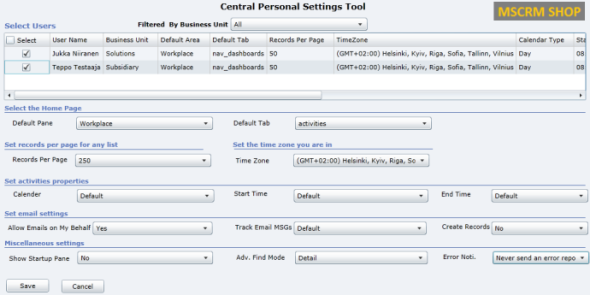
    When setting up new user accounts in your Dynamics CRM organization, wouldn’t it be nice if the system administrator could set their personal settings to match the policies of the organization as well as the likely preferences of the user in question? Things like Time Zone, Records per Page, Advanced Find mode, default home page etc. can be easily configured for users in bulk with the CRM 2011 User Settings Utility by Amreek Singh.

    CRM2011_User_Settings_Utility

    One particular pet peeve of mine related to the default configuration of Dynamics CRM is that new contact records are automatically created from tracked email sender or recipient addresses not found in the database. Well, with this tool you can stop the users from unintentionally populating your database with partially filled contact records not associated to their proper parent accounts by simply configuring the setting to “No” for all users. Beats having to send everyone instructions by email on how to check their CRM profile settings, doesn’t it?

    Universal Settings

    Download from Sonoma Partners website.

    It’s not only the user settings that may require you to pop the hood open on your CRM instance. There is a number of Organization Settings as well as Deployment Settings that can be used to either overcome limitations or alter the default behavior of Dynamics CRM. For example, if you’d like to be able to export all of your contacts records from CRM to Excel and not just the first 10,000 then you’ll be happy to know that changing the MaxRecordsForExportToExcel parameter is a breeze with Universal Settings, no matter if you have an on-premises or CRM Online environment.

    UniversalSettings

    Another handy limit you can adjust with the tool is AggregateQueryRecordLimit, which will allow your charts to summarize more than 50,000 records at a time, instead of seeing “the maximum record limit is exceeded” errors. Also very handy if you wish to work with more than 50,000 marketing list members in your campaign target group. Unfortunately this tweak is not available for CRM Online, though, as the setting resides in the deployment table rather than the organization table, which is the only one you can update in the cloud.

    XrmToolbox

    Download from CodePlex.

    We’re now stepping into the world of “Mr. CRM Tools” himself, a.k.a. Tanguy Touzard. His awesome Toolbox for Dynamics CRM 2011 is a collection of the various tools developed over the years to help make Dynamics CRM administration and customization more efficient and enjoyable. By downloading the Toolbox you’ll get a number of great tools, but just to ensure you understand why you need them, let me give a quick intro to my favorite ones.

    Sitemap editor

    Adjusting the CRM main page navigation (a.k.a. sitemap) is something that you should always perform after you’ve determined what are the entities your different user groups (sales, marketing, etc.) will need to access and what is the logical arrangement of them in the navigation. Trust me, the right answer is not “the order in which the entities were created” nor “alphabetical”. There’s a number of free sitemap editor tools out there, but since XrmToolbox is such a powerhouse, it makes a lot of sense to use the the same tool that you’ll be using for other tasks in the same organization, as you’ll only need to configure the connection parameters once.

    Sitemap_editor

    Re-arrange, add, hide, group, rename, do basically whatever you want with the CRM menus with this editor without ever seeing a trace of the solution XML file contents.

    Easy Translator

    Easy_translatorThe latest addition to XrmToolbox is something every CRM admin from a non-English speaking country can surely appreciate. Since most of us still prefer to use the English base language setting in Dynamics CRM due to the awkward terminology of our native language translations in the customization UI (and any potential technical compatibility quirks that come with it), working with the “export/import labels for translation” process is all too familiar to us. Hunting down those strings in the unstructured output file isn’t very pleasant, which is where Easy Translator comes in handy. You’ll get a nicely arranged Excel with just the types of labels you’ve selected for export, which reduces the amount of trial & error in translating fields, values and form labels to the language of your choice. (more…)

  • MVP Award & Why Communities Rock

    MVP Award & Why Communities Rock

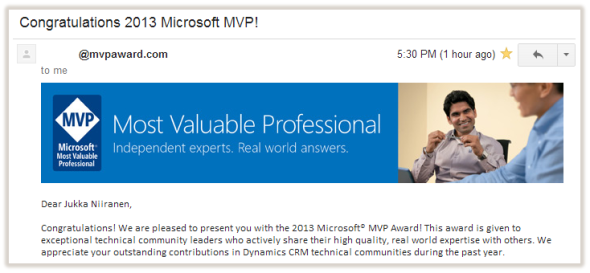
    Today I received the following email:

    MVP_award_email_small

    Wow! Quite an honor, I must say. Not so much for the MVP badge itself but for being recognized alongside all of the brilliant minds that have received the Microsoft Dynamics CRM MVP award before me. Thanks especially to fellow MVP Gustaf Westerlund for nominating me for the award! Also, it’s nice to notice that all of the sarcastic remarks I tend to make in my posts while explaining the do’s and don’ts of the Dynamics CRM product have not permanently angered the folks at Microsoft to put me on their blacklist 😉

    It’s great to receive recognition from the makers of Dynamics CRM of course, but by far the most important thing is the support from all the other members of the Dynamics CRM community. That means anyone who contributes to the discussions on CRM forums, comments on blog posts, sharing of links on social media and all the other activities that help people like you and me to… you know, survive living with this thing we call CRM. In the spirit of award speeches, let me take this moment to ramble on a bit about why these things matter so much.

    All the way back in 2005 when I first got exposed to Microsoft CRM (the pre-Dynamics era) in the role of an ICT specialist evaluating alternative applications to replace an aging yet heavily utilized Lotus Notes based CRM system for my organization, the one thing that stood out in Microsoft’s product was the amount of community contributed material that was already available at the time. Compared to the world we live in today, it was of course a tiny fraction of the vast resources we’ve got now, but compared to the other potential CRM vendors on our short list, it was a significant factor that made me push for choosing Microsoft CRM. Knowing that I would be responsible for administering, supporting and customizing the system further once deployed, I naturally wanted to work with a product that I could find answers from not just the vendor but also other users and consultants who were sharing their expertise so graciously on the Internet.

    CommunityAfter having spent some time in learning the ropes and reading through a pile of invaluable blog posts (~100 RSS feeds on my Dynamics CRM daily diet) that had helped me solve the day-to-day problems encountered when trying to mold the CRM system to meet the requirements of the users in a couple of customer organizations, I decided to put up a blog of my own to have a place to share some of the tips I had found useful. Then along came social networks like Twitter, that allowed you to discover even more great experts and content on hashtags like #MSDYNCRM. Eventually I realized there was no way for me to return back to the way things were before becoming an active member of the global online community around Dynamics CRM, so the only thing left to do was to push even further and try to make the most of it – even experiment with it, if you like.

    The virtuous cycle of communities is truly a powerful force. In exchange for receiving help from complete strangers with no expectation of monetary remuneration, you start to feel compelled to give back to them in one form or another, to pay it forward. Once you do, you begin to notice that there are others who in turn are benefiting from your actions, which makes the cycle just start to spin faster & faster. All that shared knowledge begins to accumulate into a source for “wisdom of crowds” type of phenomena where you are no longer bound by your own cognitive capabilities, rather you can tap onto the community as an extension of your brain to solve the problems you encounter. It’s no cyberpunk fiction, simply the best strategy for an information worker to stay on top of his game today and develop the skills needed tomorrow.

    Most of the things I know about Dynamics CRM I have learned from the community surrounding the product. That is why I personally value the MVP Award, because in essence it’s all about the most important part: the community, not just the application. Therefore, my advise for anyone who’s working with Dynamics CRM and is interested in getting more out of their job, as well as getting better at their job, is to take the plunge and start contributing to the community. You don’t have to be a CRM guru, a superstar developer or even a 24/7 social media geek to be able to add value into this common pool of knowledge and insight that keeps the Dynamics CRM product moving forward and allows all of us to better solve real life business problems with it, thus eventually helping the world outside the community. All you need to do is proceed along these steps, one ladder at a time:

    1. Explore
    2. Learn
    3. Share
    4. Contribute
    5. Rinse & repeat.

    Thank you. Let’s keep rockin’ with CRM.

  • Getting back at blog content thieves

    Blogs are not only a valuable information source, they are also incredibly efficient vehicles for performing content marketing to promote a company or its products. In the line of professional services, many organizations want to use blog content created by experts in their own organization to prove to their potential customers that they are a viable business partner.

    Unfortunately there are also companies who don’t possess the required expertise or haven’t assigned proper resources for content creation, but they still wish to drive traffic to their website through articles that contain keywords they expect potential customers to be searching for. As the web is already full of content, why not just grab a suitable piece of it and post it in your own name? Sure, it’s unethical and mostly illegal, but what’s the risk of getting caught on the wild wild west of the Internet?

    Microsoft Dynamics CRM community has tons of great experts that choose to share their knowledge with others without asking for any direct monetary compensation for it. Lurking inside this community (or perhaps rather outside at the gates of the community) is a small number of players who are willing to take advantage of all this free content and use it to fill up their own blogs with direct copies of the original posts. Typically the only difference is the lack of reference to the original author of the content, because it wouldn’t look very smart if someone finds out you haven’t actually added any value in the copy-paste process. It’s not content sharing like posting links to articles by others, it is content theft with a very clear intention of benefiting from the works of others.

    This week I ran into two cases where the posts from my Surviving CRM blog had been posted on another blog, word by word, without my permission. The first one was a blog by an individual, who apparently was trying to build up his profile as a Dynamics CRM expert. The second one, however, was a Microsoft Dynamics CRM consulting company that’s a listed partner on Microsoft’s Pinpoint service (I won’t post the name of the company, but this is their profile). Looking at their Blogger profile, it was apparent that this company was misusing blogs and stolen content from also many other sources in an effort to gain traffic for their own website.

    I spotted that the company in question had hotlinked the article images from my web server, instead of re-posting them on Blogger. That’s of course the easiest way for them to steal content, but it also opened up an opportunity for me to teach them a lesson. See the slide deck below for the results of the little trick I played on them. If you’re interested in viewing the actual page and seeing if the modified images are still there, just open my original article about subgrids and associated views in CRM 2011, copy a sentence from it and paste it into Google to find the unauthorized copy of my article hosted on the company’s blog (tip: it’s the Blogger blog with a dynamics-crm2011 prefix in the URL, the article’s posted in September 2011).

    Despite of me getting to have some fun at the expense of the content thief, it is of course a very sad thing to see such practices being utilized in selling services for Microsoft Dynamics CRM. Out of all people, it’s CRM consultants who should understand the importance of building long term business relationships on trust, not short term money grabs from gaming the search engines with keywords to lure in customers. In this light, who in their right mind would consider ripping off content from others as a viable tactic to be used for selling services related to customer relationship management?

    The unfortunate fact is that there are many people who work with CRM solutions purely from a technical perspective, without understanding the business problems that these solutions are meant to solve. For a customer looking for experts to guide them through the process of deploying Microsoft Dynamics CRM in their organization, it’s not easy to spot the bad apples and choose the right partner. So many professional organizations working with the Dynamics CRM product still today do not bring out their expertise online but rather just settle for having a brochure website with generic, static content about their products and services. This leaves the door open for unethical marketers to flood the net with their blogs and steal the top spots on search listings. It’s not something we can blame Google for; their tactics work because we allow them to work.

    To quote myself (or rather the updated blog post image):

    So, as a conclusion, when you’re looking for Dynamics CRM professionals to help you implement & develop your CRM system, do some background checks first. It’s all too easy to steal content from others and build up a web presence to lure in potential customers. Online content is easy to generate, building a reputation requires hard work. Some of us choose to skip that ”hard work” part.

    Have you encountered content theft on Dynamics CRM blogs you’ve written, or consulting companies that take advantage of stolen content? Any thoughts or ideas on how the Dynamics CRM community could weed out this unwanted behavior?