Tag: Common Data Service

CDS

  • How naming works in the Power Platform universe

    How naming works in the Power Platform universe

    After the peculiar episode in July-August timeframe when Microsoft first tried to rebrand the Common Data Service and had to later cancel their plans, we’ve been eagerly awaiting to hear what they are actually going to call CDS from now on. Yesterday the Teams based features known as Project Oakdale finally went GA and now we know the answer. I won’t focus here on the actual features, but you can read my thoughts on them from the Forward Forever team’s blog:

    Hello Microsoft Dataverse

    The mapping of the old & new names is quite straightforward:

    • CDS = Dataverse
    • Project Oakdale a.k.a. “CDS Lite” = Dataverse for Teams

    Not all that different from their initial plans of using the name “Dataflex”, which didn’t go through since the owner of that trademark considered it to be an infringement and sued MS. Is the name “Dataverse” unique then? Not entirely, as there appears to be at least the Harvard Dataverse out there. Luckily it’s not as directly related to low-code application development platforms as the DataFlex that caused grief the last time.

    Just because there are other existing products out there in the IT space that use a particular word, this doesn’t mean new products would never appear in the market with the same name. As an example, last month a service called Microsoft Clarity was made Generally Available. Is “Clarity” a brand name that isn’t used by any other IT product? Of course it isn’t. The first thing that comes to my mind is Clarity PPM project & portfolio management software, but search engines will reveal many others. Heck even MS has acquired a BI software company called ProClarity back in 2006.

    That’s just how it goes in the real world. Coming up with a name that hasn’t ever been used before yet also means something is not an easy task. If instead of a Globally Unique ID you’re aiming for a product name that actually contains some hints about what the product does, then your choices will always be limited.

    Ah, the Choice / Choices in life…

    Which brings us to:

    Terminology updates inside the Dataverse

    Not only does the name of the technolgy itself change from CDS to Dataverse, there have been a number of terminology updates to the foundational concepts of the data platform:

    • Entity > Table
    • Field / Attribute > Column
    • Record > Row
    • Option set / Picklist > Choice
    • Multi select option set > Choices
    • Two options > Yes/No

    For a quick explanation about the scope of changes, see this short video by David Yack:

    I bet this is a bigger change for many of the professionals in Power Platform and Dynamics 365 area than the new Dataverse brand. We’ve been talking about entities ever since the birth of MS CRM and now all of a sudden the idea of “entities are much, MUCH more than a mere database table” should be replaced with “fine, they are tables”.

    Why are these changes necessary then? Largely for the same reasons why a more approachable name was needed for CDS: the target group for this technology is no longer the same – it is considerably broader. Microsoft doesn’t want the platform to be an exclusive club for those who thoroughly understand the business process management and data modeling techniques offered by their products, sometimes only after having gone through training courses and technical certifications. No, this needs to be something a power user that’s equipped with nothing more than a Microsoft Teams license can quickly figure out on their own.

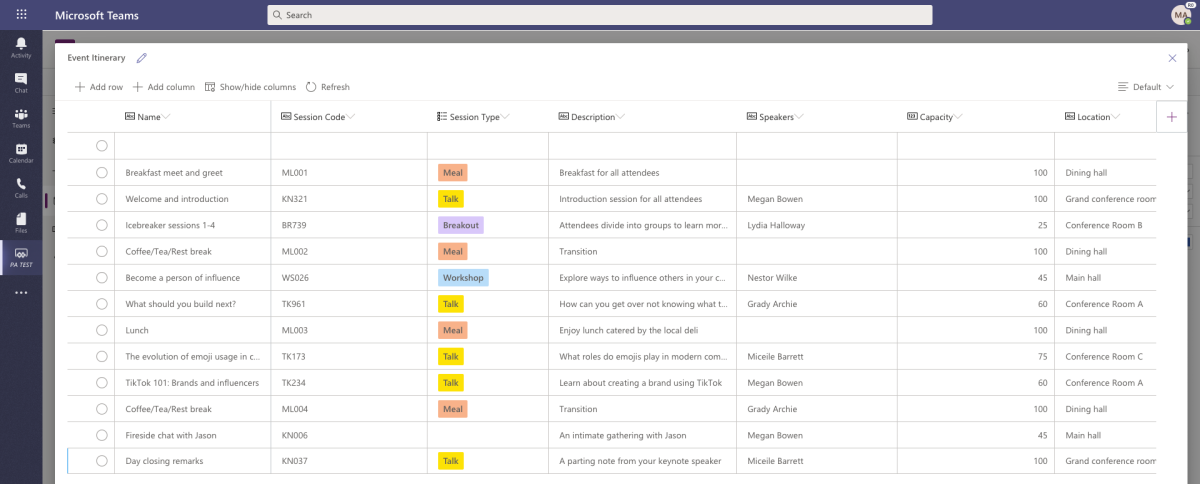
    The path towards Teams as a platform brings more changes than just new names for familiar things. Previously the data model construction was a back-end task handled largely separately from configuring the app’s front-end. With Dataverse for Teams and later presumably in other UI’s, too, the interactive table editor supports both data model design and data entry all in one – much like a pre-built app á la Microsoft Lists does today. It doesn’t remove all the other functionality of entities in the underlying relationship management system, but it makes these optional at the start. You could just build a table like in Excel or Access, then later take it further as the app requirements become better defined.

    For those who have mastered the earlier XRM universe, the simplification of the terminology that was very specific and accurate to what the platform does may feel like a slap in the face. How can Microsoft tell us that we should pretend that it’s just a database table when we know the reality as well as the history? There isn’t much of an upside for these technical professionals in the new naming – at least if they don’t need to interact much with business users unfamiliar with the core concepts of CDS.

    We’ll get over it, though. Developers and even many no-code customizers will probably hold on to the entity/field terminology for quite a while – especially when on the API level everything the terms are not expected to change (at least for now). Having this dual reality of tables and entities isn’t going to present a huge cognitive challenge for those who’ve been with the platform for a longer time. The old content from pre-Dataverse era may cause confusion for the newbies, but we’ve already been through the merger of Power Apps & XRM a short while ago, which had a much more profound impact on the names of concepts in the platform. This too shall pass.

    While it may not be of much consolation, there’s one thing that we know won’t change: this changing of product and feature names isn’t ever going to stop.

    Why is this naming thing so hard in BizApps?

    I’m not going to write a four-part series on the product naming complexity just yet (like I did on the complexity of Power Platform licensing). Let’s try and keep it within this blog post for now. So, here are four reasons that make naming especially tricky in the context of Microsoft Business Applications are:

    1. Ambiguity
    2. Hierarchy of concepts
    3. Shifting product boundaries
    4. Marketing goals vs. market needs

    1. Ambiguity

    In a universe as broad as Power Platform, there can easily be overlap in naming elements of that platform that serve different purposes but really should have a fairly generic name. As an example, “a Power Apps portal” and “the Power Apps portal” are 2 different things. Excuse me, what?!? Yes, it’s all in the documentation. Power Apps portals are one of types of apps you can build, whereas the Power Apps portal is the place to create new tables and columns. People tend to refer to the latter one as the Maker Portal thanks to its URL, but it’s good to keep in mind that URLs in Power Platform do also change occasionally.
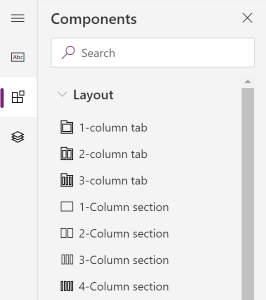
    Layout components

    This is why we now have Model-driven app forms which use the word “column” for both describing a field on a form as well as the number of adjacent containers within a tab or section. The original intentions for using easy and generic terms can sometimes create confusing results. If not in their native English language then most probably somewhere down the line when the terms get localized to a multitude of different languages.

    2. Hierarchy of concepts

    You won’t always have a clear view of what individual products and technologies will eventually be needed when pursuing a particular vision. Thinking about what CDS was called initially, it wasn’t a separate “thing”. It was embedded within the Common Data Model concept introduced in 2016. It took a year for this vision to evolve to a level where the actual data platform functionality operated by Microsoft was named Common Data Service and the earlier CDM term was dedicated to the idea of a shared schema across business apps from different vendors. It’s easy to see these should be 2 different things, but finding the right way to put them out there took a few iterations.
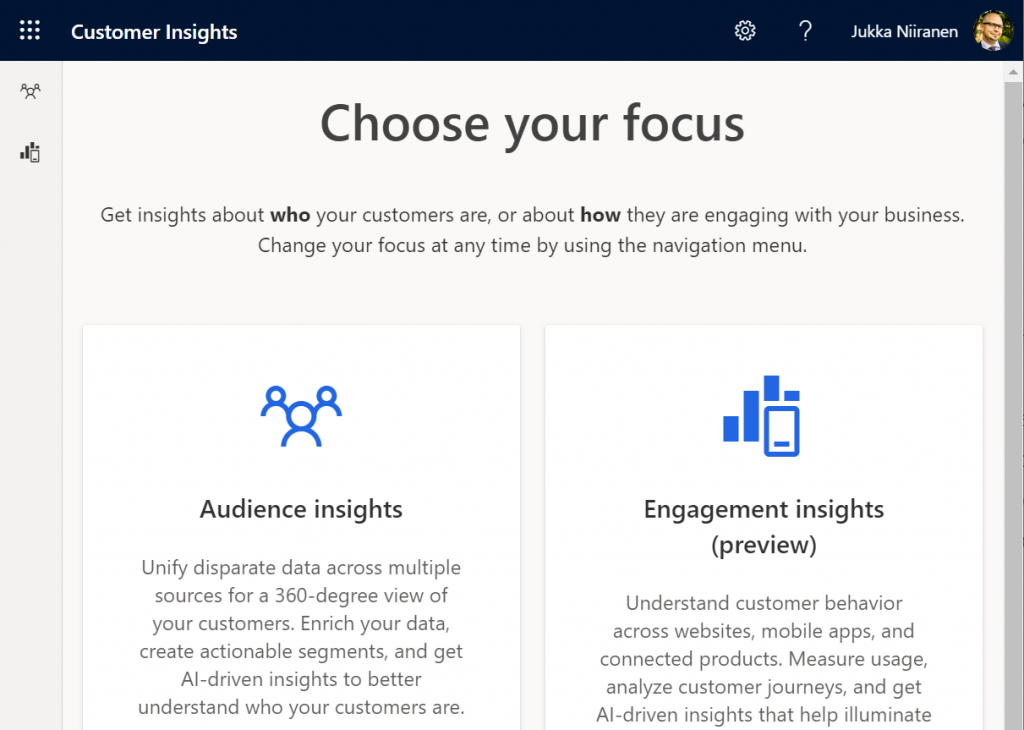
    Another example where things are a bit further already when a the need for redefining the terminology arises is Customer Insights. Microsoft has been shouting a lot about the booming demand for their Customer Data Platform solution (CDP, a generic term like CRM). Recently they’ve had to reshuffle the Insights deck of cards to ensure the gameplay works smoothly, so a hierarchy like this has been introduced:

    • Customer Insights: the top level concept of Microsoft’s CDP
      • Audience Insights: the features that were initially called Customer Insights, now referred to merely as a “capability” of CI.
      • Engagement Insights: announced originally as an independent product called Product Insights, now in preview as another capability of CI

    3. Shifting product boundaries

    Microsoft today excels in understanding the importance of their technology stack. You could also call it the platform approach in this context, but the point remains the same. Their products rarely get developed in isolation these days, rather there is (at least seemingly) a big push for combining elements of existing services to create new products. The problem is, though, that this game of connecting the dots isn’t ever really over.

    Survey feedback management was first brought into the Business Applications portfolio via acquiring an ISV product called Mojo Surveys that had been built on the XRM platform. After some rearchitecting and rebranding it was launched as Microsoft Voice of the Customer (VoC). The capabilities for the survey form design were quite lacking compared to the simplified UX in Microsoft Forms that had been developed internally on the Office 365 side of the house. Instead of retrofitting the form designer into VoC, MS decided to take CDS as the process and data management engine to give birth to a more structured feedback management tool, called Forms Pro. VoC was then deprecated and customers were asked to migrate to Forms Pro instead.

    In this process the technical capability of feedback management had hopped over the fence from the Dynamics side to the Office side. This was somewhat problematic from a business perspective, as well as causing confusion between the non-Pro and Pro usage of Forms. So, Microsoft ended up doing a further reimagining of EFM and rebranded Forms Pro to Dynamics 365 Customer Voice, bringing it back to the BizApps side where it started from.

    Returning to the previous example, before we had Dynamics 365 Customer Insights, the product names Microsoft used for referring to the same concept included “Cortana Intelligence Customer Insights” and “Azure Customer Insights”. The earlier Azure products that were offered in preview had to be scrapped and rebuilt as a Dynamics 365 product to finally see the GA milestone. Today it makes far more sense to have these type of packaged AI capabilities in the BizApps portfolio than in the Azure service catalog, but it wasn’t always obvious – especially back when Dynamics was just about CRM and ERP.

    4. Marketing goals vs. market needs

    Product marketing at Microsoft is in an endless pursuit of finding the best story that can sell customers a shiny new vision of what results they could achieve – if they choose the right technology from MS. Making a single purchase isn’t enough. You have to get the customers hooked on buying more from you, which leads to the invention of new things to sell. It’s easy to understand the incentives that lead to such actions, but they can sometimes end up irritating the customer who’s already made a purchase based on their own understanding of their needs.

    When Microsoft decided in 2016 that it would no longer sell a product called CRM, you could argue that their vision for tearing down the traditional CRM and ERP silos was logically a goal worth pursuing. The side effect from this product marketing goal was that when Microsoft took away the name “CRM”, they didn’t give anything new to replace it with. Reluctantly the Customer Engagement name was introduced a bit later, only to be quietly discontinued.

    The CRM systems that customers had deployed didn’t disappear anywhere of course. Companies offering professional services around them first struggled in migrating from Dynamics CRM consulting to Dynamics 365 CE consulting, and now they’re even more confused about what to call themselves.

    Microsoft’s branding changes aren’t ever exactly applauded in the partner or customer space, since renaming CDS to Dataflex to Dataverse will always cause extra work for them and give little in return. Removing an entire category like CRM has a far bigger impact than changing A to B. Redefining concepts and their boundaries is of course a very powerful way to stir things up and generate motion in the markets. I can’t say that I personally have any regrets on moving on from CRM, yet it’s easy to understand why not everyone is cheering when someone comes and says “what you’re doing is no longer a thing – time to reimagine everything!”


  • There never was a “Microsoft Dataflex”

    There never was a “Microsoft Dataflex”

    There are a lot of benefits in taking long enough holidays during the summer, like many people here in the Nordics do. Going offline for a while is a great way to reset your brain and force-close all those open browser tabs of the mind, to free up memory capacity for properly engaging in brand new tasks.

    If you were lucky enough to set your vacation time between July 21st and August 11th, you managed to dodge an unfortunate episode in software product launches from Redmond. Here are the key dates:

    • July 21st (first day of MS Inspire conference): a new brand name “Dataflex” is announced, with Common Data Service renamed as “Dataflex Pro” and a new subscription tier “Dataflex” promised for all Microsoft Teams customers. (My blog post about it is still here.)
    • July 29th: the name “Dataflex for Teams” is used for the first time to reference the previous “Dataflex” tier that’s bunlded with Teams, in an effort to make this product connection more clear.
    • August 11th: all references to “Dataflex” in all Microsoft websites are taken down. The announcement blog posts are brought back online with the terms “Dataflex” and “Dataflex for Teams” replaced with “Project Oakdale”, and “Dataflex Pro” now reverted back to “Common Data Service”.

    What happened? The answer is: litigation from the owner of the trademark “Dataflex”.

    There already was an established software product with the name “Dataflex” out there – in fact it had been around for 4 decades already. Immediately upon the launch day of July 21st several community members were quick to point this out, as indeed it was in practice impossible to miss this brand name overlap when using a search engine. Why Microsoft decided to proceed with their plans on renaming CDS into something like this is something we’ll never know for sure. Some had initially speculated that perhaps there was a preliminary agreement in place with Data Access Worldwide to transfer the ownership of the trademark, but based on the immediate legal action that the company understandably took to defend their rights, nothing like this was likely ever discussed. Our conclusion must therefore be that Microsoft knowingly and intentionally attempted to change the name of its existing technology (Common Data Service) into something that was already in use within the same domain by another software company (Dataflex) without considering the consequences.

    The end results is almost like a story taken from The Onion. Even if we are living in 2020 right now and the world appears to go mad every few days, it’s still an utterly bizarre episode in software business. I can’t recall seeing anything killed this fast after it’s announcement, which in the case of Microsoft Dataflex was only 21 days. Neither can I think of an example where something with such a clear potential for software product naming conflict would have been attempted. It is indeed similar to as if MS would have launched “PlayStation 6”.

    It’s of course not unusual for Microsoft to pull a product name between its announcement and the planned GA. Remember Dynamics 365 Business Edition, for example? Just because we see something presented on slide decks aimed at MS Partners as guidance for building their business around it, that doesn’t guarantee it will ever see the light of day. Shift happens, plans change and a lot of the partners have already become accustomed to this risk as simply the cost of doing business in this ecosystem. This time the product itself is not pulled, though. The need for coming up with a new brand will most likely delay the commercial roll-out of CDS features for Microsoft Teams based apps, but it’s important to keep in mind that this is all still happening. CDS will most likely become a mainstream data platform to replace use cases where SharePoint Lists have previously been used.

    SkyDrive is another example of a Microsoft product brand that suffered from the conflict with an existing trademark and had to be renamed OneDrive as a result. BSkyB as a media broadcaster and digital services provider wasn’t entirely in the same business as Microsoft with it’s personal cloud storage that was following in the footsteps of Dropbox, yet the end result of that case showed that at least between large enterprises such near misses with strong brands can become costly. Even features of a product like the “Metro UI” with Windows 8’s modern user experience had to be avoided due to objections from German reltailer Metro AG. Both of these are examples where it wasn’t obvious to an outsider if a trademark was actually violated, though. With Dataflex the evidence was in plain sight for everyone.

    Lucky for us, MS had not yet made any public preview or a commercial subscription of the new Dataflex branded services available by the time they had to call the whole thing off. It was only the early adopters in the partner field and the passionate community members a.k.a. #PowerAddicts that lost some of their work hours due to the branding incident. Yeah, I had to go back and edit a number of web pages, rewrite presentation decks, revert our service documents etc. to recover from the erraneous information that had been published on July 21st. The majority of people out there in the MS ecosystem probably didn’t yet even get a chance to understand what Dataflex meant or how it was different from CDS, so they will have dodged the bullet when it comes to loss in productivity.

    There is, however, a much greater loss here than the “Find and Replace” activities needed for changing product names. It is the loss of credibility that Microsoft’s Business Applications specifically suffered from this very unfortunate product naming incident. The worst thing is that there has not been any explanation presented to the genereal audience on what’s going on, rather we’ve just seen the word “Dataflex” disappear and get replaced with “Project Oakdale” or CDS. Microsoft at this point is facing legal action from the owner of the Dataflex trademark, which we all know from the many Hollywood movies we’ve watched that “anything they say can and will be used againts them in a court of law”. It is at moments like these where it would be crucial for companies to have a voice, to be able to reach out to their most important audience (customers) and explain what happened & what are they going to do about it.

    I can tell you that it would honestly be a full time job keeping up with A) product naming and B) product licensing of Microsoft Business Applications. It’s not full time for me (luckily), but since I also do it as a hobby / community activity, I can say I’m pretty well educated on what the “right” answers in this area would be at any given time. For anyone who actually IS covering the actions of Microsoft full time in a professional manner, Business Applications is an area they usually openly admit to struggle in.

    At the end of the day, what matters to each and every one of us the most in this MS ecosystem is how the end customers react to what they see & hear. While the marketing machine at Redmond surely is capable of capturing the attention of IT professionals worldwide with their news and campaigns, what it does not seem to be very good at is explaining “what does this really mean to you”. As the cloud platforms grow and become an ever larger pool of individual apps that form a spider web of integrations underneath the user interface, the need for someone to cut through the marketing speak and explain the customers what’s really happening here seems to be growing exponentially. What we all could do with the Power Platform is simply magical, yet the understanding of A) through which products, B) based on what technology, with C) what levels of effort and D) for what license cost – this level of understanding is lacking pretty much anywhere I look. I’m not talking about the “how to” instructions of building apps but rather the higher level discussion of where business decisions get made. It is here where the damage from confusing messaging is, in my opinion, holding this ecosystem back.

    To close things off for now, as we wait for the new product names that Microsoft has said they will be giving to the technology briefly known as Dataflex, let’s recap where we are right now. “Project Oakdale” is the codename that is for the time being used to refer to the “Lite” version of CDS that will be made available to all Microsoft Teams customers at no charge. Common Data Service is what we will continue to use as the term (for now) when talking about the full capabilities of data management, entities, solutions, Model-driven apps and many other advanced features in Power Platform. This post on the Power Apps blog (originally from July 29th) is still valid in every other aspect, apart from that one “D” term that got removed on August 11th.

    It’ll all work out in the end, I’m sure. This time next year there will probably be a whole number of other product names that we’ll be using when discussing the latest turn of events in the crazy & exciting world of Microsoft Business Applications. Dataflex and Oakdale will live on as one of those trick questions in the pub quizzes run by the community. No one died as a result of this episode.

    In a way, us #PowerAddicts simply got a taste of what the BizApps whirwind must at times feel like for the end customer who isn’t involved with this technology of ours, all day, every day.

  • Dataflex: the day after

    Dataflex: the day after

    Microsoft dropped a big bomb this week with their Dataflex announcement. I don’t think I’ve ever had as many notifications on my social media apps as there were after I posted my two Dataflex articles on this blog and our company blog.

    Knowing that it wouldn’t be a simple topic for outsiders to grasp, with the many different dimensions that Microsoft’s various product teams would use in their own messaging, I wanted to make sure there was at least one article out there that would explain what Dataflex means for Teams, Power Apps and Dynamics 365 in the big picture of business applications. It was great to see that this explanation I came up with was also adopted elsewhere in the mainstream tech media:

    Here are some of the topics that the community has raised up since the July 21st announcement, based on the still fairly limited amount of public information that is out there on the coming Dataflex and the rebranded Dataflex Pro (formerly CDS).

    Yeah, about that name…

    For the small minority of techies who have actually heard of the Common Data Service (or XRM), the need for inventing a new name for their beloved service that remains the same (i.e. Dataflex Pro) wasn’t very obvious. For the larger crowd that works with Office tools and Microsoft Teams, Dataflex is a brand new thing, which understandably has made MS think whether a brand new brand would also be useful at this point.

    Unfortunately the name “Dataflex” isn’t so unique that there wouldn’t be some clashing with non-MS products out there. In this case, there has been an existing trademark within pretty much the same application development domains since the year 1981 already.

    Oh Microsoft…

    21 days after launching their Dataflex product name, Microsoft had to cancel their original plans due to litigation from the lawful owner of the Dataflex trademark (Data Access Worldwide). Read this blog post for more details: There never was a “Microsoft Dataflex”.

    Why not call it “Power Dataflex” or “Power [anything]” then? Wouldn’t that have been better in line with the whole Power Platform story, as well as reduce the chances of a legal dispute? Probably so, but it’s important to understand that this Power thing actually isn’t the only purpose that Microsoft has in mind for the platform:

    The entry level offering of Dataflex for all Teams users is an important milestone for XRM/CDS/MDF (not sure I want to adopt “MDF” as the acronym just yet, actually). Don’t be surprised if the same technology will pop up in more & more places within the MS Cloud in the coming months and years.

    Licensing details: TBC = “To Be Confusing”

    The specifics of what is and isn’t included with Dataflex didn’t get released yet, as this new service is still pending for the public preview to start sometime in August. At the announcement day it has clearly been more important for MS to higlighlight what you can do with the non-Pro Dataflex vs. what you can’t. Even after the eventual GA, we can expect to see Microsoft use just the term “Dataflex” when referring to Pro capabilities like API access and custom code. When raising this issue of one additional source of Power Platform licensing complexity, Charles Lamanna confirmed that this is indeed intentional:

    This comparison to Power BI actually makes a lot of sense. In fact, much of what has happened with the platform side of MS Business Applications has been taken from the Power BI playbook used in conquering the Nr. 1 spot in business intelligence products within a relatively short period of time. So, here’s how the product levels are positioned over there:

    • Power BI: free for anyone to use, also for publish to web
    • Power BI Pro: user specific license required for sharing reports across the organization (non-public)
    • Power BI Premium: capacity based offering that allows enterprise customers to remove the per-user element from the licensing equation

    What Dataflex and Dataflex Pro are going to offer is quite similar to this structure. No, I don’t quite expect the completely free edition of Teams to offer Dataflex features anytime soon, but the bundling into Office 365 & Microsoft 365 effectively makes it free for a huge pool of organizations to start using. When you then need to build some apps that go beyond the scenarios of team specific use cases and want to enforce some organization wide policies on it, Dataflex Pro may quickly become a requirement.

    What may initially sound like not a very profitable business model (give stuff away for free) can result in a lot of positive effects on the company wide revenue streams of Microsoft if played right. After all, we’ve already seen the plumbing from under the Dynamics products to being reused as a platform for DIY apps (Power Apps), so this strategy of exposing as many users to Dataflex as possible is a clear continuation of that path.

    Following the Power BI model, the next logical step after Dataflex and Dataflex Pro would now be to offer a Dataflex Premium service for enterprise customers who are more willing to pay for the capacity rather than for each and every seat. Whether MS ever launch this or not, the question of capacity consumption in terms of storage and API calls is bound to become a big source of confusion with the “free” vs. paid plans for Power Apps. Luckily the team behind Power Platform Center of Excellence Starter Kit is already working on making some of these governance tools compatible with the non-premium resources:

    SharePoint: both dead and alive

    The debate on why you should not use SharePoint lists as your app’s data source vs. why they area a perectly valid option has been going on for probably longer than Power Apps has existed. The inclusion of Dataflex into the core services of O365/M365 subscriptions has now prompted people to claim that app development inside SharePoint should be avoided altogether.

    There are plenty of greant points in the blog post by Andrew Welch on the impact that Dataflex will have on the app strategy for organizations. Certainly the old reality of avoiding CDS due to licensing costs will need to be replaced with a more modern view into the low-code application development landscape in Microsoft 365. SharePoint will remain as the service most well known in the Modern Workplace technology category for sure, but questioning whether it’s the right tool for managing structured data should now become a mandatory step in all app plannign discussions.

    One thing that’s clearly stealing the thunder from the Dataflex announcement and making the M365 folks even more confused is the GA announcement of Microsoft Lists that took place at the very same time. Yeah, this is just classic MSFT – having multiple products with overlapping feature sets and competing marketing messages.

    Teams: your business app platform?

    No matter how cool the apps that we build for customers (and ourselves) may be, it’s important to keep in mind that the majority of the average information worker’s time is spent inside applications that are exactly the same for everyone – like Microsoft Teams. This recent news about Slack first claiming Teams is not even a competitor to them, then moving to filing a lawsuit against Microsoft for bundling Teams with O365/M365 subscriptions, tells a lot about the game being played:

    It’s a fight for the future of work, which will largerly be remote work. The digital transformation of business processes will require many, many apps that are tailored for a specific task inside a particular organization. Nevertheless, it’s the umbrella above them, meaning the platform for teamwork, that will drive a lot of the technology choices and licensing dollars into the online meeting and remote work ecosystem that provides the different business apps the common context.

    If there would indeed be a significant uptake on the modern task based “mini” apps that do one thing well and we’d see organizations abandond their earlier enterprise system monoliths, then the question is where would all these apps logically land in? I haven’t really seen the enterprise app store concept being heavily utilized out there in the real world yet. Nor has there been much hope for Windows to enjoy a similar success with users installing apps from Microsoft Store, like they do all the time with iOS and Android.

    It’s been already a decade since the app store concept was first launched for Microsoft Business Applications. AppSource is a great channel for distributing Dynamics 365 and Power Apps solutions in theory, but in practice it’s a lousy marketplace for most ISVs to do business in:

    I’m not yet going to claim “this time it’s different” on the Teams app store and the Dataflex powered apps that can soon be published there by both 3rd party vendors and internal citizen developers. The idea however does sound like something that might scale better. Instead of deploying add-ons or templates into the single system of record like CRM, the new Teams based deployment model could allow a smaller group of users to install apps into an environment with a lot more narrow impact on organization-wide processes and data models. This could well be a more logical approach for Power Apps based solutions to find their way into more and more tenants.

  • Dataflex is more (and less) than CDS

    Dataflex is more (and less) than CDS

    It’s that time of the year again when big announcements have been lined up for Microsoft Inspire, the (virtual) conference for the MSFT partner ecosystem. Last year the Inspire announcements gave us a wealth of changes for the way how the Power Apps, Power Automate and Dynamics 365 licensing model worked, but all the product names remained the same (as far as I recall, at least). This year from Inspire 2020 the Business Applications part of Microsoft’s cloud is getting a bit of both. Say hello to Microsoft Dataflex!

    I have written an introductory post over on Forward Forever blog, “What is Microsoft Dataflex and who is it aimed at”, which you can check out to understand the impact from a customer organization perspective. Here on my personal blog I’m exploring the topic when viewed through the eyes of a long-time XRM professional.

    Abort mission!

    Microsoft will NOT use the name “Dataflex” to refer to the services described here, due to a blunder they’ve made with trademarks. Read this post for more details: There never was a Microsoft Dataflex.

    Dataflex Pro is the new CDS

    Let’s face it: “Common Data Service” wasn’t exactly the finest product name invented at Redmond. Originally it was introduced as Common Data Model, then later this name was switched to reference only the open source schema of CDM whereas the application platform and data management features became a service called CDS. In March 2018 the v1.0 of CDS was effectively put to rest as the far more established platform behind the Dynamics CRM / Dynamics 365 Customer Engagement apps, known as XRM, was rebranded to be “the new” Common Data Service (without the “new” or “v2.0” labels, of course, because why make things precise complicated). Actually it was called “Common Data Service for Apps” (CDS-T), since there was originally supposed to be a “Common Data Service for Analytics” (CDS-A) alongside the transactional platform. There never was, as CDS-A was rebranded as “Power BI dataflows” before GA, so we only had one Common Data Service left to talk about. Whew!

    After these adventures in the great platform shuffle of 2018, we did have some product name related announcement in 2019 as well, like the deprecation of Customer Engagement in the cloud, rebranding Microsoft Flow into Power Automate (where you still create Flows), and finally the “space program” for making PowerApps be spelled as Power Apps instead. In 2020, it had been eerily quiet in the product brand front, so I guess everyone was already expecting to see something once FY21 kicked off. As of today, July 21st, CDS is no more and the Dataflex chapter has begun.

    “Microsoft Dataflex” is not perhaps the most exciting name ever, but it’s certainly a better choice than Common Data Service. In part 4 of my series on Power Platform licensing complexity, I wrote that CDS should have rather been called “Power Platform”, due to its central role as the glue that ties the various MS low-code tools into a coherent platform. It’s a very unCommon service and it does a lot more than just host application data. Now, Dataflex on the other hand plays with the words “flexible” and “-plex”. The latter, when used as a noun combining form is described in Wiktionary as having the following origin:

    From the Latin past tense of plectere (“to weave, braid, twine, entwine”).

    Yes! That’s exactly what this technology does! It’s a platform that allows you to weave a set of processes, interfaces and data together, into an intertwined whole that is greater than the sum of its parts. It offers every developer flexible, no-code/low-code tools for achieving this. That’s how at least I intend to explain the meaning of Dataflex from now on, unless MS product marketing comes up with something even more compelling.

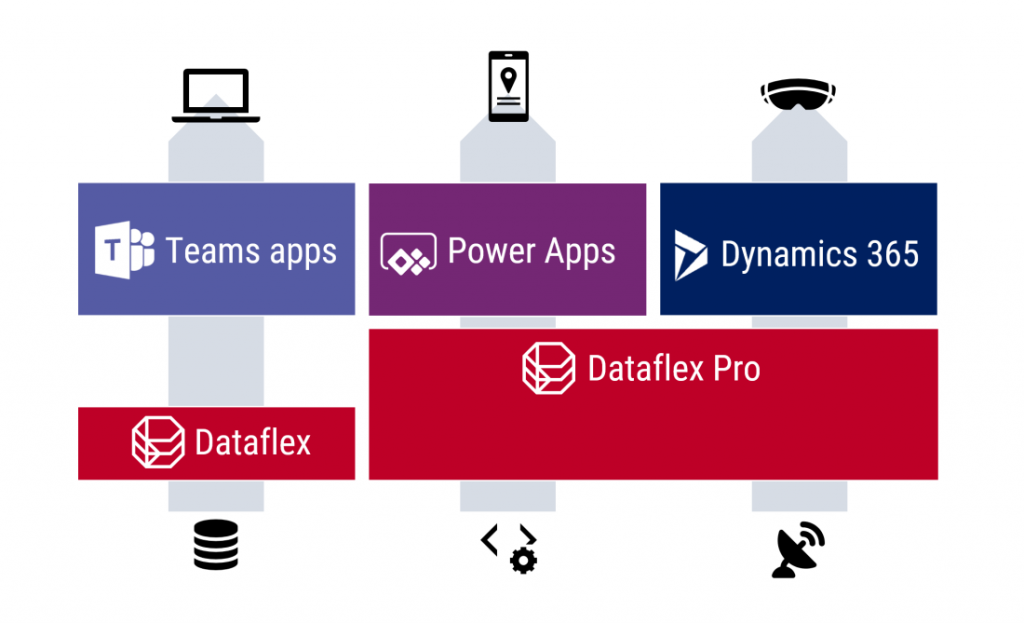
    Oh, there is of course one tiny detail to keep in mind: it’s actually Dataflex PRO. What Microsoft announced today at Inspire is a new service called Dataflex that is a subset of what CDS always used to offer. So, everyone who’s using CDS today is already on the Dataflex Pro version, whereas we’re about to get a preview of the non-Pro Dataflex in the coming weeks.

    Application platform for the masses: Dataflex (with Teams)

    If you’re coming from a Dynamics 365 background, the introduction of a “lite” version alongside the CDS/XRM platform capabilities might not sound so exciting at first. After all, from a pure functionality prespective Microsoft is taking away capabilities from the existing platform, to establish the baseline offering of Dataflex that customers can then upgrade to Dataflex Pro when needed. Some might dismiss it as just another licensing hurdle to worry about when trying to develop apps.

    From a commercial perspective, Dataflex is possibly the biggest thing that has ever happened to the platform formerly know as CDS/XRM. Biggest in terms of the number of potential app makers that will now have the possibility to build Power Apps on top of a true relational database instead of the dreaded SharePoint Lists. This is obviously the major immediate benefit from the announcement of Dataflex non-Pro, since in the previous licensing model the lines were drawn in a way that discouraged the use of CDS (or Azure SQL) databases for any Power Apps designed for light use scenarios – unless you had already acquired the full Power Platform license for your entire organization. With Dataflex usage rights bundled into Microsoft Teams at no extra cost, any user (internal or guest) with the necessary Office 365 / Microsoft 365 base license can now access Power Apps that leverage the true powers of a modern low-code application platform.

    You won’t get everything that CDS used to offer with just a Teams license now, of course. For starters, the only place from where you can access these app built on the non-Pro version of Dataflex is from within Microsoft Teams. None of the existing “players” for Power Apps will be supported, neither is embedding the apps to other UIs like SharePoint pages. Data types, security model, business logic, integration points, ALM… All of these will be far more limited on the “free” Dataflex than with the “real” application platform that is Dataflex Pro. For small apps aimed to be used by small-ish teams, though, I bet the Dataflex version will be good enough for a large percentage of use cases. It certainly is more advanced than SharePoint Lists, although the restrictions on app access points is more limited with the Teams based approach.

    Limitations can sometimes be a good thing. Dataflex is a simplified version of what CDS was, not just in terms of features but also the maker & admin experience. Do not underestimate how important this aspect can be in getting the citizen developers to make the right choice. Experienced CDS/XRM professionals may have been reluctant to move over to the new Maker Portal that is still missing features from the classic Solution Explorer. The new generation of app makers who have never even heard of these acronyms will most likely be happier within the Teams embedded app creation experience and give a higher NPS score to Power Apps as a result. Less is more, as they say.

    There’s going to be one Dataflex environment per Team that you can create, and the users will then map to the members of that Team, with a simplified user security role structure of Owner-Member-Guest (a.k.a. OMG). No business units or custom security role privileges to worry about, nor any complex data types like activities, polymorphic lookups, currencies etc. Yes, I know, most of the apps you’ve built already probably depend on those, but remember that this is not aimed at you! Dataflex Pro will have all of it and the non-Pro environments can be promoted to full capabilites, at which point they will require the same licenses as CDS does today.

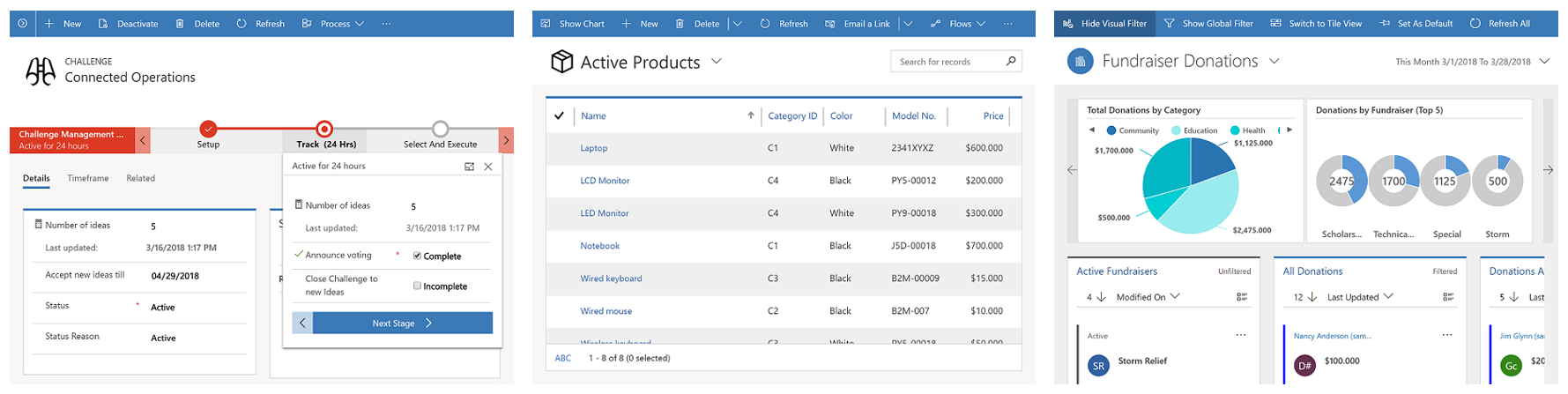
    This is still a Big Deal. With the “free” Dataflex included in Teams, Model-driven apps can soon be created by an equally large crowd as Canvas apps before. Eventually it might no longer be an awkward moment when you need to talk about “that Power Apps app type that looks like Dynamics, not like all the other apps you have”, since every app maker can generate those beautiful, structured UIs on top of the database tables they’ve added into Dataflex. Since Model-driven apps are so metadata driven, I’d imagine this route would actually be a lot easier for many power users of Excel that haven’t necessarily been comfortable with building pixel-pefect mobile UIs in Canvas apps before.

    Despite of everyone having the possibility to store app data inside Dataflex, it’s not by any means imperative that a single database is established as the place for all business data. That is the traditional CRM approach of doing things, but with the modern tools like Power Apps and Power Automate the source and target of data operations could be a number of different systems if needed, thanks to Connectors. However, I’ve understood that Premium Connectors will still not be included with the Teams license, so the options for data connectivity will be more limited here. This may again be perfectly fine for the simple apps that the non-Pro Dataflex is aimed to serve.

    One thing the free access to Dataflex should make ubiquitous is the usage of solutions for app packaging and ALM. As the solution framework is a concept from the XRM era, replacing the earlier standalone .zip packaging of apps and Flows required that everyone would get access to this layer in the underlying platform. From an administration perspective it should be a clear step forward to standardize all the work to be done with Dataflex tools. There is also the promise of further deployment options being introduced with the Teams app store and its “single click” app installation, so this is an area for everyone to keep an eye on.

    The business impact of Dataflex

    The launch of non-Pro Dataflex can be expected to generate a wealth of questions from those professionals who’ve been working with CDS based solutions. What is & isn’t supported in Dataflex, where do the license and capacity limits actually get drawn, how are they enforced, where can apps be created for different Dataflex environment types, what admin controls are available on the tenant level, and so on. It’ll be confusing initially, but in the end I bet it’s gonna be woth it for all parties in this ecosystem.

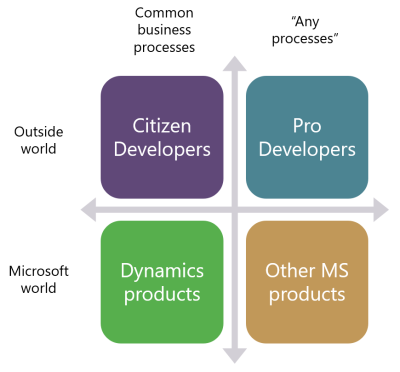
    One year ago I wrote a blog post examining the possible growth directions for Power Platform. This launch of Dataflex + Teams now broadens the scope of the platform both on the Citizen Developer dimension (number of potential app makers) but also in the “Other MS products” axis. Earlier I’ve enjoyed making the joke that one day Microsoft would build the next version of SharePoint on top of CDS. Well, that hasn’t quite happened yet (and most likely never will), but we did see a major step now in Power Platform catching up with the mainstream productivity apps in Office. After all, every time you create a new Teams team, a new SharePoint site is provisioned for it. We’re now at a point where technically each team could also have a Dataflex environment provisioned at the same time. Knowing this, what’s stopping future Teams features from being built on top of CDS Dataflex?

    As we can see from Ryan’s example, there are interesting synergies between Power Apps and Teams that are made possible by having Dataflex “on by default”. From a partner ecosystem perspective, over 500.000 organizations around the world who use Microsoft Teams just became a potential target for no-code solutions that could be dropped inside various teams. I’m saying no-code here instead of low-code because presumably the non-Pro Dataflex environment wouldn’t support custom code. Anyway, there’s a lot to investigate here with the Dataflex public preview coming in August and GA planned for September timeframe, so I will definitely be returning to cover the topic more closely once detailed feature lists are publicly available.

  • Why Power Platform licensing is complex, part 4: the role of CDS

    Why Power Platform licensing is complex, part 4: the role of CDS

    Three months ago I set myself a goal to publish a 4-part series on the many mysteries around Power Platform licensing models. I’ve been known to write blog posts that are a bit on the long side and sometimes it surprises myself when after announcing the new article on LinkedIn I see a “20 minute read” info tag added alongside what I though was just a quick exploration into a topic. So, learning to better pace myself is a skill worth practicing, and dividing my writings into more digestable portions is one such exercise.

    To recap, the original outline of this series was to cover these sources of licensing complexity:

    • Protection of intellectual property as well as development budgets across Microsoft product portfolio (part 1, done✔)
    • The old world of apps as data silos & the concept of multiplexing (part 2, done✔)
    • Light use scenarios for information workers vs. “Real Business Applications” (part 3, done✔)
    • The role of CDS as the platform, not just a data source/target (part 4, you are here 📍)

    The Common Data Service is more than a data service

    For the majority of users and developers out there who work with Microsoft technologies on a daily basis, CDS is not yet a “common” part of the toolkit. It’s not a visually sexy thing like Power Apps pixel-perfect UI’s, nor an superglue that connects different cloud services like Power Automate. There’s nowhere near as much flare in the data part as with Power BI. It’s not (in itself) an intelligent thinking AI machine with fancy algorithms either. For many it simply looks like a boring database that sits somewhere in the MS Cloud.

    These people got it all wrong, of course, but it’s hardly their fault. After all, “CDS” sounds a bit like “SQL” and the term often isn’t used in any other context than when you’re planning the data storage part of your solution architecture. What CDS really should have been called is “Power Platform”, because essentially it is the single place that represents all the platform elements that makers, developers and admins can take advantage of when building on Microsoft’s low-code application platform.

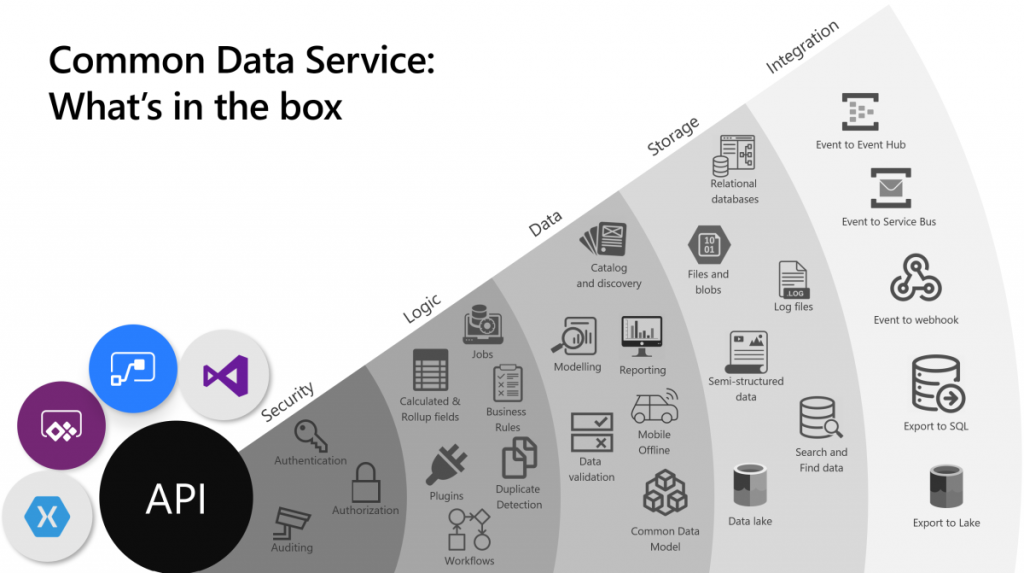
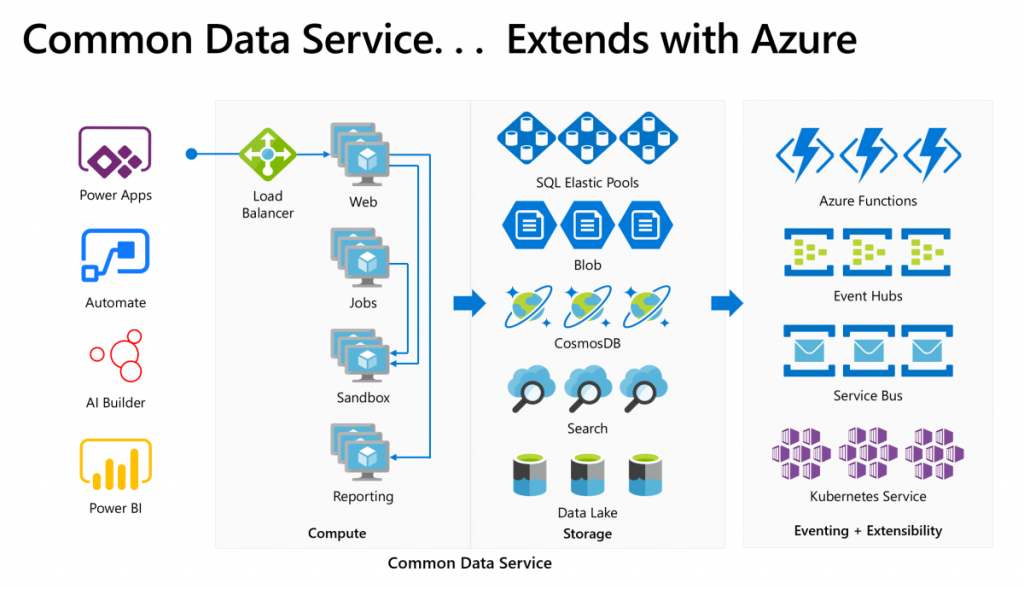
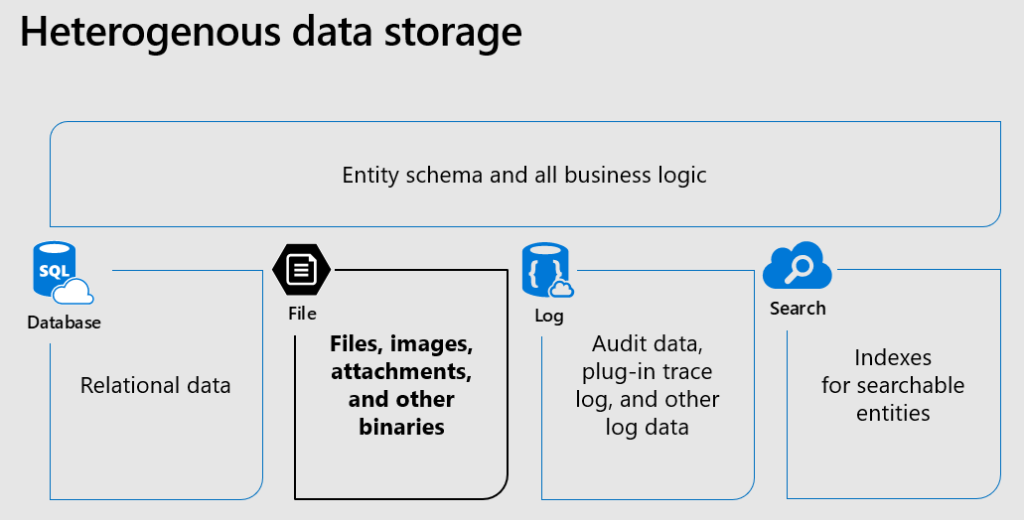
    The above image is the best illustration of the many dimensions of Common Data Service that I have yet come across in Microsoft’s slide decks. “Yeah, that’s pretty much all the important stuff you get with CDS”, I was thinking for a long time. Until someone pointed out to me that this picture is actually missing one obvious thing: solutions! That’s perhaps the single most important thing that CDS from its XRM origins is bringing to the table. Without solutions, what Microsoft would otherwise have is just a collection of independent cloud services that each have a completely separate way to manage their configuration, with no way to package these components into one logical container covering the functionality of an app, nor any valid ALM story for enterprise scenarios. In short, Power Platform would not be a platform without the solution model that’s powered by CDS.

    The fact that we can so easily miss a critical part of the Common Data Sevice while talking about it just goes to show how much of a foundational part CDS is in the business applications offering. It’s not just one icon in the cloud architecture pictures. In fact, we also should keep in mind how many different Azure services CDS runs on, to deliver its feature set to users, makers and developers:

    Yes, there is of course a whole bunch of deep tech stack found behind each and every icon in that picture too – say CosmosDB, for example. It is “big”, in the same way that CDS is “big”. What I think makes the Common Data Service special in this discussion is how it can abstract all that techy stuff from Azure and allow citizen developers (like myself) to control it indirectly, either via our own configuration or through the predefined patterns built by MS.

    Essentially CDS is a value-added layer that brings much of the cool new cloud technology into my business apps while I’m sleeping. What I mean by this is that the architecture evolves to cover new requirements and open up new possibilities, all the while the original business logic and data of the app is preserved. If I create a custom entity, like I did for the first time in 2007, it will keep gaining new superpowers every year as application platform beneath it matures and evolves. All I have to do is keep paying for the service.

    How do you price such a thing then?

    The answer: in all the wrong ways. At least that’s what it often looks like at that moment when the cost factor is brought into the discussion in Power Apps business scenario planning.

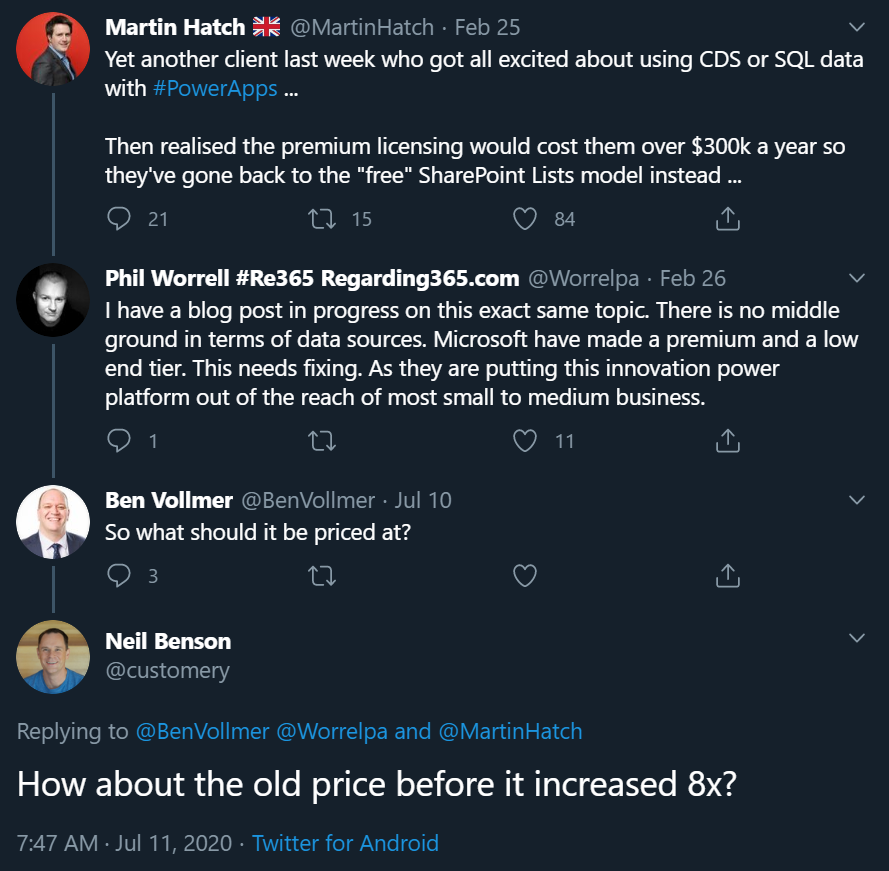
    The more central CDS becomes in the app story of MS Cloud, the more dissatisfaction there seems to be on the impact that its premium licensing model has on business decisions. There have been many debates on Twitter during the past few months, with valid arguments and counterarguments presented between the participants that range from customers to Microsoft 365 pros to Dynamics 365 pros to MSFT employees. Threads like this highlight an important aspect:

    If you were to invent a brand new service out of the blue, had zero customers and then started to plan the pricing model for it, life would be easy. If, on the other hand, you take an online service that has been offered to customers for over a decade now, then try and mold that into whole new use cases, you’re inevitably going to cause some anger among the existing customer base.

    In the above example, Neil’s point about the CDS storage cost increase in the new pricing model that moved from a flat GB rate to database/log/file storage type separation is entirely true: some part of the bill will go up 8x and that quite frankly sucks. Imagine if that would happen to the price of gasoline and your fuel costs would suddenly be 8 times higher. But hold on: the price of diesel went down considerably at the same time, and filling the tank with natural gas like LNG is now practically FREE!!! “Well whoop-de-doo, I’ll just switch my old gasoline Volkswagen to use LNG the next time I need to stop at the station.” Yeah, real life comes with a bit more friction to change the system that powers your vehicle, or your business processes.

    Going back to my CDS custom entity example, though, if we think about the types of cars that Volkswagen sold back in 2007 vs. in 2020, of course there are slight differences in what the product is. The transition to electric cars is a very apt metaphor when thinking about the difference between XRM and CDS. Even though the Volkswagen engineers were able to create an electic version of the popular VW Golf model and sell the e-Golf alongside its combustion engine powered cousins since 2014 already, that particular path wasn’t going to get them far enough. In order to remain a competitive vehicle manufacturer in the global game, Volkswagen has had to design a pure electric compact car in the form of ID.3, and struggle with the many issues that come with brand new technology (also on the software side).

    Similarly, it wasn’t ever really enough for Microsoft to just take XRM to the cloud and host it there (which they did a decade ago already). A lot of R&D budget has surely been spent in building the new foundation of Power Platform. At the same time, some existing features that the loyal fans of the classic VW Golf would have enjoyed could not be brought over to the ID.3, because there just isn’t a logical place for the combustion history to co-exist with the electric future all within the same frame. Witness the same pain with CDS, Power Apps and Power Automate never quite reaching full parity with what was available in the world that came before them.

    Aside from just going electric, there’s one even bigger existential question the car makers are facing: do people even want to purchase cars in 2020 or would they prefer to just pay for the transportation services that they need at any given time? A bit like the dilemma of the light use scenarios, whereby it would make more business sense to lower the barrier of entry by not requiring the purchase of a full user license for the complete platform but rather selling tickets to enter the app when the need arises. This growth in revenue wouldn’t necessarily come from the existing customer base that pays more – it could be a whole new revenue stream made possible by the way the technology as well as the world out there has evolved.

    Think about a simple, timely example: customer self-service terminals. In the aftermath of COVID-19, our day-to-day interactions with humans directly are being greatly reduced due to regulations on keeping a safe distance when roaming out there in the physical world. Instead of talking to clerks and cashiers, we are now acquiring the same information and completing the same transactions by using touch screens that allow the customer to do the data entry and retrieval themselves. Now, Power Apps Canvas apps would of course be the perfect fit for quickly creating touch friendly tablet UIs for various self-service scenarios. There’s only one blocker: Canvas apps don’t have a licensing model for kiosk scenarios where the person interacting with the app isn’t equipped with a user license for Power Apps. Doh!

    It’s hard to imagine Microsoft not wanting to expand the footprint of Power Platform to more and more scenarios that aren’t tied to named users with dedicated licenses. Yes, Portals can already do that, Power Virtual Agents can of course serve anonymous customers, Power BI can even be embedded inside third party applications. It’s that direct interaction with the CDS entities through a user identity mapped into security roles that isn’t quite as flexible yet in the current world… because like I’ve been telling you all along, Power Platform licensing is complex for the customers, the partners and surely Microsoft themselves as well.

    Life finds a way, licensing may follow

    The good news is that CDS as a technology is doing better than ever, thanks to the critical role it is playing in so many different Microsoft products these days. It’s further expanding inside the Dynamics 365 portfolio via Dual-write. Data platform is embracing it via the native sync to Azure Data Lake. It’s the ALM backbone for all Power products (aside from Power BI – and of course PowerPoint!). Project got rebuilt on top of CDS to replace the earlier SharePoint based architecture. It’s perfectly feasible to imagine more and more MS apps and products gravitating towards this growing platform and starting to orbit around the central body that is CDS.

    That still leaves open the question of the customer specifc business apps that are getting built every day as Power Apps Canvas apps. In order to ensure the citizen developers don’t just default to using SharePoint Lists (soon to be called Microsoft Lists) as their data storage solution, MS needs to find ways to lower the barriers to go with CDS instead. There’s the technical barrier from the long legacy of CRM requirements, then we have this licensing complexity. Even though the recent launch of Per App passes as a concept has in some high value scenarios made the business case calcuations easier, the vast majority of true citizen developer apps won’t ever even reach that stage where official calculations for a specific app’s ROI would be analyzed in detail. For this long tail of app development, there should just be ample CDS capacity available to be used for the purposes that the business experts themselves have identified as worthy to spend their time on (which often may cost a lot more than the actual software licenses).

    Capacity based licensing of course wouldn’t make the tools free either, it just changes the way the final bill is calculated. The example of CDS storage pricing change is a reflection of exactly what happens when trying to find non-user based billing metrics that would reflect the rate at which the platform is used. Looking at the Power Platform price points, Microsoft may well feel that it’s perfectly OK to sell the CDS database capacity at $40/GB/month when their traditional CRM rival Salesforce has set their list price per GB to be a whopping $250 (which I don’t think they publicly advertise anywhere, so your real mileage may vary). Both figures have nothing to do with how much it actually costs to store data in the cloud, they are purely intended for building a pricing curve where the growth in platform usage (and hopefully business value) results in growth of revenue to the service provider.

    The more we have capacity based pricing of Power Platform features, the bigger the issue of capacity limits and their enforcement will become in solution architecture design. API calls are much more difficult to estimate than user counts, so there is bound to be some increasing complexity ahead for scenarios where CDS and other Power Platform tools are used in a “pay per request” model. MS will likely continue to bundle quotas of API and storage capacity into their own software products that use CDS and where the revenue is attained via other means, in an effort to simplify the experience for that one product. The challenge that remains is the more holistic usage of an application platform, where not only do you buy the Apps but use features powered by CDS in your own unique ways.

    Other parts in this article series can be found here:

    Read more about Microsoft Business Applications licensing

    Check out my earlier blog posts in the licensing category.

  • First impressions on Power Platform 2020 Release Wave 2

    First impressions on Power Platform 2020 Release Wave 2

    At the start of this year, we made the decision to go all-in on Microsoft Power Platform and founded a company that focuses on helping organizations on their journey to take ownership of this low-code business application platform. You could therefore say that it’s pretty darn important for us that there is compelling roadmap for the products that represent the technical foundation of our services.

    Luckily Microsoft doesn’t show any signs of slowing down the investments into Power Apps, Power Automate, Power BI, Power Virtual Agents and all the underlying elements of the platform. Our MVP team at Forward Forever already did a “Top 3 x 3” highlights article on what each of us found to be the most exciting feature announcements in the 2020 Release Wave 2 release plans that Microsoft published yesterday. I wanted to expand a bit on that top list and reflect on how I see Power Platform evolving based on this new roadmap information.

    But first: what happened to Wave 1?

    Ah, true. We’re actually only halfway through the April-September period that 2020 Release Wave 1 represents. This means that many of the features I highlighted in my earlier first impressions posts have not yet shipped. Just because there’s a virtual launch event every six months doesn’t mean that it would be the exact time when a big box full of new software is made available. There are no version numbers in the cloud, it’s a continuous release train that runs on its endless route.

    It’s important to keep in mind that these are release plans, not release notes. The thing with plans is that they tend to change, and such is also the fate of some items in 2020 Wave 1 that I picked as the higlights in my post back in January. If we look at the change history page in the release plan, for Power Apps alone we see that 15 items had their release schedule changed and 7 were removed from Wave 1. And remember we’re only a bit over 50% through the April-September period, so more changes are bound to still occur.

    Changes do happen for the better, too. 8 new features have been added for Power Apps already after the initial release plan. In total there are one hunderd new features added to 2020 Release Wave 1 after January 27th. Wow! I can’t recall how many items in total there were originally, but this really highlights two things:

    1. The Release Plan is not a static document, rather it’s an evolving backlog of planned features.
    2. Microsoft has been very actively maintaining the online version of the Release Plan over on docs.microsoft.com.

    This is what the product roadmaps for clour services are like today. You can’t simply have a look every 6 months and then forget about them, rather you should always refer to the latest information online. Also, you can be 100% sure that there will be a lot more coming for Power Platform between October 2020 and March 2021 than this first Release Plan version reveals. Just look at Wave 1: we would not have seen from the plan that MS would acquire an RPA vendor like Softomotive, or that they would announce T-SQL support for CDS during MS Build. Get ready to be taken by surprise during Wave 2 as well!

    Wave 2 features to keep an eye on

    Portals Web API with CRUD support was big news in Wave 1, but the GA date for the feature isn’t until February 2021. It’s all part of the story where Portals is being made more compatible with the two other app types in the family. Wave 2 now promises a preview of PCF control support for Portals in December 2020, which should certainly be a nicely wrapped Xmas present for pro devs if that schedule will hold.

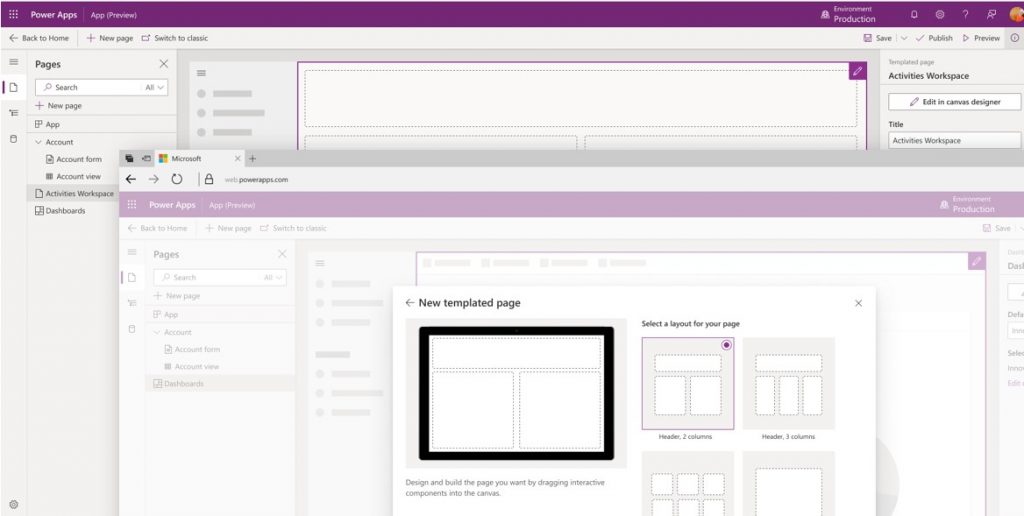
    If Portals is getting closer to the mainstream Power Apps types, then the unification of Canvas and Model-driven apps into “Run One UI” is also moving along. By the time the custom pages feature hits public preview in December 2020 it will have been 18 months since we saw the roadmap, but I’m not actually that surprised it’s taking a while for making these 2 very different client technologies work in harmony. It’ll surely be worth the wait from an UX perspective, as the Canvas app embed story has been somewhat limited in its impact so far.

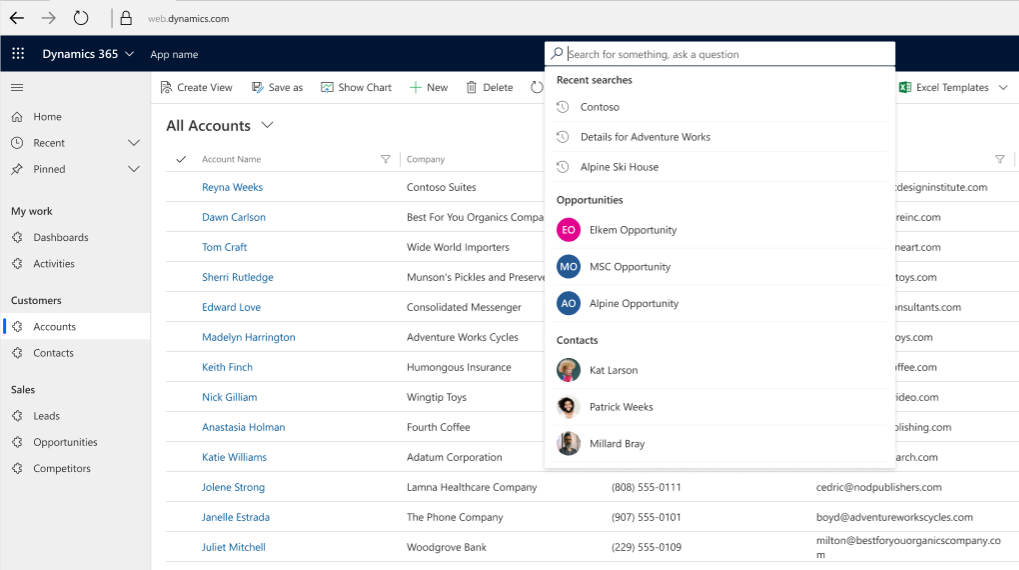
    To gain something new means you often must let go of something old, in this case the legacy web client. Transition to Unified Interface has been delayed a bit due to COVID-19, but it is definitely happening. While it will bring a more stict licensing enforcement on app module level, the benefits from features like improved global search experience and improved app header, sitemap and app switching should make it easier for anyone familiar with Microsoft tools to be productive when using CRM “Model-driven apps in Dynamics 365”.

    Once Canvas apps can be natively placed on pages that appear inside the app navigation, they’ll be ever more likely to become an integral part of more complex enterprise applications. This means that also Canvas development practices need to become more mature, which is exactly what the reusable components for business logic are aiming for. PCF components for Canvas apps are also critical to allow the pro dev audience to contribute into low-code app development projects. Code components have already been in preview for a while and GA is expected in March 2021, so obviously injecting custom code into what was originally designed as a “PowerPoint + Excel” experience for citizen developers is a big investment that takes time to polish.

    Power Automate has grown into an all-encompassing process automation service that covers both API and non-API (meaning RPA) scenarios. I have to say that for me personally it’s one of the scariest parts of this “low-code” platform due to how much secret formula knowledge one must posses to achieve something where XRM workflows offered a full GUI experience. I’m glad to see that MS is investing not only in the UI flows territory from their Softomotive acquisition but also in making Power Automate work more seamlessly with Power Apps. Simplifying things even further, the coming “diet designer” and templates desined for Microsoft Teams users is an example of how broadly the PaaS foundation of Azure Logic Apps is being productized via its Power Automate UI experiences across the whole MS stack.

    From the Data Platform side, we will finally be seeing the ability to use Power BI on system dashboards for Model-driven apps. It’s one of those things that the vast majority of customers probably would have assumed to be possible for ages already. Getting proper support for parameters like environment variables has been a prerequisite to make these components play well together in the Power Platform ALM story. Now, this still doesn’t mean PBI would replace the built-in visualizations from CRM 2011 era, rather we see that MS is actually only working on catching up with the year 2011 when it comes to Unified Interface charts customization (i.e. supporting ASP.Net chart XML based features with the new Highcharts).

    Come to think of it, there isn’t a single mention of the TDS endpoint / T-SQL support in either 2020 Wave 1 or 2020 Wave 2 release plans. It’s a good reminder to everyone that despite of the huge volume of information in the release plans, they don’t reveal the complete story of what’s happening with Business Applications beyond the immediately visible end user and app maker features. You’ll still need to do a bit of 1+1 yourself to figure out how things like DirectQuery support enabled by the TDS endpoint might have a dependency on unlocking more modern visualizations on top of CDS data in Power Apps.

    While creating charts on a sales pipeline etc. could be seen as just doing old stuff with new tech, what’s really net new in terms of data analysis capabilties is all the goodies coming into CDS integration with Azure Data Lake. Time series data: get the full historical values of business record in a format that you can actually report on (i.e. not audit logs). Soft delete support: instead of keeping all historical data in that fairly expensive CDS database storage, delete the transactional record but still keep the data in the analytical system. Support for entities with attachments: if you’d like to get some value out of the annotation data clogging up your CRM system, push it into the Data Lake where AI can crunch it and generate new insights from it. All in all, this built-in continuous replication of data from the Power Apps / Dynamics 365 app database into Azure Data Lake seems to be truly delivering on the vision of The Real Common Data Service that goes far beyond the boundaries XRM used to have.

    If getting data out of CDS is evolving, so are the mechanisms for getting data in. Power Platform dataflows have a lot of potential for sure, yet just like with Power Automate, it’s been difficult for these new generic cloud services to complete with the built-in XRM tools when it comes to feature completeness for CRM customers to achieve their common business goals (use a GUI to automate a process, run a Wizard to import relational data). Power Automate already has the path to “upgrade” the business logic into Azure Logic Apps and now also Power Platform dataflows can grow up to Azure Data Factory, once the March 2021 preview arrives. In the big picture, this ability to start from citizen developer tools and then transition to pro dev methods and systems is a very powerful value proposition from Microsoft to all their customer organizations who are looking to empower their subject matter experts to take steps forward in the day-to-day digital transformation. App creation & automation is where this Maker revolution has started, and I bet we’ll see more and more data driven features in the next phase of Power Platform evolution.

    Finally, as the number of apps grows and they become an irreplaceable part of critical business processes, there’s a growing demand for tools to ensure the digital machine is well oiled. As we know, data is the new oil and in this context that means organizations need broader access to telemetry data on how their business apps are working. The 2020 Wave 2 feature that promises to deliver CDS errors, performance data, and diagnostics data in customer’s own Azure Application Insights should do exactly this, by complemeting the built-in metrics available in PPAC with a way for customers to build their own alert systems for both proactive and reactive maintenance. Yet another “grow up to Azure” path that illustrates how closely the low-code application platform-as-a-service will be intertwined with Microsoft’s PaaS offering.

  • United at last: Dynamics 365 Dual-write goes GA

    United at last: Dynamics 365 Dual-write goes GA

    On March 27 2020, Microsoft announced that the Dual-write feature is generally available. After being in preview for over a year, the functionality itself isn’t necessarily a surprise to anyone who’s actively following what’s taking place in the Dynamics 365 product portfolio. The GA does however mark a milestone where it makes sense to reflect on what the broader impact of Dual-write is to business applications built on top of Microsoft Power Platform.

    The very short answer to “what is Dual-write” would be that it’s a built-in feature for making business data available across Dynamics CRM & ERP products without any additional integration tools. It may come as a surprise to people outside the MS ecosystem that even though the Dynamics 365 brand was announced already in the summer of 2016, the practical work of bringing the different apps from this product suite together has not yet changed that much from the early days of custom integration projects. Putting things into context, the effort to unify the 1 CRM & N ERP products in Microsoft’s portfolio originally targeted its first deliverables in 2004 (as “Project Green”). This proved to be impossible (or rather not feasible from a business perspective) in the on-premises era, but now when the Dynamics products are services hosted in the global MS cloud, the unification has actually been doable.

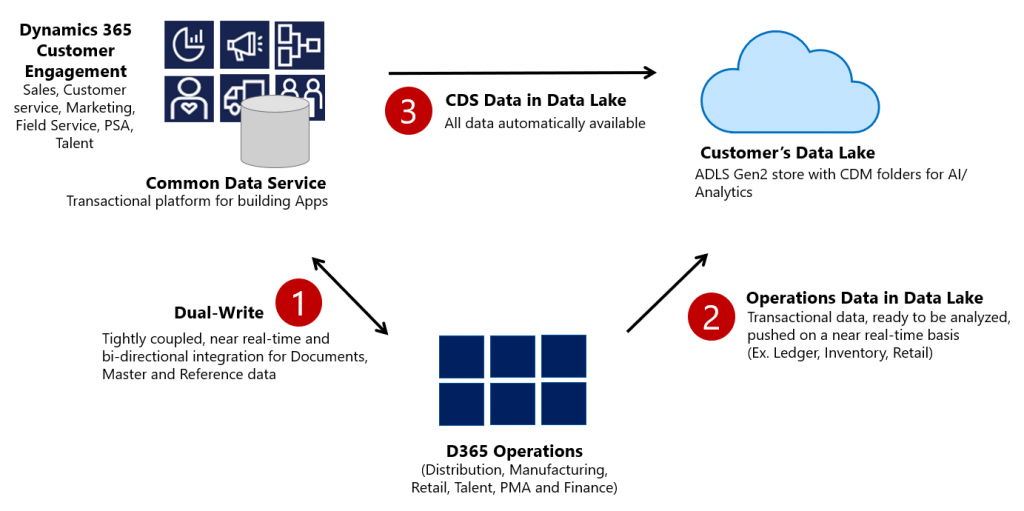
    Dual-write isn’t your everyday CRM-ERP integration, though. It is a near real-time synchronization of data between the Finance and Operations database and the Common Data Service that powers the low-code application and automation development story of Power Platform. Looking at the even broader data story that Microsoft is building around it’s business apps, BI and AI capabilities, we can also see that Dual-write is just one of the mechanisms that will move business data around:

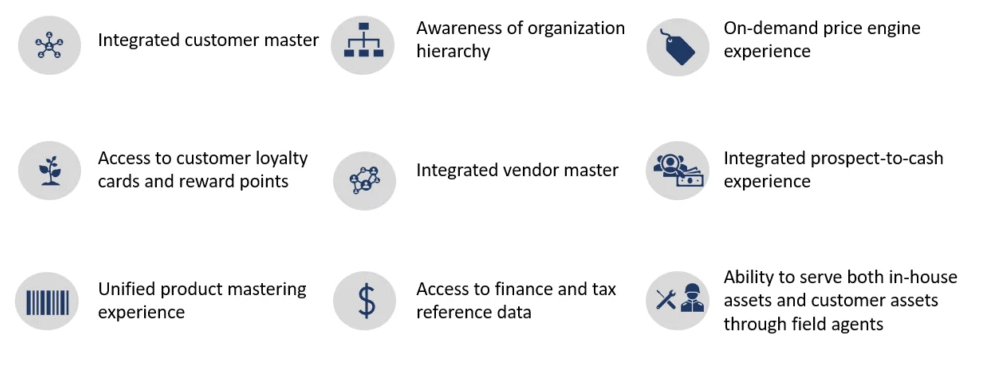
    Taken from the Ignite 2019 session “Common Data Service with Dynamics 365 Finance and Operations”, this slide highlights the role of Azure Data Lake Gen2 in the analytical features that will be offered both as preconfigured features from Microsoft as well as customer specific implementations, to derive new insights from the business data. When it comes to the more operational side of doing business in the digital world, having the SCM and Finance app data available in CDS is what opens up plenty of new interesting scenarios. What if anyone could easily build Power Apps that work directly with the enterprise master data from ERP like customers, products and pricing information? If CDS indeed could lower this data integration barrier and bring task based experiences with pixel-perfect Canvas apps into the hands of frontline workers, that could surely be a transformative service worthy of its name. Not just a single database like XRM was but a connecting layer across many Microsoft cloud technologies.

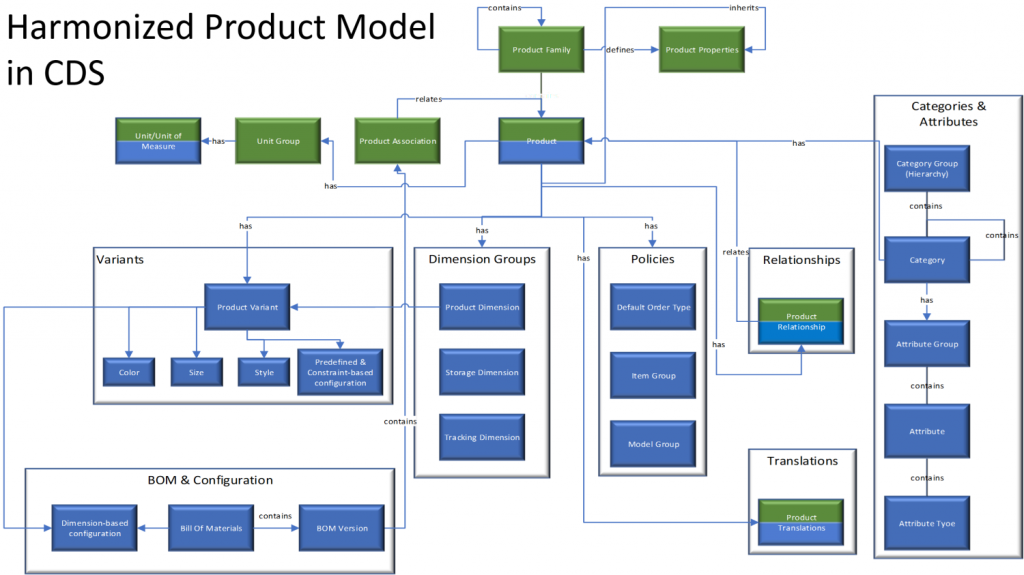
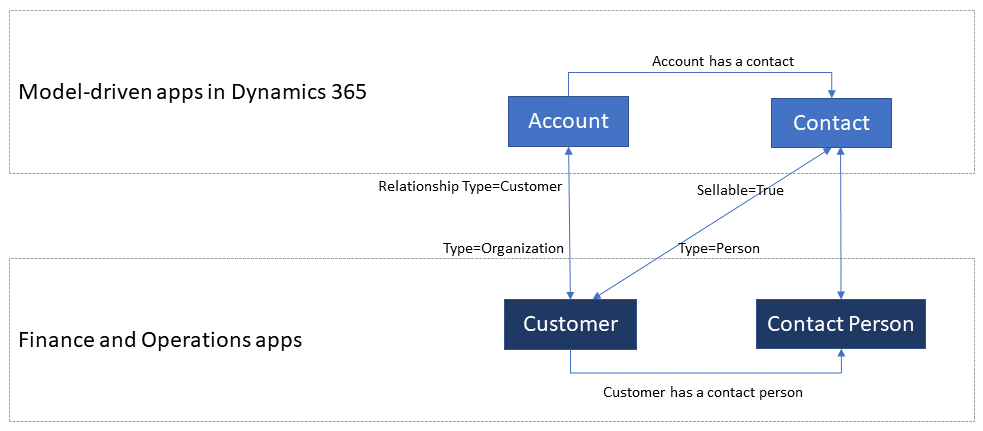
    In order to bring the ERP data into CDS, Microsoft needed to design harmonized data models that align with what used to be the independent products of Dynamics CRM and Dynamics AX originally and define how the schema of each system maps to the other. As an example, the CRM product data model has understandably been considerably more limited than that of an actual ERP application. Now with Dual-write, these two must come together in a unified product experience:

    No two businesses operate exactly alike when it comes to data and processes, so the logic of Dual-write has been built to allow no-code configuration to adjust the details of specific implementations. However, this new depth of application integration within the Dynamics 365 portfolio now means that you should have very good reasons if you decide to deviate from the standard model. Let’s look at Microsoft’s guidance for the above mentioned product data model as an example:

    The dual-write entity maps for products have been designed to flow data one-way only, in near-real time from Finance and Operations apps to Common Data Service. However, the product infrastructure has been made open to make it bi-directional if required. Although you can customize it, it’s at your own risk, as Microsoft does not recommend this approach.

    Anyone who’s worked with Dynamics CRM / Dynamics 365 Customer Engagement implementations in the past has surely come across the need to extend or modify the overly simplistic product and pricing data model that hasn’t been flexible enough to accomodate many real life sales scenarios. Jumping from such a customized environment in production use into Dual-write may not be all that easy, nor will the new data model defined by Microsoft just magically solve everyone’s problems. Dynamics 365 consultants working on data integration between systems aren’t likely going to be out of jobs just yet.

    Whether you’ll be jumping into deploying Dual-write or not, everyone needs to educate themselves on the implications of this new piece in the Dynamics 365 puzzle. From the DW documentation, have a look at the chapter “What does dual-write mean for users and architects of CRM products?” to understand why. There will be several new concepts introduced over on the CDS side like “company” and “party” that will affect all apps built on top of it – such as Dynamics 365 Sales, Marketing or Customer Service. Foundational elements like how customers of the organization or the internal units within that organization are defined have different data models in CDS vs. FinOps, so it’s important that everyone working on either side will use the new common documentation for Dual-write as the starting point to try and understand eachother’s perspectives on the world.

    There are also other dimensions affecting future solution architecture listed out in the documentation. According to MS, initially Dual-write will be shipped as separate solutions (notice that DW is solution-aware right from GA, highlighting the role of CDS as the cross-product ALM foundation in Power Platform). “In future releases, those solutions will become part of Common Data Service”, which I presume translates to every Dynamics 365 customer getting the core components, regardless of whether they already have Finance and Operations apps deployed in their tenant or not. Data types in CDS are also about to get extended to accomodate the enterprise ERP needs arising from this out-of-the-box FinOps integration.

    Of course not everyone is using the ERP solution based on AX, Finance & Operations, Unified Operations, Finance/SCM or whatever name Microsoft comes up next for it. A large share of the customer base will be a better fit for Dynamics 365 Business Central, which isn’t at least publicly yet targeted with Dual-write. Is there going to be an impact to SMB implementations where CDS is part of the solution architecture in some way and is this going to be positive or negative? According to the documentation, “in future releases, concepts in model-driven apps in Dynamics 365 (for example, customer, contact, quotation, and order) will be scaled to mid-market and upper-mid-market customers.” If Microsoft is really aiming to have a Common Data Model that should serve not just all Dynamics 365 products but also software providers from outside the immediate MS ecosystem, there are bound to be trade-offs between the complexity of the required schema for enterprise ERP and the ease of use for how citizen developers can tap into the Common Data Service for building simple business apps.

    Finally, there’s the ever interesting licensing aspect, of course. From the Ignite 2019 presentation, we can find the following statement on Dual-write licensing implications:

    When Microsoft customers (ISV, Partners, End Users, etc.) possess a valid Dynamics 365 for Finance and Operations license, they are entitled to replicate data between the Common Data Service and Dynamics 365 for Finance and Operations.  This entitlement does not include capacity consumed by the replicated data; if necessary, this is purchased separately.  This entitlement does not include use rights for the Dynamics 365 for Customer Engagement applications, including Sales, Service, Marketing, etc; if necessary, this is purchased separately.

    I’m expecting that the upcoming versions of the Dynamics 365 Licensing Guide would include documentation about the licensing scenarios for Dual-write, as at the time of writing there isn’t any public guidance available yet to address the concerns of multiplexing that inherently arise from the real-time synchronization of ERP data into CDS.

    As we know, having Power Apps licenses allows you to read all of CDS data. If you read through the GA announcement of Dual-write and its documentation, you’ll notice that MS is following its own guidance and not mentioning Customer Engagement even once, since CE now refers to on-premises software only. The new term, “Model-driven apps in Dynamics 365”, is a representation of Microsoft app teams themselves ship as the Sales app, Customer Service app and so on. When it comes to the customer specific business apps tailored to their needs, meaning Power Apps, these can be Model-driven or Canvas, ranging from simple “one click” mobile experiences to advanced information worker UI’s for desktop environments. They are all backed by the Common Data Service and running on the Microsoft Power Platform. How will these custom apps be treated in the licensing documentation that traditionally assumes customers would just be using the Dynamics 365 Apps as-is rather than adapting them to their unique needs and real life processes? This remains to be seen.

    Now that we are gradually getting over the age old divide between CRM and ERP, I hope the next area of unification would be a common licensing story that doesn’t draw artificial lines between Dynamics 365 and Power Apps. Splitting these into different licensing guides and different pricing publication formats isn’t all that helpful for the customers nor the partner ecosystem. A Common Data Service based on a Common Data Model should preferably be backed by a Common Licensing Model, don’t you think?

  • CDS FAQ for the Power Apps Makers

    CDS FAQ for the Power Apps Makers

    Microsoft is commited to making Common Data Service the flagship data source for Power Apps scenarios, as well as delivering advanced enterprise application lifecycle management (ALM) features via CDS. What can make the role of CDS somewhat difficult to approach for app makers is the fact that it hasn’t originally been built for Power Apps, like CDS “v1.0” was. The current CDS “v2.0” is based on XRM, the business appliciation platform that was born alongside the Microsoft Dynamics CRM product.

    I’ve been working with this plaform technology for close to 15 years now, whereas the world of Power Apps Canvas apps (and Power Automate) is a much more recent acquaintance of mine. To put my experience into good use and to also learn to see things from outside the XRM walls, I decided to share answers to a few questions that I’ve heard from #PowerAddicts that are exploring the CDS world.

    Q1: Why should I use CDS as my data source instead of SharePoint or SQL Server?

    Because it is not just a data source. Yes, in Power Apps Canvas apps you do connect to it just like any other data source in the app Studio, but this is misleading. CDS is the complete platform that can orchestrate how your app works when it comes to business logic, security model, integration, administration, governance and many more areas. Compared to raw SQL Azure, the SQL relational data is actually just one of the storage types that CDS leverages behind the scenes. Ultimately it’s a bundle of the latest Microsoft cloud technology for compute, storage and eventing/extensibility – offered as a single service that you don’t have to configure nor manage. You consume it either via built-in integrations to Power Platform, Dynamics 365 and Office 365, or alternatively via an API that is automatically generated to match your customized schema.

    The topic of “why CDS” would easily warrant a whole series of extensive blog posts on its own, which I may well do later on, but not inside an FAQ like this. For now, I recommend that you watch this Ignite 2019 session from Ryan Jones to understand the big picture of Common Data Service:

    Q2: What’s the difference between the 2 connectors for Common Data Service?

    The current environment connector is a native connection. This is the misleading part. It’s not a real Connector at all, rather every Power App knows how to talk with the environment that hosts it, which essentially is the current CDS environment. This leads to numerous benefits in performance and available features, as the technical implementation behind the scenes is quite different. I haven’t come across a Power Apps specific comparison yet, but MVP Sara Lagerquist has done a thorough analysis of the two CDS Connectors in the Power Automate context.

    Q3: Is there any reason to use the non-current environment CDS connector then?

    Yes, if you want to connect to a CDS environment that’s not the one which is hosting your app configuration. Meaning, if there is busness data out there in another CDS database and you need to reference it in addition to the “native” data in your app’s environment, the old CDS Connector might well do the trick. However, this is an area to keep a close eye on for the detailed functionality over time, as MS is very much wanting everyone to “go current” and some issues might arise from remaining on the old Connector.

    Q4: Why should I use solutions for building my app functionality in CDS?

    Even if you’re working in just a single environment, building a simple app directly in production (which is what a citizen developer often might do), solutions offer you the logical grouping of elements that are part of your project. In fact, at some point MS experimented with changing the Maker UI to read “projects” instead of “solutions”, but luckily that change was reverted back. It can stil be a helpful concept to illustrate the purpose of solutions for those who aren’t familiar with CDS. The act of building an app needs to manifest itself somehow within the environment, so always start by creating at least one solution for your project. (Real life projects may well have more than one solution, thouh.)

    What solutions really are designed for is shipping the elements of applications into other environments, in a process that is easy to manage and possible to automate. Microsoft is aiming to make solutions the packaging story across all of Power Platform, which means it’s not an optional concept. It’s how things are built within this business application platform.

    Q5: I’ve read about this thing called “managed solutions”. When should I use them?

    There’s the saying “if you have to ask how much it costs, you can’t afford it”. In my opinion, this fits perfectly with managed solutions, too. Unless you are really, really well educated with how the solution system in CDS works (meaning you’ll probably have an XRM developer background), don’t touch managed solutions – yet.

    When delivering complex enterprise CRM systems with multiple full time developers writing custom code and leveraging Azure DevOps for automated CI/CD pipelines, managed solutions are the way to go. Similarly if you’re building an ISV app for many different customer organizations and hope to publish it on AppSource, you simply have to go managed. We’ll most likely see Microsoft making the managed solution concept more approachable for other audiences in the future, too, so please do educate yourself on their possibilities and get ready for building more complex apps at scale.

    Q6: Couldn’t I use managed solutions to lock down my app components from other makers?

    Yes, but not in the environment you’re probably working in right now. When building apps, you’re always working in unmanaged mode. It’s only when you export your solution from the current environment that you get a choice to make the solution package either managed or unmanaged. Shipping configurations from dev to test & prod is what this mechanism is for. If you only have a single environment for the app makers where the small departmental or personal productivity apps are built by citizen developers, none of this stuff applies to you.

    No. Don’t ever re-import the managed solution back to the environment where it came from. That’s locking yourself in and throwing away the key. It’s not what you want.

    Q7: Is there any other way to restrict specific entities to be only customizable by certain app makers if we’re working in a shared CDS environment?

    No. The metadata of CDS doesn’t have such security mechanism that would allow you to say that “Group A owns the account and contact entities, Group B is responsible for the project, task and resource allocation custom entities”. Within a single environment, there can be only one god, and that is the System Administrator. System Customizer also comes close, as both have the rights to create and delete new entities on a whim.

    Records stored within an entity always have an owner. An account is owned by User X, which can be used for determining what other users can do with it. The actual account entity i.e. the table that holds the records doesn’t have this type of ownership construct, as it applies only to data and not metadata. If you need more granluar control over metadata, then the answer is to set up different environments for the different groups.

    Q8: How can I see what privleges a particular user has been given in CDS?

    Security roles are a central construct in CDS, as everything you attempt to do in the database is verified against two key parameters before execution:

    1. Do you have rights for the specific action against the entity where the data is stored?
    2. Who is the owner of specific the record that you are trying to perform the action on and what’s the relationship to the calling user?

    The UI for security roles dates back to MS CRM v.X days and is scary both due to the legacy experience as well as the variety of options found in even a blank CDS org. Nevertheless, it is logical and will tell you what you need if you know what you’re searching for. Let’s compare 3 standard roles of Common Data Service User, Environment Maker and System Customizer and their privileges on the Customization tab:

    The CDS User has mostly just read access to the metdata, like Entity, Field, Option Set and so on. An Environment Maker is allowed to create new items like Canvas Apps & Model-driven Apps – like a Maker should. To actually create new Entities and Fields, you’ll need to be a System Customizer or Administrator.

    This is where the platform aspect of CDS (and its predecessor XRM) comes into play, though. You can create your own security roles, preferably via copying an existing system role that’s close enough. So, you could create a new “Environment Super Maker” that would have the right to create new fields, but not new entities, nor delete any fields. So, security roles are not only the gatekeeper to business data but also metadata.

    Q9: Looks like these security roles are environment specific. Do the IT admins really to go and manage the security settings via this MS CRM Power Apps UI?

    Not anymore! Last year Microsoft finally brought Azure AD integration into the system administration features of Dynamics 365 and thus CDS. You can now leverage the Group Teams to assign CDS security roles to an Azure Active Directory group (security or Office group) and the users will inherit the privileges of that role when added to the group.

    While Azure AD groups definitely streamline the administration process, please keep in mind that there’s more to CDS security model than just the security role assignment. Business Unit structures, Field Level Security, Hierarchical Security are some aspects that may require admin actions directly within the environment to get them set up properly.

    Q10: Why do all these user accounts from across the organization appear in the CDS environment meant for department X only? Can they all access it?

    You probably didn’t assign a security group to the CDS environment right at the start when it was created. Therefore every licensed user account in your tenant was copied over to the environment. If you assigned a security group to the environment after its creation, then those user accounts will be automatically disabled. They will forever remain in the database tables as inactive users, though, since user record deletion is not something XRM nor CDS has ever supported.

    Just because a user exists inside the CDS environment’t systemuser table doesn’t mean they can do anything in that environment. Not even if they haven’t yet been disabled. Everyone needs a security role to have a chance to read both the metadata and the business data from CDS, so the user record is just a prerequisite to opening the door to the environment but it doesn’t provide the key to the lock.

  • Price points of Power Platform (2022 pricing and licenses)

    Price points of Power Platform (2022 pricing and licenses)

    NOTE: This post was originally published in March 2020, the last revision of pricing information is from November 2022.

    As of today, there isn’t a single place from where to check the actual prices of the different license types covered by the Microsoft Power Platform suite of products – like there is for Dynamics 365, for example. The information of prices vs. what paying that price actually entitles you to is distributed across several information sources and formats – starting from the individual product pages, to the learn.microsoft.com documentation pages, to the PDF licensing guides.

    To stop myself from having to always use a search engine to discover these pricing details, I decided to compile a list of links to the places where each individual Power Platform product team has made their pricing information public, as well as write out the current subscription prices in US Dollars and Euros. I’ve also included a few relevant licensing model elements that describe what the particular subscription entitles you to do (capacity, features and so on).

    Most of Power Platform product licensing is done via the prepaid subscription model familiar from Microsoft 365 (Office 365). More recently the pay-as-you-go (“PAYG”) option has been introduced for some of the services, allowing payment via an Azure subscription (read more about the November 2021 announcement here). It’s important to note that in general prepaid subscription prices are cheaper than pay-as-you-go. The PAYG option is primarily aimed as an option for customers to use, before they know the true consumption level and are ready to commit to a prepaid subscription. Where applicable, I’ve included the PAYG prices here for comparison.

    Your actual licensing costs will of course depend on the types of agreements your organization has with Microsoft. So, consider the prices on this page as mainly a starting point for understanding the relative costs of different Power Platform services.

    Power Apps / Pages

    Power Apps pricing

    Power Apps per app plan: $5 (€4.20)

    • Allows you to access one Power Apps app (canvas, model-driven, portal/website).
    • The same app in different Power Platform environments (dev/test/prod) requires a per app license for each environment.
    • Pay-as-you-go option: $10/monthly active user/app/month

    Power Apps per user plan: $20 (€16.90)

    • Allows you to access an unlimited number of Power Apps (canvas, model-driven, portal/website) in your tenant.
    • Can also be used for accessing canvas apps shared to guests in another tenant (not applicable to other app types).

    Power Apps pricing change on October 2021

    Before Oct 1st 2021, the Power Apps per app list price was $10 and Power Apps per user $40. See this blog post for more details on the price reduction as well as changes in the per app license entitlements. Note that your license agreement may still apply to the old terms, based on the contract duration.

    Power Pages (formerly Power Apps Portals)

    Power Pages pricing

    • Power Pages authenticated user capacity, 100 monthly active users: $200 (€168.70)(see also discount tiers).
      • Pay-as-you-go option: $4/user/site/month
    • Power Pages anonymous user capacity, 500 monthly active users: $75 (€63.20) (see also discount tiers).
      • Pay-as-you-go option: $0.30/user/site/month
    • Internal users (employees) can be licensed separately, via Power Apps or Dynamics 365 licenses, or as authenticated users.

    Licensing FAQ: Power Pages

    Power Apps portals (old licensing model, before Power Pages)

    Differences between Power Pages and Power Apps portals licensing model

    • Power Apps portals login capacity add-on, 100 logins per month: $200 (€168.79)(see also discount tiers).
    • Power Apps portals page view capacity add-on, 100,000 page views per month: $100 (€84.30).
    • Internal users must be licensed separately, either via Power Apps or Dynamics 365 licenses.

    Dataverse capacity (formerly “Common Data Service” / CDS)

    Power Apps and Power Automate licensing FAQ: Add-ons

    Storage
    • Dataverse Database Capacity (1GB) $40 (€33.70) per month
      • May still show up as “Common Data Service Database Capacity”
      • Pay-as-you-go option: $48 per GB used per month
    • Dataverse File Capacity (1GB) $2 (€1.69) per month
      • May still show up as “Common Data Service File Capacity”
      • Pay-as-you-go option: $2.40 per GB used per month
    • Dataverse Log Capacity (1GB) $10 (€8.40) per month
      • May still show up as “Common Data Service Log Capacity”
      • Pay-as-you-go option: $12 per GB used per month

    See also: What Dataverse capacity is included with the Power Apps and Power Automate plans?

    Power Platform / Dataverse API calls / API requests:
    • Power Platform Requests add-on: 10,000 daily API requests for $50 (€42.20) per month
      • Formerly known as “Power Apps and Power Automate capacity add-on”

    See also: Requests limits and allocations

    Power Automate (formerly “Microsoft Flow”)

    Power Automate Pricing

    Power Automate per user plan: $15 (€12.60)

    • Allows individual users to create unlimited flows, execution is limited based on available API requests per day (40,000 included)
    • Note: while Power Apps per app and per user plans includes similar rights, they are tied to the context of a canvas or model-driven app

    Power Automate per flow plan: $500 (€421.50) for five flows per month

    • Allows the organization to implement 5 flows, regardless of the number of users who trigger them
    • Child flows triggered by a parent flow do not need to be licensed
    • Execution is limited based on available API requests per day (250,000 included)
    • Additional flows can be purchased at $100 (€84.30)per flow per month
    • Pay-as-you-go option: $0.60 per each cloud flow run

    Power Automate per user plan with attended RPA: $40 (€33.70)

    • Allows individual users to run an attended RPA bot on their workstation
    • Presumably also contains similar rights as the standard Power Automate per user plan
    • Pay-as-you-go option: $0.60 per each attended desktop flow run

    Power Automate unattended RPA add-on: $150 (€126.50)

    • Allows the organization to run a single unattended RPA bot, no dependencies to users or workstations
    • Add-on requires either per user plan with attended RPA or per flow plan
    • Pay-as-you-go option: $3 per each unattended desktop flow run

    See also: Power Automate licensing FAQ.

    AI Builder

    Power Apps and Power Automate licensing FAQ: AI Builder

    AI Builder capacity add-on: $500 (€421,70) per unit per month

    • Each unit contains 1 million service credits on the tenant level
    • Allows the organization to use any of the AI model types included in AI Builder
    • AI models consume service credits when they are trained, used in an app or flow, or scheduled to periodically run. The amount of capacity consumed varies based the AI model, as well as the size and complexity of the data set. See AI Builder calculator to estimate the capacity requirement and cost of your model.
    • Add-on requires at least one paid Power Apps, Power Automate or Dynamics 365 license
    • For the built-in Business Card scanning feature in Dynamics 365 Sales, there is free capacity included in Sales Enterprise App licenses: 10 scans per user per month, pooled at tenant level. Sales Insights has a capacity limit for business card scanning of 200/user/month. If additional Business card scanning capacity is required, Sales Enterprise customers may purchase additional Sales Insights licenses. (Taken from Dynamics 365 Licensing Guide PDF document.)

    Power Virtual Agent

    Power Virtual Agents pricing

    Assign licenses and manage access to Power Virtual Agents

    Power Virtual Agent: $1,000 (€843.20) per 2,000 sessions per month

    • Allows the organization to have an unlimited number of bots
    • In addition to the tenant license, internal users will need to be assigned a user license. The tenant license costs money, but the user licenses that are purchased via the same mechanism are apparently free.
    • “A session is an interaction between the customer and the bot, and represents one unit of consumption. The session begins when an authored topic is triggered. These sessions are referred to as ‘billed sessions’ in the product. Sessions are deducted for both testing and production usage.”

    Power BI

    Power BI licensing in your organization

    Power BI Pro: $9.99 (€8.40) per user

    • Included in Office 365 E5 subscriptions for no additional charge
    • Each Pro license gets 10 GB of data storage capacity

    Power BI Premium per capacity: starting from $4,995 (€4,212,30) per organization

    • Offers dedicated compute and storage resources for your organization
    • No per-user license assignment needed for report consumption, report creation and sharing still requires Pro licenses for users
    • Required for advanced features, see comparison table
    • See What is Power BI Premium and Power BI Premium FAQ for more details

    Power BI Premium per user: $20 (€16.90)

    • New option to access premium features without organizational capacity purcahase requirement.

    Dive deeper into the licensing details

    Microsoft usually posts monthly updates to their licensing guide PDF documents. Here’s where you can grab the latest copies: Power Apps and Power Automate Licensing Guide & Dynamics 365 Licensing Guide.

  • Why would you store images and files in CDS?

    Why would you store images and files in CDS?

    The Common Data Service is often though as a relational data store that resembles the former XRM database. While there is backward compatibility in the sense that you can do everything with CDS that you could in XRM (Online), the real power of the cloud platform comes from going beyond those limits. Earlier I’ve talked about how The Real Common Data Emerges as we start to work with a variety of different data types and even reaching out into the Azure Data Lake as part of leveraging the Dynamics 365 first-party apps. This time I want to drill deeper into the specifics of images and files as new field types available in CDS.

    Feature announcements from Microsoft

    The concept of CDS heterogenous data storage was demonstrated back in Business Application Summit 2019 in June. As illustrated below, alongside the traditional SQL database for relational data, CDS now offers also the option for binary (file) data stored in Azure Blob Storage and log data in CosmosDB, as well as search indexes offered via Azure Search. All of these are are available under the common entity schema and business logic defined in CDS, without requiring the app makers to think about what data goes into which specific service and how. This is how the Power Platform provides a higher level of abstraction compared to code based app development on top of the raw Azure services.

    Fast forward a few months to Ignite 2019 in November, where Ryan Jones presented a session on “Connecting Power Apps, Power Automate, Power BI and the Common Data Service with data”. The capabilities promised for the new image data type were as follows:

    And here’s the equivalent slide for file data type:

    In December 2019 there have now been announcements made on the Power Apps blog about Introducing File and Image datatype, as well as the availability of the public preview of file attributes on Power Apps Canvas apps. Things are still in the process of rolling out and support for Model-driven apps hasn’t yet even been demonstrated anywhere, so this isn’t something you can jump into using right away.

    Scenarios for files in CDS

    Traditionally in the world of CRM projects we’ve always advised against putting files into the database. “Keep ’em in SharePoint” has been the standard answer, which still makes a lot of sense for any collaboration on content creation, document versioning and so on. The SharePoint document management integration in CDS offers an out-of-the-box experience that generates document locations linked to specific records in CDS and allows working with them through the Model-driven app UI. If you’re happy with auto-generated folders under a single document library on a single SharePoint site for all the records of a particular CDS entity (like accounts), there’s no need to look any further. In real world customer environments the OoB integration is often not sufficient, and I’m really glad that things are improving with the Microsoft Teams based document management integration offering a more practical security and data location model. (Note that currently the Teams integration can’t be enabled for pure CDS environments without Dynamics 365 apps.)

    The problem that still remains is that both the direct SharePoint-CDS integration as well as the Teams-SharePoint-CDS combo don’t offer much business process context for the files. It’s more of a helpful tip like “hey, if you’re looking for documents related to this account/project/order/inspection, try searching from this folder”, rather than a very specific instruction about which particular file contains information on what step of a business process managed in CDS. You also can’t really verify whether a required document exists in the system before proceeding further in the process, since all you have is links to a folder which might or might not contain that file – or multiple copies and various different file types when what you’d really need is a single required PDF, like a signed agreement document.

    With the new file and image datatypes, you can actually define a specific field to store a specific type of document or image. This will let you know exactly what the business purpose of a particular piece of binary data is, which means you can develop app functionality like user interface and business logic around it. It’s no longer just 0…N files linked from another system (like SharePoint), it becomes an integral part of your business process. The demo that Ryan Jones did at Ignite about an inspections app is a good example of what the “strongly typed” image and file data could be in practice:

    Having rich metadata about what a particular document represents in the real world is great, but what’s an even bigger benefit is the security model around it. As anyone with an XRM background knows, the ways in which you can configure the security model in CDS is very advanced, offering granular control of who can create, read, update and delete data. You have security roles, business unit hierarchies, position hierarchies, owner teams, access teams, sharing, even field level security. Any security logic that you apply on the entity that’s hosting the file or image field will also guard access to the binary content. If you’ve ever tried to sync the security information between a Dynamics 365 based CRM system storing customer records and the SharePoint environment storing the related documents, you’ll know how difficult and error prone this attempt is. The security concepts of those two systems are inherently different and even Microsoft is unlikely ever offer anything close to 1:1 integration (Teams is about as close as you can get.) For access control of sensitive documents and images, these new datatypes in CDS are therefore a very attractive option.

    Attachments (annotations) vs. file/image datatype

    Let’s not forget that it has always been possible to store binary data in CDS, even in the on-premises days. All your tracked Dynamics 365 emails will have automatically uploaded their every attachment into the Note entity. Additionally the users have been able to add notes with attachments on the Timeline of any entity where the attachment feature has been enabled.

    As part of the new storage capacity model launched in April 2019, Microsoft will have already migrated all of the attachments previously stored in the SQL database to Azure Blob Storage behind the scenes for any Online environment. However, this doesn’t make the attachments feature any more modern and you should seriously consider not using it in the future (where possible). While there is a somewhat better security story with the data all being behind CDS APIs, you won’t find any customization options here to align the data in Notes entity with your business requirements nor the desired application UI. It’s a fixed way of representing file data alongside the customizable relational business data model, inherited from the Dynamics CRM days rather than a feature designed for the Power Platform era.

    In the meantime, with the lack of better support for image handling, many of us have surely explored the capabilities of building a Power Apps Canvas App that could perform what the above Ignite inspection demo app does. Dropping a camera control on the Canvas App is so easy, yet storing the captured image into CDS alongside the other inspection data has been next to impossible. Yes, attachments as a separate control has been available for Power Apps makers for quite some time, but patching the image data from somewhere else into a new CDS attachment record is the tricky part. Complex record references like the Regarding field on the Note entity in CDS have long been a stumbling block for Canvas Apps, and as of today you still can’t write data to that field. Jumping through hoops made of Flows and Custom Connectors is hardly the kind of seamless experience you’d expect from a low-code application platform when working with camera images, so there definitely has been a big demand for the image datatype to come and replace the clunky attachment feature.

    Back when CDS was just the storage place for structured data that was accessed via the metadata driven UI of Model-driven apps for CRM scenarios, there weren’t that many places where visually pleasing stuff like images could have been used. The entity image with its glorious 144×144 resolution has been cool for demo data, but how many customers have actually ended up populating logos, profile pics, product images or other visuals in there? With the rise of citizen developers armed with Canvas apps that offer pixel perfect UI development, the situation is now quite different and there’s an expectation to be able to work with full-size images as well as showing thumbnails for visualizing the business records.

    Things to keep an eye on

    As mentioned earlier, we haven’t yet been able to truly validate in real life Power Apps what functionality files and images support. I’m expecting there will be further chapters in the story of how heterogenous storage in Common Data Service evolves over time, so the first release for Canvas Apps and later Model-driven apps may not yet be feature complete. How the data will work with PCF controls/components and other features of Power Platform (automation, offline, search, AI…) is going to be a big factor in deciding whether storing files and images into the dedicated CDS datatypes is the right call for your app. Of course you’ll also need to examine the options from the other Microsoft clouds: Azure and Office.

    If you’re doing custom code development and expect to deal with a large amount of binary data in your app, doing the math on storage cost between the configuration friendly CDS and raw Azure Blob Storage is probably going to be an item on your solution design agenda. Just like with relational data, CDS is always going to be priced as a premium service compared to things like Azure SQL, because it provides you so many layers of additional features you’d otherwise have to build and maintain. Storage is only one part of the equation, but of course you’ll need to ensure the business case is valid when consuming Power Platform storage capacity with its associated services.

    If the applications you build are aiming to support the collaboration of information workers over unstructured data like Word documents with co-authoring and several versions, then that data clearly doesn’t belong into CDS. Use MS Teams as the security mechanism where possible and allow the users to work with the documents through SharePoint, offline synced OneDrive folders, Office applications on any device etc. If there is an end product that comes from this collaborative process and needs to be carried along in a structured business process, then that file could well be stored into a CDS file attribute.

    It will be interesting to see how Microsoft will align these file & image attribute features with the existing attachments feature. Having a predefined number of fields per entity where you can drop a single file is obviously quite a different experience than an open “folder” that could accept as many files as needed. Although on the schema level, also the Notes (annotation) collection only accepts just one attachment per each note and the rest is just UI. Whether we’ll receive a true customizable Notes feature from MS with metadata support and a modern control to complement the standard Timeline visualization on the Model-driven app as well as the attachments control on the Canvas side is something that remains to be seen. I’m also expecting to see some community contributed PCF controls in the near future around the new datatypes.