Blog

  • Microsoft FY20 Q2 earnings and the rise of CDP

    Microsoft FY20 Q2 earnings and the rise of CDP

    Yesterday, January 29th, Microsoft reported on their earnings for the Oct-Dec 2019 quarter, which is Q2 in their fiscal calendar. It didn’t come as a huge surprise that the cloud revenue keeps growing at an impressive pace everywhere you look. 12% growth for Dynamics products and cloud services revenue is nice, and 42% for Dynamics 365 is… even nicer!
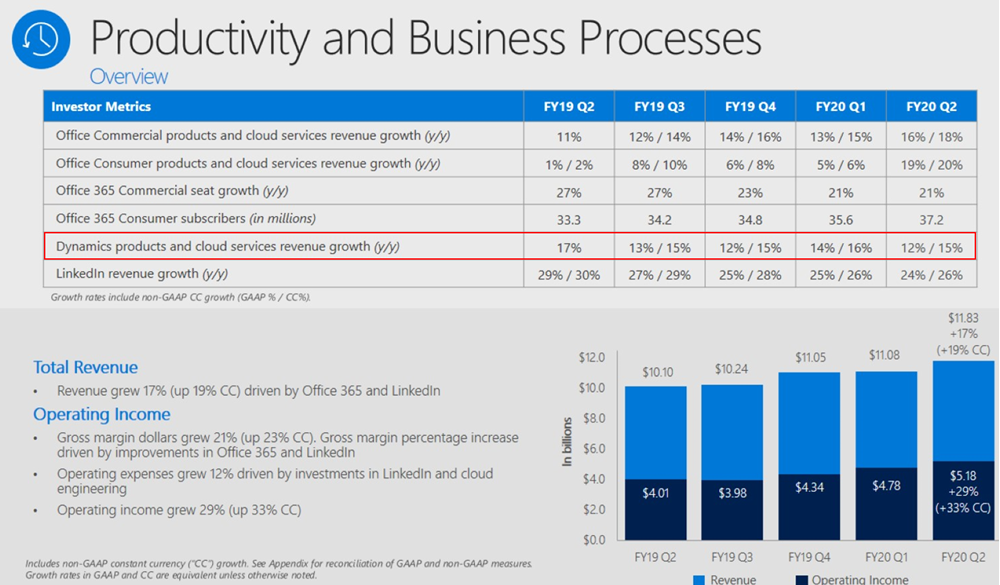
    What I find more interesting than these financial numbers is the earnings call transcript, where we get the opportunity to hear CEO Satya Nadella and CFO Amy Hood describe how they see the Microsoft business evolving. Picking up the terms and products from here should give us a better understanding of not just the past (i.e. the quarterly revenue and operating income) but especially the future outlook of what the company considers to be the shining stars in its portfolio. So, in the spirit of Thinking Forward, here’s a summary of what I though was relevant in that earnings call from a Business Applications perspective.

    Power Platform

    “We are empowering not only professional developers but those closest to the business problem – from citizen developers to business decision makers – with no code, low code tools so they can create apps and intelligent workflows that solve unique needs. Today, 2.6 million citizen developers use our Power Platform to make better decisions using self-service analytics, build a mobile app, automate a business process, or even create a virtual agent – all with no coding experience.”

    The new type of market for app makers that previously could have only been app users is of course a very critical area of success for Microsoft. Low-code development is one of the hottest games in town, where also other tech giants are looking to grab a seat at the table. A couple of weeks ago Google acquired AppSheet to provide no-code/low-code tools for their customers. Almost right after it, they announced that their in-house equivalent Google App Maker would be shut down within less than a year. Google cited low usage as the reason for running down App Maker, which gives us an indication that you can’t succeed here merely by having just any citizen developer tool available out there.

    Meanwhile, Microsoft is investing heavily into ensuring Power Apps plays nice with their whole productivity stack. Satya especially highlighted the platform effect that Microsoft Teams carries with it, so expect this to be the UI through which the broad user base will discover Power Apps and Power Automate. At the same time, Power Platform’s role as the shared extensibility model for both Microsoft 365 and Dynamics 365 is also of high strategic importance:

    “There’s no such thing as a canonical business, and no such thing as a canonical business over time, right? Business processes change. The question is how rapidly can people and domain experts keep up with the change. And that’s where Dynamics 365 absolutely shines.”

    Dynamics 365

    Even though many XRM professionals have shifted into blogging and talking more about Power Platform these days (myself included), that doesn’t mean the role of Dynamics 365 in Microsoft’s product portfolio would have decreased one bit. No, of course Dynamics 365 is not “dead” – it just isn’t the platform product anymore. The rapid launch of new first-party Apps under the Dynamics 365 brand is a key source for revenue growth, as described by Microsoft CFO Amy Hood:

    “The Dynamics 365 excitement we have, when I think about the comment I made around adding workloads, what’s so important about what Satya just talked about is how this reaches into new budgets for us, new opportunity for us in terms of being able to tap growth that we had not been able to access before.”

    Many of these new workloads are about going beyond what the traditional CRM + ERP suite of Dynamics 365 covered. While I suspect that we haven’t yet seen much actual license revenue come in from this next generation of business applications, Satya firmly believes that the new opportunities in this field will rise out of the not-so-secret magic ingredient: data.

    “We are very excited about what’s happening with Dynamics 365, in particular, because when I look at what the world needs is it needs a business application suite that is more comprehensive that can turn what is the real currency of this next era, which is data, into predictions, insights, and automation without boundaries.”

    Customer Data Platform

    Now we get to the interesting, forward looking part, which I believe hasn’t yet been fully grasped by the general tech media. What specific products and technologies is Microsoft using as the spearhead for getting the message across when they talk about data and AI being brought into business applications?

    “The competitiveness of every business going forward will be defined by their ability able to harness the full value of their data. Dynamics 365 enables organizations to move from reactive, siloed transactional processes – to proactive, repeatable, and predictable business outcomes. Dynamics 365 Customer Insights, that’s layered and built on Azure Synapse, is the only Customer Data Platform operating at scale today.”

    Let’s highlight the CDP part first. What is it, to begin with? Well, we don’t have time to dig into the dirty details here, but in short: a Customer Data Platform is about creating a unified customer profile from a number of structured and less structured data sources, deriving new insights from it and then performing smarter (automated) actions towards the customer as a result of this. It’s not a single relational database like CRM, it’s more like a database of databases, ad-hoc data sources and APIs that change rapidly over time. The common use cases for CDP have mostly been in the marketing space, but the concepts and scenarios are evolving fast into other areas, too. As Satya Nadella points it out:

    “There is a new category, in fact, and a new race starting with CDP, and we’re leading.”

    Why is Microsoft so confident about being a leader in CDP already? Yes, we’ve seen Dynamics 365 Customer Insights being demonstrated at every MSFT event for the past half a year already, but is it really such a revolutionary application in its own? The real source of Microsoft’s competitive advantage is found from within their Data Platform in the cloud, and how all the new Insights products in the Dynamics 365 family are leveraging the very latest Azure tech. Looking at the earnings call transcript and the order in which the different categories were addressed during the session, before Satya even mentions Power Platform or Dynamics, he highlights the importance of Azure Synapse:

    “Azure Synapse is our new limitless analytics service. It brings together big data analytics and data warehousing with unmatched performance, scale, and security. In concert with Power BI, it enables data scientists to generate immediate insights from structured and unstructured data, and build custom AI models.”

    These are some of the cornerstones in how Microsoft envisions it can enable organizations to “build their own digital capability and tech intensity”. You can find a recent example from the Dynamics 365 product team blog about how the Customer Data Platform story fits in with the shifts in the retail industry: it’s not just about capturing the customer’s email at the checkout counter but rather offering a comprehensive solution to manage signal data from social channels, chatbot interactions and even augmented reality.

    So, if I were to summarize what’s happening here in a simplified formula, it would be:

    Azure Data Platform + Dynamics 365 = Customer Data Platform

    jukkaniiranen.com

  • First impressions on Power Platform 2020 Release Wave 1

    First impressions on Power Platform 2020 Release Wave 1

    It’s that time of the year again when all us Microsoft Business Applications geeks are blessed with two huge documents to consume: the Release Plans for both Power Platform and Dynamics 365. While I gotta say that it’s awesome to have this level of transparency on what specifically is in the next 6 month release cycle, the amount information does feel overwhelming – at least if you’re trying to cover more than a few specific products within the stack.

    Ultimately we should at least aim to have a general idea of how each piece of the BizApps puzzle is evolving. Especially the Power Platform side is very relevant for anyone who’s not strictly focused on training/delivering/administering just a single app from the Dynamics 365 portfolio, because this is your low-code toolkit for making those applications meet the real life needs of customers. Unlike with past CRM projects, the customization tools are not part of single server installation, rather they can be discovered from all around the Microsoft cloud.

    To make the Release Plan easier to digest, I’ve picked out the new/improved features that jumped out when I went through it for the first time. Instead of the PDF versions (which are coming a bit later anyway), I prefer the online documentation, so below are links to each of those items for you to drill deeper into – and also keep track of possible changes to the original plan.

    I’ve added my comments on why I consider these to be the most important items in the Release Plan. Time will tell how they actually land and what the impact will be. It’s going to be fun to review this list October 2020 when Wave 1 is over!

    Power Apps

    Single mobile app player for Canvas & Model: very much needed in order to break free from the assumption that Model-driven apps are only for Dynamics 365 customers.

    Offline improvements: the need for accessing data without a live connection is still very real in mobile scenarios. What is somewhat of a bummer is that the efforts here are targeting Model-driven apps only for now.

    Modern solution explorer makeover: Yes! There are a lot of areas where app maker productivity could be improved, so it’s great to see investments are being made here.

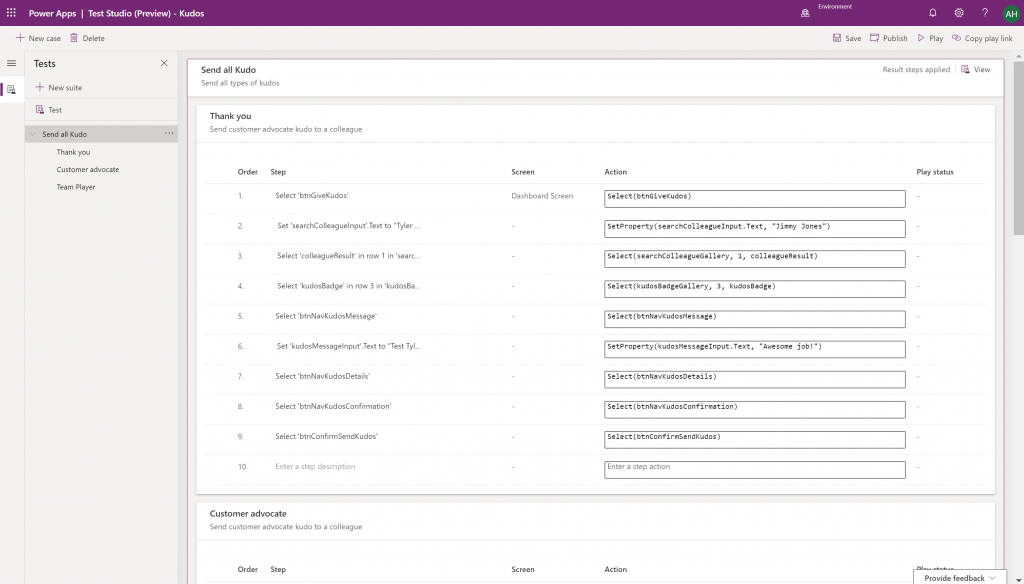
    Canvas app Monitor tool & Test studio GA: the wave of the future. Low-code app development isn’t going to be restricted to personal productivity scenarios, we’ll have much of the same needs as in the pro dev side.

    Azure Application Insights telemetry in Canvas: a great example of how the existing tools from Azure should be harnessed to offer shortcuts for Power Apps makers.

    Generate app from data with responsive layout for phone and tablet: it’s been an awkward limitation before to only support phone layouts. The bigger story is in bringing out these templates for how to actually make Canvas apps responsive, as it has been quite a mountain to climb for citizen developers. In 2020 Wave 1 we’ll also see a preview of the awaited responsive Canvas app pages.

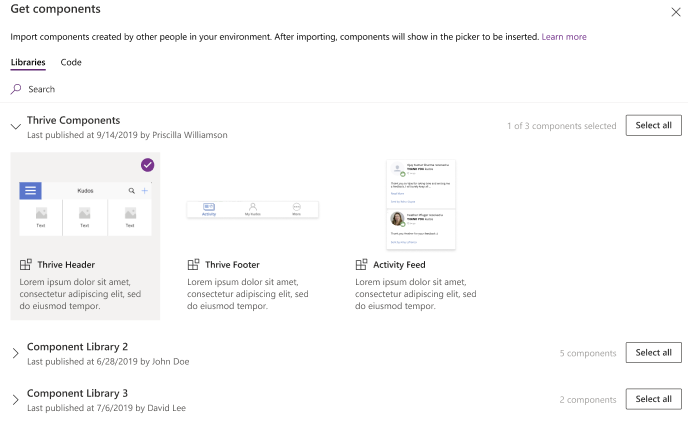
    Canvas Components GA: very impactful stuff here. Component libraries, solution awareness, support for galleries and forms, using collections and media files. These are big steps in bringing the two app types of Canvas and Model-driven closer together.

    Power BI embed component in Portals: oh yeah, there’s that third app type, too… Definitely looks a lot more approachable than the current embed experience. As for Portals extensibility for pro devs, the CRUD Web API sure made Nick Doelman excited, so keep an eye on that one.

    Unified Interface enhancements: important for many Dynamics 365 experiences. Forms as modal dialogs in particular looks useful, better filters are about closing the gaps to legacy web client, search in this view is an age old requirement.

    Improved themes reflecting modern Microsoft Fluent themes: UI matters, the power of the Apps is not just in the logic, data and automation. MS should be more aggressive here when competing against other low-code development platforms.

    Power Automate

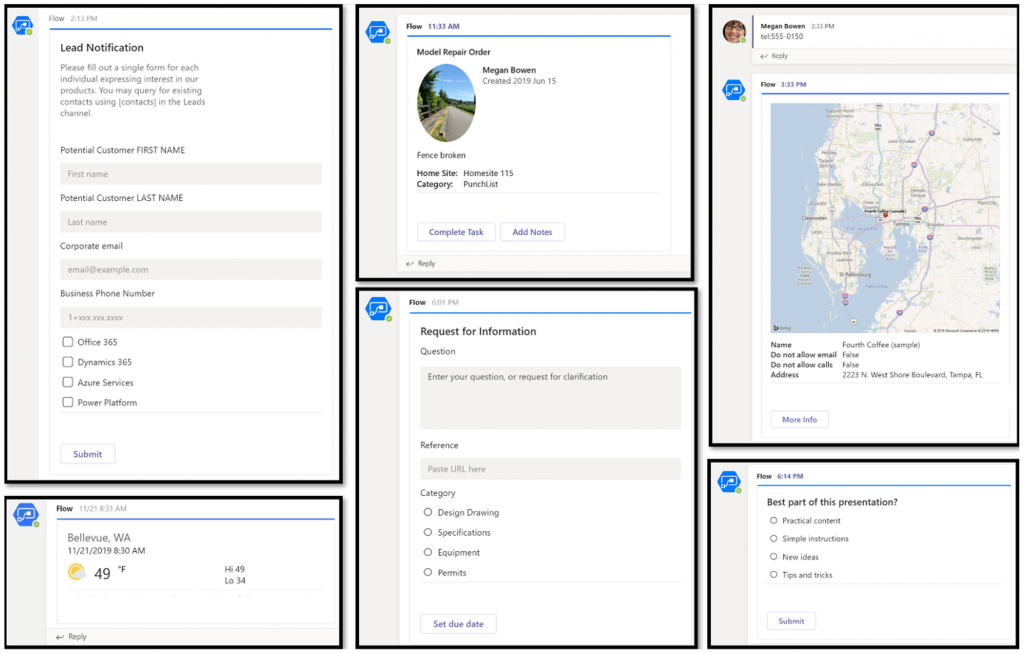
    Interactive adaptive cards: we’ve surely been waiting for this. Very important for bridging the user experiences across different tools in different MS clouds (Office, Dynamics, Power Apps). Could 2020 be the year of the Adaptive Cards? Potentially yes, if you look at how Teams & Power Automate can make use of this feature.

    UI Flows solution awareness: aligning RPA with the common shipping vehicle of Power Platform. Being a new preview feature, there’s of course a lot of other parts moving around still, but the important bit from a platform play perspective is getting everything to play nice with solutions (including non-UI Flows…)

    Use business process flows in Office 365 apps: interesting yet logical step. From a process automation perspective there’s no reason to keep BPF functionality tied too closely with the familiar CRM sales process stages mentality. Again, it’s the platform that counts.

    Power Platform governance and administration

    Environment life cycle support: much needed in the real world implementations. To be able to test new standard and custom features in complex business systems, copying and deleting environments needs to be compatible with all the platform components used. Power Automate, Canvas apps etc. have to support healthy ALM patterns for enterprise development scenarios.

    User access diagnostic experience: again, very much needed for keeping larger environments operating the way IT would want them to. The process of managing access to applications should be isolated from the actual app maker tools or features specific for Dynamics 365 admins, to ensure there’s help available on a broad enough level when users encounter problems.

    Admin connectors & PowerShell cmdlets Generally Available: because they need to be. Low-code Application Platforms for enterprise customers will have to provide automation tools for not just app creation but app governance and administration. If the number of business apps within an organization will explode thanks to these tools, trying to scale the old admin practices isn’t going to be the answer.

    Bring your own data lake: allowing customers to control their own adoption metrics for Power Apps. Just like the GUI for admin tools might not meet the requirements of all organizations, it makes sense for Microsoft to allow customers to also take the telemetry data from apps and use Azure services to put it into their own reporting context.

    Power BI

    Paginated reports enhancements: the next generation SSRS has been a long time coming. The new features like API to render a paginated report to any format (e.g., PDF, Excel) and subreport support will bring the cloud reporting powers of Power BI close to what you could do in on-prem 15 years ago. They might not be the coolest of features, but for many CRM scenarios these “pixel perfect” A4 outputs are still a very practical solution.

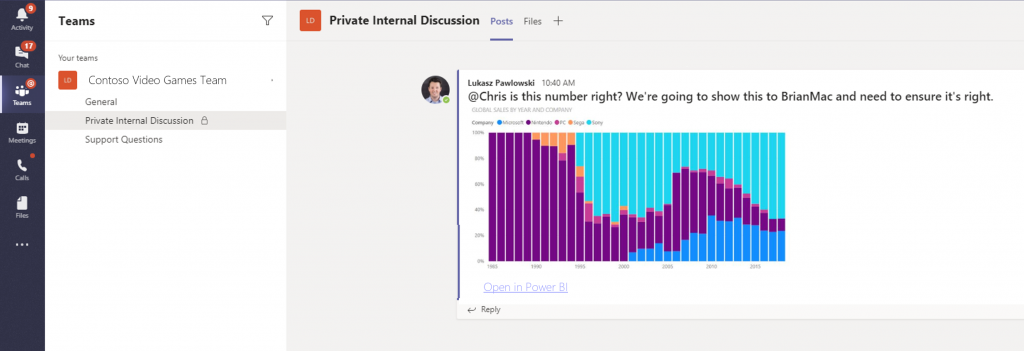
    Copy and paste visuals into other applications: supporting the modern flow of information. If the paginated reports represent the PC era way of working, then being able to grab a part of your analysis and quickly paste it to a conversation in Teams with a link back to the full report is the way today’s information workers expect these cloud apps to work with one another.

    Data lineage GA & enhancements: when cross-referencing data from anywhere is a breeze, how can you tell if the analysis is actually accurate? The lineage visualization is an effective way to illustrate how this modern world of self-service BI operates and bring tools to do meta-analysis on what’s the actual source of the truth being presented to you.

    Power Virtual Agent

    Add a Power Virtual Agents bot into Power Apps canvas app: because bots are not just for customer service. Internal scenarios for app users would be very interesting, although the starting price for using bots is probably going to scare most customers away.

    Adaptive Cards: see my comment in Power Automate section.

    Single Sign-On: if attempting to go beyond generic website chat popups, strong identity management features are a must.

    Pass context to a bot from the calling site: “Hi, how may I help you?” That’s not how a smart agent would initiate the chat, so after identity comes context management. Bridging the gaps between apps is where I see bots being particularly powerful, so URL query string support is a good start for making this happen.

    AI Builder

    Power Automate integration: building the Cognitive Service for citizen developers. The patterns from Azure need to become more accessible in the BizApps frame of reference.

    New models like anomaly detection and receipt scanning: making AI Builder ready for business. Training AI for unique data sets is one thing, but where I believe wider adoption will start is through these more “ready to go” scenarios.

    Common Data Model

    Empower out-of-the-box analytics: delivering on the promise of CDM. It’s all just theory until we see Microsoft deliver on those promises about making it easier to integrate data sources and analytics/AI via a common semantic model.

    CDM visualization and management experience: making CDM more than a GitHub repo. “Increased focus on growing the Common Data Model ecosystem requires enabling users to work with Common Data Model in their native data environments, such as Power Query, Insights Apps, Synapse, and Power BI.” Yes, it certainly does.

  • Get ready for licensing enforcement in Dynamics 365

    Get ready for licensing enforcement in Dynamics 365

    Understanding what customers can do with specific licensing options available for Microsoft Business Applications has become a key component of the solution design process. There can be many different ways to reach the same business goal when either customizing and extending first party apps that Microsoft has built for Dynamics 365, or leveraging the Power Platform for building your own custom apps. Even within Dynamics 365, when planning which specific features are taken into use for managing a specific business process, it’s important to keep in mind whether it requires some “premium” features available only in more expensive plans like Sales AI. Then there are of course the consumption based components used in Microsoft’s more recent additions to Power Platform licensing model, like API calls and Portals logins.

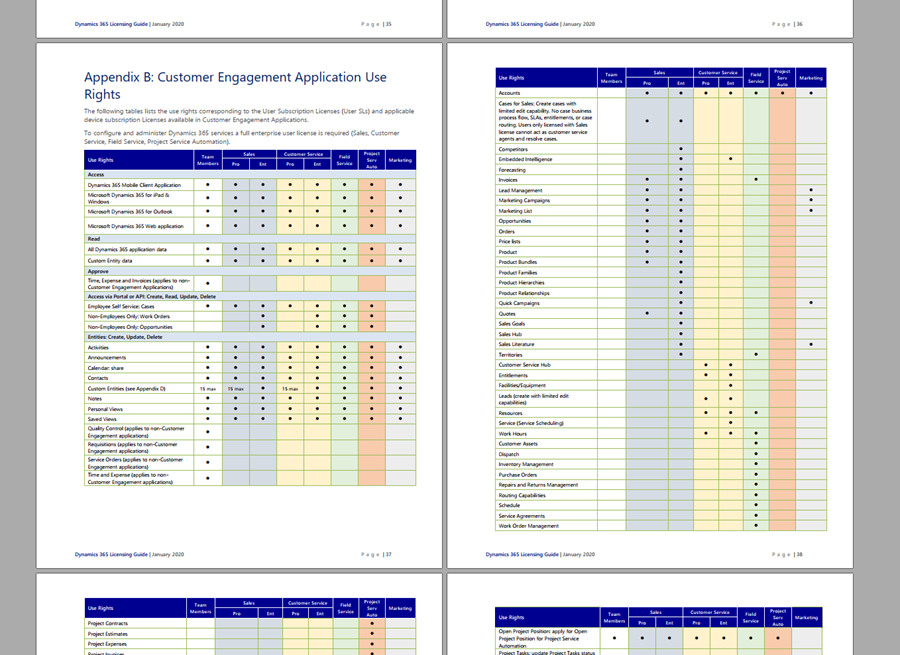
    Some partners and customers complain that the licensing documents from Microsoft are far too long, but the reality is that at the same time they’re also not extensive enough. It is quite common to run into a scenario when planning the implementation of a specific solution for a customer and then not finding a definite answer on what licenses it requires exactly. This is particularly true nowadays when the licensing model is a merger of the Dynamics 365 style business application products and the new citizen developer focused offering of Power Apps and Power Automate. These different products share more technology underneath the covers than many people realize, yet the way they are sold and positioned is quite different. When there is overlap, that’s when confusion arises.

    What would make it easier to validate the solution design against the licensing model is if there was a way to do test cases with a live system. Unfortunately much of this model still remains an honor system, meaning that many rules only exist on paper but have not been actually technically implemented within the online service run by Microsoft. However, we’ve been hearing about the plans for further technical enforcement of the licensing for some time now. In fact, there are pieces related to this that you can already see with your own eyes when exploring your environments.

    Enforcement mechanism inside CDS

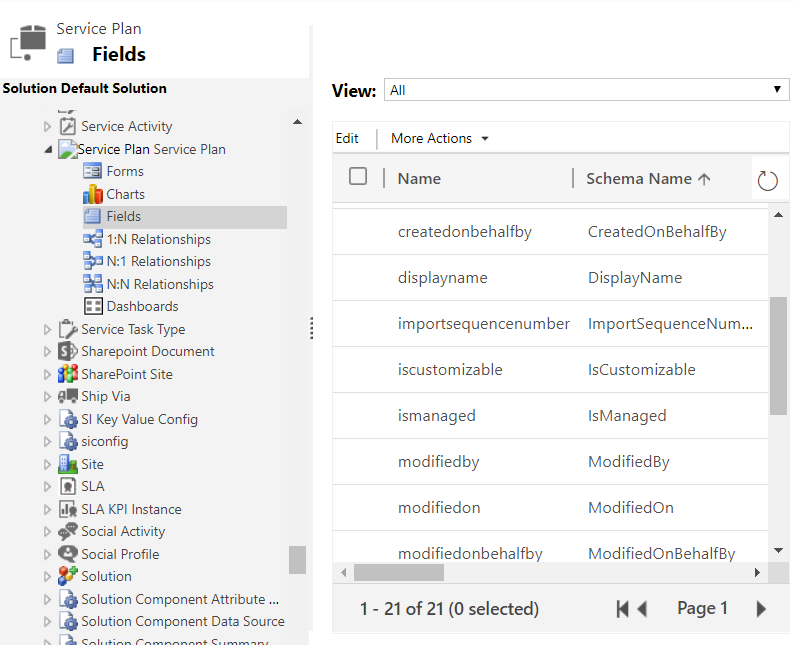
    If you are keeping track of the weekly updates that Microsoft pushes into every Online environment (via tools like Solution History for XrmToolBox), then there’s a chance you’ve noticed a hidden solution called “License Enforcement” deployed in December 2019. This introduced a new “Service Plan” entity into the schema, as can be viewed via the Default Solution:

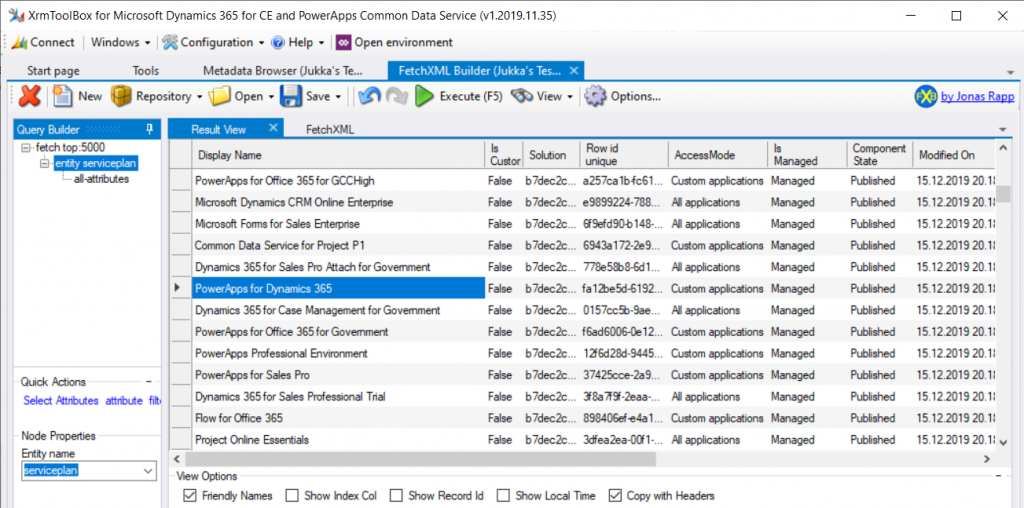
    You won’t be able to do an Advanced Find search to browse through the data for this entity. There is, however, a very convenient way for us to do a query of the Service Plan records, again via XrmToolBox, by leveraging FetchXML Builder:

    Wow, that looks interesting! While installing the solution, Microsoft also deployed a bunch of Service Plan records that presumably cover all the different types of licenses that have at some point in time granted access to a Dynamics 365 Customer Engagement Online environment, or CDS. Let’s copy this data into Excel for further analysis, and let’s make sure we tap the “friendly names” view option before doing so.

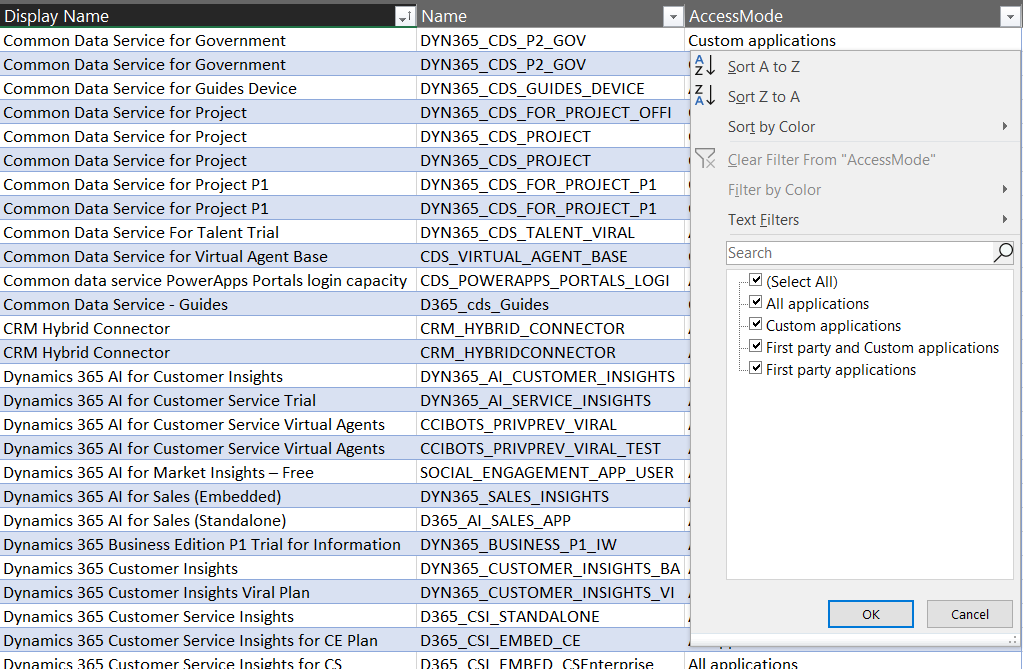
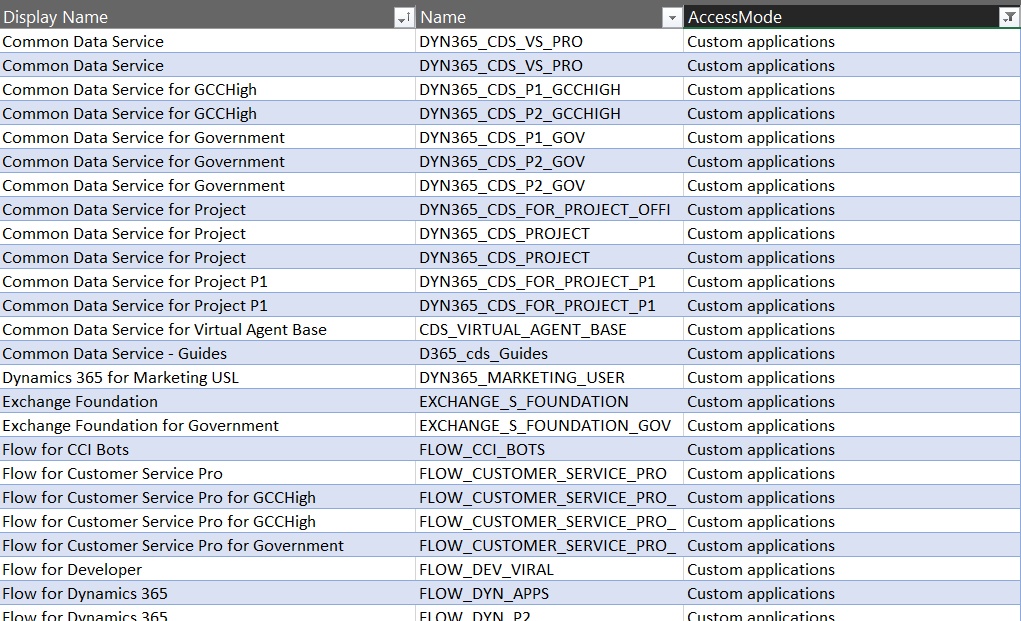
    It looks like there’s important data in the columns “Display Name” & “Name”, but the really interesting column from licensing enforcement perspective is “Access Mode”:

    Looking at the 4 options, it’s a bit difficult to understand what the difference between “all applications” and “first party and custom applications”would be. Even legacy products that are long gone like “Parature Enterprise” have the “all applications” access mode enabled. Without further information on this, let’s focus on the more straightforward options, like “first party applications”:

    Not too many entries for this option. Also it’s not surprising at all that it is the Team Member licenses that show up here. If there is one type of license that Microsoft probably would want to undo in the history of the Dynamics product line, it must be this. Introduced back in the days of Dynamics 365 CRM + ERP story debut, its design neglected the power of the platform in the sense that it granted practically unlimited rights for custom entities for a very low cost. The rights included in Team Member have since then been restricted considerably, to make room for the actual platform SKU that is Power Apps.

    Speaking of Power Apps, let’s look at the service plans that have the access mode set as “custom applications”.

    A lot longer list, with again some surprising entries like “Exchange Foundation”. The vast majority of this list is however very logical, as it mainly covers PowerApps and Flow (which on the branding side have been changed to “Power Apps” and “Power Automate”, of course, but this is licensing). The twist here is that similar to how Team Member granted too wide access for custom app scenarios, the rights included in Power Apps for accessing Dynamics 365 CE data stored in CDS are also a bit problematic from a commercial perspective for Microsoft. What clearly is off limits is the use of the standard app modules that ship with the Dynamics 365 App licenses.

    App Modules as a licensing construct

    The whole point in bringing data like service plans inside the CDS database is in being able to link that into app modules. If you browse through the metadata of any Online environment you’ll discover an entity with schema name “ServicePlanAppModules”. The relationship between a service plan and the app module is both the way how Microsoft has crafted the licensing terms for different products and also the mechanism through which access rights for different license holders will be restricted in the future.

    Looking at the fresh new Release Plan for Dynamics 365 2020 Release Wave 1, one of the new features is in fact called “License enforcement: users with new Team Member licenses”.

    For Team Member licenses purchased during or after October 2018, license-based access will restrict users to a set of designated app modules. These users will no longer be able to access Customer Service Hub, Sales Hub, or custom app modules.

    In April 2020 and already earlier in preview we’ll finally see the new Sales Team Member and Customer Service Team Member app modules that have been hinted at in earlier communication from Microsoft. Although these will be preconfigured modules, there will be room for customizing them to contain custom entities and (presumably) also hide unwanted entities – just like with traditional app modules. What will be different though, based the Release Notes as well as the Service Plan data model, is the lack of ability to build your own specific app modules from scratch. Any organization that has used Team Member licenses for covering a functionality not included within the first party Dynamics 365 Apps built by Microsoft will therefore have some work to do for redesigning the end user facing experience to accommodate these technical restrictions being put into place.

    “Oh, but we don’t use Unified Interface, so I guess we can skip those app modules in the oldskool web experience, right?” Wrong, you have even more work to do! There will be no support for accessing the legacy web client after October 2020. You better hurry with both planning your transitioning to Unified Interface as well as addressing the gaps that may be left for your Team Members users that will not have access to Sales Hub or any custom app module. Both of these changes have been a long time coming, but as many surely have experienced, it can be challenging to get the necessary planning and development work prioritized within organizations without a hard deadline. Now we have one (well, two dates interlinked), so that part is solved already!

    Restrictions like these enforcement rules are bound to generate some emotional responses. In the long run, having the rules specified in software rather than just paper should serve to bring more clarity into what services are available with which licenses. Any such clarity is most certainly welcome for making it easier to navigate an ever growing product stack like Microsoft Business Applications.’

    Read more

    Check out my blog post New Team Member apps for Dynamics 365 where I explore the 2020 Release Wave 1 early access versions of the new App Modules for Sales Team Member and Customer Service Team Member.

  • Using CSS color names for SVG icons in Power Apps Canvas app

    Using CSS color names for SVG icons in Power Apps Canvas app

    In my previous post we took the contents of an open source SVG icon library from GitHub and imported that into a Canvas app as a static Excel table, with the help of Power Query. This time we’ll explore how working with the icon colors can be expanded compared to the standard functionality offered by Power Apps Maker Studio.

    Standard color picker

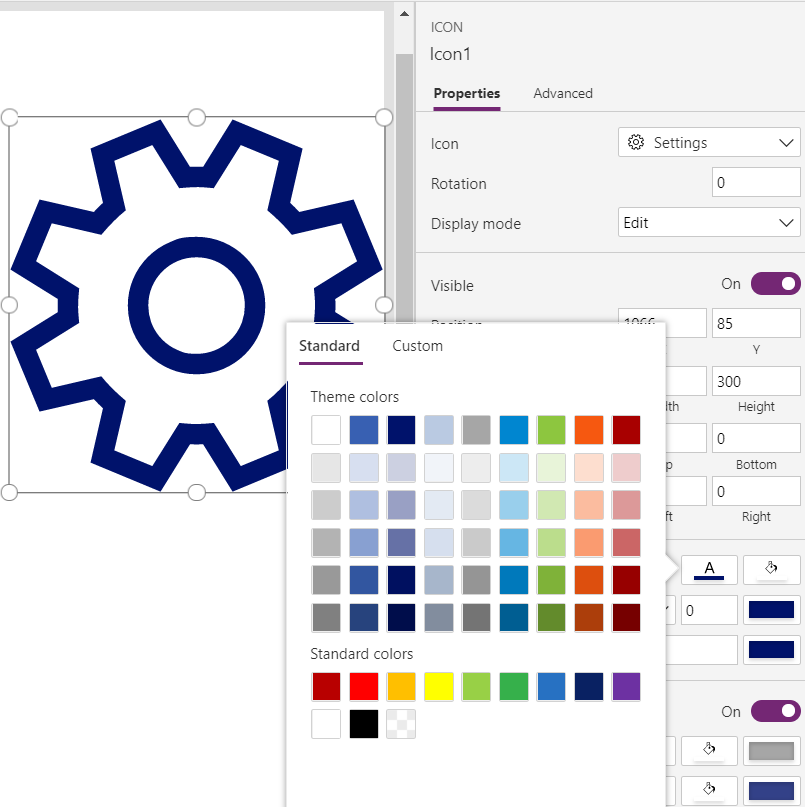
    If we are inserting any of the out-of-the-box icons into our app screen, Power Apps offers a color picker that works the same as when defining the color of a text font. The first option is the standard palette with theme colors and, um, “standard” colors:

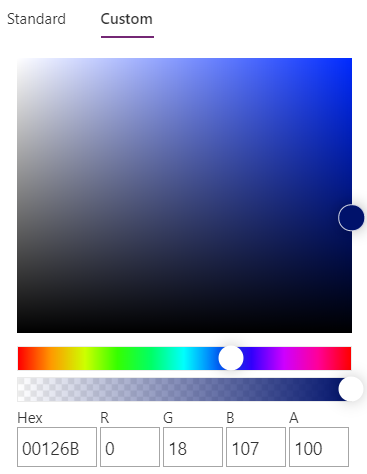
    Then there’s the “any color you could imagine” option where you can either pick the color from the sliders, type in the hex code or use the RGBA code:

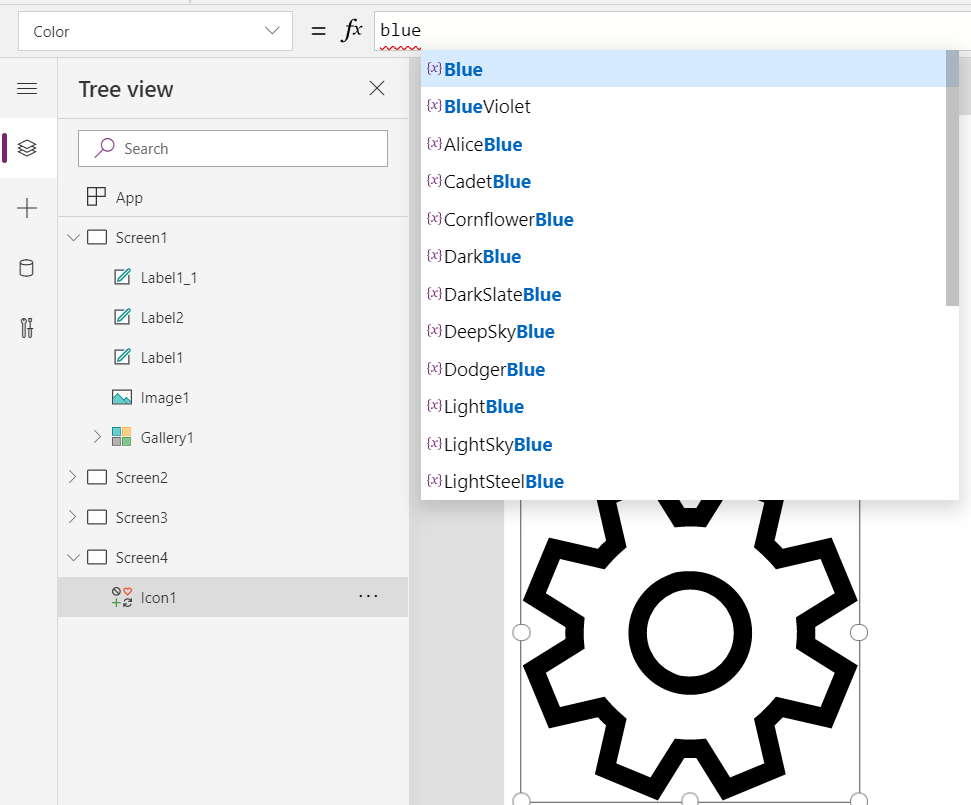
    The third option is a bit more hidden, so you’ll only find it when using the formula bar. You see, Power Apps actually supports also the CSS color names, so you could type in the value as “DarkBlue” and get exactly that for your icons:

    The Power Apps documentation contains a list of built-in colors supported and their CSS color names. Now, the idea of having the standard CSS palette with its easy to understand color names instead of cryptic Hex codes or RGB values sounds attractive for a low-code citizen developer like me. However, there isn’t really any convenient way to browse through these colors and see the results in the Canvas app UI. Unless we build one for ourselves!

    Custom color picker

    Just like with the SVG icon definitions, we can use the option for importing static reference data from an Excel table to enhance the app maker experience. What we’d need first is a suitable list of the CSS color names, alongside their attributes. Rather than searching for the perfect table online, I just grabbed the data from this CSS Color Codes page on RapidTables. What I especially liked about this page was that the colors were grouped based on the color “family”, meaning different tables for red colors, orange colors, yellow colors and so on. That’s the way I’d really want the colors to be organized, rather than the alphabetic list over on docs.microsoft.com. With some copy & paste, I ended up with an Excel table like this:

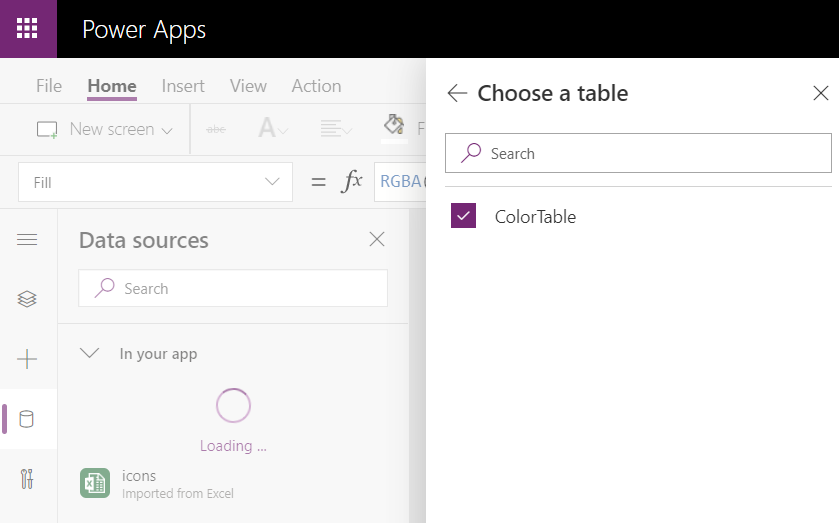
    You can grab my .xlsx file here. Let’s import that into our app via the Excel static data connector, as a table called ColorTable:

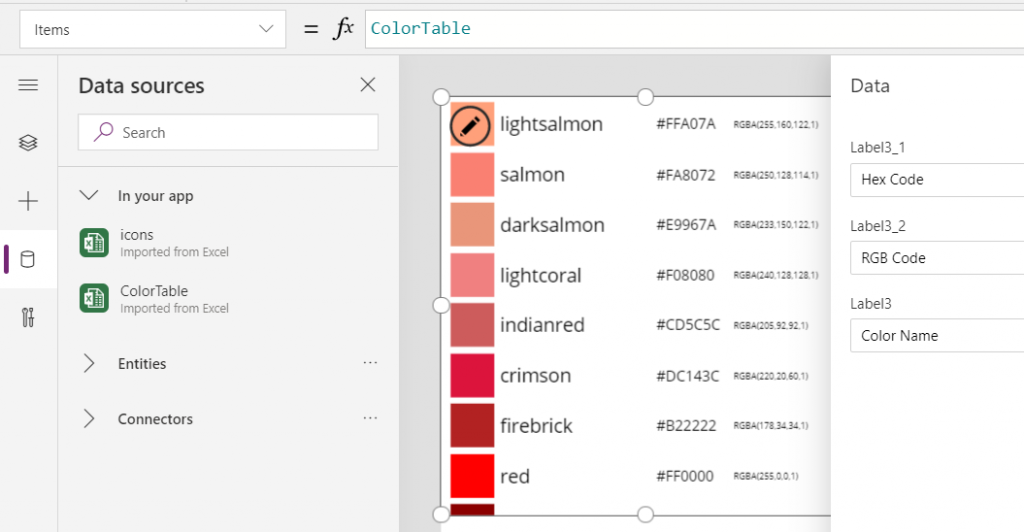
    We can now add a gallery control into our app and use the columns from our ColorTable as values for the fields in this palette browsing gallery:

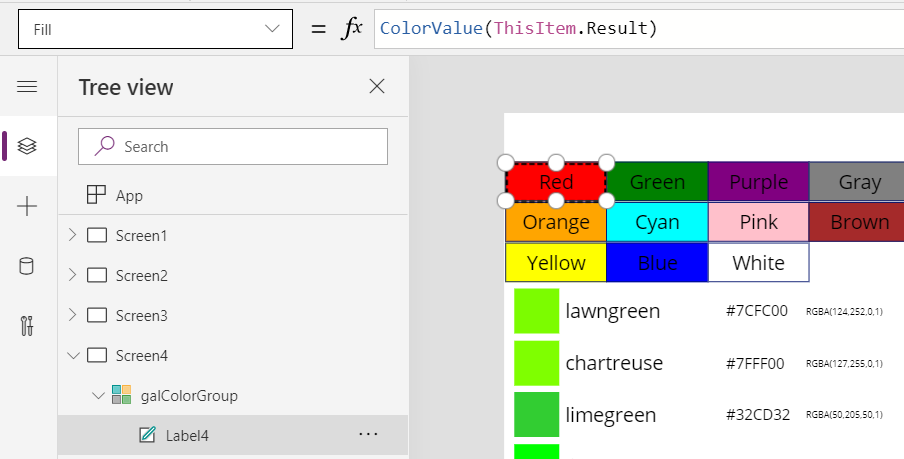
    “Wait, how did that visual color indicator get there?” Oh, that’s easy! We just added a rectangle into the gallery and used the ColorValue function to reference the Color Name column from the table that we imported from Excel:

    What I didn’t add there into our gallery yet was the Color Group information. That’s because I want to have this as a separate parameter that I can use to narrow down the list of CSS color names presented in the list. Let’s name the first gallery to “galColors” and create a second horizontal gallery called “galColorGroup”, which will contain a list of all the group names included in our Excel table.

    How do we get just a single “Green” and not all of the 19 different instances of that same text string in the source table’s “Color Group” column? We use the Distinct function and tell it we’re looking for data in the ColorTable data source and the distinct values should come from this particular column:

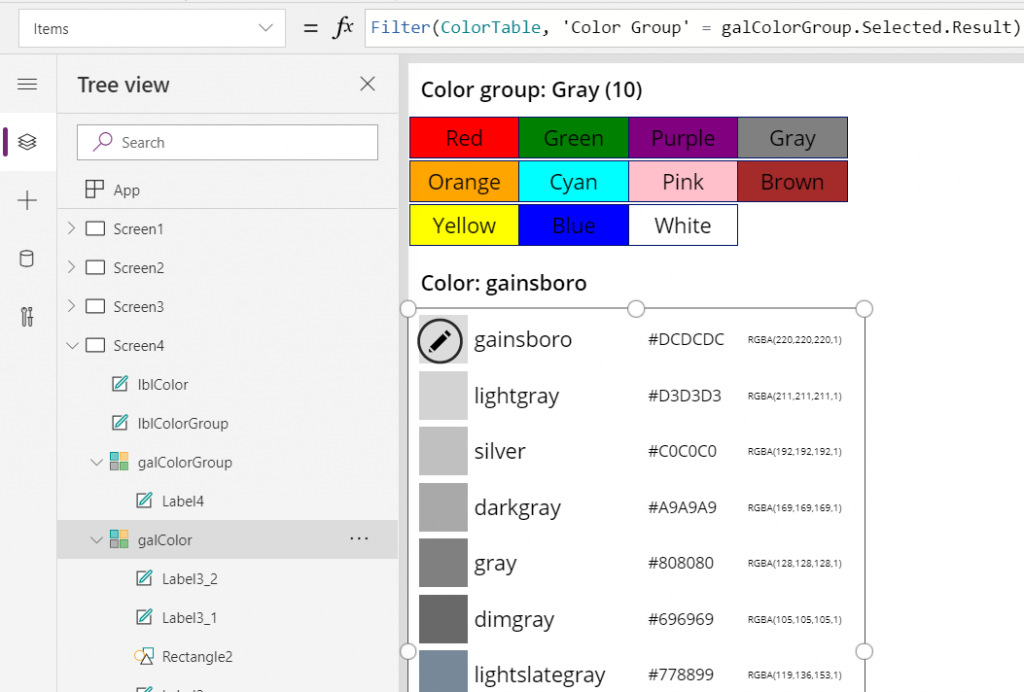
    The Distinct function returns a table with the single column “Result” as seen from the formula bar preview. We’ll add label into our gallery and populate the text value with this Result directly. To set the fill of the label’s rectangle area we’ll use the same ColorValue function as in our first gallery and point that to the Result column. Now we’ve got ourselves a galColorGroup gallery with 11 distinct values visualized:

    Let’s use the selected Color Group now as a filter to list only that group’s CSS color names in the other gallery. For galColor the Items parameter should read:

    Filter(ColorTable, 'Color Group' = galColorGroup.Selected.Result)

    While we’re at it, let’s also add labels on top of each gallery to state the currently selected value. For galColorGroup, we’ll want both the group’s name as well as the number of items returned after the Filter has been applied in the galColor gallery. We’ll concatenate the selected item’s name plus the CountRows result from the galColor gallery into a single text string like this:

    "Color group: " & galColorGroup.Selected.Result & " (" & CountRows(galColor.AllItems) & ")"

    For the second label, the selected color’s CSS name is enough for us:

    "Color: " & galColor.Selected.'Color Name'

    Now we can click on a value in the Color Group gallery like “Gray” and be presented with a filtered list of the 10 available shades of grey:

    Using selected CSS color name as SVG icon color

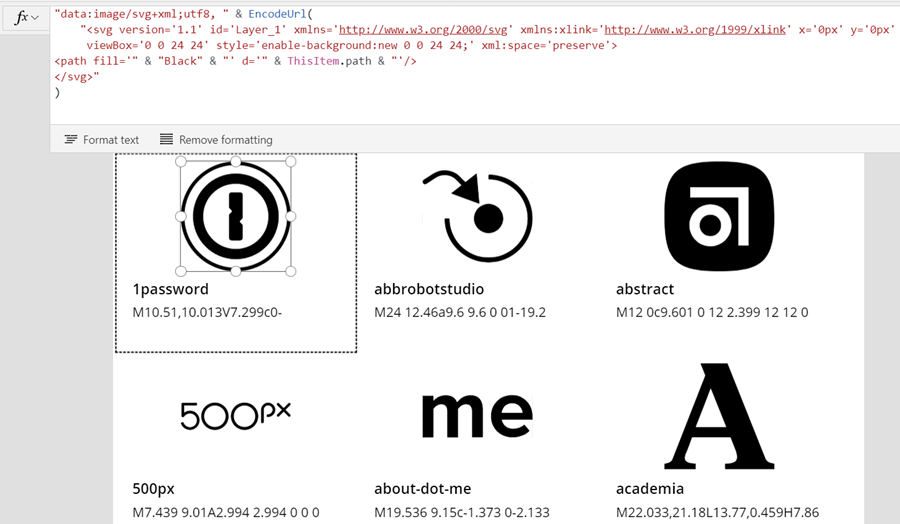
    The last bit is connecting the color with the icon library we imported in my earlier blog post. As a quick recap, the SVG icon shapes can be defined in the image property of a Power Apps image control by constructing the XML in the following way:

    "data:image/svg+xml;utf8, " & EncodeUrl(
        "<svg version='1.1' id='Layer_1' xmlns='http://www.w3.org/2000/svg' xmlns:xlink='http://www.w3.org/1999/xlink' x='0px' y='0px'
    	 viewBox='0 0 24 24' style='enable-background:new 0 0 24 24;' xml:space='preserve'>
    <path fill='" & "Black" & "' d='" & ThisItem.path & "'/>
    </svg>"
    )

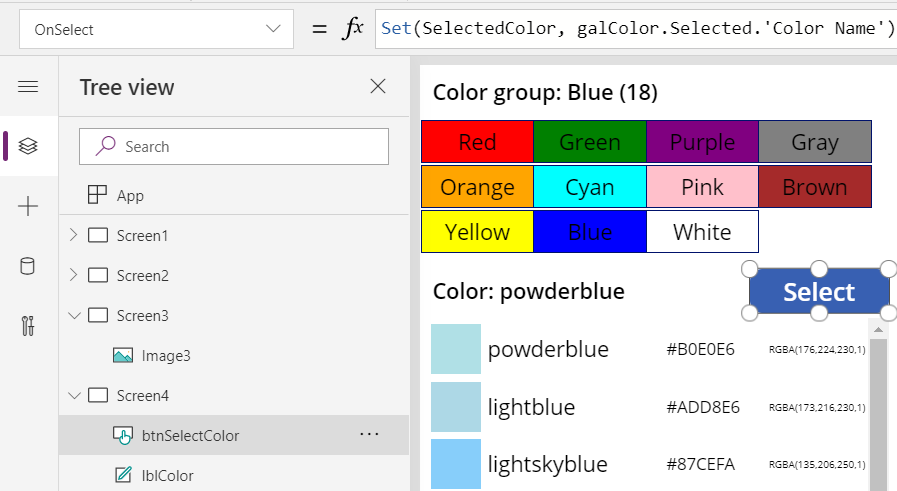
    You’ll notice that while we pulled the path’s attribute “d” from the dynamic value of ThisItem.path, we had left the path’s fill attribute hardocded as “Black”. Changing this to a dynamic value will allow us to render the SVG icons in any color we’ve chosen elsewhere. To make this work in conjunction with the CSS color name picker functionality we’ve built into our app, let’s add a button above galColor and use the OnSelect event to set a variable called SelectedColor to be the CSS color name of our choice:

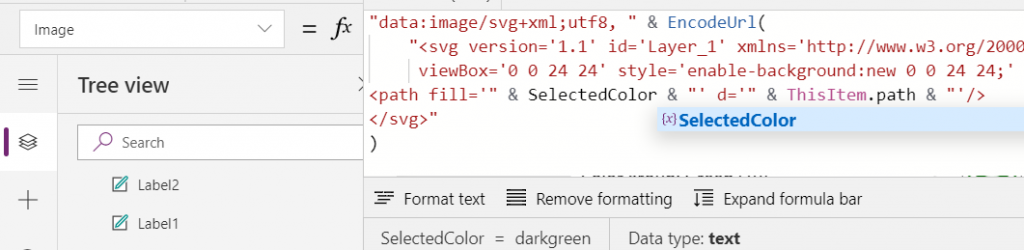
    Now we’ll just change the SVG icon’s XML definition to reference this variable’s value as the fill color:

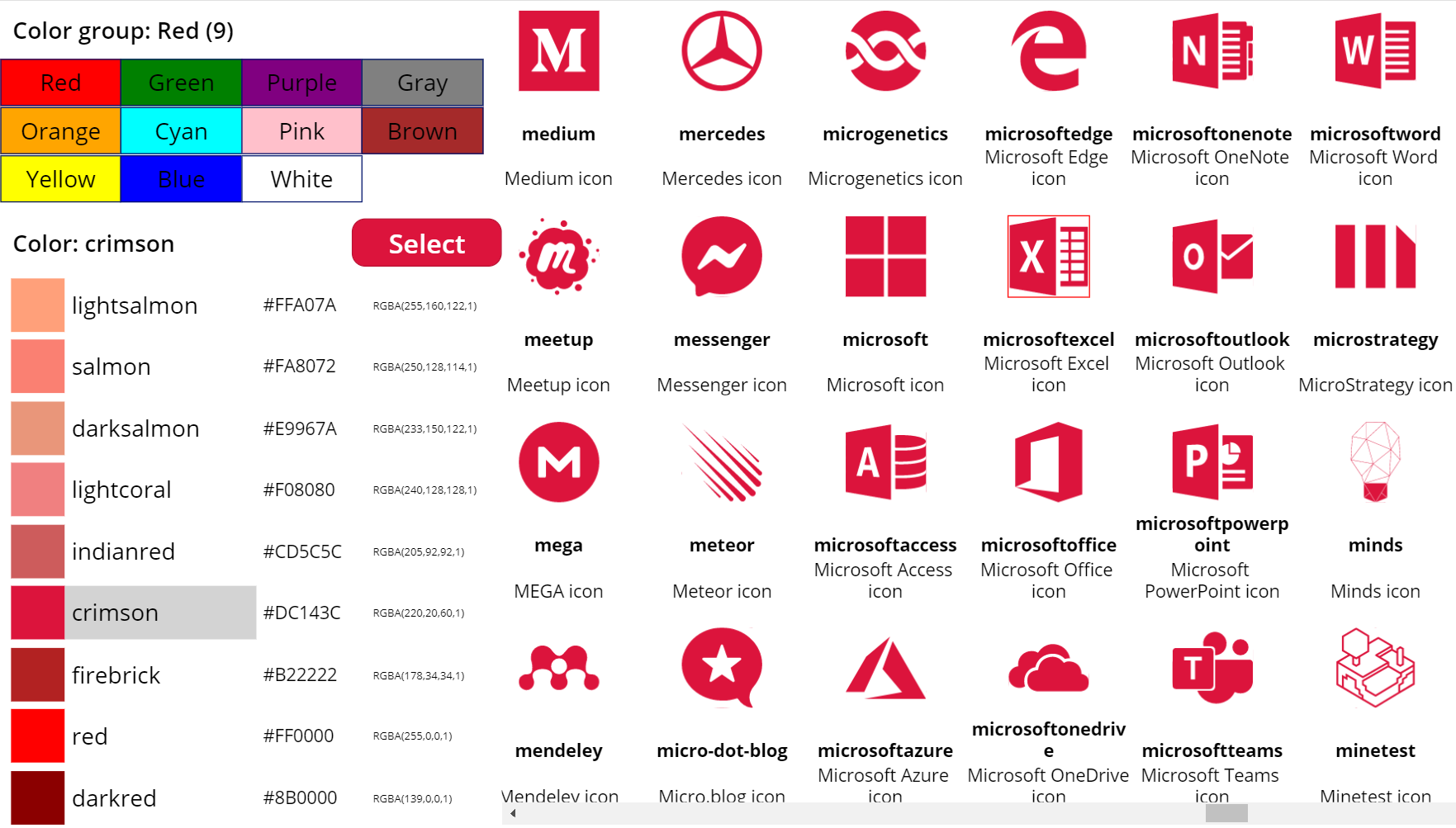
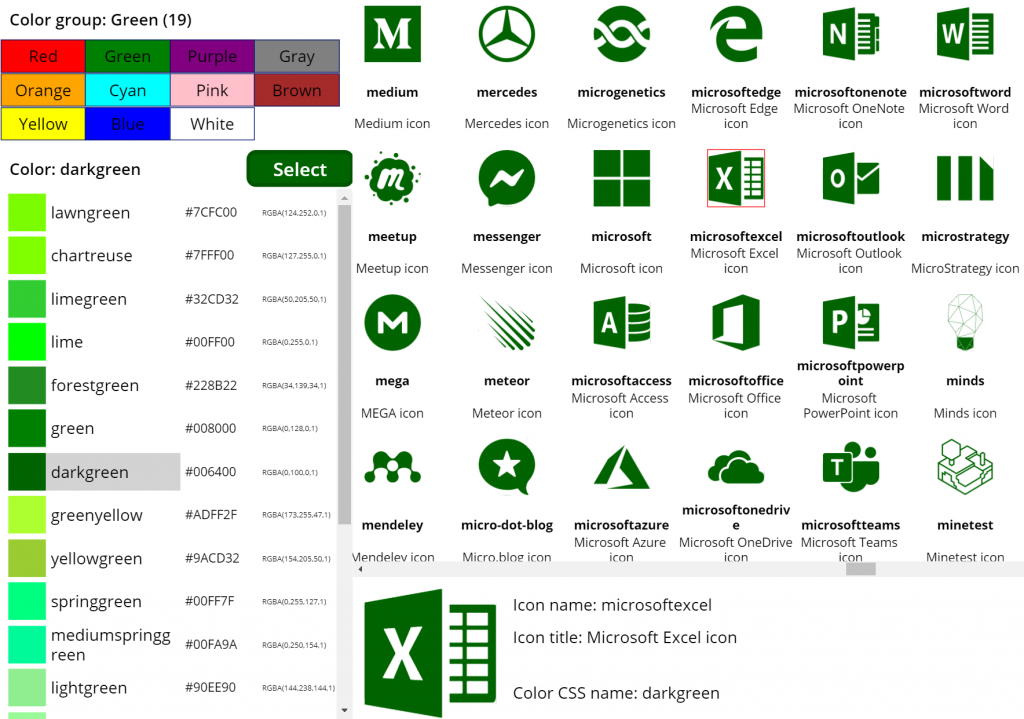
    This allows us to combine the earlier SVG icon gallery with our CSS color name gallery and make the color choice reflected visually immediately on all the visible icons:

    The visual part is what I love about this example of working with icons and colors in Power Apps. It’s a great exercise for learning how to work with data sources from the outside world and seeing how the Power Apps Canvas app UI changes as you modify your formulas and shape your galleries. Being able to inject dynamic values into XML that the app then renders in real time is a demonstration of how the low-code app development tools available in Power Platform can serve to unlock your creative powers, even if you have no skills on actual “pro code” development. Understanding how different color values can be passed on from one place to another and transformed via functions along the way also teaches you a lot more than using the standard color picker to set the static fill value of a single control.

    For me personally, it’s also an exploration of how to leverage configuration data when building Canvas apps. Coming from the Model-driven app customization world of XRM, my mind is still somewhat fixed on thinking via metadata, even though I’m trying to make the leap into UX first Canvas apps building (see this presentation for some of my tips on surviving that leap from Dynamics 365 to Power Apps). The possibility of importing static tables from Excel that are then preserved within the app is an interesting option to try and make the app building process a bit more structured than what the maker tools in Power Apps offer. I’m going to continue my experimentation and try to turn this example app into something that could offer reusable logic and configuration data when generating brand new apps.

  • Using SVG icons in Power Apps Canvas apps

    Using SVG icons in Power Apps Canvas apps

    When creating business applications on Microsoft Power Platform, a major difference between the traditional “CRM style” Model-driven apps and the modern “mobile first” Canvas apps is the possibility of visualizing data and available features in the app. Yes, having well-structured data to begin with is of course a fundamental requirement of being able to construct a meaningful business app. The freedom of pixel perfect visuals that Power Apps can deliver in the Canvas style apps is, however, an important factor when it comes to the perceived value that the end users can get from accessing the app.

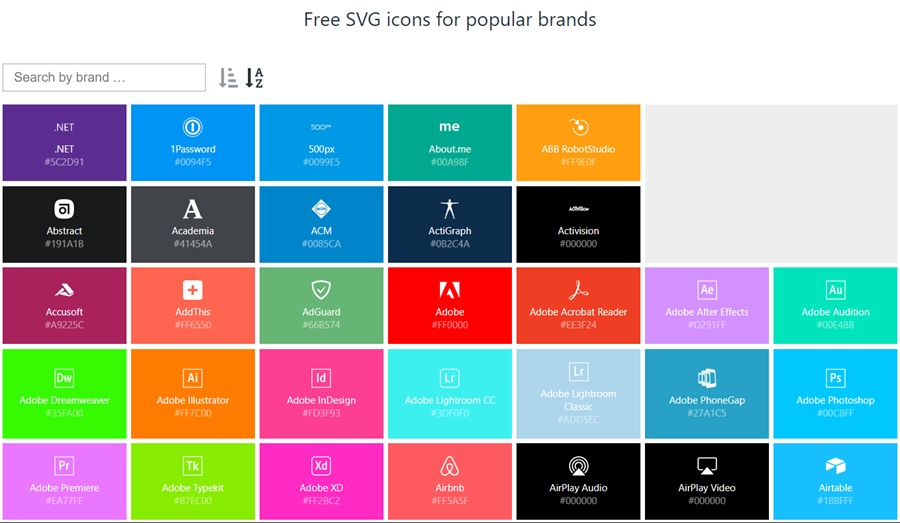
    If you’re willing to spend time in generating static images for all the different areas of your app UI and, more importantly, to reflect the state of your app in relation to the data that the user is viewing, then the sky’s the limit for what you could achieve with Power Apps. Now, considering that these low-code/no-code tools aren’t exactly targeted for professional app development teams that would have designers equipped with the tools & skills to create amazing graphics on demand, we often need to explore more frugal ways to make the app visuals serve their purpose. For those of us with next to zero skills in graphic design, sources of free / open source digital illustrations like IconFinder are like a gift from above. There are also a number of awesome icon libraries available on GitHub. Here’s an example of Simple Icons:

    Static graphics like PNG files can already do wonders to your Power App UI, but wouldn’t it be nice if you could also leverage the more scalable and adaptable SVG’s (Scalable Vector Graphics)? Especially for monochrome line drawings like the ones you’ll see a lot in today’s flat app UI, an SVG with transparent background and also a configurable color would be highly useful. Unfortunately, Power Apps today doesn’t support SVG file manipulation when imported as images. There’s a built-in set of icons that come with the Maker studio, which most probably are vector graphics, but you cannot add your own icons into that list. What this means is that if you import an SVG image into your app, there’s not going to be any more parameters available for you to adjust than if you had brought in a JPEG. Doh!

    A Canvas app that I’m currently building requires a large number of icons that should be dynamically changed based on a variable. For the purpose of mapping the suitable icon with a specific value and testing the UI, I wanted to bring in a whole library of icons and play around with it in Power Apps Maker Studio. In order to have better control over the icon appearance, I wanted to be able to modify the actual XML definition that makes up the SVG icon. Here are the steps how I managed to get the data inside the app and also how to render the SVG icons from the XML that I dynamically modify with formulas.

    Combining your SVG files into an Excel table

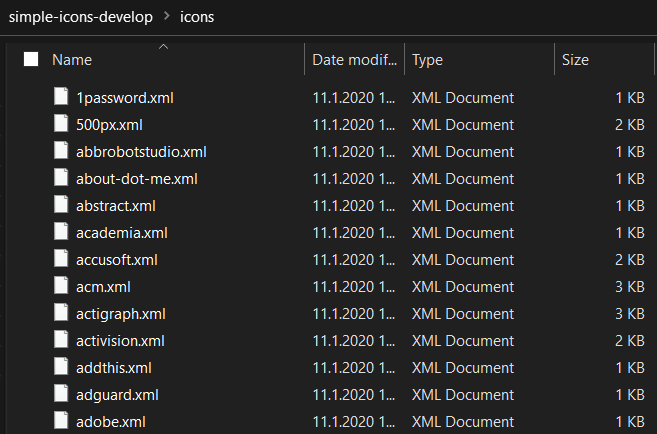
    Excel is a data source in Power Apps that allows you to import a static table of data into the app and store it there for all the app users to consume, without having to work with connections to external data sources. This type of resource file was quite convenient for my purposes, so the first thing I had to figure out was how to get a folder full of SVG files imported into an Excel table where each icon’s definition is represented on one row. In the above example of Simple Icon library, this would be the contents of the folder “\simple-icons-develop\icons”.

    Power Query in Excel has the “From Folder” option available when using “Get Data / From File”, which brings in not just a single file but rather all the files inside a specific folder. Great, that’s what I needed! Oh, but the source files I have are SVG which Excel doesn’t understand. No problem, let’s just change the file type to XML by renaming the files with by running this in the Command Prompt after navigating to that folder:

    ren *.svg *.xml

    This is what we should now have:

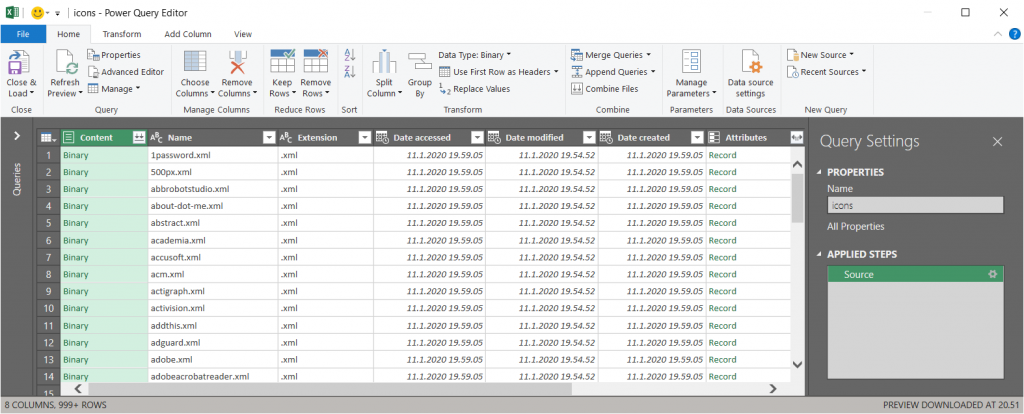
    Now we’re ready to consume the folder contents in Excel. Using “From Folder” and selecting “Transform Data” in the import prompt, we see a view like this:

    A good start, but we need to do some transformations to this data. First, in the Content column, click on the two downward arrows for “Combine Files” and see the results:

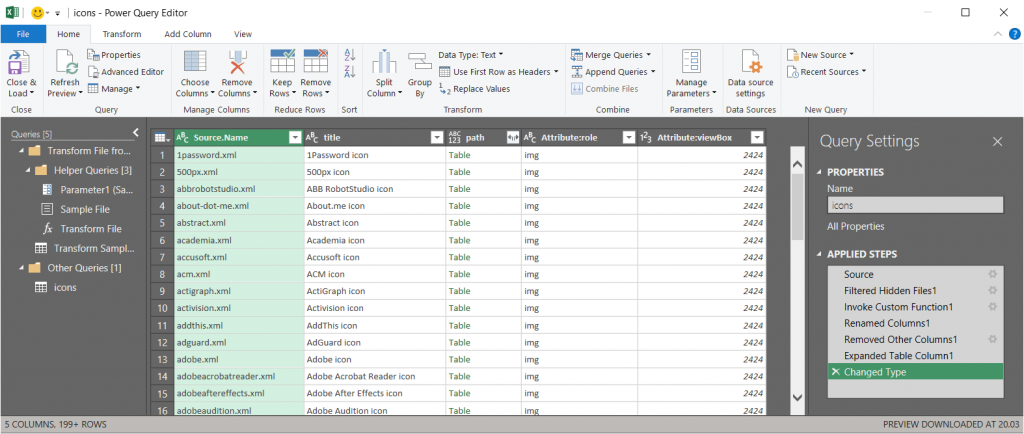
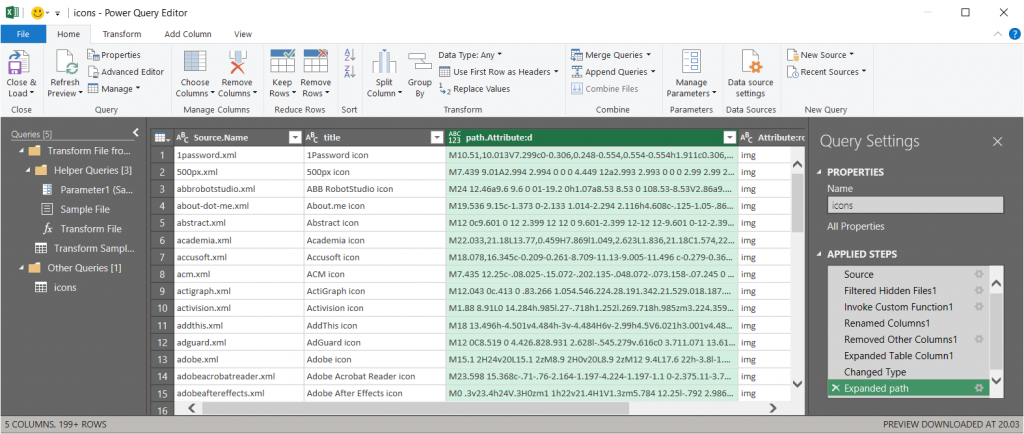
    Awesome, now we’re actually inside the XML file structure! What we’re really after is the <path> element in SVG , which is the ultimate drawing that creates the lines, curves and shapes. We don’t have to understand anything about its syntax (well, at least I don’t) but we need this data to get Power Apps to render the SVG shape inside an image control. Since it’s currently a table in the Power Query Editor, we click on the two parting arrows to expand its contents, which consists of a single attribute called “d”.

    We’ve now got everything we need, so the last steps are in removing unnecessary columns and renaming the existing ones. The first three ones are what we want to save into our Excel table, so let’s simplify the column names to “name”, “title” and “path”, then click Close & Load. You should have a beautiful Excel file with as many rows as you had files in the source folder. Before saving and closing the .xlsx, give the table a sensible name that you want to have showing up as the data source name in Power Apps.

    Visualizing SVG data from Excel inside Power Apps

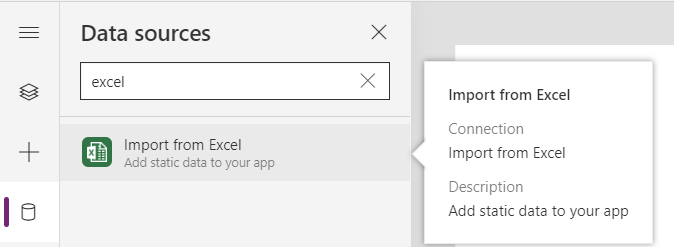
    How does one actually turn the XML definition data into a visible image in Power Apps? There’s a great blog post from Laura GB titled PowerApps – SVG Introduction, which gives us all the details needed to make the Image control render our SVG data. To see how it works in practice, let’s first bring in our Simple Icons Excel table into Power Apps as a data source:

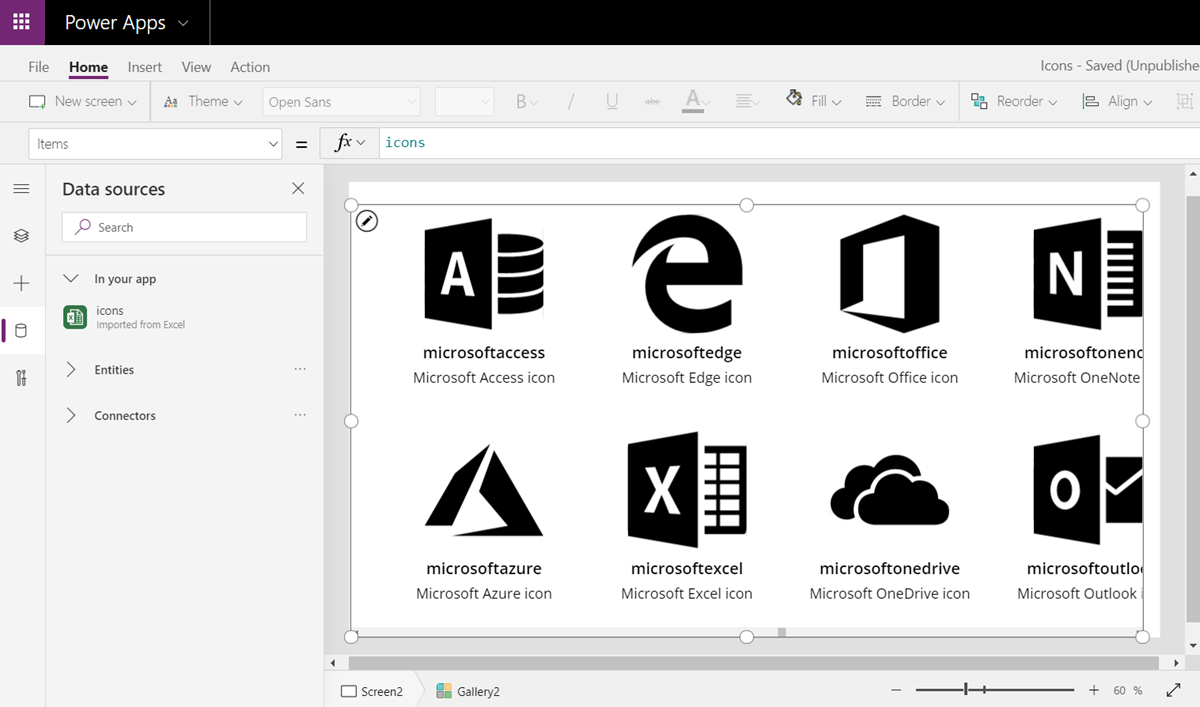
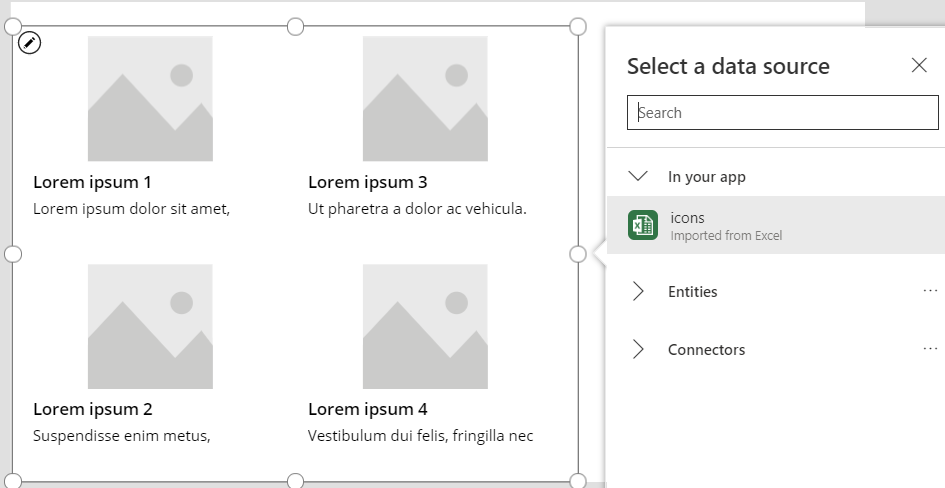
    Next we can add a horizontal gallery onto our screen an choose to use the imported table “icons” as our data source:

    Our table has the three columns we left in there when working with Power Query. From the default mapping we can see that the gallery item’s Subtitle1 label has “ThisItem.path” as the Text value. This is the data we’ll want to use in the image control of the gallery item, but first we’ll need to wrap it into something that gives Power Apps the context around it needed to render the SVG image, since we only imported the one attribute and not the complete XML. However, since this XML part will be exactly the same for any icons that we want to display from this Excel table, it can consist of static text, inside which we’ll inject a few dynamic values with the Power Apps formulas. Adapted from Laura’s post, this is how the Image property of the Image control inside the Gallery item should look like:

    "data:image/svg+xml;utf8, " & EncodeUrl(
        "<svg version='1.1' id='Layer_1' xmlns='http://www.w3.org/2000/svg' xmlns:xlink='http://www.w3.org/1999/xlink' x='0px' y='0px'
    	 viewBox='0 0 24 24' style='enable-background:new 0 0 24 24;' xml:space='preserve'>
    <path fill='" & "Black" & "' d='" & ThisItem.path & "'/>
    </svg>"
    )

    The important part is how we construct the “d” attribute from ThisItem.path on line 4, as that will be the only dynamic value in our SVG for now. Here’s what the result will look like:

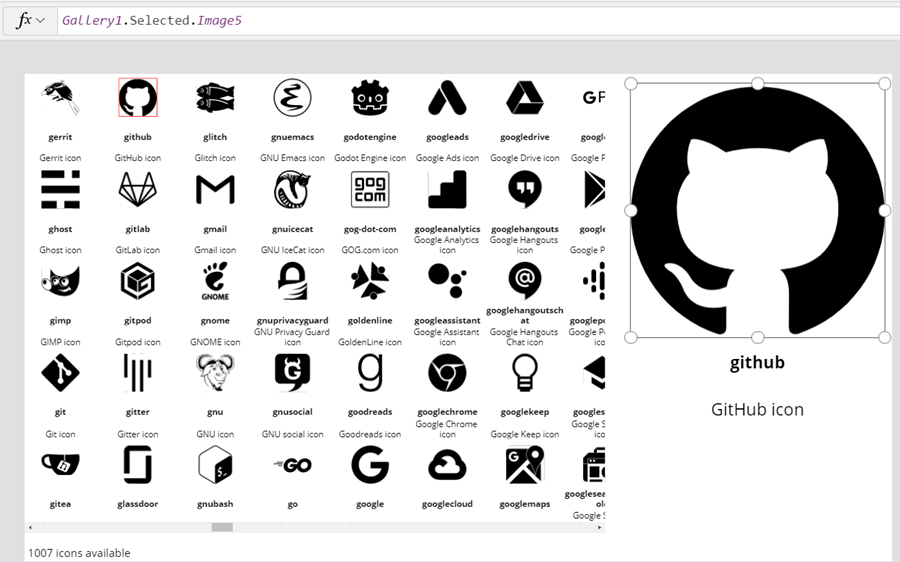
    It works! We can now design a gallery that will allow us to conveniently browser through the complete collection of 1007 icons in the library, by having a live “thumbnail” of the icon in a smaller 100*100 image control. To then view the selected icon in a larger format, let’s add a new image control outside the gallery and set it’s Image property to reference the Image of the selected item from Gallery1. Since these are vector graphics, there should be no loss of quality, no matter how large we set the image size to be:

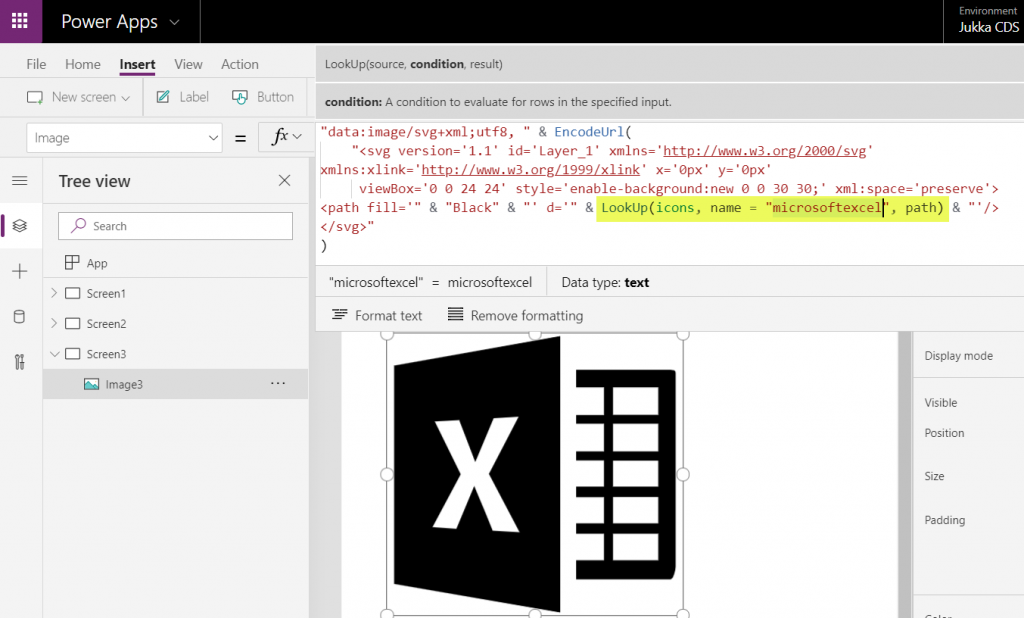
    If we now want to use these imported SVG icons from anywhere else in our app, we can just do a LookUp to the data source with the icon name and return its path, like this:

    LookUp(icons, name = "microsoftexcel", path)

    Using this when wrapped within the same formula we used earlier for showing the gallery’s selected item’s path will now give us a rendering of the SVG icon that matches our LookUp function:

    “Hmm, wont this kind of library of a thousand icons make our app size huge?” Not really. Since we are only storing the shapes instead of the pixels, the payload will actually be very compact for each icon. In this example with the Simple Icons library, here’s how much storage the different parts consumed:

    • Icons folder from the GitHub project: 1.5 MB
    • Excel file with icon XML imported via Power Query: 661 KB
    • .msapp file of the example app with static Excel data imported: 592 KB

    By taking just what we need (the shape information) and leaving out the static XML file’s overhead we’ve actually managed to shrink the 1007 icons into a much smaller space with our Power App. The other benefit is that further adjustment like icon color can now be set in our own formulas. In a follow-up post I’ll continue adding features into this icon library browser app to make use of exactly this capability.

  • Year 2019 in Microsoft Business Applications

    Year 2019 in Microsoft Business Applications

    For the past couple of years I’ve done a “top 3 themes” post at the end of the year, to reflect back on what were the key topics that shaped the coming direction of Dynamics 365. Just because this is no longer a “CRM blog” doesn’t mean I should give up on that tradition, so let’s do some exploration on what has happened in the past 365 days.

    One year ago I described 2018 as the year of the platform and listed the top themes to be 1) Power Platform, 2) One version, and 3) AI journey. What will 2019 be remembered from? Just like before, it was fairly easy to select three bullets that I think have been most impactful on the Business Applications ecosystem:

    • Low-code movement
    • Licensing confusion
    • Data story evolved

    Let’s discuss what happened under each of these themes in 2019 and do some forward thinking on why they’ll continue to be relevant in 2020.

    Low-code movement

    This first topic is a much broader phenomenon than just Microsoft’s Power Platform offering. During 2019 we’ve seen the general tech media and industry analysts give plenty of attention to the rise of low-code/no-code development and how organizations are exploring its possibilities to augment (or even replace) traditional software development methods when it comes to internal app development. Microsoft receiver recognition from both Forrester in March 2019 and Gartner in August 2019 for its position as a leader in the low-code application platform market.

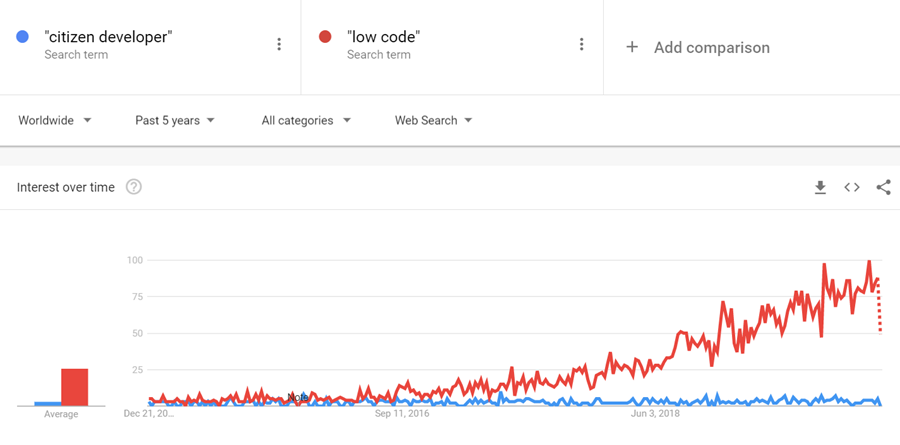
    The term “citizen developer” had of course been used already much earlier in Microsoft’s description of the target group for Power Apps (earlier “PowerApps”) and Power Automate (formerly known as “Microsoft Flow”). However, it’s safe to say that the general interest on low-code is rising much faster, if you look at what people are googling:

    What has propelled Microsoft to the top right corner in the analysts’ charts is not just the functionality aimed at everyday information workers / power users in these tools. Making their low-code offering enterprise ready has been a clear goal for Microsoft, as can be seen from how the pro developer audience is being presented Power Platform + Azure as the platform for every developer. On the IT administration side the efforts to put together a Center of Excellence (CoE) toolkit for Power Apps are showing Microsoft’s commitment to providing a governance story to address both the common admin needs of organizations as well as adapting to the varied support needs of the new breed of app makers.

    There is a wealth of functionality that’s still just in the MS product team’s pipeline to land sometime in 2020 which will make the Power Apps development process much more like “real” app building. Built-in tools like Power Apps App Monitor will be the go-to place for debugging formulas, analyzing performance and in general taking a peek under the hood of what the low-code declarative app development studios actually produce. The coming Power Apps Test Framework will allow the authoring and execution of proper test cases, to ensure the app quality doesn’t erode as new features and platform functionality are introduced. There will be Power Apps telemetry data available in a similar way as Azure Application Insights provides to custom apps today.

    All these platform investments together with the growing interest from customers (and presumably partners, too) should mean that low-code app development will become increasingly mainstream in 2020. This will boost the awareness of different vendors in the category and may well steer us a bit further away from the ever so familiar head-to-head comparison of Salesforce vs. Microsoft that’s founded in their CRM product offering. Dedicated low-code players like OutSystems or Appian may start to appear more frequently on the radar, as well as companies like ServiceNow that are running towards the citizen developer territory from a slightly different background. Oh, and you should definitely expect there to be even more heated debates ahead on the possibilities, limitations and roles of no-code, low-code and pro code!

    Licensing confusion

    This second theme is in part related to the growing pains of how the Power Platform tools are turning into self-sustained products rather than just an extension method for Office 365 and Dynamics 365. Yes, they are still very much the toolkit for how you customize applications in the aforementioned suites. However, building extensive custom apps with the full low-code platform capabilities is no longer something that “comes with Office” when looking at the latest licensing terms. Citizen developers can still easily get started with the “seeded” plans in Office 365 for their personal productivity explorations, but for the organization wide deployment of low-code solutions, customers should prepare to purchase dedicated Power Apps and/or Power Automate licenses.

    In 2019, removing the earlier included rights from Office 365 seeded plans to use custom connectors, HTTP custom actions, on-prem gateway, Azure SQL was understandably something that irritated those early adopters who had dived deep into building Power Apps and utilizing flows on a wider scale in their organization. While I bet many had suspected there would eventually be limitations designed to drive customers towards the paid plans, it might have been a surprise that minimum price point for the required Power Apps user license was kept at $40/month. From the Office 365 point of view, this can sure look like quite a “cliff” for taking app development further.

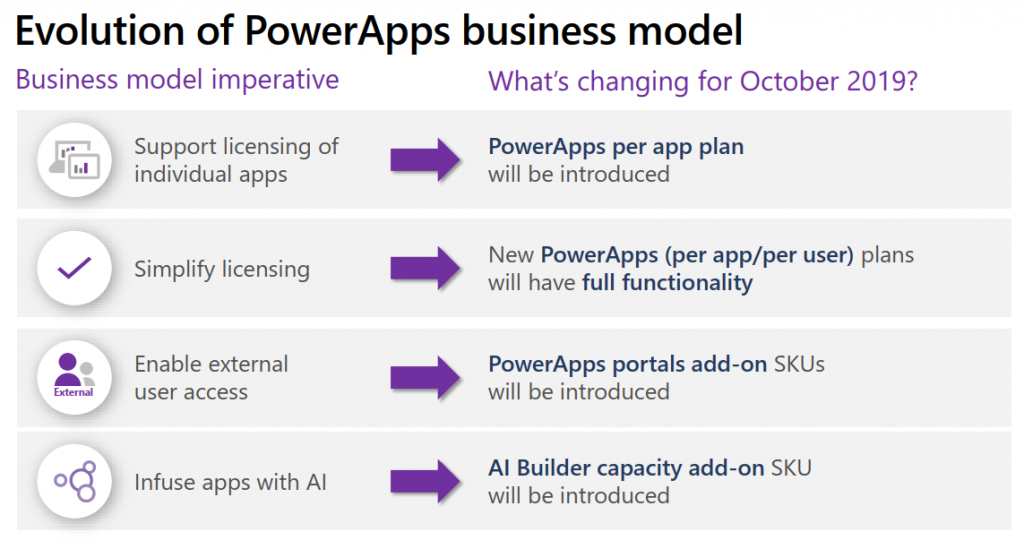
    Another big surprise was the way how Microsoft introduced a new $10 per app pricing model as an option for basically any custom apps built on top of Power Platform. With rights to full feature set of CDS, Model-driven apps and pretty much everything that you’d need for running an app that looks like the native Dynamics 365 apps, it seemed almost too good to be true – if you’re coming from the Dynamics side of traditional CRM style business applications where the enterprise apps cost $95. A great example of the two different realities clashing, when Power Platform can simultaneously be seen as crazy expensive or dirt cheap, depending on the frame of reference.

    The policy of licensing the low-code Power tools from Microsoft via primarily a per-user model with upfront payment requirement is sometimes challenging when talking about the business cases for an application platform that would be gradually adopted for more and more app scenarios. There’s no pay-as-you-go option like with raw Azure resources, because Power Platform is a value-added abstraction layer that should remove any direct dependencies to those resources. However, in 2019 we saw MS take things towards capacity based licensing, with the introduction of explicit Power Platform API request limits per user license type, plus the option to purchase additional capacity if needed. Although MS has stated that normal users should be well within the included API quota, there have been many concerns raised from developers on how custom apps and integrations will be impacted. The fact that these new consumption based limits were announced before any metrics were made visible to customers for evaluating their existing scenarios didn’t exactly help in alleviating concerns.

    I’ve never spent as much time investigating the details of Microsoft licensing as I did in 2019, and honestly I hope that 2020 would be at least a bit lighter on the licensing changes side. Seeing the rate at which the product portfolio of Microsoft Business Applications is growing, though, I’m not sure if it’s realistic to hope for the size of the licensing guides to shrink anytime soon. We’re also still waiting for some of the October 2019 licensing announcement details to be finalized, like the promised API usage metrics in Power Platform Admin Center, or the updated list of restricted entities requiring Dynamics 365 license. Oh, and I bet in 2020 we’ll see the launch of technical enforcement for the types of apps that each license holder is able to use (1st party, custom, Team Member etc.).

    From the customer and partner perspective, the licensing of Power Platform is often perceived as its most complex part, based on feedback from various community members. Although many of the recent changes have been undoubtedly necessary to align the very different Power Apps and Dynamics 365 licensing models into a coherent and future proof platform licensing model, unfortunately the continuous adjustments on what these services actually cost to run has clearly eroded the customers’ trust on being able to predict the operating costs of their solutions built on top of Microsoft’s cloud. After shaking things up on the licensing front in 2019, let’s hope that 2020 would see less drama. Who knows, Microsoft might actually study their own data on how the latest licensing and pricing decisions have impacted service consumption and calibrate the model on those areas that could be better balanced to drive greater adoption of the platform and the apps.

    Data story evolved

    Basing business decision on larger and larger pools of data, gathered from an exponentially growing number of sources, processed closer and closer to real time is the Digital Feedback Loop story that Microsoft has been preaching in basically every Business Applications themed event for the past couple of years. The underlying message is that you must have applications so well integrated with one another that you can establish such a loop in real life – which of course the products in Dynamics 365 and Power Platform portfolios promise to deliver.

    Back in 2018 we saw the birth of many “AI for X” products that have since then been rebranded as “[something] Insights”. I called this out as the start of the business AI journey in last year’s summary blog post, since we hadn’t yet seen much of these new intelligent features find their way into actual customer environments. Based on my observations today, it’s still fairly rare to find these premium Dynamics 365 licenses for Sales Insights or Customer Service Insights deployed in real life scenarios (let alone Market Insights that’s still a bit of a mystery product in its preview state). So, it appears that at least these core CRM processes didn’t just magically get transformed by adding some AI frosting on top. A big practical blocker seems to be lurking in the availability of clean enough data in large enough quantities that these packaged AI features could show concrete results to business decision makers in customer organizations.

    What 2019 did deliver is a set of new products that are aiming to leverage business data in a way not previously covered by Microsoft’s business apps offering. In the second half of 2019, the headline Dynamics 365 product demonstrated in all MS events was Customer Insights. Built as a Customer Data Platform (CDP), its purpose is to enable marketing users to combine customer and transaction data from numerous different sources, to form a 360 degree profile of that customer and use it in better segmenting offers and providing personalized service. Pouring data into Azure Data Lake & CosmosDB is designed to be effortless from any source, be it Microsoft’s or other vendors’ solutions, with intelligent matching algorithms generating “keys where keys don’t exist”. While it can be used with Dynamics 365 apps, there’s no requirement for the customer to have a specific CRM system in place. It’s also not a black box like some of the earlier Insights products, since the built-in templates like churn prediction can be replaced with custom Azure ML models to take advantage of machine learning models built and trained by your own data scientists.

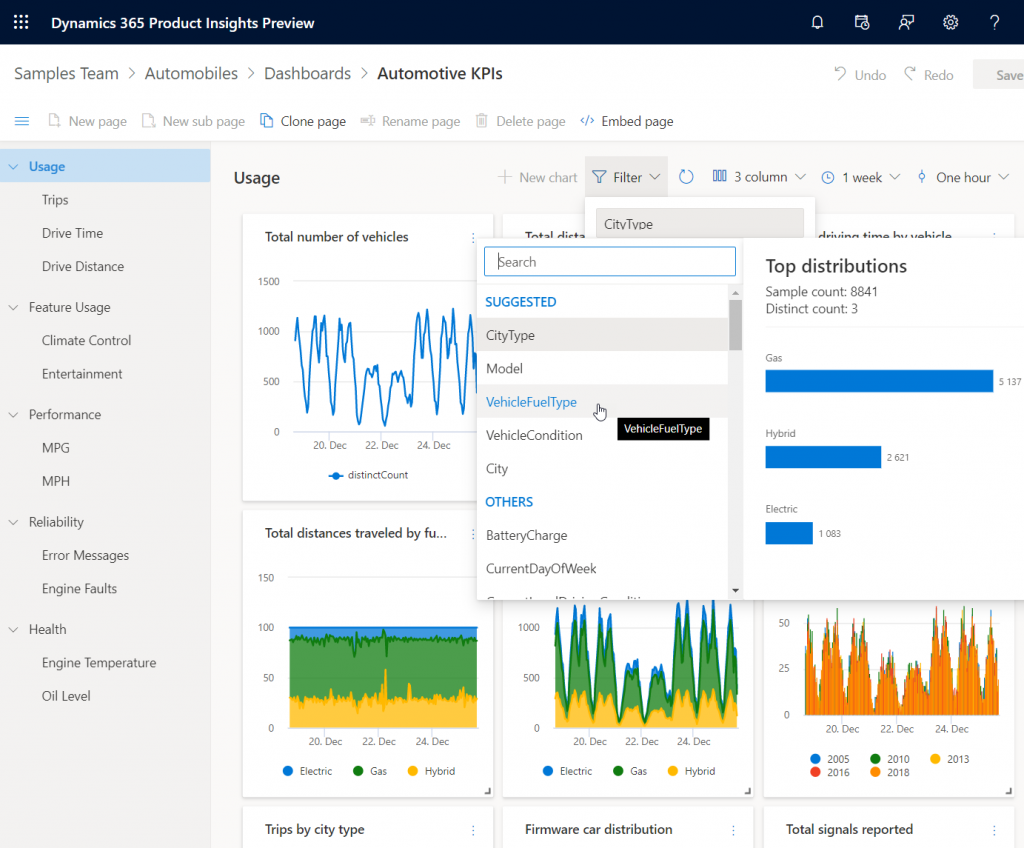
    Another similar data intensive new product launched as preview in 2019 was Dynamics 365 Product Insights. The origins of this application lay in Microsoft’s own telemetry data management systems, where services like Xbox, Skype, Bing and Office have been sending up to 25 million events per second to be processed by the same technology that’s now offered as a Dynamics 365 SaaS product to customers. Yes, you could use Azure Event Hub to push all that product telemetry data into the PI service, but there’s a Signals SDK for Java, Objective-C or Python, too, if and when the whole product architecture of the customer organization isn’t based on MS technology. Insights derived from processing the signal data could be consumed via Power BI or embedded inside Dynamics 365.

    These kind of new services that are aimed at exposing business users to data that previously used to exist outside the reach of the Digital Feedback Loop sound a lot more transformative than the earlier “AI for X” products. Sure, there’s also value in bringing predictive opportunity scoring into the traditional sales funnel management in CRM. However, those kind of features will likely become the new norm for the type of smart business apps that users will expect to be interacting with everywhere. The customer specific implementation of solutions based on Customer Insights or Product Insights, on the other hand, have the potential to be a source of true differentiation if organizations can learn unique ways to use their data for proactively serving their customers. It also aligns with the ambitions that Satya Nadella has on how organizations can break traditional data processing barriers with the help of Azure:

    We are building Azure as the only cloud with limitless data and analytics capabilities across our customers’ entire data estate, bringing hyperscale capabilities to our relational database services.

    Satya Nadella, September 2019 post on LinkedIn

    New services like Azure Synapse will naturally be the toolkit for creating highly specific, cutting edge analytics solutions on the MS data platform, but I can imagine the SaaS style Dynamics 365 products to follow pretty close by when it comes to covering repeatable business scenarios for big data – with the same underlying Azure tech, of course. In 2019 we already saw CDS data export to Azure Data Lake becoming available both via Dataflows as well as through a standard feature (preview). The traditional relational world of business application data is intermingling with the less structured analytical data systems at a rapid pace, with Microsoft building these services that blur the lines of what specific type of data is being used in which business scenario. Is 2020 going to be the year when Dynamics 365 professionals must step out of their comfort zone of having everything in one database and start connecting to all these strange new services, to deliver those much sought after actionable insights to their business user audience? We’ll know that in approximately 365 days!

  • Why would you store images and files in CDS?

    Why would you store images and files in CDS?

    The Common Data Service is often though as a relational data store that resembles the former XRM database. While there is backward compatibility in the sense that you can do everything with CDS that you could in XRM (Online), the real power of the cloud platform comes from going beyond those limits. Earlier I’ve talked about how The Real Common Data Emerges as we start to work with a variety of different data types and even reaching out into the Azure Data Lake as part of leveraging the Dynamics 365 first-party apps. This time I want to drill deeper into the specifics of images and files as new field types available in CDS.

    Feature announcements from Microsoft

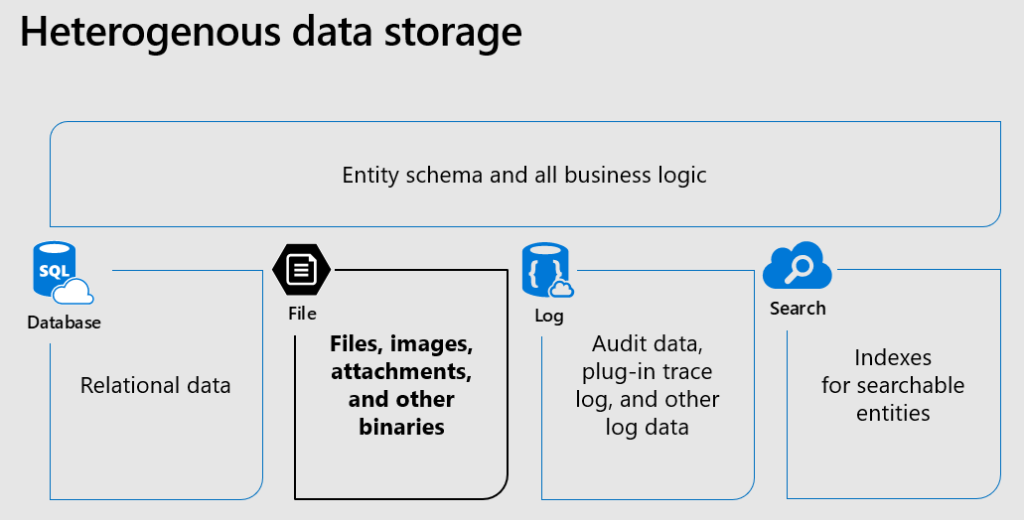
    The concept of CDS heterogenous data storage was demonstrated back in Business Application Summit 2019 in June. As illustrated below, alongside the traditional SQL database for relational data, CDS now offers also the option for binary (file) data stored in Azure Blob Storage and log data in CosmosDB, as well as search indexes offered via Azure Search. All of these are are available under the common entity schema and business logic defined in CDS, without requiring the app makers to think about what data goes into which specific service and how. This is how the Power Platform provides a higher level of abstraction compared to code based app development on top of the raw Azure services.

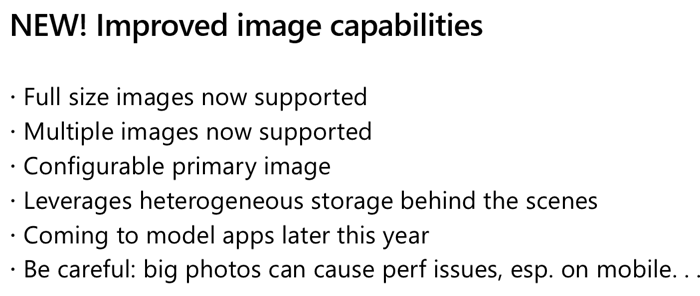
    Fast forward a few months to Ignite 2019 in November, where Ryan Jones presented a session on “Connecting Power Apps, Power Automate, Power BI and the Common Data Service with data”. The capabilities promised for the new image data type were as follows:

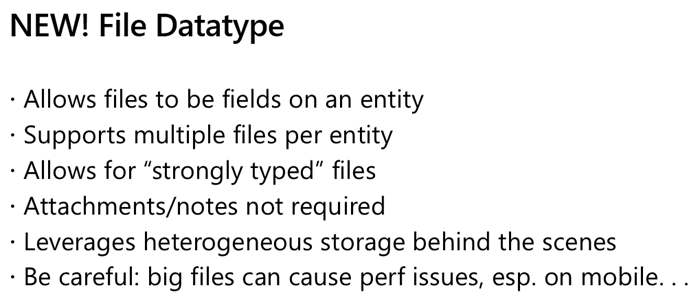
    And here’s the equivalent slide for file data type:

    In December 2019 there have now been announcements made on the Power Apps blog about Introducing File and Image datatype, as well as the availability of the public preview of file attributes on Power Apps Canvas apps. Things are still in the process of rolling out and support for Model-driven apps hasn’t yet even been demonstrated anywhere, so this isn’t something you can jump into using right away.

    Scenarios for files in CDS

    Traditionally in the world of CRM projects we’ve always advised against putting files into the database. “Keep ’em in SharePoint” has been the standard answer, which still makes a lot of sense for any collaboration on content creation, document versioning and so on. The SharePoint document management integration in CDS offers an out-of-the-box experience that generates document locations linked to specific records in CDS and allows working with them through the Model-driven app UI. If you’re happy with auto-generated folders under a single document library on a single SharePoint site for all the records of a particular CDS entity (like accounts), there’s no need to look any further. In real world customer environments the OoB integration is often not sufficient, and I’m really glad that things are improving with the Microsoft Teams based document management integration offering a more practical security and data location model. (Note that currently the Teams integration can’t be enabled for pure CDS environments without Dynamics 365 apps.)

    The problem that still remains is that both the direct SharePoint-CDS integration as well as the Teams-SharePoint-CDS combo don’t offer much business process context for the files. It’s more of a helpful tip like “hey, if you’re looking for documents related to this account/project/order/inspection, try searching from this folder”, rather than a very specific instruction about which particular file contains information on what step of a business process managed in CDS. You also can’t really verify whether a required document exists in the system before proceeding further in the process, since all you have is links to a folder which might or might not contain that file – or multiple copies and various different file types when what you’d really need is a single required PDF, like a signed agreement document.

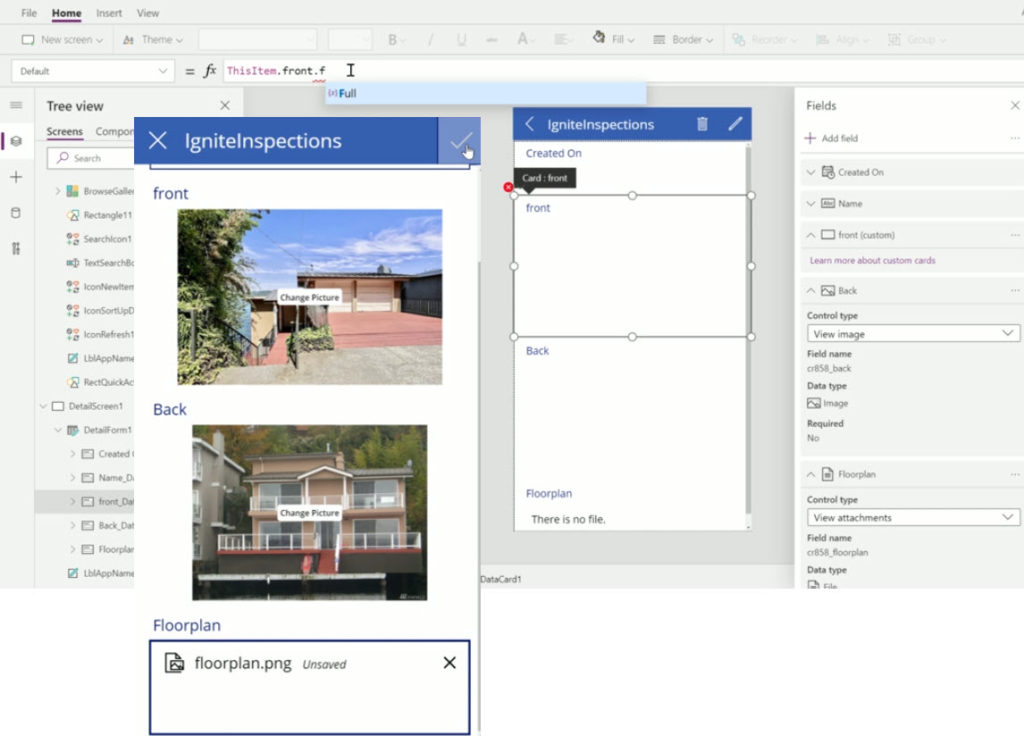
    With the new file and image datatypes, you can actually define a specific field to store a specific type of document or image. This will let you know exactly what the business purpose of a particular piece of binary data is, which means you can develop app functionality like user interface and business logic around it. It’s no longer just 0…N files linked from another system (like SharePoint), it becomes an integral part of your business process. The demo that Ryan Jones did at Ignite about an inspections app is a good example of what the “strongly typed” image and file data could be in practice:

    Having rich metadata about what a particular document represents in the real world is great, but what’s an even bigger benefit is the security model around it. As anyone with an XRM background knows, the ways in which you can configure the security model in CDS is very advanced, offering granular control of who can create, read, update and delete data. You have security roles, business unit hierarchies, position hierarchies, owner teams, access teams, sharing, even field level security. Any security logic that you apply on the entity that’s hosting the file or image field will also guard access to the binary content. If you’ve ever tried to sync the security information between a Dynamics 365 based CRM system storing customer records and the SharePoint environment storing the related documents, you’ll know how difficult and error prone this attempt is. The security concepts of those two systems are inherently different and even Microsoft is unlikely ever offer anything close to 1:1 integration (Teams is about as close as you can get.) For access control of sensitive documents and images, these new datatypes in CDS are therefore a very attractive option.

    Attachments (annotations) vs. file/image datatype

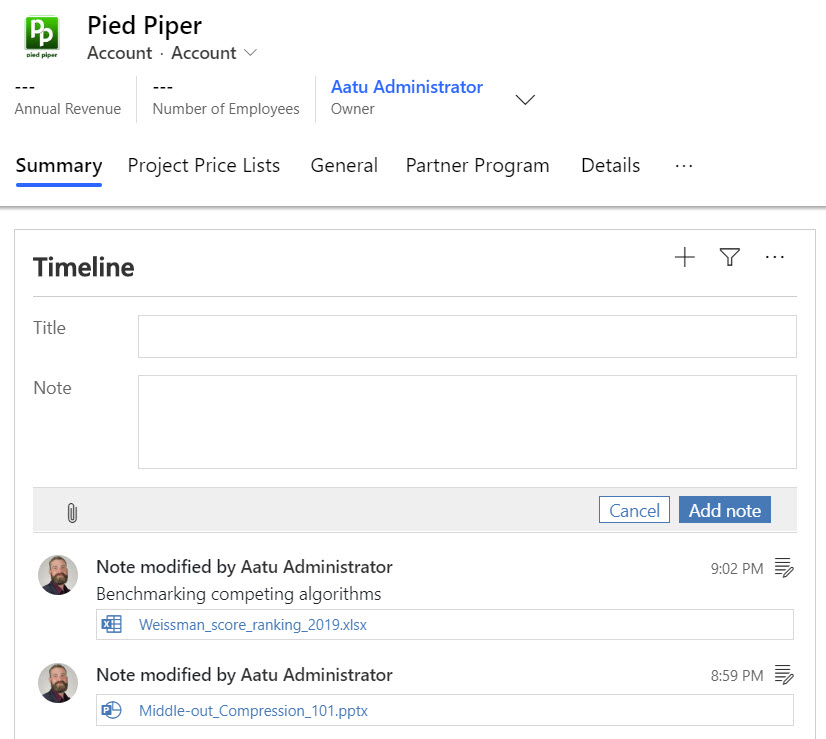
    Let’s not forget that it has always been possible to store binary data in CDS, even in the on-premises days. All your tracked Dynamics 365 emails will have automatically uploaded their every attachment into the Note entity. Additionally the users have been able to add notes with attachments on the Timeline of any entity where the attachment feature has been enabled.

    As part of the new storage capacity model launched in April 2019, Microsoft will have already migrated all of the attachments previously stored in the SQL database to Azure Blob Storage behind the scenes for any Online environment. However, this doesn’t make the attachments feature any more modern and you should seriously consider not using it in the future (where possible). While there is a somewhat better security story with the data all being behind CDS APIs, you won’t find any customization options here to align the data in Notes entity with your business requirements nor the desired application UI. It’s a fixed way of representing file data alongside the customizable relational business data model, inherited from the Dynamics CRM days rather than a feature designed for the Power Platform era.

    In the meantime, with the lack of better support for image handling, many of us have surely explored the capabilities of building a Power Apps Canvas App that could perform what the above Ignite inspection demo app does. Dropping a camera control on the Canvas App is so easy, yet storing the captured image into CDS alongside the other inspection data has been next to impossible. Yes, attachments as a separate control has been available for Power Apps makers for quite some time, but patching the image data from somewhere else into a new CDS attachment record is the tricky part. Complex record references like the Regarding field on the Note entity in CDS have long been a stumbling block for Canvas Apps, and as of today you still can’t write data to that field. Jumping through hoops made of Flows and Custom Connectors is hardly the kind of seamless experience you’d expect from a low-code application platform when working with camera images, so there definitely has been a big demand for the image datatype to come and replace the clunky attachment feature.

    Back when CDS was just the storage place for structured data that was accessed via the metadata driven UI of Model-driven apps for CRM scenarios, there weren’t that many places where visually pleasing stuff like images could have been used. The entity image with its glorious 144×144 resolution has been cool for demo data, but how many customers have actually ended up populating logos, profile pics, product images or other visuals in there? With the rise of citizen developers armed with Canvas apps that offer pixel perfect UI development, the situation is now quite different and there’s an expectation to be able to work with full-size images as well as showing thumbnails for visualizing the business records.

    Things to keep an eye on

    As mentioned earlier, we haven’t yet been able to truly validate in real life Power Apps what functionality files and images support. I’m expecting there will be further chapters in the story of how heterogenous storage in Common Data Service evolves over time, so the first release for Canvas Apps and later Model-driven apps may not yet be feature complete. How the data will work with PCF controls/components and other features of Power Platform (automation, offline, search, AI…) is going to be a big factor in deciding whether storing files and images into the dedicated CDS datatypes is the right call for your app. Of course you’ll also need to examine the options from the other Microsoft clouds: Azure and Office.

    If you’re doing custom code development and expect to deal with a large amount of binary data in your app, doing the math on storage cost between the configuration friendly CDS and raw Azure Blob Storage is probably going to be an item on your solution design agenda. Just like with relational data, CDS is always going to be priced as a premium service compared to things like Azure SQL, because it provides you so many layers of additional features you’d otherwise have to build and maintain. Storage is only one part of the equation, but of course you’ll need to ensure the business case is valid when consuming Power Platform storage capacity with its associated services.

    If the applications you build are aiming to support the collaboration of information workers over unstructured data like Word documents with co-authoring and several versions, then that data clearly doesn’t belong into CDS. Use MS Teams as the security mechanism where possible and allow the users to work with the documents through SharePoint, offline synced OneDrive folders, Office applications on any device etc. If there is an end product that comes from this collaborative process and needs to be carried along in a structured business process, then that file could well be stored into a CDS file attribute.

    It will be interesting to see how Microsoft will align these file & image attribute features with the existing attachments feature. Having a predefined number of fields per entity where you can drop a single file is obviously quite a different experience than an open “folder” that could accept as many files as needed. Although on the schema level, also the Notes (annotation) collection only accepts just one attachment per each note and the rest is just UI. Whether we’ll receive a true customizable Notes feature from MS with metadata support and a modern control to complement the standard Timeline visualization on the Model-driven app as well as the attachments control on the Canvas side is something that remains to be seen. I’m also expecting to see some community contributed PCF controls in the near future around the new datatypes.

  • Life after CRM: farewell to SurvivingCRM.com

    Life after CRM: farewell to SurvivingCRM.com

    In 2008 I started a blog called Surviving CRM. Now in 2019, 11 years later, it’s time to move on.

    Don’t worry, I have no intention to stop blogging. Nor will there be a dramatic change in the type of content I’ll be posting or the topics I’ll be covering. This is merely a symbolic farewell to my blog’s original frame of reference, which was customer relationship management (CRM) and more specifically Microsoft Dynamics CRM as the technology for delivering solutions to bring the organization’s CRM strategy to life on a practical level.

    While there is a benefit in having an established three letter acronym to describe what exactly you do for a living, I feel that just “doing CRM” has not been my focus area for quite some time now. I have spent far more time and energy in educating Dynamics customers and professionals why they need to think outside the familiar CRM box. This shift towards a broader Business Applications story had of course started already earlier with the app explosion of Dynamics 365 and the product’s tighter alignment with Office 365, but it was Microsoft’s launch of Power Platform in 2018 that really drove through the message for the wider audience.

    What comes after CRM then? That’s a good question! Ever since I wrote about The End of CRM as Microsoft Software 3 years ago, I’ve been pondering what should be that new “thing” that I could comfortably associate myself with. “Customer Engagement” never felt like it was established enough to take CRM’s place, which has now also been acknowledged by Microsoft as they’ve essentially deprecated the CE term to refer only to the legacy on-premises software. Nor do I find myself embracing the Dynamics 365 concept very deeply (at least the CRM+ERP harmonization part of the story) since so much of the innovation coming from MS in the business applications space is actually not about the 1st party Dynamics products directly. As for all the “Power” products – well, we’ve already seen the branding changes happening over there, which should serve as a warning sign for anyone to not get too attached with the specific names of their tools.

    At the end, I decided that I’ll just have to be me.

    This is now simply a blog written by Jukka Niiranen, hosted on the jukkaniiranen.com domain. There’s also a shorter jukkan.com to align with my social media handle (which the non-Finnish readers might appreciate). As for the name of the blog, Thinking Forward is a reflection of the purpose that blogging about Dynamics 365 and Power Platform has had in my life.
    I’ve always considered the act of writing down my thoughts as a way to think out loud, to create new meaning from the fragments of information that are bouncing around in my head. Through this process I’ve often ended up producing my own forward-looking statements about where Microsoft and the broader business applications ecosystem are heading. That’s what Thinking Forward will continue to be: analyzing the signals from Microsoft’s own announcements, from my network, from the community, and hopefully producing insightful articles that help everyone make sense of Power Platform’s direction. Highlighting the new opportunities while also openly addressing the challenges.

    Earlier my blog content used to be also syndicated over on the Dynamics 365 Community site. Back in 2013 when I received my first MVP award, submitting the blog’s feed over there seemed very natural, to make it part of the global CRM blog content feed to be conveniently consumed via RSS readers. In 2018 Microsoft decided that also the community blog content would need to be split into sub-groups based on the Dynamics 365 Apps hierarchy. “Oh alright then, put it under Sales for lack of a better group” I thought. Looking back, my blog content has lately had so little to do with Dynamics 365 Sales that it truly doesn’t belong into such a bucket. Nor is there really any better alternative in the current community sites provided by Microsoft, so it’s time to end the content aggregation. From now on you’ll have to either visit my blog directly or subscribe to the updates.

    What about CRM then? Is it “over” for me? No, of course it isn’t. In this age of data driven business processes that require advanced automation, new interaction channels, complex data analysis, machine learning algorithms and all sorts of intelligence, the customer master records are at the heart of it all. Unless you’re working with processes that don’t involve the customer, it’s unlikely that we’d get very far at all in designing new solutions if the foundation isn’t built on a solid system of record – most often your CRM. There is no magic bullet that will allow you to skip building this first layer.

    The importance of a CRM system for businesses hasn’t diminished at all. It’s just that we need to go much further. With the no-code tools offered by Power Platform and the ready-to-consume APIs available on Azure, the kinds of value-adding layers that we can now build on top of these core systems are simply mind-blowing. The biggest shift is how accessible this technology is today. You don’t need enterprise scale budgets and development teams to dream about them anymore. In practice any customer organization to whom I’ve delivered Dynamics CRM based solutions during the past 14 years should be perfectly capable to leverage these cloud services and digitally transform their business. Turn it into something completely different than what it was when that CRM system was first brought in to support the as-is processes and ways of working. Experiment, analyze, adjust, innovate, expand. Put those wheels in motion!

    Yet so few are doing this. Both the customers and the consultants who have been involved in building the first layer, the CRM system, can so easily get stuck in maintaining the as-is. Where could you find the time for thinking outside the box when you’re responsible for keeping that crucial, ever growing CRM box operational? The real tragedy here is that those professionals who’ve been deeply involved with designing, developing and supporting the CRM processes and have intimate knowledge of the customer data and many related systems – they would be in a great position to build the next layers with the new modern tools. It won’t “just happen”, though.

    If you want something new, you have to stop doing something old.

    Peter Drucker

    To me, CRM is a classic. Classics don’t die, they’ll always be a part of the journey that got us into the world that exists today. Those shiny new objects in the cloud that we may occasionally get so very obsessed with might turn out to be passing fads. That’s just fine, it’s not a competition of this thing vs. that thing. We don’t have to forget about what we know, we just have to make room for growth – like in all areas of life. Just like I haven’t thrown away my precious CD collection of music from the 80’s, 90’s and 00’s, my daily dose of electronic beats is still mostly a stream of brand new music that is being created today. All of which is built on the heritage of artists that came before and gave inspiration, techniques and sounds to make it possible for the many productions of today to evolve from what was created before. That’s how I like to think of CRM, too.

  • End of Dynamics 365 Customer Engagement Online

    End of Dynamics 365 Customer Engagement Online

    I always prefer to use precise terminology when talking about the technologies that are part of my trade. Some might consider me a pedantic guy who’s always correcting some insignificant details in documents or presentations that cover Microsoft technologies but aren’t using their correct names. Yeah, the customers reading them probably wouldn’t notice the difference, but if you let go of your standards then sooner or later the lazy writing will lead to unnecessary confusion. Since I don’t write any actual computer code for a living, I guess this is my way of “debugging” the deliverables that I actually ship.

    Like with actual coding, sometimes there are breaking changes introduced into the concepts that are used in technical writing, too. This happens when the product branding gets updated by Microsoft as part of their evolving commercial offering, or when existing technologies are realigned to be used in a new context. You could think of it as a new API version that MS product marketing releases, which means you need to perform updates to your “code” to keep its API references compatible with the surrounding reality. A slide deck created by Microsoft in 2016 for the Dynamics product offering would hardly pass the code validation today – yet you still see some partners out there just happily using these legacy materials in customer dialogue. Yes, I cringe a lot when seeing those.

    The actual topic of this post is about what the title says: Dynamics 365 Customer Engagement is now officially gone from the Microsoft cloud. That is all. Thanks for coming, have a save ride home!

    Wait, WHAT?

    Oh, alright then. Let’s dive a bit deeper into the what, starting with a look back at what has happened in our earlier episodes of Microsoft business applications branding.

    In the beginning there was CRM…

    …And then suddenly there wasn’t. Yes, you’ll still find the term “CRM” all over my blog. I’ve had trouble deciding on what comes after it – and sticks around for longer than a year or two. Anyway, in 2016 Microsoft decided to let go of the Dynamics CRM brand and replace it with Dynamics 365 instead. There was a popular article written on LinkedIn at that time about it:

    Deprecating the term “CRM” was probably a good move, but replacing it with something that didn’t specify if the technology underneath was ex-CRM or ex-AX (the enterprise ERP product) caused a bit of a mess. From that mess, the term Dynamics 365 Customer Engagement rose from the ashes of Dynamics CRM in the first half of 2017, to reference the platform that was XRM under the hood but wasn’t allowed to be called that.

    A year went by and it was time to reimagine things again, with the merging of PowerApps and XRM. The platform was given the name Common Data Service, which had actually already been given to a completely different platform a bit earlier in the pre-merger world of PowerApps. Since in the cloud there are no version numbers, let’s not refer to “v1” or “v2” here either then. There can only be one CDS!

    (Well, actually there were 2 after this merger still: “CDS for Apps” and “CDS for Analytics”, in short “CDS-T” and “CDS-A”, but then…) OH SHUT UP ALREADY you pedantic geek!

    Summer 2018 saw the Power Platform brand emerge, and we’ve been hearing quite a lot from it since. You could say it’s been stealing the show from the previous business applications primary brand that was Dynamics 365. It would be foolish to think that we’re anywhere near the end of this Power wave that’s sweeping across the MS cloud offering.

    Dynamics 365 CE Online vs. On-premises: the game is over

    As part of the October 2019 updates coming in the form of Release Wave 2, there have been some subtle changes to product branding for Microsoft Business Applications. For starters, MS is dropping “for” from the product names, so what used to be “Dynamics 365 for Sales” is now just “Dynamics 365 Sales”. Certification and exam names have already changed, next we’ll wait and see when the official SKU names in MS price lists will reflect this.

    Another visual change you’ll see when visiting the documentation site for Dynamics 365 is that many of the apps received shiny new icons. Woo-hoo!

    Then when we scroll down the page, there’s this small section with no bold graphics, dedicated to the on-premises products:

    Let’s click on it, if only for old times sake. Hey, hold on! There’s actually something interesting here right on the Overview page for on-prem:

    Effective October 2019, the Dynamics 365 for Customer Engagement SKU/license plan is no longer available for “online” customers. More information: Dynamics 365 Licensing Update

    With this change for online customers, we are no longer using the term “Dynamics 365 for Customer Engagement apps” to refer to the collection of following apps and its related services:
    * Dynamics 365 Sales
    * Dynamics 365 Customer Service
    * Dynamics 365 Marketing
    * Dynamics 365 Field Service
    * Dynamics 365 Project Service Automation


    For online customers, these apps are model-driven apps running on Common Data Service. You can build model-driven apps using PowerApps. More information: What are model-driven apps?

    For on-premises customers, “Dynamics 365 Customer Engagement (on-premises)” is the official name of the product that provides sales, service, and marketing features. Customer Engagement (on-premises) shares many features in common with Common Data Service and PowerApps.

    That’s it then. Customer Engagement is now exclusively the name of the old legacy product that you can deploy on the server infrastructure you manage. If you use anything called Dynamics 365 that’s coming from the actively developed Microsoft Cloud, then it’s not CE anymore. It’s “[Insert Dynamics 365 app name] running on Common Data Service”.

    Why?

    Even though some of you might feel that Microsoft keeps renaming things simply because that’s what they always do, there is a justification for the axing of the Customer Engagement brand. For those of you that work with configuring and developing solutions for the platform, you will have noticed that the cloud version resembles the old server product less and less every day. Environment administration tasks have been moving over to Power Platform Admin Center, the solution configuration work is done under make.powerapps.com, the new editors for forms, views and everything new is being introduced only to the Power side.

    None of these new investments into admin and customizer tools are such that you could easily port them over to the on-premises world. There isn’t a Power Platform you could install locally, so the gap between these 2 worlds cannot ever be bridged. From a training and documentation perspective you can’t claim that “it’s all just CE, don’t worry about the small things” when the architecture of one platform no longer physically aligns with the other. CDS, PowerApps, Flow, Connectors etc. aren’t just extra pieces in the cloud, they’re an altogether different puzzle that requires new skills and fresh thinking.

    (more…)
  • Licensing is NOT a security mechanism

    Licensing is NOT a security mechanism

    Licensing remains a topic that no one claims to like yet everyone keeps on talking about. October 2019 saw what was undoubtedly the biggest number of changes to Microsoft Business Applications SKUs (i.e. items that MS sells), with the end of Dynamics 365 Plan licenses and new models for licensing PowerApps & Flow. Not to mention the new structure that ties licenses closely to API call limits. Oh, and we’re still waiting for the new restricted entities definition that should have gone along with October 1st licensing terms.

    We’re not even past the month of October and there’s already a new licensing discussion heating up in the MS customer and partner community. The announcement of Self-service purchase capabilities for Power Platform products, made via Microsoft 365 Messaging Center (only visible to admins), seems to have pretty much angered everyone who saw it.

    I gotta say, you simply could not find a worse channel to announce something like this, because it’s aimed squarely at getting around a problem that IT administration (and sometimes consultants like me) are a part of. But like we’ve seen so many times before, communication isn’t exactly the strongest part of Microsoft’s software licensing management efforts, so let’s just move on and start analyzing what is happening here, why it is happening and what possible outcomes there might be from it.

    Empowering every individual to acquire applications

    To get an overview of what exactly is going on, you can read the article from Mary Jo Foley: “Microsoft to enable end users to buy Power Platform licenses without administrative approval”. In short, starting in November 2019 (in the US), any user that has an account in your organization’s Azure AD tenant will be able to go and buy Power BI licenses directly from MS. Later this will expand to PowerApps & Flow, and other regions. Essentially this will be an “insert your credit card here to unlock Power Platform functionality” type of experience.

    How is this different from any of the popular SaaS products from other vendors then? It isn’t. That’s the model that every consumer app and most business apps support, since it represents the lowest barrier to entering a commercial relationship. Usually you would start with a free trial period to try out the capabilities of the SaaS product. If it’s a good fit for the problem you’re trying to solve, the next problem you face is the procurement of the app. Buying things for personal use is easy, whereas the bigger the organization you’re working in is, the longer you can expect this purchasing stage to be. During it you’re basically standing behind the store window, staring at the product you know you’d really need, yet the door to the store is being kept shut. Often there’s even no opening hours sign to give you any clue on how long this will take (or if you’ll ever get what you wanted).

    In such a scenario, it’s not uncommon for problems to get solved with a credit card and an expense claim. The ease of taking this route is how Shadow IT came to be, and I bet we’re just going to see more & more of this Bring Your Own App (BYOA) activity in organizations as the information workers become more savvy about what’s actually out there in the cloud. If one store is closed, there are tens of other options with 24H service.

    But they can’t do this! They’re MICROSOFT!!!

    It’s one thing being an enterprise software startup and trying to get onto the radar of potential customers via the Bring Your Own App strategy. When you’re Microsoft, though, the expectation is that things work in a completely different way. Since pretty much every bigger company is a MSFT customer, the licensing game has been a process of long negotiations and complex agreements. This is the procurement norm of how Microsoft software finds its way into the hands of the end users. Well, it sometimes does, and other times it doesn’t, because the needs of individual users may get lost in the big corporate IT machine that’s trying their best to keep things under control, with the growing amount of regulations, systems and requirements.

    What’s Microsoft on about here with self-service purchases, specifically with this chosen set of products? Imagine you’re the world’s most valuable company, you happen to be producing software & you’ve recently discovered a huge new market in the Low-code Application Platform space. You’ve built up a strong community of advocates (or addicts even) and your target is to empower the next 10 million application developers to digitally transform their organizations with the help of your global cloud infrastructure and AI driven insights. You’ve got all these key buzzwords lined up, there’s a seemingly endless sea of citizen developer opportunity ahead of you. The only thing standing in the way of your success is this nasty thing that looks like Niagara Falls, sucking in many of the smaller boats that the poor citizens attempt to use to sail to this promised land of Power Platform. That thing has a name and it’s called Enterprise Software Licensing Models. So much for the “no cliffs” experience then – hope you packed a life vest on this journey!

    To avoid this vortex that Microsoft themselves have largely caused over the past decades with the swirls of their enterprise software sales strategies, it makes perfect business sense to open up new, alternative routes for those power users who seek to merely use the software tools – instead of catering only to those who are tasked with managing the whole lifecycle of IT tools in the organization.

    There’s only so much you can do with the PowerApps and Flow features bundled into Office 365 subscriptions, after which you’ll need a premium plan. Why on earth would Microsoft willingly push the users to look for alternative tools like Zapier or IFTTT to automate processes that connect to data sources that are outside Office 365? Why shouldn’t it be possible to enter the very same credit card details into a form provided by MS, to keep the tools within the same MS cloud that’s already used by the organization? Isn’t this actually a way to reduce the problems resulting from Shadow IT? Keep the rogue users closer to the official IT world and you’ll have a better chance of converting the tools into non-shadow status at some point.

    Rogue citizens

    Obviously there are some valid concerns with a model that might encourage users to acquire MS software via an alternative channel than the officially sanctioned one. The self-service shop won’t give the same negotiated prices for licenses as the company wide agreements. Handling the expenses from various different sources will be an overhead. The boundaries between supported and unsupported IT will become blurry. Even with the promised central visibility into who’s bought what licenses in the tenant, initially it will all just look like more work to those persons who have traditionally managed Microsoft licenses in the organization. There’s an FAQ document from MS for this self-service purchase model that attempts to address some of these concerns, but with a change like this there’s bound to be far more Q’s than A’s at this point.

    There shouldn’t be a need for the self-service purchase channel to exist, but in reality there is. If you have only spent time working in roles that represent the centrally planned deployment of IT systems, you may not realize the challenges that can stand in the way of you and the software license you would need for getting your job done in a larger organization. Sure, there might be a theoretical process in place for how the needs of business users are identified and then eventually turned into a working piece of software that everyone happily uses. In reality a fair share of the people on the business side who live in the world of needs may not be seeing such processes in action. They may well be unaware of any development initiatives on the IT side, nor have contacts with those professionals that could help them navigate these processes. If IT systems can be complex, then the inner workings of an enterprise organization can represent a whole new dimension of complexity. No one is at fault, yet everyone pays the price.

    (more…)