Category: Licensing

Licensing of Microsoft’s Power Platform and Dynamics 365 products.

  • Price points of Power Platform (2022 pricing and licenses)

    Price points of Power Platform (2022 pricing and licenses)

    NOTE: This post was originally published in March 2020, the last revision of pricing information is from November 2022.

    As of today, there isn’t a single place from where to check the actual prices of the different license types covered by the Microsoft Power Platform suite of products – like there is for Dynamics 365, for example. The information of prices vs. what paying that price actually entitles you to is distributed across several information sources and formats – starting from the individual product pages, to the learn.microsoft.com documentation pages, to the PDF licensing guides.

    To stop myself from having to always use a search engine to discover these pricing details, I decided to compile a list of links to the places where each individual Power Platform product team has made their pricing information public, as well as write out the current subscription prices in US Dollars and Euros. I’ve also included a few relevant licensing model elements that describe what the particular subscription entitles you to do (capacity, features and so on).

    Most of Power Platform product licensing is done via the prepaid subscription model familiar from Microsoft 365 (Office 365). More recently the pay-as-you-go (“PAYG”) option has been introduced for some of the services, allowing payment via an Azure subscription (read more about the November 2021 announcement here). It’s important to note that in general prepaid subscription prices are cheaper than pay-as-you-go. The PAYG option is primarily aimed as an option for customers to use, before they know the true consumption level and are ready to commit to a prepaid subscription. Where applicable, I’ve included the PAYG prices here for comparison.

    Your actual licensing costs will of course depend on the types of agreements your organization has with Microsoft. So, consider the prices on this page as mainly a starting point for understanding the relative costs of different Power Platform services.

    Power Apps / Pages

    Power Apps pricing

    Power Apps per app plan: $5 (€4.20)

    • Allows you to access one Power Apps app (canvas, model-driven, portal/website).
    • The same app in different Power Platform environments (dev/test/prod) requires a per app license for each environment.
    • Pay-as-you-go option: $10/monthly active user/app/month

    Power Apps per user plan: $20 (€16.90)

    • Allows you to access an unlimited number of Power Apps (canvas, model-driven, portal/website) in your tenant.
    • Can also be used for accessing canvas apps shared to guests in another tenant (not applicable to other app types).

    Power Apps pricing change on October 2021

    Before Oct 1st 2021, the Power Apps per app list price was $10 and Power Apps per user $40. See this blog post for more details on the price reduction as well as changes in the per app license entitlements. Note that your license agreement may still apply to the old terms, based on the contract duration.

    Power Pages (formerly Power Apps Portals)

    Power Pages pricing

    • Power Pages authenticated user capacity, 100 monthly active users: $200 (€168.70)(see also discount tiers).
      • Pay-as-you-go option: $4/user/site/month
    • Power Pages anonymous user capacity, 500 monthly active users: $75 (€63.20) (see also discount tiers).
      • Pay-as-you-go option: $0.30/user/site/month
    • Internal users (employees) can be licensed separately, via Power Apps or Dynamics 365 licenses, or as authenticated users.

    Licensing FAQ: Power Pages

    Power Apps portals (old licensing model, before Power Pages)

    Differences between Power Pages and Power Apps portals licensing model

    • Power Apps portals login capacity add-on, 100 logins per month: $200 (€168.79)(see also discount tiers).
    • Power Apps portals page view capacity add-on, 100,000 page views per month: $100 (€84.30).
    • Internal users must be licensed separately, either via Power Apps or Dynamics 365 licenses.

    Dataverse capacity (formerly “Common Data Service” / CDS)

    Power Apps and Power Automate licensing FAQ: Add-ons

    Storage
    • Dataverse Database Capacity (1GB) $40 (€33.70) per month
      • May still show up as “Common Data Service Database Capacity”
      • Pay-as-you-go option: $48 per GB used per month
    • Dataverse File Capacity (1GB) $2 (€1.69) per month
      • May still show up as “Common Data Service File Capacity”
      • Pay-as-you-go option: $2.40 per GB used per month
    • Dataverse Log Capacity (1GB) $10 (€8.40) per month
      • May still show up as “Common Data Service Log Capacity”
      • Pay-as-you-go option: $12 per GB used per month

    See also: What Dataverse capacity is included with the Power Apps and Power Automate plans?

    Power Platform / Dataverse API calls / API requests:
    • Power Platform Requests add-on: 10,000 daily API requests for $50 (€42.20) per month
      • Formerly known as “Power Apps and Power Automate capacity add-on”

    See also: Requests limits and allocations

    Power Automate (formerly “Microsoft Flow”)

    Power Automate Pricing

    Power Automate per user plan: $15 (€12.60)

    • Allows individual users to create unlimited flows, execution is limited based on available API requests per day (40,000 included)
    • Note: while Power Apps per app and per user plans includes similar rights, they are tied to the context of a canvas or model-driven app

    Power Automate per flow plan: $500 (€421.50) for five flows per month

    • Allows the organization to implement 5 flows, regardless of the number of users who trigger them
    • Child flows triggered by a parent flow do not need to be licensed
    • Execution is limited based on available API requests per day (250,000 included)
    • Additional flows can be purchased at $100 (€84.30)per flow per month
    • Pay-as-you-go option: $0.60 per each cloud flow run

    Power Automate per user plan with attended RPA: $40 (€33.70)

    • Allows individual users to run an attended RPA bot on their workstation
    • Presumably also contains similar rights as the standard Power Automate per user plan
    • Pay-as-you-go option: $0.60 per each attended desktop flow run

    Power Automate unattended RPA add-on: $150 (€126.50)

    • Allows the organization to run a single unattended RPA bot, no dependencies to users or workstations
    • Add-on requires either per user plan with attended RPA or per flow plan
    • Pay-as-you-go option: $3 per each unattended desktop flow run

    See also: Power Automate licensing FAQ.

    AI Builder

    Power Apps and Power Automate licensing FAQ: AI Builder

    AI Builder capacity add-on: $500 (€421,70) per unit per month

    • Each unit contains 1 million service credits on the tenant level
    • Allows the organization to use any of the AI model types included in AI Builder
    • AI models consume service credits when they are trained, used in an app or flow, or scheduled to periodically run. The amount of capacity consumed varies based the AI model, as well as the size and complexity of the data set. See AI Builder calculator to estimate the capacity requirement and cost of your model.
    • Add-on requires at least one paid Power Apps, Power Automate or Dynamics 365 license
    • For the built-in Business Card scanning feature in Dynamics 365 Sales, there is free capacity included in Sales Enterprise App licenses: 10 scans per user per month, pooled at tenant level. Sales Insights has a capacity limit for business card scanning of 200/user/month. If additional Business card scanning capacity is required, Sales Enterprise customers may purchase additional Sales Insights licenses. (Taken from Dynamics 365 Licensing Guide PDF document.)

    Power Virtual Agent

    Power Virtual Agents pricing

    Assign licenses and manage access to Power Virtual Agents

    Power Virtual Agent: $1,000 (€843.20) per 2,000 sessions per month

    • Allows the organization to have an unlimited number of bots
    • In addition to the tenant license, internal users will need to be assigned a user license. The tenant license costs money, but the user licenses that are purchased via the same mechanism are apparently free.
    • “A session is an interaction between the customer and the bot, and represents one unit of consumption. The session begins when an authored topic is triggered. These sessions are referred to as ‘billed sessions’ in the product. Sessions are deducted for both testing and production usage.”

    Power BI

    Power BI licensing in your organization

    Power BI Pro: $9.99 (€8.40) per user

    • Included in Office 365 E5 subscriptions for no additional charge
    • Each Pro license gets 10 GB of data storage capacity

    Power BI Premium per capacity: starting from $4,995 (€4,212,30) per organization

    • Offers dedicated compute and storage resources for your organization
    • No per-user license assignment needed for report consumption, report creation and sharing still requires Pro licenses for users
    • Required for advanced features, see comparison table
    • See What is Power BI Premium and Power BI Premium FAQ for more details

    Power BI Premium per user: $20 (€16.90)

    • New option to access premium features without organizational capacity purcahase requirement.

    Dive deeper into the licensing details

    Microsoft usually posts monthly updates to their licensing guide PDF documents. Here’s where you can grab the latest copies: Power Apps and Power Automate Licensing Guide & Dynamics 365 Licensing Guide.

  • Dynamics 365 & Power Platform licensing FAQ, February 2020

    Dynamics 365 & Power Platform licensing FAQ, February 2020

    Here’s a collection of recent questions from the Dynamics 365 and Power Apps use community on licensing topics. The answers are my own interpretations, based on what I’ve seen from MS or other community members. It’s a point-in-time blog post that may well be outdated tomorrow already. Please do also leave a comment if you see errors in the answers I’ve written.

    As always with enterprise software licensing, ultimately the answers need to come from materials published by the software vendor, i.e. Microsoft. At the end of the day the customer is always responsible for being compliant with their own legal agreements that may have specific terms included.

    Team Members

    Q1: What’s changing in the 2020 Release Wave 1 for users equipped with Dynamics 365 Team Member license?

    The release plan contains several items that talk about licensing enforcement. So, the actual rights for Team Member licenses are not changing, but there will be technical limitations on what the users are actually allowed to do. I’ve blogged about the underlying mechanism for linking service plans to application types, which will first be used for Team Members and down the line probably also for other licensing types.

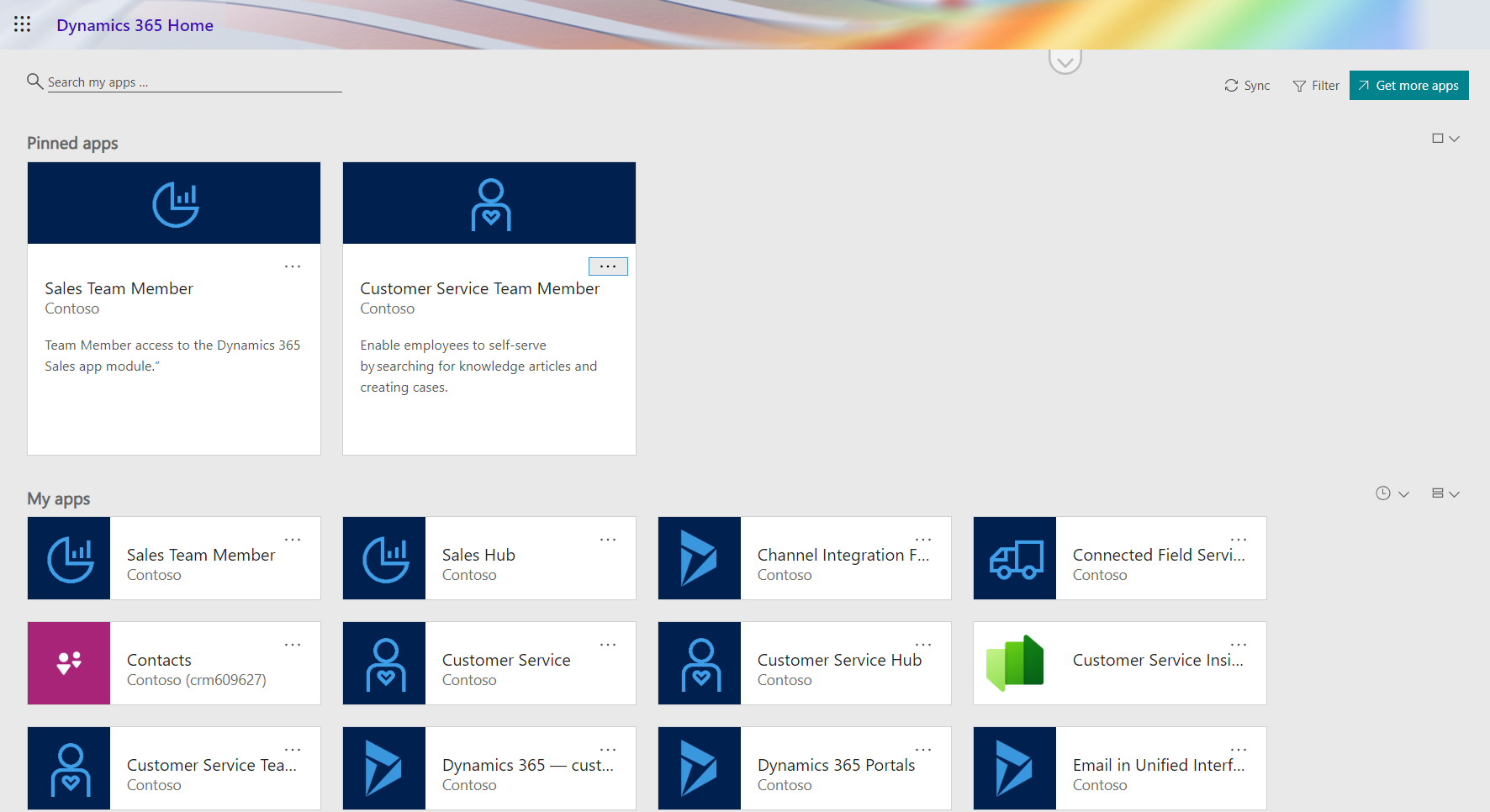
    2020 Release Wave 1 will introduce three new App Modules with pre-configured experiences for Team Members: Sales Team Member, Customer Service Team Member and Project Resource Hub. See my review of the early access version of these New Team Member Apps for Dynamics 365 for more details.

    Q2: When will the technical enforcement be enabled in our Dynamics 365 environment?

    For new customers, Microsoft intends to switch on the restrictions in April 2020. For existing customers with Team Member users, the change won’t happen overnight. Expect to see further communication from MS on this if your organization is affected by the changes.

    Update: On Feb 24th Microsoft published the following “Dynamics 365 – Team Member License Enforcement Notification” in the Microsoft 365 Message Center (MC204622) visible to administrators:

    To facilitate a smooth transition to the new Team Member app experiences, all existing customer organization instances, which will be impacted by this change, will be granted an additional grace period until June 30, 2020.

    Update 2: due to COVID-19, Microsoft has postponed several deadlines for updates and deprecations. The latest guidance for Team Member licensing enforcement is now:

    To facilitate a smooth transition, all customer organization instances that are created before April 1, 2020 have been granted an additional grace period until January 31, 2021.

    Q3: The entities we use with Team Member license in our environment are not included in the standard apps, can we add them?

    Yes. Customizing the aforementioned App Modules is allowed, as long as you follow the instructions given by Microsoft:

    “Team Member apps can be tailored to more closely fit your organization’s industry, nomenclature, and unique business processes, just like other model-driven apps built on Common Data Service. However, these customizations will need to conform to the Dynamics 365 Team Members use rights detailed in the licensing guide. While customizing the app, you can add 15 additional entities. These additional entities can be any Common Data Service core entities, or you can create custom entities.”
    Q4: The new Team Member apps ship with dedicated security roles. Does it mean we’re only able to assign these to the TM users and nothing else?

    There is currently no restriction on what roles you can assign to users with a Team Member license. The way I see it, the OoB security roles are primarily used for granting access to the App Modules and stripping down features within the app that are not within the original design scope.

    Q5: If we need users to access more than 15 entities, what are our options?

    The App Modules for Team Members will technically enforce a limit on how many entities can be added. Now, keep in mind that the App Module itself doesn’t restrict what’s actually visible in the UI when looking at an entity form. For example, an account form can have many related entities shown that are not part of the App Module specification. If you don’t directly need to navigate to the entity but rather use them to describe properties of the main entity (say, account plans related to an account), then there might not even be a problem here.

    If you need to browse through lists of tens of different entities, then you’re really pushing the boundaries of what Team Member licenses are intended for. Anyway, you could consider alternative access mechanisms alongside the Unified Interface App Module to cover these scenarios. Reporting tools could be a better way to present large quantities of data that are going to be read-only for the users. By purchasing a Power BI license for users that are equipped with Team Member licenses already, you would have full access to read the business data in CDS via reports and dashboards – as well as use Power BI for any other analytics needs within the organization.

    Q6: Our users are accessing data mainly via the Dynamics 365 App for Outlook, is this going to be available to Team Members?

    Yes. The Licensing Guide specifically lists this as the first use right for Team Members in Appendix A: “Access Anywhere: Web App, Mobile App, Tablet App, via Outlook.”

    Q7: Can we also leverage Canvas apps with the Team Member license?

    Yes and no. You can use embedded Canvas apps within a Model-driven app entity form, since these are just customizations within the app itself. However, you can’t access standalone Canvas apps with just a Team Member license.

    Q8: What about if we have Office 365 license that gives access to Power Apps AND a Team Member license, could we then build a Canvas app that reads Dynamics 365 data?

    Probably not, as this would require access to Premium Connectors. The CDS Current Environment Connector is the only non-deprecated way to access Dynamics 365 data (in the “product formerly known as Customer Engagement”, not talking about Operations or Business Central here), so this will likely be the technical blocker that stops you from building the custom app.

    Power Apps

    Q9: If we were to move our licenses from Team Members to Power Apps per App plan, what will the main differences be in the user experience?

    Power Apps licenses are meant for custom apps, meaning there will not be a preconfigured App Module from Microsoft. That’s no big deal, since creating new Model-driven App Modules is very simple. You can choose the entities you need in the app, design a sitemap to provide the navigation experience for accessing these, give your app a name, hit “publish” and have a custom App Module available to the users. There aren’t any fundamental differences between what a Sales Team Member app and “Our Customer Management app” look like to the users, as they’ll all be Model-driven apps presented via Unified Interface.

    Q10: Are there still restricted entities in Dynamics 365 that you can’t access with Power Apps licenses?

    Yes, there are, but no one knows exactly which entities. We are still waiting for Microsoft to update the list of Restricted entities requiring Dynamics 365 licenses, to align with what was supposed to be the October 2019 licensing model update. Eventually there will be new information published, but the current situation is quite challenging for both customers and ISVs to navigate past the Power Apps potholes.

    Compared to Team Member rights, a Power Apps premium license grants you access to create-read-update-delete (CRUD) entities like accounts, leads and opportunities that are read-only for Team Members. Also there are no 15 entity max limits in the Power Apps world, so your custom app can have a CDS data model that’s very complex. When you’re working with entities you create yourself, there are no restrictions at all. When you touch something built by MS for their first party apps, there’s a chance that limitations will apply at some point.

    Q11: If we would like to allow also external users to access Power Apps in our tenant, can we do that without buying a Power Apps Per App Plan or Per User Plan for everyone?

    With Canvas apps, there is the option for “bring your own license” (BYOL) available, which I’ve covered in this blog post. For Model-driven apps, this isn’t possible today. Power Apps Portals is always an option if you’re willing to re-build your app as a portal UI. (See also the Capacity topics below.)

    Q12: We’ve bought Power Apps per App Plan licenses for our users, now how do we assign these to the custom Model-driven app we’ve built?

    This is currently a tricky process, since Microsoft is still working on the proper mechanism to associate app passes with Model-driven apps. Follow these steps published on Magnetism Solutions blog and you should be able to pull it off. The Canvas app side is much easier and better documented by Microsoft.

    Q13: It seems that we can’t assign the app passes to both our production and test environments. Is this a bug or a feature?

    It’s a feature. While Dynamics 365 licenses like Team Member grant access to any number of environments in your tenant, the Per App Plan is actually a “Per App Within an Environment Plan”.

    Q14: From a licensing perspective, what are the differences between a Dynamics 365 environment and a pure CDS environment without Dynamics 365 Apps?

    Power Apps users can access any environment, if they have the Per User Plan or a Per App Plan app passes assigned in that environment. Dynamics 365 users are only allowed to use environments that have one or more Dynamics 365 Apps installed. So, if you build a small expense tracking app in a pure CDS environment, a user with $10 or $40 Power Apps licenses can use it, but a user with a $95 Dynamics 365 Enterprise App license can’t.

    Q15: If we start with a pure CDS environment to build a custom data model for our custom apps and later want to add a Dynamics 365 first party App from Microsoft, how does that work?

    Today you can’t deploy Dynamics 365 Apps into a pure CDS environment, so the only way would be a data migration project from your CDS environment to a new Dynamics 365 environment. It’s a technical limitation that MS surely wants to remove at some point, but right now you can’t step up from custom app to first party app via a license purchase alone.

    Capacity

    Q16: We want to build solutions that go beyond the personal productivity apps that the Default Environment is really only good for. What do we need for adding more environments, to leverage CDS and do proper ALM?

    Creating a new environment requires database storage capacity, since every blank environment consumes 1 GB before you even store any data there. This is the only cost associated with environment creation, you don’t need any instance licenses for sandboxes anymore like Dynamics 365 used to require earlier.

    If you purchase even a single Dynamics 365 license or a Power Apps Per User Plan license, you’ll get the 10 GB default capacity for database storage. If you only purchase Power Apps Per App Plans, it’s 1 GB. Each additional user accrues 250 MB more, if you buy Dynamics 365 Enterprise Apps or Power Apps Per User Plans. With Power Apps Per App Plan or Power Automate Per User Plan the users only accrue 50 MB. With Dynamics 365 Team Member or Professional App licenses, there’s no accrual per user.

    The default environment already burns 1 GB of your database capacity, so creating new environments may not possible without buying a capacity add-on license – unless you’ve bought one license that increases your default capacity to 1o GB (hint: always buy one).

    Q17: We have integrated other systems with Dynamics 365 / CDS and are now worried about the cost of API calls. How much will we have to pay for these?

    If the integration is accessing CDS as a non-licensed application user, the number of API calls that you have available for free is determined based on the types of licenses in your tenant. With at least one Dynamics 365 Enterprise App user, you get in total 100k requests per 24h, every day of the month. With Professional licenses this falls to 50k and with Power Apps / Automate it’s 25k. Anything beyond that requires buying dedicated capacity add-on licenses.

    Now, even though you can buy the license already, you can’t assign it yet. Since there also isn’t any API usage telemetry available to customers yet, we’re not in a situation right now where the system usage would be technically limited based on overage.

    Q18: Power Apps Portals, is the login capacity license starter level of 100 logins / $200 per day or per month?

    That’s 100 logins per month. A login session lasts 24 hours, after which a new login is consumed from the licensed capacity. If a user logs in every first day of the month, that’s a $2 per month cost. If they log in every working day of the month, the cost would be around $20 per month for Portal access, which is twice the price of a Power Apps Per App Plan. For higher volumes of Portal usage, there are discount tiers available to bring down the costs. Note that you need to purchase a sufficient amount of capacity in advance, based on how many logins you expect to have in any given month, because unused capacity does not roll over to the next month.

    There’s more!

    I’ve written several blog posts about the licensing topic, which you can browse through right here. If you want to keep up with the latest news around Power Platform, please feel free to subscribe to the Thinking Forward blog updates.

  • New Team Member apps for Dynamics 365

    New Team Member apps for Dynamics 365

    In the 2020 Release Wave 1 release plan documentation we saw that Microsoft is finally going to bring technical licensing enforcement for Dynamics 365 Team Members into the platform. By launching specific App Modules designed to be used with the cheap Team Member license as well as building the mechanism for controlling which Service Plan entitles the users to access which App Modules, there will now be a clear line for what is and isn’t possible right within the system.

    That’s how it is in theory. What about in practice? Let’s explore the Early Access features launched for 2020 Release Wave 1 on February 3rd and see how these App Modules are implemented.

    Sales Team Member app

    Since Sales is by far the most common business process that CRM systems built on Dynamics 365 Online are managing, let’s start from the dedicated Team Member App Module for this scenario. The pre-release documentation isn’t very extensive yet, but from there we can get the basic intention of this new app:

    “At a high level, users with the Team Member license can perform the following tasks in the Sales Team Member app: 1) Customer management: work with accounts and contacts. 2) Lead and opportunity management: see leads or opportunities linked with accounts or contacts, or see other sales-related data. 3) Add activities, such as notes.”

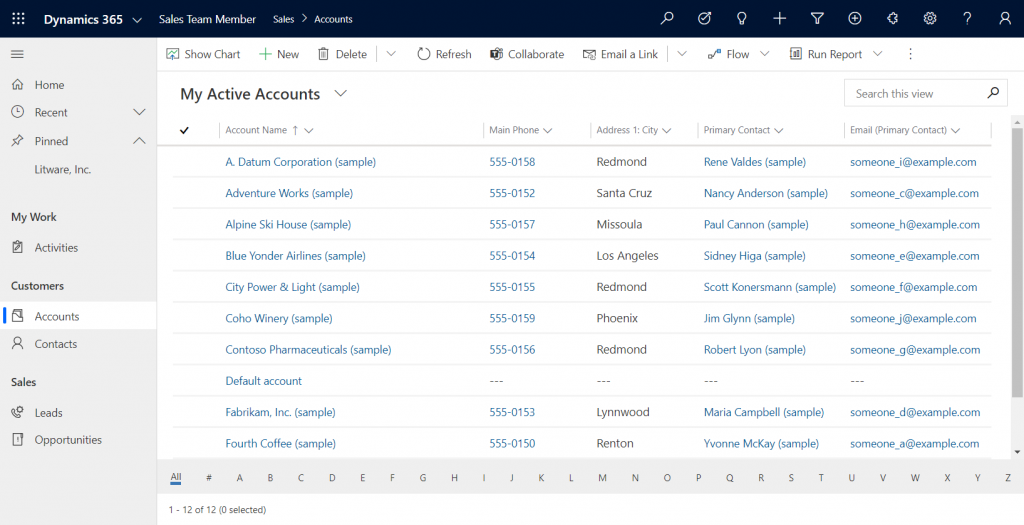
    Upon launching the app, we’re greeted with a familiar experience that looks like Dynamics 365 Sales, only it’s simplified to contain just 5 menu items in the sitemap: Activities, Accounts, Contacts, Leads, Opportunities. If the dashboards menu was also included here, the app would resemble the kind of CRM system that most small organizations or teams actually need in real life.

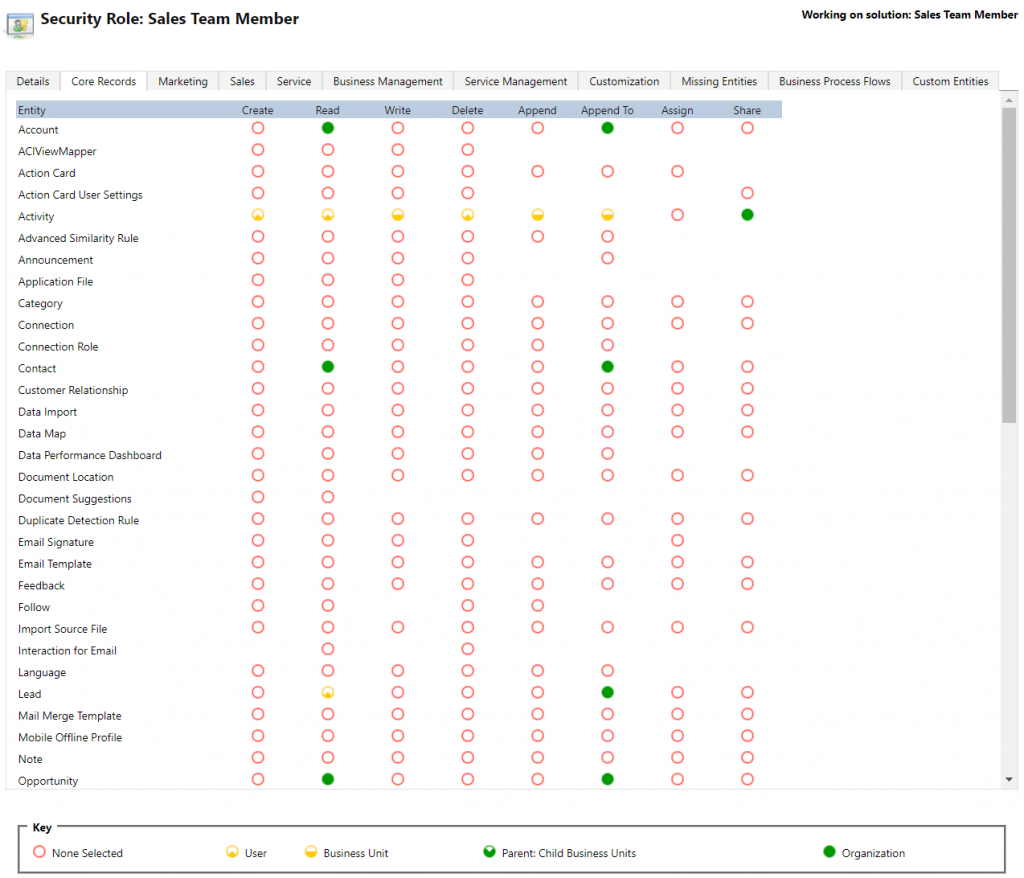
    If we’re using the app with the full access rights granted by a powerful security role like system administrator then there isn’t much that the Sales Team Member app stops us from doing. For example, creating or editing accounts is one of the rights that has been stripped away from the Team Member license, yet the app would happily show us a “New” button for adding accounts via this App Module. The secret lies in the Sales Team Member security role that comes with the solution. A view of the privileges for core entities looks like this:

    Wow, that’s quite restricted indeed! Assigning only this role the users wouldn’t even permit viewing activities from anyone else, nor leads, or adding contacts. Let’s get back to the customization options later, but this is indeed in line with the description of what Microsoft intended the offer with the standard Sales Team Member app.

    Customer Service Team Member app

    The second experience is for Customer Service – but not in the way that you’d traditionally see the Customer Service App of Dynamics 365 being leveraged for assisting external customers. This Team Member app is intended for scenarios where the app users is actually the customer being served:

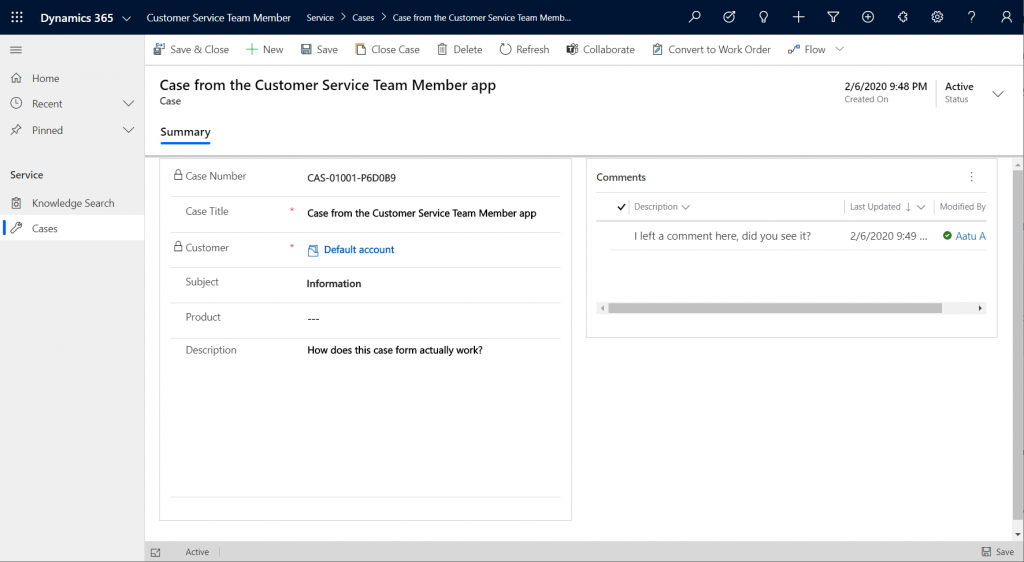
    “With the entry-level Team Member license, you can now address self-service support scenarios for your employees using the new Customer Service Team Member app module. Employees can create cases for their problems, such as laptop issues, HR queries, and administrative needs, and interact with agents through the commenting feature. They can also search the knowledge base for solutions pertaining to their problems.”

    Unlike the Sales Team Member App, this App Module isn’t installed by default. That’s probably a good thing, since I’d imagine the majority of Dynamics 365 customers are not using it as an internal helpdesk – although it definitely is a perfectly sensible scenario. If that’s what you’re doing, then the CS Team Member solution installation will need to be started from the Dynamics 365 Admin Center.

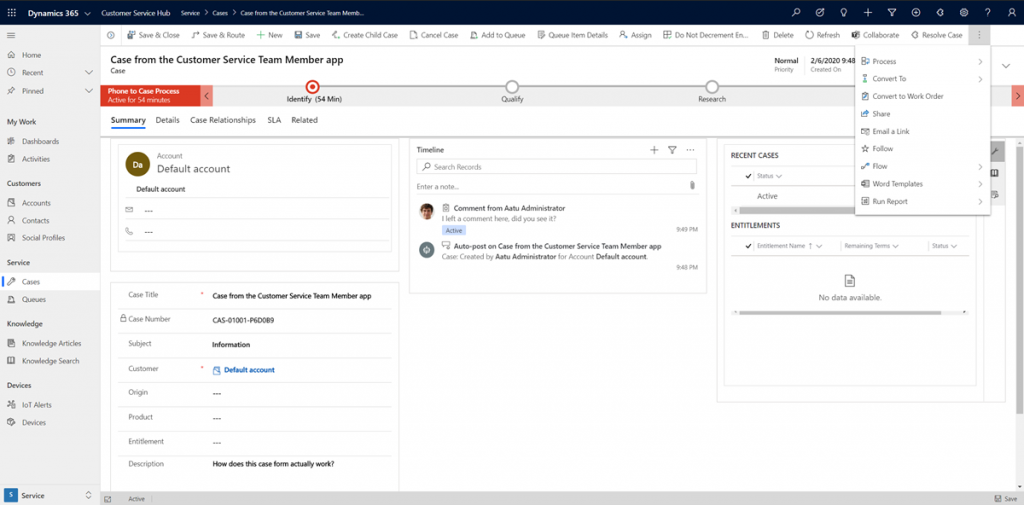
    If we look at the same case record via the full form in the Customer Service Hub App Module, we’ll see quite a stark difference. The solution package for the Team Member app appears to contain a web resource called Incident_teammember_library.js that modifies the behavior of the case form in many ways, such as hiding the Business Process Flow, replacing the standard Resolve Case dialog with a much more streamlined version and who knows what else. The Command Bar also contains far less functionality than it normally would.

    An interesting feature of the Customer Service Team Member app is the use of a default account that you can configure for the organization. The cases created via the Team Member app will automatically be linked to this account as the customer. The requirement for having either an account or contact as the customer has been a part of the MS CRM data model since day one, which has traditionally made the internal helpdesk scenarios quite tricky to implement – if the customers actually are users of Dynamics 365. Without any further documentation, I’m not quite sure what Microsoft’s vision has been for this new feature in the Customer Service Team Member app, since it looks like there isn’t any linkage to the internal customer (user) now in the case data model. If a person who provides helpdesk services would now assign the case to himself to work on, where’s the reference to the actual person who was in need of assistance?

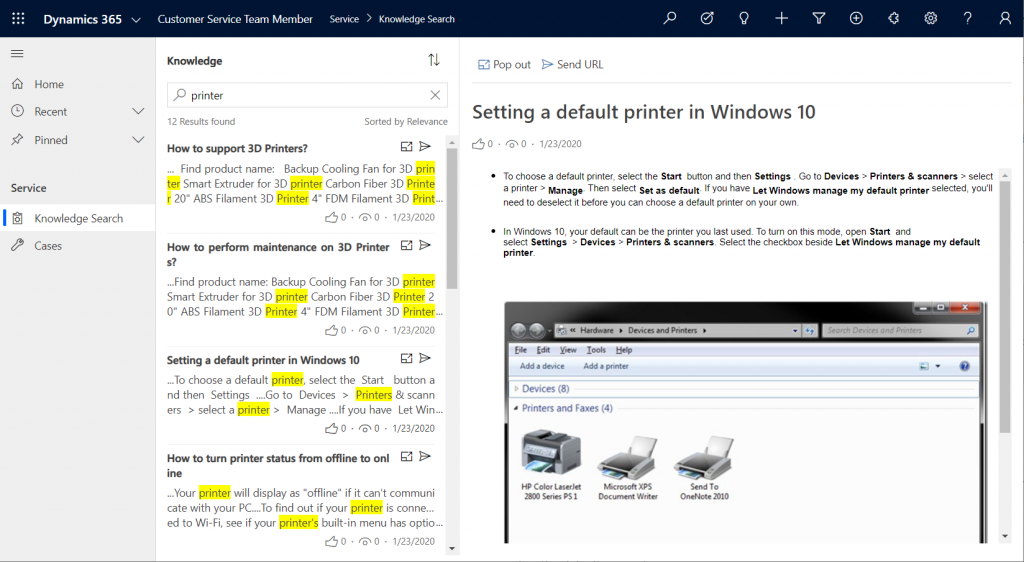
    The other available menu in the Team Member app sitemap, Knowledge Search, isn’t a reference to any entity but rather presents a dedicated UI for browsing published Knowledge Articles. Well, browsing isn’t maybe the right term, since the only option here is free text search for keywords, which will then return a list of articles if matches are found.

    It’s good to keep in mind that certain features of Model-driven Apps in Dynamics 365 aren’t yet App Module aware – meaning they’ll be presented in the UI the same way regardless of which specific app the user has launched. Recent and Pinned items will contain data not included in the App Module, Advanced Find will show all entities that are visible to the user’s security role, the Assistant and (deprecated) Task Flow buttons will always be there in the top Nav Bar. Still, the core experience of App Modules can be restricted down to a limited subset of features, as demonstrated by these Team Member apps. When moving from legacy web client to Unified Interface, these type of targeted experiences definitely are something worth pursuing, rather than the oldskool CRM monoliths that contain a hundred and one items in the navigation.

    Customizing the App Modules

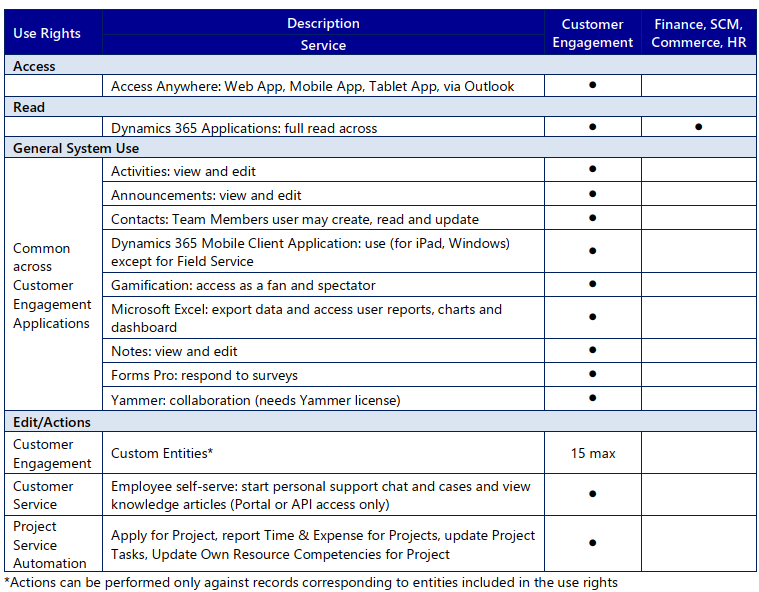
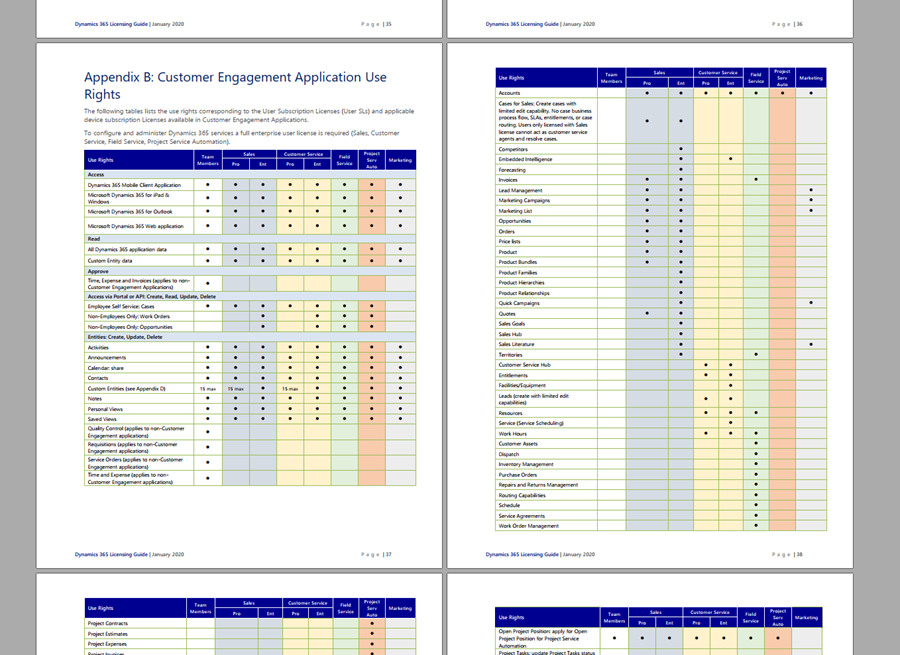
    Now that we know what comes out of the box for Team Member users, many customers will surely be asking what to do with the functionality in their CRM systems that isn’t represented in these standard App Modules. To understand the commercial boundaries better, let’s have a look at what the latest February 2020 licensing guide has to say about the rights of Team Members. We’ll start from Appendix A and the table that describes use rights for Team Members in Customer Engagement apps. (Yes, even though Microsoft product documentation says the term “Customer Engagement” is no longer used for online products, the licensing team hasn’t yet come up with a new term to replace CE in the licensing guide.)

    To start off, Team Members still have the right to read all Dynamics 365 application data. Therefore every single entity you could possibly include within the Sitemap of an App Module could in theory be brought in there. Of course you would have to ensure via the security roles that no creation or modification of those records would be allowed. Also the reporting and dashboards features are explicitly stated as being available for Team Members, on page 11 of the licensing guide.

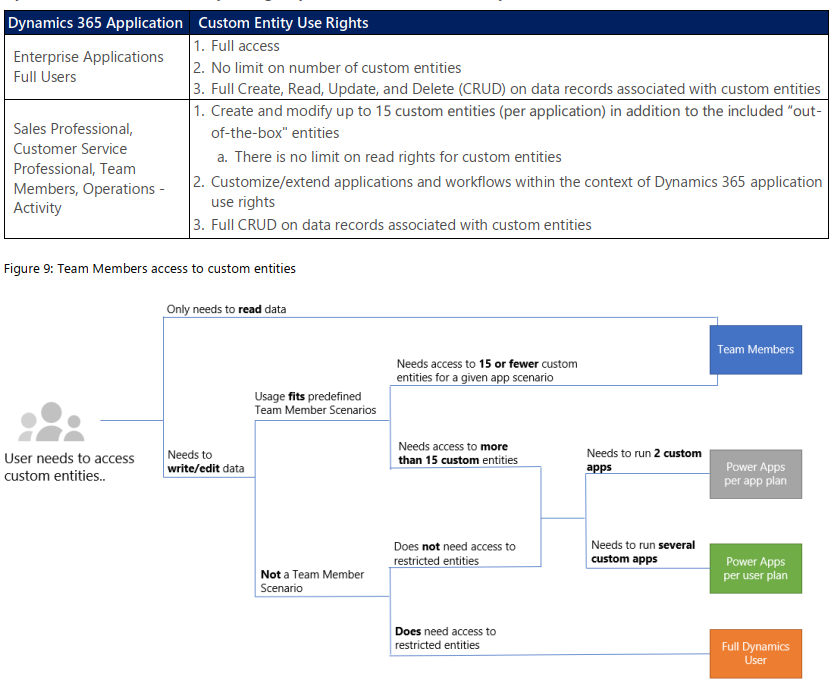
    As for custom entities, we see that there are also edit/actions rights, but we have a “15 max” restriction in the table. What does that mean? The answers are given in Appendix D: Custom Entities.

    We see that for a given app scenario, Team Members can create and modify records for up to 15 custom entities – per app. Where the lines are a bit blurry is the statement that this usage should “fit predefined Team Member scenarios”. As long as these custom entities are related to sales or customer service processes, I guess you’re on the safe side to add them to the standard Team Member App Modules that soon will be the only way for users with Team Member licenses to access Dynamics 365 – once the enforcement for first-party vs. custom apps is enabled in April 2020. Again, keep in mind that read rights are included for any entity, so the 15 custom entity limit couldn’t ever be technically enforced on the App Module level, based on how I interpret the licensing terms.

    What if you really need to do more than what the Team Member license would allow? What if you’re building apps for your unique business processes that aren’t covered by any first party app in the Dynamics 365 suite of products? Then you should explore the possibilities of Power Platform and its licensing model. Power Apps Per User Plan is the platform SKU that Team Member never was intended to be. If you’d map all the current and future workloads that Power Apps could take over in your organization’s business applications portfolio, the value is likely to be much higher than what the customization of these Team Member apps could ever deliver.

    Read more

    Microsoft has published new documentation on Dynamics 365 Team Members license that outlines the user experience for accessing the App Modules, as well as the customization restrictions.

  • Get ready for licensing enforcement in Dynamics 365

    Get ready for licensing enforcement in Dynamics 365

    Understanding what customers can do with specific licensing options available for Microsoft Business Applications has become a key component of the solution design process. There can be many different ways to reach the same business goal when either customizing and extending first party apps that Microsoft has built for Dynamics 365, or leveraging the Power Platform for building your own custom apps. Even within Dynamics 365, when planning which specific features are taken into use for managing a specific business process, it’s important to keep in mind whether it requires some “premium” features available only in more expensive plans like Sales AI. Then there are of course the consumption based components used in Microsoft’s more recent additions to Power Platform licensing model, like API calls and Portals logins.

    Some partners and customers complain that the licensing documents from Microsoft are far too long, but the reality is that at the same time they’re also not extensive enough. It is quite common to run into a scenario when planning the implementation of a specific solution for a customer and then not finding a definite answer on what licenses it requires exactly. This is particularly true nowadays when the licensing model is a merger of the Dynamics 365 style business application products and the new citizen developer focused offering of Power Apps and Power Automate. These different products share more technology underneath the covers than many people realize, yet the way they are sold and positioned is quite different. When there is overlap, that’s when confusion arises.

    What would make it easier to validate the solution design against the licensing model is if there was a way to do test cases with a live system. Unfortunately much of this model still remains an honor system, meaning that many rules only exist on paper but have not been actually technically implemented within the online service run by Microsoft. However, we’ve been hearing about the plans for further technical enforcement of the licensing for some time now. In fact, there are pieces related to this that you can already see with your own eyes when exploring your environments.

    Enforcement mechanism inside CDS

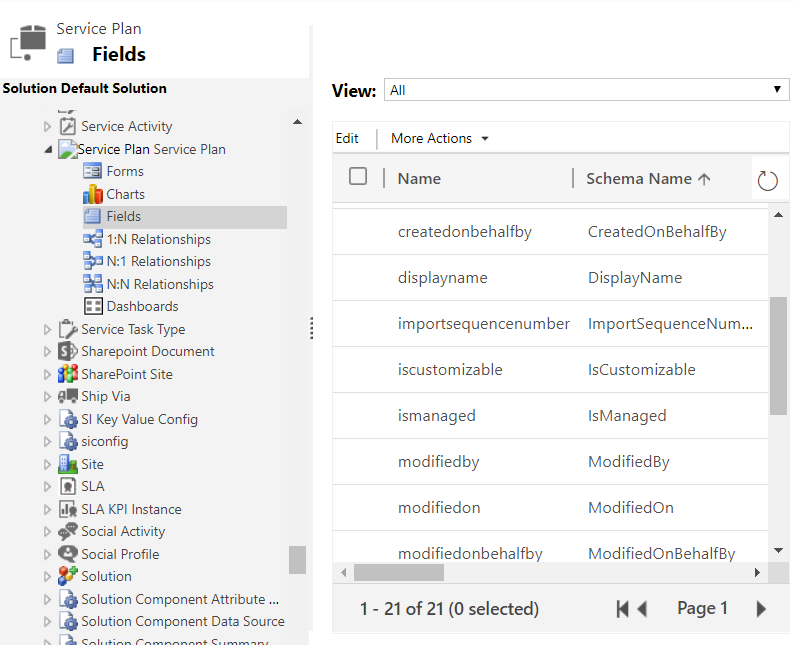
    If you are keeping track of the weekly updates that Microsoft pushes into every Online environment (via tools like Solution History for XrmToolBox), then there’s a chance you’ve noticed a hidden solution called “License Enforcement” deployed in December 2019. This introduced a new “Service Plan” entity into the schema, as can be viewed via the Default Solution:

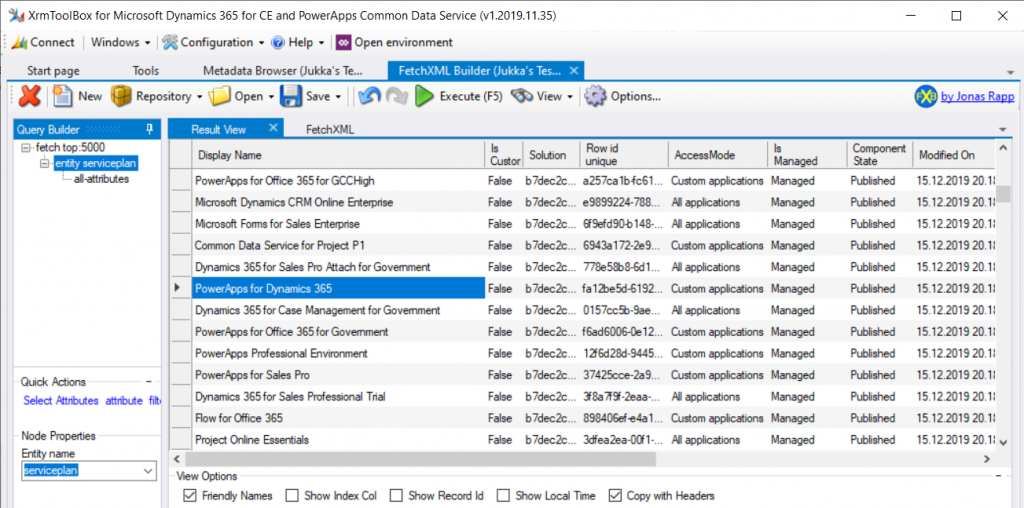
    You won’t be able to do an Advanced Find search to browse through the data for this entity. There is, however, a very convenient way for us to do a query of the Service Plan records, again via XrmToolBox, by leveraging FetchXML Builder:

    Wow, that looks interesting! While installing the solution, Microsoft also deployed a bunch of Service Plan records that presumably cover all the different types of licenses that have at some point in time granted access to a Dynamics 365 Customer Engagement Online environment, or CDS. Let’s copy this data into Excel for further analysis, and let’s make sure we tap the “friendly names” view option before doing so.

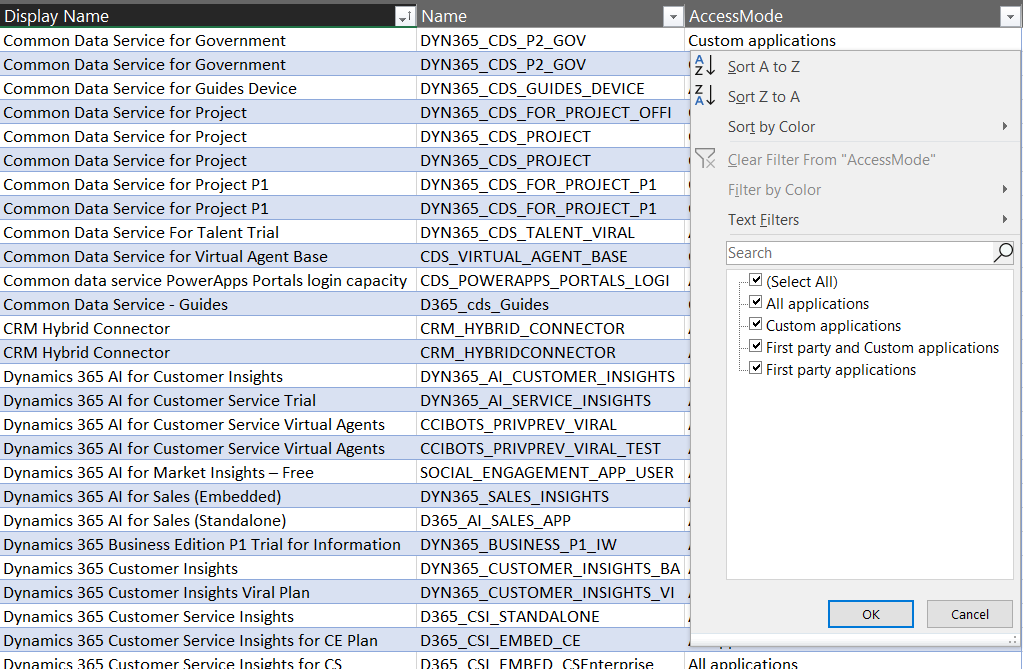
    It looks like there’s important data in the columns “Display Name” & “Name”, but the really interesting column from licensing enforcement perspective is “Access Mode”:

    Looking at the 4 options, it’s a bit difficult to understand what the difference between “all applications” and “first party and custom applications”would be. Even legacy products that are long gone like “Parature Enterprise” have the “all applications” access mode enabled. Without further information on this, let’s focus on the more straightforward options, like “first party applications”:

    Not too many entries for this option. Also it’s not surprising at all that it is the Team Member licenses that show up here. If there is one type of license that Microsoft probably would want to undo in the history of the Dynamics product line, it must be this. Introduced back in the days of Dynamics 365 CRM + ERP story debut, its design neglected the power of the platform in the sense that it granted practically unlimited rights for custom entities for a very low cost. The rights included in Team Member have since then been restricted considerably, to make room for the actual platform SKU that is Power Apps.

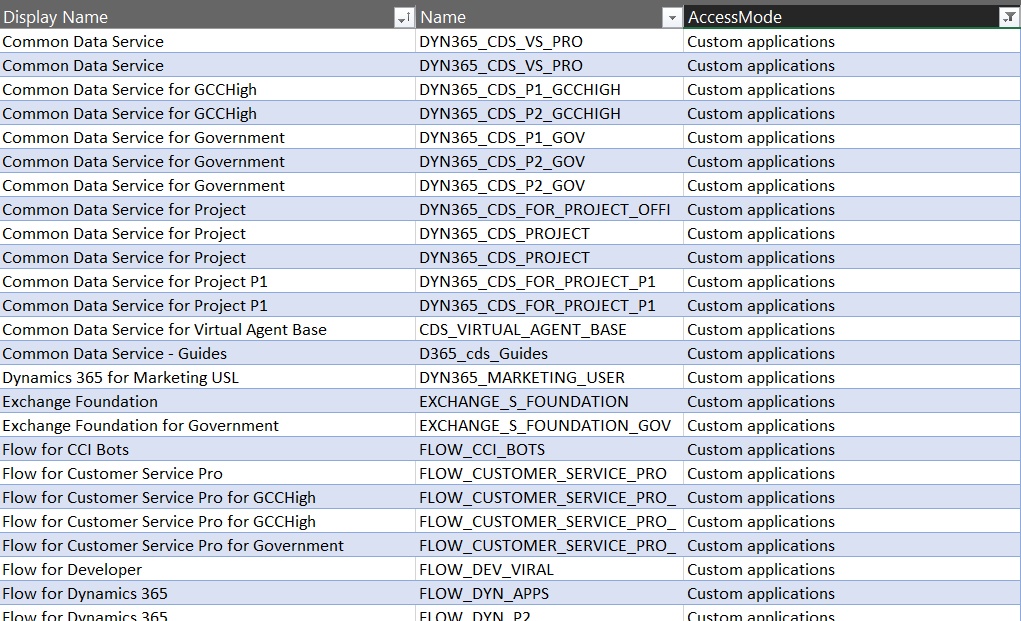
    Speaking of Power Apps, let’s look at the service plans that have the access mode set as “custom applications”.

    A lot longer list, with again some surprising entries like “Exchange Foundation”. The vast majority of this list is however very logical, as it mainly covers PowerApps and Flow (which on the branding side have been changed to “Power Apps” and “Power Automate”, of course, but this is licensing). The twist here is that similar to how Team Member granted too wide access for custom app scenarios, the rights included in Power Apps for accessing Dynamics 365 CE data stored in CDS are also a bit problematic from a commercial perspective for Microsoft. What clearly is off limits is the use of the standard app modules that ship with the Dynamics 365 App licenses.

    App Modules as a licensing construct

    The whole point in bringing data like service plans inside the CDS database is in being able to link that into app modules. If you browse through the metadata of any Online environment you’ll discover an entity with schema name “ServicePlanAppModules”. The relationship between a service plan and the app module is both the way how Microsoft has crafted the licensing terms for different products and also the mechanism through which access rights for different license holders will be restricted in the future.

    Looking at the fresh new Release Plan for Dynamics 365 2020 Release Wave 1, one of the new features is in fact called “License enforcement: users with new Team Member licenses”.

    For Team Member licenses purchased during or after October 2018, license-based access will restrict users to a set of designated app modules. These users will no longer be able to access Customer Service Hub, Sales Hub, or custom app modules.

    In April 2020 and already earlier in preview we’ll finally see the new Sales Team Member and Customer Service Team Member app modules that have been hinted at in earlier communication from Microsoft. Although these will be preconfigured modules, there will be room for customizing them to contain custom entities and (presumably) also hide unwanted entities – just like with traditional app modules. What will be different though, based the Release Notes as well as the Service Plan data model, is the lack of ability to build your own specific app modules from scratch. Any organization that has used Team Member licenses for covering a functionality not included within the first party Dynamics 365 Apps built by Microsoft will therefore have some work to do for redesigning the end user facing experience to accommodate these technical restrictions being put into place.

    “Oh, but we don’t use Unified Interface, so I guess we can skip those app modules in the oldskool web experience, right?” Wrong, you have even more work to do! There will be no support for accessing the legacy web client after October 2020. You better hurry with both planning your transitioning to Unified Interface as well as addressing the gaps that may be left for your Team Members users that will not have access to Sales Hub or any custom app module. Both of these changes have been a long time coming, but as many surely have experienced, it can be challenging to get the necessary planning and development work prioritized within organizations without a hard deadline. Now we have one (well, two dates interlinked), so that part is solved already!

    Restrictions like these enforcement rules are bound to generate some emotional responses. In the long run, having the rules specified in software rather than just paper should serve to bring more clarity into what services are available with which licenses. Any such clarity is most certainly welcome for making it easier to navigate an ever growing product stack like Microsoft Business Applications.’

    Read more

    Check out my blog post New Team Member apps for Dynamics 365 where I explore the 2020 Release Wave 1 early access versions of the new App Modules for Sales Team Member and Customer Service Team Member.

  • Licensing is NOT a security mechanism

    Licensing is NOT a security mechanism

    Licensing remains a topic that no one claims to like yet everyone keeps on talking about. October 2019 saw what was undoubtedly the biggest number of changes to Microsoft Business Applications SKUs (i.e. items that MS sells), with the end of Dynamics 365 Plan licenses and new models for licensing PowerApps & Flow. Not to mention the new structure that ties licenses closely to API call limits. Oh, and we’re still waiting for the new restricted entities definition that should have gone along with October 1st licensing terms.

    We’re not even past the month of October and there’s already a new licensing discussion heating up in the MS customer and partner community. The announcement of Self-service purchase capabilities for Power Platform products, made via Microsoft 365 Messaging Center (only visible to admins), seems to have pretty much angered everyone who saw it.

    I gotta say, you simply could not find a worse channel to announce something like this, because it’s aimed squarely at getting around a problem that IT administration (and sometimes consultants like me) are a part of. But like we’ve seen so many times before, communication isn’t exactly the strongest part of Microsoft’s software licensing management efforts, so let’s just move on and start analyzing what is happening here, why it is happening and what possible outcomes there might be from it.

    Empowering every individual to acquire applications

    To get an overview of what exactly is going on, you can read the article from Mary Jo Foley: “Microsoft to enable end users to buy Power Platform licenses without administrative approval”. In short, starting in November 2019 (in the US), any user that has an account in your organization’s Azure AD tenant will be able to go and buy Power BI licenses directly from MS. Later this will expand to PowerApps & Flow, and other regions. Essentially this will be an “insert your credit card here to unlock Power Platform functionality” type of experience.

    How is this different from any of the popular SaaS products from other vendors then? It isn’t. That’s the model that every consumer app and most business apps support, since it represents the lowest barrier to entering a commercial relationship. Usually you would start with a free trial period to try out the capabilities of the SaaS product. If it’s a good fit for the problem you’re trying to solve, the next problem you face is the procurement of the app. Buying things for personal use is easy, whereas the bigger the organization you’re working in is, the longer you can expect this purchasing stage to be. During it you’re basically standing behind the store window, staring at the product you know you’d really need, yet the door to the store is being kept shut. Often there’s even no opening hours sign to give you any clue on how long this will take (or if you’ll ever get what you wanted).

    In such a scenario, it’s not uncommon for problems to get solved with a credit card and an expense claim. The ease of taking this route is how Shadow IT came to be, and I bet we’re just going to see more & more of this Bring Your Own App (BYOA) activity in organizations as the information workers become more savvy about what’s actually out there in the cloud. If one store is closed, there are tens of other options with 24H service.

    But they can’t do this! They’re MICROSOFT!!!

    It’s one thing being an enterprise software startup and trying to get onto the radar of potential customers via the Bring Your Own App strategy. When you’re Microsoft, though, the expectation is that things work in a completely different way. Since pretty much every bigger company is a MSFT customer, the licensing game has been a process of long negotiations and complex agreements. This is the procurement norm of how Microsoft software finds its way into the hands of the end users. Well, it sometimes does, and other times it doesn’t, because the needs of individual users may get lost in the big corporate IT machine that’s trying their best to keep things under control, with the growing amount of regulations, systems and requirements.

    What’s Microsoft on about here with self-service purchases, specifically with this chosen set of products? Imagine you’re the world’s most valuable company, you happen to be producing software & you’ve recently discovered a huge new market in the Low-code Application Platform space. You’ve built up a strong community of advocates (or addicts even) and your target is to empower the next 10 million application developers to digitally transform their organizations with the help of your global cloud infrastructure and AI driven insights. You’ve got all these key buzzwords lined up, there’s a seemingly endless sea of citizen developer opportunity ahead of you. The only thing standing in the way of your success is this nasty thing that looks like Niagara Falls, sucking in many of the smaller boats that the poor citizens attempt to use to sail to this promised land of Power Platform. That thing has a name and it’s called Enterprise Software Licensing Models. So much for the “no cliffs” experience then – hope you packed a life vest on this journey!

    To avoid this vortex that Microsoft themselves have largely caused over the past decades with the swirls of their enterprise software sales strategies, it makes perfect business sense to open up new, alternative routes for those power users who seek to merely use the software tools – instead of catering only to those who are tasked with managing the whole lifecycle of IT tools in the organization.

    There’s only so much you can do with the PowerApps and Flow features bundled into Office 365 subscriptions, after which you’ll need a premium plan. Why on earth would Microsoft willingly push the users to look for alternative tools like Zapier or IFTTT to automate processes that connect to data sources that are outside Office 365? Why shouldn’t it be possible to enter the very same credit card details into a form provided by MS, to keep the tools within the same MS cloud that’s already used by the organization? Isn’t this actually a way to reduce the problems resulting from Shadow IT? Keep the rogue users closer to the official IT world and you’ll have a better chance of converting the tools into non-shadow status at some point.

    Rogue citizens

    Obviously there are some valid concerns with a model that might encourage users to acquire MS software via an alternative channel than the officially sanctioned one. The self-service shop won’t give the same negotiated prices for licenses as the company wide agreements. Handling the expenses from various different sources will be an overhead. The boundaries between supported and unsupported IT will become blurry. Even with the promised central visibility into who’s bought what licenses in the tenant, initially it will all just look like more work to those persons who have traditionally managed Microsoft licenses in the organization. There’s an FAQ document from MS for this self-service purchase model that attempts to address some of these concerns, but with a change like this there’s bound to be far more Q’s than A’s at this point.

    There shouldn’t be a need for the self-service purchase channel to exist, but in reality there is. If you have only spent time working in roles that represent the centrally planned deployment of IT systems, you may not realize the challenges that can stand in the way of you and the software license you would need for getting your job done in a larger organization. Sure, there might be a theoretical process in place for how the needs of business users are identified and then eventually turned into a working piece of software that everyone happily uses. In reality a fair share of the people on the business side who live in the world of needs may not be seeing such processes in action. They may well be unaware of any development initiatives on the IT side, nor have contacts with those professionals that could help them navigate these processes. If IT systems can be complex, then the inner workings of an enterprise organization can represent a whole new dimension of complexity. No one is at fault, yet everyone pays the price.

    (more…)
  • Sharing Apps Is Caring

    Sharing Apps Is Caring

    A while ago there was an announcement made on the PowerApps team blog about “Share canvas apps with guests in your organization”. Launched in public preview, this feature makes it (almost) as simple to share apps with a guest user as it is with internal users from your company. Basically all you need to do is invite them as guests into your tenant, by leveraging the Azure AD B2B collaboration:

    Once they’re in, providing access in the PowerApps Canvas app sharing menu works the way you should already be familiar with. Guests will appear as users that appear in the search and you can do all the usual stuff, apart from making guests co-owners of your app.

    The fact that you can Bring Your Own Identity in this app sharing scenario is already a big benefit. Forget about trying to create user accounts for your partners & customers, let alone manage password renewals, people leaving the partner company and all that tedious admin work. When there are no separate credentials for the different applications, you can focus your efforts on configuring the appropriate security model on your side and then automating as many steps in the Azure AD driven process as you can via group memberships etc.

    (Side note: Technically BYOI probably refers only to scenarios where you log into Azure AD with something completely external like a Google account, instead of just an identity from a neighboring tenant. )

    Providing application access to third parties via Azure AD B2B Collaboration has been possible for Model-driven apps for a while now, or Dynamics 365 CE like it is more commonly referenced. If you have partners that are performing telemarketing or support services that link closely to your core customer data, providing them access to your CRM directly is usually far more efficient than shipping data via Excels or handling task assignments via email.

    Licensing a shared app

    The one negative side about this external user scenario has been that you will always need to purchase a license for these guests before they can access your apps. It doesn’t matter if they’ve got Dynamics 365 licenses back at their home tenant, since that can’t grant them access to another tenant’s environment. Boo! No one likes to pay twice for the same service, but sometimes the costs can of course be absorbed while keeping the business case valid. Especially now when there’s the $10 Per App Plan for PowerApps.

    It doesn’t have to be that way, though. With the nearing GA of Canvas apps sharing across different organizations, there is now the possibility to “Bring Your Own License” (BYOL). Have a look at what the documentation says about the prerequisites for Canvas apps sharing with guests:

    The guest user must have a PowerApps license assigned through one of the following tenants:

    * The tenant hosting the app being shared.
    * The home tenant of the guest user.

    This is awesome! What this essentially means that any user that has either PowerApps or applicable Dynamics 365 licenses assigned to them in their own organization can use the powers granted by that license to operate apps in any other tenant in which he or she has been granted the rights via the respective security model of the app.

    Let’s try this out. I’ve got a user account with Dynamics 365 Customer Engagement Plan license (R.I.P.) assigned to it in my production tenant. What I will do in a test tenant that represents a partner organization in this demo is to 1) provision a CDS environment, 2) install sample account data into it, 3) generate a quick Canvas app from data to work with these account entity records, 4) invite my production user as a guest into the demo tenant, and finally 5) share the Canvas app from the demo to my production user.

    Steps 1-2 are just the configuration work familiar to any Dynamics 365 professional, so we can skip talking about those. Also step 3 is a matter of selecting “create new app, Canvas” and then going with the Common Data Service option with the account entity as the target table.

    After saving the app, we need to make sure that our guest user is found in the Azure AD user list, pretty much like an actual local user of the tenant would:

    Back in PowerApps, the sharing menu should now show us the guest user as a possible share target. Since this Canvas app is using CDS as the data source, we’re also presented with the options to set the security roles for the guest.

    Click “Share” and the guest will have an invite email in a few seconds, with a link to the Canvas app:

    Click the link & off we go! By the power invested in me via a Dynamics 365 license purchase by a completely different organization, I’m now fully capable to work with the CDS data via a PowerApp offered to me by a partner in their tenant.

    App strategies for the Power Platform era

    To an outsider this whole app sharing thing might seem a bit underwhelming. “What’s the big deal? Isn’t that exactly how it should work?” YES. It should, but it hasn’t – until now. Being originally born into the internal networks of organizations, the business user software from Microsoft has suffered from the boundaries set by an invisible firewall that no longer physically exists in the era of public cloud applications. While the application platforms from MS have gradually acquired better skills to work with the outside world, the licensing model hasn’t been all too friendly for many cross-tenant scenarios.

    For now, when you purchase the Per User license to Microsoft’s low-code application platform, you get a “1:N pass” for one user to access an unlimited number of PowerApps Canvas or Model-driven applications within the home tenant:

    The more business scenarios you can cover with PowerApps, the cheaper the relative price you pay for the platform capabilities. The result within an organization that goes all-in on Power Platform to digitally transform themselves can be quite a high number of apps already. Now, imagine that it wouldn’t be limited just to the types of digital processes that operate within your organization’s firewall. What if there was a multi-tenant model where the Per User license could unlock collaboration scenarios with your partners or customers? This network effect could grow the number of apps even faster, as it represents a “1:N:N pass”:

    Pretty exciting, don’t you think? We’re not quite yet on the level where B2C app scenarios would be within the scope of PowerApps, but this expansion into B2B collaboration area is surely a part of the strategy how Microsoft plans to grow their Power Platform business. The ability to use Canvas apps without a license in the app’s home tenant directly is an important variable to consider when planning your app strategy in the MS Cloud.

    One thing to keep in mind here is that Canvas app sharing doesn’t replace the use of PowerApps Portals for external audiences, as those have different pros and cons from a feature and cost perspective. Also the usage of Model-driven apps for collaborating with external parties in complex business processes will probably still have a place in the greater Power Platform puzzle, even if this new license portability doesn’t cover them (at least not yet).

  • PowerApps licenses and a Dynamics 365 environment

    PowerApps licenses and a Dynamics 365 environment

    Believe it or not, Dynamics 365 Customer Engagement applications from Microsoft are built on top of Power Platform. No, they didn’t originally start that way, but as the Citizen Application Platform technology from the PowerApps side merged with the former Microsoft Business Solutions product that was originally built to be an extendable CRM system, that is the end result today. As an example, Sales Enterprise is one type of Model-driven PowerApp, even though it carries the Dynamics 365 branding given to it by Microsoft. Yes, it contains much more functionality than what the low-code application platform of PowerApps provides app makers out of the box, but if you would use the SDK to extend it with custom code via methods supported by Microsoft, you could build something similar yourself (given enough development resources).

    Model-driven apps like Sales rely heavily on Common Data Service, because not only does it serve as the single data source for the app, but also the place for all metadata. The solutions are made of components like entities, which have subcomponents like forms and views. The process of building a Model-driven app may start from the creation of the required components, or you might reference something that already exists in the CDS environment you’re working in. You then choose the relevant components in the Model-driven App Designer, arrange them into a nice Site Map for users to navigate through, publish your changes and your App is ready to be used.

    PowerApps license + CDS + Model-driven App = ?

    Although it may not be obvious, the CDS Connector included in paid PowerApps plans (Per App or Per User in the new world) allows you to connect to CDS environments that have been born from the provisioning of a Dynamics 365 Customer Engagement App. (Note: while there is a separate Dynamics 365 Connector, that has been deprecated in favor of the CDS one.) Using Dynamics 365 data in PowerApps for mobile apps and Flows for process automation is a very attractive scenario for many businesses and of course MS wants to promote that. As these effectively are part of the very foundation that powers Dynamics 365 first party apps, there are hardly any technical limitations as the tools become more and more natively integrated with one another.

    Let’s get back to the Model-driven app building scenario. Assuming we have a CDS environment that contains entities installed by the first party Sales Enterprise app from Microsoft, would it be possible to pick the very same entities used in this app into a custom App Module built by and accessed by a PowerApps user with no Dynamics 365 licenses? The answer is yes. Building a “My Sales App” that looks almost like the app shipped from Redmond is allowed. This pattern of using entities and data from Dynamics 365 hasn’t been specifically forbidden by the PowerApps licensing documentation. You can read everything via PowerApps, and aside from the list of restricted entities, you can also create, update and delete data in any CDS environment.

    Since official licensing documentation rarely addresses all the questions that customers and partners have, MVP Steve Mordue had to pick up the phone and call Charles Lamanna, CVP of CAP (Corporate Vice President of Citizen Application Platform, for those not familiar with MSFT TLAs). This resulted in an excellent and detailed article on what the intent and practice behind the latest Power Platform (and Dynamics 365) licensing updates is, so you really need to check out “Steve has another chat with Charles Lamanna”. Taken from the interview is the important part:

    “So even in a Dynamics instance you can use the new per app per user license, that’s $10 for power apps, as long as you don’t use any of the restricted entities or any of the application IP, like a schedule board or something from field service. The piece of information that’s missing is that list of sales restricted entities as part of the new per app per user license, there’s a few more entities from sales that will be added to that list.”

    OK, so there are some restrictions, by generally speaking a PowerApps user is a lawful citizen in the land that used to be XRM but is now called CDS.

    Down to the details

    Today there is very little technical enforcement of licensing in the online environments run by Microsoft. As I predicted in my previous blog post about the new consumption based licensing model, API restrictions are probably going to become more in line with what the paper agreements say. Similarly, we’ve been told already for quite some time that the App Modules available for certain user types would become enforced, too. Therefore directly accessing the Dynamics 365 for Sales app with a PowerApps only license probably isn’t ok, but following the above mentioned path of building a custom Model-driven app on top of these same entities and their common components should be within the spirit of Power Platform licensing. After all, they can be found in the Common Data Model specification already today (even though you can’t deploy just the entities without the Dynamics 365 app, at least today).

    The one license that has seen most controversy already before is Dynamics 365 Team Members. It’s the “SKU earlier misused as platform license” that Microsoft has since then locked down by removing CUD rights to accounts and drawing the line on 15 custom entities per App Module. We’ve yet to see the Team Member specific apps arrive that licensing guidance documents have referred to, but now when the legacy web client will be gone in one year’s time and be replaced with the Unified Interface that runs solely on App Modules, that might be a logical moment for MS to introduce the locked down experiences for the users on the $8 Team Member license.

    What’s the road forward for customers who’ve widely deployed Team Member licenses earlier? Well, one attractive alternative would be to pay an extra $2 and get them moved up to the PowerApps per App license at $10. I’ve covered the details in my blog post “Application/Platform Separation in New PowerApps Licensing Model”, in case you’re not yet familiar with this new world. There you are fully able to leverage the core entities like account, plus there are no limitations on the number of entities your Model-driven app can have. Heck, you can even have 2 apps and Portal access all for $10! Sure, you do lose the tenant wide rights to use multiple environments, but production CDS data is probably what these users mostly would work with anyway.

    While no one likes a licensing model that keeps on changing rapidly, the point where we are now with these latest announcements is at least a bit more clear than the incomprehensible maze of rights and restrictions we had before. The Venn diagram I had to draw in “PowerApps Starter Plans Capabilities Demystified” article is now deprecated, as the PowerApps P1 plan is gone and so are the restrictions on app type (used to be Canvas only) and entity complexity (used to be no real-time workflows or plugins). The new $10 per App plan can run an app as complex as you like. If you are facing the restrictions that Team Members will soon have to live with, just configure a custom Model-driven app into the same environment, give everyone a PowerApps license (and go crazy with the $40 per User plan if you can afford it!), then carry on using the application platform you already have deployed.

    Dynamics 365 is no longer the platform

    One more thing. On the Dynamics side, there’s an interesting new restriction introduced with the October 1st 2019 licensing changes:

    “Dynamics 365 subscribers may continue using PowerApps and Flow to extend and customize their Dynamics 365 applications. However, Dynamics 365 Enterprise licenses will no longer include general purpose PowerApps and Flow use rights. Dynamics 365 Enterprise application users can continue to run PowerApps applications within their Dynamics 365 environments, but running PowerApps applications in non-Dynamics 365 environments will require a PowerApps license. An additional Flow license will also be required to run flows that do not map to a Dynamics 365 application.”

    If you used to think that by buying a Dynamics 365 CE Enterprise license you get an “Access All Areas” pass to the platform back stage, then this recent change gives some new perspective on how Microsoft actually thinks. In preparation of Power Platform becoming a much more widely used technology than Dynamics 365 CE or XRM ever was or could be, it looks like there’s a need to separate the two routes through which the platform consumption rights can be acquired. Different product teams will have different buckets for both licensing revenue and operating costs, so buying a $95 Enterprise App license for Dynamics 365 no longer entitles you to everything that a $40 PowerApps Per User license does.

    Personally I don’t consider this environment type restriction to be a very elaborate way to define the licensing model boundaries. A Dynamics 365 customer today has a (near) zero costs associated with provisioning a CDS environment as a “Dynamics 365 environment” vs. a naked CDS environment for PowerApps, since they only pay per storage capacity and no longer per instance like the old Dynamics 365 licensing model used to work. To be compliant with the new terms and keep using PowerApps and Flow in any CDS scenario, all they’d need to do is throw in a Dynamics 365 App and never use it. Of course today you need to plan for this before provisioning an environment as you can’t (yet) add first party apps into a pure CDS environment afterwards. Anyway, details like this area bound to evolve as the related platform features mature, so the really important thing is to pay attention the direction of where Charles & co. are taking the big picture when it comes to Power Platform’s commercial model.

  • Licensing by consumption: pricing model of Power Platform online services

    Licensing by consumption: pricing model of Power Platform online services

    On the topic of Dynamics 365 and PowerApps licensing changes coming in October 2019, I earlier wrote about the biggest change in how Microsoft is separating the first party applications and the underlying platform in the new Per App pricing model. There’s another aspect in the coming licensing updates that has also caused a lot of concern among partners and customers: the API call limits. While the existence of limits on how much load one can place on the online service are not an entirely new construct, it’s the first time that the amount of API calls available is directly tied to the type of licenses bought.

    In their August 29 blog post, Microsoft stated the following:

    “A single, integrated approach for daily capacity limits will be implemented to help maintain a consistent quality of service for customers with PowerApps and Flow plans. These capacity limits should not impact standard or reasonable usage of PowerApps or Flow. Organizations that require additional capacity for heavy usage scenarios will be able to purchase add-on capacity and assign it to specific users or processes.”

    Updates to Microsoft 365, Dynamics 365, PowerApps and Flow Licensing

    The finer details of the new model are outlined in the PowerApps and Microsoft Flow licensing FAQs for October 2019 as well as the Requests limits and allocations pages over on docs.microsoft.com. You should keep an eye on these documentation pages, since further information will be made available, based on the incoming questions from customers. There have already been a lot of blog posts around this topic and I’m not expecting the debate to die out anytime soon. Rather than speculating about what the exact policies will be, I will instead try to set this new consumption based licensing into context with what’s happening in the Microsoft Cloud.

    Users aren’t the only thing that matters

    USL, user subscription license, has been the dominant model for pricing applications from Microsoft in the online services era. Of course they’ve been a key component ever since the personal computing revolution started with PCs running DOS, then Windows and many productivity applications like those found in the Office suite. The networked computing era extended the pricing models to server software that wasn’t always purely a per-user play, as the complexity and robustness of your back-end services determined how expensive that side was. In the initial wave of SaaS business applications, we saw a return to the simplicity of just paying a fixed fee like $50 per user and getting all of that server stuff covered for you. Oh bliss! Isn’t this exactly the way the cloud should be sold?

    Those first SaaS services also were in themselves quite simple. A replica of the server software you could have either in your own closet or the data center run by companies like Amazon and MS. You just offloaded the complexity involved in managing hardware redundancy, backups, storage etc. and instead payed for all that in the USL. This is all fine and dandy as long as the value from the applications can be closely linked to the number of licensed users accessing it. Using CRM as a simple tool to improve sales person productivity might map into this type of cost-value structure. But how about when you take a step further on the digital transformation path and start to actually replace those tasks carried out by human employees with something that is almost fully automated? Hmm, perhaps the PC business model isn’t optimal for a future that looks like this.

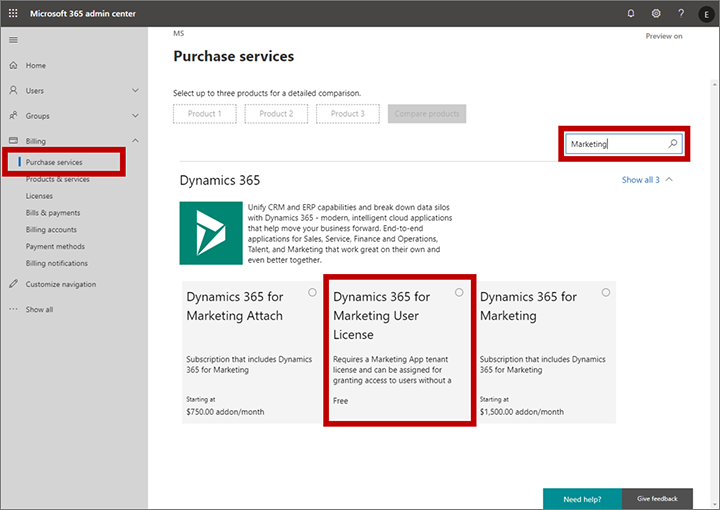
    Let’s look at some of the new services in the Dynamics 365 cloud. The commercial launch of Dynamics 365 for Marketing in Spring 2018 was a bit of a shock for anyone who always though these applications are licensed per user. Instead, Microsoft chose the model that HubSpot any many other vendors in the marketing automation space apply, by setting the pricing per contact. Yes, initially they were way off with this thinking by applying the pricing logic to the entire contents of the CRM database, but based on market feedback the model was adjusted to now count only for marketing contacts actually used by the specific application (i.e. where business value should be generated). Also, you actually don’t need any Dynamics 365 user license for those marketing people who build the customer journeys and analyze the results, since free user licenses are available to unlock the door into the system. Licensing is done on the environment level, after all.

    Purchase a free user license for Marketing

    Dynamics 365 Customer Insights is a CDP (Customer Data Platform, for those not keeping up with the latest acronyms) that allows customers to bring in customer related data from various different sources and unify them into a “customer 360” profile that links all those activity entries into a single view of the customer. You can then leverage big data processing features of a CDP to generate target segments like customers most likely to churn, select them to be a target group in Dynamics 365 for Marketing customer journeys and preserve your revenue streams by holding on to these customers identified by the intelligent machine in the cloud. How is this service priced? Per number of profiles: starting at 100k profiles for $1.5k, so 1.5 cents USD per profile. Any user in the tenant can be simply authorized to access the application, since the dedicated UI doesn’t have any dependency to the USL construct found on the Model-driven application side.
    Forms Pro is a professional version of the personal/team productivity app found in the Office 365 suite, storing its data into CDS entities for process automation and data analysis. Do you need a USL for the Pro features? Nope. The pricing is based on the number of responses to surveys, at $100 per 2k, making it $0.05 per response. If you want to listen to your customers and improve business outcomes as a result of that, it’s not about how many people you have looking at the data but rather how smart and how automated your feedback management processes are.

    AI Builder will go GA in October 2019. Guess how that’s going to be priced? That’s right: not per user. You buy a capacity license at $500/month for 1M “service credits”. When it comes to machine learning models as a service, with no pre-packaged Dynamics 365 app on top of them, there isn’t even any concept like contact or survey response that would tie the pricing to the physical world. You literally extract value directly from the data you put in there, with the help of apps and automation that builds on top of and integrates with your unique business processes.

    The consumption pricing model is already here. Future products in the Business Applications portfolio are more likely to gravitate towards that, rather than finding a user to attach a price tag on.

    Sandcastles in the sky and how to draw the lines

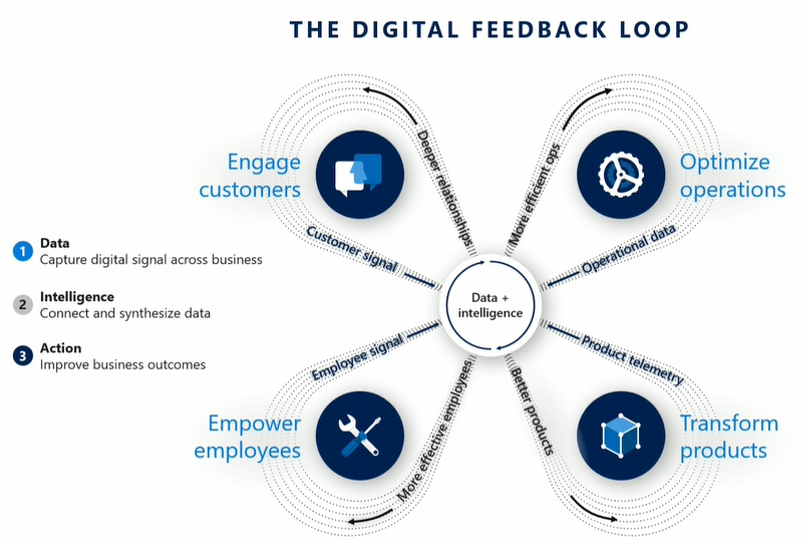
    In the cloud era, Microsoft can see everything. No, they don’t have employees looking at any customer’s private data or anything like that. What I mean is they have telemetry data on everything that happens on the service, because they are hosting all the moving parts involved. This gives them the opportunity to be very data driven in analyzing how products are adopted, what people actually do with them. It is essentially their own implementation of the digital feedback loop that you see James Phillips preaching to Microsoft’s customers and partners in every keynote he does. There’s the “transform products” part that is all about aligning product features to meet customer needs, but you can be sure MSFT also want to “optimize operations” when it comes to the logistics of delivering the cloud services and how to price them appropriately.

    Was gibt es Neues vom Microsoft Business Application Summit?

    Dynamics 365 is claimed to be the biggest service running on Azure today. Now, even though at Microsoft they both fall under the Cloud & AI that Scott Guthrie runs, there’s not a single bucket where all the costs would be thrown. The more Business Applications products are built that consume data storage and compute capacity, the higher the bill from Azure will be. The term COGS (cost of goods sold) is being used frequently when talking about the resources needed to keep cloud services up and running on these platforms like Azure. Power Platform is a platform on top of another, and while it often uses higher levels of abstraction that its raw Azure counterpart, API calls from the citizen developer PowerApps do turn into API calls against Azure services. Whatever product is generating this consumption must also front the bill.

    The vast majority of Dynamics 365 business today is still done based on user licenses, regardless of what our AI & big data driven future may look like. These are sold as SaaS apps you can just sign up and start using, rather than a complex solution that needs a technical architect to build the blueprint for. As such, the message Microsoft wants to get out there (but isn’t always so good in phrasing) is that the app user license should cover all normal usage for real human beings interacting with Dynamics 365 CE. Yes, anytime a user opens a contact form on a Model-driven app there are around 10 API calls made, which count against the quota for that particular user account. All CRUD operations theoretically count, but for an end user you shouldn’t need to count them. This is not the intention of MS.

    What is the idea behind setting the API call limits then? Well, the situation is this: the platform has evolved from the early days of being a simple CRM database for sales user productivity improvement into something that can connect OoB to a vast number of external (non-CDS) data sources and run complex automation on this data without anyone sitting in front of their PC and opening those contact record forms. When sold as Power Platform, there will be a massive amount of this non-CRM style consumption of computing resources running on the platform (unless MS completely fails with capturing this new business potential). Building all of this abstraction on top of the underlying Azure services and then giving it a way with essentially a per-identity flat monthly fee just wouldn’t be a sensible business model.

    (more…)
  • Application/Platform Separation in New PowerApps Licensing Model

    Application/Platform Separation in New PowerApps Licensing Model

    Ever since Spring 2018 when the XRM and PowerApps platforms merged on a commercial level, I’ve found myself spending an ever increasing number of hours per week involved in licensing discussions and scenario planning. My initial exploration of the platform licensing back then came to the conclusion that many of the crucial details for actually determining what you can & can’t do with PowerApps licenses vs. Dynamics 365 CE licenses were simply not available at the time. Obviously this was not an ideal starting point for Microsoft to start pushing their Power Platform into new business areas that should see it capture the next 10 million developers from outside the traditional CRM field. But still, it is the legacy that came with the underlying platform that was designed to be sold as Sales, Service, Marketing etc. solutions delivered via traditional enterprise projects via partners that mostly had started back in the Microsoft Business Solution (MBS) days. What can you do about that, huh?

    This year at the Inspire 2019 partner conference, Satya Nadella framed the role of Business Applications and Power Platform in particular with the following numbers:

    (Click here to watch this segment of his Inspire 2019 Corenote.)

    If there are indeed 500 million new apps that will be created in the coming five years, then those sure ain’t gonna emerge from the MBS style business model and development methodology. Today the world is full of both cloud service providers that offer low-code/no-code tools for building your own apps very rapidly, as well as savvy power users who are interested in seeing if they could take their Excel workbook desktop wizardry to the next level with these cool new tools that promise to deliver modern apps for this smartphone era. Since MS has obviously identified this new business potential that Power Platform can unlock for them, are they going to let the prior licensing model of Dynamics 365 stand in their way? Probably not.

    It just so happens that Inspire 2019 was also the place where the upcoming licensing changes for both Dynamics 365 and Power Platform were introduced to the partner audience. Since Inspire is a public conference that anyone can attend, it also meant that any customers paying attention to the Microsoft ecosystem are already aware of the changes announced to take effect on October 1st, 2019. The slide decks for both sessions are available for download on the Inspire website for a more detailed look. On the PowerApps blog there is also a summary of these changes, which is nice. What’s really nice is that the comments section is open, which often isn’t the case for corporate announcements related to licensing (is it even a “blog” if there is no reader interaction opportunity given?). The product team has been responding to a lot of the feedback around the topic, which makes me optimistic about the possible fine tuning of the licensing model to align with what the outside world thinks about it.

    Pay per App

    As with licensing always, there’s far too many details in the Inspire 2019 news to cover in one blog post. Maybe I’ll eventually do a revised version of my “Demystifying Dynamics 365 & Power Platform Licensing” session from January, but right now I want to focus on one aspect: the price of an App. This is something the new PowerApps licensing model highlights in particular:

    In short, what Microsoft will do in October is to retire the earlier PowerApps P1 and P2 plans and introduce new “Per App” and “Per User” plans. Nothing (major) is going to change with how the rights bundled into Office 365 and Dynamics 365 licenses work. The “Per User” plan will be the same price ($40) and mostly the same capabilities as the earlier P2, whereas the earlier “lite edition” of PowerApps P1 at $7 will be discontinued completely.

    “What?!? How can they just take away the $7 plan and push everyone to buy a license that’s almost six times the price of that?” Yes, this is the hardest part about the changes, no doubt. I was a bit surprised to see this as the direction where Power Platform is heading, given how the citizen developers who’ve been playing around with the seeded Office 365 PowerApps license should rather be pushed into learning more about CDS, solutions and all those “real” application development tools that P1 previously offered. Nevertheless, after letting the new model sink in for a few days, I believe that this pricing mechanism makes a lot more sense than the earlier version.

    A fundamental problem with the current P1/P2 divide was that it attempted to draw the line on app complexity. There were limitations like the inability to attach real-time custom business logic (workflows, plugins) on entities that were used by PowerApps P1 license holders. This was particularly problematic when operating within CDS environments that also serve as the Dynamics 365 CE app database (yes, they’re all CDS now): any developer or 3rd party app registering a plugin step on an entity like account would instantly have put all P1 users attempting to access it out of compliance with the license terms. Also the rights on “complex entities” and “restricted entities” differed between P1 & P2. Sounds complex? Yup. I had to write a blog post for demystifying these PowerApps “starter” plan capabilities just to get my head around on where the lines were drawn.

    Something that would have eventually become a big problem with the old P1 definition was that it only allowed the users to run Canvas apps. Sure, those pixel-perfect mobile-first applications are what most people think PowerApps is made of, but that is a view of the world that needs to be deprecated. Model-driven apps are just as important area of what Power Platform represents (on CDS in particular), but that capability was reserved for P2 license holders only. Given that Microsoft is aiming to remove all of these artificial limitations between app types and eventually get all PowerApps customers to Run One UI, keeping P1 users locked from this future app convergence simply wasn’t a viable option anymore.

    (more…)
  • PowerApps “Starter” Plans Capabilities Demystified

    PowerApps “Starter” Plans Capabilities Demystified

    There are many ways to get started with PowerApps on the cheap. What I mean by cheap here is the types of licenses that have certain limitations on what you’re allowed to do with the PowerApps platform and apps, in exchange for their lower cost. In other words, “less than PowerApps P2 capabilities.” In this article I’ll try to illustrate what these limitations are, especially when working with data in the Common Data Service (CDS).

    As was announced already one year ago, PowerApps Plan 2 at $40/user/month is the official platform SKU that allows you to build and run highly complex custom applications, on top of the same platform that also powers Dynamics 365 Customer Engagement (CE) applications. If you have a license for any CE Enterprise App or Plan, you’ve also got the full power of PowerApps P2 at your disposal. As long as you can afford to fork out at least $95/user/month, then you’ll get both the first party Dynamics 365 App plus the unlimited platform usage, which of course is the best scenario in terms of how to digitally transform your business processes with the help of MS Cloud.

    When building custom PowerApps, often times the audience that would need to have access to these apps is much larger than your team of sales people who would use the CRM application manage customer interactions and sales pipeline, for example. The apps may be replacements of legacy Excel sheets or even paper forms, which are not all that complex when compared to full Enterprise Sales applications, and they might not even be used that often per single user. However, you may still need to enable each and every employee in the organization to use the application to complete the task it’s designed to manage.

    For these kind of scenarios the licenses should preferably fall more into the Office 365 (or Microsoft 365) territory, so that they can be standardized as the tools that all information workers in the company have at their disposal. Luckily there is a plan called “PowerApps for Office 365” that already provides the basic capabilities for app building and usage bundled into the license that almost everyone has these days. The limitations are that it’s really meant only for working within the Office 365 stack of services. The next level up from there, PowerApps Plan 1, is also priced at $7/user/month which is only a fraction of the price of Enterprise Sales App, for example. Here you get access to CDS and various types of connectors to other systems where your business data may reside.

    Up until this point, the PowerApps plans and capabilities line up nicely into a stacked Venn diagram with these layers:

    Where it starts to get more complex is the Dynamics 365 CE licenses that are below the Enterprise Apps and Plans. These do NOT include the PowerApps P2 capabilities but a different plan called “PowerApps for Dynamics 365 Applications”. In the CE product portfolio, this plan is included with the following licenses:

    • Dynamics 365 for Team Members ($8)
    • Dynamics 365 for Customer Service Professional ($50)
    • Dynamics 365 for Sales Professional ($65)

    You should look into the PowerApps & Flow Licensing Guide to get the full details about what the limitations for different plans are. Now, since these type of long documents aren’t great at highlighting what the “gotchas” in the licensing model are, here’s my attempt at drawing a picture around these lower end PowerApps plans and key capabilities. Please note that I’m only covering the Team Member license here when referencing the “PowerApps for Dynamics 365 Applications” plan, as it’s more in line with the price range of the aforementioned “starter” plans.

    Let’s start from the left, meaning the one capability that is included even in the “PowerApps for Office 365” plan: run standalone Canvas apps. For some peculiar reason, this is not allowed for users with the “PowerApps for Dynamics 365 Applications” plan. The only thing that they can do is “run extended first-party Dynamics 365 (Model-driven) apps within the context of the application use rights”. So, an embedded Canvas app on the account entity form is allowed, but launching any app directly from either web.powerapps.com or the PowerApps mobile app is forbidden.

    This leads to an interesting scenario, because essentially the “PowerApps for Dynamics 365 Applications” plan doesn’t give the users the right to run any type of app that says “PowerApps” in the header bar. Only the applications with “Dynamics 365” branding are within the boundaries of this plan, which makes you wonder why it even need to be a plan in the PowerApps licensing model when the Dynamics 365 licensing should in theory cover it.

    (more…)