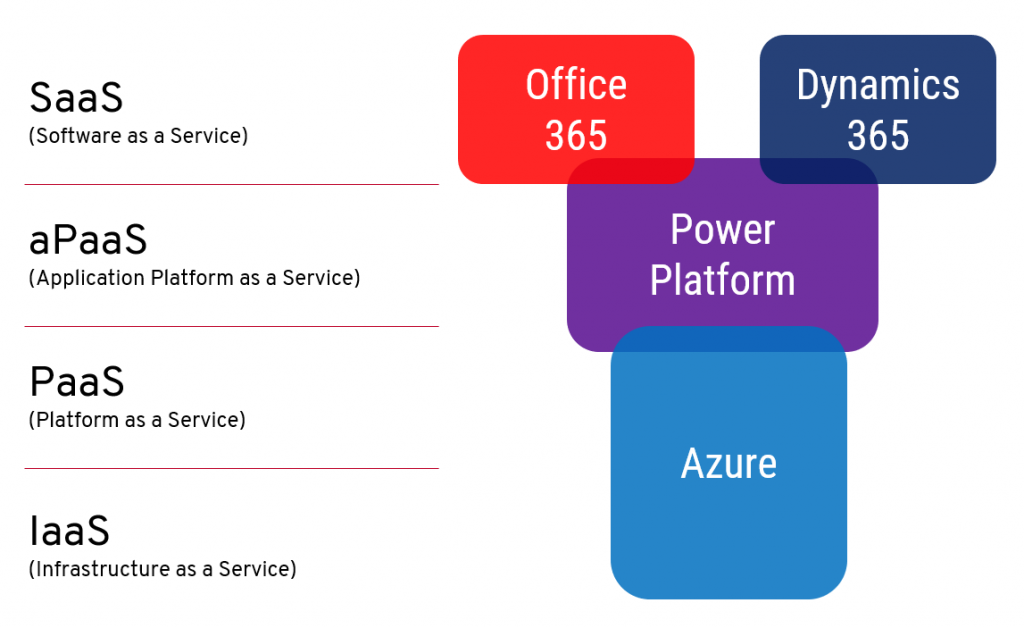
In the past, I have written a lot of posts on this blog under the Licensing category. Ever since I moved on to writing my weekly newsletter on beehiiv, there’s been a bit of a conflict in my mind about “where should the licensing stuff go?” Because I acknowledge it’s not necessarily something to casually drop into the weekly articles of Perspectives on Power Platform.
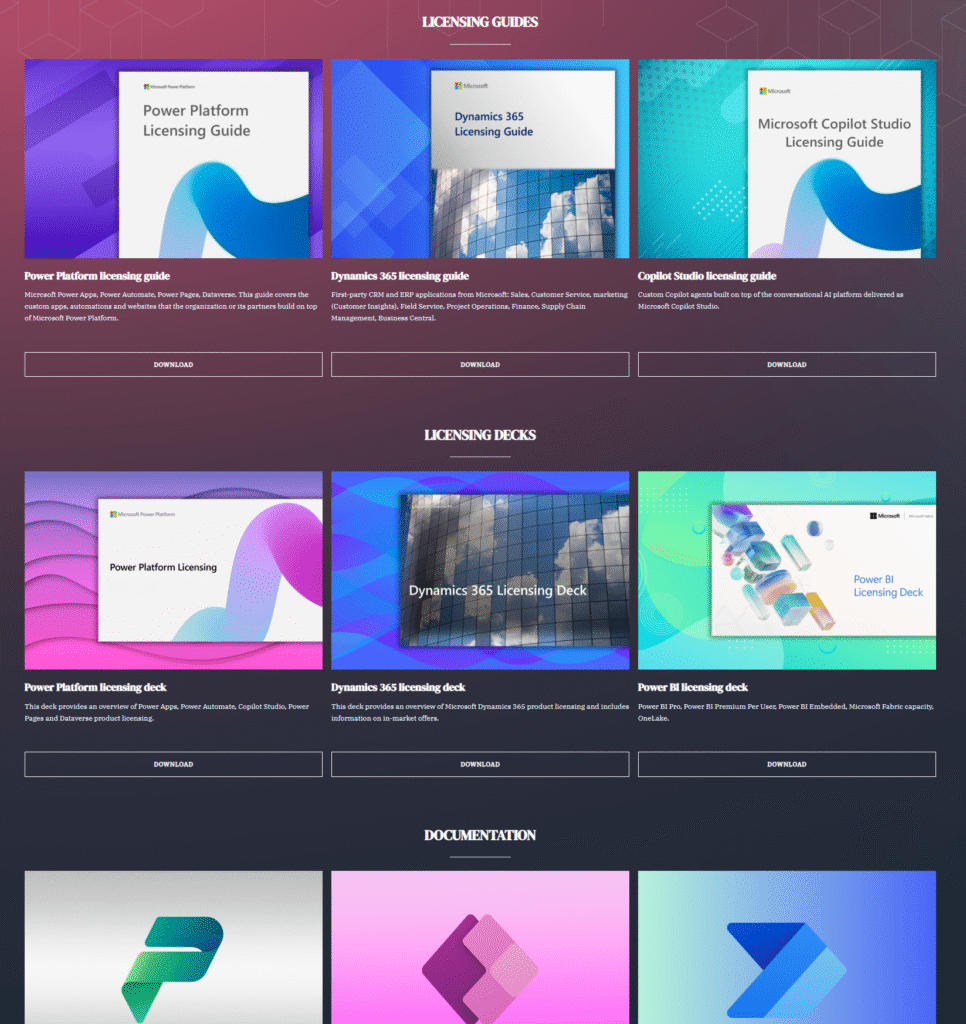
What started out as a fun domain I discovered to be free has now turned into a proper website with both persistent pages as well as blog posts on recent events. True to its name, this site does also provide you the quickest possible way to view the latest licensing guides from Microsoft, via the Resources page:
I figured there’s no point in always going via search engines to the latest guide versions. Or to keep some of the commonly referenced MS Learn pages as bookmarks in my own browser only. Better to just put it out there on the internet.
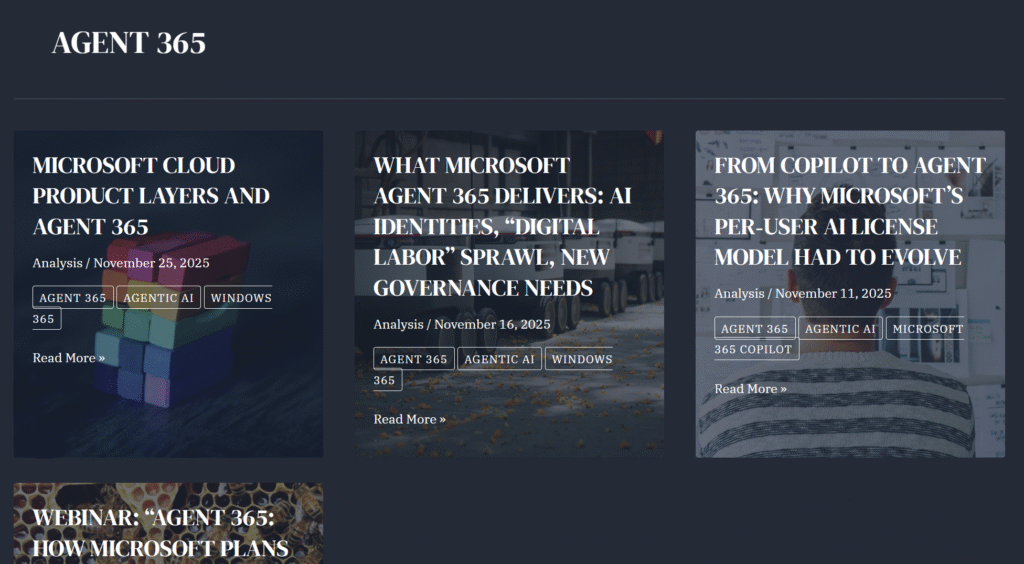
Whenever Microsoft announces something that will shake up their licensing model, like the new per-agent licensing of Agent 365, I will be keeping an eye on the scoops and info leaks as part of this strange hobby that I have. There’s now an obvious place to post these kind of updates, with The Licensing Guide blog section.
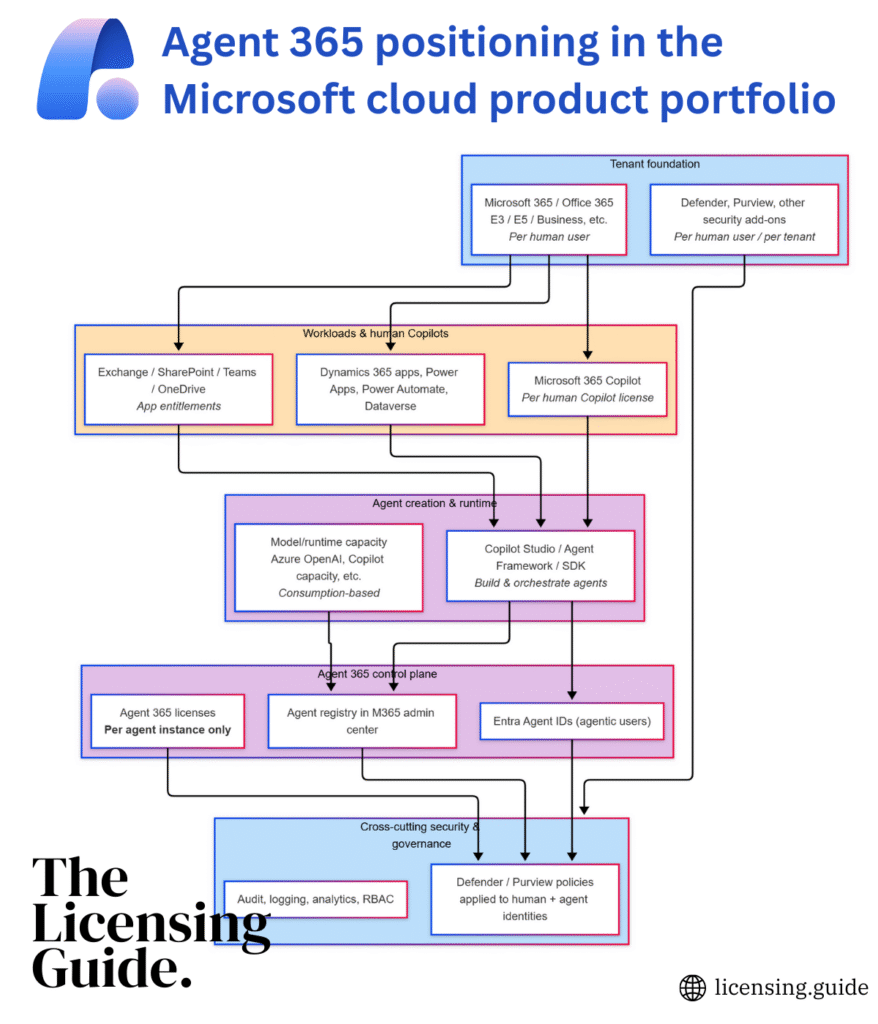
The added benefit of collecting your research into one place is that this makes the data easy to chat about with AI tools. That allows turning the complex new concepts buried in MS marketing lingo into illustrations that explain things without the smoke and mirrors. Such as creating mermaid charts from product documentation. Or constructing alternative FAQ pages from product announcement details and docs, like I did with the A365 FAQ page.
As far as topics in the Microsoft ecosystem go, there’s hardly anything less demonstrable than licensing. Yet occasionally I still get the feeling “I’d want to show this in action”, which is when I might record a quick video and put it on YouTube. Like this latest one about the Dataverse Capacity Calculator I built:
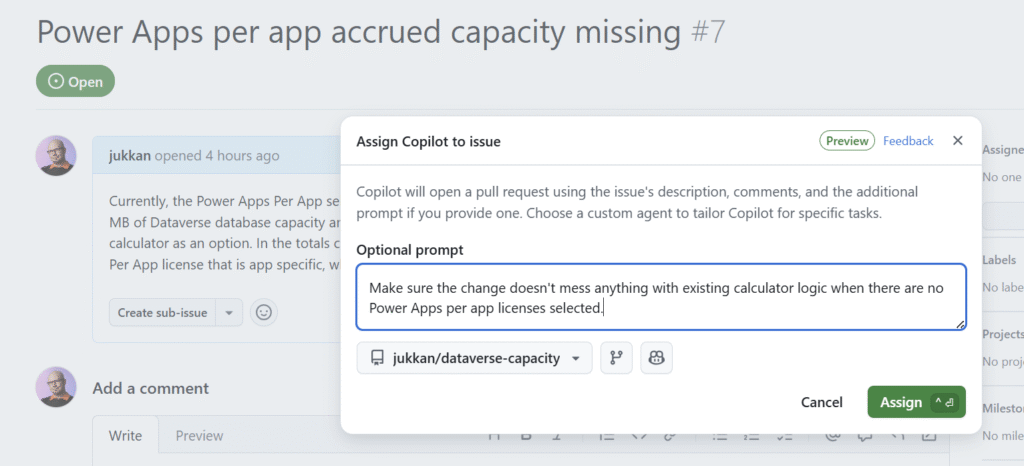
Which gets us to another unlikely combination: licensing + vibe coding. Yet that’s exactly what I’ve done with the above-mentioned Dataverse Capacity Calculator. After having a thorough discussion with my AI assistants about the contents of the latest licensing guide PDFs from Microsoft, I instructed them to “go and build me a calculator with these rules”. Now it’s an actual thing that exists on GitHub. Do I fully trust the output? No, whenever problems are found, I’ll just log an issue and assign it to Copilot.
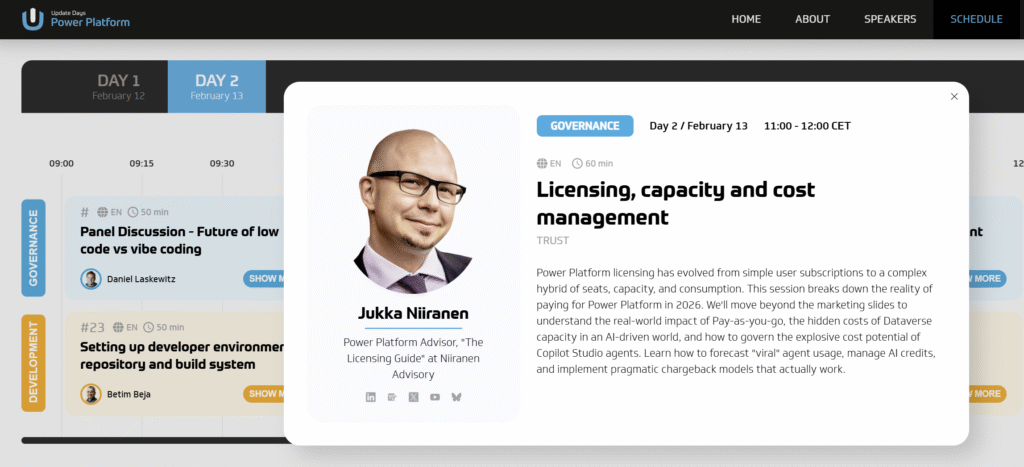
Some might think this isn’t how you should treat serious business topics like software licensing. Yet when I started actively blogging about Dynamics 365 and Power Platform licensing back in 2019, that wasn’t a thing any community member was doing either. These days, you’ll often find licensing-related sessions in community conferences like DynamicsMinds. And even at an upcoming pro-dev conference like Update Days: Power Platform.
I believe the best way to make an impact in this world is to A) find something that people don’t normally do, and then B) just do it. It has been proven to work with citizen development, citizen publishing (i.e. blogging) and all kinds of areas in life.
Remember this, kids: you can be whatever you choose to be. I chose to become the licensing.guide. Because why not? 🦸
In this age of online commerce, and especially when selling digital subscription services, one might think that the online storefronts of large corporations would contain accurate product descriptions. Or that at least it wouldn’t take many years for incorrect information to get fixed.
Neither of these assumptions are correct when dealing with Microsoft 365 admin center’s online store, a.k.a. the “purchase services” tab. The detailed information that is shown to customers who are looking to purchase Power Apps licenses is not valid in this portal. It hasn’t been valid for close to 4 years now.
During the past couple of years, I’ve tried every imaginable channel for contacting Microsoft about this. I’ve reached out to MS partner forums dedicated to licensing information. I’ve posted into Microsoft MVP program related forums dedicated to MS Business Applications licensing information. I’ve reached out directly to the product team who owns Power Apps.
Nothing has helped in getting this information fixed. Which means that I must assume it will never get fixed. The only way to communicate about this to the people who suffer from it (customers, partners) seems to be in writing a blog post like this.
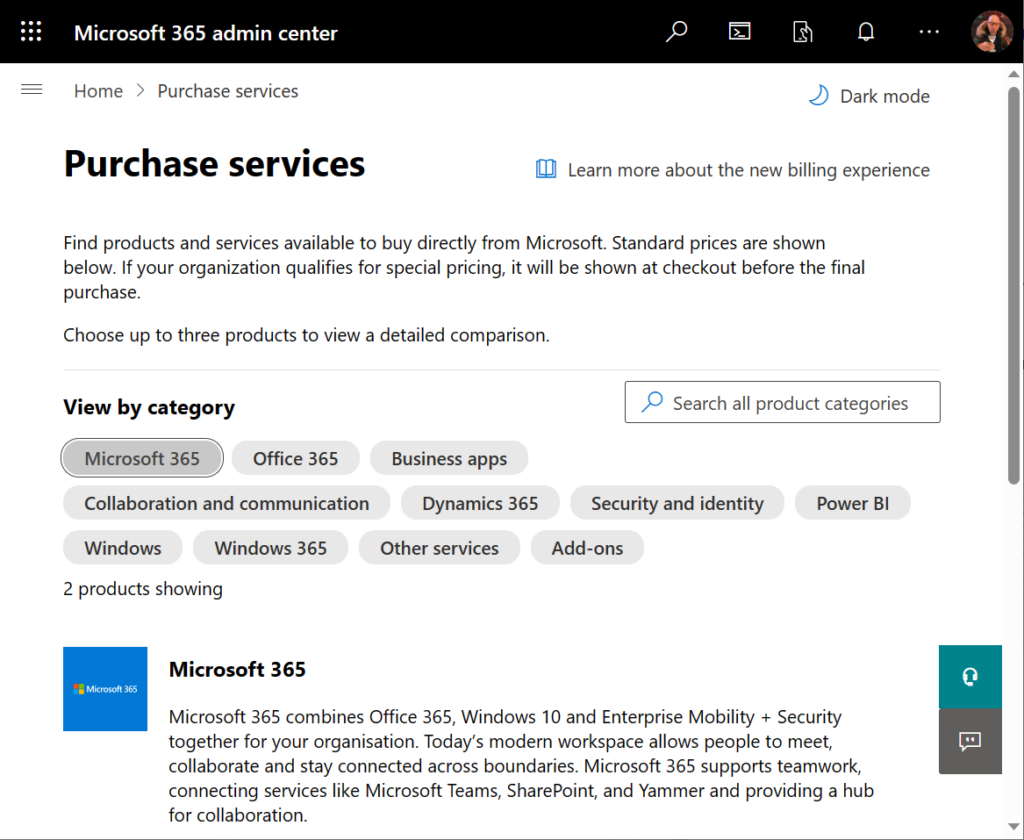
Let’s take a look at the online commerce experience for someone who’s got a Microsoft 365 tenant and wants to purchase Power Apps licenses directly from Microsoft. In this scenario we want to specifically understand the options provided in the subscriptions called “Power Apps per user plan” and “Power Apps per app plan”.
Finding Power Apps products from Microsoft 365 admin center
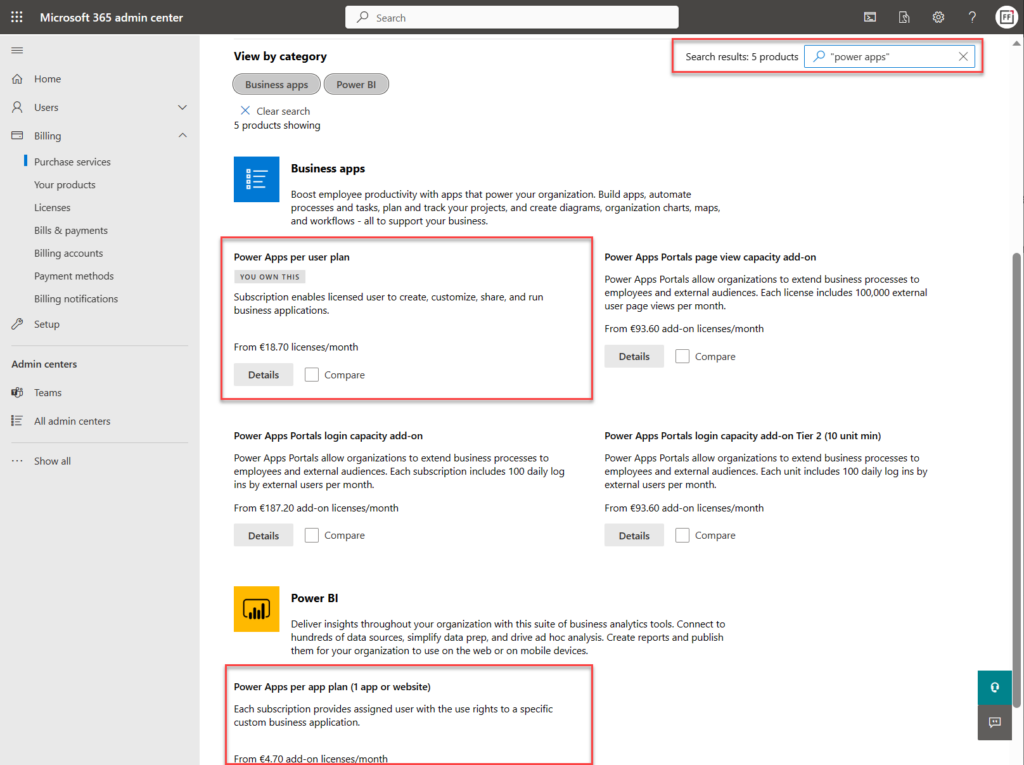
The first hurdle will be in finding the products. One might think that Power Apps would be listed under the “Business apps” category (since there isn’t a category called “Power Platform”). However, we only find the Power Apps per user plan from that category.
Let’s try a text search. Searching for “Power Apps” (or the old name variation “powerapps”) gives us the results we were after, yet in a surprising place:
Why on earth would the per app plan be categorized under “Power BI”? Well, for the same reason I need to write this blog post. The product information under Microsoft 365 admin center is simply wrong in many cases. This specific miscategorization has been in place for several months now, as an example.
Comparing Power Apps product features in Microsoft 365 admin center
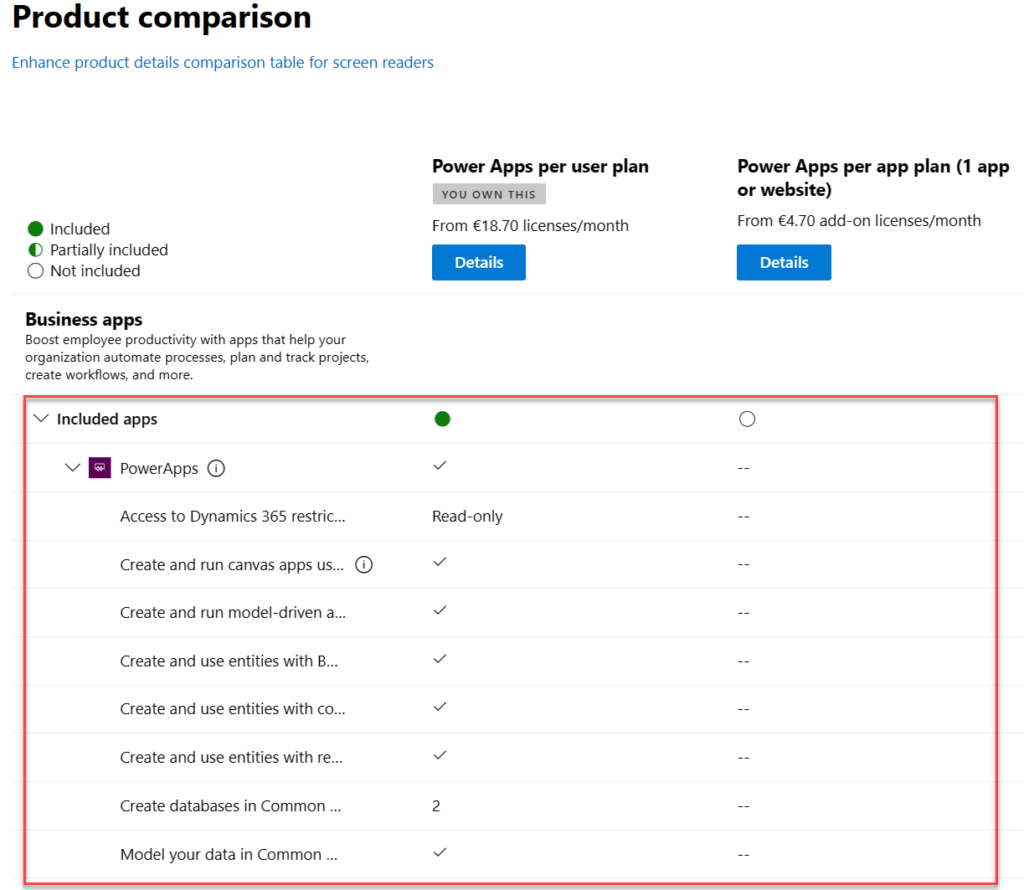
Now what we’ve got the 2 Power Apps SKUs (“stock keeping units”) on the same results page, we can tick the “compare” box on them. Upon opening the comparison page, this is the result we get:
There is absolutely nothing right about these product features. Even the product name and icon in the comparison section are outdated. They refer to the old SKUs of PowerApps Plan 1 and PowerApps Plan 2, which were replaced by the Power Apps per app plan and Power Apps per user plan on October 1st, 2019.
The problem is, someone responsible for the commercial information managed in the Office 365 / Microsoft 365 online store didn’t understand this change was not simply a rebranding. You can’t just replace “Plan 1” with “Per App” and get away with it. Someone truly missed the memo of Charles Lamanna when he announced the change on July 25th, 2019.
“We are also removing feature and capability differentiation across the paid, standalone PowerApps and Flow user-based plans. All customers will be able to benefit from the full features of the services, regardless of which plans they purchase. Key concepts like complex entities, or model-driven applications, will no longer be available in only some of the licenses.”
Taken from “New licensing options for PowerApps and Microsoft Flow standalone paid plans” on Power Apps product team blog
Let’s look at the list of features that are presented in Microsoft 365 admin center ~4 years later and see what errors we can spot:
“Access to Dynamics 365 restricted entities.” It used to be read-only for Plan 2 and no access for Plan 1. Today, the entities (nowadays renamed “tables”) categorized as restricted are read-only for any Power Apps license. Also, everything else has full CRUD rights.
“Create and run canvas apps using common data service for apps”. First of all, “Common Data Service (CDS) for Apps” as a term was replaced with Dataflex…sorry, Dataverse, quite some time ago already. Both Per App and Per User today have identical right to using this, unlike what the comparison table claims.
“Create and run model-driven apps using Common Data Service for Apps”. Showing this as not available in Per App is entirely false. As anyone reading the memo from Charles would have spotted: “Key concepts like complex entities, or model-driven applications, will no longer be available in only some of the licenses.”
“Create and use entities with Business Rules and async workflows”. Available in both Per User and Per App licenses, unlike what the product comparison table says.
“Create and use entities with code add-ins”. Sigh… See above.
“Create and use entities with real-time workflows”. Oh come ON! See above.
“Create databases in Common Data Service for Apps (per user)”. Ooh, what an ancient relic this line is! Saying that Power Apps per user plan allows you to only create 2 databases has no basis whatsoever in the current licensing model. Customers can create as many Dataverse environments (meaning CDS / XRM databases) as their available storage capacity permits. Furthermore, today anyone can create up to 3 Developer environments for themselves, without having any premium Power Apps license.
“Model your data in Common Data Service for Apps”. Does anyone still want me to explain to them that there’s no difference between Per User and Per App entitlements here? No? Good. You got the memo then.
Closing thoughts
For those of use who have been tracking the platform evolution of MS Business Applications over the years, it’s pretty much business as usual to encounter MS materials and information that reference outdated versions of products. The names change, the icons change, the licensing models change – this happens all the time and we’ve come to expect it already.
If you don’t have prior experience on the commercial aspects of Microsoft’s product stack, though – this can be highly confusing. Imagine that you’re trying to compare different low-code application platform vendors and the information provided by the online store is like what we’ve seen above. Not the best way to build trust and convince customers that the pricing model is transparent.
Why does this happen then? Why aren’t the product details updated in customer facing portals? Well, I don’t think anyone intentionally wants to mislead the audience here. I believe it’s simply a reflection of how inside a huge corporation like MSFT it can be very difficult to coordinate such updates. Every time some product gets “reimagined” there must be a million places that would need attention internally at Microsoft (us partners surely feel the impact, too). Sometimes the friction in the systems may just be too great to overcome, such as in commerce engines like Microsoft 365 or technical dashboards like the Azure portal.
Power Platform products and pricing
If you’re interested in seeing the Power Platform product prices on a single page, take a look at a summary that I’ve created for my own reference: Price points of Power Platform. I can’t promise it to be always up to date either, but at least I have a lot less bureaucracy to overcome than the official channels.😁
The second Microsoft Ignite event of 2021 included several important updates on a topic that I cover regularly on this blog: Microsoft Business Applications licensing. The biggest announcement of course was the pay-as-you-go licensing model (PAYG) for Power Apps:
Here’s a few thoughts and observations on what was announced & updated on the licensing front.
PAYG and Azure
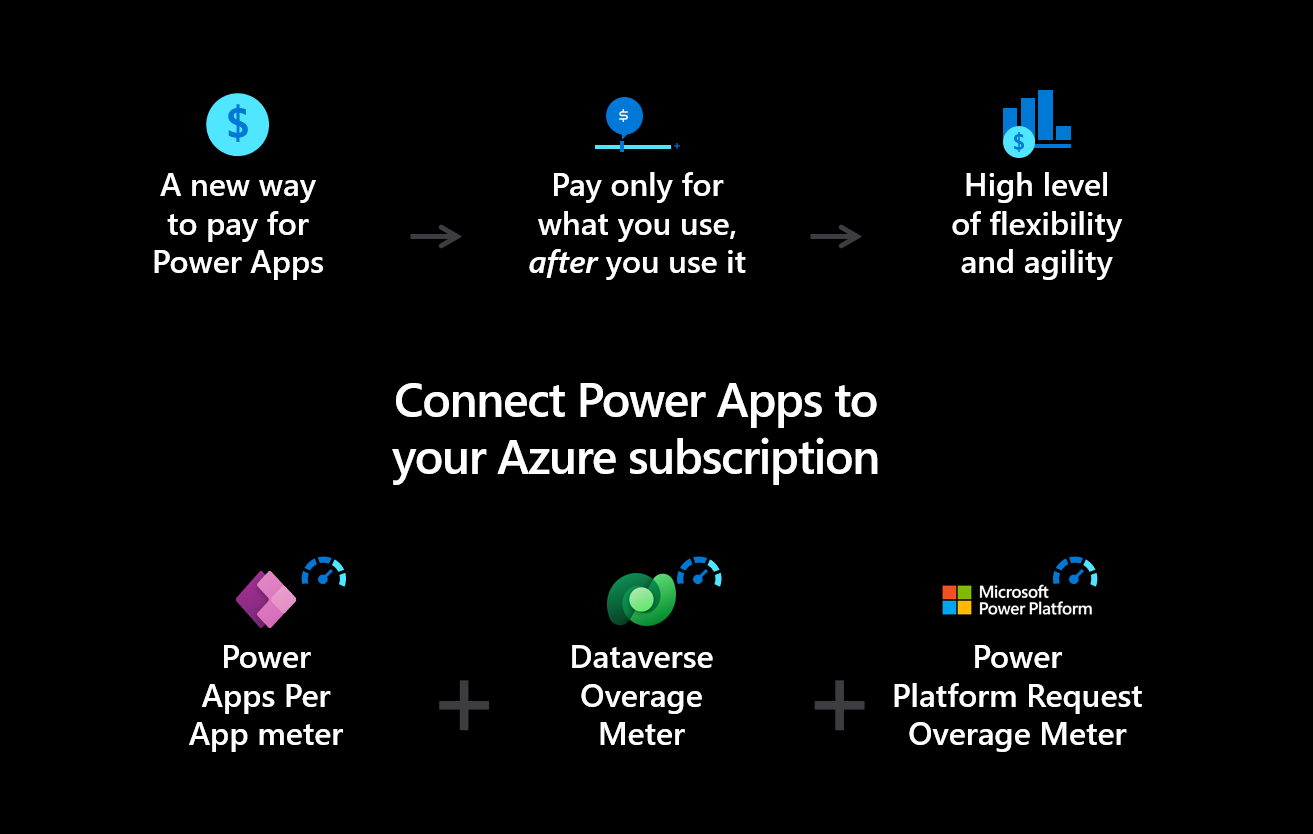
Despite of its name, the biggest impact from the Power Apps pay-as-you-go plans isn’t necessarily the pricing model. Rather it’s the currency in which you pay for it: Azure money. This is something that most larger organizations will already have in their virtual cash reserves, which makes it considerably easier to spend on services.
Licensing agreements are both an enabler and a blocker for Microsoft cloud services, especially on enterprise level. Getting something new like Power Apps premium licenses included into the IT portfolio available to the business users can take a lot of time and effort. Once it’s included, though, there’s plenty of practical benefits for using these as opposed to some fancy new cloud service that might come along.
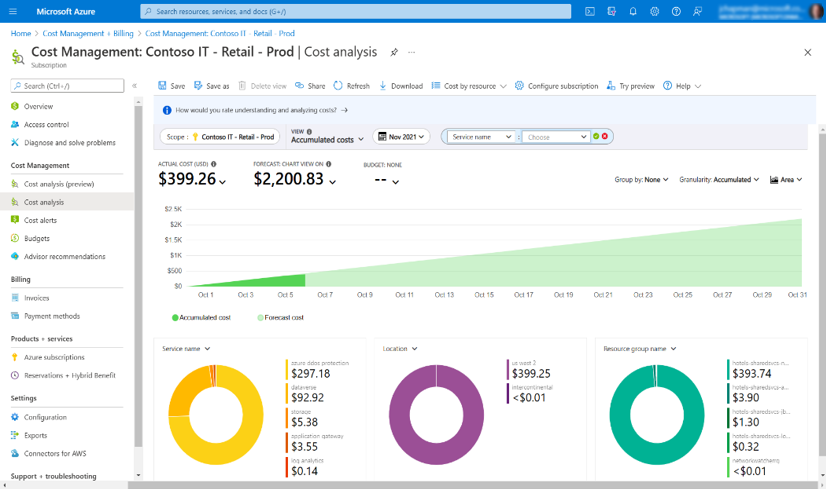
Having an official “exchange rate” that converts these new low-code tools managed on the Microsoft 365 side into tools and terminology compatible with the pro-dev work already done in Azure is key step in selling the Fusion Teams story to organizations. Even if the PAYG model wouldn’t be cheaper in practice, having Power Apps license costs show up in existing reports on Azure Cost Management side will make it less of an unfamiliar beast to IT and developers. Also the discounts customers may have negotiated based on their Azure spend will presumably apply to Power Apps, too.
PAYG and apps
PAYG is specified on environment level, by defining a billing policy and selecting which environments are included in it. However, you can exclude specific apps from the model and require their users to have a Power Apps Per User license instead. Mixing PAYG with Per App subscription plan isn’t allowed, though.
I believe that underneath the covers the PAYG Per App plan and the regular Per App plan are mostly identical. The major difference is that at the end of the month, the PAYG pass is removed from the user until he/she opens the app again. With the regular Per App subscription plan, the pass allocated upon the initial app sharing to the user and isn’t revoked until the app is explicitly unshared.
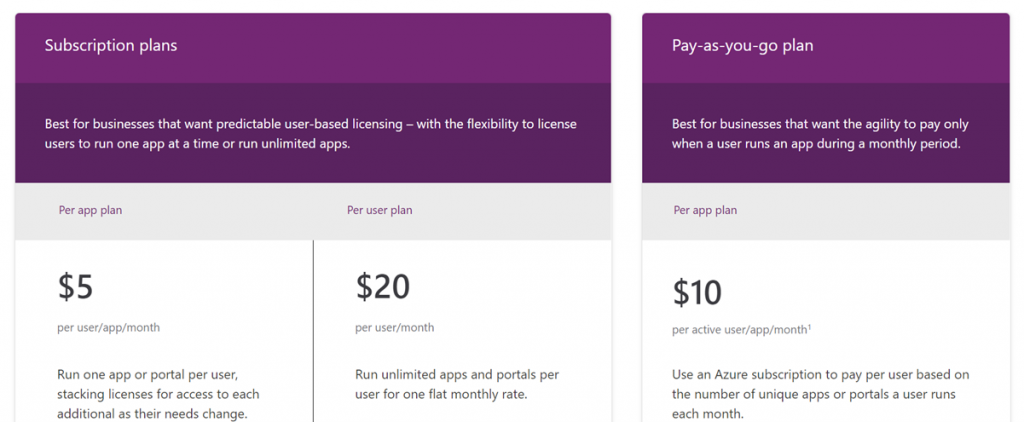
So, which one should you go for then with your Power Apps that use premium features? Subscription model or PAYG? First we must keep in mind that the recent 50% price drop in Power Apps subscription plans took the price of a Per App license down from $10 to $5. At the same time the Per App entitlements were updated to cover a single app, rather than up to 3 different apps (existing customers have been compensated with 3x passes). Now with the new options, you can either pay $5 per user per app per month in the subscription model, or pay $10 for the exact same features but only for those months when a user opens the app.
If there was a quick & easy way to assign, unassign and report on the Per App subscription licenses, it would clearly be tempting to save 50% and pay with the old model rather than PAYG. In practice, Per App licensing management remains a nightmare that has surely cost customers (and partners) lots of money in time spent figuring out who’s got access to apps, why someone doesn’t, and how much licenses are actually being used. It’s been over 2 years since the Per App plan was launched and we still don’t have a report in Power Platform Admin Center that would give customers the information needed for managing this process.
If the PAYG mechanism can both automate the assignment and removal of licenses, as well as provide detailed reporting in Azure Cost Management, then it could well be worth the price premium for process efficiency and cost visibility. For any smaller app experiments that you’re not yet entirely sure on how widely they will be used, starting with the Azure subscription based billing makes a lot of sense. You’ll be able to cut down on the initial admin hassle and get real data on the app usage to base your future licensing decisions on, whether to use PAYG or committed subscription passes/seats in the long term.
PAYG and capacity
It’s important to understand that the PAYG model doesn’t completely transform Power Platform into a pure consumption based model like Azure. After all, a single app launch during a calendar month will cost you the same as 1000 launches by the same user, and using 2 different apps will double the cost regardless of how much load you generate to the cloud services. Think of it more like buying a monthly pass for public transportation in your local area vs. taking an Uber and paying in proportion to the actual duration and length of your rides. If you travel to another city not covered by your current pass, you’ll need to purchase another pass. In the case of Power Apps, there aren’t any per hour or per day tickets sold, so the monthly pass is the minimum charge for the Power Apps per app meter billing rules.
Having said that, there is also the concept of pay-as-you-go capacity when it comes to Power Platform licensing. API capacity is something that Microsoft says a normal user shouldn’t have to worry about, since there is bundled capacity included with the app/user licenses. At Ignite an announcement was made that increased the request limits for both licensed users and non-licensed users (check out Gustaf’s blog for details). If you do run out of requests, though, there will soon be a PAYG Power Platform request meter that can be used to pay for the overage.
Something that does already exist today and is a much easier concept to approach than API consumption is the storage capacity. Unlike the traditional subscription licenses that are paid upfront, the PAYG model doesn’t have any storage capacity accrued per each user or app pass. This makes sense, since those numbers are only known as-you-go by the end of the month, whereas data storage is something a lot more persistent.
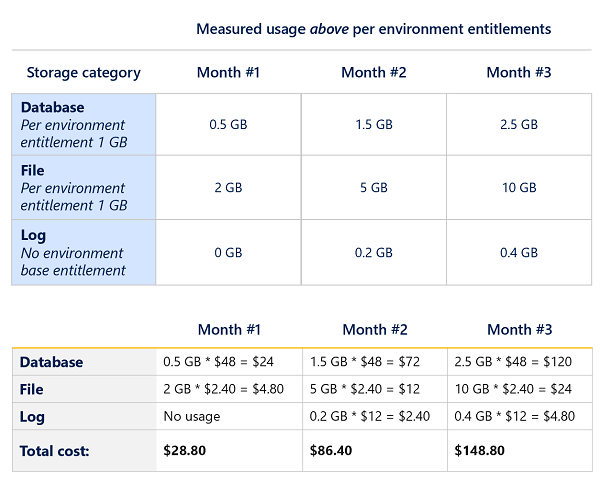
Whenever you activate PAYG for an environment, it means it no longer draws from the tenant’s common capacity pool. The environment does get 1 GB of “free” Dataverse database capacity + 1 GB file storage capacity, but after that you’ll pay for everything based on what the Dataverse capacity meter shows. These rats are slightly higher than subscription based capacity prices, at $48 and $2.4 per GB respectively (note that log capacity is always paid for at $12/GB). If you’re used to leveraging the tenant level capacity accrued from user subscription licenses for your storage needs (coming from Dynamics 365 users, for example), then this can be a surprising additional cost when activating the Azure based billing policy for your environment.
There’s one gotcha in the current way how PAYG storage capacity can be used. You see, in order for you to assign a PAYG billing policy to an environment, the environment must first be provisioned. What this means is that the tenant will need to have a minimum of 1 GB database capacity available for the environment creation to succeed. So, you’ll need non-PAYG capacity from elsewhere (such as a paid Power Apps or Dynamics 365 plan) before you can use an Azure subscription to start paying for the capacity instead. Presumably Microsoft will fix this issue in the near future, since it’s in no one’s interest to block PAYG as the sole billing method.
While storage capacity has been reported and technically enforced for a while already, Power Platform requests are still something that exist on paper but cannot be reported on nor paid via actually assignable licenses. In the FAQ section of their documentation page, there is now a new answer to the following question: What are the timelines for Power Platform Request limits?
The concept of limits was first introduced in late 2019 and documented limits were substantially increased in late 2021. Generally available reporting for Power Platform Requests is expected in the first quarter of calendar 2022. Any potential high usage enforcement wouldn’t start until six months after reports have been made available. Assignment of add-on capacity packs should be aligned to high usage enforcement.
Let’s assume that the reports would be launched in March 2022, after which there will be a 6 month grace period before the technical enforcement kicks in. This would mean that the October 2019 licensing changes that started all this confusion around what the platform can & cannot be used for will have taken full 3 years to truly come into effect. That’s a long, long time. Yet I do think it’s encouraging that Microsoft haven’t rushed into enforcing a rule that might have caused way too much collateral damage if not thought out well enough.
Power Automate licensing updates
There isn’t a PAYG model available for Power Automate. Sure, you can use premium connector cloud flows within the context of a Per App licensed app (although I’ve found this to be difficult/impossible in practice). The nature of a background process automation is fairly different from the interactive usage of an app UI, so it kinda makes sense why new options haven’t been introduced. Besides, if the Power Automate licensing model doesn’t work for your scenarios, then moving to the consumption based Azure Logic Apps is already a good option to consider.
While there weren’t any major Power Automate specific licensing changes announced at Ignite, there was a wealth of new documentation released on the topic during the event. The flow licensing FAQ contains some interesting answers when it comes to what we would have traditionally considered to be multiplexing. I’m one of the few people who have ever dared to blog about multiplexing, yet it seems that there are things I haven’t fully grasped about the topic either. This infromation in the FAQ caught me by surprise:
A common question is, “If a flow is triggered when a SharePoint list item is updated, and many users interact with that list, will there be a cost for each user?” The answer is if the flow does not use a premium connector such as calling Dataverse in the full production environment (not the Microsoft Teams environment), having an Office 365 license is enough. If the flow uses premium connectors, since the trigger is an automated trigger, only the owner needs a premium license.
Having a web form that any user could submit to create a lead record in Dynamics 365 used to be the scenario where I’d say “sorry, you’re violating the licensing terms”. Now, Microsoft explicitly calls out that if a user enters data into a SharePoint list and that in turn triggers an automated flow that uses a premium connector to push the data into Dataverse, it’s enough for the flow owner to have the premium license.
This little change opens up many scenarios where recording entries into Dataverse / Dynamics 365 may have previously been considered too expensive. Using a SharePoint / Microsoft List as the intermediate data storage is now officially a supported method to reduce the need for Power Automate premium licenses when using automated flows. I personally find it hard to understand how this statement wouldn’t contradict Microsoft’s core definition of multiplexing, but what can I say? Other than: welcome to Business Apps licensing!😂
AI Buider
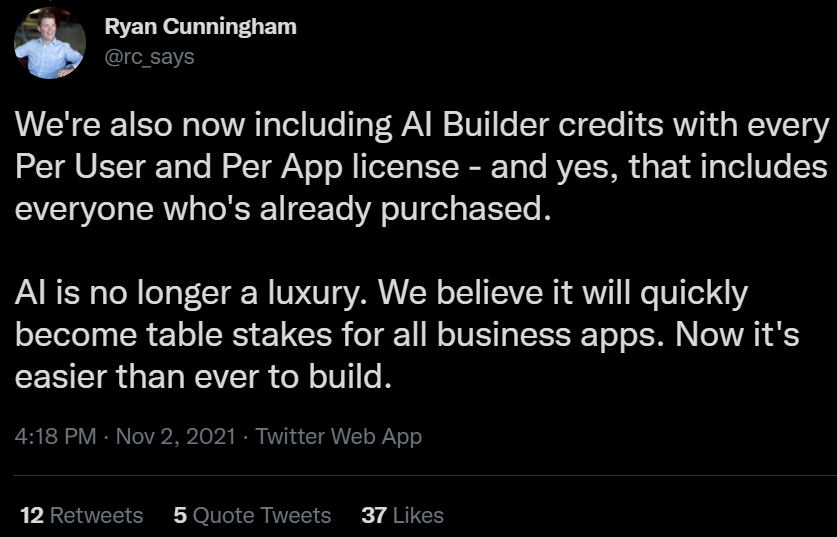
One more small but significant change: there will now be AI Builder capacity included with Power Apps Per App plan (250 credits) and Power Apps Per User plan (500 credits).
How much AI that will actually give you depends on the usage scenarios, which you can try and estimate with the AI Builder calculator.
Why is this a big deal? Well, for some mysterious reason, Microsoft had earlier decided that the starting price for buying AI Builder capacity was $500/month for 1 million credits. Need just a few runs for your little cloud flow every month? “Sorry, we can’t be bothered to support anything below 1M.“
This was a prime example of how not to price cloud services for citizen developers, as they should be given the chance to focus on building apps instead of building business cases for software licenses. The starter capacity will now make it possible for app makers to leverage AI models in small solutions and experiments beyond just a 30 day trial.
Together, Dynamics 365 and Teams offer powerful new ways for everyone across an organization to seamlessly exchange and capture ideas right in the flow of work. Today we announced a new collaborative app that brings together the best of Dynamics 365 and Teams. We’re also eliminating the licensing tax that has historically held organizations back from this kind of integration, making these experiences available within Teams to any user, at no additional cost. No other technology vendor offers this kind of integration and accessibility across the organization without the need to pay for multiple underlying software licenses.
Clearly this is quite a big factor for Microsoft when competing against the likes of Salesforce. The features are therefore unlikely to be merely on a “check the box” level that the competition could undermine with their counter arguments. Obviously Teams is the platform that Microsoft is betting pretty much everything on, so a deeper integration with Dynamics 365 is hardly a surprise.
The brand new 2021 Release Wave 2 release plans for Dynamics 365 that came out on the same day have multiple references to new Teams integrated features:
…And I won’t even go to things like Mixed Reality. You get the idea by now: if a Microsoft product doesn’t have any Teams integration today then it might as well be nearing the end of its natural lifecycle.
Collaborative apps in practice
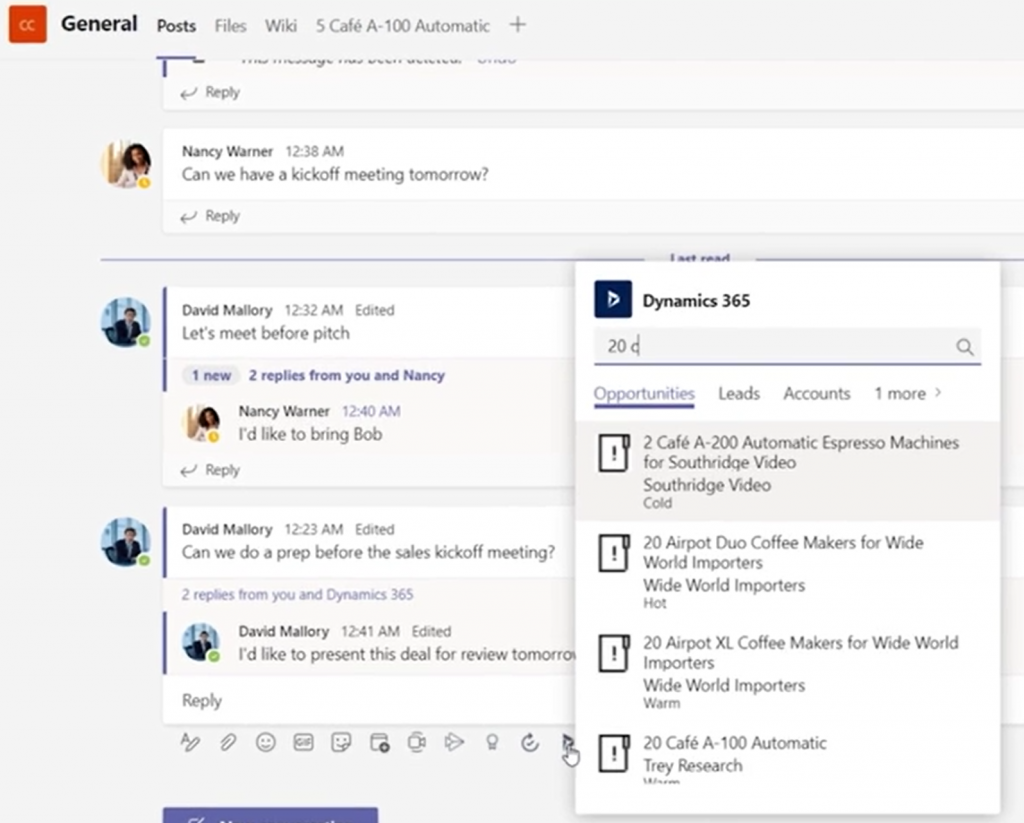
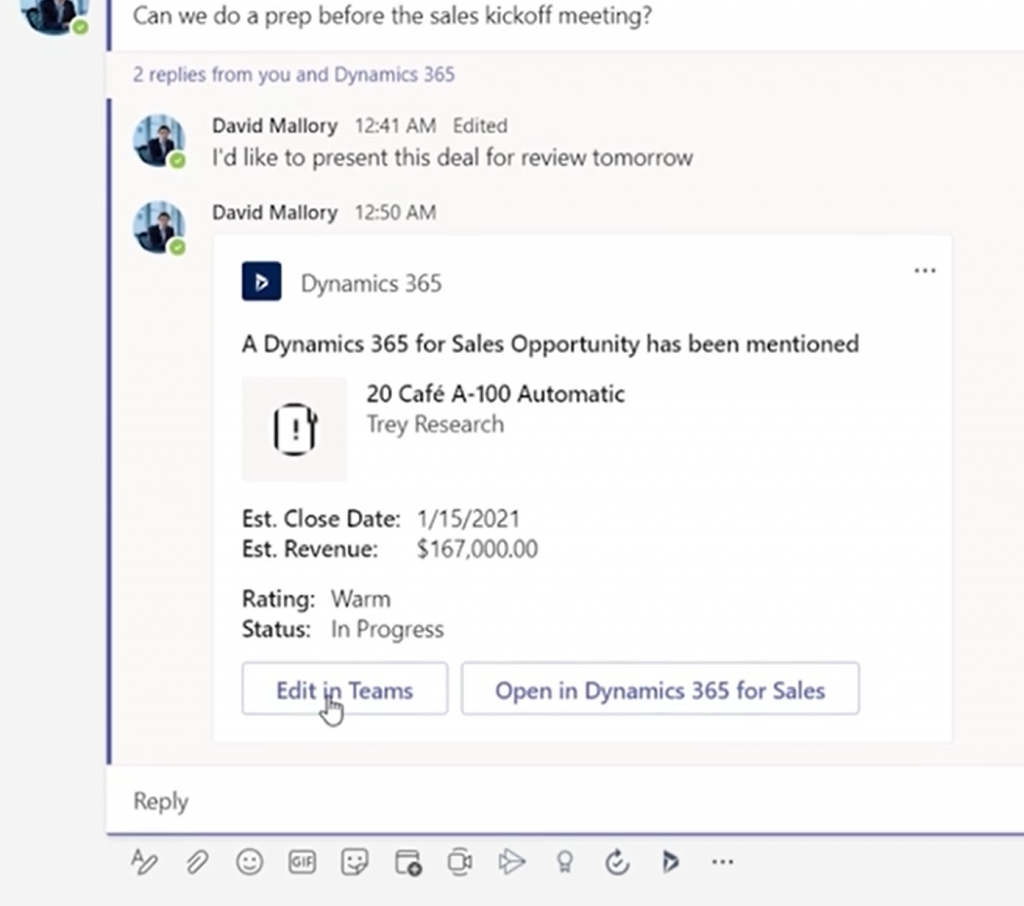
Today we’re limited to the product marketing materials published by MS, but let’s try and make the most of it in our feature analysis and licensing speculation. Starting from the Dynamics 365 + Microsoft Teams landing page, we can watch a promotional video that includes some UI footage of the collaboration scenario. To start off, sharing Dynamics 365 records into a Teams channel is obviously a key to unlocking the collaborative scenarios, so a new experience for attaching records like opportunities or accounts will be provided:
From the resulting Adaptive Card we see that the user is offered not just an option to “open in Dynamics 365 for Sales” but also to “edit in Teams”:
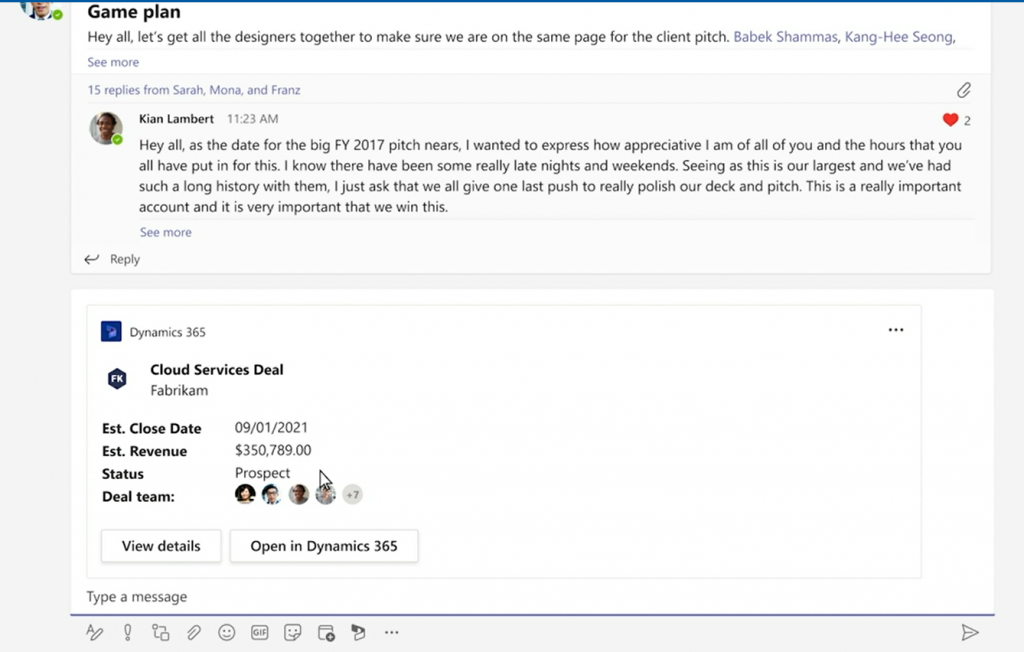
We don’t get to go very deep in this video, so let’s switch over to the Inspire session called “The Cloud Built for a New World of Work” where Alysa Taylor introduces the Teams + Dynamics 365 story to the MS partner audience. The story has a similar “attach a Dynamics 365 record to a channel message” scenario. Here the button says “View details” rather than “Edit in Teams” but since these videos probably need to created well in advance, we can assume these two feature to be the same.
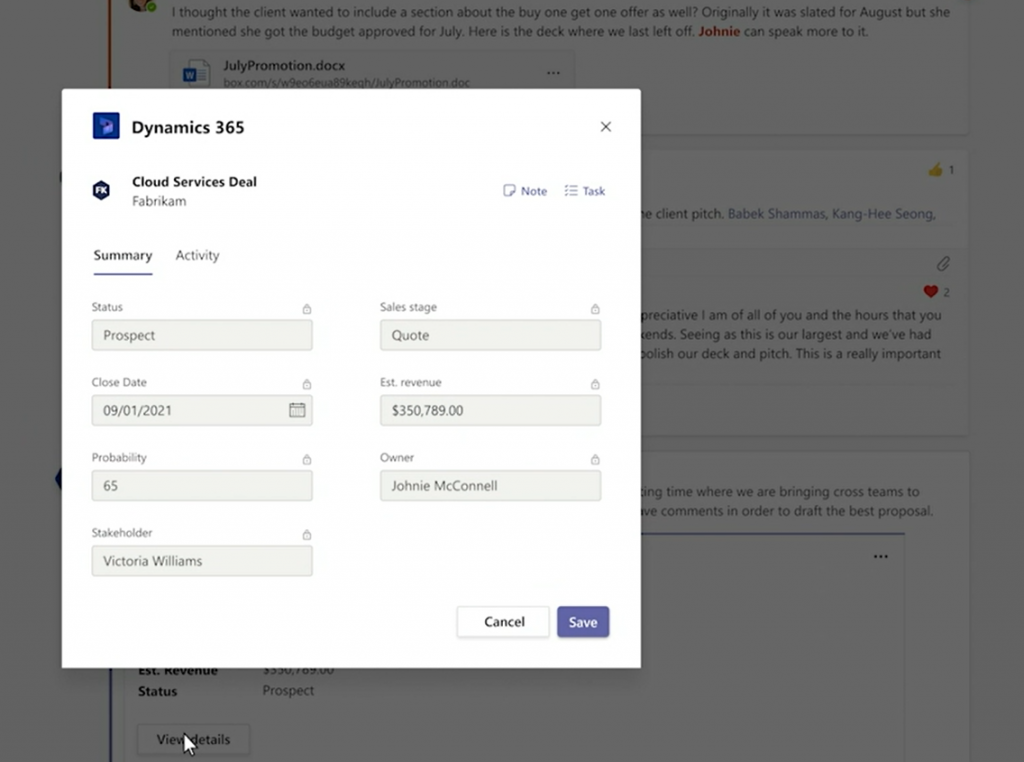
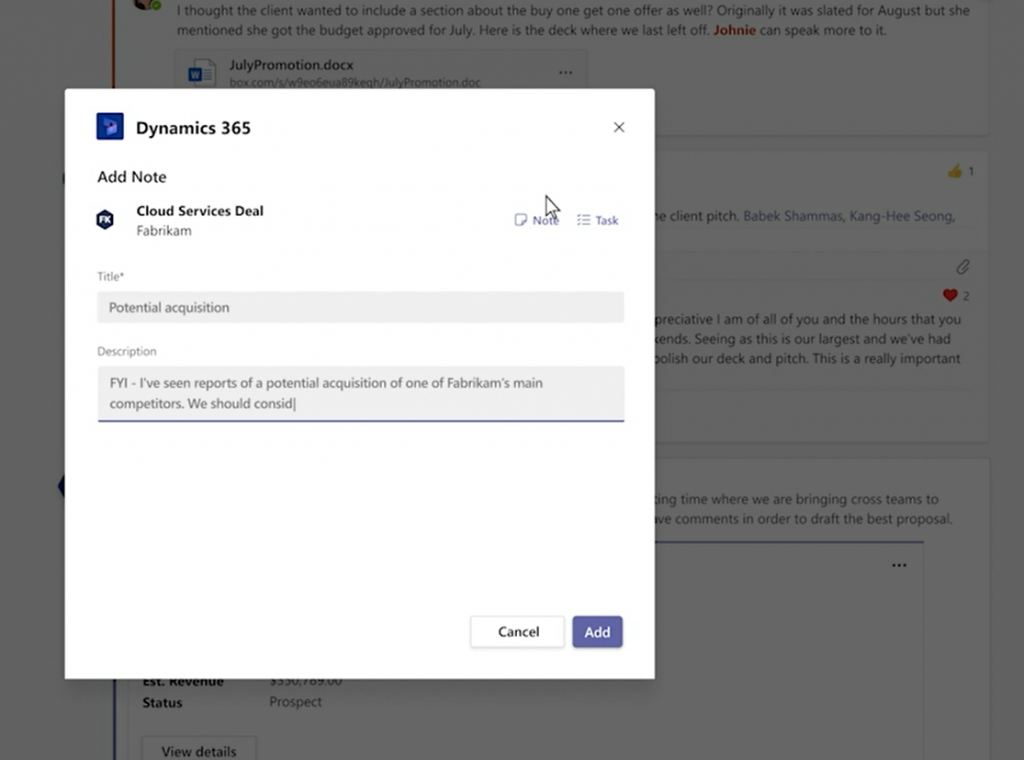
Here we then get to see the actual details/editing experience. An opportunity record opens in a modal dialog within the Teams client’s channel context (no tabs) and presents a simplified form with key fields in the Summary tab. All the fields appear locked here, but the dialog has a Save button, so presumably the security roles from Dynamics 365 will be reflected here on the UI level already.
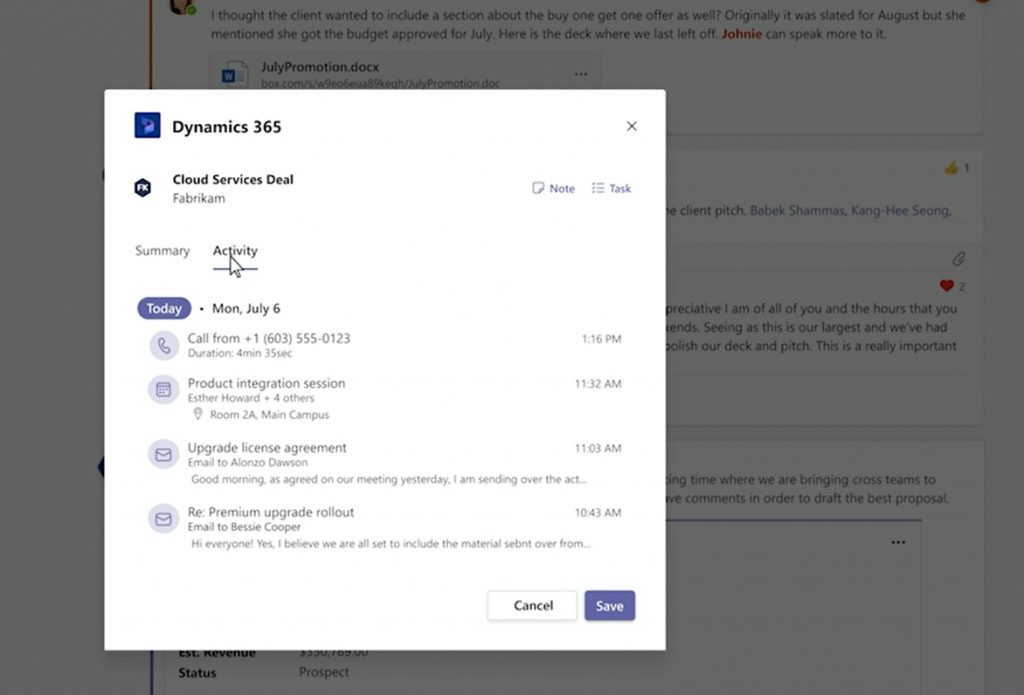
Next we see the Activity tab, which is again a simplified version of the full Timeline view found on a Model-driven Power Apps form (meaning Dynamics 365 for Sales et al.).
The user in question has the ability to add a new note for the record, which will get stored within Dataverse rather than just the Teams thread. Tasks also appear to be an option presented in this modal window.
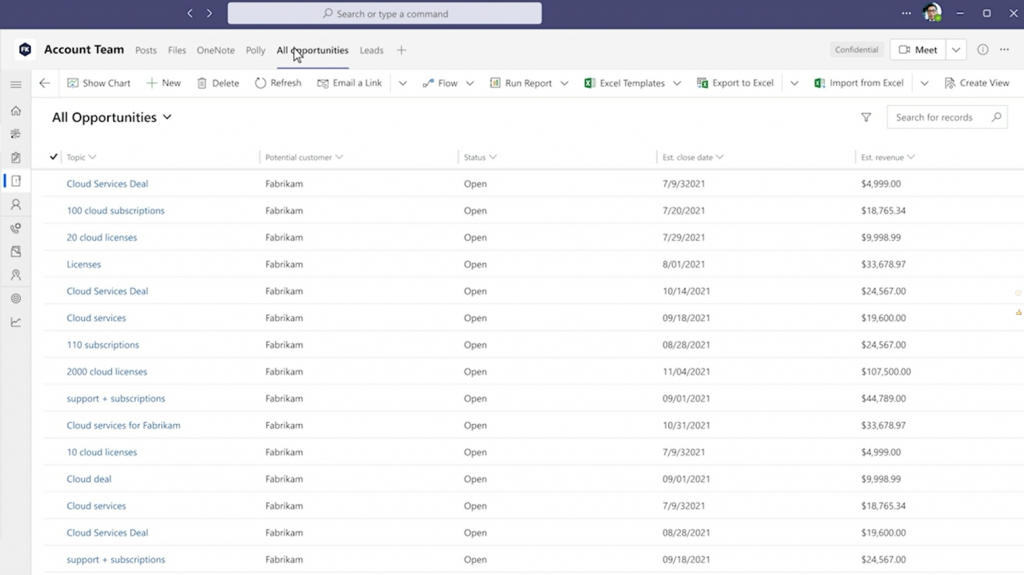
What happens next in Alysa’s demo scenario is not entirely clear from a licensing perspective. The marketing executive performing the actions in this demo has also the access to any Dynamics 365 views pinned as Teams tabs. Also the full forms are accessible, including Command Bar buttons allowing record creation and editing.
Whether these rights have been inherited merely from the Teams collaboration scenario depicted in the demo is not disclosed here. The user might as well be a fully licensed Dynamics 365 user and MS just wants to show off the seamless experience of working with CRM data within the Teams client.
In addition to the licensing story, there’s also the access management angle that isn’t revealed in detail yet. Obviously not any person within your tenant will just automatically have access to records inside a Dataverse environment. Therefore the process of sharing the record with non-users of Dynamics 365 when attaching a record into a Teams message and mentioning users within a message is likely to have a lot of interesting new functionality for any Dynamics 365 admin or solution architect to consider.
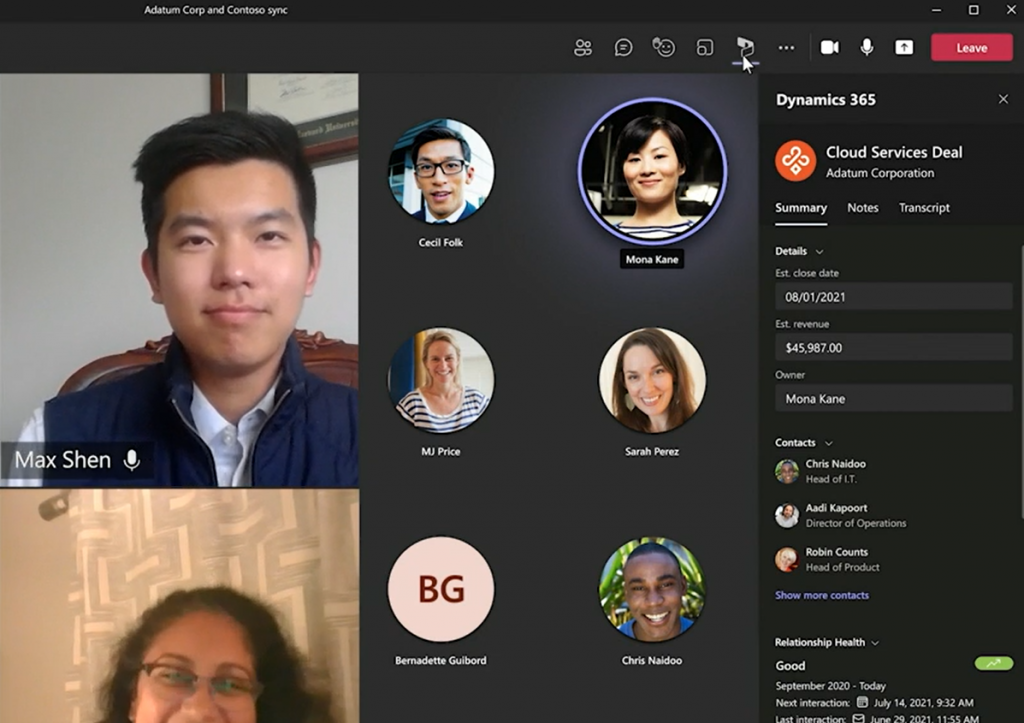
Contextual presentation of business application data inside Teams is not limited only to channel messages or chat. Meetings can also be associated with Dynamics 365 records in the future, thus opening up further possibilities to make use of this new “free” access to Dynamics data for any Teams user.
Licensing implications in practice
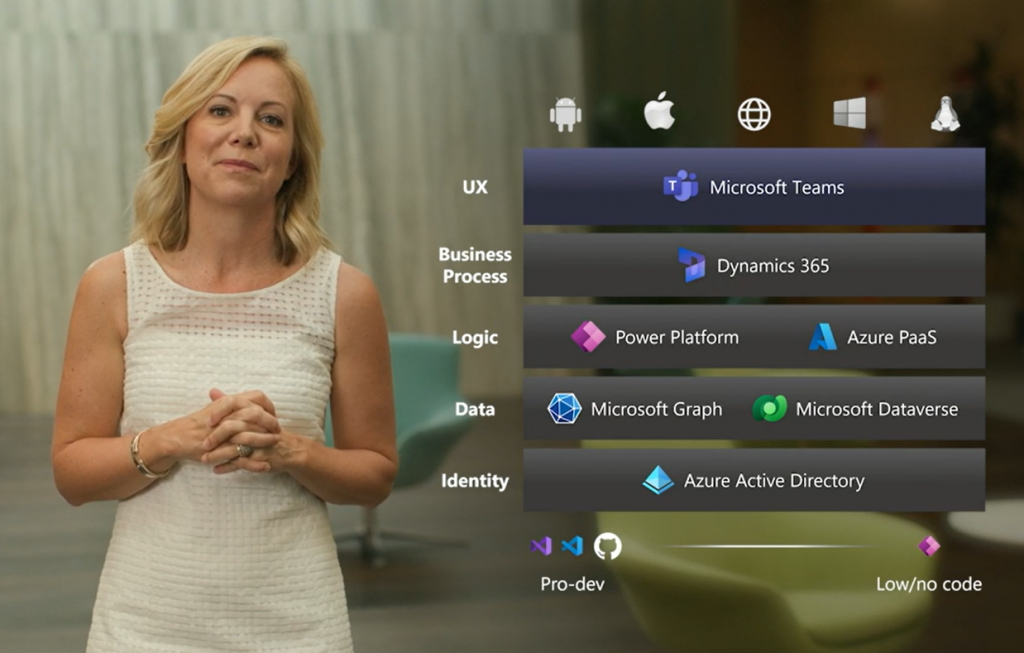
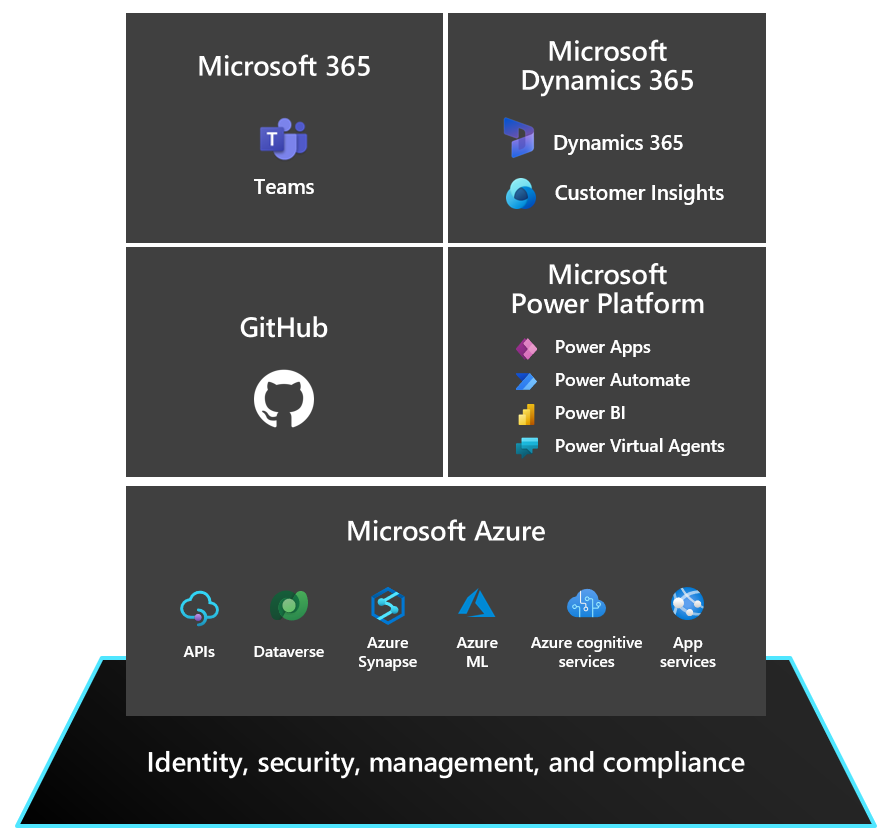
Let’s think about the broader context of this licensing announcement. The big picture of what Microsoft wants to draw with their Collaborative Apps story is a stack like this:
When I’ve drawn a similar diagram for customers I’ve labelled the top layer as “OS” rather than UX. Understandably MS may not want to rock the boat that much yet, keeping in mind that they also have concrete operating system announcements like Windows 365 and Windows 11 to pitch to the partner audience. Still, the logical layering is the same and that’s what matters. Teams is how MS can regain its relevance inside the users’ devices that are today running Android, iOS or even Linux. Therefore making things not just easy to use but “free” to use within Teams makes perfect sense.
Dataverse for Teams has considerably lowered the barrier for organization wide usage of the low-code apps built on Power Platform tools, with its bundled rights to basic Dataverse features for no additional fee if used within Teams. To me, this Inspire announcement of unlocking access to Dynamics 365 data “without the licensing tax” (Microsoft’s words, not mine) is a logical continuation on this same path. You won’t get full features for free, but the upsell potential with the massive audience of Teams users globally is what makes this bargain lucrative for MS product teams.
From a Dynamics 365 perspective, there are similarities here to the earlier Team Member licensing model that MS launched back when their CRM+ERP vision of a 365 cloud saw the light of day exactly 5 years ago. It was a $10 license that helped to close deals but ended up being a big headache for MS in practive. The launch of Power Apps as the official platform SKU eventually made the TM license pretty much redundant.
Whereas Power Apps is the story for custom low-code apps, it isn’t exactly meant to be used for Dynamics 365 scenarios (if you ask MS). Yet the licensing terms currently do make it an interesting option for unlocking light use of Dynamics 365 data. Especially given the coming 50% price drop for Power Apps licenses, the fact that you can use these in a Dynamics 365 environment would certainly make them ever more interesting for customers to evaluate as an option.
Depending on how far the read rights on Dynamics 365 data for Microsoft Teams users will actually go, this latest change might be able to deflect some of these Power Apps “misuse” threats. It’s a fact that not such a big share of a typical organization’s employees will need to work daily with updating CRM data, yet from a reporting and data referencing perspective it’s pretty darn valuable if you have access to the records within the customer data master system.
If there’s one thing I hear from pretty much every customer (and many partners), it’s that they think Microsoft Business Applications licensing is complex. I’m hoping that whatever this new Dynamics 365 + Teams licensing announcement turns out to be in practice, it wouldn’t create more seemingly arbitrary lines for what data can be used in which context for what license. I’ll need to revisit this topic once we have the full story on today’s Inspire 2021 announcement, to see which way the licensing model is turning this time.
Update 2021-07-22
From the comments section in the original Dynamics 365 product team blog post for this announcement, we can gather the following details around Dynamics 365 privileges that will be embedded within Microsoft Teams:
Scope: “We are initially launching Teams experiences for Dynamics 365 Sales and Dynamics 365 Customer Service but working on the possibilities of additional experiences across the Dynamics 365 portfolio.” So, further CE scenarios like Field Service and the ERP side for HR, FinOps, BC will be covered later.
Schedule: “These experiences will start to become available as part of our Dynamics 365 Wave 2 release which begins in October.” As expected, 2021 Wave 2 release plan is where you should go and check the current target dates for public preview / early access / general availability dates for these Teams related features.
Technical implementation: “We are entitling all paid Microsoft Teams users with ‘Team Members’ level access to Dynamics 365 allowing Teams users to read Dynamics 365 data and action upon designated scenarios. These new connected experiences between Dynamics 365 and Teams will make it easier for Teams users to access Dynamics 365 records but only from within Microsoft Teams.” Quite similar then to the earlier technical enforcement of Team Member licensing on app module level. Except that direct browser access outside of Teams clients will be restricted, so presumably the current Dynamics 365 Team Member license SKU will still remain in place at $8 per user per month.
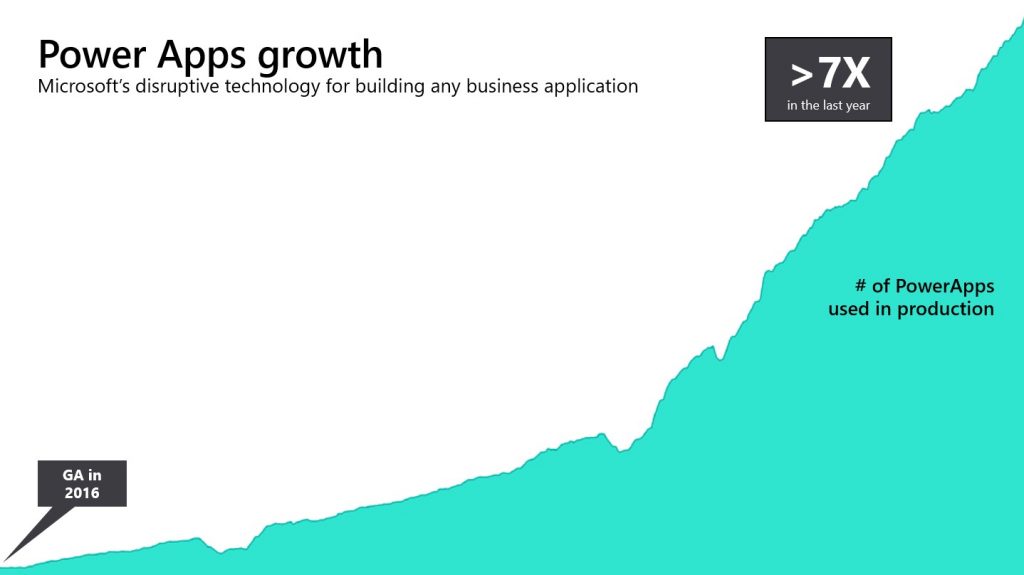
Note that this is the new list price – not a temporary campaign price. Using Microsoft’s low-code application platform is therefore becoming considerably cheaper for all customers (eventually).
More revenue via lower pricing
What’s the story behind such a dramatic pricing change? Was Microsoft struggling with selling the platform to customers at the old price point? Well, we will of course never know the full details behind the business planning decisions and the calculations MS has been performing in their own Excels.
My own interpretation is that there certainly hasn’t been any shortage of interest towards Power Apps from the customers’ side. What’s probably happening here is that the high ambitions Microsoft has set for scaling up the broad commercial coverage of Power Platform technologies within their customer base haven’t quite been met with the current pricing model introduced in October 2019. I can easily see how the speed at which low-code is taking over the world isn’t well aligned with the slow licensing agreement negotiation cycles around enterprise software. These are both a blessing and a curse for MS, compared to more nimble competitors in the low-code / no-code space.
To address this need for pricing agility, Microsoft had already launched a promotional offer at the end of 2020 to give volume discounts on per user and per app licenses: $40 > $12 and $10 > $3 respectively. This offer basically made the previously confidential discount levels publicly available, giving a much better indication to larger customers about what the expected true cost level of Power Apps licenses would be. Since there are so many different potential user groups for low-code apps within a typical enterprise organization, it’s problematic if every team does their own business case calculations based on list prices. That doesn’t really deliver the optimal outcome for Microsoft who’d want to sell the one platform for the whole organization through a single high volume deal.
Based on my discussions with customers, it’s pretty obvious that most of them are already confident with the technical abilities of Power Platform. What they are not very comfortable with is the complexity of how the platform has to be licensed. All the confusion and uncertainty is quite understandable, given the many moving parts and the licensing model that appears to have been in flux during the past couple of years.
Any temporary campaign price isn’t necessarily going to alleviate the concerns customers have for the long term costs of licensing Power Platform premium features. Therefore I think Microsoft is looking to provide a clear signal that they’re targeting a very wide scale adoption of these low-code tools – not just for large business critical apps for specific audiences.
Licensing implementation details
Due to how the licensing contracts and MS price lists work, the new Power Apps license prices aren’t yet reflected in the public pricing site, as they’ll only come into effect on October 1st 2021. Any contracts made after that will get the new prices. Same for contracts that are renewed after October 1st. For any ongoing subscriptions the new price points are not applied automatically, because for good & bad, the prices for a customer are locked via these contracts. Keep that in mind when counting the near term costs of Power Apps for your users.
The SKU (stock keeping unit) of the per user plan won’t change, the list price will just come down to $20. For the per app plan we’ll see the old SKU become discontinued and a brand new SKU launched on October 1st. This is because there is more to the changes than just a new figure on the price tag in the per app model.
There’s been this peculiar twist in the original entitlement that allowed a single Power Apps per app pass to run 2 apps & 1 portal within a single environment. While the reasons for allowing both Canvas and Model-driven apps to be used in a single business scenario probably made sense in theory, this has been in practice very difficult for customers to comprehend. It must have also been a huge headache for MS to incorporate into their license reporting and technical enforcement within the platform. Changing the new per app license to cover a single app is therefore a very logical & welcome update. If you really need 2 apps, then just buy 2 per app passes for $10 – the total price is not increasing here, after all.
These changes announced today are specific to Power Apps, which means that the Power Automate price points for per user and per flow remain untouched. This isn’t very surprising, since I believe Microsoft would rather see customers adopt both the app side and the automation side – not just run “invisible” flows behind the scenes. The Power Apps per user plan now gives you these for a small additional cost compared to Power Automate per user plan ($20 vs. $15). As for the other plans, the use cases for per flow process automation or the RPA capabilities are very distinct, in my opinion, so not much pressure should arise from this Power Apps pricing change for those.
What about Dynamics?
Two years ago when the per app plan was launched at $10, there was a lot of discussion on how this might cannibalize the Dynamics 365 products. Paying $95 for an Enterprise Sales license seemed pretty steep in comparison when you could build your own CRM on top of the same Power Platform tools and run it for a fraction of the cost. Well, it looks like the tribes of low-code cannibals didn’t take over the world and Dynamics 365 business has been growing nicely regardless of this move. There certainly is a growing number of “DIY CRM” type of solutions being used now via Power Apps, but one could argue that these customers and their scenarios might not have landed on MS cloud (or stayed there) if the lower priced option didn’t exist.
During the past 1.5 years, after founding a company focused 100% on Power Platform and taking some distance from my prior Dynamics related work, it’s been eye-opening to talk with customers without wearing a CRM hat. Low-code application platforms are a discussion that concerns everyone, regardless of what systems they are using for managing their sales, marketing, service processes. You don’t really need to mention the word “Dynamics” at all in these discussions – unless the customer happens to be running them already. Whatever their CRM or ERP systems are, the Power Platform story is equally compelling when viewed from the broader Microsoft cloud perspective.
When Ryan Cunningham, Power Apps product lead at MSFT, introduces the new pricing model announcement with the title “apps for everyone” – that should give you an idea of where the goals are set. You can’t sell Dynamics 365 to everyone, hence the higher pricing of these products. As for Power Apps, there aren’t many valid reasons why someone could not be target customer for them.
The price will never be “right”
Even with this 50% price reduction, I’m not expecting all customers (or even MS partners, strangely enough) to be happy with the licensing model for Power Apps premium features. As long as everything isn’t free, someone will always complain how the low-code platform pricing model of charging by app usage is “wrong” (instead of paying money for app development work and infrastructure operations).
I don’t think we should expect that the full premium feature set of Power Apps would ever become a free bundle within Microsoft 365. More and more of these high value features like Dataverse for Teams are already “free” for existing customers. They help build up the scale of app usage (see the Teams as a platform story), but there has to be an upsell story to paid Power Platform services somewhere down the line. If there wasn’t, we wouldn’t see such huge investments into low-code capabilities from Microsoft.
Platform licensing is the end game, not per app. Once customer organizations unlock the possibility for all their employees to run & build unlimited apps on the platform, that’s when the real transformation begins. There’s undeniable business value waiting behind that door, and that’s why it needs to have a price tag.
Read more about Microsoft Business Applications licensing
On the first business day of each month, I have one routine that I’ve been following for quite some time now: check the latest Licensing Guides that Microsoft has published. I have two short URLs that I use for quickly downloading them:
I also have a habit of storing each historical version of these documents (and other licensing materials from MS) onto my OneDrive. I’ve found this to be the only way you can actually keep track of what’s going on in the rapidly moving world of BizApps licensing. Well, these days there is also the GitHub history of commits made on Microsoft Docs pages covering licensing (like this one), if you’re into comparing the diffs of each change made in the detailed wording.
Fresh new look for October 2020
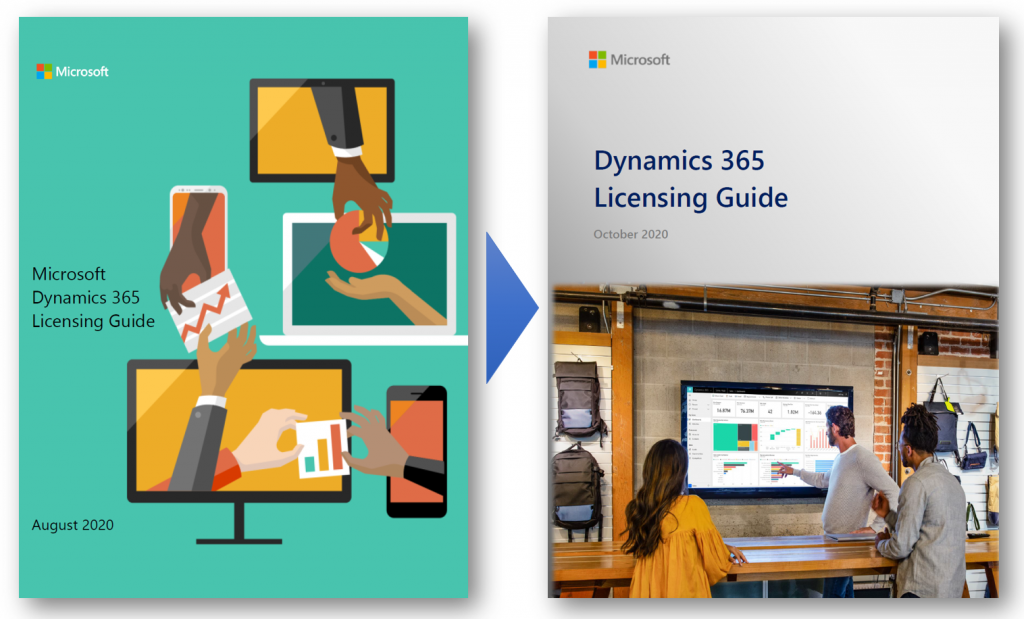
This time the latest PDF for Dynamics 365 Licensing Guide offered quite significant changes, which are clearly visible right from opening the document:
“Big deal, just another cover page update like they do with Release Plans.” This time there’s more to it, though. Here’s what MS says:
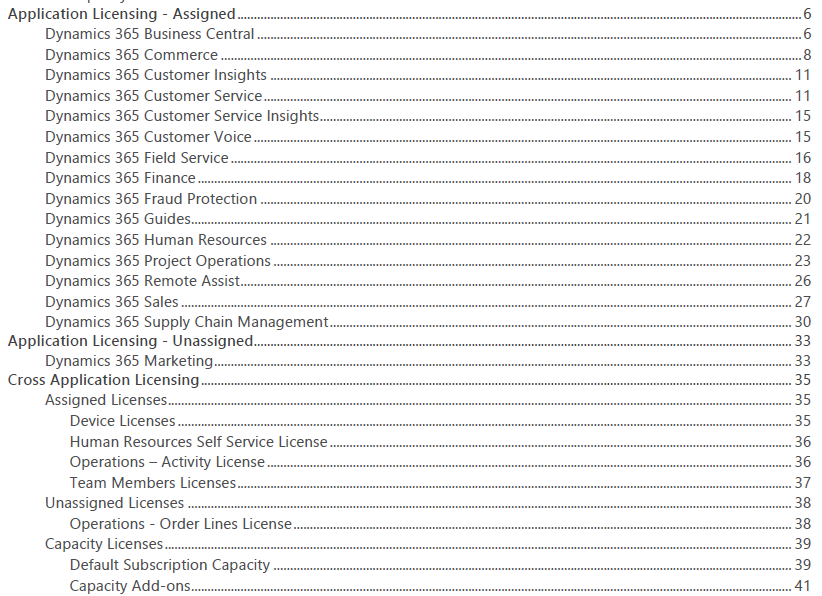
The Dynamics 365 Licensing Guide has been reformatted and renewed for October 2020. We hope you will find it consistent and easier to consume. Applications are presented in alphabetical order, and each section covers the full story including licensing model, additional applications, and user rights. Dynamics 365 Business Central and Mixed Reality offers are now included in this guide and duplicative information has been removed. Product licensing information that is legally binding is presented in the Product Terms and Online Services Terms (OST). Power Platform licensing information is referenced in Power Platform licensing documents.
Previously Business Central was excluded from the Dynamics 365 Licensing Guide, which of course sounded a bit strange. After all, the historical plans for having separate Business Edition and Enterprise Edition product tiers for Dynamics 365 were scrapped before these products ever launched, so preserving such division in the licensing documentation did not seem justified.
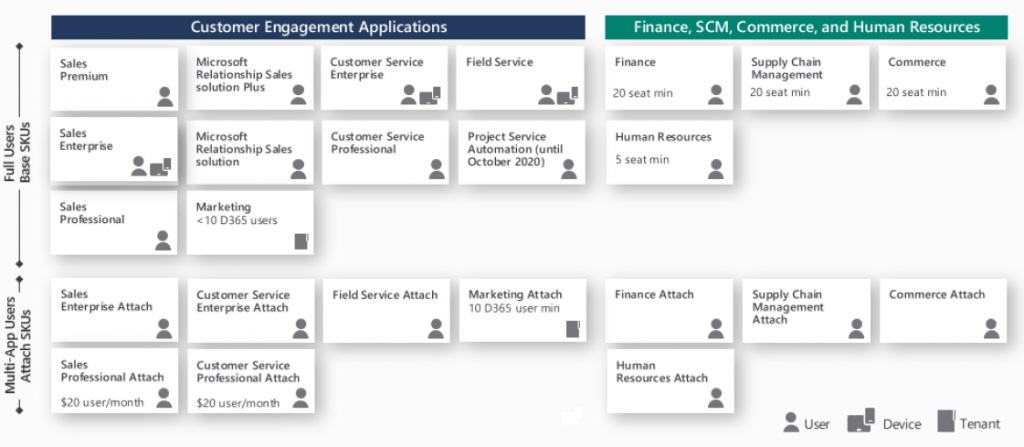
This was not the only division that existed in the earlier Dynamics 365 Licensing Guide, though. For old time’s sake, here’s how the last August 2020 version of the Guide illustrated the different types of Base and Attach licenses available:
We had a split between “Customer Engagement Applications” and “Finance, SCM, Commerce and Human Resources”. Go back a full year and the right side said “Finance and Operations, Retail, and Talent” – because it’s apparently a great idea to change software product names at least as often as their licensing model… Anyway, the logical grouping was still the same, meaning we had the XRM/CRM apps on the left and AX/ERP on the right.
This wasn’t exactly the way Microsoft would like to present their Dynamics 365 suite of products, as instead of CRM on one side and ERP on the other it should be one seamless plaform. Related to this, MS had stated in October 2019 already that they would no longer be using the term “Dynamics 365 for Customer Engagement apps” to refer to any cloud services, leaving CE as the term for legacy on-prem versions only. Despite of this, up until the August 2020 version the Licensing Guide for these cloud apps still had 47 occurrences of the term “Customer Engagement” in it.
Customer Engagement is gone for good
Now in the lastest Licensing Guide version we have a truly flat list of all the different Dynamics 365 apps presented in an alphabetical order. If you didn’t know the origin of each application and what technical platform it actually runs on, there wouldn’t be anything in the Licensing Guide to highlight this.
From a commercial perspective this makes a lot of sense. The whole idea behind Dynamics 365 today is that instead of subscribing to a “plan” that opens on set of apps that share a common server origin, your organization’s users could subscribe to any combination of apps that suit the needs of a particular subset of your users. The Base/Attach licensing model makes the cost of additional apps an attractive option to explore. While not all data might be in the same physical place for each app, this may not even be an issue for unrelated business processes like Sales and Human Resources.
From a technical perspective, things aren’t necessarily getting any easier to grasp by this removal of a familiar layer like CE (or CRM). Yet on a factual level the Dynamics 365 suite hasn’t been about the combination of CRM and ERP for a while anymore.
Think about Customer Insights, for example. That’s a service built to ingest data from multiple different systems (like CRM or ERP) and manage it on Azure Data Lake. Or how about Customer Voice. It was born from the feature set of Microsoft Forms, then merged with the legacy of now-deprecated Voice of the Customer. The resulting product isn’t exactly pure XRM nor is it an extended Office app.
We can expect most new Dynamics 365 products to be hybrids built out of multiple technologies. In the process it’s becoming difficult to assign them into buckets based on established enterprise systems.
What’s my name again…?
People with a Dynamics CRM background have fairly broadly adopted CE as the descriptor to identify which part of Dynamics 365 they specialize in. As Microsoft erases the last instances of Customer Engagement from their terminology, this can cause some further identify crisis for long time professionals who are experienced with XRM yet can’t quite place themselves on the long list of current Dynamics 365 app names.
The way I see it, there isn’t any need for a new replacement term to cover what used to be CE, and XRM before that. It’s just simply Power Apps! All of the common features of the platform are essentially included under the Power Apps umbrella, and there’s a data platform called Common Data Service as one key element of it. Everything up from there is the app specific layer where the Dynamics 365 X product team has implemented functionality with a business process in mind. CE isn’t such a useful concept here anymore, because knowing about Sales doesn’t guarantee you’re fluent in Marketing or Field Service apps.
So that things wouldn’t be all too simple, Power Apps does of course cover a wide array of functionality that CE professionals may not be familiar with. For starters, alongside the Model-driven apps there are Canvas apps and Portals – each with very specific logic that could be compared to CRM vs. ERP. Power Automate as the candidate for replacing traditional CE process automation is a fair bit wider than just workflows. If you’d then expand beyond Power Apps and call yourself a Power Platform specialist, would that indicate fluency in Power Virtual Agents and Power BI, too?
Licensing just Dynamics 365 ain’t enough
The extensive list of apps and their pricing elements in the current Dynamics 365 Licensing Guide is a bit like the Terms & Conditions of any online service: no one is going to read through it all. At the same time, though, it doesn’t go deep enough in explaining how the first-party Dynamics 365 apps relate to the platform capabilities licensed via Power Apps. Unfortunately there is no single Power Platform Licensing Guide document to provide answers, because no such product is actually being sold by Microsoft. You license various pieces of it and then assemble them into your own unique structures.
The trickiest questions around business applications licensing aren’t usually about the app specific details that you can read from the Dynamics 365 Licensing Guide. It’s about those scenarios which involve using the Power Platform as the means to customize, extend and integrate Dynamics 365 apps. On this front nothing has really changed nor improved, as Microsoft continues to treat these two sides as separate products (see my blog post on why Power Platform licensing is complex). Often you’re left between browsing the two separate Licensing Guides, digging through FAQ answers and sometimes tracing the underlying intent of the licensing model into something that a MS representative has informally stated in an interview.
As it just so happens, I’ll be speaking at the CDS Saturday event on October 24th about Making Sense of CDS Licensing. This will be a live event with no recording to catch later so be sure to sign up and be there if you’re interested in diving deeper into the key aspects of licensing Dynamics 365 & Power Apps when building CDS based solutions.
Three months ago I set myself a goal to publish a 4-part series on the many mysteries around Power Platform licensing models. I’ve been known to write blog posts that are a bit on the long side and sometimes it surprises myself when after announcing the new article on LinkedIn I see a “20 minute read” info tag added alongside what I though was just a quick exploration into a topic. So, learning to better pace myself is a skill worth practicing, and dividing my writings into more digestable portions is one such exercise.
To recap, the original outline of this series was to cover these sources of licensing complexity:
Protection of intellectual property as well as development budgets across Microsoft product portfolio (part 1, done✔)
The old world of apps as data silos & the concept of multiplexing (part 2, done✔)
Light use scenarios for information workers vs. “Real Business Applications” (part 3, done✔)
The role of CDS as the platform, not just a data source/target (part 4, you are here 📍)
The Common Data Service is more than a data service
For the majority of users and developers out there who work with Microsoft technologies on a daily basis, CDS is not yet a “common” part of the toolkit. It’s not a visually sexy thing like Power Apps pixel-perfect UI’s, nor an superglue that connects different cloud services like Power Automate. There’s nowhere near as much flare in the data part as with Power BI. It’s not (in itself) an intelligent thinking AI machine with fancy algorithms either. For many it simply looks like a boring database that sits somewhere in the MS Cloud.
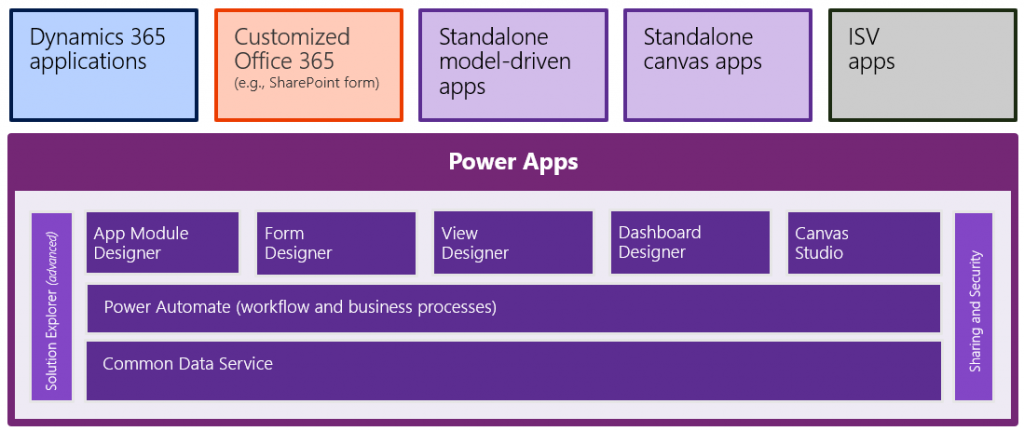
These people got it all wrong, of course, but it’s hardly their fault. After all, “CDS” sounds a bit like “SQL” and the term often isn’t used in any other context than when you’re planning the data storage part of your solution architecture. What CDS really should have been called is “Power Platform”, because essentially it is the single place that represents all the platform elements that makers, developers and admins can take advantage of when building on Microsoft’s low-code application platform.
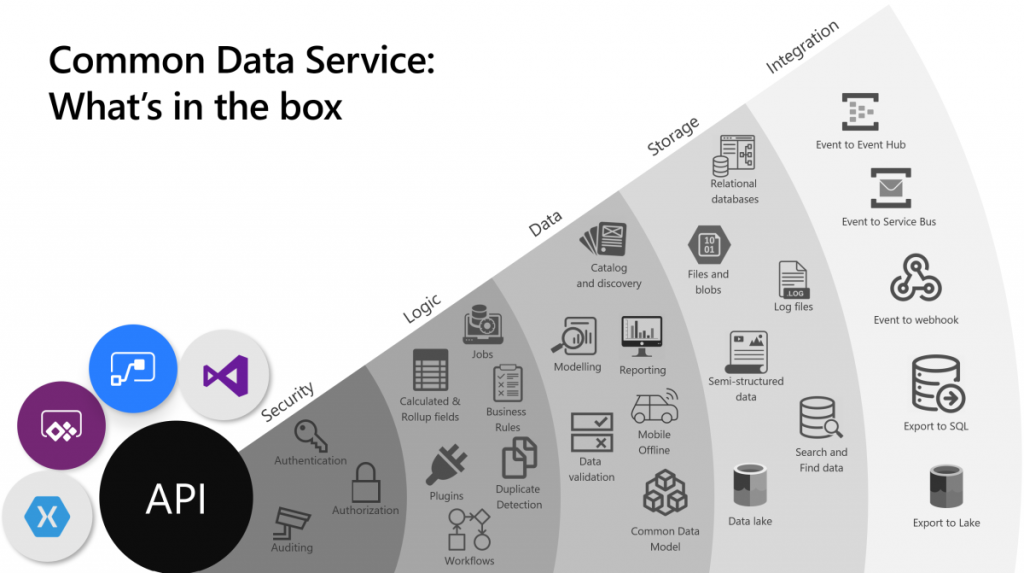
The above image is the best illustration of the many dimensions of Common Data Service that I have yet come across in Microsoft’s slide decks. “Yeah, that’s pretty much all the important stuff you get with CDS”, I was thinking for a long time. Until someone pointed out to me that this picture is actually missing one obvious thing: solutions! That’s perhaps the single most important thing that CDS from its XRM origins is bringing to the table. Without solutions, what Microsoft would otherwise have is just a collection of independent cloud services that each have a completely separate way to manage their configuration, with no way to package these components into one logical container covering the functionality of an app, nor any valid ALM story for enterprise scenarios. In short, Power Platform would not be a platform without the solution model that’s powered by CDS.
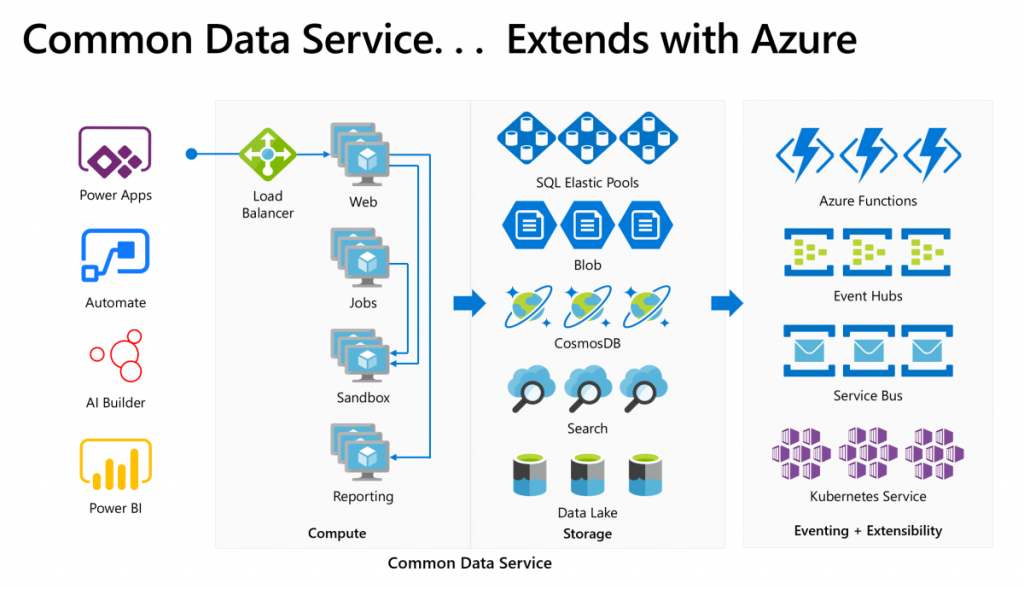
The fact that we can so easily miss a critical part of the Common Data Sevice while talking about it just goes to show how much of a foundational part CDS is in the business applications offering. It’s not just one icon in the cloud architecture pictures. In fact, we also should keep in mind how many different Azure services CDS runs on, to deliver its feature set to users, makers and developers:
Yes, there is of course a whole bunch of deep tech stack found behind each and every icon in that picture too – say CosmosDB, for example. It is “big”, in the same way that CDS is “big”. What I think makes the Common Data Service special in this discussion is how it can abstract all that techy stuff from Azure and allow citizen developers (like myself) to control it indirectly, either via our own configuration or through the predefined patterns built by MS.
Essentially CDS is a value-added layer that brings much of the cool new cloud technology into my business apps while I’m sleeping. What I mean by this is that the architecture evolves to cover new requirements and open up new possibilities, all the while the original business logic and data of the app is preserved. If I create a custom entity, like I did for the first time in 2007, it will keep gaining new superpowers every year as application platform beneath it matures and evolves. All I have to do is keep paying for the service.
How do you price such a thing then?
The answer: in all the wrong ways. At least that’s what it often looks like at that moment when the cost factor is brought into the discussion in Power Apps business scenario planning.
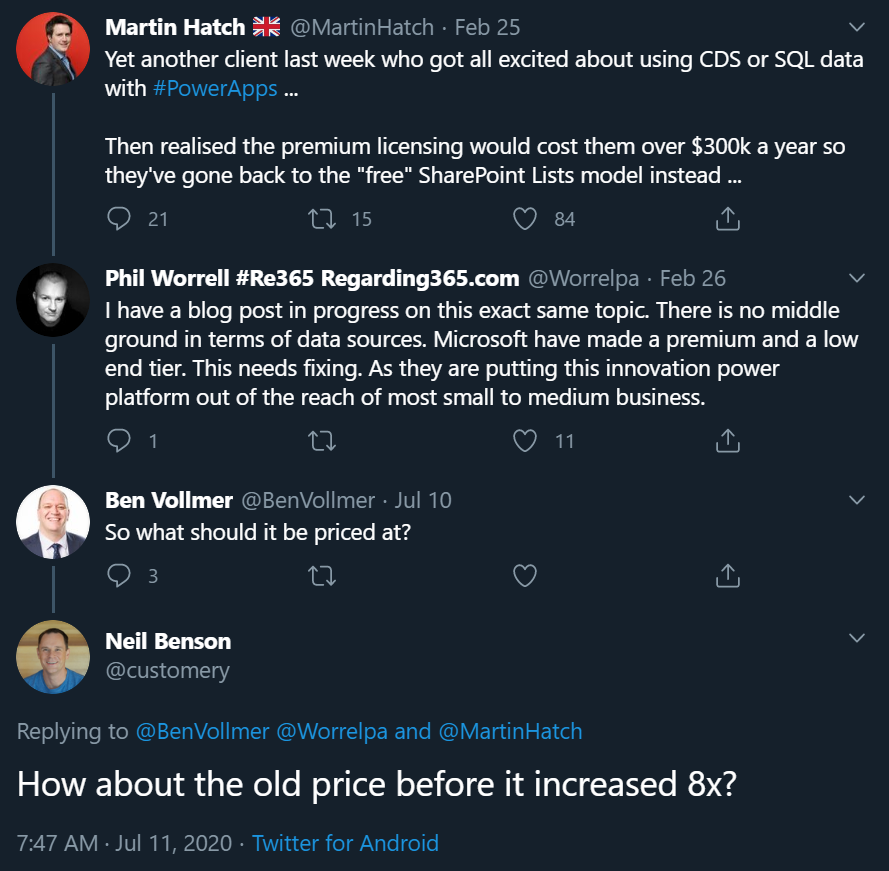
The more central CDS becomes in the app story of MS Cloud, the more dissatisfaction there seems to be on the impact that its premium licensing model has on business decisions. There have been many debates on Twitter during the past few months, with valid arguments and counterarguments presented between the participants that range from customers to Microsoft 365 pros to Dynamics 365 pros to MSFT employees. Threads like this highlight an important aspect:
If you were to invent a brand new service out of the blue, had zero customers and then started to plan the pricing model for it, life would be easy. If, on the other hand, you take an online service that has been offered to customers for over a decade now, then try and mold that into whole new use cases, you’re inevitably going to cause some anger among the existing customer base.
In the above example, Neil’s point about the CDS storage cost increase in the new pricing model that moved from a flat GB rate to database/log/file storage type separation is entirely true: some part of the bill will go up 8x and that quite frankly sucks. Imagine if that would happen to the price of gasoline and your fuel costs would suddenly be 8 times higher. But hold on: the price of diesel went down considerably at the same time, and filling the tank with natural gas like LNG is now practically FREE!!! “Well whoop-de-doo, I’ll just switch my old gasoline Volkswagen to use LNG the next time I need to stop at the station.” Yeah, real life comes with a bit more friction to change the system that powers your vehicle, or your business processes.
Going back to my CDS custom entity example, though, if we think about the types of cars that Volkswagen sold back in 2007 vs. in 2020, of course there are slight differences in what the product is. The transition to electric cars is a very apt metaphor when thinking about the difference between XRM and CDS. Even though the Volkswagen engineers were able to create an electic version of the popular VW Golf model and sell the e-Golf alongside its combustion engine powered cousins since 2014 already, that particular path wasn’t going to get them far enough. In order to remain a competitive vehicle manufacturer in the global game, Volkswagen has had to design a pure electric compact car in the form of ID.3, and struggle with the many issues that come with brand new technology (also on the software side).
Similarly, it wasn’t ever really enough for Microsoft to just take XRM to the cloud and host it there (which they did a decade ago already). A lot of R&D budget has surely been spent in building the new foundation of Power Platform. At the same time, some existing features that the loyal fans of the classic VW Golf would have enjoyed could not be brought over to the ID.3, because there just isn’t a logical place for the combustion history to co-exist with the electric future all within the same frame. Witness the same pain with CDS, Power Apps and Power Automate never quite reaching full parity with what was available in the world that came before them.
Aside from just going electric, there’s one even bigger existential question the car makers are facing: do people even want to purchase cars in 2020 or would they prefer to just pay for the transportation services that they need at any given time? A bit like the dilemma of the light use scenarios, whereby it would make more business sense to lower the barrier of entry by not requiring the purchase of a full user license for the complete platform but rather selling tickets to enter the app when the need arises. This growth in revenue wouldn’t necessarily come from the existing customer base that pays more – it could be a whole new revenue stream made possible by the way the technology as well as the world out there has evolved.
Think about a simple, timely example: customer self-service terminals. In the aftermath of COVID-19, our day-to-day interactions with humans directly are being greatly reduced due to regulations on keeping a safe distance when roaming out there in the physical world. Instead of talking to clerks and cashiers, we are now acquiring the same information and completing the same transactions by using touch screens that allow the customer to do the data entry and retrieval themselves. Now, Power Apps Canvas apps would of course be the perfect fit for quickly creating touch friendly tablet UIs for various self-service scenarios. There’s only one blocker: Canvas apps don’t have a licensing model for kiosk scenarios where the person interacting with the app isn’t equipped with a user license for Power Apps. Doh!
It’s hard to imagine Microsoft not wanting to expand the footprint of Power Platform to more and more scenarios that aren’t tied to named users with dedicated licenses. Yes, Portals can already do that, Power Virtual Agents can of course serve anonymous customers, Power BI can even be embedded inside third party applications. It’s that direct interaction with the CDS entities through a user identity mapped into security roles that isn’t quite as flexible yet in the current world… because like I’ve been telling you all along, Power Platform licensing is complex for the customers, the partners and surely Microsoft themselves as well.
Life finds a way, licensing may follow
The good news is that CDS as a technology is doing better than ever, thanks to the critical role it is playing in so many different Microsoft products these days. It’s further expanding inside the Dynamics 365 portfolio via Dual-write. Data platform is embracing it via the native sync to Azure Data Lake. It’s the ALM backbone for all Power products (aside from Power BI – and of course PowerPoint!). Project got rebuilt on top of CDS to replace the earlier SharePoint based architecture. It’s perfectly feasible to imagine more and more MS apps and products gravitating towards this growing platform and starting to orbit around the central body that is CDS.
That still leaves open the question of the customer specifc business apps that are getting built every day as Power Apps Canvas apps. In order to ensure the citizen developers don’t just default to using SharePoint Lists (soon to be called Microsoft Lists) as their data storage solution, MS needs to find ways to lower the barriers to go with CDS instead. There’s the technical barrier from the long legacy of CRM requirements, then we have this licensing complexity. Even though the recent launch of Per App passes as a concept has in some high value scenarios made the business case calcuations easier, the vast majority of true citizen developer apps won’t ever even reach that stage where official calculations for a specific app’s ROI would be analyzed in detail. For this long tail of app development, there should just be ample CDS capacity available to be used for the purposes that the business experts themselves have identified as worthy to spend their time on (which often may cost a lot more than the actual software licenses).
Capacity based licensing of course wouldn’t make the tools free either, it just changes the way the final bill is calculated. The example of CDS storage pricing change is a reflection of exactly what happens when trying to find non-user based billing metrics that would reflect the rate at which the platform is used. Looking at the Power Platform price points, Microsoft may well feel that it’s perfectly OK to sell the CDS database capacity at $40/GB/month when their traditional CRM rival Salesforce has set their list price per GB to be a whopping $250 (which I don’t think they publicly advertise anywhere, so your real mileage may vary). Both figures have nothing to do with how much it actually costs to store data in the cloud, they are purely intended for building a pricing curve where the growth in platform usage (and hopefully business value) results in growth of revenue to the service provider.
The more we have capacity based pricing of Power Platform features, the bigger the issue of capacity limits and their enforcement will become in solution architecture design. API calls are much more difficult to estimate than user counts, so there is bound to be some increasing complexity ahead for scenarios where CDS and other Power Platform tools are used in a “pay per request” model. MS will likely continue to bundle quotas of API and storage capacity into their own software products that use CDS and where the revenue is attained via other means, in an effort to simplify the experience for that one product. The challenge that remains is the more holistic usage of an application platform, where not only do you buy the Apps but use features powered by CDS in your own unique ways.
Other parts in this article series can be found here:
In this series we’ve talked about the complexity that arises from how Microsoft defines (and re-defines) their product structure, as well as the concept of multiplexing where indirect usage of software (or data) needs to be licensed just like direct usage is. In this third chapter it’s time to look at the varying depth of software usage and how the licensing models out there don’t always take this into consideration the way people would expect them to.
“I only need to do X, why do I have to pay full price?”
For any business application deployed within an organization there’s bound to be a group of heavy users who spend a significant share of their working hours using the broad range of features offered by it. They might be administrators of a process that is managed with this app, or users whose tasks are either handed out via the app or facilitated by the information that the app can provide them. A service technician might have his or her day planned out in detail via Dynamics 365 Field Service. A salesperson could be using customer information and activities to keep track of their pipeline and prioritize actions via Dynamics 365 Sales.
Then there are those employees whose roles aren’t primarily focused on the aforementioned processes but who need to participate in them in some stage, or consume the outputs from these processes as one ingredient of their work. It might be merely signing off on an approval or completing a task that has been generated from the end-to-end business process. Again we could use here the same example as in Part 2 where merely submitting a new lead via a web form that has fully automated connectivity with Dynamics 365 will mean that these employees must be equipped with a type of license that would essentially allow them to also work with the lead qualification process of an full-time inside sales role. Hmm, why are these two very different personas treated the same, when one is a very light touch scenario and the other a heavy use of the system?
Whether you perform the task once a year or a hundred times a day doesn’t make a difference, due to the way how these business applications licensing models are constructed. It’s not a consumption model where you’d pay for the number of events and computing capacity like in Azure, rather it’s all based on purchasing the rights for a specific user to access feature X in the application. Underneath the app UI there is of course the same Azure technology being consumed to keep the bits running, but products like Dynamics 365 are quite a thick value-add layer of SaaS on top of it that removes the need for you to pay for the infrastructure. Similarly it removes the need for a custom software development project to manage your sales process, as an example, because you can simply subscribe to the Dynamics 365 Sales product and gain access to all of the business logic, UI, security models, auditing, APIs and numerous other features you’d eventually need for your digital business to operate in a sustainable way. You get a lot, so it’s only fair that it should cost something, too.
Still, it’s very common to run into a scenario where the idea of licensing every actor involved in the business process with the same flat monthly fee just doesn’t feel justifiable. In the Dynamics 365 world it might involve working with a single entity that’s not covered by the Team Member license. On the Power Platform side it might be a Flow that would need to do one step that inolves a Premium connector. All of a sudden the cost of allowing users to touch these tools might multiply the monthly fee, just because of that one thing. Couldn’t we, you know, just make that one thing be excluded from the Premium category and solve this dilemma?
Virtual borders vs. platform unions
It’s not like Microsoft wouldn’t be aware of the issues with these functionality borders and how they end up blocking many otherwise valid scenarios for leveraging their software products. Obviously there could be more money to be grabbed from the table if only there was a suitable licensing card to be played in these occasions. The problem is that every customer’s problem tends to be slightly different. Moving one feature checkbox from this license type to that license type isn’t therefore the answer. It would be like trying to adjust the borders of a country to follow a slightly different pattern so that you could optimize where you live, work, shop, go fishing, use medical services, and so on. A border will by definition limit your freedom in some ways, in exchange for offering you rights to (hopefully) exercise your freedom within the area covered by it. You gain some, you lose some.
In an interview by MVP Steve Mordue, Steven “Guggs” Guggenheimer described these light use / light touch scenarios and the licensing demands around them as “the most complex thing you’ll ever see”. Be it Dynamics 365 or Office 365, there doesn’t seem to be a satisfactory way to draw a line between heavy use and light use for the software products because when it comes to licensing everyone wants both A) simplicity and B) flexibility, which are C) a paradox.
There is a collective challenge, which is how do you build a licensing framework where you can’t tell between the two, light touch or light use, or you can tell but there’s no consistency. If I ask the question, “What does light touch mean to one ISV or light use?” I’ll get a very different answer than what I get from another one, so you can’t design a licensing type that works for everyone.
Looking at the evolution of Dynamics 365 products that used to be called CRM, then Customer Engagement and now “Model-driven apps in Dynamics 365”, they’ve been moving towards an “á la carte motion” where instead of subscribing to the whole software suite (Plan) you instead buy individual Apps. While initially this might sound like something that addresses the aforementioned customer pain points, I believe it’s mainly aimed at allocating the revenue more accurately between Microsoft product teams (and thus creating clear incentives for new product development) rather than making Business Applications less complex for customers to license. After all, you’ll often still need to buy a minimum of one Enterprise app at a list price of $95 per user per month, which isn’t exactly a figure that’s a great fit for the light use territory.
The platform SKU, meaning Power Apps Per User Plan, is closer to solving some of the challenges for customers that are ready to consider broadly licensing their work force for the business application platform rather than individual apps. Sure, a $40 list price is still more than Microsoft 365 E3, for example, so not an insignificant cost by any means. The more app scenarios you can cover in your organization with that flat platform fee, the cheaper it becomes. The first time you need to cross the border to the Premium territory it’s still a costly visa to acquire, but the more you travel the cheaper the relative investment becomes. You could compare this to a political and economic union like the EU, where benefits of having a single market that allows free movement of people, goods and services can outweigh the cost of forming and running this union. The application platform opens up opportunities by removing some (but not all) borders for your organization’s employees to participate in the digital processes runnign on top of it, regardless of if it’s just an occasional holiday trip to the neighbouring business unit or a permanent role of deep co-operation.
Alternative pricing methods
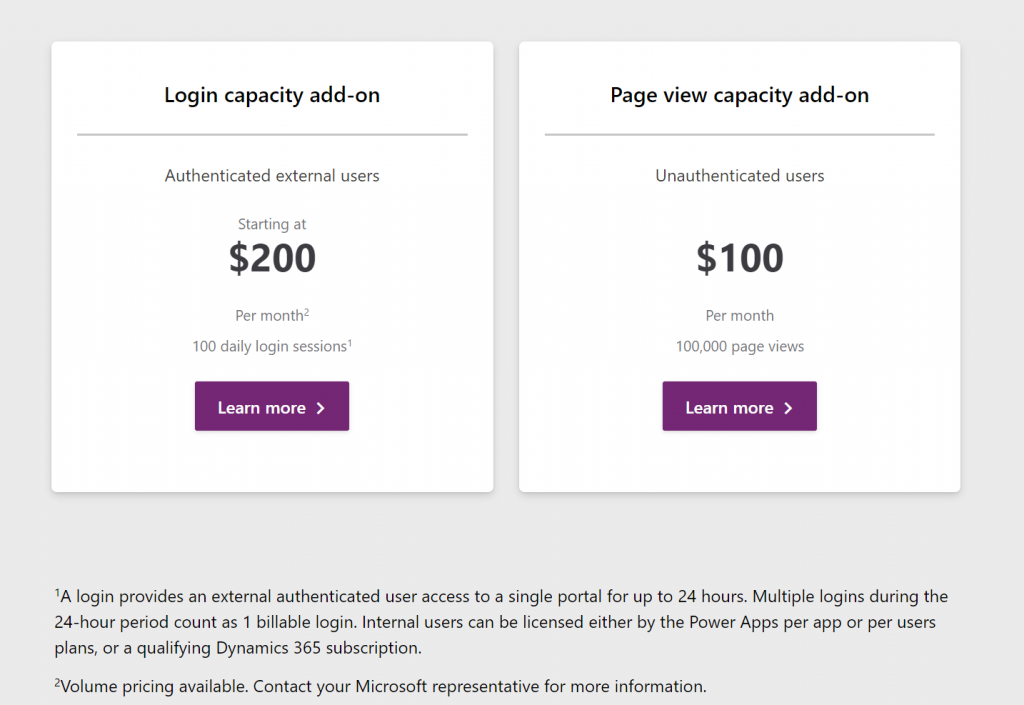
The Power Platform today requires you to purchase a license for each internal user, but there already is a mechanism available that would in theory allow paying for the actual usage. It’s the new pricing model of Power Apps Portals, where instead of buying the Portal application itself you purchase capacity to be consumed by the usage of the portal. This covers unauthenticated usage like page views, which isn’t all that relevant for real business application use cases. However, the concept of paying for each login of an authenticated user would be very applicable to many light use scenarios with infrequent but still valuable application usage.
The beauty of a consumption based pricing model like this would be that you wouldn’t need to purchase a full licenses for each and every user that might or might not use the system during any given week. However, when there would be a valid business need for them to access the system and use some of it’s features, they could be assigned a “day pass” that grants them the license for a 24h period. If on the next day they again need to do the same thing, it’s a new pass to be consumed. Doesn’t this sound like exactly the sort of a mechanism that could…?
Unfortunately as of today there isn’t yet a way for customers to purchase these type of day passes for their internal employees. The Portals licensing model is limited to only external users, whereas internal users must be assigned either a Power Apps license or an applicable Dynamics 365 App license (note: Team Member license does not apply here). There is some irony here because the per-login pricing model is actually making Portals a tough sell for some of the intended external audiences. Buying pre-paid packages of login capacity that would cover you entire potential user base of customers that might or might not log in to your public website can quickly become so costly that it makes more commercial sense to build a custom portal with custom integration into CDS instead of leveraging this product capability built by Microsoft (at least with the list price).
Regardless of these current challenges with aligning the license terms, I do believe the roads in Power Platform are eventually leading more and more towards the model of licensing by consumption. Not as the primary mechanism, but as something that will complement the user based licenses. This is because ultimately the goal should be value-based pricing. How do you measure the value generated by the business applications that are running on your shared cloud platform and used by millions of people out there for their own specific business processes? Well, the usage of the software products is a nice concrete way to gauge the potential sources of value – as well as idetifying places where the value is certainly not being captured (due to lack of usage/adoption).
In the on-prem era where some of the enterprise software licenses practices we still see today were originally drafted, you were selling a big system that the customer would acquire the server & user licenses for and then deploy the whole thing behind their own firewalls. The cloud has changed this model whereby the SaaS vendors are now able to see in much more detail the metrics for active usage (DAU, WAU, MAU) from the customer environments running on systems that they operate. In addition to ensuring that the customers keep renewing their subscriptions, access to this usage data also opens up possibilities for offering alternative pricing models that would make the many light use scenarios more attractive for large pools of potential users. The example of charging for app access by every 24h may not be the model that will be offered to internal users, but at least it represents a much less complex mechanism for customers to digest than the earlier models of drawing licensing lines between entities, features or access types.
Other parts in this article series can be found here:
In my previous post in this series on Power Platform’s sources of licensing complexity I explored the internal product structure at Microsoft and why changes in this commercial packaging of different technnologies may lead to confusing messages. Now it’s time to move further into the actual usage of these products and discuss how the depth of integration that you – the customer – build between the systems can affect the licensing requirements.
Multiplexing is a term that isn’t necessarily familiar to anyone who hasn’t worked with either selling or buying enterprise software. This is the core definition that Microsoft is using in all of its documentation:
“Multiplexing refers to the use of hardware or software that a customer uses to pool connections, reroute information, or reduce the number of devices or users that directly access or use the [X] service. Multiplexing does NOT reduce the number of subscription licenses of any type required to access the [X] service. Any user or device that accesses the [X] service – whether directly or indirectly – must be properly licensed.”
There’s has never been that much information made publicly available by Microsoft on how the multiplexing topic – probably because it’s a hairy beast that no one would want to let out of the closet. But the beast is there nonetheless, an if you’re not careful in how you design the technical solution architecture and the software products included in it, that beast may jump at you when you’re not ready and mess up all your plans.
The price of data entry
Let’s look at a simple example first, one that is a very common requirement from customers. Imagine there are employees out there in the field that work with customers and may hear about their future plans or identify current needs for which the organization could offer services or products to. They’re not in a sales role themselves but would love to pass on the info to the actual salespersons who manage these customer accounts. The lead entity in Dynamics 365 would be the obvious place to record such information, but this would require the employee in question to have the necessary license for creating new records into it. So, even if these field employees would be equipped with a Team Member licenses or even the Field Serivce Enterprise app, this is not an operation that they’re allowed to perform, according to the Dynamics 365 licensing guide.
“But wait, we don’t need to actually have the users themselves interact with the lead record in the Dynamics 365 application in order to achieve this!” you might think, if you’d be viewing it purely as a functional requirement. Yes, technically we could create a custom entity like “Incoming Sales Information” and store its records into CDS, then run a workflow or Power Automate to copy that data into the lead entity’s corresponding fields automatically. Commercially speaking this would not reduce the need for licensing the users who are initiating the process. You’ve just designed a software solution that does the multiplexing, but the end result is still exactly the same, thus the actual problem remains. First of all, you are automating the data entry into CDS, and second, you are indirectly using an entity that is not covered by all Dynamics 365 license types (funnily enough, it IS covered by Power Apps, but that’s another story).
The important thing to remember about multiplexing is that it essentially only concerns the internal users of an organization (this includes employees, contractors, vendors, agents). You can have a “Contact Us” web form on a public site with the same fields as you have on your Dynamics 365 lead entity, then have that form call a webhook and use Power Automate to write the submitted form’s data as a new lead record. Everyone else in the world can use that, but if any of your internal users would go onto this public web form and use it for data entry into Dynamics 365, they would have to have a user license that grants them sufficient privileges. (How would you in practice stop employees from using a web form that requires no user identification? Good question.)
Multiplexing within Dynamics 365
As Microsoft is making their Dynamics 365 apps more & more tightly integrated, we’re encountering scenarios where the traditional boundaries between the CRM product and the ERP product get very much blurred. The GA launch of the Dual-write feature means that Microsoft now provides an out-of-the-box way for entities common to both sides to have near real-time two-way synchronization. For example, you might modify the field of an account record in CRM (or “model-driven apps in Dynamics 365”) and this will right away be reflected on the customer record in ERP (“Dynamics 365 for Finance & Operations apps”). From an end user perspective, there is only a single system to work with. Awesome!
How does this align with Dynamics 365 product licensing then? As of today, I haven’t seen Microsoft make any announcements on the multiplexing definition being relaxed as a result of their Dual-write feature. So, if a user creates or edits any record in one of the entities on the CRM side that gets almost instantaneously replicated over on the ERP side, they are using two systems at once and should be licensed for them both. All of a sudden, that $95 Sales Enterprise app license isn’t enough and you’d need something bigger. With Dynamics 365 Finance or SCM App starting at $180 as the base licenses, then adding a bit more of attach licenses to cover the Sales App, you’d be looking at a doubling in costs for the users who are stil working in the one and the same user interface but leveraging functionality that now connects seamlessly with another Dynamics 365 system behind the scenes.
Setting the licensing dilemma aside for a moment, there are scenarios with very clear benefits from having the CRM and ERP side work together hand in hand, where the cost from the current way of working may well be higher. For example, being able to transiently call the product data and pricing engine of the ERP system to produce the details needed for quoting a customer on the CRM side can potentially remove a lot of context switching from the end users as well as reduce the amount of custom code you need to build and maintain. In the far end of the spectrum, brand new product offerings like Project Operations can emerge from this unified platform that can now replace the prior mix of apps like PSA, Finance and MS Project. They don’t actually need to suffer from the multiplexing “tax”, since all Microsoft needs to do is design a targeted commercial model for offering this functionality.
Power Multiplexing
The concept of charging for access to data that has originated from of flowing to another system has been invented at a time when software was deployed to dedicated servers and data had clear boundaries of the system in which it resided. Back when the old Dynamics CRM era rules on multiplexing were defined, I bet most of the Microsoft people working with the product surely couldn’t have imagined that the data used in managing the business processes for sales, marketing or service might one day also be stored elsewhere than the application’s own SQL database. We are living in very different times today.
With Power Platform the whole purpose of these new cloud native tools is to combine data sources and manipulate their contents by sometimes bypassing the original application altogether – at least on an UI level, when talking to an API via Connectors. It’s effectively a whole platform designed to multiplex all the things!
In today’s world many of us no longer perceive the value of a software application to be delivered only via the user direclty interacting with the user inteface. Especially in the context of business processes, we’re more concerned with the outcomes from the digital orchestration of data, business logic, and users – both the internal ones and the actual end customer. Despite of this, on commercial level we still need to pay attention to the number of individual systems involved in a process that’s triggered by the user. In a recent interview, Charles Lamanna from Microsoft stated that you should be able to instinctively know when you’re crossing the line to multiplexing.
“At its core, if you’re using or doing something to circumvent a user license and you’ll know you’re doing it because it will feel unnatural because the system’s not built to behave that way, that’s multiplexing and not allowed. Everything else, the intent is to have it be allowed.”
The question of whether data is replicated between systems in real-time or in scheduled batches used to be a reasonable criteria for evaluating whether something was multiplexing or not. Today when any citizen developer can build a Flow that pushes data across systems almost immediately, or construct a custom app that pulls & pushes data via Connectors and presents it in potentially a much better UI than the originating enterprise systems, the lines have blurred down to a level where they become almost useless in trying to navigate the licensing maze. The systems are built one way but the business users are now armed with low-code tools that they’re going to use to try and get the systems to work their way. Governance of remaining compliant in this new world is certainly going to become more and more challenging for organizations as a result.
The business of software
We can’t escape the fact that while the code based PaaS of Azure is mainly charged by API and resource consumption, the low-code application platform (aPaaS) of Microsof Power Platform is founded on the per-user licensing model. The pricing dynamics of a platform are such that the more workloads you can move away from individual applications (be it legacy on-prem systems or SaaS point solutions) onto a common app platform with a Per User licensing model, the more cost savings you can achieve. However, if you were to try and automate the processes up to a level where the number of licensed employees needed in total is reducing as a result, then that’s actually not a favourable result to the platform provider financially. Hence the strong stance on requiring every user involved in the business process someway to have a license.
It’s not only Microsoft that has this complexity built into its product licensing. SAP is known for chasing the Indirect Access of data that has touched their system. Oracle talks about Named User Plus. It is one of the core principles through which enterprise software vendors have traditionally defined the rules under which their IPR can be made to be a part of the digital processes of an organization. What this means is that any modern platform which strives to connect these type of systems as data sources or targets in the new application UIs or automations built as low-code solutions is subject to the same licensing impact. Creating new avenues to use the data and business logic of these third party systems may well incur new costs as a result of extended usage.
It’s tempting to argue that systems like CRM and ERP should not be able to place down a commercial lock on access to core information like the organization’s customers or the pricing of the products they sell. We should still keep in mind that often there would be no such single source of valid records that reflect the business reality in a digital form, had there not been the design and implementation of an enterprise system that can govern all the various processes around it. The API to any system may look deceptively simple, precisely because it abstracts the complexity behind it. Managing that data and process complexity is one of the key reasons why these systems exist, and why companies are usually willing to pay their licensing fees in exchange for the value they get. Unfortunately this tends to push down the complexity to those scenarios where power users and citizen developers might want to build new, creative solutions to that tap into the data managed in these systems.
Other parts in this article series can be found here:
It’s hard to avoid this question whenever people discuss the business scenarios for Microsoft Power Platform. The tools and experiences for creating apps are getting more & more streamlined, yet it feels like the complexity of rules on what licenses are needed for each specific scenario just keeps growing. With great powers for designing creative new solutions comes also great responsibility for understanding the commercial factors of implementing them. This means that the solution architecture needs to take the licensing aspects into consideration, even if many technical people aren’t very comfortable with the topic.
The main factors I consider to be sources of complexity in the licensing discussion around Power Platform, Dynamics 365 and Office 365 are these:
Protection of intellectual property as well as development budgets across Microsoft product portfolio
The old world of apps as data silos & the concept of multiplexing
Light use scenarios for information workers vs. “Real Business Applications”
The role of CDS (now: Dataverse) as the platform, not just a data source/target
I’ll cover each of these dimensions in a separate blog post, to avoid building up too many stress factors into a single post and scaring away people. None of these obstacles are insurmountable, instead I believe raising awareness of them will make it easier for everyone to answer the question of “why” and move on to the “how” part of planning the actual solutions and business cases for leveraging the full potential that lies within the Power Platform.
Let’s begin from the complexity source nr. 1: Microsoft’s product portfolio structure.
Protecting the products & investments
XRM, the predecessor of CDS and partially also Power Apps, was never sold as a platform. The business model was built around selling a suite of CRM applications, which you could then customize and extend to cover business processes not originally within the scope of the product shipped by Microsoft. This meant that a lot of money was left on the table because customers that weren’t looking for a new CRM system didn’t really have much reason to consider XRM as a platform their other business apps needs. From the perspective of Dynamics CRM as a product, there wasn’t much threat of competing apps within the MS ecosystem, but unfortunately it also meant that investments into the core platform weren’t likely to grow very fast if the Dynamics offering was to remain outside the mainstream product portfolio of Microsoft.
Now that Power Apps is offered specifically as a platform where your citizen developers, pro developers and ISVs alike can all come and build their apps, the upside to everyone is that the common infrastructure for data and application management is evolving crazy fast. The new problem that arises from this is the battle of the internal buckets where money should be flowing in. Unless all customers unanimously purchase both the platform (Power Apps premium licenses) and the first party applications (Dynamics 365 Enterprise Apps), someone could easily consider their bucket to have a leak caused by these new buckets. Cannibalization of revenue is a rational fear to have when there is overlap between product offerings within the organization.
The way how Power Platform has been positioned as the extensibility layer for both Office 365 and Dynamics 365 is undoubtedly one of its key strenghts from the business perspective on Microsoft level. PP is everywhere because so many customers already have it, underneath their existing information worker tools and CRM systems, whereas low-code competitors like OutSystems or Appian will need to find a way to get their foot in the door somehow. However, this mechanism of having “seeded” Power Apps and Power Automate features inside other products just delays the commercial discussion to a later point in time. “Why do we need to buy these new premium plans if we already have the Office/Dynamics features?”
Before Power Apps merged with XRM, what we know call “Canvas apps” were introduced to the markets as a technology that could easily work with the ubiquitous Office 365 services as data sources. The same with Microsoft Flow. I believe this really was more of a marketing positioning strategy rather than a deep architectural commitment from MS, since many experiences weren’t really that seamless once you got down to working with SharePoint, for example. Still, this approach made it possible for the community of citizen developers to start gathering around Power Apps, when power users all over the world discovered how they could go beyond Office 365 standard capabilities with these no-code tools – while still remaining within the existing corporate licensing of Office tools offered by IT.
Had Power Apps and Power Automate (Flow) remained there as just tools in the Office waffle that come with the subscription, we would have likely seen only a tiny fraction of the features that now are rolling out into Power Platform. After all, if you’re not paying any additional licensing fees for the products, then are they really products in themselves at all? “Freebies” like Sway or Bookings that we’ve seen appear in the cloud service nowadays known as Microsoft 365 are examples of what you could expect from technology that isn’t large enough to warrant a SKU of its own in the MS product portfolio. Not a very lucrative position for any ambitious app team in the long run.
There’s this dilemma that if you raise the barrier of entry too high for a product, the adoption curve is going to take a hit and you’ll miss out on the viral effect of “free” software. At the same time, if you can’t directly tie the usage rate into a visible stream of new money, it’s difficult to collect funding for product development investments beyond the initial hype and excitement of launching something new & cool. In the enterprise software business you can’t even monetize the users by exploiting their data and eyeballs for selling ads, because privacy and confidentiality tend to be bigger factors here than in the consumer market (where unfortunately everything is moving to “pay with your data” business model). Just look at the example of Google, who did build up their own App Maker product into the G Suite, then saw too low usage numbers for it and ended up killing the service and customer apps built on top of it. Now they’ve acquired the low-code application development platform provider AppSheet and are trying to gain a foothold in this growing market.
While this explains why Microsoft couldn’t just keep the doors open for ever more advanced Power Apps development on top of exisiting Office 365 subscriptions, there’s also the other direction to consider. At some point these apps become so advanced that they’ll start to challenge the Dynamics 365 applications formerly called “CRM” or “Customer Engagement”. These commercial apps from MS are nowadays just called “model-driven apps in Dynamics 365”, which further underlines the role of Power Apps Model-driven Apps as the infrastructure that makes these apps tick. They are preconfigured instances of applications on top of CDS, but they are not the same as the platform itself. Therefore, starting from October 2019, buying a Dynamics 365 Enterprise App no longer gives you an Access All Areas pass to using apps in just any vanilla CDS environment that hosts a custom app for process X. You’ll need to be wearing the lanyard that specifically says “Power Apps” if there’s not Dynamics 365 applications installed in the environment you want to enter.
In short, buying the Dynamics 365 product doesn’t give you the Power Apps product, just a “seeded plan” to work within the boundaries defined by the application context. The same holds true the other way around: buying a Power Apps Per User license doesn’t grant you the rights to use everything that’s running on the platform within the tenant. Similar to how ISVs (independent software vendors) would charge you a fee to use their application features via their own licensing mechanism, Microsoft is setting up mechansims that will control who can access which App Module.
Regardless of how that might sound like initially, I believe it could actually be a good thing in the long run. The reason being that the way how Microsoft has previously attempted to limit access to the schema and data of CDS by drawing lines on restricted entities available only to Dynamics 365 license holders (aside from data read operations) isn’t really going to be a sustainable model. In his third chat with MVP Steve Mordue, the Corporate Vice President of what MS internally refers to “Citizen Application Platform”, Charles Lamanna, has stated that an alternative licensing model is being prepared right now:
“So there is something in the works that we’re working towards and I would say at a high level, restricted entities as a concept are largely antithetical to our common data service, common data model and vision. And they were just like the least bad option to go make sure that we appropriately can license Dynamics apps. So we are working feverously on many proposals to get out of that restricted entity business, but still have a model which more appropriately captures and protects the value of the Dynamics apps without introducing restricted entities.”
I’ll dive deeper into the whole Common Data Model (CDM) discussion in the next part of this blog series. In general, what I believe to have been a big barrier for the licensing options available to MS work with is the amount of effort needed in making the application/platform separation initiative a technical reality. It has surely been also holding back many teams in terms of how a specific Dynamics 365 App like Sales can deliver features that differentiate it from the sea of business applications that are to be built on Power Platform, by citizens, by customer development teams, by ISVs. A level playing field is needed for the future solution ecosystem to bloom, yet in the short term it requires work behind the scenes that doesn’t surface as application features directly.
The fact that such investments and also compromises have been made during the past couple of years is a clear signal of how Microsoft believes the demand for its different services will evolve & how they will be competitive because of their dedicated low-code application platform product offering. Customers will continue collaborate via Office 365 productivity tools, likewise they’ll keep on adopting readymade business applications from the Dynamics 365 family of Apps for scenarios like omnichannel customer service. There in between lies the opportunity for 450 million new low-code apps to be built within the next 5 years, as Charles Lamanna states in the recent CNBC article “Next frontier in Microsoft, Google, Amazon cloud battle is over a world without code”.
It is not a market that the Office products could easily rise to cover, nor is this bottom-up innovation a natural fit for the Dynamics way of delivering top-down enterprise systems. A dedicated product offering is needed here, which is why the Power Platform exists. Since Microsoft has chosen not to follow the “buy” path of Salesforce, Google and other competitors, but has rather adopted a “build” strategy to create their low-code application development platform from in-house technology, many of the elements in this platform have already been used somewhere else, and as a result also commercially licensed for scenarios that predate this new low-code era. This is the reason we’ve seen so frequent changes in the licensing model across Power Apps and Dynamics 365. It is a source of licensing complexity that is difficult to avoid when the different apps don’t live in their dedicated silos but rather share so much of the common platform capabilities.
Microsoft talks a lot about having three clouds: Office 365, Dynamics 365 and Azure. Where Power Platform fits in is right smack in the middle, and with plenty of overlap in relation to the existing clouds. It’s a new “aPaaS” layer added between the SaaS apps of Office & Dynamics and PaaS/IaaS offered by Azure. As a result, the relative position of existing products needed to shift a bit, which created a before/after dimension into both how Microsoft envisions each cloud to be used and as well as how they commercially offer the services to be licensed.
Other parts in this article series can be found here: