Category: Annoyances

  • Sharing Dataverse for Teams apps outside the team

    Sharing Dataverse for Teams apps outside the team

    When you’re building Power Apps within a Microsoft Teams based Dataverse environment, the most common target group of app users is obviously people who belong to that team. This is very logical when the purpose of the app is to collaborate as a team on something that might have otherwise been an Excel sheet shared with all team members.

    The simplified table security model of Dataverse for Teams with Owner/Member/Guest (“OMG”) levels instead of custom security roles makes things easy to manage when everyone is equal. But what about when you’d need to have more granularity on who gets to do what? What if in addition to the owners (app admins) and members (managers) you also need a level further down this hierarchy: the “normal” users?

    Colleagues with access

    This is where the concept of a “broad distribution app” comes in handy. It allows you to grant access to the app for users who are not part of the team that’s hosting the Dataverse for Teams environment. Here’s how the Docs on Dataverse for Teams table permissions describe this:

    “With Power Apps for Teams, you can share an app with Azure AD security group whose members need not be part of the Teams team where the app was built. This enables you to add users to the application without having to add them to the specific team, and opens up “Broad Distribution” scenarios. For example, you may want to build an app that is enabled for every accountant in the organization, or even every employee in that organization.”

    The ability to share an app with one Azure AD security group makes Dataverse for Teams quite an attractive platform for low-code apps that have a high number of potential users. Not many organizations have yet committed to covering all their employees with a Power Apps Per User license that unlocks premium features like Dataverse. Since every user who’s licensed for Teams via Office 365 / Microsoft 365 is allowed to use apps running on Dataverse for Teams, this option significantly lowers the barrier to start building apps on top of a true relational database designed for business applications – as opposed to running your complex processes on top of several SharePoint / Microsoft Lists.

    Sharing with colleagues in practice

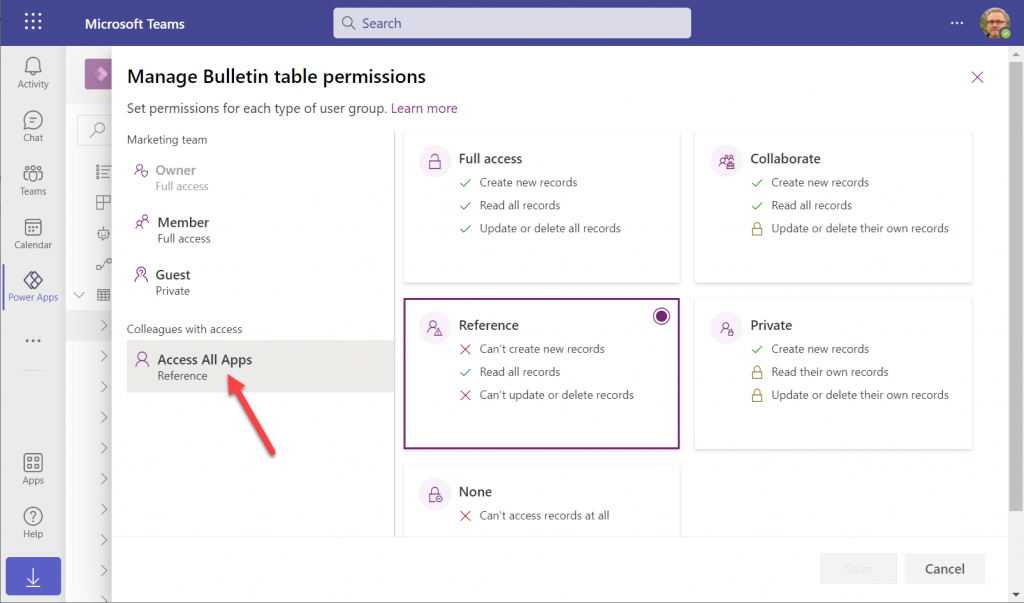
    Let’s say you’ve built an app within a Dataverse for Teams environment and are ready to publish it to the whole organization. In this demo scenario we are using the Bulletins sample app for Teams. We’ve created an Azure AD security group called “Access All Apps”. The first thing we need to do is go an add the necessary access rights to each table used by the app. For example, when it comes to the Bulletin table, users should be able to read all records but not create/modify/delete them, so we grant the “Reference” level to this group:

    You’ll need to do a lot of clicking for an app like Bulletins that has 11 tables, so be sure you’re selecting the “colleagues with access” section before assigning the permission level on each page.

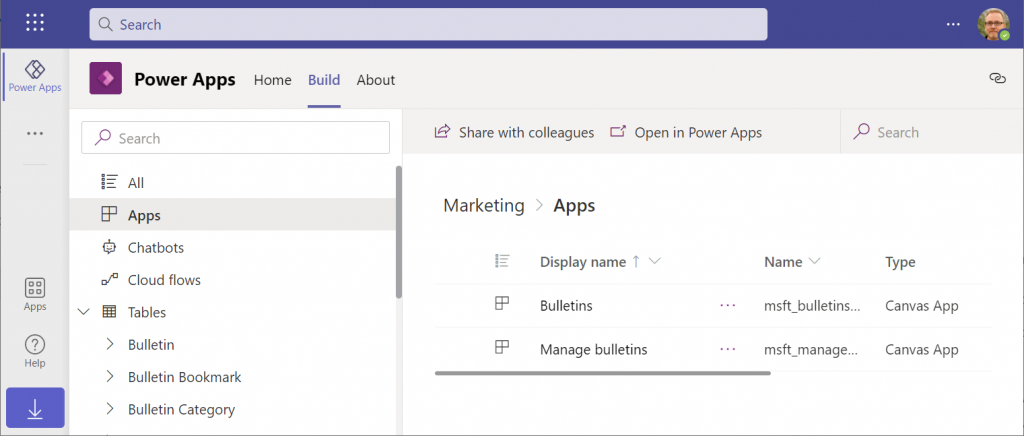
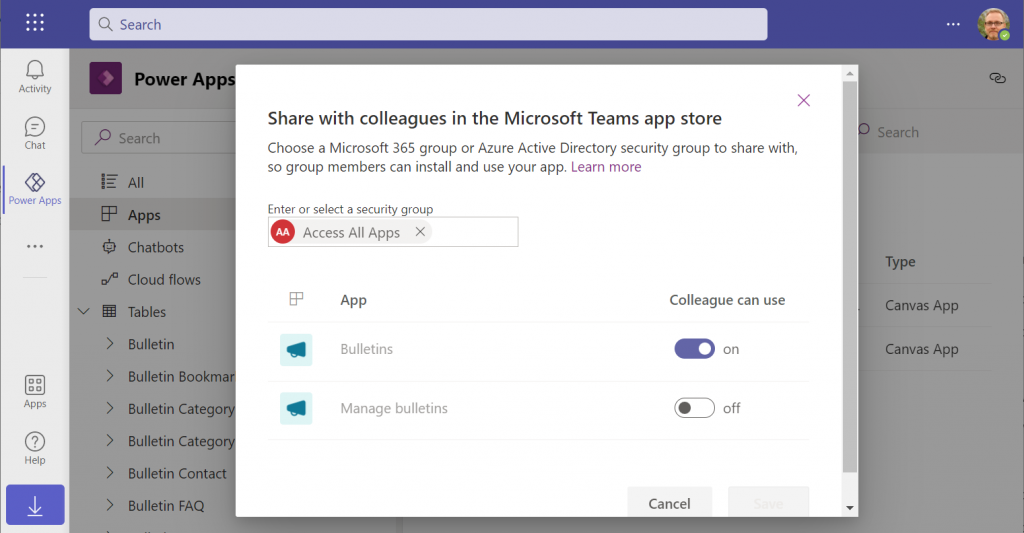
    Next, let’s share the Power Apps canvas app itself with this group. Again, you’ll need to be careful with where to click in the navigation maze that is the Power Apps for Teams app. Go to the Apps list of the Dataverse for Teams environment but don’t select the app. Otherwise you won’t see the “share with colleagues” toolbar button.

    In the modal dialog window, choose which apps from this Dataverse for Teams environment you wish to make accessible with the chosen security group. This is where you’ll notice that while you could have tens of different apps within on environment, there’s no ability to choose which Azure AD security group gets to see which apps – since there can only be one.

    Adding apps to Teams channels

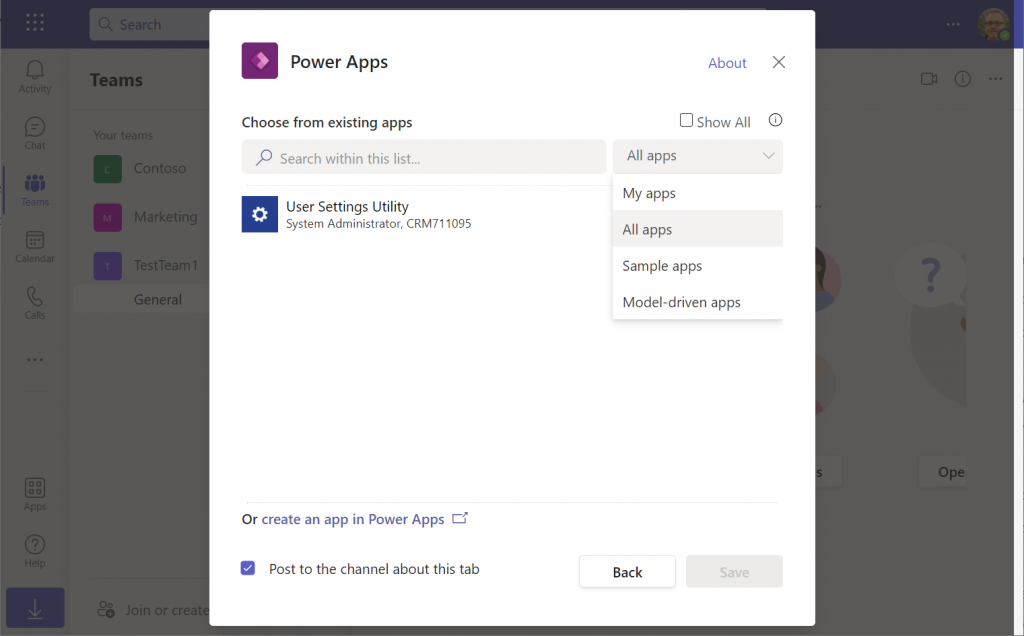
    If we were to now go to our target team and add a new Power Apps tab to the channel, we would not find our Bulletins app there. Nope, not even under that “sample apps” filter, since that actually shows a list of Power Apps sample apps like Asset Checkout that are part of all Power Apps environments. Dataverse for Teams sample apps like Bulletins are a completely separate thing, of course.

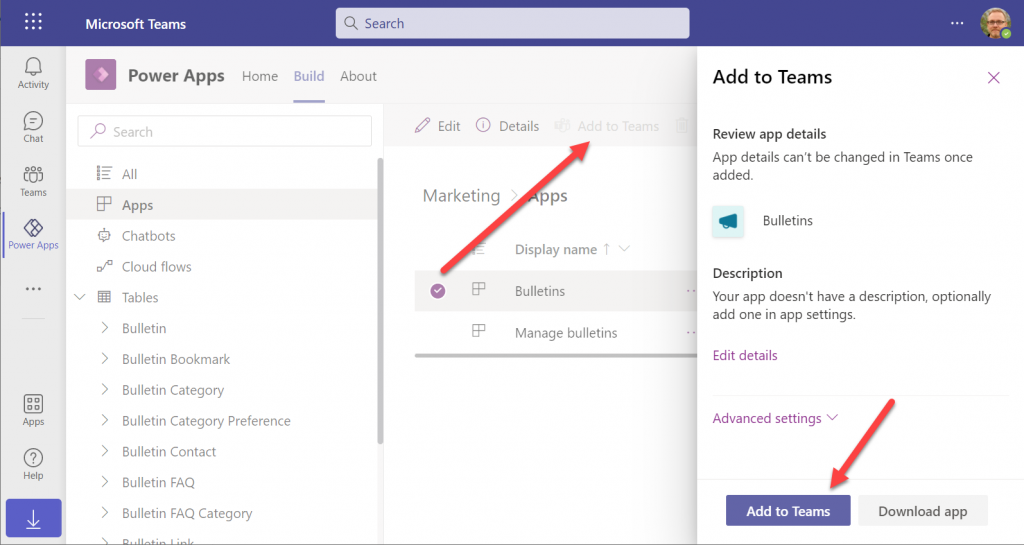
    The logic is different when it comes to Power Apps that have been built within Dataverse for Teams. You need to go back to the Power Apps for Teams app, i.e. the Maker experience. Click on the Build tab, choose your environment, find your app, select it for real this time, then choose “Add to Teams”.

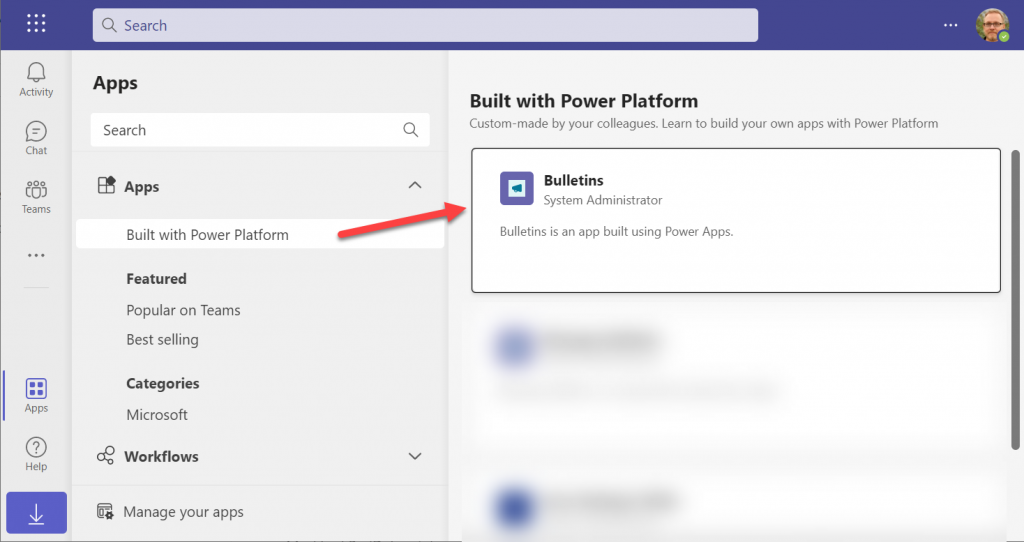
    You don’t get to choose a team or a channel, though. That’s because this process actually publishes your app into the Teams app store. It will become available under the “Built with Power Platform” section:

    OK, fair enough. It’s an app built within Teams, so it makes sense to use the same distribution mechanism as apps developed with custom code. The other Power Apps in your tenant are “external content” that you can freely pin to channel tabs. Dataverse for Teams apps are same but different.

    Blocked by Teams permissions

    This is actually the reason why I started writing this blog post in the first place. Ever since the broad distribution apps were announced in January 2021, adding them to a team from the app store worked without any additional hoops to jump through. Recently that has changed in a way that is not yet reflected in any MS documentation.

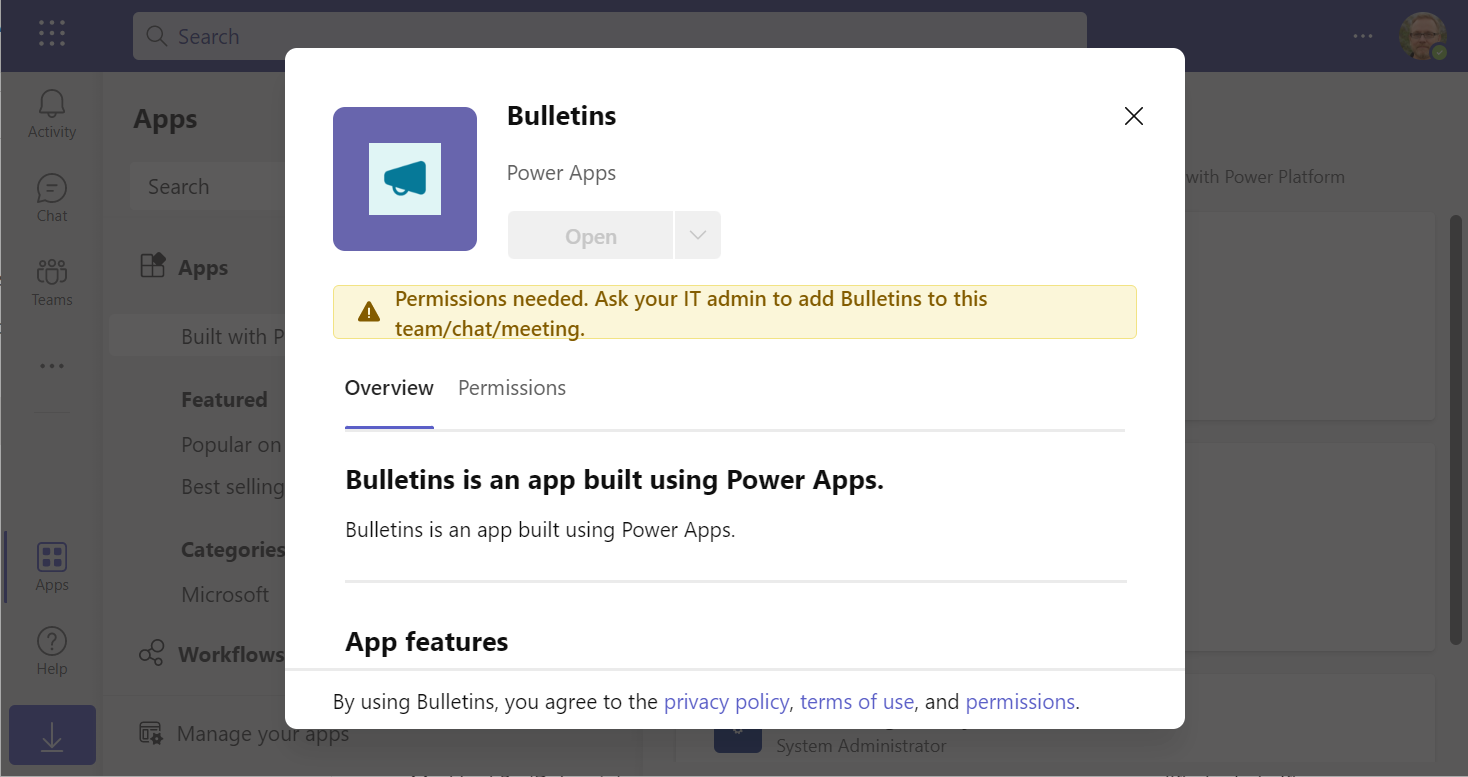
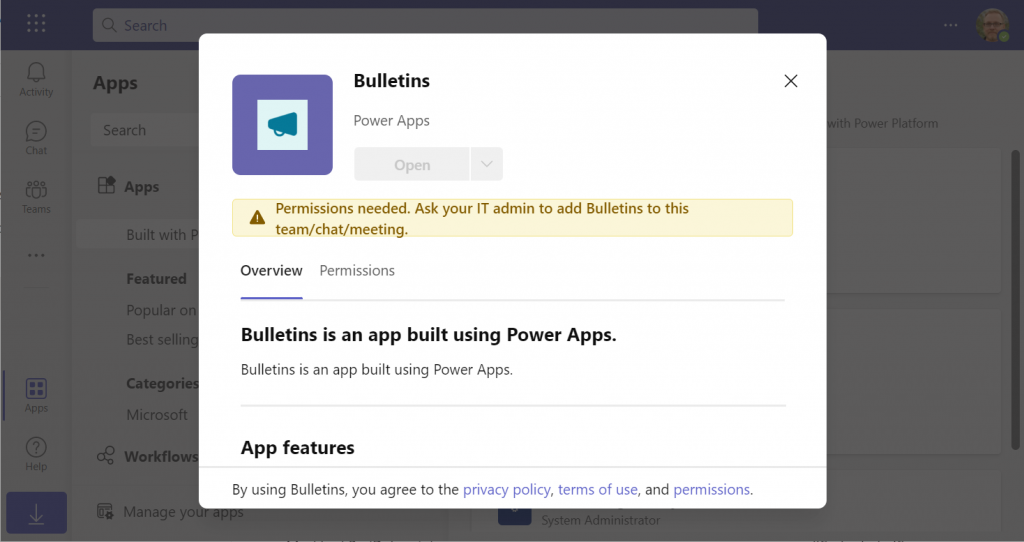
    In a new tenant with the default settings for Microsoft Teams, you may be blocked from installing the Dataverse for Teams based apps after doing the “Add to Teams” dance. Instead the app store may present you with the following error message:

    Permissions needed. Ask your IT admin to add [app name] to this team/chat/meeting.

    You will get this message even if you are the Global Administrator of the tenant, so it’s not about the user permissions. It is rather the Teams policies that are blocking the deployment of Power Apps created within Teams.

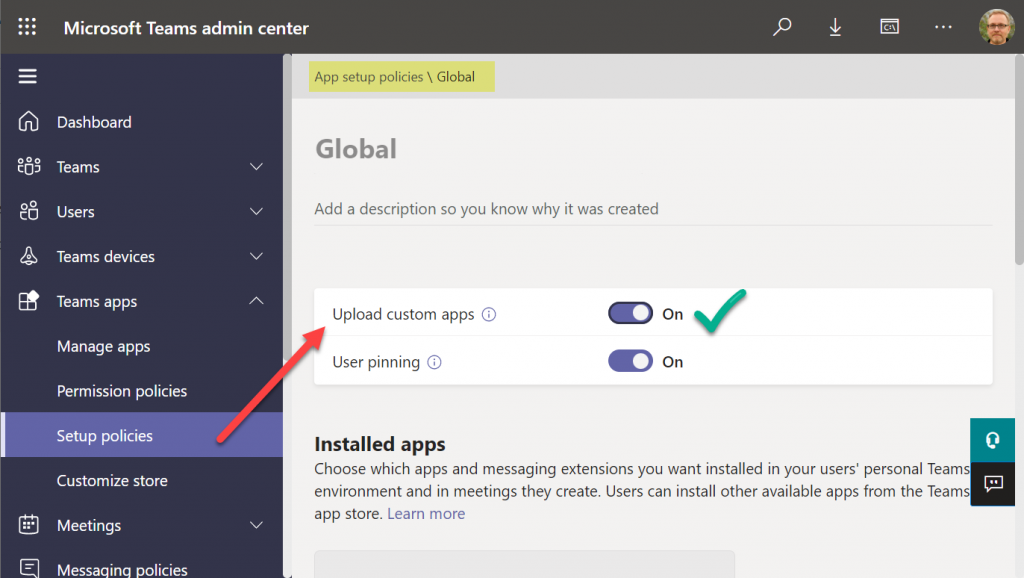
    To solve this issue, you’ll need to contact the Teams administrator of your tenant and ask them to verify that the following setting is turned on:

    Teams apps – Setup policies – Global (Org-wide default) – Upload custom apps – On

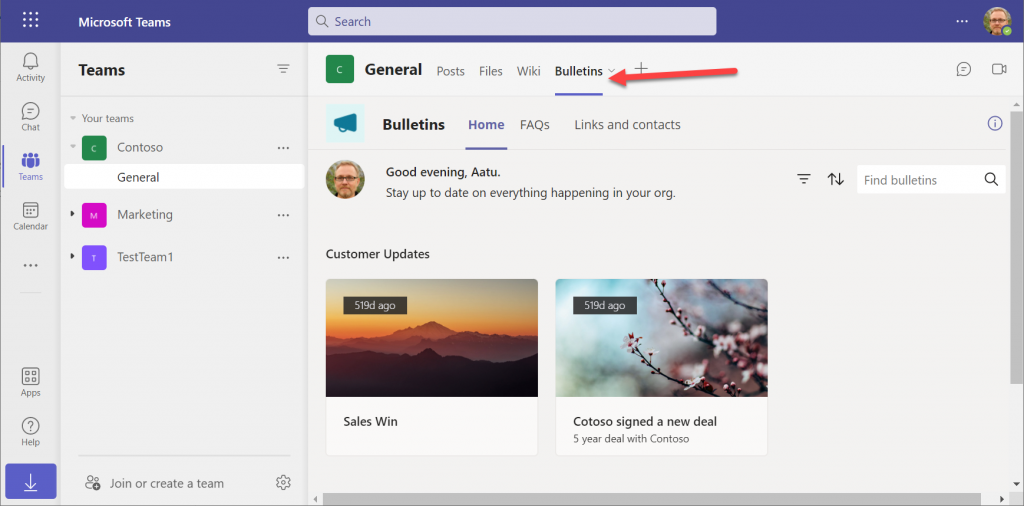
    After this change, you’ll be able to open the Bulletins app in the Teams app store, select “add to team” and create a channel tab in any team that you are a member of.

    I can tell for a fact that the requirement for the “upload custom apps” policy didn’t always used to be required (or it was enabled by default). In one of our demo tenants I had previously used the “share with colleagues” feature to add Dataverse for Teams apps outside the hosting team. The existing tabs worked just fine, but adding new apps became blocked until the apps policy in the Microsoft Teams Admin Center was modified.

    It’s a bit unfortunate if this will indeed become a permanent requirement for IT admins to grant the permission for “upload custom apps”, just to share the Dataverse for Teams app into a different team. Compared to normal Power Apps, there are a number of quirks like this that the app makers need to be aware of. Be sure to also check out my earlier blog post where I explore what it’s like to work with solutions in Dataverse for Teams.

    Update 2022-06-17: In case you’re wondering how the general approval process would actually work for Teams store apps where the approval request prompt is shown, check out this great blog post from Tony Redmond: “Users Can Request Access to Teams Store Apps”.

    Update 2022-08-11: there’s a new feature rolling out, called “Microsoft Teams user request configuration to external systems (URL redirect)”, allowing Teams admins to configure a custom URL + message for the app requests in the Teams app store. Read more here.

  • Trial & Error: Understanding Dynamics 365 CE Trials

    Trial & Error: Understanding Dynamics 365 CE Trials

    With SaaS products like Dynamics 365, getting the process of running a free trial right is crucial for the commercial success of products. This is why you may have seen Microsoft also perform a lot of changes into the process how you’ve been able to spin up trials of CRM Online instances, nowadays known as Dynamics 365 Customer Engagement. Or “Dynamics 365 for X”, with the “X” being an App like Sales, Customer Service, Field Service or Project Service.

    This App model is one of the reasons why the seemingly simple process of provisioning a new cloud database to host your CRM trial data has turned into a bit of a beast recently. It’s no longer a one-size-fits-all offering, rather Microsoft is trying to tailor the trial experience based on the business process that is most relevant for the potential customer. The intentions are good, but the results can lead to a lot of confusion when dealing with an inherently complex platform like XRM where users never follow just a single track through a few predetermined use cases. Here’s a few notes on what I recently learned about how the trials currently work.

    Classic Trials

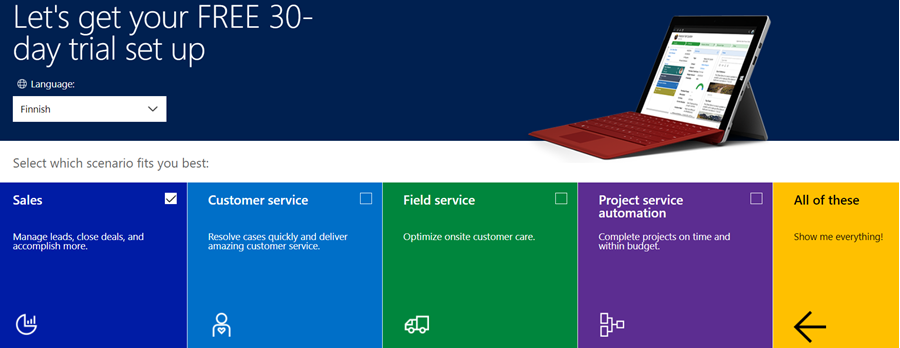
    If you’ve been working with Dynamics 365 recently, either by deploying it for customers, managing your internal instances or studying to become a certified Dynamics 365 professional, you’ve probably encountered this selection:

    Here you get an option to select either one of the Apps, go for the full suite of “all of these”, or if you’re really paying close attention, skipping the App selection by ticking the box “none of these, don’t customize my organization”. Today when I was in need of setting up a new trial to test the Sales related features specifically, I opted to install the Sales App via this provisioning screen.

    After a short while, I was able to access this new trial instance. That in itself can of course be a challenge, since there’s no guarantee that the Office 365 App launcher or the home.dynamics.com screen will refresh to show you the link to the Dynamics 365 instance. Knowing the direct URL of the instance picker (https://port.crm4.dynamics.com/G/Instances/InstancePicker.aspx in EMEA) speeds up this process, and soon I was faced with the Sales specific clean app list. My Finnish language “Myynti” app for the legacy web UI was there, as was the less elegantly named “Sales-keskus” hybrid of English/Finnish, which of course points to the Sales Hub based on Unified Interface.

    Since I needed to do some solution installation here, the first thing I had to do was to promote myself to the Admin role. That’s something you’d never need to do outside of the trial experience, as being the user who provisioned the Dynamics 365 instance you’d most likely have sufficient roles in the Office 365 administration side to see the admin menus directly here. But these are trials we’re talking about and the whole point of the tailored experience is that you DON’T see things that are not relevant to you, because that’s a scary UX for people not familiar with the platform.

    Now that I had the power to configure the instance to my liking, I proceeded to first checking out the default UI on the account form. Here I noticed that actually my nice’n clean Sales UX was cluttered with stuff that I didn’t ask for. Taken from the English UI here, you’ll notice that the account form tab actually has sections for Project Price Lists, Field Service and Scheduling. Not to mention the related records navigation that was at least 20 items long. Where did my sleek Unified Interface “Sales Hub” go?

    When going to the Solutions menu, it’s obvious where these items are coming from. The “Sales trial” in fact contains in total 16 solutions, which is equivalent to choosing the “all of them” option on the trial setup screen. It’s all here, even though you didn’t ask for it: Customer Service, Field Service, Project Service and their accompanying trial customizations. No, none of these will actually show up as installed solutions for the instance if you view them via the Dynamics 365 Admin Center. The same laws of physics obviously don’t apply for trial instances as they would for actual production or sandbox instances. (more…)

  • What’s An “App” in Dynamics 365 Anyway?

    What’s An “App” in Dynamics 365 Anyway?

    Everywhere you look you see apps these days. Or more truthfully, you’ve been seeing them for ages already. Even in this blog I used the term “applification” over 2 years ago already, so it’s fair to say we’ve been living on the planet of apps for a long time by now. As catchy as those three letters are, the overuse of the term has some side effects that may lead to confusion when people refer to something as an “app”. With Dynamics 365 Customer Engagement (a.k.a. XRM), this danger is very real, since the term has been used in quite a carefree way when naming the different components found in the platform.

    In this blog post I’ll try to provide some clarity for those that are less familiar with the various dimensions that a Dynamics 365 app can have. I will go through the places in which apps can be found and explain their intended usage scenarios. Then in a follow-up post I’ll dig deeper into the architecture of how apps relate to solutions and the XRM customization capabilities in the latest V9 version.

    Mobile Apps

    Since smartphones are to blame for the app craze, we might as well begin by doing a search in the iOS App Store. With the term “Dynamics 365” on my iPad I get a list of various different apps I could install on the device. The top there results present a row of apps from Microsoft, but they are all built on completely different architecture.

    The first result named “Microsoft Dynamics 365” is the actual “CRM” app, meaning the one that’ll give you roughly the same features as you’ll find on Dynamics 365 Customer Engagement when accessed via a browser. Once the Unified Interface is fully developed, the mobile & the web will be almost identical, but currently it’s likely that you’ll see a somewhat different experience on mobile than what the browser UI looks like. You’ll find the app’s setup guide here.

    The seconds result is “Dynamics 365 Unified Ops”. Yes, it’s also by Microsoft, even though the name doesn’t include the corporate brand this time. Now, if you’re looking for the CRM capabilities then don’t get mislead by the app’s description talking about mobilizing your business processes. This is the mobile ERP application and you’ll need the “cloud AX” environment to use it for anything. No, Dynamics 365 isn’t “unified” on the level yet that you’d have just one client for CRM & ERP, but most people probably wouldn’t need a phone app that huge anyway. If you’re into ERP, read more about the Unified Ops mobile app here.

    The third result is “Field Service- Dynamics 365”. Although the app developer info on iOS says “Microsoft Corporation” this is actually the mobile app developed by Resco & licensed by Microsoft to be offered as a part of the Dynamics 365 for Field Service app license. It operates by connecting to the “CRM” instance and using its customer data, but the configuration is separate from the customizations you might have done to your Dynamics 365 Customer Engagement environment. The user guide for this app can be found here, while the customizers will find information about installing the Woodford solution for changing the app configuration here.

    App for Outlook

    For as long as Dynamics CRM has been around, the integration to Outlook has been one of its main selling points against alternative CRM products. The CRM Client for Outlook has served us well over the years but the time has come to lay it to rest and replace the Client with the App. The change is far more significant than what Microsoft’s product naming here would suggest, with “Dynamics 365 for Outlook” being the legacy client for your PC and “Dynamics 365 App for Outlook” referring to the lightweight app that will work on pretty much any device.

    Unlike the mobile apps, the App for Outlook isn’t something that a normal end user can (typically) download and configure for themselves. A system administrator or system customizer must take care of the deployment steps, which may include switching over to server-side synchronization, approving user mailboxes (with O365 Global Admin rights) and finally pushing the app to either selected or all eligible users under the menu Settings – Dynamics 365 App for Outlook.

    As of the first week of 2018, the Dynamics 365 App for Outlook in V9 is still in Preview mode, so a sysadmin needs to enable it from the System Settings – Previews tab. This is because the earlier app has been replaced with a completely new app in this release, built on UCI (Unified Client Infrastructure) that is used in the new Unified Interface. This will actually turn the previously feature limited Outlook sidebar app into a full Dynamic 365 Customer Engagement app that has similar capabilities as the mobile app mentioned above.

    Dynamics 365 App Modules

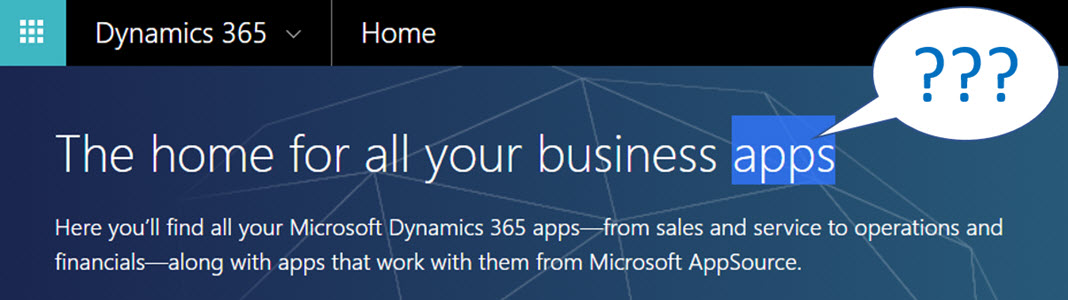
    When you’re logged in to Office 365 and you click on the Dynamics logo in the app launcher, you’ll be taken to the Dynamics 365 home page at home.dynamics.com. Depending on your environment’s configuration, you’ll see a few or a whole number of rectangular icons on this page. Those are all “apps”, but not like the previously described mobile or Outlook apps. More importantly, not all of them are necessarily Dynamics 365 Apps either. Huh?

    The explanation is that the Dynamics 365 home page lists also your Office 365 tenant’s PowerApps apps (which probably should be just called “PowerApps” to make my head hurt less while reading that). Aside from those, the list will include apps from all across your Dynamics 365 Customer Engagement instances, so if you have sandboxes for development and testing purposes, the very same app name & description may appear here multiple times. Furthermore, if you’re also using the ERP side of Dynamics 365, the home pages covers them as well.

    In the Customer Engagement world an app module is basically a subset of the components you can find within a single instance. It can include navigation, dashboards processes, entity views, forms and charts. Aside from a few app specific configuration items, it doesn’t really add anything that you wouldn’t have in the “full” XRM instance already. They are a way of controlling what contents of that particular instance is visible to the end user.

    Each XRM instance has by default at least one app, which will be called “Dynamics 365 – custom” unless you rename it in the System Settings menu. In addition to this, there can be N apps built and configured via the App Designer, or provided as readymade apps from Microsoft, like Field Service in the screenshot. Both the old web apps and the new Unified Interface apps will be present here if your instance is V9+. With so much going on here, I personally try to avoid ever navigating to the Dynamics 365 Home page and just store the direct URLs in my browser’s bookmarks bar where I’m in total control of how the apps are named and organized neatly into folders.

    Microsoft AppSource

    If you feel like you don’t have enough apps on your Dynamics 365 Home page, you can click the “+” icon that says “Find more apps that work with Dynamics 365”. This will open a modal window of AppSource, filtered down to the apps that are designed for, integrated with and some even built on top of the Dynamics 365 platform. Many of these will be built by partners (ISVs) but some of the content is authored by Microsoft themselves, either as officially supported solutions like the Social Selling Assistant, or as “accelerator” style solutions from Microsoft Labs with no warranty or promise of future support like Attachment Management.

    The AppSource apps are closest to the concept that the word “app” was associated with when the iPhone’s App Store was launched ten years ago. These may be small extensions to the common CRM feature set, like a Marketing Calendar component for visualizing campaign records, or integrations between Dynamics 365 and a standalone service like Adobe Sign. Just like in a smartphone app store, some items are completely free of charge while others will cost you dearly. Since we’re dealing with enterprise systems here instead of individual mobile devices, some services allow you to do a test drive in a sandbox completely isolated from your organization’s Dynamics 365 instances, like the CPQ solutions from Experlogix and PROS.

    What can be confusing about AppSource in the Dynamics 365 context is that probably the majority of the apps available in AppSource will not actually result in a new app icon being added to your Dynamics 365 home page. This is because up until V9 and the Unified Interface there wasn’t really a proper presence for the App Module in the XRM platform, so the world is only slowly adjusting to this new reality. I’ll delve into this very topic in my next blog post.

    Dynamics 365 App Licenses

    The concept of an app exists not only in the visible UI and logical platform component containers but also in the contractual world of software licensing. If you go to the Dynamics 365 Pricing page and download the Licensing Guide PDF, you’ll see the detailed way in which the rights of a licensed App user are defined in relation to the features provided by the XRM platform. There are in total 176 occurrences of the word “application” in this document, so don’t expect a quick answer. However, since XRM still largely follows an “honor system” where it’s up to the system administrator to limit the security roles of a user to match those to the rights given to him or her via the assigned Dynamics 365 license type, you’re going to have to understand the concepts.

    Even though you can purchase and assign a user a license for Dynamics 365 for Sales, i.e. an app license, this doesn’t mean that the only thing this user would see or would be legally allowed to access would be the Sales app icon on the Dynamics 365 home page. They can be allowed to view the entire contents of any XRM instance in that particular Office 365 tenant, thanks to the first row in the above table (“all Dynamics 365 Enterprise Edition data”). They could access the “Dynamics 365 – custom” app to look around the whole suite of features in Customer Engagement. They could leverage the Dynamics 365 App for Outlook to track emails to records. But if you misconfigure their security roles and allow them to track emails against case records (a Customer Service app feature), you are in breach of the licensing contract.

    Alright, that’s about as many “app” mentions as I can reasonably fit within one blog post. Next time I will take a look at Apps from a system customizer perspective.

  • Working with Price List Items in Dynamics CRM

    Working with Price List Items in Dynamics CRM

    Despite of the recently refreshed user interface of Dynamics CRM 2013 that offers a much more fluid user experience than previous versions, there are still areas in the application that are not very user friendly. Many of these revolve around product and price information, regarding how it is presented and what actions are allowed on it. In this blog post I will drill into a common scenario that organizations who use CRM for managing price list data may run into and present a few options on how to make their lives easier.

    Price List and Price List Item Views

    A pet peeve of mine in Dynamics CRM has always been the UI that the Price List entity offers to the end user. As many of the readers of this blog will surely know, price list items are the way how products, units, price lists and the all important price figures come together in the CRM data model. If you want to leverage the product catalog and any price calculation features in the sales module, you’ll need to work with price list items and create at least one of them per each product you plan to include as line items on your opportunities, quotes, orders and invoices.

    Unless you’ve built a custom integration to a back-end system that will automatically provide the latest pricing information for CRM, there’s quite a bit of work involved in maintaining individual price list item records when prices change or new products or lists are introduced as a normal part of the day to day business. When a CRM user opens a price list record, a reasonable assumption to make would be that he or she is interested in reviewing the pricing information given to the included products. Unfortunately the Dynamics CRM UI does not make such an assumption, rather it thinks the user is interested in only viewing a list of products and their units but not the actual price information in the amount field. Here’s what the default associated view of the price list items gives us:

    Price_List_Item_CRM_2

    Well, that sure looks like a good candidate for some entity customization work. Yes, it does, but there’s a “but”. When you open the customization UI and navigate to the price list item entity, you discover that the views are actually not customizable. Nor can you add any of your own views for that matter, which means you’re stuck with the default UI. If you think that the price list item entity should allow view customization, then there’s a suggestion on Microsoft Connect that you definitely should go and vote for (if you need help in registering to Connect itself, see this post).

    Exporting the Price List Item Data to Excel

    With this limitation in mind, what are our options of producing a true price list view with product and price information shown side by side? For any Dynamics CRM power user the first thing to come to mind will surely be to export the data into Excel. Unfortunately the uncustomizability of the Price List Item entity also means it has been blocked from showing up in Advanced Find, which would normally be our tool of choice for preparing a CRM data export.

    Luckily there’s still an Export to Excel button visible in the ribbon of the price list form when we are viewing the associated price list items view. Clicking this will present us with an option to either export the data in static format (which would just give us the same columns as the current view) or to create a dynamic Excel sheet in two possible formats. Both of the latter options, pivot table and worksheet, present a follow-up dialog where choosing the required columns from the price list item entity and even any parental entity like product is possible.

    Price_List_Item_CRM_3

    When you export the view into a dynamic Excel sheet in an on-premises CRM environment, you can actually go and look at the SQL query that the view is using for pulling the data from CRM to Excel. Just click “Change Data Source – Connection Properties – Definition” and copy the query from the Command Text window into Notepad. With a little tweak that removes the reference to the currently viewed price list record we can use the same dynamic Excel sheet to retrieve price list item data for all the price lists in the system.

    Price_List_Item_CRM_1_small

    In the SQL query you’ve copied to Notepad you’ll find a reference to the price list from under which we exported the related price list items. It will look something like this: where  (“productpricelevel0”.pricelevelid = N’CEA84006-AD7B-E311-9405-00155D6214FA’) . Just remove this whole where clause, thus expanding the query to retrieve all records from the price list items table in CRM, regardless of the associated price list. Then with the Excel pivot table tools you can group and filter the data any way you please, effectively creating a price list report that views the latest information from CRM in a layout that best suits our purposes. (more…)

  • Side effects of the Polaris UI

    Side effects of the Polaris UI

    Here are some of the gotchas you can expect after switching to the new UI that is introduced in December 2012 Service Update, known by the friendly name “Polaris” release. I previously compiled a summary of the changes in the new UI and publish it as the “What’s New in Polaris” slides, but I thought I should highlight a few situations that may come as a surprise when trying to adapt your existing CRM processes onto the updated user experience of Polaris.

    Relationship attribute inheritance

    As I’ve written earlier, the new forms don’t work all too well with the concept of adding child records from the parent record’s form. Previously in CRM 2011 the ribbon provided a rich, extensible set of actions you could perform on a view of related records or a form subgrid, say contacts related to the parent account or quotes related to the opportunity. While the new Command Bar is about to take the ribbon’s place as the menu of available actions for the main entity form, there’s nothing yet in place to provide similar functionality for related records. Given that CRM by nature is all about managing relationships between different objects, this currently presents quite a severe limitation on the application’s ability to fulfill its purpose.

    “Hey, don’t we have those new plus signs on the subgrids that we can use for adding related records?” Unfortunately the answer is not quite as simple, because the actions the button offers are unconfigurable and in most cases suboptimal. Here’s a take from the CRM Online Resource Center article on customizing the forms in the new sales process:

    You may add sub-grids to the new process forms as you would with existing entity forms. Note that the behavior of the “+” sign in the new sub-grid will vary, depending upon which controls you have in place on the form. Note that sub-grids cannot be customized to display charts.

    • Add Existing and Add New, both. If both are present, the “+” sign control will function as Add Existing.
    • Add New only. The “+” sign will open a new record form.
    • Add Existing only. The “+” sign will open the classic lookup dialog box.

    In most cases we have both options available, which means that instead of the new record form we’re given the Add Existing dialog. Imagine the most basic CRM scenario of them all: adding new contacts for an existing account. Here’s what you get from the form subgrid when clicking the plus sign:

    Polaris_add_related_contact

    Ok, so it’s not exactly as nice and clean as getting a new contact form right away (the classic experience), but guess we could live with that, since there’s a “New” button available there anyway. However, this reveals one of the hidden but nasty side effects of Polaris: the relationship mappings that you’ve defined in your 1:N Parent Customer relationship between the account and contact entity are not respected when using the New button in the Add Existing dialog. This means that your new contact record will not inherit any values from the account you currently have open, including common fields like address and telephone information. Even the Parent Customer field will be empty, as the system no longer understands the context in which you are adding the new record into the database.

    This shortcoming of Polaris renders many common use cases unnecessarily cumbersome. For example, try sending an email from the web UI to a contact record using the new process forms. Although a user who’s completely new to Dynamics CRM might accept the fact that he or she needs to always navigate back to the main window and choose the type of record to create, then fill out all the lookup fields and other non-inherited values, selling this to an existing user of the system would be very tough.

    Opportunity products

    The new process form for the opportunity entity does not show the opportunity products or quotes subgrids/sections by default, you’ll need to enable the visibility in form customization to menu to show them. Once you do, the layout is not very attractive, so you may want to do some clean-up on the form sections. After this exercise you can start to leverage the familiar functionality of adding line items on the opportunity record. No, inline editing of the opportunity products still isn’t possible, but maybe it will one day be in a future release.

    As we add more product lines on the opportunity we start to notice that the total amounts are no longer up to date with the latest additions. In the previous UI we would have reached out to the ribbon to click the Recalculate button to force the system to update the record. The new Command Bar doesn’t offer such an option, however. We can’t click the save button either, as there’s nothing to be saved on the actual parent opportunity itself. Our only options to get the totals updated are to A) close and reopen the opportunity form, or B) update any arbitrary field on the opportunity form. In fact, we might as well create a new checkbox field on the form called “switch to update”, to be changed each time we want to perform the calculation. The new auto save feature will then (in no more than 30 seconds) retrieve the updated value, without even flashing the form.

    Polaris_opportunity_products_small

    Recalculation is not the only issue here, however. Referring to the relationship attribute inheritance problem that the Polaris UI suffers from, this manifests itself also in the further steps of the sales process. Suppose you’ve added a subgrid for quotes on the opportunity form (or rather made it visible), to allow you to proceed with preparing an offer document to the customer. Clicking on the plus sign works nicely here for a change, since there’s no Add Existing option available for opportunity quotes, so we’re presented with the quote record containing the right header level sums and discounts we entered on the quote. We then click save and… WHAT?!? Where did all my monetary values disappear?!  Why is the quote empty now?

    Polaris_quote_products_missing

    The reason this happens is that the quote products were never created. The lack of inheritance doesn’t only limit itself to actions the user performs on the UI, but apparently some of the platform functionality also gets broken when using the Polaris forms. The Add New relationship does carry over the total values from the opportunity form onto the quote form, but none of the line items on the opportunity get added onto the quote. This means that the moment you click save and an update form is opened, the recalculation of the quote level fields takes place, thus deleting the values that existed while we were still on the create form. Sure, you could retrieve the products from the parent opportunity by using the Get Products button on the quote ribbon (as this entity still has the classic experience), but you probably wouldn’t be very happy with this workaround, knowing how it used to work before.

    As a part of the Polaris update, the default value of the Revenue field has been changed from “System calculated” to “User provided” in Polaris, as outlined in article KB2806842. I think that sends a clear signal: if you’re working with line items in your sales process, you’d be better off not enabling the new process forms. In which case, don’t forget to go and set the default back to “System calculated” after the update if that’s how you build your opportunities. (more…)

  • Dynamics Marketplace vs. Microsoft Pinpoint: where are all the CRM apps?

    When Microsoft released the 2011 version of Dynamics CRM and introduced the solution management functionality they also introduced the Dynamics Marketplace: an app store for CRM solutions, integrated right into the CRM user interface. Here’s an excerpt from the blog post Driving Success with the New Microsoft Dynamics Marketplace:

    The Microsoft Dynamics Marketplace is a new online service – based on Microsoft Pinpoint — that helps our customers maximize the relevancy and value of their Microsoft Dynamics investments by connecting them with valuable, high-quality applications and professional services from our worldwide Microsoft Partner Network (MPN).   At launch, the Marketplace has more than 1,400 solution listings, including over 700 application listings and over 700 professional services listing forboth CRM and ERP

    So, if you want to find the best listing of CRM solutions and other related applications, Dynamics Marketplace must be the place to go, right? Umm, actually not. You’re better of going to Microsoft Pinpoint to perform your search. Let me demonstrate this to you through a real life example.

    Today I saw an announcement from Sonoma Partners, one of the most high profile companies in Dynamics CRM consulting business, about a new, free solution called Universal Search. As I followed the link on the press release onto “Microsoft Dynamics Marketplace”, I actually found myself at Pinpoint instead. It’s not a huge difference in the user experience, as Dynamics Marketplace is a subset of the Pinpoint platform. However, on this occasion I paid attention to the fact that the solution had actually already been published there on August 30th. Hmm, how come I didn’t notice it when scanning the Marketplace listings just last week?

    I decided to do a little side-by-side test and opened up the US versions of both Dynamics Marketplace and Microsoft Pinpoint, narrowed down my search to applications only, selected Microsoft Dynamics CRM 2011 and sorted the list by release date. Here are the results:

    • Dynamics Marketplace: 197 applications
    • Microsoft Pinpoint: 584 applications

    Wow! A search on the generic Pinpoint site gives you three times more CRM 2011 apps than the dedicated Marketplace. Click the image below to see an example of search results that you’d be missing out on if you only use Dynamics Marketplace. 4 out of the 6 latest CRM applications listed on Pinpoint are not available on the Marketplace search.

    Why is this happening? Ignoring the chance of technical errors in the search indexing, the difference is caused by the more strict requirements imposed on submissions to the Dynamics Marketplace. If you read the blog post I mentioned earlier, you’ll find the following summary information:

    A Microsoft partner needs to have either the CRM or ERP competency in order to get listed on the marketplace.  For solution listings, partners must be an authorized reseller of Microsoft Dynamics solution or have a solution that is verified as Microsoft Platform-Ready. Additionally, there is an optional Certified for Microsoft Dynamics (CfMD) designation available for an additional fee.

    That’s a perfectly valid explanation to the difference and the intentions behind the verification processes are surely good. Some customers may well decide to minimize the risk of causing harm to the operation of their business critical CRM systems by only choosing add-ons that are CfMD. Of course, if even solution vendors like Sonoma Partners are releasing products outside of the Marketplace criteria, one might ask if that is a sensible guideline for customer organizations to follow or not.

    For anyone who wants to keep track of the useful ISV add-ons released for Microsoft Dynamics CRM, they’ll get a much better experience browsing Microsoft Pinpoint rather than Dynamics Marketplace. I myself fall into this category and also try to do my share in promoting the ISV offerings by maintaining a list of Dynamics CRM Links to interesting apps I come across. Another result of the Marketplace limitations is that the majority of the valuable, free tools for CRM developers and customizers are published on CodePlex. So, in effect, we have three separate “app stores” from Microsoft. Or perhaps the term store is inaccurate in this case, as none of these three have cashiers in place, so maybe they should rather be called “app galleries”.

    We haven’t seen much development on the Marketplace front since its release, which is quite a shame as we could really use some help from Microsoft in building a more vibrant ISV ecosystem around the Dynamics CRM product. There’s just so much more potential in the app store model, as illustrated by this awesome vision of a better Dynamics Marketplace that Neil Benson & Matt Wittemann. With the nearing commercial launch of Windows 8 and the accompanying Windows Store, the expectation levels of customers and developers alike have surely grown beyond the basic application listing that Dynamics Marketplace currently offers.

  • Getting back at blog content thieves

    Blogs are not only a valuable information source, they are also incredibly efficient vehicles for performing content marketing to promote a company or its products. In the line of professional services, many organizations want to use blog content created by experts in their own organization to prove to their potential customers that they are a viable business partner.

    Unfortunately there are also companies who don’t possess the required expertise or haven’t assigned proper resources for content creation, but they still wish to drive traffic to their website through articles that contain keywords they expect potential customers to be searching for. As the web is already full of content, why not just grab a suitable piece of it and post it in your own name? Sure, it’s unethical and mostly illegal, but what’s the risk of getting caught on the wild wild west of the Internet?

    Microsoft Dynamics CRM community has tons of great experts that choose to share their knowledge with others without asking for any direct monetary compensation for it. Lurking inside this community (or perhaps rather outside at the gates of the community) is a small number of players who are willing to take advantage of all this free content and use it to fill up their own blogs with direct copies of the original posts. Typically the only difference is the lack of reference to the original author of the content, because it wouldn’t look very smart if someone finds out you haven’t actually added any value in the copy-paste process. It’s not content sharing like posting links to articles by others, it is content theft with a very clear intention of benefiting from the works of others.

    This week I ran into two cases where the posts from my Surviving CRM blog had been posted on another blog, word by word, without my permission. The first one was a blog by an individual, who apparently was trying to build up his profile as a Dynamics CRM expert. The second one, however, was a Microsoft Dynamics CRM consulting company that’s a listed partner on Microsoft’s Pinpoint service (I won’t post the name of the company, but this is their profile). Looking at their Blogger profile, it was apparent that this company was misusing blogs and stolen content from also many other sources in an effort to gain traffic for their own website.

    I spotted that the company in question had hotlinked the article images from my web server, instead of re-posting them on Blogger. That’s of course the easiest way for them to steal content, but it also opened up an opportunity for me to teach them a lesson. See the slide deck below for the results of the little trick I played on them. If you’re interested in viewing the actual page and seeing if the modified images are still there, just open my original article about subgrids and associated views in CRM 2011, copy a sentence from it and paste it into Google to find the unauthorized copy of my article hosted on the company’s blog (tip: it’s the Blogger blog with a dynamics-crm2011 prefix in the URL, the article’s posted in September 2011).

    Despite of me getting to have some fun at the expense of the content thief, it is of course a very sad thing to see such practices being utilized in selling services for Microsoft Dynamics CRM. Out of all people, it’s CRM consultants who should understand the importance of building long term business relationships on trust, not short term money grabs from gaming the search engines with keywords to lure in customers. In this light, who in their right mind would consider ripping off content from others as a viable tactic to be used for selling services related to customer relationship management?

    The unfortunate fact is that there are many people who work with CRM solutions purely from a technical perspective, without understanding the business problems that these solutions are meant to solve. For a customer looking for experts to guide them through the process of deploying Microsoft Dynamics CRM in their organization, it’s not easy to spot the bad apples and choose the right partner. So many professional organizations working with the Dynamics CRM product still today do not bring out their expertise online but rather just settle for having a brochure website with generic, static content about their products and services. This leaves the door open for unethical marketers to flood the net with their blogs and steal the top spots on search listings. It’s not something we can blame Google for; their tactics work because we allow them to work.

    To quote myself (or rather the updated blog post image):

    So, as a conclusion, when you’re looking for Dynamics CRM professionals to help you implement & develop your CRM system, do some background checks first. It’s all too easy to steal content from others and build up a web presence to lure in potential customers. Online content is easy to generate, building a reputation requires hard work. Some of us choose to skip that ”hard work” part.

    Have you encountered content theft on Dynamics CRM blogs you’ve written, or consulting companies that take advantage of stolen content? Any thoughts or ideas on how the Dynamics CRM community could weed out this unwanted behavior?

  • To update or not to Update Rollup? That is the question

    Some time ago I wrote a parody about Dynamics CRM blogs that mainly seem to post news about the latest Update Rollups being released. Now I find myself writing an Update Rollup blog post myself. Is that a sign that I’ve run out of topics and slipped into the autopilot blogging mode? I hope not, but after reading quite a lot about the latest Update Rollup 10 for Dynamics CRM 2011 I decided to contribute a bit into the discussion.

    It’s always great to receive improvements to the software you spend all your days working with, isn’t it? Compared to a product like Java which Oracle promises to patch only four times a year, even if it’s about critical security updates (did you remember to uninstall your Java 7 yet?), Microsoft is doing quite an OK job with their update process and we see a steady stream of releases to make Dynamics CRM better one bit at a time. Even though Update Rollup 9 was cancelled after the beta program, MS is now back on track with their release schedule in the form of UR10 that came out two weeks ago.

    We have once again a great in-depth article from Dynamics CRM in the Field about all things Update Rollup 10. It tells all the details of the story from Microsoft’s perspective, but let’s evaluate the ups & downs of this latest release from the Dynamics CRM community perspective to get a complete picture, shall we? OK, here goes:

    The Ups

    There was quite a number of fixes promised for the CRM Outlook client in Update Rollup 10 that would potentially solve some of the stability issues many users have encountered when trying to use the CRM Outlook client for actual work in their environment. It’s now 2 years since the first beta of the completely rewritten Dynamics CRM Outlook client came out and many of us are certainly hoping that it would have reached a mature enough level where you don’t have to be afraid of if causing a flood of tickets to your helpdesk. Yes, some users may be quite happy with it as it is, but you’d be foolish not to prepare for potential issues when planning a large scale deployment of the Outlook client. Reaching that good ol’ Service Pack 2 type of confidence level would be just great.

    Another promising deliverable from UR10 is the improvements to query performance on large data sets. A new version of the performance optimization whitepaper has been released alongside the update, which describes the new options made available to tune the Quick Find performance. If you read the results of these tests by Chris Cognetta where the query time was decreased by over 80% in an environment with 1.5 million rows, it’s obvious this is an update worth paying attention to if you have or expect to have some “big data” in your CRM system.

    Finally, as many MSDN subscribers are now eagerly updating their PC’s to run Windows 8, Internet Explorer and even the Office 2013 Preview, the added support for all of these in CRM 2011 Update Rollup 10 is reason enough to grab the very latest CRM bits. Just don’t forget that UR10 alone is not enough, there’s some things you should know about Windows 8 RTM & CRM 2011.

    The Downs

    So, we now have a Quick Find that is working faster, which means it must be doing something differently, right? It is, and unfortunately in some cases this will result in a Generic SQL Error message being shown to the user. It appears that the new update is not quite comfortable dealing with a set of Quick Find columns that contains address fields. As some of you may remember, the address 1 & address 2 fields on the account & contact forms are actually not stored in the same database table as the rest of the default fields, rather they reside in the CustomerAddressBase table. The UR10 version of Quick Find may therefore not work properly if you try to search for records based on address fields like city or zip code. Yes, Microsoft says using these as search fields is against best practices, but the users will very often want to narrow down the customer data based on geographic variables, so taking it away from them can only act as a workaround until we have a new hotfix from MS.

    CRM developers might not be too concerned with performing actual queries on live customer data, but they will certainly be annoyed when encountering the following prompt after editing a JavaScript web resource: You have exceeded the maximum number of 200 characters in this field; it will be truncated. Doh! Making small changes to script files just became very tedious until Update Rollup 11 rolls along in 2 months time. Again, there’s a workaround to it (don’t use the editor, instead upload the file or use some helpful web resource tool from CodePlex), but it doesn’t really make anyone want to rush UR10 onto all their servers.

    Then we have stories of people applying UR10 and finding they can’t access any of their CRM organizations, due to an unhandled exceptionMethod not found: ‘Void Microsoft.Xrm.Sdk.Query.FilterExpression.set_IsQuickFindFilter(Boolean)’. Uninstalling UR10 appears to be the only known cure for this show stopper, which obviously is related to the aforementioned Quick Find changes on some level.

    Alternatively, if you’ve updated your CRM server from 4.0 to 2011, you may experience errors when trying to import a solution file: The element ‘savedquery’ has incomplete content. List of possible elements expected: ‘LocalizedNames’. Manually editing the XML to remove a view prior to importing the file is the available workaround, but again it can make the life of a system customizer quite difficult until there’s a fix available.

    OMG, what should we do with these UR’s?!

    The short answer is: always test first, then evaluate the ups & downs for your particular case. If you are struggling with the Outlook client, face performance issues with your huge CRM database or simply want to run CRM 2011 on Windows 8, going for Update Rollup 10 may be perfectly sensible for you. For someone who doesn’t have a compelling need to update, you may well decide to wait a bit longer and no one should blame you for it.

    That’s pretty much how it is with any Update Rollup. In reality there’s never going to be the perfect time to update. Knowing ahead what hotfixes will deliver the biggest gains for you or potentially break your CRM deployment would be a great skill to have. Instead of dreaming about it, here’s a few guiding principles I would recommend you to follow:

    • Always test the updates in your own test environment before planning live deployment. A virtual machine with your solutions & data is a good compromise, identical hardware is for people with enterprise level budgets (and problems).
    • Never be the first to update, always wait a couple of weeks from the release and read the CRM forums for experiences from others. Trust the wisdom of the crowds.
    • Coordinate the server and client update schedules to limit possible issues and maximize the benefits from the updates. While mixed environments tend to be supported, why risk it?
    • Do update your CRM. Staying too far behind in this “cloud first” era can soon turn out to be an expensive strategy, so reserve adequate time and resources for keeping your CRM up to date – on a regular schedule.

    Do you have any words of advise for people who are struggling with the “should I update to Update Rollup X” question? What’s your survival strategy?

    Edit 2012-09-09: Based on the discussions on the Dynamics CRM Forum, I’ve created a new wiki page for Microsoft Dynamics CRM 2011 Update Rollup 10 on the CRM Wiki on Technet. The purpose is to provide a single place where the Dynamics CRM community members could share their information on potential issues and known problems that they encounter when applying the latest Update Rollups, as well as naturally links to any solutions or workarounds that can help others who are struggling with the same problem. I’ve initially added links to 10 suspected issues with UR10, but you are very welcome to contribute by adding new links or additional information to the wiki page. In an ideal world, we could have similar pages for each new rollup that gets released and be able to more easily identify both the benefits and the dangers or applying the updates into our CRM environments. Let’s see if the wiki can serve us as a platform for such information sharing.

  • Why Microsoft needs to buy Yammer

    Edit 2012-06-25: it has now been confirmed, Microsoft has acquired Yammer. The rest of the post is still valid, so please do read on.

    There’s a rumor going around as of June 14th that Microsoft is about to buy Yammer for over $ 1 billion. While Yammer is not strictly speaking about CRM or even social CRM, they are very much about the social business transformation that is shaking up all the tools that businesses use, including CRM. That’s why I thought I’d share some thoughts and examples of why I think this deal would be really important for Microsoft.

    First, a couple of tasks that are not too much fun with the Microsoft business apps as of now.

    Sharing content is not fun

    Our corporate intranet was upgraded from SharePoint 2007 (BPOS) to 2010 a few months ago. I was interested in trying if I could leverage the built in social capabilities for replacing our Yammer network (free version, in limited use, shadow IT at its best) for sharing interesting online articles with our team. In Yammer you get a cool graphical preview of the shared URL’s target page, you can add tags right under your post (or through hashtags), mention people in posts, follow them etc. All the good stuff that’s made Twitter what it is + then some.

    Looking for a way to properly do this in our SharePoint intranet got me really confused:

    Should I write my comment + URL on the little note board in my personal page? Hmm, no this doesn’t achieve what I want. Do I put it on the callout box on top of my profile picture? Naah, that just works for short “working on CRM implementation at Singapore” type of updates, not URLs. Looks like there’s no good user experience for link sharing round here, and even if there was, how would people actually discover my content? Or if they would, what place could they use for replying and starting a discussion around the topic?

    The sheer amount of effort I was required to put in investigating how the SharePoint social features work is already a showstopper, as most other users won’t be interested in making that kind of an investment. On Yammer and other modern social tools they don’t need to RTFM. If you know how to use Facebook, then you know enough about Yammer to get started. Which is why I’ve sticked with Yammer for content sharing and left SharePoint mainly for document management purposes.

    Sure, a lot of social functionality could be developed by using SharePoint 2010 as the platform for it. Unfortunately the word “could” very often gets replaced with “won’t” in real life. I call it the 90-9-1 rule of business apps. 90% of customers stick with the out-of-the-box functionality, either by choice or by ignorance. 9% invest resources into configuring and customizing the functionality to meet their own requirements. Only 1% go and develop something really cool that squeezes out all that “could” juice from the application by building advanced integrations & custom UI’s.

    “But wait, isn’t SharePoint 2013 going to kill all the other enterprise social software with its new social features?” I’d love to see that happen, but there’s been some doubts expressed about this and I think the rumors sound all too plausible (see: Microsoft: SharePoint 2013 Will Suck at Social – Get Something Else!).

    Searching for content is not fun

    Dynamics CRM is a great platform in so many ways, but one thing that’s severely lacking in it is the search capabilities. No, not the Advanced Find query editor, which is awesome (well, as awesome as FetchXML limitations allows it to be, but anyway). I mean the kind of searches we do on 99% of our daily applications: free text search.

    If I want to look up opportunity records that contain the text “foo” and “bar”, I can’t just type it into a search box like in Google as only a single search term is supported on Quick Find (yeah, I know Outlook client is a different app). Alternatively, if I want to look for “foobar” from all my records in CRM, I’ll need to acquired a global search add-on from a 3rd party, since Dynamics CRM doesn’t provide a cross-entity search capability. (Oh, and did I mention you can’t search the Activity Feed post content at all?) Sure, you could again build a solution for this with BCS and SharePoint, but that get’s us back to the 90-9-1 rule…

    Yammer sure promises a lot with its Universal Search functionality, with advertised capabilities to search across LoB apps like SAP or SharePoint. Whether they can deliver, I’m not sure yet, since at least the free version’s search is often unable to find content that is there. Still, they support the “human” way of searching for unstructured content, which means they can always improve the functionality, simply because they have it to begin with.

    Why Yammer wouldn’t solve everything

    If Microsoft buys Yammer tomorrow, will these things get fixed overnight? No, probably they won’t. Their logo will surely find its way into all presentations in a heartbeat, but the practical implications may be less immediate. Consider Skype, how much has that acquisition changed the lives of Microsoft customers? Not very much yet, probably Windows Phone 8 will be the first real evidence of Skype being an MS product. Another example could be Microsoft’s deal with CWR Mobile, which will initially only change the purchase process and branding of Microsoft Dynamics CRM Mobile for CRM Online users. Since Yammer has just recently announced their own integration to Dynamics CRM, that would most likely be the extent of MS’s offering for quite some time.

    When a solution comes from the outside, integrating it into the portfolio with the rest of the products can be troublesome. Dynamics CRM is pretty much an in-house product that Microsoft has developed internally, unlike for example their ERP products they’ve acquired from elsewhere. My knowledge of NAV, AX, SL, GP or C5 is very limited and I don’t claim to understand the day-to-day challenges that accounting people face when dealing with legislative quirks that us CRM guys don’t need to worry about, but: five products vs. one?

    Sometimes you may not have the choice of buy vs. build if the market is expecting you to make big acquisitions to prove that you haven’t fallen behind your competition on investment levels. Oracle and Salesforce.com sure have been big spenders when it comes to anything related to social. $5 billion and $3 billion respectively, as illustrated on this infographic,  all spent on buying themselves a suite of applications that can deliver a social CRM / social business platform when combined.

    Should Microsoft go on a similar shopping spree? I don’t think trying to buy your way into social business is necessarily the right or only answer. What’s most importnat in my opinion is that after adopting the cloud Microsoft will set its next focus to be adopting social, for real. Betting on the cloud is starting to pay off for Microsoft the way I see it. Now it’s time for their next move. All in, once again?