Author: Jukka Niiranen

  • Time to go Forward with 2020 Wave 1 (webinar)

    Time to go Forward with 2020 Wave 1 (webinar)

    Our company, Forward Forever, is 1 month old today!🥳 It’s truly been exciting times starting a company that goes all-in on Microsoft Power Platform. And that’s even without considering all the surprise elements that COVID-19 is bringing into the equation right now…

    The start of April also happens to be the official launch moment for Microsoft Business Applications 2020 Release Wave 1. Since MS will host their own Virtual Launch Event on April 2nd, we though this is a good moment to also set up the first ever FF webinar. So, without further introducions, here it is:

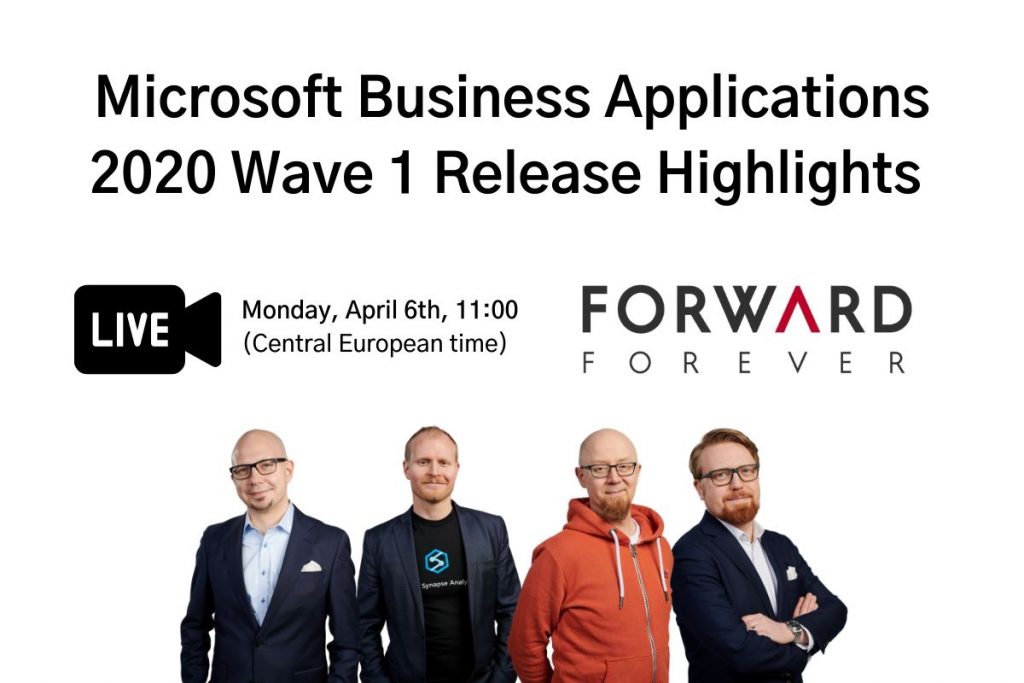
    Please join me, MVP Timo Pertilä, Jouko Nyholm and Lasse Teeriaho in our 2020 Wave 1 Release Highlights webinar on Monday, April 6th, 11:00 AM (Central European Time). We’ll be talking about the coolest Power Apps, Power Automate, Power BI and Dynamics 365 features in this April-September release wave, as well as analyzing the many demos that MS will undoubtedly show in their own event.

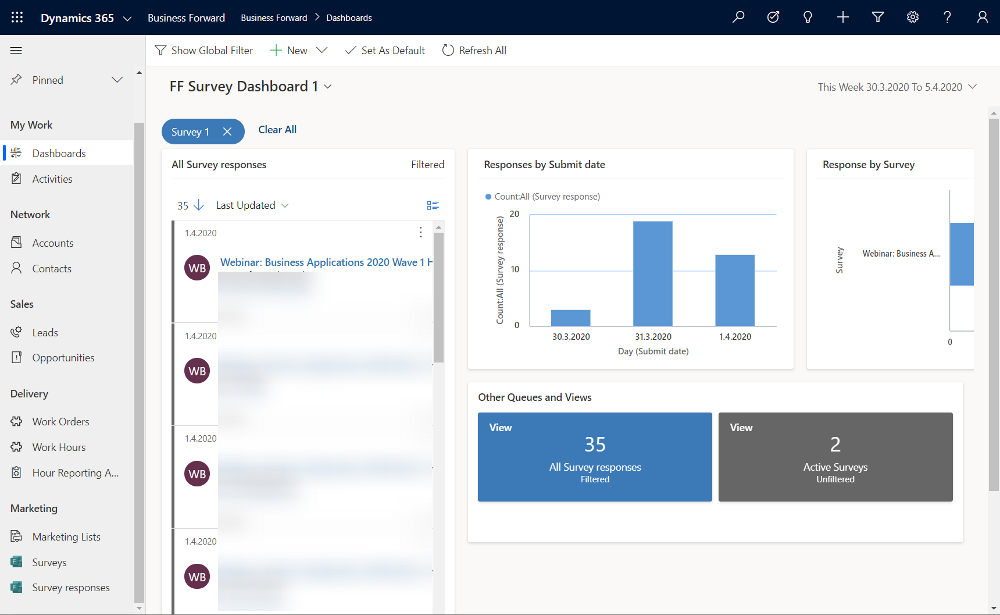
    Just fill this Forms Pro form, which will create a record in our CDS, then trigger Power Automate to send you an ICS calendar invite file hosted on my OneDrive. The link for the Teams Live Event will go live on Monday, if everything works according to plan. Yes, obviously we need to be dogfooding these tools in everything we do😊

    Register for our webinar!

    First 50 people get in for free, the rest will have to… Oh, alright then – you’re all welcome to join our event, no strings attached.

  • United at last: Dynamics 365 Dual-write goes GA

    United at last: Dynamics 365 Dual-write goes GA

    On March 27 2020, Microsoft announced that the Dual-write feature is generally available. After being in preview for over a year, the functionality itself isn’t necessarily a surprise to anyone who’s actively following what’s taking place in the Dynamics 365 product portfolio. The GA does however mark a milestone where it makes sense to reflect on what the broader impact of Dual-write is to business applications built on top of Microsoft Power Platform.

    The very short answer to “what is Dual-write” would be that it’s a built-in feature for making business data available across Dynamics CRM & ERP products without any additional integration tools. It may come as a surprise to people outside the MS ecosystem that even though the Dynamics 365 brand was announced already in the summer of 2016, the practical work of bringing the different apps from this product suite together has not yet changed that much from the early days of custom integration projects. Putting things into context, the effort to unify the 1 CRM & N ERP products in Microsoft’s portfolio originally targeted its first deliverables in 2004 (as “Project Green”). This proved to be impossible (or rather not feasible from a business perspective) in the on-premises era, but now when the Dynamics products are services hosted in the global MS cloud, the unification has actually been doable.

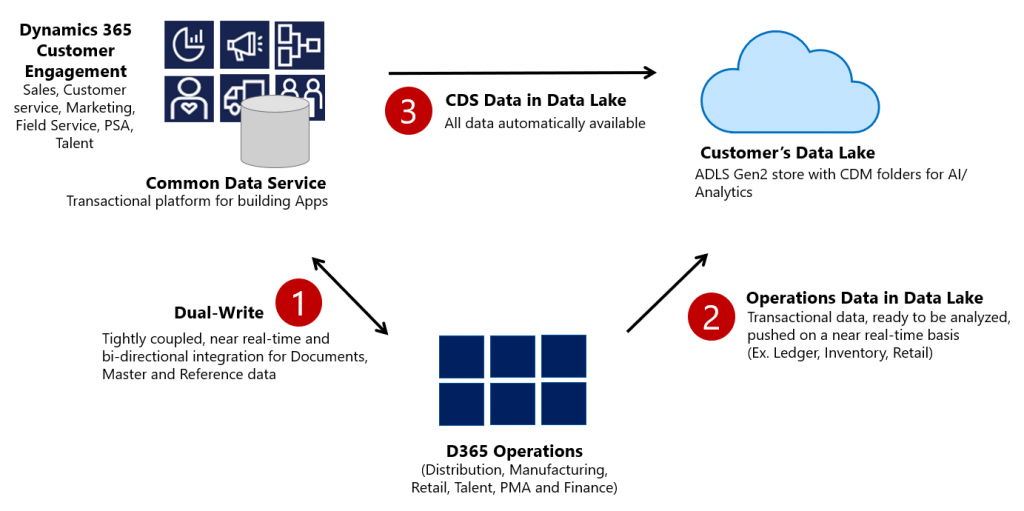
    Dual-write isn’t your everyday CRM-ERP integration, though. It is a near real-time synchronization of data between the Finance and Operations database and the Common Data Service that powers the low-code application and automation development story of Power Platform. Looking at the even broader data story that Microsoft is building around it’s business apps, BI and AI capabilities, we can also see that Dual-write is just one of the mechanisms that will move business data around:

    Taken from the Ignite 2019 session “Common Data Service with Dynamics 365 Finance and Operations”, this slide highlights the role of Azure Data Lake Gen2 in the analytical features that will be offered both as preconfigured features from Microsoft as well as customer specific implementations, to derive new insights from the business data. When it comes to the more operational side of doing business in the digital world, having the SCM and Finance app data available in CDS is what opens up plenty of new interesting scenarios. What if anyone could easily build Power Apps that work directly with the enterprise master data from ERP like customers, products and pricing information? If CDS indeed could lower this data integration barrier and bring task based experiences with pixel-perfect Canvas apps into the hands of frontline workers, that could surely be a transformative service worthy of its name. Not just a single database like XRM was but a connecting layer across many Microsoft cloud technologies.

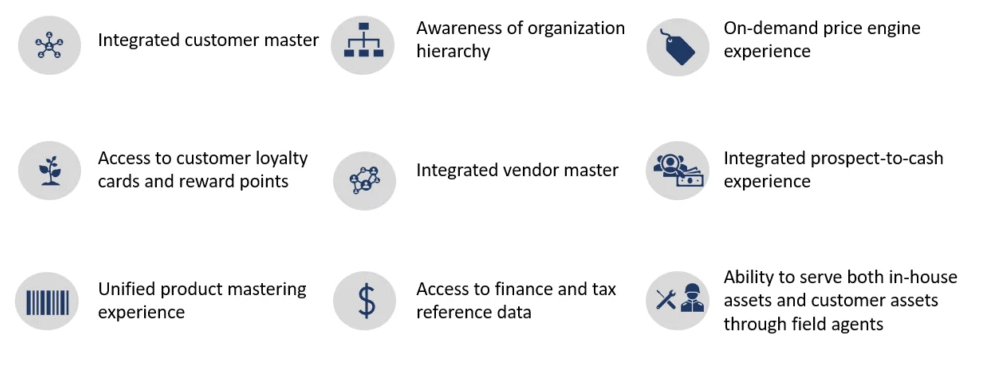
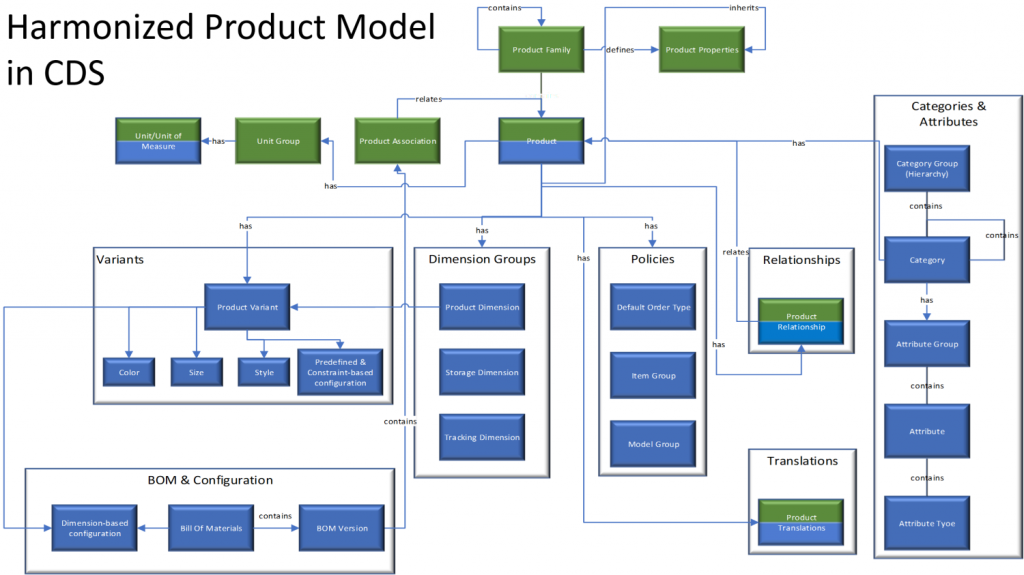
    In order to bring the ERP data into CDS, Microsoft needed to design harmonized data models that align with what used to be the independent products of Dynamics CRM and Dynamics AX originally and define how the schema of each system maps to the other. As an example, the CRM product data model has understandably been considerably more limited than that of an actual ERP application. Now with Dual-write, these two must come together in a unified product experience:

    No two businesses operate exactly alike when it comes to data and processes, so the logic of Dual-write has been built to allow no-code configuration to adjust the details of specific implementations. However, this new depth of application integration within the Dynamics 365 portfolio now means that you should have very good reasons if you decide to deviate from the standard model. Let’s look at Microsoft’s guidance for the above mentioned product data model as an example:

    The dual-write entity maps for products have been designed to flow data one-way only, in near-real time from Finance and Operations apps to Common Data Service. However, the product infrastructure has been made open to make it bi-directional if required. Although you can customize it, it’s at your own risk, as Microsoft does not recommend this approach.

    Anyone who’s worked with Dynamics CRM / Dynamics 365 Customer Engagement implementations in the past has surely come across the need to extend or modify the overly simplistic product and pricing data model that hasn’t been flexible enough to accomodate many real life sales scenarios. Jumping from such a customized environment in production use into Dual-write may not be all that easy, nor will the new data model defined by Microsoft just magically solve everyone’s problems. Dynamics 365 consultants working on data integration between systems aren’t likely going to be out of jobs just yet.

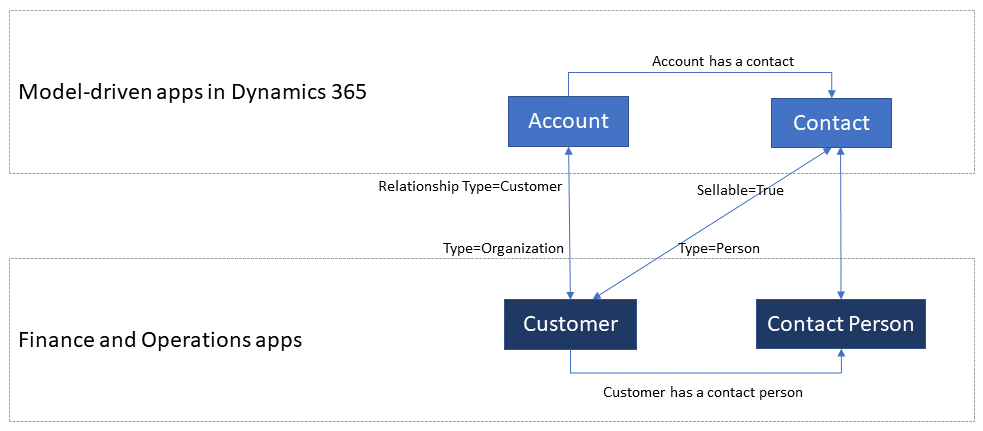
    Whether you’ll be jumping into deploying Dual-write or not, everyone needs to educate themselves on the implications of this new piece in the Dynamics 365 puzzle. From the DW documentation, have a look at the chapter “What does dual-write mean for users and architects of CRM products?” to understand why. There will be several new concepts introduced over on the CDS side like “company” and “party” that will affect all apps built on top of it – such as Dynamics 365 Sales, Marketing or Customer Service. Foundational elements like how customers of the organization or the internal units within that organization are defined have different data models in CDS vs. FinOps, so it’s important that everyone working on either side will use the new common documentation for Dual-write as the starting point to try and understand eachother’s perspectives on the world.

    There are also other dimensions affecting future solution architecture listed out in the documentation. According to MS, initially Dual-write will be shipped as separate solutions (notice that DW is solution-aware right from GA, highlighting the role of CDS as the cross-product ALM foundation in Power Platform). “In future releases, those solutions will become part of Common Data Service”, which I presume translates to every Dynamics 365 customer getting the core components, regardless of whether they already have Finance and Operations apps deployed in their tenant or not. Data types in CDS are also about to get extended to accomodate the enterprise ERP needs arising from this out-of-the-box FinOps integration.

    Of course not everyone is using the ERP solution based on AX, Finance & Operations, Unified Operations, Finance/SCM or whatever name Microsoft comes up next for it. A large share of the customer base will be a better fit for Dynamics 365 Business Central, which isn’t at least publicly yet targeted with Dual-write. Is there going to be an impact to SMB implementations where CDS is part of the solution architecture in some way and is this going to be positive or negative? According to the documentation, “in future releases, concepts in model-driven apps in Dynamics 365 (for example, customer, contact, quotation, and order) will be scaled to mid-market and upper-mid-market customers.” If Microsoft is really aiming to have a Common Data Model that should serve not just all Dynamics 365 products but also software providers from outside the immediate MS ecosystem, there are bound to be trade-offs between the complexity of the required schema for enterprise ERP and the ease of use for how citizen developers can tap into the Common Data Service for building simple business apps.

    Finally, there’s the ever interesting licensing aspect, of course. From the Ignite 2019 presentation, we can find the following statement on Dual-write licensing implications:

    When Microsoft customers (ISV, Partners, End Users, etc.) possess a valid Dynamics 365 for Finance and Operations license, they are entitled to replicate data between the Common Data Service and Dynamics 365 for Finance and Operations.  This entitlement does not include capacity consumed by the replicated data; if necessary, this is purchased separately.  This entitlement does not include use rights for the Dynamics 365 for Customer Engagement applications, including Sales, Service, Marketing, etc; if necessary, this is purchased separately.

    I’m expecting that the upcoming versions of the Dynamics 365 Licensing Guide would include documentation about the licensing scenarios for Dual-write, as at the time of writing there isn’t any public guidance available yet to address the concerns of multiplexing that inherently arise from the real-time synchronization of ERP data into CDS.

    As we know, having Power Apps licenses allows you to read all of CDS data. If you read through the GA announcement of Dual-write and its documentation, you’ll notice that MS is following its own guidance and not mentioning Customer Engagement even once, since CE now refers to on-premises software only. The new term, “Model-driven apps in Dynamics 365”, is a representation of Microsoft app teams themselves ship as the Sales app, Customer Service app and so on. When it comes to the customer specific business apps tailored to their needs, meaning Power Apps, these can be Model-driven or Canvas, ranging from simple “one click” mobile experiences to advanced information worker UI’s for desktop environments. They are all backed by the Common Data Service and running on the Microsoft Power Platform. How will these custom apps be treated in the licensing documentation that traditionally assumes customers would just be using the Dynamics 365 Apps as-is rather than adapting them to their unique needs and real life processes? This remains to be seen.

    Now that we are gradually getting over the age old divide between CRM and ERP, I hope the next area of unification would be a common licensing story that doesn’t draw artificial lines between Dynamics 365 and Power Apps. Splitting these into different licensing guides and different pricing publication formats isn’t all that helpful for the customers nor the partner ecosystem. A Common Data Service based on a Common Data Model should preferably be backed by a Common Licensing Model, don’t you think?

  • CDS FAQ for the Power Apps Makers

    CDS FAQ for the Power Apps Makers

    Microsoft is commited to making Common Data Service the flagship data source for Power Apps scenarios, as well as delivering advanced enterprise application lifecycle management (ALM) features via CDS. What can make the role of CDS somewhat difficult to approach for app makers is the fact that it hasn’t originally been built for Power Apps, like CDS “v1.0” was. The current CDS “v2.0” is based on XRM, the business appliciation platform that was born alongside the Microsoft Dynamics CRM product.

    I’ve been working with this plaform technology for close to 15 years now, whereas the world of Power Apps Canvas apps (and Power Automate) is a much more recent acquaintance of mine. To put my experience into good use and to also learn to see things from outside the XRM walls, I decided to share answers to a few questions that I’ve heard from #PowerAddicts that are exploring the CDS world.

    Q1: Why should I use CDS as my data source instead of SharePoint or SQL Server?

    Because it is not just a data source. Yes, in Power Apps Canvas apps you do connect to it just like any other data source in the app Studio, but this is misleading. CDS is the complete platform that can orchestrate how your app works when it comes to business logic, security model, integration, administration, governance and many more areas. Compared to raw SQL Azure, the SQL relational data is actually just one of the storage types that CDS leverages behind the scenes. Ultimately it’s a bundle of the latest Microsoft cloud technology for compute, storage and eventing/extensibility – offered as a single service that you don’t have to configure nor manage. You consume it either via built-in integrations to Power Platform, Dynamics 365 and Office 365, or alternatively via an API that is automatically generated to match your customized schema.

    The topic of “why CDS” would easily warrant a whole series of extensive blog posts on its own, which I may well do later on, but not inside an FAQ like this. For now, I recommend that you watch this Ignite 2019 session from Ryan Jones to understand the big picture of Common Data Service:

    Q2: What’s the difference between the 2 connectors for Common Data Service?

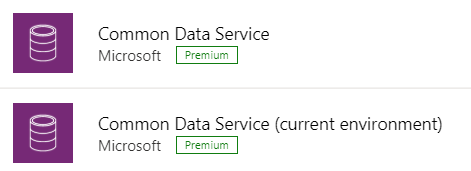
    The current environment connector is a native connection. This is the misleading part. It’s not a real Connector at all, rather every Power App knows how to talk with the environment that hosts it, which essentially is the current CDS environment. This leads to numerous benefits in performance and available features, as the technical implementation behind the scenes is quite different. I haven’t come across a Power Apps specific comparison yet, but MVP Sara Lagerquist has done a thorough analysis of the two CDS Connectors in the Power Automate context.

    Q3: Is there any reason to use the non-current environment CDS connector then?

    Yes, if you want to connect to a CDS environment that’s not the one which is hosting your app configuration. Meaning, if there is busness data out there in another CDS database and you need to reference it in addition to the “native” data in your app’s environment, the old CDS Connector might well do the trick. However, this is an area to keep a close eye on for the detailed functionality over time, as MS is very much wanting everyone to “go current” and some issues might arise from remaining on the old Connector.

    Q4: Why should I use solutions for building my app functionality in CDS?

    Even if you’re working in just a single environment, building a simple app directly in production (which is what a citizen developer often might do), solutions offer you the logical grouping of elements that are part of your project. In fact, at some point MS experimented with changing the Maker UI to read “projects” instead of “solutions”, but luckily that change was reverted back. It can stil be a helpful concept to illustrate the purpose of solutions for those who aren’t familiar with CDS. The act of building an app needs to manifest itself somehow within the environment, so always start by creating at least one solution for your project. (Real life projects may well have more than one solution, thouh.)

    What solutions really are designed for is shipping the elements of applications into other environments, in a process that is easy to manage and possible to automate. Microsoft is aiming to make solutions the packaging story across all of Power Platform, which means it’s not an optional concept. It’s how things are built within this business application platform.

    Q5: I’ve read about this thing called “managed solutions”. When should I use them?

    There’s the saying “if you have to ask how much it costs, you can’t afford it”. In my opinion, this fits perfectly with managed solutions, too. Unless you are really, really well educated with how the solution system in CDS works (meaning you’ll probably have an XRM developer background), don’t touch managed solutions – yet.

    When delivering complex enterprise CRM systems with multiple full time developers writing custom code and leveraging Azure DevOps for automated CI/CD pipelines, managed solutions are the way to go. Similarly if you’re building an ISV app for many different customer organizations and hope to publish it on AppSource, you simply have to go managed. We’ll most likely see Microsoft making the managed solution concept more approachable for other audiences in the future, too, so please do educate yourself on their possibilities and get ready for building more complex apps at scale.

    Q6: Couldn’t I use managed solutions to lock down my app components from other makers?

    Yes, but not in the environment you’re probably working in right now. When building apps, you’re always working in unmanaged mode. It’s only when you export your solution from the current environment that you get a choice to make the solution package either managed or unmanaged. Shipping configurations from dev to test & prod is what this mechanism is for. If you only have a single environment for the app makers where the small departmental or personal productivity apps are built by citizen developers, none of this stuff applies to you.

    No. Don’t ever re-import the managed solution back to the environment where it came from. That’s locking yourself in and throwing away the key. It’s not what you want.

    Q7: Is there any other way to restrict specific entities to be only customizable by certain app makers if we’re working in a shared CDS environment?

    No. The metadata of CDS doesn’t have such security mechanism that would allow you to say that “Group A owns the account and contact entities, Group B is responsible for the project, task and resource allocation custom entities”. Within a single environment, there can be only one god, and that is the System Administrator. System Customizer also comes close, as both have the rights to create and delete new entities on a whim.

    Records stored within an entity always have an owner. An account is owned by User X, which can be used for determining what other users can do with it. The actual account entity i.e. the table that holds the records doesn’t have this type of ownership construct, as it applies only to data and not metadata. If you need more granluar control over metadata, then the answer is to set up different environments for the different groups.

    Q8: How can I see what privleges a particular user has been given in CDS?

    Security roles are a central construct in CDS, as everything you attempt to do in the database is verified against two key parameters before execution:

    1. Do you have rights for the specific action against the entity where the data is stored?
    2. Who is the owner of specific the record that you are trying to perform the action on and what’s the relationship to the calling user?

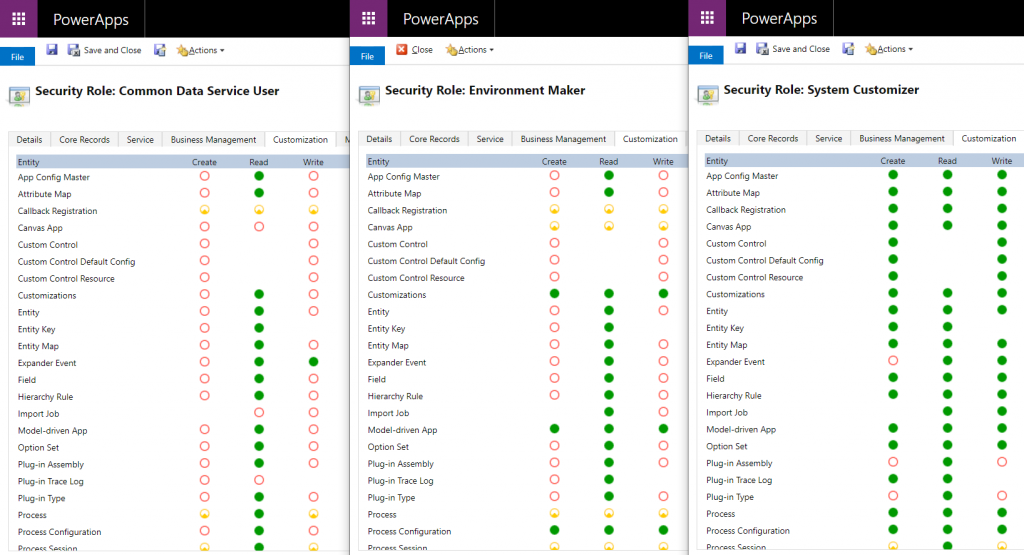
    The UI for security roles dates back to MS CRM v.X days and is scary both due to the legacy experience as well as the variety of options found in even a blank CDS org. Nevertheless, it is logical and will tell you what you need if you know what you’re searching for. Let’s compare 3 standard roles of Common Data Service User, Environment Maker and System Customizer and their privileges on the Customization tab:

    The CDS User has mostly just read access to the metdata, like Entity, Field, Option Set and so on. An Environment Maker is allowed to create new items like Canvas Apps & Model-driven Apps – like a Maker should. To actually create new Entities and Fields, you’ll need to be a System Customizer or Administrator.

    This is where the platform aspect of CDS (and its predecessor XRM) comes into play, though. You can create your own security roles, preferably via copying an existing system role that’s close enough. So, you could create a new “Environment Super Maker” that would have the right to create new fields, but not new entities, nor delete any fields. So, security roles are not only the gatekeeper to business data but also metadata.

    Q9: Looks like these security roles are environment specific. Do the IT admins really to go and manage the security settings via this MS CRM Power Apps UI?

    Not anymore! Last year Microsoft finally brought Azure AD integration into the system administration features of Dynamics 365 and thus CDS. You can now leverage the Group Teams to assign CDS security roles to an Azure Active Directory group (security or Office group) and the users will inherit the privileges of that role when added to the group.

    While Azure AD groups definitely streamline the administration process, please keep in mind that there’s more to CDS security model than just the security role assignment. Business Unit structures, Field Level Security, Hierarchical Security are some aspects that may require admin actions directly within the environment to get them set up properly.

    Q10: Why do all these user accounts from across the organization appear in the CDS environment meant for department X only? Can they all access it?

    You probably didn’t assign a security group to the CDS environment right at the start when it was created. Therefore every licensed user account in your tenant was copied over to the environment. If you assigned a security group to the environment after its creation, then those user accounts will be automatically disabled. They will forever remain in the database tables as inactive users, though, since user record deletion is not something XRM nor CDS has ever supported.

    Just because a user exists inside the CDS environment’t systemuser table doesn’t mean they can do anything in that environment. Not even if they haven’t yet been disabled. Everyone needs a security role to have a chance to read both the metadata and the business data from CDS, so the user record is just a prerequisite to opening the door to the environment but it doesn’t provide the key to the lock.

  • Price points of Power Platform (2022 pricing and licenses)

    Price points of Power Platform (2022 pricing and licenses)

    NOTE: This post was originally published in March 2020, the last revision of pricing information is from November 2022.

    As of today, there isn’t a single place from where to check the actual prices of the different license types covered by the Microsoft Power Platform suite of products – like there is for Dynamics 365, for example. The information of prices vs. what paying that price actually entitles you to is distributed across several information sources and formats – starting from the individual product pages, to the learn.microsoft.com documentation pages, to the PDF licensing guides.

    To stop myself from having to always use a search engine to discover these pricing details, I decided to compile a list of links to the places where each individual Power Platform product team has made their pricing information public, as well as write out the current subscription prices in US Dollars and Euros. I’ve also included a few relevant licensing model elements that describe what the particular subscription entitles you to do (capacity, features and so on).

    Most of Power Platform product licensing is done via the prepaid subscription model familiar from Microsoft 365 (Office 365). More recently the pay-as-you-go (“PAYG”) option has been introduced for some of the services, allowing payment via an Azure subscription (read more about the November 2021 announcement here). It’s important to note that in general prepaid subscription prices are cheaper than pay-as-you-go. The PAYG option is primarily aimed as an option for customers to use, before they know the true consumption level and are ready to commit to a prepaid subscription. Where applicable, I’ve included the PAYG prices here for comparison.

    Your actual licensing costs will of course depend on the types of agreements your organization has with Microsoft. So, consider the prices on this page as mainly a starting point for understanding the relative costs of different Power Platform services.

    Power Apps / Pages

    Power Apps pricing

    Power Apps per app plan: $5 (€4.20)

    • Allows you to access one Power Apps app (canvas, model-driven, portal/website).
    • The same app in different Power Platform environments (dev/test/prod) requires a per app license for each environment.
    • Pay-as-you-go option: $10/monthly active user/app/month

    Power Apps per user plan: $20 (€16.90)

    • Allows you to access an unlimited number of Power Apps (canvas, model-driven, portal/website) in your tenant.
    • Can also be used for accessing canvas apps shared to guests in another tenant (not applicable to other app types).

    Power Apps pricing change on October 2021

    Before Oct 1st 2021, the Power Apps per app list price was $10 and Power Apps per user $40. See this blog post for more details on the price reduction as well as changes in the per app license entitlements. Note that your license agreement may still apply to the old terms, based on the contract duration.

    Power Pages (formerly Power Apps Portals)

    Power Pages pricing

    • Power Pages authenticated user capacity, 100 monthly active users: $200 (€168.70)(see also discount tiers).
      • Pay-as-you-go option: $4/user/site/month
    • Power Pages anonymous user capacity, 500 monthly active users: $75 (€63.20) (see also discount tiers).
      • Pay-as-you-go option: $0.30/user/site/month
    • Internal users (employees) can be licensed separately, via Power Apps or Dynamics 365 licenses, or as authenticated users.

    Licensing FAQ: Power Pages

    Power Apps portals (old licensing model, before Power Pages)

    Differences between Power Pages and Power Apps portals licensing model

    • Power Apps portals login capacity add-on, 100 logins per month: $200 (€168.79)(see also discount tiers).
    • Power Apps portals page view capacity add-on, 100,000 page views per month: $100 (€84.30).
    • Internal users must be licensed separately, either via Power Apps or Dynamics 365 licenses.

    Dataverse capacity (formerly “Common Data Service” / CDS)

    Power Apps and Power Automate licensing FAQ: Add-ons

    Storage
    • Dataverse Database Capacity (1GB) $40 (€33.70) per month
      • May still show up as “Common Data Service Database Capacity”
      • Pay-as-you-go option: $48 per GB used per month
    • Dataverse File Capacity (1GB) $2 (€1.69) per month
      • May still show up as “Common Data Service File Capacity”
      • Pay-as-you-go option: $2.40 per GB used per month
    • Dataverse Log Capacity (1GB) $10 (€8.40) per month
      • May still show up as “Common Data Service Log Capacity”
      • Pay-as-you-go option: $12 per GB used per month

    See also: What Dataverse capacity is included with the Power Apps and Power Automate plans?

    Power Platform / Dataverse API calls / API requests:
    • Power Platform Requests add-on: 10,000 daily API requests for $50 (€42.20) per month
      • Formerly known as “Power Apps and Power Automate capacity add-on”

    See also: Requests limits and allocations

    Power Automate (formerly “Microsoft Flow”)

    Power Automate Pricing

    Power Automate per user plan: $15 (€12.60)

    • Allows individual users to create unlimited flows, execution is limited based on available API requests per day (40,000 included)
    • Note: while Power Apps per app and per user plans includes similar rights, they are tied to the context of a canvas or model-driven app

    Power Automate per flow plan: $500 (€421.50) for five flows per month

    • Allows the organization to implement 5 flows, regardless of the number of users who trigger them
    • Child flows triggered by a parent flow do not need to be licensed
    • Execution is limited based on available API requests per day (250,000 included)
    • Additional flows can be purchased at $100 (€84.30)per flow per month
    • Pay-as-you-go option: $0.60 per each cloud flow run

    Power Automate per user plan with attended RPA: $40 (€33.70)

    • Allows individual users to run an attended RPA bot on their workstation
    • Presumably also contains similar rights as the standard Power Automate per user plan
    • Pay-as-you-go option: $0.60 per each attended desktop flow run

    Power Automate unattended RPA add-on: $150 (€126.50)

    • Allows the organization to run a single unattended RPA bot, no dependencies to users or workstations
    • Add-on requires either per user plan with attended RPA or per flow plan
    • Pay-as-you-go option: $3 per each unattended desktop flow run

    See also: Power Automate licensing FAQ.

    AI Builder

    Power Apps and Power Automate licensing FAQ: AI Builder

    AI Builder capacity add-on: $500 (€421,70) per unit per month

    • Each unit contains 1 million service credits on the tenant level
    • Allows the organization to use any of the AI model types included in AI Builder
    • AI models consume service credits when they are trained, used in an app or flow, or scheduled to periodically run. The amount of capacity consumed varies based the AI model, as well as the size and complexity of the data set. See AI Builder calculator to estimate the capacity requirement and cost of your model.
    • Add-on requires at least one paid Power Apps, Power Automate or Dynamics 365 license
    • For the built-in Business Card scanning feature in Dynamics 365 Sales, there is free capacity included in Sales Enterprise App licenses: 10 scans per user per month, pooled at tenant level. Sales Insights has a capacity limit for business card scanning of 200/user/month. If additional Business card scanning capacity is required, Sales Enterprise customers may purchase additional Sales Insights licenses. (Taken from Dynamics 365 Licensing Guide PDF document.)

    Power Virtual Agent

    Power Virtual Agents pricing

    Assign licenses and manage access to Power Virtual Agents

    Power Virtual Agent: $1,000 (€843.20) per 2,000 sessions per month

    • Allows the organization to have an unlimited number of bots
    • In addition to the tenant license, internal users will need to be assigned a user license. The tenant license costs money, but the user licenses that are purchased via the same mechanism are apparently free.
    • “A session is an interaction between the customer and the bot, and represents one unit of consumption. The session begins when an authored topic is triggered. These sessions are referred to as ‘billed sessions’ in the product. Sessions are deducted for both testing and production usage.”

    Power BI

    Power BI licensing in your organization

    Power BI Pro: $9.99 (€8.40) per user

    • Included in Office 365 E5 subscriptions for no additional charge
    • Each Pro license gets 10 GB of data storage capacity

    Power BI Premium per capacity: starting from $4,995 (€4,212,30) per organization

    • Offers dedicated compute and storage resources for your organization
    • No per-user license assignment needed for report consumption, report creation and sharing still requires Pro licenses for users
    • Required for advanced features, see comparison table
    • See What is Power BI Premium and Power BI Premium FAQ for more details

    Power BI Premium per user: $20 (€16.90)

    • New option to access premium features without organizational capacity purcahase requirement.

    Dive deeper into the licensing details

    Microsoft usually posts monthly updates to their licensing guide PDF documents. Here’s where you can grab the latest copies: Power Apps and Power Automate Licensing Guide & Dynamics 365 Licensing Guide.

  • Highlights from TechDays Finland 2020

    Highlights from TechDays Finland 2020

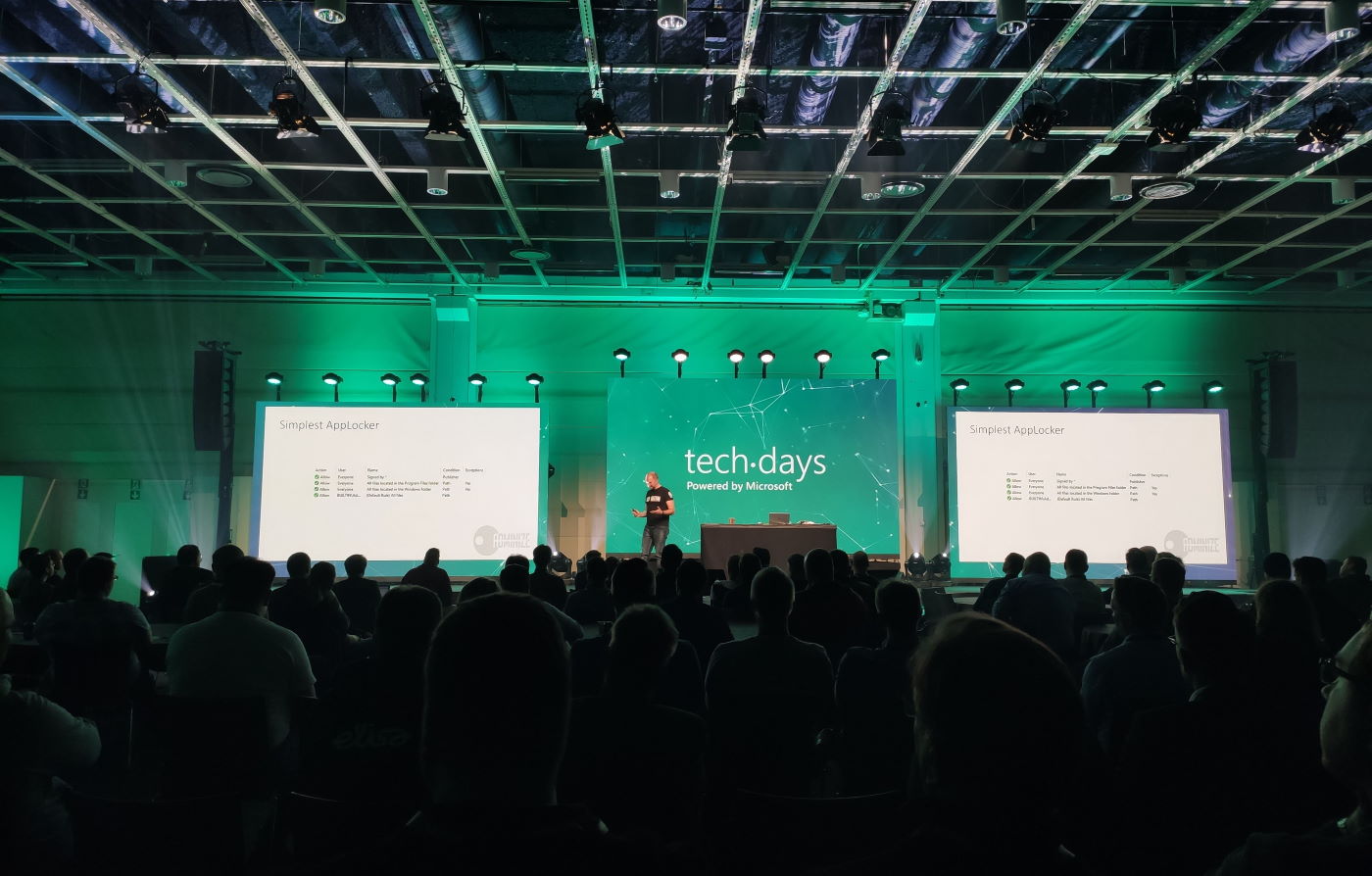
    March 5-6 marked the annual conference for Microsoft geeks in Finland to gather in Messukeskus Convention Center and enjoy two days full of expert sessions on the latest MS technologies and real life stories on how all this tech is making an impact out there. In this blog post I’ll reflect on the sessions that I attended at TechDays this year and share some thoughts on what I think are topics worth exploring more. You’ll also find links to slides and a few social media posts from the event.

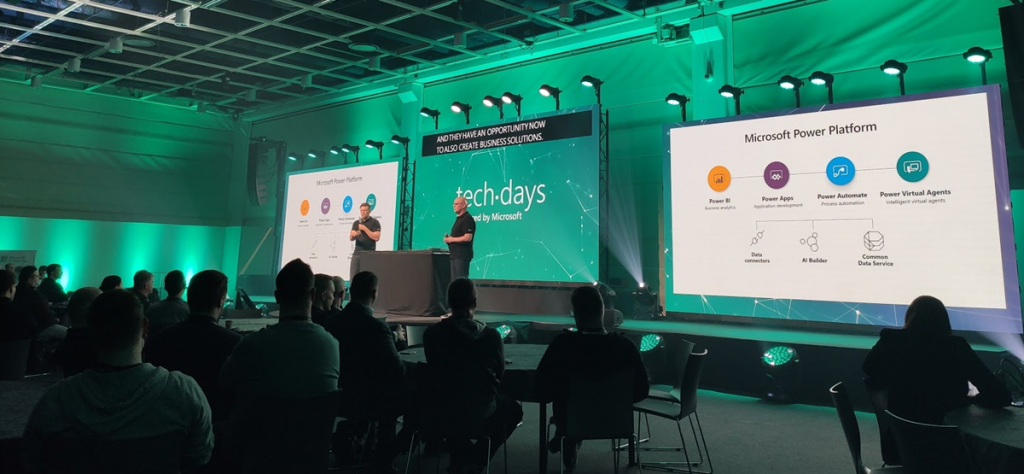
    Let’s get one thing straight first: Power Platform is everywhere these days. Even a Microsoft IT & Dev conference like TechDays 2020 was opened with a keynote presentation that stared with the 4 pillars we’ve come to know from the Digital Feedback Loop, familiar to all Dynamics 365 professionals by now. Engage customers. Empower employees. Transform products. Optimize operations. The goal of digitally transforming organizations has become the overarching theme of Microsoft’s product offering, supported by global cloud infrastructure, enabled by Azure services, integrated with Office 365 productivity tools and ultimately unlocked by the apps created on top of Power Platform.

    For many of the attendees, the journey of how exactly we’ve reached this tipping point of low-code applications isn’t necessarily familiar yet. For us at Forward Forever, a new technology agency focused 100% on Power Platform, being able to participate in discussions with MS tech professionals around this theme was of course of highest importance. Our whole team was present for the 2 days of the event, to ensure we’ve got a thorough understanding of the state of the ecosystem. Thanks to everyone we had a chance to meet at TechDays! Lots of great dialogue and awesome feedback to encourage us to push forward with the vision that we have for our new company.

    Our very own Power Platform guru Timo Pertilä had two sessions at this year’s event. The first one was aimed at the broader audience of non-PP professionals, to help them get started on creating Power Apps Canvas apps. Timo gave us the kind of tips he wished he had been given back in 2016 when starting to explore these tools. When it comes to Canvas apps, the most important step is to A) decide on an app that you would actually want to use yourself and then B) just creating it! Following along the lines of a simple IT asset management app built on top of a SharePoint list, Timo’s session went through all the common areas that an app maker should be aware of. I encourage everyone to pick a training lab from one of the many Power Apps learning resources and just follow through a scenario, to understand how these new tools can really democratize the creation of simple business apps on top of existing data sources.

    [Slides]

    The second session by Timo was about exploring the capabilities of the new UI Flows in Power Automate. RPA, Robotic Process Automation, is a smoking hot topic and the addition of such capabilities into Microsoft Power Platform has gotten even cool-headed Finns like Timo excited about the new opportunities. Yes, while integrating software properly via API based automation remains the core of what Power Automate excels at, the option to connect to systems that for one reason or another can’t be accessed via APIs can close the final gaps and turning manual processes fully digital. In the TechDays session we saw a demo story of an employee onboarding process for HR deparments. Using UI Flows to create user accounts in a non-API enabled legacy system such as Microsoft Access is now possible with these graphical tools that record the steps in the UI and then execute them by using variables like employee name as inputs from other parts of the Power Automate flow.

    [Slides]

    Although the use of a “proper” relational data management system like CDS would be preferable in building apps for enterprise wide use, the fact is that SharePoint remains both a commonly used as well as easily accessible data store for many citizen developers. The session by Mikko Koskinen showed us how you can leverage tools from the Power Platform to improve the user experience and also auditability of actions that users take on SP list and document data. Custom forms built as Canvas apps and process automation implemented as Flows can do wonders to your SharePoint based business apps, and of course they also open up the connectivity to many other Microsoft services to further extend the feature set as the demands of enterprise customers evolve beyond Office. Having a common set of low-code customization tools across the whole MS stack is where the real Power of the Platform lies.

    Microsoft Teams is becoming ubiquitous in the business world as pretty much all organizations on Office 365 are moving away from Skype for Business. The end result of this mass exodus towards Teams may not always be the automatic improvement of teamwork and employee productivity, if all you do is enable the licenses and activate the new services. The Teams MVP duo Vesa Nopanen and Karoliina Kettukari delivered an entertaining story of the rogue cowboys (end users) vs. the central command center (IT department) and how their perspectives on how Microsoft Teams should be implemented and managed can differ wildly. There are plenty of smart settings that the IT guys could automate behind the scenes for a more productive workday experience, but at the end of the day, a lot of the everyday usage of Teams relies on the real life teams to agree on common practices and expectations on how everyone will use the software tools. Educating and encouraging both parties to do their part is therefore essential for achieving success with MS Teams adoption.

    [Slides]

    Teams is not just a communication tool, though. It is quickly becoming a platform, which from my perspective is the most exciting aspect in its rise to popularity, since this paves way for a wealth of scenarios to better leverage Power Platform tools for a broad information worker audience. MVP Christina Wheeler presented us to path on how to get started with developing Apps for Microsoft Teams. It’s worth exploring the wealth of Teams App Templates that MS has published on GitHub, as these will give you many ideas on how to link various Azure services into the UI that your people are spending a growing part of their days working in. From a low-code development perspective, though, the options for bringing in Power Apps into the Teams navigation experience is the low-hanging fruit that you’ll also want to explore.

    Another super hot MS technology alongside the low-code Power Platform and ubiquitous Teams is Azure Synapse Analytics. In the TechDays 2020 keynote, Data Platform MVP Vesa Tikkanen and Anne Komscha from Stora Enso presented what opportunities this brand new cloud analytics offering from Microsoft opens up for organizations to rethink their data architecture. Vesa demonstrated the unique capabilities that Synapse brings to the table by connecting to and from a SQL Server 2000 virtual machine to the modern data cloud. It’s therefore not a “rip & replace all the things!!1!” type of a scenario where Microsoft is aiming at here, rather they are playing on the compatibility card here and ensuring that your complete data estate can connect with Synapse. Thinking about the Customer Data Platform scenarios where this same underlying technology will be leveraged to identify customer profiles from various sources, it’s easy to understand why MS is so bullish on their position in the emerging CDP market.

    As your data and your apps are all either moving to or at least being connected with Azure, it’s no wonder that questions on how should we secure all of this are bound to surface more and more. Azure MVP Karl Ots explained the role of security in the cloud adoption journey to a packed room full of MS tech professionals that probably have all done hands-on experimentation with many Azure services yet not necessarily paid attention to how to limit access instead of enabling it for their own super admin accounts. Role-based Access Control (RBAC) gives you a comprehensive toolkit to configure the permissions in alignment with the identified parties who need to access resources in your subscription, but it may still come as a surprise how much rights can be inherited from the top down to the individual resources if your model isn’t well planned out.

    [Slides]

    Rob Kuehfus from Microsoft presented a possible solution for approaching the wider journey to the cloud: Cloud Adoption Framework for Azure. This represents MS efforts to consolidate their earlier fragmented whitepapers and information sources (up to 40 earlier, based on what Rob told) into a single source of guidance and best practices on what to do on each step towards the cloud. From planning the organizational roles needed on the journey to building focused “landing zones” where the first customer workloads can be dropped on, this framework should become the go-to resource for establishing common understanding between customers and partners on what’s actually needed when adopting Azure at scale inside an enterprise organization.

    [Docs: Microsoft Cloud Adoption Framework for Azure]

    As an example of one customer organization that has taken the steps recently, the Azure adoption story of Terveystalo was presented by Development Director Ilari Richardt and Polar Squad’s Azure Lead Masi Malmi. Terveystalo is one of the two private healthcare giants in Finland and their history is full of consolidation projects, which makes it all the more impressive how throughout history they have aimed at having a single patient information system in place. The decision to choose Dynamics 365 as their CRM and ERP systems actually ended up driving also the custom software development investments towards Azure and now building modern DevOps practices in the MS cloud are a key focus area. Bridging the cloud and on-prem wolds in healthcare naturally involved building a lot of APIs and Masi’s exploration of the capabilities of Azure API Management has produced some interesting findings on what the challenges are on this front.

    Last and probably least… OK, definitely not the least. Mr. Järjestelmänvalvoja a.k.a. firsname.lastname, also referred to as Sami Laiho, wrapped up TechDays 2020 with his packed session on the main arena. Even though I myself have very little to do with managing endpoint security on a professional level, it’s always interesting to hear what the world of securing the Windows laptops and the Azure resources accessed via the credentials used on those laptops actually looks like out there in the enterprise space. It doesn’t make much sense to aim for 100% security, but you just need to be better secured than your neighbor. Considering that just by enabling multi-factor authentication you’re already more secure than 99.9% of the compromised accounts out there, this isn’t always rocket science but rather behavioral science. Sami’s examples of the extent to which people (employees and CIOs alike) go to in their effort to remove inconveniences that could actually put them into near 100% safety is a welcome reminder to all of us that any new innovations we come up with in the information technology space will need to pass the “but what would humans do with it” test before achieving real, tangible results.

    [Slides]

  • Why we’re betting on the Power Platform

    Why we’re betting on the Power Platform

    This Monday we publicly launched our new company: Forward Forever.

    There are many reasons for why we as a team of experienced professionals in Microsoft technologies wanted to build a company of our own, which I’ll talk about later once we are actually fully operational and have shown how we operate. Right now, though, I wanted to explain why we’ve decided to go all in with Microsoft Power Platform. It boils down to the interplay of three elements: data, apps, processes.

    Data

    James Phillips, President of Business Applications at Microsoft, said in a recent interview (behind a paywall):

    “These applications, Dynamics 365 and the Power Platform that sits beneath are designed to be data first, designed to allow you to collect data from across the organization, from all of your various systems and to analyze that, to deeply understand it and to predict. And that’s what’s leading to I think the success that we’re seeing in the market.”

    The idea of data-first design as opposed to app-first is very much in line with what we’ve seen happening in the Dynamics 365 product portfolio during the past 1-2 years. Microsoft has placed big emphasis on making the traditional systems of record more intelligent by building various Insights products to broaden the Business Applications stack as well as bringing Insights into the familiar sales, service and marketing apps. Since there is no AI without data, building the connectivity from Dynamics 365 and Power Platform into as many existing business data sources as possible is where the Business Apps are heavily relying on the R&D of MS Data Platform to outrun the competition.

    Even before James, the leadership team at Microsoft revealed their true ambitions of grabbing a much bigger share of the pie than what CRM & ERP as an app-first market could offer them. Already back in 2016 when I was visiting Redmond, the leaders of the product engineering for Dynamics CRM at the time were describing the two sides of the complete end-to-end offering as Transactional Stack (XRM) and Analytical Stack, giving us the following guidance:

    “Analytical Stack will be 10 times more powerful than the Transactional Stack. This is where you need to be. Transactional apps will be commoditized, monetization will happen on Analytical apps.”

    That moment really stuck with me. While I knew that such forward looking statement probably wouldn’t have a visible impact on Dynamics partner business within the next year or two, it was obvious that these targets Microsoft had on turning things around with their intense focus on data would eventually shake things up. The products would evolve into something different and so would the competence demands for anyone working with them.

    Apps

    There is a lot of power on the commoditization side of the stack, too. If we look at things only from the traditional business applications perspective, how Dynamics 365 capabilities are typically used by organizations who manage their sales, service, marketing processes, it might at times seem like we’re just in a race to the bottom. Packaged offerings replacing project work, ready-made integrations replacing customer specific code, online learning resources replacing in-person training. This is simply what naturally should happen, when technology and past experience allow us to move from solving unique problems to solving common problems in the most efficient and scalable way.

    Let’s look at another perspective, though: 500 million apps in the next 5 years. This is the statement Satya Nadella made about the exploding demand for new apps within organizations who are aiming to digitally transform their businesses. You don’t get to 500M with the normal software project methods and tools, which is why the no-code/low-code movement has such momentum behind it today. Because this is exactly the way. Turning the app users into potential app makers is the ultimate method of commoditizing business applications.

    So, this is the second major shift that will shake up the Microsoft partner business. What may well happen is that the existing partner channel for CRM and ERP based solutions that has formed around the Dynamics products over the years will not be the ones who can eventually cannibalize their own offering and grab this new space in the market. At the same time, it’s also difficult for me to see the Modern Workplace partners from the Office ecosystem all stepping up into a new area of higher business value consulting. It’s not exactly a walk in the park. Helping customers to define how a particular business process with all its actors, inputs and outputs should actually work in the digital domain, inside the frame of existing lines of business and different industries, isn’t necessarily the natural path for Microsoft 365 specialists to follow.

    Processes

    Regardless of all this new AI potential found in huge data sets and the possibilities of new app creation via citizen friendly tools, in the minds of the decision makers in customer organizations it still tends to boil down to the question of money: how to make more of it & how to spend less of it. The faster we can draw a line between these technological innovations and the financial results, the faster it starts to pay off and the more future investments will be made here. This is why the role of Dynamics 365 is still of highest strategic importance for Microsoft to turn the aforementioned vision into reality. In the above mentioned interview, James Philips described this alignment of products vs. platform:

    Our customers are telling us that, if we can give them an application to start with versus a collection of tools to go build solutions, they would strongly prefer that.

    James has communicated already at MS Ingite 2019 that they’ve recently tripled the size of their Dynamics 365 sales organization by adding 1000 new people in past 3 months (referred to as “D1000”). With the growing stack of first-party apps in the portfolio, it’s only natural that MS needs to assume a more active role in bringing these solutions in front of customers. The very nature of many of these data-first apps is incompatible with the kind of partner channel that Microsoft built back in the MBS era. For the system of record type of core business infrastructure you’ll still want a reliable service provide to steer the slow moving cargo ships. For these new speed boats that require quick maneuvering skills, a very different kind of crew is needed.

    The old model for Dynamics partners to sell a bit of everything that the product can do to anyone who happens to ask for it is becoming obsolete – or has already become, depending on how much competition there is in the local market you happen to be operating in. The new role of the Dynamics partner would appear to be in offering very specialized expertise on the delivery of application A, preferably focused on target industries X, Y and Z. Microsoft will have done the solution selling part for the latest cloud apps already before you step through the customer’s door. If you can’t fit your offering into this new role that’s being presented, then… Well, it isn’t really Microsoft’s problem but rather your very own problem as a partner.

    It’s time to go forward

    Based on this perception that I have about the business applications landscape around us, what kind of a partner would Microsoft customers then actually need in order to achieve business success with this technology? My first answer is: they will need many, I’m sure. The platform and the apps on top of it have grown well beyond the boundaries of what the initial deployment of a single CRM system may have been ~10 years ago. It’s time for the customer to own their digital business platform and then choose the suitable products and service providers for their different development initiatives that utilize this common stack. This needs to be an ongoing process, not a one & done deal for X years with a single company that got the best scores from your RFP Excel sheet a long while ago.

    The second answer is more to do with the skill set that the experts in the partner’s team should have. As I described in the Process part, each app in the Dynamics 365 suite will require deeper and deeper expertise. What about the horizontal aspect – the platform that connects all the apps? I would say that the partner you’re working with should posses the following traits:

    • Understand the Data Platform underneath the Power Platform.
    • Be citizen-ready in their business app development practices.
    • Know the past, present and future direction of Dynamics 365 products.

    At least that’s what we as Team Forward Forever are striving to achieve. We’ve decided that the competence we will build and the solutions we will offer are going to be 100% focused on Power Platform:

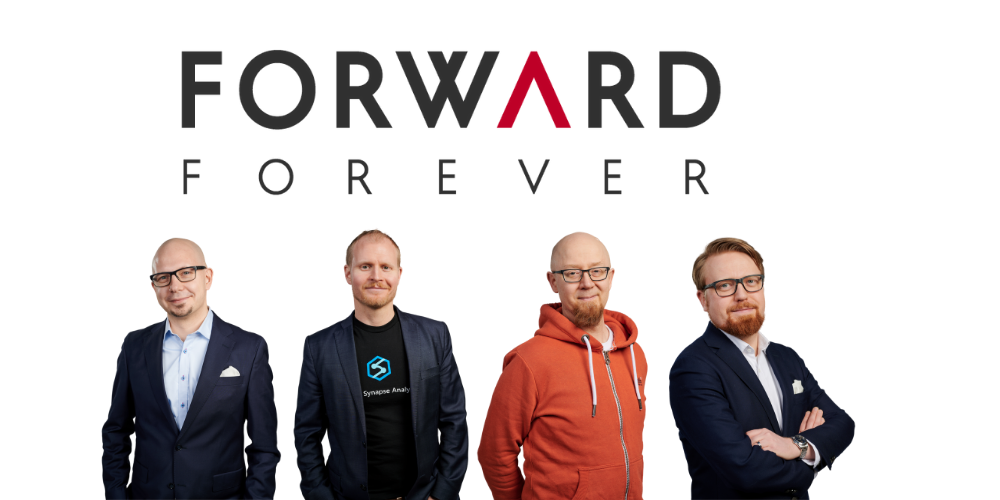
    This is the foundation that Forward Forever is built on. Our team consists of professionals with several years of experience on delivering customer solutions with Power BI, Power Apps and Dynamics 365. What we’re NOT planning is sticking to doing what we already know, though. The fact that we all see the clear need to evolve our skills towards the demands that the unstoppable onslaught of Power Platform will gradually force upon every partner out there is precisely why we are joining forces. This is how individuals like us can move forward as a team:

    • Timo Pertilä, a fellow Microsoft Business Applications MVP has a loooong history in Office 365 world and has jumped head-first into Power Apps and Power Automate in his 100+ blog posts over the past 2 years.
    • Jouko Nyholm is a leading expert in the local MS Data Platform scene, with background as a full stack developer who later decided to fully embraced Power BI well before it exploded into the dominant BI tool that it is in the market today.
    • Lasse Teeriaho is an entrepreneur with a solid Dynamics 365 CE background from both partner and customer roles, with hands-on experience on cutting edge MS technologies in machine learning, AI and bots.
    • Jukka Niiranen is… well, I am what I’ve become over the past 20 years.

    Honestly, I couldn’t hope for a better crew to sail with on this journey of helping our customers navigate the Power Platform seas. To quote the lyrics of a song by the late & great Andrew Weatherall:

    Fail we may, sail we must.

    Andrew Weatherall interview: “It’s bollocks, it’s discos, tell me tales of the sea.”
  • Dynamics 365 & Power Platform licensing FAQ, February 2020

    Dynamics 365 & Power Platform licensing FAQ, February 2020

    Here’s a collection of recent questions from the Dynamics 365 and Power Apps use community on licensing topics. The answers are my own interpretations, based on what I’ve seen from MS or other community members. It’s a point-in-time blog post that may well be outdated tomorrow already. Please do also leave a comment if you see errors in the answers I’ve written.

    As always with enterprise software licensing, ultimately the answers need to come from materials published by the software vendor, i.e. Microsoft. At the end of the day the customer is always responsible for being compliant with their own legal agreements that may have specific terms included.

    Team Members

    Q1: What’s changing in the 2020 Release Wave 1 for users equipped with Dynamics 365 Team Member license?

    The release plan contains several items that talk about licensing enforcement. So, the actual rights for Team Member licenses are not changing, but there will be technical limitations on what the users are actually allowed to do. I’ve blogged about the underlying mechanism for linking service plans to application types, which will first be used for Team Members and down the line probably also for other licensing types.

    2020 Release Wave 1 will introduce three new App Modules with pre-configured experiences for Team Members: Sales Team Member, Customer Service Team Member and Project Resource Hub. See my review of the early access version of these New Team Member Apps for Dynamics 365 for more details.

    Q2: When will the technical enforcement be enabled in our Dynamics 365 environment?

    For new customers, Microsoft intends to switch on the restrictions in April 2020. For existing customers with Team Member users, the change won’t happen overnight. Expect to see further communication from MS on this if your organization is affected by the changes.

    Update: On Feb 24th Microsoft published the following “Dynamics 365 – Team Member License Enforcement Notification” in the Microsoft 365 Message Center (MC204622) visible to administrators:

    To facilitate a smooth transition to the new Team Member app experiences, all existing customer organization instances, which will be impacted by this change, will be granted an additional grace period until June 30, 2020.

    Update 2: due to COVID-19, Microsoft has postponed several deadlines for updates and deprecations. The latest guidance for Team Member licensing enforcement is now:

    To facilitate a smooth transition, all customer organization instances that are created before April 1, 2020 have been granted an additional grace period until January 31, 2021.

    Q3: The entities we use with Team Member license in our environment are not included in the standard apps, can we add them?

    Yes. Customizing the aforementioned App Modules is allowed, as long as you follow the instructions given by Microsoft:

    “Team Member apps can be tailored to more closely fit your organization’s industry, nomenclature, and unique business processes, just like other model-driven apps built on Common Data Service. However, these customizations will need to conform to the Dynamics 365 Team Members use rights detailed in the licensing guide. While customizing the app, you can add 15 additional entities. These additional entities can be any Common Data Service core entities, or you can create custom entities.”

    Q4: The new Team Member apps ship with dedicated security roles. Does it mean we’re only able to assign these to the TM users and nothing else?

    There is currently no restriction on what roles you can assign to users with a Team Member license. The way I see it, the OoB security roles are primarily used for granting access to the App Modules and stripping down features within the app that are not within the original design scope.

    Q5: If we need users to access more than 15 entities, what are our options?

    The App Modules for Team Members will technically enforce a limit on how many entities can be added. Now, keep in mind that the App Module itself doesn’t restrict what’s actually visible in the UI when looking at an entity form. For example, an account form can have many related entities shown that are not part of the App Module specification. If you don’t directly need to navigate to the entity but rather use them to describe properties of the main entity (say, account plans related to an account), then there might not even be a problem here.

    If you need to browse through lists of tens of different entities, then you’re really pushing the boundaries of what Team Member licenses are intended for. Anyway, you could consider alternative access mechanisms alongside the Unified Interface App Module to cover these scenarios. Reporting tools could be a better way to present large quantities of data that are going to be read-only for the users. By purchasing a Power BI license for users that are equipped with Team Member licenses already, you would have full access to read the business data in CDS via reports and dashboards – as well as use Power BI for any other analytics needs within the organization.

    Q6: Our users are accessing data mainly via the Dynamics 365 App for Outlook, is this going to be available to Team Members?

    Yes. The Licensing Guide specifically lists this as the first use right for Team Members in Appendix A: “Access Anywhere: Web App, Mobile App, Tablet App, via Outlook.”

    Q7: Can we also leverage Canvas apps with the Team Member license?

    Yes and no. You can use embedded Canvas apps within a Model-driven app entity form, since these are just customizations within the app itself. However, you can’t access standalone Canvas apps with just a Team Member license.

    Q8: What about if we have Office 365 license that gives access to Power Apps AND a Team Member license, could we then build a Canvas app that reads Dynamics 365 data?

    Probably not, as this would require access to Premium Connectors. The CDS Current Environment Connector is the only non-deprecated way to access Dynamics 365 data (in the “product formerly known as Customer Engagement”, not talking about Operations or Business Central here), so this will likely be the technical blocker that stops you from building the custom app.

    Power Apps

    Q9: If we were to move our licenses from Team Members to Power Apps per App plan, what will the main differences be in the user experience?

    Power Apps licenses are meant for custom apps, meaning there will not be a preconfigured App Module from Microsoft. That’s no big deal, since creating new Model-driven App Modules is very simple. You can choose the entities you need in the app, design a sitemap to provide the navigation experience for accessing these, give your app a name, hit “publish” and have a custom App Module available to the users. There aren’t any fundamental differences between what a Sales Team Member app and “Our Customer Management app” look like to the users, as they’ll all be Model-driven apps presented via Unified Interface.

    Q10: Are there still restricted entities in Dynamics 365 that you can’t access with Power Apps licenses?

    Yes, there are, but no one knows exactly which entities. We are still waiting for Microsoft to update the list of Restricted entities requiring Dynamics 365 licenses, to align with what was supposed to be the October 2019 licensing model update. Eventually there will be new information published, but the current situation is quite challenging for both customers and ISVs to navigate past the Power Apps potholes.

    Compared to Team Member rights, a Power Apps premium license grants you access to create-read-update-delete (CRUD) entities like accounts, leads and opportunities that are read-only for Team Members. Also there are no 15 entity max limits in the Power Apps world, so your custom app can have a CDS data model that’s very complex. When you’re working with entities you create yourself, there are no restrictions at all. When you touch something built by MS for their first party apps, there’s a chance that limitations will apply at some point.

    Q11: If we would like to allow also external users to access Power Apps in our tenant, can we do that without buying a Power Apps Per App Plan or Per User Plan for everyone?

    With Canvas apps, there is the option for “bring your own license” (BYOL) available, which I’ve covered in this blog post. For Model-driven apps, this isn’t possible today. Power Apps Portals is always an option if you’re willing to re-build your app as a portal UI. (See also the Capacity topics below.)

    Q12: We’ve bought Power Apps per App Plan licenses for our users, now how do we assign these to the custom Model-driven app we’ve built?

    This is currently a tricky process, since Microsoft is still working on the proper mechanism to associate app passes with Model-driven apps. Follow these steps published on Magnetism Solutions blog and you should be able to pull it off. The Canvas app side is much easier and better documented by Microsoft.

    Q13: It seems that we can’t assign the app passes to both our production and test environments. Is this a bug or a feature?

    It’s a feature. While Dynamics 365 licenses like Team Member grant access to any number of environments in your tenant, the Per App Plan is actually a “Per App Within an Environment Plan”.

    Q14: From a licensing perspective, what are the differences between a Dynamics 365 environment and a pure CDS environment without Dynamics 365 Apps?

    Power Apps users can access any environment, if they have the Per User Plan or a Per App Plan app passes assigned in that environment. Dynamics 365 users are only allowed to use environments that have one or more Dynamics 365 Apps installed. So, if you build a small expense tracking app in a pure CDS environment, a user with $10 or $40 Power Apps licenses can use it, but a user with a $95 Dynamics 365 Enterprise App license can’t.

    Q15: If we start with a pure CDS environment to build a custom data model for our custom apps and later want to add a Dynamics 365 first party App from Microsoft, how does that work?

    Today you can’t deploy Dynamics 365 Apps into a pure CDS environment, so the only way would be a data migration project from your CDS environment to a new Dynamics 365 environment. It’s a technical limitation that MS surely wants to remove at some point, but right now you can’t step up from custom app to first party app via a license purchase alone.

    Capacity

    Q16: We want to build solutions that go beyond the personal productivity apps that the Default Environment is really only good for. What do we need for adding more environments, to leverage CDS and do proper ALM?

    Creating a new environment requires database storage capacity, since every blank environment consumes 1 GB before you even store any data there. This is the only cost associated with environment creation, you don’t need any instance licenses for sandboxes anymore like Dynamics 365 used to require earlier.

    If you purchase even a single Dynamics 365 license or a Power Apps Per User Plan license, you’ll get the 10 GB default capacity for database storage. If you only purchase Power Apps Per App Plans, it’s 1 GB. Each additional user accrues 250 MB more, if you buy Dynamics 365 Enterprise Apps or Power Apps Per User Plans. With Power Apps Per App Plan or Power Automate Per User Plan the users only accrue 50 MB. With Dynamics 365 Team Member or Professional App licenses, there’s no accrual per user.

    The default environment already burns 1 GB of your database capacity, so creating new environments may not possible without buying a capacity add-on license – unless you’ve bought one license that increases your default capacity to 1o GB (hint: always buy one).

    Q17: We have integrated other systems with Dynamics 365 / CDS and are now worried about the cost of API calls. How much will we have to pay for these?

    If the integration is accessing CDS as a non-licensed application user, the number of API calls that you have available for free is determined based on the types of licenses in your tenant. With at least one Dynamics 365 Enterprise App user, you get in total 100k requests per 24h, every day of the month. With Professional licenses this falls to 50k and with Power Apps / Automate it’s 25k. Anything beyond that requires buying dedicated capacity add-on licenses.

    Now, even though you can buy the license already, you can’t assign it yet. Since there also isn’t any API usage telemetry available to customers yet, we’re not in a situation right now where the system usage would be technically limited based on overage.

    Q18: Power Apps Portals, is the login capacity license starter level of 100 logins / $200 per day or per month?

    That’s 100 logins per month. A login session lasts 24 hours, after which a new login is consumed from the licensed capacity. If a user logs in every first day of the month, that’s a $2 per month cost. If they log in every working day of the month, the cost would be around $20 per month for Portal access, which is twice the price of a Power Apps Per App Plan. For higher volumes of Portal usage, there are discount tiers available to bring down the costs. Note that you need to purchase a sufficient amount of capacity in advance, based on how many logins you expect to have in any given month, because unused capacity does not roll over to the next month.

    There’s more!

    I’ve written several blog posts about the licensing topic, which you can browse through right here. If you want to keep up with the latest news around Power Platform, please feel free to subscribe to the Thinking Forward blog updates.

  • New Team Member apps for Dynamics 365

    New Team Member apps for Dynamics 365

    In the 2020 Release Wave 1 release plan documentation we saw that Microsoft is finally going to bring technical licensing enforcement for Dynamics 365 Team Members into the platform. By launching specific App Modules designed to be used with the cheap Team Member license as well as building the mechanism for controlling which Service Plan entitles the users to access which App Modules, there will now be a clear line for what is and isn’t possible right within the system.

    That’s how it is in theory. What about in practice? Let’s explore the Early Access features launched for 2020 Release Wave 1 on February 3rd and see how these App Modules are implemented.

    Sales Team Member app

    Since Sales is by far the most common business process that CRM systems built on Dynamics 365 Online are managing, let’s start from the dedicated Team Member App Module for this scenario. The pre-release documentation isn’t very extensive yet, but from there we can get the basic intention of this new app:

    “At a high level, users with the Team Member license can perform the following tasks in the Sales Team Member app: 1) Customer management: work with accounts and contacts. 2) Lead and opportunity management: see leads or opportunities linked with accounts or contacts, or see other sales-related data. 3) Add activities, such as notes.”

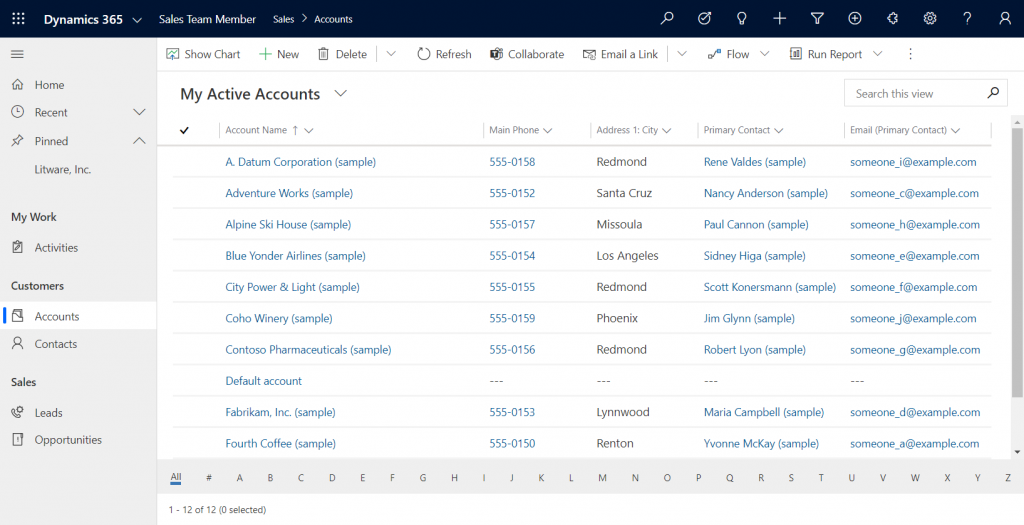
    Upon launching the app, we’re greeted with a familiar experience that looks like Dynamics 365 Sales, only it’s simplified to contain just 5 menu items in the sitemap: Activities, Accounts, Contacts, Leads, Opportunities. If the dashboards menu was also included here, the app would resemble the kind of CRM system that most small organizations or teams actually need in real life.

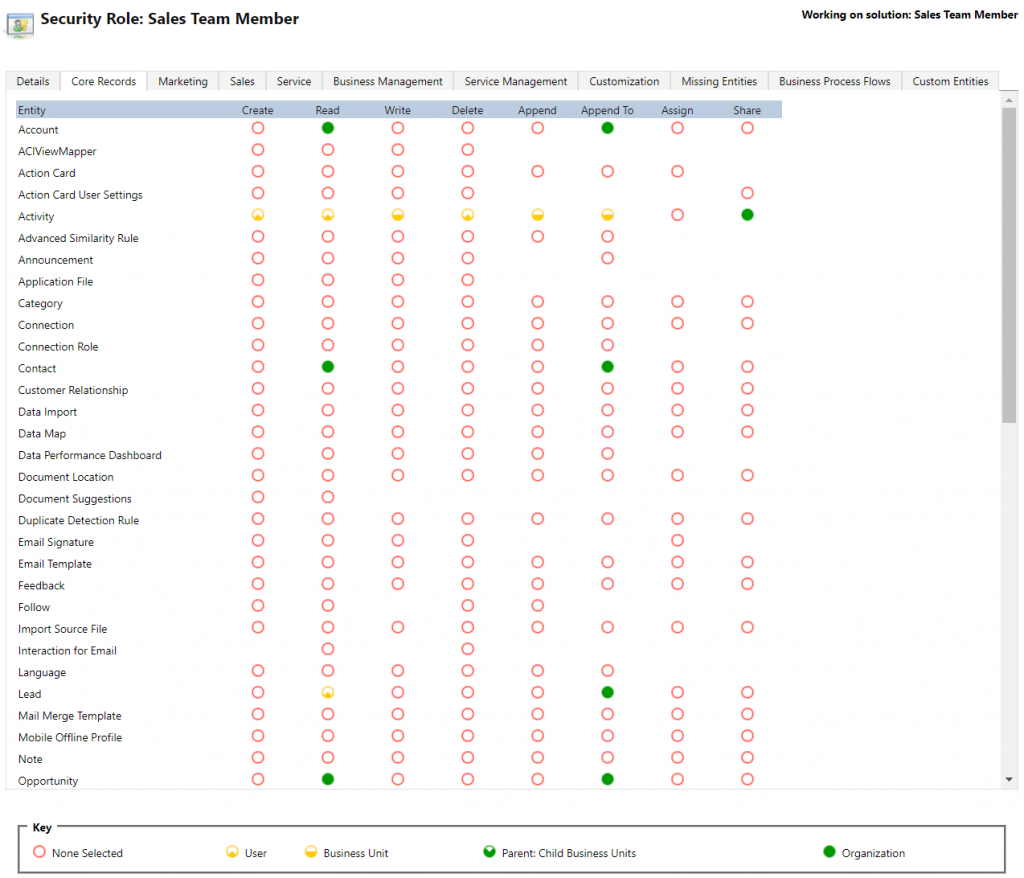
    If we’re using the app with the full access rights granted by a powerful security role like system administrator then there isn’t much that the Sales Team Member app stops us from doing. For example, creating or editing accounts is one of the rights that has been stripped away from the Team Member license, yet the app would happily show us a “New” button for adding accounts via this App Module. The secret lies in the Sales Team Member security role that comes with the solution. A view of the privileges for core entities looks like this:

    Wow, that’s quite restricted indeed! Assigning only this role the users wouldn’t even permit viewing activities from anyone else, nor leads, or adding contacts. Let’s get back to the customization options later, but this is indeed in line with the description of what Microsoft intended the offer with the standard Sales Team Member app.

    Customer Service Team Member app

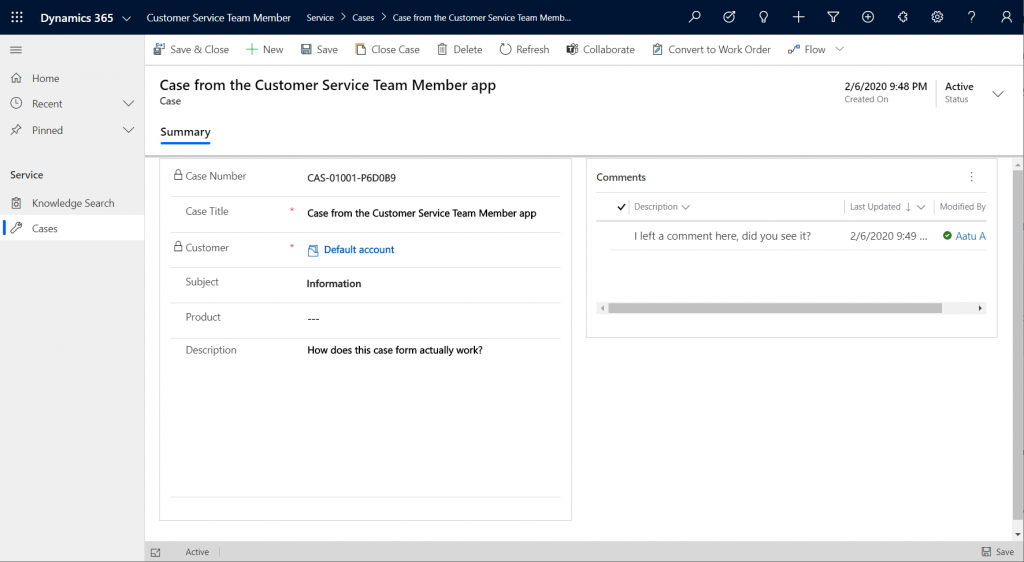
    The second experience is for Customer Service – but not in the way that you’d traditionally see the Customer Service App of Dynamics 365 being leveraged for assisting external customers. This Team Member app is intended for scenarios where the app users is actually the customer being served:

    “With the entry-level Team Member license, you can now address self-service support scenarios for your employees using the new Customer Service Team Member app module. Employees can create cases for their problems, such as laptop issues, HR queries, and administrative needs, and interact with agents through the commenting feature. They can also search the knowledge base for solutions pertaining to their problems.”

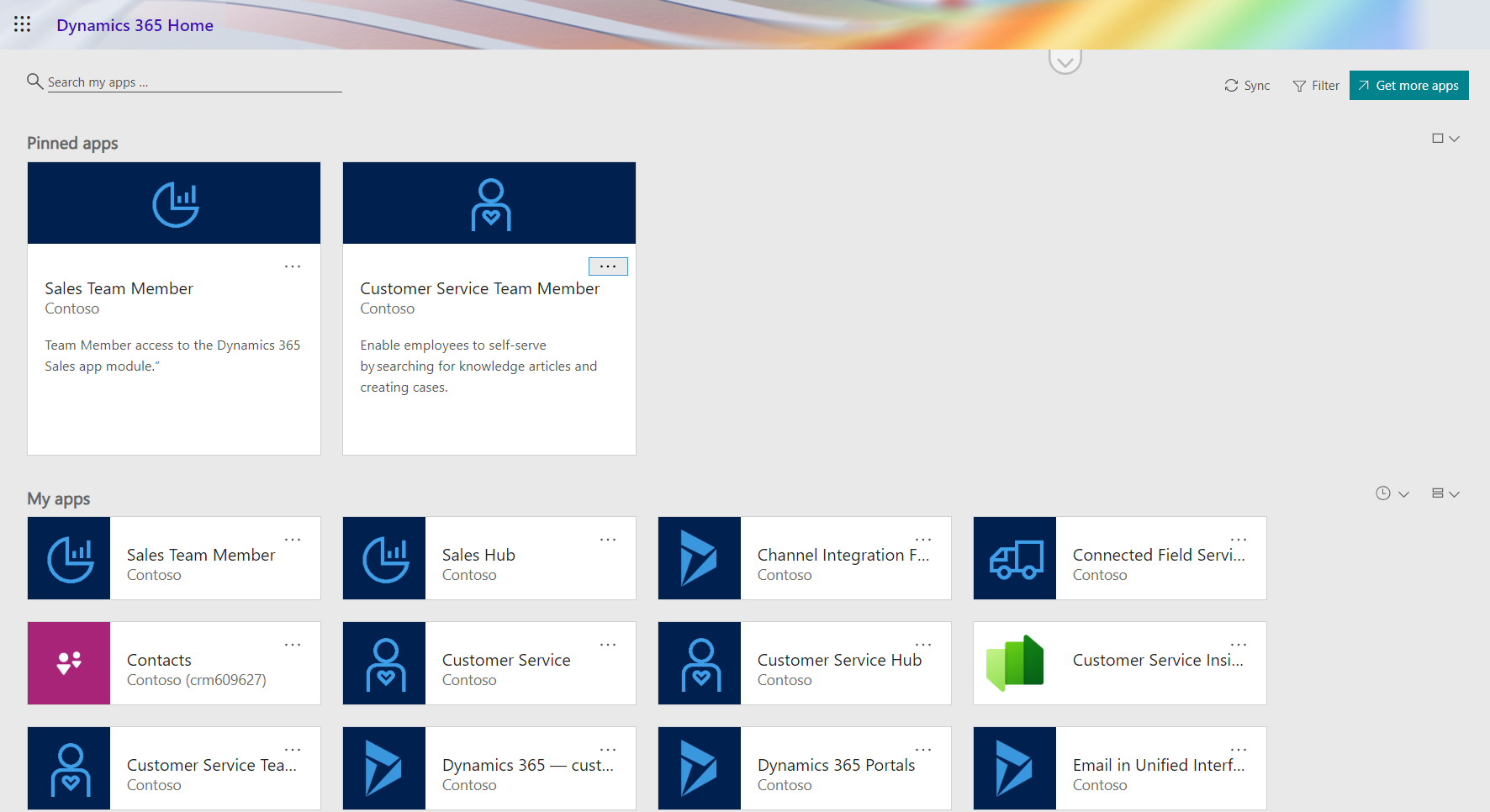
    Unlike the Sales Team Member App, this App Module isn’t installed by default. That’s probably a good thing, since I’d imagine the majority of Dynamics 365 customers are not using it as an internal helpdesk – although it definitely is a perfectly sensible scenario. If that’s what you’re doing, then the CS Team Member solution installation will need to be started from the Dynamics 365 Admin Center.

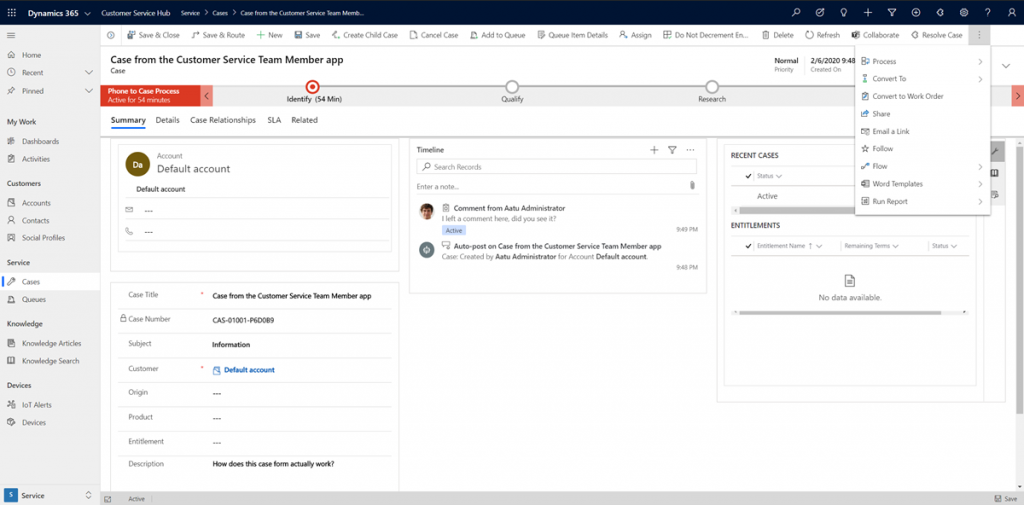
    If we look at the same case record via the full form in the Customer Service Hub App Module, we’ll see quite a stark difference. The solution package for the Team Member app appears to contain a web resource called Incident_teammember_library.js that modifies the behavior of the case form in many ways, such as hiding the Business Process Flow, replacing the standard Resolve Case dialog with a much more streamlined version and who knows what else. The Command Bar also contains far less functionality than it normally would.

    An interesting feature of the Customer Service Team Member app is the use of a default account that you can configure for the organization. The cases created via the Team Member app will automatically be linked to this account as the customer. The requirement for having either an account or contact as the customer has been a part of the MS CRM data model since day one, which has traditionally made the internal helpdesk scenarios quite tricky to implement – if the customers actually are users of Dynamics 365. Without any further documentation, I’m not quite sure what Microsoft’s vision has been for this new feature in the Customer Service Team Member app, since it looks like there isn’t any linkage to the internal customer (user) now in the case data model. If a person who provides helpdesk services would now assign the case to himself to work on, where’s the reference to the actual person who was in need of assistance?

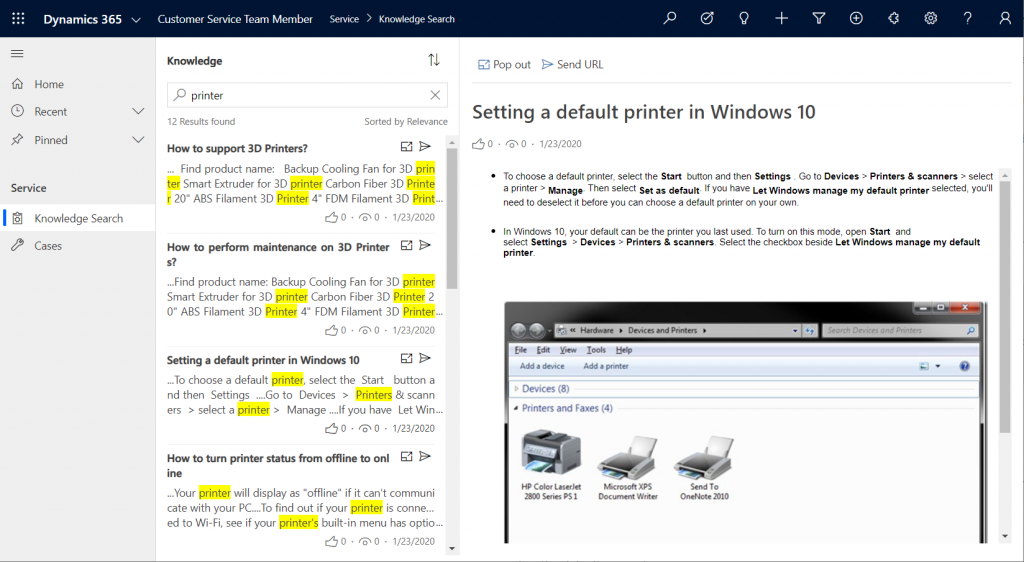
    The other available menu in the Team Member app sitemap, Knowledge Search, isn’t a reference to any entity but rather presents a dedicated UI for browsing published Knowledge Articles. Well, browsing isn’t maybe the right term, since the only option here is free text search for keywords, which will then return a list of articles if matches are found.

    It’s good to keep in mind that certain features of Model-driven Apps in Dynamics 365 aren’t yet App Module aware – meaning they’ll be presented in the UI the same way regardless of which specific app the user has launched. Recent and Pinned items will contain data not included in the App Module, Advanced Find will show all entities that are visible to the user’s security role, the Assistant and (deprecated) Task Flow buttons will always be there in the top Nav Bar. Still, the core experience of App Modules can be restricted down to a limited subset of features, as demonstrated by these Team Member apps. When moving from legacy web client to Unified Interface, these type of targeted experiences definitely are something worth pursuing, rather than the oldskool CRM monoliths that contain a hundred and one items in the navigation.

    Customizing the App Modules

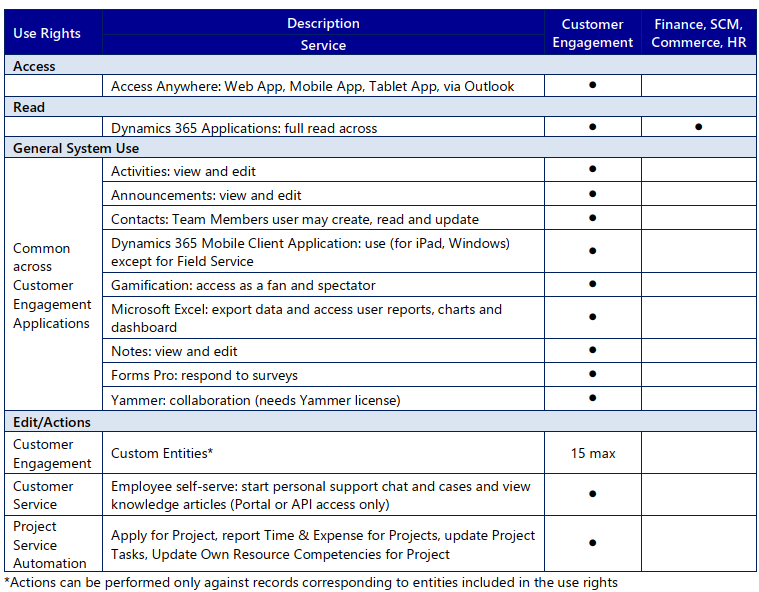
    Now that we know what comes out of the box for Team Member users, many customers will surely be asking what to do with the functionality in their CRM systems that isn’t represented in these standard App Modules. To understand the commercial boundaries better, let’s have a look at what the latest February 2020 licensing guide has to say about the rights of Team Members. We’ll start from Appendix A and the table that describes use rights for Team Members in Customer Engagement apps. (Yes, even though Microsoft product documentation says the term “Customer Engagement” is no longer used for online products, the licensing team hasn’t yet come up with a new term to replace CE in the licensing guide.)

    To start off, Team Members still have the right to read all Dynamics 365 application data. Therefore every single entity you could possibly include within the Sitemap of an App Module could in theory be brought in there. Of course you would have to ensure via the security roles that no creation or modification of those records would be allowed. Also the reporting and dashboards features are explicitly stated as being available for Team Members, on page 11 of the licensing guide.

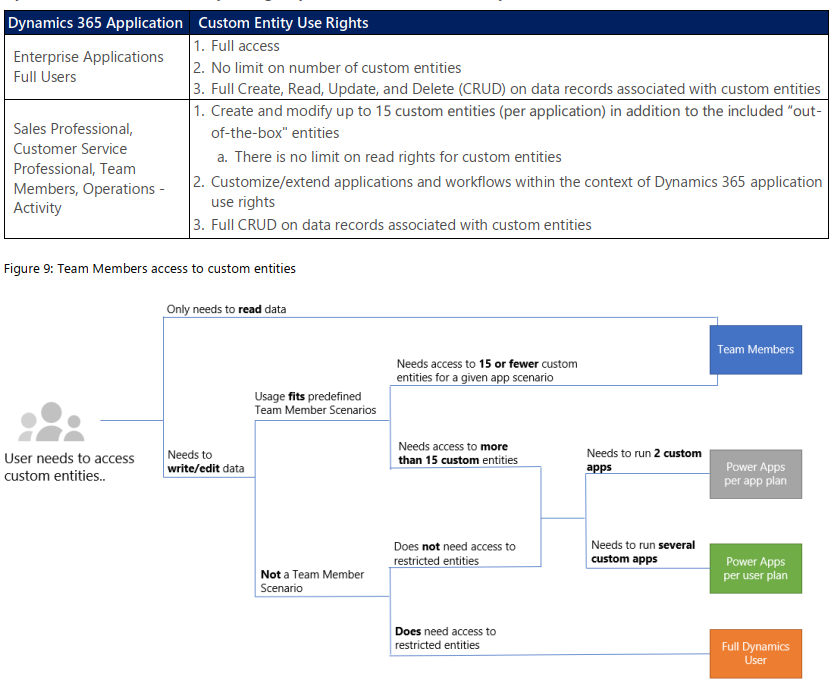
    As for custom entities, we see that there are also edit/actions rights, but we have a “15 max” restriction in the table. What does that mean? The answers are given in Appendix D: Custom Entities.

    We see that for a given app scenario, Team Members can create and modify records for up to 15 custom entities – per app. Where the lines are a bit blurry is the statement that this usage should “fit predefined Team Member scenarios”. As long as these custom entities are related to sales or customer service processes, I guess you’re on the safe side to add them to the standard Team Member App Modules that soon will be the only way for users with Team Member licenses to access Dynamics 365 – once the enforcement for first-party vs. custom apps is enabled in April 2020. Again, keep in mind that read rights are included for any entity, so the 15 custom entity limit couldn’t ever be technically enforced on the App Module level, based on how I interpret the licensing terms.

    What if you really need to do more than what the Team Member license would allow? What if you’re building apps for your unique business processes that aren’t covered by any first party app in the Dynamics 365 suite of products? Then you should explore the possibilities of Power Platform and its licensing model. Power Apps Per User Plan is the platform SKU that Team Member never was intended to be. If you’d map all the current and future workloads that Power Apps could take over in your organization’s business applications portfolio, the value is likely to be much higher than what the customization of these Team Member apps could ever deliver.

    Read more

    Microsoft has published new documentation on Dynamics 365 Team Members license that outlines the user experience for accessing the App Modules, as well as the customization restrictions.

  • My agenda for TechDays Finland 2020

    My agenda for TechDays Finland 2020

    One of the reasons why I changed my blog from “Surviving CRM” to “Thinking Forward” was to give me more space to cover topics that don’t necessarily fit under the umbrella of Dynamics 365. Yes, Power Platform is naturally one of the big drivers for this broadening of the scope, but I see a whole range of technologies in the Microsoft Cloud that are becoming more & more relevant for anyone who’s designing and delivering business solutions to customers. Broad awareness of the stack combined with deep expertise in specific fields is what I believe is needed to survive and thrive in my line of work. You could call this the path of the specialized generalist, or “T-shaped people who run the world”.

    How does one go about building up this awareness of Microsoft Cloud technologies? All the required information is of course out there in the great wide Internet, but the big questions are A) what would be the most relevant topics right now for me to search guidance on, and B) how could I make this new knowledge stick? In order to create a memory footprint that will still remain after I’ve moved on from one browser tab to the next, sometimes it helps when you can associate things with something tangible from the physical world. People, places, events, moments.

    The big event of the year for the Microsoft minded crowd of IT professionals in Finland is TechDays, which is on March 5-6 this year. I’ve got fond memories of the first time I attended this conference in 2011, when Dynamics CRM 2011 & CRM Online had just been launched and there was a dedicated track for this exciting new version & cloud service (which I naturally covered in my Finnish CRM blog at the time). Now, I have to admit that level of exposure to MS BizApps didn’t exactly become the norm for the event, because for a long time the MBS unit and its Dynamics products remained on the fringe of the mainstream Microsoft product portfolio.

    Today things are different. No, you still wouldn’t find a CRM session from the TechDays 2020 agenda, but you wouldn’t find one in Microsoft’s list of products sold, either. What you will find instead is Power Platform being promoted as the common customization layer for both Office and Dynamics products. You’ll encounter a growing number of Azure services being turned into Insights products in the Dynamics 365 portfolio. You’ll see Microsoft promoting a platform for every developer, from professionals to citizens. You’ll hear Satya being bullish in MSFT earnings calls about their Customer Data Platform, powered by Dynamics 365 + Data Platform.

    That’s how the story has evolved and this is the new reality in which the customer solutions must be designed: making use of all we have, not just what we’re familiar with. So, let’s look at the TechDays 2020 Finland session list with this in mind. Here are my top 3 sessions picked from the domains that I consider highly relevant for business applications professionals that want to understand the bigger picture of MS Cloud: Power Platform, Data Platform, Azure, Microsoft 365. I will also try to do a post event summary of the sessions I managed to attend and share the key takeways.

    Power Platform

    “Power Apps – Miten pääsen alkuun ja vielä pidemmälle?” by MVP Timo Pertilä. “Encrypted in Finnish” yet consisting 100% of demos, this session is going to help you kickstart your Power Apps (Canvas) app building journey for sure.

    “How to build RPA solutions with UI Flows” by Timo once again. Robotic Process Automation is one of the hottest areas in business software and MS has only very recently entered the game with Power Automate’s new UI Flows that are aiming for GA in June. How far are they already? We’re about to find out!

    “Developing enterprise-ready solutions with Power Platform and SharePoint” by Mikko Koskinen. Even if there is native support for CDS in Power Platform, the Connectors to SharePoint are bound to be the most common data source/target for apps today. Understanding how to leverage these in scenarios that go beyond citizen developed apps is therefore quite important.

    Data Platform

    “Azure Synapse: The day when relational and unrelational folks became friends forever!” by MVP Vesa Tikkanen. For us XRM folks who’ve had a fixation for building a relational data model for everything we do, it’s time to dip our toes into the lakes of non-relational business data that is needed in so many scenarios (like the CDP example).

    “Building an Empire – Implementing Power BI Step by Step” by MVP Alexander Arvidsson. I’ll be the first to admit that of all the key pillars in Power Platform, Power BI is where I have the least hands-on experience so far. Therefore the promise of crafting the PBI solution from the absolute beginning and working our way towards Power BI dataflows sounds like just the thing for me!

    “Introduction to Azure Databricks” by MVP Oskari Heikkinen. Going big in the data field requires courage to explore technologies like the Apache Spark based Databricks and understand how they relate to MS developed services in Azure.

    Azure

    “Selecting the right Azure products for your Azure PaaS project” by MVP Sakari Nahi. Just because I know how to sprinkle some #azure hashtags on my social media posts, that doesn’t mean I would have the capacity to keep an eye on all the products that are being launched there. I’m convinced that Sakke from Zure can give a Power Platform “aPaaS” guy like me a nice crash course on what the “PaaS with no training wheels” consists of.

    “Need to know Azure services as a Microsoft 365 developer” by MVP Laura Kokkarinen. I bet there are similar mental barriers in reaching into raw Azure, no matter if you’re extending Dynamics 365 or Office 365 based solutions. It’ always interesting to hear how the professionals from the cloud next door are tapping into “The World’s Computer” when delivering customer specific solutions.

    “Case Terveystalo: Terveydenhuollon digitaalisen palveluiden iteratiivinen kehitys Azuressa” by Ilari Richardt and Masi Malmi. The most interesting stories are from the real world projects, so I’m looking forward to learning what a large healthcare company like Terveystalo has encountered on their Azure journey.

    Microsoft 365

    “Lisenssit löytyy, #mitäsitten – ota Teams hallitusti haltuun!” by MVPs Karoliina Kettukari & Vesa Nopanen. User adoption has always been a hot topic / grave concern in CRM projects. Even though Microsoft Teams is now the fastest growing product in the software giant’s 45 year history, that hardly means users will just discover all the benefits on their own and live happily ever after. Tips for how to gracefully pull off the launch new technology affecting such a large crowd of information workers are always useful, even when developing and rolling out more targeted business apps.

    “Getting Started with Developing Apps for Microsoft Teams” by MVP Christina Wheeler. Speaking of business apps, it’s pretty clear that Microsoft is envisioning Teams to become the hub for teamwork, not just via common productivity tools but also unique applications made available through its UI. Understanding the options available and contrasting them with what Power Platform can offer is going to be key in building a solid app strategy for customer organizations.

    “Customizing Microsoft Teams Provisioning and Governance” by MVP Olli Jääskeläinen. Collaboration practices should be backed up by a smart system that can bring some structure into the otherwise so unstructured world of conversations and documents. Learning how to more tightly connect Microsoft Teams provisioning with the processes and data structures managed in systems of record like CRM is what I’m eager to see.

  • Moving forward: my career retrospective 2000-2020

    Moving forward: my career retrospective 2000-2020

    One week ago I left my job and took an important step away from being an employee – something I have been for the past 20 years. I am now working towards building a new company that will offer services in the Microsoft Power Platform field of technologies. We are not quite ready yet to share details about what’s coming, but this will change within a few weeks time.

    Becoming an entrepreneur is not something that happens overnight, nor is it a journey that would have a very predictable route and schedule. Still, now that journey has begun. For me it is a time of both reflecting on the past as well as envisioning the future. Funnily enough, this balancing of thoughts between the two ends of the time spectrum actually results in a strong sense of “living in the now”.

    To better understand the direction where I see myself heading, I wanted to write down the steps that have lead me up to this point in my professional career. Since for me writing is thinking, the primary purpose of the exercise was to gain perspective on my earlier experiences and see how the dots may actually have connected when observed from a distance – i.e. after enough time has passed to wash away the minor details from my head. So, for those who are interested, here’s my story from 2000 to 2020.

    Exploring customer data management

    At the beginning of the new millennium, in the Spring of 2000, I briefly joined the dot.com boom at its height and got to experience the first round of revolutions introduced by new mobile technology. There wasn’t much non-voice data moving between mobile devices of course (with only 2G available) but the explosion of digital service usage by consumers meant that a wealth of data on their behavior had started to accumulate. Even though I had no actual understanding of the source technology that spewed out this virtual trail of what someone had done with their handset or their PC browser, what I did find absolutely fascinating was how this data could be interpreted to tell us what those millions of customers liked and didn’t like.

    In my first real jobs I was positioned within the marketing organizations of companies who were running digital consumer facing services. I took part in the operational campaign management with target group definition and queries, but also had the opportunity to report on the response rates as well as combine these with other customer value metrics to create new insights from this data. I did my bachelor’s thesis on “measuring email direct marketing effectiveness in customer relationship building”. Its founding idea of being able to track the individuals who opened the message or clicked on links and then cross reference that with customer profile data from the CRM system seemed like an incredibly efficient way to gain new knowledge about the relationship’s state and direction. Sure, the actual systems needed for working with that data and automating email & SMS campaign logic were still hugely expensive to implement at the time. But hey: at least a junior analyst like me could create some pretty neat Excel summaries on the cheap, thanks to all that sunk cost spent on IT consultants who had built the data platform.

    Had I stayed in this mobile wonderland, I might well have gravitated deeper into what was then referred to as analytical CRM, which could easily be seen as the path towards the business of crunching big data at massive scale. However, I didn’t really ever possess the mathematical skills needed to become a proper data scientist. It seemed to me like there must be plenty of similar opportunities out there in other industries, too. I imagined almost any company that understood the value of actively managing customer relationships could optimize their operations by having smarter processes in place that gathered and made use of the CRM data. Wanting to explore the alternate realities of CRM that existed out there, I found myself moving towards B2B scenarios where the transactions were of lower quantity but of much higher value. Funnily enough, I soon discovered a negative correlation: the more valuable these transactions actually were, the less likely it was that a systematic process was followed and accurate data captured about the engagement with the potential customer. The holy trinity of People, Process, Technology and how they impact CRM success would quickly become apparent to me, thanks to being exposed to the human element of how the users of CRM systems actually behave.

    This was an era where everything was very much focused on doing more with the PC. To be more precise, it was about getting the employees to enter more data via their PC keyboard strokes and mouse clicks into the centralized databases that would then turn this data into reports and possibly even partially automated completion of business processes via integrated systems. Alongside my marketing tasks I ended up becoming responsible for running the complete IT services for an organization with ~50 users. Sure, initially I didn’t know much at all about going beyond the personal computing devices running Windows XP, but with access to a few aging Lotus Domino servers that were reaching end of live, I soon ended up taking this organization to modern tools like Microsoft Exchange 2003, Microsoft SharePoint Services 2003, Microsoft SQL Server 2005 and, yes, Microsoft Dynamics CRM 3.0. I didn’t yet realize back then how crucial it was that I had to get my hands dirty with all these MS server products. We needed to save up on the consulting fees while at the same time ensuring these systems supported the day to day business processes that kept the money flowing in and services flowing out.

    Learning the CRM consulting trade

    Next I went to work on Dynamics CRM 3.0 implementation, integration and development projects within a software company that was deploying the system globally to all its area offices. Again, the willingness to get my hands dirty with the kinds of technologies that I didn’t have much formal qualifications to be setting up (remember, I had mostly been “just a marketing guy”) proved to be a survival mechanism that paid off in terms of the results achieved when faced with surprises and uncertainty along a brand new path. Sure, it also taught me how easily the aspirations for achieving business process change can fail if attempting to accomplish it mainly through IT projects. Feature bullets in software rarely turn into success stories in business, when moving past the demos and presales. Nevertheless, seeing the endless number of moving parts involved in building a working technical foundation to enable this business transformation made me respect the depth of detail that proper CRM systems consultants must master.

    The single most important method for surviving in the sea of technological options and varying user requirements was building up my skills to acquire information from the global community that worked with the Dynamics CRM product. As a way to participate and give back, I launched my own Surviving CRM blog to share my experiences and document the many gotchas I had encountered. Observing all the progress made in new software versions from MS and the many partner products was whetting my appetite for taking this tech stack further. In the everyday life at the office, though, I was facing the agony of not being able to upgrade our systems into newer versions because of the nature of corporate IT and numerous dependencies between other systems and software versions. This was what finally pushed me to the next stage in my professional career. I had been participating in the CRM v5 Beta program (or “TAP”) and by the time CRM 2011 was nearing launch, I knew more about it than probably any consultant in the country. Which then quickly lead me to become one.

    In late 2010 I joined the IT division of a telecom operator that had built a hosted CRM 4.0 environment and offered a cloud CRM service that customers could sign up by just paying the monthly fee. Having experienced the massive IT effort needed in delivering Dynamics CRM from your self-hosted servers, this SaaS model immediately struck to me as a revolutionary way to cut down the barriers that had kept business users stuck with Excel sheets instead of a proper information system designed to manage their processes and customer data. The SaaS concept itself was of course familiar to me from before already. I had become an advocate of Shadow IT solutions in my earlier company, in an effort to find better ways for employees to share information and organize their tasks. So, even though I was initially tasked with managing the hosted CRM solution from a technology perspective, the true beauty I saw in the cloud service business model was having to deal with less IT to deliver working business applications.

    On the day I signed my contract for what was to become my first IT consulting role, I was sitting in the cab with my new manager and browsing through Twitter (on my HTC Touch Pro 2 running Windows Mobile). “Oh, it looks like Microsoft has announced this new cloud service called Office 365” I said to him at one point. Even though it wasn’t directly related to CRM, I’ve always framed that as the moment when the business of hosting MS software via SPLA licensing model in the local data centers died. A whole couple of months before I would even start my job, that is. In the beginning of 2011 the global availability of Dynamics CRM Online made it all too obvious that the players in the hosting business weren’t equipped to deal with what was ahead. Stuck again with no ability to upgrade our own hosted platform to the latest version (yeah, this was “cloud” back in the days) meant that I ended up aggressively selling against our in-house services and promoting the MS cloud option as a way for customers to ensure they’d be getting long term benefits from their CRM system deployment efforts.

    With a long enough experience on working on the customer’s side in CRM projects, I wasn’t your typical consultant who’d sing whatever songs needed to close a deal in presales stage. My manager at the time often described me as “brutally honest”, which was & still is an accurate description of my style of engaging with the audience (I took it as a compliment and I believe deep down he also meant it to be one).

    With the start of the global cloud era, combined with the rise of mobile apps and social networks, things seemed to have started moving forward pretty darn fast. At least that’s what it felt like when observing this new world light up around me, in the many digital channels I paid attention to. It was in this time period where I also started doing more concentrated work on trying to analyze what the signals from the MS ecosystem meant, through producing both internal memos on how I envisioned the business landscape around us to evolve, as well as writing down my thoughts on public blog articles. Being a geek with too much free time in my hands and too many networks, blogs and forums on my reading list, I kind of turned my CRM work into a CRM hobby. This became quite an addictive form of entertainment for me to consume – long before media formats like podcasts and vlogs became a thing in our industry. All I needed was a feed of text & images to keep me hooked for hours on end.

    Since I didn’t really believe in the value proposition of hosting MS software in local data centers of a telco, I thought what I’d next want to see is how things are run when working in a pure IT consulting environment. My second CRM consulting position was within a software development company that did things on a broad technology stack, for varying types of customer projects. One of the offerings happened to be Dynamics CRM, which on a deep enough technical level did tie into the .NET based custom development work done more broadly within that company. Running the whole business through a pure “by the hour” project model was much more straightforward than the earlier business model I had seen, where the same account managers were supposed to sell the customers pretty much anything from printers to CRM projects.

    We even had the technical competence for developing Dynamics CRM extensions as sort of “apps” – which were mainly integration templates in real life. The market shift towards CRM Online proved to be a bit of a struggle for those integration patterns, so a majority of the new customers projects that I mainly recall actually deploying into production at that time were in the public MS cloud already.

    The biggest gap in this business model built around software developer competency was the lack of any surrounding offering in the Microsoft application space. The heritage of custom software development didn’t really lend itself well to consulting customers on how to leverage different evolving parts of the Office 365 portfolio, for example. It was this lack of alignment in the broader MS ecosystem that ultimately became a blocker for the company’s commercial success.

    It was during this position that my Dynamics community contributions earner me my first Microsoft MVP Award. Having already set my eyes more on the outside world rather than the immediate project work at hand, this new expansion of my professional network lead me to gain an ever wider view into the true breadth of Microsoft’s product portfolio and R&D activities. It made me realize that instead of just doing what I know, I gotta go out and strive to do what is possible with this technology stack and the ecosystem around it. Do what others are still hesitating to do.

    Betting on the Microsoft cloud

    For my third consulting role I jumped into an even smaller company that didn’t yet have a CRM practice in place. They were, however, a cloud native company in the sense that their focus was on riding the wave of what Office 365 allowed modern, more agile MS partners to achieve. At this point all the traditional system integrators were still stuck in their past on-prem methods. Funnily enough, my first Dynamics CRM deployment project there was still for an on-premises environment, but in 2014 that didn’t yet feel like such a technical handicap as it would eventually turn out to be.

    The team consisted of high performance individuals who were not only skilled with the MS tools out there but also willing to live on the edge when it came to validating new products and features. It didn’t really matter if on a day-to-day level the individual consultants were still in practice focused on their own core areas: either SharePoint or CRM. What we were doing & how we were doing it was aligned with the path of the Microsoft Cloud, resulting in strong synergies in all areas of the business. The cloud story also truly came to life when presented to customers this way, rather than as siloed IT projects of implementing a specific system to meet specific requirements.

    This did require a leap of faith also from the customer organizations, since often the specifications could not be tightly defined before kicking off a project. You needed to have an agile enough mindset to appreciate the value of experimenting with how the out-of-the-box functionality could support the business, rather than immediately resorting to custom development. After all, why go and implement the process exactly the way how some process owner out there had dreamed it, before they had ever seen the tools that would be available in the modern MS Cloud? For me, as a code illiterate consultant that would explore all possible ways to solve a problem before resorting to requesting a plugin or Javascript to be developed, this was the original low-code/no-code approach for enabling digital transformation within organizations. Long before anyone had seen Power Apps or Automate, and only with a shaky understanding of what Power BI would later become.

    Dramatically cutting down the time-to-value with this fresh new approach of designing the sales, service and marketing solutions primarily on top of existing cloud app capabilities did deliver some pretty darn nice results for customers. With the growing MS product portfolio that evolved from CRM Online to Dynamics 365, there was always just more & more on the plate. We kind of just had to keep serving these new dishes to the customers, since we had pulled of the previous rounds so well. Being a lean consulting machine became an implicit target in its own right, which pushed everyone to higher and higher revs. Well, at least it pushed me to chase some elusive goal of efficiency and growth that I began to find increasingly demotivating. At some point I started asking myself “if this is what success looks like then do I really want it?”

    Being there at the start of the new CRM practice, I had originally made it fairly clear (to myself) that our biggest challenge would not be in the new projects for new customers and getting them through the initial system deployment. It would be in the life after go-live. Where every CRM partner typically fails to remain in close co-operation with the customer, right when they are facing the inevitable Trough of Disillusionment as expectations meet reality and the path forward becomes muddy. Someone needed to be there to ensure that measurable business results were built up, gradually over time, as both the usage and process coverage was expanded though systematic, well planned actions. Upon reflecting on my achievements in addressing these challenges, I simply wasn’t satisfied with the depth of impact made in the area that I had considered most important before starting the journey. This was one example of an area where I had pushed aside the silent goals derived from one’s value system, in order to stay on the path of success. In the corner of my mind I found other similar conflicts, too.

    I realized that just doing more of what’s in front of you, faster and in a more productive manner, isn’t ever going to change the direction of where you’re heading. Another discovery was that I was primarily accountable to myself for tackling the aspects that I found troubling in what the everyday work consisted of, since it’s of no use in trying to project your perception of problems onto the work community and expect them to step up in solving them. Regardless of the business performance indicators, we all have our personal success metrics that also need to remain aligned with where the team is aiming at. The misalignment can end up eating your intrinsic motivation once the rush of sheer speed wears out, even when everything seems to be fine on the surface. It happened to me, which left me no choice but to seek for a new trajectory to attain personal growth.

    In search of scalability

    I’ve always felt that much of what is done in your typical CRM deployment project is a waste. Reinventing the same wheel for every engagement isn’t all that rewarding at the end of the day, because it ties up expert resources in a non-scalable way. Projects should ultimately be a vehicle for building something that needs to be unique for a reason, yet looking at the Microsoft based CRM systems I’ve come across during the past ~15 years, the end results of these projects from a technical standpoint are often frighteningly similar. Sure, CRM as a software category is an example of a fairly well established concept that can only be done in so many ways. Those minor differences that end up costing money for a valid reason (i.e. integrations, industry specific business logic, analytics) don’t necessarily justify building something radically different for each customer, yet they are laborious to come up with. Still, the single biggest need for spending time in the CRM implementation project is about managing the change inflicted upon and experienced by the system’s users, rather than the software always requiring such time investments to be ready for use.

    Whenever there is a situation like this that involves systems, practices and organizations that operate mainly in the digital world, you know it’s a business model waiting to be disrupted. Instead of always selling consulting hours to deliver a CRM project at the start of it all, why couldn’t there be “starter kits” that had been designed to get you up & running with a basic setup that works for most companies/business units/teams in the target customer segment? Simple CRM apps like Pipedrive or HubSpot already give you a system that doesn’t come with a mandatory “insert credit card to purchase a project team for X days” step in the deployment process. Shouldn’t it be perfectly possible to craft such offerings on top of a flexible business application platform like the one Dynamics 365 contains beneath the apps? Wouldn’t these packaged solutions then also offer a great story for plugging in additional apps and modules once the foundation had been set up in a standardized way, to make use of the Microsoft Cloud’s many services and the products from the partner ecosystem?

    My second job in the telco industry was all about experimenting with this hypothesis. In order to enter a market where the IT consulting companies seemed perfectly happy to hold on to the customer specific project delivery model, the new contender had to build a product that would challenge the status quo via a distinct value proposition and a new revenue model. Getting new Dynamics 365 customers quickly off the ground with minimum customization work and maximum self-service support materials was one part of this plan. The other aspect was connecting these Dynamics 365 customer environments with as many communication & data services as possible with readymade apps rather than via traditional integration projects. If there really was market potential in bringing CRM solutions to SMB customers who didn’t fit the normal target group criteria for consulting projects, then this was what you’d need to build for catering to that audience.

    These concepts are pretty much straight out of the Microsoft playbook for how partners should seek a role for themselves in the era of cloud CRM that tends to commoditize the core application capabilities and lower the barriers for ISVs to integrate their own services with the global business application platform. The problem has always been that when operating in small markets like Finland, there’s fairly little room for partners to specialize in catering to specific verticals, or build any app functionality to test out in the home market. You’d need to aim global right from the start, and the risks in that seem to be too great when compared to the safe alternative of doing generic projects for local customer organizations you know, though the team of experts you also mostly know. Going beyond that requires investments in everything: planning, development, marketing, sales, support, the usual. Most of all it requires tolerance for failure as you experiment and fail, before you understand what it is that’s actually needed to succeed.

    Not too many opportunities exist in the local market to do something like this, so when they arise, you need to give it a go. Even when it sounds likely that things might not work out, the only thing to really ask yourself is “what have I got to lose?” I chose to see where this path would lead and how long it would carry me, because I saw that there really wasn’t anything important for me to lose in making that choice. The possibility to learn from a whole new business activity of developing products outweighed the harm that would come from stepping outside an organization that had been optimized around delivering customer solutions on MS Cloud and into an enterprise where such a service would be merely a single drop in the ocean. Sure, from my past experience I could envision a million reasons why this thing would not work in the CRM market that I knew so well, yet I found myself being able to give “what if” a chance regardless.

    As I had expected, a lot of barriers were in place to stop us from getting up to speed with building the products that were needed to bring the vision to life. Following my pattern of brutal honesty, I wasn’t too shy on telling everyone fairly early on where I saw the next obstacles that we were bound to hit. Reflecting back on this, even though I might have been right in my analysis of the many details that stood between the product’s capabilities and getting to real customer value, perhaps it would have been more beneficial for me to try and play along a bit more. Banishing the inner critic is not something that comes easy to me, but that would certainly be a welcome skill when attempting to foster creativity and paint a picture of what we should be aiming for on a high level.

    I won’t go further into details here, as we’re about to reach the point in our chronological journey where not enough time has yet passed between then and now. What I can share is that the opportunity to work for a large information worker organization offered some very valuable perspective into the role of technology as both the enabler and the blocker for business success. This is something you can’t ever quite grasp when coming in as a consultant from a small company with zero legacy and hardly any organizational barriers – even if your actual project delivery work happens within these enterprise walls of the customer organizations. There are both huge possibilities and great inertia found in such environments that invariably affect how business applications need to be designed, deployed and fostered. Just like already earlier in my career, being able to experience the process from both sides of the table has been essential for me in gaining the perspective and empathy needed for achieving long lasting results in this field.

    In my roles as a Tech Lead and later Product Lead I had the perfect opportunity to observe the Power Platform emerge from the white space left between the established product areas of Microsoft. Had I been buried deep in project work for those usual CRM customer environments that most Dynamics 365 professionals spend their days in, it would have surely been much harder to see what’s happening out there. Of course I also had on my side all the connections that have been made possible via the MVP Award, both from the Microsoft product team and the unique network of experts that is Business Applications MVPs around the world. This combination provided me the confidence needed in making the decision that has lead me to now write this retrospective of my past 20 years.

    What lies ahead

    If you’ve read the story this far, then I think you deserve a break! I know I certainly do, which is why there won’t be an immediate part 2 for this blog post. But it’s coming, in one form or another.

    Looking back on all these steps in my professional career, I feel a strong sense of gratitude for being given the opportunities that each role has brought along. I have never regretted accepting any single position, because at the end of the day, it has always been me who has shaped that role into what it eventually became. Staying within the existing boundaries defined by someone else and then just improving my performance inside that box just isn’t who I am. For both good and bad, my mind is often working on solving the next problems that have yet to be identified as problems by others.

    The reason I’ve stayed on the move instead of settling down for a longer period of time within a single organization or position has been the inescapable urge for pushing these boundaries. That feeling of “there’s gotta be even more out there” – and there has always been.