Author: Jukka Niiranen

  • What’s New in Microsoft Dynamics CRM Polaris Release: The Slides

    On January 21st, 2013 the official announcement on “broader availability” of the Microsoft Dynamics CRM December 2012 Service Update (formerly known by codename Polaris) was made on the CRM Connection blog. Even though not all the CRM Online organizations have yet been updated, new trials in US and shortly in EMEA & APAC will get the latest functionality installed upon provisioning.

    The absolutely best way to get familiar with the future UI of Dynamics CRM is to get a 30 day trial organization for yourself and play around with the demo data. In fact for a large share of the existing customers this will be the only possible way, since there will be no on-premise version of Polaris. You’ll get the cross-browser support, API updates, and, contrary to previous information, the updated Activity Feeds solution when installing Update Rollup 12 for your CRM server (currently not yet available for download after having been pulled). Sorry, you’ll have to wait for the Orion release that’s coming out sometime later in the year 2013.

    Since I know many of you must be busy with deploying, supporting, developing and actually using  the current on-prem version of CRM 2011, I’ve created a summary of the new features  in the December 2012 Service Update just for you. No, not just a list of the bullet points that Microsoft has already communicated, but rather a hands-on exploration of how the new version works differently from the old CRM 2011. You’ll find it on SlideShare available for download or you can view it below (although the image quality in the streamed version is a bit crappy).

    The 34 slides cover those features I personally found noteworthy when getting to know the Polaris release. It’s not an exhaustive list by any means, but I’ve tried to highlight the changes and gotchas that a system customizer or administrator familiar with the previous versions should be aware of. The topics include:

    • Sitemap changes
    • Activity Feeds filters (see this earlier post for more details)
    • New process form structure and components (previously known as the “Flow UI”)
    • Swithing between new and Classic forms
    • Updated subgrids and limitations on working with related records in general
    • Extended case management functionality
    • Support for creating leads for existing accounts
    • + Many more!

    With this release Microsoft has done an excellent job with publishing a plethora of training videos on the Dynamics CRM December 2012 Service Update on the Microsoft Dynamics YouTube channel for anyone to watch, with no login required to access the materials on Customer/PartnerSource, so do take advantage of them. Unfortunately I haven’t yet found an official MS index page to these videos, so I suggest you refer to this post by Donna Edwards with the video links, because the video titles are impractically long when browsed on YouTube (hmm, wonder if this says anything about Microsoft’s product naming convention… probably not 😉 )

    And that’s not all, folks! By browsing through the updated Resource Center content online you can access detailed help articles on topics such as installing product updates, turn on the new sales and service process forms or customizing the forms in the new sales process. There’s so much more to this release than just the cross-browser support (although that’s bound to keep people busy as CRM 4.0 scripts start to break) that I urge you to have a look, even if you’re not working on a CRM Online environment. By starting early you’ll have a better understanding of how to prepare for the next on-premise release, what comes out of the box in Polaris and what type of customizations are sensible to make when knowing the upcoming form architecture and user experience that will arrive in the Orion release.

  • Windows 8, Outlook 2013 and Dynamics CRM – part 2

    Back in August I wrote about my initial experiences of using a Windows 8 PC with Office 2013 to connect the Outlook client to Microsoft Dynamics CRM. During that time we only had the preview versions of both the OS and Office, so some quirks were naturally to be expected. Now that Windows 8 is generally available and also the RTM bits of Office 2013 can be downloaded from MSDN (with commercial launch expected by end of January), it’s a good moment to revisit the topic. Upon my latest test I came across a few configuration gotchas that I though might be useful to share for anyone who’s struggling with the same issues.

    Connecting to CRM Online with WLID

    Our official work setup is still on Windows 7 / Office 2010 level, but being the kind of eager early adopter that I am, my home PC’s have moved to the brave new world of Windows 8 some time ago already. I installed Office Professional Plus 2013 on a Windows 8 64-bit laptop that’s not joined to a domain, so my login credentials to Windows are linked to my Microsoft Account (previously known as Windows Live ID). In my first tests in August this was a blocker for using a CRM Online organization where the user’s WLID / Microsoft Account was different in CRM and on the local machine.

    Update Rollup 11 removed the need to manually enable Windows Identity Foundation (WIF) on Windows 8, but out of old habits I checked that it was available before configuring CRM. Launching the CRM client Configuration Wizard and selecting CRM Online on the Server URL field of the Configure Organizations prompt gave a familiar error: “Cannot connect to Microsoft Dynamics CRM server because we cannot authenticate your credentials.” Just like before, it appears that the Configuration Wizard automatically attempts to use the Microsoft Account of the local user for logging in to CRM Online. Logging out of the account in Internet Explorer and then logging in to CRM Online in the browser didn’t seem to resolve the issue with the Outlook client connectivity, as a further error message was presented later in the Initializing the Organization phase:

    There is a problem communicating with the Microsoft Dynamics CRM server. The server might be unavailable. Try again later. If the problem persists, contact your system administrator.
    [Expanded Information]
    Unable to load the native components of SQL Server Compact corresponding to the ADO.NET provider of version 8082. Install the correct version of SQL Server Compact. Refer to KB article 974247 for more details.

    The KB article referenced in the error message discusses the following issue: “You receive an error message when you run a SQL Server Compact 3.5-based application after you install the 32-bit version of SQL Server Compact Edition 3.5 Service Pack 2 on an x64 computer.” However, downloading and installing the x64 version of Microsoft SQL Server Compact 3.5 Service Pack 2 for Windows Desktop didn’t resolve the CRM configuration error, so I opened a support ticket with Microsoft. They instructed me that I also needed to install the Cumulative Update 2 for SQL Server Compact 3.5 Service Pack 2, which is a hotfix that you need to request a download link to be sent to you by email. After my SQL CE 3.5 had been updated to build 3.5.8082.00, I was finally able to connect my Outlook 2013 with our CRM Online demo organization.

    Connecting to CRM on-premise with IFD

    During the previous test with CRM Online I had also tried to connect the Outlook 2013 CRM client  to our production on-premise CRM server that is IFD configured. I kept receiving the following error: “Cannot connect to Microsoft Dynamics CRM server because we cannot authenticate your credentials. Check your connection or contact your administrator for more help.” Looking at the error details there was a message claiming “no credentials are available in the security package.” (more…)

  • The new Polaris UI in practice

    CRM Online users may have already started thinking about when their organization would be getting the December 2012 Service Update. The good news is that we have an actual release date now, but the bad news is that it’s not in December 2012. Check out this link for more details, including the release date for cross-browser support for on-prem CRM in the form of Update Rollup 12.

    Anyway, as we await for the new process flow oriented user experience to be enabled in the cloud, here’s some nice live footage of how the new UI works in practice. In this YouTube video Reuben Krippner walks us through the changes you can expect to see in your CRM once the December 2012 Service Update has been applied.

    Some things worth paying attention to in the video include:

    • The browser client running on Chrome (including administrative UI)
    • New social dashboard including the Activity Feeds web part
    • Inline editing and adding of subgrid items (notice the lack of any save buttons)
    • Recording a completed phone call directly on the lead form
    • Lookup existing contacts or accounts from the Process Control component
    • Transition from a lead to an opportunity without any popup window appearing
    • Moving forward and backward freely in the process stages
    • Editing process stage fields with the Process Control Customization Tool
    • The new forms in the customization UI (and the lack of support for any form scripts in this release)
    • Simplified UI of the iPad Sales Experience browser client on Safari


  • Breaking down the Polaris and Statement of Direction documents

    After the announcement in July 2012 regarding the delayed delivery schedule of the CRM Anywhere functionality, Microsoft has been promising that their updated product roadmap would be announced “soon”. Well, it took until November eventually, but we now have two new documents available from them: the Statement of Direction and Microsoft Dynamics CRM December 2012 Service Update Release Preview Guide. In this post I’ll share a few thoughts and questions that these documents have raised in my mind.

    Polaris (Microsoft Dynamics CRM December 2012 Service Update)

    Much of the contents of Polaris was revealed in eXtreme CRM 2012 Las Vegas and tweeted out into the online communities. One major piece of news from there is only casually mentioned in the beginning of the Release Preview Guide document, so let’s emphasize it here once more:

    This document is organized to highlight specific investments included in the December 2012 Service Update for Microsoft Dynamics CRM Online. This release begins in mid-December 2012 and will continue through January 2013.

    Yes, on-premise and hosted customers will still need to wait another 6 months while the new functionality is previewed in the cloud. The Orion release, currently scheduled for around mid-2013, will include these new treats into the CRM server bits you can download and deploy on your own or outsourced hardware. In the meantime, there will be a gap during which some UI customizations and development can be done only in CRM Online, so remember to take this into consideration when planning you solution deployment strategies.

    The new Flow UI, also known as the “Process-Driven UI” or “Refresh UI”, has been shown from the user’s point of view already earlier, but in the Release Preview Guide we get a first glimpse into the configuration options of how you can actually adjust it to match your real business processes. The Process Control Customization Tool appears to consist of a basic set of stages and steps, with no direct connection to the familiar workflow or dialog processes. Of course if you trigger a workflow process from a field value change you could include much more business logic into the stages and steps. The document mentions that there will be “several pre-defined steps such as locate existing contact and account”, so we’ll need to wait and see if the process steps will actually provide a new extension point that allows developers to create custom steps.

    Ever since the Yammer deal in June, we’ve all been wondering (well, perhaps it’s just me who’s obsessed with these things) how this social business tool would be integrated into Dynamics CRM and specifically what it will do to the Activity Feeds functionality introduced in Q4 2011 Service Update. Looking at the Polaris UI preview, we still don’t have too many details about this, but at least there’s a screenshot for us to stare at. Back in July when the Flow UI was first shown, the Activity Feeds were presented on the opportunity form alongside activities and notes/attachments, but now it’s been replaced by a Yammer feed. However, the distinction between auto posts and user posts in the menu suggests that there’s a bit of the CRM Activity Feeds functionality in play here, since Yammer doesn’t have such concepts in their own product.

    Showing updates regarding CRM records in the Yammer UI was already possible before Microsoft bought Yammer, thanks to the integration they had developed. In the release preview guide we can now read that “Microsoft will enable the ability to post messages from Microsoft Dynamics CRM to Yammer and vice versa”, which suggest a deeper level of integration, most likely leveraging Yammer’s Enterprise Graph. I guess it’s safe to say by now that the CRM R8 beta functionality developed for CRM Activity Feeds to filter the feed content has been permanently cancelled and all the efforts are aimed at integrating Yammer into Dynamics CRM. However, Microsoft will probably not completely rip out the existing feeds from on premises Dynamics CRM deployments nor implement a non-cloud Yammer, so the transition may take a while. Another thing worth noting is that the current free version of Yammer does not support any integration to applications like CRM, so the Enterprise Plan for Yammer may be required in order to leverage the new functionality in Dynamics CRM unless Microsoft changes the pricing policy.

    Bing Maps integration will be available for the Flow UI, where “addresses for contacts and accounts will be displayed in an embedded contextual map provided by the Microsoft decision engine Bing”. There were some good comments to my previous Future Stars blog post about the licensing of Bing Maps, so you might want to check them out if visualizing your customer addresses on an integrated map is of interest to you. Just like with Yammer, currently the Bing Maps API requires a separate license when used in internal applications and there’s no mention of any changes to this model in the release preview guide, so it’s best to assume that these new Polaris features will not be free to users with a Dynamics CRM Online license alone.

    Cross-browser support arrives with Polaris, but it’s a bit of a “yes and no” regarding support on iPad Safari browser. Yes, users will be able to access something else than Mobile Express on their iPad, but it’s not the same browser client as you’d have on a PC or Mac. A special version of the web client has been created for the iPad only, utilizing the new Flow UI forms. However, as the Flow UI is only available in a limited number of entities so far, only the “sales experience” is enabled in the iPad CRM client version. Judging by the menu below you can only access accounts, contacts, leads and opportunities. Any other entities (presumably even quotes, orders or products) will require you to click the “Launch Mobile Express” link, which will take you back to the CRM experience designed for pre-iPhone era smartphones. The Polaris version of iPad client seems therefore like an intermediate solution while we await for the full tablet UX to arrive.
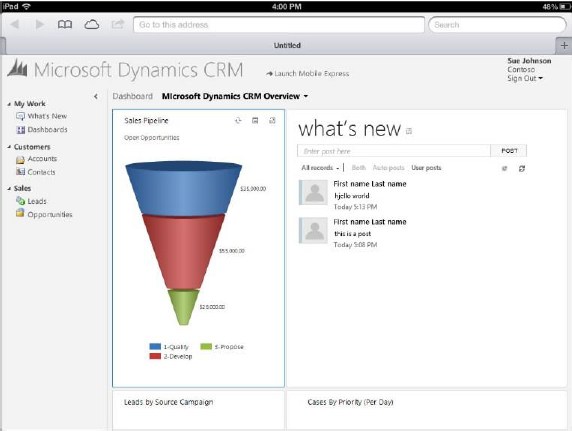
    So, where’s the Dynamics CRM Mobile part of the CRM Anywhere release? Hmm, not mentioned in this document, so let’s check out the long term roadmap next.

    Statement of Direction, November 2012

    This document discusses the Dynamics CRM product vision for the next 36 months and is therefore much less specific on the upcoming functionality than the Polaris release documentation. It starts with a list of upcoming applications to be added into Dynamics CRM in future releases. Putting the terminology into context, an example of a new application for CRM 2011 was goal management, so these would likely include a bunch of new default entities, business logic, UI enhancements and potential new integration points.

    On the SFA front we’ve got Quote, Order, and Pricing Management, which is a very important area for Dynamics CRM to step up it’s game. Anyone who’s ever demoed the existing UI for creating quotes knows that the popup jungle is something you want to avoid showing to potential customers, so a more flat user experience for working with product lines . In the Service section the term Knowledge Management brings a breath of canned air from the past decade, especially when we later on hear that “SharePoint will power next-generation content and knowledge experiences to strengthen supporting business processes”. All joking aside, it’s pretty obvious that the KB functionality in Dynamics CRM is in need of a makeover, so bringing SharePoint into the picture is the obvious route for Microsoft to improve its CRM offering for service users.

    The direction of marketing functionality development in Dynamics CRM will be shaped by Microsoft’s latest acquisition, Marketing Pilot. Although no one seems to have heard about the company before the MS press release, that doesn’t mean it wouldn’t be a good choice for the foundation which the v2.0 of Dynamics CRM marketing module would be built on. Whereas Skype and Yammer were big existing brands with their own technology stack, MarketingPilot is a small company that has developed their product on top of Microsoft’s platform and should therefore be much more easily assimilated into the Dynamics CRM product. Not a big splash like Salesforce.com’s acquisitions of Buddy Media or Radian6, not even close, but Microsoft have said marketing automation is one of their key investment areas for CRM, so let’s wait and see how that story develops.

    While not exactly a bullet point in the Statement of Direction document, it’s pretty clear that Surface will be the central vehicle for launching the re-imagined Dynamics CRM experience and Microsoft have come up with a nice promotional video to build up the hype while we wait for the Windows 8 app to arrive. Folding the “Metro CRM app”, Yammer, Skype and Surface all into one sure does result in a compelling image of what the next generation of customer relationship management applications could be like.

    What about devices other than the Surface? More precisely: what about mobile as in smartphone apps? Unfortunately there’s not much to say about them, except that there’s another delay for supporting iPhone and Android devices. Even the upcoming Windows Phone 8 customers won’t initially be able to use their mobile device for more than reading CRM records and posting Activity Feeds posts with the existing Microsoft Dynamics CRM Mobile client.

    The February 2012 announcement of Microsoft partnering with CWR Mobility pretty much put everyone in a waiting mode, as the official mobile client for Dynamics CRM would have obviously been the safest bet for any customer or partner. Well, by now we can clearly see that the deal is off and the CWR client is no more “official” than Resco, TenDigits or any other ISV offering. Instead of buying a solution, Microsoft eventually decided that they need to be the ones who build it. In the long run I believe this is definitely the right strategy for them, as mobile is simply far too important to be an outsourced component of CRM.

    We’ve heard from the Dynamics team that they’re betting big on HTML5 to deliver experiences across different devices. Even though Facebook famously backed off from their HTML5 strategy in favor of native apps, I’m somewhat optimistic that the path chosen by Microsoft can work better in the business apps landscape. MS will naturally build native CRM clients for Windows 8 and Windows Phone 8, but the effort required in delivering an enterprise scale mobile solution for a fragmented Android platform probably doesn’t make sense to them. Those are the gaps that ISV’s are there to fill, delivering more advanced offline clients for non-MS mobile platforms.

    At the same time as the device specific offering is being rearranged, we’ve heard from a source claiming to have official confirmation from Microsoft that the Dynamics CRM CAL price will soon be increasing by 15 percent, in preparation of the upcoming support for more devices per user. Since there will not be any additional 30 USD monthly fee per mobile user, the user CAL can be leveraged on more devices and therefore it delivers more value to customers, which in turn means Microsoft sees it can justify a price increase. Although no one ever rejoices when the cost of a service goes up, I’m actually in favor of a pricing strategy where the mobile and tablet clients will be as easy as possible for any Dynamics CRM users to access, rather than the customer organizations having to go through the internal negotiations of who really needs a premium license for mobile CRM usage. There’s always the device CAL for those who need to just enable CRM access on a single PC per user, after all.

    Conclusions

    Polaris is certainly an important update for Dynamics CRM and in many ways it feels like the starting point for “the next chapter” of the product. With all the UI and client changes lined up for Orion in mid-2013, in my mind it raises the question that will this already be a fully new product á la Microsoft Dynamics CRM 2013? Any which way, I think Microsoft is right now delivering a compelling vision with their whole product portfolio and announcements this year, and this reflects positively on the Dynamics applications as well.

  • Creating recurring goals with some workflow magic

    Goal management is one of those features in Microsoft Dynamics CRM 2011 that has a relatively high barrier for utilization. The initial thought of measuring the business results of your organization through a built-in mechanism in your CRM system resonates with almost any customer that you tell about goal management, yet the excitement tends to wear out quickly once they discover the effort required in configuring and maintaining the goals. Sure, if you’ve only got a small organization and set goals on annual or quarterly level, it’s not such a big burden to key in the goal records with metrics and targets. But what if you’d like to measure something on a more real-time basis, like monthly or weekly? Even daily? Not such a fun thought anymore, now is it?

    There are creative workarounds available for generating goals for a larger number of data points. The most practical tip I’ve come across has involved copying goal records by creating a dialog process to streamline the steps required for reproducing existing goals. I originally read about it from a presentation by Richard Knudson on Scalable Goal Management in Dynamics CRM 2011. You can view the slides from eXtreme CRM 2011 Las Vegas in PowerPoint Online or alternatively read this blog post by PowerObjects that walks you through the dialog creation process.

    A different way to define goal time periods

    Sometimes what you need in terms of process measurement isn’t down to the detailed level of setting individual target values for each week or each user. Maybe you have a steady weekly target of X records in a particular state and you’d just want to easily see how you’re currently performing against this target. Here’s were a more recent article by Richard comes in handy: Goal Criteria and Dynamic Goals. The big message here is that you’re not actually forced to use the From and To dates of a goal record to determine the measurement period. You can basically set a goal to be running for 20 years and instead limit the number of records evaluated by the goals Rollup Query through a dynamic date criteria like “last 7 days”.

    Whit this little trick, setting up a dashboard that shows the current performance is super easy, no matter how short your goal time period is. The charts will update once per day based on the default roll-up recurrence  frequency, so displaying the difference between the target and the actual value for metrics like leads qualified or calls made requires you to only set up the goal once per each variant (owner, status, type…) but not the different dates. Just stretch the goal period to be as long as you like and control the dates in the Rollup Query definition.

    The downside of this approach is that the goal measurement is completely dynamic, meaning past values will leave no trace. Sure, you could enable audit on the goal entity to keep some form of results history, but since the audit data is not available for views, charts or even custom SQL reports (without some hacking), it’s not quite as easy as with the traditional method of creating goals for each time period separately.

    Tracking historical results without manually creating goals

    Another recent Dynamics CRM blog post favorite of mine comes from Yaniv Arditi. In his three part series (part 1, part 2 and part 3) Yaniv presents a model of how to implement an asynchronous batch process in Microsoft Dynamics CRM. Best of all, in his final post he provides a solution file that you can download and apply in your CRM organization.

    What does the solution do then? Basically it is a way to implement a much needed but currently missing feature of Dynamics CRM: easily scheduling recurring workflows on a group of records. With this solution you can specify a batch process that runs every X days, performs a query of the required CRM records and then initiates a workflow process for each of those records found. You schedule it once, leave it running and the related process will always create a new waiting instance of itself once it stars at the defined intervals.

    What’s the Fetch XML in there? It’s the Target Records Definition that determines for which records the workflow process selected in the Action Workflow lookup field will be executed. Where do you get the Fetch XML then? That’s easy: from any Advanced Find view, just by clicking the “Download Fetch XML” button on the ribbon.

    To put this solution into work together with the concept of dynamic goals, I’ve got the following sample use case: track the number of active cases on a daily basis and compare it with a target value. This is an example of a status metric that’s not so simple to directly calculate from the records in CRM. To produce a figure like helpdesk queue length you would need to not only retrieve the number of cases created on any given day but also compare it with the closure dates of cases. It would be much easier if we could just take a snapshot of the currently open records on a set interval and store the information into CRM. So, why don’t we do just that?

    First, let’s set up a custom entity called “Snapshot” to hold the data for us. We’ll establish relationships to both Goal and Goal Metric, then add the necessary fields for holding the types of data we want to track, in this case integer values for target and actual.

    Next we need an on-demand workflow process that will create these Snapshot records for us from the goal data.

    The batch process record shown previously has already been configured to perform the task we want: based on a daily schedule, retrieve all the goal records for which we want to be tracking the snapshots. All we need to do is set its Status Reason field to Scheduled, save the record and the process kicks off. The Asynchronous Batch Process Pattern solution will run every day (unless residing on a shut down virtual machine, like in my example image below), triggering the Take Goal Snapshot workflow, which in turn will create a daily snapshot of the actual and target number of active cases in the system. You can naturally visualize the history data with a chart, too. If you have different goal owners or several different goals to take snapshots of, just create the necessary views to filter the data shown.

    To summarize, in this solution we use the Goal record as merely a “calculation machine” that produces the Actual Integer value we need. It also holds the data for the Target Integer, with the ability to update this figure if the targets should ever change. The scheduling is managed by the Batch Process record. It takes care of initiating the Take Goal Snapshot process for the selected Goal on a daily basis, which results in the creation of the Snapshot records you see above. All we had to do was to create each record once and we can leave this solution running for as long as we need.

    I think this is quite a wonderful example of how you can mix’n match the different functionality of the Dynamics CRM platform to come up with a new feature that doesn’t exist in the product right out of the box, yet it can be implemented by using the platform components and supported extensions developed on top of it. Thanks again to both Richard and Yaniv in providing me with the building blocks for implementing the recurring goal solution.

  • Now blogging on MSDynamicsWorld.com, too

    Now blogging on MSDynamicsWorld.com, too

    In addition to the Surviving CRM blog right here, I have recently also published a few writings on MSDynamicsWorld.com. If you’re not familiar with the site yet, then I recommend you to take a look at their offering and subscribe to their newsletters. In short, MSDynamicsWorld.com is an independent online publication (meaning: not sponsored by Microsoft) that publishes content for Dynamics CRM & ERP users, partners, independent software vendors (ISVs) and consultants.

    The articles I intend to write for MSDynamicsWorld.com will be somewhat different than the blog posts you see on Surviving CRM. In my own blog I tend to cover the types of topics that I run into as a part of the day-to-day job of a Microsoft Dynamics CRM consultant: how to do X with Y, workarounds to common issues, updates on the new functionality to be expected from Microsoft & partners, etc. I speak my mind on both the good and the bad, the highs & the lows, in an effort to spread awareness of how anyone working with or around Microsoft Dynamics CRM can make the most of this great platform.

    How I’m hoping to leverage this new channel that’s been graciously offered to me by the editors of MSDynamicsWorld.com is to broaden the scope of discussion and look at the world of CRM and Dynamics CRM from a slightly different angle. Instead of the hands-on, application level topics, I’m planning to allow myself some space to move onto a higher level of abstraction and share some thoughts on the business impact and considerations involved with implementing, developing and, at the end of the day, just living with a CRM solution at the customer organization. Don’t worry, it’s not going to be too far detached from the everyday reality. I promise!

    My first articles published on MSDynamicsWorld.com are actually series of articles under the theme The Design Language of Your CRM Solution. It’s a journey through the many considerations involved in improving the user adoption rate of CRM systems – a hot topic that never goes out of style, right? I started thinking about these user adoption challenges once again when I heard Bill Patterson make a statement in his WPC 2012 presentation about designing CRM systems that can go viral. Contrasting that with the traditional world of enterprise applications (anti-viral almost by definition) gave me enough food for thought to come up with the following articles:

    • Part 1: What does it actually require to build a CRM application for viral adoption vs. top-down enforcement?
    • Part 2: Common sense design principles for making your CRM system easier for the users to adopt
    • Part 3: The importance of visualizing the processes that the users are expected to follow
    • Part 4: How the new mobile device clients are helping to make CRM a more lightweight, context-aware application

    You’ll need to create a user account at MSDynamicsWorld.com in order to access the full articles. I know, signing up to yet another website can feel like a bit of a burden, but considering it’s an independent publication that doesn’t charge their readers any money, I personally understand the requirement of creating a user account to get access to the content. I’ve signed up for the site already years ago (4.5 to be precise) and haven’t ever come across any messages from them that I would have considered spam emails not relevant to my areas of interest.

    Anyway, the choice is of course yours, but I at least encourage you to circle MSDynamicsWorld.com on Google+ or follow their RSS feed, as it’s a great source of news for all things related to the Microsoft Dynamics ecosystem. Oh, and while you’re at it, do make sure that you’re also following the Surviving CRM Google+ stream where I personally share the most interesting blog posts and articles I’ve encountered while surfing the big waves of the #MSDYNCRM community.

  • Activity Feeds and user rights: who can see what?

    Activity Feeds are a channel that’s much like Twitter: creating posts that are visible for other users who are following you. On the surface they share many of the same concepts (mentions, following, replies/comments), but there are some notable differences that may come as a surprise to a user who’s accustomed to the open communication taking place on the external social networks. This is especially apparent in a CRM organization that has a hierarchical structure of business units and is limiting the visibility of core records such as accounts across the BU’s.

    Let’s assume that we have a CRM deployment with multiple BU’s that form a hierarchy of a single parent (the top level BU) and multiple child business units. In our example the child level is represented by two country specific BU’s: Finland and France. There’s a user called Jukka in Finland and another user by the name of Teppo in France (OK, not exactly a typical French name, but we’re actually dealing with a Finnish expat here in this case). They are both using CRM to manage accounts and opportunities in their own business units but do not have visibility to any other BU’s data. Nevertheless, we’d like to leverage the Dynamics CRM Activity Feeds as a channel for sharing insights and connecting across BU borders, to make the most of the human capital and knowledge available within our global organization.

    If Teppo from France is looking for new users to follow, he will need to fire up Advanced Find and perform a search of the user records available in the CRM organization (this is the first thing you need to provide clear instructions on, as it’s not quite as intuitive as on Twitter). Unless the default security roles have been adjusted in terms of the User entity, he will be able to see a list of users from all business units. Also the follow buttons on the ribbon of the results view will be active, so Teppo selects a few users from outside his own business unit, as he’s eager to learn about what information they might be sharing on the common CRM platform. However, if he’s paying close attention to the dialog that CRM presents to him he’ll actually notice that he wasn’t able to follow Jukka from Finland.

    “You might have tried to follow some recently deleted records. Newly following: 0” Hmm, what does that mean exactly? It means that the user wasn’t able to follow any users, even though he was not greeted with the familiar big, red X. The reason for this error message was most likely that the user didn’t have sufficient rights to append the Follow records to the selected User records. Assuming that we want to enable such cross-BU following of users, what we need to do is to modify one of the user’s security roles to grant a global right to the Append To function on the User entity.

    After we’ve granted the new rights, Teppo from France is able to follow Jukka from Finland. When Jukka posts a message on his personal wall, Teppo is able to see the post and jump in on the conversation. Social Business in action!

    OK, now how about if Jukka from Finland is writing a post on the wall of an account owned by a user from the Finland business unit? If Teppo is following Jukka’s posts, he will probably see this update from him as well? No, actually he won’t see anything on his wall. If we look at the same post from Jukka’s own Activity Feed wall we can spot the difference to the previous post:

    Here we see the importance of the regarding object of an Activity Feed post. Teppo will not see any of these posts written by a user he is following, because they are set as regarding an account record he himself is not following. These are not just independent posts on the Personal Wall of the user, rather they are updates that are posted on the wall of a specific account (Nokia). In our case, since Teppo does not have visibility to the accounts from another business unit, he has no way to access the conversation going on there or to go and follow the account record.

    (more…)

  • Dynamics Marketplace vs. Microsoft Pinpoint: where are all the CRM apps?

    When Microsoft released the 2011 version of Dynamics CRM and introduced the solution management functionality they also introduced the Dynamics Marketplace: an app store for CRM solutions, integrated right into the CRM user interface. Here’s an excerpt from the blog post Driving Success with the New Microsoft Dynamics Marketplace:

    The Microsoft Dynamics Marketplace is a new online service – based on Microsoft Pinpoint — that helps our customers maximize the relevancy and value of their Microsoft Dynamics investments by connecting them with valuable, high-quality applications and professional services from our worldwide Microsoft Partner Network (MPN).   At launch, the Marketplace has more than 1,400 solution listings, including over 700 application listings and over 700 professional services listing forboth CRM and ERP

    So, if you want to find the best listing of CRM solutions and other related applications, Dynamics Marketplace must be the place to go, right? Umm, actually not. You’re better of going to Microsoft Pinpoint to perform your search. Let me demonstrate this to you through a real life example.

    Today I saw an announcement from Sonoma Partners, one of the most high profile companies in Dynamics CRM consulting business, about a new, free solution called Universal Search. As I followed the link on the press release onto “Microsoft Dynamics Marketplace”, I actually found myself at Pinpoint instead. It’s not a huge difference in the user experience, as Dynamics Marketplace is a subset of the Pinpoint platform. However, on this occasion I paid attention to the fact that the solution had actually already been published there on August 30th. Hmm, how come I didn’t notice it when scanning the Marketplace listings just last week?

    I decided to do a little side-by-side test and opened up the US versions of both Dynamics Marketplace and Microsoft Pinpoint, narrowed down my search to applications only, selected Microsoft Dynamics CRM 2011 and sorted the list by release date. Here are the results:

    • Dynamics Marketplace: 197 applications
    • Microsoft Pinpoint: 584 applications

    Wow! A search on the generic Pinpoint site gives you three times more CRM 2011 apps than the dedicated Marketplace. Click the image below to see an example of search results that you’d be missing out on if you only use Dynamics Marketplace. 4 out of the 6 latest CRM applications listed on Pinpoint are not available on the Marketplace search.

    Why is this happening? Ignoring the chance of technical errors in the search indexing, the difference is caused by the more strict requirements imposed on submissions to the Dynamics Marketplace. If you read the blog post I mentioned earlier, you’ll find the following summary information:

    A Microsoft partner needs to have either the CRM or ERP competency in order to get listed on the marketplace.  For solution listings, partners must be an authorized reseller of Microsoft Dynamics solution or have a solution that is verified as Microsoft Platform-Ready. Additionally, there is an optional Certified for Microsoft Dynamics (CfMD) designation available for an additional fee.

    That’s a perfectly valid explanation to the difference and the intentions behind the verification processes are surely good. Some customers may well decide to minimize the risk of causing harm to the operation of their business critical CRM systems by only choosing add-ons that are CfMD. Of course, if even solution vendors like Sonoma Partners are releasing products outside of the Marketplace criteria, one might ask if that is a sensible guideline for customer organizations to follow or not.

    For anyone who wants to keep track of the useful ISV add-ons released for Microsoft Dynamics CRM, they’ll get a much better experience browsing Microsoft Pinpoint rather than Dynamics Marketplace. I myself fall into this category and also try to do my share in promoting the ISV offerings by maintaining a list of Dynamics CRM Links to interesting apps I come across. Another result of the Marketplace limitations is that the majority of the valuable, free tools for CRM developers and customizers are published on CodePlex. So, in effect, we have three separate “app stores” from Microsoft. Or perhaps the term store is inaccurate in this case, as none of these three have cashiers in place, so maybe they should rather be called “app galleries”.

    We haven’t seen much development on the Marketplace front since its release, which is quite a shame as we could really use some help from Microsoft in building a more vibrant ISV ecosystem around the Dynamics CRM product. There’s just so much more potential in the app store model, as illustrated by this awesome vision of a better Dynamics Marketplace that Neil Benson & Matt Wittemann. With the nearing commercial launch of Windows 8 and the accompanying Windows Store, the expectation levels of customers and developers alike have surely grown beyond the basic application listing that Dynamics Marketplace currently offers.

  • Future stars: Dynamics CRM roadmap news from Las Vegas

    We didn’t yet get a new Statement of Direction or Release Preview Guide for the future releases of Microsoft Dynamics CRM from today’s eXtreme CRM 2012 Las Vegas keynote by Craig Dewar, titled “Microsoft Dynamics CRM – Now and In the Future”. That is scheduled to happen next week, but who wants to wait around for the information that has been shared to the privileged few who attended the eXtreme CRM session?

    Lucky for us who weren’t able to go to Vegas, the best new bits revealed at the session were tweeted out by outstanding #MSDYNCRM community contributors like Neil Benson, Shawn Tabor, Brad Koontz, Bob Hatcher and Eric W Cahoon. Here’s a “best of #eXtremeCRM tweets” collection that tries to summarize what was presented in Dewar’s session.

    Q4 2012: Polaris

    Let’s start with the updates coming in the very near future. The next release is codenamed “Polaris” will be out in Q4 2012, so this is the “Fall 2012” release we saw on an earlier roadmap slide. More specifically, the new functionality will be delivered as a part of Update Rollup 12 during December 2012 for both on-premise and for CRM Online customers.

    Polaris will contain upgrades to the browser UI as seen in the WPC 2012 session in July. It will include the Process Driven Refresh UI and deliver a more “flat” user experience to better match the look & feel of Office 2013. Also, the cross-browser support originally scheduled for Q2 2012 Service Update will now be delivered in December with UR12 and this part will affect also on-premise and hosted CRM environments. The previously delayed custom workflow activity support for CRM Online will be delivered within the same UR12 update schedule.

    New announcements made at the eXtreme CRM keynote for Q4 2012 include click-to-call integration with Lync and Skype (both of which are Microsoft products these days, in case you forgot). CRM Online customers will get a simple Bing Maps integration with maps embedded on the customer forms. Presumably the CRM Online subscription will in the future include a license to use Bing Maps on an internal application whereas customers who’ve bought perpetual server and client licenses from Microsoft need to acquire a separate license to use the mapping functionality through the API (remember: it’s not a free service, like the Bing Maps or Google Maps website).

    Q2 2013: Orion

    The release after Polaris carries the codename “Orion” and is scheduled for Q2 2013. What’s special about this release is that it will be CRM Online only. Whether on-premises and hosted CRM clients will be completely left without updates in Q2 remains to be seen, but the new release cadence suggest only a single major update for on-premises customers per year. The Update Rollup release schedule with an 8 week cycle should still remain unchanged, though, so it’s likely to be a bit of a mixed bag of what’s really “Online only” in terms of new or changed functionality. Update: it’s actually the Q4 2012 Polaris that will be Online only, see the comments at the end from Craig Dewar.

    As I’ve already speculated for a long time, the new Agaves in Office 2013 apps will be used as the means to deliver Dynamics CRM support for Outlook Web Access, both in OWA and MOWA (mobile app). This will finally enable tracking content from your inbox into CRM without having to live with the Outlook desktop client legacy. Also the synchronizing of items from Exchange will be possible on the server side with the Orion release in Q2 2013.

    Yammer integration, which presumably goes much deeper than the current integration solution built by Yammer before being acquired by Microsoft, is scheduled for Q2 2013. Other than this, concreted evidence of bringing social channels into Dynamics CRM was not leaked from Vegas, so we’ll need to wait a bit longer to see how Microsoft intends to deliver on the social story they’ve been promoting for CRM since this time last year. Back when we were still talking about Polaris as the R9 release this was supposed to connect Dynamics CRM with the external communities in a big way, but no major announcements have so far been made on this front.

    Ok, I did spot one physical evidence of social CRM from the Extreme CRM announcements, in the form of a new Social CRM solution built by Sonoma Partners. It’s baked into the updated version of CRM Demo Builder, which now allows you to provision CRM + SharePoint on the same, shared Office 365 platform, thus achieving single sign-on. Whether this particular Social CRM app will be made available to all CRM customers is something I’m not yet sure, but it looks like quite a solid little app for bringing Twitter feeds into CRM by using the same look & feel as the previous Activity Feeds solution. You can promote tweets into new/existing leads, contacts, accounts, cases or opportunities, after which you see the original tweet in CRM as an Activity Feed post. Nothing revolutionary in itself, but a welcome feature, if something like this is actually on Microsoft’s roadmap.

    That’s all of the news I picked up so far from the event by following the social networks. Did I miss any interesting tweet from #eXtremeCRM or an important piece of news? Leave a comment & let’s assemble the pieces of the Dynamics CRM roadmap together!

    Update 2012-09-04: I received clarification on the release roadmap from Craig Dewar himself, here’s the update:

    • “Polaris due Q4 2012 is online only with one exception. There is one capability in Polaris namely cross browser that is of such high interest we will release that capability on premise also.”
    • “Orion due Q2 2013 is online and on premise. It will include all Polaris functionality in addition to many new capabilities.”

    Based on my interpretation of the above, CRM Online customers will get the Polaris functionality first, while on premise and hosted CRM customers receive these updates 6 months later when Orion comes out.

  • Country lists and multi-language lookup fields

    Country lists and multi-language lookup fields

    One of the most common customizations almost any organization working with customers from multiple countries will want to have in their Microsoft Dynamics CRM data model is the addition of a structured list of country names, to ensure they are stored in a consistent format. Yes, by default the Country/Region fields on the account, contact and lead entities are free text fields that a user must manually fill every time. This can result in some serious issues with data quality that make it difficult to perform a common task such as searching for accounts from specific countries. The field may contain values like “United States of America”, “United States”, “USA”, “Estados Unidos de América”, not to mention different conventions for upper/lowercase letters, hyphens etc.

    Why doesn’t Dynamics CRM come with a pre-configured list of countries? There are probably several reasons for the choice of this design, some of them which date back to the early days when CRM wasn’t a multi-language platform (before version 4.0 came along). Anyway, there’s absolutely nothing stopping us from fixing this gap by using the basic customization tools, so let’s get right to it!

    Picking the right Country field option

    There are two alternative approaches to implementing a controlled list of values for country names. You can either create a new option set (preferably a global one) or a new entity to hold the country name values. There are pros and cons to each method, which means the right choice depends on the use cases of the organization in question. In a simple scenario the option set may well be sufficient, if there are no other requirements for country data in CRM. For implementation guidance, look no further than this excellent post by Pedro Innecco: Dynamics CRM: Adding a Country/Region option set using ISO 3166-1.

    Sometimes the country data management requirements may be somewhat more complex, which may lead you into choosing to create a custom Country entity. This approach has the benefit of allowing you to store other variables than just the name of the country on the same record. For example, there may be parameters related to reporting that are country specific and would therefore be logically placed on the same record as the official name of the country. Other regional variables such as states or languages spoken are also a natural fit to be stored on the country entity.

    One interesting scenario to explore is the possibility of using the Country records as a central location for posting updates specific to a particular region, by using Activity Feeds on the Country record’s wall. Let’s say you have a multi-region Dynamics CRM implementation and you want to target auto-posts to users working with customers from specific countries. By generating posts like “New campaign Big Fair 2012 launched in @Finland” or “Major opportunity closed in @Sweden for account Contoso” that mention the country record you can easily push updates to any user who’s following that particular country. For a more detailed explanation please see my earlier post on how to make CRM Activity Feeds easier to follow by creating custom groups.

    There’s a catch with the custom entity approach, though, and that is the lack of native support for multiple languages. While the option set labels are a part of Dynamics CRM solution files and support translations just like your regular form fields, a custom entity is just data stored into the CRM database, no matter if you use it in a metadata like manner. As a result, if your CRM organization has different languages enabled and the user switches from English to Spanish, the value on the Country field on the account form won’t change from “United States of America” to “Estados Unidos de América”. If you had used an option set, all you’d need to do is export the labels for translation, enter values for the Spanish language column for the option set values, import it back and publish the results. However, with the custom Country entity we’ve ended up choosing, the value stored in the name field of the Country record will display the same way, regardless of the UI language of the logged in user.

    Nothing a little Jscript can’t fix

    Lucky for us, Pedro has come up with a solution that can also handle the multi-language support requirement when using a custom entity to hold the country labels. In the image below, you can see an account record viewed first in English, then in Finnish. Even though we’re using a lookup field to the Country entity on the account form, the label of the selected Country record has magically been translated from one language to another. As if that wasn’t enough, also the Look Up Record dialog window shows a list of values that has been tailored to the language of the user. Well, that looks like the best of both worlds, doesn’t it?

    How can you switch the label in the lookup field then? All you need to do is to download the Country/Region for Dynamics CRM solution created by Pedro Innecco and configure your CRM organization to take advantage of the scripts included. The solution also provides the ability to add more languages, so I’ll list out the steps I followed to add the Finnish language support for this Country lookup field.

    (more…)