After the announcement in July 2012 regarding the delayed delivery schedule of the CRM Anywhere functionality, Microsoft has been promising that their updated product roadmap would be announced “soon”. Well, it took until November eventually, but we now have two new documents available from them: the Statement of Direction and Microsoft Dynamics CRM December 2012 Service Update Release Preview Guide. In this post I’ll share a few thoughts and questions that these documents have raised in my mind.
Polaris (Microsoft Dynamics CRM December 2012 Service Update)
Much of the contents of Polaris was revealed in eXtreme CRM 2012 Las Vegas and tweeted out into the online communities. One major piece of news from there is only casually mentioned in the beginning of the Release Preview Guide document, so let’s emphasize it here once more:
This document is organized to highlight specific investments included in the December 2012 Service Update for Microsoft Dynamics CRM Online. This release begins in mid-December 2012 and will continue through January 2013.
Yes, on-premise and hosted customers will still need to wait another 6 months while the new functionality is previewed in the cloud. The Orion release, currently scheduled for around mid-2013, will include these new treats into the CRM server bits you can download and deploy on your own or outsourced hardware. In the meantime, there will be a gap during which some UI customizations and development can be done only in CRM Online, so remember to take this into consideration when planning you solution deployment strategies.
The new Flow UI, also known as the “Process-Driven UI” or “Refresh UI”, has been shown from the user’s point of view already earlier, but in the Release Preview Guide we get a first glimpse into the configuration options of how you can actually adjust it to match your real business processes. The Process Control Customization Tool appears to consist of a basic set of stages and steps, with no direct connection to the familiar workflow or dialog processes. Of course if you trigger a workflow process from a field value change you could include much more business logic into the stages and steps. The document mentions that there will be “several pre-defined steps such as locate existing contact and account”, so we’ll need to wait and see if the process steps will actually provide a new extension point that allows developers to create custom steps.

Ever since the Yammer deal in June, we’ve all been wondering (well, perhaps it’s just me who’s obsessed with these things) how this social business tool would be integrated into Dynamics CRM and specifically what it will do to the Activity Feeds functionality introduced in Q4 2011 Service Update. Looking at the Polaris UI preview, we still don’t have too many details about this, but at least there’s a screenshot for us to stare at. Back in July when the Flow UI was first shown, the Activity Feeds were presented on the opportunity form alongside activities and notes/attachments, but now it’s been replaced by a Yammer feed. However, the distinction between auto posts and user posts in the menu suggests that there’s a bit of the CRM Activity Feeds functionality in play here, since Yammer doesn’t have such concepts in their own product.

Showing updates regarding CRM records in the Yammer UI was already possible before Microsoft bought Yammer, thanks to the integration they had developed. In the release preview guide we can now read that “Microsoft will enable the ability to post messages from Microsoft Dynamics CRM to Yammer and vice versa”, which suggest a deeper level of integration, most likely leveraging Yammer’s Enterprise Graph. I guess it’s safe to say by now that the CRM R8 beta functionality developed for CRM Activity Feeds to filter the feed content has been permanently cancelled and all the efforts are aimed at integrating Yammer into Dynamics CRM. However, Microsoft will probably not completely rip out the existing feeds from on premises Dynamics CRM deployments nor implement a non-cloud Yammer, so the transition may take a while. Another thing worth noting is that the current free version of Yammer does not support any integration to applications like CRM, so the Enterprise Plan for Yammer may be required in order to leverage the new functionality in Dynamics CRM unless Microsoft changes the pricing policy.
Bing Maps integration will be available for the Flow UI, where “addresses for contacts and accounts will be displayed in an embedded contextual map provided by the Microsoft decision engine Bing”. There were some good comments to my previous Future Stars blog post about the licensing of Bing Maps, so you might want to check them out if visualizing your customer addresses on an integrated map is of interest to you. Just like with Yammer, currently the Bing Maps API requires a separate license when used in internal applications and there’s no mention of any changes to this model in the release preview guide, so it’s best to assume that these new Polaris features will not be free to users with a Dynamics CRM Online license alone.
Cross-browser support arrives with Polaris, but it’s a bit of a “yes and no” regarding support on iPad Safari browser. Yes, users will be able to access something else than Mobile Express on their iPad, but it’s not the same browser client as you’d have on a PC or Mac. A special version of the web client has been created for the iPad only, utilizing the new Flow UI forms. However, as the Flow UI is only available in a limited number of entities so far, only the “sales experience” is enabled in the iPad CRM client version. Judging by the menu below you can only access accounts, contacts, leads and opportunities. Any other entities (presumably even quotes, orders or products) will require you to click the “Launch Mobile Express” link, which will take you back to the CRM experience designed for pre-iPhone era smartphones. The Polaris version of iPad client seems therefore like an intermediate solution while we await for the full tablet UX to arrive.
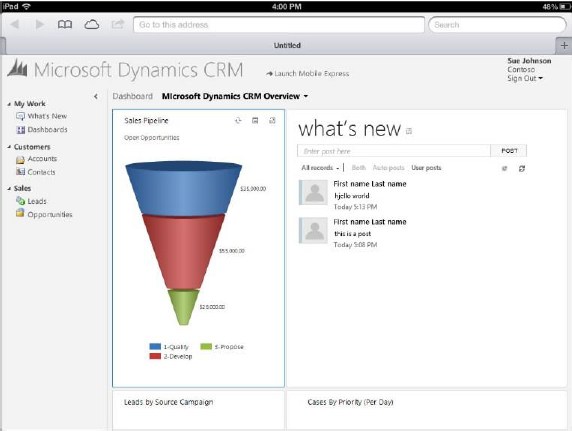
So, where’s the Dynamics CRM Mobile part of the CRM Anywhere release? Hmm, not mentioned in this document, so let’s check out the long term roadmap next.
Statement of Direction, November 2012
 This document discusses the Dynamics CRM product vision for the next 36 months and is therefore much less specific on the upcoming functionality than the Polaris release documentation. It starts with a list of upcoming applications to be added into Dynamics CRM in future releases. Putting the terminology into context, an example of a new application for CRM 2011 was goal management, so these would likely include a bunch of new default entities, business logic, UI enhancements and potential new integration points.
On the SFA front we’ve got Quote, Order, and Pricing Management, which is a very important area for Dynamics CRM to step up it’s game. Anyone who’s ever demoed the existing UI for creating quotes knows that the popup jungle is something you want to avoid showing to potential customers, so a more flat user experience for working with product lines . In the Service section the term Knowledge Management brings a breath of canned air from the past decade, especially when we later on hear that “SharePoint will power next-generation content and knowledge experiences to strengthen supporting business processes”. All joking aside, it’s pretty obvious that the KB functionality in Dynamics CRM is in need of a makeover, so bringing SharePoint into the picture is the obvious route for Microsoft to improve its CRM offering for service users.
The direction of marketing functionality development in Dynamics CRM will be shaped by Microsoft’s latest acquisition, Marketing Pilot. Although no one seems to have heard about the company before the MS press release, that doesn’t mean it wouldn’t be a good choice for the foundation which the v2.0 of Dynamics CRM marketing module would be built on. Whereas Skype and Yammer were big existing brands with their own technology stack, MarketingPilot is a small company that has developed their product on top of Microsoft’s platform and should therefore be much more easily assimilated into the Dynamics CRM product. Not a big splash like Salesforce.com’s acquisitions of Buddy Media or Radian6, not even close, but Microsoft have said marketing automation is one of their key investment areas for CRM, so let’s wait and see how that story develops.
While not exactly a bullet point in the Statement of Direction document, it’s pretty clear that Surface will be the central vehicle for launching the re-imagined Dynamics CRM experience and Microsoft have come up with a nice promotional video to build up the hype while we wait for the Windows 8 app to arrive. Folding the “Metro CRM app”, Yammer, Skype and Surface all into one sure does result in a compelling image of what the next generation of customer relationship management applications could be like.

What about devices other than the Surface? More precisely: what about mobile as in smartphone apps? Unfortunately there’s not much to say about them, except that there’s another delay for supporting iPhone and Android devices. Even the upcoming Windows Phone 8 customers won’t initially be able to use their mobile device for more than reading CRM records and posting Activity Feeds posts with the existing Microsoft Dynamics CRM Mobile client.
The February 2012 announcement of Microsoft partnering with CWR Mobility pretty much put everyone in a waiting mode, as the official mobile client for Dynamics CRM would have obviously been the safest bet for any customer or partner. Well, by now we can clearly see that the deal is off and the CWR client is no more “official” than Resco, TenDigits or any other ISV offering. Instead of buying a solution, Microsoft eventually decided that they need to be the ones who build it. In the long run I believe this is definitely the right strategy for them, as mobile is simply far too important to be an outsourced component of CRM.
We’ve heard from the Dynamics team that they’re betting big on HTML5 to deliver experiences across different devices. Even though Facebook famously backed off from their HTML5 strategy in favor of native apps, I’m somewhat optimistic that the path chosen by Microsoft can work better in the business apps landscape. MS will naturally build native CRM clients for Windows 8 and Windows Phone 8, but the effort required in delivering an enterprise scale mobile solution for a fragmented Android platform probably doesn’t make sense to them. Those are the gaps that ISV’s are there to fill, delivering more advanced offline clients for non-MS mobile platforms.
At the same time as the device specific offering is being rearranged, we’ve heard from a source claiming to have official confirmation from Microsoft that the Dynamics CRM CAL price will soon be increasing by 15 percent, in preparation of the upcoming support for more devices per user. Since there will not be any additional 30 USD monthly fee per mobile user, the user CAL can be leveraged on more devices and therefore it delivers more value to customers, which in turn means Microsoft sees it can justify a price increase. Although no one ever rejoices when the cost of a service goes up, I’m actually in favor of a pricing strategy where the mobile and tablet clients will be as easy as possible for any Dynamics CRM users to access, rather than the customer organizations having to go through the internal negotiations of who really needs a premium license for mobile CRM usage. There’s always the device CAL for those who need to just enable CRM access on a single PC per user, after all.
Conclusions
Polaris is certainly an important update for Dynamics CRM and in many ways it feels like the starting point for “the next chapter” of the product. With all the UI and client changes lined up for Orion in mid-2013, in my mind it raises the question that will this already be a fully new product á la Microsoft Dynamics CRM 2013? Any which way, I think Microsoft is right now delivering a compelling vision with their whole product portfolio and announcements this year, and this reflects positively on the Dynamics applications as well.
 Let’s start with the updates coming in the very near future. The next release is codenamed “Polaris” will be out in Q4 2012, so this is the “Fall 2012” release we saw on an
  The release after Polaris carries the codename “Orion” and is scheduled for Q2 2013.


