Tag: Windows 8

  • Troubleshooting CRM for Tablets Login Issues with ADFS

    All CRM 2013 and CRM Online customers have access to the CRM for Tablets app that’s available for Windows 8, iOS and Android devices. Since it’s an app from the new age of mobile computing, the users can simply download it from the respective app store of the platform provider and install it. Configuring the app to connect with your CRM organization can however prove to be a bit trickier task than this.

    If you’re using CRM Online hosted by Microsoft in their data centers, connecting the tablet app to the CRM server in the cloud is usually a straightforward process. Just enter the URL for your organization, then punch in the credentials and off you go. Well, to be more precise, upon your first connection the organization you’ll be taken to a screen that asks you to hold on tight while the app is being set up. This is because all of the metadata related to your CRM organization’s customizations first needs to be loaded, so that you’ll see your own CRM instead of some generic, hard coded menus and fields. This step can take quite a while to finish, but just hold on tight, it’s worth it.

    If you’ve got your own on-premises CRM server or you’re logging to CRM Online via your on-premises Active Directory credentials, you may need to work a bit harder to achieve connectivity between the CRM for Tablets app and the CRM server. This is because in both of these scenarios you will have ADFS (Active Directory Federation Services) sitting there in the middle, processing your login request and validating your user credentials. Of course the same technology is also used behind the pure cloud CRM Online service, but MS has done the configuration work for you, whereas with on-premises components you’ll be in charge of performing this.

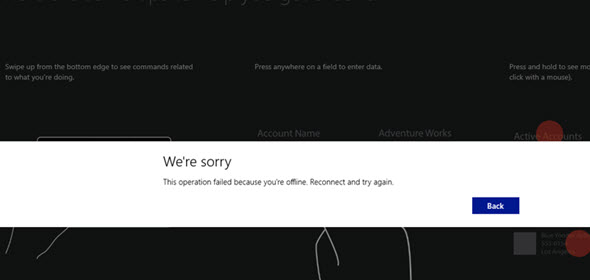
    CRM_for_Tablets_Were_Sorry

    Recently I was faced with a situation where a customer had deployed Dynamics CRM 2013 SP1 on-premises and done the Internet Facing Deployment via Windows Server 2008 R2 ADFS 2.0, published via Forefront TMG (Threat Management Gateway) 2010. Accessing CRM via the web client through the IFD address was working as expected, so was the CRM Outlook client. CRM for Phones was connecting without issues and I could even connect to the server via tools like XrmToolBox with no issues. There was just one problem: the CRM for Tablets wouldn’t connect to the server, no matter what. In the process of troubleshooting this particular scenario I learned a thing or two about the tablet app connectivity as well as server configuration tasks, so I thought I’d share my findings here on my blog. I’m by no means an expert on anything surrounding ADFS , but I’m stubborn enough to keep searching for answers until I find some from the great wide web.

    RTFM – Read The Friendly Manual(s)

    First of all, you’ll need to know your ADFS version, since there’s a few new hoops you’ll need to jump through when working with Windows Server 2012 R2 and the latest ADFS 2.2 (sometimes referred to as ADFS 3.0, since official version numbers seem to have been dropped by MS, in favor of just shipping ADFS together with Windows Server releases). The architecture of ADFS has changed considerably from earlier 2.0 and 2.1 versions, with no more IIS in the background, so the configuration process for CRM IFD also differs from the previous experience.

    You’ll find the extra steps listed on this article: Configure Windows Server 2012 R2 for CRM mobile clients. On the ADFS 2.2 server you’ll need to enable forms authentication manually, since it’s not enabled by default, like in previous versions. Then you need to run a Powershell script on the CRM server to configure the OAuth provider. Finally, you should register the CRM for Tablets app ID’s with the ADFS server via another Powershell script.

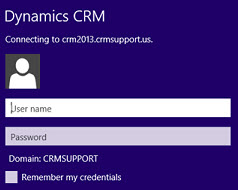
    Tablet_AD_login_promptYou may run into an issue with the login process where the user is prompted for their AD credentials via the standard Windows domain dialog window repeatedly. This is because of some incorrect authentication settings that apparently are caused by the CRM IFD configuration process itself. To avoid these issues, you should run a repair installation on the CRM 2013 server with the Web Application Server role deployed, after you’ve done the IFD configuration and before you attempt to log in with the CRM for Tablets app.

    Another aspect is the requirements imposed by the new Windows 8.1 version of the tablet app. Because of the changes on the OS layer, it’s no longer possible for Win8 apps to connect to any random server at will, but rather the developer has to specify the URL’s of these servers before publishing the app to the Windows Store. For CRM Online the domains for the service are known in advance, but for an on-premises deployment they could be absolutely anything. To overcome this, you’ll need to add a registry entry onto your device before attempting to connect to your server, otherwise the tablet app will just sit there and do nothing. Go to the page Set up CRM for Tablets, expand the section “what the admin needs to do” and grab the Powershell script from there. Running it on your device will prompt you for the CRM organization URL and create the necessary registry key for you. (more…)

  • Windows 8, Outlook 2013 and Dynamics CRM – part 2

    Back in August I wrote about my initial experiences of using a Windows 8 PC with Office 2013 to connect the Outlook client to Microsoft Dynamics CRM. During that time we only had the preview versions of both the OS and Office, so some quirks were naturally to be expected. Now that Windows 8 is generally available and also the RTM bits of Office 2013 can be downloaded from MSDN (with commercial launch expected by end of January), it’s a good moment to revisit the topic. Upon my latest test I came across a few configuration gotchas that I though might be useful to share for anyone who’s struggling with the same issues.

    Connecting to CRM Online with WLID

    Our official work setup is still on Windows 7 / Office 2010 level, but being the kind of eager early adopter that I am, my home PC’s have moved to the brave new world of Windows 8 some time ago already. I installed Office Professional Plus 2013 on a Windows 8 64-bit laptop that’s not joined to a domain, so my login credentials to Windows are linked to my Microsoft Account (previously known as Windows Live ID). In my first tests in August this was a blocker for using a CRM Online organization where the user’s WLID / Microsoft Account was different in CRM and on the local machine.

    Update Rollup 11 removed the need to manually enable Windows Identity Foundation (WIF) on Windows 8, but out of old habits I checked that it was available before configuring CRM. Launching the CRM client Configuration Wizard and selecting CRM Online on the Server URL field of the Configure Organizations prompt gave a familiar error: “Cannot connect to Microsoft Dynamics CRM server because we cannot authenticate your credentials.” Just like before, it appears that the Configuration Wizard automatically attempts to use the Microsoft Account of the local user for logging in to CRM Online. Logging out of the account in Internet Explorer and then logging in to CRM Online in the browser didn’t seem to resolve the issue with the Outlook client connectivity, as a further error message was presented later in the Initializing the Organization phase:

    There is a problem communicating with the Microsoft Dynamics CRM server. The server might be unavailable. Try again later. If the problem persists, contact your system administrator.
    [Expanded Information]
    Unable to load the native components of SQL Server Compact corresponding to the ADO.NET provider of version 8082. Install the correct version of SQL Server Compact. Refer to KB article 974247 for more details.

    The KB article referenced in the error message discusses the following issue: “You receive an error message when you run a SQL Server Compact 3.5-based application after you install the 32-bit version of SQL Server Compact Edition 3.5 Service Pack 2 on an x64 computer.” However, downloading and installing the x64 version of Microsoft SQL Server Compact 3.5 Service Pack 2 for Windows Desktop didn’t resolve the CRM configuration error, so I opened a support ticket with Microsoft. They instructed me that I also needed to install the Cumulative Update 2 for SQL Server Compact 3.5 Service Pack 2, which is a hotfix that you need to request a download link to be sent to you by email. After my SQL CE 3.5 had been updated to build 3.5.8082.00, I was finally able to connect my Outlook 2013 with our CRM Online demo organization.

    Connecting to CRM on-premise with IFD

    During the previous test with CRM Online I had also tried to connect the Outlook 2013 CRM client  to our production on-premise CRM server that is IFD configured. I kept receiving the following error: “Cannot connect to Microsoft Dynamics CRM server because we cannot authenticate your credentials. Check your connection or contact your administrator for more help.” Looking at the error details there was a message claiming “no credentials are available in the security package.” (more…)

  • Breaking down the Polaris and Statement of Direction documents

    After the announcement in July 2012 regarding the delayed delivery schedule of the CRM Anywhere functionality, Microsoft has been promising that their updated product roadmap would be announced “soon”. Well, it took until November eventually, but we now have two new documents available from them: the Statement of Direction and Microsoft Dynamics CRM December 2012 Service Update Release Preview Guide. In this post I’ll share a few thoughts and questions that these documents have raised in my mind.

    Polaris (Microsoft Dynamics CRM December 2012 Service Update)

    Much of the contents of Polaris was revealed in eXtreme CRM 2012 Las Vegas and tweeted out into the online communities. One major piece of news from there is only casually mentioned in the beginning of the Release Preview Guide document, so let’s emphasize it here once more:

    This document is organized to highlight specific investments included in the December 2012 Service Update for Microsoft Dynamics CRM Online. This release begins in mid-December 2012 and will continue through January 2013.

    Yes, on-premise and hosted customers will still need to wait another 6 months while the new functionality is previewed in the cloud. The Orion release, currently scheduled for around mid-2013, will include these new treats into the CRM server bits you can download and deploy on your own or outsourced hardware. In the meantime, there will be a gap during which some UI customizations and development can be done only in CRM Online, so remember to take this into consideration when planning you solution deployment strategies.

    The new Flow UI, also known as the “Process-Driven UI” or “Refresh UI”, has been shown from the user’s point of view already earlier, but in the Release Preview Guide we get a first glimpse into the configuration options of how you can actually adjust it to match your real business processes. The Process Control Customization Tool appears to consist of a basic set of stages and steps, with no direct connection to the familiar workflow or dialog processes. Of course if you trigger a workflow process from a field value change you could include much more business logic into the stages and steps. The document mentions that there will be “several pre-defined steps such as locate existing contact and account”, so we’ll need to wait and see if the process steps will actually provide a new extension point that allows developers to create custom steps.

    Ever since the Yammer deal in June, we’ve all been wondering (well, perhaps it’s just me who’s obsessed with these things) how this social business tool would be integrated into Dynamics CRM and specifically what it will do to the Activity Feeds functionality introduced in Q4 2011 Service Update. Looking at the Polaris UI preview, we still don’t have too many details about this, but at least there’s a screenshot for us to stare at. Back in July when the Flow UI was first shown, the Activity Feeds were presented on the opportunity form alongside activities and notes/attachments, but now it’s been replaced by a Yammer feed. However, the distinction between auto posts and user posts in the menu suggests that there’s a bit of the CRM Activity Feeds functionality in play here, since Yammer doesn’t have such concepts in their own product.

    Showing updates regarding CRM records in the Yammer UI was already possible before Microsoft bought Yammer, thanks to the integration they had developed. In the release preview guide we can now read that “Microsoft will enable the ability to post messages from Microsoft Dynamics CRM to Yammer and vice versa”, which suggest a deeper level of integration, most likely leveraging Yammer’s Enterprise Graph. I guess it’s safe to say by now that the CRM R8 beta functionality developed for CRM Activity Feeds to filter the feed content has been permanently cancelled and all the efforts are aimed at integrating Yammer into Dynamics CRM. However, Microsoft will probably not completely rip out the existing feeds from on premises Dynamics CRM deployments nor implement a non-cloud Yammer, so the transition may take a while. Another thing worth noting is that the current free version of Yammer does not support any integration to applications like CRM, so the Enterprise Plan for Yammer may be required in order to leverage the new functionality in Dynamics CRM unless Microsoft changes the pricing policy.

    Bing Maps integration will be available for the Flow UI, where “addresses for contacts and accounts will be displayed in an embedded contextual map provided by the Microsoft decision engine Bing”. There were some good comments to my previous Future Stars blog post about the licensing of Bing Maps, so you might want to check them out if visualizing your customer addresses on an integrated map is of interest to you. Just like with Yammer, currently the Bing Maps API requires a separate license when used in internal applications and there’s no mention of any changes to this model in the release preview guide, so it’s best to assume that these new Polaris features will not be free to users with a Dynamics CRM Online license alone.

    Cross-browser support arrives with Polaris, but it’s a bit of a “yes and no” regarding support on iPad Safari browser. Yes, users will be able to access something else than Mobile Express on their iPad, but it’s not the same browser client as you’d have on a PC or Mac. A special version of the web client has been created for the iPad only, utilizing the new Flow UI forms. However, as the Flow UI is only available in a limited number of entities so far, only the “sales experience” is enabled in the iPad CRM client version. Judging by the menu below you can only access accounts, contacts, leads and opportunities. Any other entities (presumably even quotes, orders or products) will require you to click the “Launch Mobile Express” link, which will take you back to the CRM experience designed for pre-iPhone era smartphones. The Polaris version of iPad client seems therefore like an intermediate solution while we await for the full tablet UX to arrive.
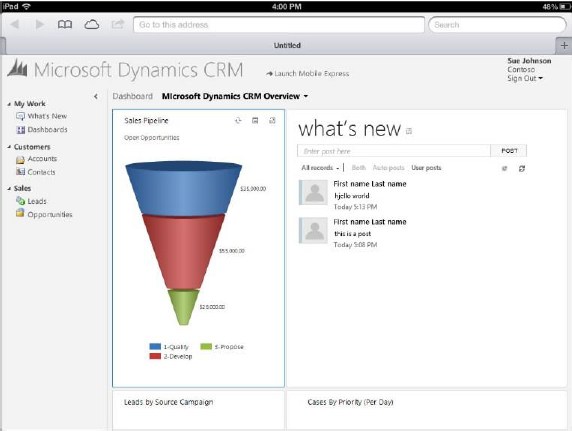
    So, where’s the Dynamics CRM Mobile part of the CRM Anywhere release? Hmm, not mentioned in this document, so let’s check out the long term roadmap next.

    Statement of Direction, November 2012

    This document discusses the Dynamics CRM product vision for the next 36 months and is therefore much less specific on the upcoming functionality than the Polaris release documentation. It starts with a list of upcoming applications to be added into Dynamics CRM in future releases. Putting the terminology into context, an example of a new application for CRM 2011 was goal management, so these would likely include a bunch of new default entities, business logic, UI enhancements and potential new integration points.

    On the SFA front we’ve got Quote, Order, and Pricing Management, which is a very important area for Dynamics CRM to step up it’s game. Anyone who’s ever demoed the existing UI for creating quotes knows that the popup jungle is something you want to avoid showing to potential customers, so a more flat user experience for working with product lines . In the Service section the term Knowledge Management brings a breath of canned air from the past decade, especially when we later on hear that “SharePoint will power next-generation content and knowledge experiences to strengthen supporting business processes”. All joking aside, it’s pretty obvious that the KB functionality in Dynamics CRM is in need of a makeover, so bringing SharePoint into the picture is the obvious route for Microsoft to improve its CRM offering for service users.

    The direction of marketing functionality development in Dynamics CRM will be shaped by Microsoft’s latest acquisition, Marketing Pilot. Although no one seems to have heard about the company before the MS press release, that doesn’t mean it wouldn’t be a good choice for the foundation which the v2.0 of Dynamics CRM marketing module would be built on. Whereas Skype and Yammer were big existing brands with their own technology stack, MarketingPilot is a small company that has developed their product on top of Microsoft’s platform and should therefore be much more easily assimilated into the Dynamics CRM product. Not a big splash like Salesforce.com’s acquisitions of Buddy Media or Radian6, not even close, but Microsoft have said marketing automation is one of their key investment areas for CRM, so let’s wait and see how that story develops.

    While not exactly a bullet point in the Statement of Direction document, it’s pretty clear that Surface will be the central vehicle for launching the re-imagined Dynamics CRM experience and Microsoft have come up with a nice promotional video to build up the hype while we wait for the Windows 8 app to arrive. Folding the “Metro CRM app”, Yammer, Skype and Surface all into one sure does result in a compelling image of what the next generation of customer relationship management applications could be like.

    What about devices other than the Surface? More precisely: what about mobile as in smartphone apps? Unfortunately there’s not much to say about them, except that there’s another delay for supporting iPhone and Android devices. Even the upcoming Windows Phone 8 customers won’t initially be able to use their mobile device for more than reading CRM records and posting Activity Feeds posts with the existing Microsoft Dynamics CRM Mobile client.

    The February 2012 announcement of Microsoft partnering with CWR Mobility pretty much put everyone in a waiting mode, as the official mobile client for Dynamics CRM would have obviously been the safest bet for any customer or partner. Well, by now we can clearly see that the deal is off and the CWR client is no more “official” than Resco, TenDigits or any other ISV offering. Instead of buying a solution, Microsoft eventually decided that they need to be the ones who build it. In the long run I believe this is definitely the right strategy for them, as mobile is simply far too important to be an outsourced component of CRM.

    We’ve heard from the Dynamics team that they’re betting big on HTML5 to deliver experiences across different devices. Even though Facebook famously backed off from their HTML5 strategy in favor of native apps, I’m somewhat optimistic that the path chosen by Microsoft can work better in the business apps landscape. MS will naturally build native CRM clients for Windows 8 and Windows Phone 8, but the effort required in delivering an enterprise scale mobile solution for a fragmented Android platform probably doesn’t make sense to them. Those are the gaps that ISV’s are there to fill, delivering more advanced offline clients for non-MS mobile platforms.

    At the same time as the device specific offering is being rearranged, we’ve heard from a source claiming to have official confirmation from Microsoft that the Dynamics CRM CAL price will soon be increasing by 15 percent, in preparation of the upcoming support for more devices per user. Since there will not be any additional 30 USD monthly fee per mobile user, the user CAL can be leveraged on more devices and therefore it delivers more value to customers, which in turn means Microsoft sees it can justify a price increase. Although no one ever rejoices when the cost of a service goes up, I’m actually in favor of a pricing strategy where the mobile and tablet clients will be as easy as possible for any Dynamics CRM users to access, rather than the customer organizations having to go through the internal negotiations of who really needs a premium license for mobile CRM usage. There’s always the device CAL for those who need to just enable CRM access on a single PC per user, after all.

    Conclusions

    Polaris is certainly an important update for Dynamics CRM and in many ways it feels like the starting point for “the next chapter” of the product. With all the UI and client changes lined up for Orion in mid-2013, in my mind it raises the question that will this already be a fully new product á la Microsoft Dynamics CRM 2013? Any which way, I think Microsoft is right now delivering a compelling vision with their whole product portfolio and announcements this year, and this reflects positively on the Dynamics applications as well.
  • To update or not to Update Rollup? That is the question

    Some time ago I wrote a parody about Dynamics CRM blogs that mainly seem to post news about the latest Update Rollups being released. Now I find myself writing an Update Rollup blog post myself. Is that a sign that I’ve run out of topics and slipped into the autopilot blogging mode? I hope not, but after reading quite a lot about the latest Update Rollup 10 for Dynamics CRM 2011 I decided to contribute a bit into the discussion.

    It’s always great to receive improvements to the software you spend all your days working with, isn’t it? Compared to a product like Java which Oracle promises to patch only four times a year, even if it’s about critical security updates (did you remember to uninstall your Java 7 yet?), Microsoft is doing quite an OK job with their update process and we see a steady stream of releases to make Dynamics CRM better one bit at a time. Even though Update Rollup 9 was cancelled after the beta program, MS is now back on track with their release schedule in the form of UR10 that came out two weeks ago.

    We have once again a great in-depth article from Dynamics CRM in the Field about all things Update Rollup 10. It tells all the details of the story from Microsoft’s perspective, but let’s evaluate the ups & downs of this latest release from the Dynamics CRM community perspective to get a complete picture, shall we? OK, here goes:

    The Ups

    There was quite a number of fixes promised for the CRM Outlook client in Update Rollup 10 that would potentially solve some of the stability issues many users have encountered when trying to use the CRM Outlook client for actual work in their environment. It’s now 2 years since the first beta of the completely rewritten Dynamics CRM Outlook client came out and many of us are certainly hoping that it would have reached a mature enough level where you don’t have to be afraid of if causing a flood of tickets to your helpdesk. Yes, some users may be quite happy with it as it is, but you’d be foolish not to prepare for potential issues when planning a large scale deployment of the Outlook client. Reaching that good ol’ Service Pack 2 type of confidence level would be just great.

    Another promising deliverable from UR10 is the improvements to query performance on large data sets. A new version of the performance optimization whitepaper has been released alongside the update, which describes the new options made available to tune the Quick Find performance. If you read the results of these tests by Chris Cognetta where the query time was decreased by over 80% in an environment with 1.5 million rows, it’s obvious this is an update worth paying attention to if you have or expect to have some “big data” in your CRM system.

    Finally, as many MSDN subscribers are now eagerly updating their PC’s to run Windows 8, Internet Explorer and even the Office 2013 Preview, the added support for all of these in CRM 2011 Update Rollup 10 is reason enough to grab the very latest CRM bits. Just don’t forget that UR10 alone is not enough, there’s some things you should know about Windows 8 RTM & CRM 2011.

    The Downs

    So, we now have a Quick Find that is working faster, which means it must be doing something differently, right? It is, and unfortunately in some cases this will result in a Generic SQL Error message being shown to the user. It appears that the new update is not quite comfortable dealing with a set of Quick Find columns that contains address fields. As some of you may remember, the address 1 & address 2 fields on the account & contact forms are actually not stored in the same database table as the rest of the default fields, rather they reside in the CustomerAddressBase table. The UR10 version of Quick Find may therefore not work properly if you try to search for records based on address fields like city or zip code. Yes, Microsoft says using these as search fields is against best practices, but the users will very often want to narrow down the customer data based on geographic variables, so taking it away from them can only act as a workaround until we have a new hotfix from MS.

    CRM developers might not be too concerned with performing actual queries on live customer data, but they will certainly be annoyed when encountering the following prompt after editing a JavaScript web resource: You have exceeded the maximum number of 200 characters in this field; it will be truncated. Doh! Making small changes to script files just became very tedious until Update Rollup 11 rolls along in 2 months time. Again, there’s a workaround to it (don’t use the editor, instead upload the file or use some helpful web resource tool from CodePlex), but it doesn’t really make anyone want to rush UR10 onto all their servers.

    Then we have stories of people applying UR10 and finding they can’t access any of their CRM organizations, due to an unhandled exceptionMethod not found: ‘Void Microsoft.Xrm.Sdk.Query.FilterExpression.set_IsQuickFindFilter(Boolean)’. Uninstalling UR10 appears to be the only known cure for this show stopper, which obviously is related to the aforementioned Quick Find changes on some level.

    Alternatively, if you’ve updated your CRM server from 4.0 to 2011, you may experience errors when trying to import a solution file: The element ‘savedquery’ has incomplete content. List of possible elements expected: ‘LocalizedNames’. Manually editing the XML to remove a view prior to importing the file is the available workaround, but again it can make the life of a system customizer quite difficult until there’s a fix available.

    OMG, what should we do with these UR’s?!

    The short answer is: always test first, then evaluate the ups & downs for your particular case. If you are struggling with the Outlook client, face performance issues with your huge CRM database or simply want to run CRM 2011 on Windows 8, going for Update Rollup 10 may be perfectly sensible for you. For someone who doesn’t have a compelling need to update, you may well decide to wait a bit longer and no one should blame you for it.

    That’s pretty much how it is with any Update Rollup. In reality there’s never going to be the perfect time to update. Knowing ahead what hotfixes will deliver the biggest gains for you or potentially break your CRM deployment would be a great skill to have. Instead of dreaming about it, here’s a few guiding principles I would recommend you to follow:

    • Always test the updates in your own test environment before planning live deployment. A virtual machine with your solutions & data is a good compromise, identical hardware is for people with enterprise level budgets (and problems).
    • Never be the first to update, always wait a couple of weeks from the release and read the CRM forums for experiences from others. Trust the wisdom of the crowds.
    • Coordinate the server and client update schedules to limit possible issues and maximize the benefits from the updates. While mixed environments tend to be supported, why risk it?
    • Do update your CRM. Staying too far behind in this “cloud first” era can soon turn out to be an expensive strategy, so reserve adequate time and resources for keeping your CRM up to date – on a regular schedule.

    Do you have any words of advise for people who are struggling with the “should I update to Update Rollup X” question? What’s your survival strategy?

    Edit 2012-09-09: Based on the discussions on the Dynamics CRM Forum, I’ve created a new wiki page for Microsoft Dynamics CRM 2011 Update Rollup 10 on the CRM Wiki on Technet. The purpose is to provide a single place where the Dynamics CRM community members could share their information on potential issues and known problems that they encounter when applying the latest Update Rollups, as well as naturally links to any solutions or workarounds that can help others who are struggling with the same problem. I’ve initially added links to 10 suspected issues with UR10, but you are very welcome to contribute by adding new links or additional information to the wiki page. In an ideal world, we could have similar pages for each new rollup that gets released and be able to more easily identify both the benefits and the dangers or applying the updates into our CRM environments. Let’s see if the wiki can serve us as a platform for such information sharing.

  • More rumors on Dynamics CRM browser and mobile support

    While we wait for the official Release Preview Guide for the next Dynamics CRM update, let’s add some more water into the rumor mill. I came across an interesting blog post titled “What’s the status of Microsoft Dynamics CRM 2011 R8 (Update Rollup 9)” on the SyncraTec Solutions blog, which included the following piece of news:

    The Safari browser is not going to work on the iPad.  Instead, there will be a “specific mobile companion application” that won’t be available until post Fall 2012 Release.  This (device-) specific mobile companion application will be based on html5 and work with any of Windows 8, iPad, or other tablet-type devices (e.g., Android).

    So, not only will we be getting a new Refresh UI for the browser experience as well as the inevitable Metro CRM app, there’s also a third in-house CRM client in the works for mobile and tablet devices. Although the deal with making CWR Mobility’s CRM client available with Microsoft’s branding appears to be still in the works, this gives a whole new perspective on speculation for the reason why the mobile clients were delayed together with the cross-browser support. Why put the whole CRM Anywhere concept on hold just because the IE-specific scripts would have caused issues to PC and Mac users on an alternative browser? Well, seems like there’s more to the whole “companion” client story than slide below from WPC 2012 would have lead us to believe.

    I’ve never been fully convinced that it’s a good idea to use a similar CRM client app both on the small smartphone screen and the 10″ screen of a typical tablet device (read: iPad). The use cases for these devices tend to vary quite a lot, at least in my personal experience. The upcoming Metro UI of Windows 8 seems to fit very well with the tablet scenarios that aim to replace traditional laptops as the devices which you take with you to the meeting rooms and other temporary workspaces. However, there are currently zero tablets out there running Windows RT (at least in the hands of end users) and a growing number of iOS and Android devices. Since Metro will make many Microsoft apps exclusive to Microsoft platforms again, how do you capture the audience that needs a mobile CRM solution but doesn’t want to replace all their hardware the very moment Win8 becomes generally available?

    It appears now that this is a market Microsoft intends to go after, by building a HTML5 based client specifically designed for the smaller screens. Based on the above quote, we’ll see an app that is platform specific, but will they take the same route as Facebook did with their iPad app and just embed a browser view into the UI chrome of iOS and Android operating systems? Or will there be more native features used in each platform, which would be the opposite approach to the responsive design paradigm that’s become trendy with public websites nowadays? And what will remain as the domain of the existing iPad app that was promoted so much back in Convergence 2012?

    Another question that arises from statement of “CRM on Safari browser will not work on iPad” is whether this means Dynamics CRM is not officially supported on that browser/device combo or if Microsoft will actually actively block the usage of the browser client on a tablet device? Earlier this spring the message was that the browser support matrix published would indicate which platforms would fall under Microsoft’s customer support plans, but other devices like Android might still work OK. Although the Dynamics CRM browser user interface that has been designed to be used with a mouse would surely not be optimal on a multi-touch tablet, the initial reports from running the UR9 / R8 beta on the iPad Safari browser were saying the experience wasn’t actually that bad at all.

    Returning back to the R8 discussion, we now have confirmation also from a Microsoft representative that the following features will not be published this summer but instead be delayed until Q4 2012:

    • Custom workflow activities on CRM Online
    • Activity Feeds solution update with view filters

    Bummer. Many developers and ISV’s were really waiting for the possibility to start utilizing custom code in workflow processes, but now with CRM Online still not supporting them and 2/3 of new Dynamics CRM customers choosing the Microsoft hosted cloud platform, there’s not much opportunities to release commercial solutions with custom workflow activities until later this year.

    Why the Activity Feeds update is not released either is difficult to understand. While testing the R8 beta the new filter features seemed like a very welcome addition that would surely make it easier to deploy Activity Feeds into the day-to-day operations of CRM users without worrying about how to get the users to follow relevant records. The only sensible explanation for this delay could be that Microsoft has decided to pull back some of their own feed functionality and try to merge them with the Yammer platform’s capabilities. Given the relatively short time frame until Q4, I’m not sure how much integration could actually be developed between Yammer’s feeds and the MS stack of business applications, but let’s see how this thing develops.

  • Making Dynamics CRM exclusive again with Windows 8 & Metro

    We have less than a month to go until Windows 8 hits RTM (release to maunfacturing). What has been described as the biggest OS renewal since Windows 95 is the current center of attention for each and every division at Redmond, since effectively Microsoft is betting the whole company on Windows 8. How does such a significant shift in the operating system used by 1.3 billion users impact a business application like Microsoft Dynamics CRM that has “only” 2.7 million users worldwide?

    The past glory of Outlook

    Previously Outlook used to be the premium client for accessing Microsoft Dynamics CRM. While any other CRM application provider was technically able to design a great user experience on a browser client, tapping into the omnipresent Microsoft Outlook (1 billion MS Office users globally) was a much more challenging task for outsiders, since they couldn’t just borrow members of the Outlook product team to help in building a CRM client, like the Dynamics division did with CRM 2011.

    One regular tweet the Redmond tweeps like to recycle is that Outlook integration is the most popular add-on for Salesforce.com. I can imagine that for anyone selling a CRM application the question of “how does it work with my Outlook email and calendar” will have been a common encounter. As a result, every significant vendor has developed an Outlook integration. Also, as admitted by Bill Patterson at his WPC 2012 presentation, some customers actually prefer the Outlook clients of competing CRM vendros over what Dynamics CRM offers today. Sure, it may be an add-on, but what’s the big difference at the end of the day?

    Another aspect to consider is that CRM inside Outlook is no longer the Holy Grail it once used to be. While I don’t have actual hard evidence to back this claim up, to me it seems obvious that the Outlook client is losing the relevancy it once had as the central hub for all knowledge workers. We no longer process our emails or manage our calendars on only our work PC, instead we do it on mobile phones, tablets, browsers, everywhere. The traditional Outlook application as we know it exists only in one of these environments. Although it remains within the reach of most Dynamics CRM users, it is more about the desktop legacy than showing the way of the future.

    Cross-browser vs. Metro

    Alongside Outlook, also the Internet Explorer client is losing its past status. The Dynamics CRM browser experience is becoming available on pretty much any Internet capable device, be it a PC or tablet, as the cross-browser support in Dynamics CRM rolls out. It was supposed to be here already, but got put on hold for another 6 months based on a decision Microsoft has made very recently. Regardless of the delay, it is something that cannot be stopped anymore. All the users, be it on IE, Chrome, Safari or Firefox will get the benefits of the new “Refresh” UI in their web client.

    The main reason stated for the delayed delivery schedule of cross-browser support has been quality issues related to customizations in existing Dynamics CRM environments. Microsoft representatives have emphasized that they will not release a beta level product for line of business software that’s business critical to many of their customers.

    While those are most likely accurate claims, Dennis Michalis (General Manager, Microsoft Dynamics CRM) also brought up in his WPC 2012 session the impact that Windows 8 has had on product development for other Microsoft product lines. Based on his statements, the demands placed on all the product teams for reaching Metro compatibility as close to the Windows 8 RTM date (beginning of August) as possible have probably forced them to re-evaluate their roadmaps and take away resources from the development of non-Metro functionality. In his own words:

    “If we didn’t render Dynamcis CRM in the Windows 8 context we’d look foolish.”

    Think about the priorities from Microsoft’s perspective: Would you rather make your business applications run seamlessly across PC and non-PC devices, thus making your competitors’ hardware and software more valuable for the user, or would you focus on building something that will run only on Windows machines? Besides, who wouldn’t want to get to selling a CRM app as gorgeous as this ASAP?

    With the introduction of Metro apps on Windows 8, it will once again be possible for Microsoft to deliver a premium user experience that is exclusive to the clients running the latest & greatest MS software. Metro CRM will effectively be what the CRM Outlook client used to be a few years ago. This slide from WPC shows how the future Dynamics CRM client portfolio will no longer be Internet Explorer + Outlook, but instead we have the Classic client (browser + Outlook), Core client (Metro) and Companion clients (mobile apps).

    In this transformation process the iPad apps are relegated into the “companion” category, whereas Metro apps are considered a part of the “core” experience. We probably won’t be seeing all the Dynamics CRM customization tools in the Metro CRM app anytime soon, but most of the functionality accessed by the average CRM user will very likely be available in the Metro client. Companion apps fill the gap for usage scenarios running on truly mobile devices i.e. smartphones, but the iPad or Android tablet apps Microsoft themselves offer will surely never be allowed to reach the level of functionality available on the Metro UI.

    By delaying the availability of Microsoft Dynamics CRM Mobile from Q2 to Q4 the period of time between the Metro CRM app preview (Winter 2012 release = Q1 2013) and the official iPad app availability will have been conveniently minimized. Sure, anyone could acquire the iPad client straight from the manufacturer already today, but in the eyes of industry analysts who don’t pay attention to every detail in the product portfolio of CRM vendors they write articles about, little things like this can make a difference (case in point).

    Are you ready to sell the Windows OS?

    As we feast our eyes on the sneak peaks to a world where Dynamics CRM data is available literally at our fingertips, sliding away smoothly on the Metro canvas, it’s easy to forget what it will actually require for customers to gain access to a system like this. Metro apps will not run on anything but machines with Windows 8 OS. Also, they will not feel all that special unless you have some form of touch based input available in your hardware.

    The Microsoft stack must be a faimilar concept to any IT professional. As an example, a customer doesn’t just buy Dynamics CRM from Microsoft, they buy the OS for the server & client, SQL Server for the database, Office for the end user information processing tools + optionally SharePoint, Exchange & Lync. Similarly, the Dynamics partners don’t only sell Dynamics CRM, Dynamics NAV etc. but also the surrounding stack. While in the past the OS hasn’t been a huge focus for Dynamics VAR’s, soon many of them will be selling Windows 8, indirectly. This is because if the customer doesn’t have the modern client software & hardware at their disposal, then you’ll need to fall back into the classic client in your CRM presales demo. Just imagine how crushing that will be once you’ve had a taste of Metro.

    But there’s more to it then just flashy CRM demos obviously. Microsoft needs Metro to succeed in the enterprise. It may not need it immediately, though, and could therefore be prepared to not see a bigger uptake until Windows 9 comes around. Nevertheless, in order to have any chance of convincing companies to move beyond Windows 7 they’ve spent a lot of time and money migrating to not too long ago, Microsoft is in desperate need of Metro apps for the enterprise user. It’s not too difficult to convince developers to build simple Twitter clients and other small apps for Metro. The consumer can probably migrate to a Metro world pretty quickly, just like they’ve embraced the iPad. The enterprise scenario is a lot more complicated: No enterprise Metro apps -> users stuck with desktop apps -> Windows 8 only makes the life of IT department more difficult -> no sale.

    The previous versions of Windows were sold to the enterprise as an operating system that meets the core needs placed on an OS. Windows 8 and its successors will be sold as the platform that runs the apps that your users need, with the user experience that they want. It’s no longer how you sold the enterprise BlackBerries, it’s increasingly how the enterprise was made to adopt iPhones. From the bottom up, through CoIT strategies (consumerization of IT). Cheap upgrade offers and shiny new slate devices targeted for the Xmas shopping season will not get the enterprises to adopt Windows 8, but they may get a few key influencers to go BYOD with Microsoft software and hardware (unlike the BYOM we’ve seen so far, i.e. Bring Your Own Mac) and put some pressure on their IT departments.

    The same applies to Microsoft Dynamics partners. If the Salesforce.com sales reps go meet the potential customer with an iPad 3 in their hands, what Microsoft needs to get into the hands of its partners is the Surface. Long before the Dynamics CRM users will adopt it in any significant numbers. As the saying goes, the future is already here – it’s just not very evenly distributed. Even if Windows 8 would become an instant success in the consumer space, this will likely remain the reality for the Dynamics CRM customer base for quite some time.

  • Dynamics CRM update & version madness explained

    Things used to be simple back in 2005 when I started working with Microsoft Dynamics CRM (known as only Microsoft CRM back then). You pretty much knew that there would be a version update every 2-3 years. In between, there would be a number of hotfixes created to address software bugs, which were packaged as “Update Rollups”. CRM 3.0 received in total three such packages. CRM 4.0 things kicked up a notch as we started getting these Update Rollups (UR) based on a regular schedule, one update every 2 months (until they were put on hold after UR21). CRM 2011 adopted the same UR release schedule, but in addition to that, Microsoft announced that they would adopt a new agile release model.

    Exactly one year after the announcement we find ourselves in situation that may seem quite confusing to the casual observer. There are new releases in the horizon on a continuous basis and it’s easy to lose track of what exactly is meant by which update. Well, here’s my shot at explaining what’s going on.

    What’s the “R” in R8?

    R8 means Release 8. OK, so what are the previous seven versions then? They don’t refer to CRM 1.0, 1.2, 3.0, 4.0 or 2011 (there never was a 2.0, as some of you will remember). This R-based naming policy comes from the CRM Online product, which used to have its own release schedule with no UR’s and a slightly different code base from the on-premises product. The first R was presumably released when CRM Online was announced in April 2008. Things changed when Microsoft Dynamics CRM 2011 was released on January 15th, 2011, after which both the Online and on-premises version have pretty much gone hand in hand.

    The “Rx” naming signifies a new functionality release and should never be used to refer to Update Rollup versions. Don’t shorten UR8 to R8, because the two are not the same (even though they are intertwined as we’ll later see). The Update Rollup version numbers always start from 1, so there’s been an Update Rollup 1 for both Dynamics CRM 2011, CRM 4.0 as well as CRM 3.0. Makes googling for information all the more merrier, eh? The Rx releases are a product of the cloud era and until we reach the next era beyond cloud apps, I don’t expect Microsoft to start the numbers from R1 all over again.

    What’s the Q2 2012 Service Update?

    Since it would have been confusing for on-prem customers to first release Microsoft Dynamics CRM 2011, then follow it up with a “Release 7” all of a sudden, Microsoft decided to come up with a different naming policy for these new, agile releases. Unfortunately, the naming policy they chose gave us monsters like “Microsoft Dynamics CRM 2011 Q4 2011 Service Update”. Wow, how catchy, and only 50 characters long! As a result of this, what was originally supposed to be just internal jargon became the preferred option for human communication and we learned to know the update as R7. 50 vs. 2 chars, which one would you expect to fly in the age of Twitter? ‘Nuff said.

    Most of you must surely be already familiar with the contents of R8, the next release, and if you’re not, here’s a link to the Release Preview Guide. The real catch is in how the promised new features will actually be delivered. The correct answers to this question are:

    • In multiple Update Rollup versions
    • As solution files
    • Through Microsoft hosted, subscription based services or 3rd party licensing
    • In other Microsoft products

    A, B, C, D – tick ’em all. This is the reason why there will not be any single place where you can “download R8”.

    What will the Update Rollup 9 contain?

    The official release announcement of Q2 2012 Service Update will most likely coincide with Update Rollup 9. However, if you study the contents of the Guide, you’ll find features that have already been released before UR9. Rapid View Forms were introduced in March as part of UR7 and re-labelled as Read-Optimized Forms. The same is true for SQL Server 2012 compatibility.

    As we know from the previous R7 release, Activity Feeds are delivered as a solution package that you will need to download from the Dynamics Marketplace and configure manually. The Activity Feeds solution is not a part of the “core” Dynamics CRM product. However, there are parts of it that have been built into the platform, which is why at least Update Rollup 5 is required in order to install the solution. Similarly, you will need to get an updated version of the Activity Feeds solution after installing Update Rollup 9, otherwise you won’t see the new features.

    A key deliverable of Update Rollup 9 will be the cross-browser compatibility that makes Dynamics CRM available on Chrome, Firefox and Safari. Since this is such a significant change to the platform, Microsoft has been kind enough to grant access to the R8 beta release for anyone who’s willing to follow these steps. Please note that the beta bits available for download cannot be upgraded to the final release of R8, so use them in a test environment only.

    Extended browser support is completely separate from the mobile device support promised in R8. While you will be able to run CRM on an iPad Safari browser, the mobile UI demoed by Microsoft in numerous occasions is only available as 1) a subscription service from Microsoft, if you’re running Online or IFD, or 2) a perpetual license to be purchased from CWR Mobility if you intend to host the required service on your own server. Trying to access your Dynamics CRM environment after UR9 installation with an iPhone will most likely just give you the simplified Mobile Express user interface already familiar from the CRM 4.0 days.

    Oh, and do note that the Microsoft Dynamics CRM Mobile released for Windows Phone 7 back in Q4 2011 Service Update is a completely separate product, even though it carries exactly the same name as the new offering developed by CWR Mobility and later on re-labelled by Microsoft. Since CWR Mobility didn’t have a Windows Phone client, this mobile app will likely remain on a separate development roadmap from the CWR-based offering.

    What’s the role of SQL Server 2012 in all this?

    If you haven’t seen the cool drag & drop report designer or the animated bubble chart demo of Power View, take a look at this video:

    Wow, wouldn’t that look nice on a Dynamics CRM dashboard! Well, even though Power View is listed as one of the R8 features, there’s a couple things you should know:

    • It’s not available in the cloud. Sorry, CRM Online users. Maybe in R9 then?
    • CRM dashboards are a different data visualization technique that will remain “as is” for R8, not integrated with Power View.
    The pre-configured Power View templates promised in R8 will be delivered as a Dynamics Labs solution, probably as a download from the Dynamics Marketplace. The same goes for the PowerPivot models to be included. Note that if you want to publish these PowerPivots to your organization, you’ll need an on-premises SharePoint Server 2010 with Enterprise CAL’s to view their contents on a browser window in your intranet.

    In addition, if you plan to use SQL Server 2012 for hosting your Dynamics CRM database and Reporting Services, it’s good to know that you can’t achieve this configuration with the RTM bits for Dynamics CRM 2011. Update Rollup 6 has established a new baseline for CRM and you’ll need to download the server installation files from Microsoft Download Center, otherwise you’ll run into the following error while trying to install the Reporting Extensions:

    Unable to validate SQL Server Reporting Services Report Server installation. Please check that it is correctly installed on the local machine.

    What time is Metro?

    Putting things into perspective, Dynamics CRM is a small fish in the tank compared to the big whale that is Windows 8. Since R8 will be out well before Windows 8, there isn’t yet a 100% support provided for the Internet Explorer 10 browser provided with it. Hopefully the remaining issues will be addressed by upcoming UR’s as Windows 8 is nevertheless just around the corner. Presumably we’ll see a proper Metro app for Dynamics CRM once R9 is released later this year. After all, the Windows RT tablets will not be able to run Outlook and we’ll need some solution for activity tracking to and from CRM.

    When it comes to Windows Server 8, official support has not been announced. However, that doesn’t mean you couldn’t install Dynamics CRM 2011 Server on a Windows 8. Daniel Cai has done just that and offers a tutorial for anyone wanting to test R8 on the very latest Microsoft products available.

  • Convergence 2012 in a (virtual) nutshell

    Full disclosure: I didn’t actually physically attend Microsoft Convergence 2012 in Houston, Texas. However, that doesn’t mean you have to feel left in the dark, thanks to the immersive experience that is the social web of our times. With live webcasts, near-live blogging and some 6000 tweets on the #CONV12 hashtag, keeping up with the online buzz has never been easier. Here’s my summary of what the event looked like through the eyes of a virtual attendee and some thoughts on where Microsoft and its Dynamics product line appear to be heading based on the announcements at Convergence.

    Microsoft Convergence 2012 keynote summary on StorifyKeynote

    The opening keynote is where the stage is set for the rest of the event, so watching the live broadcast on Monday was definitely on my agenda. Sure, it’s all about building up hype for your products by telling how great you’ve done so far, how excited you are about your future roadmap and showing off with future concept demos that have little to do with the current reality. So what! You need a little show business alongside your business applications conference.

    Having the luxury of my PC keyboard & mouse at my disposal during the event allowed me to experiment with Storify, a social media storytelling tool. I captured the best tweets, photos and screenshots during the keynote and compiled them into my Convergence 2012 story. If you’re anything like me, the mental barrier for sitting down and watching a recorded conference event for 1.5 hours is quite high, so why not glance through the highlights of the show on the Storify summary? After that, you can decide if you want to read the full transcript or watch the recording on the Virtual Convergence site.

    Some notes picked up from the opening keynote included:

    • The Dynamics CRM momentum now stands at 2,250,000 users in 33,000 customer organizations.
    • “There are no happy Siebel customers in the world, there just aren’t.” – COO Kevin Turner on Microsofts internal journey from Siebel to Dynamics CRM.
    • Nearly half of the deals won by Microsoft over Salesforce.com have been due to the on-premises option and the hybrid model.

    Metro

    It’s Windows reimagined time all across Redmond now as we’re nearing the launch of Windows 8 later this year. This means everything that can be shown as a Metro style app running on a tablet, will be shown precisely that way. The fictional Contoso Electronics scenario of the big keynote demo used a highly customized UI built for the retail store experience only. A much more interesting demo was the project management Metro app that looked so realistic you could imagine it becoming an actual UI to some future Microsoft product to be rolled out at Windows 8 launch.

    We didn’t get any official screenshots of a Dynamics CRM Metro app yet, but luckily Garth Knutson was able to snap & tweet this picture of a UI concept presented in one of the sessions. Just imagine if assigning users onto a Dynamics CRM opportunity record would look like this, how much higher would the user adoption of a CRM system be among sales people? Ah, CRM reimagined…

    Microsoft Dynamics CRM and Metro UI

    But the road to metro is paved with Apples. The actual tablet product Microsoft had to show at Convergence was the Dynamics CRM Mobile client for iPad, which meant that Apple devices were well presented in many of the Convergence sessions. Funnily enough, during the conference an internal email leak revealed that Microsoft was banning the use of company budget to buy any Apple products for its Sales, Marketing, Services, IT, & Operations Group. Oh well, guess we won’t be seeing many iPads on stage anymore in the following events. For those of you who haven’t seen the current client yet (developed by CWR Mobility), see my previous post on Microsoft Dynamics CRM Mobile iPad screenshots.

    Microsoft Dynamics Metro app running on a Windows 8 tabletAn important aspect to note is that the move towards Metro apps and tablet devices does also have an impact on traditional desktop usage of Dynamics CRM. Back in November I speculated that the legacy of Outlook could not be carried over to the world of Windows 8 tablets in its existing form. Since then this assumption has only been enforced by the announcement of Windows on ARM (WOA) tablets with no classic Windows application support and no sign of Outlook in the list of Office apps promised for these “iPad killers”. What this means is that the functionality exclusive to Dynamics CRM Outlook client must be moved to the cloud. At Convergence, the following functionality was more or less revealed to be included in the R9 release later this year:

    • Direct synchronization of activities through Exchange (instead of Outlook)
    • Support for “track in CRM” functionality in Outlook Web Access (OWA client)

    Woo-hoo! It’s been a long time coming, but to me this is a clear sign that Dynamics CRM is definitely on the right track in terms of becoming more compatible with the habits of today’s mobile workforce; how they manage their activities and messages on multiple clients, not just the single Outlook on their work laptop. Making the CRM features available through new channels, such as the Office 15 Agaves, is very important for making Dynamics CRM a relevant tool for knowledge sharing as the applications and devices surrounding it are evolving.

    (more…)

  • To the eXtreme, part 2: The future of the web caught up with IE and Dynamics CRM

    One great thing about Microsoft Dynamics CRM as a business application platform has been that it’s modern enough to have been born into the browser window from day one. With no legacy from the pre-web era, the product has been able to stay relevant with no major disruptions in the client side development and also supported the eventual move of the server side functionality to the data centers in the cloud.

    A history of Internet ExplorerInternet Explorer market share peaked in 2003, when 95% of all Internet usage was on IE. Coincidentally, Microsoft CRM 1.0 was released in January 2003. At the time, providing support for any other browser than your in-house product would have certainly sounded like a requirement you could de-prioritize. Today Internet Explorer commands a market share of less than 40%. There are now more iPads sold than any brand of desktop PCs combined. If that doesn’t signal the move to a post-PC era, I don’t know what does. If you’d be a company manufacturing an IE only product for PCs in the year 2012, you could soon be out of business.

    This is a fate Microsoft intends to avoid, which is why the cross-browser support for Microsoft Dynamics CRM was officially announced in the Q2 2012 Service Update release preview guide, released at the beginning of Extreme CRM 2012 conference in Berlin. We had already seen the promise of non-IE browser clients for Dynamics CRM presented in Microsoft’s May 2011 Statement of Direction and now we finally have details about what to expect in Dynamics CRM R8 release exactly one year later. As with my previous post on mobile CRM, I won’t rephrase all the content of the official announcement but I’ll rather try and reflect on the topic with some personal observations and thoughts.

    There’s Supported and then there’s “supported”

    If you’ve glanced at the table of supported browser and OS combinations, you’ll have noticed that Microsoft does not guarantee support on every browser out there on every operating system. This is not too surprising, as any web application developer surely knows what a nightmare the differences in interpretation of web standards between various browsers can be for application development and testing. In the words of Craig Dewar (Director of Product Management for MSDYNCRM), browser testing is a “gigantic effort” for Microsoft, which is why official support is not all encompassing.

    Microsoft Dynamics CRM browser and OS support

    Just because a browser or OS is not listed in Microsoft’s documentation as supported, doesn’t mean Dynamics CRM won’t work on it. So, even though there are no supported options for using Microsoft Dynamics CRM on Linux, you might not notice any problems if you access it with Firefox on Ubuntu. In fact, Craig mentioned in his keynote at Extreme CRM 2012 Berlin that even if you’re using a client that’s not officially supported, Microsoft will allow you to open support tickets on issues that are not specific to the browser/OS combination you’re running. I guess you’ll just want to have at least one Win/IE or Mac/Safari device around to make sure you can reproduce the issue when dealing with Microsoft Support representatives.

    “Macbooks for everyone!”

    In case you’ve been drooling over the cool Apple hardware that all the opinion leaders seem to carry with them these days, the future does indeed look brighter for people working on/with Dynamics CRM. Before you jump head first into the OSX & iOS world and format all your Windows partitions, it’s important to remember that what Microsoft is talking about here is just the browser client support for CRM end users.

    Outlook 2011 for Mac: sorry, no Microsoft Dynamics CRM clientWhile you can get Microsoft Office for OSX and run Outlook on you Mac, what you can’t do is use the Microsoft Dynamics CRM for Outlook client. This means you can’t track emails to CRM, synchronize your calendar appointments between Outlook and CRM, get CRM task and call reminders from your Outlook, synchronize your contacts from CRM to Outlook to your iPhone, or have any offline support for CRM data and application functionality when your Macbook doesn’t have WiFi or 3G data connectivity. All in all, you lose quite a bit of that seamless productivity tools magic that Dynamics CRM promises to deliver for all Windows users. I haven’t seen any announcements about a CRM Outlook client for Mac, so it’s pretty safe to assume that we won’t see one released for the Outlook 2011 for Mac version currently available.

    OK, so how about the support of Apple’s mobile devices then? It says Dynamics CRM will run on iPad 2 with iOS 5.x, so that should at least deliver the full flavor of the browser experience on a tablet, right? Well, the problem is you might get more than you bargained for in that deal, since (as far as I’m aware of) the browser client will look and work exactly the same on all supported platforms and devices. If you’ve ever tried running the Dynamics CRM web client on a Windows 7 tablet, you’ll know that simply replacing the mouse cursor with your index finger will not magically “touchify” the user experience. What works nicely on a 24″ screen with mouse & keyboard input may not scale/transform into the tablet environment of 10″ screens and touch UI. If you’ve used a remote desktop app on your iPad, then I’d imagine this is pretty much what you can expect from a browser client on an iPad. Unless you go for the $30 per month subscription of Microsoft Dynamics CRM Mobile app or purchase a perpetual license from CWR Mobility, TenDigits or other ISV’s that develop mobile clients optimized specifically for the touch UI. The same goes for Android tablets, only with the exception that the browser client falls into the “not officially supported” territory.

    Finally, if you’re not only using Dynamics CRM but also administering or customizing it, I’ve read that you’ll still need Internet Explorer in order to access these areas in the web client.

    ‘Reimagining’ Windows, should we also reimagine Dynamics CRM?

    WinRT architectureIt’s important to note that the web client coming out in Q2 2012 is not a HTML5 product, rather it’s a trimmed version of the previous IE only client with removed dependencies on Microsoft’s proprietary extensions that only IE supports (.htc files etc.). The future is not here yet, but there is little doubt on the direction Microsoft is heading towards, with the upcoming WinRT framework and the big push for HTML, Javascript and CSS as the foundation for future Windows apps.

    Which brings us to Silverlight. It’s been widely speculated that Silverlight 5 released at the end of 2011 will be the last of it’s kind, the end of the road. Porting existing Silverlight apps to run on Win RT is said to be easy, which should naturally be in the interest of Microsoft to ensure. As I’m not a developer, I’m looking at the discussion more from the point of view of someone who needs to examine all the available technologies out there, evaluate how they fit together and build a working business solution out of them. From this perspective, there are some concerns regarding Silverlight that very much affect Dynamics CRM users as well.

    While Dynamics CRM might work on a browser/OS combination that is not officially supported, the game is different if you’re using Silverlight web parts in your CRM. If a Silverlight plugin is not available for the client, it will not work, period. This includes combinations such as Chrome/OSX, any machine running Linux and most notably the iPad. Ok, so what about making the same UI with a different technology, like HTML, Javascript and CSS? In theory everything should work on every platform in this case. You’re free to draw your conclusions on which approach is better for starting your next Dynamics CRM add-on project.

    Looking further ahead to Windows 8, we’ve already received the announcement that there will actually be a completely different edition of the operating system, called Windows On ARM (WOA), that will the basis for building always on, always connected, low power consumption devices to rival the iPad. The Internet Explorer 10 browser on WOA will not allow any plug-ins whatsoever, be it Flash or Silverlight. Furthermore, the Office 15 package that is available for WOA tablets will include only Word, Excel, PowerPoint and OneNote, but not Outlook. By now you should have figured out that the Microsoft Dynamics CRM experience on WOA will need to be quite different from what we have on Windows 7 today.

    If there will not be Outlook on the “real” Windows tablets, what does the future hold for the CRM Outlook client? I previously wrote about the legacy of Outlook and how it will be increasingly more difficult to carry all that legacy when moving to the Post-PC era of iPad-esque devices for every knowledge worker. By the looks of things, Outlook could possibly get split into Metro Mail, Contacts and Calendar apps. If this happens, then it’s easy to envision a separate Dynamics CRM Metro app sitting alongside them, integrating into all the other installed apps through a simple share contract. After all, isn’t that the way it should really be? Link contacts/friends/followers from any social network app to CRM contacts, track any type of status update/post/tweet from the same app as a custom activity type into your CRM database. There’s no reason why customer relationship management tasks should be any more complex or inflexible than that.

    It’s great to have Dynamics CRM available soon on (almost) any browser. Still, if Microsoft truly is reimagining Windows the way they claim to be and if their business customers buy into their new story, perhaps running Dynamics CRM on Safari won’t seem all that exciting anymore this time next year.