Tag: VoC

  • A Million Voices: VoC Survey Results Analysis

    A Million Voices: VoC Survey Results Analysis

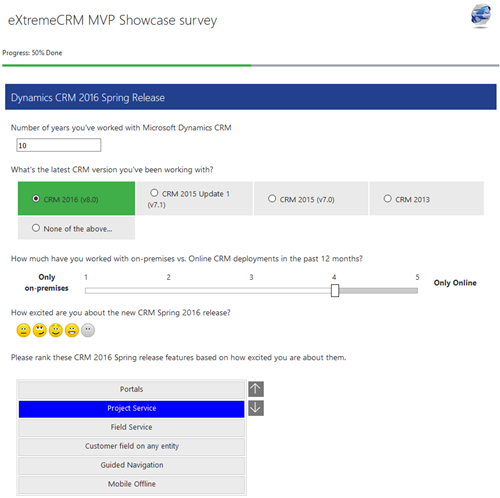
    A few weeks ago I launched a demo survey built on Voice of the Customer, the brand new survey tool from Microsoft. The goals I had for this exercise were twofold: 1) see how these type of interactive tools could be used in live events like eXtremeCRM 2016 Warsaw, and 2) gain some experience on what it is actually like to work with incoming survey response data inside Dynamics CRM. In this post I’ll mainly be focusing on the latter one, although the example data we’ll be looking at are the live answers you & other readers of this blog submitted via the eXtreme MVP Survey.
    VoC_survey_page

    As you may know, Voice of the Customer (or VoC as we’ll refer to it from now on) is a pure XRM solution. Although the actual customer facing survey forms are of course not presented via the Dynamics CRM client UI, everything that you use for configuring the survey questions and logic, as well as the incoming survey responses, is managed with CRM entities and stored into the CRM database. The reason this is such a big deal is that most of you will already possess the skills needed for leveraging such data via views, charts and dashboards as it’s just XRM all the way. Furthermore, you’re free to design business processes around the survey functionality with tools like real-time workflows or business rules. Naturally you’re also able to interact with the survey entities and records via the latest CRM Web API, should you come across some integration scenarios where data needs to either flow in or out to another system.

    The flip side of this coin is that VoC is unfortunately very XRM-ish to work with. If you compared it to dedicated survey apps that do nothing but questionnaire design (like SurveyMonkey, Surveypal and the likes), survey publishing and response data analysis, then there’s still quite a big gap for Microsoft to work on bridging when it comes to the end user experience of this tool. In a way this is quite understandable since the value proposition of VoC really is all about the tight integration with your customer data and the ability to send survey invitations automatically as a part of your customer facing processes; such as a survey link being emailed to a customer after a support case is closed in CRM, to gather quick ratings and design automatic escalation paths if the KPI’s are not met. Nevertheless, since VoC does also support creating pretty advanced surveys for collecting quantitative data from a broad target group in more traditional campaign style satisfaction surveys, as well as anonymous survey links presented on website, it’s good to understand what it’s like analyzing such data inside Dynamics CRM.
    VoC_Survey_Summary_report

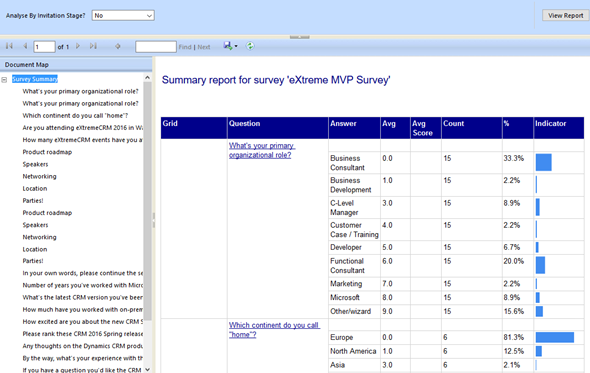
    There are a lot of components in the VoC solution right out of the box. First off, there are four SSRS reports: Survey Summary, Question Summary, Net Promoter Score and Survey Export. The first two are general purpose reports with tables and charts summarizing the data either across a single survey or a specific question, as illustrated in the screenshots shown here. The NPS report is naturally aimed for this particular survey type, whereas the export one is a single huge matrix for dumping out the raw survey response data into Excel for further manipulation.
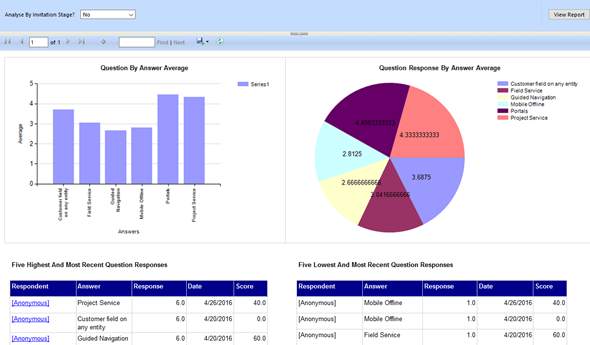
    VoC_Question_Summary_report

    For more interactive data analysis there are eight dashboards in the VoC solution. However, these may not be all that useful for many real life scenarios, since they suffer from the same limitation as all Dynamics CRM dashboards: there are no global filters you can apply for all the dashboard components. Meaning, unlike with an SSRS report launched from CRM, you can’t set the context of the dashboard to be a specific survey. Yes, with the new “interactive experience dashboards” introduced in CRM 2016 you do get this type of filters, but since right now those features are limited to the Interactive Service Hub only (which in turn has a fair number of limitations for general use), it’s not exactly the kind of solution we’d need right here.

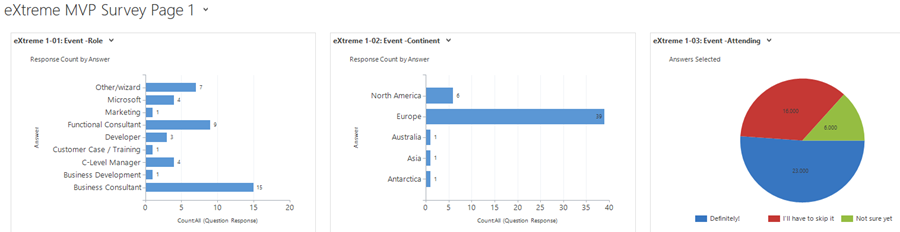
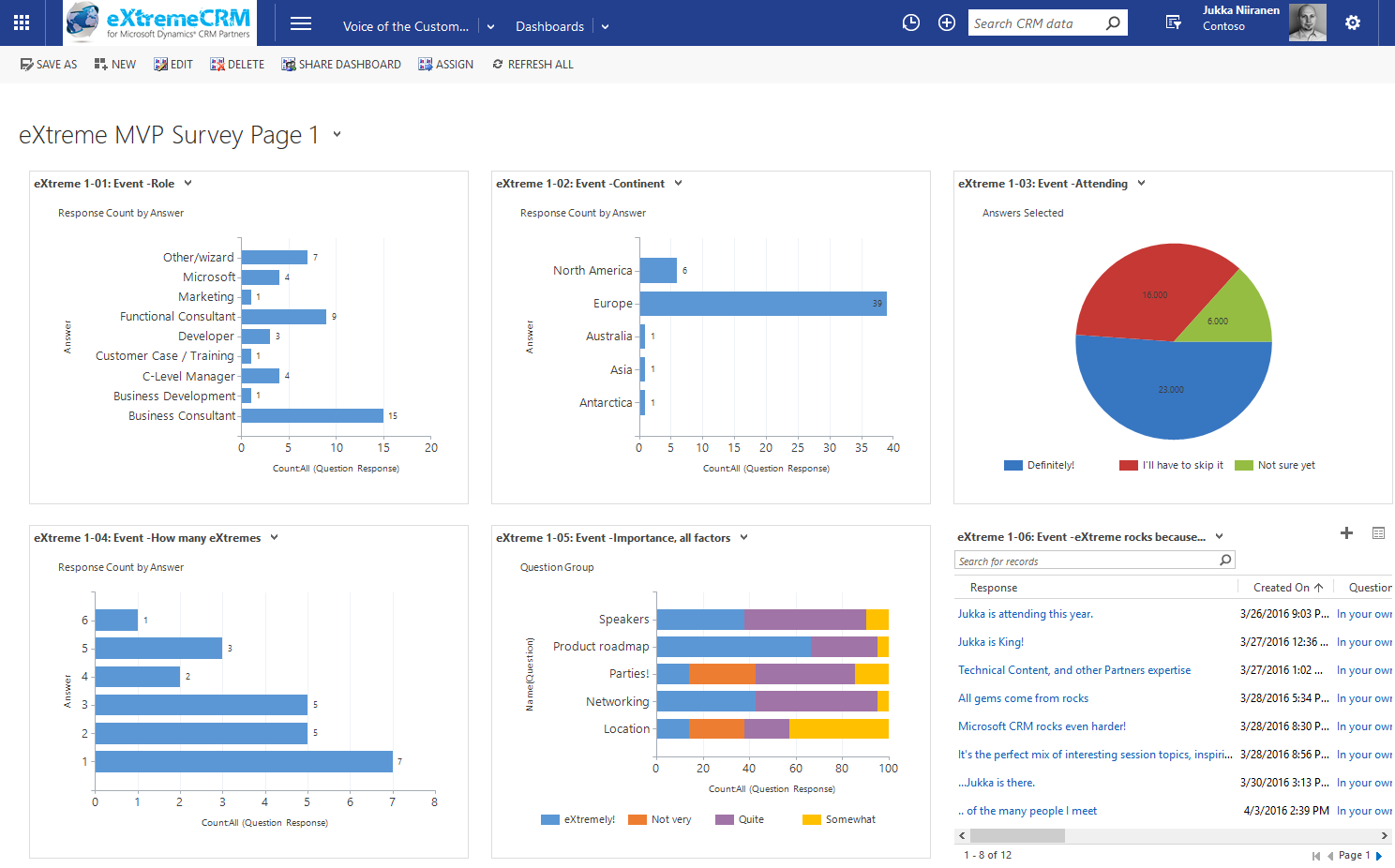
    That doesn’t mean we couldn’t build pretty dashboards to summarize our survey responses, though. I had a go at this with the eXtreme MVP Survey and it turned out pretty well. Have a look (click for a larger image):
    VoC_eXtremeMVP_dashboard_page_1_small

    In the survey form I had three pages full of questions and I constructed the corresponding pages as personal CRM dashboards. This allowed me to both monitor the incoming responses during the survey data collection period as well as present the results to the audience at the MVP Showcase session in eXtremeCRM. It looks good, it appears very familiar to existing CRM users and it gets the job done without having to resort to any complex report development. (more…)
  • Voice of the Customer: Conditional Questions

    Voice of the Customer: Conditional Questions

    My favorite podcast by far is CRM Audio. In fact, it’s the only podcast I regularly follow, since whenever I put my headphones on, quite often it will be for playing something from Spotify or Mixcloud to keep me from being distracted by people talking around me. Anyway, the podcasts that Joel, George and Shawn record about the latest news from the Dynamics CRM world together with their guest stars always provide some interesting insights that you can’t catch from the blogosphere. If you haven’t subscribed to it yet, I encourage you to give it a go.

    In episode 21 of CRM Audio, titled “That’s Not A Survey”, these CRM tipsters explored the brand new Voice of the Customer solution and discussed how to position it in relation to other tools like ClickDimensions Surveys and the likes. As you may have noticed from my previous blog post, I’ve also spent a bit of time playing around with VoC, since I see quite a lot of potential with this XRM based survey engine.

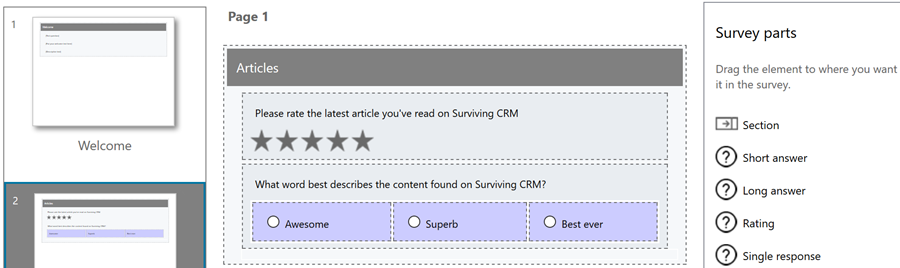
    One of the misconceptions around VoC that I’ve come across a few times before was also mentioned in the podcast was about conditional questions in a survey. It’s quite a basic requirement from any more advanced online surveys that the remaining questions should be adapted based on the earlier answers that the user has given. Call it “skip logic” or conditional show/hide, this would be something that a well designed survey would often need to apply, so that it adapts to the customer’s scenario being studied and can branch into different directions if parts of the questions are not relevant in a particular path. The misconception here is that in the Voice of the Customer survey designer UI there doesn’t appear to be a way to define such conditional logic. However, VoC does have this functionality already today.

    Being a very recent addition to Microsoft’s portfolio, and having been delayed from the original CRM 2016 release schedule, the features of VoC aren’t very well documented at the moment, nor is there much training material available for instructing users how to get familiar with the tool. The regular readers of Surviving CRM might recall that VoC was actually called Mojo Surveys when MS acquired it one year ago. This means that documentation does exist, but it just hasn’t been remade into Microsoft’s format yet. Here’s a little tip: Google for mojo surveys filetype:pdf and see what you’ll find…

    How the “skip logic” is done in VoC surveys is via a feature/entity called Response Routing. Found from the related records menu under a survey record, this is where you can define both the response conditions under which the routing  should take place as well as the response actions that should be carried out when the conditions are met (or not met). A condition would be associated with the response given to a particular question and evaluated via “equal/greater/less” type of operators. Below you see a simple example of a single condition per response routing, but you could also group multiple conditions together via AND/OR operator.

    VoC_Response_Routing

    The actions that you can take based on the conditions are split into two categories: client and server. As you may guess, the client side actions are performed during survey runtime, similar to client side scripts on CRM forms. Server actions are not performed until the survey response is submitted into the CRM database (like plugins), at which time it will be too late to affect what questions were presented to the user. So, the most interesting actions will be client side, which allow us to determine show/hide actions for questions or sections of a survey page, skip to a specific page, end the survey or even direct the user to a whole different survey.

    VoC_Response_Action_client

    In the example of the eXtremeCRM MVP Survey which I published together with my previous post, I added a Response Routing on the page 1 question “are  you attending eXtremeCRM 2016 in Warsaw”:

    VoC_Response_Action_demo_1

    If the user selects the answer option “Definitely!” then a further set of three questions will be revealed underneath that question on the same page. Similarly, because I also built response actions for the reversed scenario, if they change the answer value and click “I’ll have to skip it” then these additional questions are again hidden in real time on the survey page.

    VoC_Response_Action_demo_2

    As you can see, VoC does already contain quite nice functionality in the first version that’s been released now. There are many more features to discover, such as piping dynamic data fields into surveys, so let’s hope that Microsoft will publish tutorials that showcase the real potential of these VoC surveys – not to mention the possibilities of what you can do with the response data as it flows into your XRM environment!

    VoC_Piping_dynamics_fields

    One word of warning is in order here: currently there’s a known issue with the Voice of the Customer solution that will break the CRM v8.0 OData feeds (the new OData v4 endpoint) if you install it into your environment. If you then try to build a report with Power BI Desktop and want to use CRM Online as the data source, you may run into an error dialog saying “The field ‘regardingobjectid_msdyn_surveyresponse’ already exists in the record.” Microsoft is aware of this bug and is working on a fix, but if you are relying on Power BI for your production CRM Online reporting, then it’s maybe better not to deploy VoC outside of your sandbox environment just yet. (more…)

  • eXtremeCRM 2016 in Warsaw – See You There!

    eXtremeCRM 2016 in Warsaw – See You There!

    As you may have heard, the long running Microsoft Dynamics CRM & ERP conference Convergence is no more. Microsoft has revised their event catalog and is now instead encouraging people to attend either the brand new Envision conference for business level discussions or Ignite for the technology platform updates. However, since both these events are much more generic in nature than the Dynamics focused Convergence used to be, it does leave quite a gap in the market for the CRM application deep dive content. Also, there’s nothing in the MSFT event calendar that would directly cater to the Envision and Ignite crowd in Europe, so anyone from around here who doesn’t want to spend too much time on a plane (and mentally in between time zones for the relatively short period of the conference) may not be quite as excited about these changes as the marketing message coming from Redmond might want them to feel.

    Luckily the Dynamics CRM ecosystem isn’t dependent on only the events that Microsoft arranges. CRMUG has been building up their presence also on this side of the Atlantic and is now launching their first European Congress this spring in Stuttgart. eXtremeCRM is a long running event that has been catering to both the US and Europe partner audience for many years already and they’ll also have an event nearby very soon, as eXtremeCRM 2016 Warsaw takes place on April 18-21. So, whether you’re working on the customer’s side of the table or consulting a variety of different organizations on how to best take advantage of Dynamics CRM, there’s bound to be the right event for you where you can meet professionals like yourself, exchange ideas with them and hear presentations from knowledgeable members of the #MSDynCRM community on what’s hot (and not) in the CRM space.

    It’s been a while since I’ve been to a CRM conference myself but this year I decided to make room in my customer projects calendar for attending one, since one doesn’t simply survive in this business with content you can find from online sources and social channels. So, I registered for the eXtremeCRM Warsaw event early on and then decided to also suggest a topic I could do a presentation on. The suggestion got approved, which means… well, the picture of yours truly right underneath Jujhar Singh says it all!

    eXtremeCRM2016_speakers

    I’m honored to have the opportunity to join such a prestigious list of speakers in the eXtremeCRM 2016 Warsaw event. I wont of course be competing on the level of Jujhar (who BTW seems like exactly the right man for the Dynamics CRM GM position, based on our encounters at the MVP Summit) but will rather be focused on preaching what I know. Which is all about how to make the most of the XRM platform when you don’t know how (or just don’t want to) work with the API’s but rather need to leverage the built-in customization tools. My session is titled “Killer UX: Delivering a Great CRM User Experience without Custom Code” and what I’ll try to do is show how anyone who knows his or her way around the solution configuration UI can make a real difference in what Dynamics CRM as an application feels like for the end users to work with.

    Now, I should of course be working feverishly on my presentation slides already, but here I am just reading and writing blog posts like I always do. If you’ve ever encountered a situation where instead of focusing on completing the important work that has a deadline approaching in the distant but all too inevitable future, you find yourself wondering around between Twitter and YouTube instead, then you know the feeling. Well, speaking of online videos, there just happens to be an excellent TED Talk from Tim Urban on the topic “Inside the mind of a master procrastinator”. You really should watch it because A) the Instant Gratification Monkey inside your brain will totally love the distraction, and B) it’ll help you better understand the dynamics of (not CRM but) procrastination.

    Instant_gratification_monkey

    “Hey, get off the wheel, you Monkey! We haven’t even finished this blog post yet! Grrr…”

    In addition to myself, there are also eight other awesome CRM MVP’s who are coming to Warsaw. We’ll all be having our own sessions of course, but in addition to that, there will be a joint session where the audience can present questions to all the CRM MVP’s in the room on the latest CRM 2016 Spring Release in particular. Now, as we were thinking about what’s a good way to coordinate such a session, it occurred to me that “hey, why couldn’t we use CRM for this?” More specifically, wouldn’t this be a great opportunity to showcase the new Voice of the Customer functionality that’s very recently been made generally available for CRM Online customers?

    eXtremeCRM_MVP_survey

    As it turns out, Voice of the Customer (or “VoC” as we’ll all end up calling it) allows you to easily design surveys on any topic that you’re interested in collecting data on. If you haven’t yet explored this great new addition to the XRM family of add-ons that Microsoft has integrated into the core Dynamics CRM product offering, you could start by watching this introductory VoC video on YouTube. Or, you could see a VoC survey live in action by answering our eXtreme MVP Survey.

    eXtreme_MVP_button_1

    The survey is mainly targeted at those who are planning to attend the eXtremeCRM 2016 Warsaw event, but there’s nothing stopping you from taking it if you can’t make it there. The survey starts with some questions about the event and closes with a “feedback form” that you can use for submitting your questions to the CRM MVPs in advance, to be answered in the live event (time permitting). It also contains a few questions about how you feel about the upcoming CRM 2016 Spring Release, so I’m planning to also experiment with some of the analytics capabilities that these XRM style surveys offer us. I might even write a blog article about how the VoC experiment worked (unless the ‘Monkey gets its way again), so it’s all conducted in the name of science! (No marketing spam will come from this survey, it’s my personal CRM Online trial org that will disintegrate within a couple of months.)