Tag: upgrade

  • Top 3 Themes for Dynamics 365 in 2018

    Top 3 Themes for Dynamics 365 in 2018

    This time last year I wrote my Top 3 themes of 2017 article on what were the major events and directions from the year for the Dynamics 365 ecosystem. The start of a brand new year always feels like the logical moment to reflect back on the past 365 days, so this sounds like a worthy tradition to keep going. Here are my Top 3 picks from 2018 and some thoughts on how they might influence the direction of the year 2019 ahead.

    Power Platform

    The biggest single announcement of 2018 came in March when the Dynamics 365 Customer Engagement and PowerApps platforms were merged into one. It wasn’t until July that we began to see the Power Platform term used in describing this new suite of tools that now is the way to extend both Dynamics 365 and Office 365 apps, as well as building brand new apps for customer specific scenarios.All of a sudden the technology that had been bubbling under in the Dynamics CRM corner room is now brought onto the main stage of MS business software show.

    The immediate impact was that XRM became CDS 2.0 (Common Data Service for Apps),which probably hasn’t been all that easy for non-Dynamics professionals to understand if they only paid attention to official MS information sources covering the topic. For the Dynamics partners a nice upside in this merger was PowerApps P2 becoming the “naked XRM” platform license they had been asking for many years (compared to the earlier Dynamics 365 Plan license for bundling CRM + ERP, which I don’t think was in as high demand).

    A more subtle but equally important change was the birth of model-driven app and canvas app concepts. No, not the marketing terms nor the division into two app types, rather the fact that these different client technologies now had a clear need to start approaching one another in terms of how they behave, what data sources they support and how they are administered. Examples of these have become visible through recent announcements like:

    It would be perfectly justified to call 2018 “the year of the platform”, considering how significantly the investments from MS side seem to have shifted from Dynamics 365 to the Power Platform. During 2019 we’ll see if the partner channel can follow along, to transform their offering into something more in line with the PowerApps story than the traditional CRM business models that have mostly been just revised for the cloud based environments during recent years.

    A similar challenge awaits the professionals who’ve been working in this business and now need to figure out how to put their existing skills into use in projects that may not even mention the Dynamics product name anywhere. Plenty of new skills will also need to be acquired for leveraging the broader toolkit. The recent announcement of Dynamics 365 exams certifications to be retired gives an indication of the looming new requirements that await the MCP’s wanting to remain current with their certification record.

    One Version

    My Nr. 2 theme from 2017 was the App/Plat separation that largely took place as part of version 9 release. Now that Dynamics 365 CE is running purely on Azure after all orgs get to v9, the next logical step is to start delivering new releases on it the same way a modern cloud native product would. PowerApps, Flow and Power BI have already been operating as a service with a single version for all customers and now the platform underneath Dynamics 365 as well as the Apps on top of it are set to transition into this model. The July announcement of how Microsoft plans to deliver predictable updates with continuous deployment for both Customer Engagement and Finance & Operations is another major event of 2018 that will shape the future of these product lines and introduce a new reality for customers who build their digital business processes on top of them. The old CDU process for version update scheduling is no more and everyone will get the April 2019 update bases on the public release schedule.

    (more…)
  • Winter in July: Release Notes for Next Dynamics 365 Version

    Winter in July: Release Notes for Next Dynamics 365 Version

    While I’m over in Finland enjoying the biggest and longest heatwave ever, some of my fellow MVPs and Dynamics 365 community members were attending the first ever Microsoft Business Applications Summit this week on the other side of the globe in Seattle. As much as I would have enjoyed sitting in cold & dark conference rooms instead of trying to hide from the burning sunlight, this time I had to rely on the others to share the latest news from #MSBizAppsSummit while I attempt to enjoy the summer vacation.

    A large share of the conference’s announcements are covered in the October ’18 Release Notes, which you can download in PDF format right here. This is a massive “drop” that follows the format of what we already saw with the previous April ’18 release. Even though it’s been made available during the summer heat, it’s actually a list of features that Microsoft intends to (mostly) make available between October 2018 and March 2019. So, winter came early this year, which is a positive thing, since now we have several months of advance notice of what’s in the product team’s pipeline. These release notes essentially replace the earlier roadmap.dynamics.com website, which in itself was kinda cool (running on top of Dynamics 365 Portals and all) but didn’t communicate the actual road ahead all that well. So, these twice a year PDF releases with ongoing updates to their detailed content is the thing you need to pay attention to now.

    One small but notable difference is that Microsoft is no longer calling it “Dynamics 365 Release Notes” but “Business Applications Release Notes”, which together with the Summit’s name reflects the new context in which we all should approach whatever parts of the toolkit we use in our end user solutions. Recently also the Microsoft Most Valuable Professional program updated its terminology, and now the previous Business Solutions MVPs are in the Business Applications MVP category.

    The previous April 2018 release was the first time when we saw the new organizational structure of Microsoft Business Applications Group (“BAG”) bringing previously separate product offerings under one roof, with CRM & ERP products being represented in the same release notes list as PowerApps, Flow, Power BI. That also was the time when things like the Common Data Service for Apps were announced as replacements for what XRM previously stood for. However, from a raw functionality level there appeared to be a greater urgency in reaching GDPR compliance before the May 25th deadline than to actually push out new integrated features for the CDS for Apps platform.

    Reading through the October 2018 release notes, this time it’s very different. There are huge steps being take to bring together the “ex-XRM” technologies with the newer products and make it truly one Power Platform. Here are selected highlights:

    • PowerApps Canvas Apps and Flows can now been included inside CDS for Apps solutions, giving them the ALM story for enterprise grade deployment across different dev/test/UAT/prod instances. This clearly makes them no longer a “power user” focus tool but a building block for credible business applications.
    • PowerApps Canvas Apps can be embedded inside the model-driven app entity forms. The traditional UI of XRM apps that was generated from metadata will get a touch of pixel-perfect design options that the Canvas Apps have always been about. This ability coincides with the new options to freely set the app size instead of earlier phone/tablet format limitations.
    • Flow is promised to reach parity with async workflows. Even though the transactional capabilities of real-time workflows (similar to plug-ins) is not yet within October 2018 scope, that’s one bold step to make the XRM workflows history and move their logic into Flows.
    • Power BI reports & tiles can be embedded onto CDS for Apps entity forms and the record context as well as any record attribute can be passed to them for data query and visualization filtering. Surely pretty much anyone has at one time wished “gee, wouldn’t it be sweet if instead of working with this limited ASP.NET chart XML from Dynamics CRM 2011 we could leverage those modern Power BI charts instead”. Well, that day is getting closer!
    • PowerApps Canvas Apps will FINALLY offer native support for lookups, option sets and datetime fields. For anyone who’s tried to replicate pretty much any CRM functionality with PowerApps, this will have been a very early stumbling block. Not so easy to solve with separate product teams inside MSFT apparently, but within the new Business Applications Group these gaps for real life solutions can now be filled.
    • There will be a single mobile “player” for both Model-driven Apps and Canvas Apps. When previously the Dynamics 365 Customer Engagement mobile app for Unified Interface and the PowerApps apps lived behind separate app icons on your phone, soon the users may no longer see any difference when switching between different business applications.

    These are only a few items in the long list of upcoming features that the 239 pages of October 2018 release notes contain. A lot of important unification is also taking place in the author and admin experience of how Dynamics 365 Customer Engagement apps, CDS for Apps platform, PowerApps Canvas Apps and Flow can be used together for your solution design needs. Similarly, a lot of advances are being made on the UCI front, with the legacy web client being more and more replace with Unified Interface. Then there’s the whole CDS for Analytics side of things coming up, with promises for new AI apps and capabilities. You’re going to need to read through a wealth of blog posts to grasp the full spectrum of what Microsoft is planning to launch, so a good place to start is the Scott Durow Top 10 favourite features in this release.

    The April 2018 release for Dynamics 365 CE was a bit of a surprise due to the fact that it wasn’t officially a major release like v10 or even v9.1, instead it was only a v9.0.2 update. Deployed automatically to your v9 instances, with no CDU process to schedule the update from the available time slots. Now in July we got a confirmation from Microsoft that this reflects the way all future updates will be rolled out, in the blog post Modernizing the way we update Dynamics 365. Looking at how the Power Platform will increasingly be consisting of functionality that isn’t found in the “XRM server”, the automatic updates make a whole lot of sense. It remains to be seen how the remaining on-premises customers will be serviced with the updates and to what extent there will be feature parity. At least we now got a confirmation at the Business Applications Summit 2018 that there will be a new on-prem release this fall, so there appears to be a plan to bring things like UCI available for those who still prefer to run their own business application servers.

  • The Irresistible Force of Great User Experience in CRM Applications

    The Irresistible Force of Great User Experience in CRM Applications

    Those who have worked with Dynamics CRM for a longer period of time will remember how the user experience delivered by the platform has evolved over time: from an Office style, data entry focused, Internet Explorer popup window application into the clean and modern Dynamics CRM 2015 application that works on any device and aims to present the maximum amount of relevant information to the user with the minimum amount of clicks. There was a time when CRM didn’t exactly seem like something that was designed with the needs of the end user in mind, but this direction changed quite drastically from the CRM Online December 2012 Service Update onwards, as Microsoft started to redesign the experiences they wanted to deliver for the users of their business applications in the new era where mobile, social and cloud were quickly becoming the most dominating forces in the world of enterprise software. Not forgetting the consumerization of IT, which had shown people that not every app used in a work context needed to look like a 90’s ERP system.

    I have covered this transition in quite a bit of detail in my four part article series titled “Dynamics CRM Platform Evolution”, which I’d recommend you to read through for understanding the practical impact of moving from the “first era” of MS CRM v1-v5 onto the current era of largely CRM Online focused rapid product iterations. One of the points I raised in the article was that not all the CRM software providers in the market had chosen to follow a similar path of introducing a big bang revolution to their application. Unlike Microsoft, Salesforce.com had instead opted for an evolutionary path that had seen their application UI remain almost unchanged for the main components and layout, as depicted in the image below.

    CRM_Platform_Evolution_2_small

    While being wildly successful in becoming the “next CRM application” after the 90’s generation of Siebel style, on-premises enterprise CRM suites had began to slide out of the limelight, Salesforce also began to receive a growing amount of criticism over the legacy that its user interface had accumulated over its history. The question of “Why doesn’t Salesforce upgrade the UI/UX of its core CRM web app?” did seem more and more valid, especially when competing products like Dynamics CRM were transforming the user experience that one could expect from a customer relationship management application. Well, finally in late August 2015, Salesforce announced that their next era of CRM UX would arrive in the form of the new Salesforce Lightning UI.

    Welcome to the Future of CRM, Salesforce!

    First of all, congratulations to the product team behind the Lightning UI on the launch! Pulling off a major redesign like this is bound to be a massive task and I’m sure in many ways the work has only begun now, but it’s still definitely an achievement worth celebrating. As many of you may have noticed, in my day job I work exclusively with Microsoft Dynamics CRM, so whatever I write here about a competing CRM solution is not going to be 100% objective. For that I apologize, but the point of my post isn’t to bash Salesforce but rather to analyze some of the trends in CRM software in general and also reflect back a bit on what has taken place in the world of Dynamics CRM during the past few years.

    But first, I need to just get something out of the way. Damn how these two apps look alike! Here’s the brand new opportunity form on Salesforce Lightning UI, a.k.a. Opportunity Workspace:
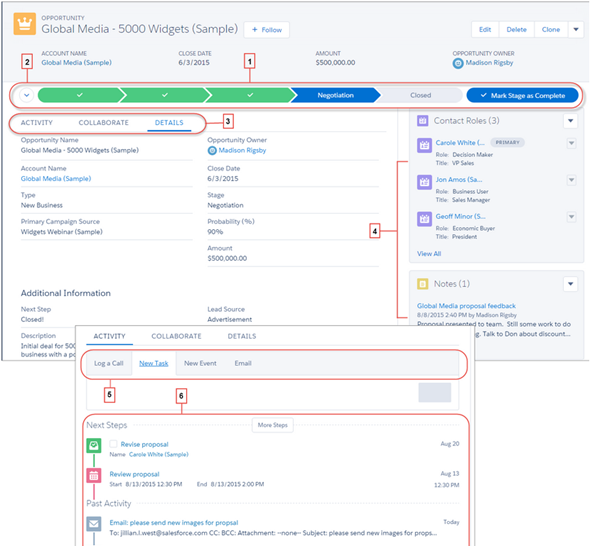
    Salesforce_Lightning_Opportunity_small

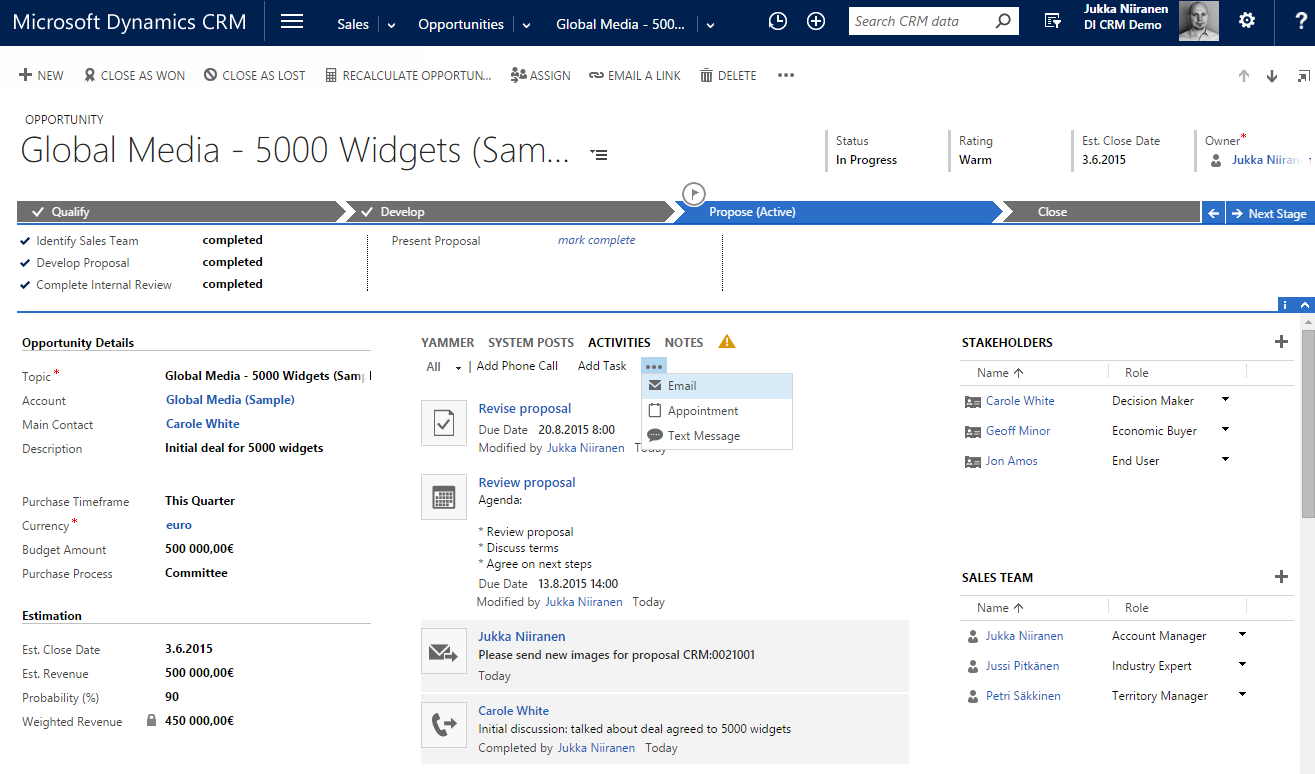
    …And here’s how the opportunity form on Dynamics CRM has looked like pretty much since the 2013 version:

    Dynamics_CRM_2015_Opportunity_small

    Notice any resemblance? Let me help you out a bit by listing the first five things that come to my mind from the Salesforce screenshot:

    • Sales Path for visualizing the sales process stages and related fields, known as Business Process Flow in Dynamics CRM
    • Tabs for switching between related activities and social posts, known as the Social Pane in Dynamics CRM
    • Composer for adding new tasks, phone calls and events to the opportunity, which simply is an inline activity quick create form in Dynamics CRM
    • Related information on Contact Roles, essentially the Stakeholders editable grid in Dynamics CRM
    • Persistent four header fields at the top of the form, ditto for Dynamics CRM

    Yeah, of course these both are applications for managing your typical sales opportunity information with activities and contacts, so its understandable that the concepts used in the default screens would be unlikely to radically differ from one another. Still, contrasting Lighting UI with the traditional Salesforce UI and looking at how close to the now familiar Dynamics CRM form layout, UI controls and especially the Business Process Flow feature the Salesforce product team has ended up with their design is, well… Quite remarkable in my opinion. Not a bad choice by any means, and also serves in validating the direction that Microsoft’s team took when overhauling their application’s UI a couple of years ago.

    Aside from the similarity to Dynamics CRM, there are plenty of nice looking designs and features included in the Salesforce Winter ’16 release notes. Some of them are about filling the functional gaps to Dynamics CRM (list view charts known from CRM 2011 make an appearance here), others are borrowing concepts from the more recent CRM apps out there (Kanban style opportunity board used in Pipedrive, Pipeliner et al., as well as SalesFlow for Dynamics CRM), but many of the release items seem to be focused on fine tuning the application usability and removing unnecessary friction from common tasks that sales people need to perform on a daily basis. Rather than just slapping on a new field layout and updating the icons, it does seem like the user experience of Salesforce will change quite dramatically with Lightning. Of course the true UX can only be evaluated once a live version of the application is available for testing how it truly feels like to use the app, but at this point it looks like a major step forward.

    The Price of Revolution

    Introducing a new application user experience to new users who don’t have prior experience of the product will always be far easier than forcing it upon the existing user base. While few people would say that they don’t want a nice & easy UI, the reality is that resistance to change is always a factor when dealing with human beings. When it comes to business software especially, disruptive changes are at the very bottom of the want list for the majority of people who are responsible for ensuring that information systems deployed for managing the core business processes of their organization keep on churning out the expected results. What’s going to happen when a CRM system jumps from evolutionary releases to revolutionary changes instead?

    The one important thing to keep in mind is that changes like this never take place overnight. Migrating over all the functionality that vast application platforms like Salesforce of Dynamics CRM have accumulated over time isn’t something you can get away with a single big bang release. With Microsoft there was a preview version of the new UX introduced with the Online only Polaris release, launched almost one year ahead of the actual major release of CRM 2013 (v6.0). Initially only five core entities were updated to the new “refreshed” forms, and even today the latest v7.1 still contains lots and lots of entities and menus that follow the old Ribbon based user experience. So, three years later the work isn’t even done for the Dynamics CRM product team in renewing the platform, which means that the end users and system customizers need to cope with a somewhat mixed application environment. The platform legacy becomes most apparent with the new mobile client applications that don’t support the old product architecture, resulting in features like marketing lists or connections not being available on the modern client versions. Sure, life is much, much better with the new UX, but it has also introduced some new complexities into the product.

    In the case of Salesforce, the story sounds to be somewhat similar, as not every area of their platform will be Lightning enabled right from the start. The Service Cloud will not yet be updated, nor will features like forecasting, orders or person accounts. In moments like these it’s always interesting to see how companies prioritize their development efforts, as they are likely to indicate either the observed level of usage for certain features of their products, or alternatively possible future plans to scrap something old and rebuild it from the ground up. If you’re working as a consultant that advises customers on what features they should take into use or invest in developing for their CRM systems, the messages conveyed by the application vendors via the frequency of updates to certain functional areas of their products are signals you’ll most certainly take into consideration when deciding on what strategy to recommend to your client base.

    With 150k customers and millions of users, it’s going to take a while before Salesforce will have safely moved each and every one into the Lightning world. In fact, based on the statement by Sara Varni, senior VP of marketing for SFDC Sales Cloud,  this milestone may never even be reached, since Salesforce will support the classic experience “indefinitely”. In the oldskool settings of on-premises servers, the way this could have been handled would be for the customers just sticking to an older version of the software and not deploying any updates. When you’re the grandaddy of SaaS platforms, things are obviously a bit different and supporting older versions will require more than just accepting support tickets for ancients releases of your software. With CRM Online, Microsoft has previously been pretty strict on getting every customer to move on to the latest version via the CDU (Customer Driven Update) program, but lately they’ve also changed their update policy to allow skipping the bi-annual releases and updating only once per year. As SaaS products become a more mature market, I bet we’ll be seeing a growing number of options for customers to choose which versions to use, which features to activate and when to schedule these changes to take place.

    Universal Experiences

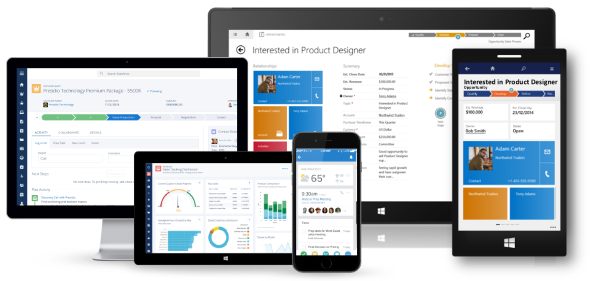
    The way Salesforce chose to build their next generation UI is different from the path that Microsoft took. While Dynamics CRM 2013 introduced both the new web client experience as well as the “MoCA” tablet client application as separate experiences (followed by the refreshed mobile app in CRM 2015 Update 1), Salesforce decided to first build the Lightning framework for their Salesforce1 mobile app and then scale it out to the PC screens. As a result, the screenshots that we see in the Winter ’16 release notes look very much like a mobile app placed onto the screen of an iMac. While you could in theory also use the Dynamics CRM for Tablets app on a Windows 8/10 laptop, the users will certainly almost always end up choosing the Dynamics CRM web client designed for interaction with mouse & keyboard rather than touch optimized “Metro” experience.
    Salesforce_Dynamics_clients

    I think this will be one of the most interesting design choices to keep an eye on when it comes to user reactions to the new Salesforce Lightning UI. Regardless of all the recent Universal Apps hype that Microsoft has been building up alongside the Windows 10 release, I’m personally not quite convinced yet that you can deliver a great UX with a single app that needs to scale from 5″ touch screens to 27″ desktop monitors. As a result, I’m also not a big proponent of the “configure once, deploy everywhere” slogan used in reference to the Dynamics CRM mobile apps, since I’d rather see CRM applications truly optimized for the device and use case in question. However, if Salesforce can pull this off with Lightning, then perhaps Microsoft has been right all along with their OS strategy and the application teams should now move faster towards unifying the client side of things.

    Applification of Platforms?

    When it comes to products like Dynamics CRM or Salesforce, one of the key reasons why they are being so widely deployed across enterprises today is the ability to customize them to align with the business processes specific to the customer organization. They are not only replacing legacy CRM suites but also capturing an ever larger share of the market that used to belong to custom developed business software, since using a customizable application platform delivered from the public cloud can really drive down the TCO quite significantly. But if the CRM applications are now reaching towards an even more polished user experience in performing common tasks with sales, marketing and service records, what will happen to supporting the business specific scenarios that are more unique than what pre-built application features can cover?

    When Microsoft launched the Dynamics CRM 2013 version with the refreshed UI, they didn’t only add more features into the already crammed product, but rather they took away some configuration options that had been previously expected from the platform. As the saying goes about the goal of design work, “perfection is achieved not when there is nothing more to add, but when there is nothing left to take away.” That may very well be true when designing a product to serve a specific set of tasks, but it may not resonate so well with a toolkit used for crafting these end products. Limiting the options shown to an end users is different from limiting the options available to the designer of the final solution that the user will be exposed to.

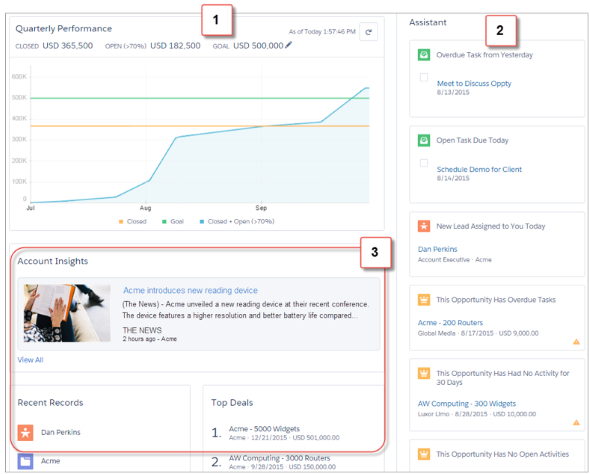
    How do such limitations show up in everyday life with the latest Dynamics CRM version? Today we have inline quick create forms for effortlessly adding activities for records, but we can no longer choose if we want to record a future phone call activity instead of a completed one. We can use an editable grid for adding line items into opportunities, quotes and orders, but we can’t configure these grids to contain those fields that the business logic would require to be recorded onto these line items. The price of added convenience for some is therefore resulting in the reduced usefulness to others. Looking at the Salesforce Winter ’16 release, it’s apparent that also here the polished UX will be come at the cost of reduced options. For example, there will be a brand new, great looking Home screen offered for sales users, but the components shown in it cannot be customized at this time.
    Salesforce_Lightning_Home

    Is there an inherent conflict between the needs of the application end user and the platform customizer? I don’t believe this is necessarily the case, but it is obvious that there are trade offs in building something that works great and building something configurable when it comes to the allocation of development resources for these software products. As the release cycles get faster and faster, the pressure for getting a new feature out there can mean there’s no time to perfect the first version into something that will meet the needs of all user groups and align with the rest of the platform functionality. The real question is, will the features be made more customizable in the subsequent releases, or will the requirements be pushed down in the backlog when the demand for more new features arises?

    When discussing the user experience of applications that are not commodity services like email but highly business specific process management tools (at least when properly deployed), it’s very important to understand what the final UX really consists of. It’s not only about having the slickest UI controls for working with the data, the flashiest graphics for visualizing the sales pipeline or most creative layouts for presenting different data sources on one screen. At the end of the day, the users need to feel like they can easily accomplish the tasks they are responsible for, with the help of the application – not despite of it. Understanding what exactly those tasks are and what pieces of information are relevant to the process of their completion is something that requires careful analysis conducted at the organization deploying a new CRM solution. Failure to do this will quickly wash away any value that the software features could have potentially delivered to the organization.

    As today’s CRM platforms become more and more sophisticated with the functionality and data presentation options available, the design work of those who configure the customer specific solutions also needs to be aligned with the increasing expectation levels for application usability. It’s still not rocket science, but it does require a greater attention to detail than the earlier, more primitive business applications where the UI was essentially a reflection of the data model. I’ve illustrated some of these design aspects in my 10 Tips for Designing A Great User Experience presentation, which hopefully can give an idea of how the system customizers can do their part in building CRM systems that the business users will find great value in – a Useful Experience, if you will.

  • Don’t Merge Your Forms in CRM 2013

    If you have been using Dynamics CRM before the 2013 version was released, you may have something in your system called “information forms”. This is not a very descriptive term for them, since of course all the entity forms are about presenting “information” to the end user. These forms actually date back to a time in the Dynamics CRM platform history when there was only a single form available per entity. Times have changed quite a lot since then, as entities can now have role based forms, mobile forms, quick create forms and quick view forms.

    Although not a specific form type in itself, CRM 2013 introduced a whole new layout for the default entity forms as a part of the UI refresh. Instead of the traditional & boring two column layout, the new CRM 2013 forms are made up of three columns that can consist of not just entity fields but also related entity subgrids, the social pane, Bing Maps component and other exciting new features. Whereas the old default forms were called “Information”, the names of these new forms follow the entity names. So, the account entity will have a new form labelled “Account”, as an example. (By the way: check this tip for optimizing your form naming convention.)

    Merge Forms Feature

    Since the new forms are designed to make better use of the new navigation paradigm of CRM 2013 as well as present the data in a much richer way than the old “ERP style” forms of past CRM versions, customers who are upgrading their Dynamics CRM deployment to the latest version are advised to migrate into using these new forms. In fact, Microsoft has stated that the next major version (CRM 2015) would no longer support the use of the old “information forms”.

    To make this transition easier, Microsoft has provided a feature called “Merge Forms”. This new button available on the form editor in the CRM customization UI (which still utilizes the old CRM 2011 style layout even in CRM 2015, by the way) is intended to be used for bringing the tabs, sections and fields from your old forms onto the new forms with as little clicks as possible.

    CRM_merge_forms

    The process is described in the article “Update your forms to Microsoft Dynamics CRM 2013 or Microsoft Dynamics CRM Online Fall ’13”. Even more detailed steps can be found from the PDF document “How to Prepare for the CRM Online Fall ’13 Service Update”. Basically what the feature does is bring in the contents of the old form to the end of the currently open form, with the intention of making it faster to rearrange your customized fields and sections to align with the new default form’s content and layout.

    Sounds like a handy feature, right? There’s only one slight problem with it: it doesn’t work.

    Conflicting ID Values

    “What do you mean it doesn’t work? I have used the button to bring in my custom fields and it did just what I expected.” Well, maybe I should rather say that it works partially. If you never export your CRM customizations into a solution file and move it to a different environment, you may not notice that anything is wrong with your forms. However, if you do want to move the customizations between development, test and production organizations, you might run into the below error message during the solution import process.

    CRM_import_solution_error_after_form_merge

    After the error, if you download the log file and open it, you’ll see a message like this:

    Error code 0x8004F658. The label ‘E-mail 2′, id: ’87dc7c9c-94c1-3953-e490-11413b31d0ad’ already exists. Supply unique labelid values.

    What the system is telling us is that we’re trying to insert an item into the customization metadata that has a non-unique ID. Depending on the scenario, the item could be a field or section label. But how did the ID end up being a duplicate? After all, we don’t assign these GUID values in the customization UI, rather the CRM platform generates them. What could have caused the system to violate its own rules?

    The answer can be found from this thread on the MSDN forums: CRM 2013 Solution Import. A Microsoft support engineer has confirmed that the error is caused by a design mistake in the Merge Forms feature. Apparently in the process of merging form content from the old form onto the new one there is more data carried over than is needed. Not only do you get the form components exactly the way they are configured in the original form, but you also get the same ID’s. Now, since the old form also exists in the system, this will cause an error message when you try to import your solution file from the source system to the target environment, like from development to test environment, for example.

    The Workaround

    The system where I ran into this problem was running Dynamics CRM 2013 Service Pack 1 (6.1.0.581) with no Update Rollups (see this earlier blog post for help on understanding the different updates and version numbering). The forum thread above does not indicate that a hotfix for the form merge bug would have been included in one of the released updates so far, so I’m assuming that all CRM 2013 environments are affected by it during the time of writing.

    The suggested workaround in the forum discussion was basically “start all over”, meaning removing the merged content from the form and re-adding the components back there one by one. In the environment I was working on this would have required many hours of work with using the form editor on a number of entities , which I wasn’t too keen on spending there. I had just migrated a copy of the CRM 2011 production organization database onto a CRM 2013 test server and was in the process of testing the upgrade steps before the final go-live, so re-doing the customizations at this stage just sounded like both a schedule challenge as well as a potential source for new issues.

    I extracted the CRM solution zip file and poked around the customization.xml file for a while, trying to think of a way out of this situation. After I realized that trying to edit the XML manually would only land me into a deeper hole, it occurred to me that there was another feature in CRM that performed something similar than the broken Merge Forms: the “Save As” button. Copying entity forms to create new variations was something that I had used many times with no issues, so perhaps I could rely on it here as well?

    I proceeded with creating a copy of each of the entity forms where I had used the Merge Forms feature. Since the new form versions created via “Save As” are able to co-exist with the original forms without causing any conflicts, this must mean that the CRM platform assigns the required new ID’s to the form components. Based on this reasoning, I therefore assumed that once I deleted the original merged form and renamed the new copy (as well as configured the form order and security roles), I would have a clean solution file with unique ID values. After testing the solution import I was extremely glad to see that this was in fact the case, as no more error messages appeared during the import. Saved by the “Save As”!

    Don’t Just Merge – Design

    So, with the above workaround and a potential upcoming hotfix, is there any reason not to use the Merge Forms feature? In my humble opinion, the merge process is not a best practice but rather just a quick’n dirty way of getting the custom fields to appear on the entity forms. If you don’t in practice know how to customize your Dynamics CRM environment but need to cope with the updated UI of the new version, then the merge will technically make it possible to keep using your CRM data. What it will not do is produce a system that your end users will enjoy.

    The merge will bring over a lot of duplicate content (all the default fields) that you may forget to clean away from the new form. It will also create very confusing components for the system administrators, such as the old “What’s New” section vs. the new Social Pane, which require a deeper understanding of the Dynamics CRM platform evolution to really figure out. The biggest risk is that the form content designed for the old version UI will end up living alongside the content that is specifically made for the post CRM 2013 world, creating a disconnected and illogical application that works differently depending on the area where the user navigates to.

    Instead of taking the shortcut and doing a quick content merge, I recommend investing a bit more time and effort in planning what’s the best way to present the data and how to make it as easy as possible for the users to interact with it through the UI. If you need some ideas for improving the user experience of your Microsoft Dynamics CRM environment, take a look at my previous post that listed 10 tips for designing a great user experience in Dynamics CRM.

  • Our New Book: CRM 2013 QuickStart

    A few people have asked me for recommendations on what books they should get if they want to learn about the ins & outs of the current Microsoft Dynamics CRM 2013 version. Even though there’s a wealth of blog articles out there that study specific features and an ever growing library of content produced by Microsoft themselves, there’s not been a whole lot of material in traditional book format that would have covered the latest CRM 2013 functionality. Well, now there is a great title available that I can recommend: the CRM 2013 QuickStart.

    CRM_2013_QuickStart_cover_smallHow do I know the book is any good? Because I wrote a part of it! Aside from shameless self promotion, I can honestly say that the writing team behind this book is quite an extraordinary league of CRM experts:

    If that’s not a group of CRM MVP’s you’d trust for advice on how to work with the platform then I don’t know who you would!

    What exactly does the book cover then? As the title suggests, it’s not a complete A-Z of each individual feature included in the Dynamics CRM 2013 platform. Neither is it meant to be “my first Dynamics CRM manual” for people who are unfamiliar with any version of the product. Let me borrow some of the official intro text for the book here to explain the reason for its existence:

    The CRM 2013 Quick Start is a first look at Microsoft Dynamics CRM 2013 and all the new features that have been included.

    In the CRM 2013 Quick Start you will find details that can help administrators, customizers (functional consultants) and developers; not to mention power business users wanting to know all the details the admin never tells them. If you run CRM in the cloud or sitting in a server room at your office the information is useful.

    This book is targeted to someone who has some CRM prior experience. By that we simply don’t spend any time explaining the basics of Microsoft Dynamics CRM from a beginner’s point of view. That said, the information in this book would still be useful on your journey to become proficient.

    Imagine that you’re someone who’s started their Dynamics CRM journey with an earlier version like 4.0 or 2011 and you’re now faced with the upgrade project for moving the solutions onto the latest CRM 2013 version. Is this the right book for you to gain an understanding of what’s new & what has changed in the platform? Absolutely! How about if you’re a system administrator or a customizer that has some exposure to the new version (via CRM Online perhaps) but are looking to ramp up your knowledge about the platform for future projects, enhancements or admin tasks. Will the CRM 2013 QuickStart help you get up to speed faster than searching for random articles online? You bet!

    Now, this is actually the first book that I have ever written content for and it makes me immensely proud to have managed to make my debut in such a prestigious crowd of co-authors. My personal contribution to this title focused on describing the founding principles of how to design a great user experience for the CRM solution that you wish to deliver to your end users. While some of the topics I covered in the book are specific to the latest CRM 2013 version, many of the solution design guidelines are actually universally applicable to any Dynamics CRM version, representing best practices that I’ve personally learned over the past decade of working with the product. I’m really glad to have been given the opportunity to present them in a format that allows for a different type of discussion than your typical blog post.

    Being a newbie in authoring content for books, it was also a valuable learning experience for me. Although I’ve been writing down my thoughts  on all things Dynamics CRM on this blog for six years now, the project of producing close to 50 pages of content on a given topic to create a coherent book chapter that can stand on its own was still a very different kind of assignment. Let’s just say that I have new found respect for authors that have managed to create entire books for new software products on their own.

    The great thing about my writing project was that it provided me a really concrete reason to dig into the details of the various new customization options that Dynamics CRM 2013 offers and experiment with different scenarios that I’m likely to encounter in real life customer projects. As they say, the best way to learn a new topic is to teach it to someone else. If this content that I’ve put together as a part of my own learning process then ends up helping also other members of the Dynamics CRM community to discover better ways to solve customers’ problems with the application, then I consider that a win-win result.

  • Update Rollups, Service Packs, Major Releases: Understanding Dynamics CRM Versioning

    When it comes to commercial software, there’s often times a difference between what the engineering department calls their product versions and how the marketing department decides to label the product for the end customers. For example, after Windows 3.1 the commercial name of the product changed to “Windows XP” while the underlying version number progressed to 4.00. After various changes in both product and naming strategy of the OS, we’re now using a product called “Windows 8.1” when its actual technical version number is 6.3…

    Just like with Windows, Dynamics CRM also has version numbers that are different from the names you’ll see in marketing materials and end user documentation. These numbers are relevant to anyone who needs to either maintain and administer a Dynamics CRM environment or customize and develop solutions for the product, since you need to be aware of the changes introduced by various updates to Dynamics CRM.

    Before CRM 2013 there wasn’t a convenient way through which you could have determined the installed updates by just looking at the version number, since each Update Rollup just had a seemingly random four digit build number assigned to it. Luckily the latest releases have made the version numbers much more user friendly, by starting to follow the standard “major.minor.update.build” pattern. There’s still a few CRM specific things you need to be aware of, especially with the very latest releases, which is why I thought now’s a good time to draw some attention to the topic.

    CRM_version_numberStarting with CRM 2013, the version numbering scheme follows a pattern like this (notice the bold numbers):

    • Major Release
      • Name: Microsoft Dynamics CRM 2013
      • Version number: 6.0.0.xxxx
    • Service Pack:
      • Name: Microsoft Dynamics CRM 2013 Service Pack 1
      • Version number: 6.1.0.xxxx
    • Update Rollup:
      • Name: Microsoft Dynamics CRM 2013 Update Rollup 1
      • Version number: 6.0.1.xxxx

    The build numbers are of course not “xxxx” in reality but I left them out since they’re not something you should actively need to remember. Just bookmark this page and reference it whenever you need to know the detailed number of a particular release: Microsoft Dynamics CRM 2013 and 2011 Update Rollups and Service Packs: Release Dates, Build Numbers, and Collateral.

    I’ll go through these levels in a reversed order, since I think that makes up for a more exciting story line here. Also, I think it’s more likely to resemble the real life process via which you’ll encounter each of these versions of Microsoft Dynamics CRM after your initial deployment. You’ll certainly need to be aware of the different versions even prior to setting up your very first demo/test/development environment, but keeping up with the Dynamics CRM releases is a job that never ends!

    Update Rollups

    These are collections of hotfixes to existing product functionality. When you open a support ticket with Microsoft for an issue you’ve encountered with the software, sometimes you might receive an individual hotfix package from them that fixes your specific issue (and nothing else). Normally you wouldn’t need to install each and every hotfix separately, however, as most of these fixes will eventually be released in an Update Rollup package. You’ll see a list of “issues that are resolved” in the Microsoft Knowledge Base article of each Update Rollup, which is normally your best indication of whether the software bug you’ve encountered has been squashed.

    <rant>Since the official name of these releases is “Update Rollup”, the official acronym for them would logically be “UR”. However, some people seem to happily forget about the first word and instead call them “RU”, presumably as a shorthand from “RollUp”. Fine, call them whatever you want, even give each of the releases your very own pet names if you wish, but you’ll never, ever see me use anything but “UR” on my blog.</rant>

    At the time of writing, the latest released version for CRM 2013 is Update Rollup 3, version number 6.0.3.0106. It was released on July 15th and contains over 200 hotfixes as listed on the KB article. Normally there would be a UR3 package released for all the server and client components, but this time there’s no Outlook version available, since apparently none of the hotfixes required the client bits to be updated. Update Rollups are usually cumulative, so CRM 2013 UR3 also contains the fixes from UR1 and UR2.

    If you don’t manually download and install the UR’s, they will also be distributed via Windows Update later on once Microsoft makes them available via this channel. Since you should always test the effects of each UR prior to production deployment, it’s usually never a good idea to just let things run on autopilot. For example, letting your Outlook clients get the UR’s via the Windows Update schedule without keeping your server components up to date will soon land you in unsupported territory.

    Service Packs

    During it’s first 11 years of existence, there weren’t any official Service Packs released for Dynamics CRM, unlike many other Microsoft products. This changed a couple of months ago when CRM 2013 Service Pack 1 was released on May 28th. Even though MS is mostly referring to it by the name Spring ’14 release in their marketing messages, based on the naming policy of CRM Online, the SP1 version is essentially Spring ’14 for on-premises customers and the Outlook client components (even for CRM Online customers).

    While the CRM 2013 SP1 KB article looks like any UR article we’ve come to know, with a list of resolved issues, this isn’t just a collection of hotfixes. Service Packs are the delivery mechanism for new product features as well as changes to existing functionality of the product. An example of this would be the case creation and routing features introduced in SP1. For a more complete list of SP1 contents, refer to the “What’s New” page on CRM Customer Center. Note that in order to access some of the new features, you’ll not only need to install the SP1 bits onto the server but also go to the CRM organization’s settings menu and apply “Install Product Updates” from there.

    Service Packs are cumulative in the sense that they contain the previously released Update Rollup hotfixes. So, while CRM 2013 UR1 and UR2 were released prior to SP1, you don’t need to install them separately when setting up a new Dynamics CRM 2013 environment. Just grab the Service Pack and you’re all patched up to that point.

    Update Rollups for Service Packs

    Now this is where it really gets interesting. Remember that latest CRM 2013 Update Rollup 3 I linked to a few paragraphs earlier? Based on our discussion so far, would you assume it to contain all the fixes, updates and new features released for CRM 2013 so far? I see quite a number of nodding heads out there and I’m not at all surprised if your initial assumption would be “of course”. The correct answer, however, is “no”. Due to the counter-intuitive nature of this situation for any Dynamics CRM veterans, an explanation is surely in order here. (more…)

  • Dynamics CRM 2013 Finally Revealed

    There were a couple of announcements made regarding the upcoming version upgrade of Microsoft Dynamics CRM (previously known as “Orion”) during the World Partner Conference 2013 event (WPC13) three weeks ago: 1) it was named as “Microsoft Dynamics CRM 2013 / Microsoft Dynamics CRM Online Fall ’13 (depending on your deployment model) and 2) the client licensing model was unified between Online and on-premises to consist of Professional, Basic and Essential license tiers. The CRM related sessions also presented several interesting facts about where Dynamics CRM is heading (see my WPC13 recaps of Day 1, Day 2 and Day 3 if you missed them), but all in all they were more about the product roadmap rather than detailed features of the next release.

    CRM2013_BlitzToday, on July 31st, Microsoft held the Dynamics CRM Training Blitz Day for all its partners. The sessions were split into two tracks, but for most of this blog’s audience I’m sure the track “Technical Overview for Application Consultants, Presales Consultants and Developers” was the preferred choice. The sessions presented by the Redmond allstars Eric Boocock and Girish Raja consisted of the following topics:

    • Reimagined User Experience in Microsoft Dynamics CRM 2013
    • Process Agility in Microsoft Dynamics CRM 2013
    • Microsoft Dynamics CRM 2013 Mobile Client Application
    • Yammer Integration in Microsoft Dynamics CRM 2013
    • Outlook Client and Exchange Sync in Microsoft Dynamics CRM 2013
    • Microsoft Online Portal Administration in Microsoft Dynamics CRM 2013
    • Upgrade Process in Microsoft Dynamics CRM 2013
    • Business Rules with Dynamics CRM
    • Client Extensibility in Microsoft Dynamics CRM 2013
    • Extensibility on the Server and Cloud with Dynamics CRM
    • Microsoft Dynamics CRM as a Platform for Business Apps

    If you’re a Microsoft partner and have access to the event site, you really need to schedule some time for going through the recordings and other content available, because this is effectively the “What’s new in Microsoft Dynamics CRM 2013” training kit that summarizes the new and updated features of the product you’ll be working with from Q4 onwards.

    Although this was a partner event, it was declared “free to tweet” and resulted in a wealth of content being shared over on Twitter. I collected the most interesting content related to new features of CRM 2013 onto a Storify post that you can view below, to get a quick overview of what was announced in the Blitz event.


    There will surely be more material made available to Dynamics CRM customers shortly, so that they’ll have a better understanding of what it means when they see the update notifications in their existing CRM Online instances. If I’d have to summarize the CRM 2013 release highlights in five bullet points, they would be:

    • The new UI that was previewed in the “public beta” of the Polaris release looks like a worthy successor to the previous forms & ribbons. The impact to user adoption and differentiation from competing CRM products is potentially huge, while the feared breaking changes to existing customizations may not be as big as the initial reaction might have suggested (things will break, of course, but I don’t foresee a catastrophe).
    • Business rules and synchronous workflows are the real killer feature of CRM 2013, since they expand the no-code capabilities of the product immensely. They will surely not cover all the common customization scenarios in the first release, but they point the way towards a declarative future where custom development efforts can be targeted to where they are really needed, meaning system integrations.
    • The mobility story with responsive design and “write once” business logic is far beyond what the “CRM Anywhere” path announced in February 2012 (and later cancelled) would have allowed to achieve.
    • Server side sync is long overdue and many organizations will surely be happy to replace the email router with this solution. Tracking individual items will still require Outlook, though. And while we’re at it, the new UI in Outlook client with its popups and hidden global navigation doesn’t look all that hot, but friends of Outlook and CRM 2011 may disagree with me.
    • Acquisitions of Yammer, Marketing Pilot and NetBreeze will play a significant role in the future of the product, but CRM 2o13 is still very early days for this feature set. It’s loosely coupled services like this which will surely make the most of the rapid release cadence of CRM Online (twice a year), so keep an eye on them.

    As with most new things, there’s a great deal of excitement I have towards the CRM 2o13 release based on what I’ve seen, and at the same time a healthy sense of fear on “is it all really going to work”. Lucky for us, we can now seek validation for the excitement and relieve our fears by downloading the beta for Microsoft Dynamics CRM that has been posted on Microsoft Connect today patiently waiting for a public beta to become available (if ever). Yes, the beta link shared by the CRM team previously was apparently not meant to be made available publicly, so you’ll still need wait for a while to get your hands on the latest version of Dynamics CRM.

    When will the actual Dynamics CRM 2013 product be released then? Many sources are pointing to The Partner Connections Event starting on October 20th as being the official launch event. Also many CRM Online customers have already received information on their organizations having been scheduled for updates to take place during Q4 2013, so I think it’s safe to assume this to be the time frame for general availability of the next version of Dynamics CRM.

  • Keep Calm and Prepare for Orion

    keep-calm-and-prepare-for-orionJust a quick note to all the readers of my blog regarding a new post I wrote for MSDynamicsWorld.com on how existing customers can start preparing for the upcoming release of Orion, the next version of Dynamics CRM.

    That is all. Keep calm and carry on.

  • Ready Or Not, Orion Is Coming

    There’s been a huge level of interest towards my previous blog post on the updated user experience in the next Dynamics CRM version, codename Orion. A wealth of great comments have been added by #MSDYNCRM community members both here and on the LinkedIn Dynamics CRM Group thread. Thank you all for contributing into the discussion around the future direction of CRM!

    Based on these comments and observations, I decided to write down some further thoughts of mine on the potential impact of Orion. After all, it will be a while before the next Dynamics CRM release is officially out the door (notice how it’s almost “light years away” in timeline slide below?), so we’ve got plenty of time to kill.

    Conv13_Roadmap_02_small

    The Aftermath of Polaris

    The Polaris release in January seems to have raised a few concerns among customers and consultants, specifically on these two fronts:

    • CRM Online only – is Microsoft going to ignore its on-premises customers?
    • Lack of support for Javascript on the process forms – will Dynamics CRM cease to be an extensible XRM platform?

    If we start from the Online part, Microsoft has made it clear already some time ago that they will proceed with an “Online first” strategy when it comes to updates and new features. While previously the gap between the on-premises and Online environments in terms of feature availability has been fairly small (with many hotfixes still arriving first for on-premises customers), Polaris really shifted this balance by introducing a whole new user interface with the process forms as well as integrations to external services like Bing Maps and Skype.

    If you were only casually following the product roadmap announcements from Microsoft last fall, it will have been easy to miss the fine print that said the December 2012 Service Update was for CRM Online customers only. Although Microsoft has basically promised that all of the new features will be introduced also in the on-premises version, with no specific release dates available yet, this message may not have been very comforting to those who were mistaken to expect the new Polaris features for their CRM servers already in December. Many blog posts were later on written to clarify the differences between Update Rollup 12 and Polaris, so clearly there was some room left for improvement in the product roadmap communication strategy for future releases.

    Since Orion will be a major version release with synchronized contents for all deployment models, it’s only a matter of time before we’ll return back to the status of feature parity between Online and on-premises. However, it’s also just a matter of time before there’s a further release planned that targets CRM Online customers only. As has been stated, the plan is to have one release per year for on-premises and two for Online, so it’s best to adjust yourself to the idea that the latest innovations will be piloted in the Microsoft cloud. On-premises remains a perfectly viable option (or the only option for some customer groups), but things just won’t move as fast there as they do in the cloud. When dealing with business software, that’s not always such a bad thing actually.

    Let Them Eat Jscript

    Just like the “Online only” nature of Polaris, the support for scripts or, more precisely, the lack of it wasn’t a widely advertised quality of the new UI. This limitation has understandably caused frustration in different departments. Funnily enough, having the privilege of access to new features doesn’t necessarily make you any happier if you end up feeling that something has been taken away from you at the same time.

    For existing CRM Online customers with form scripts already applied, be it for simple conditional logic related to fields and values or more complex calculations, it has meant that the benefits of the new UI can’t be taken into use without cutting back on functionality that exists in the old UI. For new customers who sign up for a CRM Online trial it can come as a surprise that in order to implement the business logic that the organization needs, their Microsoft partner will have to “downgrade” them to a UI that looks very different from the one that got the excited about the product during the 30 day trial.

    If you ask me, I think the problem really is that Polaris wasn’t released as the “iPad client” but rather as the new user interface for all clients. This brought the requirements for the UI onto a whole different level and, unfortunately, at this level Polaris isn’t able to compete with the classic forms yet. If the Flow UX was something that the users themselves could easily switch to, similar to using the “/m” in the CRM URL to access the Mobile Express version, consultants and administrators wouldn’t need to be cautious about enabling this new UX alonside the fully functional Ribbon UI of CRM 2011.

    Orion Rising

    With Orion we can expect to see the support of form Javascripts to be extended onto the new Process forms, if only for the simple reason that the “classic” forms may not be available anymore in the next release. Alongside this we’ll also see a brand new navigation pattern supported by the global Navigation Bar, as Dynamics CRM will transform from a popup-driven application to a standard web application that can be operated in a single browser window. (more…)

  • More agile direction for Dynamics CRM future product releases

    During Convergence 2011 Atlanta we already heard the first pieces of news about an upcoming change in the release cycle of Microsoft Dynamics CRM product versions. Now we have the updated Statement of Direction May 2011 whitepaper in our hands and it lays out a roadmap for more rapid delivery of new features into both CRM Online as well as on-premises and partner hosted instances.

    What has now been labelled as the agile release model for Microsoft Dynamics CRM will mean that an update/upgrade to the core platform will become available every six months. Contrast that to the previous 2-3 years in between major releases and you can see it’s no minor readjustment but rather a whole new way from the Microsoft Dynamics team to deliver products to the business users.

    Funnily enough, the SoD whitepaper claims that CRM 2011 is the fifth major release of the product. While it goes by the 5.0 version number, I guess some of the folks in Redmond have already forgotten that there never was a CRM 2.0 realease, rather we saw the version number incremented from 1.2 to 3.0. Oh well, time flies when you’re having fun working in the field of CRM, so let’s move on…

    The new release cycle is of course a direct result of the Cloud Power in action. No longer can you spend years in designing and developing features for your new product behind closed doors, even if you are Microsoft. Cloud applications have taught us consumers into living in a world of perpetual beta products that constantly get updated with new functionality, without any effort required from us to physically upgrade the apps. If Google can do it for Gmail, then why would the enterprise users settle for working with a standarized XP/2003 toolset for almost a decade? In the scheme of CRM, if you’re competing against Salesforce.com that has a monthly release cycle (or so I’ve heard), delivering a huge box of new features once every three years (which is what 2011 does offer over 4.0) means you’d have to actually keep three years ahead in terms of development, just to avoid slipping behind your competitor again. Doesn’t quite sound like a winning strategy.

    Microsoft Dynamics CRM Statement of Direction May 2011

    During the CTP and Beta phases of the Dynamics CRM 2011 release process there were many times when I found either myself or someone else on the forums & blogosphere expressing their thoughts along these lines: “these new features are really awesome, but I just wish the small details of X and Y could be included before RTM, so I can really truly make the most of the product”. In the world of the old release cycle, hearing MSFT representatives reply back with the words “thanks, we’ll try to include it in v.Next” didn’t give much comfort. If the next version was three years away, it’s effectively the same as “forget about it”, if you contrast it with how fast the world of applications keeps turning these days. Facebook grew from 10 million to 310 million active users during a timeframe like that.

    Smaller packages of new features twice a year should definitely help Microsoft fill the gaps in product functionality that inevitably appear whenever a big release deadline approaches and planned features have to be dropped to meet the real life requirement of shipping a release. At the moment, Dynamics CRM 2011 is lacking some functionality on three distinct areas that the Statement of Direction says will be addressed in upcoming versions to be released within one year:

    • Cross-browser support. Transforming Dynamics CRM from an Internet Explorer only application to a true cross browser app through a new HTML5 UI, thus finally making the platform an option for Mac users as well.
    • Mobile devices support. The Mobile Express client in 2011 is identical to what we had in 4.0, but with more and more iPads and Android/iOS/WP7 smartphones found in the workplace, the out-of-the-box mobile experience should be much better, with possible 3rd party apps taking it on an even higher level (offline data access etc.).
    • Social CRM. There are two dimensions in which a CRM application needs to be “social enabled” these days: 1) internal collaboration on customer information and activity feeds á la Yammer and Chatter, and 2) capturing and enabling a dialog with the customers in social media channels like Twitter, Facebook, LinkedIn.

    Dynamics Marketplace will also presumably play a role in addressing some of the needs that don’t quite fit into the core product delivered by Microsoft. The accelerators that we saw released for CRM 4.0 were nice proofs of concept, but they weren’t proper add-on products that could have been deployed by the end user organizations without customization and development services provided by MS partners. The solution management framework included in CRM 2011 will make the distribution of apps much easier and I would expect to see development also on the Marketplace functionality as a channel for app delivery (eventually commerce). When the base platform of Dynamics CRM is built on one single product edition (meaning no separate standard/enterprise or sales/service versions), modularity is enabled throug the solution packages. While the verticals will likely remain a partner driven domain, I’m expecting to see some interesting releases coming from Microsoft Dynamics Labs as well.

    (more…)