Tag: solution

  • Working with solutions in Dataverse for Teams

    Working with solutions in Dataverse for Teams

    For over a year now, we’ve been living in a world where Microsoft has two separate offerings of Dataverse. When it comes to the tools especially around solution management, there are certain differences app makers should be aware of.

    In this article I’ll go through the peculiarities I’ve ran into when building solutions in Dataverse for Teams (DV4T). But first, a few words on why you should care about the Teams based environments when building Power Apps.

    Positioning of Dataverse for Teams

    Understandably, not everyone is a fan of the Teams version of Dataverse. After all, it’s a cut-down version of the full Microsoft Dataverse that many have been using for Dynamics 365 and XRM scenarios for ages. However, there’s that one unbeatable feature in Dataverse for Teams that’s hard to ignore: it’s FREE!!! (*With capacity limits, though.)

    If you are building a complex business application for a specific audience, it’s almost always sensible to pay a little more and get the Power Apps Per App or Per User license to unlock the full Dataverses platform capabilities. But when you need an app with a casual usage pattern that applies to a huge number of individual users, sometimes it just ain’t feasible to go premium all at once. So, to avoid falling back to SharePoint lists, Dataverse for Teams a.k.a. DV4T can be a well justified choice from an architecture perspective.

    Just because you’re using Teams as a platform for your low-code apps doesn’t mean you don’t need to plan for ALM (application lifecycle management). A single production environment ain’t going to be sustainable in the long run for the more important business processes. There are good news and bad news when it comes to Dataverse for Teams in this regard.

    Let’s get this one bad news out of the way first: all of the APIs to programmatically interact with Dataverse are not available when working in a Teams environment. So, any pro-dev ALM processes that involves automation via DevOps pipelines and such is out of the question.

    That leaves us manual ALM, meaning export and import of solutions by a human being. Nothing wrong with that, since surely the vast majority of business apps running on the platform globally are developed and maintained this way. After all, there really isn’t a low-code specific ALM process available in Microsoft’s world today that wouldn’t require at least some pro-code developer skills in the delivery team.

    The secret life of solutions in DV4T

    When you build apps from within the Teams UI, you will never encounter the word “solution” in the app maker experience. The Power Apps app inside Microsoft Teams will instead show you tabs called “built by this team” and “installed apps”:
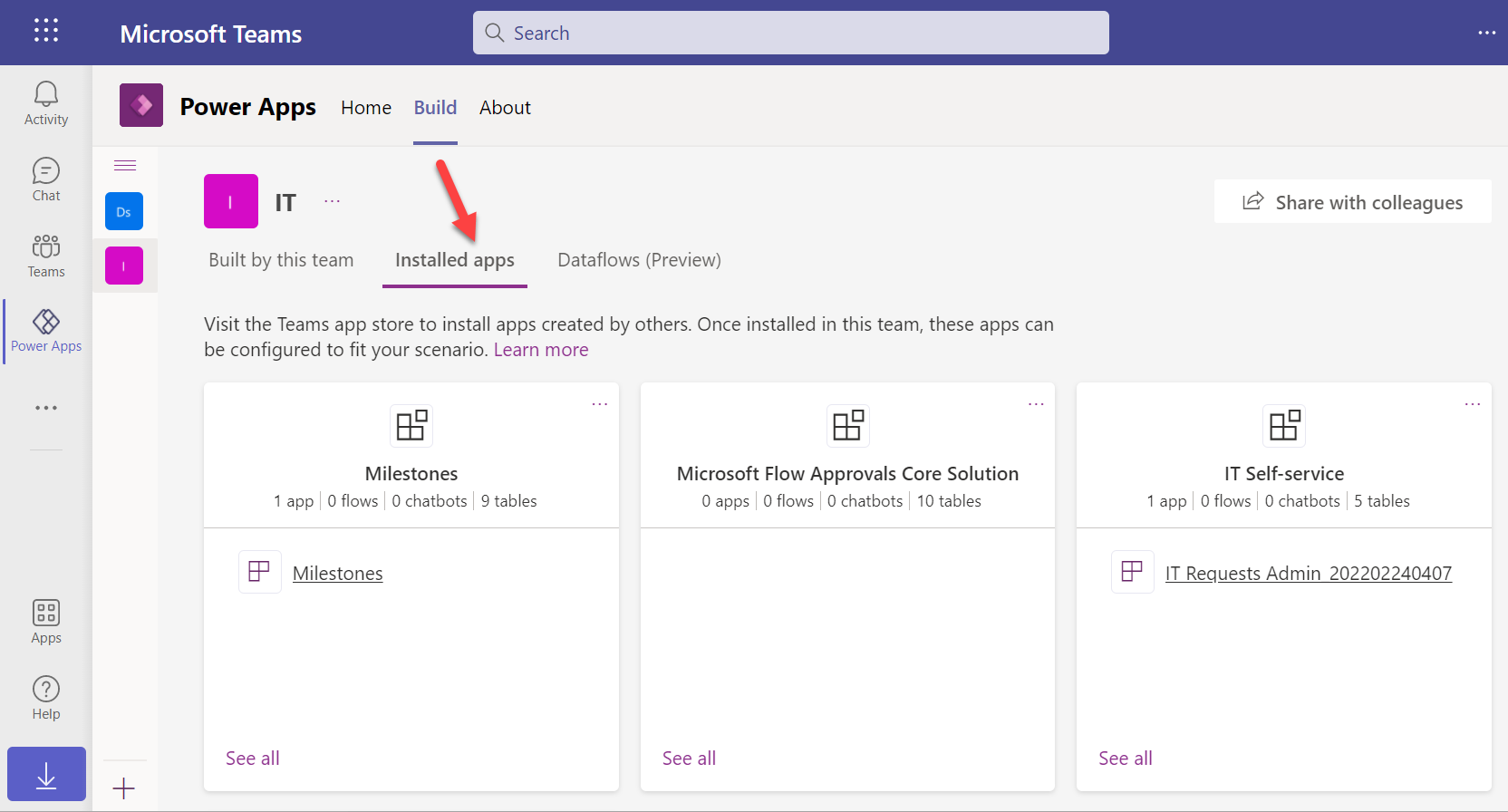
    How does one create new apps here alongside the already installed ones? By importing managed solutions into the DV4T environment. Of the three apps in the above example, IT Self-service has been imported as a managed solution package from another environment. Milestones is a sample app from MS with its own proprietary install experience, whereas Flow Approvals is just the raw infrastructure bits that get auto-provisioned when you create your first approval request in an environment.

    All the unmanaged components in this environment will be found under the “built by this team” tab. Looking at the source DV4T environment from where the above IT Self-service app has been exported from, here’s how its bits and pieces show up in that environment:
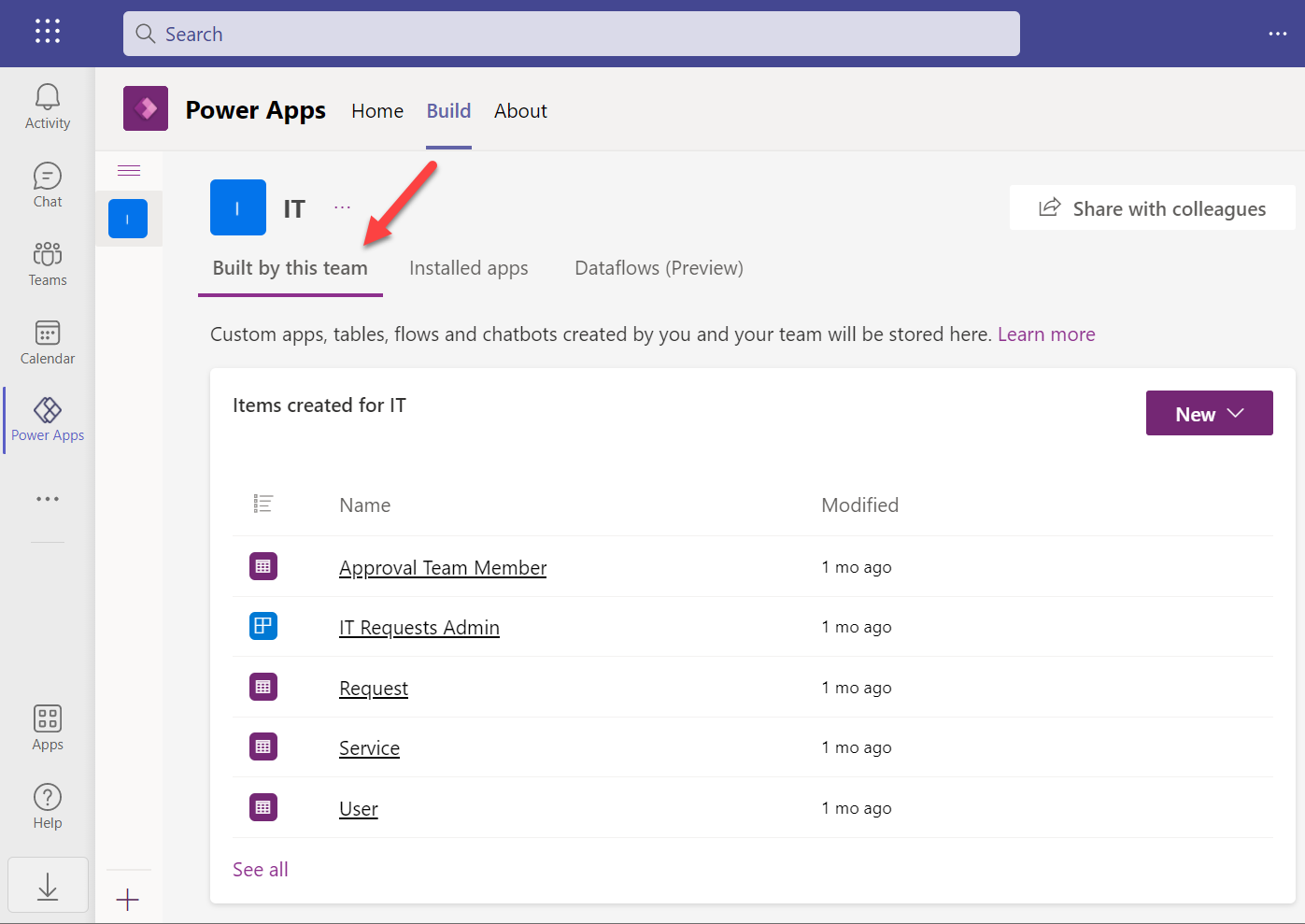
    When you click “see all” you’re taken to what looks a bit like the modern solution explorer in Dataverse, except it’s missing most of the features you’d expect to find there. When you consider for a moment that this experience is aimed at new citizen developers who aren’t really even aware of what “Dataverse” means, it does make a lot of sense.

    We’re not like them, though. We are advanced low-code app makers who know what we want to achieve with these tools. Our escape hatch from this simplified world is the “Open in Power Apps” button that can be found when selecting “Apps” from the tree view.
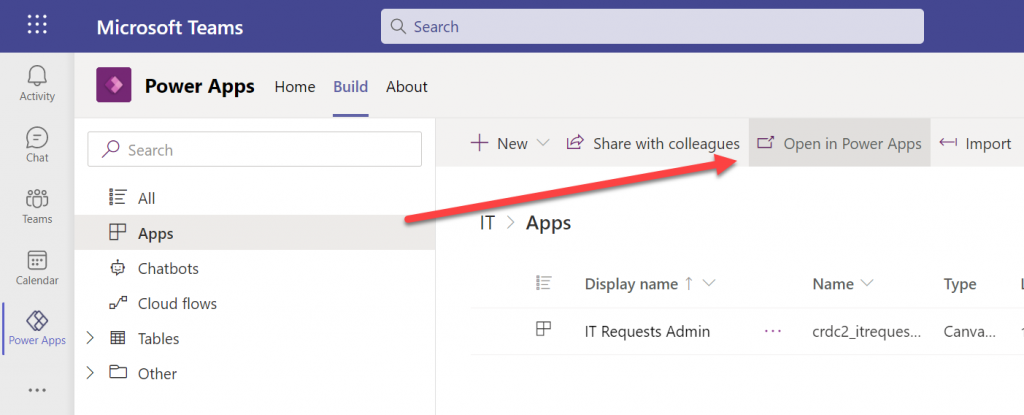
    We’re then taken into a special version of the Power Apps Maker portal that cannot be accessed directly from make.powerapps.com. This is because the DV4T environments do not show up in the environment picker of the usual Maker portal (they do on the Power Automate side, though). Time to add a browser bookmark for this URL, to keep you from having to always remember the curious navigation acrobatics required to land here.

    Anyway, at least we’re now in a place where the good ol’ solutions can be created:
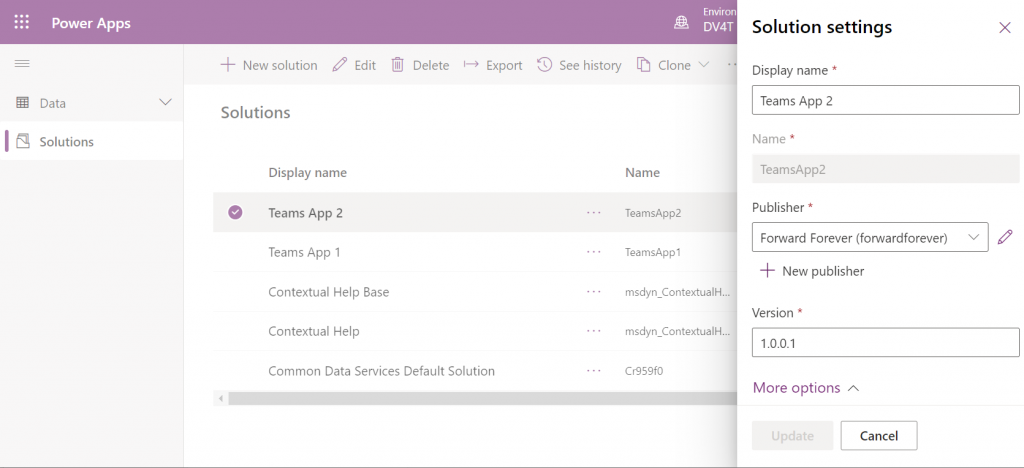
    You’ll quickly notice that only a subset of the full solution explorer features are available here. I’ll next demonstrate how this can lead to some challenges in your app development tasks.

    Choices in a DV4T world with less… choices

    The IT Self-service app that was mentioned above is a fairly straightforward app with a few tables, a canvas app and a cloud flow. After getting the initial version ready in the development environment and preparing to configure it for another Dataverse for Teams environment, I ran into an interesting issue. This example reflects some of the “gotchas” you should be aware of when working without access to the full Dataverse tools.

    We can import solution files from the Power Apps experience within Microsoft Teams, too – even if the word “solution” is avoided. When importing my test app from here I encountered the error “import failed due to missing dependencies”. Clicking on the “show dependencies” button didn’t do anything at all.
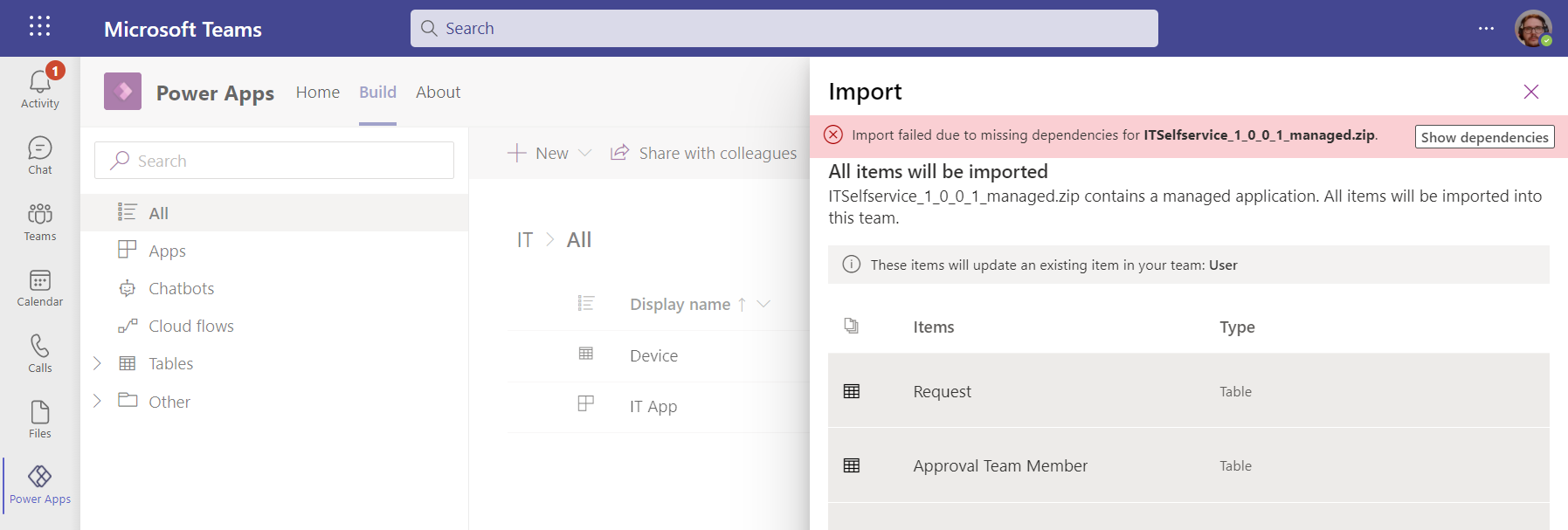
    Switching over to the Maker portal UI for this DV4T environment, then initiating the traditional solution import process, I was able to see the that my solution package was apparently missing a Choice:
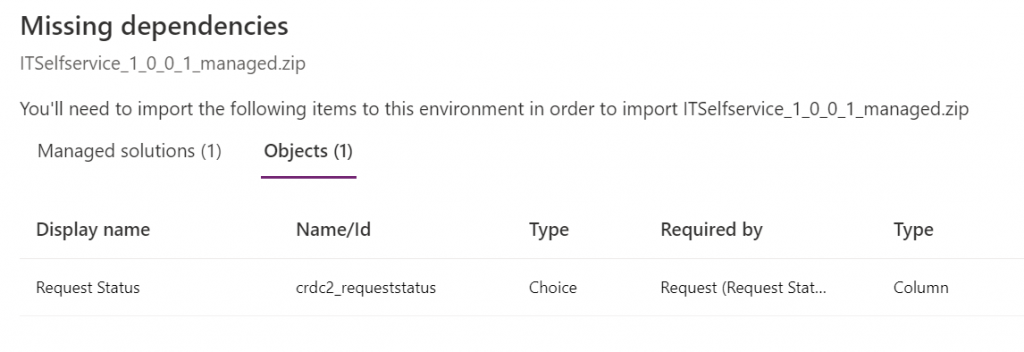
    Ah, the awkward naming choices that Microsoft has recently made with our beloved platform… Ok, I’m now switching back to the old terminology that makes more sense.

    So: I had added an option set field for my entity. However, it was a global option set, and now the solution package was missing the actual list of values that are stored within this separate solution component.

    How did I end up in this situation? I’m not actually sure. I did a test with a different app, to see whether it makes any difference if I create the table columns from the Teams experience (which is very citizen friendly in its Microsoft Lists type UI) or the Maker portal. It is different in the sense that Teams creates a local choice vs. the global choice that the Maker portal defaults to (as recommended by Microsoft’s own Docs). Still, the solution export/import worked without any dependency errors on both versions.

    No big deal, I’ll just add the missing component into the solution… Not so fast, Mr. Advanced Maker! Just because you’re working in a UI that resembles the full Dataverse solution explorer, doesn’t mean you have the same features at your disposal. Although Choices is one of the nodes that does show up in the tree view, you can’t actually find it in the “Add existing” menu:
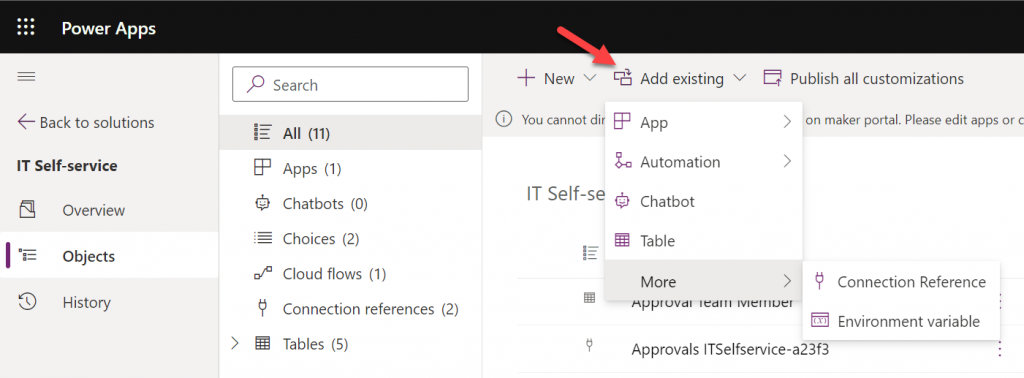
    Those of you who work with full Dataverse know that the “Add existing” menu contains well over a hundred items. The official Docs on solution component types only list 90 values at the time of writing but MS is adding internal components there all the time. We sure don’t need most of them in DV4T, but this omission sounds a bit unfortunate.

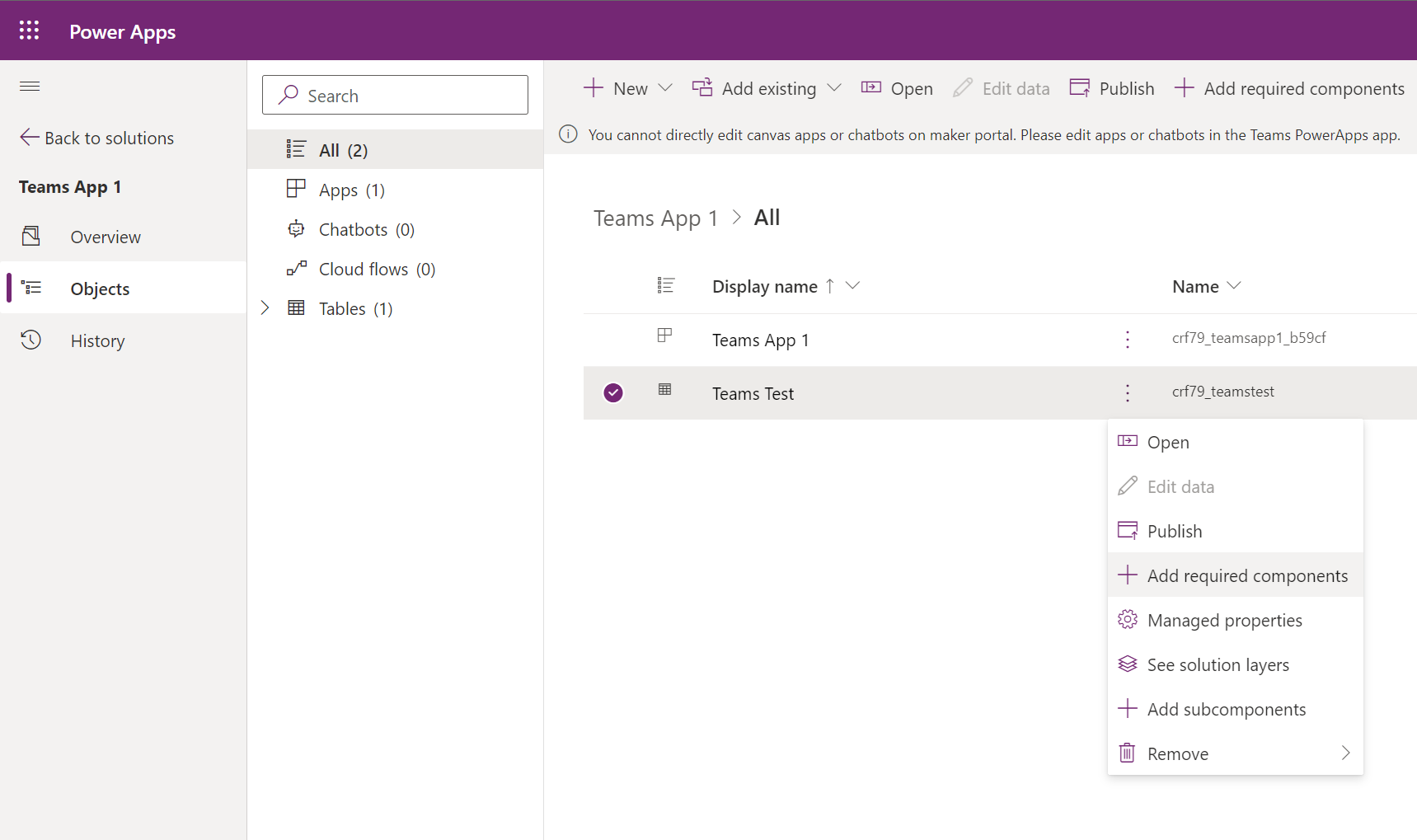
    I had already done all sorts of debugging and hacking to find a way around this annoying limitation until I discovered a UI based way out. I saw that the existing Choices in the solution had the “Add required components” option behind the three dots. Unfortunately the Tables view didn’t include the same option. In the full Dataverse solution explorer we’ve got it in the main toolbar, but DV4T is different in this regard, too.

    Finally I found the place where the option does apply to tables, too: the all objects view. Success!
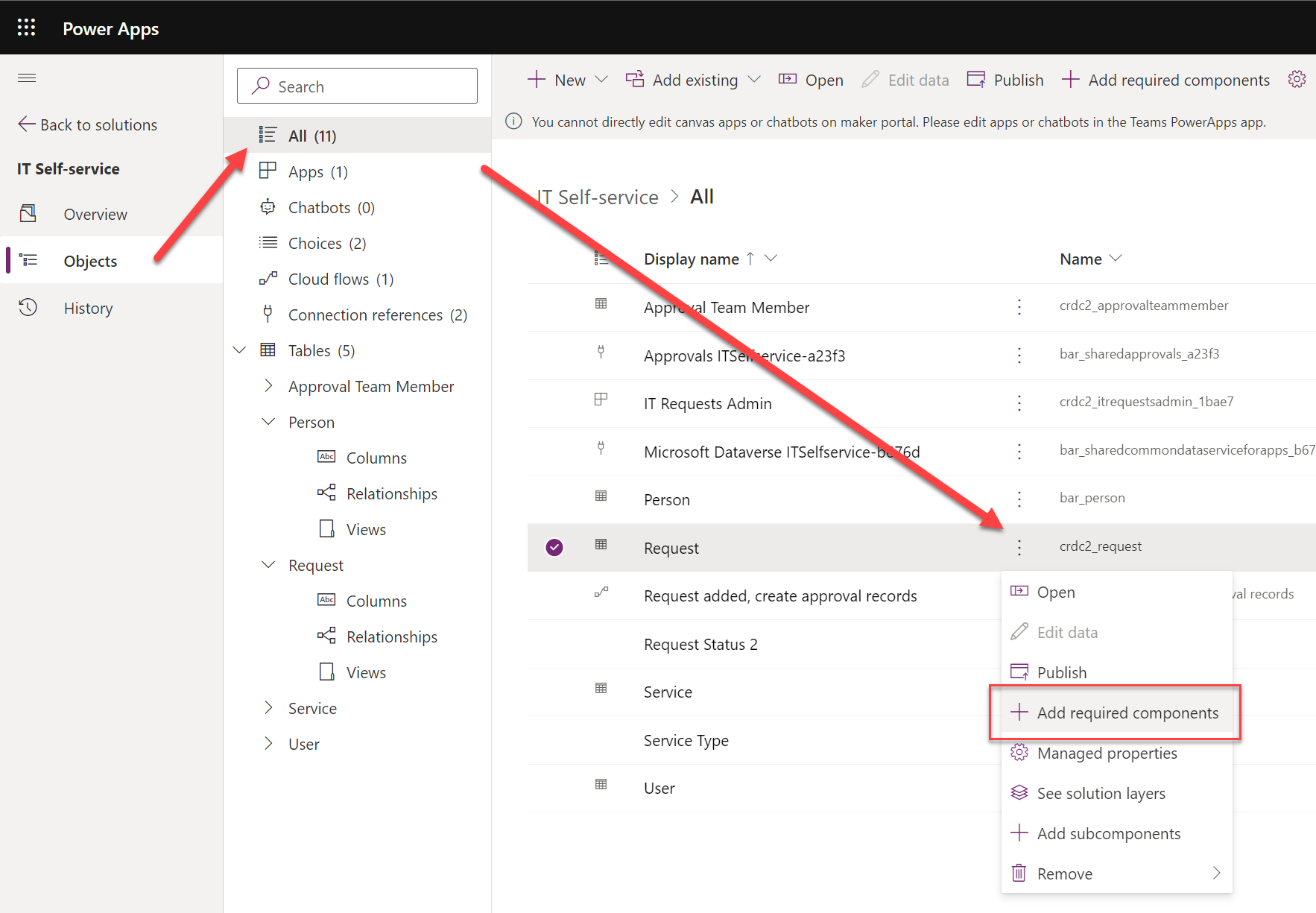
    It took a few hours for an experienced low-code developer to discover how to do what he wants to do in this simplified environment. It was still faster than replacing everything with a new column at this point, though. I had almost accepted the fact that I had simply clicked on the wrong navigation path somewhere in building the app and managed to break the boundaries of the DV4T sandbox. Luckily that wasn’t the case today.

    Solution publishers

    When you start adding items into a Dataverse for Teams environment via the Teams UI, they will get created under the CDS Default Publisher. The prefix for new solution components will be something like “crdc2”, meaning a random value that’s different in each environment. At least it isn’t the dreaded “new_” prefix…

    You can create a your own custom publisher when creating a new solution via the DV4T edition of the Maker portal, similar to how the full solution explorer works. As long as you create the items from under this solution in the Maker UI rather than the Teams UI, the correct prefixes get assigned to them. However, since you cannot create a new canvas app (or chatbot) via the Maker UI, this means your app schema names will always get the CDS Default Publisher prefixes.

    There are nice new features like the table editor in the Teams UI, which you might be tempted to use for quick editing of demo data while building your app. If you’ve created your tables from the Maker portal side, though, you won’t find them in the Teams UI:
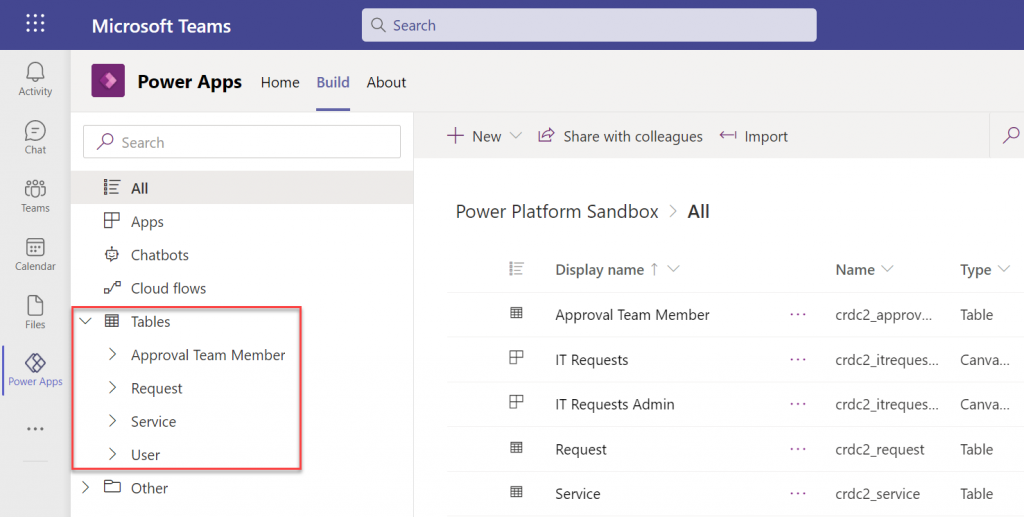
    The reason for this is that the Power Apps app inside Teams will only display the unmanaged solution components for the environment’s default publisher. So, if you tried to follow solution management best practices and created your own solution publisher, the doors will be closed over on the DV4T native app building experience.

    Unmanaged, invisible solutions

    This leads us to another gotcha on how DV4T treats solutions that come from outside the current environment. We already saw the differences in how the managed solutions imported into the environment are listed under “installed apps” and unmanaged stuff is under “built by this team”. That’s how the Teams experience shows things, and as we’ve come to now understand, it isn’t always sufficient for advanced makers.

    When we do the equivalent of “switch to classic” in the Teams world and hop over to the Maker portal view of the environment, are things in their right places again? Well, not if you imported an unmanaged solution into the environment. Here, try and find the unmanaged IT Self-service solution from this list below:
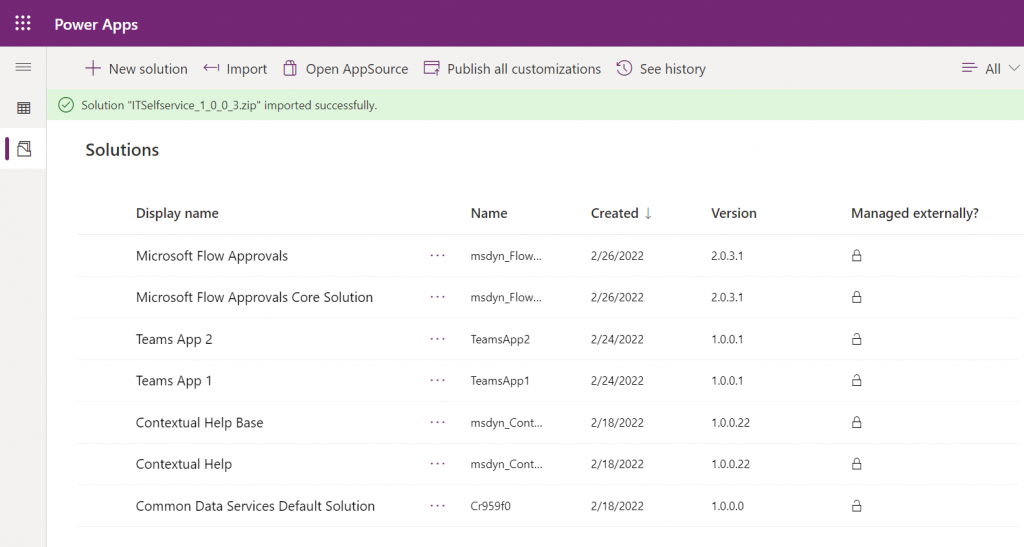
    No matter how many times you hit refresh on that page, your imported solution won’t show up. All the imported components do exist in the environment, though. You can access them via the Common Data Services Default Solution:
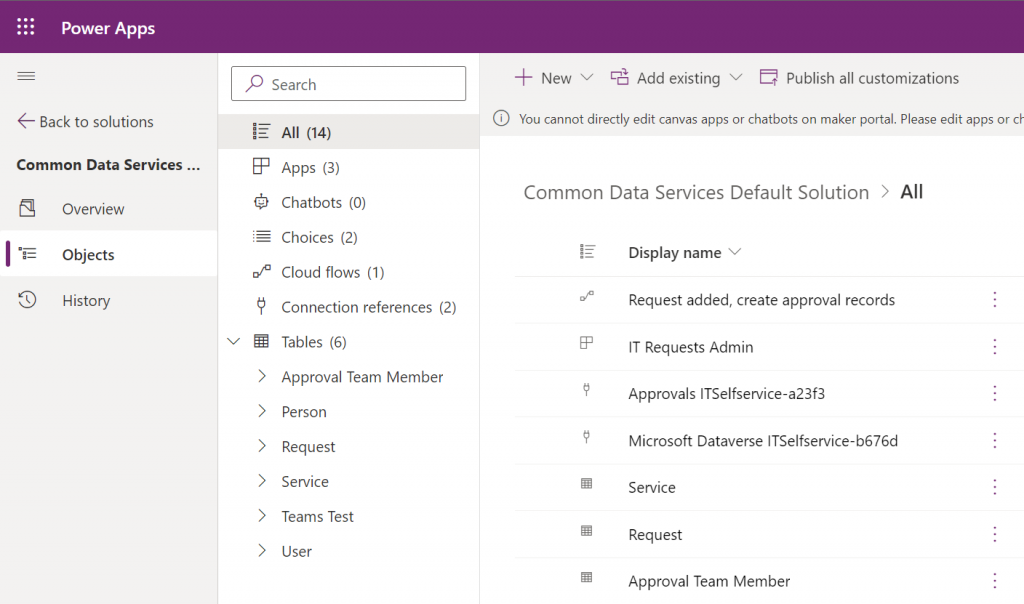
    Why isn’t the solution visible then? Because Microsoft decided that you don’t need to see it, apparently. Deep down in the database all the solution metadata is stored. You can tell this from the fact that if you try to re-import the same solution, you’ll see a message “this version of the solution package is already installed”.

    The limitation isn’t technical then, just a UI level filter. Yet from a practical point of view it is very real in a DV4T environment. This is because all the standard Dataverse APIs are blocked, so using tools like XrmToolBox to work around UI limitations and improve app maker/developer productivity are out of the question.

    Closing thoughts

    Dataverse for Teams has capabilities for running quite extensive business applications (just look at the CoE Starter Kit for reference). Many internal low-code apps could benefit from having a proper relational database behind them, yet they may not be feasible to be implemented with features requiring Power Apps premium licenses due to their usage patterns. The current app packaging story of DV4T raises some concerns on how solid this foundation will be for applications that will need ongoing maintenance and development.

    Ultimately it would be best if we had a clear path for using the full Dataverse as our development environment, then publish the final app into DV4T for testing and production. As it stands today, the Canvas app editor experiences between the two environments are technically different. Also, it can be all too easy to “infect” your solution with some dependencies to features of full Dataverse that are going to block importing it into a DV4T environment, based on my experiences.

    Update 2022-10-20: Today I learned about one more gotcha with Dataverse for Teams that involves Power BI reporting. If you build your tables from within the Teams Power Apps UI, you won’t see a “publish all customizations” button. However, unless you publish your customizations, the TDS endpoint won’t pick up the choice column labels. You’ll only have the ID values but the “name” fields will be blank. So, as a best practice, always keep the full Power Apps Maker portal open while building Teams apps/tables and remember to publish your customizations from there – just like you always have in the XRM days.

  • Why Power Platform licensing is complex, part 4: the role of CDS

    Why Power Platform licensing is complex, part 4: the role of CDS

    Three months ago I set myself a goal to publish a 4-part series on the many mysteries around Power Platform licensing models. I’ve been known to write blog posts that are a bit on the long side and sometimes it surprises myself when after announcing the new article on LinkedIn I see a “20 minute read” info tag added alongside what I though was just a quick exploration into a topic. So, learning to better pace myself is a skill worth practicing, and dividing my writings into more digestable portions is one such exercise.

    To recap, the original outline of this series was to cover these sources of licensing complexity:

    • Protection of intellectual property as well as development budgets across Microsoft product portfolio (part 1, done✔)
    • The old world of apps as data silos & the concept of multiplexing (part 2, done✔)
    • Light use scenarios for information workers vs. “Real Business Applications” (part 3, done✔)
    • The role of CDS as the platform, not just a data source/target (part 4, you are here 📍)

    The Common Data Service is more than a data service

    For the majority of users and developers out there who work with Microsoft technologies on a daily basis, CDS is not yet a “common” part of the toolkit. It’s not a visually sexy thing like Power Apps pixel-perfect UI’s, nor an superglue that connects different cloud services like Power Automate. There’s nowhere near as much flare in the data part as with Power BI. It’s not (in itself) an intelligent thinking AI machine with fancy algorithms either. For many it simply looks like a boring database that sits somewhere in the MS Cloud.

    These people got it all wrong, of course, but it’s hardly their fault. After all, “CDS” sounds a bit like “SQL” and the term often isn’t used in any other context than when you’re planning the data storage part of your solution architecture. What CDS really should have been called is “Power Platform”, because essentially it is the single place that represents all the platform elements that makers, developers and admins can take advantage of when building on Microsoft’s low-code application platform.

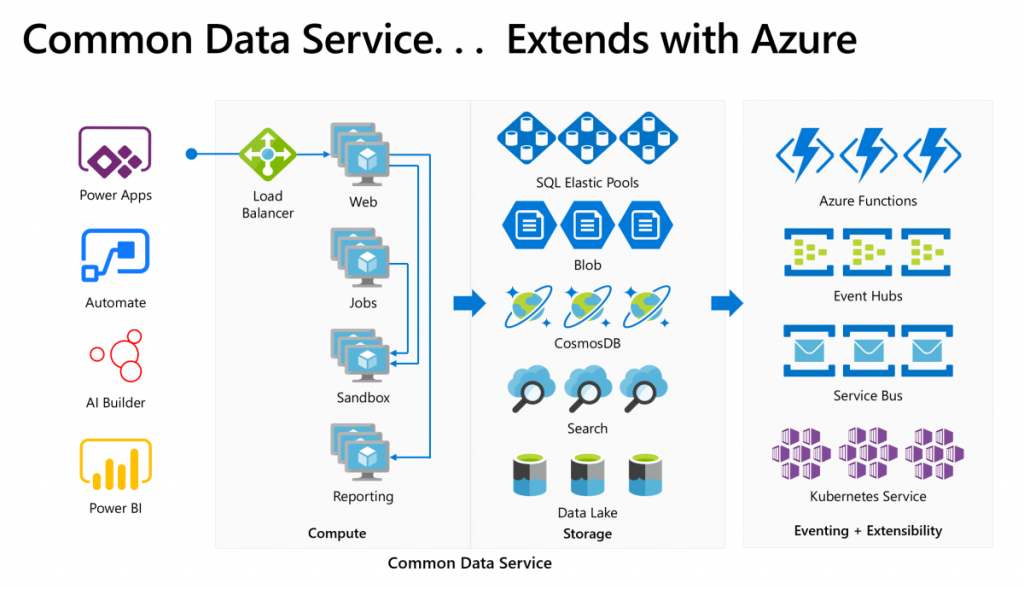
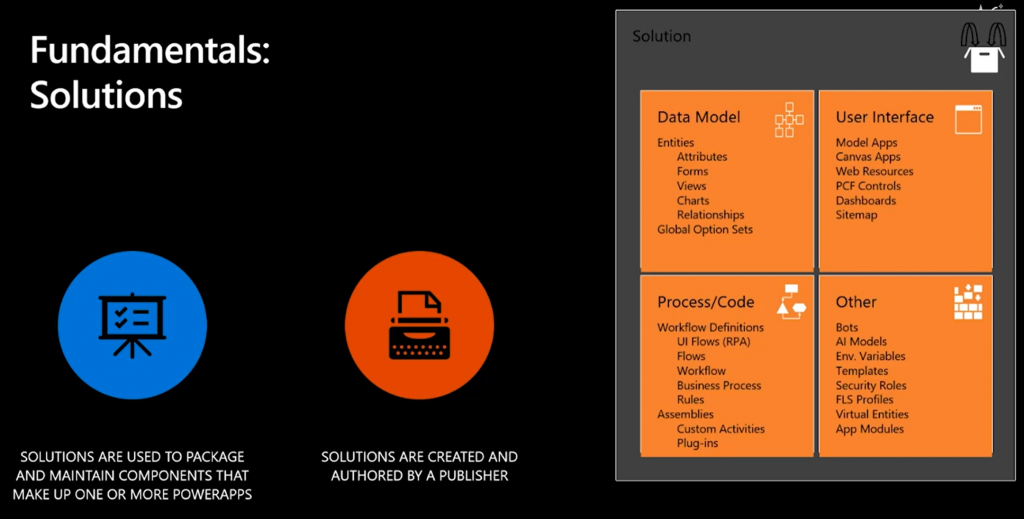
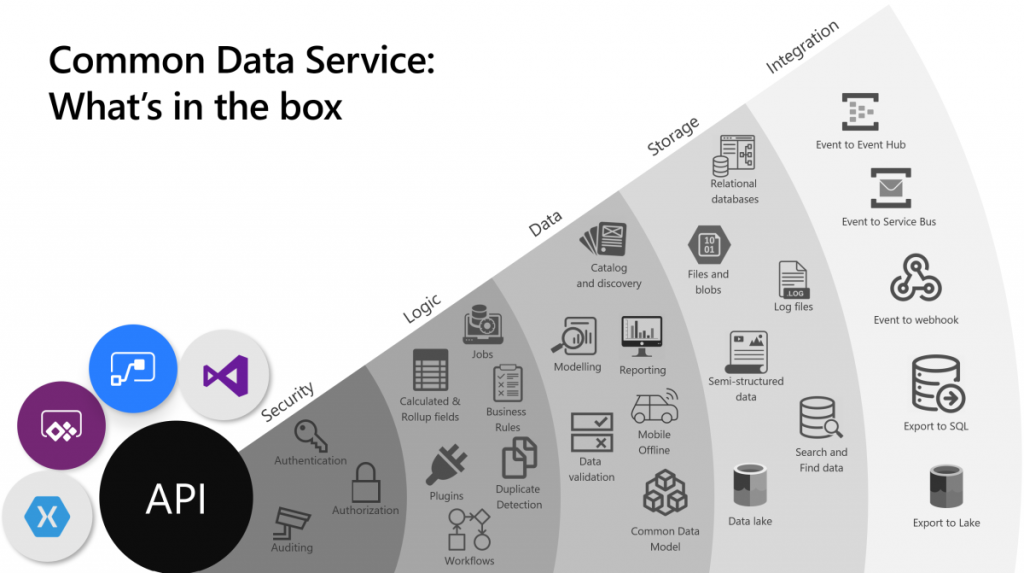
    The above image is the best illustration of the many dimensions of Common Data Service that I have yet come across in Microsoft’s slide decks. “Yeah, that’s pretty much all the important stuff you get with CDS”, I was thinking for a long time. Until someone pointed out to me that this picture is actually missing one obvious thing: solutions! That’s perhaps the single most important thing that CDS from its XRM origins is bringing to the table. Without solutions, what Microsoft would otherwise have is just a collection of independent cloud services that each have a completely separate way to manage their configuration, with no way to package these components into one logical container covering the functionality of an app, nor any valid ALM story for enterprise scenarios. In short, Power Platform would not be a platform without the solution model that’s powered by CDS.

    The fact that we can so easily miss a critical part of the Common Data Sevice while talking about it just goes to show how much of a foundational part CDS is in the business applications offering. It’s not just one icon in the cloud architecture pictures. In fact, we also should keep in mind how many different Azure services CDS runs on, to deliver its feature set to users, makers and developers:

    Yes, there is of course a whole bunch of deep tech stack found behind each and every icon in that picture too – say CosmosDB, for example. It is “big”, in the same way that CDS is “big”. What I think makes the Common Data Service special in this discussion is how it can abstract all that techy stuff from Azure and allow citizen developers (like myself) to control it indirectly, either via our own configuration or through the predefined patterns built by MS.

    Essentially CDS is a value-added layer that brings much of the cool new cloud technology into my business apps while I’m sleeping. What I mean by this is that the architecture evolves to cover new requirements and open up new possibilities, all the while the original business logic and data of the app is preserved. If I create a custom entity, like I did for the first time in 2007, it will keep gaining new superpowers every year as application platform beneath it matures and evolves. All I have to do is keep paying for the service.

    How do you price such a thing then?

    The answer: in all the wrong ways. At least that’s what it often looks like at that moment when the cost factor is brought into the discussion in Power Apps business scenario planning.

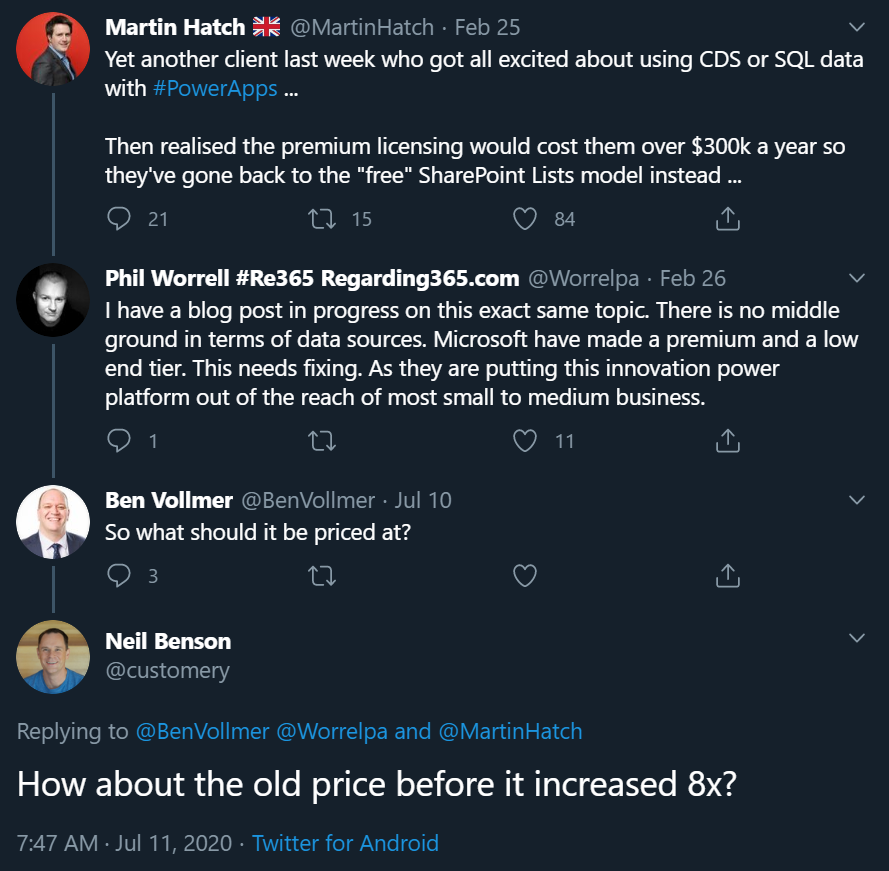
    The more central CDS becomes in the app story of MS Cloud, the more dissatisfaction there seems to be on the impact that its premium licensing model has on business decisions. There have been many debates on Twitter during the past few months, with valid arguments and counterarguments presented between the participants that range from customers to Microsoft 365 pros to Dynamics 365 pros to MSFT employees. Threads like this highlight an important aspect:

    If you were to invent a brand new service out of the blue, had zero customers and then started to plan the pricing model for it, life would be easy. If, on the other hand, you take an online service that has been offered to customers for over a decade now, then try and mold that into whole new use cases, you’re inevitably going to cause some anger among the existing customer base.

    In the above example, Neil’s point about the CDS storage cost increase in the new pricing model that moved from a flat GB rate to database/log/file storage type separation is entirely true: some part of the bill will go up 8x and that quite frankly sucks. Imagine if that would happen to the price of gasoline and your fuel costs would suddenly be 8 times higher. But hold on: the price of diesel went down considerably at the same time, and filling the tank with natural gas like LNG is now practically FREE!!! “Well whoop-de-doo, I’ll just switch my old gasoline Volkswagen to use LNG the next time I need to stop at the station.” Yeah, real life comes with a bit more friction to change the system that powers your vehicle, or your business processes.

    Going back to my CDS custom entity example, though, if we think about the types of cars that Volkswagen sold back in 2007 vs. in 2020, of course there are slight differences in what the product is. The transition to electric cars is a very apt metaphor when thinking about the difference between XRM and CDS. Even though the Volkswagen engineers were able to create an electic version of the popular VW Golf model and sell the e-Golf alongside its combustion engine powered cousins since 2014 already, that particular path wasn’t going to get them far enough. In order to remain a competitive vehicle manufacturer in the global game, Volkswagen has had to design a pure electric compact car in the form of ID.3, and struggle with the many issues that come with brand new technology (also on the software side).

    Similarly, it wasn’t ever really enough for Microsoft to just take XRM to the cloud and host it there (which they did a decade ago already). A lot of R&D budget has surely been spent in building the new foundation of Power Platform. At the same time, some existing features that the loyal fans of the classic VW Golf would have enjoyed could not be brought over to the ID.3, because there just isn’t a logical place for the combustion history to co-exist with the electric future all within the same frame. Witness the same pain with CDS, Power Apps and Power Automate never quite reaching full parity with what was available in the world that came before them.

    Aside from just going electric, there’s one even bigger existential question the car makers are facing: do people even want to purchase cars in 2020 or would they prefer to just pay for the transportation services that they need at any given time? A bit like the dilemma of the light use scenarios, whereby it would make more business sense to lower the barrier of entry by not requiring the purchase of a full user license for the complete platform but rather selling tickets to enter the app when the need arises. This growth in revenue wouldn’t necessarily come from the existing customer base that pays more – it could be a whole new revenue stream made possible by the way the technology as well as the world out there has evolved.

    Think about a simple, timely example: customer self-service terminals. In the aftermath of COVID-19, our day-to-day interactions with humans directly are being greatly reduced due to regulations on keeping a safe distance when roaming out there in the physical world. Instead of talking to clerks and cashiers, we are now acquiring the same information and completing the same transactions by using touch screens that allow the customer to do the data entry and retrieval themselves. Now, Power Apps Canvas apps would of course be the perfect fit for quickly creating touch friendly tablet UIs for various self-service scenarios. There’s only one blocker: Canvas apps don’t have a licensing model for kiosk scenarios where the person interacting with the app isn’t equipped with a user license for Power Apps. Doh!

    It’s hard to imagine Microsoft not wanting to expand the footprint of Power Platform to more and more scenarios that aren’t tied to named users with dedicated licenses. Yes, Portals can already do that, Power Virtual Agents can of course serve anonymous customers, Power BI can even be embedded inside third party applications. It’s that direct interaction with the CDS entities through a user identity mapped into security roles that isn’t quite as flexible yet in the current world… because like I’ve been telling you all along, Power Platform licensing is complex for the customers, the partners and surely Microsoft themselves as well.

    Life finds a way, licensing may follow

    The good news is that CDS as a technology is doing better than ever, thanks to the critical role it is playing in so many different Microsoft products these days. It’s further expanding inside the Dynamics 365 portfolio via Dual-write. Data platform is embracing it via the native sync to Azure Data Lake. It’s the ALM backbone for all Power products (aside from Power BI – and of course PowerPoint!). Project got rebuilt on top of CDS to replace the earlier SharePoint based architecture. It’s perfectly feasible to imagine more and more MS apps and products gravitating towards this growing platform and starting to orbit around the central body that is CDS.
    That still leaves open the question of the customer specifc business apps that are getting built every day as Power Apps Canvas apps. In order to ensure the citizen developers don’t just default to using SharePoint Lists (soon to be called Microsoft Lists) as their data storage solution, MS needs to find ways to lower the barriers to go with CDS instead. There’s the technical barrier from the long legacy of CRM requirements, then we have this licensing complexity. Even though the recent launch of Per App passes as a concept has in some high value scenarios made the business case calcuations easier, the vast majority of true citizen developer apps won’t ever even reach that stage where official calculations for a specific app’s ROI would be analyzed in detail. For this long tail of app development, there should just be ample CDS capacity available to be used for the purposes that the business experts themselves have identified as worthy to spend their time on (which often may cost a lot more than the actual software licenses).

    Capacity based licensing of course wouldn’t make the tools free either, it just changes the way the final bill is calculated. The example of CDS storage pricing change is a reflection of exactly what happens when trying to find non-user based billing metrics that would reflect the rate at which the platform is used. Looking at the Power Platform price points, Microsoft may well feel that it’s perfectly OK to sell the CDS database capacity at $40/GB/month when their traditional CRM rival Salesforce has set their list price per GB to be a whopping $250 (which I don’t think they publicly advertise anywhere, so your real mileage may vary). Both figures have nothing to do with how much it actually costs to store data in the cloud, they are purely intended for building a pricing curve where the growth in platform usage (and hopefully business value) results in growth of revenue to the service provider.

    The more we have capacity based pricing of Power Platform features, the bigger the issue of capacity limits and their enforcement will become in solution architecture design. API calls are much more difficult to estimate than user counts, so there is bound to be some increasing complexity ahead for scenarios where CDS and other Power Platform tools are used in a “pay per request” model. MS will likely continue to bundle quotas of API and storage capacity into their own software products that use CDS and where the revenue is attained via other means, in an effort to simplify the experience for that one product. The challenge that remains is the more holistic usage of an application platform, where not only do you buy the Apps but use features powered by CDS in your own unique ways.
    Other parts in this article series can be found here:

    Read more about Microsoft Business Applications licensing

    Check out my earlier blog posts in the licensing category.

  • ALM for low-code: are we there yet?

    ALM for low-code: are we there yet?

    Application Lifecycle Management, ALM, is a topic rarely covered in the mainstream pitch for how low-code/no-code solutions are transforming app development practices. This is understandable, since the initial time-to-value, from an identified business need to a working application (or at least a functioning prototype of one) is where the major difference to the traditional software development initiatives are easiest to demonstrate. It’s the “five minutes to WOW” effect that gets most of the attention.

    Relying on configuration and formulas over custom code does promise also a lower maintenance overhead for the post go-live phase where the apps are used and evolved gradually to remain in line with the business requirements. There is less to worry about the potential impact of changes in each of the underlying components that keep the app running when you’re subscribing to a service like Power Platform that aims to abstract away many of the moving pieces in Azure and other related cloud services.

    You shouldn’t assume life to be completely worry free, though. If you don’t plan ahead on what type of work is needed after the creation of your low-code app, then a nasty surprise may lie ahead for someone, somewhere, at the most inconvenient time. In the worst case your organization has become reliant on an app that no one owns & no one knows how it works, only to realize that your processes have already stopped due to errors caused by a change either inside or outside the system. Updates to the cloud components or changes in APIs used via Connectors, for example. A slower yet equally frustrating problem can arise from identifying a future change you’d really need to implement for the app in question, yet you don’t have the means to make that happen in practice.

    The rise of low-code application development and the forecasted arrival of 500 million new apps in the next 5 years is making IT organizations very aware of the need for setting up governance models to address this new reality. Having baseline knowledge of what apps are created, by whom, for which audience, for what purpose, through what technologies, on what data sources etc. is often the discussion that needs to be done first to analyze the current situation. A great tool for facilitating this is the Power Platform Center of Excellence (CoE) Starter Kit, which gives you an overview of the big picture for Power Apps and Flows in your tenant. To go deeper and actually manage the lifecycle of an individual (potentially business critical) application, we need to start discussing ALM.

    What is this ALM thing anyway?

    Microsoft has published fresh new documentation on ALM with Power Platform that could be viewed as a similar Starter Kit for this topic as the aforementioned CoE. It briefly covers the high level summary of what ALM means:

    ALM is the lifecycle management of applications, which includes governance, development, and maintenance. Moreover, it includes these disciplines: requirements management, software architecture, development, testing, maintenance, change management, continuous integration, project management, deployment, and release management.

    A very broad concept then. What I like most about this intro chapter is the definition of the goal of ALM: “driving efficiency through predictable and repeatable software delivery”. That’s the essence right there. Anything that reduces the differences between how individual app makers / developers perform common tasks within the whole lifecycle of a specific business application will improve the state of your ALM practices. Those with a software development background may immediately venture into thinking about various DevOps methods and tools at this point, whereas I’m always most concerned about how the business can get a grip of what exactly is happening to their applications over time. Who built what, based on which specification, when was it deployed & where to, how were the changes documented, what impact did it have on others systems, how were users educated on the new features, and so on.

    Microsoft’s ALM guidance is mostly revolving around the technical level specific to Power Platform, meaning how solutions and environments should be used. If you haven’t heard it before, then the solution framework that was born in 2010 for the XRM era has been actively expanded to cover more & more areas that are not a part of the Dynamics 365 Customer Engagement on-premises server. Canvas apps, Flows, AI Builder models, Power Virtual Agent chatbos, Export to Data Lake configs, pretty much everything in the Power Platform is now manifested as solution component. More is on the way, based on how Matt Barbour has stated things like Power BI and integration services being “on the radar” for the Power Platform solution system.

    The expanding technical capabilities and scope of components shipped via solutions is of course great news. However, as we are now talking about the platform for every developer, not just pro devs, my number one question about Power Platform ALM is not “will it scale up to new products and features” but rather “will it scale down to new types of apps that don’t follow the lifecycle of a CRM system?” So, there’s two dimensions I feel will be critical for the ALM story to succeed: 1) unifying the mechanisms to manage configuration & code across the different app teams within MS Business Applications Group, and 2) democratizing healthy ALM practices by making them accessible to citizen developers. The first one is well underway with the solutionization of everything, but how about the second one?

    Managing your “source low-code”

    The fundamental challenge with why ALM tools aren’t already a part of every Power Apps maker’s or Dynamics 365 customizer’s core workflow is that they don’t exist within the context where these people do their work. This audience doesn’t need Visual Studio for anything, nor would there be anything familiar with the terminology used by version control systems like Git. This is alien technology from Planet Developer, which the no-code app makers would have to learn specifically for the purpose of managing how their configuration deliverables are moved from one environment to another. Compare that to the “export solution as .zip” / “import solution .zip” actions availble in the Power Apps Maker GUI that gets the job done for them. Many of these app makers surely understand the value that a formal deployment process and solution versioning could offer, but the barrier has been much too high for them to make that leap.

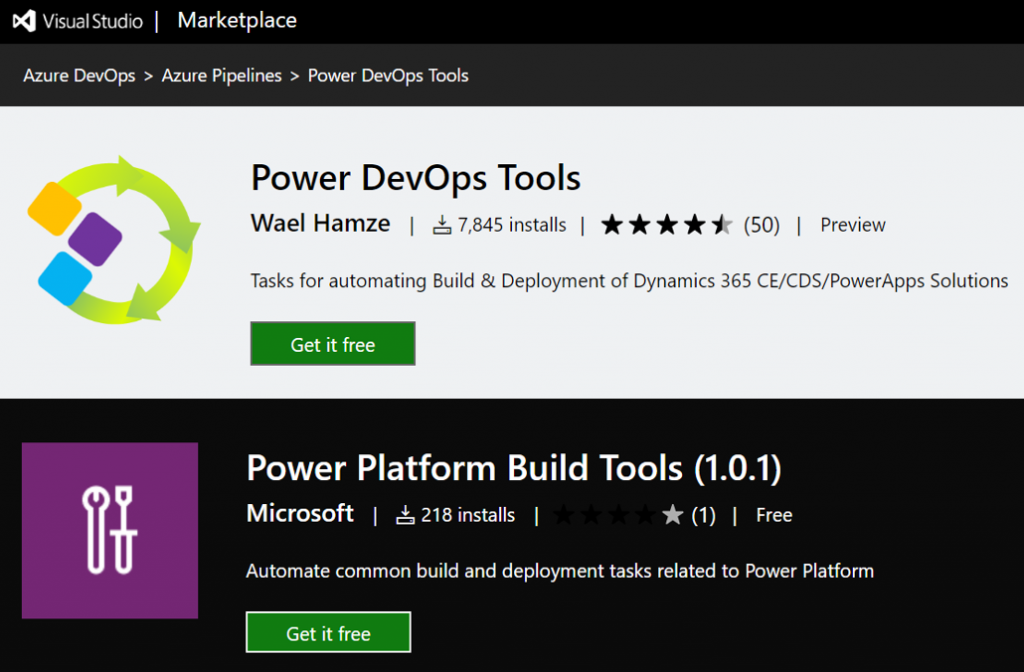
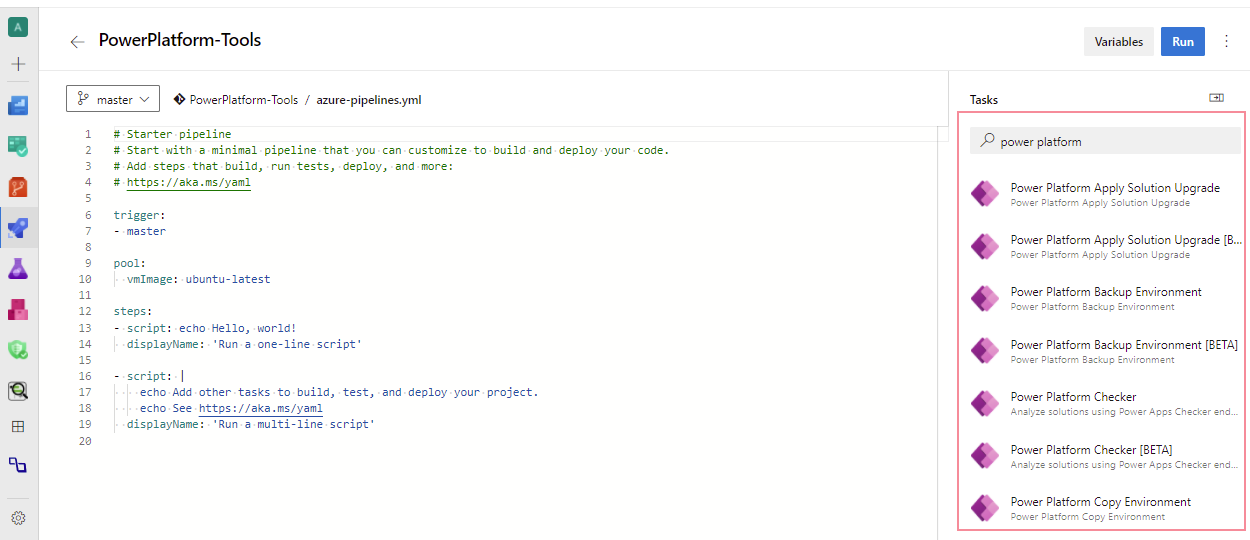
    There have been tools for pro-code developers working with XRM solutions for many years already, some provided by MS and many built by the community. Today there are official Microsoft Power Platform Build Tools available for Azure DevOps, which offer readymade tasks like solution export, import, unpack, pack, publish, with more features to come. Rather than tweaking PowerShell scripts, it would seem like there’s a way to visually configure the cloud to do some ALM magic for our low-code apps. Sure, this is not within Power Apps directly, but could this be considered just another admin portal that the citizen developers might learn to navigate?

    Get the Microsoft Power Platform Build Tools

    Setting up an Azure DevOps pipeline that pulls solutions from your dev environment, commits them into a repository for version control and then deploys that same solution to test or prod still isn’t exactly a next-next-next process. However, following a Power Platform specific tutorial, even a non-developer like me can get this up & running in a few hours. MVP Nick Doelman has written exactly what I needed, so if you’re interested in building your very first ALM pipeline, I recommend you to try this out:

    Simple ALM for Power Apps/Dynamics 365 Projects Revisited – Power Apps Build Tools edition

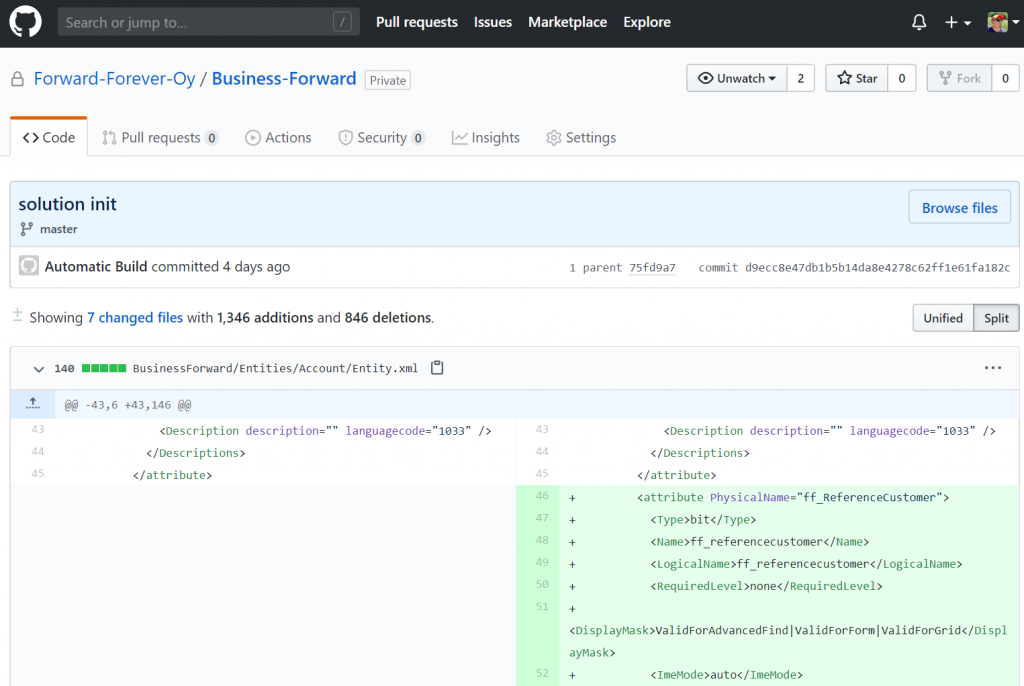
    Combining this with a recent update to the Power Apps Build Tools that also introduced support for MFA protected environments (meaning you can log in with an Application User identity), I was able to get our company’s “CRM” solution’s customization changes from from Dev to GitHub and Dev to Prod. Here’s what it looks like now when adding a new field on the accout entity:

    “Woo-hoo, we now have proper ALM in place!” Well, not quite. All that we really achieved with this was the possiblity of doing it “right”, meaning there are DevOps pipelines that could be used for handling configuration changes automatically instead of manually by individual low-code developers. Until I actually go and remove all Power Platform service admin roles from my colleagues, anyone of them could still go and mess up the production customizations directly. So, proper ALM is only partially about the tooling and automation – you still need to the exact same thing as without DevOps, meaning defining the processes and agreeing on the practices for how the business applications are managed.

    Regardless of this, it does makes perfect sense for low-code app development projects to evaluate if they would get benefits from leveraging automation tools like Azure DevOps. You’ll need to have the solution configuration stored somewhere anyway, so why not put it in a version control system that’s designed for “real code” and gain access to things like viewing the changes of individual solution components – rather than just dumping the files on OneDrive/SharePoint. Who knows, taking that step might even unlock further opportunities to automate and harmonize your application management processes.

    We should keep in mind that automation is a double-edged sword. In theory it can save you a lot of time, yet in practice it may often turn into an additional time sink of its own. The legendary webcomic XKCD beautifully illustrated this dilemma of Automation, which I think is especially true here in the ALM discussion. The tasks that you’re trying to automate need to happen on a frequent enough basis for a long enough time before you could achieve a positive ROI from investing in setting up your pipelines. A single citizen developer building a one-off app may not yet meet that threshold, so preferably in your automation scenario there should be a team of developers who will do several planned releases for the app in question.

    ALM for a team of low-code developers

    Microsoft likes to promote the stories of Power Apps Champions who have managed to make digital transformation a reality for their organizations by building low-code apps that would have earlier required a team of software developers. This marketing approach higlights the role of an individual hero, but from an ALM perspective the dependency to any individual person’s heroic actions and secret knowledge is rather a problem that should be solved. Once that initial app idea and first PoC starts turning into something business critical, you should have a team in place that can ensure its continuity.

    This team may not resemble your typical software development team. Yes, it’s quite likely that there will also be people with programming skills either working in the team or closely with it, but the primary competence on the technology side for this team is in assembling the features and components of the chose application platform into solutions that solve a wide variety of business problems. They are less likely to be all working with the single code base of a large application, doing pull requests, commits and all that Git jazz, simply because a fair share of Power Apps aren’t going to be built that way at all.

    If you look at Power Apps Canvas apps today, they are essentially a document made of JSON that cannot be simultaneously worked on by multiple developers. This is very different from a traditional app project on the Model-driven side (let’s say in a CRM context) where one person could be building the customer data management features while another team member is working on products and order management. All with their own dedicated entities, having so little overlap that simultaneous work within the same dev environment is often doable. Even though Components promise to offer a more modular way to build capabilities for the Canvas world (and Model, too), I suspect that the client side experience of a single app will typically remain a “one maker show” in the near future.

    Sharing elements and patterns across different apps built and managed by the team is, on the other hand, in a much greater role in the low-code approach. Here components, template apps and other reusable pieces of configuration can be of high value. Power Apps began its journey as a citizen-first app creation experience yet is gradually accumulating more of these features that mean every app doesn’t have to be a unique project. We’re getting more & more possibilities to see beyond the Maker GUI, like “peek code” in a Flow or use Monitor to debug Canvas app formulas. However, based on what Microsoft representatives have publicly said, it doesn’t sound likely that these low-code tools would evolve into allowing app makers to directly manipulate the configuration files in VS Code, for example. There are community tools like CanvasAppPackager from MVP Daryl LaBar that will help app developers understand complex Canvas apps, but these are NOT meant for building or modifying apps.

    Even in Model-driven apps the list of supported modifications for customizations.xml is fairly limited. So, keep this in mind when thinking if the pro-dev tools and ALM practices that are based on direct source code manupulation are going to be a fit for the low-code app developer team or not. Your Power Platform experts need to be primarily fluent with the admin tools from MS and the community (always start from XrmToolBox), plus they’ll need excellent skills for using collaborative tools like Teams within your org to share their lessons learned. Once you’ve got this side is covered, then you can move onto Azure DevOps and the likes.

    Environment management is another big topic for low-code apps on Power Platform. Having a separate CDS environment for every developer working on their corner of an application is Microsoft’s recommended approach to keep changes isolated. As your number of “ALM enabled” apps in the tenant will grow, the total number of environments will grow even faster. Assuming a theoretical 5 GB size for the CDS database of an environment, the $200/month storage cost itself wouldn’t actually be that significant if it saves a few hours of work from those developers. What you don’t want to happen, though, is having dormant dev environments consuming CDS capacity for many months with no actual deliverables from them – especially when your CDS quota is defined on a tenant level with no control available for reserving it to specific apps/environments.

    There are remedies to this problem. The “governance way” is managing the environment creation/deletion though a process that provides transparency to environment usage and enables allocating costs accordingly, for example via custom apps built on top of the CoE Starter Kit. The “ALM way” is provisioning on-demand environments from the source code in your repo via DevOps automation, then scrapping them after the active development work stops. While I sort of fancy this idea of “everything as code” where all of the infrastructure and configuration is managed via the same pipeline, I can’t help thinking that the most difficult thing about environments for business app development isn’t necessarily the configuration or the code. It’s the valid test data needed for making the app come alive. Yes, of course you could also script the perfect test data set to be generated alongside the environments, but again, we’re taking the level of effort needed in achieving deployment automation onto a very non-citizen developer level and approaching the XKCD scenario.

    Managed Solutions: what do you REALLY want to manage?

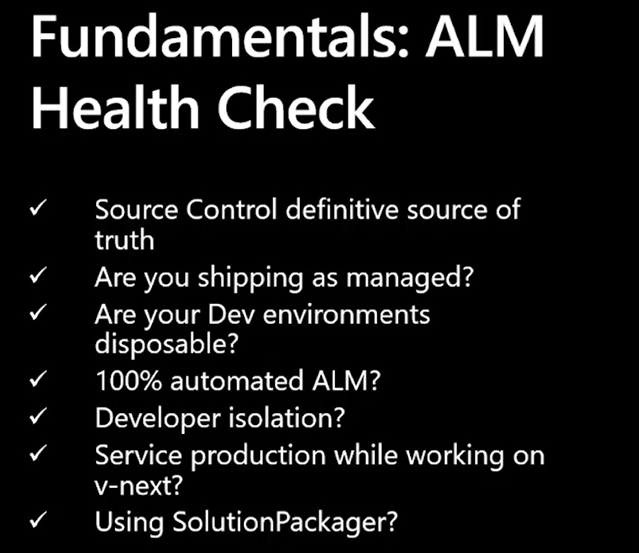
    Whenever Microsoft talks about ALM, usually you’re going to hear their statement on “use only managed solutions in production” sooner later than later. It’s not surprising that also the latest guidance, such as the MBAS 2o20 sesssion on Advanced Application Lifecycle Management capabilities lists this high up on the ALM Health Check list:

    In the user community around XRM there’s been an endless debate around whether unmanaged or managed solutions are really the way to go, and we’re not going to find the ultimate answer to it here in my blog. Personally, I’ve always had a hard time understanding the exact benefit that a customer organization would get from self-imposing the limitations of managed solutions onto themselves. It just sounds to me like installing a different lock with a dedicated key onto the window blinds in every room of your house. Expensive, overly complex, and very likely to leave you in the dark when someone forgets which key was used for which lock. It can also give you a false sense of security, as the main door to your house is still left completely unlocked, because Microsoft doesn’t yet offer a way to protect your production environments from the deployment of unmanaged customizations by anyone with sysadmin rights.

    In the context of low-code specifically, if you don’t have a seriously mature ALM process in place, I’d say you’re fairly likely to hurt yourself when playing with the sharp objects that are managed solutions. This is why during my 10 years of working with Dynamics CRM, XRM and now Power Apps, I haven’t yet deployed a single managed solution inside a customer specific project. On the other hand, I have worked with removing managed solutions created by the customers’ previous partners, after the ALM process has broken down for one reason or another (“not existing” being one of them), then replacing them with an unmanaged layer of customizations that has been a better fit for their overall CRM landscape. Yes, those other partners probably defaulted to following MS instructions on using managed solutions in every production environment – this guidance remained the same since CRM 2011 days, after all.

    Please do note that I’m not saying managed solutions wouldn’t serve a purpose. When you are building an actual app product that is meant to be deployed across multiple environments for different customers, managed solutions are of course the way to go. They offer the container for keeping your stuff separate from the stuff delivered by other app vendors, when deployed into the single CRM system that’s used widely across the enterprise by different user groups for different processes. Any proper commercial product development initiative should also be able to absorb the ALM overhead from environments, automation etc. and turn that into increased revenue from being able to ship software releases faster and more reliably as time goes by, thanks to the upfront investment made. It all makes sense here, but this is a very different landscape than how I perceive the typical use cases for low-code apps within organizations to evolve as Power Platform becomes more widely adopted.

    Remember: you’re no longer building “one place for all customer data”, rather you’re often creating several targeted apps for very specific purposes and audiences. Most of these app experiences will likely be fully developed by either savvy citizen developers, an in-house team of Power Apps champions, or an external consultant brought in to get that job done. The app lifecycle can be very short, even targeted to be used in one-off events (or under temporary disruptions such as COVID-19 social distancing), whereby some apps may actually be “disposable by design”. These are pretty much the opposite of monolithic CRM systems where a wealth of different ISV solutions need to peacefully co-exist throughout the years. So, whichever solution strategy you choose for your Power Platform environments, make sure it solves a real problem that your low-code app developers and admins are facing, rather than directly adapting practices that have been designed for the ALM needs of pro-developer teams working full-time on shipping a sizeable amount of custom code alongside the low-code application platform configuration information.

    A different approach to ALM: Power BI deployment pipelines

    The broad umbrella of Microsoft Power Platform covers also technology that isn’t (currently) built on the solution framework: Power BI. Since it is in practical terms more part of MS Data Platform, the mechanisms used on the BI side are understandably quite different than those originating from the citizen-dev PowerApps (back when it was still spelled together) or CRM systems. What makes this an interesting area to observe is that from what I’ve understood, the traditional development of reporting solutions hasn’t exactly followed the typical software development path either. Checking in reports to source control systems may not be the natural workflow of a Power BI content author or data analyst, so the barrier for adopting advanced ALM practices is likely to be pretty high for this audience, too.

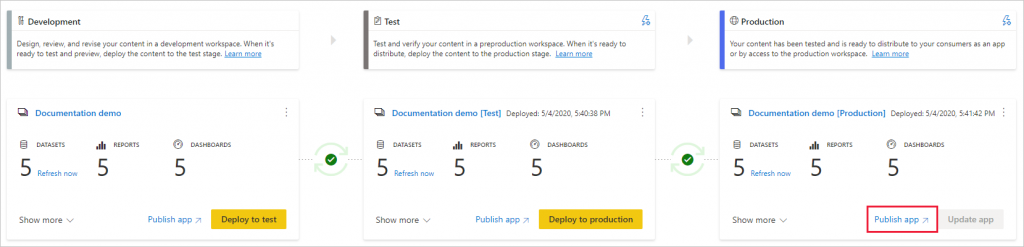
    Power BI deployment pipelines is a feature that has recently been launched in preview. Labelled as an ALM solution, as also Power BI now packages report content into “apps”, this functionality is actually baked right in to the native user interface of the PBI service:

    deployment pipelines landing page

    Reading the introductory text gives us an idea of how this feature is positioned:

    Deployment pipelines help enterprise BI teams build an efficient and reusable process by maintaining development, test, and production environments. BI creators can incrementally transition new or updated content between environments, reconfiguring them with the appropriate data connections and permissions. Pipelines are very easy to use and take only few minutes to setup. No previous expertise or coding skills required.

    Wouldn’t it be nice if we could take the term “BI” from that paragraph, replace it with “App” and have a similar story to tell for low-code business app developers? A targeted experience that would be readily available for each & every customer environment right out of the box would certainly be the most effective way to democratize healthy ALM practices.

    You’ll need Power BI Premium capacity for using deployment pipelines, so the reporting ALM story is aimed towards the enterprise audience. If there ever was a native deployment pipeline functionality for Power Apps, I’m sure the usage would require consuming some type of paid for capacity from the Power Platform product subscriptions. I believe this would still be a lot easier approach for selling the idea of why customers need to invest in having proper ALM infrastructure and capabilities in place, since it wouldn’t be just an extra layer of billable hours added on top of app development project budgets but rather something much more tangible.

  • CDS FAQ for the Power Apps Makers

    CDS FAQ for the Power Apps Makers

    Microsoft is commited to making Common Data Service the flagship data source for Power Apps scenarios, as well as delivering advanced enterprise application lifecycle management (ALM) features via CDS. What can make the role of CDS somewhat difficult to approach for app makers is the fact that it hasn’t originally been built for Power Apps, like CDS “v1.0” was. The current CDS “v2.0” is based on XRM, the business appliciation platform that was born alongside the Microsoft Dynamics CRM product.

    I’ve been working with this plaform technology for close to 15 years now, whereas the world of Power Apps Canvas apps (and Power Automate) is a much more recent acquaintance of mine. To put my experience into good use and to also learn to see things from outside the XRM walls, I decided to share answers to a few questions that I’ve heard from #PowerAddicts that are exploring the CDS world.

    Q1: Why should I use CDS as my data source instead of SharePoint or SQL Server?

    Because it is not just a data source. Yes, in Power Apps Canvas apps you do connect to it just like any other data source in the app Studio, but this is misleading. CDS is the complete platform that can orchestrate how your app works when it comes to business logic, security model, integration, administration, governance and many more areas. Compared to raw SQL Azure, the SQL relational data is actually just one of the storage types that CDS leverages behind the scenes. Ultimately it’s a bundle of the latest Microsoft cloud technology for compute, storage and eventing/extensibility – offered as a single service that you don’t have to configure nor manage. You consume it either via built-in integrations to Power Platform, Dynamics 365 and Office 365, or alternatively via an API that is automatically generated to match your customized schema.

    The topic of “why CDS” would easily warrant a whole series of extensive blog posts on its own, which I may well do later on, but not inside an FAQ like this. For now, I recommend that you watch this Ignite 2019 session from Ryan Jones to understand the big picture of Common Data Service:

    Q2: What’s the difference between the 2 connectors for Common Data Service?

    The current environment connector is a native connection. This is the misleading part. It’s not a real Connector at all, rather every Power App knows how to talk with the environment that hosts it, which essentially is the current CDS environment. This leads to numerous benefits in performance and available features, as the technical implementation behind the scenes is quite different. I haven’t come across a Power Apps specific comparison yet, but MVP Sara Lagerquist has done a thorough analysis of the two CDS Connectors in the Power Automate context.

    Q3: Is there any reason to use the non-current environment CDS connector then?

    Yes, if you want to connect to a CDS environment that’s not the one which is hosting your app configuration. Meaning, if there is busness data out there in another CDS database and you need to reference it in addition to the “native” data in your app’s environment, the old CDS Connector might well do the trick. However, this is an area to keep a close eye on for the detailed functionality over time, as MS is very much wanting everyone to “go current” and some issues might arise from remaining on the old Connector.

    Q4: Why should I use solutions for building my app functionality in CDS?

    Even if you’re working in just a single environment, building a simple app directly in production (which is what a citizen developer often might do), solutions offer you the logical grouping of elements that are part of your project. In fact, at some point MS experimented with changing the Maker UI to read “projects” instead of “solutions”, but luckily that change was reverted back. It can stil be a helpful concept to illustrate the purpose of solutions for those who aren’t familiar with CDS. The act of building an app needs to manifest itself somehow within the environment, so always start by creating at least one solution for your project. (Real life projects may well have more than one solution, thouh.)

    What solutions really are designed for is shipping the elements of applications into other environments, in a process that is easy to manage and possible to automate. Microsoft is aiming to make solutions the packaging story across all of Power Platform, which means it’s not an optional concept. It’s how things are built within this business application platform.

    Q5: I’ve read about this thing called “managed solutions”. When should I use them?

    There’s the saying “if you have to ask how much it costs, you can’t afford it”. In my opinion, this fits perfectly with managed solutions, too. Unless you are really, really well educated with how the solution system in CDS works (meaning you’ll probably have an XRM developer background), don’t touch managed solutions – yet.

    When delivering complex enterprise CRM systems with multiple full time developers writing custom code and leveraging Azure DevOps for automated CI/CD pipelines, managed solutions are the way to go. Similarly if you’re building an ISV app for many different customer organizations and hope to publish it on AppSource, you simply have to go managed. We’ll most likely see Microsoft making the managed solution concept more approachable for other audiences in the future, too, so please do educate yourself on their possibilities and get ready for building more complex apps at scale.

    Q6: Couldn’t I use managed solutions to lock down my app components from other makers?

    Yes, but not in the environment you’re probably working in right now. When building apps, you’re always working in unmanaged mode. It’s only when you export your solution from the current environment that you get a choice to make the solution package either managed or unmanaged. Shipping configurations from dev to test & prod is what this mechanism is for. If you only have a single environment for the app makers where the small departmental or personal productivity apps are built by citizen developers, none of this stuff applies to you.

    No. Don’t ever re-import the managed solution back to the environment where it came from. That’s locking yourself in and throwing away the key. It’s not what you want.

    Q7: Is there any other way to restrict specific entities to be only customizable by certain app makers if we’re working in a shared CDS environment?

    No. The metadata of CDS doesn’t have such security mechanism that would allow you to say that “Group A owns the account and contact entities, Group B is responsible for the project, task and resource allocation custom entities”. Within a single environment, there can be only one god, and that is the System Administrator. System Customizer also comes close, as both have the rights to create and delete new entities on a whim.

    Records stored within an entity always have an owner. An account is owned by User X, which can be used for determining what other users can do with it. The actual account entity i.e. the table that holds the records doesn’t have this type of ownership construct, as it applies only to data and not metadata. If you need more granluar control over metadata, then the answer is to set up different environments for the different groups.

    Q8: How can I see what privleges a particular user has been given in CDS?

    Security roles are a central construct in CDS, as everything you attempt to do in the database is verified against two key parameters before execution:

    1. Do you have rights for the specific action against the entity where the data is stored?
    2. Who is the owner of specific the record that you are trying to perform the action on and what’s the relationship to the calling user?

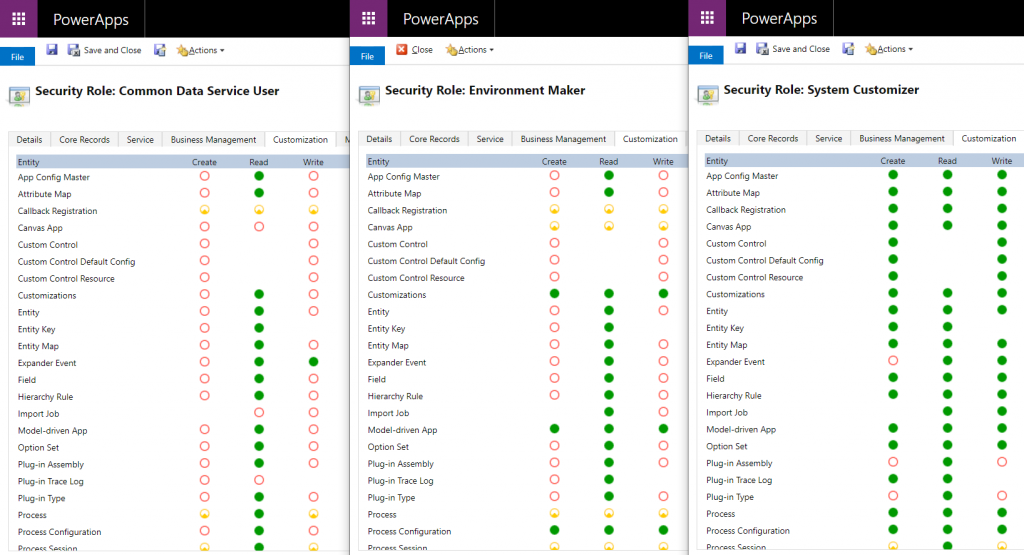
    The UI for security roles dates back to MS CRM v.X days and is scary both due to the legacy experience as well as the variety of options found in even a blank CDS org. Nevertheless, it is logical and will tell you what you need if you know what you’re searching for. Let’s compare 3 standard roles of Common Data Service User, Environment Maker and System Customizer and their privileges on the Customization tab:

    The CDS User has mostly just read access to the metdata, like Entity, Field, Option Set and so on. An Environment Maker is allowed to create new items like Canvas Apps & Model-driven Apps – like a Maker should. To actually create new Entities and Fields, you’ll need to be a System Customizer or Administrator.

    This is where the platform aspect of CDS (and its predecessor XRM) comes into play, though. You can create your own security roles, preferably via copying an existing system role that’s close enough. So, you could create a new “Environment Super Maker” that would have the right to create new fields, but not new entities, nor delete any fields. So, security roles are not only the gatekeeper to business data but also metadata.

    Q9: Looks like these security roles are environment specific. Do the IT admins really to go and manage the security settings via this MS CRM Power Apps UI?

    Not anymore! Last year Microsoft finally brought Azure AD integration into the system administration features of Dynamics 365 and thus CDS. You can now leverage the Group Teams to assign CDS security roles to an Azure Active Directory group (security or Office group) and the users will inherit the privileges of that role when added to the group.

    While Azure AD groups definitely streamline the administration process, please keep in mind that there’s more to CDS security model than just the security role assignment. Business Unit structures, Field Level Security, Hierarchical Security are some aspects that may require admin actions directly within the environment to get them set up properly.

    Q10: Why do all these user accounts from across the organization appear in the CDS environment meant for department X only? Can they all access it?

    You probably didn’t assign a security group to the CDS environment right at the start when it was created. Therefore every licensed user account in your tenant was copied over to the environment. If you assigned a security group to the environment after its creation, then those user accounts will be automatically disabled. They will forever remain in the database tables as inactive users, though, since user record deletion is not something XRM nor CDS has ever supported.

    Just because a user exists inside the CDS environment’t systemuser table doesn’t mean they can do anything in that environment. Not even if they haven’t yet been disabled. Everyone needs a security role to have a chance to read both the metadata and the business data from CDS, so the user record is just a prerequisite to opening the door to the environment but it doesn’t provide the key to the lock.

  • Keeping Dynamics 365 Apps Up to Date

    Keeping Dynamics 365 Apps Up to Date

    We’re living in the “post-October” era where many of the new Dynamics 365 Customer Engagement features promised in the Oct ’18 Release are materializing into the live environments. Not all of them, though, since that space train carrying the Business Applications release bits has been scheduled to run from October 2018 to March 2019, as you can clearly see: 

    While some features arrive in preview and only for a specific geographic region, there is plenty of stuff that’s being deployed to nearly all Dynamics 365 CE online orgs. While we’re not quite yet at the target state of having every customer running the same version of the application, there’s no longer a process for scheduling the update for your own environments on a particular date in the distant future. v9.1 has most likely now been rolled out in all but the most exotic geos.

    This lack of CDU calendars to pick the dates from doesn’t mean that everything would automatically get switched to the latest version. Remember that in addition to the underlying platform (now called Common Data Service for Apps, CDS) there are also the actual Apps to update. For example, if you’re running the Sales Hub a.k.a. the Unified Interface app for Dynamics 365 for Sales, the menu items in the App Settings section might look like the following:

    Whereas what you should be seeing in the latest version currently is this:

    How do we get there? Let’s dive into the world of solutions and find out.

    Applying Solution Updates

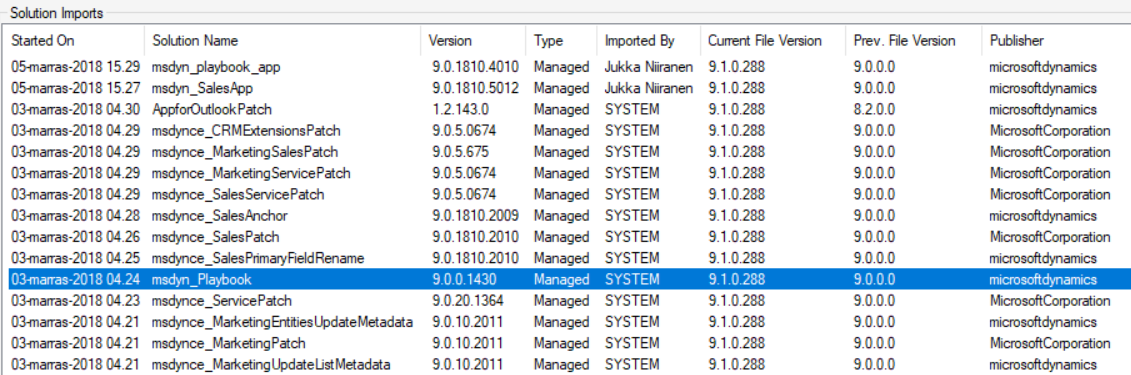
    How do we know which solution versions carry which new features? We don’t have a central place for such information right now, since the Microsoft Dynamics 365 Online releases page only lists fixes and changes to existing functionality (in theory at least). When we browse the documentation for specific features like Playbooks for example, we may see details like this:

    OK, that gives us a hint about what versions we should be seeing inside Dynamics 365. Getting the platform version is easy enough via the About menu behind the configuration cog, and everyone who’s customized Dynamics CRM should know where to look for the solution version number.

    (more…)
  • Trial & Error: Understanding Dynamics 365 CE Trials

    Trial & Error: Understanding Dynamics 365 CE Trials

    With SaaS products like Dynamics 365, getting the process of running a free trial right is crucial for the commercial success of products. This is why you may have seen Microsoft also perform a lot of changes into the process how you’ve been able to spin up trials of CRM Online instances, nowadays known as Dynamics 365 Customer Engagement. Or “Dynamics 365 for X”, with the “X” being an App like Sales, Customer Service, Field Service or Project Service.

    This App model is one of the reasons why the seemingly simple process of provisioning a new cloud database to host your CRM trial data has turned into a bit of a beast recently. It’s no longer a one-size-fits-all offering, rather Microsoft is trying to tailor the trial experience based on the business process that is most relevant for the potential customer. The intentions are good, but the results can lead to a lot of confusion when dealing with an inherently complex platform like XRM where users never follow just a single track through a few predetermined use cases. Here’s a few notes on what I recently learned about how the trials currently work.

    Classic Trials

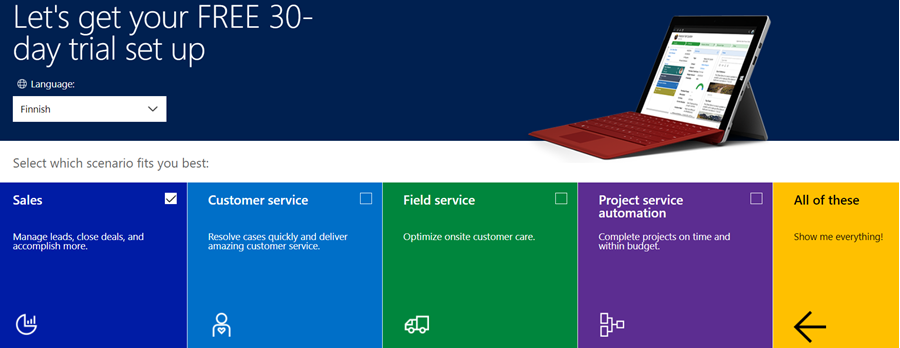
    If you’ve been working with Dynamics 365 recently, either by deploying it for customers, managing your internal instances or studying to become a certified Dynamics 365 professional, you’ve probably encountered this selection:

    Here you get an option to select either one of the Apps, go for the full suite of “all of these”, or if you’re really paying close attention, skipping the App selection by ticking the box “none of these, don’t customize my organization”. Today when I was in need of setting up a new trial to test the Sales related features specifically, I opted to install the Sales App via this provisioning screen.

    After a short while, I was able to access this new trial instance. That in itself can of course be a challenge, since there’s no guarantee that the Office 365 App launcher or the home.dynamics.com screen will refresh to show you the link to the Dynamics 365 instance. Knowing the direct URL of the instance picker (https://port.crm4.dynamics.com/G/Instances/InstancePicker.aspx in EMEA) speeds up this process, and soon I was faced with the Sales specific clean app list. My Finnish language “Myynti” app for the legacy web UI was there, as was the less elegantly named “Sales-keskus” hybrid of English/Finnish, which of course points to the Sales Hub based on Unified Interface.

    Since I needed to do some solution installation here, the first thing I had to do was to promote myself to the Admin role. That’s something you’d never need to do outside of the trial experience, as being the user who provisioned the Dynamics 365 instance you’d most likely have sufficient roles in the Office 365 administration side to see the admin menus directly here. But these are trials we’re talking about and the whole point of the tailored experience is that you DON’T see things that are not relevant to you, because that’s a scary UX for people not familiar with the platform.

    Now that I had the power to configure the instance to my liking, I proceeded to first checking out the default UI on the account form. Here I noticed that actually my nice’n clean Sales UX was cluttered with stuff that I didn’t ask for. Taken from the English UI here, you’ll notice that the account form tab actually has sections for Project Price Lists, Field Service and Scheduling. Not to mention the related records navigation that was at least 20 items long. Where did my sleek Unified Interface “Sales Hub” go?

    When going to the Solutions menu, it’s obvious where these items are coming from. The “Sales trial” in fact contains in total 16 solutions, which is equivalent to choosing the “all of them” option on the trial setup screen. It’s all here, even though you didn’t ask for it: Customer Service, Field Service, Project Service and their accompanying trial customizations. No, none of these will actually show up as installed solutions for the instance if you view them via the Dynamics 365 Admin Center. The same laws of physics obviously don’t apply for trial instances as they would for actual production or sandbox instances. (more…)

  • From AppSource to Solutions to Dynamics 365 Apps

    From AppSource to Solutions to Dynamics 365 Apps

    In my previous blog post I presented the various different meanings that an App can have in Dynamics 365 Customer Engagement. Now that we’re aware of this jungle, let’s grab a machete and start making our way deeper into the heart of it, to understand how a system customizer can survive in there.

    Before there was Microsoft AppSource for Dynamics 365, the methods available for distributing apps in a generic sense were pretty basic: you downloaded a zip file (or several) from a location provided by some party, then navigated to the solutions menu in your XRM environment and started importing them. When there were updates to those apps, you needed to repeat the procedure. If there were some other configuration steps needed in getting the application properly set up, you had to read the friendly manual and complete those. In a more tech savvy environment the Package Deployer might have been used here, but that was hardly a task for the accidental CRM administrator.

    What AppSource aims to change in the Dynamics 365 app distribution process is similar to what the smartphone app stores did a decade ago, i.e. simplify the steps for the customer and also provide a better channel for app developers to deliver their updates. When you go to AppSource and choose to either install a free App or start a trial on a paid one, the next screen will provide an instance selector to determine where in your Office 365 tenant you want to put this App in. Also presented are the checkboxes for agreeing on both Microsoft’s as well as the ISV’s legal terms.

    From here you’ll be taken into Dynamics 365 Administration Center. This part of the process nor the UI of the admin center isn’t very intuitive, so let’s pause here for a moment. While you’ll land on the Solutions view of an Instance after clicking on “Agree”, on the logical level we should be paying attention to the Applications tab instead. The chosen ISV (or MS) App will have been added as a row in the applications list, which applies to the whole tenant. In this example we see that North52 Business Process Activities is now available in our tenant. It doesn’t have any configuration options in this UI, but the Microsoft apps like Portal Add-on or Voice of the Customer both have an additional “Configure” button that is accessed via this Manage Applications screen.

    If we click back to the Instances tab in the admin center, select one of our instances and click the Solutions icon on the right side, we’re now presented with the list of solutions available to this instance via the AppSource delivery channel. It is not the same as going to your XRM instance and clicking Settings – Solutions, as there can be more solutions within that instance. For example, the organization specific solutions that you’ve created as a container for your own customizations. Not even the managed/unmanaged status of those solution has anything to do with what’s shown in the admin center, because whatever zip files you imported directly into your XRM instance as a solution is only visible from within the XRM UI.

    The solutions list in the admin center is also different in the way that it shows also the solutions you haven’t installed in the instance. These are applications that someone, either MS or your D365 admin, has made available in your tenant and possibly installed them into some other instance (a test sandbox, for example). To get them installed you don’t have to go to AppSource, rather you can start the process from here.

    What makes this view so relevant for the Dynamics 365 instance administrator is that here’s where you’ll see what solutions have upgrades available. In the above example, Microsoft has released a new version of the Relationship Insights solution. Since they don’t want to accidentally break your dev/test/production orgs by changing the solutions on their own, they are rather giving you the controls to click on the “Update” icon for the particular instance when you’re ready for it. This same process is applied also for third party ISV solutions to deliver updated versions of their apps.

    Now when we have deployed the app from AppSource and the Solutions view in the Dynamics 365 Administration Center for our chosen instance shows the status as “installed”, let’s use the Office 365 app launched to navigate to our Dynamics 365 start page, meaning home.dynamics.com. And… there’s nothing new here. Even if we click the “Sync” button to refresh the My Apps view, our AppSource app doesn’t appear. What gives?

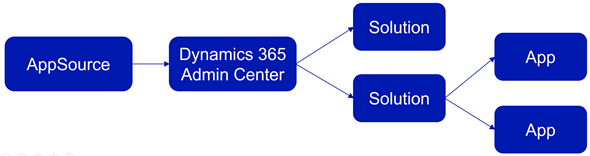
    At this point we need to take a step back from the UI and think about how these different components relate with one another. On the highest level we have AppSource, which is more of a marketing UI for products. From there we get Applications into our Dynamics 365 Administration Center. These manifest themselves as single solution rows for an instance when viewed via the admin center, but they can actually contain N separate solution files (look at Dynamics 365 Portals, for example). Finally, these solutions may or may not contain Apps – from 0 to N. This diagram illustrates these four conceptual levels and their relationships:

    In our example we’ve installed North52, which is an administrator/customizer tool designed for “building simple or complex business rules using point-click editor, eliminating C# and JavaScript coding”. In short, it’s an app for configuring apps, but it’s not a business app in itself. That doesn’t mean it wouldn’t need a UI, of course, but the Command Bar shortcuts and the dedicated home page web resource with navigation options quite frankly is much better suited for this type of a power user tool than the new Unified Interface apps that are supposed to work even on 4″ mobile phone screens.

    This brings us back to the App Module concept that was briefly mentioned in my earlier blog post. Before V9 and the Unified Interface there wasn’t so much benefit in building separate Apps for different functional areas of the XRM platform, as we had the one master UI for the instance available anyway. When the features are migrated over to the new Unified Interface, basically everything must be an App. In v9.0 we’ve yet to see how the more complex admin features will be implemented as Unified Interface versions, so currently it’s a somewhat jarring experience of 2011 meets 2018 for the system customizers.

    Even when all the actual business application functionality has moved over to Unified Interface, there will still be many scenarios in which presenting an AppSource app as a Dynamics 365 App Module App doesn’t necessarily make any sense. UI extensions like Checklists will not have much use outside the actual business entity in which they are used. Any app that connects to an external web service to enrich the contents of Dynamics 365 records mainly needs a configuration admin UI somewhere. Sure, there’s nothing stopping developers from using the App Designer to define an App for their solutions, since all you technically need is a single HTML web resource to publish an App with a single menu item. However, separating the tool from the XRM instance in which it lives isn’t going to make the UX of configuring features any easier, so I’m not really hoping for the app clutter to increase this way.

    Both the AppSource marketplace and the App Module in Dynamics 365 Customer Engagement provide significant improvement on how the business application features can be presented to business users and decision makers. What they don’t do is completely remove the need for Dynamics 365 system administrators to understand how the various layers and parts of the application platform are wired. XRM will likely remain an environment that’s just inherently more complex than an iPhone screen with its pretty app icons lined up just the way the single device user likes to see them.

  • CRM 2016 Solution Segmentation for The Rest of Us

    CRM 2016 Solution Segmentation for The Rest of Us

    There’s been a significant enhancement to the Dynamics CRM solution framework in the 2016 release. Here’s what the TechNet article on CRM solution segmentation promises us:

    To gain tighter control over what you distribute in solutions and solution patches, use solution segmentation. With Microsoft Dynamics CRM solution segmentation, you can export solutions with selected entity assets, such as entity fields, forms, and views, rather than entire entities with all the assets. To create the segmented solutions and patches, you can use the CRM user interface, without writing code.

    Sounds pretty cool, doesn’t it? I’m sure there’s hardly a CRM customizer out there who wouldn’t have encountered the challenges with the lack of granularity when it comes to how Dynamics CRM defines some of the solution components to be inseparable from their parent entity. For example, if you just wanted to add a custom chart or modify a system view you always had to include the whole entity into your solution to distribute it from your development environment to other CRM orgs. With this type of “all or nothing” approach, it’s very easy to end up overwriting customizations in the target organization for components that you had no intention of modifying. The worst part really is that you can never be sure if you’ve done some damage after clicking on “publish solution”.

    The TechNet article immediately starts talking about concepts like patching and cloning solutions, so it’s important to note here that these really are mostly relevant only to people who ship managed solutions. If you’re an ISV developing an add-on product or work in a large enterprise developer team with automated release processes, this will surely be what you do all day everyday. If, on the other hand, your work is more focused on customizing and configuring Dynamics CRM environments in projects that don’t contain a large amount of custom code and only target a single customer specific production instance, I bet you’re dealing a lot with unmanaged solutions. I know I am, since the price you pay for deploying unmanaged solutions is most often a lot lower than what you’d face when committing to the path of the managed solutions (and crossing that scary point of no return while at it).

    What makes the new solution segmentation concept important to understand for any CRM customizer is that each and every one of you will come across it when adding default entities into your solution in CRM 2016 and beyond. After you select an entity like the opportunity, for instance, you’ll be presented with a brand new screen asking you to “select entity assets to include in the solution”:

    CRM_2016_solution_segmentation_01

    This is where you now can pick just the components that you wish to ship with your solution once you export it out from the development environment. You could choose just a specific set of fields, for example, or go to the views tab and click the top left corner of the grid to mark all the assets of type “view” to be included in the solution. Want to see how it can be used in practice? Okay, let’s go ahead and pick from the opportunity entity just the Sales Pipeline chart into our solution, so we can modify it.

    Let’s say we want to change the pipeline chart to use weighted revenue instead of estimated revenue values. So, where do we get those fields? You create them! CRM doesn’t ship with a weighted revenue field OoB but instead it contains the tools for building it, thanks to the great calculated fields feature introduced in CRM 2015. We’ll therefore need to create a new currency field and set its formula as “estimated revenue * (probability / 100)”. Even though we’re referencing other fields in the formula, there’s no requirement to include them in our solution, as these system fields will be in place in the target environment regardless of our actions. What we might want to pay attention to is something that the solution segmentation engine doesn’t worry about, which is including the system generated “Weighted Revenue (Base)” field into the solution, as that’s where the base currency version of our calculation will be automatically stored. Better safe than sorry! Furthermore, the new solution segmentation model means we can remove any individual component from the solution if we later deem it unnecessary (as shown below).

    CRM_2016_solution_segmentation_02

    Now that we’ve got our Weighted Revenue field, we can update the Sales Pipeline chart to use this new value. To test the segmented solutions functionality in more depth, let’s also pick another system component into our package: the Sales Activity Social Dashboard. We’ll update the elements of this dashboard and see how they transfer into the target organization. Once we’re ready, let’s export the solution as an unmanaged package like we’ve always done. We’ll get the warnings on missing dependencies (again, like we always do), but since the whole exercise is about updating just selected pieces of the CRM puzzle, we don’t need to worry about any of those.

    Upon importing the solution .zip file into the target org, there are no differences to how things worked with non-segmented solutions. If we want to peek inside solution details before hitting publish, we’re only presented with the high level components, which means there’s no way to tell at this point if the package contains the entire opportunity entity or just a couple of fields from it. If I was importing an ISV solution received from an external source, I would actually like to know what’s included on a very detailed level, but for now we’ll just need to keep on trusting the publisher.

    CRM_2016_solution_segmentation_03

    Let’s see what happens to our updated dashboard now. As a starting point I have a CRM Online demo environment from my previous post regarding “preferred vendor solutions” offered by Microsoft. As you can see, one of these solutions (probably FieldOne) has turned the flat CRM 2016 funnel chart into a retro 2011 style 3D version. Yeah, that’s precisely why solution segmentation makes a big difference, as you no longer need to overwrite things just to add new things.

    CRM_2016_solution_segmentation_04

    Once we import our new solution and publish the changes, we’ll see that the funnel chart has now been restored to the flat version that we exported from another CRM 2016 org. More importantly, the stages are now different as we’re mapping the opportunities into the pipeline based on our custom field Weighted Revenue instead of Estimated Revenue. The Top Opportunities chart has also been replaced by another custom chart I included into the solution. Looks like our segmentation is working great so far!

    CRM_2016_solution_segmentation_05

    Picking the entity assets one by one is perfectly fine for a scenario where you are deploying a very specific change like the one presented here. However, when you aren’t just performing minor tweaks to an existing CRM environment but rather deploying a brand new CRM system for a customer, you’re likely going to be touching a very large number of components. For instance, this week I’ve been working on a deployment project where the current sprint focuses on sales process management functionality. The number of tweaks I’ve done during two straight days of CRM customization is pretty massive, when you start from an out-of-the-box Dynamics CRM environment and turn it into something that actually works the way the users expect. If I would have had to plan in advance which components I need to be touching, or alternatively adding them into the solution one by one as I realize they need to be customized, I would have probably spent ~20 days instead of 2 while waiting for the CRM Online customization dialog windows to open.

    What I’m saying is that while having the full granularity of solution components available to you is awesome, there are common scenarios where you actually may want to keep on working the way you’re used to – adding the whole big entity chunk into your solution. Let’s say I’m building a “base customizations” solution package in a development environment which should contain all the core data model and UI customizations for a new CRM org. I know I’ll be messing with the opportunity entity big time, so I want to ensure every change to the OoB configuration is covered. Instead of picking the individual assets, I can tick the box in the top right corner to “add all assets” into the solution at once.

    CRM_2016_solution_segmentation_07

    Nice, now I’ve got the best of both worlds! My base customizations package looks like things were before CRM 2016 so I’m comfortable with building the customer specific solution with it. So, with that I’ll conclude my feature overview of a CRM 2016 highlight…

    “Wait, hold on just a moment there! Are you telling me there’s not a single “gotcha” discussed in this blog post? This is Surviving CRM! You never do a happy path walkthrough of CRM features without finding some issues in them.” Okay, you got me. I wasn’t really going to stop there. Let’s keep exploring this segmentation path a little deeper, shall we? (more…)

  • Gentlemen Prefer Solutions: The Expanding Dynamics CRM Footprint

    Gentlemen Prefer Solutions: The Expanding Dynamics CRM Footprint

    If you haven’t worked with CRM Online using Office 365 Global Admin rights recently, you might have missed the new delivery mechanism that Microsoft has created for additional CRM functionality not included in a new Online org by default: preferred solutions. Unlike the traditional solution import mechanism under the CRM application’s Settings area, these preferred solutions are both installed as well as updated (upgraded) via a miniature “CRM app store” controlled by and reserved for Microsoft exclusively. To access these preferred solutions you need to go to the O365 Admin Portal, open the CRM Online Administration Center, choose an instance and click the edit icon next to “Solutions”. You’ll be presented with a list like this one:

    Preferred_solutions_manage

    OK, maybe not exactly like this one, unless you work in the United States. You see, these preferred solutions are also targeted to preferred customers, meaning in practice CRM Online customers who use a tenant located in North America. Let me point this preferred region out to you from the Office 365 and CRM Online datacenter map:

    O365_datacenter_map

    The current availability of the preferred solutions is as follows:

    • Insights for Microsoft Dynamics CRM Online: powered by InsideView, this service is free for CRM Online US customers only. Presumably due to the fact that their database wouldn’t have very good coverage of companies in other parts of the world. You could of course buy the service from InsideView directly if you really must have it.
    • FantasySalesTeam: acquired by MS in August 2015, this gamification solution is built on the concept of fantasy sports that’s apparently a huge industry in the US but less familiar in most other regions. Sales people all around the world surely are a competitive species but no one turns the competition into entertainment quite like the Americans do. Expanded availability of the preview is coming any day now.
    • Voice of the Customer: built in the UK and acquired by MS in March, the solution formerly known as Mojo Surveys has been launched in preview mode for US customers only. Ouch. Well, don’t worry, this feedback management solution will surely come to other geos quite quickly (or MS will need to deal with some customer feedback of their own…)
    • Office 365 Groups: not acquired from anywhere but rather an original Redmond design, this solution became available already back in CRM 2015 Update 1 (v7.1) time frame as a preview globally (yay!)and is now available in full production support mode to all CRM Online customers.
    • FieldOne Sky: only the sky’s the limit for this solution that’s available to CRM Online users with Professional licenses, no matter where your field service personnel may roam. Acquired in July 2015, FieldOne is running mostly on Microsoft’s XRM platform, but the mobile client still relies on Resco and allows only access to a subset of CRM default entities, so for broader mobile use you’ll still need to buy a separate Resco license.

    Although not a CRM solution in technical terms, it’s also worth mentioning that the CRM App for Outlook which was released as US only preview last summer is now available to all CRM Online users who are on CRM 2016 version. I haven’t seen any upgrade time slots being scheduled for existing CRM Online customers yet, so currently mostly newly provisioned orgs can access the Settings – CRM App for Outlook menu to enable users for this lightweight successor to the “heavyweight” Outlook client of the past. (more…)

  • First Glance At Dynamics CRM 2016

    First Glance At Dynamics CRM 2016

    Another year, another major Dynamics CRM release! What a time to be alive, eh? CRM 2016 has now been published for new Online trial instances globally and will be coming available as on-premises download within the next couple of weeks. If you haven’t yet explored what’s new with Dynamics CRM 2016 then I recommend starting from the following three links that I personally always refer to when discussing the latest version:

    Rather than just making it a “go and RTFM” type of post, here are a few notable features in the latest release that I personally think you should pay attention to.

    Start From The Top

    For folks upgrading their on-premises CRM environments, this is definitely a sizable release, as the features from CRM Online 2015 Update 1 (v7.1) are only now becoming available to them. Working mostly with CRM Online environments these days, it does really feel painful whenever I have to go back to the pre-7.1 Nav Bar, so the new navigation experience should definitely cheer up your users who are now spared from the game of sideways scrolling accuracy Olympics. I’ve yet to find a single thing that the new navigation would be worse for than the old one released in CRM 2013. Don’t forget to configure a custom theme & logo for your CRM while visiting the customizations menu! Oh, and remember to leverage this Theme Generator, since MS apparently had to cut the development budget when it came to “nice to have” things like color pickers instead of hex codes.

    Experience_it_now

    Moving from 7.1 to 8.0 may not deliver any immediately visible changes to you, as Microsoft has largely decided not to introduce anything dramatic in the look & feel of the familiar web client. One thing you may notice, though, is a yellow notification bar telling you something about an “interactive service hub” and asking you to “experience it now”. Hmm, sounds interesting, so maybe I’ll click on it and… Whoa, what’s happening?! Why am I seeing the same customization download screen as on the tablet client? And where did half of my menu items from the Nav Bar go all of a sudden?

    CRM_2016_interactive_service_hub_account

    So you thought there’s not much new in the CRM 2016 UI, huh? There definitely is a lot of new investments to be found here, ranging from brand new “interactive experience dashboards” to updated form layouts with embedded cards, revised components like Timeline (ex Social Pane) and new concepts like the Reference Panel (“Related”). It’s all built on top of the MoCA framework, and it gives you a taste of how the Dynamics CRM application of the future will behave: less like a web page and more like an app.

    Why do I say “the future” if it’s in fact already available in CRM 2016, for both Online and on-prem customers? Well, if you’re an existing Dynamics CRM user, the chances are that you’re not going to deploy this into production use quite yet. For starters, it only supports a limited set of the core CRM entities like account, contact, activity and case. Sales opportunities, leads, marketing lists or campaigns aren’t within the scope of this release. While you can show custom entities in the Interactive Service Hub, you’ll not be able to perform many of the more advanced customization tasks that the traditional Dynamics CRM web client supports, like embedding web resources or Iframes to forms.

    CRM_2016_interactive_service_hub_dashboard_filters

    There’s a lot to like about the new user experience that this “interactive” web client presents us with. The new dashboards especially appear to address many of the requests that CRM users typically have, like the ability to apply global filters to all the charts. The method of presenting related records and streams of activities is definitely more in line with the way modern mobile apps work, even if the experience itself feels a bit too mobile for a full size monitor in terms of information density. Still, in its current state it remains more of an experimental release that’s not meant for wider adoption yet. Much like the infamous Polaris release prior to CRM 2013, this Interactive Service Hub will be best used for learning about and preparing for the direction of future Dynamics CRM web clients.

    Explaining this grand scheme of things to the customers will be tricky, as it was with Polaris. For example, in order to leverage the new Knowledge Articles you have to access them via The Hub, presumably because Microsoft hasn’t wanted to build a rich text editor UI for the old web client anymore but has rather focused their investments on MoCA. Within the right feature scope you can probably do cool stuff with this client already, it’s going to required setting the right expectation level right from the start. Oh well, I guess that’s what us consultants are there for…

    CRM Via The Apps

    CRM_2016_visual_controlsOn the mobile apps there is now the ability include new types of visual controls for the mobile forms that can make CRM data both a lot more pleasing to the eye as well as easier to work with on a touch screen device. While many of these new controls would surely be great additions to have on normal web client forms as well, Microsoft has decided not to enable them for browser users of CRM in this release. Remember what I said about the MoCA framework being the focus area for MS?

    CRM_2016_task_based_experiencesTask Based Experiences (“TBX”) a.k.a. Task Flows is another new feature that is not just “mobile first” but “mobile only”. The idea behind these experiences is to be independent from the underlying entity relationship model and rather guide the user through a set of screens that present a subset of only the relevant fields from each related record that need to be touched in the process. What’s a bit cumbersome in this release is that TBX isn’t actually launched for a specific record but rather from the bottom left corner of the mobile app start screen. It’s almost like the old (and mostly abandoned) Dialogs feature from CRM 2011 but with a more modern approach, including the ability to add nice looking photo icons for the launch menu. (more…)