Tag: social

  • Why start a newsletter instead of writing a blog

    Why start a newsletter instead of writing a blog

    Blogging has had a massive impact on my career and personal life in the past 16 years. The act of other community members out there sharing their insights via blog posts is what initially got me so excited about the Microsoft business apps ecosystem to begin with, at around ~2005. My own investments of time and effort into blogging have been totally worth it.

    And yet here we are, in 2024 and I decided to launch a newsletter instead. Called “Perspectives on Power Platform”, it’s available on the perspectives.plus domain. Published and managed via beehiiv. This is all aligned with me switching over from being a co-founder into being a solopreneur instead just a few months ago.

    I feel I need to explain myself a bit here on this “legacy” blog – considering a few people have also asked me directly about it. “Why a newsletter?” I’ll provide my reasons and thought process here, with the intention of possibly sparking also comments from fellow bloggers and blog readers on this shift I see around me.

    Is blogging dead? No, but following is.

    The web is certainly no longer the same as back in 2005 – yet few things in the world are. First the rise of social media came along and pretty much killed the traditional way of following blogs via RSS feeds and Google Reader (RIP). It doesn’t matter that RSS as a protocol is still perfectly valid today. Most people who might be interested in what I or the rest of the #MSBizApps community write about will not be using RSS. I have personally pretty much given up on following the hundreds of RSS feeds that I had subscribed to in my Feedly account.

    At first, the co-existence of blogs and social media platforms like Twitter seemed to work quite well. Sharing links to great blog posts was an amplification method that helped form communities. Then, the laws of market economics drove every major social media company to build a walled garden instead of a “meta protocol” for such social interactions between community members. They wanted to hold onto the audience instead, which lead to algorithmic feeds punishing people for posting things that had a link pointing outside the garden. As a result, fewer people left the garden and the content inside became richer as users tried to cram more text, images, video into the native social channel instead. “Engagement” became the key metric that determines what we see – not who we chose to follow or subscribe to. We lost control.

    This affected all content, not just blogs. Musicians, writers, artists – all creators everywhere lost the direct way for them to build an audience of followers. To understand the broad impact that the rise of the social media algorithm had, I recommend you to put this video on your watchlist: “Death of the Follower & the Future of Creativity on the Web” by Patreon CEO Jack Conte at SXSW 2024.

    Today, in the era of TikTok, the concept of subscriptions or following creators has been completely abandoned. Ultra-algorithmic “For You” streams do not rely on your personal network. On today’s social media services like Threads (the “Twitter, from Meta”) it’s tough to get anyone to follow you. Engagement on your post does not translate into an audience of followers. You don’t connect with creators – you consume trending content. There’s hardly anything “social” about such content networks anymore.

    Blogging didn’t die as much as social networks did. User generated content is being circulated around at an ever-faster pace – yet it’s selected by a machine rather than the users explicitly. Audiences are not something we own, rather it’s something we can purchase time & time again from the walled gardens that host the user generated content we give to them for free.

    Are you writing blog posts or AI training data?

    After the social media algorithms came the LLM wave. How is this generative AI era different from the social media era? In terms of how they treat content, the difference is subtle yet massive:

    • Social media: process all the content users posted on our platform and extract maximum value out of it.
    • Generative AI: process all the content available on the public web and extract maximum value out of it.

    Pause for a moment to reflect on that. First, they built a walled garden – then they came for everything outside those walls. What Meta did in Facebook/Instagram is now being done by OpenAI, Google, Meta (again) etc. on the entire world wide web. It’s ultimately just about turning up the volume of data, by crunching everything humans have ever created and compressing that into a Large Language Model. Throw in piles & piles of Nvidia GPUs and massive amounts of energy burned in data centers, and then – suddenly a new species of intelligent chatbots emerged from this cauldron of the geeks. Generating something new from the ingredients mixed in during the cooking process.

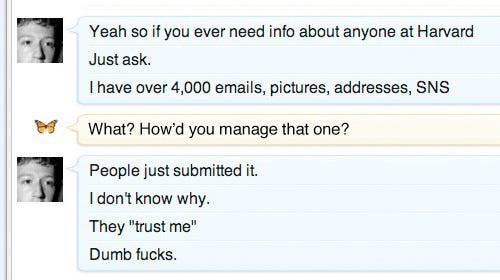
    Human thoughts are the critical ingredient. Without the users, all that big tech corporations have is software and hardware. They don’t have data unless someone gives it to them. Google as a search engine wouldn’t have been able to produce any value to anyone unless it was able to index the data shared by humans on the public web. Mark Zuckerberg wouldn’t have been able to get anyone signed up or Facebook unless people at Harvard hadn’t “just submitted the data to him, like dumb f***s”.
    Data both inside the walled gardens as well as outside of it has been analyzed before for commercial purposes. When Google did it for their search engine, it (originally) was about helping users find the original source of that content. Leading to website visitors, who could in turn potentially become subscribers. You gained attribution and the opportunity to connect with other people via building an audience. A deal that was hard to refuse.

    How does this deal work in the age of ChatGPT, Copilot and the other AI services? It doesn’t. The social contract of “you index my content and I get exposure in return” becomes irrelevant when the machine no longer provides merely a link to a website as the answer to a user query. Instead, the LLMs become so smart that they offer personalized answers in the exact format requested by the user – thus negating any reason to visit the original websites. After all, why read through an SEO optimized “how to do X in Power Apps” article when ChatGPT or Copilot can adjust the information to any scenario and help you with follow-up questions, error messages and so on?

    The irony here is that the “how to do X” and “5 tips for optimizing Y” type of blog posts have been by far the most effective format to gain website visitors in the past. I haven’t usually seen them as very ejoyable to write, so I’ve instead spent my keystrokes on broader articles of analyzing “what does X mean” and “the future of Y” type of speculations. Such articles have only mattered for a brief period and have been mainly seen by loyal subscribers/followers. The long tail of traffic from Google has always been to the “how to” posts, by a massive margin. Now, thanks to AI – neither type of blog post will receive much traffic in the future, for pretty much any bloggers out there.

    Could the creators of content opt out from becoming AI training data? In theory, yes, and in practice, no. We’ve already seen companies like Perplexity AI spoof their user agent info and ignore any blocking done via the robots.txt file. Corporations also do it between each other. Amazon has instructed its employees to create personal user accounts and hand them over to the corporate AI group to get around GitHub API call limits. Besides, if we ever reach consensus on a method to deny the use of specific web content in training AI models, all of the old stuff out there today would still remain as part of what makes up the intelligence of ChatGPT and the likes.

    It’s best to assume that anything an anonymous website visitor can read, AI corporations will also use to advance their own purposes. You, the writer, will most often get absolutely nothing from it.

    Email as the old/new platform

    This brings us to the title of this post. While some pre-social and pre-AI internet technologies like RSS have faded into the background, email has remained undefeated. No matter how many alternative messaging and collaboration platforms have come & gone, nothing has managed to disrupt email in a meaningful way. Although kids today may not be paying much attention to email, the further along they go on their professional career, the more futile it is to resist the power of this universal messaging protocol and (unfortunately) identity system that has been around since 1971.

    The renaissance of email newsletters that has been fueled by services like Substack, Ghost etc. is a great example of how the old thing can feel new again after a break. Most importantly, these tools have been designed to first help the content creators build up an audience, and only then gain financial success from taking a cut off the paid content served to those audiences. Or from subscription fees paid by the creator, as is the case with my beehiiv account today. Unlike with social media, the platform for email newsletter delivery is not actively trying to stop the creators and readers from having a direct relationship with each other.

    Email capture is a ubiquitous gate along the many journeys we all experience while online. You do it when registering for both social and AI services, too. Businesses often use it as an excuse for getting the chance to know who is interested in their content enough to fill in a form, so that they can talk directly to them. Now, with the rise of the all-scraping AI overlords, there’s a whole new reason for even individual content creators and community members to seriously consider asking readers to sign in. Unless content is locked away behind a real gate that can’t just be opened via the search bots lying about who they are, the content will get consumed by AI.

    Right now, all my Perspectives on Power Platform newsletter issues are publicly available for anyone to consume. However, I have the possibility now to change that if needed. Perhaps in the future the full articles will require a subscriber account – just to keep the AI bots away. While for the casual web surfers this of course is an extra hassle, luckily they can do a one-off registration on the site and then receive all future issues of the newsletter delivered into their mailbox.

    It’s nothing new for some of you. There are hundreds of people who are subscribing to this current blog via email notifications (powered by Jetpack) and I’m very thankful for this audience! At the same time, I want to apologize for the recent blast of lorem ipsum dummy content that got sent to you while I was deploying a new theme for my blog.😳 Just goes to show that WordPress isn’t exactly the ideal platform if you intend to publish content primarily in an email newsletter format…

    If you are interested in receiving my future writings into your inboxes, I strongly recommend you to sign up for the newsletter. This blog right here at jukkaniiranen.com will remain as a place for me to share thoughts around topics outside of the Microsoft ecosystem. The regular content on what’s happening with Microsoft Power Platform and what’s my take on it will be on the Perspectives newsletter and site exclusively from now on.

    Why “perspectives.plus”?

    As I mentioned in the beginning, I am today working for myself. For the first time ever, I really don’t need to think about “how will this activity generate work for someone else in my team”. I am the business. I’m free to explore ways in which the things I know and what I’m good at can deliver value to someone else out there – and how to make a decent living out of it.

    With my 11-year journey in the Microsoft MVP award program coming to an end, there is no longer any conflict of interests between community contributions and possible commercial agreements with parties in this expanding Power Platform ecosystem. This does not mean that I intend to sell out my own integrity and start promoting products from anyone who inserts a credit card. The way I see it, the key reason I have any audience in this space to begin with is because I always tell it like it is. I spend quite a bit of time exploring and thinking about the world I see around me, then I form my own perspectives on things and say it aloud. Telling both sides of the story, in ways that might feel controversial. Love it or hate it, that’s what I am about.

    This is not all just about me. My motivation comes from advancing a worthy cause and helping those people out there who are doing the right thing, yet not always getting the recognition that they would deserve. This is where I’m looking to form partnerships with companies that have a solid offering for the Microsoft Power Platform customer base, and who understand what it takes to establish trust within this community.

    The “Plus” in perspectives.plus is not just a random top-level domain I picked. It represents the possibility of there one day being something more than just a free email newsletter available there. One of the possibilities introduced by platforms like beehiiv is the option for premium subscription tiers. Who knows, perhaps some of the things I will build and write would be worth putting behind a small fee to be paid? It’s not something I am actively pursuing at this moment, yet I like to keep my options open.

    In the end, it all comes down to perception. Of the million ways that we can create, exchange, and consume information in the computer world, technical implementation is rarely the factor that defines the outcome. It’s about how we frame information and express our intention, through subtle signals that us humans have evolved to pay special attention to. Machines just see data, be it published on a blog or a newsletter. We, on the other hand, can define – and redefine, the meaning of such data via crafting the storyline around it. If we want to achieve something new, I believe we first need to imagine a new story and then share it with the people around us.

    UPDATE 2024-11-29: Here’s a follow-up post, “7 months of Perspectives – start of my newsletter journey”.

    Cover photo by Kristina Tripkovic, from Unsplash.

  • This blog is now part of the Fediverse

    This blog is now part of the Fediverse

    I have been blogging quite a while in terms of calendar time. One year ago I did some math on how much time has been spent on the blogging activity itself. This data can be found in my post “Is blogging worth it?”

    The online world around me has gone through many waves of changes. The most recent one involves the term you see in this post title, which may or may not be familiar to you. I certainly didn’t know about it a year ago. Today, I am making (or at least attempting to make) my first WordPress blog post that goes out into the Fediverse via ActivityPub!

    To put things into context and explain what & why I’m doing, let’s look back a bit on the road that lead to the rise of the Fediverse.

    Humble beginnings

    I started my first blog over on Blogspot sometime in 2007. That blog doesn’t exist anymore, yet recently Google reminded me of the image files they’re still hosting related to that blogging activity. Including this wonderful photo of the actual corner in my bedroom from where it all began:

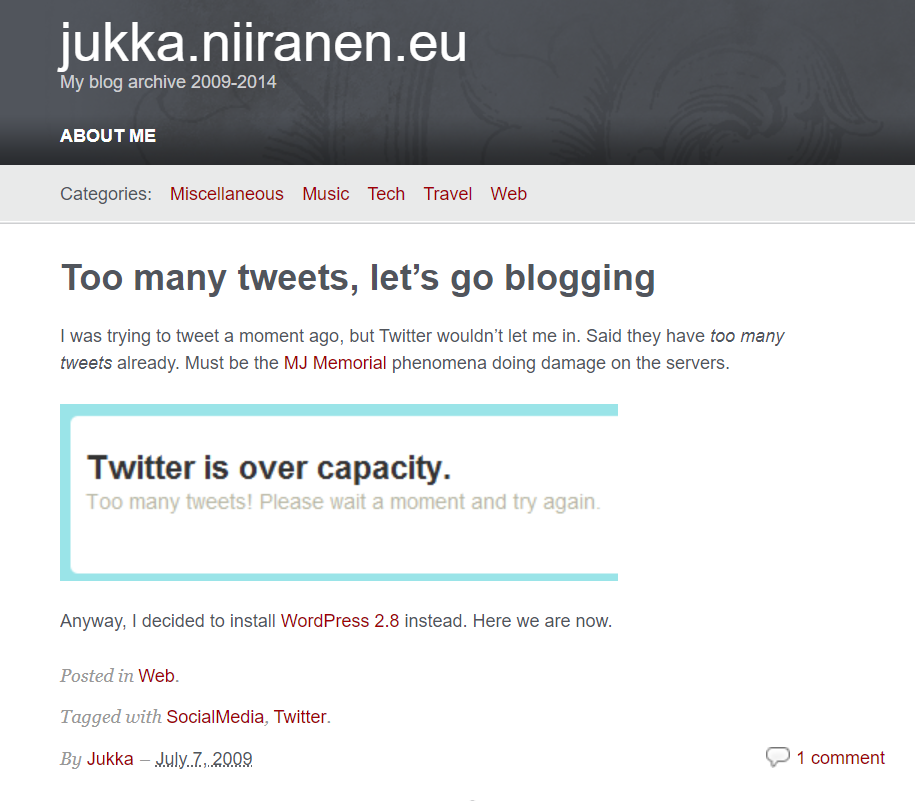
    After I found the Blogspot cloud service too limited, I decided to go on-prem and install a version of Drupal on a hosted server somewhere. That site doesn’t exist anymore either (at least I hope it doesn’t). In 2009 I figured Drupal wasn’t designed for my purposes and moved my personal blogging onto WordPress. That specific blog is still online and this is the first post I found on it:

    That post’s content was a surprise for myself. I would not have recalled that I had originally joined Twitter for the same reason as the masses did: to follow what celebrities around the world were sharing about their life (140 characters at a time).

    A bit earlier, in 2008, I had already started another WordPress blog called “Surviving CRM” which eventually evolved into the blog you are reading right now (“Thinking Forward” at jukkaniiranen.com). The core WP enginge has remained the same behind the scenes (with countless version updates, of course) and the main contents of all the blog posts is also still available.

    Everything else about the blog has changed several times (pages, topics, visual theme, plugins, features, linked services), yet fundamentally it’s the same digital object that was born 15 years ago. With a few domain redirects that I put in place, you could have even started following my blog via its RSS feed back then and still today see this updated that I posted.

    If someone would still be using RSS feeds, that is.

    Social media boom and bust

    My inspiration for starting to write blog posts naturally came from following other bloggers. The method for this was RSS (“real simple syndication”). I started trying out different feed reader software & services (like Netvibes) before Google Reader took over the feed aggregator market.

    Then Google did what Google usually does, meaning killing its products. Presumably the monetization model for online media consumption based on open standards like RSS wasn’t lucrative enough compared to other ways Google could turn user data into something to sell to advertisers. When the hugely popular Google Reader was discontinued in 2013, no similar feed aggregator service took its place.

    The online masses turned to social media services instead. Blog posts were no longer a dedicated feed, now they were just a part of the updates presented via the social graph of users you followed. The likes of Facebook and Twitter owned this graph and realized how much more profitable it was for them to control it – rather than just showing a chronological feed and allowing users to categorize content. Enter the age of the algorithms deciding what the users were seeing.

    Today, the social media as we came to know it in the golden age of Facebook and Twitter is slowly yet surely dying. I had remained an active Twitter user for over a decade, despite of the decline in organic network content and the rise of algorithm pleasing clickbaits and political outrage filling the feed. After seeing the massive damage that Elon Musk managed to create when taking over on October 27th 2022, I decided to stop posting new content on Twitter on November 18th.

    I knew that the things which had been broken in the process, primarily user trust and the sense of community, would be unlikely to ever get fixed again. To make it easier for everyone, Musk eventually decided to kill also the Twitter brand and replace it with X. That cross shape is a very fitting symbol for the graveyard where the blue bird was laid to rest.

    I’m kind of happy to see this, as it draws a clear line between what Twitter was and what its new owner wants it to be. I wouldn’t want my online identity to be associated with the latter one. No, I haven’t deleted my account nor tweets, because I also don’t believe in changing the world by erasing the past. We can only move forward in this life.

    What comes next?

    Just like there wasn’t a new Google Reader to take over the service that was killed, I don’t believe there will be a new Twitter to take the place of what is now called X. Sure, many will be attempting to build the exact same thing, including the earlier Twitter CEO, or the established social networks like Instagram and TikTok.

    “Insanity is doing the same thing over and over and expecting different results.” So what if some new mobile app comes along and captures the market share for the time that we used to spend on Twitter? The chances of history repeating are high, thanks to the natural life cycle of online platforms that leads to enshittification.

    “Here is how platforms die: first, they are good to their users; then they abuse their users to make things better for their business customers; finally, they abuse those business customers to claw back all the value for themselves. Then, they die.”

    Cory Doctorow on “Tiktok’s enshittification”

    The early days of blogging did not provide everyone an easy onboarding experience nor an streamlined UX for casual content consumption. Yet there was none of this shit. In exchange for all the convenience and endless dopamine shots that the global, proprietary online platforms give us, they will also serve you an ever growing daily dosage of shit on a golden plate.

    At the same time, blogs haven’t technically gone anywhere. No, you’ll never have every TikTok user create their own blog. That is not the goal because there is no one to set the goals but us. If you’re like me, you never even set any goals in life to begin with.

    As long as there is a sense of community being established and ideas are exchanged between people who you wish to interact with – that’s a pretty good life to live online.

    Yet not everything can be a blog post. We can’t pretend to be professional journalists working for major newspapers, writing formal and polished walls of text as the only means of communicating with the outside world. The idea behind social networks isn’t fundamentally broken – only the business model that leads to their inevitable enshittification. What was once commonly called “microblogging” in the distant past has certainly proved its value in the act of idea exchange and information dissemination through peer networks.

    Once I realized that Twitter was over for me, there was a proper incentive to think about what other tools are there for this type of communication. I saw my network exhibit interest in Mastodon and decided to give it a go. I managed to get past the infamous “pick a server” question, created my user account, searched for other interesting accounts to follow and gradually settled in. Today, it feels like a very natural home for one of my many online identities.

    Mastodon has around 2.1 million monthly active users. As such it won’t be a threat to any of the networks run by publicly listed tech giants. Also many VC funded startups in this market may well be able to burn cash for user acquisition in ways that Mastodon will have no possibility to match – by design.

    In the end, it’s a decentralized social media platform that no single deranged billionaire can acquire. It’s just a bunch of regular folks running a few servers that facilitate the federation of user feed content between them. There are no ads to be found in Mastodon feeds because the whole concept does not exist in that technology. Content isn’t shown to users based on any algorithms because again, that’s not a thing in Mastodon. In both good and bad, what you follow is what you get.

    Hello ActivityPub

    RSS is a protocol. Twitter at some stage talked about their ambition of becoming a protocol for the internet, but quite obviously they didn’t move into that direction. Now, ActivityPub that powers Mastodon and much of the Fediverse is an official web protocol with a W3C stamp on it. It has also gained interest from commercial players like Meta and WordPress.

    Protocols are cool because they are not dependent on any single organization. You can send email from your Microsoft 365 Outlook to a Gmail address and all of the core message content will be similar in both services. The UI, the features and the email experience in general can be different (especially with both MS and Google “reimagining” office applications with their own flavor of generative AI). You can innovate on product development and also the commercial model while still preserving interoperability with other services that use the same protocols.

    So, if ActivityPub is the thing that allows you to both read and publish content on a social network like Mastodon, how does it relate to blogging? Is it just like Twitter you still had to tweet out the links to your new blog posts and make them visible to the followers of your Twitter profile? Well, it’s a bit different – and it’s also still very much work in progress.

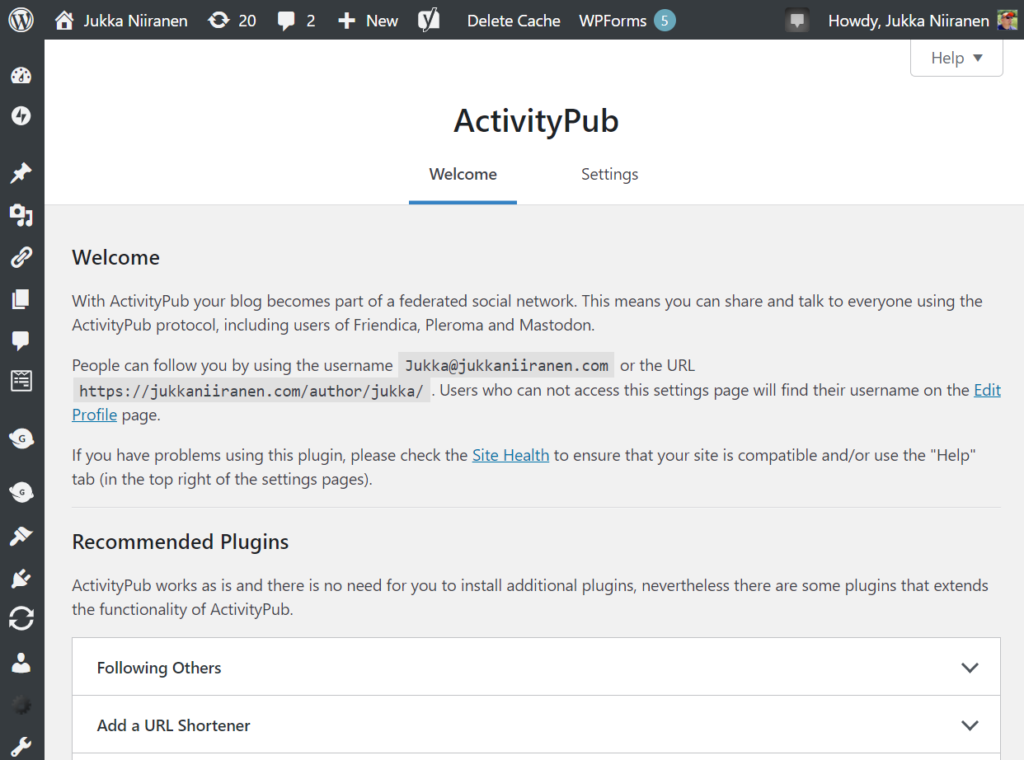
    In March this year the ActivityPub WordPress plugin was acquired by Automattic, the folks behind WordPress.com (and also Tumblr). Presumably the experience will become much more integrated with WordPress in the future, but we can already deploy the ActivityPub plugin on our self-hosted WP instances. Here’s what the settings look like on the admin side for my blog:

    "People can follow you by using the username Jukka@jukkaniiranen.com or the URL https://jukkaniiranen.com/author/jukka/"

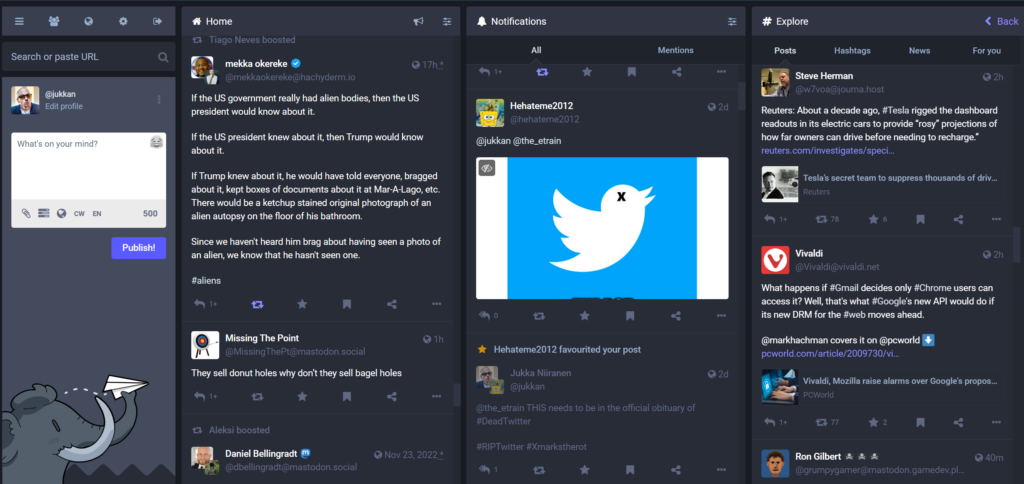
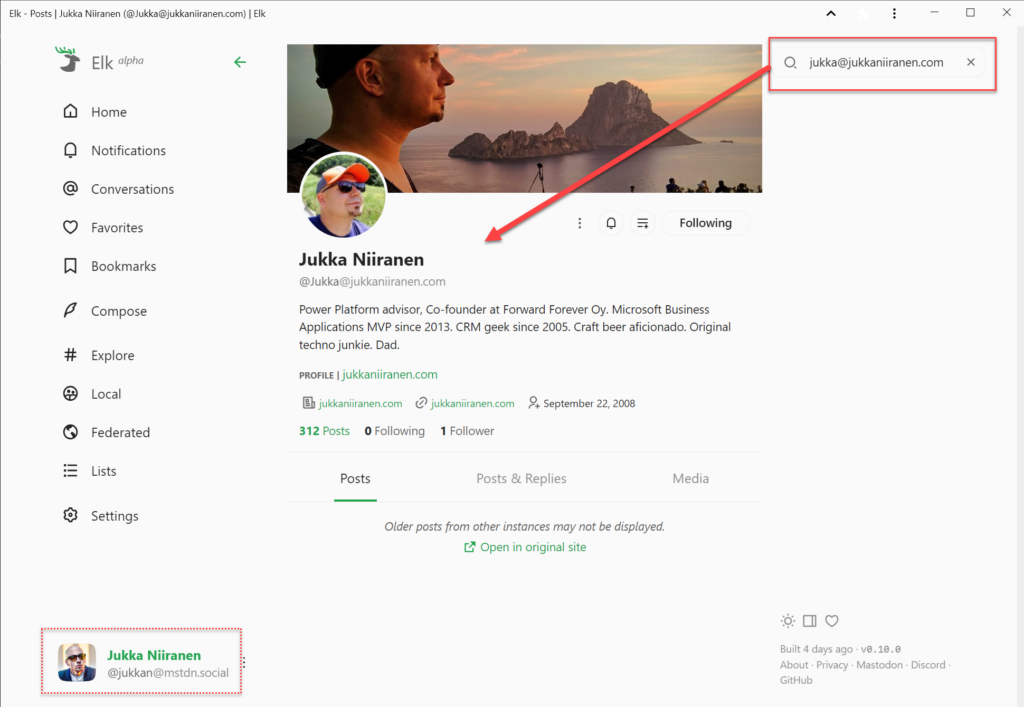
    What’s that all about? It means that when using a service like Mastodon, people can find this blog by searching for “Jukka@jukkaniiranen.com”. As an example, when using the Elk web client for Mastodon and logging in with my @jukkan@mstdn.social account, I can perform this search in the app and land on a profile that represents my blog. It’s an independent thing on the Fediverse that users can follow, even if they don’t care about the rants I post on my “main” profile and just want the long-form content like this blog post.

    It’s kinda cool and confusing at the same time. Which is a lot like setting up a blog was 15 years ago, or what Twitter was in 2009 when I signed up for it. That’s part of the reason why I’m excited about the recent rise of federated online services. You don’t have to be a geek to start using them, but it definitely helps.

    Is ActivityPub the replacement for RSS then? I don’t quite see it that way today. However, for the majority of the current online population who have never subscribed to an RSS feed to begin with, I see a lot of potential in this new protocol to revitalize the social web. To take back control from the mega platforms that are doomed to follow the path of enshittification. To spark up new innovation in both the established web players (WordPress, Mozilla, Medium etc.) as well as make room for new projects to find an audience outside the walled gardens of X, Facebook and the likes.

    Things won’t magically become better with decentralization. Sustainable business models or consumer grade UX aren’t easy to come by with no direct ad revenue. If the popularity of a decentralized service grows, many problems like content moderation or infrastructure scaling will certainly be as hard as on the centralized side. From Twitter to Mastodon, from Instagram to Pixelfed, from Reddit to Lemmy, from YouTube to PeerTube – if the same people move from one technical platform to another then so will the problems caused by people.

    We should not stop moving, though. We should not accept that the one party who holds the most data (generated by the users) gets to decide on the rules. We may not be able to avoid using many closed systems with ad revenue based business models. Yet we must ensure that our content is not captive inside only such systems.

    Evolution is all about competition, about having a choice. For us users of the web to have that choice, we must A) use the power of owning our content, and B) put in the effort to learn and support new tools.

    The best time to start a personal blog was 15 years ago. The next best time is now. The best time to join Mastodon was before the Bird died. Today is another fine day for it. Learn about it from Fedi.tips and follow me (@jukkan@mstdn.social) and this blog (@jukka@jukkaniiranen.com) if you get there!

  • Who Is The Customer in Your CRM? (Podcast)

    Recently I was invited to make my second appearance on the CRM Rocks podcast series, hosted by Markus Erlandsson. The first episode we did back in fall last year was focused on “what’s new in Microsoft Dynamics CRM 2013”, which was certainly a timely topic back then. This time we decided to discuss on a theme that was less focused on the CRM application functionality or a specific version of it. On our agenda was the question “who is the customer”?

    It might seem like not such a complex question to answer at first. After all, if we are deploying or developing solutions for customer relationship management then surely there must be a clear understanding of what exactly we need to be managing with the system, right? Well, as with most things related to designing a CRM solution, there isn’t a single right answer, but there are many good questions instead! To help anyone who’s starting their journey towards implementing a CRM system for their company and wondering what questions should be asked from the business and process owners, I’ve listed some of these topics into the following presentation available on SlideShare:

    Our discussion in the podcast covers five major aspects of the CRM solution design fundamentals:

    • Who is your customer?
    • B2B customer modelling
    • Segmenting your customers
    • The role of non-customers in CRM
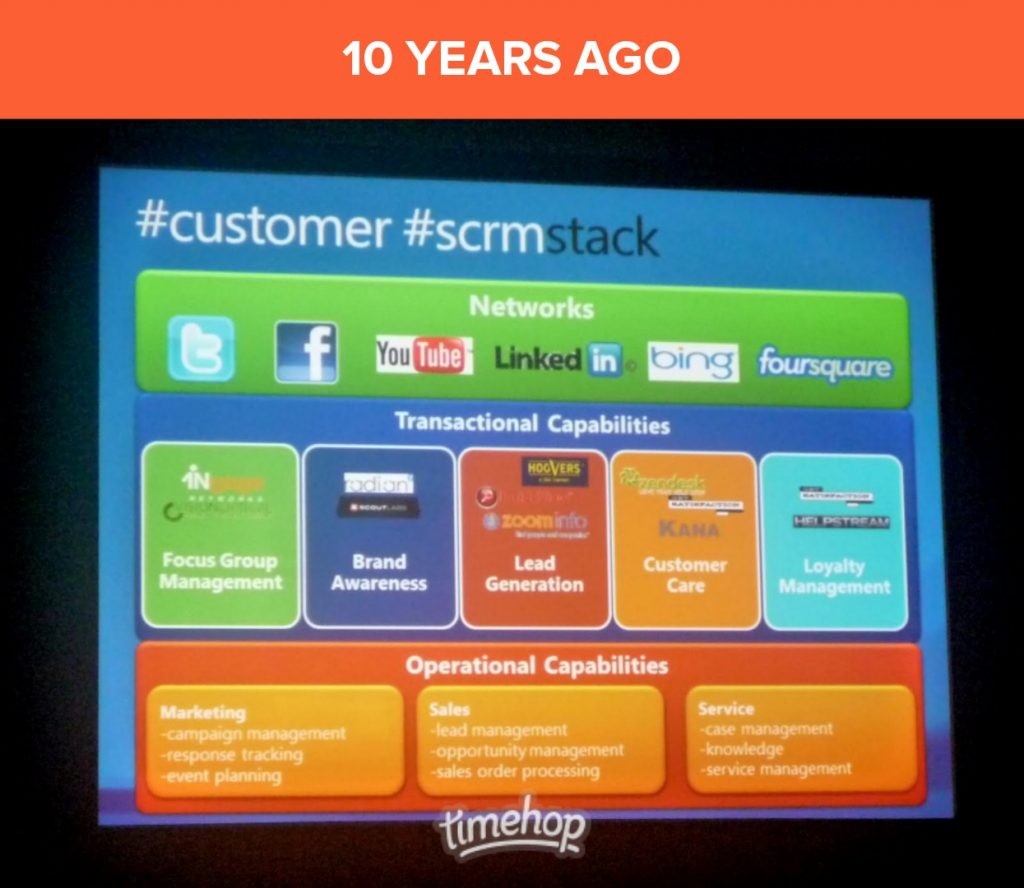
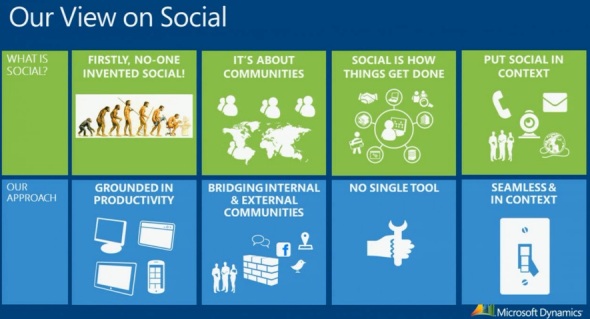
    • Why Social CRM is the new CRM

    While some of the podcast content is of course specific to the application platform that I have the most experience of working with (can you guess which one?), I hope and believe that much of the guidance would also apply to any modern CRM system you might be deploying. So, please have a look at the slides above, and if you feel like the contents is relevant to the business problems that you hope to solve with customer relationship management technology, proceed to listening to the full CRM Rocks podcast.

  • eXtreme CRM Tool Challenge Winner: Tanguy!

    Unfortunately I wasn’t able to attend the eXtremeCRM event in Barcelona this year (“the Woodstock for CRM Rockstars”), but I’ve been keeping an eye on the buzz in Twitter around the #eXtremeCRM hashtag. Although it’s not exactly the same as enjoying live CRM geek talk over some tapas & cerveza, for anyone interested in hearing the latest news and tips around Dynamics CRM this is certainly a better pastime than any reality shows on TV.

    There’s a bit of a reality TV style competition every year at eXtremeCRM, called the the eXtreme App Challenge, where the participants have 24 hours to build an application leveraging the Dynamics CRM platform. The idea is of course to showcase the potential for extremely rapid app development where an idea can transform into a functional application overnight, thanks to all the “plumbing” that CRM platform already provides you. Well, I’d like to just point out that it’s not just the technical platform of Dynamics CRM that makes it such an excellent tool for delivering real life business solutions. There’s also an awesome community formed around Dynamics CRM that at the end of the day powers the platform in an equally important way as the SDK or the bits of code delivered by Microsoft. Here’s one excellent example of it:

    While spending the afternoon coffee break on Tweetdeck yesterday (like I far too often do), I came across one picture tweeted by Jonas Rapp from an eXtremeCRM session that demonstrated how to manipulate the CRM 2013 default dashboard setting via the Sitemap XML. The dashboard settings behavior is one of the less known areas of the latest Dynamics CRM version, although it has been covered in CRM Team Blog (which I was of course quick to point out, being the “certified Smar As*” that I am).

    The guru of CRM, Adam Vero, jumped in on the discussion and pinged the lord of the rings CRM tools, Tanguy Touzard, with a suggestion on making this setting a part of his Sitemap Editor, included in the ever growing XrmToolBox. Things kind of escalated from there and just a moment ago there was a new blog post published: Change the default dashboard in Dynamics CRM 2013 with XrmToolBox SiteMap Editor plugin.

    XrmToolbox default dashboard

    What just happened there? Let me summarize it for you:

    10.2.2014 12:47 – A tweet about a less known feature in CRM 2013 Sitemap XML presented at eXtremeCRM.

    11.2.2014 16:39 – The announcement of a free tool to configure the setting via a graphical, user friendly UI.

    That’s 27 hours and 52 minutes “from tweet to complete”. Folks, we have a winner and you all should know him by now:  Tanguy! Please show him the appreciation he deserves by dropping by his sponsor page on your way to collect the latest XrmToolBox download. Thank you.

    We’ve all heard (and some of us even blogged) about the rapid release cadence that Microsoft is nowadays pursuing via their cloud-first strategy of pushing out new releases of Dynamics CRM every 6 months (12 for on-premises). Still, all of this pales in comparison to the speed at which the community around the product, powered by social networks like Twitter and open source galleries like CodePlex, can deliver their own little “hotfixes” to the platform.

    While browsing through my stacks of CRM blog feeds and weeding through the #MSDYNCRM tweets, it’s sometimes too easy to forget that not everyone knows about the great tips and time saving tools that are available out there. It’s almost scary to think that in reality there are many people working with Dynamics CRM professionally who haven’t yet discovered the many ways in which the CRM platform could more easily be leveraged to deliver better solutions for customers in a shorter period of time – if only they knew how.

    There’s a very simple way how each and every one of us can make a difference here: if you come across a useful piece of information that helped you solve a problem you’ve faced while working with Dynamics CRM, please pass it on. You don’t have to develop a set of advanced configuration tools, or even build an app in 24 hours – just share what you’ve seen, heard or discovered. Then we can all be the winners.

  • Bringing Customer Service Back to CRM with Parature

    In case you missed the big news last week, Microsoft has acquired a company called Parature. Similar to the two marketing related service providers MS has bought earlier, Marketing Pilot and Netbreeze, this latest acquisition is intended for expanding the footprint of Dynamics CRM on the customer service side.

    MS_Parature

    It’s been no secret that this was the next area where Microsoft was looking to build up some new capabilities for Dynamics CRM. Thinking about the existing feature set for customer service scenarios in the product, we basically haven’t had any significant enhancements to the service module since CRM 3.0. Sure, the recent platform enhancements on the process automation and UI side can be leveraged in customer service as well, but in terms of specific out-of-the-box functionality that would be aimed at helpdesk scenarios, it’s been pretty quiet so far. Case management and queues for email routing have been very useful features for many organizations using Dynamics CRM. Service scheduling and knowledge base articles… well, not so much.

    The world around CRM software has changed quite a bit from 2005 when CRM 3.0 came out. Not only have online service portals and support content websites become incredibly affordable for any company to set up via cloud based services like Zendesk, but the customers of those companies have also been given a whole range of independent social channels to reach out to one another. These days the customers are in charge of the conversation, which means that if you don’t offer a forum for them to submit feedback and questions, they’ll just set one up for your brand on GetSatisfaction on their own. Regardless of how many 1-to-1 contact points you offer them, they’ll still go and share their frustration over on public channels like Twitter.

    This is obviously not a world where back-office applications like traditional CRM systems that mainly offer features to your employees instead of the end customers provide a very comprehensive solution for customer service management. Sure, integrating with the customer account details, managing the support ticket process and collecting information about past interactions are all essential components of customer service in the new world, too, but they are becoming relatively less and less significant factors in the processes needed for delivering great customer experiences. When the customers no longer pick up the phone to call you when they have a problem but rather use it to search for answers on their own, call center automation software isn’t the area you should primarily be looking to invest in.

    Integrating the customer facing components of modern online customer service solutions to the internal CRM systems has been the way to build systems that are up for the challenge presented by the age of the social customer. While system integration is a natural part of any CRM implementation project, requiring each organization to come up with their own solution of how to put the pieces together isn’t perhaps the most effective way forward. For example, Parature had already launched their integration with Microsoft Dynamics CRM Online back in 2009, but how many people were actually aware of it? I might have stumbled across Parature a few times before, but they certainly didn’t occupy a space on my top-of-the-mind list for possible solutions to suggest to companies using Dynamics CRM. Merging these services into Microsoft’s Dynamics CRM offering is certainly going to expose them to a potential customer audience of a completely different scale. (more…)

  • Thank You, Readers!

    Today Surviving CRM passed the 1,000 +1’s milestone on Google+. Wow!

    Surviving_CRM_Gplus_1K1

    Thank you to all of you who’ve been reading the post over here on the blog or following the latest Microsoft Dynamics CRM news and links shared over at the Surviving CRM Google+ page. Even though I think the most immediate benefit from publishing CRM related content is how you can yourself learn so much more about the topics you’re covering, the fact that other people out there can also benefit from this shared knowledge is what really makes it worthwhile in the end.

    Every post, comment, vote or click matters in the online communities. So, consider this my +1 to you:

    PlusOne


  • MVP Award & Why Communities Rock

    MVP Award & Why Communities Rock

    Today I received the following email:

    MVP_award_email_small

    Wow! Quite an honor, I must say. Not so much for the MVP badge itself but for being recognized alongside all of the brilliant minds that have received the Microsoft Dynamics CRM MVP award before me. Thanks especially to fellow MVP Gustaf Westerlund for nominating me for the award! Also, it’s nice to notice that all of the sarcastic remarks I tend to make in my posts while explaining the do’s and don’ts of the Dynamics CRM product have not permanently angered the folks at Microsoft to put me on their blacklist 😉

    It’s great to receive recognition from the makers of Dynamics CRM of course, but by far the most important thing is the support from all the other members of the Dynamics CRM community. That means anyone who contributes to the discussions on CRM forums, comments on blog posts, sharing of links on social media and all the other activities that help people like you and me to… you know, survive living with this thing we call CRM. In the spirit of award speeches, let me take this moment to ramble on a bit about why these things matter so much.

    All the way back in 2005 when I first got exposed to Microsoft CRM (the pre-Dynamics era) in the role of an ICT specialist evaluating alternative applications to replace an aging yet heavily utilized Lotus Notes based CRM system for my organization, the one thing that stood out in Microsoft’s product was the amount of community contributed material that was already available at the time. Compared to the world we live in today, it was of course a tiny fraction of the vast resources we’ve got now, but compared to the other potential CRM vendors on our short list, it was a significant factor that made me push for choosing Microsoft CRM. Knowing that I would be responsible for administering, supporting and customizing the system further once deployed, I naturally wanted to work with a product that I could find answers from not just the vendor but also other users and consultants who were sharing their expertise so graciously on the Internet.

    CommunityAfter having spent some time in learning the ropes and reading through a pile of invaluable blog posts (~100 RSS feeds on my Dynamics CRM daily diet) that had helped me solve the day-to-day problems encountered when trying to mold the CRM system to meet the requirements of the users in a couple of customer organizations, I decided to put up a blog of my own to have a place to share some of the tips I had found useful. Then along came social networks like Twitter, that allowed you to discover even more great experts and content on hashtags like #MSDYNCRM. Eventually I realized there was no way for me to return back to the way things were before becoming an active member of the global online community around Dynamics CRM, so the only thing left to do was to push even further and try to make the most of it – even experiment with it, if you like.

    The virtuous cycle of communities is truly a powerful force. In exchange for receiving help from complete strangers with no expectation of monetary remuneration, you start to feel compelled to give back to them in one form or another, to pay it forward. Once you do, you begin to notice that there are others who in turn are benefiting from your actions, which makes the cycle just start to spin faster & faster. All that shared knowledge begins to accumulate into a source for “wisdom of crowds” type of phenomena where you are no longer bound by your own cognitive capabilities, rather you can tap onto the community as an extension of your brain to solve the problems you encounter. It’s no cyberpunk fiction, simply the best strategy for an information worker to stay on top of his game today and develop the skills needed tomorrow.

    Most of the things I know about Dynamics CRM I have learned from the community surrounding the product. That is why I personally value the MVP Award, because in essence it’s all about the most important part: the community, not just the application. Therefore, my advise for anyone who’s working with Dynamics CRM and is interested in getting more out of their job, as well as getting better at their job, is to take the plunge and start contributing to the community. You don’t have to be a CRM guru, a superstar developer or even a 24/7 social media geek to be able to add value into this common pool of knowledge and insight that keeps the Dynamics CRM product moving forward and allows all of us to better solve real life business problems with it, thus eventually helping the world outside the community. All you need to do is proceed along these steps, one ladder at a time:

    1. Explore
    2. Learn
    3. Share
    4. Contribute
    5. Rinse & repeat.

    Thank you. Let’s keep rockin’ with CRM.

  • LinkedIn, Dynamics CRM and Social Selling

    LinkedIn, Dynamics CRM and Social Selling

    LinkedInA significant share of Dynamics CRM systems tend to be implemented for B2B sales scenarios. In the age of social selling, digging up information about the person you’re about to call will quite often involve looking up his or her LinkedIn profile. With this in mind, surely everyone’s running a tight integration between their customer relationship management system and the LinkedIn network, right? Well, based on my personal experience, quite often it tends to be one of those requirements that come up during the sales phase but then get phased out from the actual go-live of a new CRM system.

    The question of “how to integrate Microsoft Dynamics CRM with LinkedIn” has been making the rounds in various forums for as long as I’ve been involved with the product. Now that you’ve potentially arrived here in search for an answer (thanks, Google!), I thought I’d collect a few pieces of information and personal thoughts on the subject. If you have any experiences to share regarding using Dynamics CRM in the social selling scenarios, please do leave a comment in the box below.

    The Quick Way

    As always with information systems, there’s integration and then there’s “integration”. If you can meet the requirement by just surfacing a bit of content from LinkedIn inside a Dynamics CRM form, then here’s a great article from Salesmetrix that shows you the steps to integrate the LinkedIn Member Profile badge onto a CRM contact form. By adding a simple web resource and signing up for a LinkedIn API key you can show the contact’s job title and picture from LinkedIn alongside your CRM data, like this:

    CRM_contact_LinkedIn_profile_widget_small

    Why is this not the perfect solution? Well, did you notice the step require for copy-pasting the URL to the contact’s LinkedIn profile field before the profile badge is shown? Yeah, that’s the bit that your sales people are most likely not going to perform. Getting them to even enter the minimum required details on their leads and opportunities into a CRM system can be a major struggle, so introducing a complex operation like this into the process is going to require plenty of sales skills from the implementation consultant to convince the users that there’s a tangible benefit for them in filling in all the blanks on the contact form.

    That’s of course not anything that couldn’t be overcome with a little bit of further development. One example for performing the profile search dynamically based on name fields on the CRM records can be found from Nicolae Tarla’s blog. Coincidentally, Nicolae has also recently released the Microsoft Dynamics CRM 2011 Scripting Cookbook that contains a few examples of lightweight social network integrations in the final chapter. Building proper social profile discovery services will require more than mere Javascript, but for showing LinkedIn Member Profile Plugin and Company Insider Plugin in the CRM UI you probably don’t need to invest a whole lot of time in developing a working solution.

    You could choose an even more simplified approach and just add a button on the contact form’s ribbon to open LinkedIn search page with pre-filled values. A URL like http://www.linkedin.com/vsearch/p?firstName=Jukka&lastName=Niiranen&company=CodeBakers will get you onto my LinkedIn profile faster than manually entering the same search terms. You can study the LinkedIn URL Query Parameters to see the kinds of variables that could be used. There’s also a post on the old CRM Online Team blog that shows you how the button would have been added back in the CRM 4.0 days. (While building your URL’s, do remember to handle special characters and spaces in contact and account names.)

    The problem with all these type of solutions is that if you’re not paying for them (on a continuous basis), you can’t expect them to remain working forever. Several variations of the LinkedIn and Dynamics CRM integration techniques have come and gone, such as Marco Amoedo’s CRM 4.0 LinkedIn Company Insider Widget hover link and Leon Tribe’s & Matt Wittemann’s Five-Minute Integration Between Dynamics CRM and LinkedIn. All fine solutions in their time, but as the API’s and applications keep changing, the need for re-developing solutions to the same problem remains.

    The Official Way

    A company like LinkedIn surely wouldn’t have missed the chance for monetizing the data they’ve accumulated into their network by selling it to B2B sales people who are using a system like Microsoft Dynamics CRM, now would they? Of course not, which means “there’s an app for that”LinkedIn for Microsoft Dynamics CRM.

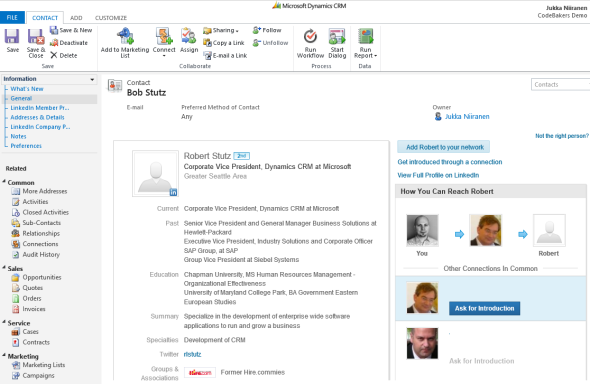
    The product requires a Sales Plus or Sales Executive subscription for LinkedIn, which start from €28.95 per user per month. If you’re like me, you probably receive frequent “special offers” for a free month of LinkedIn Premium. This time I decided to activate the offer and use it for test driving the Dynamics CRM solution. The deployment process was quite straightforward for a CRM Online environment as no further configuration was needed apart from installing the solution file. After that, this is how you’ll see LinkedIn company profile and people data on the account form:

    LinkedIn_DynamicsCRM_company_profile_small

    On the contact form we have tabs for both Company Profile and individual Member Profile.

    LinkedIn_DynamicsCRM_member_profile_small

    For some reason the lead form doesn’t get any LinkedIn components added on it, so you’ll need to qualify the lead to an account and contact before being able to leverage the integration.

    Not every CRM user needs to have the subscription, but unless they do, they’ll not be able to see the premium content on the account or contact forms. Therefore you’ll probably need to manage role based forms for different user groups by creating a specific LinkedIn security role for those who have the Sales Plus subscription.

    Unfortunately the solution from LinkedIn hasn’t yet been updated to be compatible with the cross-browser world of Polaris / Update Rollup 12, so using it on Chrome, Firefox or Safari isn’t supported. Also Internet Explorer 10 fails to render any content in the iFrame and LinkedIn recommends downgrading to IE9, so if you’re running Windows 8 you’ll need to run Dynamics CRM in IE7 Compatibility View to make use of the solution. No release schedules for an updated solutions were available when I asked about this from LinkedIn support. Needless to say, running CRM Online with the new Polaris process forms isn’t supported with the LinkedIn add-on.

    The Ultimate Way?

    What if we are really determined to get the most out of this wonderful source of “free” information that is LinkedIn? Wouldn’t we want to pour all the data into our own CRM database and preferably also synchronize it with the latest updates available from different online directories?

    (more…)