Tag: SharePoint

  • Dataverse results inside Microsoft Search in Office, SharePoint, Bing

    Dataverse results inside Microsoft Search in Office, SharePoint, Bing

    Whether you are configuring Dynamics 365 Customer Engagement apps from Microsoft or building custom applications with Power Apps, often the solution design and implementation focuses too much on the data entry experience and not enough on data discovery. Yet it’s the process of searching for information rather than entering new records that consumes far more time in the lives of information workers.

    Throughout the history of my blog (originally “Surviving CRM”), topics such as the Advanced Find feature or configuration of views in XRM/CDS/Dataverse have been the most popular ones. To put it another way: a lot of people search for information on how to make search better in Microsoft business apps.

    While they are nothing like Google, Microsoft still has a wealth of R&D budget spent on search related services. Just because Bing isn’t what you’re likely using in your private life, that doesn’t mean you couldn’t benefit from the Microsoft Search infrastructure. Today we’ll explore how data from Dataverse environments can now be exposed in Microsoft Search.

    Enabling Dynamics 365 results in Microsoft Search

    The feature for showing Dataverse results in Microsoft Search was originally promised at Ignite 2021 in November, but on the release plans it has been postponed a few times. Now the ability for enabling search federation has appeared and the roadmap item for it says “GA in June 2022”. The feature appeared in a couple of tenants, so it’s time for a test drive.

    First you should ensure that these prerequisites for configuration are met. The modern Dataverse search needs to be enabled for the environment you want to target. Second, the search admin user account that you’re using to run the configuration must have both admin access and a valid Dynamics 365 license for the environment.

    Next you can proceed to Microsoft 365 Admin center. Go to “All admin centers”, choose “Search & Intelligence” and select the “Data sources” tab. You should see the section “Microsoft apps and services” that allows you to add a new app for search federation.
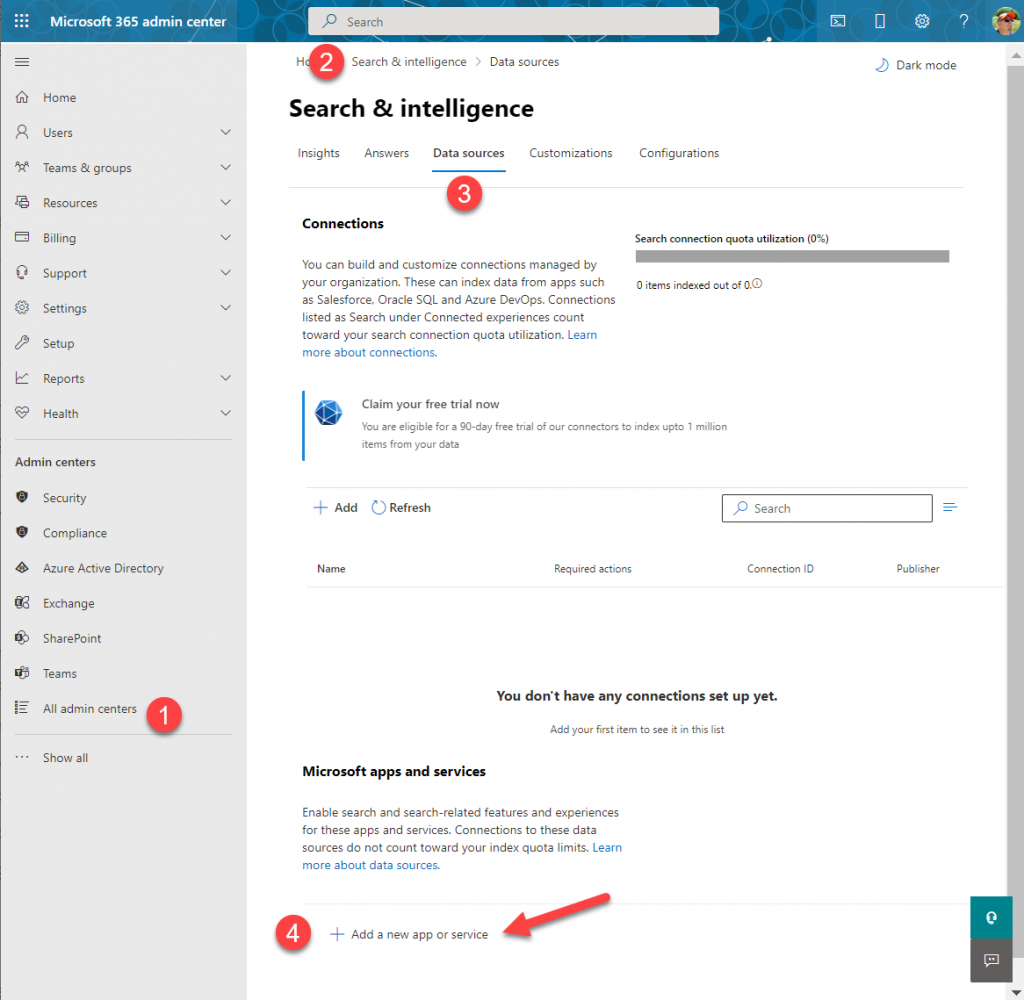
    What if that section does not appear? It may be that you don’t have a paid Dynamics 365 subscription in the tenant. The detailed requirements haven’t been documented by Microsoft yet, but based on my experiments, having just Dataverse with Power Apps premium licensing is not enough. Neither is a trial subscription for Dynamics 365.

    In the configuration section for Microsoft apps and services, it says that “connections to these data sources do not count toward your index quota limits.” If you’re not familiar with Microsoft Search, then the data sources accessible via Microsoft Graph connectors are indeed a paid service. With Dynamics 365 we’re seeing the search capability bundled into the product, but for things like Azure Data Lake, Azure DevOps or third party services like Salesforce or ServiceNow, you’ll need a Microsoft Search paid license.

    If we were to use the paid features, how much would it cost? The required product can be found under “purchase services” in the M365 admin center – although not with any generic term like “search”, of course. You’ll need to know that SKU name is “Extra Graph Connector Capacity”. The minimum purchase is 1 million items and that would be around $1.000 per month, or in euro prices these sums below:
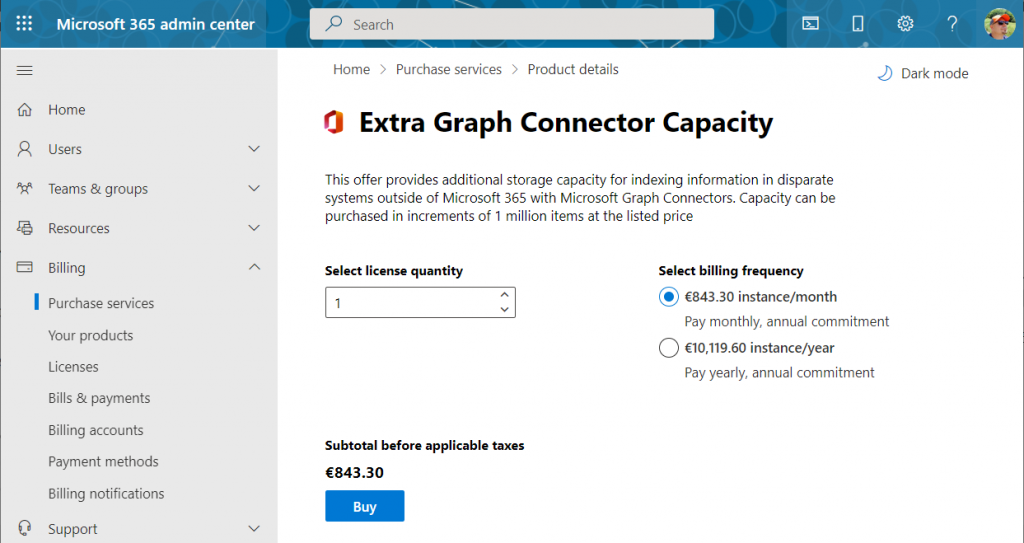
    If you had Microsoft 365 E5 or Office 365 E5 licenses, those would also accrue some index quota per each licensed seat, as shown here.

    Luckily we don’t need to make purchases since our tenant has Dynamics 365 Customer Engagement licenses in place. We can proceed to adding a new app under the Search & Intelligence data sources, by selecting the only supported MS app at this time: Dynamics 365.
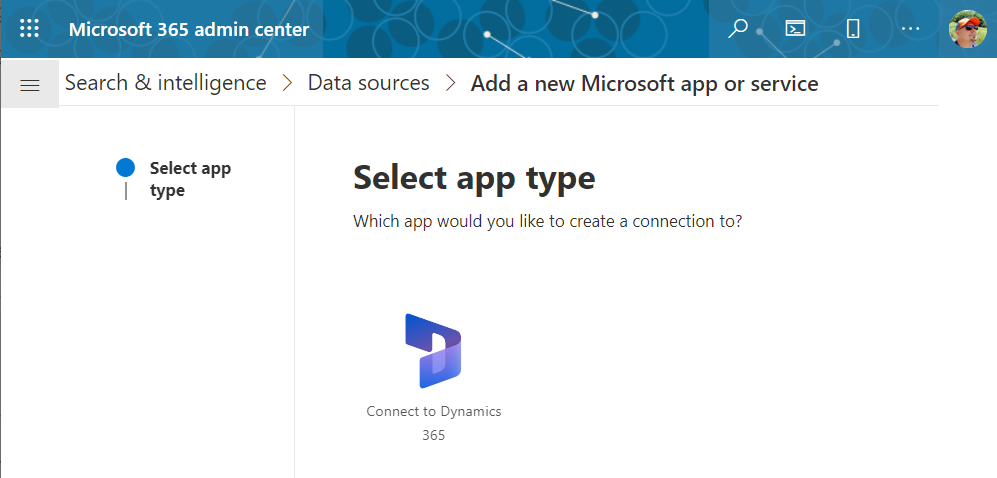
    Next we get to choose the Dataverse environment. Except not all your environments may be listed here. Why? I did not discover a valid explanation for it in my initial tests. Neither the environment type (sandbox/production) nor existence of Dynamics 365 apps was the reason why environments didn’t always show up. Oh well, let’s proceed with what we’ve got and pick “Jukka’s Business Cloud” that contains the core CRM data in this tenant.
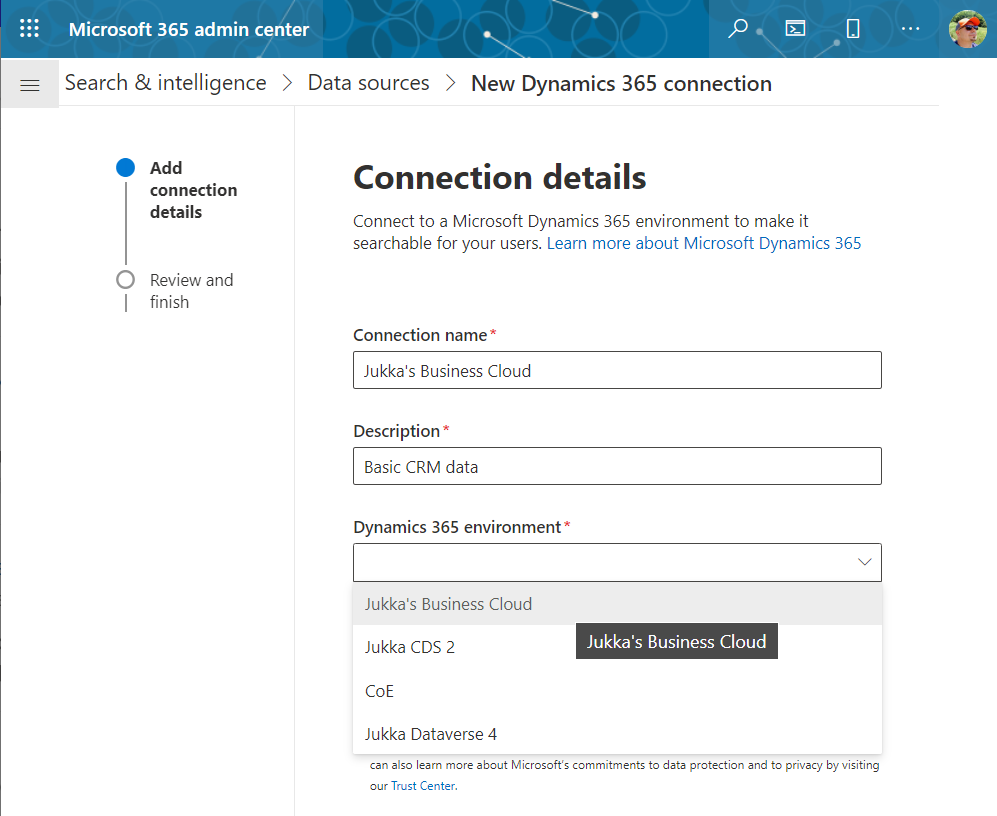
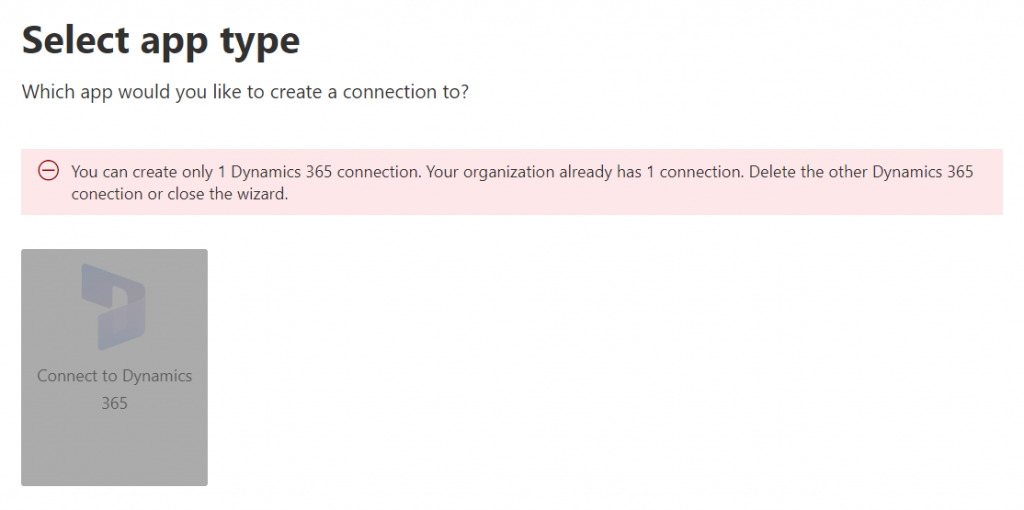
    If you’re wondering whether you could configure data from multiple Dataverse environments from your tenant to show up in the Microsoft Search results, the answer currently is: no.
    Once you’ve added the data source, it can take a while before the results will appear in the search experience. In our production tenant this took less than 30 minutes, in my personal tenant it’s been ~2h and nothing yet. MS says it can take 24 hours before the indexing is complete. Patience is a virtue – if you’ve got some to spare. I’ll just hop over to the production tenant now and explore the end user experience.

    How Dataverse records show up in Microsoft Search

    The users will discover the results from the previously configured Dynamics 365 connection when they access search either in Office.com, SharePoint Online or Bing. The UI to get to those results varies slightly, but the listed results from the Microsoft Graph connector seem to be identical.

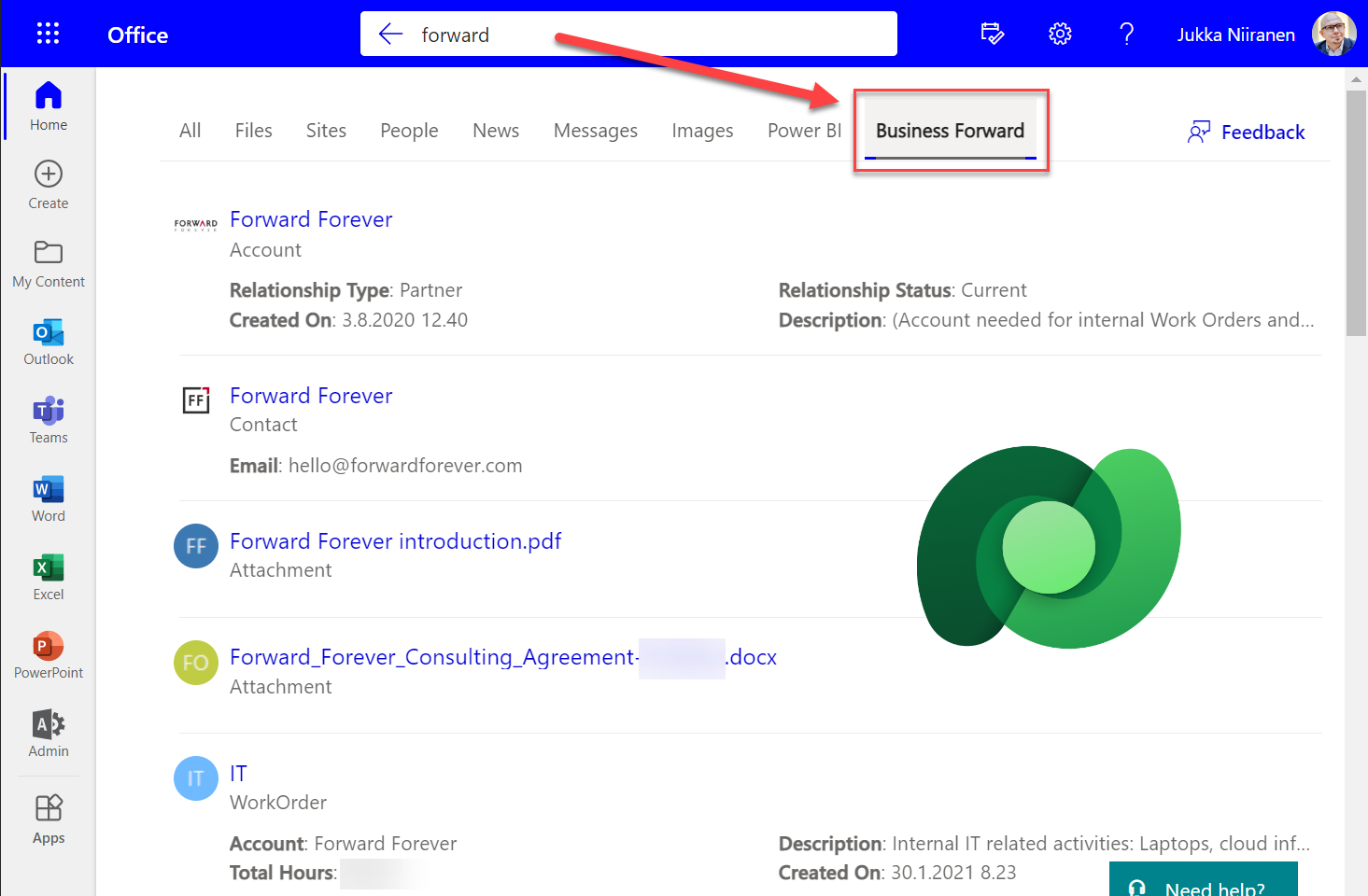
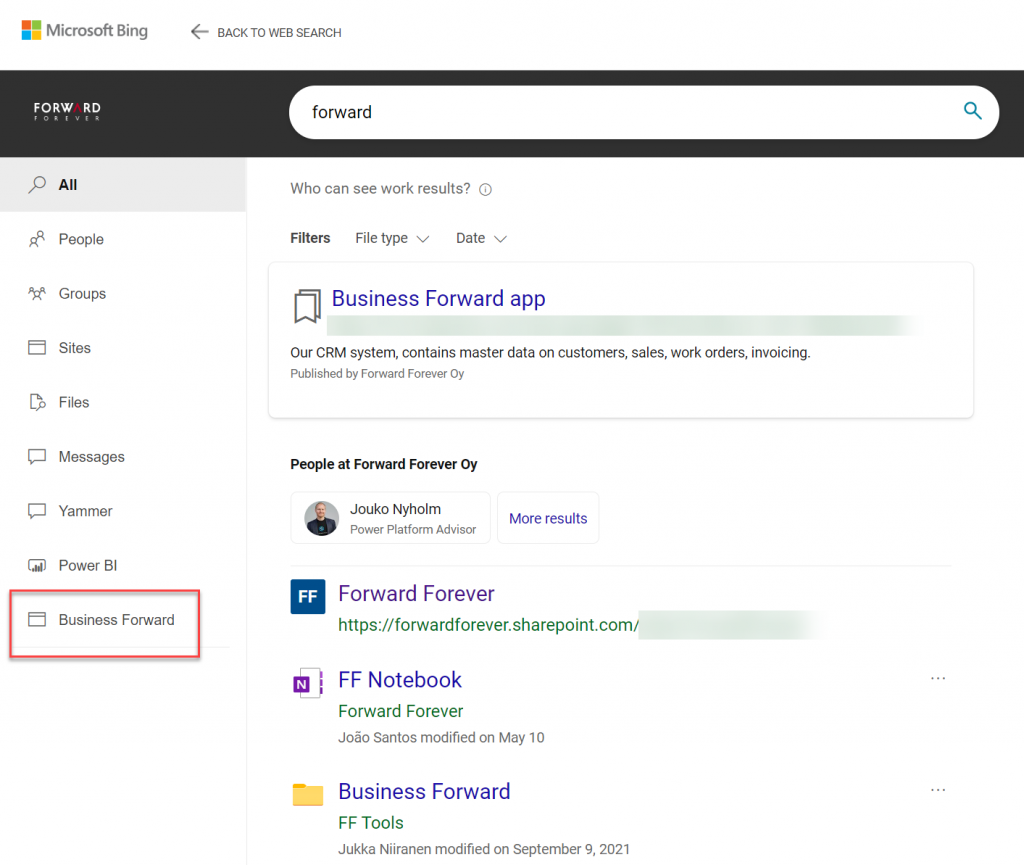
    Obviously in Bing you need to be signed in and access the Work tab that switches you from the public web search to the internal results from your work tenant. In addition to all the regular results, plus custom search bookmarks like the one you see below, there will be a new tab to represent the “search vertical”. In the case of our production tenant, I named it “Business Forward” as it is the primary app used in our production Dataverse environment.
    I personally am more likely to leverage these search results from under Office.com. Here’s an example of what data is pulled from the Dataverse environment for a basic query term “forward”:
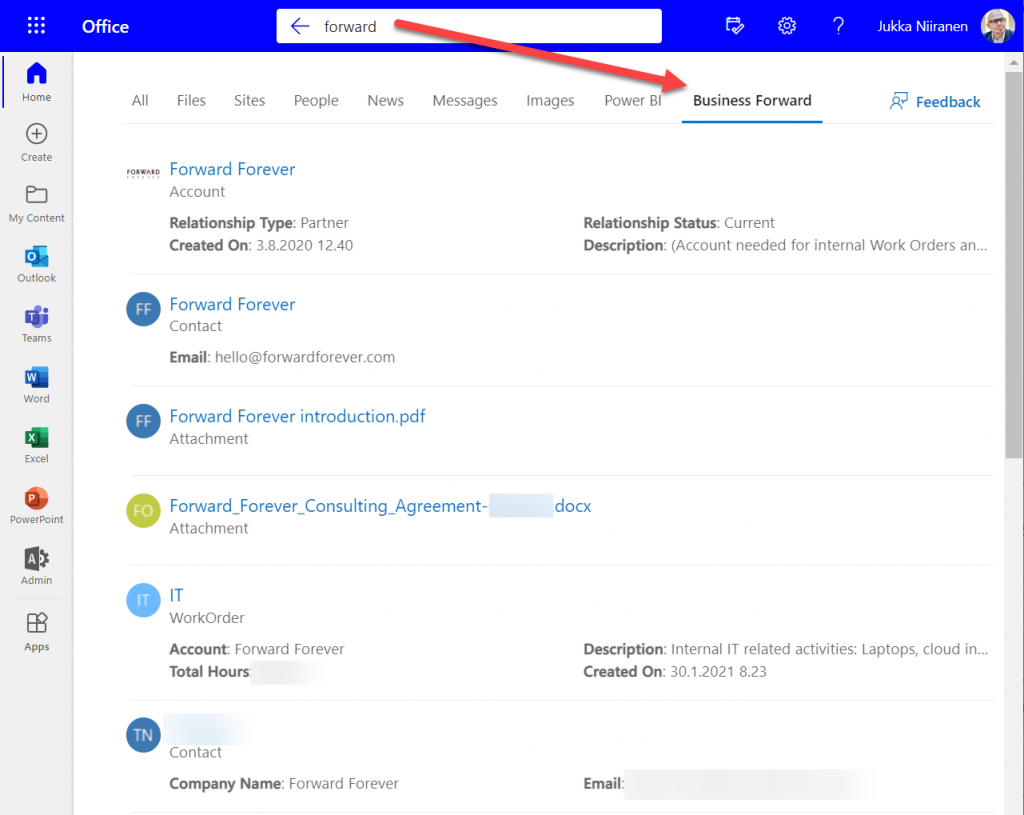
    We immediately see that the results cover both standard tables from CDM like accounts and contacts, but also custom tables like our work orders that are managed in Dataverse. We see a preview of fields from the matching records, which varies based on what columns are non-empty for each row in the corresponding Quick Find View.

    Configuration of the searchable fields is done in the Dataverse search settings, which the Microsoft Graph connector for Dynamics 365 then respects for each table. This means there’s very little to be configured on the Microsoft Search experience specifically. You really only decide A) which 1 environment to point it at, and B) what name do you want to show in the search vertical in Office.com, SharePoint, Bing.

    Dataverse in-app search vs. Microsoft Search experience

    Now that we have enabled the discovery of Dataverse data from within Microsoft Search, should that become the recommended entry point for all your business data searching needs? The answer to this is: through Microsoft Search you’ll only get a subset of search features that are available in a full model-driven Power App. Whereas with Microsoft Search you may well get close enough results, the detailed search capabilities are better within Power Apps native Dataverse search.

    If I enter a search term like “governance” into Office.com search bar, I’ll get a long list of results that I can not filter nor sort in any way. When I do the same search inside our Business Forward app (a model-driven Power App on Dataverse), I get the results tabbed per specific tables that allow me to narrow the query by record type. Also the filter pane gives access to owner and date filters, which get even more detailed as I select one specific table from the results.
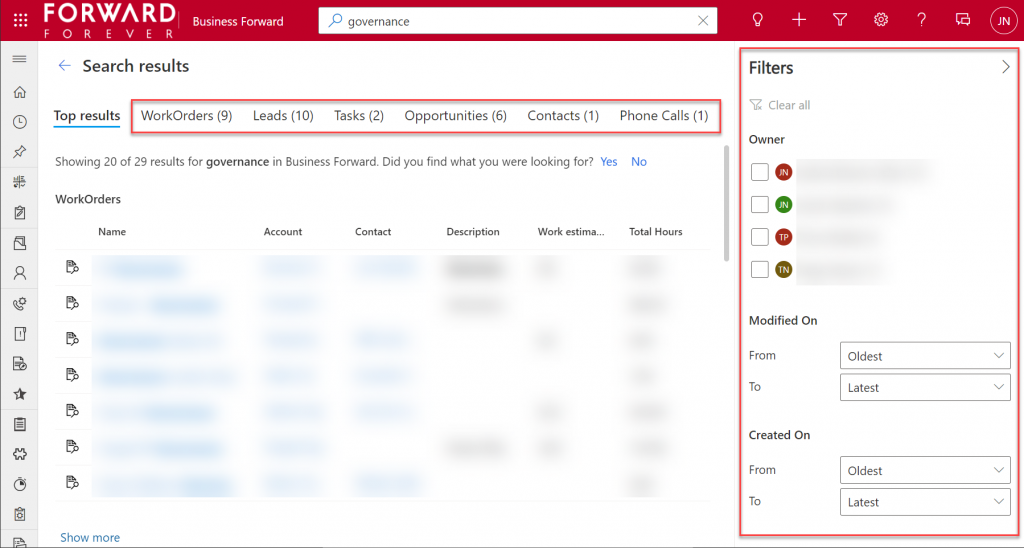
    Another feature that can be a welcome addition is that the Dataverse search within the app UI covers only the tables included in that app. This can lead to search challenges in a larger Dynamics 365 environment that covers multiple different processes.

    For example, our production environment covers not only our CRM info on customers, sales etc. but it also hosts our internal IT Asset Management solution and its data. Now, if I search for “Nokia”, the results could include both the account management data related to Nokia Corporation as well as Nokia smartphones (from HMD Global) that our team members have registered as their IT assets. Sure, all results are filtered based on security roles and won’t reveal any data to unauthorized users, but anyone with broader access to Dataverse will also get broader, nonfilterable results with Microsoft Search.

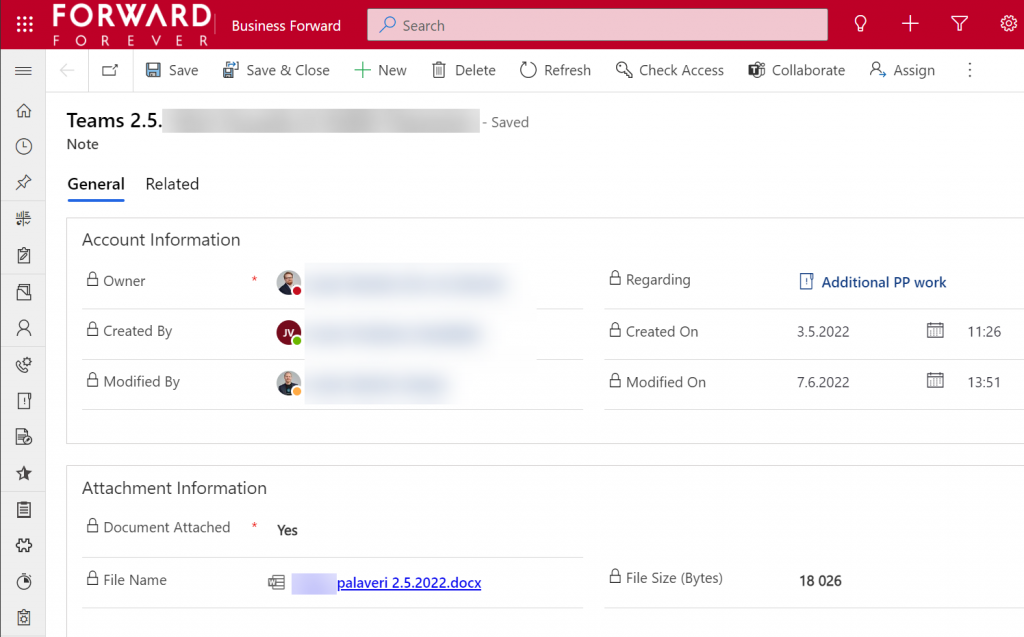
    Sometimes you may get more results from Microsoft Search than from within Power Apps, because of the way documents stored in notes and attachments get indexed. I even discovered that the note record (annotation) which traditionally hasn’t had any user accessible table form in the native UI can actually be opened independent of the parent record. The form of a note is very nice and readable, providing a link to the related document:
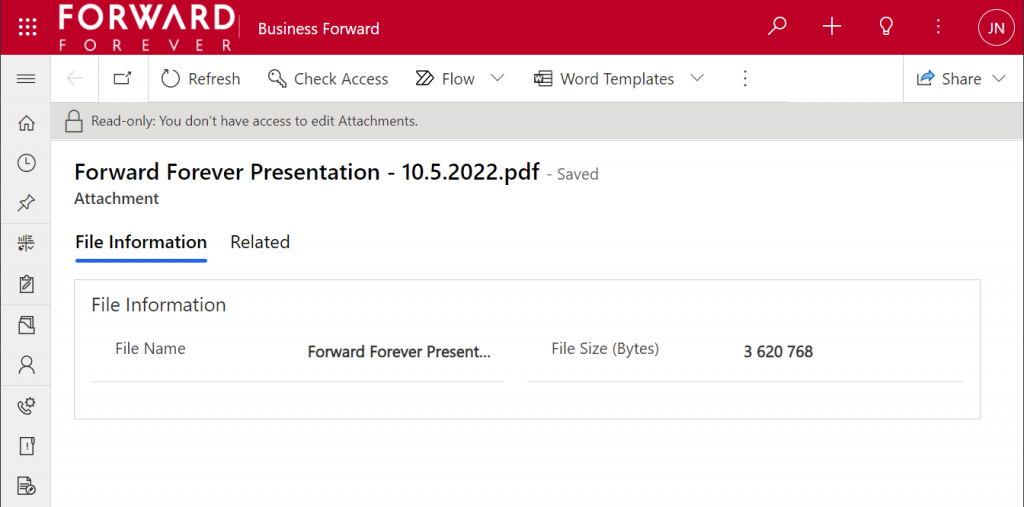
    Things aren’t quite as awesome when it comes to attachments of email records. While these also open a form within a model-driven app, the attachment table form doesn’t offer any link to either the document or the related email message from where the file could be opened.
    The many faces of Dataverse search experiences

    It’s really awesome that we’re now seeing the mainstream search capabilities in Microsoft cloud services reaching into the domain of business applications with these out-of-the-box capabilities. The investments that Microsoft has made into Dataverse Search as a service that isn’t just for doing freetext search inside your CRM system is starting to pay off. Just like makers can tap into Dataverse Search from within Power Automate actions, now information workers can do simple queries into enterprise systems from within Office experiences.

    In its current state, with support only for Dynamics 365 customers and only a single environment per tenant, the Microsoft Search experience isn’t yet as powerful as it could become. Covering the Power Platform use cases where business data is managed in various environments and via specific custom apps would be a logical direction to broaden Microsoft Search with a true low-code platform story.

    The way I see it, the search experiences for business data managed within Dataverse are being developed in three separate areas:

    1. Free text search: building search indexes that cover several sources/tables, with multiple entry points (in-app, Office, flow, APIs), evolving into support for natural language queries and supporting conversational UIs (Teams chatbots etc.). This is the area where Dataverse Search and Microsoft Search are operating.
    2. Structured queries: building complex query criteria to filter the rows in a specific Dataverse table. “Show accounts with orders in last X months and no activities from members of sales team Y”. The Advanced Find feature and the FetchXML query language have traditionally covered this front. The modern advanced find experience is making these filters easier for casual app users to approach, while FetchXML is still alive (now available for download in the UI) and can help flow makers design complex queries more efficiently, for example.
    3. References: the next generation of “set regarding” features are aiming to broaden the traditional scenario of associating emails in Outlook with records from CRM. If the MS vision for Context IQ comes to life, we should be able to at-mention basically any record from a Dataverse environment and collaborate interactively on it via Loop components. Similar to the Microsoft Search initial limitations, it will be interesting to see how the lookup field experience can be optimized with machine learning algorithms when all records in a large tenant are behind a single @ symbol…

    Returning back to what I mentioned at the start of this blog post, as a solution designer it’s very important to understand all these different means through which users can search for your business application’s data. There’s a lot you can do by configuring the settings in Dataverse views to make the experience enjoyable for the user.

    Studying the Dataverse search documentation is a good start. However, it’s all just theory until you have some actual data and real user interfaces to test the usability of your search configuration with. What this means is that you’re unlikely to ever get all the settings right in the V1 release of your app. In practice the user experience for business data search requires attention throughout the lifecycle of your app. Microsoft will continue to change and expand the ways in which search queries and results are handled, so you better keep up with these new features and explore what configuration options are being introduced in the future, too.

  • Dataflex: the day after

    Dataflex: the day after

    Microsoft dropped a big bomb this week with their Dataflex announcement. I don’t think I’ve ever had as many notifications on my social media apps as there were after I posted my two Dataflex articles on this blog and our company blog.

    Knowing that it wouldn’t be a simple topic for outsiders to grasp, with the many different dimensions that Microsoft’s various product teams would use in their own messaging, I wanted to make sure there was at least one article out there that would explain what Dataflex means for Teams, Power Apps and Dynamics 365 in the big picture of business applications. It was great to see that this explanation I came up with was also adopted elsewhere in the mainstream tech media:

    Here are some of the topics that the community has raised up since the July 21st announcement, based on the still fairly limited amount of public information that is out there on the coming Dataflex and the rebranded Dataflex Pro (formerly CDS).

    Yeah, about that name…

    For the small minority of techies who have actually heard of the Common Data Service (or XRM), the need for inventing a new name for their beloved service that remains the same (i.e. Dataflex Pro) wasn’t very obvious. For the larger crowd that works with Office tools and Microsoft Teams, Dataflex is a brand new thing, which understandably has made MS think whether a brand new brand would also be useful at this point.

    Unfortunately the name “Dataflex” isn’t so unique that there wouldn’t be some clashing with non-MS products out there. In this case, there has been an existing trademark within pretty much the same application development domains since the year 1981 already.

    Oh Microsoft…

    21 days after launching their Dataflex product name, Microsoft had to cancel their original plans due to litigation from the lawful owner of the Dataflex trademark (Data Access Worldwide). Read this blog post for more details: There never was a “Microsoft Dataflex”.

    Why not call it “Power Dataflex” or “Power [anything]” then? Wouldn’t that have been better in line with the whole Power Platform story, as well as reduce the chances of a legal dispute? Probably so, but it’s important to understand that this Power thing actually isn’t the only purpose that Microsoft has in mind for the platform:

    The entry level offering of Dataflex for all Teams users is an important milestone for XRM/CDS/MDF (not sure I want to adopt “MDF” as the acronym just yet, actually). Don’t be surprised if the same technology will pop up in more & more places within the MS Cloud in the coming months and years.

    Licensing details: TBC = “To Be Confusing”

    The specifics of what is and isn’t included with Dataflex didn’t get released yet, as this new service is still pending for the public preview to start sometime in August. At the announcement day it has clearly been more important for MS to higlighlight what you can do with the non-Pro Dataflex vs. what you can’t. Even after the eventual GA, we can expect to see Microsoft use just the term “Dataflex” when referring to Pro capabilities like API access and custom code. When raising this issue of one additional source of Power Platform licensing complexity, Charles Lamanna confirmed that this is indeed intentional:

    This comparison to Power BI actually makes a lot of sense. In fact, much of what has happened with the platform side of MS Business Applications has been taken from the Power BI playbook used in conquering the Nr. 1 spot in business intelligence products within a relatively short period of time. So, here’s how the product levels are positioned over there:

    • Power BI: free for anyone to use, also for publish to web
    • Power BI Pro: user specific license required for sharing reports across the organization (non-public)
    • Power BI Premium: capacity based offering that allows enterprise customers to remove the per-user element from the licensing equation

    What Dataflex and Dataflex Pro are going to offer is quite similar to this structure. No, I don’t quite expect the completely free edition of Teams to offer Dataflex features anytime soon, but the bundling into Office 365 & Microsoft 365 effectively makes it free for a huge pool of organizations to start using. When you then need to build some apps that go beyond the scenarios of team specific use cases and want to enforce some organization wide policies on it, Dataflex Pro may quickly become a requirement.

    What may initially sound like not a very profitable business model (give stuff away for free) can result in a lot of positive effects on the company wide revenue streams of Microsoft if played right. After all, we’ve already seen the plumbing from under the Dynamics products to being reused as a platform for DIY apps (Power Apps), so this strategy of exposing as many users to Dataflex as possible is a clear continuation of that path.

    Following the Power BI model, the next logical step after Dataflex and Dataflex Pro would now be to offer a Dataflex Premium service for enterprise customers who are more willing to pay for the capacity rather than for each and every seat. Whether MS ever launch this or not, the question of capacity consumption in terms of storage and API calls is bound to become a big source of confusion with the “free” vs. paid plans for Power Apps. Luckily the team behind Power Platform Center of Excellence Starter Kit is already working on making some of these governance tools compatible with the non-premium resources:

    SharePoint: both dead and alive

    The debate on why you should not use SharePoint lists as your app’s data source vs. why they area a perectly valid option has been going on for probably longer than Power Apps has existed. The inclusion of Dataflex into the core services of O365/M365 subscriptions has now prompted people to claim that app development inside SharePoint should be avoided altogether.

    There are plenty of greant points in the blog post by Andrew Welch on the impact that Dataflex will have on the app strategy for organizations. Certainly the old reality of avoiding CDS due to licensing costs will need to be replaced with a more modern view into the low-code application development landscape in Microsoft 365. SharePoint will remain as the service most well known in the Modern Workplace technology category for sure, but questioning whether it’s the right tool for managing structured data should now become a mandatory step in all app plannign discussions.

    One thing that’s clearly stealing the thunder from the Dataflex announcement and making the M365 folks even more confused is the GA announcement of Microsoft Lists that took place at the very same time. Yeah, this is just classic MSFT – having multiple products with overlapping feature sets and competing marketing messages.

    Teams: your business app platform?

    No matter how cool the apps that we build for customers (and ourselves) may be, it’s important to keep in mind that the majority of the average information worker’s time is spent inside applications that are exactly the same for everyone – like Microsoft Teams. This recent news about Slack first claiming Teams is not even a competitor to them, then moving to filing a lawsuit against Microsoft for bundling Teams with O365/M365 subscriptions, tells a lot about the game being played:

    It’s a fight for the future of work, which will largerly be remote work. The digital transformation of business processes will require many, many apps that are tailored for a specific task inside a particular organization. Nevertheless, it’s the umbrella above them, meaning the platform for teamwork, that will drive a lot of the technology choices and licensing dollars into the online meeting and remote work ecosystem that provides the different business apps the common context.

    If there would indeed be a significant uptake on the modern task based “mini” apps that do one thing well and we’d see organizations abandond their earlier enterprise system monoliths, then the question is where would all these apps logically land in? I haven’t really seen the enterprise app store concept being heavily utilized out there in the real world yet. Nor has there been much hope for Windows to enjoy a similar success with users installing apps from Microsoft Store, like they do all the time with iOS and Android.

    It’s been already a decade since the app store concept was first launched for Microsoft Business Applications. AppSource is a great channel for distributing Dynamics 365 and Power Apps solutions in theory, but in practice it’s a lousy marketplace for most ISVs to do business in:

    I’m not yet going to claim “this time it’s different” on the Teams app store and the Dataflex powered apps that can soon be published there by both 3rd party vendors and internal citizen developers. The idea however does sound like something that might scale better. Instead of deploying add-ons or templates into the single system of record like CRM, the new Teams based deployment model could allow a smaller group of users to install apps into an environment with a lot more narrow impact on organization-wide processes and data models. This could well be a more logical approach for Power Apps based solutions to find their way into more and more tenants.

  • Why Microsoft needs to buy Yammer

    Edit 2012-06-25: it has now been confirmed, Microsoft has acquired Yammer. The rest of the post is still valid, so please do read on.

    There’s a rumor going around as of June 14th that Microsoft is about to buy Yammer for over $ 1 billion. While Yammer is not strictly speaking about CRM or even social CRM, they are very much about the social business transformation that is shaking up all the tools that businesses use, including CRM. That’s why I thought I’d share some thoughts and examples of why I think this deal would be really important for Microsoft.

    First, a couple of tasks that are not too much fun with the Microsoft business apps as of now.

    Sharing content is not fun

    Our corporate intranet was upgraded from SharePoint 2007 (BPOS) to 2010 a few months ago. I was interested in trying if I could leverage the built in social capabilities for replacing our Yammer network (free version, in limited use, shadow IT at its best) for sharing interesting online articles with our team. In Yammer you get a cool graphical preview of the shared URL’s target page, you can add tags right under your post (or through hashtags), mention people in posts, follow them etc. All the good stuff that’s made Twitter what it is + then some.

    Looking for a way to properly do this in our SharePoint intranet got me really confused:

    Should I write my comment + URL on the little note board in my personal page? Hmm, no this doesn’t achieve what I want. Do I put it on the callout box on top of my profile picture? Naah, that just works for short “working on CRM implementation at Singapore” type of updates, not URLs. Looks like there’s no good user experience for link sharing round here, and even if there was, how would people actually discover my content? Or if they would, what place could they use for replying and starting a discussion around the topic?

    The sheer amount of effort I was required to put in investigating how the SharePoint social features work is already a showstopper, as most other users won’t be interested in making that kind of an investment. On Yammer and other modern social tools they don’t need to RTFM. If you know how to use Facebook, then you know enough about Yammer to get started. Which is why I’ve sticked with Yammer for content sharing and left SharePoint mainly for document management purposes.

    Sure, a lot of social functionality could be developed by using SharePoint 2010 as the platform for it. Unfortunately the word “could” very often gets replaced with “won’t” in real life. I call it the 90-9-1 rule of business apps. 90% of customers stick with the out-of-the-box functionality, either by choice or by ignorance. 9% invest resources into configuring and customizing the functionality to meet their own requirements. Only 1% go and develop something really cool that squeezes out all that “could” juice from the application by building advanced integrations & custom UI’s.

    “But wait, isn’t SharePoint 2013 going to kill all the other enterprise social software with its new social features?” I’d love to see that happen, but there’s been some doubts expressed about this and I think the rumors sound all too plausible (see: Microsoft: SharePoint 2013 Will Suck at Social – Get Something Else!).

    Searching for content is not fun

    Dynamics CRM is a great platform in so many ways, but one thing that’s severely lacking in it is the search capabilities. No, not the Advanced Find query editor, which is awesome (well, as awesome as FetchXML limitations allows it to be, but anyway). I mean the kind of searches we do on 99% of our daily applications: free text search.

    If I want to look up opportunity records that contain the text “foo” and “bar”, I can’t just type it into a search box like in Google as only a single search term is supported on Quick Find (yeah, I know Outlook client is a different app). Alternatively, if I want to look for “foobar” from all my records in CRM, I’ll need to acquired a global search add-on from a 3rd party, since Dynamics CRM doesn’t provide a cross-entity search capability. (Oh, and did I mention you can’t search the Activity Feed post content at all?) Sure, you could again build a solution for this with BCS and SharePoint, but that get’s us back to the 90-9-1 rule…

    Yammer sure promises a lot with its Universal Search functionality, with advertised capabilities to search across LoB apps like SAP or SharePoint. Whether they can deliver, I’m not sure yet, since at least the free version’s search is often unable to find content that is there. Still, they support the “human” way of searching for unstructured content, which means they can always improve the functionality, simply because they have it to begin with.

    Why Yammer wouldn’t solve everything

    If Microsoft buys Yammer tomorrow, will these things get fixed overnight? No, probably they won’t. Their logo will surely find its way into all presentations in a heartbeat, but the practical implications may be less immediate. Consider Skype, how much has that acquisition changed the lives of Microsoft customers? Not very much yet, probably Windows Phone 8 will be the first real evidence of Skype being an MS product. Another example could be Microsoft’s deal with CWR Mobile, which will initially only change the purchase process and branding of Microsoft Dynamics CRM Mobile for CRM Online users. Since Yammer has just recently announced their own integration to Dynamics CRM, that would most likely be the extent of MS’s offering for quite some time.

    When a solution comes from the outside, integrating it into the portfolio with the rest of the products can be troublesome. Dynamics CRM is pretty much an in-house product that Microsoft has developed internally, unlike for example their ERP products they’ve acquired from elsewhere. My knowledge of NAV, AX, SL, GP or C5 is very limited and I don’t claim to understand the day-to-day challenges that accounting people face when dealing with legislative quirks that us CRM guys don’t need to worry about, but: five products vs. one?

    Sometimes you may not have the choice of buy vs. build if the market is expecting you to make big acquisitions to prove that you haven’t fallen behind your competition on investment levels. Oracle and Salesforce.com sure have been big spenders when it comes to anything related to social. $5 billion and $3 billion respectively, as illustrated on this infographic,  all spent on buying themselves a suite of applications that can deliver a social CRM / social business platform when combined.

    Should Microsoft go on a similar shopping spree? I don’t think trying to buy your way into social business is necessarily the right or only answer. What’s most importnat in my opinion is that after adopting the cloud Microsoft will set its next focus to be adopting social, for real. Betting on the cloud is starting to pay off for Microsoft the way I see it. Now it’s time for their next move. All in, once again?

  • File storage and CRM: what you should know

    File storage and CRM: what you should know

    Dynamics CRM is a great system for managing your customer data. “Alright, so can you tell me how do I upload all my customer document folders in here?” Well, you don’t. Or more precisely, you better not do it. You see, while it’s more than likely that you have lots of files regarding your existing and potential customers, putting these into your customer relationship management system is rarely a sensible approach. Let me illustrate a few issues that you will encounter if trying to use file attachments in Dynamics CRM as document management solution.

    Storage cost

    Due to some recent announcements on pricing & functionality related updates in Microsoft’s cloud based services in April 2012, I decided to do a little comparison of storage costs between three services. SkyDrive, a consumer focused product that has very recently acquired Dropbpx-like skills of synchronizing content from one or more client PC’s (or mobile devices) into the cloud. SharePoint Online, the SaaS edition of Microsoft’s collaboration / content management platform that’s currently licensed to around 125 million business users around the world in all it’s editions. Finally, CRM Online, the Microsoft hosted version of Dynamics CRM. All of these products include some base level quota for storage, but since the subscription prices per user are not really comparable due to the application functionality included in each, I’ve instead chosen to compare what is the cost of an additional 50 GB storage on each service.

    See the percentage difference in the table when compared to SkyDrive? While a pure file system storage service in the cloud for consumers is practically free these days, as we move towards more structured databases with metadata and workflow related functionality wrapped around the file, things tend to get more expensive. SharePoint Online has just recently cut it’s storage prices by a whopping 92%, yet it remains almost five times as expensive as SkyDrive. Since the price per GB on Dynamics CRM Online has not changed (at least yet), CRM in turn is 50 times as expensive as SharePoint Online. (Note: storage space ain’t cheap on other cloud based CRM systems either, including Salesforce.com).

    Ok, so maybe you’re managing your own servers and SAN’s, which means the direct cost per GB isn’t dramatically different between file shares and database blobs. Let’s look at some application level features that will affect your CRM users nonetheless.

    Search experience

    If we put our files into a structured database that has lots of customer information already, surely that makes them easier to discover when needed? Well, to some extent it does, but not necessarily the way you’d expect. “Did I attach that document to an account, opportunity or contract?” When it comes to Dynamics CRM, you’ll need to be able to answer this question before performing your search, as there is no out-of-the-box way to perform search across multiple entities. Also, instead of entering a natural search phrase like “online migration scribe”, you’ll need to build your query one parameter at a time in Advanced Find, specifying which values should be found in which field or related entity.

    Chances are you found this blog post through Google. That’s the way us humans tend to find what we’re looking for nowadays: free text searches on whichever keywords we have in our minds, rather than selecting a combination of attribute values that correspond to the parent object of the file we are after. Oh, and in case you wanted to search for text from inside the document, forget about it. Attachment contents is not indexed in Dynamics CRM, only fields on the entities directly are available for the search tools.

    Editing experience

    Do you ever need to revise the documents you’ve once created? Having the file as an attachment on a CRM record doesn’t quite give you the same kind of flexibility as a network drive or a document management system. You can’t directly open a document from the system into your MS Word, start editing it and save the changes. Rather you’ll need to store it temporarily on your local hard drive, then upload it back to CRM. The number of clicks and dialog windows involved in the process will not exactly encourage your end users to share information through CRM if they need to go through these steps repeatedly.

    How about archiving different revisions of the document? Let’s not even go there, at least with CRM alone.

    What should we do with our files then?

    While it’s certainly not the end all, be all solution for document management, you should definitely give SharePoint a go and see if it delivers the type of functionality your CRM users would benefit from. The built-in integration between Dynamics CRM 2011 and SharePoint 2010/Online removes much of the pain points mentioned above. Even though it may not cover all the customer document management scenarios directly (access rights, custom folder/site structures etc.), storing files in SharePoint document libraries instead of Dynamics CRM will automatically help you address many of the aforementioned issues related to content search, storage and editing. Also, the CRM SDK provides further extension points for SharePoint document management functionality development, combination with SharePoint’s extension points. You can see an example of such a scenario in this post on the CRM Consultancy blog.

    Thanks to the cloud version of SharePoint Online supporting Dynamics CRM integration starting from November last year, you can easily test the document management functionality in your existing Dynamics CRM 2011 / Online environment by signing up for an Office 365 trial account. With Office 365 E package subscriptions starting at € 7.25 per user per month, even if you’d use the whole subscription for nothing more than complementing the functionality of your CRM system, the cost wouldn’t be all that high, just 18% of a CRM Online subscription price.

    Better yet, if you sign up for Office 365 first and then later on purchase CRM Online, you’ll gain the luxury of using a single Microsoft Online login across both systems (see this post for the steps). Others will need to keep using Windows Live ID for Dynamics CRM until the transition to a single platform on Microsoft’s end has been completed sometime in the future.

  • Office 365 launches without Dynamics CRM integration for document management

    Office 365 launches without Dynamics CRM integration for document management

    Today was finally the big day when Microsoft’s cloud productivity platform BPOS was replaced with Office 365, which is now available for subscription. Having played with the beta version for a while now, I’m overall quite impressed with how close the SharePoint Online environment now is to its on-premises counterpart. While the limitations are still somewhat more visible than when comparing CRM Online vs. CRM 2011 on-premises versions, I think it’s already close enough to enable a significant part of traditional business requirements for SharePoint to be fulfilled with the cloud platform.

    Microsoft confirmed already last fall that also Dynamics CRM Online will eventually be migrated onto the same Online Services Delivery Platform as Office 365. In addition to being a natural fit with SharePoint and Exchange, CRM Online should also gain benefits into both its subscription management as well as authentication options as a result of  this migration. However, there’s no official timeline or feature set communicated yet, so we’ll have to keep waiting possibly until Q4/2011, when the next update for Dynamics CRM has been scheduled to become available, as announced in the latest Statement of Direction document.

    Ever since Dynamics CRM 2011 was launched with built-in SharePoint document library integration, there’s been a bit of anxiety on when this functionality could be leveraged with the cloud versions of CRM and SharePoint. Since BPOS was built on SharePoint 2007, it wasn’t possible to utilize the Microsoft Dynamics CRM 2011 List Component for Microsoft SharePoint Server 2010 in the Online environment. This meant that setting up a document management enabled trial environment with CRM Online required an on-premises SharePoint server, which wasn’t too convenient. Nor was it for any customer looking to go “all in” with their MS applications. Oh well, but now that Office 365 is available, that’s all a thing of the past, isn’t it?

    Wrong! Despite of the better together marketing message surrounding Office 365 and CRM Online, there’s actually still no way to integrate the SharePoint document libraries with the CRM List Component. Sure, you can upload the solution file into a SharePoint Online site and publish it. What you cannot do in the Online version is to take care of the second part of the installation steps, which involves the AllowHtcExtn.ps1 PowerShell script,used for enabling .htc file extensions to be served from SharePoint.

    Why is this important? Because without the .htc support, you can’t actually do anything with the document library. The folder creation can be configured and it flows through as it should when accessing the Documents menu for a new record, such as an account. However, after that you are presented with the following prompt:

    “The action buttons are disabled because the SharePoint server that you are using does not allow HTC component files. To enable the buttons, contact your system administrator.” What this means is that the document library will be rendered nicely inside the CRM entity form, but you can’t upload any documents to it. Clicking on the buttons does nothing, as they’re all disabled.

    How about on the SharePoint side of things then? We can see that the entity specific document libraries are created and also the corresponding folders for each record where the document location has been defined. We can also of course use the native SharePoint UI to upload documents into the library.

    Then when you access the corresponding record through CRM, you can see that the document does appear in the library. But with all the controls disabled, you again cannot do anything with it, like open the document, for example. How nice…

    How did we end up in this situation where the latest and greatest cloud offerings from Microsoft are not working together like they obviously were inteded to? That’s a very good question. The problem with Office 365 SharePoint Online limitations and their implications to Dynamics CRM document management functionality has been a known issue throughout the whole beta phase of Office 365. There are several threads on the Office 365 community forums regarding this. Yet the response from Microsoft has been that this cannot be resolved by GA (general availability) of Office 365 (as in “today”), but rather we’ll have to wait for the first service update, probably. Come on! How can 6 months not be enough to allow one .htc file to perform its work and provide the document integration between CRM and SharePoint? I find it extremely strange that the product management behind Office 365 has allowed such a flaw to be included in the initial release version.

    Of course eventually this issue will be solved and we’ll be able to experience the full document management process flow with Microsoft’s cloud applications.

  • Dynamics CRM 2011 and the world of (cloud) apps

    On July 12th it was announced in the Microsoft Worldwide Partner Conference (WPC 2010) that there will be no CRM 5.0, instead we will have a product called Microsoft Dynamics CRM 2011. Not a huge surprise, considering the other Dynamics products like AX and NAV had already moved to this naming convetion followed by the Office family for quite some time now (actually 15 years, if we exclude the odd Office XP release in the middle).

    So much for the branding. Underneath it all we will have the “CRM5” engine evolving from CRM 4.0, with quite a few important improvements on how the application can be utilized as a platform for developing your own custom applications, a.k.a. the XRM mantra that Microsoft has been heavily promoting and showcasing between the product version releases. While this side of the coin will surely play an important part in gradually turning Dynamics CRM into part of the core enterprise infrastructure like SharePoint has become, the first thing most new users will see from the application will still be the Outlook client and traditional customer data management functionality. Which is why there have been some big investments from the Redmond boys on developing that side of the CRM product, as you can see from the picture below.

    Instead of merely wrapping the web client page into an Outlook frame, the new rich client interface introduces whole new components that attempt to follow the faimilar Outlook UI experience. Tabs will help in keeping the number of pop-up windows under control while the preview pane we’ve learned to take for granted in processing our email inboxes is now also available in the scope of CRM entity forms. Since Dynamics CRM 2011 now comes with the ribbon interface like most other MS products, the CRM functionality now blends into the Outlook toolbar and gets presented in all its context sensitive glory. (more…)