Tag: service

  • New Team Member apps for Dynamics 365

    New Team Member apps for Dynamics 365

    In the 2020 Release Wave 1 release plan documentation we saw that Microsoft is finally going to bring technical licensing enforcement for Dynamics 365 Team Members into the platform. By launching specific App Modules designed to be used with the cheap Team Member license as well as building the mechanism for controlling which Service Plan entitles the users to access which App Modules, there will now be a clear line for what is and isn’t possible right within the system.

    That’s how it is in theory. What about in practice? Let’s explore the Early Access features launched for 2020 Release Wave 1 on February 3rd and see how these App Modules are implemented.

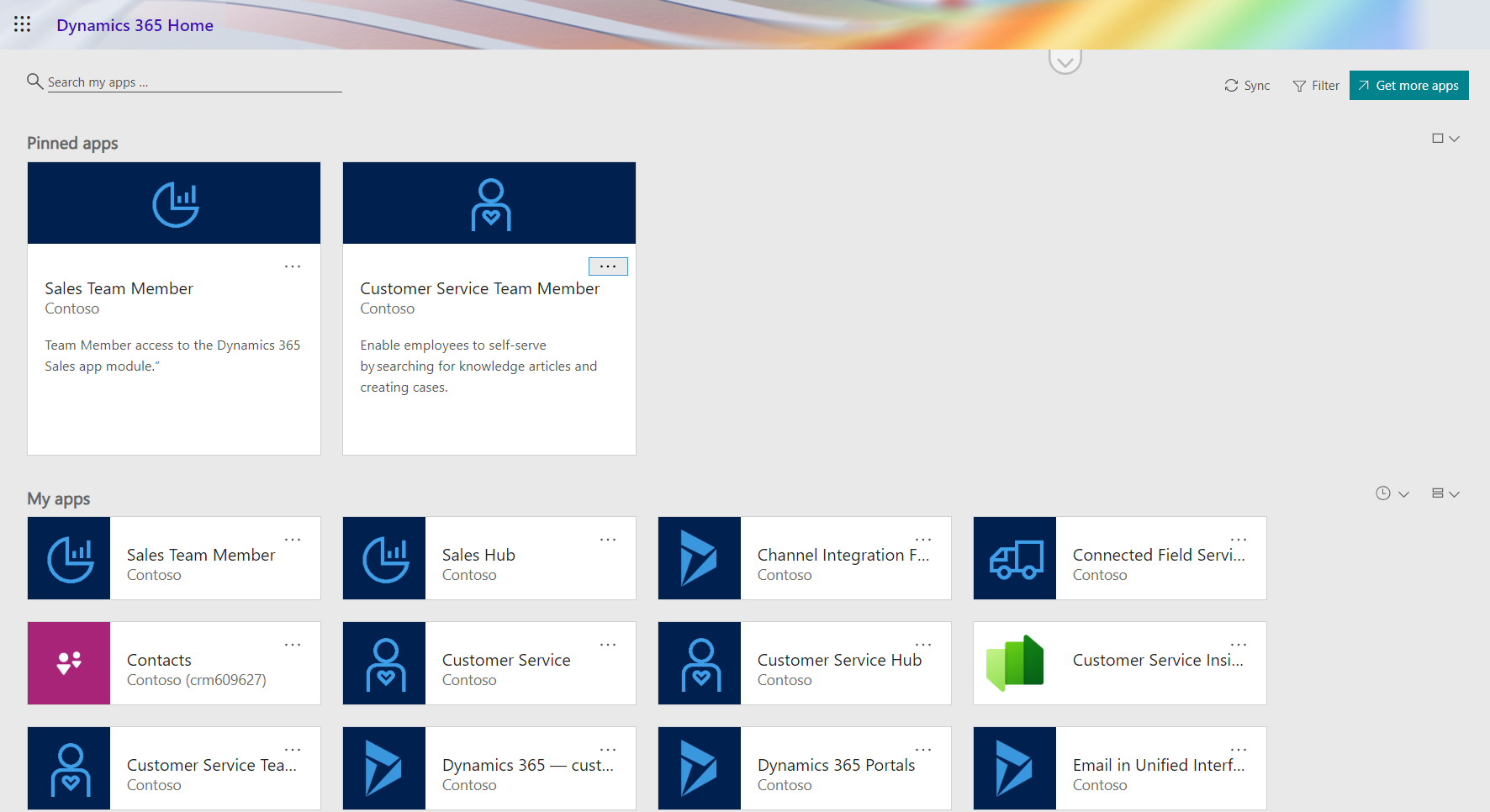
    Sales Team Member app

    Since Sales is by far the most common business process that CRM systems built on Dynamics 365 Online are managing, let’s start from the dedicated Team Member App Module for this scenario. The pre-release documentation isn’t very extensive yet, but from there we can get the basic intention of this new app:

    “At a high level, users with the Team Member license can perform the following tasks in the Sales Team Member app: 1) Customer management: work with accounts and contacts. 2) Lead and opportunity management: see leads or opportunities linked with accounts or contacts, or see other sales-related data. 3) Add activities, such as notes.”

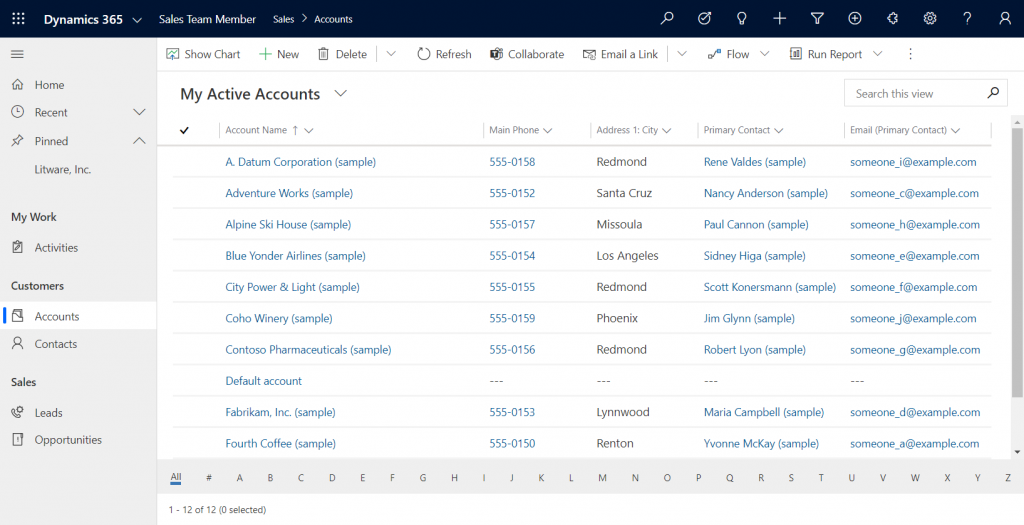
    Upon launching the app, we’re greeted with a familiar experience that looks like Dynamics 365 Sales, only it’s simplified to contain just 5 menu items in the sitemap: Activities, Accounts, Contacts, Leads, Opportunities. If the dashboards menu was also included here, the app would resemble the kind of CRM system that most small organizations or teams actually need in real life.

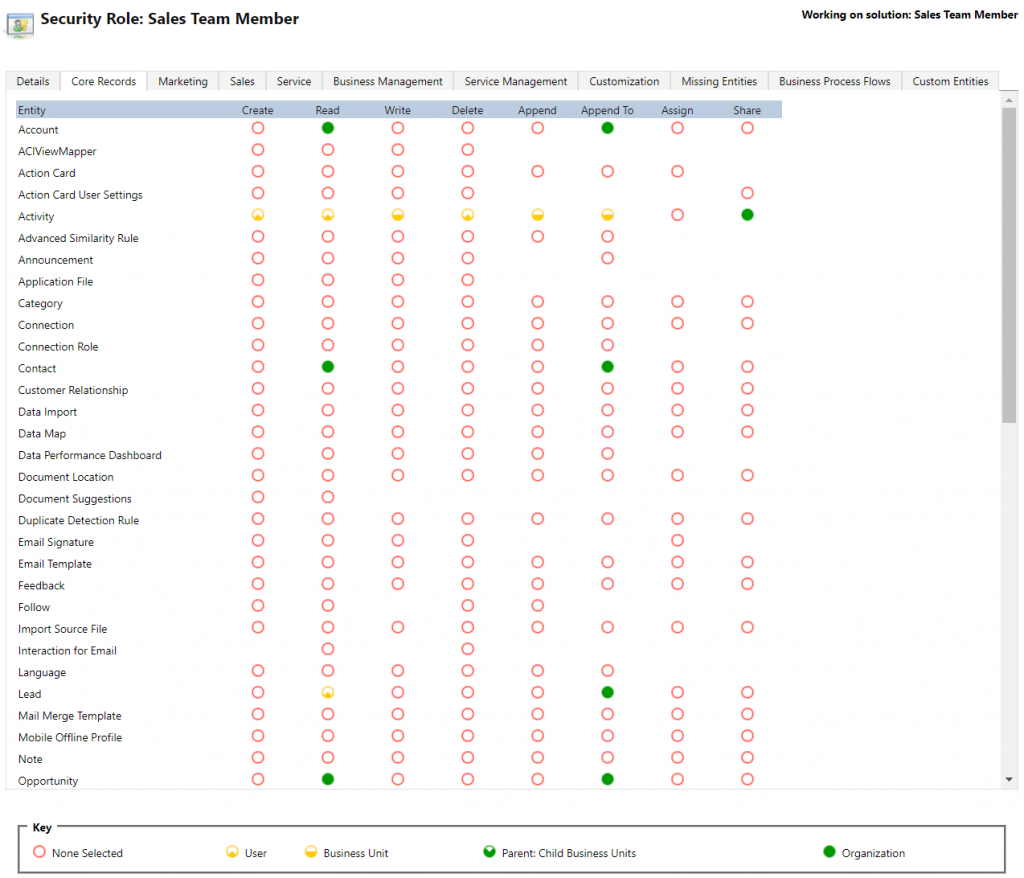
    If we’re using the app with the full access rights granted by a powerful security role like system administrator then there isn’t much that the Sales Team Member app stops us from doing. For example, creating or editing accounts is one of the rights that has been stripped away from the Team Member license, yet the app would happily show us a “New” button for adding accounts via this App Module. The secret lies in the Sales Team Member security role that comes with the solution. A view of the privileges for core entities looks like this:

    Wow, that’s quite restricted indeed! Assigning only this role the users wouldn’t even permit viewing activities from anyone else, nor leads, or adding contacts. Let’s get back to the customization options later, but this is indeed in line with the description of what Microsoft intended the offer with the standard Sales Team Member app.

    Customer Service Team Member app

    The second experience is for Customer Service – but not in the way that you’d traditionally see the Customer Service App of Dynamics 365 being leveraged for assisting external customers. This Team Member app is intended for scenarios where the app users is actually the customer being served:

    “With the entry-level Team Member license, you can now address self-service support scenarios for your employees using the new Customer Service Team Member app module. Employees can create cases for their problems, such as laptop issues, HR queries, and administrative needs, and interact with agents through the commenting feature. They can also search the knowledge base for solutions pertaining to their problems.”

    Unlike the Sales Team Member App, this App Module isn’t installed by default. That’s probably a good thing, since I’d imagine the majority of Dynamics 365 customers are not using it as an internal helpdesk – although it definitely is a perfectly sensible scenario. If that’s what you’re doing, then the CS Team Member solution installation will need to be started from the Dynamics 365 Admin Center.

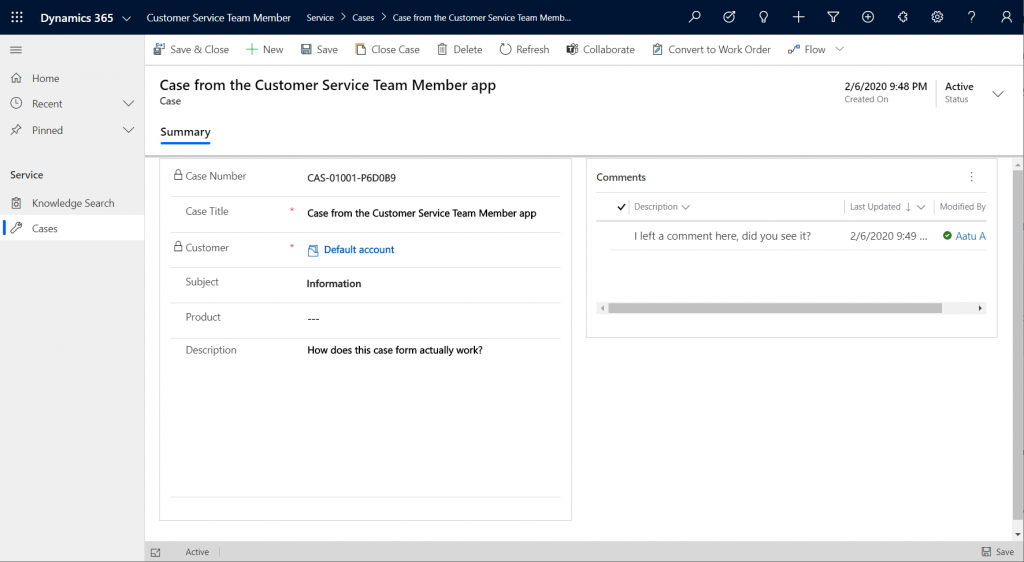
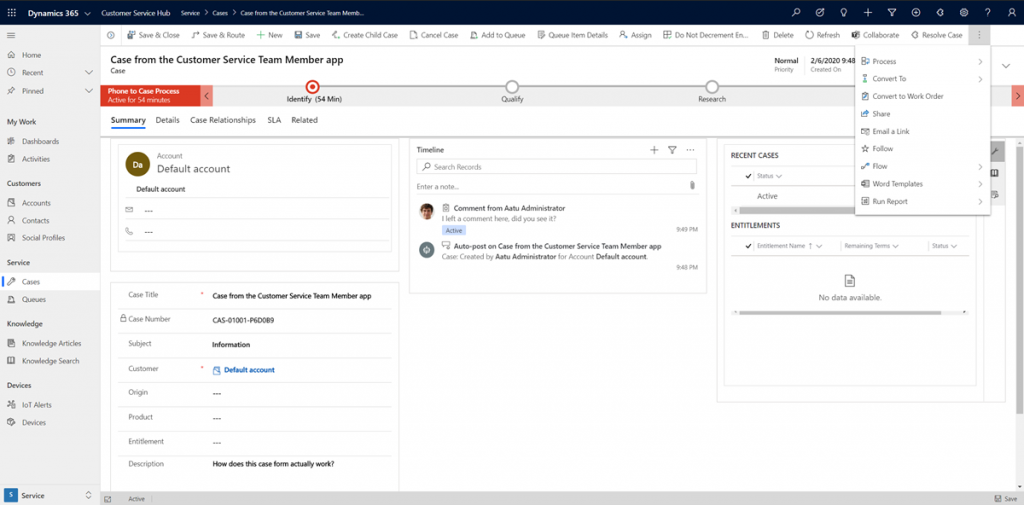
    If we look at the same case record via the full form in the Customer Service Hub App Module, we’ll see quite a stark difference. The solution package for the Team Member app appears to contain a web resource called Incident_teammember_library.js that modifies the behavior of the case form in many ways, such as hiding the Business Process Flow, replacing the standard Resolve Case dialog with a much more streamlined version and who knows what else. The Command Bar also contains far less functionality than it normally would.

    An interesting feature of the Customer Service Team Member app is the use of a default account that you can configure for the organization. The cases created via the Team Member app will automatically be linked to this account as the customer. The requirement for having either an account or contact as the customer has been a part of the MS CRM data model since day one, which has traditionally made the internal helpdesk scenarios quite tricky to implement – if the customers actually are users of Dynamics 365. Without any further documentation, I’m not quite sure what Microsoft’s vision has been for this new feature in the Customer Service Team Member app, since it looks like there isn’t any linkage to the internal customer (user) now in the case data model. If a person who provides helpdesk services would now assign the case to himself to work on, where’s the reference to the actual person who was in need of assistance?

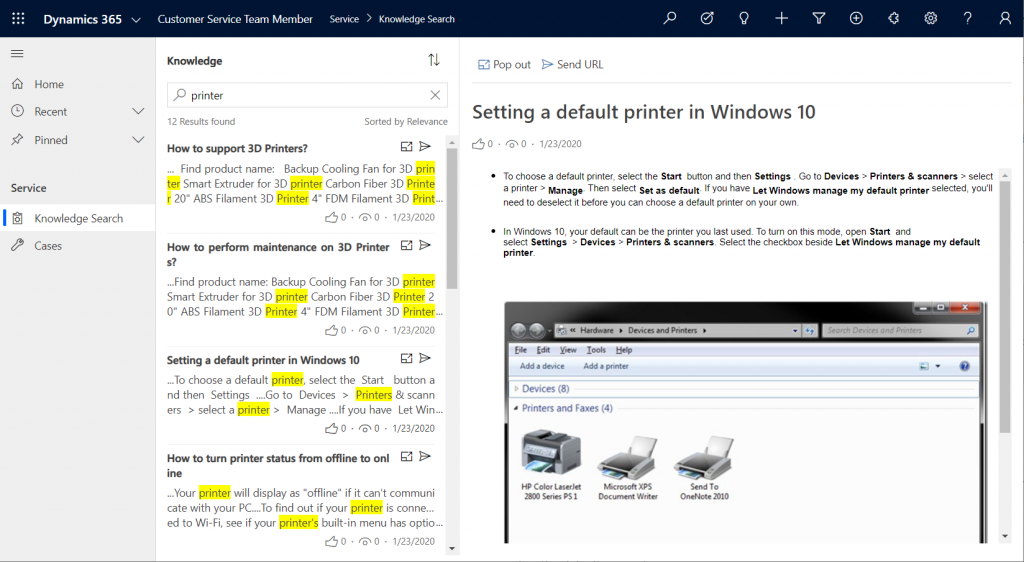
    The other available menu in the Team Member app sitemap, Knowledge Search, isn’t a reference to any entity but rather presents a dedicated UI for browsing published Knowledge Articles. Well, browsing isn’t maybe the right term, since the only option here is free text search for keywords, which will then return a list of articles if matches are found.

    It’s good to keep in mind that certain features of Model-driven Apps in Dynamics 365 aren’t yet App Module aware – meaning they’ll be presented in the UI the same way regardless of which specific app the user has launched. Recent and Pinned items will contain data not included in the App Module, Advanced Find will show all entities that are visible to the user’s security role, the Assistant and (deprecated) Task Flow buttons will always be there in the top Nav Bar. Still, the core experience of App Modules can be restricted down to a limited subset of features, as demonstrated by these Team Member apps. When moving from legacy web client to Unified Interface, these type of targeted experiences definitely are something worth pursuing, rather than the oldskool CRM monoliths that contain a hundred and one items in the navigation.

    Customizing the App Modules

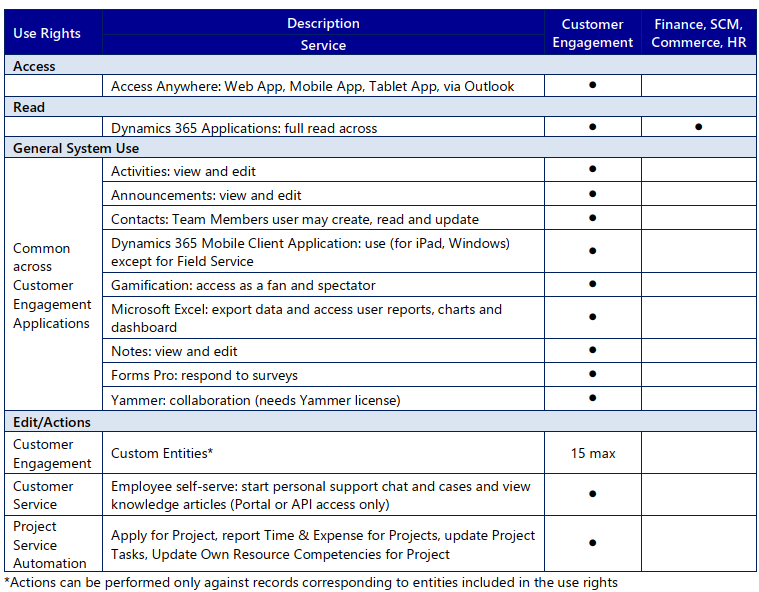
    Now that we know what comes out of the box for Team Member users, many customers will surely be asking what to do with the functionality in their CRM systems that isn’t represented in these standard App Modules. To understand the commercial boundaries better, let’s have a look at what the latest February 2020 licensing guide has to say about the rights of Team Members. We’ll start from Appendix A and the table that describes use rights for Team Members in Customer Engagement apps. (Yes, even though Microsoft product documentation says the term “Customer Engagement” is no longer used for online products, the licensing team hasn’t yet come up with a new term to replace CE in the licensing guide.)

    To start off, Team Members still have the right to read all Dynamics 365 application data. Therefore every single entity you could possibly include within the Sitemap of an App Module could in theory be brought in there. Of course you would have to ensure via the security roles that no creation or modification of those records would be allowed. Also the reporting and dashboards features are explicitly stated as being available for Team Members, on page 11 of the licensing guide.

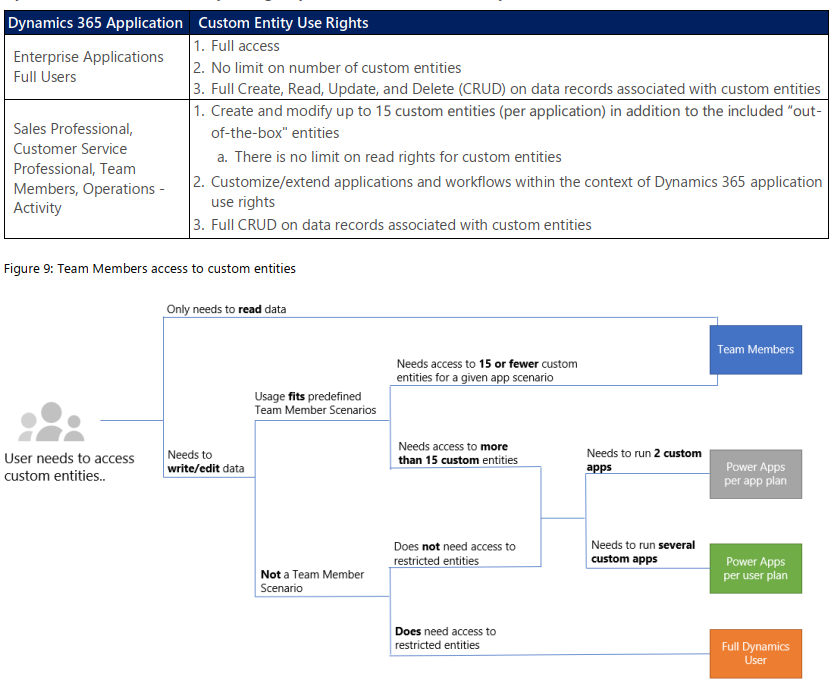
    As for custom entities, we see that there are also edit/actions rights, but we have a “15 max” restriction in the table. What does that mean? The answers are given in Appendix D: Custom Entities.

    We see that for a given app scenario, Team Members can create and modify records for up to 15 custom entities – per app. Where the lines are a bit blurry is the statement that this usage should “fit predefined Team Member scenarios”. As long as these custom entities are related to sales or customer service processes, I guess you’re on the safe side to add them to the standard Team Member App Modules that soon will be the only way for users with Team Member licenses to access Dynamics 365 – once the enforcement for first-party vs. custom apps is enabled in April 2020. Again, keep in mind that read rights are included for any entity, so the 15 custom entity limit couldn’t ever be technically enforced on the App Module level, based on how I interpret the licensing terms.

    What if you really need to do more than what the Team Member license would allow? What if you’re building apps for your unique business processes that aren’t covered by any first party app in the Dynamics 365 suite of products? Then you should explore the possibilities of Power Platform and its licensing model. Power Apps Per User Plan is the platform SKU that Team Member never was intended to be. If you’d map all the current and future workloads that Power Apps could take over in your organization’s business applications portfolio, the value is likely to be much higher than what the customization of these Team Member apps could ever deliver.

    Read more

    Microsoft has published new documentation on Dynamics 365 Team Members license that outlines the user experience for accessing the App Modules, as well as the customization restrictions.

  • Everything as a Service – Not Just Your CRM

    Everything as a Service – Not Just Your CRM

    CRM_goldfishSpring is in the air, at least if the Dynamics CRM 2016 Spring Wave announcement is anything to go by. It’s pretty amazing that only 2 days after we were given the 2016 update for our CRM Online environment there’s already the next batch of updates to pay attention to. Now here I was thinking about spending some time experimenting with the new v8.0 functionality like the Interactive Service Hub or Knowledge Articles and OH, LOOK, A NEW RELEASE WAS ANNOUNCED! (Welcome to my goldfish bowl…)

    Another thing that further contributes to the growing inability to concentrate on just a single CRM version at a time is that, well, there aren’t really any proper versions anymore. Sure, there are still official announcements regarding the major (Fall) and minor (Spring) releases, but it’s not like there would be a single point in time when the product bits become available for you to download. To a certain extent they still do, for the type of software that’s shipped as bits on MSDN, but if you’ve been working with Dynamics CRM for a while you might have found yourself thinking “all the fun stuff’s in the cloud”. I certainly have, and I don’t even see anything wrong with this, because pulling off this type of continuously updated application delivery is in practice only really feasible for customers when it’s consumed purely as a service.

    By the time the CRM 2016 version became generally available, as in new CRM Online trial orgs were provisioned with v8.0, there was a slight feeling of “meh” when you discovered that most of the coolest new features touted in the Release Preview Guide were actually not yet there. No Mobile Offline, no Voice of the Customer surveys, no Relevance Search, no External Party Access… Many of the features being developed didn’t appear to have made the release train of v8.0 and were instead moved to what seemed like a Plan B, meaning rolling them out in limited Previews rather than the big fanfare of the GA. This would have been quite controversial back in the days of “one release every three years”, but these days it’s not really such a big source of concern at the end of the day, because there is no “gold master” disc to signify an RTM product anymore.

    CRM_Roadmap_Site

    Recently Microsoft released an official Roadmap site for Dynamics CRM, which may be a small step for content management but a giant leap for the release policy around the CRM product. Following on the footsteps of many other MSFT product teams, like Office 365, this further moves Dynamics CRM into the service delivery model as the traditional product versioning gets pushed behind the scenes and the application functionality is brought to the forefront. Yes, the sysadmin will still need to be aware of the specific release that his or her CRM Online instance is running on, but from a business perspective this is becoming less and less relevant. New things will arrive in a continuous stream and the decisions for how to deploy a particular application functionality and what actions are needed for ensuring user adoption is an ongoing task for the persons in charge of making their workforce more productive and building customer facing processes that meet or exceed their ever going demands.

    I guess it’s fair to say the world of CRM software reflects the bigger picture of how we the individuals are also operating when it comes to acquiring the things we desire: as a service. Instead of making big upfront investments in gaining the full possession of physical goods or property, our consumption patterns are increasingly leaning towards making a few clicks in an electronic environment and gaining access to the missing piece that will fulfill the needs we’ve identified. Our magic wands with wireless connectivity can be used to conjure up pretty much anything that you can imagine via a “buy now” button somewhere, almost at the exact moment you’ve thought of it. The end product may still be a physical package that gets delivered to your door, but the experience that the customer receives from your company is increasingly being evaluated against not how well the physical gizmo has been crafted but rather how well the various interactions around the customer lifecycle stages of information acquisition, financial transaction and ownership/service consumption are in line with the expectations that the customer had when he or she embarked on this journey. (more…)

  • CRM 2013 SP1: Case Creation and Routing – The Details

    In my previous post about the new functionality included in CRM 2013 SP1 / Spring ’14 release I laid out the big picture of how case creation and routing rules relate to cases and queues in Dynamics CRM. Now it’s time to take a more detailed look at how you would actually configure these rules to automate your case creation process. There are a few limitations that it’s good to be aware of before you jump into applying these new tools in your service management scenarios.

    Case Creation Rules

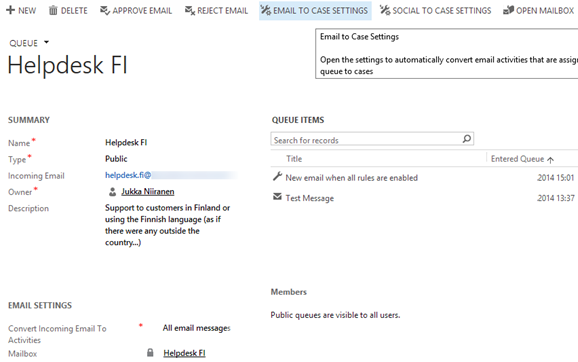
    As illustrated in the big picture of queue and case management in my previous article, Case Creation Rules are specific to a single queue. Also, you can only have one Case Creation Rule per queue – per channel. It is nevertheless a 1:N relationship between queues and rules, since a queue can have a Case Creation Rule both for email and social activities (the latter of which are not yet leveraged in this release). The Command Bar buttons on the updated queue form, labelled “Email To Case Settings” and “Social To Case Settings”, take you to the respective rule record.

    CRM2013SP1_queue_settings

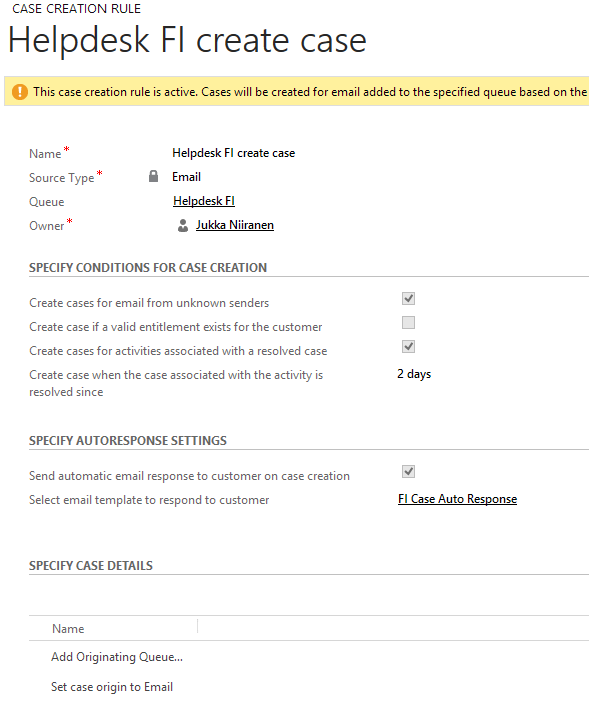
    The Case Creation Rule form allows you to configure predefined conditions for case creation. Emails from unknown senders can be filtered away from case creation. Also the existence of a valid entitlement for the sender (contact) or the senders company (parent account) can be used as a filter. Finally, email related to an already resolved case can be set to generate a new case record, with a configurable “quarantine” time period. So, if you resolve a case today and the customer replies “thanks for your help”, this probably shouldn’t generate a new case, but a reply sent after 3 days to the same email thread might warrant opening up a whole new case record.

    CRM2013SP1_case_creation_rule

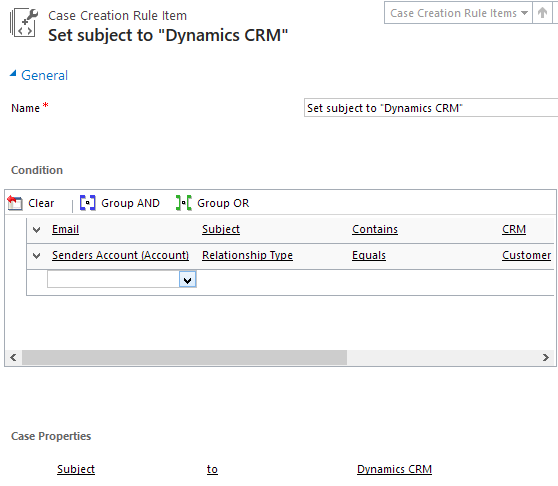
    That’s all the conditions you can apply for the automatic case creation. There’s an additional entity called Case Creation Rule Item that’s found in the “Specify Case Details” subgrid. What this feature allows you to do is specify a condition on the activity record (email or social activity) and set values for the newly created case’s fields. As an example, if the email subject contains word X, you could populate the case subject lookup field with value Y. So, you can’t use these Rule Items to determine whether a case will be created or not, but you can pass along some variables from the originating activity.

    CRM2013SP1_case_creation_rule_item

    The entity fields you can access in the Conditions box are limited to those directly related to the email (or social) activity. There is however one welcome exception and that is the Senders Account. This means that when the email is coming from a known contact, there’s a way to reach into the fields of the account related to the contact (related to the activity), to check variables like relationship status, customer category or other important pieces of information in a B2B service scenario. (more…)

  • CRM 2013 SP1: Case Creation and Routing – The Big Picture

    The latest Dynamics CRM Online Spring ’14 release is now rolling out to existing and new customers (starting from the US data centers) and the on-premises equivalent of CRM 2013 Service Pack 1 will soon follow is now available from MS Download Center (here’s the KB article for more details about SP1). The quickest way to check if your CRM Online organization is already updated to the latest release is on the About screen, accessible via the gear icon in the top right corner. If your version reads 6.1.0.575 (or 6.1.anything) then you’ve got the Spring ’14 release available and you can proceed to the Install Product Updates menu to enable the new features.

    CRM2013SP1_version

    This release, previously known by the codename “Leo”, focuses on enhancing the service management capabilities of Dynamics CRM. There’s a great “What’s New” page on CRM Customer Center that provides a detailed listing of the new features launched now, including an eBook of the changes in service management. Instead of repeating all of this information, I’ll try and provide an overview of how the features align with one another and specifically how they could be applied in real world scenarios for managing incoming service cases from customers.

    Enhancements in Case Creation and Queues

    I guess we’ll still need to first list the new options we need to be aware of when configuring the service module in CRM 2013 SP1 to handle emails and cases  via queues. First off, there is now support for server side synchronization of emails (and other activities) between CRM Online and Exchange Online, without having to use the old Email Router technology (no support for hybrid deployments, though). Then there’s a new feature called Case Creation Rule that allows you to automatically convert an email message or a social activity record placed in a queue into a new case record. Finally, we have Routing Rules that can be leveraged for moving items into queues.

    The following is my own interpretation of how these three areas are aligned in CRM 2013 Spring ´14 Update / Service Pack 1. The picture illustrates how an email message from the customer would flow through the system automatically based on the configuration of the aforementioned features. It also includes a few bullet points about the supported actions for each component. (Feel free to click on the image to view a bigger version that won’t stress your eyes so much.)

    CRM2013SP1_Queue_Case_Configuration_small

    When going through the Leo release features I found it a bit challenging to get a clear view of the logical order in which the different functional areas found under the new Service Management settings menu should be applied. Also the relationships between them and the restrictions imposed on the number of records was something I only learned through trial and error. Hopefully this illustration makes it easier to identify the roles of case creation rules and case routing rules in the new release.

    Rules vs. Workflows & Plugins

    Looking at the picture, someone who has previously configured Dynamics CRM to be used in an email, queue and case based support process will surely find many familiar actions from the list. At the end of the day, pretty much everything here has already been possible with previous CRM versions. With those you just needed to leverage the workflow engine in the CRM platform to configure the case creation and routing activities. So, what’s really new here and why has Microsoft built this into the latest product release?

    Behind the scenes, what the case creation and routing rules do is they create the workflow processes for you. This can be seen from the release documentation where the administrator of those rules is reminded about the requirement to have sufficient security roles for performing the corresponding actions via workflows. So, taking a very simplistic view, you could think of these new features available in the Service Management as a dedicated UI for configuring common process automation actions for customer service scenarios.

    There’s definitely value in having these new features available right inside the core product. In previous versions, it has been far from trivial to build the necessary functionality for frequently encountered requirements, such as “email to case”. Several ISV add-ons have been developed to deliver such functionality and system customizers have surely spent a ton of time pushing the CRM workflow editor to its limits in an effort to automate the common tasks that a service organization would need to perform when managing cases in Dynamics CRM. Now there’s a new standard way to implement these processes via a method that is fully supported by Microsoft, which in turn will lead to far more customers taking a serious look at these case management capabilities in their business application platform.

    CRM2013SP1_Service_Management_Settings

    It’s important to keep in mind that these new features don’t replace any of the existing CRM platform functionality. They offer a default method to configure common features, but they will not cover every possible scenario that you’ll come across in real life implementation scenarios. That means you can still use workflows and plugins to extend the process automation for service case management. For example, while a case creation rule provides the possibility to set an auto response email to be sent to the customer upon case creation, there’s nothing stopping you from doing this via familiar workflow process if more complex business logic is needed than what the new Service Management UI in CRM makes available.

    In the next blog post I will take a more detailed look at how the case creation and routing features can be leveraged in practice, so stay tuned!

  • Accessing “Special” Activity Data with CRM Report Wizard

    Sometimes a data model that is perfectly valid on a logical level does not enable the system end users to actually leverage the data stored in it. One example of such a design is the way Microsoft Dynamics CRM handles the information collected on the standard (uncustomizable) dialog windows used in the case resolution and opportunity close processes. While the information collected here would often be valuable for managing the business process and analyzing the results (“what information was provided to the customer while closing the case?” or “why did exactly we end up losing this opportunity?”), it cannot be easily accessed in a way that would show data from more than a single record at a time.

    CRM_Case_Resolution_Dialog

    This is due to the fact that the case resolution and opportunity close information is not recorded onto the actual business entity itself but rather onto a related activity. There are specific activity types for both of these processes that get created once a user clicks OK on the respective dialog for setting the business record status as closed. This makes sense if we think about the lifecycle of a record like case or opportunity, since the closure is not necessarily a permanent end state. The user can reactivate a case or reopen an opportunity and continue working on it if the circumstances and the business process guidelines dictate this to be the correct route of action, in which case there will eventually be more than one close activity for the business record. The data model therefore needs to support a 1:N relationship between these entities, which is why the design of the out-of-the-box business processes in Dynamics CRM is justified.

    The unfortunate side effect of this design is that the system cannot easily produce views of closed cases with both the question and answer information, as these are stored on separate entities. It is equally difficult to view and analyze information regarding won or lost opportunities, as any comments entered by the opportunity owner during the closure event are not available on the opportunity record itself. What makes the situation even more unfortunate is that the Advanced Find UI does not surface these “special” activity types and make them available for custom views, so even extracting the data from the system for ad-hoc analysis in Excel sheets is not directly possible.

    One approach that I often recommend to customers is to develop additional business logic that will store the information about the latest case resolution or opportunity close onto custom fields on the case/opportunity entity. I’ve also written a blog article earlier about how ISV tools like North52 Business Process Activities (formerly known as Formula Manager) can be used for building a no-code customization to better leverage case resolution data. This of course will not cover any records created prior to deploying the customization, so accessing historical information is still a challenge.

    Reporting on Case Resolution Data

    As always, by developing a custom SQL Server Reporting Services report you could access almost any data in CRM and present it exactly the way you want. You’ll need to use Visual Studio and know a thing or two about how to develop SSRS reports for CRM if you take this approach. In the standard user interface of Dynamics CRM there is only the Report Wizard feature available, which in many cases offers quite limited options for designing reports that would go beyond what the inline charts in CRM views can do. This Wizard was originally introduced back in CRM 4.0 when there was no charting or dashboard capability included in Dynamics CRM yet. Once CRM 2011 brought in these new visualization options, the Report Wizard was pretty much abandoned in terms of new functionality development, so today it remains sitting there in its 2007 outfit and looking a bit outdated as a result.

    One of the lesser known qualities of the Report Wizard is that you can actually access certain entities and fields with it that are off limits to Advanced Find. This comes in quite handy when dealing with a scenario like the one I described earlier. So, let me show you how to build a Report Wizard report that will provide you better access to case resolution data.

    When creating a new report and choosing Report Wizard as the type, you’ll first be taken into a dialog window where you can choose 2 entities that you’re allowed to use in the report. By selecting Activities as the primary record type we’re presented with a list of possible related record types that includes also the “hidden” entities like Opportunity Close or Case Resolution. For our purposes, let’s select the resolutions.

    CRM_Report_Wizard_1

    Now we get to the filter criteria screen. Let’s say that we want to build a report on the billable time information recorded into the case resolution entity. We’ll only be interested in resolved cases and case resolutions that contain data in the Time Spent field (this is where the billable time field data in the case resolution dialog gets stored in). (more…)

  • What’s on the 2014 Roadmap for Microsoft Dynamics CRM?

    The annual festivities of the Microsoft Dynamics Convergence event in the US have now been completed for the year 2014. This means that the outline for upcoming releases in this calendar year have also been presented to the 12K attendees in Atlanta as well as anyone watching the sessions via Virtual Convergence. The following roadmap slide shown at the event tells us the big picture: it’s going to be a busy year for Dynamics CRM!

    Microsoft Dynamics CRM roadmap 2014

    OK, so if the first “swim lane” in the CRM Roadmap schedule is titled “CRM”, then what’s with all the other lanes then and how do these non-CRM items relate to the Dynamics CRM roadmap? Well, here’s the thing: this ain’t the CRM you used to know. It’s no longer that IIS application you used to install on your own little Windows server along with a SQL database and maybe a client component in Outlook. It’s now a suite of services that cover not just your internal processes and tools for your employees but also a wealth of external touch points where your customers will also encounter your CRM system, be it directly or indirectly. Oh, and naturally most of it lives in the cloud, because that’s also where your customers are.

    Of course customer relationship management has never been about just that single CRM database where you keep your own contact records, but now it has become very obvious that also Microsoft’s offering in the field of CRM has grown way beyond that. Following on the footsteps of Oracle and Salesforce.com, the acquisition and integration of a growing number of tools to complement the traditional core Dynamics CRM platform means the future CRM product will be much more modular, as opposed to the earlier “one app & license for everybody” approach. Let’s go through each of these lanes in the CRM roadmap and look at what was announced for them at Convergence 2014, starting from the most familiar one: “CRM”.

    CRM

    After last fall’s release of the new Dynamics CRM 2013 major version (code name Orion), you might have been lead to believe that there wouldn’t be so much happening with the core platform this year, at least in the on-premises world. The earlier communication from Microsoft indicated that the plan was to introduce a new release for CRM Online twice a year and roll out an on-prem version once a year. The code names for these releases were also shared: Leo in Q2 2014 and Vega in Q4, one year after CRM 2013 RTM.

    This is no longer true. But wait! It’s not an R8 style cancellation but rather a positive piece of news. The Q2 2014 release Leo will be for both CRM Online and on-premises customers, as will Vega. It doesn’t mean all the features will be identical across deployment models but it does promise to deliver new functionality also to customers who are running CRM on their own servers. What exactly will be the delivery mechanism (Update Rollups were supposed to be clear of any new features) or how the official naming convention for different versions will evolve is not yet clear, but currently Microsoft is referring to this as the Dynamics CRM Spring Wave. Partners will have a training blitz session for this wave on April 8th/9th, so expect to see more details made public after this.

    The functional changes in Leo will focus on the service module of CRM. New features showcased in the Convergence sessions included SLA management with a timer control available on the case form, merging cases and linking parent/child cases, entitlement management, email to case automation and improvements in the queue feature usability. Considering how much these new features alter the case entity functionality and configuration options, it would have surely been quite difficult to continue supporting two different feature levels if Leo would have in fact been Online only. For callcenter scenarios the new Unified Service Desk (USD) will offer functionality similar to what has previously been delivered via components like the Customer Care Accelerator (CCA) or User Interface Integration (UII). Expect to see also other feature enhancements or tools released as a part of Leo that will not be customer service specific, as well as new capabilities for CRM Online subscription management.

    The contents of the Vega release had not really been disclosed prior to Convergence 2014. As this release is still further away in the future the details are not yet as clear as for Leo, but a number of very interesting enhancements to the core Dynamics CRM product were shown on the CRM roadmap slides. Calculated fields will finally be available without writing custom code, via a graphical editor with intellisense support. Business Process Flows (BF) will be enhanced with support for branching processes. On the UI side we can expect to see built-in capability for visualizing account hierarchies. These three features all address very common scenarios that Dynamics CRM customers require in their system implementations, so it’s great to see them introduced as configurable features that a system customizer can leverage right out of the box.

    Social

    Remember when Microsoft bought NetBreeze one year ago? Their service has now been integrated into the Redmond product portfolio and carries the name Microsoft Social Listening. Last month it was announced that Microsoft Social Listening will be offered as part of the CRM Online Professional licenses at no additional charge, whereas on-premises customers can get it for an incremental cost. This “incremental cost” was later specified to be $20 per user per month for CRM Professional CAL holders. So, while it’s not free for everyone, the pricing is still in line with Microsoft’s previous announcements of wanting to “democratize social” and integrate it as just another channel into their CRM product. (more…)

  • Bringing Customer Service Back to CRM with Parature

    In case you missed the big news last week, Microsoft has acquired a company called Parature. Similar to the two marketing related service providers MS has bought earlier, Marketing Pilot and Netbreeze, this latest acquisition is intended for expanding the footprint of Dynamics CRM on the customer service side.

    MS_Parature

    It’s been no secret that this was the next area where Microsoft was looking to build up some new capabilities for Dynamics CRM. Thinking about the existing feature set for customer service scenarios in the product, we basically haven’t had any significant enhancements to the service module since CRM 3.0. Sure, the recent platform enhancements on the process automation and UI side can be leveraged in customer service as well, but in terms of specific out-of-the-box functionality that would be aimed at helpdesk scenarios, it’s been pretty quiet so far. Case management and queues for email routing have been very useful features for many organizations using Dynamics CRM. Service scheduling and knowledge base articles… well, not so much.

    The world around CRM software has changed quite a bit from 2005 when CRM 3.0 came out. Not only have online service portals and support content websites become incredibly affordable for any company to set up via cloud based services like Zendesk, but the customers of those companies have also been given a whole range of independent social channels to reach out to one another. These days the customers are in charge of the conversation, which means that if you don’t offer a forum for them to submit feedback and questions, they’ll just set one up for your brand on GetSatisfaction on their own. Regardless of how many 1-to-1 contact points you offer them, they’ll still go and share their frustration over on public channels like Twitter.

    This is obviously not a world where back-office applications like traditional CRM systems that mainly offer features to your employees instead of the end customers provide a very comprehensive solution for customer service management. Sure, integrating with the customer account details, managing the support ticket process and collecting information about past interactions are all essential components of customer service in the new world, too, but they are becoming relatively less and less significant factors in the processes needed for delivering great customer experiences. When the customers no longer pick up the phone to call you when they have a problem but rather use it to search for answers on their own, call center automation software isn’t the area you should primarily be looking to invest in.

    Integrating the customer facing components of modern online customer service solutions to the internal CRM systems has been the way to build systems that are up for the challenge presented by the age of the social customer. While system integration is a natural part of any CRM implementation project, requiring each organization to come up with their own solution of how to put the pieces together isn’t perhaps the most effective way forward. For example, Parature had already launched their integration with Microsoft Dynamics CRM Online back in 2009, but how many people were actually aware of it? I might have stumbled across Parature a few times before, but they certainly didn’t occupy a space on my top-of-the-mind list for possible solutions to suggest to companies using Dynamics CRM. Merging these services into Microsoft’s Dynamics CRM offering is certainly going to expose them to a potential customer audience of a completely different scale. (more…)

  • No-code Customizations with North52 Formula Manager, Part 3: Case Resolutions

    In the previous articles (part 1 and part 2) we’ve explored how the North52 Formula Manager can be utilized in automating steps related to the sales process. This time we’ll be looking at a scenario related to service management, in an effort to make it easier to share knowledge and report on the resolutions of cases recorded in the Microsoft Dynamics CRM database.

    Cases vs. Case Resolutions

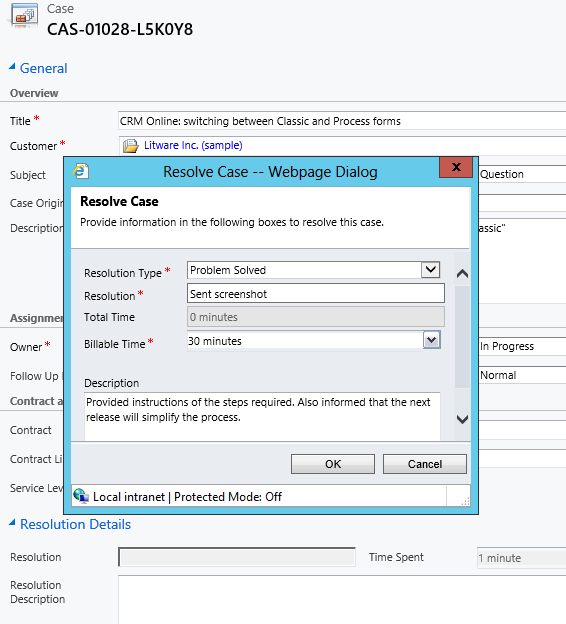
    Case_resolve_cancelIn theory it should be pretty straightforward how you work with a case record: they are support tickets that are initially open (active) when you create them and eventually they end up getting closed as either resolved (service was provided) or cancelled (duplicate ticket, customer never replied etc.).
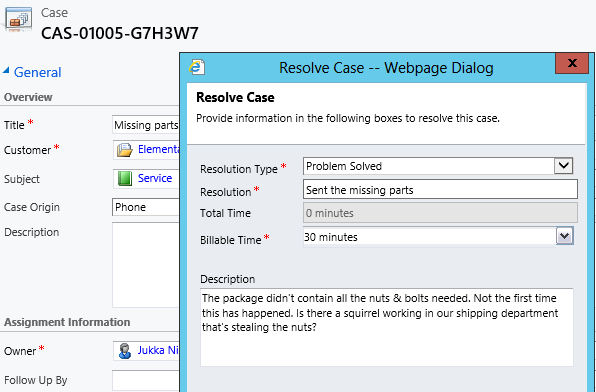
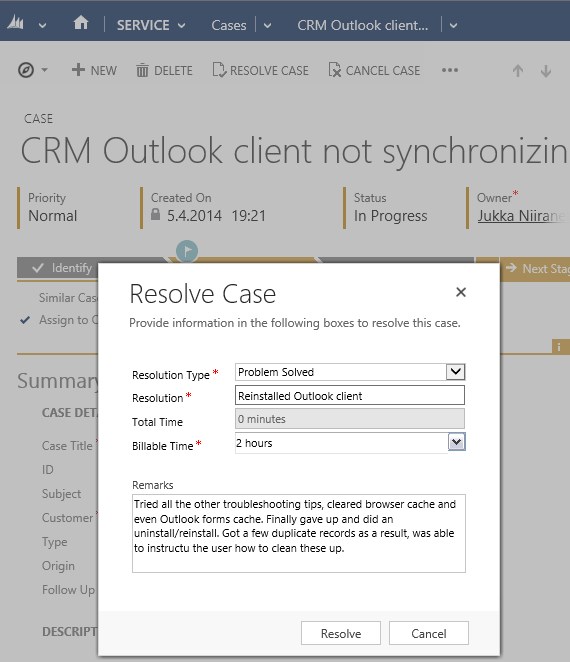
    The point where complexity raises its ugly head is how the resolution process works: instead of entering the case resolution details onto the case record itself, the user is presented with a window that creates a Case Resolution activity underneath the parent case. While this is a perfectly valid design in terms of the nature of the interactions, as there could be situations where the case gets re-opened and resolved again (thus being a 1:N relationship with the case), it does make it more complicated to work with the resolution data later on.

    Resolve_case_dialog

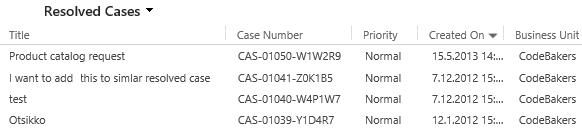
    For example, say you’d want to study the resolved cases by using a view of the case records. In that view you can see the case subject, owner, status and other standard fields, but there’s no information visible on what the actual resolution to the case was. “Ok, so I’ll need to customize the view and show columns from a related record. That’s not too difficult, now is it?” Unfortunately that’s not going to work, because the information we’re interested in resides on the N side of the relationship. Since there can be several case resolutions for a single case, no columns from this entity can be displayed in a case view. So, we can’t construct a nice Q&A list that the service reps could leverage in scanning for similar cases on a new question from a customer. We can only see the problem, not the resolution.

    Resolved_cases_view

    You could build a view of case resolutions, the child entity in this relationship, but that’s not very convenient either. Although case resolution is an entity of its own, it’s not actually available in Advanced Find to directly build queries on. It is possible to access a list of case resolutions by crafting a view of activities with that specific type, but you’ll still be limited to only the generic activity fields. As an example, the field Billable Time (Time Spent) cannot be accessed in a view, which makes it rather difficult to report on this data entered as a part of the service process.

    Activities_Advanced_Find_case_resolution

    Using a Formula to Replicate the Case Resolution Fields on the Case Form

    Luckily Dynamics CRM is a flexible platform that allows you to develop new business logic to fulfill the requirements for your service process. In this situation, if we could simply have the Resolve Case dialog fields copied over to the parent case, this would solve the aforementioned problems. So, how to proceed then?

    If we want to alter the default behavior or the service entities, we should first have a look at the workflow process capabilities of Dynamics CRM to see if can  configure a workflow rule that is triggered when the case resolution is created. This time we won’t get very far with that idea, though, as neither the case resolution nor the activity entity can be used as a workflow trigger. Fair enough, we’ll then need to come up with a lower level solution to meet this requirement. Assuming we have access to a .NET developer who knows the Dynamics CRM SDK, creating a custom plug-in to copy the fields to the case record would be a worthy option to consider. Since the title of this post promised “no-code customizations”, let’s instead look at how we could achieve the same functionality with the Formula Manager.

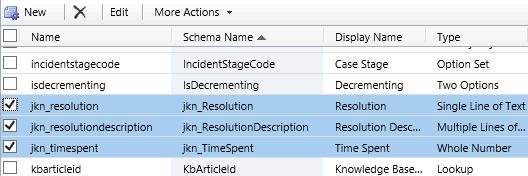
    First we need a place to host the case resolution data of course, so let’s add three custom fields on the case entity: Resolution (text field), Resolution Description (multiple lines) and Time Spent (whole number with duration format). On the case form they can be put into a section of their own and set as disabled, since the user shouldn’t directly update them.  Then we’ll create the three formulas that will populate these fields with corresponding values from the case resolution entity.

    Case_custom_fields

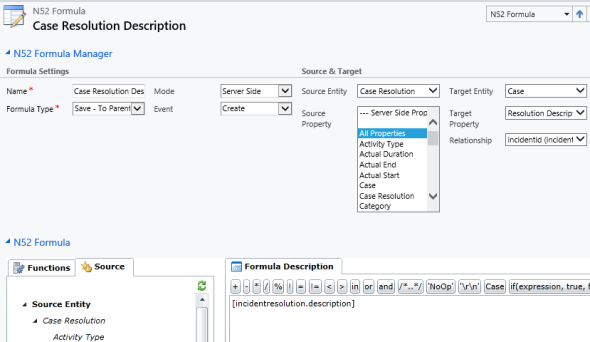
    We’ll be using a formula of the type “Save – To Parent” and attach it to the create event of the case resolution entity. As our target (parent) entity we can select case, but notice that you’ll actually need to specify the relationship field value first before you’re able switch the value in the target entity field. Let’s take the Resolution Description field we just created as the target property. The formula itself in this case will be very simple, since all we need is a value directly from the source entity. We can use the source entity tree visible in the bottom left corner of the screen to browse through the available fields or just type in directly the value [incidentresolution.description].

    Formula_case_description

    The other two fields will get an identical treatment, which means we can click on the Clone Formula button on the ribbon and create two copies of the original formula. Just update the target property field and select a new source field value into the formula description window accordingly. After we’re done, we can publish the formulas and try them out by resolving an existing case.

    Resolve_case_formula_1

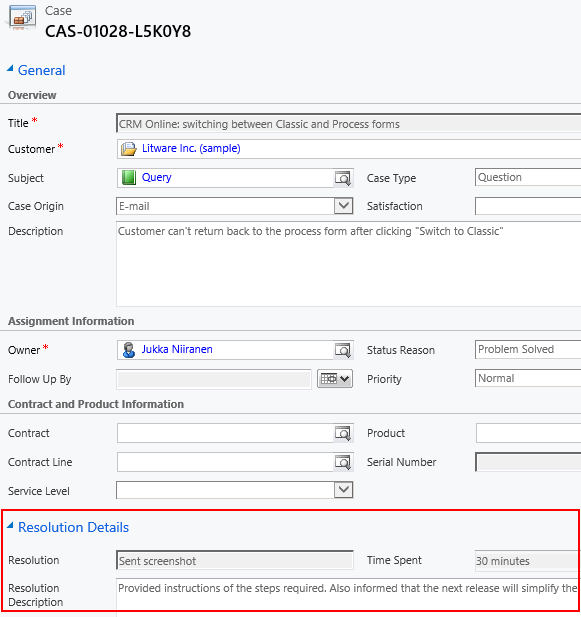
    After we’ve entered the details into the Resolve Case dialog fields and clicked OK, our formula will update the underlying case form in real time to reflect the same values presented directly on the resolved case record. Unlike asynchronous workflow processes, the formulas can perform their tasks right in front of the user, which makes the user experience more consistent.

    Resolve_case_formula_2

    Making Use of the Resolution Data

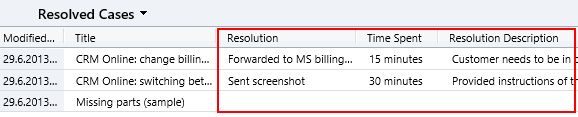
    Now that the fields are available on the case entity, we still need to ensure that the user actually has access to them through all the necessary routes. First we should of course include them into the Resolved Cases view we talked about earlier.

    Resolved_cases_view_updated

    Seeing the resolution field contents directly in the view is a great improvement, but an even more important feature is to enable the users to search for this information. You see, one of the peculiar default settings of Dynamics CRM is that the Quick Find view for case entities only covers active (open) cases. (more…)