Tag: roadmap

  • CRM 2013 Customization and the Platform Evolution (Webcast)

    MSDynamicsWorldOn Thursday, 22nd of May, I’ll be delivering a one hour webcast on MSDynamicsWorld.com, the leading independent online publication covering all things Microsoft Dynamics. The topic of my webcast is “Microsoft Dynamics CRM 2013 Customization and the Platform Evolution”. Here’s the official description of the session:

    During its 11 years of life, Microsoft Dynamics CRM has grown from simple sales force automation software into a comprehensive business application platform. At the same time, both the tools available for the typical knowledge worker as well as the general expectations for the functionality in web-based business applications like CRM have evolved considerably.

    Join Microsoft MVP and Dynamics CRM expert Jukka Niiranen for a live session that will:

    • Explore the implications of these solutions design trends with respect to Dynamics CRM 2013; 
    • Discuss how to fully leverage the latest platform capabilities;  
    • Examine ways to deliver a modern productivity application that works the way in which the user expects

    This event content is aimed at persons who are planning, designing or implementing customizations to Dynamics CRM. Whether you have already moved to CRM 2013 or are considering upgrading your existing system, this session will provide insights on key areas where the latest platform version is different from its predecessors.

    Sounds interesting? Then by all means sign up for the live webcast next week!

  • What’s on the 2014 Roadmap for Microsoft Dynamics CRM?

    The annual festivities of the Microsoft Dynamics Convergence event in the US have now been completed for the year 2014. This means that the outline for upcoming releases in this calendar year have also been presented to the 12K attendees in Atlanta as well as anyone watching the sessions via Virtual Convergence. The following roadmap slide shown at the event tells us the big picture: it’s going to be a busy year for Dynamics CRM!

    Microsoft Dynamics CRM roadmap 2014

    OK, so if the first “swim lane” in the CRM Roadmap schedule is titled “CRM”, then what’s with all the other lanes then and how do these non-CRM items relate to the Dynamics CRM roadmap? Well, here’s the thing: this ain’t the CRM you used to know. It’s no longer that IIS application you used to install on your own little Windows server along with a SQL database and maybe a client component in Outlook. It’s now a suite of services that cover not just your internal processes and tools for your employees but also a wealth of external touch points where your customers will also encounter your CRM system, be it directly or indirectly. Oh, and naturally most of it lives in the cloud, because that’s also where your customers are.

    Of course customer relationship management has never been about just that single CRM database where you keep your own contact records, but now it has become very obvious that also Microsoft’s offering in the field of CRM has grown way beyond that. Following on the footsteps of Oracle and Salesforce.com, the acquisition and integration of a growing number of tools to complement the traditional core Dynamics CRM platform means the future CRM product will be much more modular, as opposed to the earlier “one app & license for everybody” approach. Let’s go through each of these lanes in the CRM roadmap and look at what was announced for them at Convergence 2014, starting from the most familiar one: “CRM”.

    CRM

    After last fall’s release of the new Dynamics CRM 2013 major version (code name Orion), you might have been lead to believe that there wouldn’t be so much happening with the core platform this year, at least in the on-premises world. The earlier communication from Microsoft indicated that the plan was to introduce a new release for CRM Online twice a year and roll out an on-prem version once a year. The code names for these releases were also shared: Leo in Q2 2014 and Vega in Q4, one year after CRM 2013 RTM.

    This is no longer true. But wait! It’s not an R8 style cancellation but rather a positive piece of news. The Q2 2014 release Leo will be for both CRM Online and on-premises customers, as will Vega. It doesn’t mean all the features will be identical across deployment models but it does promise to deliver new functionality also to customers who are running CRM on their own servers. What exactly will be the delivery mechanism (Update Rollups were supposed to be clear of any new features) or how the official naming convention for different versions will evolve is not yet clear, but currently Microsoft is referring to this as the Dynamics CRM Spring Wave. Partners will have a training blitz session for this wave on April 8th/9th, so expect to see more details made public after this.

    The functional changes in Leo will focus on the service module of CRM. New features showcased in the Convergence sessions included SLA management with a timer control available on the case form, merging cases and linking parent/child cases, entitlement management, email to case automation and improvements in the queue feature usability. Considering how much these new features alter the case entity functionality and configuration options, it would have surely been quite difficult to continue supporting two different feature levels if Leo would have in fact been Online only. For callcenter scenarios the new Unified Service Desk (USD) will offer functionality similar to what has previously been delivered via components like the Customer Care Accelerator (CCA) or User Interface Integration (UII). Expect to see also other feature enhancements or tools released as a part of Leo that will not be customer service specific, as well as new capabilities for CRM Online subscription management.

    The contents of the Vega release had not really been disclosed prior to Convergence 2014. As this release is still further away in the future the details are not yet as clear as for Leo, but a number of very interesting enhancements to the core Dynamics CRM product were shown on the CRM roadmap slides. Calculated fields will finally be available without writing custom code, via a graphical editor with intellisense support. Business Process Flows (BF) will be enhanced with support for branching processes. On the UI side we can expect to see built-in capability for visualizing account hierarchies. These three features all address very common scenarios that Dynamics CRM customers require in their system implementations, so it’s great to see them introduced as configurable features that a system customizer can leverage right out of the box.

    Social

    Remember when Microsoft bought NetBreeze one year ago? Their service has now been integrated into the Redmond product portfolio and carries the name Microsoft Social Listening. Last month it was announced that Microsoft Social Listening will be offered as part of the CRM Online Professional licenses at no additional charge, whereas on-premises customers can get it for an incremental cost. This “incremental cost” was later specified to be $20 per user per month for CRM Professional CAL holders. So, while it’s not free for everyone, the pricing is still in line with Microsoft’s previous announcements of wanting to “democratize social” and integrate it as just another channel into their CRM product. (more…)

  • Bringing Customer Service Back to CRM with Parature

    In case you missed the big news last week, Microsoft has acquired a company called Parature. Similar to the two marketing related service providers MS has bought earlier, Marketing Pilot and Netbreeze, this latest acquisition is intended for expanding the footprint of Dynamics CRM on the customer service side.

    MS_Parature

    It’s been no secret that this was the next area where Microsoft was looking to build up some new capabilities for Dynamics CRM. Thinking about the existing feature set for customer service scenarios in the product, we basically haven’t had any significant enhancements to the service module since CRM 3.0. Sure, the recent platform enhancements on the process automation and UI side can be leveraged in customer service as well, but in terms of specific out-of-the-box functionality that would be aimed at helpdesk scenarios, it’s been pretty quiet so far. Case management and queues for email routing have been very useful features for many organizations using Dynamics CRM. Service scheduling and knowledge base articles… well, not so much.

    The world around CRM software has changed quite a bit from 2005 when CRM 3.0 came out. Not only have online service portals and support content websites become incredibly affordable for any company to set up via cloud based services like Zendesk, but the customers of those companies have also been given a whole range of independent social channels to reach out to one another. These days the customers are in charge of the conversation, which means that if you don’t offer a forum for them to submit feedback and questions, they’ll just set one up for your brand on GetSatisfaction on their own. Regardless of how many 1-to-1 contact points you offer them, they’ll still go and share their frustration over on public channels like Twitter.

    This is obviously not a world where back-office applications like traditional CRM systems that mainly offer features to your employees instead of the end customers provide a very comprehensive solution for customer service management. Sure, integrating with the customer account details, managing the support ticket process and collecting information about past interactions are all essential components of customer service in the new world, too, but they are becoming relatively less and less significant factors in the processes needed for delivering great customer experiences. When the customers no longer pick up the phone to call you when they have a problem but rather use it to search for answers on their own, call center automation software isn’t the area you should primarily be looking to invest in.

    Integrating the customer facing components of modern online customer service solutions to the internal CRM systems has been the way to build systems that are up for the challenge presented by the age of the social customer. While system integration is a natural part of any CRM implementation project, requiring each organization to come up with their own solution of how to put the pieces together isn’t perhaps the most effective way forward. For example, Parature had already launched their integration with Microsoft Dynamics CRM Online back in 2009, but how many people were actually aware of it? I might have stumbled across Parature a few times before, but they certainly didn’t occupy a space on my top-of-the-mind list for possible solutions to suggest to companies using Dynamics CRM. Merging these services into Microsoft’s Dynamics CRM offering is certainly going to expose them to a potential customer audience of a completely different scale. (more…)

  • The Next Dynamics CRM User Experience: Orion

    Post updated 2013-06-26:

    Hi there, thanks for your interest in Orion, the next version of Microsoft Dynamics CRM. You’ve probably arrived here by following a link that promised to show you what the user interface of the upcoming application release was going to be. Unfortunately you won’t find that content here anymore.

    Back in March 2013 several Microsoft representatives presented a preview of the upcoming release at the Convergence 2013 event. It was the first time that Orion was publicly shown to MS partners, customers and anyone interested enough in the product to either attend the event in New Orleans or watch the webcasts through Virtual Convergence. I enjoyed the latter ones and took a few screenshots from those sessions (which can still be accessed through the aforementioned site. Based on them, I wrote my own analysis of how the upcoming user interface changes were going to impact Dynamics CRM users, consultants, developers and so on.

    It turned out to be quite a popular post. As I write this update on June 28th, the page had been viewed over 11,000 times. Links to the post had been shared almost 300 times on various social channels. Several Dynamics CRM experts contributed to the discussion on the Orion UX changes in the comments section, on LinkedIn and elsewhere. In short, it was a hit.

    Linktally_analytics_Orion_UX

    The reason why the post cannot be available for you to read anymore is that three months after its release my employer has signed an agreement document and the contents of my (personal) blog is seen to be in conflict with the terms of this agreement. I understand the reasoning behind this interpretation and have no problem removing some of the content based on the request I’ve received. After all, I think the post has already done its job in distributing the publicly available information from Convergence 2013 in a structured format that has hopefully made it easier for anyone working within the Microsoft Dynamics CRM ecosystem to understand the direction where the product is heading in its upcoming release.

    We’re approaching the moment when Microsoft will be making official information available about the Orion release. At that point there will no longer be a need for any preview screenshots of the UI. If you simply can’t wait for that moment to arrive, then luckily this is the Internet and it does a great job in distributing information to anyone who can be bothered to search for it. If you want to stay on top of the latest news around Microsoft Dynamics CRM, one source of information to keep an eye on is the Surviving CRM Google+ page. If you want to know, how to prepare for Orion, there are some fine articles written on the topic 😉

  • eXtreme CRM 2013 Rome takeaways

    eXtremeCRMThere are no more Microsoft Convergence events held in Europe, but luckily the eXtreme CRM organization has stepped in to arrange a bi-annual conference where all the Dynamics CRM professionals can meet up and share information & thoughts on what’s happening around the product and the surrounding ecosystem. Last year in Berlin was the first time I attended the eXtreme CRM conference and this year it was time to head down south to Rome for eXtreme CRM 2013. Here’s my travel report from the event, focusing on the product roadmap details that were revealed and the direction that Microsoft Dynamics CRM seems to be heading towards, based on my interpretation.

    It’s been a bit rough

    The opening keynote by Bob Stutz, corporate vice president of Microsoft Dynamics CRM, was a somewhat unusual appearance compared to the traditional Microsoft way of highlighting their past achievements and future opportunities. From the European viewpoint, the typical US style keynotes often go over the top in building up hype for the success of the products, but Bob came onto the stage with a different kind of a message. Basically he apologized for all the problems that have surrounded Dynamics CRM recently: the delay of cross-browser support, CRM Online performance/reliability issues and the sad saga of recent Update Rollups being pulled.

    Bob_Stutz_eXtremeCRM_keynoteI think most of the MS partners in the room had shared the pain from these issues, especially when having to explain them on a day-to-day basis while working with customers. In the software business it’s of course nothing unheard of that  such problems may occur, but there’s been an elevated sense of frustration recently with the lack of information given to partners on what’s going on at Microsoft. Communication is the most effective cure in recovering from such events and I bet that it would have been far easier for all parties if there had been more transparent exchange of information on each of these issues earlier on, but it’s good to see the top management acknowledge this now and hopefully do what is necessary to straighten these things out.

    One thing that Bob Stutz promised to change was to return the Update Rollups back to pure hotfix packages instead of vehicles for new feature delivery that they’ve turned into after Microsoft adopted the agile release policy for Dynamics CRM shortly after the 2011 version came out. What this means in practice is that MS will need to come up with a new delivery vehicle for introducing the new features into on-premise CRM environments at least once a year. While this can potentially improve the stability of those environments, the gap between CRM Online and on-premise feature release schedule can also grow even larger as a result of this, which could introduce it’s own challenges through an increased platform fragmentation.

    The mobility story

    This time last year Microsoft made a big announcement of their upcoming “CRM Anywhere” prodcut offering. Following the aforementioned turn of events, the cross-browser support got eventually delayed up until Polaris / Update Rollup 12 while the mobile strategy was gradually revised, scrapping their planned partnership with CWR Mobility and opting to develop in-house mobile apps instead. Individual pieces of news around the mobility offering have become available during the past fall and now at eXtreme CRM 2013 Rome the following mobility roadmap slide was presented:

    Dynamics CRM Mobility Roadmap & Vision

    From this slide and the accompanying presentation I was able to pick out the following pieces of data:

    • The iPad Safari web client that was postponed from the actual Polaris rollout is arriving this month for CRM Online customers, on-premise support will be in Orion
    • Tablet devices will receive a dedicated app, not only the Windows 8 Sales Workspace but also a similar iPad native app appears to be scheduled for Orion, with further Service and Marketing apps in the horizon
    • iPhone and Android support will be limited to the Mobile Express client even after Orion, all the way until Leo
    • No details on whether Windows Phone will receive any new features in addition to the WP7 Activity Feeds app that was released a bit over year ago
    • Customization options as well as offline data support will be rolled out gradually to these clients

    One thing that Bob was emphasizing during the keynote was Microsoft’s decision not to charge additional licenses for access to these mobile and tablet applications. Choosing to take the longer route of build vs. buy in the mobile CRM gives MS a wider range of options to adjust their commercial offering to market needs, but the prolonged period of uncertainty means that many customers will also be postponing their investment decisions on mobile CRM deployment until they have facts available on what level of functionality is going to be baked into the core platform. At the same time ISV’s like Resco and more recently also CWR Mobility are working hard to be able to offer a HTML5 platform for developing customized mobile and tablet apps for Dynamics CRM for those customers who need to equip their mobile workforce with CRM solutions already today.

    Update 2013-02-16: Microsoft partners can now download the Microsoft Dynamics CRM Mobility Roadmap slide deck from PartnerSource (login required).

    From Polaris to Orion via Gemini

    The new “Flow” UI of Dynamics CRM has been rolled out to existing CRM Online customers. This has caused both a lot of excitement as well as anxiety, since the new design and integrations (Bing Maps, Yammer etc.) are very tempting to be demonstrated as the next generation user experience, but the feature set of Polaris takes away many of the standard customization options that rely on form event scripting. I’ve covered the Polaris new features & gotchas in a previous post, in case you haven’t had a chance to dig deeper into the updated CRM Online version yet. Just to repeat once more what I’ve been trying to emphasize ever since latest Statement of Direction document was released: on-premise customers won’t get the new UI with Update Rollup 12, it arrives in the Orion release.

    Orion_the_next_version_of_Dynamics_CRMWith that in mind, let’s get the big news out of the way before digging any deeper: Orion is not an Update Rollup or even Service Update type of a release, it is the next major version of Dynamics CRM. In his closing keynote Bill Patterson pretty much confirmed that it would be called “Microsoft Dynamics CRM 2013” (or 2014) for the on-premise customers. Not a whole lot of other details were shared, apart from the fact that the target release date is in Q3 2013. Although Bob Stutz was hesitant on giving any dates in his speech, July was mentioned more than once, but whether that refers to general availability or CRM Online is anybody’s guess as of now.

    Before that, we’ll have time for another star in the spring sky: Gemini. Yes, it looks like there will be even more frequent releases for CRM Online than previously communicated. Gemini arrives in Q2 2013 and will focus on bringing the Marketing Pilot features acquired last October available to Dynamics CRM users. The feature set was shown in a very brief run through of slides, since the network issues that plagued the whole eXtreme CRM 2013 Rome event held at Marriott Park Hotel forced Bill to skip the live demo and resort to screenshots instead. Not much can be said about what to expect from Marketing Pilot at this stage, but here are some facts I picked up: (more…)

  • Breaking down the Polaris and Statement of Direction documents

    After the announcement in July 2012 regarding the delayed delivery schedule of the CRM Anywhere functionality, Microsoft has been promising that their updated product roadmap would be announced “soon”. Well, it took until November eventually, but we now have two new documents available from them: the Statement of Direction and Microsoft Dynamics CRM December 2012 Service Update Release Preview Guide. In this post I’ll share a few thoughts and questions that these documents have raised in my mind.

    Polaris (Microsoft Dynamics CRM December 2012 Service Update)

    Much of the contents of Polaris was revealed in eXtreme CRM 2012 Las Vegas and tweeted out into the online communities. One major piece of news from there is only casually mentioned in the beginning of the Release Preview Guide document, so let’s emphasize it here once more:

    This document is organized to highlight specific investments included in the December 2012 Service Update for Microsoft Dynamics CRM Online. This release begins in mid-December 2012 and will continue through January 2013.

    Yes, on-premise and hosted customers will still need to wait another 6 months while the new functionality is previewed in the cloud. The Orion release, currently scheduled for around mid-2013, will include these new treats into the CRM server bits you can download and deploy on your own or outsourced hardware. In the meantime, there will be a gap during which some UI customizations and development can be done only in CRM Online, so remember to take this into consideration when planning you solution deployment strategies.

    The new Flow UI, also known as the “Process-Driven UI” or “Refresh UI”, has been shown from the user’s point of view already earlier, but in the Release Preview Guide we get a first glimpse into the configuration options of how you can actually adjust it to match your real business processes. The Process Control Customization Tool appears to consist of a basic set of stages and steps, with no direct connection to the familiar workflow or dialog processes. Of course if you trigger a workflow process from a field value change you could include much more business logic into the stages and steps. The document mentions that there will be “several pre-defined steps such as locate existing contact and account”, so we’ll need to wait and see if the process steps will actually provide a new extension point that allows developers to create custom steps.

    Ever since the Yammer deal in June, we’ve all been wondering (well, perhaps it’s just me who’s obsessed with these things) how this social business tool would be integrated into Dynamics CRM and specifically what it will do to the Activity Feeds functionality introduced in Q4 2011 Service Update. Looking at the Polaris UI preview, we still don’t have too many details about this, but at least there’s a screenshot for us to stare at. Back in July when the Flow UI was first shown, the Activity Feeds were presented on the opportunity form alongside activities and notes/attachments, but now it’s been replaced by a Yammer feed. However, the distinction between auto posts and user posts in the menu suggests that there’s a bit of the CRM Activity Feeds functionality in play here, since Yammer doesn’t have such concepts in their own product.

    Showing updates regarding CRM records in the Yammer UI was already possible before Microsoft bought Yammer, thanks to the integration they had developed. In the release preview guide we can now read that “Microsoft will enable the ability to post messages from Microsoft Dynamics CRM to Yammer and vice versa”, which suggest a deeper level of integration, most likely leveraging Yammer’s Enterprise Graph. I guess it’s safe to say by now that the CRM R8 beta functionality developed for CRM Activity Feeds to filter the feed content has been permanently cancelled and all the efforts are aimed at integrating Yammer into Dynamics CRM. However, Microsoft will probably not completely rip out the existing feeds from on premises Dynamics CRM deployments nor implement a non-cloud Yammer, so the transition may take a while. Another thing worth noting is that the current free version of Yammer does not support any integration to applications like CRM, so the Enterprise Plan for Yammer may be required in order to leverage the new functionality in Dynamics CRM unless Microsoft changes the pricing policy.

    Bing Maps integration will be available for the Flow UI, where “addresses for contacts and accounts will be displayed in an embedded contextual map provided by the Microsoft decision engine Bing”. There were some good comments to my previous Future Stars blog post about the licensing of Bing Maps, so you might want to check them out if visualizing your customer addresses on an integrated map is of interest to you. Just like with Yammer, currently the Bing Maps API requires a separate license when used in internal applications and there’s no mention of any changes to this model in the release preview guide, so it’s best to assume that these new Polaris features will not be free to users with a Dynamics CRM Online license alone.

    Cross-browser support arrives with Polaris, but it’s a bit of a “yes and no” regarding support on iPad Safari browser. Yes, users will be able to access something else than Mobile Express on their iPad, but it’s not the same browser client as you’d have on a PC or Mac. A special version of the web client has been created for the iPad only, utilizing the new Flow UI forms. However, as the Flow UI is only available in a limited number of entities so far, only the “sales experience” is enabled in the iPad CRM client version. Judging by the menu below you can only access accounts, contacts, leads and opportunities. Any other entities (presumably even quotes, orders or products) will require you to click the “Launch Mobile Express” link, which will take you back to the CRM experience designed for pre-iPhone era smartphones. The Polaris version of iPad client seems therefore like an intermediate solution while we await for the full tablet UX to arrive.
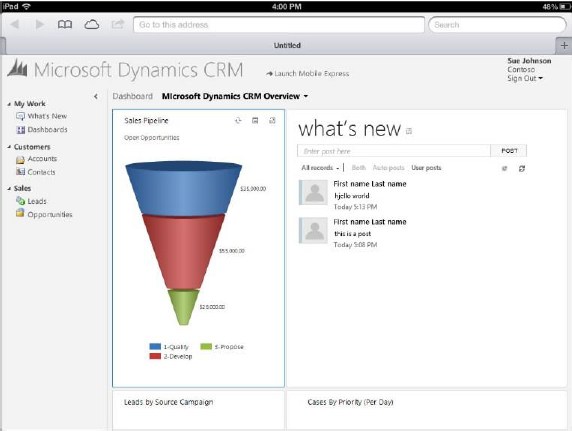
    So, where’s the Dynamics CRM Mobile part of the CRM Anywhere release? Hmm, not mentioned in this document, so let’s check out the long term roadmap next.

    Statement of Direction, November 2012

    This document discusses the Dynamics CRM product vision for the next 36 months and is therefore much less specific on the upcoming functionality than the Polaris release documentation. It starts with a list of upcoming applications to be added into Dynamics CRM in future releases. Putting the terminology into context, an example of a new application for CRM 2011 was goal management, so these would likely include a bunch of new default entities, business logic, UI enhancements and potential new integration points.

    On the SFA front we’ve got Quote, Order, and Pricing Management, which is a very important area for Dynamics CRM to step up it’s game. Anyone who’s ever demoed the existing UI for creating quotes knows that the popup jungle is something you want to avoid showing to potential customers, so a more flat user experience for working with product lines . In the Service section the term Knowledge Management brings a breath of canned air from the past decade, especially when we later on hear that “SharePoint will power next-generation content and knowledge experiences to strengthen supporting business processes”. All joking aside, it’s pretty obvious that the KB functionality in Dynamics CRM is in need of a makeover, so bringing SharePoint into the picture is the obvious route for Microsoft to improve its CRM offering for service users.

    The direction of marketing functionality development in Dynamics CRM will be shaped by Microsoft’s latest acquisition, Marketing Pilot. Although no one seems to have heard about the company before the MS press release, that doesn’t mean it wouldn’t be a good choice for the foundation which the v2.0 of Dynamics CRM marketing module would be built on. Whereas Skype and Yammer were big existing brands with their own technology stack, MarketingPilot is a small company that has developed their product on top of Microsoft’s platform and should therefore be much more easily assimilated into the Dynamics CRM product. Not a big splash like Salesforce.com’s acquisitions of Buddy Media or Radian6, not even close, but Microsoft have said marketing automation is one of their key investment areas for CRM, so let’s wait and see how that story develops.

    While not exactly a bullet point in the Statement of Direction document, it’s pretty clear that Surface will be the central vehicle for launching the re-imagined Dynamics CRM experience and Microsoft have come up with a nice promotional video to build up the hype while we wait for the Windows 8 app to arrive. Folding the “Metro CRM app”, Yammer, Skype and Surface all into one sure does result in a compelling image of what the next generation of customer relationship management applications could be like.

    What about devices other than the Surface? More precisely: what about mobile as in smartphone apps? Unfortunately there’s not much to say about them, except that there’s another delay for supporting iPhone and Android devices. Even the upcoming Windows Phone 8 customers won’t initially be able to use their mobile device for more than reading CRM records and posting Activity Feeds posts with the existing Microsoft Dynamics CRM Mobile client.

    The February 2012 announcement of Microsoft partnering with CWR Mobility pretty much put everyone in a waiting mode, as the official mobile client for Dynamics CRM would have obviously been the safest bet for any customer or partner. Well, by now we can clearly see that the deal is off and the CWR client is no more “official” than Resco, TenDigits or any other ISV offering. Instead of buying a solution, Microsoft eventually decided that they need to be the ones who build it. In the long run I believe this is definitely the right strategy for them, as mobile is simply far too important to be an outsourced component of CRM.

    We’ve heard from the Dynamics team that they’re betting big on HTML5 to deliver experiences across different devices. Even though Facebook famously backed off from their HTML5 strategy in favor of native apps, I’m somewhat optimistic that the path chosen by Microsoft can work better in the business apps landscape. MS will naturally build native CRM clients for Windows 8 and Windows Phone 8, but the effort required in delivering an enterprise scale mobile solution for a fragmented Android platform probably doesn’t make sense to them. Those are the gaps that ISV’s are there to fill, delivering more advanced offline clients for non-MS mobile platforms.

    At the same time as the device specific offering is being rearranged, we’ve heard from a source claiming to have official confirmation from Microsoft that the Dynamics CRM CAL price will soon be increasing by 15 percent, in preparation of the upcoming support for more devices per user. Since there will not be any additional 30 USD monthly fee per mobile user, the user CAL can be leveraged on more devices and therefore it delivers more value to customers, which in turn means Microsoft sees it can justify a price increase. Although no one ever rejoices when the cost of a service goes up, I’m actually in favor of a pricing strategy where the mobile and tablet clients will be as easy as possible for any Dynamics CRM users to access, rather than the customer organizations having to go through the internal negotiations of who really needs a premium license for mobile CRM usage. There’s always the device CAL for those who need to just enable CRM access on a single PC per user, after all.

    Conclusions

    Polaris is certainly an important update for Dynamics CRM and in many ways it feels like the starting point for “the next chapter” of the product. With all the UI and client changes lined up for Orion in mid-2013, in my mind it raises the question that will this already be a fully new product á la Microsoft Dynamics CRM 2013? Any which way, I think Microsoft is right now delivering a compelling vision with their whole product portfolio and announcements this year, and this reflects positively on the Dynamics applications as well.