Tag: R9

  • What’s New in Microsoft Dynamics CRM Polaris Release: The Slides

    On January 21st, 2013 the official announcement on “broader availability” of the Microsoft Dynamics CRM December 2012 Service Update (formerly known by codename Polaris) was made on the CRM Connection blog. Even though not all the CRM Online organizations have yet been updated, new trials in US and shortly in EMEA & APAC will get the latest functionality installed upon provisioning.

    The absolutely best way to get familiar with the future UI of Dynamics CRM is to get a 30 day trial organization for yourself and play around with the demo data. In fact for a large share of the existing customers this will be the only possible way, since there will be no on-premise version of Polaris. You’ll get the cross-browser support, API updates, and, contrary to previous information, the updated Activity Feeds solution when installing Update Rollup 12 for your CRM server (currently not yet available for download after having been pulled). Sorry, you’ll have to wait for the Orion release that’s coming out sometime later in the year 2013.

    Since I know many of you must be busy with deploying, supporting, developing and actually using  the current on-prem version of CRM 2011, I’ve created a summary of the new features  in the December 2012 Service Update just for you. No, not just a list of the bullet points that Microsoft has already communicated, but rather a hands-on exploration of how the new version works differently from the old CRM 2011. You’ll find it on SlideShare available for download or you can view it below (although the image quality in the streamed version is a bit crappy).

    The 34 slides cover those features I personally found noteworthy when getting to know the Polaris release. It’s not an exhaustive list by any means, but I’ve tried to highlight the changes and gotchas that a system customizer or administrator familiar with the previous versions should be aware of. The topics include:

    • Sitemap changes
    • Activity Feeds filters (see this earlier post for more details)
    • New process form structure and components (previously known as the “Flow UI”)
    • Swithing between new and Classic forms
    • Updated subgrids and limitations on working with related records in general
    • Extended case management functionality
    • Support for creating leads for existing accounts
    • + Many more!

    With this release Microsoft has done an excellent job with publishing a plethora of training videos on the Dynamics CRM December 2012 Service Update on the Microsoft Dynamics YouTube channel for anyone to watch, with no login required to access the materials on Customer/PartnerSource, so do take advantage of them. Unfortunately I haven’t yet found an official MS index page to these videos, so I suggest you refer to this post by Donna Edwards with the video links, because the video titles are impractically long when browsed on YouTube (hmm, wonder if this says anything about Microsoft’s product naming convention… probably not 😉 )

    And that’s not all, folks! By browsing through the updated Resource Center content online you can access detailed help articles on topics such as installing product updates, turn on the new sales and service process forms or customizing the forms in the new sales process. There’s so much more to this release than just the cross-browser support (although that’s bound to keep people busy as CRM 4.0 scripts start to break) that I urge you to have a look, even if you’re not working on a CRM Online environment. By starting early you’ll have a better understanding of how to prepare for the next on-premise release, what comes out of the box in Polaris and what type of customizations are sensible to make when knowing the upcoming form architecture and user experience that will arrive in the Orion release.

  • The new Polaris UI in practice

    CRM Online users may have already started thinking about when their organization would be getting the December 2012 Service Update. The good news is that we have an actual release date now, but the bad news is that it’s not in December 2012. Check out this link for more details, including the release date for cross-browser support for on-prem CRM in the form of Update Rollup 12.

    Anyway, as we await for the new process flow oriented user experience to be enabled in the cloud, here’s some nice live footage of how the new UI works in practice. In this YouTube video Reuben Krippner walks us through the changes you can expect to see in your CRM once the December 2012 Service Update has been applied.

    Some things worth paying attention to in the video include:

    • The browser client running on Chrome (including administrative UI)
    • New social dashboard including the Activity Feeds web part
    • Inline editing and adding of subgrid items (notice the lack of any save buttons)
    • Recording a completed phone call directly on the lead form
    • Lookup existing contacts or accounts from the Process Control component
    • Transition from a lead to an opportunity without any popup window appearing
    • Moving forward and backward freely in the process stages
    • Editing process stage fields with the Process Control Customization Tool
    • The new forms in the customization UI (and the lack of support for any form scripts in this release)
    • Simplified UI of the iPad Sales Experience browser client on Safari


  • More rumors on Dynamics CRM browser and mobile support

    While we wait for the official Release Preview Guide for the next Dynamics CRM update, let’s add some more water into the rumor mill. I came across an interesting blog post titled “What’s the status of Microsoft Dynamics CRM 2011 R8 (Update Rollup 9)” on the SyncraTec Solutions blog, which included the following piece of news:

    The Safari browser is not going to work on the iPad.  Instead, there will be a “specific mobile companion application” that won’t be available until post Fall 2012 Release.  This (device-) specific mobile companion application will be based on html5 and work with any of Windows 8, iPad, or other tablet-type devices (e.g., Android).

    So, not only will we be getting a new Refresh UI for the browser experience as well as the inevitable Metro CRM app, there’s also a third in-house CRM client in the works for mobile and tablet devices. Although the deal with making CWR Mobility’s CRM client available with Microsoft’s branding appears to be still in the works, this gives a whole new perspective on speculation for the reason why the mobile clients were delayed together with the cross-browser support. Why put the whole CRM Anywhere concept on hold just because the IE-specific scripts would have caused issues to PC and Mac users on an alternative browser? Well, seems like there’s more to the whole “companion” client story than slide below from WPC 2012 would have lead us to believe.

    I’ve never been fully convinced that it’s a good idea to use a similar CRM client app both on the small smartphone screen and the 10″ screen of a typical tablet device (read: iPad). The use cases for these devices tend to vary quite a lot, at least in my personal experience. The upcoming Metro UI of Windows 8 seems to fit very well with the tablet scenarios that aim to replace traditional laptops as the devices which you take with you to the meeting rooms and other temporary workspaces. However, there are currently zero tablets out there running Windows RT (at least in the hands of end users) and a growing number of iOS and Android devices. Since Metro will make many Microsoft apps exclusive to Microsoft platforms again, how do you capture the audience that needs a mobile CRM solution but doesn’t want to replace all their hardware the very moment Win8 becomes generally available?

    It appears now that this is a market Microsoft intends to go after, by building a HTML5 based client specifically designed for the smaller screens. Based on the above quote, we’ll see an app that is platform specific, but will they take the same route as Facebook did with their iPad app and just embed a browser view into the UI chrome of iOS and Android operating systems? Or will there be more native features used in each platform, which would be the opposite approach to the responsive design paradigm that’s become trendy with public websites nowadays? And what will remain as the domain of the existing iPad app that was promoted so much back in Convergence 2012?

    Another question that arises from statement of “CRM on Safari browser will not work on iPad” is whether this means Dynamics CRM is not officially supported on that browser/device combo or if Microsoft will actually actively block the usage of the browser client on a tablet device? Earlier this spring the message was that the browser support matrix published would indicate which platforms would fall under Microsoft’s customer support plans, but other devices like Android might still work OK. Although the Dynamics CRM browser user interface that has been designed to be used with a mouse would surely not be optimal on a multi-touch tablet, the initial reports from running the UR9 / R8 beta on the iPad Safari browser were saying the experience wasn’t actually that bad at all.

    Returning back to the R8 discussion, we now have confirmation also from a Microsoft representative that the following features will not be published this summer but instead be delayed until Q4 2012:

    • Custom workflow activities on CRM Online
    • Activity Feeds solution update with view filters

    Bummer. Many developers and ISV’s were really waiting for the possibility to start utilizing custom code in workflow processes, but now with CRM Online still not supporting them and 2/3 of new Dynamics CRM customers choosing the Microsoft hosted cloud platform, there’s not much opportunities to release commercial solutions with custom workflow activities until later this year.

    Why the Activity Feeds update is not released either is difficult to understand. While testing the R8 beta the new filter features seemed like a very welcome addition that would surely make it easier to deploy Activity Feeds into the day-to-day operations of CRM users without worrying about how to get the users to follow relevant records. The only sensible explanation for this delay could be that Microsoft has decided to pull back some of their own feed functionality and try to merge them with the Yammer platform’s capabilities. Given the relatively short time frame until Q4, I’m not sure how much integration could actually be developed between Yammer’s feeds and the MS stack of business applications, but let’s see how this thing develops.

  • Making Dynamics CRM exclusive again with Windows 8 & Metro

    We have less than a month to go until Windows 8 hits RTM (release to maunfacturing). What has been described as the biggest OS renewal since Windows 95 is the current center of attention for each and every division at Redmond, since effectively Microsoft is betting the whole company on Windows 8. How does such a significant shift in the operating system used by 1.3 billion users impact a business application like Microsoft Dynamics CRM that has “only” 2.7 million users worldwide?

    The past glory of Outlook

    Previously Outlook used to be the premium client for accessing Microsoft Dynamics CRM. While any other CRM application provider was technically able to design a great user experience on a browser client, tapping into the omnipresent Microsoft Outlook (1 billion MS Office users globally) was a much more challenging task for outsiders, since they couldn’t just borrow members of the Outlook product team to help in building a CRM client, like the Dynamics division did with CRM 2011.

    One regular tweet the Redmond tweeps like to recycle is that Outlook integration is the most popular add-on for Salesforce.com. I can imagine that for anyone selling a CRM application the question of “how does it work with my Outlook email and calendar” will have been a common encounter. As a result, every significant vendor has developed an Outlook integration. Also, as admitted by Bill Patterson at his WPC 2012 presentation, some customers actually prefer the Outlook clients of competing CRM vendros over what Dynamics CRM offers today. Sure, it may be an add-on, but what’s the big difference at the end of the day?

    Another aspect to consider is that CRM inside Outlook is no longer the Holy Grail it once used to be. While I don’t have actual hard evidence to back this claim up, to me it seems obvious that the Outlook client is losing the relevancy it once had as the central hub for all knowledge workers. We no longer process our emails or manage our calendars on only our work PC, instead we do it on mobile phones, tablets, browsers, everywhere. The traditional Outlook application as we know it exists only in one of these environments. Although it remains within the reach of most Dynamics CRM users, it is more about the desktop legacy than showing the way of the future.

    Cross-browser vs. Metro

    Alongside Outlook, also the Internet Explorer client is losing its past status. The Dynamics CRM browser experience is becoming available on pretty much any Internet capable device, be it a PC or tablet, as the cross-browser support in Dynamics CRM rolls out. It was supposed to be here already, but got put on hold for another 6 months based on a decision Microsoft has made very recently. Regardless of the delay, it is something that cannot be stopped anymore. All the users, be it on IE, Chrome, Safari or Firefox will get the benefits of the new “Refresh” UI in their web client.

    The main reason stated for the delayed delivery schedule of cross-browser support has been quality issues related to customizations in existing Dynamics CRM environments. Microsoft representatives have emphasized that they will not release a beta level product for line of business software that’s business critical to many of their customers.

    While those are most likely accurate claims, Dennis Michalis (General Manager, Microsoft Dynamics CRM) also brought up in his WPC 2012 session the impact that Windows 8 has had on product development for other Microsoft product lines. Based on his statements, the demands placed on all the product teams for reaching Metro compatibility as close to the Windows 8 RTM date (beginning of August) as possible have probably forced them to re-evaluate their roadmaps and take away resources from the development of non-Metro functionality. In his own words:

    “If we didn’t render Dynamcis CRM in the Windows 8 context we’d look foolish.”

    Think about the priorities from Microsoft’s perspective: Would you rather make your business applications run seamlessly across PC and non-PC devices, thus making your competitors’ hardware and software more valuable for the user, or would you focus on building something that will run only on Windows machines? Besides, who wouldn’t want to get to selling a CRM app as gorgeous as this ASAP?

    With the introduction of Metro apps on Windows 8, it will once again be possible for Microsoft to deliver a premium user experience that is exclusive to the clients running the latest & greatest MS software. Metro CRM will effectively be what the CRM Outlook client used to be a few years ago. This slide from WPC shows how the future Dynamics CRM client portfolio will no longer be Internet Explorer + Outlook, but instead we have the Classic client (browser + Outlook), Core client (Metro) and Companion clients (mobile apps).

    In this transformation process the iPad apps are relegated into the “companion” category, whereas Metro apps are considered a part of the “core” experience. We probably won’t be seeing all the Dynamics CRM customization tools in the Metro CRM app anytime soon, but most of the functionality accessed by the average CRM user will very likely be available in the Metro client. Companion apps fill the gap for usage scenarios running on truly mobile devices i.e. smartphones, but the iPad or Android tablet apps Microsoft themselves offer will surely never be allowed to reach the level of functionality available on the Metro UI.

    By delaying the availability of Microsoft Dynamics CRM Mobile from Q2 to Q4 the period of time between the Metro CRM app preview (Winter 2012 release = Q1 2013) and the official iPad app availability will have been conveniently minimized. Sure, anyone could acquire the iPad client straight from the manufacturer already today, but in the eyes of industry analysts who don’t pay attention to every detail in the product portfolio of CRM vendors they write articles about, little things like this can make a difference (case in point).

    Are you ready to sell the Windows OS?

    As we feast our eyes on the sneak peaks to a world where Dynamics CRM data is available literally at our fingertips, sliding away smoothly on the Metro canvas, it’s easy to forget what it will actually require for customers to gain access to a system like this. Metro apps will not run on anything but machines with Windows 8 OS. Also, they will not feel all that special unless you have some form of touch based input available in your hardware.

    The Microsoft stack must be a faimilar concept to any IT professional. As an example, a customer doesn’t just buy Dynamics CRM from Microsoft, they buy the OS for the server & client, SQL Server for the database, Office for the end user information processing tools + optionally SharePoint, Exchange & Lync. Similarly, the Dynamics partners don’t only sell Dynamics CRM, Dynamics NAV etc. but also the surrounding stack. While in the past the OS hasn’t been a huge focus for Dynamics VAR’s, soon many of them will be selling Windows 8, indirectly. This is because if the customer doesn’t have the modern client software & hardware at their disposal, then you’ll need to fall back into the classic client in your CRM presales demo. Just imagine how crushing that will be once you’ve had a taste of Metro.

    But there’s more to it then just flashy CRM demos obviously. Microsoft needs Metro to succeed in the enterprise. It may not need it immediately, though, and could therefore be prepared to not see a bigger uptake until Windows 9 comes around. Nevertheless, in order to have any chance of convincing companies to move beyond Windows 7 they’ve spent a lot of time and money migrating to not too long ago, Microsoft is in desperate need of Metro apps for the enterprise user. It’s not too difficult to convince developers to build simple Twitter clients and other small apps for Metro. The consumer can probably migrate to a Metro world pretty quickly, just like they’ve embraced the iPad. The enterprise scenario is a lot more complicated: No enterprise Metro apps -> users stuck with desktop apps -> Windows 8 only makes the life of IT department more difficult -> no sale.

    The previous versions of Windows were sold to the enterprise as an operating system that meets the core needs placed on an OS. Windows 8 and its successors will be sold as the platform that runs the apps that your users need, with the user experience that they want. It’s no longer how you sold the enterprise BlackBerries, it’s increasingly how the enterprise was made to adopt iPhones. From the bottom up, through CoIT strategies (consumerization of IT). Cheap upgrade offers and shiny new slate devices targeted for the Xmas shopping season will not get the enterprises to adopt Windows 8, but they may get a few key influencers to go BYOD with Microsoft software and hardware (unlike the BYOM we’ve seen so far, i.e. Bring Your Own Mac) and put some pressure on their IT departments.

    The same applies to Microsoft Dynamics partners. If the Salesforce.com sales reps go meet the potential customer with an iPad 3 in their hands, what Microsoft needs to get into the hands of its partners is the Surface. Long before the Dynamics CRM users will adopt it in any significant numbers. As the saying goes, the future is already here – it’s just not very evenly distributed. Even if Windows 8 would become an instant success in the consumer space, this will likely remain the reality for the Dynamics CRM customer base for quite some time.

  • Dynamics CRM Fall 2012 “Refresh” UI first impressions

    Last year the Microsoft Word Partner Conference gave us a first look at the Activity Feeds solution and other R7 feature enhancements. This year in WPC 2012 we got a taste of things to come in Dynamics CRM on not just one but two client UI’s. Although the Metro CRM app is surely a more significant step in the long run, the updated browser UI will initially have an impact on a much wider user base. That’s why I decided to blog about these news first before jumping into the world of Windows 8.

    The screenshots in this post are taken from the recording of the WPC session titled Microsoft Dynamics CRM — Now and in the Future, in which Bill Patterson presented the future roadmap of Dynamics CRM. We’ll be getting an updated Release Preview Guide soon which hopefully goes into more detail about the changes and new features, so consider this just a sneak peak into what’s coming in the next Dynamics CRM update.

    After the R8 / Q2 2012 release contents on the browser front were rescheduled, we’ll now be getting visible changes also on the Internet Explorer user experience in the Fall 2012 release (in practice the Q4 2012 Service Update). The new “Refresh” UI will take the classic browser experience closer to the Metro look & feel, but it is not the same thing as the Metro app. Point & click mouse interaction is still the focus here, although with cross-browser support you will at least theoretically be able to run this on a tablet with a touch UI.

    The changes in the main screen of Dynamics CRM browser client do not appear to be functionally significant, rather just small tweaks in the colors, fonts and other details. We’re moving from the Vista style Aero UI into a simplified, flat Metro UI, which will be visible in all Microsoft products very shortly.
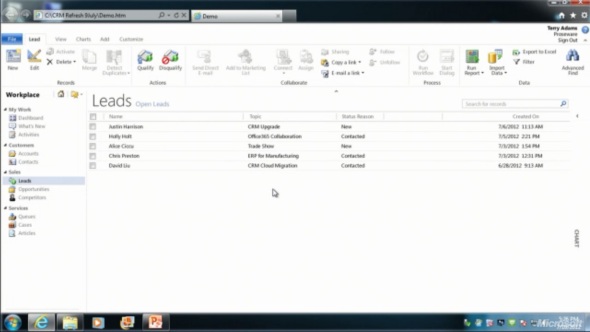
    The entity form windows will experience a much more significant update. Please note that one of the focus areas in the Dynamics CRM roadmap for Fall 2012 is developing the application functionality specifically for opportunity and case management, so I expect these changes will not initially impact all the entities. The demo at WPC covered lead and opportunity forms, below is a screenshot of how the lead form appears in the “Refresh” UI:
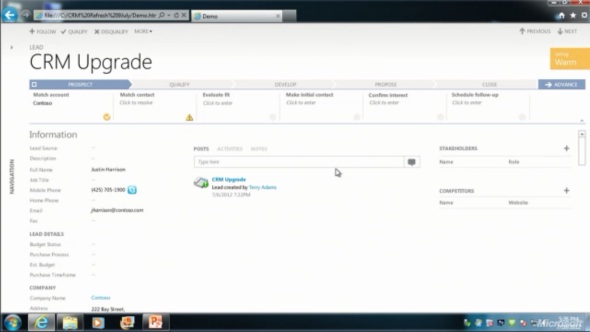
    Wow! We’ve come a long way from the CRM 2011 UI. Where should we start with going through the changes?

    Let’s take the ribbon first, or more specifically the lack of it. Although the main window of CRM will still present the full application ribbon, at least on the lead & opportunity forms the ribbon will be minimized by default. Clicking the “More” button will presumably reveal the ribbon, but we didn’t see this in the demo, because the intention of Microsoft is to hide it away as much as possible.

    “Hey, didn’t we just get the ribbon 1.5 years ago?” Yes, we did, but it doesn’t fit with the Metro design principles anymore, which state: only deliver the right information to the user at the right time, don’t overwhelm them. Touch UI on tablets and phones makes this even more important, which is quite easy to understand. For the power users (most of the readers of this blog, I’d imagine), the wealth of functionality presented on the ribbon must have felt like a welcome addition back in Office 2007 or CRM 2011, but this doesn’t necessarily mean it’s the right design choice for a CRM application. Results of the usability research Microsoft has conducted can be summarized in the following quote from Patterson:

    “Ribbon is great for the power user, but the everyday user just wants the file menu back.”

    Well, that’s it then. RIP ribbon 2011-2012, it was nice to know you. While the reality may not be quite as black & white, anyone designing solutions on top of the XRM platform should definitely take the inevitable fate of the ribbon into consideration.
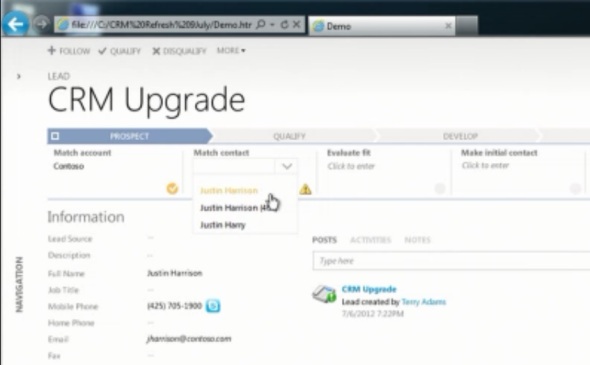
    If we don’t have the ribbon there to guide the user anymore, then what can we use instead? The answer is: processes. What is called the Process Driven UI in the development roadmap will in practice manifest itself as a graphical, interactive process stage indicator on the top section of the entity form.

    According to Patterson, the new UI is built on the Dialog Process foundation established in the original CRM 2011 release. Presumably the arrow titles will then come from process stage names. Each stage can contain multiple steps that the user needs to complete (although they don’t appear to be mandatory, at least in the lead qualification demo). Logically these would then be created with the Prompt and Response pairs available in current dialogs. The user can progress from one stage to another manually by clicking arrows on the far right corner of the process graph, but presumably there will also be support for creating conditions for automatic rules to update the stage of a record.

    Without knowing much about the features and initial limitations yet, the Process Driven UI looks like an excellent addition to the Dynamics CRM application. Workflow and dialog processes have so far been almost invisible to the user, which has made CRM look like just a static place for entering, reading and updating fields on a form. By bringing the process thinking into the foreground, the barrier for using CRM to really automate business processes will become significantly lower, which in turn can make the application a much more valuable tool for the organization using it.

    Moving on with the UI review, into the main form sections, we can see another welcome addition: the built-in follow-up activity functionality is back! When the form assistant was deprecated in CRM 2011 we lost the ability to quickly create follow-up actions from the previous activity form (unless you built a custom process for this, as I’m sure many organizations have), but now it returns into the  core Dynamics CRM application.

    These follow-ups, like any other related record presented on the form, are fully editable directly on the parent entity form instead of a separate pop-up window, which has been a paint point that Microsoft is working hard on trying to eliminate. Modern web apps don’t have popups and modern devices (tablets and smartphones) don’t support them, so inline editing is the only sensible way going forward.

    Notice how the traditional form fields of a lead are all stacked up on the left side. With the related entities navigation collapsed by default, this single column approach actually looks pretty good. Must be because the iPad and Metro apps are teaching us that fields don’t exist side by side but on top of each other. But what do you then fill the rest of the screen with?

    The answer: related records. In the opportunity form example there are subgrids of stakeholders (Connections), Competitors and pursuit team (possibly new team management related entity, or just a Connection type?), although they barely look like subgrids at all since the Metro style form design blends these seamlessly into the entity form. In the middle there’s a combined list that shows Activity Feed Posts, Activities or Notes, depending on the selected tab. Another design choice that sure feels better than spreading these records into a wall web resource, subgrid and a notes/attachments list as they are in the current CRM 2011 UI.

    Also pay attention to the top right corner of the form, where there is a highlighted section of entity fields, in this case the opportunity probability, rating, estimated close date and estimated revenue. Whether these are business required or business recommended fields that get automatically promoted into this section of the UI remains to be seen. It’s like a form header section that is actually editable, which could be another possible implementation method. As you may or may not have noticed yet, the header and footer section of the lead and opportunity forms are now history, with no apparent way of bringing them back, unlike the ribbon with the “More” menu.

    All in all, what the WPC 2012 demo showed us is almost like a whole new application. The way in which the lead-to-opportunity process now flows within the same window, without a single pop-up window is nothing short of revolutionary, if you compare it to the current Dynamics CRM UI logic. The navigation paths in the application have remained fairly static from v3.0 to 2011, with the latest major version adding a large amount of new UI components (ribbons, charts, subgrids, filters) into the mixture but not really changing the core concepts. Now with the Fall 2012 browser client update and the Metro CRM app looming in the horizon, all of a sudden the  Dynamics CRM user experience is about to get redesigned in a major way.

  • Dynamics CRM roadmap for Fall 2012 release and beyond (the road to Metro)

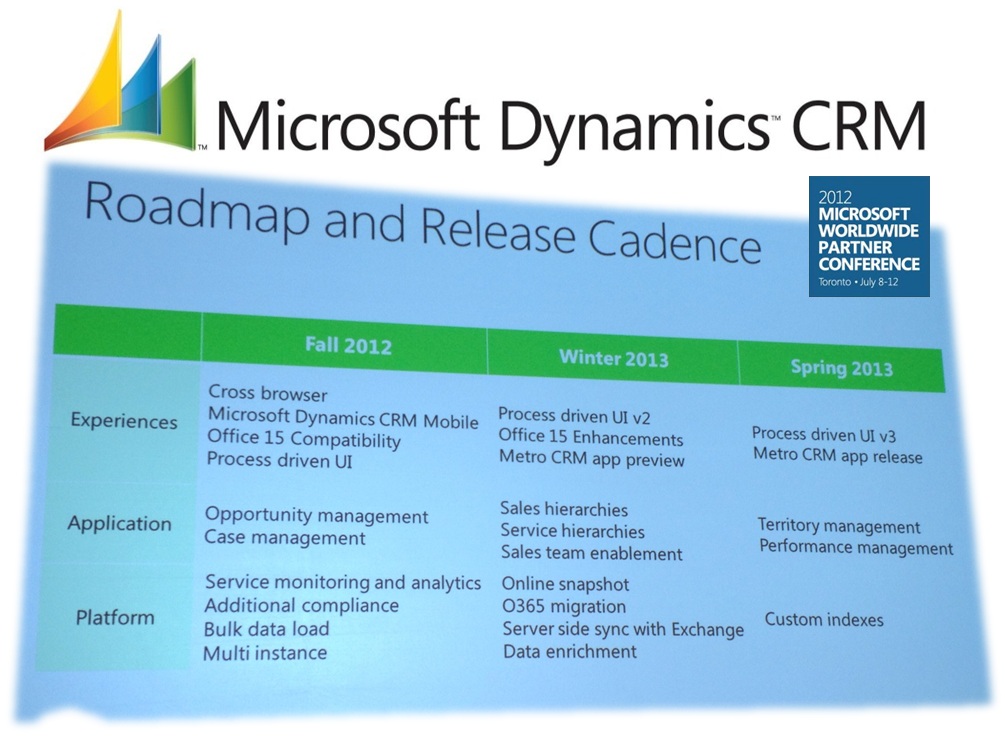
    After the unfortunate delay announcement of R8 / Q2 2012 Service Update planned functionality into Q4 2012 (cross-browser and mobile, read it all here), we have some more upbeat news regarding the future of Microsoft Dynamics CRM. As of now there is no official document available on this information, but the screenshots from World Partner Conference 2012 (WPC) already give us plenty of new information and reasons to get excited about the road ahead. Without further ado, here’s what the future releases of Dynamics CRM are planned to contain:

    Click here for a bigger version of the picture. Now, let’s break this roadmap slide down into pieces so we can better digest the contents.

    No more references to “Q4 2012 Service Update”, R9 etc. Instead we now have the functionality placed into Fall 2012, Winter 2013 and Spring 2013 updates. Whether this is the official new naming policy for Dynamics CRM updates remains to be seen.

    “Refresh” UI coming to the browser client presumably in Fall 2012 update. These UI changes have now been merged with the cross-browser support, which was delayed from Q2 2012 to Q4 2012. The new UI will have a Metro feel to it, but it won’t be an actual Metro app. Simplified appearance with less colors seems to be the way to go here. If you’ve seen the leaked Office 15 screenshots, that’s probably where CRM is going as well.

    Office 15 (Office 2013) compatibility in Fall 2012, enhancements during Winter 2013. Since we don’t have a beta of Office 2013 available, the future functionality is unconfirmed, but I’d imagine CRM to integrate with the Agaves feature, for example. Making the CRM client compatible with Outlook 2013 should be an obvious deliverable here.

    Process driven UI, to be launched in Fall 2012 update and developed further in consecutive releases. The demo from WPC shows a persistent process “timeline” graphic on top of the lead form, which visualizes the stage the record is in and he information & actions required in that stage. What’s interesting is that this process in the demo flows seamlessly from a lead record onto an opportunity record. This looks like a highly interesting new feature that will hopefully allow us to make workflow and dialog processes as well as status reason data easier for the CRM user to understand and interact with. Also notice how the lead entity form in the demo presents fields and subgrids in several columns side by side, with the form navigation collapsed.

    Metro CRM app preview in Winter 2013, full release in Spring 2013. Yes, the real deal, not just a generic Dynamics app we’ve seen in the keynote demos in Convergence 2012 and now WPC 2012. CRM reimagined.

    Application functionality updates. Opportunity management and case management enhancements in Fall 2012, presumably to go alongside the process driven UI. Sales & service hierarchies, sales team enablement in Winter 2013, providing some of the team functionality visible in the Metro demo. Territory and performance management in Spring 2013.

    On the platform side there’s plenty of new things lined up. For Fall 2012 we have:

    • Service monitoring and analytics (á la Office 365 Trust Center)
    • Additional compliance (more certifications for CRM Online?)
    • Bulk data load (improved data import wizard?)
    • Multi-instance (?)

    Winter 2013 promises us:

    • Online snapshot (can we download a copy of CRM Online database as self service?)
    • Office 365 migration (is this the move from CTP to OSDP, finalizing the “better together” story for existing customers?)
    • Server side sync with Exchange (R9 rumor from Convergence now confirmed, no more Outlook client dependency)
    • Data enrichment (could be Azure Data Market, InsideView or something similar for filling customer details from external databases & networks)

    And finally “custom indexes” for Fall 2013. A lot of questions arise from a single roadmap slide, but that’s what the upcoming Q4 2012 Release Preview Guide will hopefully address once released during the summer.

    A big shout out to CRM MVP Mark Smith from Magnetism for sharing the pictures he grabbed during the WPC 2012 sessions. You can find his WPC album on SkyDrive, filled with Metro goodness. I’ll close off with another beautiful scene from the Metro CRM and start counting the days to when I can get my hands on a Windows 8 slate running the preview app.

  • Convergence 2012 in a (virtual) nutshell

    Full disclosure: I didn’t actually physically attend Microsoft Convergence 2012 in Houston, Texas. However, that doesn’t mean you have to feel left in the dark, thanks to the immersive experience that is the social web of our times. With live webcasts, near-live blogging and some 6000 tweets on the #CONV12 hashtag, keeping up with the online buzz has never been easier. Here’s my summary of what the event looked like through the eyes of a virtual attendee and some thoughts on where Microsoft and its Dynamics product line appear to be heading based on the announcements at Convergence.

    Microsoft Convergence 2012 keynote summary on StorifyKeynote

    The opening keynote is where the stage is set for the rest of the event, so watching the live broadcast on Monday was definitely on my agenda. Sure, it’s all about building up hype for your products by telling how great you’ve done so far, how excited you are about your future roadmap and showing off with future concept demos that have little to do with the current reality. So what! You need a little show business alongside your business applications conference.

    Having the luxury of my PC keyboard & mouse at my disposal during the event allowed me to experiment with Storify, a social media storytelling tool. I captured the best tweets, photos and screenshots during the keynote and compiled them into my Convergence 2012 story. If you’re anything like me, the mental barrier for sitting down and watching a recorded conference event for 1.5 hours is quite high, so why not glance through the highlights of the show on the Storify summary? After that, you can decide if you want to read the full transcript or watch the recording on the Virtual Convergence site.

    Some notes picked up from the opening keynote included:

    • The Dynamics CRM momentum now stands at 2,250,000 users in 33,000 customer organizations.
    • “There are no happy Siebel customers in the world, there just aren’t.” – COO Kevin Turner on Microsofts internal journey from Siebel to Dynamics CRM.
    • Nearly half of the deals won by Microsoft over Salesforce.com have been due to the on-premises option and the hybrid model.

    Metro

    It’s Windows reimagined time all across Redmond now as we’re nearing the launch of Windows 8 later this year. This means everything that can be shown as a Metro style app running on a tablet, will be shown precisely that way. The fictional Contoso Electronics scenario of the big keynote demo used a highly customized UI built for the retail store experience only. A much more interesting demo was the project management Metro app that looked so realistic you could imagine it becoming an actual UI to some future Microsoft product to be rolled out at Windows 8 launch.

    We didn’t get any official screenshots of a Dynamics CRM Metro app yet, but luckily Garth Knutson was able to snap & tweet this picture of a UI concept presented in one of the sessions. Just imagine if assigning users onto a Dynamics CRM opportunity record would look like this, how much higher would the user adoption of a CRM system be among sales people? Ah, CRM reimagined…

    Microsoft Dynamics CRM and Metro UI

    But the road to metro is paved with Apples. The actual tablet product Microsoft had to show at Convergence was the Dynamics CRM Mobile client for iPad, which meant that Apple devices were well presented in many of the Convergence sessions. Funnily enough, during the conference an internal email leak revealed that Microsoft was banning the use of company budget to buy any Apple products for its Sales, Marketing, Services, IT, & Operations Group. Oh well, guess we won’t be seeing many iPads on stage anymore in the following events. For those of you who haven’t seen the current client yet (developed by CWR Mobility), see my previous post on Microsoft Dynamics CRM Mobile iPad screenshots.

    Microsoft Dynamics Metro app running on a Windows 8 tabletAn important aspect to note is that the move towards Metro apps and tablet devices does also have an impact on traditional desktop usage of Dynamics CRM. Back in November I speculated that the legacy of Outlook could not be carried over to the world of Windows 8 tablets in its existing form. Since then this assumption has only been enforced by the announcement of Windows on ARM (WOA) tablets with no classic Windows application support and no sign of Outlook in the list of Office apps promised for these “iPad killers”. What this means is that the functionality exclusive to Dynamics CRM Outlook client must be moved to the cloud. At Convergence, the following functionality was more or less revealed to be included in the R9 release later this year:

    • Direct synchronization of activities through Exchange (instead of Outlook)
    • Support for “track in CRM” functionality in Outlook Web Access (OWA client)

    Woo-hoo! It’s been a long time coming, but to me this is a clear sign that Dynamics CRM is definitely on the right track in terms of becoming more compatible with the habits of today’s mobile workforce; how they manage their activities and messages on multiple clients, not just the single Outlook on their work laptop. Making the CRM features available through new channels, such as the Office 15 Agaves, is very important for making Dynamics CRM a relevant tool for knowledge sharing as the applications and devices surrounding it are evolving.

    (more…)