Tag: product

  • Don’t trust the Microsoft 365 admin center product information

    Don’t trust the Microsoft 365 admin center product information

    In this age of online commerce, and especially when selling digital subscription services, one might think that the online storefronts of large corporations would contain accurate product descriptions. Or that at least it wouldn’t take many years for incorrect information to get fixed.

    Neither of these assumptions are correct when dealing with Microsoft 365 admin center’s online store, a.k.a. the “purchase services” tab. The detailed information that is shown to customers who are looking to purchase Power Apps licenses is not valid in this portal. It hasn’t been valid for close to 4 years now.
    During the past couple of years, I’ve tried every imaginable channel for contacting Microsoft about this. I’ve reached out to MS partner forums dedicated to licensing information. I’ve posted into Microsoft MVP program related forums dedicated to MS Business Applications licensing information. I’ve reached out directly to the product team who owns Power Apps.

    Nothing has helped in getting this information fixed. Which means that I must assume it will never get fixed. The only way to communicate about this to the people who suffer from it (customers, partners) seems to be in writing a blog post like this.

    Let’s take a look at the online commerce experience for someone who’s got a Microsoft 365 tenant and wants to purchase Power Apps licenses directly from Microsoft. In this scenario we want to specifically understand the options provided in the subscriptions called “Power Apps per user plan” and “Power Apps per app plan”.

    Finding Power Apps products from Microsoft 365 admin center

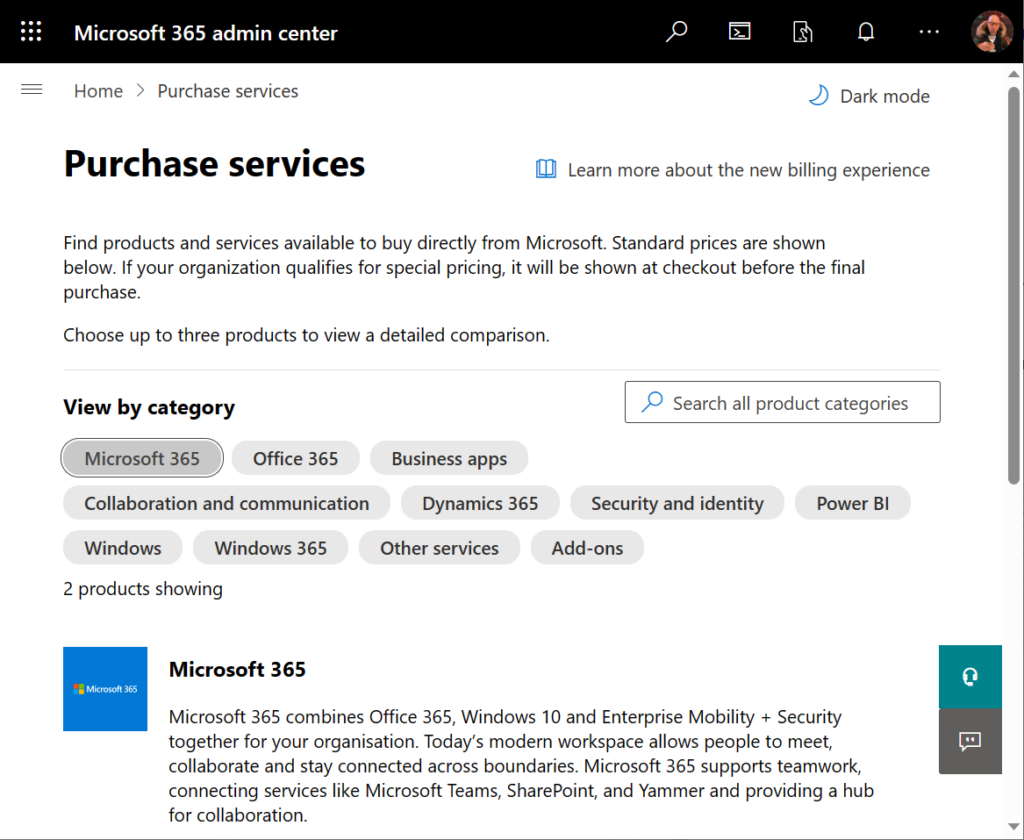
    The first hurdle will be in finding the products. One might think that Power Apps would be listed under the “Business apps” category (since there isn’t a category called “Power Platform”). However, we only find the Power Apps per user plan from that category.

    Let’s try a text search. Searching for “Power Apps” (or the old name variation “powerapps”) gives us the results we were after, yet in a surprising place:
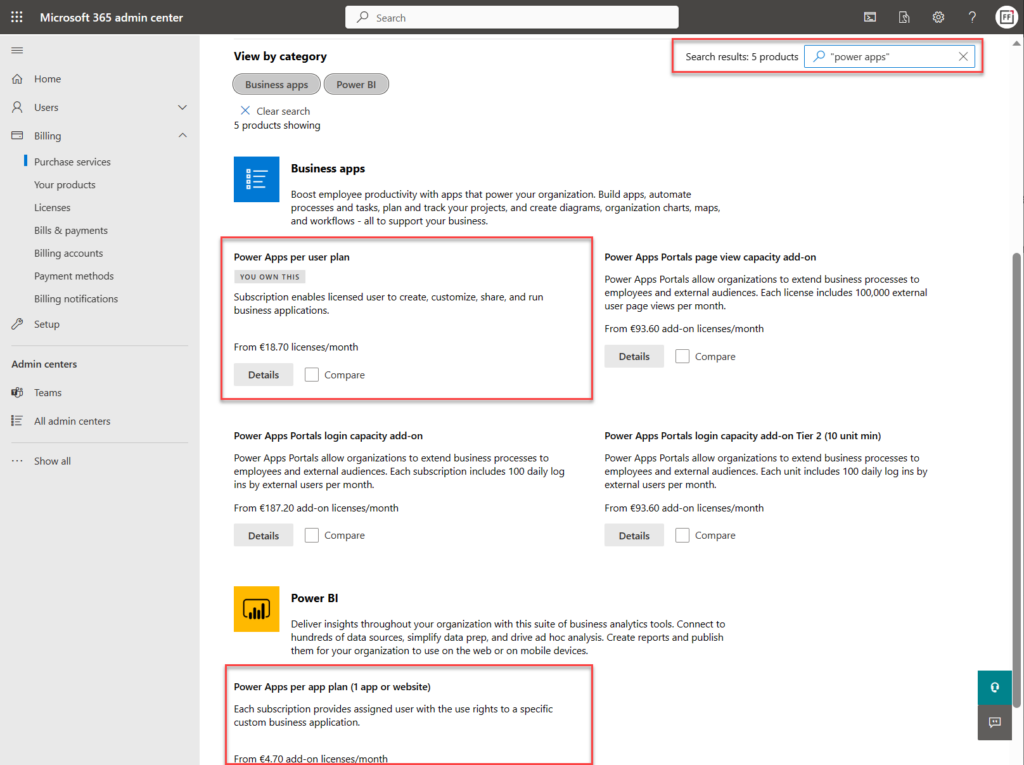
    Why on earth would the per app plan be categorized under “Power BI”? Well, for the same reason I need to write this blog post. The product information under Microsoft 365 admin center is simply wrong in many cases. This specific miscategorization has been in place for several months now, as an example.

    Comparing Power Apps product features in Microsoft 365 admin center

    Now what we’ve got the 2 Power Apps SKUs (“stock keeping units”) on the same results page, we can tick the “compare” box on them. Upon opening the comparison page, this is the result we get:
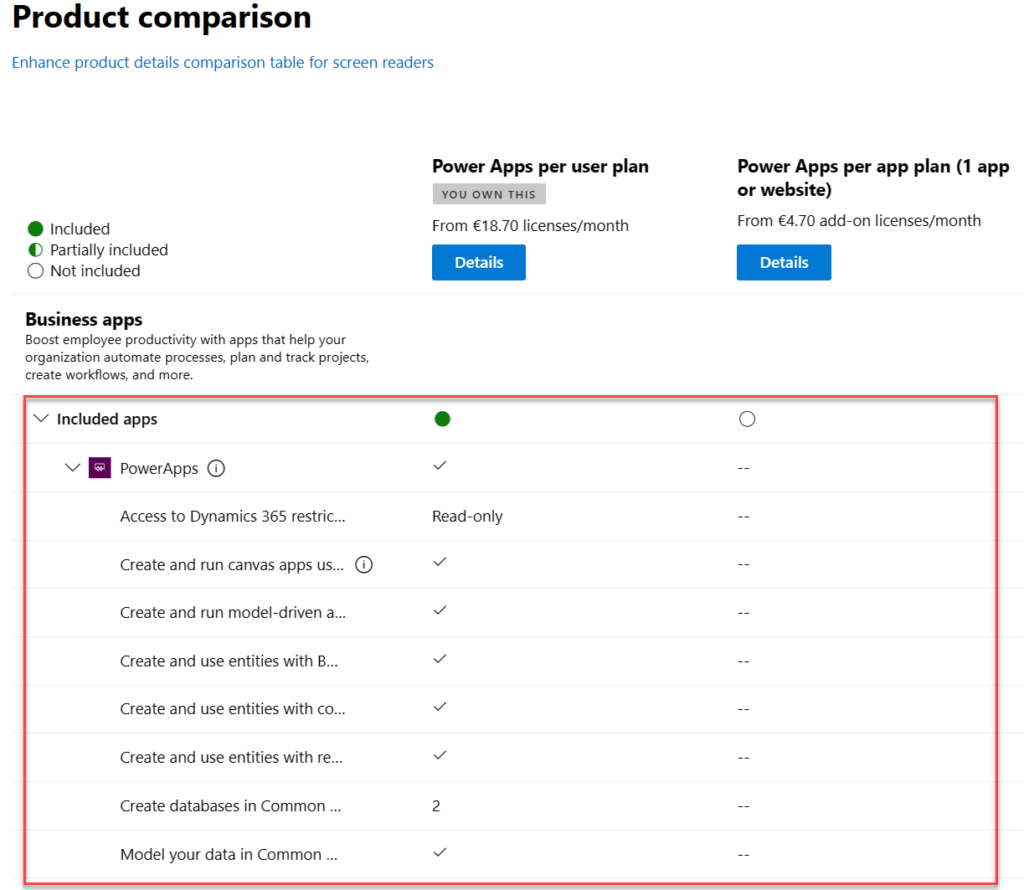
    There is absolutely nothing right about these product features. Even the product name and icon in the comparison section are outdated. They refer to the old SKUs of PowerApps Plan 1 and PowerApps Plan 2, which were replaced by the Power Apps per app plan and Power Apps per user plan on October 1st, 2019.

    The problem is, someone responsible for the commercial information managed in the Office 365 / Microsoft 365 online store didn’t understand this change was not simply a rebranding. You can’t just replace “Plan 1” with “Per App” and get away with it. Someone truly missed the memo of Charles Lamanna when he announced the change on July 25th, 2019.

    “We are also removing feature and capability differentiation across the paid, standalone PowerApps and Flow user-based plans. All customers will be able to benefit from the full features of the services, regardless of which plans they purchase. Key concepts like complex entities, or model-driven applications, will no longer be available in only some of the licenses.”

    Taken from “New licensing options for PowerApps and Microsoft Flow standalone paid plans” on Power Apps product team blog

    Let’s look at the list of features that are presented in Microsoft 365 admin center ~4 years later and see what errors we can spot:

    “Access to Dynamics 365 restricted entities.” It used to be read-only for Plan 2 and no access for Plan 1. Today, the entities (nowadays renamed “tables”) categorized as restricted are read-only for any Power Apps license. Also, everything else has full CRUD rights.

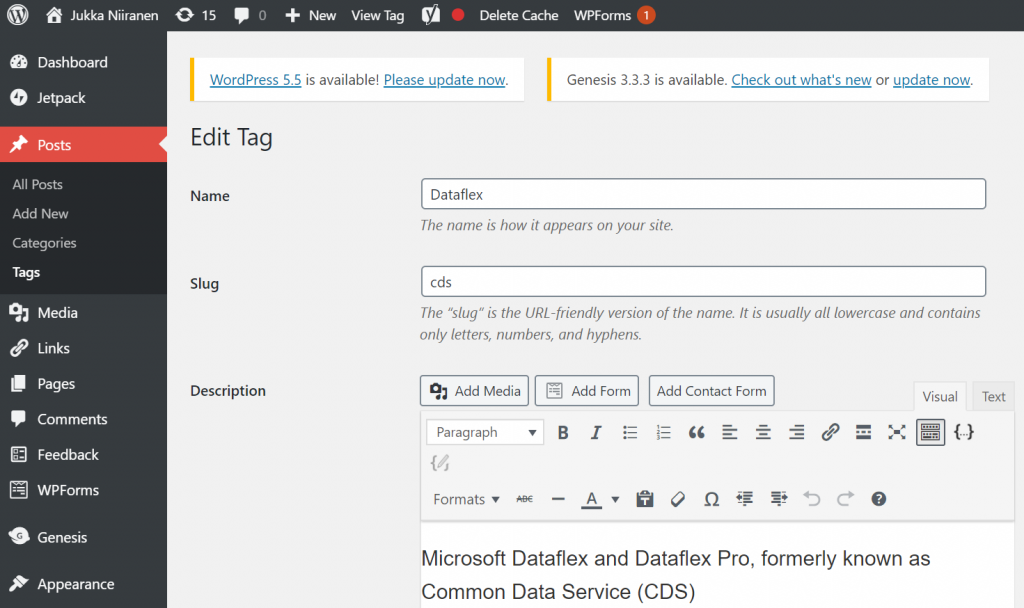
    “Create and run canvas apps using common data service for apps”. First of all, “Common Data Service (CDS) for Apps” as a term was replaced with Dataflex …sorry, Dataverse, quite some time ago already. Both Per App and Per User today have identical right to using this, unlike what the comparison table claims.

    “Create and run model-driven apps using Common Data Service for Apps”. Showing this as not available in Per App is entirely false. As anyone reading the memo from Charles would have spotted: “Key concepts like complex entities, or model-driven applications, will no longer be available in only some of the licenses.”

    “Create and use entities with Business Rules and async workflows”. Available in both Per User and Per App licenses, unlike what the product comparison table says.

    “Create and use entities with code add-ins”. Sigh… See above.

    “Create and use entities with real-time workflows”. Oh come ON! See above.

    “Create databases in Common Data Service for Apps (per user)”. Ooh, what an ancient relic this line is! Saying that Power Apps per user plan allows you to only create 2 databases has no basis whatsoever in the current licensing model. Customers can create as many Dataverse environments (meaning CDS / XRM databases) as their available storage capacity permits. Furthermore, today anyone can create up to 3 Developer environments for themselves, without having any premium Power Apps license.

    “Model your data in Common Data Service for Apps”. Does anyone still want me to explain to them that there’s no difference between Per User and Per App entitlements here? No? Good. You got the memo then.

    Closing thoughts

    For those of use who have been tracking the platform evolution of MS Business Applications over the years, it’s pretty much business as usual to encounter MS materials and information that reference outdated versions of products. The names change, the icons change, the licensing models change – this happens all the time and we’ve come to expect it already.

    If you don’t have prior experience on the commercial aspects of Microsoft’s product stack, though – this can be highly confusing. Imagine that you’re trying to compare different low-code application platform vendors and the information provided by the online store is like what we’ve seen above. Not the best way to build trust and convince customers that the pricing model is transparent.

    Why does this happen then? Why aren’t the product details updated in customer facing portals? Well, I don’t think anyone intentionally wants to mislead the audience here. I believe it’s simply a reflection of how inside a huge corporation like MSFT it can be very difficult to coordinate such updates. Every time some product gets “reimagined” there must be a million places that would need attention internally at Microsoft (us partners surely feel the impact, too). Sometimes the friction in the systems may just be too great to overcome, such as in commerce engines like Microsoft 365 or technical dashboards like the Azure portal.

    Power Platform products and pricing

    If you’re interested in seeing the Power Platform product prices on a single page, take a look at a summary that I’ve created for my own reference: Price points of Power Platform. I can’t promise it to be always up to date either, but at least I have a lot less bureaucracy to overcome than the official channels.😁


  • There never was a “Microsoft Dataflex”

    There never was a “Microsoft Dataflex”

    There are a lot of benefits in taking long enough holidays during the summer, like many people here in the Nordics do. Going offline for a while is a great way to reset your brain and force-close all those open browser tabs of the mind, to free up memory capacity for properly engaging in brand new tasks.

    If you were lucky enough to set your vacation time between July 21st and August 11th, you managed to dodge an unfortunate episode in software product launches from Redmond. Here are the key dates:

    • July 21st (first day of MS Inspire conference): a new brand name “Dataflex” is announced, with Common Data Service renamed as “Dataflex Pro” and a new subscription tier “Dataflex” promised for all Microsoft Teams customers. (My blog post about it is still here.)
    • July 29th: the name “Dataflex for Teams” is used for the first time to reference the previous “Dataflex” tier that’s bunlded with Teams, in an effort to make this product connection more clear.
    • August 11th: all references to “Dataflex” in all Microsoft websites are taken down. The announcement blog posts are brought back online with the terms “Dataflex” and “Dataflex for Teams” replaced with “Project Oakdale”, and “Dataflex Pro” now reverted back to “Common Data Service”.

    What happened? The answer is: litigation from the owner of the trademark “Dataflex”.

    There already was an established software product with the name “Dataflex” out there – in fact it had been around for 4 decades already. Immediately upon the launch day of July 21st several community members were quick to point this out, as indeed it was in practice impossible to miss this brand name overlap when using a search engine. Why Microsoft decided to proceed with their plans on renaming CDS into something like this is something we’ll never know for sure. Some had initially speculated that perhaps there was a preliminary agreement in place with Data Access Worldwide to transfer the ownership of the trademark, but based on the immediate legal action that the company understandably took to defend their rights, nothing like this was likely ever discussed. Our conclusion must therefore be that Microsoft knowingly and intentionally attempted to change the name of its existing technology (Common Data Service) into something that was already in use within the same domain by another software company (Dataflex) without considering the consequences.

    The end results is almost like a story taken from The Onion. Even if we are living in 2020 right now and the world appears to go mad every few days, it’s still an utterly bizarre episode in software business. I can’t recall seeing anything killed this fast after it’s announcement, which in the case of Microsoft Dataflex was only 21 days. Neither can I think of an example where something with such a clear potential for software product naming conflict would have been attempted. It is indeed similar to as if MS would have launched “PlayStation 6”.

    It’s of course not unusual for Microsoft to pull a product name between its announcement and the planned GA. Remember Dynamics 365 Business Edition, for example? Just because we see something presented on slide decks aimed at MS Partners as guidance for building their business around it, that doesn’t guarantee it will ever see the light of day. Shift happens, plans change and a lot of the partners have already become accustomed to this risk as simply the cost of doing business in this ecosystem. This time the product itself is not pulled, though. The need for coming up with a new brand will most likely delay the commercial roll-out of CDS features for Microsoft Teams based apps, but it’s important to keep in mind that this is all still happening. CDS will most likely become a mainstream data platform to replace use cases where SharePoint Lists have previously been used.

    SkyDrive is another example of a Microsoft product brand that suffered from the conflict with an existing trademark and had to be renamed OneDrive as a result. BSkyB as a media broadcaster and digital services provider wasn’t entirely in the same business as Microsoft with it’s personal cloud storage that was following in the footsteps of Dropbox, yet the end result of that case showed that at least between large enterprises such near misses with strong brands can become costly. Even features of a product like the “Metro UI” with Windows 8’s modern user experience had to be avoided due to objections from German reltailer Metro AG. Both of these are examples where it wasn’t obvious to an outsider if a trademark was actually violated, though. With Dataflex the evidence was in plain sight for everyone.

    Lucky for us, MS had not yet made any public preview or a commercial subscription of the new Dataflex branded services available by the time they had to call the whole thing off. It was only the early adopters in the partner field and the passionate community members a.k.a. #PowerAddicts that lost some of their work hours due to the branding incident. Yeah, I had to go back and edit a number of web pages, rewrite presentation decks, revert our service documents etc. to recover from the erraneous information that had been published on July 21st. The majority of people out there in the MS ecosystem probably didn’t yet even get a chance to understand what Dataflex meant or how it was different from CDS, so they will have dodged the bullet when it comes to loss in productivity.

    There is, however, a much greater loss here than the “Find and Replace” activities needed for changing product names. It is the loss of credibility that Microsoft’s Business Applications specifically suffered from this very unfortunate product naming incident. The worst thing is that there has not been any explanation presented to the genereal audience on what’s going on, rather we’ve just seen the word “Dataflex” disappear and get replaced with “Project Oakdale” or CDS. Microsoft at this point is facing legal action from the owner of the Dataflex trademark, which we all know from the many Hollywood movies we’ve watched that “anything they say can and will be used againts them in a court of law”. It is at moments like these where it would be crucial for companies to have a voice, to be able to reach out to their most important audience (customers) and explain what happened & what are they going to do about it.

    I can tell you that it would honestly be a full time job keeping up with A) product naming and B) product licensing of Microsoft Business Applications. It’s not full time for me (luckily), but since I also do it as a hobby / community activity, I can say I’m pretty well educated on what the “right” answers in this area would be at any given time. For anyone who actually IS covering the actions of Microsoft full time in a professional manner, Business Applications is an area they usually openly admit to struggle in.

    At the end of the day, what matters to each and every one of us the most in this MS ecosystem is how the end customers react to what they see & hear. While the marketing machine at Redmond surely is capable of capturing the attention of IT professionals worldwide with their news and campaigns, what it does not seem to be very good at is explaining “what does this really mean to you”. As the cloud platforms grow and become an ever larger pool of individual apps that form a spider web of integrations underneath the user interface, the need for someone to cut through the marketing speak and explain the customers what’s really happening here seems to be growing exponentially. What we all could do with the Power Platform is simply magical, yet the understanding of A) through which products, B) based on what technology, with C) what levels of effort and D) for what license cost – this level of understanding is lacking pretty much anywhere I look. I’m not talking about the “how to” instructions of building apps but rather the higher level discussion of where business decisions get made. It is here where the damage from confusing messaging is, in my opinion, holding this ecosystem back.

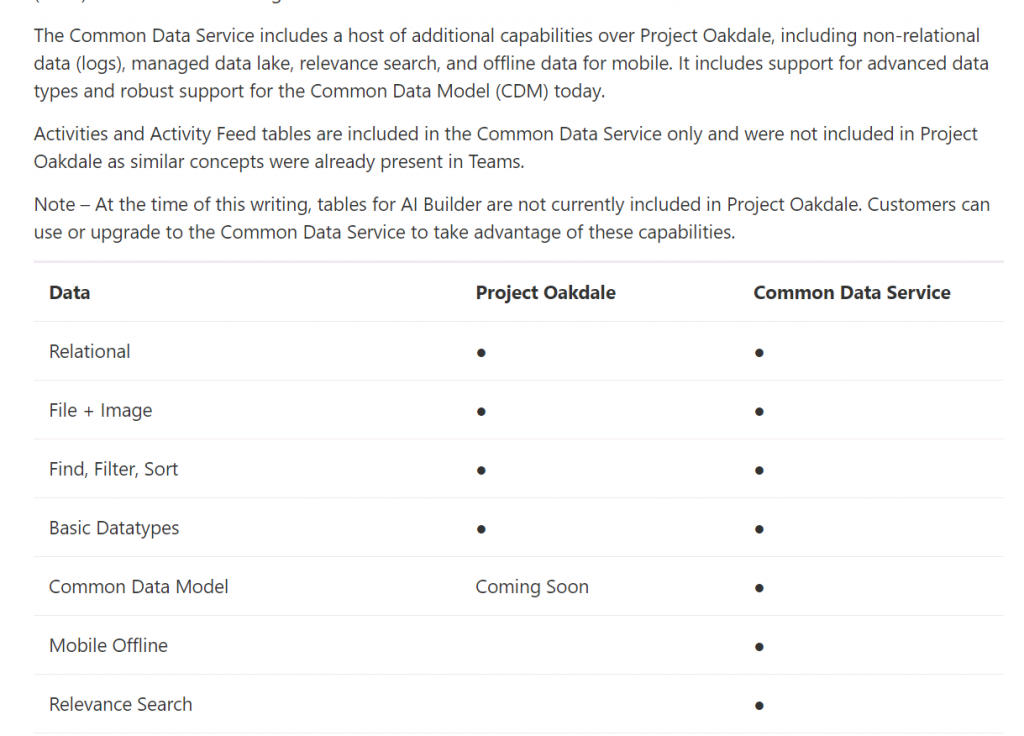
    To close things off for now, as we wait for the new product names that Microsoft has said they will be giving to the technology briefly known as Dataflex, let’s recap where we are right now. “Project Oakdale” is the codename that is for the time being used to refer to the “Lite” version of CDS that will be made available to all Microsoft Teams customers at no charge. Common Data Service is what we will continue to use as the term (for now) when talking about the full capabilities of data management, entities, solutions, Model-driven apps and many other advanced features in Power Platform. This post on the Power Apps blog (originally from July 29th) is still valid in every other aspect, apart from that one “D” term that got removed on August 11th.

    It’ll all work out in the end, I’m sure. This time next year there will probably be a whole number of other product names that we’ll be using when discussing the latest turn of events in the crazy & exciting world of Microsoft Business Applications. Dataflex and Oakdale will live on as one of those trick questions in the pub quizzes run by the community. No one died as a result of this episode.

    In a way, us #PowerAddicts simply got a taste of what the BizApps whirwind must at times feel like for the end customer who isn’t involved with this technology of ours, all day, every day.

  • Working with Price List Items in Dynamics CRM

    Working with Price List Items in Dynamics CRM

    Despite of the recently refreshed user interface of Dynamics CRM 2013 that offers a much more fluid user experience than previous versions, there are still areas in the application that are not very user friendly. Many of these revolve around product and price information, regarding how it is presented and what actions are allowed on it. In this blog post I will drill into a common scenario that organizations who use CRM for managing price list data may run into and present a few options on how to make their lives easier.

    Price List and Price List Item Views

    A pet peeve of mine in Dynamics CRM has always been the UI that the Price List entity offers to the end user. As many of the readers of this blog will surely know, price list items are the way how products, units, price lists and the all important price figures come together in the CRM data model. If you want to leverage the product catalog and any price calculation features in the sales module, you’ll need to work with price list items and create at least one of them per each product you plan to include as line items on your opportunities, quotes, orders and invoices.

    Unless you’ve built a custom integration to a back-end system that will automatically provide the latest pricing information for CRM, there’s quite a bit of work involved in maintaining individual price list item records when prices change or new products or lists are introduced as a normal part of the day to day business. When a CRM user opens a price list record, a reasonable assumption to make would be that he or she is interested in reviewing the pricing information given to the included products. Unfortunately the Dynamics CRM UI does not make such an assumption, rather it thinks the user is interested in only viewing a list of products and their units but not the actual price information in the amount field. Here’s what the default associated view of the price list items gives us:

    Price_List_Item_CRM_2

    Well, that sure looks like a good candidate for some entity customization work. Yes, it does, but there’s a “but”. When you open the customization UI and navigate to the price list item entity, you discover that the views are actually not customizable. Nor can you add any of your own views for that matter, which means you’re stuck with the default UI. If you think that the price list item entity should allow view customization, then there’s a suggestion on Microsoft Connect that you definitely should go and vote for (if you need help in registering to Connect itself, see this post).

    Exporting the Price List Item Data to Excel

    With this limitation in mind, what are our options of producing a true price list view with product and price information shown side by side? For any Dynamics CRM power user the first thing to come to mind will surely be to export the data into Excel. Unfortunately the uncustomizability of the Price List Item entity also means it has been blocked from showing up in Advanced Find, which would normally be our tool of choice for preparing a CRM data export.

    Luckily there’s still an Export to Excel button visible in the ribbon of the price list form when we are viewing the associated price list items view. Clicking this will present us with an option to either export the data in static format (which would just give us the same columns as the current view) or to create a dynamic Excel sheet in two possible formats. Both of the latter options, pivot table and worksheet, present a follow-up dialog where choosing the required columns from the price list item entity and even any parental entity like product is possible.

    Price_List_Item_CRM_3

    When you export the view into a dynamic Excel sheet in an on-premises CRM environment, you can actually go and look at the SQL query that the view is using for pulling the data from CRM to Excel. Just click “Change Data Source – Connection Properties – Definition” and copy the query from the Command Text window into Notepad. With a little tweak that removes the reference to the currently viewed price list record we can use the same dynamic Excel sheet to retrieve price list item data for all the price lists in the system.

    Price_List_Item_CRM_1_small

    In the SQL query you’ve copied to Notepad you’ll find a reference to the price list from under which we exported the related price list items. It will look something like this: where  (“productpricelevel0”.pricelevelid = N’CEA84006-AD7B-E311-9405-00155D6214FA’) . Just remove this whole where clause, thus expanding the query to retrieve all records from the price list items table in CRM, regardless of the associated price list. Then with the Excel pivot table tools you can group and filter the data any way you please, effectively creating a price list report that views the latest information from CRM in a layout that best suits our purposes. (more…)