Tag: Portals

  • Forget static plans, use the Release Planner for Power Platform roadmap info

    Forget static plans, use the Release Planner for Power Platform roadmap info

    It’s that time of the year again when Microsoft have published their plans for the upcoming 2022 Release Wave 2 for Power Platform and Dynamics 365. “How exciting! New PDF documents with hundreds of pages to read!”
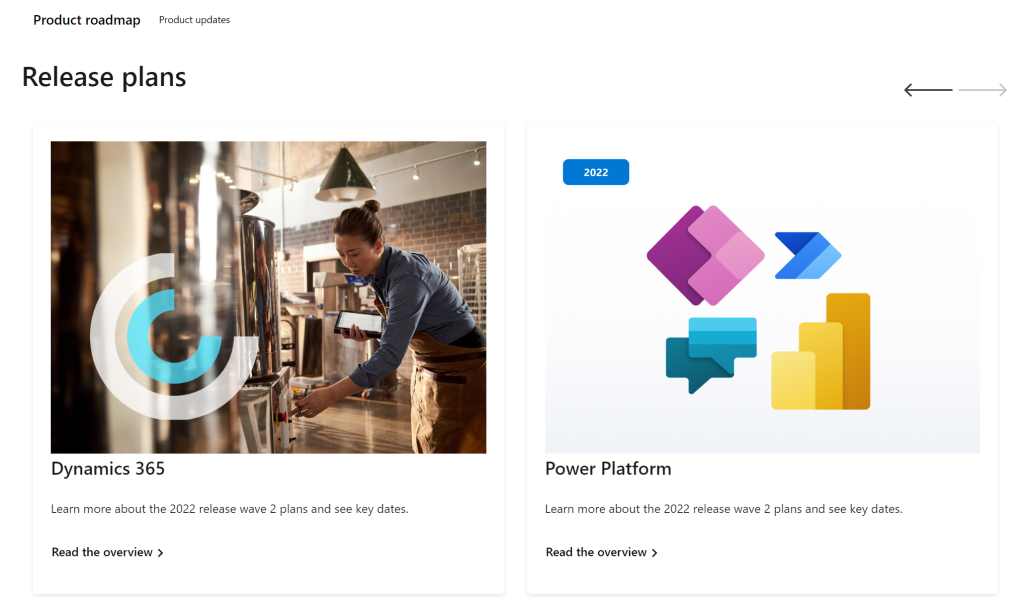
    I’m sure many of you have learned to skip the static PDF files by now and instead add bookmarks to quickly get to the online version of these plans. Like these:

    That’s much better, but it isn’t really optimal either. I don’t know about you, but personally I’ve had a hard time getting very excited about the new Release Plan drops for a couple of years now. There’s just something not quite right with this “wave” model.

    Everything changes, always

    Don’t get me wrong. It’s great that the Power Platform community members are curating their own top lists from these Release Plans twice a year. There’s plenty of value in seeing what items people are actually excited about, not just reading MS corporate style “excitement” on everything included in the Plan.

    Yet the reality is this: the contents of these Releases Plans is likely to reflect less than 50% of what will actually be delivered into the products over the course of the wave. If you need proof, then check out the most important page of the online Release Plans: change history.

    At any given time, Microsoft product teams are working on several new features and enhancements that they are not yet ready to disclose. They’ll get added to release plan later (or sometimes launched without it). As a very recent example, Managed Environments was announced as a preview feature on the same day as the 2022 wave 2 plans came out. The feature is not yet in either wave 1 or wave 2 documentation. It’s very natural that the product marketing’s need for making feature specific big announcements is a higher priority. After all, diligently maintaining the long list of similar release items won’t bring that much attention to any single feature.

    Then there’s the inevitable reality of planning / estimating in software development. Things can get delayed due to too optimistic estimates, dependencies to other items/products, changes in MS product strategy, acquisitions, and so on. Ultimately the Release Plans are just a publicly visible backlog of what the team is working to deliver. It’s better not to get too excited about any specific feature on the list – often those will be the ones that get eventually postponed / removed…

    While it’s kinda nice that we have a steady rhythm of 2 release waves per year that can be easily communicated to customers, the reality is more messy. These waves are forcing an artificial structure onto the ongoing product development work. Remember: the “wave” is not any actual release in itself. October 2022 will deliver a tiny fraction of the items listed in the 2022 wave 2 plan, as the wave lasts for 6 months.

    While the waves themselves are sequential, Microsoft’s communication model has overlap for the waves. The fact that the wave 2 plans are first announced when there’s still 3 months worth of wave 1 to go (until end of September) can make it complex to keep track of items. You can’t tell whether a feature is in the product roadmap just by looking at the latest plan since it might be in the previous pipeline still. Here’s one example:

    If only we had a more dynamic view into the Power Platform and Dynamics 365 product backlog, without these artificial “waves” to confuse us…

    Say hello to the Release Planner website!

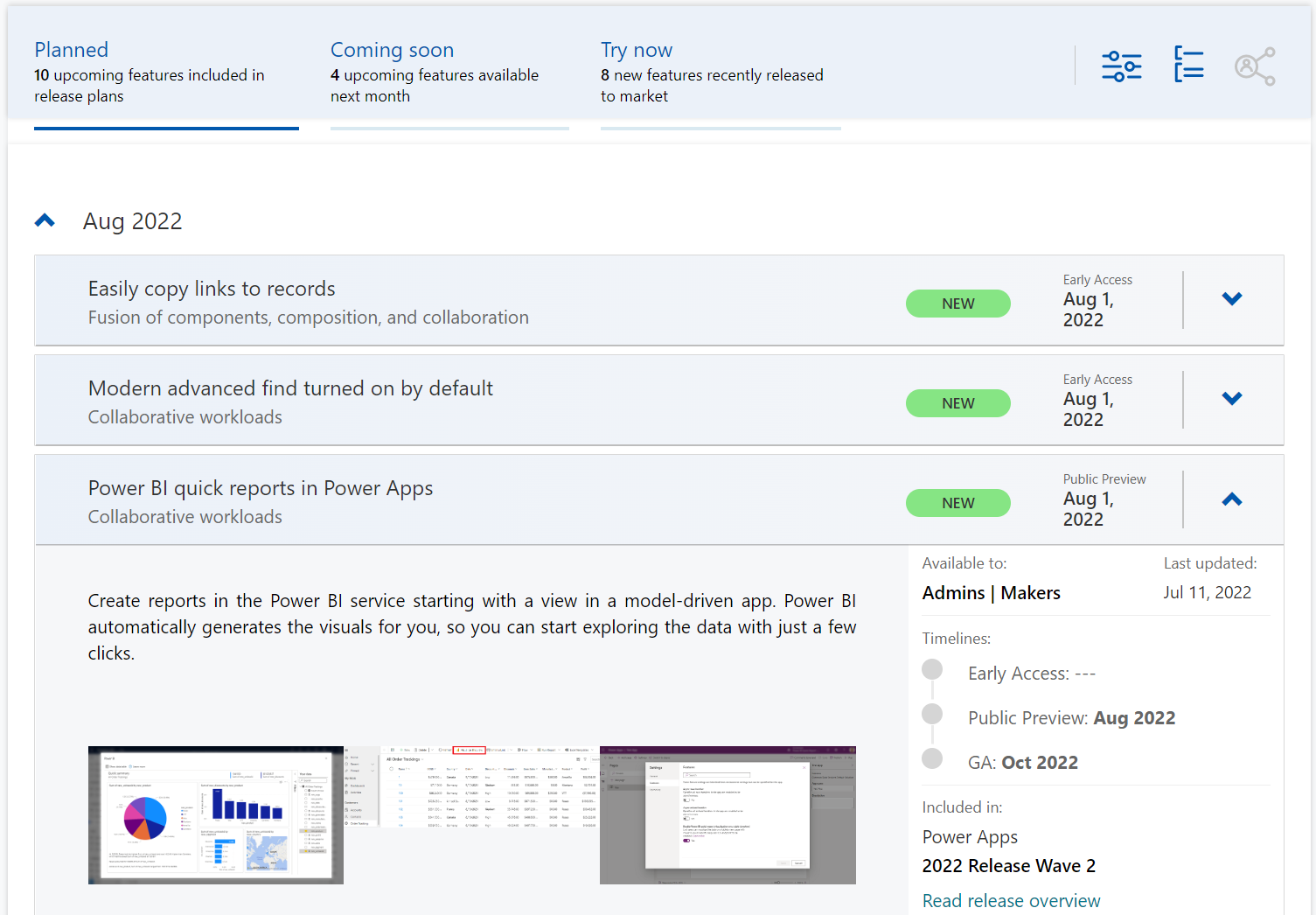
    Although it’s still a preview in itself, the Dynamics 365 and Microsoft Power Platform release planner is already a very worthy rival to the familiar Release Plans. If you’re familiar with the Microsoft 365 roadmap, then this a similar website that provides the current state of what features are being planned, rolling out or recently delivered.
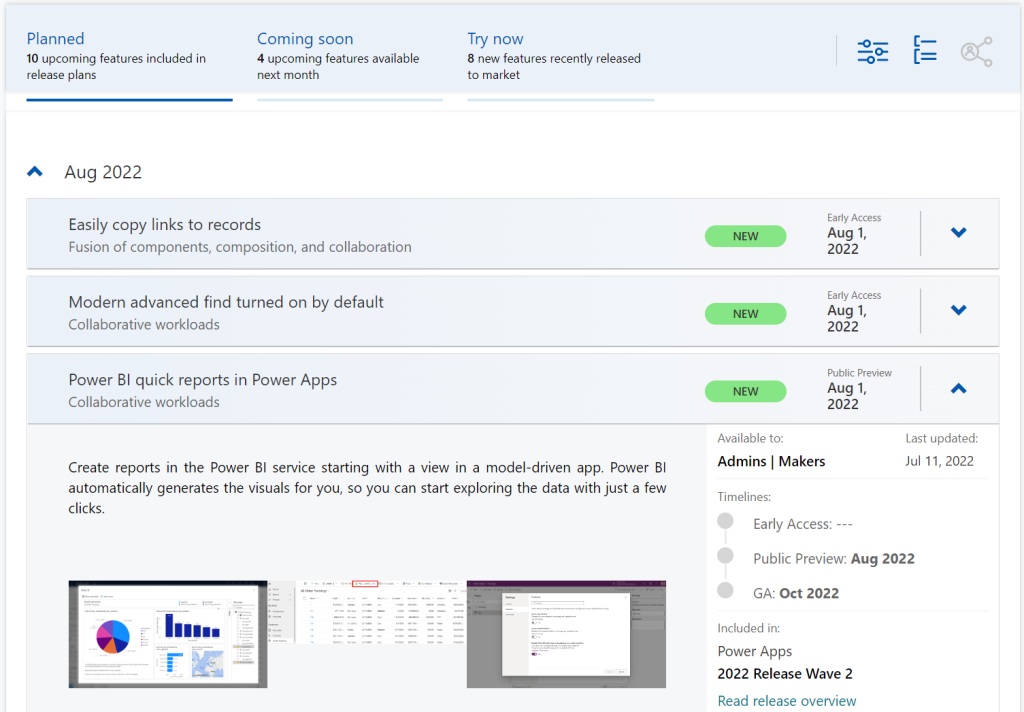
    The data on release items is largely identical to what the official release plans already offer. However, it’s not wrapped within the wave concept, meaning everything can be found under a single site.

    There have been recent enhancements made to the Release Planner (listed here). Searching the release plan items with keywords is now possible. There’s a change history to reflect updates made to delivery milestones (i.e. delays in early access / preview / GA dates). Finally, filters and sorting options have been introduced, so you can view only the latest additions (7/30 days) or updated items across Dynamics 365 and Power Platform.
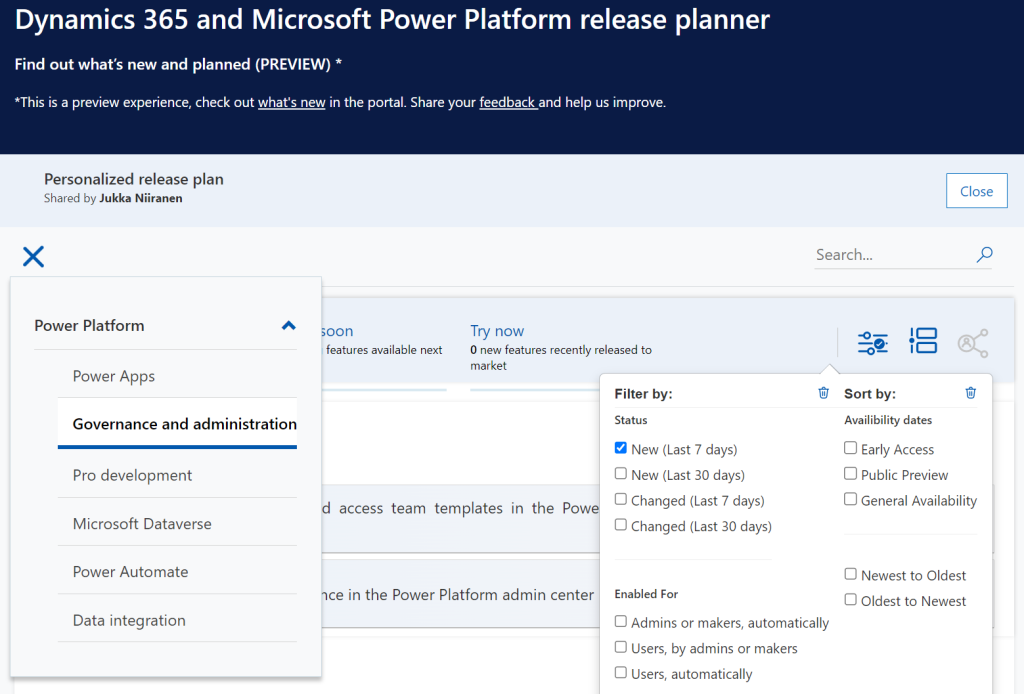
    Since the Release Planner is a Power Apps Portal Power Pages website instead of a Microsoft Docs site, it is much easier to implement such features that are intended for working with a list of records. Docs is great for documentation of course, as well as version control through its GitHub back end.

    One really neat feature in Release Planner is the personalization option. When I log into the site, I have the ability to pick items into “my release plan”. Essentially its a way to create a list of favorite items to follow. Because let’s face it: we all focus on some corner of Power Platform or Dynamics 365, not the entire MS BizApps cloud. Creating a personal release plan also provides an option to copy a public share link for it:
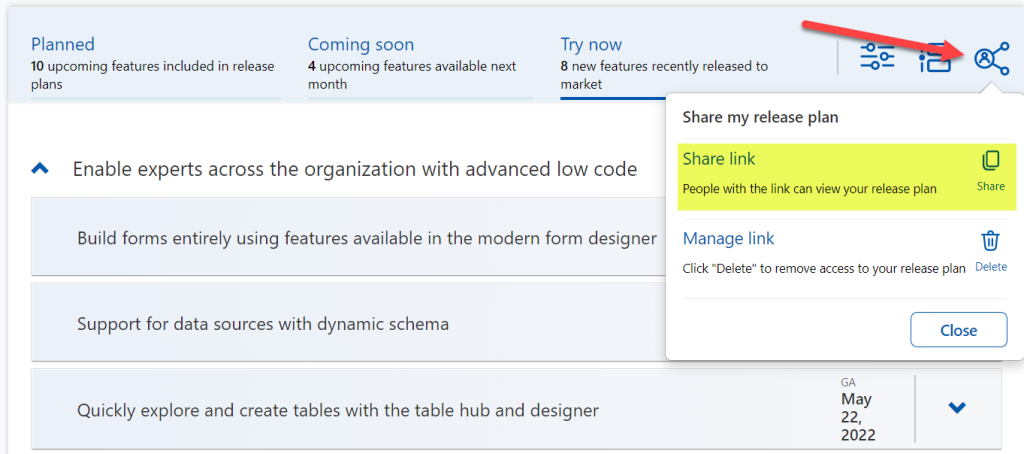
    Using a short URL service, I can now create an easy to remember link that will always take me to the list of Power Platform release plan items I’ve flagged for myself to follow. You can of course have a look at it, too:

    https://ff.tips/releaseplan

    With this link, I can now spend less energy on A) remembering if an item has been in wave 1 or 2, and B) stop hunting through the change history page for status updates. Oh, and it also works fairly well on a mobile device, whereas trying to navigate the legacy release plans on MS Docs seems to be impossible (at the moment at least, on Android/Chrome).

    Of course any dynamic website is only as good as the underlying data that is used for rendering it. At the time of viewing, there seem to be tens of release plan items from 2022 wave 1 that have not yet been updated to reflect the current status. The Release Planner site says they should be available/GA when in reality they’ve been delayed, postponed or even cancelled. This is something that technology in itself won’t fix. I hope as Microsoft’s release planning process matures beyond thinking about “waves” we’ll see more up to date information in the Release Planner site, too.

    Did you know?

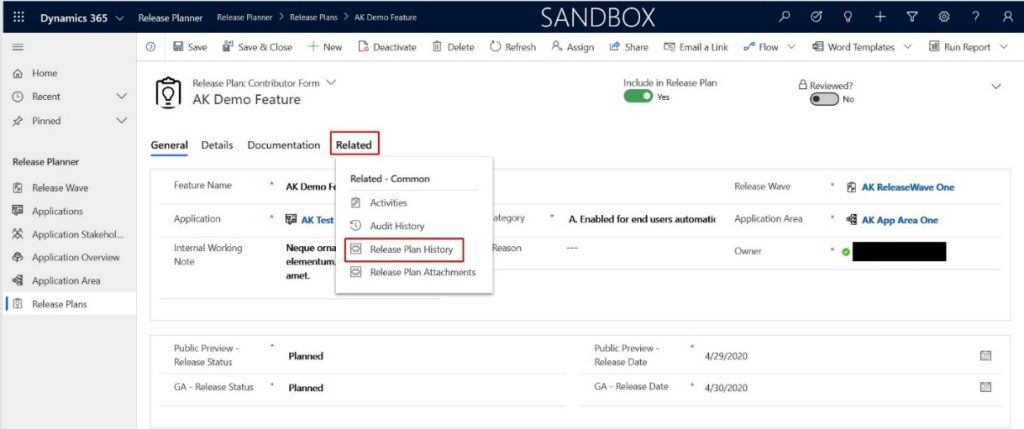
    This Release Planner isn’t the first step for Microsoft to use the Power Platform to manage the product development of the very same platform. Already back in 2019 the process and tools used by the BizApps team for release planning was published in a blog post. There’s a sample app on GitHub that contains a solution with the tables, forms, plugins, PCF controls, cloud flows etc. for deploying your own copy of the release management tools.
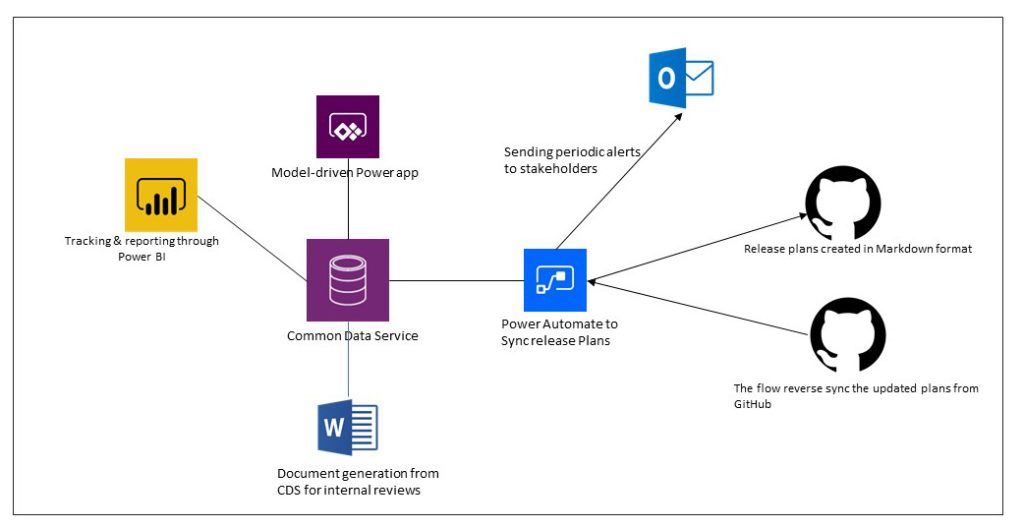
    This process was designed to dynamically produce outputs from the release items data managed in Dataverse. Both the release plan document as a Word output as well as the Docs pages as markdown files on GitHub were generated with Power Automate cloud flows:
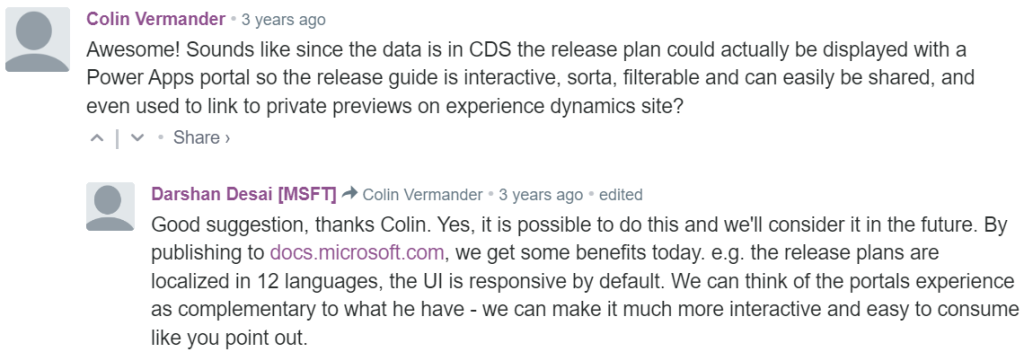
    Since the solution was built on top of a solid platform designed for managing business process data, there were of course other opportunities to leverage it. As was pointed out in the comments section of the 2019 blog post, by a certain ex-MVP (now at MSFT) with a long history on Portals in the form of Adxstudio:
    Which brings me back to an even more ancient blog post of mine, from 2015, called XRM Strikes Back. Inspired by Microsoft’s acquisition of Adxstudio, I argued why in the long term it would be a more successful strategy for MS to bet on the platform, rather than trying to integrate SaaS products from outside the ecosystem into the Business Applications portfolio.

    Success doesn’t happen overnight either way. Looking at the XRM based acquisitions, Adxstudio is now the 5th product in the Power Platform family, with the new name Power Pages. FieldOne Sky turned into Dynamics 365 Field Service that has quite a solid position in the market (from what I know). Mojo Surveys evolved into Dynamics 365 Customer Voice, which may not have an extensive roadmap right now, yet it’s still widely used by the customers we are working with at least.

    Back in 2011 when Dynamics CRM Online itself was used for managing the Dynamics CRM Online launch website, backed by (Windows) Azure, so might have considered that a crazy thing to do with a business application platform like XRM. Well, who’s laughing now?!?😁

    The journey up to this point has been long, but that’s exactly what such low-code application platform journeys are for customers, too. Microsoft is now in the process of also migrating their third party Ideas sites for product feedback into the Dynamics 365 Customer Service Community portal template (meaning Power Pages). The Power Automate Ideas site is moving there next week. Dynamics 365 Ideas already lives on this platform, so I’d imagine other products will soon follow. Another piece of the digital feedback loop coming together, through the power of the platform.

  • Did Power Apps really leak your customer data?

    Did Power Apps really leak your customer data?

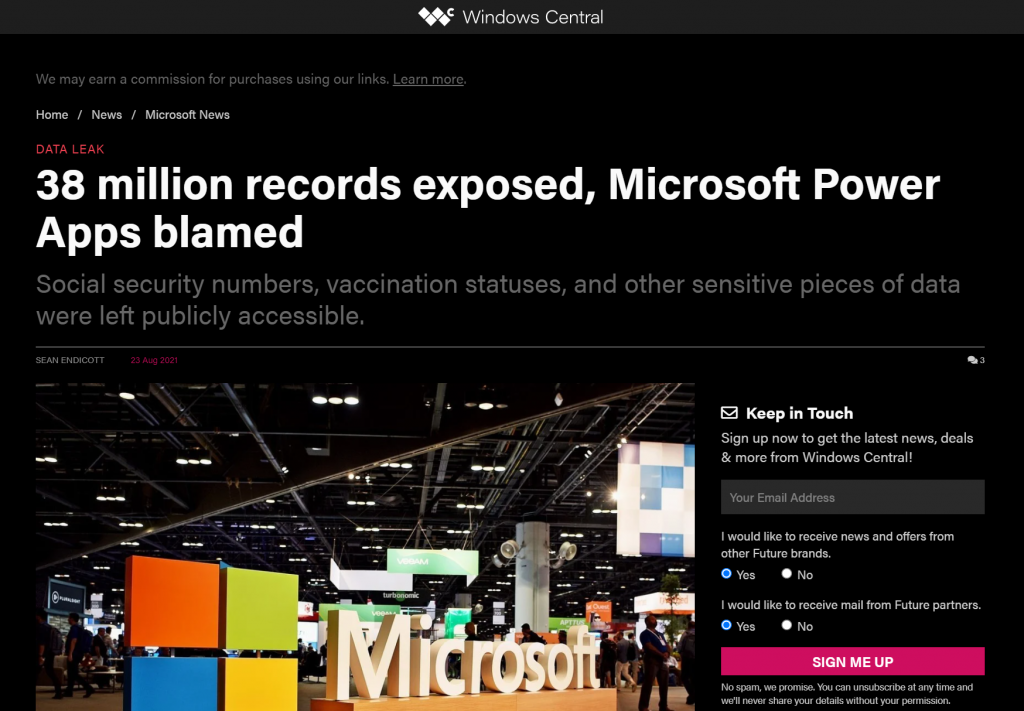
    Recently Power Apps made the headlines in a way that Microsoft would have liked to avoid at all cost:

    The news headlines today aren’t exactly the most neutral source of information, but luckily we also have access to the full report from the security research team at UpGuard. Here’s what happened according to them:

    The UpGuard Research team can now disclose multiple data leaks resulting from Microsoft Power Apps portals configured to allow public access – a new vector of data exposure. The types of data varied between portals, including personal information used for COVID-19 contact tracing, COVID-19 vaccination appointments, social security numbers for job applicants, employee IDs, and millions of names and email addresses.

    UpGuard

    Sounds serious, and it certainly shouldn’t be sweapt under the rug by anyone working with Microsoft Power Platform. We have a lot to learn from an incident like this and the concerns it may bring up along with it. As these low-code technologies become more widely used across different industries, not all publicity will be positive.

    There have of course been some concerns raised by IT practitioners already before this Portals incident on what’s the general impact that low-code platforms will have on business solutions development. How to secure customer data and to build proper governance practices around these tools is a topic that is often covered when talking about Power Platform with customers.

    I personally already used the above headline as an example in a governance workshop with a customer on the very next day after the report was published. The discussion was quite neutral and it served well in acknowledging both the important role that Power Platform tools can have in business processes, as well as the need for practices that allow them to be safely used in developing new solutions.

    The other alternative where such a topic would not be proactively addressed in a transparent manner could instead lead to more controversial reactions down the road. Some people may have negative experiences in their past that might lead to seeing these new events as an enforcement of their existing beliefs.

    It’s hard to prevent people from drawing the wrong conclusions based on incomplete information if we don’t bring all the relevant pieces into light. To help in such examination of the evidence, in this blog post I’ll present some fictitious statements that could potentially be made based on reading the news headlines. Then I’ll offer my own perspective on whether they would be justified or not.

    “Bugs in Microsoft’s software caused the data leak!”

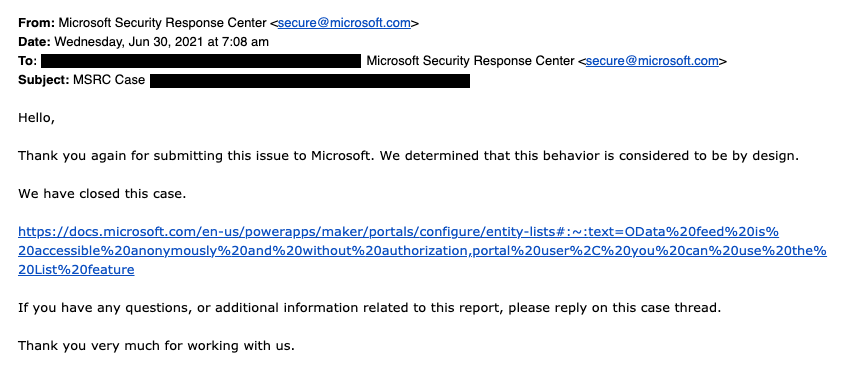
    This wasn’t an actual bug, rather an unfortunate feature. As the report title from UpGuard hints, it was “by design” when examined from a technical perspective. Also, that was the initial response from Microsoft’s side, as shown in the report:

    The above response is in my opinion the biggest mistake from Microsoft in this whole incident. Being tone deaf when presented with something that had already proven to be a pattern leading to unintended disclosure of confidential customer data via numerous Power Apps Portals out there is… Well, it’s what happens in large corporations, unfortunately.

    What was this “by design” feature then? In the state that the Portals configuration experience was at the time of the investigation, there wasn’t any strong push from the product side to make the data tables used in the portal as private. It was a neutral platform built specifically to take records from your organization’s internal Dataverse tables into a public website, then giving you the choice to either show all the contents to anyone, or limit the visibility through a very granular security model to only a small subset of records.

    As an example: you could show all the available locations where COVID-19 vaccinations were being offered (public table). Then you’d give the logged in user the ability to create an appointment record (private table with access control). Both are an integral part of the business process managed via a portal, yet the rules for showing them to the website visitors are directly opposite. The technical platform has to cater to both these requirements.

    As it happened, there was a way through which the portal developer could forget to enable the table permissions that the private data should have in all areas where it was used. Now, the reason why this mistake wasn’t immediately obvious was that the Power Apps Portal product included a feature that allowed publishing this data as OData feeds. These would not be visible in the website pages necessarily, but they were technically available as long as you knew the right path from where to search for them.

    In our example, a public OData feed of locations could have been useful for integration purposes. For reservations made by private individuals, an unauthenticated feed would never be a good idea. Yet the platform didn’t know what the developer wanted.

    After this incident was reported by UpGuard, Microsoft changed the defaults and made it require more conscious effort to publish the feeds for unauthenticated consumption.

    “Poor default settings in the Portal product were dangerous!”

    There’s no denying that discovering more than a thousand Power Apps Portals misconfigured to expose confidential data to unauthenticated users is a big number. Yet the total number of Portals out there is… well, let’s just say it’s certainly multiple times that.

    As part of their research, UpGuard enumerated through the various available powerappsportals.com and microsoftcrmportals.com subdomains to programmatically scan the sites with potential unintended OData feeds published. Many were found through this method, but still this problem affected only a small subset of all Portals websites out there.

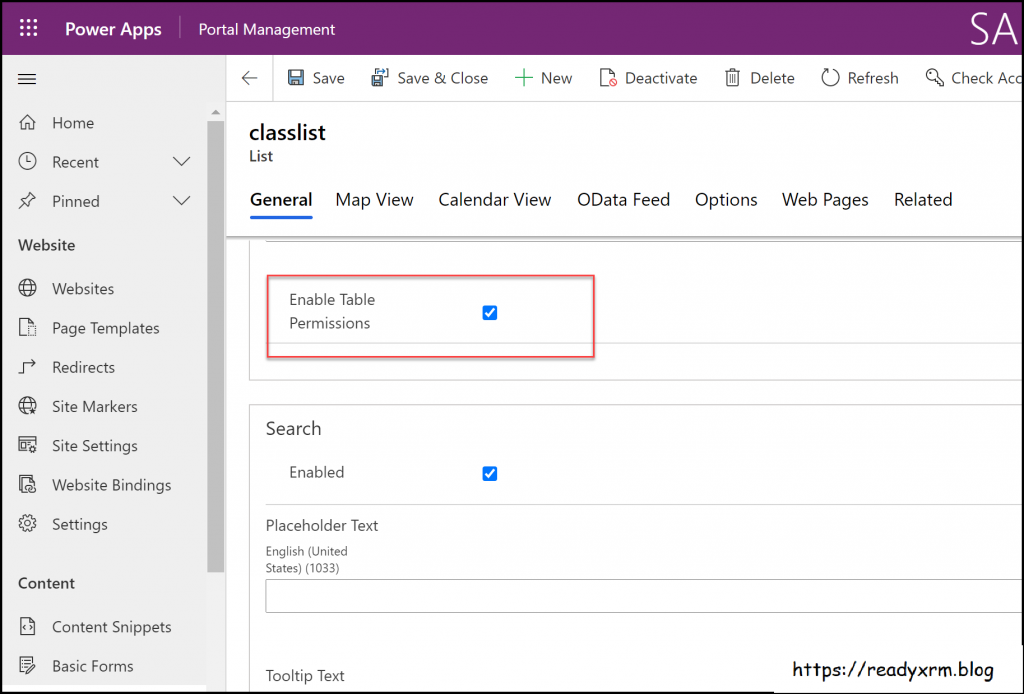
    The majority of Portals developers will have been aware of the setting that must be enabled for any data that you don’t want to be publicly available on your website. Nick Doelman explains the “Enable Table Permissions” setting very clearly in his excellent blog post. It’s not really fair to claim that this would have been impossible to notice while building your Portal app:

    If it has been news to you and you have built websites with Power Platform tools, then I seriously recommend you to take advantage of this generous offer by Nick and enroll for his Power Apps portals Security Deep Dive course:

    Update 2021-08-31: you should also check this video from George Doubinski about the Portals behaviour before & after the default setting change:

    “Microsoft should prevent such things from happening on their cloud service!”

    Power Platform is a suite of low-code tools that allows you to build your own apps. Whatever business logic the published app contains is ultimately the responsibility of the app creator. Same goes for the data you manage with that app. Technology providers can’t easily stop people from building unfit solutions with their products.

    There’s a great analogy in George Doubinski’s blog post “How to secure Power Apps portal from making the news” that I’ll repeat here. If you’re a company selling nail guns and a few unfortunate customers of yours shoot themselves in the foot – what should you do about it? Sure, your product probably came with all kinds of instruction manuals and warning signs that try to explain the importance of learning how to use such power tools. Similar to how Microsoft now shows a banner saying “table permissions should be enabled for this record or anyone on the internet can view the data”, to try and warn people not to hurt themselves.

    Let’s look at an example from another area of Power Platform that I cover frequently in my blog: licensing. Any customer could easily use this platform to build an automation that is a clear violation of the multiplexing rules of the very same platform’s licensing terms. Just create a Power Automate cloud flow that automatically pushes all new opportunities from your Dynamics 365 Enterprise Sales app into a SharePoint list accessible to your whole organization with no Dynamics licenses assigned to them. Congratulations, you’ve again used the powerful tool to hurt yourself in a way that the vendor couldn’t have stopped.

    “I knew citizen developers couldn’t be trusted to build real business applications. So much for low-code!”

    Did you look at the types of customers that suffered from this data leak? If not, I’ll list some of them from the UpGuard report here, to give perspective:

    • American Airlines
    • Ford
    • State of Indiana
    • New York City Municipal Transportation Authority
    • Microsoft

    These don’t sound exactly like the kind of organizations where a lone citizen developer who discovered a neat tool in his Office 365 app launcher just went ahead and built a portal on top of millions of rows of contact records and other sensitive data. If I had to guess, I’d assume there has been a proper development team working on many such customer facing services – not just citizens.

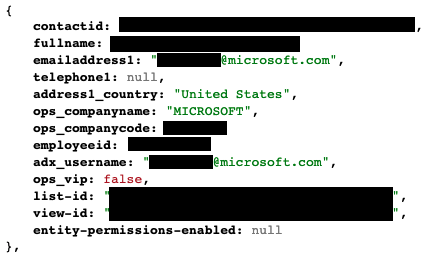
    The above picture is an example from the report’s contents that was captured via the unsecured OData feeds. It is from the Global Payroll Services Portal for Microsoft employees, built (presumably) by professionals working with software. Despite of all the resources and knowledge behind these, the misconfiguration of a Power Apps Portal still went into production sites.

    Although not directly related to this incident, on the very same week there was also another unfortunate data leak reported concerning the Microsoft cloud. Only this time it was around CosmosDB and the database primary keys that got leaked, exposing private data from thousands of Azure customer organizations. The misconfiguration seems to have been carried out by Microsoft software developers while they were integrating Jupyter Notebooks with CosmosDB to provide a new platform feature to customers.

    Regardless of whether you are clicking through low-code configuration pages or writing your own lines of custom code, mistakes can happen.

    “Suites like Power Platform are becoming way too complex for anyone to keep track of all these features & settings that can cause harm!”

    This is certainly true in the sense that a single person will not have an A-to-Z understanding of Power Apps in Canvas/Model-driven/Portals flavor, Power Automate in the cloud and on the desktop, Power Virtual Agent, Dataverse, AI Builder, Power BI and its data platform back-end… It’s way too much for anyone to consume as documentation, let alone master in practice.

    We should be asking where the assumption actually comes from that an app maker or developer should have end-to-end knowledge of the whole Microsoft low-code stack? Whether you’re a customer or a partner, it’s very important for you to not be blinded by all the flashy product demos and testimonials on “how company X digitally transformed themselves, using software suite ABC”. It doesn’t all happen thanks to this one mythical app hero who can take on any challenge – rather it’s the result of the right person finding the right tool to solve one specific problem at a time. Repeatedly, at scale.

    Low-code is a team sport and you will increasingly see the fusion development approach be promoted by Microsoft. This emphasizes the fact that an optimal mix of business domain expertise and technical software development skills is a better approach to achieving long term business value with low-code than relying on lone superheroes to do it all. In the end, just because you’re not writing as much code as earlier doesn’t mean the resulting systems would be simple:

    Low-code tools may be easy to approach, but the solutions you create with them can be as complex to manage as custom software.

    The data leak was the result of a feature built into the platform that the persons developing the customer specific solution were not aware of. They didn’t purposefully create the OData feeds, rather the software product generated them based on the underlying logic of how it was meant to streamline certain app development tasks. The best chances for having awareness of all these moving parts in the end solution is to ensure people have a realistic opportunity to focus on their primary tools and continuously sharpen their skills.

    “This incident proves you need product X / service Y from partner Z to be safe with Power Platform!”

    Events like these are bound to inspire companies working in the Microsoft ecosystem to try and gain exposure of their own by riding on the news wave. It never hurts to sprinkle a little FUD tactics on top of your marketing message, right?

    Now, I have to be transparent and admit right away that we are in the business where the questions and concerns coming from Microsoft customers are addressed via our advisory services. Even though we educate organizations on governance best practices and have delivered a few Power Apps Portals solutions to them, I would not make any statements like “buy from us and you’ll never have these kind of problems”. There’s two reasons for this:

    1. Our aim is to help customers take ownership of their digital tools, not to be the ones who build everything for them & maintain it. New app makers will make mistakes as they learn & grow, they just need a safe space for this (read: not a public website).
    2. I know how hard it would be to build a technical solution to audit every little detail that could go wrong in the various use cases where Power Platform is be used.

    Let’s examine the details of this particular data leak. First of all, to have any technical level protection, you would need a service that can tap into Power Apps Portals specifically. Running something that monitors only Canvas Apps or Model-driven Apps won’t help you here. Even the Power Platform Center of Excellence (CoE) Starter Kit from Microsoft only has the Portals data inventory as a backlog item as of now. If no public APIs are available to tap into a Microsoft cloud service, then you’re unlikely to find any software to do the required tricks for you.

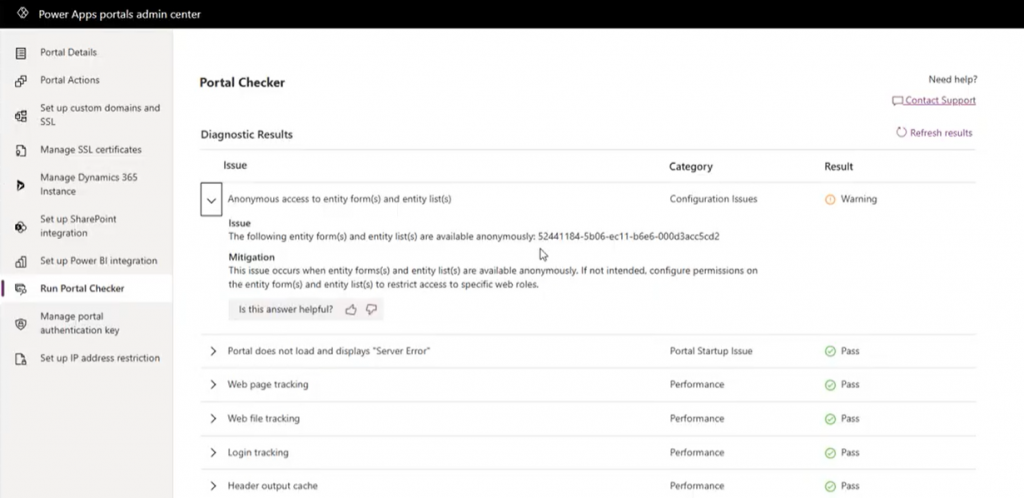
    Even if we’d have the same level of telemetry data access as Canvas Apps do, what’s the likelihood of the specific setting in question (Enable Table Permissions) to be exposed and monitored? Well, it is data stored inside Dataverse tables and could be queried via Advanced Find as showed by Nick, so in retrospect we could technically have audit tools built for it. But why would someone built such a third-party product when Microsoft already offers Portal Checker to all customers?

    So, there’s unlikely to be an easy & all encompassing solution out there that would address all your Power Platform security and governance concerns. I could even bet that some of the Portals websites that suffered from the OData leak will have been reviewed by security professionals from outside the Microsoft ecosystem and still the issue was not discovered. Probably because they didn’t know where to look.

    Because it’s an ever evolving cloud platform, it was possible for Microsoft to quickly react to the incident via a change in their original design, as well as by notifying the customers potentially affected by it. Today the risk of unintentional data exposure is technically lower and the public awareness of such possible misconfiguration among the Power Platform app maker community is much higher.

    Yet we have no way to guarantee what will happen tomorrow. Something similar may be discovered in a different part of the platform that will again require attention and action. I think all we can really do is to keep our eyes open and be ready to learn from the new discoveries shared by the network around us.

  • Why Power Platform licensing is complex, part 3: light use scenarios

    Why Power Platform licensing is complex, part 3: light use scenarios

    In this series we’ve talked about the complexity that arises from how Microsoft defines (and re-defines) their product structure, as well as the concept of multiplexing where indirect usage of software (or data) needs to be licensed just like direct usage is. In this third chapter it’s time to look at the varying depth of software usage and how the licensing models out there don’t always take this into consideration the way people would expect them to.

    “I only need to do X, why do I have to pay full price?”

    For any business application deployed within an organization there’s bound to be a group of heavy users who spend a significant share of their working hours using the broad range of features offered by it. They might be administrators of a process that is managed with this app, or users whose tasks are either handed out via the app or facilitated by the information that the app can provide them. A service technician might have his or her day planned out in detail via Dynamics 365 Field Service. A salesperson could be using customer information and activities to keep track of their pipeline and prioritize actions via Dynamics 365 Sales.

    Then there are those employees whose roles aren’t primarily focused on the aforementioned processes but who need to participate in them in some stage, or consume the outputs from these processes as one ingredient of their work. It might be merely signing off on an approval or completing a task that has been generated from the end-to-end business process. Again we could use here the same example as in Part 2 where merely submitting a new lead via a web form that has fully automated connectivity with Dynamics 365 will mean that these employees must be equipped with a type of license that would essentially allow them to also work with the lead qualification process of an full-time inside sales role. Hmm, why are these two very different personas treated the same, when one is a very light touch scenario and the other a heavy use of the system?

    Whether you perform the task once a year or a hundred times a day doesn’t make a difference, due to the way how these business applications licensing models are constructed. It’s not a consumption model where you’d pay for the number of events and computing capacity like in Azure, rather it’s all based on purchasing the rights for a specific user to access feature X in the application. Underneath the app UI there is of course the same Azure technology being consumed to keep the bits running, but products like Dynamics 365 are quite a thick value-add layer of SaaS on top of it that removes the need for you to pay for the infrastructure. Similarly it removes the need for a custom software development project to manage your sales process, as an example, because you can simply subscribe to the Dynamics 365 Sales product and gain access to all of the business logic, UI, security models, auditing, APIs and numerous other features you’d eventually need for your digital business to operate in a sustainable way. You get a lot, so it’s only fair that it should cost something, too.

    Still, it’s very common to run into a scenario where the idea of licensing every actor involved in the business process with the same flat monthly fee just doesn’t feel justifiable. In the Dynamics 365 world it might involve working with a single entity that’s not covered by the Team Member license. On the Power Platform side it might be a Flow that would need to do one step that inolves a Premium connector. All of a sudden the cost of allowing users to touch these tools might multiply the monthly fee, just because of that one thing. Couldn’t we, you know, just make that one thing be excluded from the Premium category and solve this dilemma?

    Virtual borders vs. platform unions

    It’s not like Microsoft wouldn’t be aware of the issues with these functionality borders and how they end up blocking many otherwise valid scenarios for leveraging their software products. Obviously there could be more money to be grabbed from the table if only there was a suitable licensing card to be played in these occasions. The problem is that every customer’s problem tends to be slightly different. Moving one feature checkbox from this license type to that license type isn’t therefore the answer. It would be like trying to adjust the borders of a country to follow a slightly different pattern so that you could optimize where you live, work, shop, go fishing, use medical services, and so on. A border will by definition limit your freedom in some ways, in exchange for offering you rights to (hopefully) exercise your freedom within the area covered by it. You gain some, you lose some.

    In an interview by MVP Steve Mordue, Steven “Guggs” Guggenheimer described these light use / light touch scenarios and the licensing demands around them as “the most complex thing you’ll ever see”. Be it Dynamics 365 or Office 365, there doesn’t seem to be a satisfactory way to draw a line between heavy use and light use for the software products because when it comes to licensing everyone wants both A) simplicity and B) flexibility, which are C) a paradox.

    There is a collective challenge, which is how do you build a licensing framework where you can’t tell between the two, light touch or light use, or you can tell but there’s no consistency. If I ask the question, “What does light touch mean to one ISV or light use?” I’ll get a very different answer than what I get from another one, so you can’t design a licensing type that works for everyone.

    Looking at the evolution of Dynamics 365 products that used to be called CRM, then Customer Engagement and now “Model-driven apps in Dynamics 365”, they’ve been moving towards an “á la carte motion” where instead of subscribing to the whole software suite (Plan) you instead buy individual Apps. While initially this might sound like something that addresses the aforementioned customer pain points, I believe it’s mainly aimed at allocating the revenue more accurately between Microsoft product teams (and thus creating clear incentives for new product development) rather than making Business Applications less complex for customers to license. After all, you’ll often still need to buy a minimum of one Enterprise app at a list price of $95 per user per month, which isn’t exactly a figure that’s a great fit for the light use territory.

    The platform SKU, meaning Power Apps Per User Plan, is closer to solving some of the challenges for customers that are ready to consider broadly licensing their work force for the business application platform rather than individual apps. Sure, a $40 list price is still more than Microsoft 365 E3, for example, so not an insignificant cost by any means. The more app scenarios you can cover in your organization with that flat platform fee, the cheaper it becomes. The first time you need to cross the border to the Premium territory it’s still a costly visa to acquire, but the more you travel the cheaper the relative investment becomes. You could compare this to a political and economic union like the EU, where benefits of having a single market that allows free movement of people, goods and services can outweigh the cost of forming and running this union. The application platform opens up opportunities by removing some (but not all) borders for your organization’s employees to participate in the digital processes runnign on top of it, regardless of if it’s just an occasional holiday trip to the neighbouring business unit or a permanent role of deep co-operation.

    Alternative pricing methods

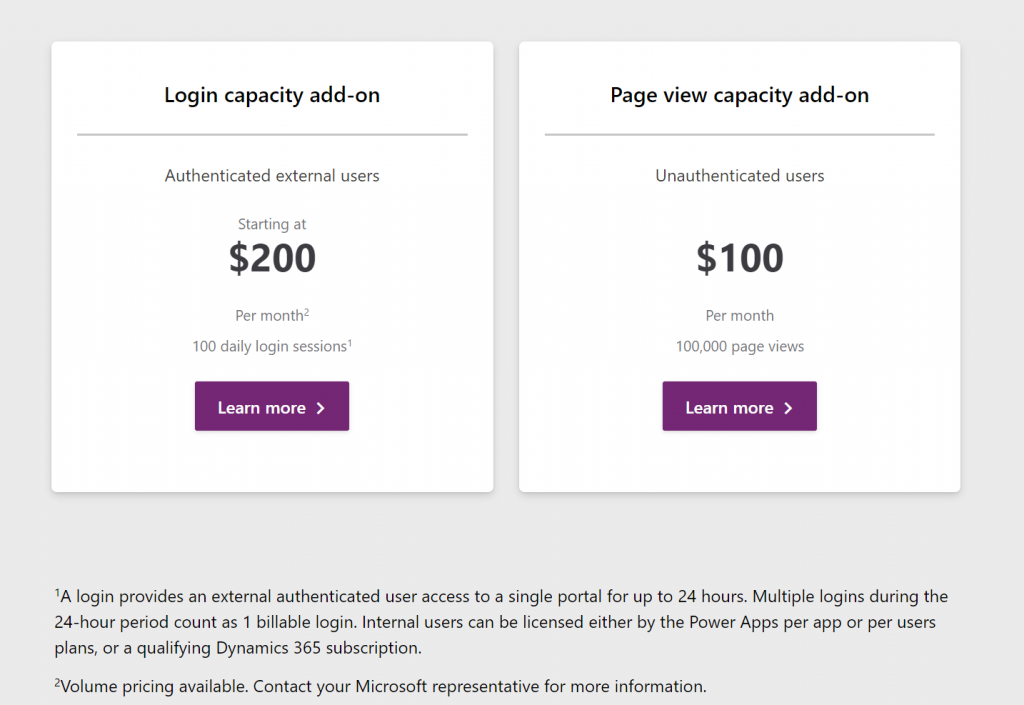
    The Power Platform today requires you to purchase a license for each internal user, but there already is a mechanism available that would in theory allow paying for the actual usage. It’s the new pricing model of Power Apps Portals, where instead of buying the Portal application itself you purchase capacity to be consumed by the usage of the portal. This covers unauthenticated usage like page views, which isn’t all that relevant for real business application use cases. However, the concept of paying for each login of an authenticated user would be very applicable to many light use scenarios with infrequent but still valuable application usage.

    The beauty of a consumption based pricing model like this would be that you wouldn’t need to purchase a full licenses for each and every user that might or might not use the system during any given week. However, when there would be a valid business need for them to access the system and use some of it’s features, they could be assigned a “day pass” that grants them the license for a 24h period. If on the next day they again need to do the same thing, it’s a new pass to be consumed. Doesn’t this sound like exactly the sort of a mechanism that could…?

    Unfortunately as of today there isn’t yet a way for customers to purchase these type of day passes for their internal employees. The Portals licensing model is limited to only external users, whereas internal users must be assigned either a Power Apps license or an applicable Dynamics 365 App license (note: Team Member license does not apply here). There is some irony here because the per-login pricing model is actually making Portals a tough sell for some of the intended external audiences. Buying pre-paid packages of login capacity that would cover you entire potential user base of customers that might or might not log in to your public website can quickly become so costly that it makes more commercial sense to build a custom portal with custom integration into CDS instead of leveraging this product capability built by Microsoft (at least with the list price).

    Regardless of these current challenges with aligning the license terms, I do believe the roads in Power Platform are eventually leading more and more towards the model of licensing by consumption. Not as the primary mechanism, but as something that will complement the user based licenses. This is because ultimately the goal should be value-based pricing. How do you measure the value generated by the business applications that are running on your shared cloud platform and used by millions of people out there for their own specific business processes? Well, the usage of the software products is a nice concrete way to gauge the potential sources of value – as well as idetifying places where the value is certainly not being captured (due to lack of usage/adoption).

    In the on-prem era where some of the enterprise software licenses practices we still see today were originally drafted, you were selling a big system that the customer would acquire the server & user licenses for and then deploy the whole thing behind their own firewalls. The cloud has changed this model whereby the SaaS vendors are now able to see in much more detail the metrics for active usage (DAU, WAU, MAU) from the customer environments running on systems that they operate. In addition to ensuring that the customers keep renewing their subscriptions, access to this usage data also opens up possibilities for offering alternative pricing models that would make the many light use scenarios more attractive for large pools of potential users. The example of charging for app access by every 24h may not be the model that will be offered to internal users, but at least it represents a much less complex mechanism for customers to digest than the earlier models of drawing licensing lines between entities, features or access types.

    Other parts in this article series can be found here:

    Read more about Microsoft Business Applications licensing

    View all my blog posts in the licensing category.

  • Price points of Power Platform (2022 pricing and licenses)

    Price points of Power Platform (2022 pricing and licenses)

    NOTE: This post was originally published in March 2020, the last revision of pricing information is from November 2022.

    As of today, there isn’t a single place from where to check the actual prices of the different license types covered by the Microsoft Power Platform suite of products – like there is for Dynamics 365, for example. The information of prices vs. what paying that price actually entitles you to is distributed across several information sources and formats – starting from the individual product pages, to the learn.microsoft.com documentation pages, to the PDF licensing guides.

    To stop myself from having to always use a search engine to discover these pricing details, I decided to compile a list of links to the places where each individual Power Platform product team has made their pricing information public, as well as write out the current subscription prices in US Dollars and Euros. I’ve also included a few relevant licensing model elements that describe what the particular subscription entitles you to do (capacity, features and so on).

    Most of Power Platform product licensing is done via the prepaid subscription model familiar from Microsoft 365 (Office 365). More recently the pay-as-you-go (“PAYG”) option has been introduced for some of the services, allowing payment via an Azure subscription (read more about the November 2021 announcement here). It’s important to note that in general prepaid subscription prices are cheaper than pay-as-you-go. The PAYG option is primarily aimed as an option for customers to use, before they know the true consumption level and are ready to commit to a prepaid subscription. Where applicable, I’ve included the PAYG prices here for comparison.

    Your actual licensing costs will of course depend on the types of agreements your organization has with Microsoft. So, consider the prices on this page as mainly a starting point for understanding the relative costs of different Power Platform services.

    Power Apps / Pages

    Power Apps pricing

    Power Apps per app plan: $5 (€4.20)

    • Allows you to access one Power Apps app (canvas, model-driven, portal/website).
    • The same app in different Power Platform environments (dev/test/prod) requires a per app license for each environment.
    • Pay-as-you-go option: $10/monthly active user/app/month

    Power Apps per user plan: $20 (€16.90)

    • Allows you to access an unlimited number of Power Apps (canvas, model-driven, portal/website) in your tenant.
    • Can also be used for accessing canvas apps shared to guests in another tenant (not applicable to other app types).

    Power Apps pricing change on October 2021

    Before Oct 1st 2021, the Power Apps per app list price was $10 and Power Apps per user $40. See this blog post for more details on the price reduction as well as changes in the per app license entitlements. Note that your license agreement may still apply to the old terms, based on the contract duration.

    Power Pages (formerly Power Apps Portals)

    Power Pages pricing

    • Power Pages authenticated user capacity, 100 monthly active users: $200 (€168.70)(see also discount tiers).
      • Pay-as-you-go option: $4/user/site/month
    • Power Pages anonymous user capacity, 500 monthly active users: $75 (€63.20) (see also discount tiers).
      • Pay-as-you-go option: $0.30/user/site/month
    • Internal users (employees) can be licensed separately, via Power Apps or Dynamics 365 licenses, or as authenticated users.

    Licensing FAQ: Power Pages

    Power Apps portals (old licensing model, before Power Pages)

    Differences between Power Pages and Power Apps portals licensing model

    • Power Apps portals login capacity add-on, 100 logins per month: $200 (€168.79)(see also discount tiers).
    • Power Apps portals page view capacity add-on, 100,000 page views per month: $100 (€84.30).
    • Internal users must be licensed separately, either via Power Apps or Dynamics 365 licenses.

    Dataverse capacity (formerly “Common Data Service” / CDS)

    Power Apps and Power Automate licensing FAQ: Add-ons

    Storage
    • Dataverse Database Capacity (1GB) $40 (€33.70) per month
      • May still show up as “Common Data Service Database Capacity”
      • Pay-as-you-go option: $48 per GB used per month
    • Dataverse File Capacity (1GB) $2 (€1.69) per month
      • May still show up as “Common Data Service File Capacity”
      • Pay-as-you-go option: $2.40 per GB used per month
    • Dataverse Log Capacity (1GB) $10 (€8.40) per month
      • May still show up as “Common Data Service Log Capacity”
      • Pay-as-you-go option: $12 per GB used per month

    See also: What Dataverse capacity is included with the Power Apps and Power Automate plans?

    Power Platform / Dataverse API calls / API requests:
    • Power Platform Requests add-on: 10,000 daily API requests for $50 (€42.20) per month
      • Formerly known as “Power Apps and Power Automate capacity add-on”

    See also: Requests limits and allocations

    Power Automate (formerly “Microsoft Flow”)

    Power Automate Pricing

    Power Automate per user plan: $15 (€12.60)

    • Allows individual users to create unlimited flows, execution is limited based on available API requests per day (40,000 included)
    • Note: while Power Apps per app and per user plans includes similar rights, they are tied to the context of a canvas or model-driven app

    Power Automate per flow plan: $500 (€421.50) for five flows per month

    • Allows the organization to implement 5 flows, regardless of the number of users who trigger them
    • Child flows triggered by a parent flow do not need to be licensed
    • Execution is limited based on available API requests per day (250,000 included)
    • Additional flows can be purchased at $100 (€84.30)per flow per month
    • Pay-as-you-go option: $0.60 per each cloud flow run

    Power Automate per user plan with attended RPA: $40 (€33.70)

    • Allows individual users to run an attended RPA bot on their workstation
    • Presumably also contains similar rights as the standard Power Automate per user plan
    • Pay-as-you-go option: $0.60 per each attended desktop flow run

    Power Automate unattended RPA add-on: $150 (€126.50)

    • Allows the organization to run a single unattended RPA bot, no dependencies to users or workstations
    • Add-on requires either per user plan with attended RPA or per flow plan
    • Pay-as-you-go option: $3 per each unattended desktop flow run

    See also: Power Automate licensing FAQ.

    AI Builder

    Power Apps and Power Automate licensing FAQ: AI Builder

    AI Builder capacity add-on: $500 (€421,70) per unit per month

    • Each unit contains 1 million service credits on the tenant level
    • Allows the organization to use any of the AI model types included in AI Builder
    • AI models consume service credits when they are trained, used in an app or flow, or scheduled to periodically run. The amount of capacity consumed varies based the AI model, as well as the size and complexity of the data set. See AI Builder calculator to estimate the capacity requirement and cost of your model.
    • Add-on requires at least one paid Power Apps, Power Automate or Dynamics 365 license
    • For the built-in Business Card scanning feature in Dynamics 365 Sales, there is free capacity included in Sales Enterprise App licenses: 10 scans per user per month, pooled at tenant level. Sales Insights has a capacity limit for business card scanning of 200/user/month. If additional Business card scanning capacity is required, Sales Enterprise customers may purchase additional Sales Insights licenses. (Taken from Dynamics 365 Licensing Guide PDF document.)

    Power Virtual Agent

    Power Virtual Agents pricing

    Assign licenses and manage access to Power Virtual Agents

    Power Virtual Agent: $1,000 (€843.20) per 2,000 sessions per month

    • Allows the organization to have an unlimited number of bots
    • In addition to the tenant license, internal users will need to be assigned a user license. The tenant license costs money, but the user licenses that are purchased via the same mechanism are apparently free.
    • “A session is an interaction between the customer and the bot, and represents one unit of consumption. The session begins when an authored topic is triggered. These sessions are referred to as ‘billed sessions’ in the product. Sessions are deducted for both testing and production usage.”

    Power BI

    Power BI licensing in your organization

    Power BI Pro: $9.99 (€8.40) per user

    • Included in Office 365 E5 subscriptions for no additional charge
    • Each Pro license gets 10 GB of data storage capacity

    Power BI Premium per capacity: starting from $4,995 (€4,212,30) per organization

    • Offers dedicated compute and storage resources for your organization
    • No per-user license assignment needed for report consumption, report creation and sharing still requires Pro licenses for users
    • Required for advanced features, see comparison table
    • See What is Power BI Premium and Power BI Premium FAQ for more details

    Power BI Premium per user: $20 (€16.90)

    • New option to access premium features without organizational capacity purcahase requirement.

    Dive deeper into the licensing details

    Microsoft usually posts monthly updates to their licensing guide PDF documents. Here’s where you can grab the latest copies: Power Apps and Power Automate Licensing Guide & Dynamics 365 Licensing Guide.

  • Dynamics 365 & Power Platform licensing FAQ, February 2020

    Dynamics 365 & Power Platform licensing FAQ, February 2020

    Here’s a collection of recent questions from the Dynamics 365 and Power Apps use community on licensing topics. The answers are my own interpretations, based on what I’ve seen from MS or other community members. It’s a point-in-time blog post that may well be outdated tomorrow already. Please do also leave a comment if you see errors in the answers I’ve written.

    As always with enterprise software licensing, ultimately the answers need to come from materials published by the software vendor, i.e. Microsoft. At the end of the day the customer is always responsible for being compliant with their own legal agreements that may have specific terms included.

    Team Members

    Q1: What’s changing in the 2020 Release Wave 1 for users equipped with Dynamics 365 Team Member license?

    The release plan contains several items that talk about licensing enforcement. So, the actual rights for Team Member licenses are not changing, but there will be technical limitations on what the users are actually allowed to do. I’ve blogged about the underlying mechanism for linking service plans to application types, which will first be used for Team Members and down the line probably also for other licensing types.

    2020 Release Wave 1 will introduce three new App Modules with pre-configured experiences for Team Members: Sales Team Member, Customer Service Team Member and Project Resource Hub. See my review of the early access version of these New Team Member Apps for Dynamics 365 for more details.

    Q2: When will the technical enforcement be enabled in our Dynamics 365 environment?

    For new customers, Microsoft intends to switch on the restrictions in April 2020. For existing customers with Team Member users, the change won’t happen overnight. Expect to see further communication from MS on this if your organization is affected by the changes.

    Update: On Feb 24th Microsoft published the following “Dynamics 365 – Team Member License Enforcement Notification” in the Microsoft 365 Message Center (MC204622) visible to administrators:

    To facilitate a smooth transition to the new Team Member app experiences, all existing customer organization instances, which will be impacted by this change, will be granted an additional grace period until June 30, 2020.

    Update 2: due to COVID-19, Microsoft has postponed several deadlines for updates and deprecations. The latest guidance for Team Member licensing enforcement is now:

    To facilitate a smooth transition, all customer organization instances that are created before April 1, 2020 have been granted an additional grace period until January 31, 2021.

    Q3: The entities we use with Team Member license in our environment are not included in the standard apps, can we add them?

    Yes. Customizing the aforementioned App Modules is allowed, as long as you follow the instructions given by Microsoft:

    “Team Member apps can be tailored to more closely fit your organization’s industry, nomenclature, and unique business processes, just like other model-driven apps built on Common Data Service. However, these customizations will need to conform to the Dynamics 365 Team Members use rights detailed in the licensing guide. While customizing the app, you can add 15 additional entities. These additional entities can be any Common Data Service core entities, or you can create custom entities.”

    Q4: The new Team Member apps ship with dedicated security roles. Does it mean we’re only able to assign these to the TM users and nothing else?

    There is currently no restriction on what roles you can assign to users with a Team Member license. The way I see it, the OoB security roles are primarily used for granting access to the App Modules and stripping down features within the app that are not within the original design scope.

    Q5: If we need users to access more than 15 entities, what are our options?

    The App Modules for Team Members will technically enforce a limit on how many entities can be added. Now, keep in mind that the App Module itself doesn’t restrict what’s actually visible in the UI when looking at an entity form. For example, an account form can have many related entities shown that are not part of the App Module specification. If you don’t directly need to navigate to the entity but rather use them to describe properties of the main entity (say, account plans related to an account), then there might not even be a problem here.

    If you need to browse through lists of tens of different entities, then you’re really pushing the boundaries of what Team Member licenses are intended for. Anyway, you could consider alternative access mechanisms alongside the Unified Interface App Module to cover these scenarios. Reporting tools could be a better way to present large quantities of data that are going to be read-only for the users. By purchasing a Power BI license for users that are equipped with Team Member licenses already, you would have full access to read the business data in CDS via reports and dashboards – as well as use Power BI for any other analytics needs within the organization.

    Q6: Our users are accessing data mainly via the Dynamics 365 App for Outlook, is this going to be available to Team Members?

    Yes. The Licensing Guide specifically lists this as the first use right for Team Members in Appendix A: “Access Anywhere: Web App, Mobile App, Tablet App, via Outlook.”

    Q7: Can we also leverage Canvas apps with the Team Member license?

    Yes and no. You can use embedded Canvas apps within a Model-driven app entity form, since these are just customizations within the app itself. However, you can’t access standalone Canvas apps with just a Team Member license.

    Q8: What about if we have Office 365 license that gives access to Power Apps AND a Team Member license, could we then build a Canvas app that reads Dynamics 365 data?

    Probably not, as this would require access to Premium Connectors. The CDS Current Environment Connector is the only non-deprecated way to access Dynamics 365 data (in the “product formerly known as Customer Engagement”, not talking about Operations or Business Central here), so this will likely be the technical blocker that stops you from building the custom app.

    Power Apps

    Q9: If we were to move our licenses from Team Members to Power Apps per App plan, what will the main differences be in the user experience?

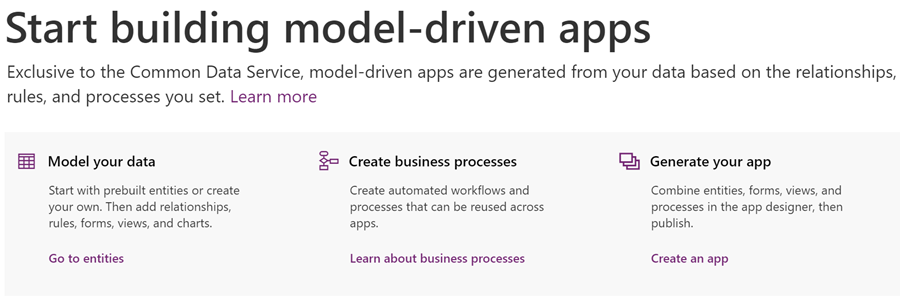
    Power Apps licenses are meant for custom apps, meaning there will not be a preconfigured App Module from Microsoft. That’s no big deal, since creating new Model-driven App Modules is very simple. You can choose the entities you need in the app, design a sitemap to provide the navigation experience for accessing these, give your app a name, hit “publish” and have a custom App Module available to the users. There aren’t any fundamental differences between what a Sales Team Member app and “Our Customer Management app” look like to the users, as they’ll all be Model-driven apps presented via Unified Interface.

    Q10: Are there still restricted entities in Dynamics 365 that you can’t access with Power Apps licenses?

    Yes, there are, but no one knows exactly which entities. We are still waiting for Microsoft to update the list of Restricted entities requiring Dynamics 365 licenses, to align with what was supposed to be the October 2019 licensing model update. Eventually there will be new information published, but the current situation is quite challenging for both customers and ISVs to navigate past the Power Apps potholes.

    Compared to Team Member rights, a Power Apps premium license grants you access to create-read-update-delete (CRUD) entities like accounts, leads and opportunities that are read-only for Team Members. Also there are no 15 entity max limits in the Power Apps world, so your custom app can have a CDS data model that’s very complex. When you’re working with entities you create yourself, there are no restrictions at all. When you touch something built by MS for their first party apps, there’s a chance that limitations will apply at some point.

    Q11: If we would like to allow also external users to access Power Apps in our tenant, can we do that without buying a Power Apps Per App Plan or Per User Plan for everyone?

    With Canvas apps, there is the option for “bring your own license” (BYOL) available, which I’ve covered in this blog post. For Model-driven apps, this isn’t possible today. Power Apps Portals is always an option if you’re willing to re-build your app as a portal UI. (See also the Capacity topics below.)

    Q12: We’ve bought Power Apps per App Plan licenses for our users, now how do we assign these to the custom Model-driven app we’ve built?

    This is currently a tricky process, since Microsoft is still working on the proper mechanism to associate app passes with Model-driven apps. Follow these steps published on Magnetism Solutions blog and you should be able to pull it off. The Canvas app side is much easier and better documented by Microsoft.

    Q13: It seems that we can’t assign the app passes to both our production and test environments. Is this a bug or a feature?

    It’s a feature. While Dynamics 365 licenses like Team Member grant access to any number of environments in your tenant, the Per App Plan is actually a “Per App Within an Environment Plan”.

    Q14: From a licensing perspective, what are the differences between a Dynamics 365 environment and a pure CDS environment without Dynamics 365 Apps?

    Power Apps users can access any environment, if they have the Per User Plan or a Per App Plan app passes assigned in that environment. Dynamics 365 users are only allowed to use environments that have one or more Dynamics 365 Apps installed. So, if you build a small expense tracking app in a pure CDS environment, a user with $10 or $40 Power Apps licenses can use it, but a user with a $95 Dynamics 365 Enterprise App license can’t.

    Q15: If we start with a pure CDS environment to build a custom data model for our custom apps and later want to add a Dynamics 365 first party App from Microsoft, how does that work?

    Today you can’t deploy Dynamics 365 Apps into a pure CDS environment, so the only way would be a data migration project from your CDS environment to a new Dynamics 365 environment. It’s a technical limitation that MS surely wants to remove at some point, but right now you can’t step up from custom app to first party app via a license purchase alone.

    Capacity

    Q16: We want to build solutions that go beyond the personal productivity apps that the Default Environment is really only good for. What do we need for adding more environments, to leverage CDS and do proper ALM?

    Creating a new environment requires database storage capacity, since every blank environment consumes 1 GB before you even store any data there. This is the only cost associated with environment creation, you don’t need any instance licenses for sandboxes anymore like Dynamics 365 used to require earlier.

    If you purchase even a single Dynamics 365 license or a Power Apps Per User Plan license, you’ll get the 10 GB default capacity for database storage. If you only purchase Power Apps Per App Plans, it’s 1 GB. Each additional user accrues 250 MB more, if you buy Dynamics 365 Enterprise Apps or Power Apps Per User Plans. With Power Apps Per App Plan or Power Automate Per User Plan the users only accrue 50 MB. With Dynamics 365 Team Member or Professional App licenses, there’s no accrual per user.

    The default environment already burns 1 GB of your database capacity, so creating new environments may not possible without buying a capacity add-on license – unless you’ve bought one license that increases your default capacity to 1o GB (hint: always buy one).

    Q17: We have integrated other systems with Dynamics 365 / CDS and are now worried about the cost of API calls. How much will we have to pay for these?

    If the integration is accessing CDS as a non-licensed application user, the number of API calls that you have available for free is determined based on the types of licenses in your tenant. With at least one Dynamics 365 Enterprise App user, you get in total 100k requests per 24h, every day of the month. With Professional licenses this falls to 50k and with Power Apps / Automate it’s 25k. Anything beyond that requires buying dedicated capacity add-on licenses.

    Now, even though you can buy the license already, you can’t assign it yet. Since there also isn’t any API usage telemetry available to customers yet, we’re not in a situation right now where the system usage would be technically limited based on overage.

    Q18: Power Apps Portals, is the login capacity license starter level of 100 logins / $200 per day or per month?

    That’s 100 logins per month. A login session lasts 24 hours, after which a new login is consumed from the licensed capacity. If a user logs in every first day of the month, that’s a $2 per month cost. If they log in every working day of the month, the cost would be around $20 per month for Portal access, which is twice the price of a Power Apps Per App Plan. For higher volumes of Portal usage, there are discount tiers available to bring down the costs. Note that you need to purchase a sufficient amount of capacity in advance, based on how many logins you expect to have in any given month, because unused capacity does not roll over to the next month.

    There’s more!

    I’ve written several blog posts about the licensing topic, which you can browse through right here. If you want to keep up with the latest news around Power Platform, please feel free to subscribe to the Thinking Forward blog updates.

  • Exploring CDS for Apps Platform Licensing (PowerApps)

    Exploring CDS for Apps Platform Licensing (PowerApps)

    When Microsoft originally made the Spring 2018 release announcement for Business Applications products and essentially promoted XRM to be the Common Data Service for Apps, they didn’t yet disclose the finer details about how the CDS for Apps license model would work outside the Dynamics 365 Apps and Plans that we’re familiar with. On May 1st the details were revealed alongside the blog post “Which PowerApps plan do I need for model-driven apps and CDS for Apps”.

    In his earlier blog post, Frank Weigel announced that PowerApps Plan 2 officially became the platform SKU for CDS for Apps. In the updated PowerApps pricing page we can see that actually the license types and prices have effectively remained the same as they were before Spring 2018 release:

    The changes are mostly on the new Model-driven App side (formerly XRM), but since there’s now also a wealth of server-side functionality made available for PowerApps via the new CDS for Apps concept, it also affects the Canvas Apps designers. Let’s dive into the details and explore the license model from a few different angles.

    PowerApps for the Productivity Folks

    A customer who’s got Office 365 will already have the specific PowerApps license type included in that subscription. As stated by the Licensing overview page over on docs.microsoft.com, this allows them to create and run applications within the context of this service (O365), as well as connect to “common cloud services including Box.com, Facebook, and many more”. Not D365 and not CDS, but that still covers a lot of interesting scenarios for building an app to replace a manual process that used to run on email or Excel.

    Since it never was a “pure business app” like Dynamics 365 CRM and ERP products, PowerApps has grown into a highly versatile tool that connects with the more mainstream Microsoft services. You can embed them into a wide variety of places within your MS Cloud environment, like on Power BI dashboards or modern SharePoint pages. For your data collection forms, they are InfoPath on steroids. An Office 365 customer might therefore get pretty far with just mashing up the UI’s of different apps and storing data into less structured places like SharePoint lists or OneDrive files.

    If they’d like to introduce more solid capabilities for relational data modeling, process automation and granular security management, the PowerApps Plan 1 would unlock this scenario for €5.90 per user. With this the data could be managed in CDS for Apps database, a much more robust back end for a business application than simple lists in the Office tools. The users still couldn’t access any Dynamics 365 style UI, since Plan 1 doesn’t grant the access to Model-driven Apps. You would need to construct the required lists, forms, navigation and client side logic with the traditional PowerApps “maker” experience and publish it through the same channels as what the Office 365 users already have access to.

    This Plan 1 approach could be viewed as the first step up from the starting point where a knowledgeable power user or “citizen developer” had built a PowerApp with the license they already had via Office 365 and now the app needs to be adopted more widely within the organization. The new admins and designers of the app would need a Plan 2 license for €33.70 but the users could be assigned the cheaper Plan 1 license for €5.90 a piece. It shouldn’t be too difficult a business case to build if there’s real demand for the app and it either saves time or money in some business process that used to be a painful manual operation before Microsoft Cloud came along. If things work out well, these same P1 licensed users can then go and use any number of apps that the P2 power users design for them, since each P2 gets 2 databases with it and no limits on how many PowerApps you have on top of those.

    PowerApps for the Dynamics Crowd

    Dynamics 365 has a powerful, growing set of first party Apps from Microsoft, but sometimes there isn’t an app for that particular business process you’re looking to digitally transform with the help of MS Cloud. This is where the power of the platform comes to rescue and saves you from custom software development and maintenance efforts. Earlier this platform was called “eXtended Relationship Management” (XRM) but now we refer to it as the Common Data Service for Apps. We don’t even need to buy a Dynamics 365 license for it anymore, since we could just use PowerApps Plan 2 instead.

    What sets Plan 2 apart from Plan 1 is that you can work with the application data via the Model-driven App UI that is automatically generated for you when you design your data model. Sure, you’ll need to configure the details of it to deliver a pleasant UX, but you’re not forced into pixel-perfect design work of the Canvas App. Navigation is provided for you, there’s the full search capability, you can quickly configure dashboards, Business Rules can make your entity forms adapt to field data values, and so on. With the new Unified Interface your Model-driven App will adapt to any screen size, and the solution framework ensures you can easily transport your customizations across environments. The Model-driven sample apps will give you a quick idea of what a non-Dynamics 365 app on CDS might look like.

    There are limitations, though, and you’ll find them listed on the “license requirements for entities” page on CDS for Apps documentation. As mentioned, P1 users can’t access the Model-driven App UI, but they also aren’t authorized to access a Canvas App that runs on a CDS for Apps instance and uses entities that have real-time workflows or plug-ins associated with them. These require a P2 license, which unlocks the full XRM style functionality of the platform.

    Now, just because the Dynamics 365 first party Apps from Microsoft are built on the same platform as your custom Model-driven Apps, that doesn’t mean a PowerApps P2 license would fully cover their usage. There’s a list of restricted entities that are used in MS apps like Sales, Customer Service, Field Service, that you aren’t allowed to touch without the proper Dynamics 365 license. For example, you’re free to work with leads and opportunities, but you can’t use cases or knowledge articles in your custom PowerApps – because Microsoft said so.

    For an overview of the different license types and privileges, be sure to check out the great blog posts and ever so slick videos that MVP Scott Durow has created for explaning the topic of PowerApps to those of us who’ve got a Dynamics background.

    PowerApps vs. Dynamics 365 License Model

    Just because we now have something declared as Platform SKU on a Microsoft blog post doesn’t mean we get to skip the finer details laid out in the Dynamics 365 Licensing Guide. Anyone working on the partner side must have experienced the amount of documentation that goes into performing changes to the licensing practices of Dynamics products. (Remember that deck about transition from Dynamics CRM to Dynamics 365? Of course you do, how could you ever forget…) I’ve got a feeling that we’re going to see more licensing related information emerge about the new PowerApps Model-driven Apps offering in the near future, as this initial announcement raises many questions that need to be answered before customers and partners can fully embrace the new platform opportunities. (more…)

  • Spring in The Dynamics 365 World

    Spring in The Dynamics 365 World

    The recent Business Forward event with a keynote from Satya Nadella served as the launch event for the Spring 2017 wave of Dynamics 365 product functionality. If you didn’t catch the live stream, you can see the recordings of the various presentations here. Of if you just wants some snacks from the event, why not take a look at my Storify collection of tweets shared on the event backchannel:

    Let’s explore some of the most exciting pieces of news that we know about the upcoming release.

    I’d Like To Add You To My Professional Network on LinkedIn

    LinkedIn is naturally a big focus for Microsoft, after paying some seriously big money for the network. The first commercial offering from MS on the sales side seems like more of an evolutionary step in bringing the LinkedIn Sales Navigator product closer to Dynamics 365 Customer Engagement. The familiar iFrames will still be how LinkedIn content is displayed in the context of accounts and opportunities, but now also the activities from LinkedIn will show up on the standard Social Pane of Dynamics 365 entities.

    If you think of the old “democratizing social” message we’ve heard with capabilities like Microsoft Social Engagement offered at no extra charge, LinkedIn won’t follow exactly the same pattern. The bundle of Sales Navigator + Dynamics 365 Sales App (not Plan) now called Microsoft Relationship Sales solution still comes with a price tag that will not lead into everyone having unlocked LinkedIn tools and network data at their disposal. Not a huge surprise, since why would you give away this “new oil” for free to customers who’ve just bought the car from you? Those target groups who see value in these sales acceleration tools may still find this to be a better deal than the earlier offers.

    The other new product seems to be a bigger step forward as MS enters the Human Capital Management (HCM) game with their Dynamics 365 for Talent app. Again, the foundation here is sure to have a lot of the LinkedIn recruiter functionality covered in a new coat of Dynamics paint, but at least based on the Business Forward live demo this looks like quite a thorough paint job. The sales guys will apparently still be kept largely in the familiar LinkedIn territory in terms of the user experience, but Talent seems like an “authentic” MS app following their design language.

    There probably won’t be so much beef in Talent for the XRM people, but the ERP integration with existing AX/Operations HR features surely has great potential.

    It’s The Insight That Counts

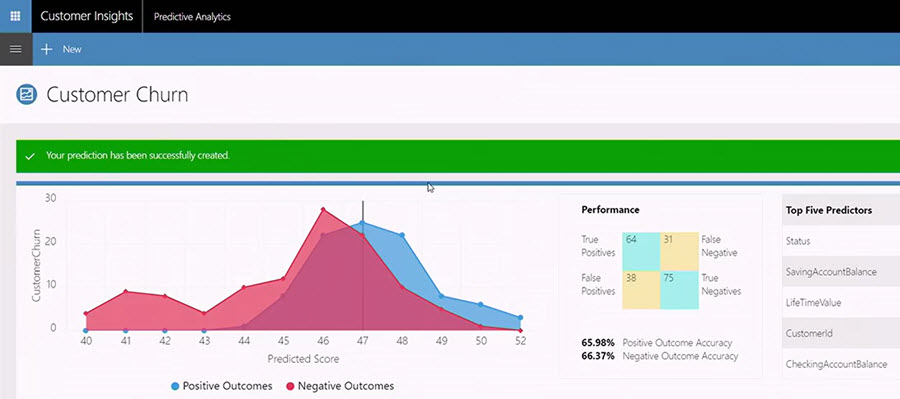
    Talking about other Dynamics products outside of the XRM platform, one new entrant into the scene that has been popping up quite frequently on the recent slides is Dynamics 365 Customer Insights. Judging by what MS showed to the industry analysts at the BF event, there will be some UI changes from the current Preview that will bring this closer to Dynamics and further away from the initial “Azure Customer Insights” version that we saw last fall.

    It’s been a bit difficult to evaluate the true capabilities of the Customer Insights application up until now, since actually connecting it with Dynamics 365 data hasn’t been possible earlier. Once all the Azure Data Lake and other elements that this application depends on are fully available across different regions, perhaps we’ll soon get some hands-on experience to contrast with all the big words that have been associated with Customer Insights so far. At least all the segmentation and visualization features appear to be much more targeted towards real life CRM scenarios than some of the more generic analytics capabilities in products like Power BI.

    Speaking of which: I almost missed this announcement, but Power BI now as a connector to Customer Insights, which opens up some new scenarios. If the various analytics options didn’t have your head spinning yet, then the new Power BI Premium with on-prem server deployment options might just do the trick.

    What About XRM?

    Looks like there are shiny new applications coming for the Dynamics 365 product portfolio, some of which are leveraging the Common Data Service (CDS) as the backbone. It makes a whole lot of sense to use the latest technology for brand new apps, but that doesn’t mean the XRM platform would have been forgotten. To get a glimpse of what the Spring release will be introducing on this front, you can head over to the Dynamics 365 Roadmap site and pick an XRM based app like Sales, then see the “In Development” lane. Below are a few examples of the items currently listed:

    • Virtual Entities. “With Virtual Entities, System Customizers and Developer have the power to build complex business applications to view external data in Dynamics 365 at runtime without having to make multiple copies of the data.”
    • Portal interaction tracking. “Track your customer’s interactions with your Portal and funnel it to Dynamics 365 Customer Intelligence to plot a 360 view.”
    • Support Azure AD-B2C for Portal authentication using a single sign-on (SSO) configuration.
    • Source code for Portals. “A one time release of Portals code will be released to the Microsoft Download Center under MIT license for developers to download. This feature enables Portals to be deployed to Dynamics 365 on-premise environments, and allows developers to customize the code to suit their specific business needs.”

    Expect to see the list grow as we move closer to the planned release date. A lot of great features have already been presented in MS events, like in-context Flows in Dynamics 365, or improvements to the user experience. If you want to be the first to gain access to the upcoming features, then be sure to check out the recently announced Dynamics 365 Insider Program.