Tag: platform

  • Forget static plans, use the Release Planner for Power Platform roadmap info

    Forget static plans, use the Release Planner for Power Platform roadmap info

    It’s that time of the year again when Microsoft have published their plans for the upcoming 2022 Release Wave 2 for Power Platform and Dynamics 365. “How exciting! New PDF documents with hundreds of pages to read!”
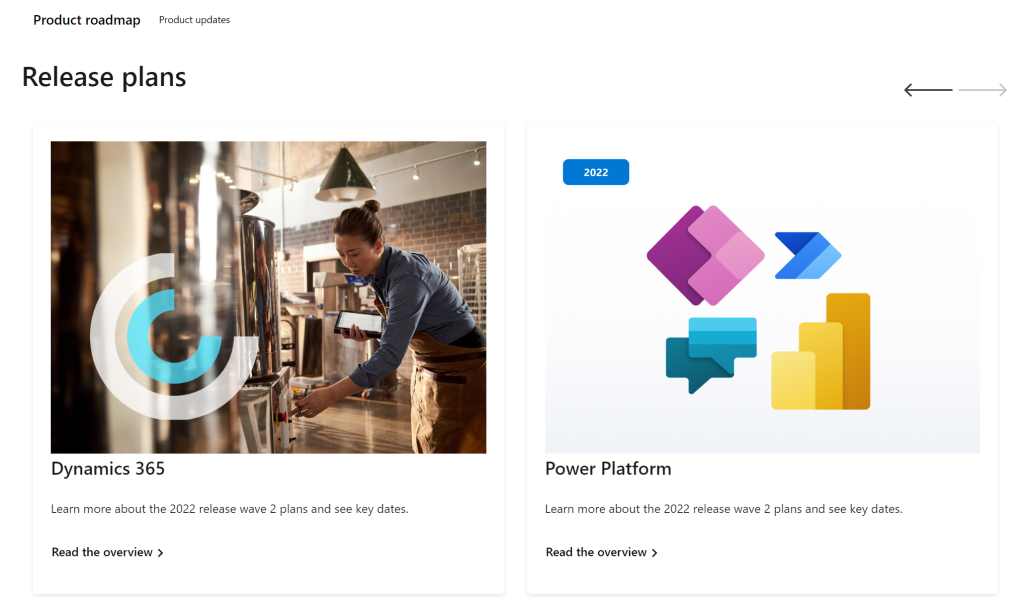
    I’m sure many of you have learned to skip the static PDF files by now and instead add bookmarks to quickly get to the online version of these plans. Like these:

    That’s much better, but it isn’t really optimal either. I don’t know about you, but personally I’ve had a hard time getting very excited about the new Release Plan drops for a couple of years now. There’s just something not quite right with this “wave” model.

    Everything changes, always

    Don’t get me wrong. It’s great that the Power Platform community members are curating their own top lists from these Release Plans twice a year. There’s plenty of value in seeing what items people are actually excited about, not just reading MS corporate style “excitement” on everything included in the Plan.

    Yet the reality is this: the contents of these Releases Plans is likely to reflect less than 50% of what will actually be delivered into the products over the course of the wave. If you need proof, then check out the most important page of the online Release Plans: change history.

    At any given time, Microsoft product teams are working on several new features and enhancements that they are not yet ready to disclose. They’ll get added to release plan later (or sometimes launched without it). As a very recent example, Managed Environments was announced as a preview feature on the same day as the 2022 wave 2 plans came out. The feature is not yet in either wave 1 or wave 2 documentation. It’s very natural that the product marketing’s need for making feature specific big announcements is a higher priority. After all, diligently maintaining the long list of similar release items won’t bring that much attention to any single feature.

    Then there’s the inevitable reality of planning / estimating in software development. Things can get delayed due to too optimistic estimates, dependencies to other items/products, changes in MS product strategy, acquisitions, and so on. Ultimately the Release Plans are just a publicly visible backlog of what the team is working to deliver. It’s better not to get too excited about any specific feature on the list – often those will be the ones that get eventually postponed / removed…

    While it’s kinda nice that we have a steady rhythm of 2 release waves per year that can be easily communicated to customers, the reality is more messy. These waves are forcing an artificial structure onto the ongoing product development work. Remember: the “wave” is not any actual release in itself. October 2022 will deliver a tiny fraction of the items listed in the 2022 wave 2 plan, as the wave lasts for 6 months.

    While the waves themselves are sequential, Microsoft’s communication model has overlap for the waves. The fact that the wave 2 plans are first announced when there’s still 3 months worth of wave 1 to go (until end of September) can make it complex to keep track of items. You can’t tell whether a feature is in the product roadmap just by looking at the latest plan since it might be in the previous pipeline still. Here’s one example:

    If only we had a more dynamic view into the Power Platform and Dynamics 365 product backlog, without these artificial “waves” to confuse us…

    Say hello to the Release Planner website!

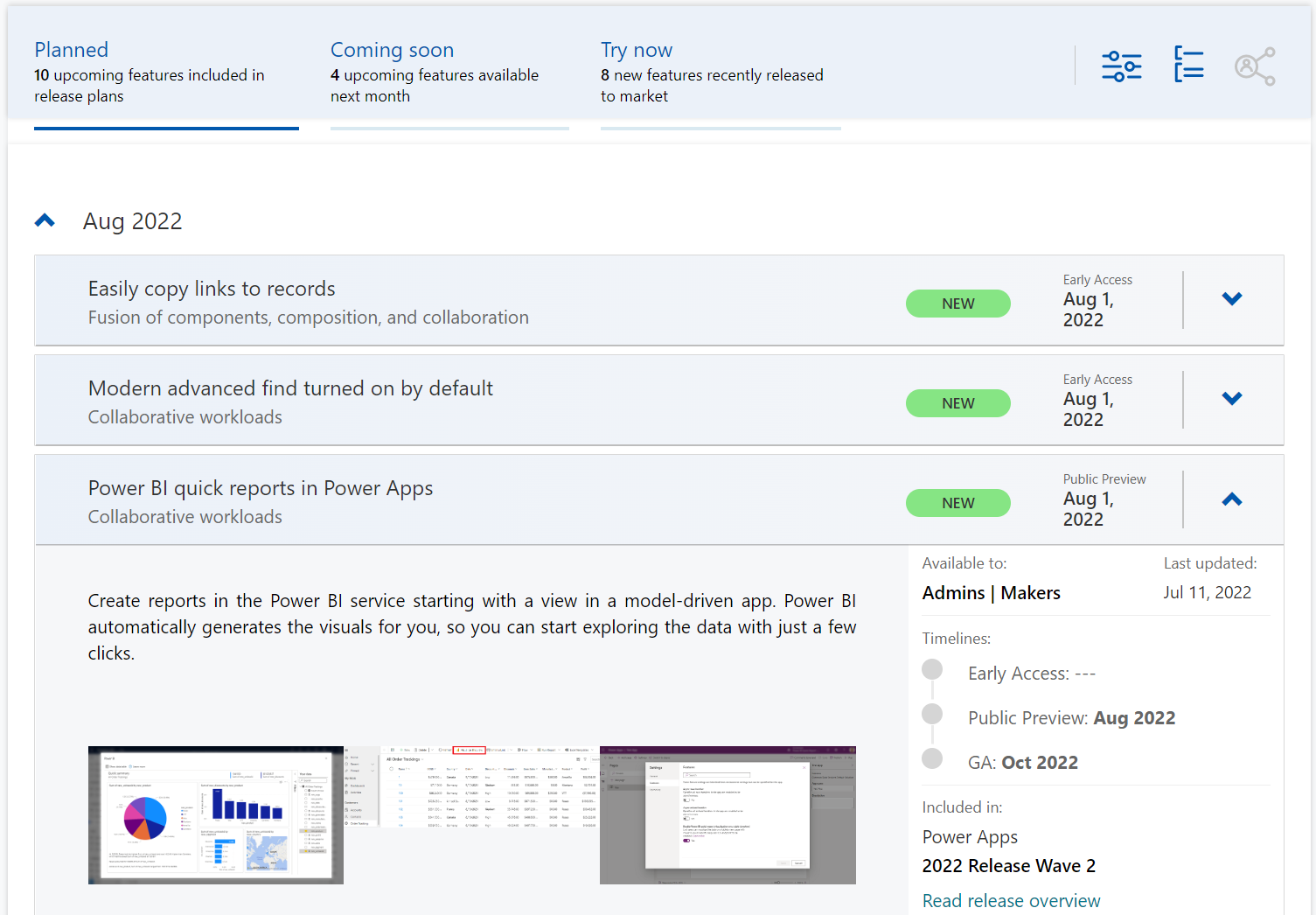
    Although it’s still a preview in itself, the Dynamics 365 and Microsoft Power Platform release planner is already a very worthy rival to the familiar Release Plans. If you’re familiar with the Microsoft 365 roadmap, then this a similar website that provides the current state of what features are being planned, rolling out or recently delivered.
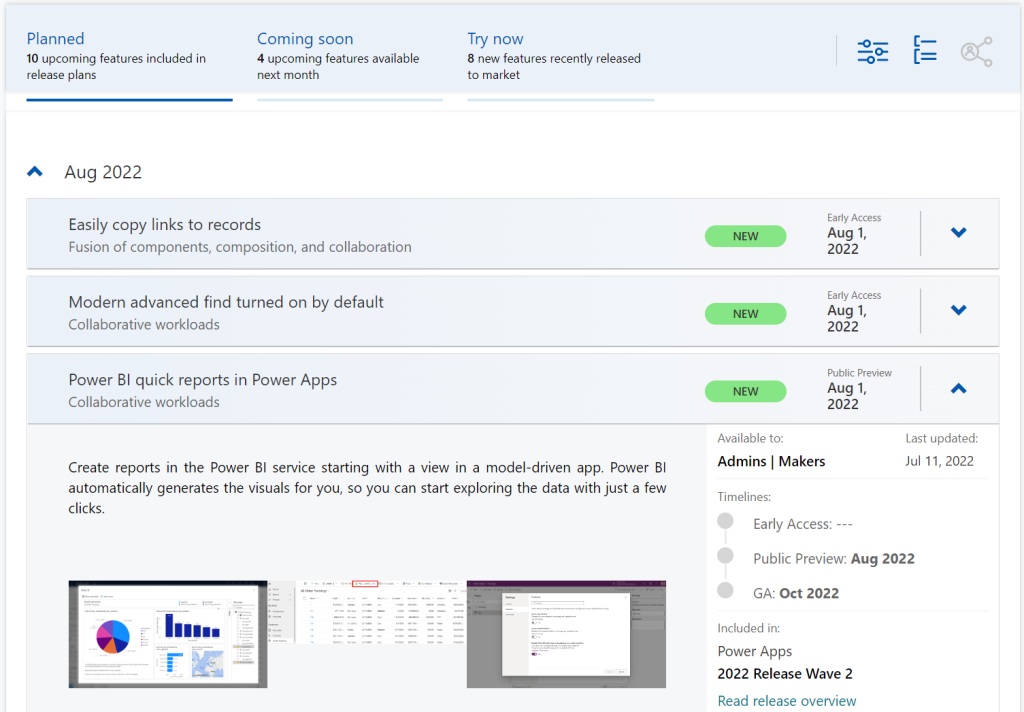
    The data on release items is largely identical to what the official release plans already offer. However, it’s not wrapped within the wave concept, meaning everything can be found under a single site.

    There have been recent enhancements made to the Release Planner (listed here). Searching the release plan items with keywords is now possible. There’s a change history to reflect updates made to delivery milestones (i.e. delays in early access / preview / GA dates). Finally, filters and sorting options have been introduced, so you can view only the latest additions (7/30 days) or updated items across Dynamics 365 and Power Platform.
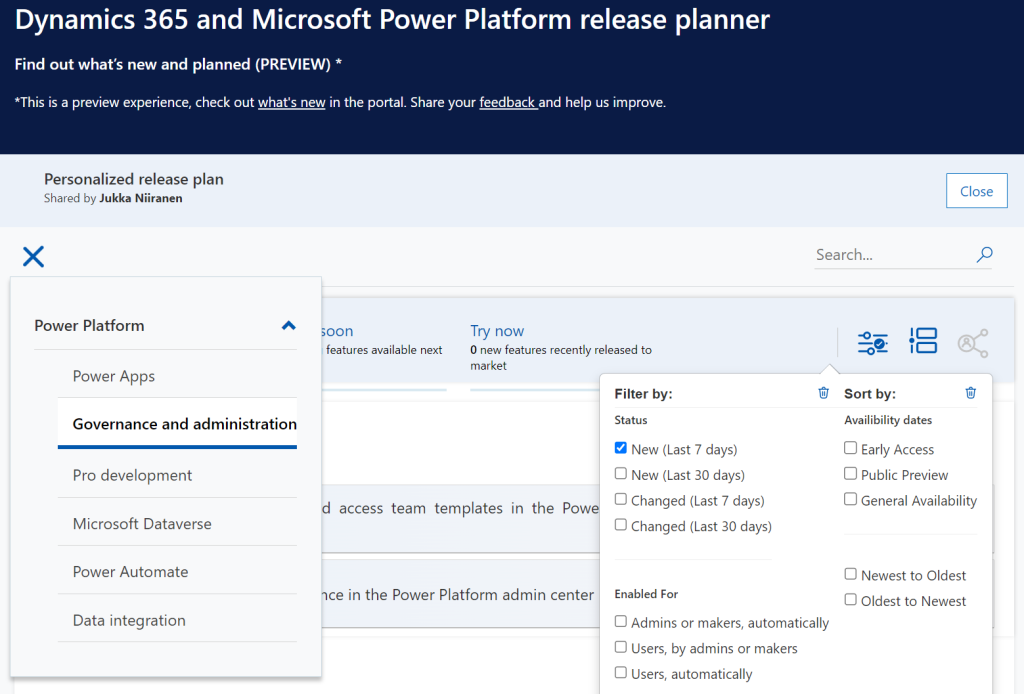
    Since the Release Planner is a Power Apps Portal Power Pages website instead of a Microsoft Docs site, it is much easier to implement such features that are intended for working with a list of records. Docs is great for documentation of course, as well as version control through its GitHub back end.

    One really neat feature in Release Planner is the personalization option. When I log into the site, I have the ability to pick items into “my release plan”. Essentially its a way to create a list of favorite items to follow. Because let’s face it: we all focus on some corner of Power Platform or Dynamics 365, not the entire MS BizApps cloud. Creating a personal release plan also provides an option to copy a public share link for it:
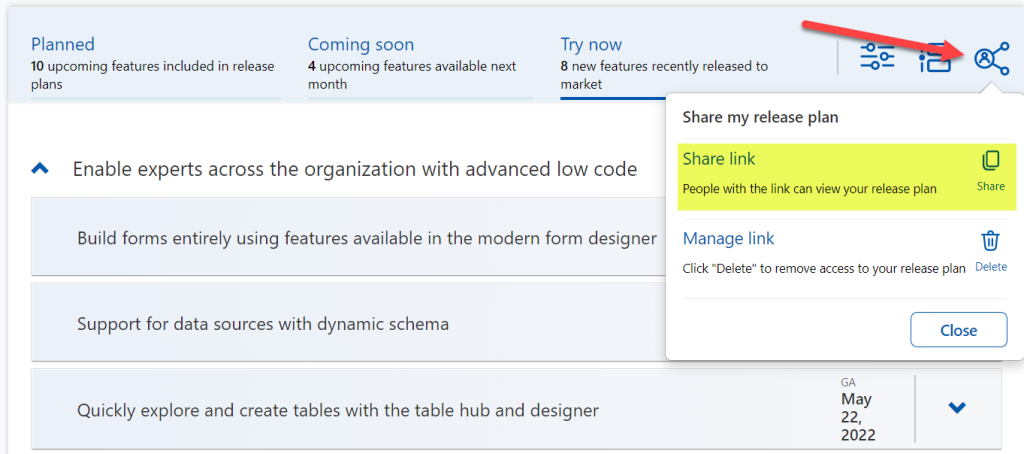
    Using a short URL service, I can now create an easy to remember link that will always take me to the list of Power Platform release plan items I’ve flagged for myself to follow. You can of course have a look at it, too:

    https://ff.tips/releaseplan

    With this link, I can now spend less energy on A) remembering if an item has been in wave 1 or 2, and B) stop hunting through the change history page for status updates. Oh, and it also works fairly well on a mobile device, whereas trying to navigate the legacy release plans on MS Docs seems to be impossible (at the moment at least, on Android/Chrome).

    Of course any dynamic website is only as good as the underlying data that is used for rendering it. At the time of viewing, there seem to be tens of release plan items from 2022 wave 1 that have not yet been updated to reflect the current status. The Release Planner site says they should be available/GA when in reality they’ve been delayed, postponed or even cancelled. This is something that technology in itself won’t fix. I hope as Microsoft’s release planning process matures beyond thinking about “waves” we’ll see more up to date information in the Release Planner site, too.

    Did you know?

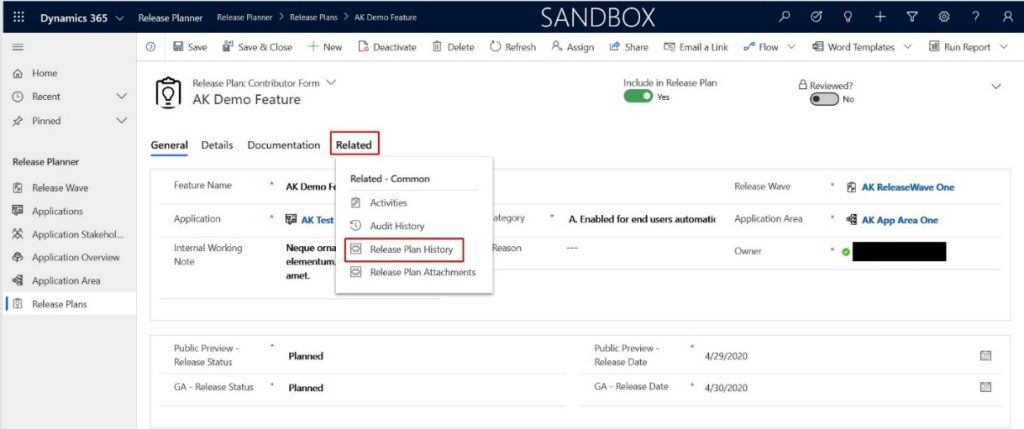
    This Release Planner isn’t the first step for Microsoft to use the Power Platform to manage the product development of the very same platform. Already back in 2019 the process and tools used by the BizApps team for release planning was published in a blog post. There’s a sample app on GitHub that contains a solution with the tables, forms, plugins, PCF controls, cloud flows etc. for deploying your own copy of the release management tools.
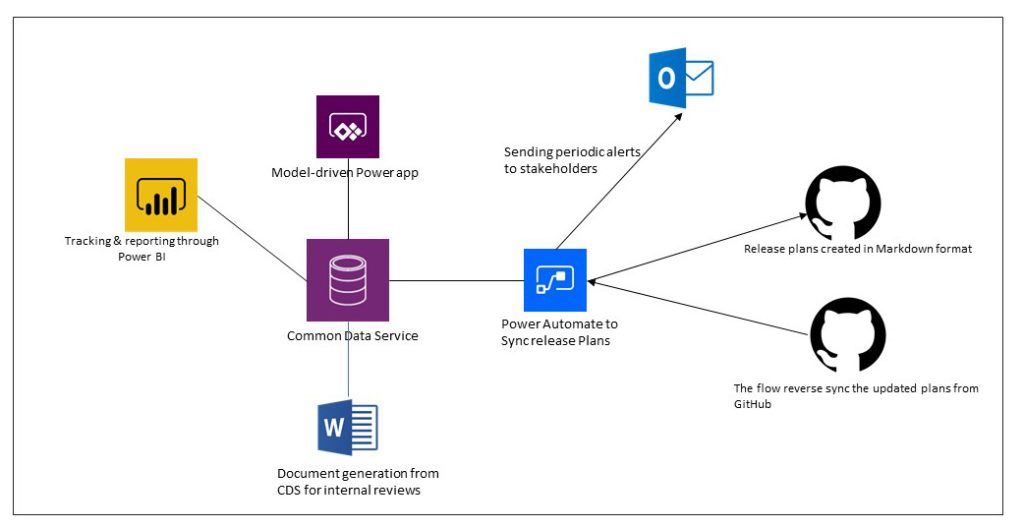
    This process was designed to dynamically produce outputs from the release items data managed in Dataverse. Both the release plan document as a Word output as well as the Docs pages as markdown files on GitHub were generated with Power Automate cloud flows:
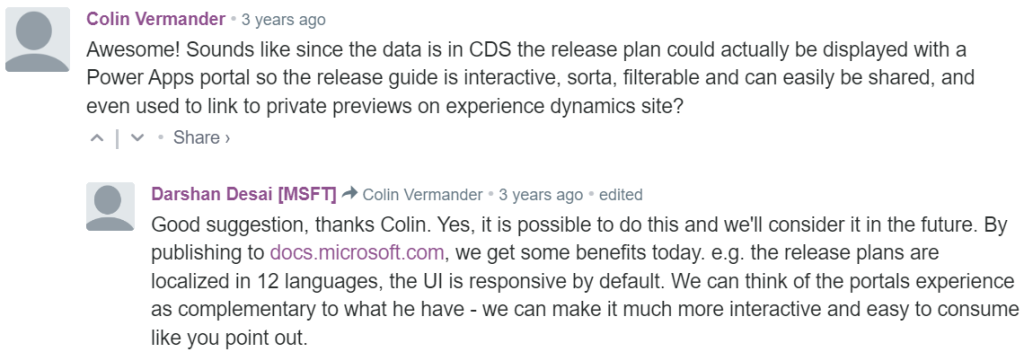
    Since the solution was built on top of a solid platform designed for managing business process data, there were of course other opportunities to leverage it. As was pointed out in the comments section of the 2019 blog post, by a certain ex-MVP (now at MSFT) with a long history on Portals in the form of Adxstudio:
    Which brings me back to an even more ancient blog post of mine, from 2015, called XRM Strikes Back. Inspired by Microsoft’s acquisition of Adxstudio, I argued why in the long term it would be a more successful strategy for MS to bet on the platform, rather than trying to integrate SaaS products from outside the ecosystem into the Business Applications portfolio.

    Success doesn’t happen overnight either way. Looking at the XRM based acquisitions, Adxstudio is now the 5th product in the Power Platform family, with the new name Power Pages. FieldOne Sky turned into Dynamics 365 Field Service that has quite a solid position in the market (from what I know). Mojo Surveys evolved into Dynamics 365 Customer Voice, which may not have an extensive roadmap right now, yet it’s still widely used by the customers we are working with at least.

    Back in 2011 when Dynamics CRM Online itself was used for managing the Dynamics CRM Online launch website, backed by (Windows) Azure, so might have considered that a crazy thing to do with a business application platform like XRM. Well, who’s laughing now?!?😁

    The journey up to this point has been long, but that’s exactly what such low-code application platform journeys are for customers, too. Microsoft is now in the process of also migrating their third party Ideas sites for product feedback into the Dynamics 365 Customer Service Community portal template (meaning Power Pages). The Power Automate Ideas site is moving there next week. Dynamics 365 Ideas already lives on this platform, so I’d imagine other products will soon follow. Another piece of the digital feedback loop coming together, through the power of the platform.

  • 4 Stages of MS Cloud Business Apps Evolution

    4 Stages of MS Cloud Business Apps Evolution

    In the past I’ve written about the History of Microsoft CRM from it’s first 10 years. I’ve also explored how the platform evolution up until Dynamics CRM 2013 had changed the product and how we worked with it. This time I want to focus on specifically the Microsoft Cloud era.

    I started to think about the different focus areas that we’ve seen on the journey that’s taken us from the early CRM Online days into what the current roadmap for Dynamics 365 and the greater Power Platform look like. In my mind these “snap” into four logical stages that describe what the main ambition at any given time seems to have been for Microsoft’s product team:

    Why bother looking back? Well, I could insert a “those who cannot learn from history” quote here, but really it’s more about putting the present into perspective. There are still plenty of customers who’ve either stayed with Dynamics CRM on-premises (now 365 CE by name, too) or who are still viewing the online service as just a “CRM in the cloud”. Hopefully this post will help in understanding the magnitude of change that has taken place in the greater Microsoft cloud during the past few years and why it would be better for them to embrace it rather than just observe it.

    1. Parity

    The very first versions of Dynamics CRM Online in 2008 wasn’t exactly the same product that you could get by installing it on your own application servers. The limitations on features and customizability meant this was a “CRM lite” that saved you the effort of infrastructure investments and server management, but there were a lot of trade-offs. You gotta start somewhere, but obviously this wasn’t exactly up to the vision that Microsoft saw as what the cloud services should offer to their customers.

    Upon the global launch of Online we received the updated CRM 2011 version and most importantly the solution framework that after several iterations now powers the ALM story behind Power Platform. Closing down the gaps between Online and on-prem was the primary goal for product development, with the “Power of Choice” being a key selling point against server-only or cloud-only competition.

    While the customization capabilities in CRM Online were surprisingly powerful already in 2011, the gaps in actually managing the environments you had no direct access to took a longer time to close. For the enterprise customers to consider moving from fully controlled servers and databases to the MS hosted cloud, a lot of investment was needed in building self-service features for instance management – not to mention ensuring the cloud apps were reliably available and updated in a controlled manner.

    Today the flexibility of spinning up new instances, copying them for test & dev, taking backups, syncing data to Azure SQL for reporting, and many other self-service features available for admins make the cloud environment quite attractive. In exchange of giving up full control over your servers and databases, you have the luxury of not having to think about them at all. There are no servers to patch up and keep running. As for the updates, it’s now a continuous delivery of new & improved features that puts an end to the concept of an upgrade project altogether. Sure, you’ll still need to do your part to ensure customer specific customizations and integrations keep working – that’s just another service that needs a continuous delivery mindset.

    2. Integration

    Once the cloud version was sufficiently close to the on-premises Dynamics CRM server, the next stage was all about making it better than on-prem. This was the era in which Office 365 was really taking over the business productivity market, so you could say the low-hanging fruit was in tapping into these existing services in the MS Cloud and making Dynamics CRM a more attractive application through those.

    Sure, we had heard the “better together” story for Dynamics + Office already in the on-prem days, but this wasn’t exactly the way we today expect cloud apps to just work with one another. Complex server configuration tasks were surely a nice source of revenue for the IT consulting companies, since very few customers were able to know all the ins & outs of how to properly deploy an Internet Facing Deployment of your Dynamics CRM server and make it talk with other MS server products. From Microsoft’s perspective, having useful product features available for everyone in theory doesn’t scale into real world customer success if there simply isn’t enough skill out there to deploy everything the way MS engineers do it in their labs. Well, when it’s all run by MS from beginning to end, this made it a solvable problem.

    Making common online services like Exchange and SharePoint available for Dynamics CRM admins to click & configure on their own was one key part of this journey. What this Cloud + Cloud combo also meant was that new features from the latest versions of each service could be rolled out at a much faster pace than the server bits could ever follow. Oh, and since all the services were by default available via the public Internet, mobile clients became an everyday tool for accessing your CRM information.

    (more…)
  • Keeping Dynamics 365 Apps Up to Date

    Keeping Dynamics 365 Apps Up to Date

    We’re living in the “post-October” era where many of the new Dynamics 365 Customer Engagement features promised in the Oct ’18 Release are materializing into the live environments. Not all of them, though, since that space train carrying the Business Applications release bits has been scheduled to run from October 2018 to March 2019, as you can clearly see: 

    While some features arrive in preview and only for a specific geographic region, there is plenty of stuff that’s being deployed to nearly all Dynamics 365 CE online orgs. While we’re not quite yet at the target state of having every customer running the same version of the application, there’s no longer a process for scheduling the update for your own environments on a particular date in the distant future. v9.1 has most likely now been rolled out in all but the most exotic geos.

    This lack of CDU calendars to pick the dates from doesn’t mean that everything would automatically get switched to the latest version. Remember that in addition to the underlying platform (now called Common Data Service for Apps, CDS) there are also the actual Apps to update. For example, if you’re running the Sales Hub a.k.a. the Unified Interface app for Dynamics 365 for Sales, the menu items in the App Settings section might look like the following:

    Whereas what you should be seeing in the latest version currently is this:

    How do we get there? Let’s dive into the world of solutions and find out.

    Applying Solution Updates

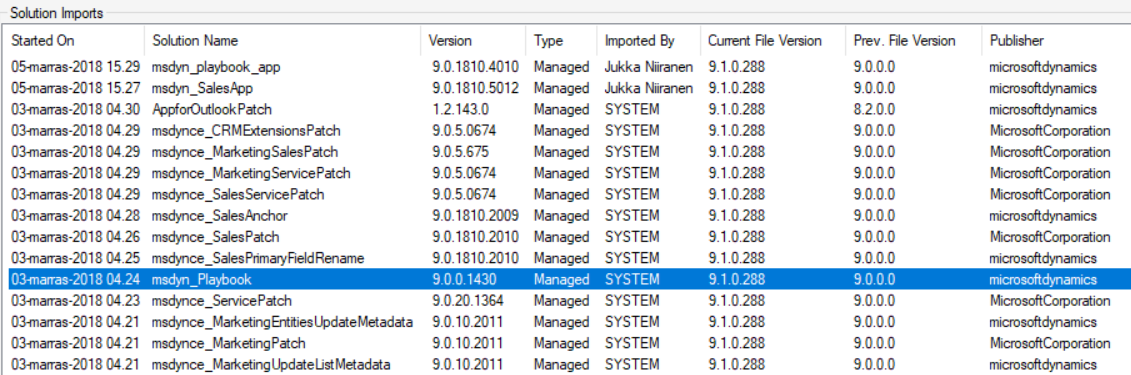
    How do we know which solution versions carry which new features? We don’t have a central place for such information right now, since the Microsoft Dynamics 365 Online releases page only lists fixes and changes to existing functionality (in theory at least). When we browse the documentation for specific features like Playbooks for example, we may see details like this:

    OK, that gives us a hint about what versions we should be seeing inside Dynamics 365. Getting the platform version is easy enough via the About menu behind the configuration cog, and everyone who’s customized Dynamics CRM should know where to look for the solution version number.

    (more…)
  • Top 3 Themes for Dynamics 365 in 2017

    Top 3 Themes for Dynamics 365 in 2017

    The first day of the new year is a good moment to reflect on what 2017 gave us (or didn’t give) in the Dynamics 365 business. Here are the top 3 themes that came to my mind when I looked backed at the last 12 months of news, releases and overall directions coming from Microsoft.

    Business Applications

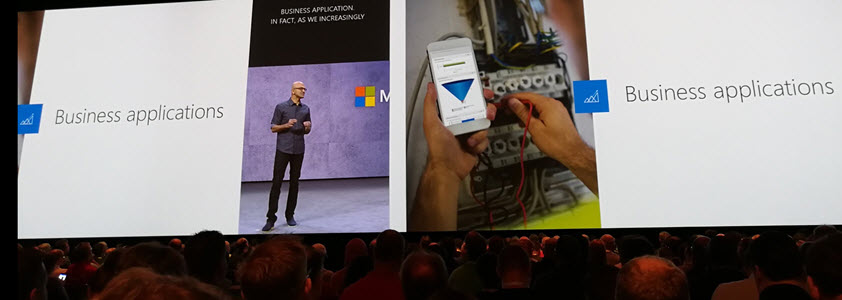
    A major theme that emerged this year and found its way into most of the communication coming from Redmond was Business Applications. Those two words on their own of course don’t mean anything very revolutionary, but it’s rather the way in which they were used to broaden the context of Microsoft’s business software beyond just Dynamics that’s of greater significance. If 2016 was the year when CRM and ERP were commercially bundled into Dynamics 365, then in 2017 the scope began to reach further beyond that. At the start of the year the XRM platform was given the Customer Engagement name, with the absolute minimum fanfare allotted for the occasion, so the true focus for product marketing was obviously somewhere else.

    Looking around at what specific software products sit alongside Dynamics 365 in the high level MS technology stack illustrations, it’s quite logical that we’re now seeing the “Power Suite” tied into pretty much every commercial narrative around Microsoft’s business cloud. More precisely, the technology grouped under this suite with no official name is very central to the story being told to both business and technical decision makers for one reason: its purpose is to connect the big three MS clouds. Office 365, Dynamics 365 and Azure are all equal beneficiaries from the toolkit that is provided by PowerApps, Flow, Power BI, CDS and their numerous connectors.

    On an everyday level it may still not be all that common for the real life CRM solutions to heavily rely on the Power Suite technology, like using MS Flow instead of D365 workflows. Because it was first rolled out as a power user focused set of tools for an individual information worker rather than something you’d deploy across a large organization, the practical as well as perceived maturity of this technology has formed a barrier of sort for full-on adoption. The long term outlook for it does look bright in my opinion, however. There’s only so much that Dynamics 365 as a platform can do on its own (be it the XRM, AX or NAV flavor), but if you can connect it with the outside world of MS and non-MS services without the traditional integration development effort, that opens up the door to a world of possibilities. I’m pretty sure customers will be interested in taking a step through that doorway and having a look around during 2018.

    App/Plat Separation

    Taking a few steps down from the higher level clouds and diving into the platform formerly known as XRM, 2017 was a busy year. This didn’t really come as a surprise to me, since I had a wonderful opportunity to get a peak at what the product team had planned for this calendar year already in the last MVP Summit in November 2016. My initial reaction to it was “are you guys SERIOUSLY going to push all of this out in the next release?” Well, a clear majority of the planned features and changes was indeed shipped during 2017 eventually, although the naming of V9 as the “July 2017 Update” didn’t turn out to be such a great idea.

    There were massive changes introduced to XRM (which I’ll continue to call for what it is), both above and beneath the surface. Rolling out Unified Interface initially to the mobile devices and eventually to every UI is going to change the client side of XRM in ways that are even greater than the previous user experience overhaul in CRM 2013. Opening up the client UI to custom extensions with the Custom Control Framework (CCF) sometime later (hopefully in 2018) is a major step in enabling and encouraging the reuse of configurable UI controls for data visualization. Finally, the App/Plat Separation that has moved the previously built-in application features of Sales, Service etc. into optional solution packages is now turning XRM into the type of generic application platform that it has earlier often been depicted as – in the technical decision maker slide decks from MS, at least.

    The combined effect of this transformation which materialized largely in V9 is that XRM should now be a lot more future proof. Having the individual applications as their own packages is a bit like how at one point in the late Windows Phone operating system’s lifecycle the Office apps needed to be separated from the OS, so that they could be serviced and updated without having to ship a new WP build. (Naturally I hope that the fate of D365 will be considerably more glorious than that of WP.) The new UI controls in CCF that now aren’t tied to a single app feature but can rather consume any data coming from XRM database or from external sources via Virtual Entities are bound (pardon the pub) to be more useful in delivering solutions to varying customer needs. Sharing the same client framework across different devices and embedded apps is going to reduce the amount of effort needed to get these solution features in the hands of different user groups.

    Licensing Model

    Sometimes the planned features take a little longer to ship than was originally estimated, which certainly is no surprise to anyone working in the business of software. Other times it turns our that what you initially promised to deliver isn’t actually going to meet the needs of the outside world after all. The delays experienced in getting V9 out to the customers represent the former scenario, while what happened to the Business Edition is an example of the latter.

    There’s no denying that with the growth of the platform and all the new cloud services attached to it, Dynamics CRM had grown from humble beginnings to enterprise scale in the recent years. Therefore the idea of labeling the suite as a true enterprise product and building a different lightweight offering for the needs of smaller CRM environments probably made a lot of commercial sense when MS announced the Dynamics 365 branding with the Enterprise and Business licensing plans to the world in WPC 2016. Only the practical problem remained of how to actually mold a new offering out of the big suite – at least without taking several shots at one’s own foot while setting up constraints for customization and expansion for those customers who’d initially start their exercise from the lower end of the license pool.

    Those 14 months from announcement to eventual cancellation of a separate Business Edition were filled with confusion on all sides – from partners to customers, and probably within Microsoft, too. Although this did leave an unfortunate stain on the year 2017 for Dynamics 365, the long term outcome from the decision to NOT roll out an artificially separated lower tier may turn out to be a better choice after all. It’s all still wide open on how the promised “lower price point” licenses and apps will be packaged, but at least it sounds to me like MS has acknowledged they need to build bridges instead of walls around the growing set of applications in Dynamics 365. For instance: just take a look at the documentation of the upcoming Dynamics 365 for Marketing application and tell me if it looks like an SMB only -product that no existing (Enterprise) customers would have any use for? Exactly. Sanity must prevail and customers be given a chance to license the technology that best fits their needs.

    Hello 2018

    What can we expect to see from Dynamics 365 in this new year then? There are no definite product roadmaps from Microsoft that would publicly disclose what’s planned for be released in which year, since the software business no longer operates on the type of schedule that we saw when products were shipped in shrink wrap every 2-3 years. It now looks more like a mesh of forever updating cloud applications and web services that move along according to their own backlogs and team velocity. Given that the real business applications that customer organizations deploy are a combination of several products that in turn use a variety of back end services, who can actually tell when a certain feature will be “ready”? For example, Dynamics 365 for Marketing utilizes Customer Insights, which in turn relies on the following Azure services:

    • Azure Data Lake Store
    • Azure Data Lake Analytics
    • Azure HDInsight (Spark, Phoenix, HBase)
    • Azure SQL Database
    • Azure Key Vault
    • Azure Secret Store
    • Azure Event Hub
    • Azure Stream Analytics
    • Azure Redis Cache
    • Azure Service Fabric
    • Azure Active Directory
    • Azure Monitoring
    • Azure Metrics
    • Azure Websites
    • Azure Service Bus
    • Azure Storage

    That’s what the future is made of, and that’s why it is so unevenly distributed. We may well see MS announce the next Dynamics 365 Customer Engagement capabilities before existing customers are even able to update their instances to V9. The specific points in time where a particular capability is 1) announced, 2) in private preview, 3) in public preview, 4) available for new environments and 5) deployed for live customer environments may therefore be spread out over a time period that makes even assigning a proper year to it challenging at times – let alone a calendar month like “July 2017”. In this light, I’m personally mainly expecting to see how the above three themes from 2017 will play out as they get closer to impacting the real life scenarios of customer organizations all over the globe that get to put it all into action in their digital business processes.

  • Postcards from Microsoft Ignite 2017, part 2

    Postcards from Microsoft Ignite 2017, part 2

    Back to Florida again – at least on a mental level. In part 1 of my Microsoft Ignite conference diary I described the overall setting of Dynamics 365 in the context of the Business Applications story. This time let’s have a look at some of the details on what the XRM platform can do now and in the near future. The live tweet content can be found from my #MSIgnite Storified collection part 2, but here’s the story behind those social posts.

    The GA (general availability) target of Dynamics 365 Customer Engagement V9 was set to the week after Ignite. This was indeed the case, as I didn’t even have a chance to arrive back home from Ignite before I had my first V9 trial instance running the in the cloud. People who had participated in the Dynamics 365 Insider program were already granted access to the preview instances of this major release but now each and every new trial is provisioned with the V9 bits. A few days later there also was an official blog post that announced the availability of “Dynamics 365 October service update”. The naming of course is a bit confusing, since up until this point Microsoft had stuck to the “July 2017 Update” name – and that’s what still shows up in the D365 Admin Center UI. Don’t you agree that life would be much simpler if we’d all just use the version numbers instead of marketing names? Oh, and if we had the KB article already available for the 9.0.0.1103 GA build, that would be even sweeter.

    After the initial Preview Executive Briefing sessions for V9 that were conducted before the summer holiday season, Ignite was the place where the next big presentation on Unified Interface took place (at least to my knowledge). Oren Ryngler and Linda Simovic took us through a detailed demo of all the UX goodies that V9 has to offer. Unfortunately the slide deck is not available for download even for Ignite attendees, but you can view the full recording of the presentation on YouTube. I bet that even if you participated in the preview program, you’d be hard pressed to recall all the wonderful details packed into the Unified Interface. Principles like “Gradual exposure to complexity”, AI capabilities like Grid Recommendations or the new chart types are something you can expect to discover in the video.

    There was another excellent session where Linda discussed what the underlying motivations behind the Unified Interface initiative (or “Unified Client Infrastructure” / UCI) were. Even more interesting was the quick peak at the Custom Control Framework (CCF) that is a significant benefit unlocked by UCI. Described as “extensibility framework for building UI components that visualize data”, we’ve already heard that Microsoft has been busy rebuilding everything in the default app UI as Custom Controls (“but if it’s default then how can it be custom?” Ah, never mind the semantics…). What we don’t yet have is a definitive date for when the APIs for building true Custom Controls will be opened up to customers and partners. What’s REALLY interesting is that the product team’s roadmap includes a “Control Gallery” marketplace for viewing and purchasing these as solutions. If it all works out, then the Unified Interface in V9 is just the start of the true transformation of XRM UI into something more than fields and grids on an entity form.

    While the UI story is always going to get far more social media coverage due to fancy screenshots from the visible application, there’s a lot more bubbling under in V9 than just the promise of a Custom Control Framework. Matt Barbour presented the Microsoft Dynamics 365 CE Platform Update for Developers, delivering a concise “what you need to know” package for people working with XRM solutions or API based extensions. Now that everything in the OoB apps has been separated from “system” into actual solutions, managing the dependencies via solution segmentation is actually a big deal. Why it’s even a bigger thing from application maintenance perspective is that the next V10 major version will ONLY accept V9+ solutions – so start getting used to them right away. In addition to the earlier announced V9 platform enhancements of Virtual Entities and Multi-Select Option Sets, we also received a “one more thing” with Auto Number fields! Thousands of custom numbering solutions can finally be put to rest, at least after you install the Auto Number Manager for XrmToolBox to access the configuration options for this new native field type.

    There were several shorter sessions in the Expo area of Ignite that offered practical tips for how to do more with less when it comes to Dynamics 365 Customer Engagement. While I remain firmly in the no-code territory myself, the PowerShell scripting capabilities available in the new Online Management API or the more familiar Microsoft.Xrm.Data.PowerShell module demonstrated by Shwan Dieken and Sean McNellis from the PFE team open up automation capabilities even I can easily relate to. Don’t forget to check out this huge link list put together by Shawn & Sean for the latest admin tips & tricks you need to be aware of. Over on the MVP powered sessions of Ignite, George Doubinski also showed a wealth of automation tips to reduce manual labor for Dynamics pros. What I bet you didn’t know how easy the integration of Dynamics 365 Customer Engagement with a WordPress website can be, thanks to the plugin developed by George & Co at AlexaCRM.

    Like I wrote on the back of my first Ignite postcard, the Business Applications story that Microsoft wants to tell us consists of a lot more than just Dynamics 365 these days. While it’s been all too easy to disregard the earlier sales pitch for PowerApps and Flow as just a citizen developer fable that doesn’t apply when working on Real Projects, they are gradually gaining the types of ALM capabilities that put them higher up on the list of tools to consider for solving customers’ business problems. While there were some disappointments, like the continuing non-story of Adobe Marketing Cloud + Dynamics 365, you could easily find yourself thinking “hmm, that’s actually pretty cool” while watching the demos for this “Power platform” of non-XRM business tools. Even though CDS still largely is “a box to connect other boxes on a PowerPoint”, the added features like embedded PowerQuery and the accompanying new data sources give us a sign that progress is being made.

    As always, the big questions is about when’s the right time to jump in to the new technology if you want to deliver successful customer projects with it. Events like Microsoft Ignite are great for calibrating your own perceptions and expectations, not just via the official product demos but also the community response to them. I know I walked away from the conference with a far better understanding of what Microsoft is pursuing with their latest product development investments – even though I’ll need to review a bunch of the session recordings to actually grasp the finer details of each individual technology.

  • Postcards from Microsoft Ignite 2017, part 1

    Postcards from Microsoft Ignite 2017, part 1

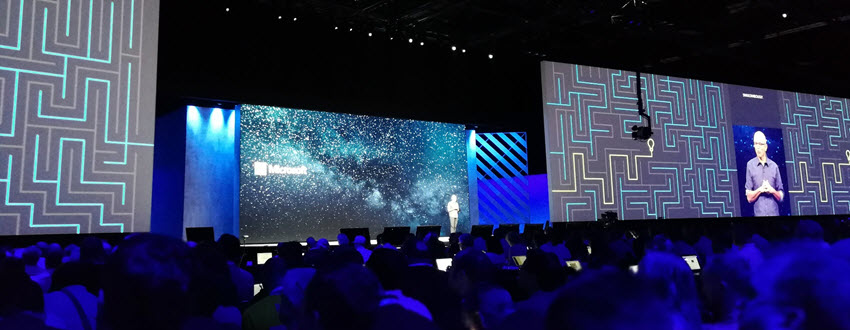
    Greetings from the Sunshine State! This Fall I was fortunate enough to have chance to attend my first ever Microsoft Ignite conference in Orlando, Florida. Staying true to my habits, I did tweet out quite a lot of content from the live event with #MSIgnite hashtag. If you missed that stream, feel free to revisit the collection over at Storify, where I curated a story called “#MSIgnite 2017: Business Applications”. (Unlike with the V9 preview, I’ve decided to refrain from embedding the infinite scroll version of the story into this blog post. You’re welcome!) Here’s a little written summary on my thoughts about the event’s contents.

    If you’ve been to or kept an eye on Microsoft Ignite before, you’ll know that it’s an event that has traditionally catered the more mainstream product lines like Office 365 and Windows. I did not expect any major announcements from the Dynamics 365 team at Ignite, so my intention was to explore the broader story around MS Business Applications. Most of us who are working in cloud environments with Dynamics products must be well aware of how much there is going on around the core XRM platform (still the best name for it), but rarely do we have a chance to focus on something that isn’t directly linked with the sales/service/marketing processes of CRM system development projects.

    That’s a bit of a shame, since at the end of the day that’s precisely where Microsoft’s big competitive advantage lies. The whole really is greater than the sum of its parts in this occasion, and if the size of the Ignite conference would be used as the yardstick, I’d say the whole is actually HUGE. Sure, it wasn’t anywhere near Dreamforce in terms of the attendee count, but if you’re not looking for a rock festival to hang out with your business partners but rather want to deepen your understanding of the current and future capabilities of a cloud technology platform, it doesn’t need to get any larger than this. I reached my 10k step target each day just walking between the sessions, which tells you the Orange County Conference Center floor space was truly put into full use in trying to fit in the complete MS business technology stack. You sometimes literally had to take a shuttle bus from one side of the conference to the other to make it to the sessions in time!

    The biggest piece of news for D365 was already from the earlier week’s Directions North America 2017 event, where Microsoft admitted that after 1 year of waiting, there was not going to be a Business Edition release of the XRM based apps at all. Or even for the ERP side of the house – at least from a product naming perspective. While none of the technology investments made in preparation of Business Edition was actually cancelled, it’s understandable that this caused a lot of stir among the Dynamics ecosystem. Without going deeper into the topic, I believe MS made the right choice and it’s only a shame it took them so long after the initial Dynamics 365 rebranding announcement to find the right path forward. While we wait for the new licensing model details, we still remain in a product naming limbo that was also very much present in any Dynamics related session at Ignite. You must remember that what we’re experiencing in the XRM space ain’t nowhere near the amount of confusion that our ERP colleagues must go through. Godspeed, Dynamics X!

    Of course the story is no longer just centered around what to call your CRM & ERP platforms. In practically all the Ignite sessions that touched my field of work, the solutions being demonstrated were always mashups of several MS technologies. Clearly the intention was to underline the possibilities of seamless integration between the latest cloud apps from almost any two product teams. Yeah, I hate the word buzzword “seamless” as much as any experienced IT consultant does, but my point is that it seems like the phase of inventing new MS cloud products has reached an end and now the focus is truly on ensuring they can connect with one another. This also means challenging the assumptions of what the role of each product is in the customer’s solution architecture. Instead of using XRM as the UI for business data presentation, could a better result be reached via a Power BI dashboard that has embedded Visio process visualization and PowerApps screens with record level drill-down? Possibly yes, and these alternatives are what MS wants us to actively explore.

    The floor space given to PowerApps at Ignite 2017 made it the clear headline product in the Business Applications track. Maybe it was just my session schedule planning, but it felt like all roads eventually lead to PowerApps. It’s of course a very neat way to demonstrate the benefits of having your business data in systems that are easily accessible by these low-code/no-code apps. What was somewhat confusing to hear, though, was that the current “UI first” approach of designing PowerApps on a free canvas was promised to get a new model-driven app design option alongside it. You know, with entity based forms, server-side business logic and even Business Process Flows. “But wait, weren’t those the defining characteristics of an XRM app?” Bingo. It literally was a set of Dynamics CRM customization UI screenshots snatched into a PowerApps roadmap presentation. These two paths are converging quickly now and you’re going to want to keep an eye on what the next chapter in the Business Applications has in store for us.

    I’ll need to go lie down in a brief coma now to recover from the jetlag caused by a Miami-Helsinki flight (cheers to Finnair for offering the direct connection, though!). I promise make a return with part 2 in a few days time, as there is a lot more souvenir sweets to digest from Microsoft Ignite 2017.