Tag: online

  • CDM: New Data Model For The Common Good?

    CDM: New Data Model For The Common Good?

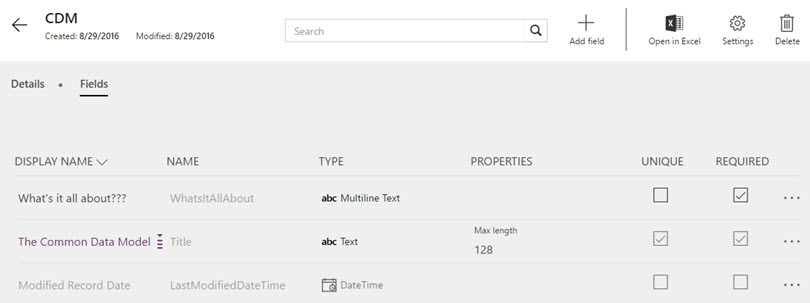
    The first new component of the upcoming Dynamics 365 platform that has reached a stage of public preview is the Microsoft Common Data Model (CDM). Available via PowerApps, CDM can be provisioned in your Office 365 tenant with only a few clicks, so there’s little reason for not having a look an early look at it. In fact, you only need to sit back and relax while watching CRM MVP Scott Durow walk you through a first look at the Common Data Model:

    So, there you have it! That’s what CDM looks like when accessed via the PowerApps web management UI. Any questions?

    Yeah, I actually do have a couple.

    How will this work with CRM and AX?

    What we have available in the preview is pretty much the most straightforward part of the very big puzzle to put together, meaning a database on Azure with some preconfigured tables and data model management tools. We do not yet know much about how the Dynamics CRM and Dynamics AX functionality will be linked to CDM as part of the Dynamics 365 cloud platform, so there’s plenty room for speculation, which honestly is mostly what I’m about to do here. In a way I’m just continuing on the theme of my previous post about Dynamics 365 and its potential implications for XRM, to pass the time as we wait for Microsoft’s plans to be revealed in more detail.

    Right now the only way to push data into CDM is a Flow. If you’ve ever played with automation tools like IFTTT or Zapier, then you’ll quickly grasp the idea of Microsoft Flow. The application itself shouldn’t be underestimated just because of its current simplistic demo scenarios that usually are along the lines of “when a new row is added to a SharePoint list, send an email to this address”. Built on top of Azure Logic Apps, there’s actually a next generation BizTalk type of cloud integration platform under the hood, which should provide plenty of future potential for advanced messaging solutions to orchestrate business processes across a number of different systems.

    Flow_copy_CRM_account_to_CDM

    Once Dynamics 365 Enterprise arrives and gives us the features of CRM and AX in one seamless cloud environment, there’s naturally going to be a need for something a lot more than a “build your own” type of Flow integration. Keeping the Sales and Operations apps of D365 in sync with the customer and transaction data managed in the process of making an delivering a sale involves a fair amount of business logic. If you’ve ever designed and developed a custom integration for this type of a scenario, you’ll know the requirements can quickly grow a bit hairy. Assuming Microsoft can come along and say “we’ll take care of that hairy part, don’t you worry about it” then who could resist it?

    The reason CDM exists is that there will be more than one physical database in the Dynamics 365 suite. It’s not all XRM, which means you can’t find the Operations app entities inside your CRM solution files. For the business processes to work seamlessly, someone needs to keep those database closely in sync with one another. From reading through the Common Data Model tutorials, we can see that at least as of now, Flow is not the system that can handle it:

    “Today, when you use Microsoft Flow to import data or export data, it is not a full synchronization service. Whenever an object is added to one service, it will be imported into the other system. However, that means if an object is deleted from one system it will not be deleted in the other system.”

    So, the sync part is still in the “To Be Implemented” bucket. So is security, since the passing of a record from CRM to CDM via Flow will not carry over any details about who should have the rights to do some CRUD work on it. Again, it may not sound like such a mission impossible to build. However, if you’ve ever faced the requirement in a Dynamics CRM project to implement SharePoint document library integration with account records that includes not just linking the folders but also enforcing the account access rights on the documents, you’ll know the struggle is real. Sure, a collaboration solution like SharePoint has very different security concepts than a system designed for structured business records management like CRM or ERP. But if Microsoft hasn’t been able to offer OoB synchronization of access rights across Dynamics CRM and SharePoint despite of the clear business demand for it, maybe we’d be foolish to expect that it will all be seamless inside the Dynamics 365 world either.

    The thing here is that unless the solution provided by Microsoft is going to be fairly advanced, it might not be an actual solution. It’s like the old saying from the dawn of the internet:

    Some people, when confronted with a problem, think “I know, I’ll use regular expressions.” Now they have two problems.

    When confronted with the need to integrate processes across two different cloud business applications, there’s always the danger of someone rushing into thinking “I know, I’ll build a database in the middle to unify the process data”. So we end up with three cloud business applications… Now, I’m not saying that Microsoft wouldn’t have the type of application architecture masterminds working on the Dynamics 365 platform that can solve these complex problems when developing a new product. I’m just afraid that things may still turn out a bit more complex in reality than the marketing pitch for the new product launch might lead people to believe.

    What limitations will this impose on customization?

    The one reason why many of us love the capabilities of the Dynamics XRM platform is the awesome flexibility it offers us to customize the application to meet the specific needs of customers. And by “customize” I actually mean “configure”, since these days you can build such amazing features for business users without writing a single line of Javascript or C#. With Dynamics 365 now promising to deliver so many preconfigured apps for different departments’ needs, as well as making them all work together, I bet some of us are thinking about whether there’s a potential threat to the platform’s flexibility buried in the new approach Microsoft is taking. (more…)

  • Dynamics 365: The Next Chapter of MS Cloud Business Apps

    Dynamics 365: The Next Chapter of MS Cloud Business Apps

    Have you heard about this brand new thing called “Dynamics 365” yet? If you attended or followed the WPC 2016 conference, I bet you have, since it was the big headline news for Microsoft’s partners and corporate customers that kicked off their FY17. Satya Nadella spent a significant part of the WPC keynote explaining how Dynamics 365 is the service through which his vision of reinventing business processes comes to life. So, obviously there’s got to be some big things packaged into this new offering. But putting the visions aside for a moment, what exactly does this service contain in practice?

    WPC16_keynote_Dynamics_365

    In short, Microsoft Dynamics 365 is both the same old and brand new when it comes to the underlying components. As presented by many of the tech news sites, essentially Dynamics 365 is about taking the previous Dynamics CRM & ERP products and bundling them into a single cloud service. Comparing it to “the other 365”, meaning Office, it’s not an entirely different approach than taking established server applications like SharePoint & Exchange and making them easier to purchase via a single Office 365 plan. While the name is different and the tools to administer the applications are specific to the subscription service, beneath the portal there are many of the same bits as you could have on your own servers, too. In the case of Dynamics 365, you’ll be mostly getting the latest versions of CRM and AX/NAV from the Microsoft cloud.

    “Ok, so we’ll have a new SKU to purchase Dynamics products from the cloud. A bit like the earlier bundles for Sales Productivity then, where you bought CRM, Office 365 and Power BI for a discounted price. Got it, can I now go back to chasing nearby Pokémons with my phone ’cause I’d really want to catch them all?” Well, if you ask me, I think you should look a bit deeper into the Dynamics 365 story to understand how it really will impact CRM as a product as well as the ecosystem around it. I too was initially a bit skeptical about this whole thing when reading the first press release from Microsoft, but the more I’ve investigated the pieces of information available at this early stage, the more I’ve started to believe that what we have here isn’t a mere product marketing stunt but rather the next major chapter in the story of Microsoft Dynamics applications.

    Satya’s Masterplan

    One year ago when Microsoft announced that they were going to tear down the silo of MBS (Microsoft Business Solutions) and merge Dynamics product teams into C+E (Cloud and Enterprise), Nadella said he wanted to “enable the company to accelerate ERP and CRM work and bring it into the mainstream C+E engineering and innovation efforts.” It took a while before saw what this “mainstreaming” really means, but I believe Dynamics 365 is the major output from this process that started with the restructuring. It is elevating the Dynamics product offering from being just an app you can order via the Office 365 portal and turning it into a proper destination of its own.

    Back when I was starting my first gig as a Dynamics CRM consultant in 2010, I distinctly remember the day after I had returned home from the Convergence conference in Prague. I was about to sign the contract with my new employer and was riding in a cab with my boss to be, catching up on the latest tweets (with my Windows Mobile 6.0 device and whatever apps we had back then). I came across Microsoft’s announcement of Office 365 and said to him “have you heard about this already, might be kind of a big deal for the business”. Well, the business of my upcoming employer was largely about hosted MS business applications and it turned out to a big deal indeed, as the rationale for offering local CRM or Exchange instances eroded much faster than most service providers were willing to understand – let alone for them to adapt to this new reality.

    Connecting_your_solutions_small

    How I see this relate to the recent Dynamics 365 announcement is that when you stop to think about the tools we work with these days, it’s not just about the cloud as a delivery channel. If it were enough for the customer organizations to just use their business applications via a browser, from a server environment managed by someone other than your own IT department, then we’d still probably be happily working in the BPOS era of application servers hosted by “someone out there”. In reality, it rarely is about the servers or even the server application bits. It’s about services: how they can be consumed and how information flows between them. Sure, someone of course needs to set up the services, but once that problem has been solved (e.g. Dynamics CRM Online removing the need for manually installing customer specific CRM instances) it’s time to start solving problems higher up in the value chain. This, I believe, is what Microsoft is aiming to achieve with Dynamics 365. Making it more than just the sum of its parts, by lowering the barriers between the apps and encouraging customers to build solutions that consist of a network of apps – from MS and ISVs. The new AppSource portal is therefore a very important part of the Dynamics 365 story (even though at launch time it’s not yet that much better than the infamous Dynamics Marketplace).

    Front to the Back with Dynamics 365

    Once launched later this year, Dynamics 365 will be available as two editions. The Enterprise Edition will be made up of Dynamics CRM modules and Dynamics AX, whereas the Business Edition is being built on top of Project Madeira (brand new cloud version of Dynamics NAV, from what I know). Details about the pricing haven’t yet been disclosed, but at WPC there were slides shown that outline the different plans that the Enterprise Edition will offer. Since the Business Edition is clearly a lot more “work in progress” at this stage, and because it might not even contain any of the Dynamics CRM functionality (if I read the WPC materials correctly), it’s best for us to focus on analyzing the Enterprise Edition.

    Dynamics_365_vs_current_SKUs

    Looking at it from a CRM perspective, the platform formerly known as Dynamics CRM is being broken down into smaller modules that can be purchased separately. We’ve already seen how the recent CRM Online enhancements like Project Service and Field Service have been introduced as separately licensed modules (and their trials are now distributed via AppSource), but with Dynamics 365 this will be taken even further. A sales user can be assigned only a license to the “Sales app”, rather than needing a “CRM Online Professional” license to manage their opportunity pipeline. Even without knowing the price points for per app licenses in Dynamics 365, it’s easy to see that the barrier for consuming application features from the cloud will be lower when you can only select what you want. In the on-premises world the traditional “all you can eat” model of Dynamics CRM licensing probably made sense, but if Microsoft now has the option to make their cloud service available in various different shapes and sizes, why wouldn’t they?

    Even though there will be more individual apps to choose from, the main value proposition of Dynamics 365 is in the possibility of making the whole end to end business process visible to the users. Traditional licensing silos between the front office CRM system and the back office ERP system have often led to scenarios where employees need to ask another employee to check information from a system they can’t access – or needing to work with limited snapshots or static reports rather than the real-time dynamic data from the business application. Microsoft surely recognizes this as a great opportunity to move customers gradually away from using legacy ERP systems by offering a cloud platform where the licensing model is no longer determined by the server application barriers but rather the workloads of the users. The Enterprise Edition contains a “Dynamics 365 for Team Members” plan that covers read rights to each and every application, from marketing to operations (the ERP part), which specifically addresses the information silo issue.

    How Can It Actually Work?

    Knowing that all the CRM and ERP applications under the Microsoft Dynamics umbrella have been completely separate products with little in common when it comes to architecture, how is Microsoft going to turn these into a single business application platform all of a sudden? Well, that is the billion $ question to which we don’t yet have an exact answer, but let’s speculate a bit while we await for it.

    Microsoft has announced that underneath the Dynamics 365 apps there will be a platform layer called Common Data Model. On the official Microsoft Dynamics blog this CDM is described with the following words:

    The common data model is a cloud-resident business database, built on years of experience with our enterprise customers. It will come with hundreds of standard business entities spanning both business process (Dynamics 365) and productivity (Office 365). The standardization and consistency of schema enables partners to build innovative applications and to automate business processes spanning the entire business process spectrum with confidence their solutions can be easily deployed and used across Microsoft’s entire customer base.

    Hmm, okay, so there’s at least going to be a new database in addition to the application specific databases of CRM and AX, as we can see from the Dynamics 365 architecture image below. The promise of a “standardized, consistent schema”  also implies that at least the OoB entities will be connected across CRM and AX without any additional configuration effort required. Now, how exactly the integration of custom entities can be configured, or how the platform will handle the business logic involved in each connected app is something that isn’t very clear at this point.

    Dynamics_365_architecture

    Surprisingly enough, the most detailed information about CDM was first released not via the Dynamics product blogs but on the Power Apps blog. The post PowerApps and the Microsoft Common Data Model gives us the first practical view into what functionality the CDM part of the platform is expected to deliver. Some examples:

    • CDM will encompass not only CRM and AX but also the data model of productivity apps like Outlook.
    • CDM will include complex data types like address and auto-numbering.
    • CDM will contain features familiar to CRM admins, like field level security and auditing.

    Dynamics_365_Common_Data_Model

    Once the CDM Preview arrives in August we’ll hopefully get to explore the contents and functionality of this data model via the PowerApps Studio at least, even though Dynamics 365 itself will probably arrive a bit later. On another PowerApps blog post, it was announced that there will be a Dynamics 365 specific SDK, which should be launched in preview mode before the year ends.

    Why does the PowerApps team work so actively in bringing this information available? There’s a simple explanation: PowerApps, Power BI and Flow are a fundamental part of the Dynamics 365 product offering. They are included in the Enterprise Edition plans and they form the new business application platform that supports the 365 apps on top of them – to the extent that there is now even a dedicated site to describe the capabilities of these three products.

    Business_process_orchestration_small

    Since business process orchestration is fundamentally a cross-application domain, it makes a lot of sense that you don’t only rely on the workflow process engines found inside applications like CRM. Also, if you’ve tried to leverage these three tools with current Dynamics CRM Online application, it soon becomes obvious that working with the relational data and specific data types of CRM is not where Power BI, PowerApps or Flow currently excel. Therefore what CDM as part of Dynamics 365 can offer for the business process orchestration tools to make the interaction easier is surely very welcome.

    Farewell to On-prem

    All of this you see coming available for Dynamics 365 is exclusive to the Microsoft cloud. Period. While you could of course take many of the individual technologies like Dynamics CRM and build custom integrations to your own servers, a single commercial offering licensed and managed by Microsoft will not become available for that environment.

    In the past Microsoft has been using the “power of choice” as an argument on why investing in Dynamics CRM technology is a safer choice than going with a cloud-only platform like Salesforce. Six years ago when CRM Online was launched that certainly was an important benefit of the MS stack. Even though the business world is a lot more “cloud ready” today, there still are many scenarios where a service hosted outside the borders of the customer’s country is not a valid option. Nevertheless, the power of choice isn’t such a clear differentiator anymore if pretty much everyone is making the same choice. For those organizations who are able to move ahead at the speed of cloud, there just has to be a fast track available. Sure, CRM Online has already been developing at a faster release cadence than CRM on-prem, but with Dynamics 365 the ties are officially cut now.

    AX_cloud_firstIt isn’t a completely new situation, even within the Dynamics product family. From what I know about Dynamics AX, the latest “AX 7” version has been designed not only as a “cloud first” but pretty much “cloud only” approach. The application architecture has been heavily redesigned and now relies on services from Azure, so it’s not something you could ever install on a Windows Server. The strategy for on-premises support is based on the Azure Stack product, which will allow customers to run a version of the same services on their very own servers. (In related news, the Azure Stack release plans have recently been revised: it won’t arrive for another year yet and it will require specific hardware when it finally does.)

    Does the announcement of Dynamics 365 mean that no investment will be made to on-premises Dynamics products anymore? No, at least according to the official statement from Microsoft. CRM, AX and NAV, meaning the in-house application layer of Dynamics 365, will continue to be developed, sold and supported. For example, AX 2012 will be supported until 2021 which gives some indication about the expectations Microsoft has on when existing on-prem ERP customers would really be able to adopt the new cloud offering of Dynamics 365. I bet that the hybrid scenarios will be taken into consideration as well when driving the adoption of the 365 cloud service.

    Still, if you’re looking for the latest Microsoft product innovations and integrating your business applications with the coolest new services, it’s hard for me to see how remaining in the on-prem land would be a viable option anymore. While new server versions will still keep on coming, having a new product feature that doesn’t require you to be running Dynamics 365 is probably going to become an exception rather than a rule. Already many of the latest CRM Online features have been built on Azure based services (offline sync for mobile, Relevance Search, machine learning in product recommendations) and the 365 cloud platform is going to make it even easier for MS to hook these things up to their business apps. The gap is just going to grow wider and wider.

    What Will Happen to XRM?

    Looking at the Dynamics CRM application specifically, there’s been a reasonably good parity between the Online and on-premises editions when it comes to the core XRM platform features. With all of these new integration points and platform layers now being developed for weaving together the complete Dynamics 365 service, it raises the question of whether the “core” really is inside XRM anymore or is it being actively replaced by something completely different?

    While I don’t think Dynamics 365 signals the death of XRM, it certainly does give a clear indication about how it is positioned in Microsoft’s new business application platform architecture. It’s what the individual apps are still built on (sales, project service, field service, portals, Voice of the Customer and so on) but it may not deliver the full user experience anymore. The users may interact with data through a purpose built PowerApp rather than the standard CRM client apps. The business process automation may jump across different apps via Flow, with CRM workflows handling only a part of it. The process metrics will frequently be monitored and analyzed with Power BI charts and not the CRM dashboards. I don’t think the 365 platform will overnight replace too many of the traditional XRM features, but it will undoubtedly set a boundary for feature development at Microsoft’s end if the new capabilities could be leveraged also outside the XRM apps.

    The arrival of a Dynamics 365 SDK means that the wider ecosystem of partners and service providers who wish to connect with customer organizations using Dynamics 365 may well choose to integrate their apps via this new API and not the XRM specific Web API, as modern and RESTful as it might be. Without knowing the exact services available in 365 it’s of course impossible to say yet what functionality would move to the CDM part of the platform, but since the whole point of CDM is to make it easier to connect cloud apps together, that’s where much of the development effort will naturally gravitate towards. Extending a specific 365 app like Sales with new UI level functionality will surely still require XRM developer skills, similarly as modifying the Operations app’s logic requires knowledge of X++ (the programming language for AX). Now, if you’re an XRM developer with no experience of AX, imagine being tasked with building a custom feature that needs to talk with both the Sales and Operations apps. Would you rather dive right in to learning X++ or start by exploring the common 365 platform SDK instead? Exactly. That’s how our solution design practices get disrupted: first gradually, then suddenly.

    XRM_cow_managementHonestly, the direction that Microsoft appears to be taking with Dynamics 365 makes perfect sense to me, and I see it as a brighter future for Dynamics CRM to be a part of this cross-application business platform – rather than a self-sustained “any relationship management” toolkit. No matter how awesome it is, XRM can’t do it all. It could certainly use a lil’ help in certain areas where Microsoft has more advanced tools available. If the new platform gives a wider set of options for me when designing solutions for customers then sign me up for it! Even if the administration experience or depth of functionality may not be on quite the same level when working with a set of connected applications sitting on top of CDM rather than a single XRM solution, it’s probably a price worth paying in the long run.

    Dynamics 365 explains a lot of the shortcomings with the current pieces of the MS cloud puzzle. Like: why must Power BI try and consume the CRM Online data via the slow OData endpoint when Microsoft could surely open up a shortcut between their two clouds? Well, here you go! The answer is that instead of taking the easy way out, a brand new Azure based architecture has been designed to support the current and future needs of CRM and other cloud business apps. It’s impossible for us outsiders to know all the different dependencies that the Dynamics 365 product strategy has had on the CRM feature roadmap, but it’s easy to imagine quite a few of them. I’m not expecting the floodgates to open with the initial release of Dynamics 365 this fall (more likely it’s a preview than a fully baked V2 platform), but I do expect the pace to pick up as the new strategy is executed on the commercial delivery side.

    How we’ll be able to transition an existing organization from Dynamics CRM Online to Dynamics 365 and connect to the Common Data Model is going to be a big question. I’m not worried about the application functionality really, as it might well be just a simple CDU experience of upgrading to the latest version. On the data model side, If there are some “best practices” implemented in CDM that don’t align with the customer specific entity model and attributes, then some refactoring of the existing CRM solutions may well be needed. While there may not be an immediate need to switch over, in the long run I expect there to be a number of services that target CDM specifically which cannot be used with a “legacy” CRM Online environment. As funny as it sounds, we may have indeed reached a point in the Dynamics CRM lifecycle where even the cloud based environments need a bit of a “reboot” to reach the next generation business application platform compatibility.

    It’s Always a Journey

    If we look at the history of Microsoft’s CRM software starting from 13 years back and analyze how the platform has evolved over time, we can see that up until the past couple of years, the progress made has been fairly product focused. Setting aside the app vs. platform debate on what the product is really about, the core package of what a Dynamics CRM server does has remained the same on a high level since the start, and I’d assume the story on the ERP side isn’t radically different either. It’s the world around it that has transformed into something quite different, and it’s this interface with the outside world of other apps and services where the most exciting stuff is happening.

    On the product code base level, Microsoft tried to merge their in-house CRM with the four acquired ERP products already over a decade ago with Project Green. As we now know, this never resulted in any “One Microsoft Dynamics” type of a platform nor new products being brought to market. When Satya Nadella (CVP of MBS at that time) was asked about why the ambitious initiative appeared to have stalled in 2007, his response was “we don’t have the goal of just convergence for convergence’s sake”. I can believe that while technically not an impossible task, there just wasn’t a clear enough business benefit for the customers to make them want to move into a single code base product merged from five existing applications, knowing how disruptive the migration could have been for their day to day operations. Fast forward ten years to the Dynamics 365 announcement and the business case now looks a lot more solid in this cloud era. Although the initial release of Dynamics 365 this fall is likely to be more of a preview than a fully functioning business application platform, it will already be a lot further in terms of visible platform harmonization than what Project Green achieved.

    While it’s easy to label almost anything in the IT business these days as “digital transformation”, there are quite a few signs that Microsoft is serious about aligning their set of different cloud products into a comprehensive toolkit for companies wanting to build and operate those digital business processes. How transformative will the end results be is something that we’ll see in time as the Dynamics 365 platform materializes. Whatever happens, Surviving CRM will be there to report on the progress of this journey!

    For a summary of what other community members have shared around the Dynamics 365 announcement and sessions from WPC, please have a look at this Sway presentation I’ve compiled from the #Dynamics365 tweets:
  • Everything as a Service – Not Just Your CRM

    Everything as a Service – Not Just Your CRM

    CRM_goldfishSpring is in the air, at least if the Dynamics CRM 2016 Spring Wave announcement is anything to go by. It’s pretty amazing that only 2 days after we were given the 2016 update for our CRM Online environment there’s already the next batch of updates to pay attention to. Now here I was thinking about spending some time experimenting with the new v8.0 functionality like the Interactive Service Hub or Knowledge Articles and OH, LOOK, A NEW RELEASE WAS ANNOUNCED! (Welcome to my goldfish bowl…)

    Another thing that further contributes to the growing inability to concentrate on just a single CRM version at a time is that, well, there aren’t really any proper versions anymore. Sure, there are still official announcements regarding the major (Fall) and minor (Spring) releases, but it’s not like there would be a single point in time when the product bits become available for you to download. To a certain extent they still do, for the type of software that’s shipped as bits on MSDN, but if you’ve been working with Dynamics CRM for a while you might have found yourself thinking “all the fun stuff’s in the cloud”. I certainly have, and I don’t even see anything wrong with this, because pulling off this type of continuously updated application delivery is in practice only really feasible for customers when it’s consumed purely as a service.

    By the time the CRM 2016 version became generally available, as in new CRM Online trial orgs were provisioned with v8.0, there was a slight feeling of “meh” when you discovered that most of the coolest new features touted in the Release Preview Guide were actually not yet there. No Mobile Offline, no Voice of the Customer surveys, no Relevance Search, no External Party Access… Many of the features being developed didn’t appear to have made the release train of v8.0 and were instead moved to what seemed like a Plan B, meaning rolling them out in limited Previews rather than the big fanfare of the GA. This would have been quite controversial back in the days of “one release every three years”, but these days it’s not really such a big source of concern at the end of the day, because there is no “gold master” disc to signify an RTM product anymore.

    CRM_Roadmap_Site

    Recently Microsoft released an official Roadmap site for Dynamics CRM, which may be a small step for content management but a giant leap for the release policy around the CRM product. Following on the footsteps of many other MSFT product teams, like Office 365, this further moves Dynamics CRM into the service delivery model as the traditional product versioning gets pushed behind the scenes and the application functionality is brought to the forefront. Yes, the sysadmin will still need to be aware of the specific release that his or her CRM Online instance is running on, but from a business perspective this is becoming less and less relevant. New things will arrive in a continuous stream and the decisions for how to deploy a particular application functionality and what actions are needed for ensuring user adoption is an ongoing task for the persons in charge of making their workforce more productive and building customer facing processes that meet or exceed their ever going demands.

    I guess it’s fair to say the world of CRM software reflects the bigger picture of how we the individuals are also operating when it comes to acquiring the things we desire: as a service. Instead of making big upfront investments in gaining the full possession of physical goods or property, our consumption patterns are increasingly leaning towards making a few clicks in an electronic environment and gaining access to the missing piece that will fulfill the needs we’ve identified. Our magic wands with wireless connectivity can be used to conjure up pretty much anything that you can imagine via a “buy now” button somewhere, almost at the exact moment you’ve thought of it. The end product may still be a physical package that gets delivered to your door, but the experience that the customer receives from your company is increasingly being evaluated against not how well the physical gizmo has been crafted but rather how well the various interactions around the customer lifecycle stages of information acquisition, financial transaction and ownership/service consumption are in line with the expectations that the customer had when he or she embarked on this journey. (more…)

  • Gentlemen Prefer Solutions: The Expanding Dynamics CRM Footprint

    Gentlemen Prefer Solutions: The Expanding Dynamics CRM Footprint

    If you haven’t worked with CRM Online using Office 365 Global Admin rights recently, you might have missed the new delivery mechanism that Microsoft has created for additional CRM functionality not included in a new Online org by default: preferred solutions. Unlike the traditional solution import mechanism under the CRM application’s Settings area, these preferred solutions are both installed as well as updated (upgraded) via a miniature “CRM app store” controlled by and reserved for Microsoft exclusively. To access these preferred solutions you need to go to the O365 Admin Portal, open the CRM Online Administration Center, choose an instance and click the edit icon next to “Solutions”. You’ll be presented with a list like this one:

    Preferred_solutions_manage

    OK, maybe not exactly like this one, unless you work in the United States. You see, these preferred solutions are also targeted to preferred customers, meaning in practice CRM Online customers who use a tenant located in North America. Let me point this preferred region out to you from the Office 365 and CRM Online datacenter map:

    O365_datacenter_map

    The current availability of the preferred solutions is as follows:

    • Insights for Microsoft Dynamics CRM Online: powered by InsideView, this service is free for CRM Online US customers only. Presumably due to the fact that their database wouldn’t have very good coverage of companies in other parts of the world. You could of course buy the service from InsideView directly if you really must have it.
    • FantasySalesTeam: acquired by MS in August 2015, this gamification solution is built on the concept of fantasy sports that’s apparently a huge industry in the US but less familiar in most other regions. Sales people all around the world surely are a competitive species but no one turns the competition into entertainment quite like the Americans do. Expanded availability of the preview is coming any day now.
    • Voice of the Customer: built in the UK and acquired by MS in March, the solution formerly known as Mojo Surveys has been launched in preview mode for US customers only. Ouch. Well, don’t worry, this feedback management solution will surely come to other geos quite quickly (or MS will need to deal with some customer feedback of their own…)
    • Office 365 Groups: not acquired from anywhere but rather an original Redmond design, this solution became available already back in CRM 2015 Update 1 (v7.1) time frame as a preview globally (yay!)and is now available in full production support mode to all CRM Online customers.
    • FieldOne Sky: only the sky’s the limit for this solution that’s available to CRM Online users with Professional licenses, no matter where your field service personnel may roam. Acquired in July 2015, FieldOne is running mostly on Microsoft’s XRM platform, but the mobile client still relies on Resco and allows only access to a subset of CRM default entities, so for broader mobile use you’ll still need to buy a separate Resco license.

    Although not a CRM solution in technical terms, it’s also worth mentioning that the CRM App for Outlook which was released as US only preview last summer is now available to all CRM Online users who are on CRM 2016 version. I haven’t seen any upgrade time slots being scheduled for existing CRM Online customers yet, so currently mostly newly provisioned orgs can access the Settings – CRM App for Outlook menu to enable users for this lightweight successor to the “heavyweight” Outlook client of the past. (more…)

  • Access Option Set Labels in Dynamics CRM OData Feeds via Power Query

    Access Option Set Labels in Dynamics CRM OData Feeds via Power Query

    If you’re using Dynamics CRM Online without direct access to the underlying SQL Server database, there may have been a few occasions when you’ve wished for more flexible options for reporting and customer data analytics than what is possible via configuring CRM charts or developing Fetch XML based reports in Visual Studio. Late last year Microsoft enabled support for accessing the secured OData feeds from CRM Online via the Excel Power Query tool, which opened up some interesting options for building modern BI solutions on top of the CRM data up in the Microsoft cloud.

    CRM_OData_Excel

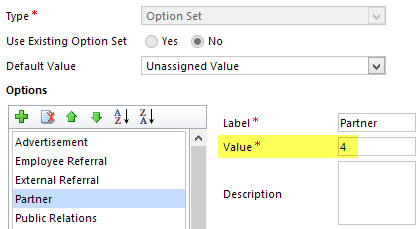
    For a non-developer who hasn’t leveraged OData before it might come as a bit of a surprise that not all of the business data is necessarily readily available via the feeds when examining a particular CRM entity. One crucial thing that’s missing is the option set values. More specifically, it’s the label values that are not accessible via the entity tables retrieved via the OData feed, as all we have access to are the numerical values representing the labels (1, 2, 3, 4… 10001), but not the human readable versions.

    CRM_OptionSet_Value_Label

    From a reporting perspective, it’s very likely that any chart or table that you wish to build is going to leverage one or more option set fields. Formerly known as picklists, these are basically the dropdown fields on CRM entity forms that allow the user to select one value from a list of predefined values. Much more convenient for reporting purposes than free text fields, as I’m sure you’d agree.

    So, what are our options then? We could of course manually create new tables into the Excel workbook that store the mapping of ID values and labels, but that just doesn’t sound like a fun exercise at all. More importantly, that would only give us a static list of option set values that couldn’t adapt to the changes in CRM customizations. Nope, not a good approach from report maintenance perspective, so let’s not go there.

    As a bit more efficient workaround we could be adventurous and import a copy of the CRM solution file containing the entity customizations as an XML data source into Power Query and then pick out the necessary mappings from there. Due to the power of Power Query, this would actually technically work, and we could even set it to reference a file location from where the latest customizations would dynamically be imported upon workbook refresh. Still, that would leave us the burden of setting up an automated export system that would produce the customizations.xml file to reflect the latest changes.

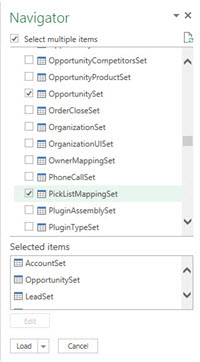
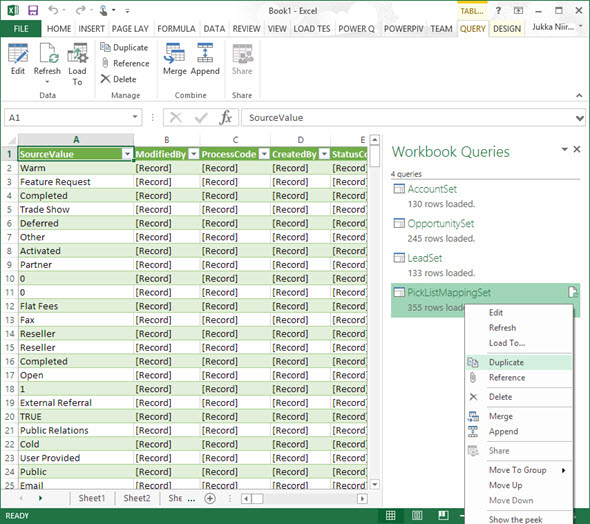
    After a bit of poking around in the OData feed data source, it turns out the optionset labels are actually included there. The tricky part is that they’re not simply a [Record] link that you can drill into and expose the values from your existing entity data set. Nope, they reside in a specific table of their own, called PicklistMappingSet. In this tutorial I’ll show you how to retrieve the data for a “Leads by Source” chart created with Power View, taken from an OData feed data source pointing to Dynamics CRM Online, using Power Query to pull the data into a data model built with Power Pivot.

    1. The Data Source: Power Query

    PowerBI_CRM_Odata_1To follow the steps you should have the latest Power Query version installed in your Excel client. I’ve already covered how to access CRM OData feeds from Power Query in a previous article, so please refer to that one if you haven’t done the exercise before. After connecting to the OData feed URL we should select the tables that we want to work with from the data source navigator pane. By minimum you should grab the LeadSet and PicklistMappingSet to build the chart.
    The problem with CRM and OData is that by default the feed will pull down each and every record in the table. The query performance is less than stellar with CRM Online and if you have a high number of leads (status doesn’t matter, also the closed ones will get downloaded), you might be waiting for a while before the query is completed. If you want to move on a bit faster then check out this great tip by Andre Margono on how to set up a query filter for the Dynamics CRM OData query (for example, only active leads).

    The real beauty of Power Query is in the query steps you can use for manipulating the workbook queries. Before we go there, though, let’s create a duplicate of the PicklistMappingSet query. This will make it easier for us to map the values into our actual leads table later on, as well as preserve the original option set value table available for further queries.

    PowerBI_CRM_Odata_2

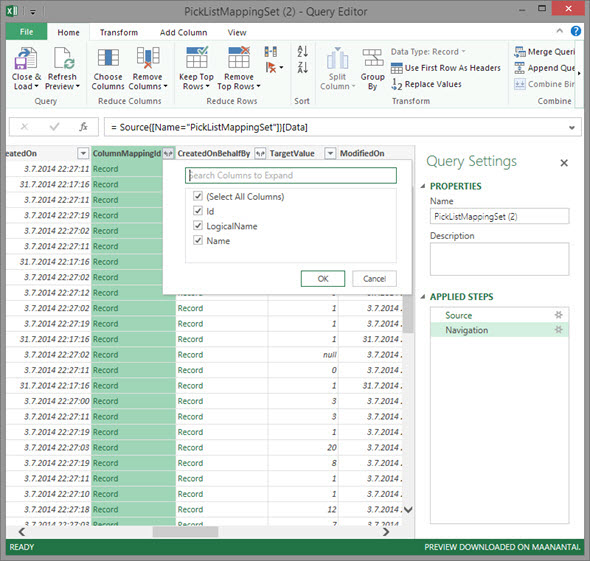
    Open up the new duplicate query you’ve added into the edit mode by double clicking on it, which launches the Power Query query editor (yes, query is the word of the day). The first step we’re going to add for the query involves expanding a column that only shows a green “Record” value by drilling into it from the small icon next to the column label. Do this to the ColumnMappingId column and just load up all the columns found from behind it.

    PowerBI_CRM_Odata_3

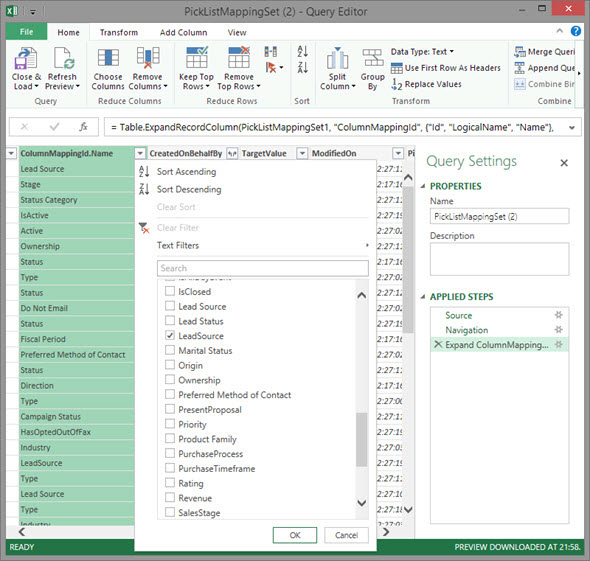
    You’ll see the Record column transformed into three new columns as a result of drilling down into the data. The column we’re interested in is ColumnMappingId.Name, which has the names for all option set fields in our source CRM system. For this example we want to see the LeadSource field, so add a new filter for this value, just as you would in a normal Excel data table.

    PowerBI_CRM_Odata_4

    By now you might have noticed that the Applied Steps box in the Query Settings pane is collecting all of the actions that we’re performing on the query and storing them as steps. If you make an error in your selection, just click the delete symbol next to the steps to get rid of it. (more…)

  • CRM 2013 SP1: Case Creation and Routing – The Details

    In my previous post about the new functionality included in CRM 2013 SP1 / Spring ’14 release I laid out the big picture of how case creation and routing rules relate to cases and queues in Dynamics CRM. Now it’s time to take a more detailed look at how you would actually configure these rules to automate your case creation process. There are a few limitations that it’s good to be aware of before you jump into applying these new tools in your service management scenarios.

    Case Creation Rules

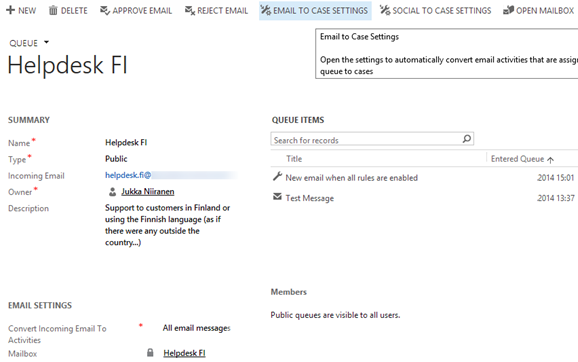
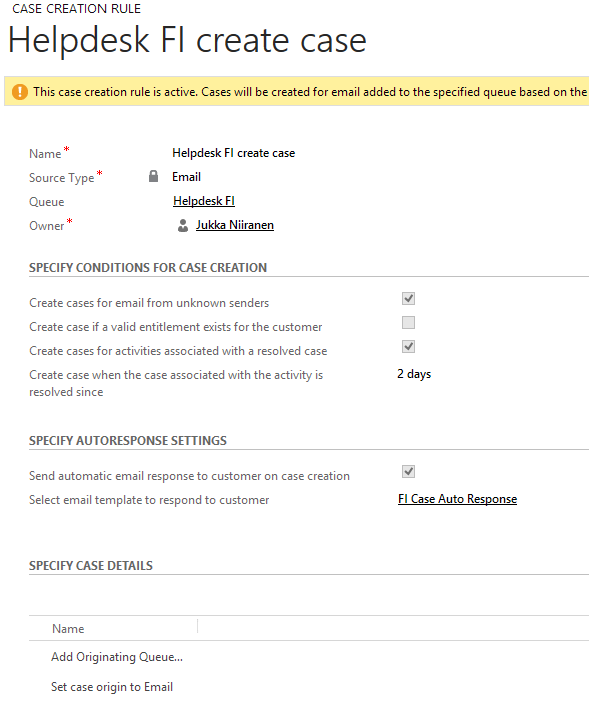
    As illustrated in the big picture of queue and case management in my previous article, Case Creation Rules are specific to a single queue. Also, you can only have one Case Creation Rule per queue – per channel. It is nevertheless a 1:N relationship between queues and rules, since a queue can have a Case Creation Rule both for email and social activities (the latter of which are not yet leveraged in this release). The Command Bar buttons on the updated queue form, labelled “Email To Case Settings” and “Social To Case Settings”, take you to the respective rule record.

    CRM2013SP1_queue_settings

    The Case Creation Rule form allows you to configure predefined conditions for case creation. Emails from unknown senders can be filtered away from case creation. Also the existence of a valid entitlement for the sender (contact) or the senders company (parent account) can be used as a filter. Finally, email related to an already resolved case can be set to generate a new case record, with a configurable “quarantine” time period. So, if you resolve a case today and the customer replies “thanks for your help”, this probably shouldn’t generate a new case, but a reply sent after 3 days to the same email thread might warrant opening up a whole new case record.

    CRM2013SP1_case_creation_rule

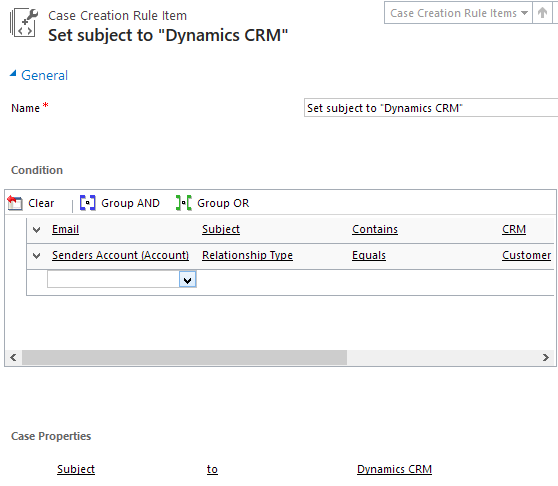
    That’s all the conditions you can apply for the automatic case creation. There’s an additional entity called Case Creation Rule Item that’s found in the “Specify Case Details” subgrid. What this feature allows you to do is specify a condition on the activity record (email or social activity) and set values for the newly created case’s fields. As an example, if the email subject contains word X, you could populate the case subject lookup field with value Y. So, you can’t use these Rule Items to determine whether a case will be created or not, but you can pass along some variables from the originating activity.

    CRM2013SP1_case_creation_rule_item

    The entity fields you can access in the Conditions box are limited to those directly related to the email (or social) activity. There is however one welcome exception and that is the Senders Account. This means that when the email is coming from a known contact, there’s a way to reach into the fields of the account related to the contact (related to the activity), to check variables like relationship status, customer category or other important pieces of information in a B2B service scenario. (more…)

  • CRM 2013 SP1: Case Creation and Routing – The Big Picture

    The latest Dynamics CRM Online Spring ’14 release is now rolling out to existing and new customers (starting from the US data centers) and the on-premises equivalent of CRM 2013 Service Pack 1 will soon follow is now available from MS Download Center (here’s the KB article for more details about SP1). The quickest way to check if your CRM Online organization is already updated to the latest release is on the About screen, accessible via the gear icon in the top right corner. If your version reads 6.1.0.575 (or 6.1.anything) then you’ve got the Spring ’14 release available and you can proceed to the Install Product Updates menu to enable the new features.

    CRM2013SP1_version

    This release, previously known by the codename “Leo”, focuses on enhancing the service management capabilities of Dynamics CRM. There’s a great “What’s New” page on CRM Customer Center that provides a detailed listing of the new features launched now, including an eBook of the changes in service management. Instead of repeating all of this information, I’ll try and provide an overview of how the features align with one another and specifically how they could be applied in real world scenarios for managing incoming service cases from customers.

    Enhancements in Case Creation and Queues

    I guess we’ll still need to first list the new options we need to be aware of when configuring the service module in CRM 2013 SP1 to handle emails and cases  via queues. First off, there is now support for server side synchronization of emails (and other activities) between CRM Online and Exchange Online, without having to use the old Email Router technology (no support for hybrid deployments, though). Then there’s a new feature called Case Creation Rule that allows you to automatically convert an email message or a social activity record placed in a queue into a new case record. Finally, we have Routing Rules that can be leveraged for moving items into queues.

    The following is my own interpretation of how these three areas are aligned in CRM 2013 Spring ´14 Update / Service Pack 1. The picture illustrates how an email message from the customer would flow through the system automatically based on the configuration of the aforementioned features. It also includes a few bullet points about the supported actions for each component. (Feel free to click on the image to view a bigger version that won’t stress your eyes so much.)

    CRM2013SP1_Queue_Case_Configuration_small

    When going through the Leo release features I found it a bit challenging to get a clear view of the logical order in which the different functional areas found under the new Service Management settings menu should be applied. Also the relationships between them and the restrictions imposed on the number of records was something I only learned through trial and error. Hopefully this illustration makes it easier to identify the roles of case creation rules and case routing rules in the new release.

    Rules vs. Workflows & Plugins

    Looking at the picture, someone who has previously configured Dynamics CRM to be used in an email, queue and case based support process will surely find many familiar actions from the list. At the end of the day, pretty much everything here has already been possible with previous CRM versions. With those you just needed to leverage the workflow engine in the CRM platform to configure the case creation and routing activities. So, what’s really new here and why has Microsoft built this into the latest product release?

    Behind the scenes, what the case creation and routing rules do is they create the workflow processes for you. This can be seen from the release documentation where the administrator of those rules is reminded about the requirement to have sufficient security roles for performing the corresponding actions via workflows. So, taking a very simplistic view, you could think of these new features available in the Service Management as a dedicated UI for configuring common process automation actions for customer service scenarios.

    There’s definitely value in having these new features available right inside the core product. In previous versions, it has been far from trivial to build the necessary functionality for frequently encountered requirements, such as “email to case”. Several ISV add-ons have been developed to deliver such functionality and system customizers have surely spent a ton of time pushing the CRM workflow editor to its limits in an effort to automate the common tasks that a service organization would need to perform when managing cases in Dynamics CRM. Now there’s a new standard way to implement these processes via a method that is fully supported by Microsoft, which in turn will lead to far more customers taking a serious look at these case management capabilities in their business application platform.

    CRM2013SP1_Service_Management_Settings

    It’s important to keep in mind that these new features don’t replace any of the existing CRM platform functionality. They offer a default method to configure common features, but they will not cover every possible scenario that you’ll come across in real life implementation scenarios. That means you can still use workflows and plugins to extend the process automation for service case management. For example, while a case creation rule provides the possibility to set an auto response email to be sent to the customer upon case creation, there’s nothing stopping you from doing this via familiar workflow process if more complex business logic is needed than what the new Service Management UI in CRM makes available.

    In the next blog post I will take a more detailed look at how the case creation and routing features can be leveraged in practice, so stay tuned!

  • Visualizing Your Progress with CRM Goals

    Dynamics CRM is a great tool for making your business processes more quantifiable. Sure, you can maintain a list of your open sales opportunities in an Excel sheet and plan your customer meetings with your Outlook calendar, as many organizations do. You can get a pretty good understanding of the current status with such personal productivity tools that come with your Office package, so why bother using any other software for it?

    Things become a lot more challenging if you need to be able to track your progress over time, let alone manage a team of individuals who are all using personal tools instead of a shared information repository. “How did we meet the monthly sales targets during the past quarter?” “How many meetings did our sales reps have with current vs. potential customers?” Having an always up to date report of not only the historical results but also estimates of how you’re performing during the current measurement period may become an overwhelming task if you need to create such reports manually.

    CRM_goalsDynamics CRM 2011 introduced the goal management feature that allows you to configure a specific measurement criteria just once, define a target value for a certain time period and user, then just sit back and watch the goal progress chart get updated on a daily basis. It’s a generic feature that can be utilized for calculating pretty much any results that are based on data stored and maintained on CRM entities. Sales quotas are a typical example of leveraging CRM goals, but you shouldn’t look at the goal management feature as something that can only be used for tracking formally agreed targets associated with individual employees. Any metric that can be reflected as a quantity in CRM data can potentially be turned into a goal record.

    Set Your Own Recurring Goals

    There are a few aspects about goal management in Dynamics CRM that may stand in the way of organizations truly starting to leverage the feature. First of them is related to how the goals are by default presented as records that you need to separately create for each and every time period where the measurement should be applied. This means that if you would be interested in tracking a goal on a monthly level, you’d have to enter 12 different records into CRM with mostly the same field values, with the only difference being the “From” and “To” date fields (or alternatively selecting the fiscal period as defined in CRM system settings). Even though you can leverage Excel export/import to create more goal records in bulk, it’s still a tedious sounding step that may keep you from even starting to experiment with the goal management feature.

    If you’re not dealing with a hard variable like a sales quota that will have a concrete effect on someone’s salary, then there’s an easier way to get started with goals. Instead of configuring them for a fixed time period, you can set them to be dynamically measured for the last X months, next Y days and so on. I’ve introduced the topic in a previous post, so I won’t dig into the details here, but basically what you can do to create a continuous goal for a dynamic time period is to set the “From” and “To” values as wide apart as you want and then restricting the measured time period in your Rollup Query definition instead.

    In my example, I wanted to create a goal record that would measure how many web forms have been submitted per month in an online campaign that leverages the ClickDimensions Web Forms for automating the process and, naturally, tracking all of the data into the CRM database directly. What I did was 1) add a new Goal Metric for counting the number of Posted Form records, 2) enter a bogus time period of 6 years, 3) set the target value that I want to achieve for monthly downloads and 4) create a new Rollup Query in which I defined the criteria to be “Created On in last 30 days” and defined a specific Web Form record that I want to track the submissions from.

    CRM_2013_recurring_goal_configuration

    Once I saved the record and clicked on Recalculate, I received the current count of Posted Forms that meet this criteria. From here on to eternity this goal will now show the count of submitted forms in the last 30 days, as well as a percentage indicator of how close or far I am from the monthly target of 10 forms. All it took was a few minutes of configuring the goal, now the system will take care of updating it every 24 hours to show the latest result. Time well spent, eh?

    Make Your Goals Visible

    Another potential pitfall with the goal management feature is that while the calculation engine behind the scenes will now maintain these metrics, there’s no guarantee that the users will remember to pay attention to this data. If they know where to go and look for the data, they can access the goal record in a view that will display target, actual and percentage values. If they are really advanced users, they may even know how to display the goal data on a chart that can be opened up from the right side of this view. And, if they have a great CRM administrator in their organization, he or she may have configured the relevant goals to be shown on their role based dashboards.

    That’s a lot of ifs, though. Unfortunately it is quite common that not all of the skills required to get this process right, from business analysis to CRM system customization, may always be available to produce an outcome that would lead to the business value of goals being fully presented to the end users. As we know, user adoption is typically the bigger challenge that CRM system implementations will face, rather than the technical limitations of the underlying software platforms. If it’s not really, truly obvious for the users how the new system will benefit them and make their everyday lives easier, they are unlikely to invest time in frequently visiting it and browsing through the various views and dashboards to review the information available there. So, with the goals feature, is there any other way we could promote the usefulness of these automatic calculations to the users?

    I’ve recently started working at a company called Digital Illustrated, which delivers solutions based on various Microsoft technologies, including Dynamics CRM. The guys at my new office have developed a cool new app for Windows Phone: CRM Goals. As the name suggests, this is an application that enables you to review your Dynamics CRM goal information via a WP8 smartphone screen. The really cool part about it is that you can select the goals you want to show as a Live Tile right on the Windows Phone start screen! For example, I can select the above mentioned eBook download campaign goal and choose a place for it among my other frequently used apps like Dynamics CRM and Yammer:

    Digital_Illustrated_CRM_Goals_for_Windows_Phone

    Now, instead of me having to remember to review the goal in CRM, it’s available to me one the place I visit tens of times every day: my smartphone start screen. The likelihood of me keeping an eye on the campaign target has increased to a whole new level – even if I was already an active CRM user. Also, the convenient presence of these metrics on my personalized mobile start screen can very easily spark up new ideas of other processes where I could leverage the Dynamics CRM goal management feature. All it took was placing the information from CRM into the context of my existing daily workflow.

    If you’re using CRM Online and have a Windows Phone device, then why not go and grab the free CRM Goals app to better visualize your own personal goals?

  • Connecting to CRM Online OData feed with Excel 2013 Power Query

    The latest version of Excel contains a Get External Data menu option for linking the workbook to an OData data feed. Knowing that Dynamics CRM 2011 and 2013 both provide an OData endpoint, this would seem like a great option for retrieving data from a CRM Online based system for reporting purposes, since direct database connections aren’t available in the cloud. Unfortunately, if you try to enter the CRM Online OData URL as a feed link, you’ll get this error message:

    CRM_OData_feed_Excel_error

    “We can’t use the data from this feed.” Bummer. The reason behind the error messages is that Excel and PowerPivot have not been able to support the authentication mechanism required for accessing the CRM Online OData feed. There is a workaround that you could apply if you’ve got the CRM Outlook client installed on the same machine, as described in this video by Ed Martinez, but in general using PowerPivot for CRM Online reporting has been quite restricted.

    Power BI December 2013 Update

    Last summer Microsoft announced the preview program for Power BI, their cloud based business intelligence suite, containing tools for publishing reports in Office 365. The Power BI umbrella also covers client side components, including Power Pivot (now spelled as two separate words apparently) and Power Query, that bring new capabilities to Excel. To get an understanding of the features included or under development, I encourage you to watch this Power BI demo from WPC 2013, which definitely deserves the Coolest Tech Demo of 2013 trophy if you ask me.

    PowerBI

    The latest December 2013 Update for Power BI announcement mentions the following enhancements:

    “Power Query can now connect to more data sources:

    • Sybase IQ
    • Exchange
    • Dynamics CRM Online

    Hey, that last part sounds great! So, what does it mean in practice for us CRM people? Well, the Power BI Preview subscription still doesn’t provide the option to provision a CRM Online instance for the same Office 365 instance, so there’s not that much new things visible on the cloud side yet if you spin up a preview org. On the client side, however, there is now an updated version of Power Query Preview for Excel 2013 that gives us the possibility to finally connect to a CRM Online OData feed directly. Let’s explore that in more detail. (more…)

  • No-code Customizations with North52 Formula Manager, Part 3: Case Resolutions

    In the previous articles (part 1 and part 2) we’ve explored how the North52 Formula Manager can be utilized in automating steps related to the sales process. This time we’ll be looking at a scenario related to service management, in an effort to make it easier to share knowledge and report on the resolutions of cases recorded in the Microsoft Dynamics CRM database.

    Cases vs. Case Resolutions

    Case_resolve_cancelIn theory it should be pretty straightforward how you work with a case record: they are support tickets that are initially open (active) when you create them and eventually they end up getting closed as either resolved (service was provided) or cancelled (duplicate ticket, customer never replied etc.).
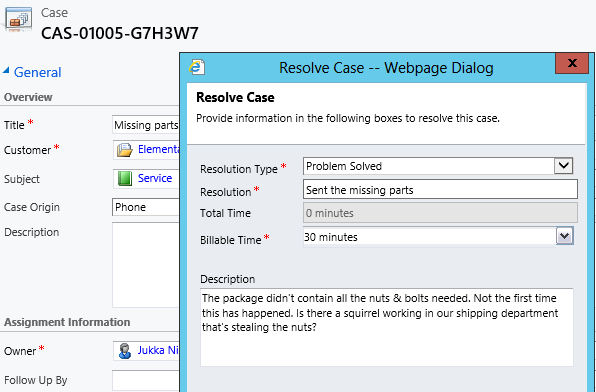
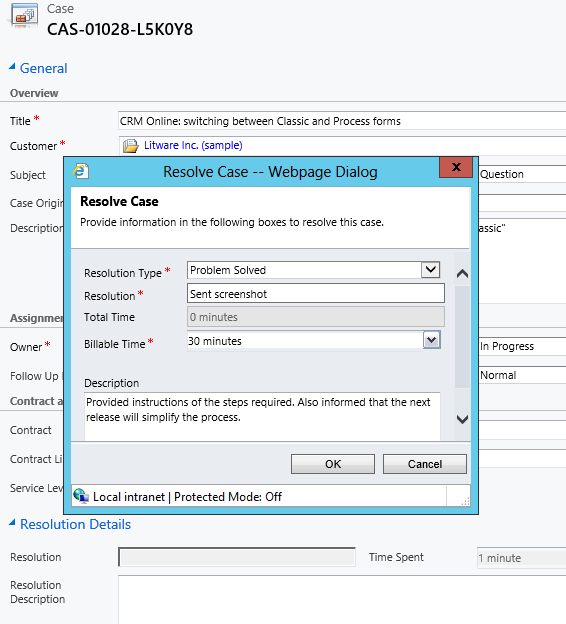
    The point where complexity raises its ugly head is how the resolution process works: instead of entering the case resolution details onto the case record itself, the user is presented with a window that creates a Case Resolution activity underneath the parent case. While this is a perfectly valid design in terms of the nature of the interactions, as there could be situations where the case gets re-opened and resolved again (thus being a 1:N relationship with the case), it does make it more complicated to work with the resolution data later on.

    Resolve_case_dialog

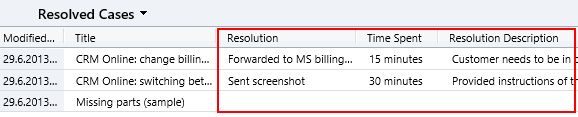
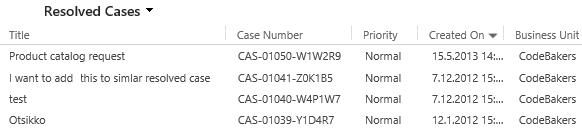
    For example, say you’d want to study the resolved cases by using a view of the case records. In that view you can see the case subject, owner, status and other standard fields, but there’s no information visible on what the actual resolution to the case was. “Ok, so I’ll need to customize the view and show columns from a related record. That’s not too difficult, now is it?” Unfortunately that’s not going to work, because the information we’re interested in resides on the N side of the relationship. Since there can be several case resolutions for a single case, no columns from this entity can be displayed in a case view. So, we can’t construct a nice Q&A list that the service reps could leverage in scanning for similar cases on a new question from a customer. We can only see the problem, not the resolution.

    Resolved_cases_view

    You could build a view of case resolutions, the child entity in this relationship, but that’s not very convenient either. Although case resolution is an entity of its own, it’s not actually available in Advanced Find to directly build queries on. It is possible to access a list of case resolutions by crafting a view of activities with that specific type, but you’ll still be limited to only the generic activity fields. As an example, the field Billable Time (Time Spent) cannot be accessed in a view, which makes it rather difficult to report on this data entered as a part of the service process.

    Activities_Advanced_Find_case_resolution

    Using a Formula to Replicate the Case Resolution Fields on the Case Form

    Luckily Dynamics CRM is a flexible platform that allows you to develop new business logic to fulfill the requirements for your service process. In this situation, if we could simply have the Resolve Case dialog fields copied over to the parent case, this would solve the aforementioned problems. So, how to proceed then?

    If we want to alter the default behavior or the service entities, we should first have a look at the workflow process capabilities of Dynamics CRM to see if can  configure a workflow rule that is triggered when the case resolution is created. This time we won’t get very far with that idea, though, as neither the case resolution nor the activity entity can be used as a workflow trigger. Fair enough, we’ll then need to come up with a lower level solution to meet this requirement. Assuming we have access to a .NET developer who knows the Dynamics CRM SDK, creating a custom plug-in to copy the fields to the case record would be a worthy option to consider. Since the title of this post promised “no-code customizations”, let’s instead look at how we could achieve the same functionality with the Formula Manager.

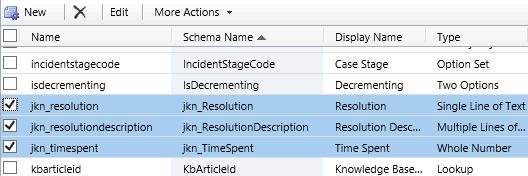
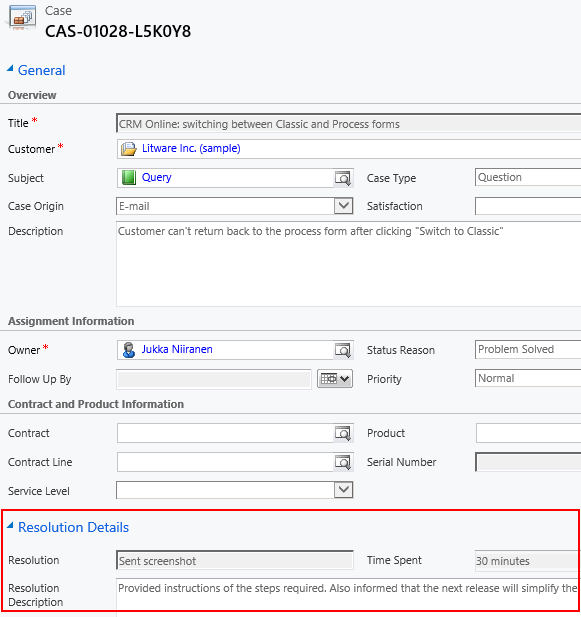
    First we need a place to host the case resolution data of course, so let’s add three custom fields on the case entity: Resolution (text field), Resolution Description (multiple lines) and Time Spent (whole number with duration format). On the case form they can be put into a section of their own and set as disabled, since the user shouldn’t directly update them.  Then we’ll create the three formulas that will populate these fields with corresponding values from the case resolution entity.

    Case_custom_fields

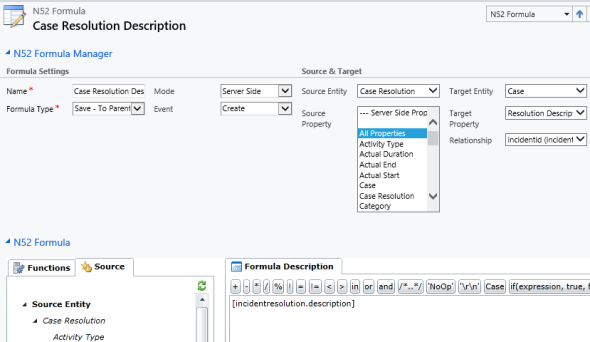
    We’ll be using a formula of the type “Save – To Parent” and attach it to the create event of the case resolution entity. As our target (parent) entity we can select case, but notice that you’ll actually need to specify the relationship field value first before you’re able switch the value in the target entity field. Let’s take the Resolution Description field we just created as the target property. The formula itself in this case will be very simple, since all we need is a value directly from the source entity. We can use the source entity tree visible in the bottom left corner of the screen to browse through the available fields or just type in directly the value [incidentresolution.description].

    Formula_case_description

    The other two fields will get an identical treatment, which means we can click on the Clone Formula button on the ribbon and create two copies of the original formula. Just update the target property field and select a new source field value into the formula description window accordingly. After we’re done, we can publish the formulas and try them out by resolving an existing case.

    Resolve_case_formula_1

    After we’ve entered the details into the Resolve Case dialog fields and clicked OK, our formula will update the underlying case form in real time to reflect the same values presented directly on the resolved case record. Unlike asynchronous workflow processes, the formulas can perform their tasks right in front of the user, which makes the user experience more consistent.

    Resolve_case_formula_2

    Making Use of the Resolution Data

    Now that the fields are available on the case entity, we still need to ensure that the user actually has access to them through all the necessary routes. First we should of course include them into the Resolved Cases view we talked about earlier.

    Resolved_cases_view_updated

    Seeing the resolution field contents directly in the view is a great improvement, but an even more important feature is to enable the users to search for this information. You see, one of the peculiar default settings of Dynamics CRM is that the Quick Find view for case entities only covers active (open) cases. (more…)