Tag: October 2018

  • Unified Experiences in October 2018 Release

    Unified Experiences in October 2018 Release

    The October ’18 of Microsoft Business Applications is going to bring a whole bunch of exciting features, spread across the huge stack of products and apps that either make up or operate on the Power Platform. Much of them will be specific to an area that only some of the users or developers work with in their specific customer scenarios, but there are also going to be updates that will be visible to practically everyone. Here are some of those new experiences that we can expect to see within the next few months as the features are gradually released.

    App Navigation

    On the Model-driven App client side, there will be some changes to the navigation features in Unified Interface. Here’s what October ’18 update is going to look like for the end user:

    The product team has communicated the following changes:

    • Sitemap will now be expanded by default, so users don’t need to remember what icon stands for what entity/feature.
    • Recent and Pinned items will be more prominently displayed at the top. MRU (most recently used items) will now be a single list instead of the earlier entity specific MRU list.
    • Sitemap areas will be displayed at the bottom, with a more visible icon and area switcher feature instead of the tabbed area list on top in current version.
    • Command Bar icons will have more color and hover effects to highlight their interactive nature.
    • Both Sitemap and Command Bar color scheme will be changed to dark text on light grey background.

    These are great enhancements that are aimed at making the Unified Interface work more smoothly on the desktop browser specifically. They will not affect the mobile or Mail app, but only the screens that will have a width of 480 or more pixels. It’s awesome to see that even though the clients share the same infrastructure, not everything is forced to work exactly the same way on a big monitor vs. small phone screen.

    Hybrid Experiences on Unified Interface

    For existing Dynamics 365 CE customers who are working in the “classic” web client, the question of “can we do this in Unified Interface?” is a critical factor in deciding on the strategy of how to migrate users to the latest experiences available in the cloud. There’s a list of capabilities not yet on Unified Interface over on docs.microsoft.com that should serve as the starting point for any such planning. For a more forward looking list, the Unified Interface roadmap presented at MS Business Applications Summit 2018 is currently the best summary of what to expect:

    While there will be more and more entities and features natively supported on UCI, not everything from good ol’ Dynamics CRM is going to be rebuilt for the new client infrastructure – at least not yet. When you look at what’s happening on the broader Power Platform side, this prioritization makes a lot of sense, as porting over old UI controls as-is probably doesn’t fit with the long term platform vision. Still, you can’t just pretend that a few missing features like Advanced Find would NOT be critical to business users who’ve built their work processes around these core capabilities of Dynamics 365 CE.

    The short term solution will be to offer a “hybrid UI”, in which the controls not yet ported to UCI will be opened up in windows that render the classic web client UI. So, things like merge dialogs, personal settings, SSRS reports and Advanced Find will be accessible to users from within Unified Interface, with the existing feature set that they’ve come to expect in earlier versions. Of course they won’t be mobile friendly like the responsive UCI controls, but desktop users aren’t probably going to care all that much about this anyway.

    As we can see in the roadmap presentation, Microsoft aims to make Unified Interface the default experience first for new customers and shortly also to existing environments. There’s no need to panic over this change, though, as the plan is to introduce a “Side by Side” (SxS) option for administrators to define whether the classic web client is visible to users or not. If you have a good reason to not yet push everyone over to Unified Interface, you don’t have to – at least not with the Oct ’18 release.

    Power Platform Admin Center

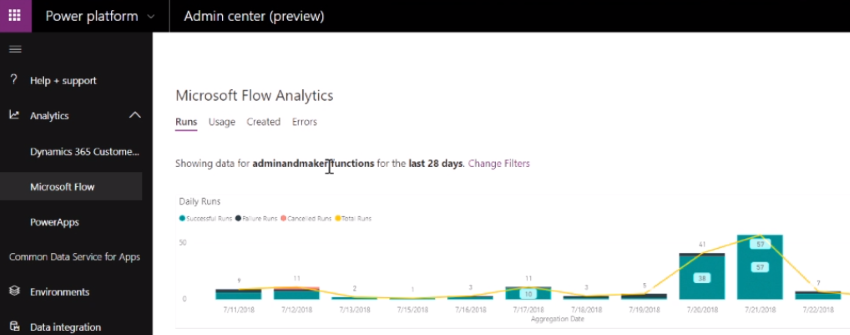
    While the aforementioned changes are mostly relevant to customers who have bought Dynamics 365 Customer Engagement and are using it for either traditional CRM scenarios or more XRM style applications, it’s good to keep in mind that all these investments are actually done in the context of the greater platform. Starting from the July 2018 announcements, Power Platform is now an actual thing that Microsoft sells. To the developers and administrators it has seemed like a collection of separate product boxes of different shapes, but that experience is also about to get unified as the new Power Platform Admin Center is introduced:

    You can already access this UI from either the short URL admin.dynamics.com or the longer (official) version admin.powerplatform.microsoft.com. Today you don’t yet see too many actual admin screens of individual applications within the Power Platform Admin Center, as the menu items will mostly redirect you to existing admin centers for PowerApps, Flow, Power BI and Dynamics 365 CE. Things are going to change soon, though, as a brand new admin UI will reveal the various Dynamics 365 CE settings that you’ve earlier been able to only access from the classic web client:

    These images are taken from another Business Applications Summit presentation, “Key features coming to Microsoft PowerApps and Dynamics 365 admins”. Just like in the UCI session, there’s a great roadmap slide included that shows the stages via which the new features are planned to be rolled out:

    Now, you may not want to look at the detailed dates, since both roadmaps are already ancient history from over a month ago and things aren’t necessarily quite where the initial targets were set. Nevertheless, these are the features and experiences that will soon be out there. If you compare this to the traditional Dynamics CRM world in which many current on-prem customers with their v8.2 (at best) environments are operating in, then it’s in many ways like a whole new application platform to work with. MVP Scott Durow has drawn a great diagram of the new admin experiences in Power Platform that also helps in illustrating the huge shift that is taking place here. We’ve seen architecture diagrams like the one below for a long time now, but once the actual user experience for solution designers also starts to reflect this, I believe that will have a “powerful” impact indeed!


  • Winter in July: Release Notes for Next Dynamics 365 Version

    Winter in July: Release Notes for Next Dynamics 365 Version

    While I’m over in Finland enjoying the biggest and longest heatwave ever, some of my fellow MVPs and Dynamics 365 community members were attending the first ever Microsoft Business Applications Summit this week on the other side of the globe in Seattle. As much as I would have enjoyed sitting in cold & dark conference rooms instead of trying to hide from the burning sunlight, this time I had to rely on the others to share the latest news from #MSBizAppsSummit while I attempt to enjoy the summer vacation.

    A large share of the conference’s announcements are covered in the October ’18 Release Notes, which you can download in PDF format right here. This is a massive “drop” that follows the format of what we already saw with the previous April ’18 release. Even though it’s been made available during the summer heat, it’s actually a list of features that Microsoft intends to (mostly) make available between October 2018 and March 2019. So, winter came early this year, which is a positive thing, since now we have several months of advance notice of what’s in the product team’s pipeline. These release notes essentially replace the earlier roadmap.dynamics.com website, which in itself was kinda cool (running on top of Dynamics 365 Portals and all) but didn’t communicate the actual road ahead all that well. So, these twice a year PDF releases with ongoing updates to their detailed content is the thing you need to pay attention to now.

    One small but notable difference is that Microsoft is no longer calling it “Dynamics 365 Release Notes” but “Business Applications Release Notes”, which together with the Summit’s name reflects the new context in which we all should approach whatever parts of the toolkit we use in our end user solutions. Recently also the Microsoft Most Valuable Professional program updated its terminology, and now the previous Business Solutions MVPs are in the Business Applications MVP category.

    The previous April 2018 release was the first time when we saw the new organizational structure of Microsoft Business Applications Group (“BAG”) bringing previously separate product offerings under one roof, with CRM & ERP products being represented in the same release notes list as PowerApps, Flow, Power BI. That also was the time when things like the Common Data Service for Apps were announced as replacements for what XRM previously stood for. However, from a raw functionality level there appeared to be a greater urgency in reaching GDPR compliance before the May 25th deadline than to actually push out new integrated features for the CDS for Apps platform.

    Reading through the October 2018 release notes, this time it’s very different. There are huge steps being take to bring together the “ex-XRM” technologies with the newer products and make it truly one Power Platform. Here are selected highlights:

    • PowerApps Canvas Apps and Flows can now been included inside CDS for Apps solutions, giving them the ALM story for enterprise grade deployment across different dev/test/UAT/prod instances. This clearly makes them no longer a “power user” focus tool but a building block for credible business applications.
    • PowerApps Canvas Apps can be embedded inside the model-driven app entity forms. The traditional UI of XRM apps that was generated from metadata will get a touch of pixel-perfect design options that the Canvas Apps have always been about. This ability coincides with the new options to freely set the app size instead of earlier phone/tablet format limitations.
    • Flow is promised to reach parity with async workflows. Even though the transactional capabilities of real-time workflows (similar to plug-ins) is not yet within October 2018 scope, that’s one bold step to make the XRM workflows history and move their logic into Flows.
    • Power BI reports & tiles can be embedded onto CDS for Apps entity forms and the record context as well as any record attribute can be passed to them for data query and visualization filtering. Surely pretty much anyone has at one time wished “gee, wouldn’t it be sweet if instead of working with this limited ASP.NET chart XML from Dynamics CRM 2011 we could leverage those modern Power BI charts instead”. Well, that day is getting closer!
    • PowerApps Canvas Apps will FINALLY offer native support for lookups, option sets and datetime fields. For anyone who’s tried to replicate pretty much any CRM functionality with PowerApps, this will have been a very early stumbling block. Not so easy to solve with separate product teams inside MSFT apparently, but within the new Business Applications Group these gaps for real life solutions can now be filled.
    • There will be a single mobile “player” for both Model-driven Apps and Canvas Apps. When previously the Dynamics 365 Customer Engagement mobile app for Unified Interface and the PowerApps apps lived behind separate app icons on your phone, soon the users may no longer see any difference when switching between different business applications.

    These are only a few items in the long list of upcoming features that the 239 pages of October 2018 release notes contain. A lot of important unification is also taking place in the author and admin experience of how Dynamics 365 Customer Engagement apps, CDS for Apps platform, PowerApps Canvas Apps and Flow can be used together for your solution design needs. Similarly, a lot of advances are being made on the UCI front, with the legacy web client being more and more replace with Unified Interface. Then there’s the whole CDS for Analytics side of things coming up, with promises for new AI apps and capabilities. You’re going to need to read through a wealth of blog posts to grasp the full spectrum of what Microsoft is planning to launch, so a good place to start is the Scott Durow Top 10 favourite features in this release.

    The April 2018 release for Dynamics 365 CE was a bit of a surprise due to the fact that it wasn’t officially a major release like v10 or even v9.1, instead it was only a v9.0.2 update. Deployed automatically to your v9 instances, with no CDU process to schedule the update from the available time slots. Now in July we got a confirmation from Microsoft that this reflects the way all future updates will be rolled out, in the blog post Modernizing the way we update Dynamics 365. Looking at how the Power Platform will increasingly be consisting of functionality that isn’t found in the “XRM server”, the automatic updates make a whole lot of sense. It remains to be seen how the remaining on-premises customers will be serviced with the updates and to what extent there will be feature parity. At least we now got a confirmation at the Business Applications Summit 2018 that there will be a new on-prem release this fall, so there appears to be a plan to bring things like UCI available for those who still prefer to run their own business application servers.