
 A significant share of Dynamics CRM systems tend to be implemented for B2B sales scenarios. In the age of social selling, digging up information about the person you’re about to call will quite often involve looking up his or her LinkedIn profile. With this in mind, surely everyone’s running a tight integration between their customer relationship management system and the LinkedIn network, right? Well, based on my personal experience, quite often it tends to be one of those requirements that come up during the sales phase but then get phased out from the actual go-live of a new CRM system.
The question of “how to integrate Microsoft Dynamics CRM with LinkedIn” has been making the rounds in various forums for as long as I’ve been involved with the product. Now that you’ve potentially arrived here in search for an answer (thanks, Google!), I thought I’d collect a few pieces of information and personal thoughts on the subject. If you have any experiences to share regarding using Dynamics CRM in the social selling scenarios, please do leave a comment in the box below.
The Quick Way
As always with information systems, there’s integration and then there’s “integration”. If you can meet the requirement by just surfacing a bit of content from LinkedIn inside a Dynamics CRM form, then here’s a great article from Salesmetrix that shows you the steps to integrate the LinkedIn Member Profile badge onto a CRM contact form. By adding a simple web resource and signing up for a LinkedIn API key you can show the contact’s job title and picture from LinkedIn alongside your CRM data, like this:

Why is this not the perfect solution? Well, did you notice the step require for copy-pasting the URL to the contact’s LinkedIn profile field before the profile badge is shown? Yeah, that’s the bit that your sales people are most likely not going to perform. Getting them to even enter the minimum required details on their leads and opportunities into a CRM system can be a major struggle, so introducing a complex operation like this into the process is going to require plenty of sales skills from the implementation consultant to convince the users that there’s a tangible benefit for them in filling in all the blanks on the contact form.
That’s of course not anything that couldn’t be overcome with a little bit of further development. One example for performing the profile search dynamically based on name fields on the CRM records can be found from Nicolae Tarla’s blog. Coincidentally, Nicolae has also recently released the Microsoft Dynamics CRM 2011 Scripting Cookbook that contains a few examples of lightweight social network integrations in the final chapter. Building proper social profile discovery services will require more than mere Javascript, but for showing LinkedIn Member Profile Plugin and Company Insider Plugin in the CRM UI you probably don’t need to invest a whole lot of time in developing a working solution.
You could choose an even more simplified approach and just add a button on the contact form’s ribbon to open LinkedIn search page with pre-filled values. A URL like http://www.linkedin.com/vsearch/p?firstName=Jukka&lastName=Niiranen&company=CodeBakers will get you onto my LinkedIn profile faster than manually entering the same search terms. You can study the LinkedIn URL Query Parameters to see the kinds of variables that could be used. There’s also a post on the old CRM Online Team blog that shows you how the button would have been added back in the CRM 4.0 days. (While building your URL’s, do remember to handle special characters and spaces in contact and account names.)
The problem with all these type of solutions is that if you’re not paying for them (on a continuous basis), you can’t expect them to remain working forever. Several variations of the LinkedIn and Dynamics CRM integration techniques have come and gone, such as Marco Amoedo’s CRM 4.0 LinkedIn Company Insider Widget hover link and Leon Tribe’s & Matt Wittemann’s Five-Minute Integration Between Dynamics CRM and LinkedIn. All fine solutions in their time, but as the API’s and applications keep changing, the need for re-developing solutions to the same problem remains.
The Official Way
A company like LinkedIn surely wouldn’t have missed the chance for monetizing the data they’ve accumulated into their network by selling it to B2B sales people who are using a system like Microsoft Dynamics CRM, now would they? Of course not, which means “there’s an app for that”: LinkedIn for Microsoft Dynamics CRM.
The product requires a Sales Plus or Sales Executive subscription for LinkedIn, which start from €28.95 per user per month. If you’re like me, you probably receive frequent “special offers” for a free month of LinkedIn Premium. This time I decided to activate the offer and use it for test driving the Dynamics CRM solution. The deployment process was quite straightforward for a CRM Online environment as no further configuration was needed apart from installing the solution file. After that, this is how you’ll see LinkedIn company profile and people data on the account form:

On the contact form we have tabs for both Company Profile and individual Member Profile.
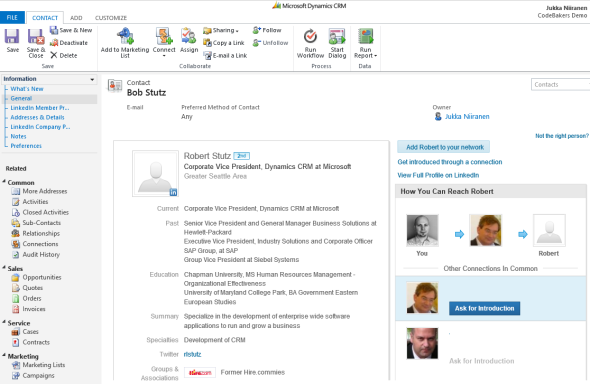
For some reason the lead form doesn’t get any LinkedIn components added on it, so you’ll need to qualify the lead to an account and contact before being able to leverage the integration.
Not every CRM user needs to have the subscription, but unless they do, they’ll not be able to see the premium content on the account or contact forms. Therefore you’ll probably need to manage role based forms for different user groups by creating a specific LinkedIn security role for those who have the Sales Plus subscription.
Unfortunately the solution from LinkedIn hasn’t yet been updated to be compatible with the cross-browser world of Polaris / Update Rollup 12, so using it on Chrome, Firefox or Safari isn’t supported. Also Internet Explorer 10 fails to render any content in the iFrame and LinkedIn recommends downgrading to IE9, so if you’re running Windows 8 you’ll need to run Dynamics CRM in IE7 Compatibility View to make use of the solution. No release schedules for an updated solutions were available when I asked about this from LinkedIn support. Needless to say, running CRM Online with the new Polaris process forms isn’t supported with the LinkedIn add-on.
The Ultimate Way?
What if we are really determined to get the most out of this wonderful source of “free” information that is LinkedIn? Wouldn’t we want to pour all the data into our own CRM database and preferably also synchronize it with the latest updates available from different online directories?