Tag: Microsoft Teams

  • Dataflex: the day after

    Dataflex: the day after

    Microsoft dropped a big bomb this week with their Dataflex announcement. I don’t think I’ve ever had as many notifications on my social media apps as there were after I posted my two Dataflex articles on this blog and our company blog.

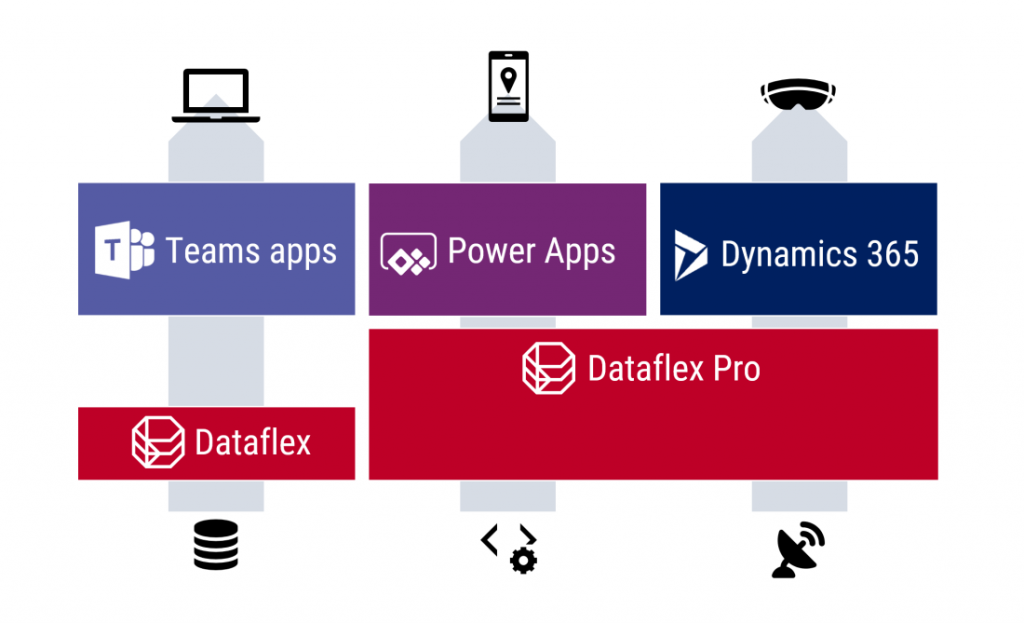
    Knowing that it wouldn’t be a simple topic for outsiders to grasp, with the many different dimensions that Microsoft’s various product teams would use in their own messaging, I wanted to make sure there was at least one article out there that would explain what Dataflex means for Teams, Power Apps and Dynamics 365 in the big picture of business applications. It was great to see that this explanation I came up with was also adopted elsewhere in the mainstream tech media:

    Here are some of the topics that the community has raised up since the July 21st announcement, based on the still fairly limited amount of public information that is out there on the coming Dataflex and the rebranded Dataflex Pro (formerly CDS).

    Yeah, about that name…

    For the small minority of techies who have actually heard of the Common Data Service (or XRM), the need for inventing a new name for their beloved service that remains the same (i.e. Dataflex Pro) wasn’t very obvious. For the larger crowd that works with Office tools and Microsoft Teams, Dataflex is a brand new thing, which understandably has made MS think whether a brand new brand would also be useful at this point.

    Unfortunately the name “Dataflex” isn’t so unique that there wouldn’t be some clashing with non-MS products out there. In this case, there has been an existing trademark within pretty much the same application development domains since the year 1981 already.

    Oh Microsoft…

    21 days after launching their Dataflex product name, Microsoft had to cancel their original plans due to litigation from the lawful owner of the Dataflex trademark (Data Access Worldwide). Read this blog post for more details: There never was a “Microsoft Dataflex”.

    Why not call it “Power Dataflex” or “Power [anything]” then? Wouldn’t that have been better in line with the whole Power Platform story, as well as reduce the chances of a legal dispute? Probably so, but it’s important to understand that this Power thing actually isn’t the only purpose that Microsoft has in mind for the platform:

    The entry level offering of Dataflex for all Teams users is an important milestone for XRM/CDS/MDF (not sure I want to adopt “MDF” as the acronym just yet, actually). Don’t be surprised if the same technology will pop up in more & more places within the MS Cloud in the coming months and years.

    Licensing details: TBC = “To Be Confusing”

    The specifics of what is and isn’t included with Dataflex didn’t get released yet, as this new service is still pending for the public preview to start sometime in August. At the announcement day it has clearly been more important for MS to higlighlight what you can do with the non-Pro Dataflex vs. what you can’t. Even after the eventual GA, we can expect to see Microsoft use just the term “Dataflex” when referring to Pro capabilities like API access and custom code. When raising this issue of one additional source of Power Platform licensing complexity, Charles Lamanna confirmed that this is indeed intentional:

    This comparison to Power BI actually makes a lot of sense. In fact, much of what has happened with the platform side of MS Business Applications has been taken from the Power BI playbook used in conquering the Nr. 1 spot in business intelligence products within a relatively short period of time. So, here’s how the product levels are positioned over there:

    • Power BI: free for anyone to use, also for publish to web
    • Power BI Pro: user specific license required for sharing reports across the organization (non-public)
    • Power BI Premium: capacity based offering that allows enterprise customers to remove the per-user element from the licensing equation

    What Dataflex and Dataflex Pro are going to offer is quite similar to this structure. No, I don’t quite expect the completely free edition of Teams to offer Dataflex features anytime soon, but the bundling into Office 365 & Microsoft 365 effectively makes it free for a huge pool of organizations to start using. When you then need to build some apps that go beyond the scenarios of team specific use cases and want to enforce some organization wide policies on it, Dataflex Pro may quickly become a requirement.

    What may initially sound like not a very profitable business model (give stuff away for free) can result in a lot of positive effects on the company wide revenue streams of Microsoft if played right. After all, we’ve already seen the plumbing from under the Dynamics products to being reused as a platform for DIY apps (Power Apps), so this strategy of exposing as many users to Dataflex as possible is a clear continuation of that path.

    Following the Power BI model, the next logical step after Dataflex and Dataflex Pro would now be to offer a Dataflex Premium service for enterprise customers who are more willing to pay for the capacity rather than for each and every seat. Whether MS ever launch this or not, the question of capacity consumption in terms of storage and API calls is bound to become a big source of confusion with the “free” vs. paid plans for Power Apps. Luckily the team behind Power Platform Center of Excellence Starter Kit is already working on making some of these governance tools compatible with the non-premium resources:

    SharePoint: both dead and alive

    The debate on why you should not use SharePoint lists as your app’s data source vs. why they area a perectly valid option has been going on for probably longer than Power Apps has existed. The inclusion of Dataflex into the core services of O365/M365 subscriptions has now prompted people to claim that app development inside SharePoint should be avoided altogether.

    There are plenty of greant points in the blog post by Andrew Welch on the impact that Dataflex will have on the app strategy for organizations. Certainly the old reality of avoiding CDS due to licensing costs will need to be replaced with a more modern view into the low-code application development landscape in Microsoft 365. SharePoint will remain as the service most well known in the Modern Workplace technology category for sure, but questioning whether it’s the right tool for managing structured data should now become a mandatory step in all app plannign discussions.

    One thing that’s clearly stealing the thunder from the Dataflex announcement and making the M365 folks even more confused is the GA announcement of Microsoft Lists that took place at the very same time. Yeah, this is just classic MSFT – having multiple products with overlapping feature sets and competing marketing messages.

    Teams: your business app platform?

    No matter how cool the apps that we build for customers (and ourselves) may be, it’s important to keep in mind that the majority of the average information worker’s time is spent inside applications that are exactly the same for everyone – like Microsoft Teams. This recent news about Slack first claiming Teams is not even a competitor to them, then moving to filing a lawsuit against Microsoft for bundling Teams with O365/M365 subscriptions, tells a lot about the game being played:

    It’s a fight for the future of work, which will largerly be remote work. The digital transformation of business processes will require many, many apps that are tailored for a specific task inside a particular organization. Nevertheless, it’s the umbrella above them, meaning the platform for teamwork, that will drive a lot of the technology choices and licensing dollars into the online meeting and remote work ecosystem that provides the different business apps the common context.

    If there would indeed be a significant uptake on the modern task based “mini” apps that do one thing well and we’d see organizations abandond their earlier enterprise system monoliths, then the question is where would all these apps logically land in? I haven’t really seen the enterprise app store concept being heavily utilized out there in the real world yet. Nor has there been much hope for Windows to enjoy a similar success with users installing apps from Microsoft Store, like they do all the time with iOS and Android.

    It’s been already a decade since the app store concept was first launched for Microsoft Business Applications. AppSource is a great channel for distributing Dynamics 365 and Power Apps solutions in theory, but in practice it’s a lousy marketplace for most ISVs to do business in:

    I’m not yet going to claim “this time it’s different” on the Teams app store and the Dataflex powered apps that can soon be published there by both 3rd party vendors and internal citizen developers. The idea however does sound like something that might scale better. Instead of deploying add-ons or templates into the single system of record like CRM, the new Teams based deployment model could allow a smaller group of users to install apps into an environment with a lot more narrow impact on organization-wide processes and data models. This could well be a more logical approach for Power Apps based solutions to find their way into more and more tenants.

  • Dataflex is more (and less) than CDS

    Dataflex is more (and less) than CDS

    It’s that time of the year again when big announcements have been lined up for Microsoft Inspire, the (virtual) conference for the MSFT partner ecosystem. Last year the Inspire announcements gave us a wealth of changes for the way how the Power Apps, Power Automate and Dynamics 365 licensing model worked, but all the product names remained the same (as far as I recall, at least). This year from Inspire 2020 the Business Applications part of Microsoft’s cloud is getting a bit of both. Say hello to Microsoft Dataflex!

    I have written an introductory post over on Forward Forever blog, “What is Microsoft Dataflex and who is it aimed at”, which you can check out to understand the impact from a customer organization perspective. Here on my personal blog I’m exploring the topic when viewed through the eyes of a long-time XRM professional.

    Abort mission!

    Microsoft will NOT use the name “Dataflex” to refer to the services described here, due to a blunder they’ve made with trademarks. Read this post for more details: There never was a Microsoft Dataflex.

    Dataflex Pro is the new CDS

    Let’s face it: “Common Data Service” wasn’t exactly the finest product name invented at Redmond. Originally it was introduced as Common Data Model, then later this name was switched to reference only the open source schema of CDM whereas the application platform and data management features became a service called CDS. In March 2018 the v1.0 of CDS was effectively put to rest as the far more established platform behind the Dynamics CRM / Dynamics 365 Customer Engagement apps, known as XRM, was rebranded to be “the new” Common Data Service (without the “new” or “v2.0” labels, of course, because why make things precise complicated). Actually it was called “Common Data Service for Apps” (CDS-T), since there was originally supposed to be a “Common Data Service for Analytics” (CDS-A) alongside the transactional platform. There never was, as CDS-A was rebranded as “Power BI dataflows” before GA, so we only had one Common Data Service left to talk about. Whew!

    After these adventures in the great platform shuffle of 2018, we did have some product name related announcement in 2019 as well, like the deprecation of Customer Engagement in the cloud, rebranding Microsoft Flow into Power Automate (where you still create Flows), and finally the “space program” for making PowerApps be spelled as Power Apps instead. In 2020, it had been eerily quiet in the product brand front, so I guess everyone was already expecting to see something once FY21 kicked off. As of today, July 21st, CDS is no more and the Dataflex chapter has begun.

    “Microsoft Dataflex” is not perhaps the most exciting name ever, but it’s certainly a better choice than Common Data Service. In part 4 of my series on Power Platform licensing complexity, I wrote that CDS should have rather been called “Power Platform”, due to its central role as the glue that ties the various MS low-code tools into a coherent platform. It’s a very unCommon service and it does a lot more than just host application data. Now, Dataflex on the other hand plays with the words “flexible” and “-plex”. The latter, when used as a noun combining form is described in Wiktionary as having the following origin:

    From the Latin past tense of plectere (“to weave, braid, twine, entwine”).

    Yes! That’s exactly what this technology does! It’s a platform that allows you to weave a set of processes, interfaces and data together, into an intertwined whole that is greater than the sum of its parts. It offers every developer flexible, no-code/low-code tools for achieving this. That’s how at least I intend to explain the meaning of Dataflex from now on, unless MS product marketing comes up with something even more compelling.

    Oh, there is of course one tiny detail to keep in mind: it’s actually Dataflex PRO. What Microsoft announced today at Inspire is a new service called Dataflex that is a subset of what CDS always used to offer. So, everyone who’s using CDS today is already on the Dataflex Pro version, whereas we’re about to get a preview of the non-Pro Dataflex in the coming weeks.

    Application platform for the masses: Dataflex (with Teams)

    If you’re coming from a Dynamics 365 background, the introduction of a “lite” version alongside the CDS/XRM platform capabilities might not sound so exciting at first. After all, from a pure functionality prespective Microsoft is taking away capabilities from the existing platform, to establish the baseline offering of Dataflex that customers can then upgrade to Dataflex Pro when needed. Some might dismiss it as just another licensing hurdle to worry about when trying to develop apps.

    From a commercial perspective, Dataflex is possibly the biggest thing that has ever happened to the platform formerly know as CDS/XRM. Biggest in terms of the number of potential app makers that will now have the possibility to build Power Apps on top of a true relational database instead of the dreaded SharePoint Lists. This is obviously the major immediate benefit from the announcement of Dataflex non-Pro, since in the previous licensing model the lines were drawn in a way that discouraged the use of CDS (or Azure SQL) databases for any Power Apps designed for light use scenarios – unless you had already acquired the full Power Platform license for your entire organization. With Dataflex usage rights bundled into Microsoft Teams at no extra cost, any user (internal or guest) with the necessary Office 365 / Microsoft 365 base license can now access Power Apps that leverage the true powers of a modern low-code application platform.

    You won’t get everything that CDS used to offer with just a Teams license now, of course. For starters, the only place from where you can access these app built on the non-Pro version of Dataflex is from within Microsoft Teams. None of the existing “players” for Power Apps will be supported, neither is embedding the apps to other UIs like SharePoint pages. Data types, security model, business logic, integration points, ALM… All of these will be far more limited on the “free” Dataflex than with the “real” application platform that is Dataflex Pro. For small apps aimed to be used by small-ish teams, though, I bet the Dataflex version will be good enough for a large percentage of use cases. It certainly is more advanced than SharePoint Lists, although the restrictions on app access points is more limited with the Teams based approach.

    Limitations can sometimes be a good thing. Dataflex is a simplified version of what CDS was, not just in terms of features but also the maker & admin experience. Do not underestimate how important this aspect can be in getting the citizen developers to make the right choice. Experienced CDS/XRM professionals may have been reluctant to move over to the new Maker Portal that is still missing features from the classic Solution Explorer. The new generation of app makers who have never even heard of these acronyms will most likely be happier within the Teams embedded app creation experience and give a higher NPS score to Power Apps as a result. Less is more, as they say.

    There’s going to be one Dataflex environment per Team that you can create, and the users will then map to the members of that Team, with a simplified user security role structure of Owner-Member-Guest (a.k.a. OMG). No business units or custom security role privileges to worry about, nor any complex data types like activities, polymorphic lookups, currencies etc. Yes, I know, most of the apps you’ve built already probably depend on those, but remember that this is not aimed at you! Dataflex Pro will have all of it and the non-Pro environments can be promoted to full capabilites, at which point they will require the same licenses as CDS does today.

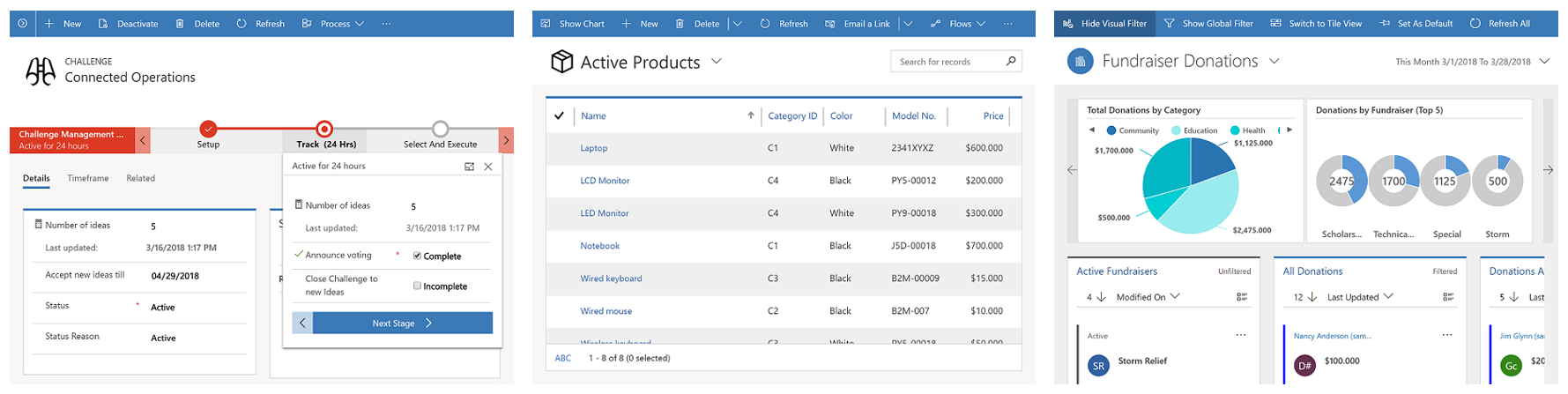
    This is still a Big Deal. With the “free” Dataflex included in Teams, Model-driven apps can soon be created by an equally large crowd as Canvas apps before. Eventually it might no longer be an awkward moment when you need to talk about “that Power Apps app type that looks like Dynamics, not like all the other apps you have”, since every app maker can generate those beautiful, structured UIs on top of the database tables they’ve added into Dataflex. Since Model-driven apps are so metadata driven, I’d imagine this route would actually be a lot easier for many power users of Excel that haven’t necessarily been comfortable with building pixel-pefect mobile UIs in Canvas apps before.

    Despite of everyone having the possibility to store app data inside Dataflex, it’s not by any means imperative that a single database is established as the place for all business data. That is the traditional CRM approach of doing things, but with the modern tools like Power Apps and Power Automate the source and target of data operations could be a number of different systems if needed, thanks to Connectors. However, I’ve understood that Premium Connectors will still not be included with the Teams license, so the options for data connectivity will be more limited here. This may again be perfectly fine for the simple apps that the non-Pro Dataflex is aimed to serve.

    One thing the free access to Dataflex should make ubiquitous is the usage of solutions for app packaging and ALM. As the solution framework is a concept from the XRM era, replacing the earlier standalone .zip packaging of apps and Flows required that everyone would get access to this layer in the underlying platform. From an administration perspective it should be a clear step forward to standardize all the work to be done with Dataflex tools. There is also the promise of further deployment options being introduced with the Teams app store and its “single click” app installation, so this is an area for everyone to keep an eye on.

    The business impact of Dataflex

    The launch of non-Pro Dataflex can be expected to generate a wealth of questions from those professionals who’ve been working with CDS based solutions. What is & isn’t supported in Dataflex, where do the license and capacity limits actually get drawn, how are they enforced, where can apps be created for different Dataflex environment types, what admin controls are available on the tenant level, and so on. It’ll be confusing initially, but in the end I bet it’s gonna be woth it for all parties in this ecosystem.

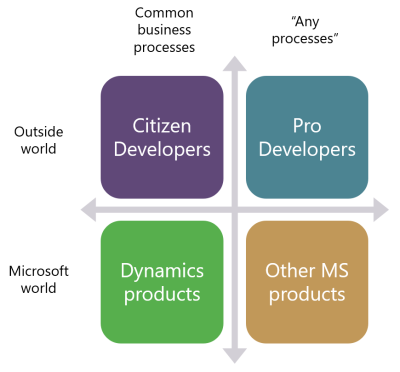
    One year ago I wrote a blog post examining the possible growth directions for Power Platform. This launch of Dataflex + Teams now broadens the scope of the platform both on the Citizen Developer dimension (number of potential app makers) but also in the “Other MS products” axis. Earlier I’ve enjoyed making the joke that one day Microsoft would build the next version of SharePoint on top of CDS. Well, that hasn’t quite happened yet (and most likely never will), but we did see a major step now in Power Platform catching up with the mainstream productivity apps in Office. After all, every time you create a new Teams team, a new SharePoint site is provisioned for it. We’re now at a point where technically each team could also have a Dataflex environment provisioned at the same time. Knowing this, what’s stopping future Teams features from being built on top of CDS Dataflex?

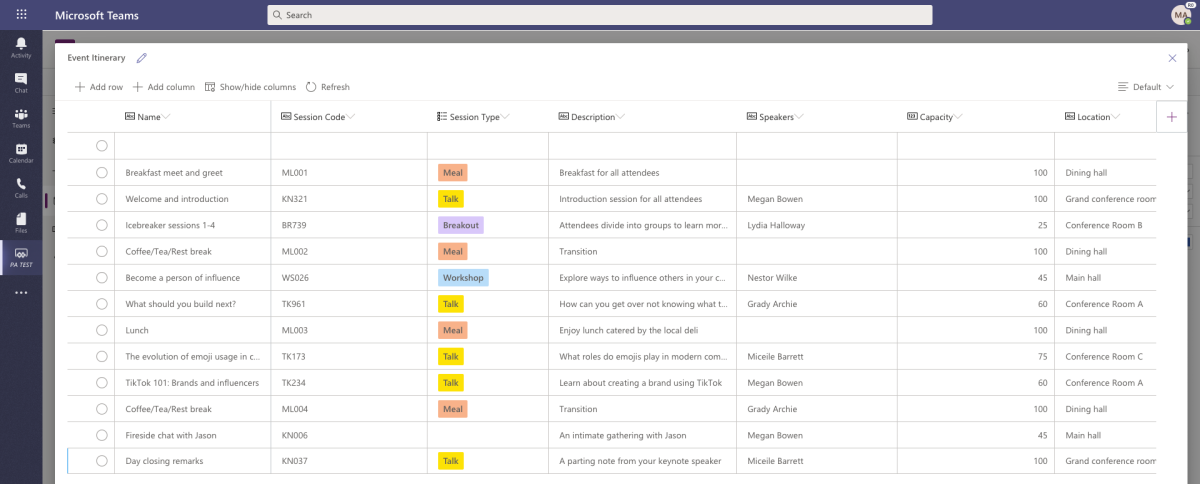
    As we can see from Ryan’s example, there are interesting synergies between Power Apps and Teams that are made possible by having Dataflex “on by default”. From a partner ecosystem perspective, over 500.000 organizations around the world who use Microsoft Teams just became a potential target for no-code solutions that could be dropped inside various teams. I’m saying no-code here instead of low-code because presumably the non-Pro Dataflex environment wouldn’t support custom code. Anyway, there’s a lot to investigate here with the Dataflex public preview coming in August and GA planned for September timeframe, so I will definitely be returning to cover the topic more closely once detailed feature lists are publicly available.

  • Highlights from TechDays Finland 2020

    Highlights from TechDays Finland 2020

    March 5-6 marked the annual conference for Microsoft geeks in Finland to gather in Messukeskus Convention Center and enjoy two days full of expert sessions on the latest MS technologies and real life stories on how all this tech is making an impact out there. In this blog post I’ll reflect on the sessions that I attended at TechDays this year and share some thoughts on what I think are topics worth exploring more. You’ll also find links to slides and a few social media posts from the event.

    Let’s get one thing straight first: Power Platform is everywhere these days. Even a Microsoft IT & Dev conference like TechDays 2020 was opened with a keynote presentation that stared with the 4 pillars we’ve come to know from the Digital Feedback Loop, familiar to all Dynamics 365 professionals by now. Engage customers. Empower employees. Transform products. Optimize operations. The goal of digitally transforming organizations has become the overarching theme of Microsoft’s product offering, supported by global cloud infrastructure, enabled by Azure services, integrated with Office 365 productivity tools and ultimately unlocked by the apps created on top of Power Platform.

    For many of the attendees, the journey of how exactly we’ve reached this tipping point of low-code applications isn’t necessarily familiar yet. For us at Forward Forever, a new technology agency focused 100% on Power Platform, being able to participate in discussions with MS tech professionals around this theme was of course of highest importance. Our whole team was present for the 2 days of the event, to ensure we’ve got a thorough understanding of the state of the ecosystem. Thanks to everyone we had a chance to meet at TechDays! Lots of great dialogue and awesome feedback to encourage us to push forward with the vision that we have for our new company.

    Our very own Power Platform guru Timo Pertilä had two sessions at this year’s event. The first one was aimed at the broader audience of non-PP professionals, to help them get started on creating Power Apps Canvas apps. Timo gave us the kind of tips he wished he had been given back in 2016 when starting to explore these tools. When it comes to Canvas apps, the most important step is to A) decide on an app that you would actually want to use yourself and then B) just creating it! Following along the lines of a simple IT asset management app built on top of a SharePoint list, Timo’s session went through all the common areas that an app maker should be aware of. I encourage everyone to pick a training lab from one of the many Power Apps learning resources and just follow through a scenario, to understand how these new tools can really democratize the creation of simple business apps on top of existing data sources.

    [Slides]

    The second session by Timo was about exploring the capabilities of the new UI Flows in Power Automate. RPA, Robotic Process Automation, is a smoking hot topic and the addition of such capabilities into Microsoft Power Platform has gotten even cool-headed Finns like Timo excited about the new opportunities. Yes, while integrating software properly via API based automation remains the core of what Power Automate excels at, the option to connect to systems that for one reason or another can’t be accessed via APIs can close the final gaps and turning manual processes fully digital. In the TechDays session we saw a demo story of an employee onboarding process for HR deparments. Using UI Flows to create user accounts in a non-API enabled legacy system such as Microsoft Access is now possible with these graphical tools that record the steps in the UI and then execute them by using variables like employee name as inputs from other parts of the Power Automate flow.

    [Slides]

    Although the use of a “proper” relational data management system like CDS would be preferable in building apps for enterprise wide use, the fact is that SharePoint remains both a commonly used as well as easily accessible data store for many citizen developers. The session by Mikko Koskinen showed us how you can leverage tools from the Power Platform to improve the user experience and also auditability of actions that users take on SP list and document data. Custom forms built as Canvas apps and process automation implemented as Flows can do wonders to your SharePoint based business apps, and of course they also open up the connectivity to many other Microsoft services to further extend the feature set as the demands of enterprise customers evolve beyond Office. Having a common set of low-code customization tools across the whole MS stack is where the real Power of the Platform lies.

    Microsoft Teams is becoming ubiquitous in the business world as pretty much all organizations on Office 365 are moving away from Skype for Business. The end result of this mass exodus towards Teams may not always be the automatic improvement of teamwork and employee productivity, if all you do is enable the licenses and activate the new services. The Teams MVP duo Vesa Nopanen and Karoliina Kettukari delivered an entertaining story of the rogue cowboys (end users) vs. the central command center (IT department) and how their perspectives on how Microsoft Teams should be implemented and managed can differ wildly. There are plenty of smart settings that the IT guys could automate behind the scenes for a more productive workday experience, but at the end of the day, a lot of the everyday usage of Teams relies on the real life teams to agree on common practices and expectations on how everyone will use the software tools. Educating and encouraging both parties to do their part is therefore essential for achieving success with MS Teams adoption.

    [Slides]

    Teams is not just a communication tool, though. It is quickly becoming a platform, which from my perspective is the most exciting aspect in its rise to popularity, since this paves way for a wealth of scenarios to better leverage Power Platform tools for a broad information worker audience. MVP Christina Wheeler presented us to path on how to get started with developing Apps for Microsoft Teams. It’s worth exploring the wealth of Teams App Templates that MS has published on GitHub, as these will give you many ideas on how to link various Azure services into the UI that your people are spending a growing part of their days working in. From a low-code development perspective, though, the options for bringing in Power Apps into the Teams navigation experience is the low-hanging fruit that you’ll also want to explore.

    Another super hot MS technology alongside the low-code Power Platform and ubiquitous Teams is Azure Synapse Analytics. In the TechDays 2020 keynote, Data Platform MVP Vesa Tikkanen and Anne Komscha from Stora Enso presented what opportunities this brand new cloud analytics offering from Microsoft opens up for organizations to rethink their data architecture. Vesa demonstrated the unique capabilities that Synapse brings to the table by connecting to and from a SQL Server 2000 virtual machine to the modern data cloud. It’s therefore not a “rip & replace all the things!!1!” type of a scenario where Microsoft is aiming at here, rather they are playing on the compatibility card here and ensuring that your complete data estate can connect with Synapse. Thinking about the Customer Data Platform scenarios where this same underlying technology will be leveraged to identify customer profiles from various sources, it’s easy to understand why MS is so bullish on their position in the emerging CDP market.

    As your data and your apps are all either moving to or at least being connected with Azure, it’s no wonder that questions on how should we secure all of this are bound to surface more and more. Azure MVP Karl Ots explained the role of security in the cloud adoption journey to a packed room full of MS tech professionals that probably have all done hands-on experimentation with many Azure services yet not necessarily paid attention to how to limit access instead of enabling it for their own super admin accounts. Role-based Access Control (RBAC) gives you a comprehensive toolkit to configure the permissions in alignment with the identified parties who need to access resources in your subscription, but it may still come as a surprise how much rights can be inherited from the top down to the individual resources if your model isn’t well planned out.

    [Slides]

    Rob Kuehfus from Microsoft presented a possible solution for approaching the wider journey to the cloud: Cloud Adoption Framework for Azure. This represents MS efforts to consolidate their earlier fragmented whitepapers and information sources (up to 40 earlier, based on what Rob told) into a single source of guidance and best practices on what to do on each step towards the cloud. From planning the organizational roles needed on the journey to building focused “landing zones” where the first customer workloads can be dropped on, this framework should become the go-to resource for establishing common understanding between customers and partners on what’s actually needed when adopting Azure at scale inside an enterprise organization.

    [Docs: Microsoft Cloud Adoption Framework for Azure]

    As an example of one customer organization that has taken the steps recently, the Azure adoption story of Terveystalo was presented by Development Director Ilari Richardt and Polar Squad’s Azure Lead Masi Malmi. Terveystalo is one of the two private healthcare giants in Finland and their history is full of consolidation projects, which makes it all the more impressive how throughout history they have aimed at having a single patient information system in place. The decision to choose Dynamics 365 as their CRM and ERP systems actually ended up driving also the custom software development investments towards Azure and now building modern DevOps practices in the MS cloud are a key focus area. Bridging the cloud and on-prem wolds in healthcare naturally involved building a lot of APIs and Masi’s exploration of the capabilities of Azure API Management has produced some interesting findings on what the challenges are on this front.

    Last and probably least… OK, definitely not the least. Mr. Järjestelmänvalvoja a.k.a. firsname.lastname, also referred to as Sami Laiho, wrapped up TechDays 2020 with his packed session on the main arena. Even though I myself have very little to do with managing endpoint security on a professional level, it’s always interesting to hear what the world of securing the Windows laptops and the Azure resources accessed via the credentials used on those laptops actually looks like out there in the enterprise space. It doesn’t make much sense to aim for 100% security, but you just need to be better secured than your neighbor. Considering that just by enabling multi-factor authentication you’re already more secure than 99.9% of the compromised accounts out there, this isn’t always rocket science but rather behavioral science. Sami’s examples of the extent to which people (employees and CIOs alike) go to in their effort to remove inconveniences that could actually put them into near 100% safety is a welcome reminder to all of us that any new innovations we come up with in the information technology space will need to pass the “but what would humans do with it” test before achieving real, tangible results.

    [Slides]