Tag: Microsoft 365

  • Don’t trust the Microsoft 365 admin center product information

    Don’t trust the Microsoft 365 admin center product information

    In this age of online commerce, and especially when selling digital subscription services, one might think that the online storefronts of large corporations would contain accurate product descriptions. Or that at least it wouldn’t take many years for incorrect information to get fixed.

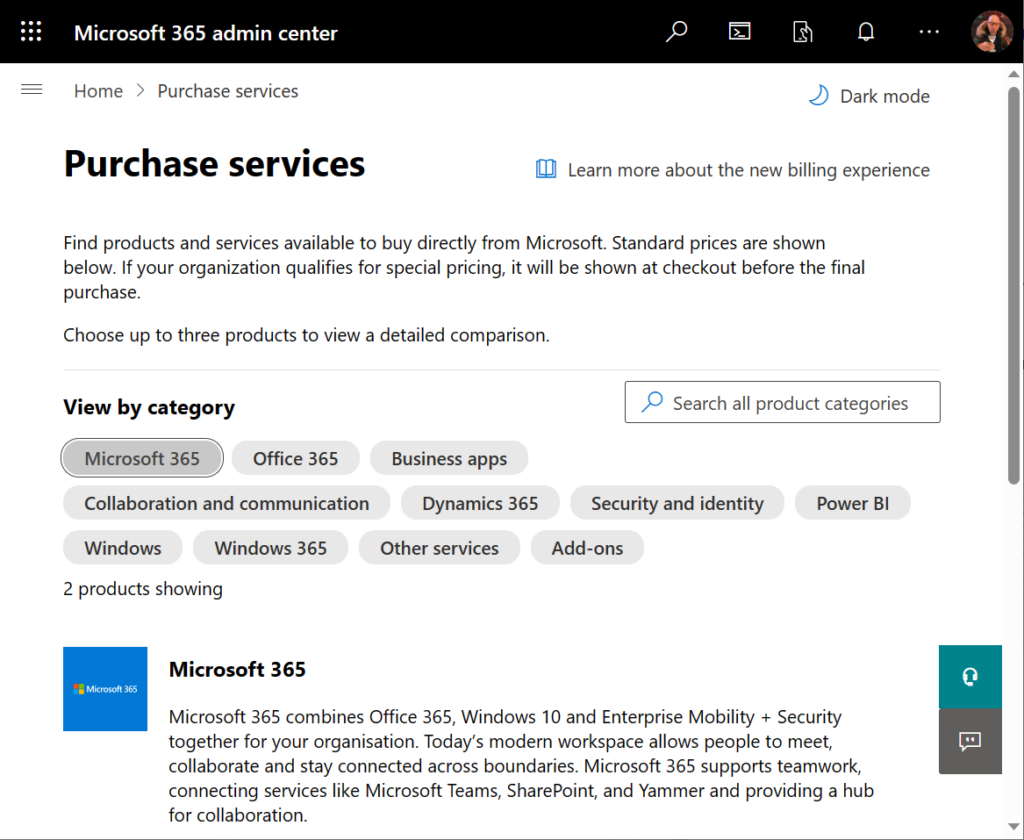
    Neither of these assumptions are correct when dealing with Microsoft 365 admin center’s online store, a.k.a. the “purchase services” tab. The detailed information that is shown to customers who are looking to purchase Power Apps licenses is not valid in this portal. It hasn’t been valid for close to 4 years now.
    During the past couple of years, I’ve tried every imaginable channel for contacting Microsoft about this. I’ve reached out to MS partner forums dedicated to licensing information. I’ve posted into Microsoft MVP program related forums dedicated to MS Business Applications licensing information. I’ve reached out directly to the product team who owns Power Apps.

    Nothing has helped in getting this information fixed. Which means that I must assume it will never get fixed. The only way to communicate about this to the people who suffer from it (customers, partners) seems to be in writing a blog post like this.

    Let’s take a look at the online commerce experience for someone who’s got a Microsoft 365 tenant and wants to purchase Power Apps licenses directly from Microsoft. In this scenario we want to specifically understand the options provided in the subscriptions called “Power Apps per user plan” and “Power Apps per app plan”.

    Finding Power Apps products from Microsoft 365 admin center

    The first hurdle will be in finding the products. One might think that Power Apps would be listed under the “Business apps” category (since there isn’t a category called “Power Platform”). However, we only find the Power Apps per user plan from that category.

    Let’s try a text search. Searching for “Power Apps” (or the old name variation “powerapps”) gives us the results we were after, yet in a surprising place:
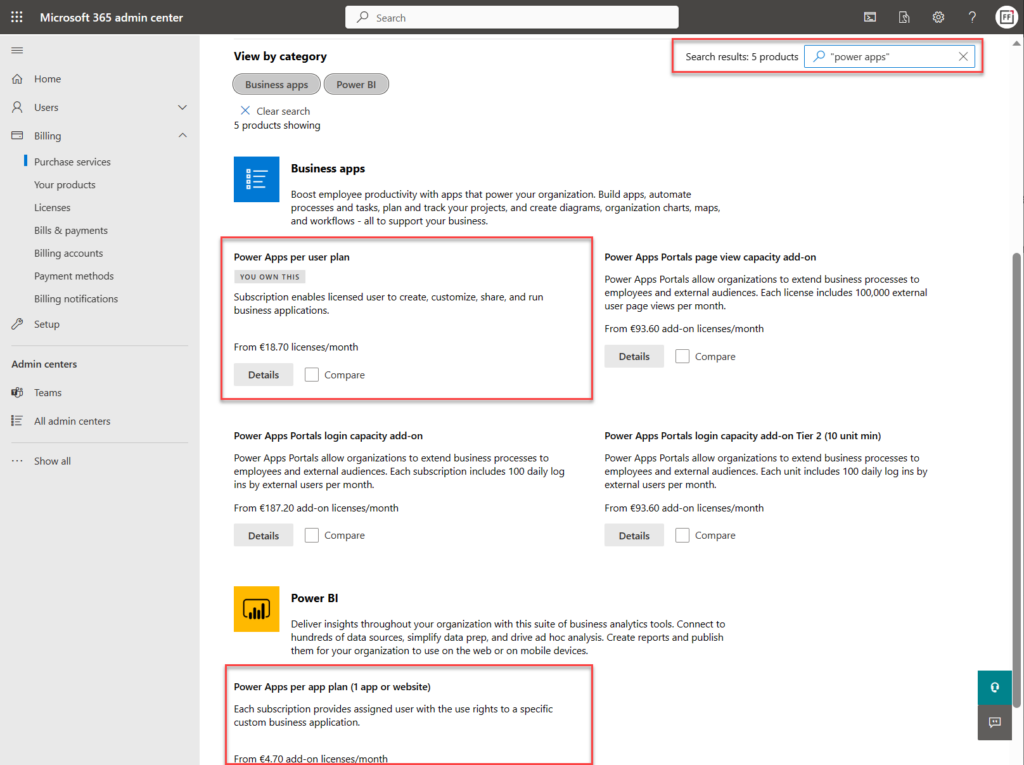
    Why on earth would the per app plan be categorized under “Power BI”? Well, for the same reason I need to write this blog post. The product information under Microsoft 365 admin center is simply wrong in many cases. This specific miscategorization has been in place for several months now, as an example.

    Comparing Power Apps product features in Microsoft 365 admin center

    Now what we’ve got the 2 Power Apps SKUs (“stock keeping units”) on the same results page, we can tick the “compare” box on them. Upon opening the comparison page, this is the result we get:
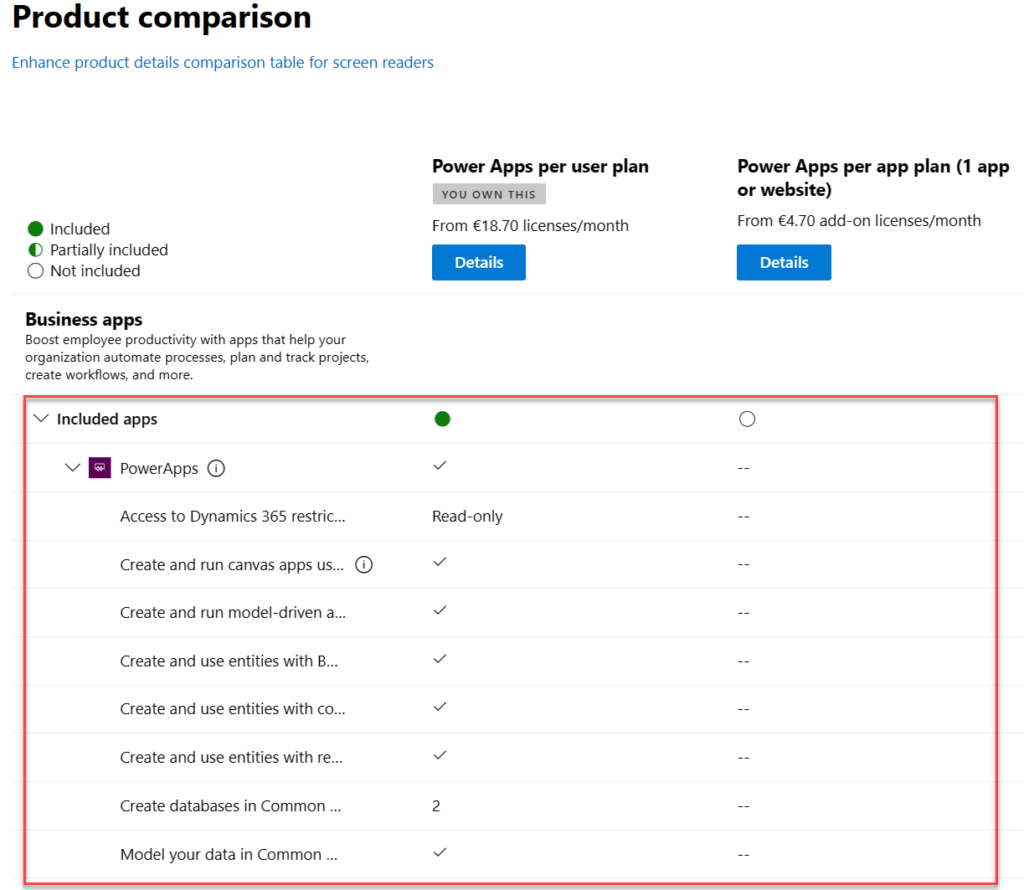
    There is absolutely nothing right about these product features. Even the product name and icon in the comparison section are outdated. They refer to the old SKUs of PowerApps Plan 1 and PowerApps Plan 2, which were replaced by the Power Apps per app plan and Power Apps per user plan on October 1st, 2019.

    The problem is, someone responsible for the commercial information managed in the Office 365 / Microsoft 365 online store didn’t understand this change was not simply a rebranding. You can’t just replace “Plan 1” with “Per App” and get away with it. Someone truly missed the memo of Charles Lamanna when he announced the change on July 25th, 2019.

    “We are also removing feature and capability differentiation across the paid, standalone PowerApps and Flow user-based plans. All customers will be able to benefit from the full features of the services, regardless of which plans they purchase. Key concepts like complex entities, or model-driven applications, will no longer be available in only some of the licenses.”

    Taken from “New licensing options for PowerApps and Microsoft Flow standalone paid plans” on Power Apps product team blog

    Let’s look at the list of features that are presented in Microsoft 365 admin center ~4 years later and see what errors we can spot:

    “Access to Dynamics 365 restricted entities.” It used to be read-only for Plan 2 and no access for Plan 1. Today, the entities (nowadays renamed “tables”) categorized as restricted are read-only for any Power Apps license. Also, everything else has full CRUD rights.

    “Create and run canvas apps using common data service for apps”. First of all, “Common Data Service (CDS) for Apps” as a term was replaced with Dataflex …sorry, Dataverse, quite some time ago already. Both Per App and Per User today have identical right to using this, unlike what the comparison table claims.

    “Create and run model-driven apps using Common Data Service for Apps”. Showing this as not available in Per App is entirely false. As anyone reading the memo from Charles would have spotted: “Key concepts like complex entities, or model-driven applications, will no longer be available in only some of the licenses.”

    “Create and use entities with Business Rules and async workflows”. Available in both Per User and Per App licenses, unlike what the product comparison table says.

    “Create and use entities with code add-ins”. Sigh… See above.

    “Create and use entities with real-time workflows”. Oh come ON! See above.

    “Create databases in Common Data Service for Apps (per user)”. Ooh, what an ancient relic this line is! Saying that Power Apps per user plan allows you to only create 2 databases has no basis whatsoever in the current licensing model. Customers can create as many Dataverse environments (meaning CDS / XRM databases) as their available storage capacity permits. Furthermore, today anyone can create up to 3 Developer environments for themselves, without having any premium Power Apps license.

    “Model your data in Common Data Service for Apps”. Does anyone still want me to explain to them that there’s no difference between Per User and Per App entitlements here? No? Good. You got the memo then.

    Closing thoughts

    For those of use who have been tracking the platform evolution of MS Business Applications over the years, it’s pretty much business as usual to encounter MS materials and information that reference outdated versions of products. The names change, the icons change, the licensing models change – this happens all the time and we’ve come to expect it already.

    If you don’t have prior experience on the commercial aspects of Microsoft’s product stack, though – this can be highly confusing. Imagine that you’re trying to compare different low-code application platform vendors and the information provided by the online store is like what we’ve seen above. Not the best way to build trust and convince customers that the pricing model is transparent.

    Why does this happen then? Why aren’t the product details updated in customer facing portals? Well, I don’t think anyone intentionally wants to mislead the audience here. I believe it’s simply a reflection of how inside a huge corporation like MSFT it can be very difficult to coordinate such updates. Every time some product gets “reimagined” there must be a million places that would need attention internally at Microsoft (us partners surely feel the impact, too). Sometimes the friction in the systems may just be too great to overcome, such as in commerce engines like Microsoft 365 or technical dashboards like the Azure portal.

    Power Platform products and pricing

    If you’re interested in seeing the Power Platform product prices on a single page, take a look at a summary that I’ve created for my own reference: Price points of Power Platform. I can’t promise it to be always up to date either, but at least I have a lot less bureaucracy to overcome than the official channels.😁

  • Making Model-driven Power Apps visible (and hidden)

    Making Model-driven Power Apps visible (and hidden)

    I’ve got a confession to make: even though I’ve been building Model-driven apps long before they even were Power Apps (back in the XRM era), I’ve struggled to understand how I can make them visible to the end users in the modern experiences Microsoft offers.

    In this post I’ll address two different challenges. First, how to enable end users to have access to your Model-driven app. Second, how to protect them from seeing irrelevant apps.

    “Why isn’t the app sharing menu working?”

    Once you’ve built your Model-driven app are ready to release it, you need to make it visible not just to the app makers and system admins but also regular users. This involves using the Share menu from the list of apps available in the environment.

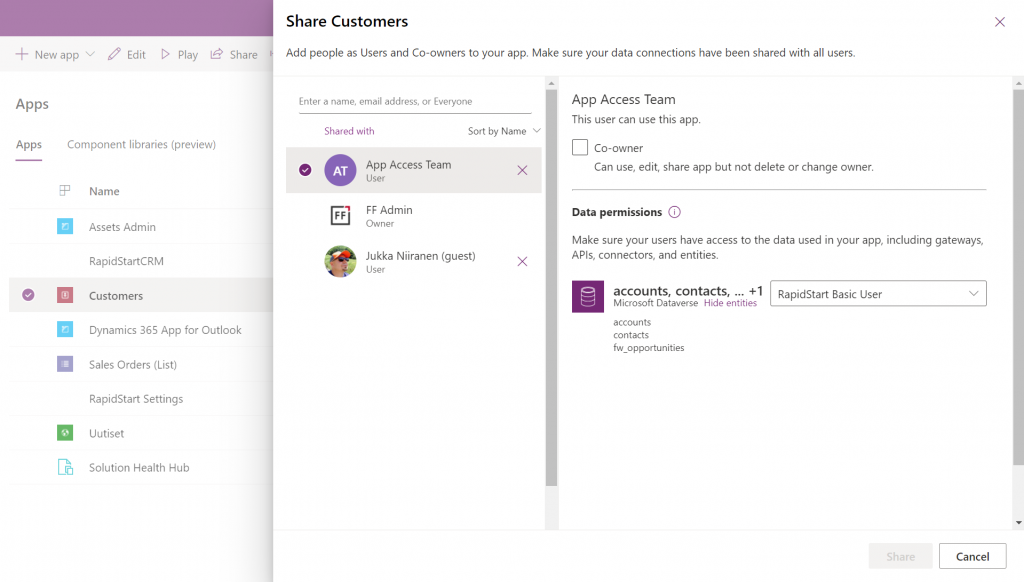
    Working in the Power Apps Maker portal, it’s pretty obvious the things we see here have been built with Canvas apps in mind. When it comes to sharing a Canvas app, the steps are fairly logical. You click the 3 dots next to the app, select “Share” and are shown this dialog:

    You add users or groups, set their data permissions via the many available security roles within Dataverse, click Share, after which the users get an (optional) email message. All good!

    Try the same steps with a Model-driven app and your users will see… nothing. It’s not just that there isn’t an email message with the app URL sent to them. They actually don’t have access to the app at all, even if you provide them the URL directly. Why isn’t the share action working from here?

    If you’ve worked with the Dynamics 365 App Modules before, you might remember that you needed to specify which security roles have access to which app. Just like with role-based forms, too. Now, that particular role assignment UI existed in the legacy web client that has been deprecated and there doesn’t seem to be an equivalent in the Maker portal anymore. Does this mean we don’t have to perform this step, rather the sharing of the app to the users takes care of this automatically?

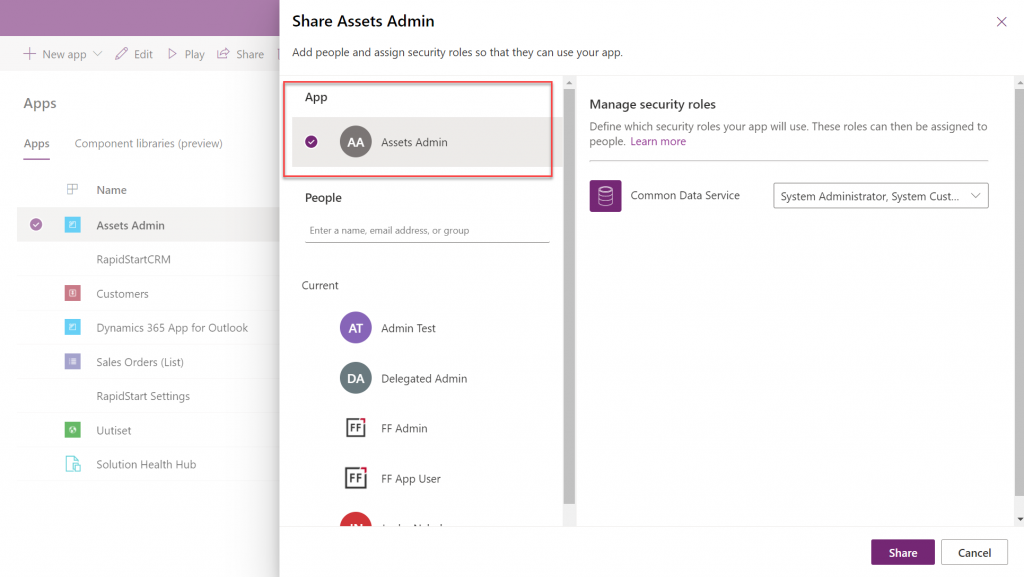
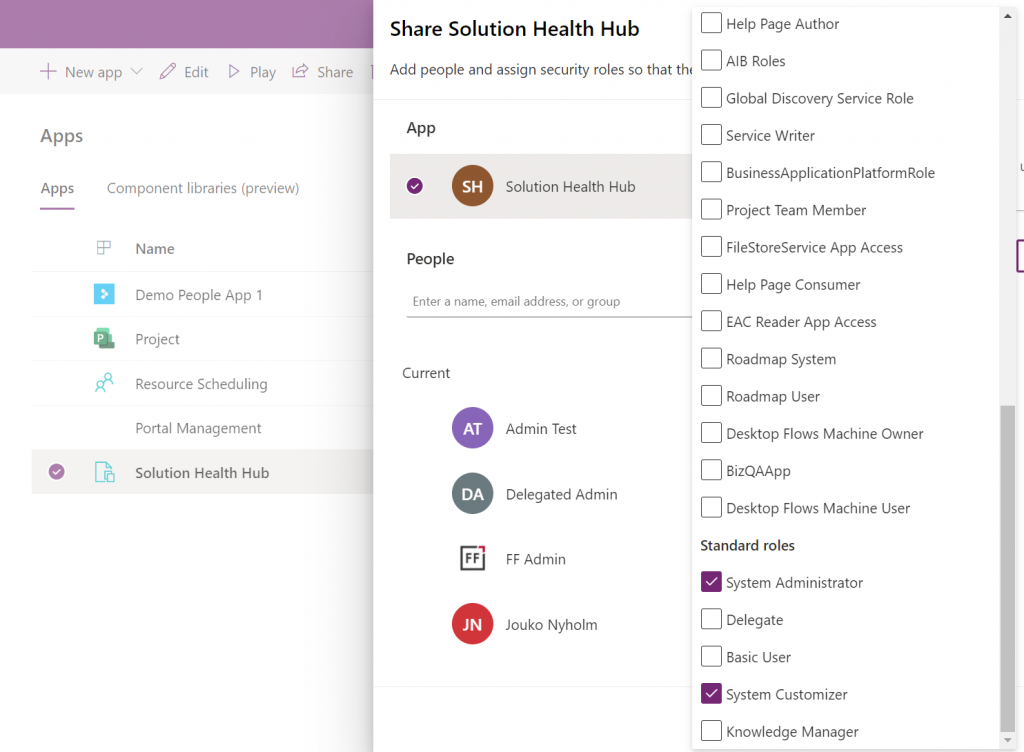
    At some point I assumed so, but this isn’t actually the case. After a long hard look at the documentation, I finally realized that the MS product team had squeezed this functionality into the Canvas sharing dialog in quite an unintuitive way. You see, you’re not only using it to share the app to the users, but also for “sharing” the app to a security role:

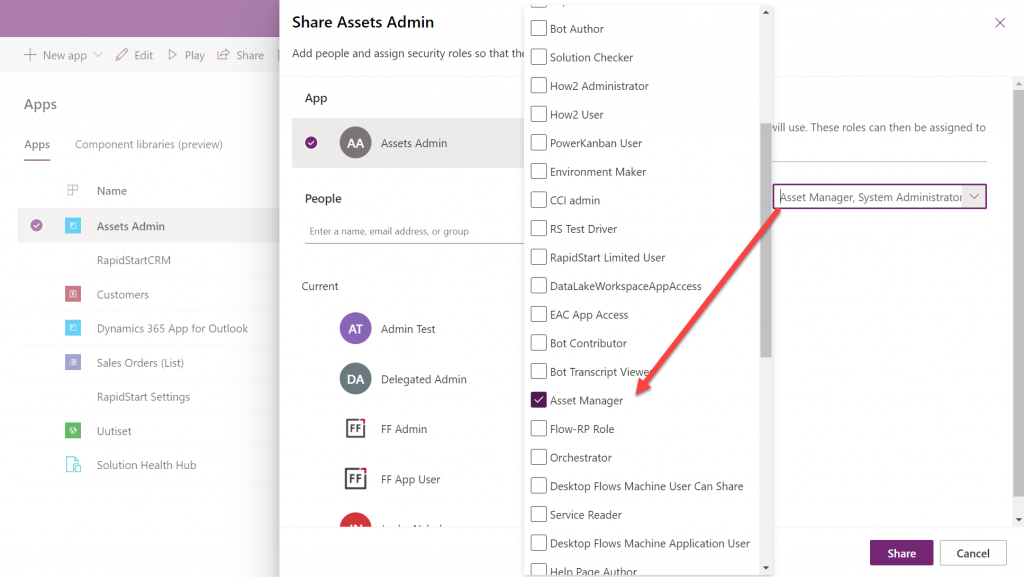
    So, rather than sharing the app to the users, stay on the higlighted App section that’s at the top of the list. Pick the correct security role from the list and then click “Share”:

    Now all users with the specified security role will have access to the app when trying the URL shared with them. Yes, you didn’t actually need to explicitly share the app to them via this menu at all! Sure, you can use it for adding the required security roles for these users, if they haven’t already acquired through other means, like group membership. But the whole concept of “app sharing” is still completely irrelevant to Model-driven apps, from what I can see. It’s only this misleading UI that may give you the impression that you can achieve visibility to Model-driven apps via a sharing action when in fact it’s still security role based like it was back in XRM.

    This leads us to the next question around Model-driven app visibility that has been puzzling me:

    “Where can I find the apps I have access to?”

    If the app user is not a maker in the particular environment, they logically won’t have access to the Power Apps Maker portal to view the list of apps in it. So, from where exactly should they be viewing the list of all the apps shared to them?

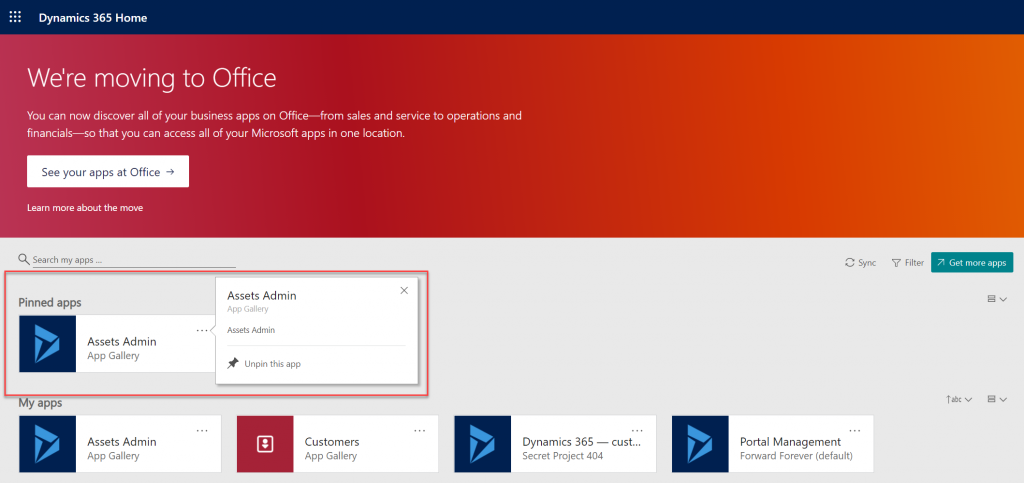
    If we have past experience from the world of XRM then we’d probably navigate to the Dynamics 365 Home page at home.dynamics.com. This page should be showing all the apps that the user has access to, which it currently does. We can pin our newly shared Model-driven app to the top of the list for easy access:

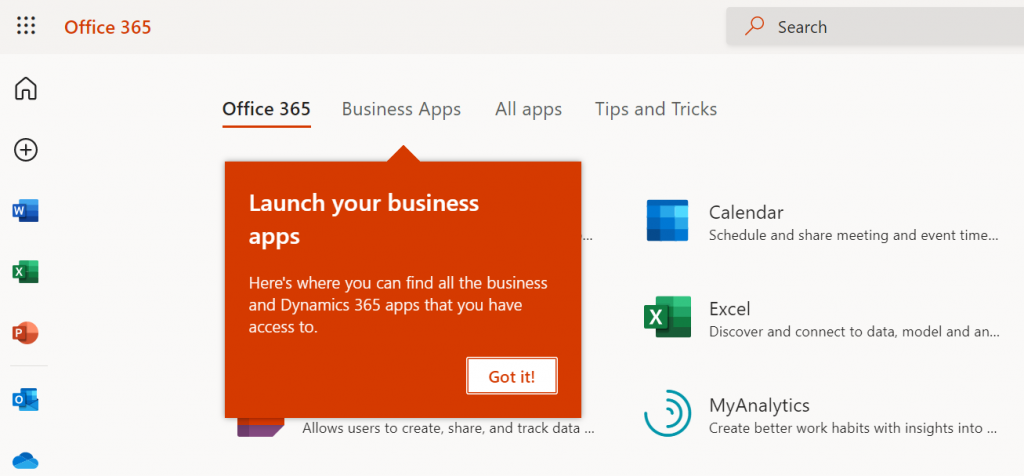
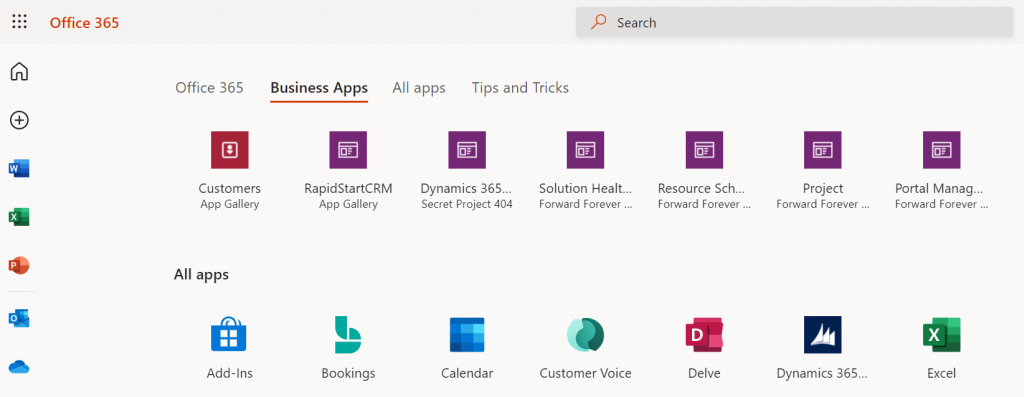
    Oh, right. “We’re moving to Office” says the banner, since this Dynamics 365 Home page has been deprecated a while ago. In fact, based on the original deprecation message this page should have started to automatically redirect you to office.com/apps already. Today we still have the option to visit the legacy page, but let’s move over to the modern Office experience. We’re greeted with the “launch your business apps” onboarding dialog that points us to the Business Apps tab at the Office 365 home page:

    Looking at the list of apps, though, we probably won’t see our brand new app here right away. There’s a pretty significant delay in the list of business apps getting updated here. Unlike the old Dynamics 365 Home, which suffered from a similar delay, we don’t have a “Sync” button to make this process any quicker.

    While we’re waiting for our new Model-driven app to show up on the Office 365 home page, we may start to wonder what apsp actually are listed here. For instance, why is Solution Health Hub showing up there for a normal user with no admin nor maker roles?

    Perhaps the Model-driven apps visibility isn’t entirely security role based after all. Whatever the reason why these Microsoft built apps like Solution Health Hub or Resource Scheduling from the default environment show up for a non-admin user, it’s not exactly a pleasant user experience. The Office 365 home page doesn’t offer us any pinning or filtering features like the old Dynamics 365 home page did, so there’s not much an end user could do to clean up the mess.

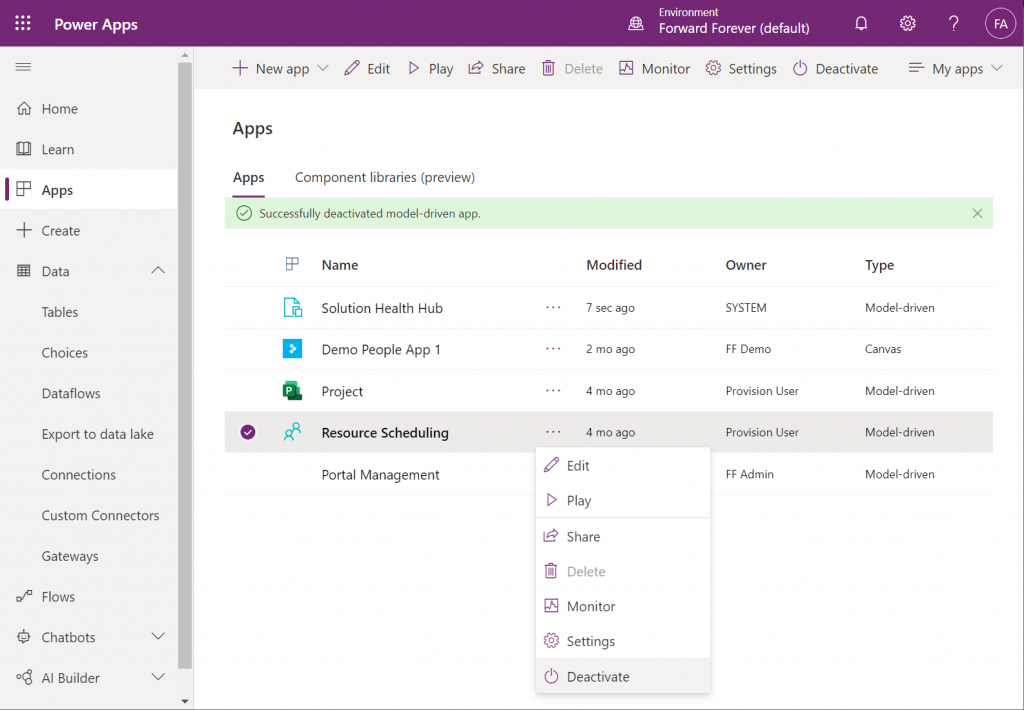
    As a system administrator, though, we actually do have a way to trim the list of apps – even when they are first-party MS apps. Thanks to fellow MVP Alex Shlega, I recently learned that Model-driven apps can now be deactivated and activated. So, let’s go to the Maker portal in the default environment, pick the apps we want to hide from office.com/apps and select “Deactivate”:

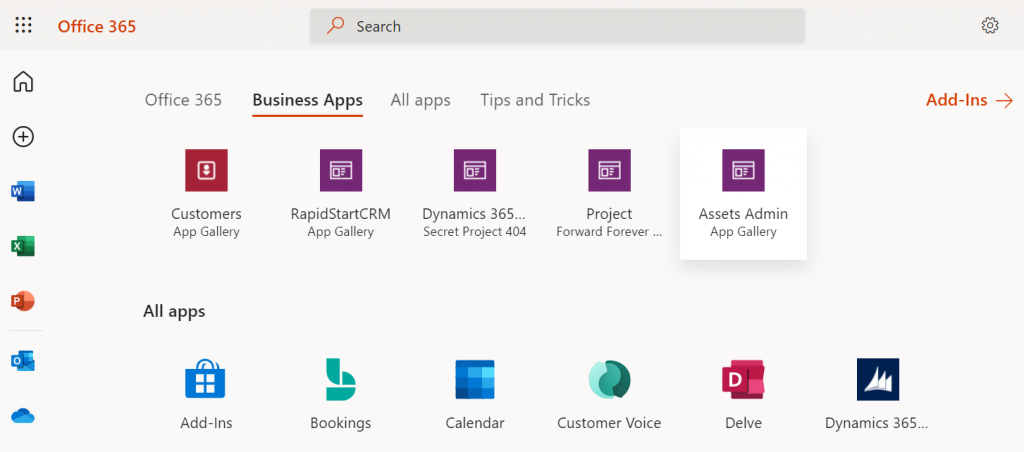
    Much better! Not only have the unwanted apps disappeared from the Business Apps list, but also our newly configured Model-driven app has appeared there during our small exercise.

    There still remains one item on that app list that I can’t figure out a way to remove from the user. That “Dynamics 365 – custom” app from the Secret Project 404 environment is actually the result of a Dataverse for Teams environment provisioned by this end user. Now, since we have no way to directly navigate to the full Maker portal of such an environment and they shouldn’t support any Model-driven apps to begin with, these apps are something only MS can clear away in a future update hopefully

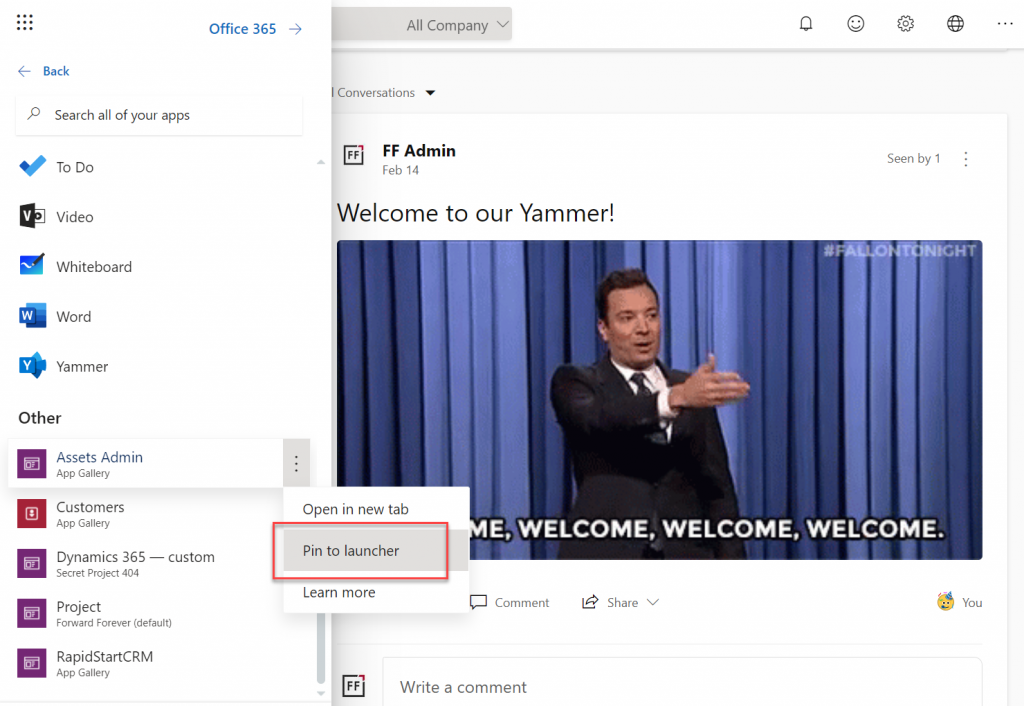
    Thankfully there’s another place where the end user has more control over the app list than the Office 365 home page. Whenever you’re using some other Microsoft 365 service and need to open up a Power App, it’s a lot more convenient to use the waffle menu from the top left corner rather than the full home page.

    Thanks to Thomas Sandsør for reminding me about the customizability of this app launcher. This is of course the place where a user should be instructed to pin their new Model-driven app for easy access:

    One final point to make about Model-driven apps visibility is around Microsoft Teams. You should definitely consider pinning the apps into relevant Teams channels as tabs, to maximize the likelihood of the end users remembering to use them. As for a complete list of Power Apps available to the user, currently no such place exists within Teams, so you should pay attention to the Office menus as the portal to display your Power Apps app catalog for desktop users.

    Update 2021-12-07: Office App Launcher new visibility criteria defined

    Microsoft has recently changed the behavior of their app lists, with an update communicated via Microsoft 365 Message center message MC290818. Since many people will not have access to MC content and it will probably disappear at some point, I’ll post the contents here in full:

    To help improve the app exploration and discovery experience for users, beginning mid-November 2021, the Office App Launcher, All Apps (https://office.com/apps), and app search experiences will be updated to only list relevant Dynamics 365 apps, Power Apps apps, and Azure Active Directory integrated apps.

    Following this update, the Office App Launcher, All Apps, and app search experiences will only list Dynamics 365 apps, Power Apps apps, and Azure AD integrated apps that meet one of the following criteria:

    Dynamics 365 apps and Power Apps apps:

    • Apps a user has launched in the last 7 days
    • Apps created by a user
    • Apps an admin has marked as ‘featured’ in the tenant
    • User accessible Microsoft published Dynamics 365 apps

    Dynamics 365 apps or Power Apps apps that meet the above criteria will be shown in the App Launcher, the Business Apps section of the All Apps experience, and in app search results. Note that the time between when an app is shared with a user and when it appears in an Office experience is expected to be 24 hours.

    Azure AD Integrated Apps:

    • Apps an admin or user has added to an Azure AD collection

    Azure AD integrated apps meeting the criteria above will be shown grouped by collection name in the All Apps experiences, as well as individually listed in the App Launcher and in app search results. A link to the My Apps portal where users can create Azure AD collections will be added to the All Apps experiences as part of this update.

    How does this affect me?
    Dynamics 365 apps, Power Apps apps, and Azure AD integrated apps that don’t meet the above criteria will no longer be listed in the Office App Launcher, All Apps, and app search experience. Users can take the following steps to access these apps and have them listed again in their experiences.

    For Dynamics 365 apps and Power Apps apps, if a user cannot find an app they are looking for will need to first launch it in the browser via its Uniform Resource Identifier (URI). Note that admins and makers can get an app’s URI by selecting an app in the Power Platform admin center or via https://make.powerapps.com by selecting details, then selecting web link. Once the app is launched, it will be listed in the Office App Launcher, All Apps, and app search experiences.

    For Azure AD integrated apps, a user can locate the full list in the “Apps” collection of the My Apps portal. Users can create collections for quick access to their favorite or most often used Azure AD integrated apps. Once the Azure AD integrated app is added to a collection, it will be listed in the Office App Launcher, All Apps, and app search experiences.

    What action do I need to take?
    This message is to inform you of an upcoming change, no action is required. However, if you want to guarantee specific Dynamics 365 apps, Power Apps apps, and Azure AD integrated apps are available to users following this update, please perform either of the following:

  • Microsoft Teams as a platform

    Microsoft Teams as a platform

    2020 became the year of #WFH (work from home) and for many organizations also the turning point when Microsoft Teams became the primary place where being “at work” happens. This is accelerating the evolution of Teams from being merely a communication tool that connects human beings into a foundational service layer for many types of business applications.

    How the concept of Teams as a platform contrasts with Microsoft’s Power Platform suite of technology is something I’ve been thinking about a lot lately. In this post I’ll first reflect on the relatively short history of where Teams came from. I’ll then examine how the recent feature announcements are brining apps front & center in Teams. Finally, a few words on the possible future for Teams as part of Microsoft’s broader strategy.

    The road that lead to Teams

    Looking back ~10 years, the real-time communication & instant messaging tools from MS seemed to be going through an endless renaming cycle: from OCS to Lync to Skype for Business. The core feature set presented to the end user didn’t seem to evolve nearly as much as product branding did. On a broader level, the communication activities of information workers within an organization still typically took place within Outlook’s inbox, and different servers like SharePoint and Dynamics CRM all packed their own features for posting short messages to other users.

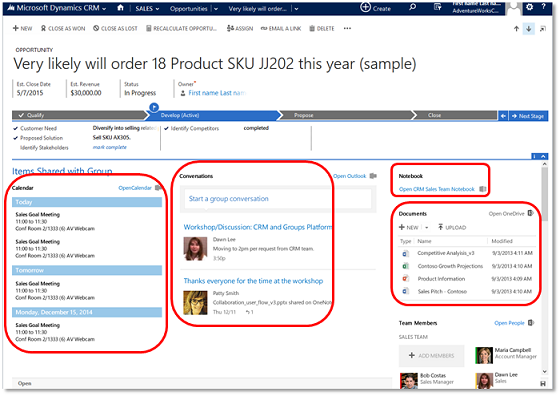
    4 years ago, when the first images of what was then called “Skype Teams” started to leak out, we were already waiting for MS to create something a bit more ambitious than just another online meeting tool. Office Groups had began to emerge in various different places inside the MS Cloud, but they were primarily a technical construct with no sensible UX for everyday people to approach them. Even Dynamics CRM had it’s own solution that attempted to bring together the dicussion, calendars, notes, documents and team memberships from under an Office 365 Group associated with a record like account or opportunity:

    I remember having many discussions with our CRM customers where I attempted to steer people away from deploying this Groups solution. Instead I wanted to encourage them to wait for something a bit more polished that I knew had to be on it’s way sooner or later.

    At one point there was a clear & present danger of another “Yammer moment” taking place, as Microsoft was reportedly quite serious about their plans to acquire Slack. In retrospect it was a blessing for both parties that MS decided to keep investing in building their own product, instead of trying to retrofit an established service like Slack into their existing software offering.

    I would argue that this “build over buy” strategy which Microsoft has since then followed across their business software stack has been a key success factor for BizApps in particular. It has enabled MS to move from merely chasing CRM competitors like Salesforce into redefining the business apps playing field with Power Platform. There’s a stark difference between acquiring companies and bundling them as “X Cloud” versus engineering your own software stack to act as a true platform.

    Teams: the collaboration chapter

    Initially the first version of the Microsoft Teams product that became generally available in Spring 2017 was pretty much focused on being three things:

    1. Replacement for Skype for Business
    2. Alternative to Slack
    3. UI layer for Office 365 Groups

    From a business applications perspective there wasn’t all that much you could do to hook Teams up with Dynamics 365, until Fall 2018 when the previews for the first integrated features were launched. In particular the integrated file sharing experience that Teams offered seemed almost like the Holy Grail for many CRM professionals, offering to fix the glaring hole in the SharePoint integration story that lacked any security model synchronization. The roadmap image below presents the plans from 2 years ago on how Teams and Dynamics 365 were going to be integrated:

    The last item on the roadmap has still not been delivered, which is the visibility of Teams conversations inside the Dynamics 365 record form. Why this hasn’t been a higher priority for MS to implement seems to me like a sign of how Microsoft Teams is nowadays positioned as the primary UI for all information work. MS probably would prefer if everything always started from inside Teams. You pin record tabs into channels, you show previews of records inside teams discussions, you interact with records via bot interfaces and so on. As long as Teams is that big umbrella under which all work takes place.

    The lack of a deep 2-way integration does not therefore mean that investments aren’t being made into the products involved. It can simply be a reflection of the new vision that is being built, by aligning many existing services to form a whole that aims to be greater than the sum of its parts.

    As an example, if you look at Microsoft’s task management story, you’ll see that features and data from across various apps like To Do, Planner and Outlook tasks / flagged emails are currently being collapsed into a central location that is the Tasks app for Teams. Tasks as a generic construct don’t necessarily need to be fully controlled by a single database, yet they very much need to be logically represented within “the hub for teamwork” that Teams is positioned as.

    Going forward, when new apps appear into the MS cloud product portfolio and they need to offer task management features to users, the logical integration point to focus on would be Teams. For activity feed type of functionality the choice is even more clear for product development: choose to piggyback on Teams instead of inventing yet another stream of short messages.

    Teams: the platform chapter

    Moving beyond simply integrating Teams with products X, Y and Z, we’re now seeing the rise of a model where apps are built specifically to be used in Teams. This has of course been possible for a long time already, by developing custom web services and using the SDKs. Now there are many features coming up that will amplify the platform story around Teams on the no-code/low-code front specifically.

    lists in teams1.png

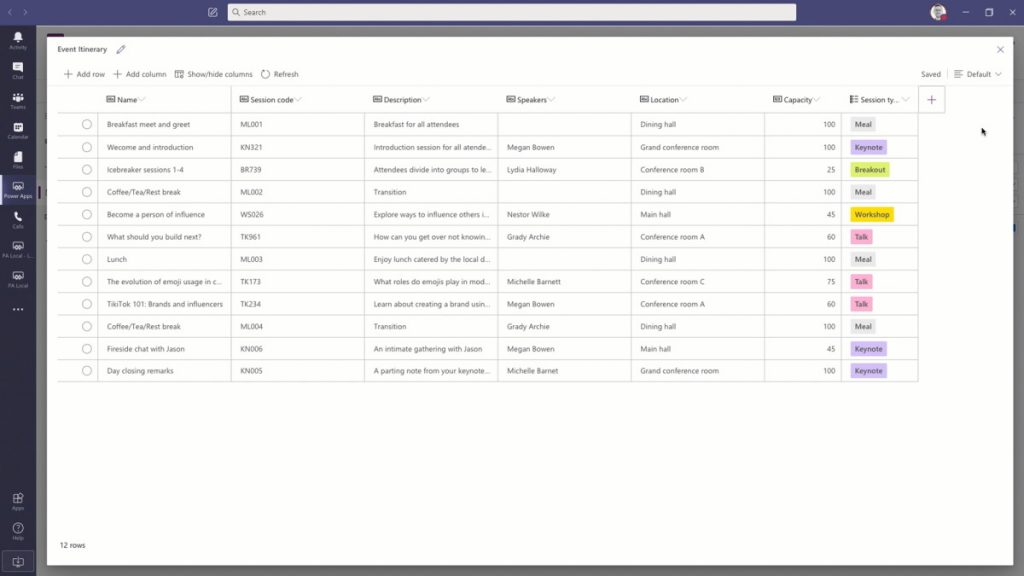
    Microsoft Lists app has been the first to reach GA and offers an ultra low barrier for users to process data in a single table through a configurable, readymade UI. When accessed via Teams, the list data gains one more special dimension: discussions to be had regarding a list item. This is pretty much the same as the usage pattern offered for a Dynamics 365 record with the integration mentioned earlier.

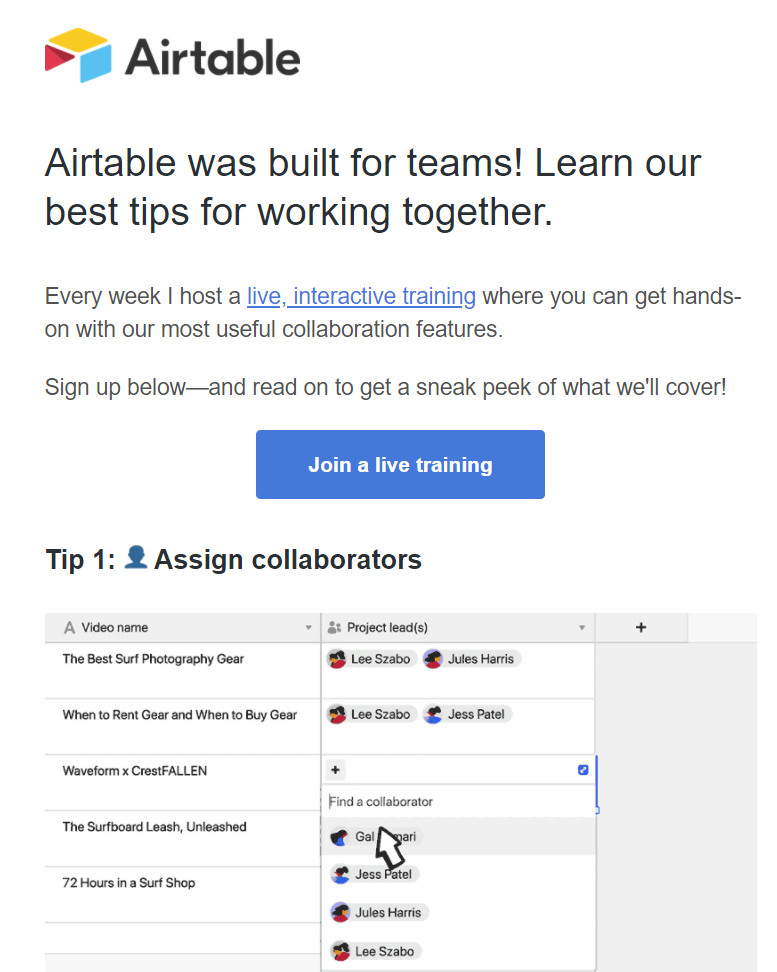
    Underneath the new covers of MS Lists is the technology familiar from SharePoint lists. If we were to only examine the UI layer, there is actually a remarkable similarity to a popular no-code service called Airtable. So much that the accusations of MS simply copying the visuals and core features from this competitor don’t seem entirely unjustified.

    Comparing these two offerings gives us some perspective on what exactly is the market position these tools are aiming to conquer. Simple lists themselves are not a particularly unique feature, rather it’s the team collaboration capabilities and ease of data sharing that turns these tables into what you’d call an actual app. Incidentally, just this week Airtable announced they were building a full platform with apps offering JavaScript based extensibility, a marketplace for sharing apps, automations for executing business logic, and finally a sync service to transfer data across environments (“bases”).

    Collaboration scenarios around semi-structured data like lists and Excel style tables can be seen as a gateway drug. They allow turning email or paper based manual processes into a quick first draft of what the digital process could be like. If there are indeed clear business benefits in automating the said process, the requirements for more complex app features will soon begin to emerge from the user base. Hence the collaboration platform should offer an obvious path to grow these pre-built app experiences into more advanced no-code/low-code apps.

    Project Oakdale a.k.a bringing CDS to Teams

    If Microsoft Lists is the equivalent of an Excel table within the Teams context, then Project Oakdale / “CDS Lite” could be though of as bringing SQL Server inside Teams. Now, obviously Microsoft has zero intent on actually replacing Excel nor SQL with features built into Teams. They only need to introduce those parts that make sense from a team collabocation perspective.

    Microsoft Lists is a far cry from what a real Excel workbook can do, yet it can offer much more value in a collaboration scenarios that those lone .xlsx files ever could. Similarly, the version of CDS that will very soon be available for building Power Apps within Teams is nowhere near as powerful as the services powering enterprise CRM systems like Dynamics 365 (or the raw power offered by SQL). Still, the fact that it can be found from within every team and used by a much larger audience than what Power Apps citizen developer tools could hope to capture – those are the factors that can truly make CDS a mainstream service that most information workers in the Microsoft 365 cloud interact it.

    The experience of defining the CDS data model in Project Oakdale will be very different from the path that Power Apps makers have gone through – let alone the XRM veterans. In fact, you could easily mistake the table design and row entry UX to be that of Microsoft Lists rather than CDS. This highlights a key aspect that not all Power Platform experts may yet have grasped: for MS this “CDS Lite” is not so much about deciding what premium features of the full Power Platform to give away for free to Teams subscibers – rather it’s about how to best simplify the enterprise CRM features of CDS into a new product that Teams users could adopt on their own.

    This doesn’t mean that Microsoft Teams should be viewed only as a mechanism for MS to scale Power Platform to the masses, by “dumbing it down”. If the app platform story of Teams plays out like it ought to, there should also be clear benefits from it to enterprise business applications development.

    Capabilities like messaging, notifications, task management, documents or group memberships are not something the Power Platform tools are very good at. For historical reasons there has been the need to build standalone features into XRM for these type of common requirements found in business application scenarios. For the future generations of apps being created, it’s easy to see the benefits of having these non-core capabilities offloaded onto a platform more suitable for managing them – meaning Teams.

    It doesn’t really even matter if the feature set offered by Teams couldn’t cover all the deep business logic integration of native Dynamics 365 functionality. Ultimately it’s not about supporting the system-of-record legacy but rather encouraging the new low-code scenarios that will generate 100x more apps onto the platform.

    Teams is the new Windows?

    The concept of an operating system is something many of us may relate back to the origins of the Personal Computer era, even if OS’s of course have existed far longer than the IBM PC. Windows was the first runaway success in the OS space when it comes to both awareness and commercial results, shaping the fate of Microsoft for roughly three decades. Then along came the era of mobile computing and Android & iOS took over in the number of devices running them. MS could no longer hope to regain that position so they decided to take over a different layer in the computing space: the (business) app cloud.

    Azure has been called “the world’s computer” and this does offer some perspective on how the computing concept has evolved since the PC days. Still, Azure is not something most people will ever interact with directly. To remain relevant in the decades to come, MS needs to have presence in the minds of the end users, too. Now that Windows has become merely an optional part of the modern computing stack, it would be pretty darn critical to gain a strong enough foothold on a level that’s above the traditional OS but still below the individual apps. A platform that spans across all the devices people in the business world are using.

    Teams is now the closest thing that Microsoft has at its disposal to transform into an OS style fabric that connects a significant share of information workers globally. Nothing like the glory days of Windows, of course, but we should expect to see very conscious steps from MS to further the goal of Teams becoming more OS like. The place where the user interacts with a multitude of apps, share their work context with those apps, a “service bus” for the various apps to exchange data with one another, and finally a unified communications channel for notifications and messaging.

    It’s still a long, long way to go for this type of shift to happen where the collaboration tools become the true center of gravity for the multitude of other apps and services that people use today in their #WFH offices. Personally, I can’t live with the limitations on multitasking that the MS Teams content embeds enforce upon the user and much prefer a collection of separate browser tabs to freely switch between. Nevertheless, it’s not an entirely crazy though that the resulting congnitive load for the user isn’t everyone’s ideal way of working. Which means organizations need to be looking for ways to optimize the employee experience via common information work hubs like Teams.

    Dion Hinchcliffe has written an excellent analysis on Microsoft’s platform strategy with Teams, where he talks about seeing Teams as the operating system for work. While it may indeed be difficult to get the current owners of the collaboration tools in customer organizations to accept the business app side of Teams onto their plate (especially now with the #WFH boom and its unexpected requirements), the perspectives may change when the time is right from both the technical capabilities side as well as the organizational targets. In the same way as the MS CRM foundation evolved into a key element of the broader low-code application platform known today as Power Platform, the barriers between collaboration tools and business apps should not be perceived to be carved in stone.

  • My agenda for TechDays Finland 2020

    My agenda for TechDays Finland 2020

    One of the reasons why I changed my blog from “Surviving CRM” to “Thinking Forward” was to give me more space to cover topics that don’t necessarily fit under the umbrella of Dynamics 365. Yes, Power Platform is naturally one of the big drivers for this broadening of the scope, but I see a whole range of technologies in the Microsoft Cloud that are becoming more & more relevant for anyone who’s designing and delivering business solutions to customers. Broad awareness of the stack combined with deep expertise in specific fields is what I believe is needed to survive and thrive in my line of work. You could call this the path of the specialized generalist, or “T-shaped people who run the world”.

    How does one go about building up this awareness of Microsoft Cloud technologies? All the required information is of course out there in the great wide Internet, but the big questions are A) what would be the most relevant topics right now for me to search guidance on, and B) how could I make this new knowledge stick? In order to create a memory footprint that will still remain after I’ve moved on from one browser tab to the next, sometimes it helps when you can associate things with something tangible from the physical world. People, places, events, moments.

    The big event of the year for the Microsoft minded crowd of IT professionals in Finland is TechDays, which is on March 5-6 this year. I’ve got fond memories of the first time I attended this conference in 2011, when Dynamics CRM 2011 & CRM Online had just been launched and there was a dedicated track for this exciting new version & cloud service (which I naturally covered in my Finnish CRM blog at the time). Now, I have to admit that level of exposure to MS BizApps didn’t exactly become the norm for the event, because for a long time the MBS unit and its Dynamics products remained on the fringe of the mainstream Microsoft product portfolio.

    Today things are different. No, you still wouldn’t find a CRM session from the TechDays 2020 agenda, but you wouldn’t find one in Microsoft’s list of products sold, either. What you will find instead is Power Platform being promoted as the common customization layer for both Office and Dynamics products. You’ll encounter a growing number of Azure services being turned into Insights products in the Dynamics 365 portfolio. You’ll see Microsoft promoting a platform for every developer, from professionals to citizens. You’ll hear Satya being bullish in MSFT earnings calls about their Customer Data Platform, powered by Dynamics 365 + Data Platform.

    That’s how the story has evolved and this is the new reality in which the customer solutions must be designed: making use of all we have, not just what we’re familiar with. So, let’s look at the TechDays 2020 Finland session list with this in mind. Here are my top 3 sessions picked from the domains that I consider highly relevant for business applications professionals that want to understand the bigger picture of MS Cloud: Power Platform, Data Platform, Azure, Microsoft 365. I will also try to do a post event summary of the sessions I managed to attend and share the key takeways.

    Power Platform

    “Power Apps – Miten pääsen alkuun ja vielä pidemmälle?” by MVP Timo Pertilä. “Encrypted in Finnish” yet consisting 100% of demos, this session is going to help you kickstart your Power Apps (Canvas) app building journey for sure.

    “How to build RPA solutions with UI Flows” by Timo once again. Robotic Process Automation is one of the hottest areas in business software and MS has only very recently entered the game with Power Automate’s new UI Flows that are aiming for GA in June. How far are they already? We’re about to find out!

    “Developing enterprise-ready solutions with Power Platform and SharePoint” by Mikko Koskinen. Even if there is native support for CDS in Power Platform, the Connectors to SharePoint are bound to be the most common data source/target for apps today. Understanding how to leverage these in scenarios that go beyond citizen developed apps is therefore quite important.

    Data Platform

    “Azure Synapse: The day when relational and unrelational folks became friends forever!” by MVP Vesa Tikkanen. For us XRM folks who’ve had a fixation for building a relational data model for everything we do, it’s time to dip our toes into the lakes of non-relational business data that is needed in so many scenarios (like the CDP example).

    “Building an Empire – Implementing Power BI Step by Step” by MVP Alexander Arvidsson. I’ll be the first to admit that of all the key pillars in Power Platform, Power BI is where I have the least hands-on experience so far. Therefore the promise of crafting the PBI solution from the absolute beginning and working our way towards Power BI dataflows sounds like just the thing for me!

    “Introduction to Azure Databricks” by MVP Oskari Heikkinen. Going big in the data field requires courage to explore technologies like the Apache Spark based Databricks and understand how they relate to MS developed services in Azure.

    Azure

    “Selecting the right Azure products for your Azure PaaS project” by MVP Sakari Nahi. Just because I know how to sprinkle some #azure hashtags on my social media posts, that doesn’t mean I would have the capacity to keep an eye on all the products that are being launched there. I’m convinced that Sakke from Zure can give a Power Platform “aPaaS” guy like me a nice crash course on what the “PaaS with no training wheels” consists of.

    “Need to know Azure services as a Microsoft 365 developer” by MVP Laura Kokkarinen. I bet there are similar mental barriers in reaching into raw Azure, no matter if you’re extending Dynamics 365 or Office 365 based solutions. It’ always interesting to hear how the professionals from the cloud next door are tapping into “The World’s Computer” when delivering customer specific solutions.

    “Case Terveystalo: Terveydenhuollon digitaalisen palveluiden iteratiivinen kehitys Azuressa” by Ilari Richardt and Masi Malmi. The most interesting stories are from the real world projects, so I’m looking forward to learning what a large healthcare company like Terveystalo has encountered on their Azure journey.

    Microsoft 365

    “Lisenssit löytyy, #mitäsitten – ota Teams hallitusti haltuun!” by MVPs Karoliina Kettukari & Vesa Nopanen. User adoption has always been a hot topic / grave concern in CRM projects. Even though Microsoft Teams is now the fastest growing product in the software giant’s 45 year history, that hardly means users will just discover all the benefits on their own and live happily ever after. Tips for how to gracefully pull off the launch new technology affecting such a large crowd of information workers are always useful, even when developing and rolling out more targeted business apps.

    “Getting Started with Developing Apps for Microsoft Teams” by MVP Christina Wheeler. Speaking of business apps, it’s pretty clear that Microsoft is envisioning Teams to become the hub for teamwork, not just via common productivity tools but also unique applications made available through its UI. Understanding the options available and contrasting them with what Power Platform can offer is going to be key in building a solid app strategy for customer organizations.

    “Customizing Microsoft Teams Provisioning and Governance” by MVP Olli Jääskeläinen. Collaboration practices should be backed up by a smart system that can bring some structure into the otherwise so unstructured world of conversations and documents. Learning how to more tightly connect Microsoft Teams provisioning with the processes and data structures managed in systems of record like CRM is what I’m eager to see.