Tag: iPad

  • Troubleshooting CRM for Tablets Login Issues with ADFS

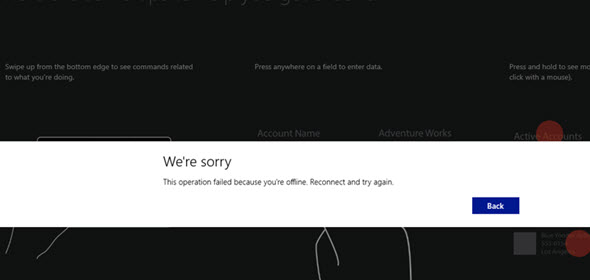
    All CRM 2013 and CRM Online customers have access to the CRM for Tablets app that’s available for Windows 8, iOS and Android devices. Since it’s an app from the new age of mobile computing, the users can simply download it from the respective app store of the platform provider and install it. Configuring the app to connect with your CRM organization can however prove to be a bit trickier task than this.

    If you’re using CRM Online hosted by Microsoft in their data centers, connecting the tablet app to the CRM server in the cloud is usually a straightforward process. Just enter the URL for your organization, then punch in the credentials and off you go. Well, to be more precise, upon your first connection the organization you’ll be taken to a screen that asks you to hold on tight while the app is being set up. This is because all of the metadata related to your CRM organization’s customizations first needs to be loaded, so that you’ll see your own CRM instead of some generic, hard coded menus and fields. This step can take quite a while to finish, but just hold on tight, it’s worth it.

    If you’ve got your own on-premises CRM server or you’re logging to CRM Online via your on-premises Active Directory credentials, you may need to work a bit harder to achieve connectivity between the CRM for Tablets app and the CRM server. This is because in both of these scenarios you will have ADFS (Active Directory Federation Services) sitting there in the middle, processing your login request and validating your user credentials. Of course the same technology is also used behind the pure cloud CRM Online service, but MS has done the configuration work for you, whereas with on-premises components you’ll be in charge of performing this.
    CRM_for_Tablets_Were_Sorry

    Recently I was faced with a situation where a customer had deployed Dynamics CRM 2013 SP1 on-premises and done the Internet Facing Deployment via Windows Server 2008 R2 ADFS 2.0, published via Forefront TMG (Threat Management Gateway) 2010. Accessing CRM via the web client through the IFD address was working as expected, so was the CRM Outlook client. CRM for Phones was connecting without issues and I could even connect to the server via tools like XrmToolBox with no issues. There was just one problem: the CRM for Tablets wouldn’t connect to the server, no matter what. In the process of troubleshooting this particular scenario I learned a thing or two about the tablet app connectivity as well as server configuration tasks, so I thought I’d share my findings here on my blog. I’m by no means an expert on anything surrounding ADFS , but I’m stubborn enough to keep searching for answers until I find some from the great wide web.

    RTFM – Read The Friendly Manual(s)

    First of all, you’ll need to know your ADFS version, since there’s a few new hoops you’ll need to jump through when working with Windows Server 2012 R2 and the latest ADFS 2.2 (sometimes referred to as ADFS 3.0, since official version numbers seem to have been dropped by MS, in favor of just shipping ADFS together with Windows Server releases). The architecture of ADFS has changed considerably from earlier 2.0 and 2.1 versions, with no more IIS in the background, so the configuration process for CRM IFD also differs from the previous experience.

    You’ll find the extra steps listed on this article: Configure Windows Server 2012 R2 for CRM mobile clients. On the ADFS 2.2 server you’ll need to enable forms authentication manually, since it’s not enabled by default, like in previous versions. Then you need to run a Powershell script on the CRM server to configure the OAuth provider. Finally, you should register the CRM for Tablets app ID’s with the ADFS server via another Powershell script.
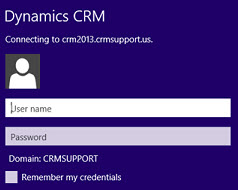
    Tablet_AD_login_promptYou may run into an issue with the login process where the user is prompted for their AD credentials via the standard Windows domain dialog window repeatedly. This is because of some incorrect authentication settings that apparently are caused by the CRM IFD configuration process itself. To avoid these issues, you should run a repair installation on the CRM 2013 server with the Web Application Server role deployed, after you’ve done the IFD configuration and before you attempt to log in with the CRM for Tablets app.

    Another aspect is the requirements imposed by the new Windows 8.1 version of the tablet app. Because of the changes on the OS layer, it’s no longer possible for Win8 apps to connect to any random server at will, but rather the developer has to specify the URL’s of these servers before publishing the app to the Windows Store. For CRM Online the domains for the service are known in advance, but for an on-premises deployment they could be absolutely anything. To overcome this, you’ll need to add a registry entry onto your device before attempting to connect to your server, otherwise the tablet app will just sit there and do nothing. Go to the page Set up CRM for Tablets, expand the section “what the admin needs to do” and grab the Powershell script from there. Running it on your device will prompt you for the CRM organization URL and create the necessary registry key for you. (more…)

  • The new Polaris UI in practice

    CRM Online users may have already started thinking about when their organization would be getting the December 2012 Service Update. The good news is that we have an actual release date now, but the bad news is that it’s not in December 2012. Check out this link for more details, including the release date for cross-browser support for on-prem CRM in the form of Update Rollup 12.

    Anyway, as we await for the new process flow oriented user experience to be enabled in the cloud, here’s some nice live footage of how the new UI works in practice. In this YouTube video Reuben Krippner walks us through the changes you can expect to see in your CRM once the December 2012 Service Update has been applied.

    Some things worth paying attention to in the video include:

    • The browser client running on Chrome (including administrative UI)
    • New social dashboard including the Activity Feeds web part
    • Inline editing and adding of subgrid items (notice the lack of any save buttons)
    • Recording a completed phone call directly on the lead form
    • Lookup existing contacts or accounts from the Process Control component
    • Transition from a lead to an opportunity without any popup window appearing
    • Moving forward and backward freely in the process stages
    • Editing process stage fields with the Process Control Customization Tool
    • The new forms in the customization UI (and the lack of support for any form scripts in this release)
    • Simplified UI of the iPad Sales Experience browser client on Safari


  • More rumors on Dynamics CRM browser and mobile support

    While we wait for the official Release Preview Guide for the next Dynamics CRM update, let’s add some more water into the rumor mill. I came across an interesting blog post titled “What’s the status of Microsoft Dynamics CRM 2011 R8 (Update Rollup 9)” on the SyncraTec Solutions blog, which included the following piece of news:

    The Safari browser is not going to work on the iPad.  Instead, there will be a “specific mobile companion application” that won’t be available until post Fall 2012 Release.  This (device-) specific mobile companion application will be based on html5 and work with any of Windows 8, iPad, or other tablet-type devices (e.g., Android).

    So, not only will we be getting a new Refresh UI for the browser experience as well as the inevitable Metro CRM app, there’s also a third in-house CRM client in the works for mobile and tablet devices. Although the deal with making CWR Mobility’s CRM client available with Microsoft’s branding appears to be still in the works, this gives a whole new perspective on speculation for the reason why the mobile clients were delayed together with the cross-browser support. Why put the whole CRM Anywhere concept on hold just because the IE-specific scripts would have caused issues to PC and Mac users on an alternative browser? Well, seems like there’s more to the whole “companion” client story than slide below from WPC 2012 would have lead us to believe.

    I’ve never been fully convinced that it’s a good idea to use a similar CRM client app both on the small smartphone screen and the 10″ screen of a typical tablet device (read: iPad). The use cases for these devices tend to vary quite a lot, at least in my personal experience. The upcoming Metro UI of Windows 8 seems to fit very well with the tablet scenarios that aim to replace traditional laptops as the devices which you take with you to the meeting rooms and other temporary workspaces. However, there are currently zero tablets out there running Windows RT (at least in the hands of end users) and a growing number of iOS and Android devices. Since Metro will make many Microsoft apps exclusive to Microsoft platforms again, how do you capture the audience that needs a mobile CRM solution but doesn’t want to replace all their hardware the very moment Win8 becomes generally available?

    It appears now that this is a market Microsoft intends to go after, by building a HTML5 based client specifically designed for the smaller screens. Based on the above quote, we’ll see an app that is platform specific, but will they take the same route as Facebook did with their iPad app and just embed a browser view into the UI chrome of iOS and Android operating systems? Or will there be more native features used in each platform, which would be the opposite approach to the responsive design paradigm that’s become trendy with public websites nowadays? And what will remain as the domain of the existing iPad app that was promoted so much back in Convergence 2012?

    Another question that arises from statement of “CRM on Safari browser will not work on iPad” is whether this means Dynamics CRM is not officially supported on that browser/device combo or if Microsoft will actually actively block the usage of the browser client on a tablet device? Earlier this spring the message was that the browser support matrix published would indicate which platforms would fall under Microsoft’s customer support plans, but other devices like Android might still work OK. Although the Dynamics CRM browser user interface that has been designed to be used with a mouse would surely not be optimal on a multi-touch tablet, the initial reports from running the UR9 / R8 beta on the iPad Safari browser were saying the experience wasn’t actually that bad at all.

    Returning back to the R8 discussion, we now have confirmation also from a Microsoft representative that the following features will not be published this summer but instead be delayed until Q4 2012:

    • Custom workflow activities on CRM Online
    • Activity Feeds solution update with view filters

    Bummer. Many developers and ISV’s were really waiting for the possibility to start utilizing custom code in workflow processes, but now with CRM Online still not supporting them and 2/3 of new Dynamics CRM customers choosing the Microsoft hosted cloud platform, there’s not much opportunities to release commercial solutions with custom workflow activities until later this year.

    Why the Activity Feeds update is not released either is difficult to understand. While testing the R8 beta the new filter features seemed like a very welcome addition that would surely make it easier to deploy Activity Feeds into the day-to-day operations of CRM users without worrying about how to get the users to follow relevant records. The only sensible explanation for this delay could be that Microsoft has decided to pull back some of their own feed functionality and try to merge them with the Yammer platform’s capabilities. Given the relatively short time frame until Q4, I’m not sure how much integration could actually be developed between Yammer’s feeds and the MS stack of business applications, but let’s see how this thing develops.

  • Making Dynamics CRM exclusive again with Windows 8 & Metro

    We have less than a month to go until Windows 8 hits RTM (release to maunfacturing). What has been described as the biggest OS renewal since Windows 95 is the current center of attention for each and every division at Redmond, since effectively Microsoft is betting the whole company on Windows 8. How does such a significant shift in the operating system used by 1.3 billion users impact a business application like Microsoft Dynamics CRM that has “only” 2.7 million users worldwide?

    The past glory of Outlook

    Previously Outlook used to be the premium client for accessing Microsoft Dynamics CRM. While any other CRM application provider was technically able to design a great user experience on a browser client, tapping into the omnipresent Microsoft Outlook (1 billion MS Office users globally) was a much more challenging task for outsiders, since they couldn’t just borrow members of the Outlook product team to help in building a CRM client, like the Dynamics division did with CRM 2011.

    One regular tweet the Redmond tweeps like to recycle is that Outlook integration is the most popular add-on for Salesforce.com. I can imagine that for anyone selling a CRM application the question of “how does it work with my Outlook email and calendar” will have been a common encounter. As a result, every significant vendor has developed an Outlook integration. Also, as admitted by Bill Patterson at his WPC 2012 presentation, some customers actually prefer the Outlook clients of competing CRM vendros over what Dynamics CRM offers today. Sure, it may be an add-on, but what’s the big difference at the end of the day?

    Another aspect to consider is that CRM inside Outlook is no longer the Holy Grail it once used to be. While I don’t have actual hard evidence to back this claim up, to me it seems obvious that the Outlook client is losing the relevancy it once had as the central hub for all knowledge workers. We no longer process our emails or manage our calendars on only our work PC, instead we do it on mobile phones, tablets, browsers, everywhere. The traditional Outlook application as we know it exists only in one of these environments. Although it remains within the reach of most Dynamics CRM users, it is more about the desktop legacy than showing the way of the future.

    Cross-browser vs. Metro

    Alongside Outlook, also the Internet Explorer client is losing its past status. The Dynamics CRM browser experience is becoming available on pretty much any Internet capable device, be it a PC or tablet, as the cross-browser support in Dynamics CRM rolls out. It was supposed to be here already, but got put on hold for another 6 months based on a decision Microsoft has made very recently. Regardless of the delay, it is something that cannot be stopped anymore. All the users, be it on IE, Chrome, Safari or Firefox will get the benefits of the new “Refresh” UI in their web client.

    The main reason stated for the delayed delivery schedule of cross-browser support has been quality issues related to customizations in existing Dynamics CRM environments. Microsoft representatives have emphasized that they will not release a beta level product for line of business software that’s business critical to many of their customers.

    While those are most likely accurate claims, Dennis Michalis (General Manager, Microsoft Dynamics CRM) also brought up in his WPC 2012 session the impact that Windows 8 has had on product development for other Microsoft product lines. Based on his statements, the demands placed on all the product teams for reaching Metro compatibility as close to the Windows 8 RTM date (beginning of August) as possible have probably forced them to re-evaluate their roadmaps and take away resources from the development of non-Metro functionality. In his own words:

    “If we didn’t render Dynamcis CRM in the Windows 8 context we’d look foolish.”

    Think about the priorities from Microsoft’s perspective: Would you rather make your business applications run seamlessly across PC and non-PC devices, thus making your competitors’ hardware and software more valuable for the user, or would you focus on building something that will run only on Windows machines? Besides, who wouldn’t want to get to selling a CRM app as gorgeous as this ASAP?

    With the introduction of Metro apps on Windows 8, it will once again be possible for Microsoft to deliver a premium user experience that is exclusive to the clients running the latest & greatest MS software. Metro CRM will effectively be what the CRM Outlook client used to be a few years ago. This slide from WPC shows how the future Dynamics CRM client portfolio will no longer be Internet Explorer + Outlook, but instead we have the Classic client (browser + Outlook), Core client (Metro) and Companion clients (mobile apps).

    In this transformation process the iPad apps are relegated into the “companion” category, whereas Metro apps are considered a part of the “core” experience. We probably won’t be seeing all the Dynamics CRM customization tools in the Metro CRM app anytime soon, but most of the functionality accessed by the average CRM user will very likely be available in the Metro client. Companion apps fill the gap for usage scenarios running on truly mobile devices i.e. smartphones, but the iPad or Android tablet apps Microsoft themselves offer will surely never be allowed to reach the level of functionality available on the Metro UI.

    By delaying the availability of Microsoft Dynamics CRM Mobile from Q2 to Q4 the period of time between the Metro CRM app preview (Winter 2012 release = Q1 2013) and the official iPad app availability will have been conveniently minimized. Sure, anyone could acquire the iPad client straight from the manufacturer already today, but in the eyes of industry analysts who don’t pay attention to every detail in the product portfolio of CRM vendors they write articles about, little things like this can make a difference (case in point).

    Are you ready to sell the Windows OS?

    As we feast our eyes on the sneak peaks to a world where Dynamics CRM data is available literally at our fingertips, sliding away smoothly on the Metro canvas, it’s easy to forget what it will actually require for customers to gain access to a system like this. Metro apps will not run on anything but machines with Windows 8 OS. Also, they will not feel all that special unless you have some form of touch based input available in your hardware.

    The Microsoft stack must be a faimilar concept to any IT professional. As an example, a customer doesn’t just buy Dynamics CRM from Microsoft, they buy the OS for the server & client, SQL Server for the database, Office for the end user information processing tools + optionally SharePoint, Exchange & Lync. Similarly, the Dynamics partners don’t only sell Dynamics CRM, Dynamics NAV etc. but also the surrounding stack. While in the past the OS hasn’t been a huge focus for Dynamics VAR’s, soon many of them will be selling Windows 8, indirectly. This is because if the customer doesn’t have the modern client software & hardware at their disposal, then you’ll need to fall back into the classic client in your CRM presales demo. Just imagine how crushing that will be once you’ve had a taste of Metro.

    But there’s more to it then just flashy CRM demos obviously. Microsoft needs Metro to succeed in the enterprise. It may not need it immediately, though, and could therefore be prepared to not see a bigger uptake until Windows 9 comes around. Nevertheless, in order to have any chance of convincing companies to move beyond Windows 7 they’ve spent a lot of time and money migrating to not too long ago, Microsoft is in desperate need of Metro apps for the enterprise user. It’s not too difficult to convince developers to build simple Twitter clients and other small apps for Metro. The consumer can probably migrate to a Metro world pretty quickly, just like they’ve embraced the iPad. The enterprise scenario is a lot more complicated: No enterprise Metro apps -> users stuck with desktop apps -> Windows 8 only makes the life of IT department more difficult -> no sale.

    The previous versions of Windows were sold to the enterprise as an operating system that meets the core needs placed on an OS. Windows 8 and its successors will be sold as the platform that runs the apps that your users need, with the user experience that they want. It’s no longer how you sold the enterprise BlackBerries, it’s increasingly how the enterprise was made to adopt iPhones. From the bottom up, through CoIT strategies (consumerization of IT). Cheap upgrade offers and shiny new slate devices targeted for the Xmas shopping season will not get the enterprises to adopt Windows 8, but they may get a few key influencers to go BYOD with Microsoft software and hardware (unlike the BYOM we’ve seen so far, i.e. Bring Your Own Mac) and put some pressure on their IT departments.

    The same applies to Microsoft Dynamics partners. If the Salesforce.com sales reps go meet the potential customer with an iPad 3 in their hands, what Microsoft needs to get into the hands of its partners is the Surface. Long before the Dynamics CRM users will adopt it in any significant numbers. As the saying goes, the future is already here – it’s just not very evenly distributed. Even if Windows 8 would become an instant success in the consumer space, this will likely remain the reality for the Dynamics CRM customer base for quite some time.

  • Cross-browser support implications for CRM developers and users

    Soon the R8 update of Microsoft Dynamics CRM will be upon us and the application will officially open up to browsers other than Internet Explorer. What this means is CRM will also be accessible through different devices than just Windows PC’s: Macs, Linux machines, iPads and other tablets. Exciting times for all CRM geeks around the world, myself included, which is why I already wrote some of my thoughts on the topic after the Q2 2012 Service Update contents was revealed (see the post “To the eXtreme, part 2: The future of the web caught up with IE and Dynamics CRM”).

    More supported browsers & devices will inevitably mean more work for CRM developers, as testing your application on IE alone will no longer be enough. As we get closer to R8 go-live before the end of Q2, the need for more detailed information on the practical implications is surely growing. Luckily XRM Virtual had managed to get Karun Krishna from Microsoft to give a webinar on the topic of cross-browser development on May 1st. The Live Meeting recording is now available for viewing at the XRM Virtual site. Apparently also Karun’s slides were shared during the live session, but since the recording didn’t contain them, I decided to write down a few notes of mine from the contents of the presentation.

    First up is the detailed browser support matrix seen below, which expands the list previously provided in the R8 release preview guide. Included are new yellow boxes for Internet Explorer 10 on Windows 7 and Windows 8, which indicate a “supported but not full fidelity” user experience for Dynamics CRM. Also the Firefox support on Mac OS X appears to have fallen onto this level where some display/functionality bugs will exist.

    Microsoft Dynamics CRM 2011 cross-browser support matrix

    In his presentation, Karun explained that while the CRM team tried to use HTML5 compliant techniques wherever possible, there were still some areas where an alternative approach had to be used in order to replicate the existing Dynamics CRM functionality across non-IE browsers. Any IE specific APIs have been removed, but as the w3C standards are still evolving, there isn’t necessarily always one single right way to implement a specific functionality in the cross-browser world. Therefore a feature detection approach for checking for browser capability differences is recommended over developing for any specific browser version. The webinar included examples and best practices on API’s and XML processing, so be sure to view the recording for details.

    It was announced already earlier that using browsers other than Internet Explorer for the administration and customization menus of Dynamics CRM would not be supported. Sorry guys, you’ll still need to boot into Windows on your MacBook if you intend to do any customization work. Some additional information was now provided on features that will not be supported on other browsers than IE. These include:

    • Workplace calendar
    • Services (scheduling) and service calendar
    • Editors for workflows and dialogs
    • Lync based presence information

    One thing to note is that the old crmForm object API from CRM 4.0 days will continue to work only for Internet Explorer. Therefore if you have any scripts in place that have not been updated to use the Xrm.Page methods, these won’t work for users on Chrome, Safari or Firefox.

    Finally, while iPad 2 support with iOS 5 is provided, it’s important to note that this is simply the support for usage through Safari browser, not a dedicated application optimized for the tablet environment. For the premium UX you’ll need to acquire/subscribe to an add-on app like the Microsoft Dynamics CRM Mobile for iPad, of which you can view screenshots in this post. The browser experience on an iPad 2 will have the following known limitations/issues:

    • No popus. Since Dynamics CRM by default opens a wealth of windows and dialogs, this doesn’t match well with the “flat” UI’s of tablet apps.
    • Touch events compared to mouse events will cause some lack of functionality (no right click, double click)
    • iFrame scroll bars may be missing.
    • Window closing has issues due to a focus related bug in the .close API
    • No Silverlight. Well, no surprise there…

    Edit 9.5.2012: The long awaited R8 release for Microsoft Dynamics CRM 2011 is now available as a beta version! PartnerSource login is required for the beta program sign-up and download (CustomerSource might also work) at http://bit.ly/crmr8beta. If you want to test your Dynamics CRM solutions in a cross-browser environment (Safari, Chrome, Firefox) before the official release of Update Rollup 9, then this is the program for you. Please note that the beta version of R8 will not support an upgrade to the final version of R8, so you should apply it to a dedicated test environment only.

  • Microsoft Dynamics CRM Mobile iPad screenshots

    Microsoft has released a YouTube video where Ruben Krippner talks you through the upcoming features of the Q2 2012 Service Update, a.k.a. Dynamics CRM R8. Since we already know much of the new release details through the Release Preview Guide, the most interesting part of the video is the live footage of Microsoft Dynamics CRM Mobile running on an iPad. For those of you who want to get a quick glimpse of what the client looks like, I took the liberty of taking a few screenshots from the video.

    Sitemap & Dashboards

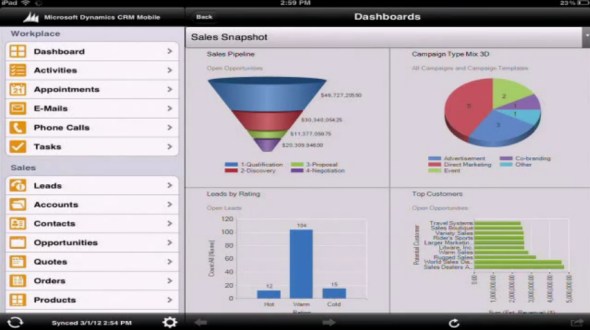
    Microsoft Dynamics CRM Mobile iPad dashboards

    As we know, the “new” client is actually a rebranded version of the CWR Mobility client for Dynamics CRM. The UI looks almost identical, apart from a new set of Metro style entity icons. The sharp edges and “authentically digital” appearance look somewhat out of place in the otherwise iOS-style app, but let’s hope that there will be a full Metro app for Dynamics CRM available once the Windows 8 tablets hit the stores.

    Dashboards appear to be close to the web UI as far as charts go. If you have other types of web resources on your dashboard (say, a Silverlight component), the results may be a bit less so. Also, I’m assuming entity grids will not be rendered on the iPad Dashboard, at least not in their original format.

    Views

    Microsoft Dynamics CRM Mobile iPad views

    The iPad UI does support filtering data through views, just like you do on the web client. However, the views themselves will not be presented in the familiar grid style with columns, rather you’ll see a list of records with the primary field and some other data stacked on top of each other. Whether this is because of iOS limitations or an inherited design from the iPhone app, I’m not sure.

    Forms

    Microsoft Dynamics CRM Mobile iPad forms

    The standard fields are presented on a form that has a single column. Picklist and date fields use native iOS controls, also field types like phone numbers or email addresses will open native apps for respective actions. Why an iPad app shows you the options to dial a phone call or send SMS, I don’t know, because at least my iPad won’t allow me to do those without jailbreaking the device, but maybe Ruben has a special version of the Apple tablet 😉

    As you can see from the form, it’s not specifically optimized for landscape mode viewing on a tablet, but rather looks like a big iPhone app. Entity forms with many columns will therefore be presented as a long list the user has to scroll up & down.

    Maps

    Microsoft Dynamics CRM Mobile iPad Google Maps

    As a funny little detail that Ruben mentions on the video how the account address opens up on Google Maps. Why not Bing Maps? Well, because the native map application on an iOS device comes from Google…

    Off-topic: It’s great that the mobile clients for iOS, Android and Windows Phone now have the basic address mapping integration in place, now we just need to get it for the web and Outlook clients as well. While the integration itself is technically quite trivial, the requirement for purchasing a Bing Maps license for using the map data on a non-public application is currently a big barrier in the desktop world. But enough about that, let’s get back to the mobile client.

    Related records

    Microsoft Dynamics CRM Mobile iPad related records

    Because the sitemap navigation pane is permanently visible on the left hand side of the screen, which on a normal web client entity form would show the related records, in the mobile client these are accessed through a button on the lower right corner of the screen. Subgrid type of functionality is not available on the tablet UI, which can make it a bit cumbersome to navigate through long hierarchies of records. As a result, using the iPad client for tasks such as order entry while on the road is not really optimal in the Microsoft Dynamics CRM Mobile client. These types of use cases will still be better met with a custom developed tablet application equipped with specific data entry screens, so toolkits like Resco will remain relevant even after this official Dynamics CRM iPad client gets released.

    Configuration

    Microsoft Dynamics CRM Mobile iPad configuration

    The mobile client is not just an alternative UI for CRM, but there is a wealth of management options for user and client management, synchronization settings, usage reports etc. Since the way you use a mobile/tablet application is quite different from the normal desktop client usage scenario, it’s important that the information presented to the user can be optimized. Microsoft Dynamics CRM Mobile allows you to do this by defining different user groups and assigning them tailored mobile profiles containing only relevant entities in the sitemap. Also the contents of the mobile forms can be adjusted, so you don’t have to show all the tens of attributes that your entities contain.

    Microsoft Dynamics CRM Mobile iPad mobile profile and entities

    Conclusions

    The CRM Anywhere theme is definitely a step in the right direction for Microsoft Dynamics CRM to become an application that truly “works the way you do”. Even though the cross-browser compatibility will enable users to open up the CRM web client on their iPad Safari browser, for any serious work on a tablet you’ll want to have a client that is optimized for:

    1. touch based user interface
    2. streamlined data presentation to support the “working in short bursts” mode of mobile device usage
    3. offline access for those moments when 3G or WiFi just doesn’t reach you

    For the subscription price of $30 per user per month (or the perpetual license you can still acquire from CWR Mobility), you can install a fully capable Dynamics CRM mobile client on both your iPad and your iPhone, and still have one user license left for trying out the latest Android phone (whether the non-offline Windows Phone 7 client will consume a license, I don’t know yet).

    You can read more of my thoughts on Microsoft Dynamics CRM Mobile on this article I wrote after the announcement at eXtreme CRM 2012 Berlin.

  • To the eXtreme, part 2: The future of the web caught up with IE and Dynamics CRM

    One great thing about Microsoft Dynamics CRM as a business application platform has been that it’s modern enough to have been born into the browser window from day one. With no legacy from the pre-web era, the product has been able to stay relevant with no major disruptions in the client side development and also supported the eventual move of the server side functionality to the data centers in the cloud.

    A history of Internet ExplorerInternet Explorer market share peaked in 2003, when 95% of all Internet usage was on IE. Coincidentally, Microsoft CRM 1.0 was released in January 2003. At the time, providing support for any other browser than your in-house product would have certainly sounded like a requirement you could de-prioritize. Today Internet Explorer commands a market share of less than 40%. There are now more iPads sold than any brand of desktop PCs combined. If that doesn’t signal the move to a post-PC era, I don’t know what does. If you’d be a company manufacturing an IE only product for PCs in the year 2012, you could soon be out of business.

    This is a fate Microsoft intends to avoid, which is why the cross-browser support for Microsoft Dynamics CRM was officially announced in the Q2 2012 Service Update release preview guide, released at the beginning of Extreme CRM 2012 conference in Berlin. We had already seen the promise of non-IE browser clients for Dynamics CRM presented in Microsoft’s May 2011 Statement of Direction and now we finally have details about what to expect in Dynamics CRM R8 release exactly one year later. As with my previous post on mobile CRM, I won’t rephrase all the content of the official announcement but I’ll rather try and reflect on the topic with some personal observations and thoughts.

    There’s Supported and then there’s “supported”

    If you’ve glanced at the table of supported browser and OS combinations, you’ll have noticed that Microsoft does not guarantee support on every browser out there on every operating system. This is not too surprising, as any web application developer surely knows what a nightmare the differences in interpretation of web standards between various browsers can be for application development and testing. In the words of Craig Dewar (Director of Product Management for MSDYNCRM), browser testing is a “gigantic effort” for Microsoft, which is why official support is not all encompassing.

    Microsoft Dynamics CRM browser and OS support

    Just because a browser or OS is not listed in Microsoft’s documentation as supported, doesn’t mean Dynamics CRM won’t work on it. So, even though there are no supported options for using Microsoft Dynamics CRM on Linux, you might not notice any problems if you access it with Firefox on Ubuntu. In fact, Craig mentioned in his keynote at Extreme CRM 2012 Berlin that even if you’re using a client that’s not officially supported, Microsoft will allow you to open support tickets on issues that are not specific to the browser/OS combination you’re running. I guess you’ll just want to have at least one Win/IE or Mac/Safari device around to make sure you can reproduce the issue when dealing with Microsoft Support representatives.

    “Macbooks for everyone!”

    In case you’ve been drooling over the cool Apple hardware that all the opinion leaders seem to carry with them these days, the future does indeed look brighter for people working on/with Dynamics CRM. Before you jump head first into the OSX & iOS world and format all your Windows partitions, it’s important to remember that what Microsoft is talking about here is just the browser client support for CRM end users.

    Outlook 2011 for Mac: sorry, no Microsoft Dynamics CRM clientWhile you can get Microsoft Office for OSX and run Outlook on you Mac, what you can’t do is use the Microsoft Dynamics CRM for Outlook client. This means you can’t track emails to CRM, synchronize your calendar appointments between Outlook and CRM, get CRM task and call reminders from your Outlook, synchronize your contacts from CRM to Outlook to your iPhone, or have any offline support for CRM data and application functionality when your Macbook doesn’t have WiFi or 3G data connectivity. All in all, you lose quite a bit of that seamless productivity tools magic that Dynamics CRM promises to deliver for all Windows users. I haven’t seen any announcements about a CRM Outlook client for Mac, so it’s pretty safe to assume that we won’t see one released for the Outlook 2011 for Mac version currently available.

    OK, so how about the support of Apple’s mobile devices then? It says Dynamics CRM will run on iPad 2 with iOS 5.x, so that should at least deliver the full flavor of the browser experience on a tablet, right? Well, the problem is you might get more than you bargained for in that deal, since (as far as I’m aware of) the browser client will look and work exactly the same on all supported platforms and devices. If you’ve ever tried running the Dynamics CRM web client on a Windows 7 tablet, you’ll know that simply replacing the mouse cursor with your index finger will not magically “touchify” the user experience. What works nicely on a 24″ screen with mouse & keyboard input may not scale/transform into the tablet environment of 10″ screens and touch UI. If you’ve used a remote desktop app on your iPad, then I’d imagine this is pretty much what you can expect from a browser client on an iPad. Unless you go for the $30 per month subscription of Microsoft Dynamics CRM Mobile app or purchase a perpetual license from CWR Mobility, TenDigits or other ISV’s that develop mobile clients optimized specifically for the touch UI. The same goes for Android tablets, only with the exception that the browser client falls into the “not officially supported” territory.

    Finally, if you’re not only using Dynamics CRM but also administering or customizing it, I’ve read that you’ll still need Internet Explorer in order to access these areas in the web client.

    ‘Reimagining’ Windows, should we also reimagine Dynamics CRM?

    WinRT architectureIt’s important to note that the web client coming out in Q2 2012 is not a HTML5 product, rather it’s a trimmed version of the previous IE only client with removed dependencies on Microsoft’s proprietary extensions that only IE supports (.htc files etc.). The future is not here yet, but there is little doubt on the direction Microsoft is heading towards, with the upcoming WinRT framework and the big push for HTML, Javascript and CSS as the foundation for future Windows apps.

    Which brings us to Silverlight. It’s been widely speculated that Silverlight 5 released at the end of 2011 will be the last of it’s kind, the end of the road. Porting existing Silverlight apps to run on Win RT is said to be easy, which should naturally be in the interest of Microsoft to ensure. As I’m not a developer, I’m looking at the discussion more from the point of view of someone who needs to examine all the available technologies out there, evaluate how they fit together and build a working business solution out of them. From this perspective, there are some concerns regarding Silverlight that very much affect Dynamics CRM users as well.

    While Dynamics CRM might work on a browser/OS combination that is not officially supported, the game is different if you’re using Silverlight web parts in your CRM. If a Silverlight plugin is not available for the client, it will not work, period. This includes combinations such as Chrome/OSX, any machine running Linux and most notably the iPad. Ok, so what about making the same UI with a different technology, like HTML, Javascript and CSS? In theory everything should work on every platform in this case. You’re free to draw your conclusions on which approach is better for starting your next Dynamics CRM add-on project.

    Looking further ahead to Windows 8, we’ve already received the announcement that there will actually be a completely different edition of the operating system, called Windows On ARM (WOA), that will the basis for building always on, always connected, low power consumption devices to rival the iPad. The Internet Explorer 10 browser on WOA will not allow any plug-ins whatsoever, be it Flash or Silverlight. Furthermore, the Office 15 package that is available for WOA tablets will include only Word, Excel, PowerPoint and OneNote, but not Outlook. By now you should have figured out that the Microsoft Dynamics CRM experience on WOA will need to be quite different from what we have on Windows 7 today.

    If there will not be Outlook on the “real” Windows tablets, what does the future hold for the CRM Outlook client? I previously wrote about the legacy of Outlook and how it will be increasingly more difficult to carry all that legacy when moving to the Post-PC era of iPad-esque devices for every knowledge worker. By the looks of things, Outlook could possibly get split into Metro Mail, Contacts and Calendar apps. If this happens, then it’s easy to envision a separate Dynamics CRM Metro app sitting alongside them, integrating into all the other installed apps through a simple share contract. After all, isn’t that the way it should really be? Link contacts/friends/followers from any social network app to CRM contacts, track any type of status update/post/tweet from the same app as a custom activity type into your CRM database. There’s no reason why customer relationship management tasks should be any more complex or inflexible than that.

    It’s great to have Dynamics CRM available soon on (almost) any browser. Still, if Microsoft truly is reimagining Windows the way they claim to be and if their business customers buy into their new story, perhaps running Dynamics CRM on Safari won’t seem all that exciting anymore this time next year.