Tag: integration

  • Virtual Dataverse tables with no code, via Connectors

    Virtual Dataverse tables with no code, via Connectors

    The concept of a virtual table (previously: virtual entity) has existed in the Dataverse platform for quite some time already. The feature was originally introduced before XRM and Power Apps merged. This in turn means that the Connector feature used by Canvas apps and Power Automate flows is an alternative approach for the same core need: how to work with data that’s not physically stored within Dataverse?

    Since there are still three different flavours of Power Apps , let’s quickly recap what each of them think about data location:

    • Model-driven apps: “I’ll let you work with any business data, as long as it’s stored within Dataverse.”
    • Power Apps portals: “I’m essentially an external facing version of Model-driven apps, so I follow the same principle.”
    • Canvas apps: “Your data may be in whatever system you want! Just point me to the right API and wrap a Connector around it & we’re sorted.”

    The term “Model-driven” refers to the existence of a clearly defined data model, on top of which the visible app UI and background features (security, search etc.) are then generated by the Dataverse platform. You get all those features because a specific set of rules exists on how different types of data are related to one another.

    Canvas apps enjoy the freedom of taking some data from source A, another piece of data from source B, mashing them together in a common gallery, stitched together with a few lines of Power Fx code. The downside is that the app maker needs to build many of the generic features that in the Model-driven world would just magically appear within the app module.

    The best possible outcome would of course be if Power Apps were able to offer both the freedom of a Connector based Canvas app and the strong relational data management capabilities of Model-driven apps. While we are not quite there yet, some elements of the unified app / platform story are starting to emerge.

    Connectors in Model-driven apps

    Ultimately Microsoft wants to bring the Canvas and Model-driven app types as close together as possible. This means expanding the capabilities for working with external data sources in Dataverse to cover also the Connector technology. At Build 2021 the session “Dataverse for Developers” introduced the latest updates on what the sources for virtual tables can be:
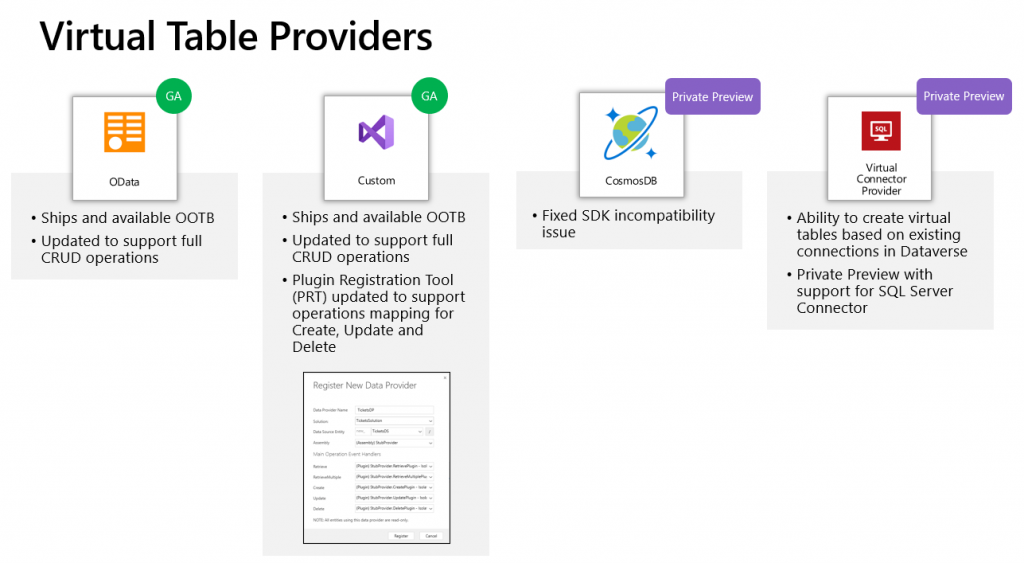
    Previously the options for adding virtual tables to Dataverse was pretty much a pro-dev targeted story. The requirements for OData feeds were such that I don’t think I ever managed to find a sample feed to try out the feature. Same for the custom connectors, which are created via writing your own plugins. Technically they can be built, but if the requirements are similar to that of a traditional data integration approach, then it doesn’t exactly revolutionize the low-code data story of Dataverse.

    The new preview for Virtual Connector Provider looks more interesting, though. Supporting out-of-the-box connectivity to SQL Server databases is definitely a scenario that’s closer to the no-code level where I personally prefer to operate on. So, I decided to go and see how far this track can take me in building a Model-driven app that actually works with data not physically stored inside Dataverse.

    Even though the documents still say “private preview”, anyone can install the Virtual connectors in Dataverse solution from AppSource today:
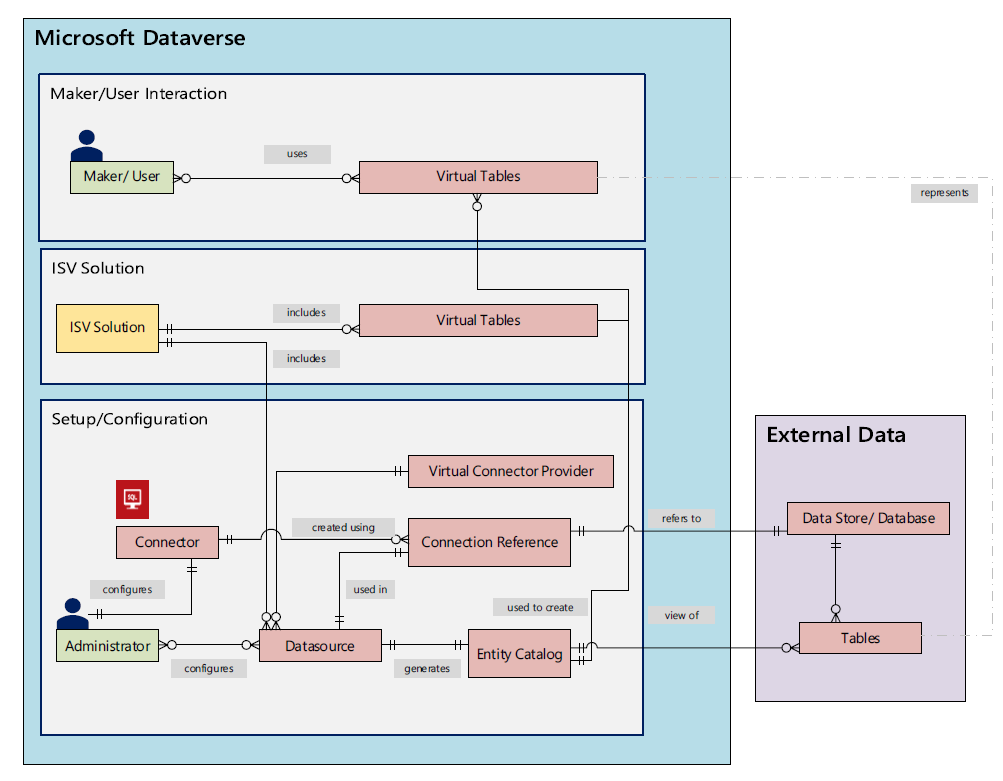
    There’s a Power CAT Live video on YouTube that introduces the solution. If you’re like me and you prefer consuming written information instead of video walkthroughs, this PDF document will be the place to go for understanding the feature. Inside it you will find this diagram that explains the architecture of how concepts like connectors, data sources, connection references etc. relate to this new Virtual Connector Provider.
    Setting up SQL Server tables to expand your Dataverse

    I have a demo AdventureWorksLT database deployed in SQL Azure, just like the one used in Microsoft’s feature documentation for virtual connectors. I had already earlier used this demo SQL database as a data source for Power Apps Canvas apps, which meant I had an existing connection available in Power Apps Maker portal. Authentication is done with SQL username/password combo in my connection, but Azure AD authentication would also be an option if you’d rather not have stored credentials within the connection.

    After following the step-by-step instructions, including setting up an application user / service principal for the virtual connector provider, I had a brand new table visible in my Dataverse environment: “Entity Catalog for AdventureWorksLT”.
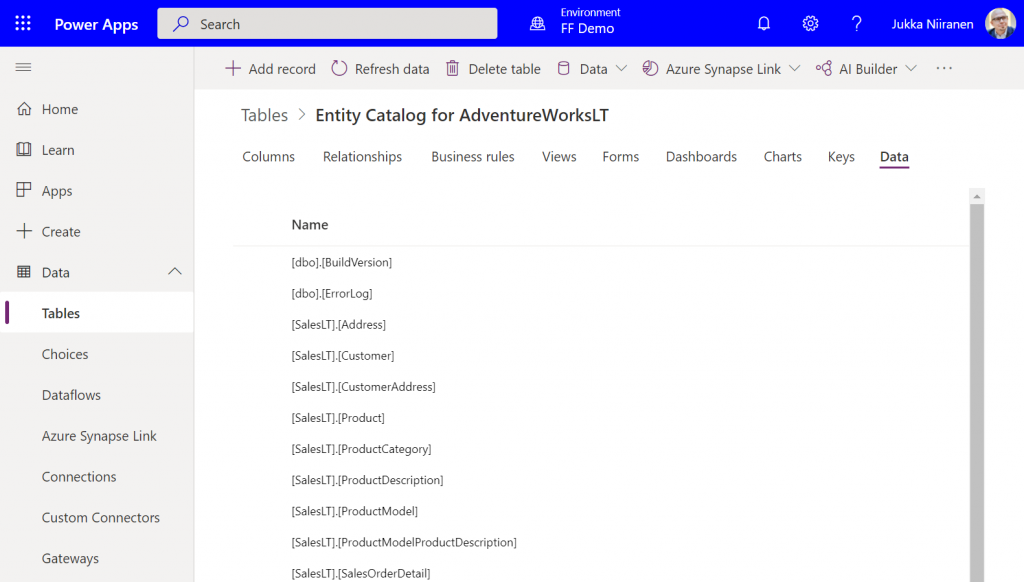
    Cool, we have a “table of tables”! I can see all the SQL Server database tables available via this connection. By opening up one of these records, I can specify that I want to create the corresponding SQL table as a Dataverse virtual table.
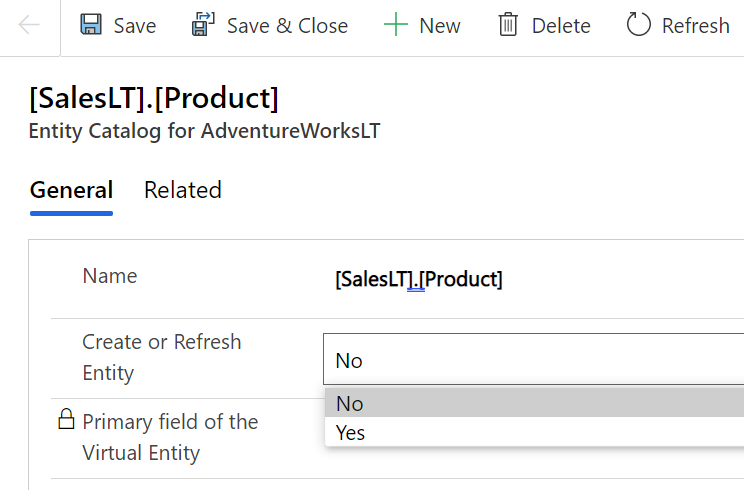
    I picked the Product and Product Category tables from there. (Note: modifying the table properties in the Power Apps UI doesn’t seem to work, so use the legacy web client and Solution Explorer to change things like table name.) After this, the virtual connection provider nicely maps all of the available columns in SQL into a matching Dataverse column, with the correct data type.
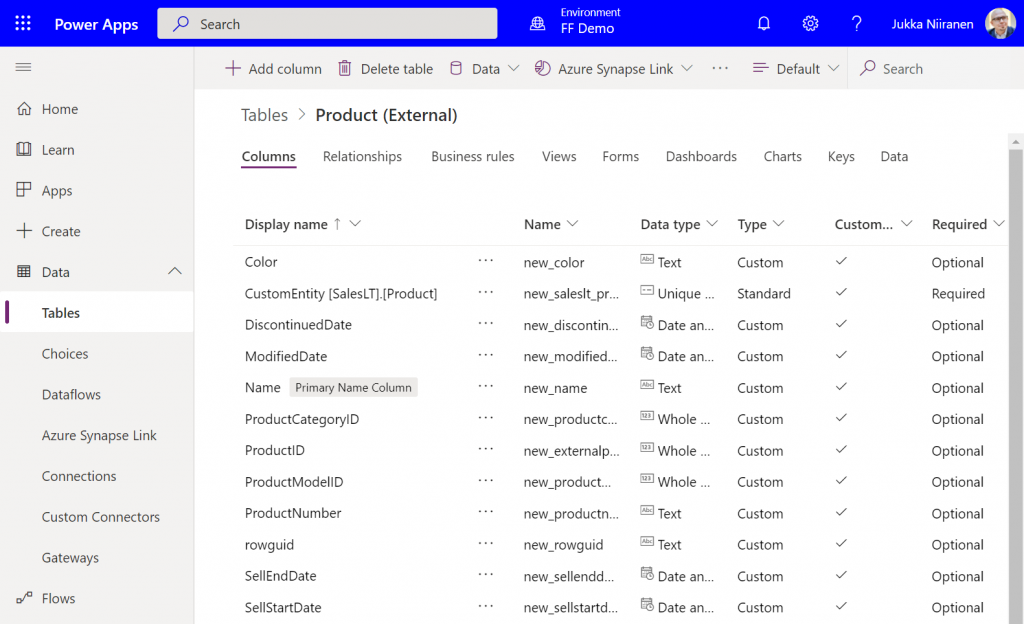
    I can then do the standard configuration tasks I’d perform for a native Dataverse table, such as adding views and modifying form layouts. Of course there are a number of considerations for virtual tables when it comes to the Power Apps features they support. Still, whatever works here is exactly the same experience from an app maker perspective, whether the table is “real” or virtual.

    Building a Model-driven app with virtual tables

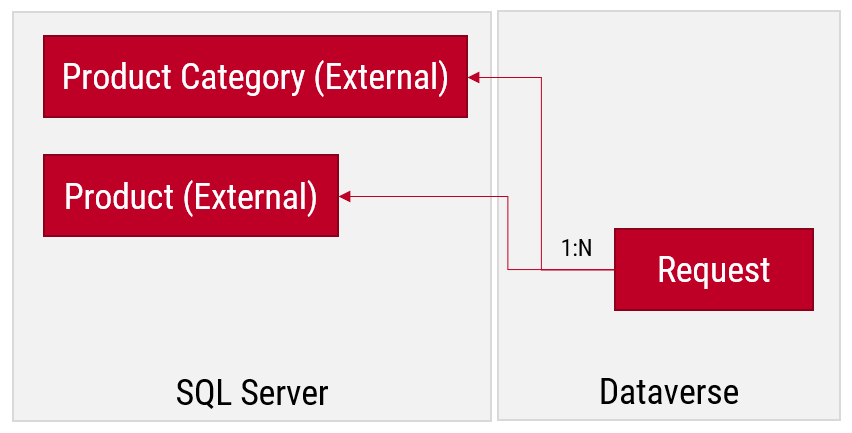
    I created a small demo app module for testing how the different table types can co-exist and work together. I added a custom table called “Requests” and added it as the child table for both Product and Product Category virtual tables coming from SQL.
    Let’s first go and browser the external data from a view. Opening up the Products table, the experience is in practice the same as if I was browsing native Dataverse records. I can create a personal view “products currently sold” that filters out all products with a value in SellEndDate field. I can sort based on the SellStartDate. I can filter to see only products with Color value Black.
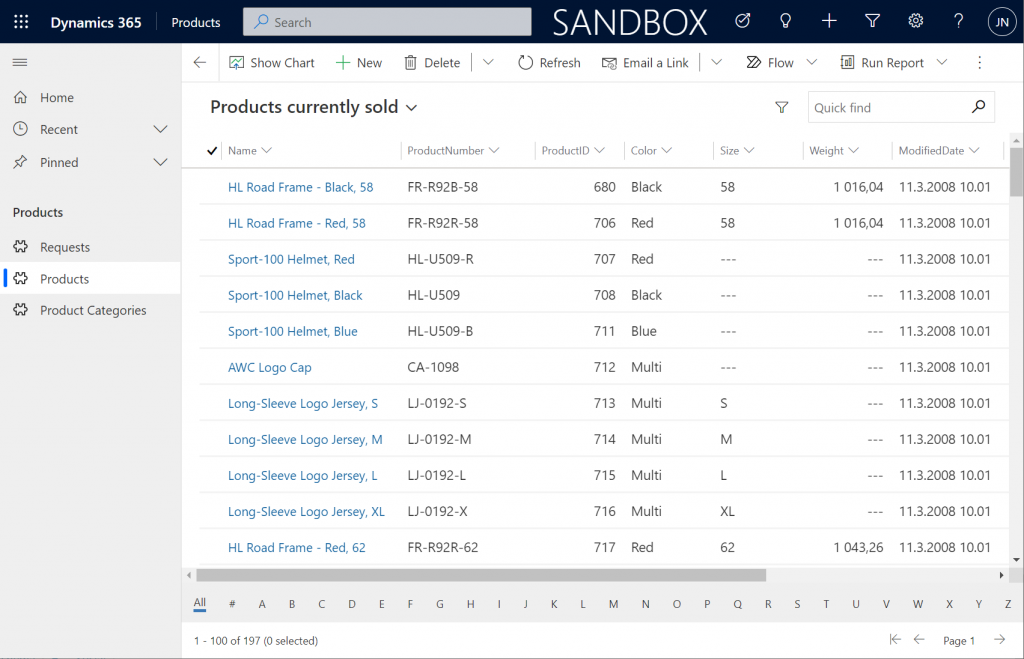
    This is already pretty darn impressive for someone coming from a Model-driven background. Sure, in the Canvas world I’ve been able to easily point a gallery to a SQL table and view the data, but having all of it available within the pre-generated Model-driven UI is a major step beyond that.

    Let’s try out how the native Dataverse table + external SQL Server tables work together on a form. Upon adding a new Request, I’m able to reference the related Product Category and Product tables via the standard lookup, just like everything would be stored in a single system. Behind the scenes, the native Request record will get references stored to the external Product Category and Product tables from SQL.
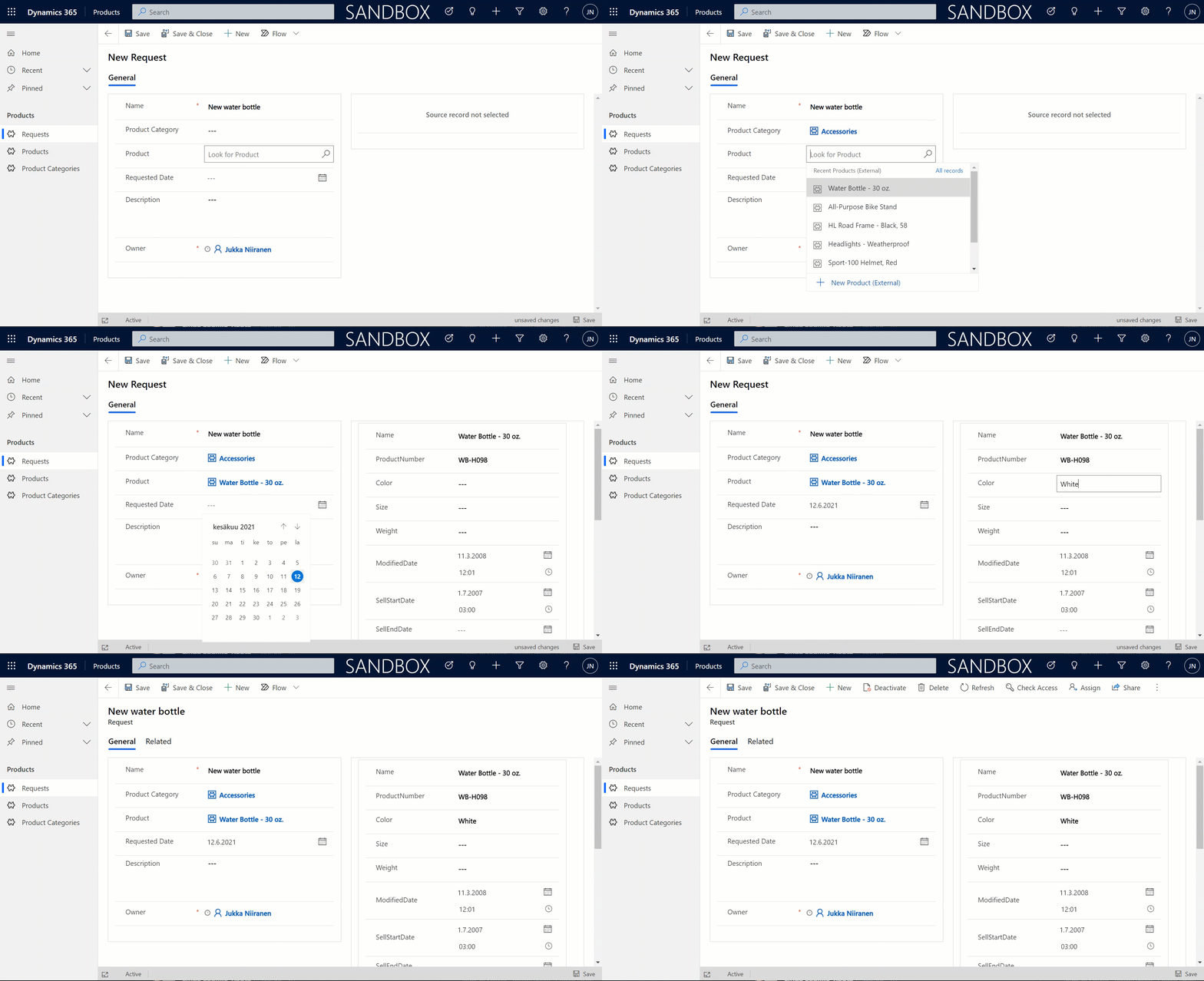
    But wait, there’s more! Did you notice that my Request form actually used the Form Component Control to show an embedded form of the Product table on the right side? Immediately upon populating the lookup field on the left side I see all the details of the selected product, just as if they were regular fields of the current record.

    In the above example I’m actually editing the Color field of the chose product with the value “White” before creating my request record. What this means is that within the same save event not only am I creating a new row in the Request table in my Dataverse, I’m also directly updating the data in my SQL Server’s Product table.
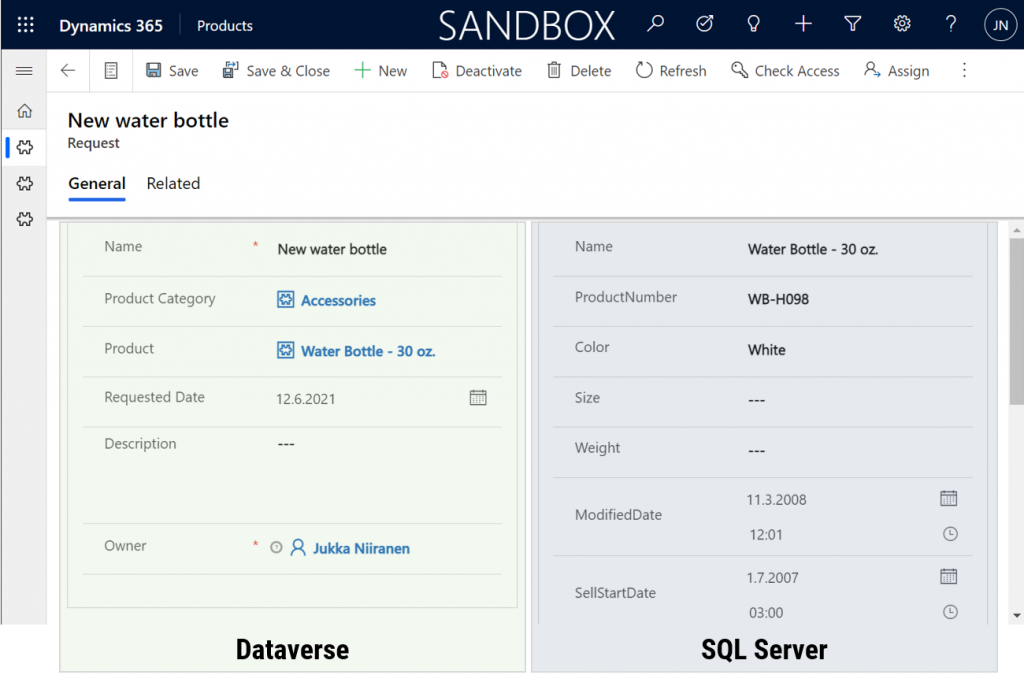
    That is powerful! No custom code was needed in creating an app UI that talks with multiple different line of business systems in real-time, on the very same form.

    From databases to Dataverses

    This simple example of simultaneously performing CRUD operations on data stored in different systems via a Power Apps form illustrates the reason why Dataverse needs to be seen as much more than just a database. It’s purpose is to be a value-add layer on top of different data storage systems, making them easy to leverage in your business apps. We already see today with the Dataverse file & image data getting stored in Azure Blob Storage and audit log entries in CosmosDB, alongside the core relational data in Azure SQL.

    The Virtual Connector Provider and virtual tables take things one step further. Especially in scenarios where you’d need to reference master data from an external system, there may not be a need to physically replicate it into Dataverse (perhaps you also want to reduce the storage costs). Specifying the virtual presence of such data will however make it appear as if it was part of the platform, thus brining it into both Model-driven apps and Canvas apps in a unified way. Even adding support for Dataverse business events to cover Power Automate is technically possible for virtual tables, although these understandably will require pro-developer involvement to get the external systems in sync with the API.

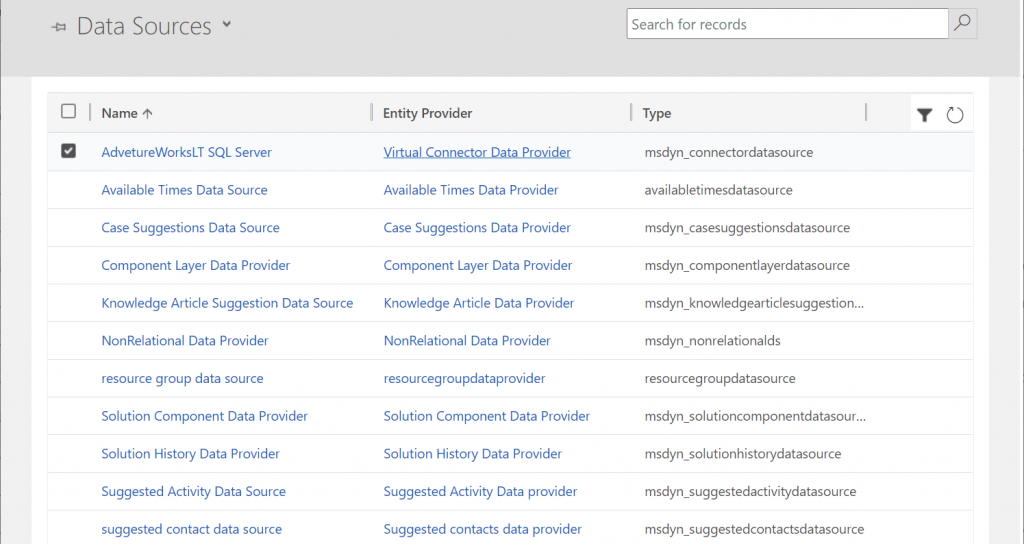
    Behind the scenes, these same concepts for virtual entities / tables are already being used by Microsoft in their first-party app features. By browsing the Data Sources within an environment we can see features like case/contact/activity suggestions listed here, as well as platform capabilities like component layers or non-relational data provider.
    Two years ago I wrote a blog post called “The Real Common Data Service Emerges” where I explored the direction where Dataverse (then CDS) was going. Since then we have seen Microsoft make the export of relational business data to a data lake a straightforward process with the built-in Azure Synapse Link for Dataverse. Similarly the import capabilities into Dataverse have expanded as the Dataflows / Power Query support keeps improving. Combine these physical data import/export pipelines with the virtual layers that the connector technology may soon offer for several tabular data sources and we’ve got a highly capable low-code toolkit for business data management needs in the Power Platform.

    You need to keep in mind that there are many considerations (read: limitations) for using virtual tables to review before deciding if they are a good fit for your business requirements. Even in building the above demo app there were things that don’t quite work the same way as with real Dataverse tables. For instance, I can’t specify a 1:N relationship between the two virtual tables for Product Categories and Products. Quick Find on the SQL data doesn’t seem to produce any meaningful results. Referencing virtual tables via lookups in a Canvas app seems to not retrieve related data at all times. Not to mention the fact that in two different environments the whole Virtual Connector Provider configuration process got stuck before any SQL tables ever materialized in the Entity Catalog.

    So, keep in mind that this is a preview of things to come, rather than production ready functionality to use today.

    Update 2021-08-20: the feature has now been officially released in public preview format, with new documentation available. Check out the Docs page “Create virtual tables using the virtual connector provider (preview)” that contains the information previously only available in the aforementioned PDF.

  • United at last: Dynamics 365 Dual-write goes GA

    United at last: Dynamics 365 Dual-write goes GA

    On March 27 2020, Microsoft announced that the Dual-write feature is generally available. After being in preview for over a year, the functionality itself isn’t necessarily a surprise to anyone who’s actively following what’s taking place in the Dynamics 365 product portfolio. The GA does however mark a milestone where it makes sense to reflect on what the broader impact of Dual-write is to business applications built on top of Microsoft Power Platform.

    The very short answer to “what is Dual-write” would be that it’s a built-in feature for making business data available across Dynamics CRM & ERP products without any additional integration tools. It may come as a surprise to people outside the MS ecosystem that even though the Dynamics 365 brand was announced already in the summer of 2016, the practical work of bringing the different apps from this product suite together has not yet changed that much from the early days of custom integration projects. Putting things into context, the effort to unify the 1 CRM & N ERP products in Microsoft’s portfolio originally targeted its first deliverables in 2004 (as “Project Green”). This proved to be impossible (or rather not feasible from a business perspective) in the on-premises era, but now when the Dynamics products are services hosted in the global MS cloud, the unification has actually been doable.

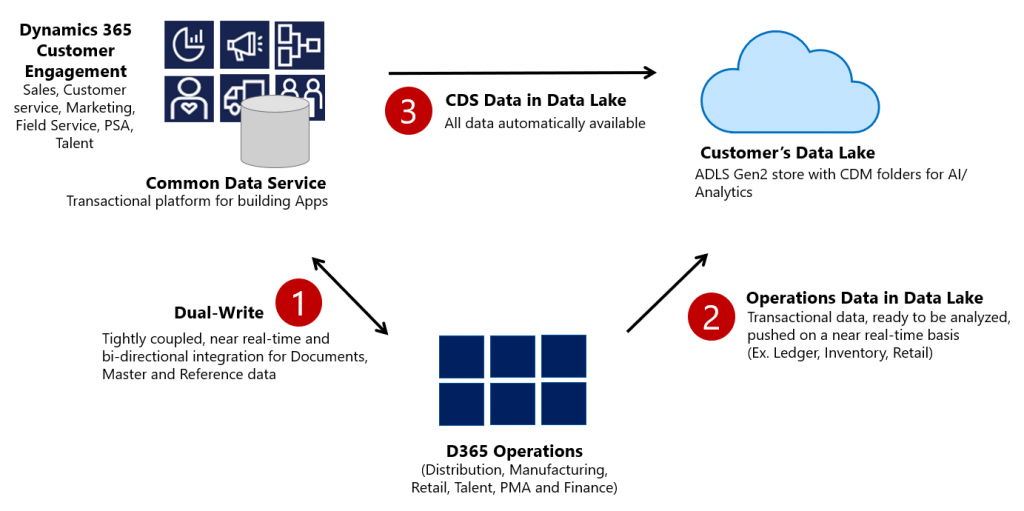
    Dual-write isn’t your everyday CRM-ERP integration, though. It is a near real-time synchronization of data between the Finance and Operations database and the Common Data Service that powers the low-code application and automation development story of Power Platform. Looking at the even broader data story that Microsoft is building around it’s business apps, BI and AI capabilities, we can also see that Dual-write is just one of the mechanisms that will move business data around:

    Taken from the Ignite 2019 session “Common Data Service with Dynamics 365 Finance and Operations”, this slide highlights the role of Azure Data Lake Gen2 in the analytical features that will be offered both as preconfigured features from Microsoft as well as customer specific implementations, to derive new insights from the business data. When it comes to the more operational side of doing business in the digital world, having the SCM and Finance app data available in CDS is what opens up plenty of new interesting scenarios. What if anyone could easily build Power Apps that work directly with the enterprise master data from ERP like customers, products and pricing information? If CDS indeed could lower this data integration barrier and bring task based experiences with pixel-perfect Canvas apps into the hands of frontline workers, that could surely be a transformative service worthy of its name. Not just a single database like XRM was but a connecting layer across many Microsoft cloud technologies.

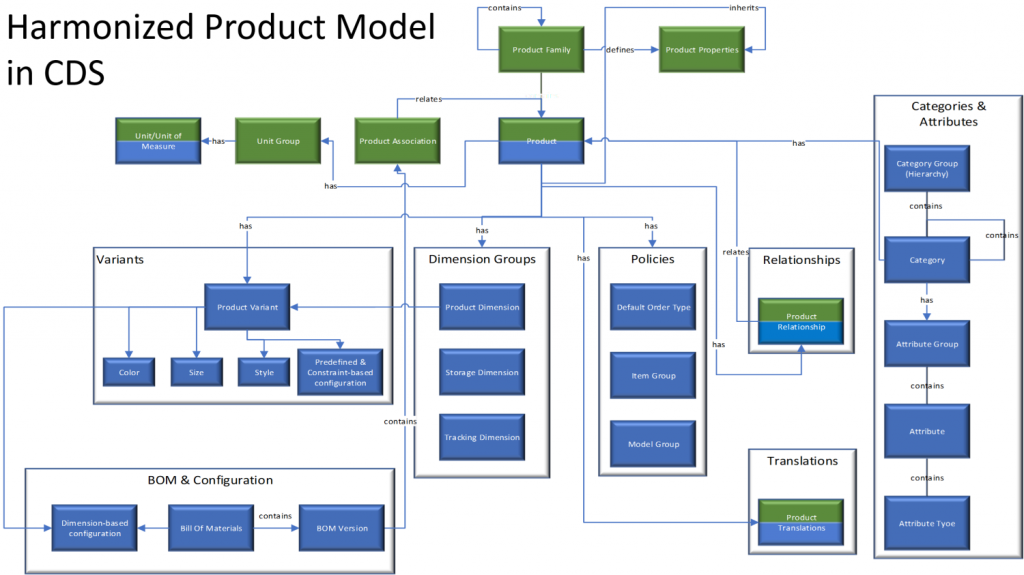
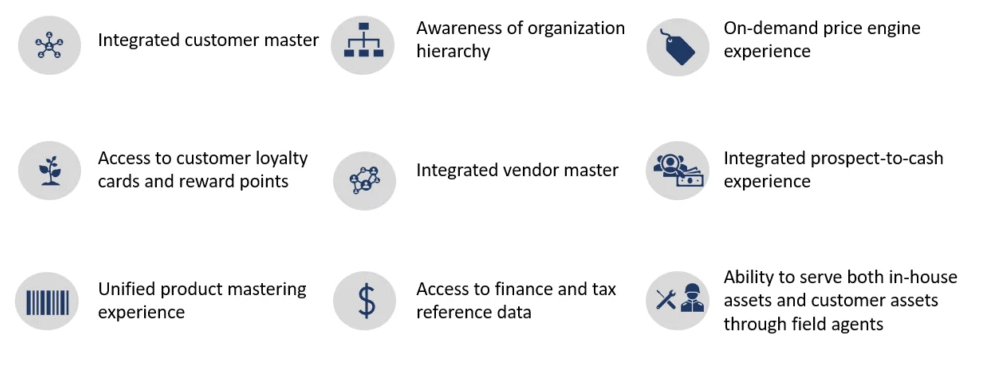
    In order to bring the ERP data into CDS, Microsoft needed to design harmonized data models that align with what used to be the independent products of Dynamics CRM and Dynamics AX originally and define how the schema of each system maps to the other. As an example, the CRM product data model has understandably been considerably more limited than that of an actual ERP application. Now with Dual-write, these two must come together in a unified product experience:

    No two businesses operate exactly alike when it comes to data and processes, so the logic of Dual-write has been built to allow no-code configuration to adjust the details of specific implementations. However, this new depth of application integration within the Dynamics 365 portfolio now means that you should have very good reasons if you decide to deviate from the standard model. Let’s look at Microsoft’s guidance for the above mentioned product data model as an example:

    The dual-write entity maps for products have been designed to flow data one-way only, in near-real time from Finance and Operations apps to Common Data Service. However, the product infrastructure has been made open to make it bi-directional if required. Although you can customize it, it’s at your own risk, as Microsoft does not recommend this approach.

    Anyone who’s worked with Dynamics CRM / Dynamics 365 Customer Engagement implementations in the past has surely come across the need to extend or modify the overly simplistic product and pricing data model that hasn’t been flexible enough to accomodate many real life sales scenarios. Jumping from such a customized environment in production use into Dual-write may not be all that easy, nor will the new data model defined by Microsoft just magically solve everyone’s problems. Dynamics 365 consultants working on data integration between systems aren’t likely going to be out of jobs just yet.

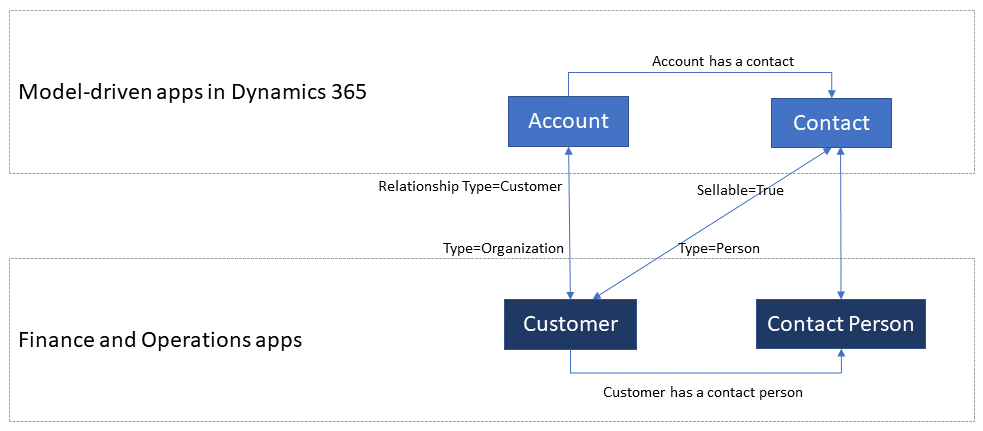
    Whether you’ll be jumping into deploying Dual-write or not, everyone needs to educate themselves on the implications of this new piece in the Dynamics 365 puzzle. From the DW documentation, have a look at the chapter “What does dual-write mean for users and architects of CRM products?” to understand why. There will be several new concepts introduced over on the CDS side like “company” and “party” that will affect all apps built on top of it – such as Dynamics 365 Sales, Marketing or Customer Service. Foundational elements like how customers of the organization or the internal units within that organization are defined have different data models in CDS vs. FinOps, so it’s important that everyone working on either side will use the new common documentation for Dual-write as the starting point to try and understand eachother’s perspectives on the world.

    There are also other dimensions affecting future solution architecture listed out in the documentation. According to MS, initially Dual-write will be shipped as separate solutions (notice that DW is solution-aware right from GA, highlighting the role of CDS as the cross-product ALM foundation in Power Platform). “In future releases, those solutions will become part of Common Data Service”, which I presume translates to every Dynamics 365 customer getting the core components, regardless of whether they already have Finance and Operations apps deployed in their tenant or not. Data types in CDS are also about to get extended to accomodate the enterprise ERP needs arising from this out-of-the-box FinOps integration.

    Of course not everyone is using the ERP solution based on AX, Finance & Operations, Unified Operations, Finance/SCM or whatever name Microsoft comes up next for it. A large share of the customer base will be a better fit for Dynamics 365 Business Central, which isn’t at least publicly yet targeted with Dual-write. Is there going to be an impact to SMB implementations where CDS is part of the solution architecture in some way and is this going to be positive or negative? According to the documentation, “in future releases, concepts in model-driven apps in Dynamics 365 (for example, customer, contact, quotation, and order) will be scaled to mid-market and upper-mid-market customers.” If Microsoft is really aiming to have a Common Data Model that should serve not just all Dynamics 365 products but also software providers from outside the immediate MS ecosystem, there are bound to be trade-offs between the complexity of the required schema for enterprise ERP and the ease of use for how citizen developers can tap into the Common Data Service for building simple business apps.

    Finally, there’s the ever interesting licensing aspect, of course. From the Ignite 2019 presentation, we can find the following statement on Dual-write licensing implications:

    When Microsoft customers (ISV, Partners, End Users, etc.) possess a valid Dynamics 365 for Finance and Operations license, they are entitled to replicate data between the Common Data Service and Dynamics 365 for Finance and Operations.  This entitlement does not include capacity consumed by the replicated data; if necessary, this is purchased separately.  This entitlement does not include use rights for the Dynamics 365 for Customer Engagement applications, including Sales, Service, Marketing, etc; if necessary, this is purchased separately.

    I’m expecting that the upcoming versions of the Dynamics 365 Licensing Guide would include documentation about the licensing scenarios for Dual-write, as at the time of writing there isn’t any public guidance available yet to address the concerns of multiplexing that inherently arise from the real-time synchronization of ERP data into CDS.

    As we know, having Power Apps licenses allows you to read all of CDS data. If you read through the GA announcement of Dual-write and its documentation, you’ll notice that MS is following its own guidance and not mentioning Customer Engagement even once, since CE now refers to on-premises software only. The new term, “Model-driven apps in Dynamics 365”, is a representation of Microsoft app teams themselves ship as the Sales app, Customer Service app and so on. When it comes to the customer specific business apps tailored to their needs, meaning Power Apps, these can be Model-driven or Canvas, ranging from simple “one click” mobile experiences to advanced information worker UI’s for desktop environments. They are all backed by the Common Data Service and running on the Microsoft Power Platform. How will these custom apps be treated in the licensing documentation that traditionally assumes customers would just be using the Dynamics 365 Apps as-is rather than adapting them to their unique needs and real life processes? This remains to be seen.

    Now that we are gradually getting over the age old divide between CRM and ERP, I hope the next area of unification would be a common licensing story that doesn’t draw artificial lines between Dynamics 365 and Power Apps. Splitting these into different licensing guides and different pricing publication formats isn’t all that helpful for the customers nor the partner ecosystem. A Common Data Service based on a Common Data Model should preferably be backed by a Common Licensing Model, don’t you think?

  • 4 Stages of MS Cloud Business Apps Evolution

    4 Stages of MS Cloud Business Apps Evolution

    In the past I’ve written about the History of Microsoft CRM from it’s first 10 years. I’ve also explored how the platform evolution up until Dynamics CRM 2013 had changed the product and how we worked with it. This time I want to focus on specifically the Microsoft Cloud era.

    I started to think about the different focus areas that we’ve seen on the journey that’s taken us from the early CRM Online days into what the current roadmap for Dynamics 365 and the greater Power Platform look like. In my mind these “snap” into four logical stages that describe what the main ambition at any given time seems to have been for Microsoft’s product team:

    Why bother looking back? Well, I could insert a “those who cannot learn from history” quote here, but really it’s more about putting the present into perspective. There are still plenty of customers who’ve either stayed with Dynamics CRM on-premises (now 365 CE by name, too) or who are still viewing the online service as just a “CRM in the cloud”. Hopefully this post will help in understanding the magnitude of change that has taken place in the greater Microsoft cloud during the past few years and why it would be better for them to embrace it rather than just observe it.

    1. Parity

    The very first versions of Dynamics CRM Online in 2008 wasn’t exactly the same product that you could get by installing it on your own application servers. The limitations on features and customizability meant this was a “CRM lite” that saved you the effort of infrastructure investments and server management, but there were a lot of trade-offs. You gotta start somewhere, but obviously this wasn’t exactly up to the vision that Microsoft saw as what the cloud services should offer to their customers.

    Upon the global launch of Online we received the updated CRM 2011 version and most importantly the solution framework that after several iterations now powers the ALM story behind Power Platform. Closing down the gaps between Online and on-prem was the primary goal for product development, with the “Power of Choice” being a key selling point against server-only or cloud-only competition.

    While the customization capabilities in CRM Online were surprisingly powerful already in 2011, the gaps in actually managing the environments you had no direct access to took a longer time to close. For the enterprise customers to consider moving from fully controlled servers and databases to the MS hosted cloud, a lot of investment was needed in building self-service features for instance management – not to mention ensuring the cloud apps were reliably available and updated in a controlled manner.

    Today the flexibility of spinning up new instances, copying them for test & dev, taking backups, syncing data to Azure SQL for reporting, and many other self-service features available for admins make the cloud environment quite attractive. In exchange of giving up full control over your servers and databases, you have the luxury of not having to think about them at all. There are no servers to patch up and keep running. As for the updates, it’s now a continuous delivery of new & improved features that puts an end to the concept of an upgrade project altogether. Sure, you’ll still need to do your part to ensure customer specific customizations and integrations keep working – that’s just another service that needs a continuous delivery mindset.

    2. Integration

    Once the cloud version was sufficiently close to the on-premises Dynamics CRM server, the next stage was all about making it better than on-prem. This was the era in which Office 365 was really taking over the business productivity market, so you could say the low-hanging fruit was in tapping into these existing services in the MS Cloud and making Dynamics CRM a more attractive application through those.

    Sure, we had heard the “better together” story for Dynamics + Office already in the on-prem days, but this wasn’t exactly the way we today expect cloud apps to just work with one another. Complex server configuration tasks were surely a nice source of revenue for the IT consulting companies, since very few customers were able to know all the ins & outs of how to properly deploy an Internet Facing Deployment of your Dynamics CRM server and make it talk with other MS server products. From Microsoft’s perspective, having useful product features available for everyone in theory doesn’t scale into real world customer success if there simply isn’t enough skill out there to deploy everything the way MS engineers do it in their labs. Well, when it’s all run by MS from beginning to end, this made it a solvable problem.

    Making common online services like Exchange and SharePoint available for Dynamics CRM admins to click & configure on their own was one key part of this journey. What this Cloud + Cloud combo also meant was that new features from the latest versions of each service could be rolled out at a much faster pace than the server bits could ever follow. Oh, and since all the services were by default available via the public Internet, mobile clients became an everyday tool for accessing your CRM information.

    (more…)
  • CDM: New Data Model For The Common Good?

    CDM: New Data Model For The Common Good?

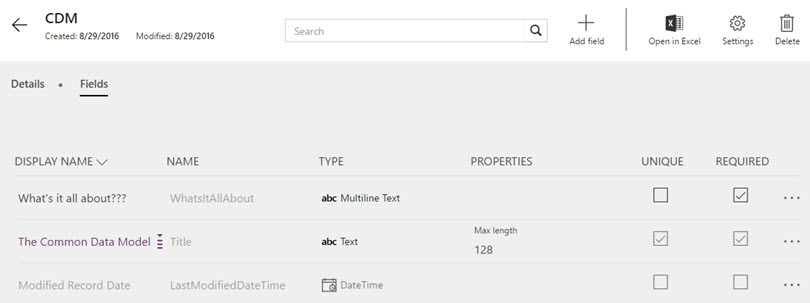
    The first new component of the upcoming Dynamics 365 platform that has reached a stage of public preview is the Microsoft Common Data Model (CDM). Available via PowerApps, CDM can be provisioned in your Office 365 tenant with only a few clicks, so there’s little reason for not having a look an early look at it. In fact, you only need to sit back and relax while watching CRM MVP Scott Durow walk you through a first look at the Common Data Model:

    So, there you have it! That’s what CDM looks like when accessed via the PowerApps web management UI. Any questions?

    Yeah, I actually do have a couple.

    How will this work with CRM and AX?

    What we have available in the preview is pretty much the most straightforward part of the very big puzzle to put together, meaning a database on Azure with some preconfigured tables and data model management tools. We do not yet know much about how the Dynamics CRM and Dynamics AX functionality will be linked to CDM as part of the Dynamics 365 cloud platform, so there’s plenty room for speculation, which honestly is mostly what I’m about to do here. In a way I’m just continuing on the theme of my previous post about Dynamics 365 and its potential implications for XRM, to pass the time as we wait for Microsoft’s plans to be revealed in more detail.

    Right now the only way to push data into CDM is a Flow. If you’ve ever played with automation tools like IFTTT or Zapier, then you’ll quickly grasp the idea of Microsoft Flow. The application itself shouldn’t be underestimated just because of its current simplistic demo scenarios that usually are along the lines of “when a new row is added to a SharePoint list, send an email to this address”. Built on top of Azure Logic Apps, there’s actually a next generation BizTalk type of cloud integration platform under the hood, which should provide plenty of future potential for advanced messaging solutions to orchestrate business processes across a number of different systems.

    Flow_copy_CRM_account_to_CDM

    Once Dynamics 365 Enterprise arrives and gives us the features of CRM and AX in one seamless cloud environment, there’s naturally going to be a need for something a lot more than a “build your own” type of Flow integration. Keeping the Sales and Operations apps of D365 in sync with the customer and transaction data managed in the process of making an delivering a sale involves a fair amount of business logic. If you’ve ever designed and developed a custom integration for this type of a scenario, you’ll know the requirements can quickly grow a bit hairy. Assuming Microsoft can come along and say “we’ll take care of that hairy part, don’t you worry about it” then who could resist it?

    The reason CDM exists is that there will be more than one physical database in the Dynamics 365 suite. It’s not all XRM, which means you can’t find the Operations app entities inside your CRM solution files. For the business processes to work seamlessly, someone needs to keep those database closely in sync with one another. From reading through the Common Data Model tutorials, we can see that at least as of now, Flow is not the system that can handle it:

    “Today, when you use Microsoft Flow to import data or export data, it is not a full synchronization service. Whenever an object is added to one service, it will be imported into the other system. However, that means if an object is deleted from one system it will not be deleted in the other system.”

    So, the sync part is still in the “To Be Implemented” bucket. So is security, since the passing of a record from CRM to CDM via Flow will not carry over any details about who should have the rights to do some CRUD work on it. Again, it may not sound like such a mission impossible to build. However, if you’ve ever faced the requirement in a Dynamics CRM project to implement SharePoint document library integration with account records that includes not just linking the folders but also enforcing the account access rights on the documents, you’ll know the struggle is real. Sure, a collaboration solution like SharePoint has very different security concepts than a system designed for structured business records management like CRM or ERP. But if Microsoft hasn’t been able to offer OoB synchronization of access rights across Dynamics CRM and SharePoint despite of the clear business demand for it, maybe we’d be foolish to expect that it will all be seamless inside the Dynamics 365 world either.

    The thing here is that unless the solution provided by Microsoft is going to be fairly advanced, it might not be an actual solution. It’s like the old saying from the dawn of the internet:

    Some people, when confronted with a problem, think “I know, I’ll use regular expressions.” Now they have two problems.

    When confronted with the need to integrate processes across two different cloud business applications, there’s always the danger of someone rushing into thinking “I know, I’ll build a database in the middle to unify the process data”. So we end up with three cloud business applications… Now, I’m not saying that Microsoft wouldn’t have the type of application architecture masterminds working on the Dynamics 365 platform that can solve these complex problems when developing a new product. I’m just afraid that things may still turn out a bit more complex in reality than the marketing pitch for the new product launch might lead people to believe.

    What limitations will this impose on customization?

    The one reason why many of us love the capabilities of the Dynamics XRM platform is the awesome flexibility it offers us to customize the application to meet the specific needs of customers. And by “customize” I actually mean “configure”, since these days you can build such amazing features for business users without writing a single line of Javascript or C#. With Dynamics 365 now promising to deliver so many preconfigured apps for different departments’ needs, as well as making them all work together, I bet some of us are thinking about whether there’s a potential threat to the platform’s flexibility buried in the new approach Microsoft is taking. (more…)

  • XRM Strikes Back

    XRM Strikes Back

    Adxstudio_logoIn case you missed the announcement last week, Microsoft has acquired Adxstudio. This is simply wonderful news for anyone working with Microsoft Dynamics CRM, for a number of reasons. First of all, the Adxstudio Portals product brings in a critical piece of functionality that has so far been missing from Microsoft’s own portfolio, which is surfacing the information and processes of CRM to external parties via integrated web portals. Second, the amount of knowledge and real-life experience that will be brought into the Dynamics CRM product team on topics like solution management, ALM practices and in general the life of an ISV partner in the Dynamics ecosystem is bound to make Microsoft’s product offering even better in the future.

    The third point, and the main topic of this blog post, is that in my eyes this acquistion validates one very important aspect when it comes to Dynamics CRM as a business application platform: XRM is alive and kicking. In order to understand why I think that way & why it makes a big difference to the Dynamics CRM ecosystem, we need to look back a bit and understand what’s been happening on the acquisitions front during the past few years.

    Let’s Go Shopping

    It is not that uncommon for enterprise software vendors to grow their solution portfolio by acquiring companies rather than organically developing new products and features. This timeline from a few years ago demonstrated how Oracle and Salesforce were buying companies related to Social CRM technology. (Funnily enough, the company who posted the timeline was first acquired by ExactTarget, which then got sold to Salesforce within 1 year from that post.) Microsoft hasn’t been quite as active in this shopping spree as some of its competitors, but they do seem to have picked up the pace during the past few years.

    ThreeCommaClub_sAre acquisitions a smart way to spend cash then? Back in the days when Microsoft bought Yammer, the price of $1.2 billion was questioned by many. Three years later the valuation of Slack, which you could call “the Yammer of 2015”, is set at $2.8 billion. Once you get to the “three commas” level, the traditional laws of physics no longer apply, meaning it’s not about technology underneath the product or anything else tangible that sets the price tag for a company. So, instead of handing out investment tips to the big boys in the “,,,” club, let’s discuss a more down to earth aspect of software company acquisitions: integrating the new technology with the old.

    In these days of cloud based services with open API’s, it’s really not that difficult to develop a bit of code that will allow you add a bullet into your marketing materials, claiming “X now integrates with Z”! Heck, with services like Zapier or IFTTT, even a code illiterate geek like me could take two applications from the consumer or business space and make them talk with one another, just by setting up the business logic via point & click configuration in a browser window. If I’d want to push tweets with a negative sentiment into Dynamics CRM as support tickets, all I really need is to watch a video from Azuqua, sign up for their subscription service and click my way through the process shown below.

    In the marketing speak, any software integration will always described as “seamless”. The reality of what you can actually achieve via the integration (if anything) may not become apparent until it is validated in a real-life use case that takes into consideration the variations in configuration & data contents found in live systems, executing an end-to-end business process rather than a simple data exchange between two IT systems. In practice, a cloud application vendor that promises to integrate with 20 different CRM platforms is unlikely to understand very much at all about the built-in logic of each target system, nor the specific use cases in which organizations wish to leverage such integrated features.

    Integrating pieces of software together isn’t a very unique task. After all, that’s the origin behind the term “systems integrator” that’s sometimes used when referring to consulting companies that deploy enterprise IT systems like CRM software and stitch it together with other systems. Integrating actual products, on the other hand, is a much more challenging task than just integrating software. Not only do you need to deliver a solution that adapts to the needs of many customers instead of one, but you also must be able to align the capabilities of all the related products in your portfolio in such a way that makes sense to the customers and end users. Avoiding redundancy and overlap while still smoothly transitioning the old & new users towards the new, truly seamless experience that delivers on the promises made regarding the integration – yeah, I can imagine that being a bit of a product management challenge for sure.

    Microsoft’s Acquisition & Integration Track Record

    The list of acquisitions Microsoft has made in the recent years that involved product functionality related to Dynamics CRM includes the following notable examples:

    • Skype (2011) – At $8.5B, this was the biggest MSFT acquisition to date and the Skype brand has since then replaced Lync as the telephony/messaging brand for consumers and businesses alike.
    • Yammer (2012) – Another big one. The whole social revolution in information work meant MSFT needed to make both their products as well as product development processes more like that startup & viral model of Yammer and less like that traditional enterprise software world of Office & co.
    • MarketingPilot (2012) – Although not primarily a marketing automation solution for digital channels originally, the MP acquisition was transformed into Microsoft Dynamics Marketing (MDM) to attract the CMO’s with an technology budget that would soon pass that of the CIO.
    • Netbreeze (2013) – While Yammer targeted the internal social collaboration scenarios in organizations, monitoring the public social media channels needed a separate channel. Enter Netbreeze with it’s initial Microsoft Social Listening brand and the later reincarnation as Social Engagement (MSE).
    • Parature (2014) – Along with marketing resources targeted to social channels at a growing pace, the customer service work also moved away from call centers into online support portals and customer reps communicating via services like Facebook. Parature was the answer to meeting the market demand on this front.

    For each of these products it was easy to come up with numerous scenarios in which the organizations using Dynamics CRM could benefit from embedding this new technology into being a part of the sales, marketing and service processes managed via CRM, linked directly into the account & contact records, thus promising to deliver that a true 360 view of the customer relationship. Of course the mere change of ownership for the IPR behind these acquired technologies didn’t yet change anything in the physical world that would make such scenarios become reality. How would these new pieces of the puzzle in practice be fitted together with the existing big picture was the important question to ask. Would 1 and 1 be 2+, or closer to “one point something”?

    Yammer_endAt the time of acquisition, there were some existing integrations to Dynamics CRM available for Yammer and Parature. If we take the former as an example, then there was obvious overlap between Yammer and CRM’s own Activity Feeds feature that was introduced to the platform on the year before. While Yammer of course has far more end user functionality available in its own application, on the Dynamics CRM side there’s actually quite a lot less that we can do with these type of social posts in the business process context than with the native Activity Feeds feature of CRM. Since the posts are now split into two different feeds (Yammer and “System Posts”) inside two different databases with two different security models and several different client application UI’s, it’s not so obvious that this new integrated world is a better fit for all Dynamics CRM customer organizations. (For a discussion on the future of Yammer & CRM, check out this blog post from Gustaf Westerlund.)

    Looking at a larger integration effort, Microsoft took the foundation of MarketingPilot and rebuilt much of it to create Dynamics Marketing, but they still decided to keep it as a separate application that can be used with or without Dynamics CRM. So, what does this mean for CRM customers then? Looking at the surface, the main application navigation is identical between MDM and CRM, but the form and view controls presented to the end user have different logic in each application. The system administrator cannot perform similar UI and data model customization on MDM than what the CRM platform provides. Microsoft offers a connector service hosted on Azure that synchronizes data between CRM and MDM databases, but the scope is limited to a set of predefined record types. As an end result, while you get a wealth of marketing resource management functionality via MDM, there will be limitations on how you can integrate the solution to act as part of you specific business processes and data model configured into Dynamics CRM.

    Doing It The XRM Way

    If as an independent application architect it was clear to you from day one that the product you’ve set out to build should work in the most seamless way for Dynamics CRM customers, you probably wouldn’t first develop a separate application and then start thinking about how to connect it with the CRM database. In such a scenario your architecture design would most likely start from the core of the customer data and business processes that CRM is typically used for managing, as you would want to ensure that your solution is well aligned with the installed base of Dynamics CRM organizations out there. Next you would take a look at what functionality the XRM platform offers that could be leveraged as the building blocks of your own solution, to avoid time spent on developing the “plumbing” already available in each CRM deployment where your application would operate. Only after this would you go and build the external services needed in delivering your application’s functionality, by connecting to other systems, presenting data in non-CRM user interfaces where needed, enforcing licensing policies for your product etc.

    The XRM way of developing products has clear benefits not only to the solution provider but most importantly to the organization using the product. The user identities and access rights have a single administration point, the user experience is likely more familiar to your CRM users, you have no application interfaces to configure or manage and the data will (mostly) sit inside the same database as your existing customer account and contact information. Most importantly, from a functional perspective, you can keep on building your business specific processes and reporting for the XRM applications in the same way as you would customize your Dynamics CRM application. If you’re seriously investing in CRM as your business process hub, doesn’t that all sound quite tempting?

    Also Microsoft appears to have understood the temptation behind such a model, since the Dynamics related acquisitions it has made during this year for the most part have XRM written all over them:

    • Mojo Surveys: Design surveys inside CRM, by modeling the questionnaires as CRM entities and tracking the detailed response data back to the customer records. Will be include in CRM 2016 release as a Survey Designer / “Voice of The Customer” feature. Pure XRM ISV solution from Fusion Software, who still continue to work on similar non-MS products like CRM SalesFlow.
    • FieldOne: Field service solution that started out in 2001 with a bit more classic approach for their “Terra” product, then bet the farm on XRM and rewrote it as “Sky”. Built on top of Dynamics CRM and also leverages other leading ISV solutions like Resco for mobility and Scribe for integration. Oh, and coincidentally, Adxstudio for their service portals.
    • FantasySalesTeam: The only non-XRM product on this acquisition list. Well, I guess it doesn’t hurt MS to have some apps in their portfolio that integrate with Oracle Sales Cloud and the likes…
    • Adxstudio: If there ever was a prime example of an XRM application, it would have to be Adxstudio Portals. Their solution was already included as a part of CRM 2011 SDK to replace the earlier Portal Accelerator, and now the circle is complete. With up to 128 custom entities, Adx hasn’t been afraid to use Dynamics as a true XRM platform, all the while offering the critical missing piece that would connect the internal facing business applications with the customer facing websites.

    Depending on what’s the position of your application in relation to CRM, it’s of course not mandatory for it to be fully baked into the XRM platform for it to deliver great value to end users. Also, if Microsoft were to just keep on buying more and more ISV solutions into their product portfolio and assimilating them all into one big CRM suite, there’s a potential risk of ending up with a SAP-esque enterprise monolith that’s no longer serving the needs of the customers (by the way, for anyone interested on some insights on the current state of the “SAP nation”, I recommend reading the book by the same name).

    Still, I for one am much more optimistic about the recent XRM based acquisitions when it comes to the expected time to value for customers and partners, as there shouldn’t be a pressing need for MS to rearchitect these solutions to try and integrate them with the existing Dynamics CRM product offering. From our perspective, they’ve been done right from the start. In a couple of years time I think we should reflect back on these different acquisitions made, to see if XRM truly got its revenge or not.

  • Bringing Customer Service Back to CRM with Parature

    In case you missed the big news last week, Microsoft has acquired a company called Parature. Similar to the two marketing related service providers MS has bought earlier, Marketing Pilot and Netbreeze, this latest acquisition is intended for expanding the footprint of Dynamics CRM on the customer service side.

    MS_Parature

    It’s been no secret that this was the next area where Microsoft was looking to build up some new capabilities for Dynamics CRM. Thinking about the existing feature set for customer service scenarios in the product, we basically haven’t had any significant enhancements to the service module since CRM 3.0. Sure, the recent platform enhancements on the process automation and UI side can be leveraged in customer service as well, but in terms of specific out-of-the-box functionality that would be aimed at helpdesk scenarios, it’s been pretty quiet so far. Case management and queues for email routing have been very useful features for many organizations using Dynamics CRM. Service scheduling and knowledge base articles… well, not so much.

    The world around CRM software has changed quite a bit from 2005 when CRM 3.0 came out. Not only have online service portals and support content websites become incredibly affordable for any company to set up via cloud based services like Zendesk, but the customers of those companies have also been given a whole range of independent social channels to reach out to one another. These days the customers are in charge of the conversation, which means that if you don’t offer a forum for them to submit feedback and questions, they’ll just set one up for your brand on GetSatisfaction on their own. Regardless of how many 1-to-1 contact points you offer them, they’ll still go and share their frustration over on public channels like Twitter.

    This is obviously not a world where back-office applications like traditional CRM systems that mainly offer features to your employees instead of the end customers provide a very comprehensive solution for customer service management. Sure, integrating with the customer account details, managing the support ticket process and collecting information about past interactions are all essential components of customer service in the new world, too, but they are becoming relatively less and less significant factors in the processes needed for delivering great customer experiences. When the customers no longer pick up the phone to call you when they have a problem but rather use it to search for answers on their own, call center automation software isn’t the area you should primarily be looking to invest in.

    Integrating the customer facing components of modern online customer service solutions to the internal CRM systems has been the way to build systems that are up for the challenge presented by the age of the social customer. While system integration is a natural part of any CRM implementation project, requiring each organization to come up with their own solution of how to put the pieces together isn’t perhaps the most effective way forward. For example, Parature had already launched their integration with Microsoft Dynamics CRM Online back in 2009, but how many people were actually aware of it? I might have stumbled across Parature a few times before, but they certainly didn’t occupy a space on my top-of-the-mind list for possible solutions to suggest to companies using Dynamics CRM. Merging these services into Microsoft’s Dynamics CRM offering is certainly going to expose them to a potential customer audience of a completely different scale. (more…)

  • LinkedIn, Dynamics CRM and Social Selling

    LinkedIn, Dynamics CRM and Social Selling

    LinkedInA significant share of Dynamics CRM systems tend to be implemented for B2B sales scenarios. In the age of social selling, digging up information about the person you’re about to call will quite often involve looking up his or her LinkedIn profile. With this in mind, surely everyone’s running a tight integration between their customer relationship management system and the LinkedIn network, right? Well, based on my personal experience, quite often it tends to be one of those requirements that come up during the sales phase but then get phased out from the actual go-live of a new CRM system.

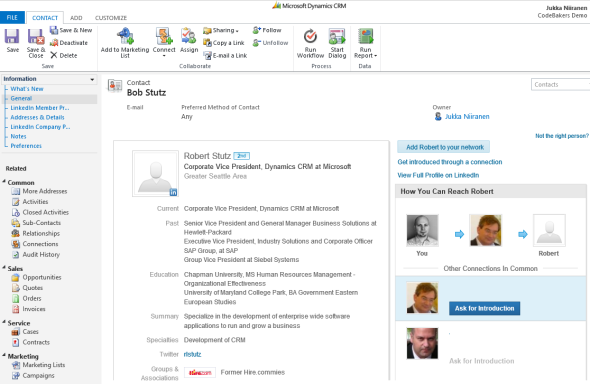
    The question of “how to integrate Microsoft Dynamics CRM with LinkedIn” has been making the rounds in various forums for as long as I’ve been involved with the product. Now that you’ve potentially arrived here in search for an answer (thanks, Google!), I thought I’d collect a few pieces of information and personal thoughts on the subject. If you have any experiences to share regarding using Dynamics CRM in the social selling scenarios, please do leave a comment in the box below.

    The Quick Way

    As always with information systems, there’s integration and then there’s “integration”. If you can meet the requirement by just surfacing a bit of content from LinkedIn inside a Dynamics CRM form, then here’s a great article from Salesmetrix that shows you the steps to integrate the LinkedIn Member Profile badge onto a CRM contact form. By adding a simple web resource and signing up for a LinkedIn API key you can show the contact’s job title and picture from LinkedIn alongside your CRM data, like this:

    CRM_contact_LinkedIn_profile_widget_small

    Why is this not the perfect solution? Well, did you notice the step require for copy-pasting the URL to the contact’s LinkedIn profile field before the profile badge is shown? Yeah, that’s the bit that your sales people are most likely not going to perform. Getting them to even enter the minimum required details on their leads and opportunities into a CRM system can be a major struggle, so introducing a complex operation like this into the process is going to require plenty of sales skills from the implementation consultant to convince the users that there’s a tangible benefit for them in filling in all the blanks on the contact form.

    That’s of course not anything that couldn’t be overcome with a little bit of further development. One example for performing the profile search dynamically based on name fields on the CRM records can be found from Nicolae Tarla’s blog. Coincidentally, Nicolae has also recently released the Microsoft Dynamics CRM 2011 Scripting Cookbook that contains a few examples of lightweight social network integrations in the final chapter. Building proper social profile discovery services will require more than mere Javascript, but for showing LinkedIn Member Profile Plugin and Company Insider Plugin in the CRM UI you probably don’t need to invest a whole lot of time in developing a working solution.

    You could choose an even more simplified approach and just add a button on the contact form’s ribbon to open LinkedIn search page with pre-filled values. A URL like http://www.linkedin.com/vsearch/p?firstName=Jukka&lastName=Niiranen&company=CodeBakers will get you onto my LinkedIn profile faster than manually entering the same search terms. You can study the LinkedIn URL Query Parameters to see the kinds of variables that could be used. There’s also a post on the old CRM Online Team blog that shows you how the button would have been added back in the CRM 4.0 days. (While building your URL’s, do remember to handle special characters and spaces in contact and account names.)

    The problem with all these type of solutions is that if you’re not paying for them (on a continuous basis), you can’t expect them to remain working forever. Several variations of the LinkedIn and Dynamics CRM integration techniques have come and gone, such as Marco Amoedo’s CRM 4.0 LinkedIn Company Insider Widget hover link and Leon Tribe’s & Matt Wittemann’s Five-Minute Integration Between Dynamics CRM and LinkedIn. All fine solutions in their time, but as the API’s and applications keep changing, the need for re-developing solutions to the same problem remains.

    The Official Way

    A company like LinkedIn surely wouldn’t have missed the chance for monetizing the data they’ve accumulated into their network by selling it to B2B sales people who are using a system like Microsoft Dynamics CRM, now would they? Of course not, which means “there’s an app for that”LinkedIn for Microsoft Dynamics CRM.

    The product requires a Sales Plus or Sales Executive subscription for LinkedIn, which start from €28.95 per user per month. If you’re like me, you probably receive frequent “special offers” for a free month of LinkedIn Premium. This time I decided to activate the offer and use it for test driving the Dynamics CRM solution. The deployment process was quite straightforward for a CRM Online environment as no further configuration was needed apart from installing the solution file. After that, this is how you’ll see LinkedIn company profile and people data on the account form:

    LinkedIn_DynamicsCRM_company_profile_small

    On the contact form we have tabs for both Company Profile and individual Member Profile.

    LinkedIn_DynamicsCRM_member_profile_small

    For some reason the lead form doesn’t get any LinkedIn components added on it, so you’ll need to qualify the lead to an account and contact before being able to leverage the integration.

    Not every CRM user needs to have the subscription, but unless they do, they’ll not be able to see the premium content on the account or contact forms. Therefore you’ll probably need to manage role based forms for different user groups by creating a specific LinkedIn security role for those who have the Sales Plus subscription.

    Unfortunately the solution from LinkedIn hasn’t yet been updated to be compatible with the cross-browser world of Polaris / Update Rollup 12, so using it on Chrome, Firefox or Safari isn’t supported. Also Internet Explorer 10 fails to render any content in the iFrame and LinkedIn recommends downgrading to IE9, so if you’re running Windows 8 you’ll need to run Dynamics CRM in IE7 Compatibility View to make use of the solution. No release schedules for an updated solutions were available when I asked about this from LinkedIn support. Needless to say, running CRM Online with the new Polaris process forms isn’t supported with the LinkedIn add-on.

    The Ultimate Way?

    What if we are really determined to get the most out of this wonderful source of “free” information that is LinkedIn? Wouldn’t we want to pour all the data into our own CRM database and preferably also synchronize it with the latest updates available from different online directories?

    (more…)

  • Office 365 launches without Dynamics CRM integration for document management

    Office 365 launches without Dynamics CRM integration for document management

    Today was finally the big day when Microsoft’s cloud productivity platform BPOS was replaced with Office 365, which is now available for subscription. Having played with the beta version for a while now, I’m overall quite impressed with how close the SharePoint Online environment now is to its on-premises counterpart. While the limitations are still somewhat more visible than when comparing CRM Online vs. CRM 2011 on-premises versions, I think it’s already close enough to enable a significant part of traditional business requirements for SharePoint to be fulfilled with the cloud platform.

    Microsoft confirmed already last fall that also Dynamics CRM Online will eventually be migrated onto the same Online Services Delivery Platform as Office 365. In addition to being a natural fit with SharePoint and Exchange, CRM Online should also gain benefits into both its subscription management as well as authentication options as a result of  this migration. However, there’s no official timeline or feature set communicated yet, so we’ll have to keep waiting possibly until Q4/2011, when the next update for Dynamics CRM has been scheduled to become available, as announced in the latest Statement of Direction document.

    Ever since Dynamics CRM 2011 was launched with built-in SharePoint document library integration, there’s been a bit of anxiety on when this functionality could be leveraged with the cloud versions of CRM and SharePoint. Since BPOS was built on SharePoint 2007, it wasn’t possible to utilize the Microsoft Dynamics CRM 2011 List Component for Microsoft SharePoint Server 2010 in the Online environment. This meant that setting up a document management enabled trial environment with CRM Online required an on-premises SharePoint server, which wasn’t too convenient. Nor was it for any customer looking to go “all in” with their MS applications. Oh well, but now that Office 365 is available, that’s all a thing of the past, isn’t it?

    Wrong! Despite of the better together marketing message surrounding Office 365 and CRM Online, there’s actually still no way to integrate the SharePoint document libraries with the CRM List Component. Sure, you can upload the solution file into a SharePoint Online site and publish it. What you cannot do in the Online version is to take care of the second part of the installation steps, which involves the AllowHtcExtn.ps1 PowerShell script,used for enabling .htc file extensions to be served from SharePoint.

    Why is this important? Because without the .htc support, you can’t actually do anything with the document library. The folder creation can be configured and it flows through as it should when accessing the Documents menu for a new record, such as an account. However, after that you are presented with the following prompt:

    “The action buttons are disabled because the SharePoint server that you are using does not allow HTC component files. To enable the buttons, contact your system administrator.” What this means is that the document library will be rendered nicely inside the CRM entity form, but you can’t upload any documents to it. Clicking on the buttons does nothing, as they’re all disabled.

    How about on the SharePoint side of things then? We can see that the entity specific document libraries are created and also the corresponding folders for each record where the document location has been defined. We can also of course use the native SharePoint UI to upload documents into the library.

    Then when you access the corresponding record through CRM, you can see that the document does appear in the library. But with all the controls disabled, you again cannot do anything with it, like open the document, for example. How nice…

    How did we end up in this situation where the latest and greatest cloud offerings from Microsoft are not working together like they obviously were inteded to? That’s a very good question. The problem with Office 365 SharePoint Online limitations and their implications to Dynamics CRM document management functionality has been a known issue throughout the whole beta phase of Office 365. There are several threads on the Office 365 community forums regarding this. Yet the response from Microsoft has been that this cannot be resolved by GA (general availability) of Office 365 (as in “today”), but rather we’ll have to wait for the first service update, probably. Come on! How can 6 months not be enough to allow one .htc file to perform its work and provide the document integration between CRM and SharePoint? I find it extremely strange that the product management behind Office 365 has allowed such a flaw to be included in the initial release version.

    Of course eventually this issue will be solved and we’ll be able to experience the full document management process flow with Microsoft’s cloud applications.

  • Works the way you do, almost

    Matt Witteman, an MS CRM MVP, posted a nice wish list of 14 improvements that he would like to see in the product. Out of all these, I agree with almost all of them and would take them up on my list as well, except for the first one, which is the request to have more frequent releases of new MS CRM product versions. And that really contradicts with the whole point of asking for feature improvements.

    When you are working with a product that has a release cycle of 2 years, there are a couple of things that happen. Number 1, you implement workarounds or acquire add-ons to circumvent some of the features that you are most sorely lacking in the current release. Number 2, you commit yourself to the platform that has been given to you and invest in long, tedious and expensive integration projects that promise to deliver value in the long run.

    Imagine that this same platform would suddenly turn into a “perpetual beta” kind of product which continuously insists on updating itself with nice little features and quick polishing. You would end up living in a world of constant fear that a change in the next minor version will either render some of your previous efforts obsolete, or more importantly, break an integration that the whole business has learned to rely on.

    I’d very much like to have it both ways, but when it comes to choosing one or the other, I’m actually pretty happy with the way things are for Microsoft CRM. Yes, my company is still on CRM 3.0. Yes, we have a huge number of critical integrations. Yes, there are plenty of features in 4.0 that I want to get my hands on. Yes, upgrading to 4.0 will be a long and hard journey. I just don’t think there really is a viable alternative to this development path, yet. Then again, while reading The Big Switch and seeing what is going on with Salesforce.com and other modern players, I also keep on wondering how many years the current method of implementing business applications will last, and what will be the next platform that I get my hands dirty on after 5 years time?