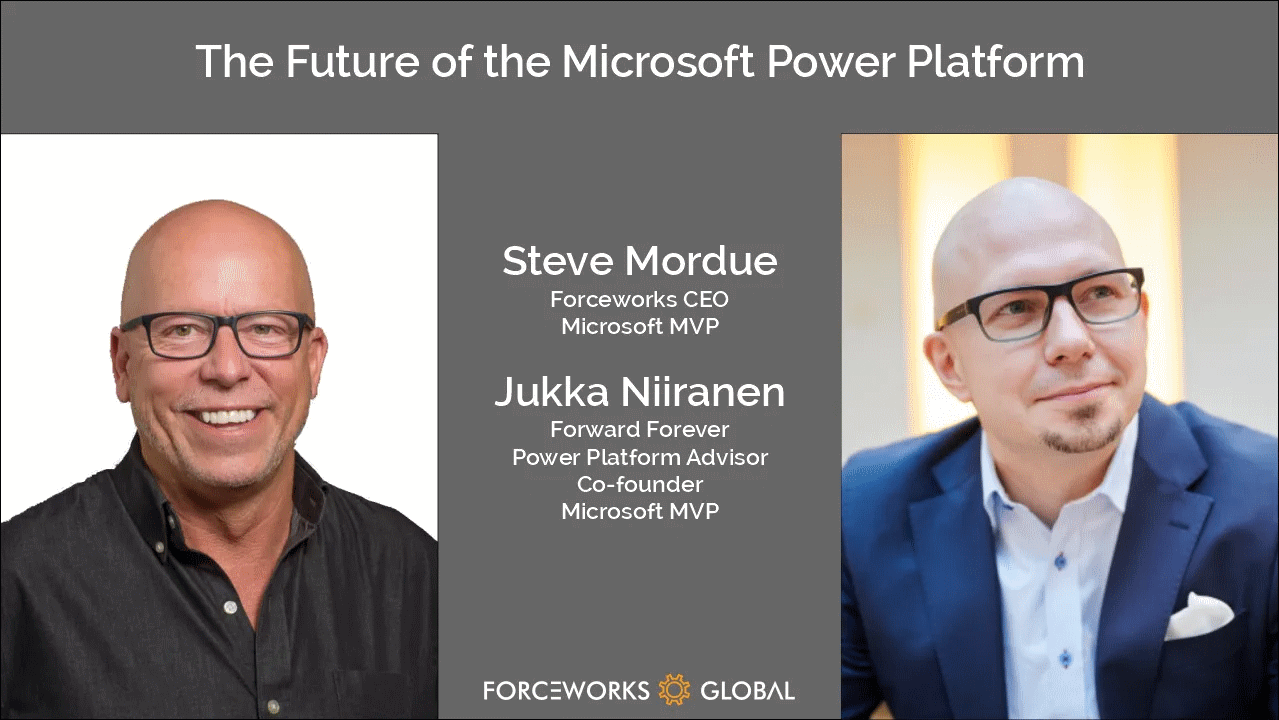
If I had to choose only one blog I could follow in the Microsoft Business Applications ecosystem, it would be Steve Mordue’s blog.
Why this blog? Because you’ll learn more about the true business of BizApps in Steve’s blog than you would from reading all the partner channel materials MS puts out there.
It’s not just the unfiltered opinions and provocative comments from Steve that make the content unique. He manages to get Microsoft leaders like Charles Lamanna or Ryan Cunnigham speak openly about product roadmap and business strategy whenever he has a chat with them. It’s the kind of material you couldn’t hear from anywhere else – at least not without an NDA.
When MVPs used to get together
One unfortunate impact that COVID has had on the Microsoft MVP program is that our annual MVP Summit events have gone virtual. Even though the world is slowly opening up to physical events again, at the same time the world economy is sinking. This has pushed even the biggest tech corporations like Microsoft to announce cuts on their internal travel, training and event budgets. This means the next Summit, which will be my 10th, is probably done over Teams again.
It’s better than nothing, of course. The Microsoft product team members do put in effort to share their plans with the MVPs and are open to receiving feedback from us, since the protective shield of the NDA agreement covers both digital and physical worlds. Making things digital can also help scale the amount of tech content that can be made available as well as the means through which to consume it.
What the virtual events cannot in any meaningful way compensate for is the lack of informal interactions between MVPs. When you can’t go grab a drink with the smartest people in the business together at JOEY Bellevue, a large part of the Summit is wiped away. Sure, the product group interactions are valuable, but the MVP-to-MVP interactions are priceless.
No, you can’t replicate this in the virtual Summits. When you’re first sitting 6-8 hours alone in front of your computer, from 6pm onwards after your normal working day, staring at the Teams screen – trust me, you’re in no mood for “virtual drinks” after that.
Events quickly turn into non-events due to the lack of any changes in the physical surroundings. No travel costs, no jetlag, only a little loss of billable work during the week – it’s all very productive, to the point where you start asking yourself: why did I ever consider this “fun”? It sure helps to contribute to the feeling of being constantly tired.
Time to move forward again
You shouldn’t become too bitter about things not being what they used to be. The older you get, the more stuff like this is going to come at you every single day. You don’t have to like it, and you certainly are entitled to feel what you feel about it. That’s where our entitlements pretty much end, though.
Choosing how we react to change is pretty much the essence of life – and business as well. This is an area where both me and Steve seem to have similar ideology that drives our behavior. If you know the only certain thing in life (and business) is constant change, it’s better to be someone who’s pushing that change to happen instead of becoming the object that must endure the change pushed upon it.
So that’s one thing we share in addition to our hairstyle. With nothing more as a prepared agenda, we opened up Teams and stated recording a session on Steve has a chat with Jukka. It’s as close to an MVP-to-MVP informal interaction you can get to without flying to Redmond.
You can listen to the audio track on Steve’s website or on Spotify / Apple Podcasts. Alternatively, you can watch two BizApps MVP baldies on your screen for one hour via the embedded Vimeo clip below:
https://vimeo.com/742784310/7101b864c1
Some of the topics we discuss with Steve include:
How different the world looks like when you choose to go all-in on Power Platform instead of being a Business Applications generalist
The struggle of convincing customers that a $5 app can actually give them more value than a $95 app
How to get the IT on board with the citizen developer movement and turn governance into an enabler instead of a blocker
What would be the ideal support model for a platform-first business that would reduce the customer/vendor tension and get everyone on the same side
Why Dynamics 365 partners have very little financial incentives to move their capacity into true low-code business
The difficulties in making the Fusion Team story sound attractive enough for pro-devs to find their place in the low-code world
Why Teams is the most important platform Microsoft has and why it isn’t yet quite the right platform for wide scale business applications usage
That’s just a few things I remember off the top of my head, after our awesome chat session. So, if you’re interested in hearing what us two loudmouths think the future of Microsoft Power Platform is – you know what to do.
There’s no sponsors in any of these chats nor either one of our blogs, so I’ll just leave you with two commercial call-to-actions:
Check out RapidStart CRM to experience what you can do with just a $5 Power Apps Per App license (the CRM part comes free, courtesy of Steve).
To keep up with what our 100% Power Platform focused team of pretty amazing experts is doing, subscribe to the Forward Forever Monthly newsletter.
Recently I was invited to the Demystifying Enterprise Innovation podcast run by AgilePoint. The podcast host Sharjeel Sohaib is interviewing experts from the field of digital process automation technologies and low-code platforms.
Our topics covered not only the Microsoft specific technology in Power Platform but also the broader market around low-code/no-code platforms. How are they impacting the lives of citizen developers? What should organizations do to drive the low-code tools adoption? Where is the technology underneath these platforms heading towards?
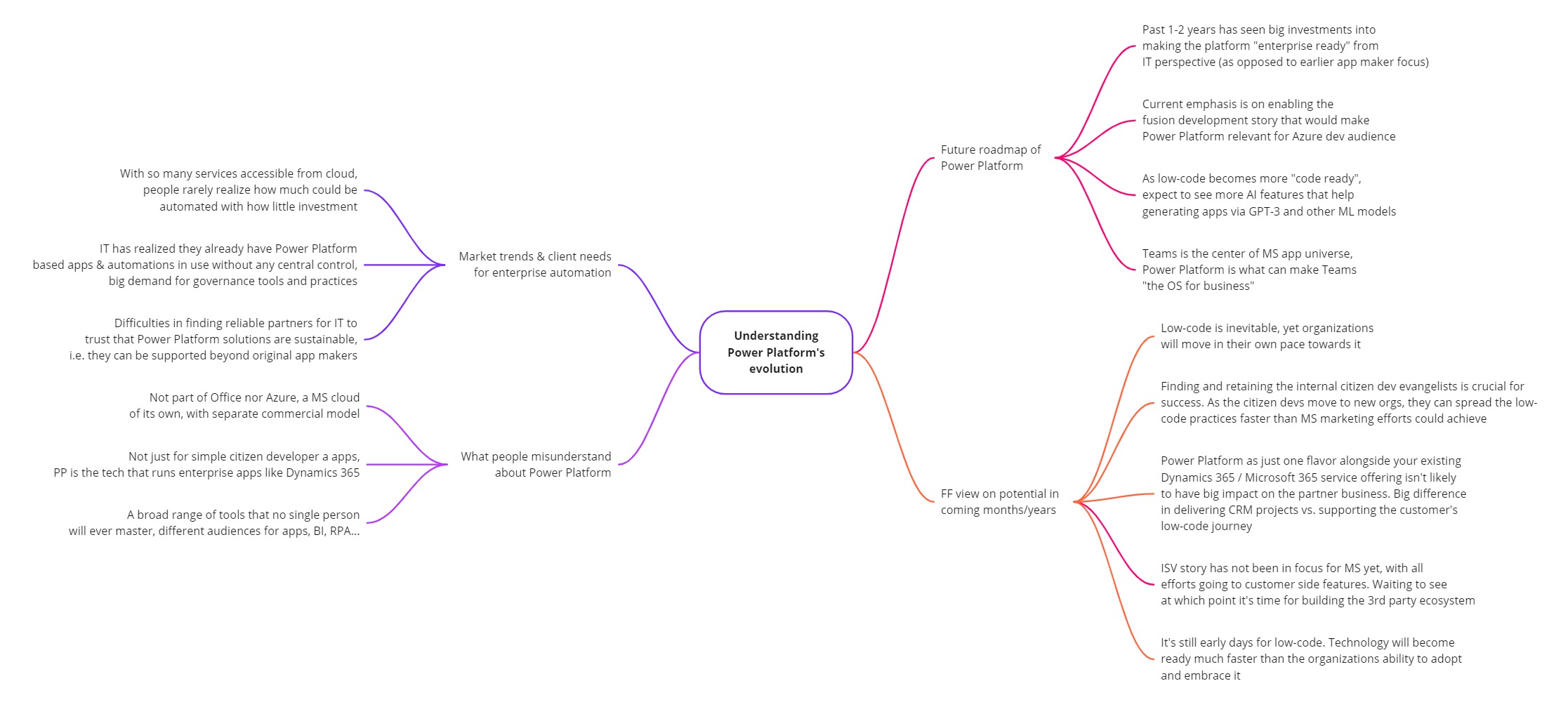
This turned out to be quite a comprehensive “state of Power Platform in 2022” type of a discussion. I guess that’s just what tends to happen when someone asks me a question about it. Below is the mind map of what I planned to cover in the podcast episode (click for a bigger image):
You can listen to the end result on your favorite podcast service – assuming it is either Spotify or Apple. The detailed show notes with a few quotes from me are available on the Transistor.fm page for the Demystifying Enterprise Innovation podcast.
Notes and thoughts
In the podcast episode we start by discussing my own journey as a citizen developer from 20 years ago, learning about CRM / marketing automation processes at a large B2C company (Nokia). This path then lead me to different Dynamics CRM consulting roles, and most recently going all-in with Power Platform in 2020.
Being on the citizen side from day one instead of starting my career in formal IT projects has been undoubtedly one of the key reasons why I’ve found the low-code movement to be so close to heart. To me, the ability to democratize code is a much more worthy goal than just trying to get sales people to enter more information into the CRM database.
Sure, such business apps may be the “what” but citizen development is the “why”. The way Microsoft has managed to infiltrate the existing toolkits of these citizens by bundling Power Apps and Power Automate into Office 365 is the prime reason why things have moved along so fast in this space. Merging PowerApps with XRM 4 years ago is what allows them to still keep moving fast today, even as more complex enterprise IT requirements now need to be met when the apps originally built by citizen devs are becoming more & more business critical.
Despite of this move towards enterprise processes, bottom-up innovation is still what excites me the most. Grandiose digital transformation programs with their top-down agendas may have the big funding behind them, yet I believe the net impact from small apps built by citizens motivated to fix practical issues in their daily working lives is going to be greater in total. Teams as a platform is a story that may cause problems for us more experienced MS BizApps practitioners, and still this kind of simplification is definitely needed when you really want to scale low-code in practice.
Power Platform governance topics are where I spend the majority of my working days on right now. When delivering our Power Platform governance advisory services, I’ve seen how difficult it can be for the IT organization to get a handle on citizen driven apps and automations – at least if no one was there to educate them on how Power Apps & Power Automate administration works in practice.
This is not so much a challenge of the technology not being available. Rather it is the new roles and alignment of IT alongside the citizen developers that poses the biggest barrier for companies to feel safe enough to fully embrace what this corner of the MS cloud can offer them. The same gradual increase in maturity that has happened with Office 365, Azure, and also Power BI from the “power family” – all of it seems inevitable for Microsoft’s low-code products, too.
This is why we’re now seeing less new maker focused features right now and a bigger push for admin & governance capabilities in Power Platform. The next big target for MS is in formalizing the fusion development story for low-code, to get the professional developers on board this new way how customer organizations address the growing demand for digital solutions that can’t all be met with custom code alone.
The ISV opportunity in Power Platform has not yet been a true focus area for Microsoft. Their emphasis has been on the internal transformation of organizations via citizen developer solutions. Yet many MS partners are naturally interested in the huge opportunity of the low-code movement. They’d love to become a part of this new ecosystem where the number of low-code developers is growing by 40% every year. However, there’s a lot of work ahead before the mainstream wave of ISVs could be onboarded to Power Platform, both from commercial and technical perspective.
We can’t just take the good ol’ Dynamics business model and apply it to Power Apps since the platform is designed to empower bottom-up innovation distributed all across the organization (who’s gonna do the top-down purchase decision on your project?). Neither can we make the Office style assumption that all these tools would be common to all information workers (justifying the premium licenses requires stepping outside the generic productivity story and quantifying the value from business specific processes). Experience from the other MS clouds is definitely a major advantage from an ecosystem insights perspective. At the same time, if you just sprinkle a bit of Power Platform technologies on top of your existing business model and projects, you can’t expect to see any radical growth or shift in how your customers are engaging with you.
At Forward Forever we’ve been lucky to get the chance to educate several MS partner companies on the practicalities of developing apps for Power Platform in 1:1 coaching sessions over the past two years. It has affirmed our belief that this low-code movement is an infinite game where we aren’t competing against other players. There’s no sense in trying to be the winners once the final whistle blows. Rather we should do our best to keep the game going, helping the whole league around us to grow and build an audience (even a fan base) who wants to see us succeed.
There are no winners or losers in an infinite game; there is only ahead and behind.
Simon Sinek
In addition to advising customers and partners on how to succeed with Power Platform, we’ve also invested resources into building products on top of it. Our offering in this field has recently reached a point where our Sustainability Action Pack is now listed on Microsoft AppSource for everyone to see. It’s a solution template that provides tools to drive environmental actions, make progress transparent and help organizations reach their social, environmental and climate targets (see SECAP).
Power Pages, Power Apps, Power Automate, Power BI – the whole MS low-code stack is being used when we’ve delivered the solution to municipalities in Finland. The big difference compared to Azure based applications, for example, is that the end product truly runs on the customer’s platform. Modifying and extending our Sustainability Action Pack functionality can be done by business users – as long as they’ve got the willingness to learn how Power Platform works.
This might have been just marketing talk a decade ago. Today the reality is that the persons who are willing and able to use these low-code tools to shape your business applications are likely to be among your most valuable employees. They probably haven’t been hired for this exact role, yet the organization should acknowledge the positive impact that they’re able to achieve by adopting Power Platform tools and thus adapting your tools to deliver better business outcomes. Otherwise they may quickly find a new place to work where such evangelism is appreciated.
From the outside, as a consultant/advisor, we can only show you the direction to take. The real adoption journey for low-code relies on empowering internal personnel to build new things that create business value. Ownership of your own tools is the biggest difference in mindset when it comes to the traditional Dynamics business applications versus the new breed of Power Platform solutions. This is the revolution in low-code – the technology part is just evolution.
For more of my thoughts on Microsoft Power Platform evolution / low-code revolution, go and check out the podcast episode:
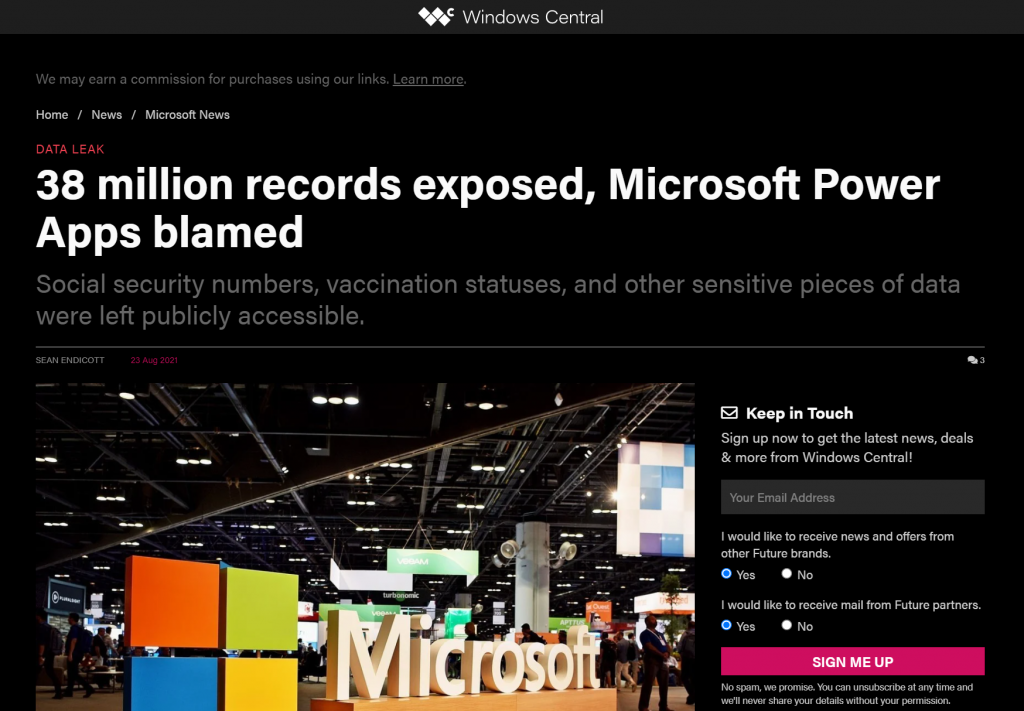
Recently Power Apps made the headlines in a way that Microsoft would have liked to avoid at all cost:
The news headlines today aren’t exactly the most neutral source of information, but luckily we also have access to the full report from the security research team at UpGuard. Here’s what happened according to them:
The UpGuard Research team can now disclose multiple data leaks resulting from Microsoft Power Apps portals configured to allow public access – a new vector of data exposure. The types of data varied between portals, including personal information used for COVID-19 contact tracing, COVID-19 vaccination appointments, social security numbers for job applicants, employee IDs, and millions of names and email addresses.
UpGuard
Sounds serious, and it certainly shouldn’t be sweapt under the rug by anyone working with Microsoft Power Platform. We have a lot to learn from an incident like this and the concerns it may bring up along with it. As these low-code technologies become more widely used across different industries, not all publicity will be positive.
There have of course been some concerns raised by IT practitioners already before this Portals incident on what’s the general impact that low-code platforms will have on business solutions development. How to secure customer data and to build proper governance practices around these tools is a topic that is often covered when talking about Power Platform with customers.
I personally already used the above headline as an example in a governance workshop with a customer on the very next day after the report was published. The discussion was quite neutral and it served well in acknowledging both the important role that Power Platform tools can have in business processes, as well as the need for practices that allow them to be safely used in developing new solutions.
The other alternative where such a topic would not be proactively addressed in a transparent manner could instead lead to more controversial reactions down the road. Some people may have negative experiences in their past that might lead to seeing these new events as an enforcement of their existing beliefs.
It’s hard to prevent people from drawing the wrong conclusions based on incomplete information if we don’t bring all the relevant pieces into light. To help in such examination of the evidence, in this blog post I’ll present some fictitious statements that could potentially be made based on reading the news headlines. Then I’ll offer my own perspective on whether they would be justified or not.
“Bugs in Microsoft’s software caused the data leak!”
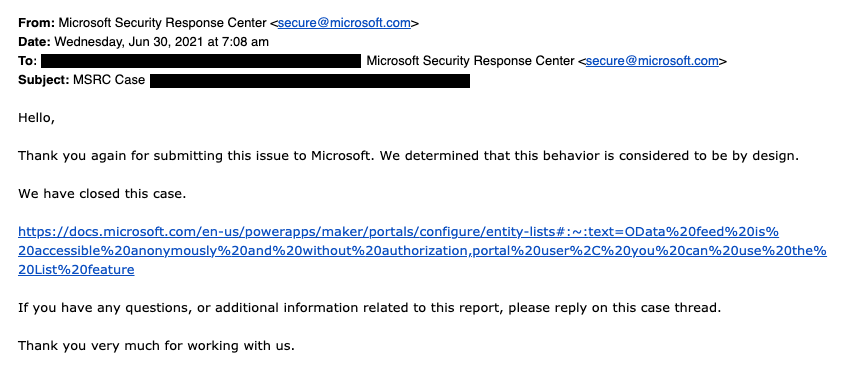
This wasn’t an actual bug, rather an unfortunate feature. As the report title from UpGuard hints, it was “by design” when examined from a technical perspective. Also, that was the initial response from Microsoft’s side, as shown in the report:
The above response is in my opinion the biggest mistake from Microsoft in this whole incident. Being tone deaf when presented with something that had already proven to be a pattern leading to unintended disclosure of confidential customer data via numerous Power Apps Portals out there is… Well, it’s what happens in large corporations, unfortunately.
What was this “by design” feature then? In the state that the Portals configuration experience was at the time of the investigation, there wasn’t any strong push from the product side to make the data tables used in the portal as private. It was a neutral platform built specifically to take records from your organization’s internal Dataverse tables into a public website, then giving you the choice to either show all the contents to anyone, or limit the visibility through a very granular security model to only a small subset of records.
As an example: you could show all the available locations where COVID-19 vaccinations were being offered (public table). Then you’d give the logged in user the ability to create an appointment record (private table with access control). Both are an integral part of the business process managed via a portal, yet the rules for showing them to the website visitors are directly opposite. The technical platform has to cater to both these requirements.
As it happened, there was a way through which the portal developer could forget to enable the table permissions that the private data should have in all areas where it was used. Now, the reason why this mistake wasn’t immediately obvious was that the Power Apps Portal product included a feature that allowed publishing this data as OData feeds. These would not be visible in the website pages necessarily, but they were technically available as long as you knew the right path from where to search for them.
In our example, a public OData feed of locations could have been useful for integration purposes. For reservations made by private individuals, an unauthenticated feed would never be a good idea. Yet the platform didn’t know what the developer wanted.
After this incident was reported by UpGuard, Microsoft changed the defaults and made it require more conscious effort to publish the feeds for unauthenticated consumption.
“Poor default settings in the Portal product were dangerous!”
There’s no denying that discovering more than a thousand Power Apps Portals misconfigured to expose confidential data to unauthenticated users is a big number. Yet the total number of Portals out there is… well, let’s just say it’s certainly multiple times that.
As part of their research, UpGuard enumerated through the various available powerappsportals.com and microsoftcrmportals.com subdomains to programmatically scan the sites with potential unintended OData feeds published. Many were found through this method, but still this problem affected only a small subset of all Portals websites out there.
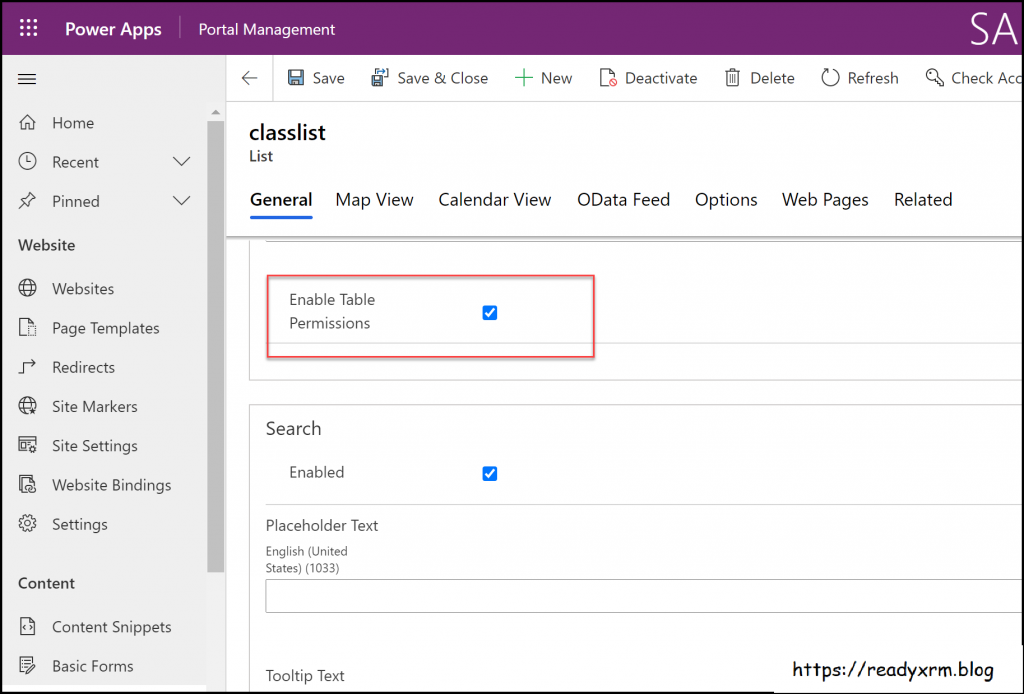
The majority of Portals developers will have been aware of the setting that must be enabled for any data that you don’t want to be publicly available on your website. Nick Doelman explains the “Enable Table Permissions” setting very clearly in his excellent blog post. It’s not really fair to claim that this would have been impossible to notice while building your Portal app:
If it has been news to you and you have built websites with Power Platform tools, then I seriously recommend you to take advantage of this generous offer by Nick and enroll for his Power Apps portals Security Deep Dive course:
Update 2021-08-31: you should also check this video from George Doubinski about the Portals behaviour before & after the default setting change:
“Microsoft should prevent such things from happening on their cloud service!”
Power Platform is a suite of low-code tools that allows you to build your own apps. Whatever business logic the published app contains is ultimately the responsibility of the app creator. Same goes for the data you manage with that app. Technology providers can’t easily stop people from building unfit solutions with their products.
There’s a great analogy in George Doubinski’s blog post “How to secure Power Apps portal from making the news” that I’ll repeat here. If you’re a company selling nail guns and a few unfortunate customers of yours shoot themselves in the foot – what should you do about it? Sure, your product probably came with all kinds of instruction manuals and warning signs that try to explain the importance of learning how to use such power tools. Similar to how Microsoft now shows a banner saying “table permissions should be enabled for this record or anyone on the internet can view the data”, to try and warn people not to hurt themselves.
Let’s look at an example from another area of Power Platform that I cover frequently in my blog: licensing. Any customer could easily use this platform to build an automation that is a clear violation of the multiplexing rules of the very same platform’s licensing terms. Just create a Power Automate cloud flow that automatically pushes all new opportunities from your Dynamics 365 Enterprise Sales app into a SharePoint list accessible to your whole organization with no Dynamics licenses assigned to them. Congratulations, you’ve again used the powerful tool to hurt yourself in a way that the vendor couldn’t have stopped.
“I knew citizen developers couldn’t be trusted to build real business applications. So much for low-code!”
Did you look at the types of customers that suffered from this data leak? If not, I’ll list some of them from the UpGuard report here, to give perspective:
American Airlines
Ford
State of Indiana
New York City Municipal Transportation Authority
Microsoft
These don’t sound exactly like the kind of organizations where a lone citizen developer who discovered a neat tool in his Office 365 app launcher just went ahead and built a portal on top of millions of rows of contact records and other sensitive data. If I had to guess, I’d assume there has been a proper development team working on many such customer facing services – not just citizens.
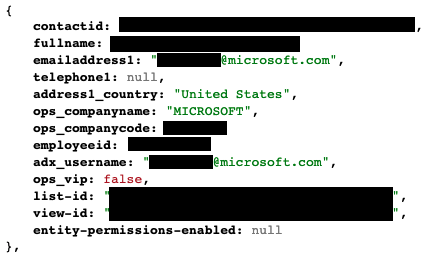
The above picture is an example from the report’s contents that was captured via the unsecured OData feeds. It is from the Global Payroll Services Portal for Microsoft employees, built (presumably) by professionals working with software. Despite of all the resources and knowledge behind these, the misconfiguration of a Power Apps Portal still went into production sites.
Although not directly related to this incident, on the very same week there was also another unfortunate data leak reported concerning the Microsoft cloud. Only this time it was around CosmosDB and the database primary keys that got leaked, exposing private data from thousands of Azure customer organizations. The misconfiguration seems to have been carried out by Microsoft software developers while they were integrating Jupyter Notebooks with CosmosDB to provide a new platform feature to customers.
Regardless of whether you are clicking through low-code configuration pages or writing your own lines of custom code, mistakes can happen.
“Suites like Power Platform are becoming way too complex for anyone to keep track of all these features & settings that can cause harm!”
This is certainly true in the sense that a single person will not have an A-to-Z understanding of Power Apps in Canvas/Model-driven/Portals flavor, Power Automate in the cloud and on the desktop, Power Virtual Agent, Dataverse, AI Builder, Power BI and its data platform back-end… It’s way too much for anyone to consume as documentation, let alone master in practice.
We should be asking where the assumption actually comes from that an app maker or developer should have end-to-end knowledge of the whole Microsoft low-code stack? Whether you’re a customer or a partner, it’s very important for you to not be blinded by all the flashy product demos and testimonials on “how company X digitally transformed themselves, using software suite ABC”. It doesn’t all happen thanks to this one mythical app hero who can take on any challenge – rather it’s the result of the right person finding the right tool to solve one specific problem at a time. Repeatedly, at scale.
Low-code is a team sport and you will increasingly see the fusion development approach be promoted by Microsoft. This emphasizes the fact that an optimal mix of business domain expertise and technical software development skills is a better approach to achieving long term business value with low-code than relying on lone superheroes to do it all. In the end, just because you’re not writing as much code as earlier doesn’t mean the resulting systems would be simple:
Low-code tools may be easy to approach, but the solutions you create with them can be as complex to manage as custom software.
The data leak was the result of a feature built into the platform that the persons developing the customer specific solution were not aware of. They didn’t purposefully create the OData feeds, rather the software product generated them based on the underlying logic of how it was meant to streamline certain app development tasks. The best chances for having awareness of all these moving parts in the end solution is to ensure people have a realistic opportunity to focus on their primary tools and continuously sharpen their skills.
“This incident proves you need product X / service Y from partner Z to be safe with Power Platform!”
Events like these are bound to inspire companies working in the Microsoft ecosystem to try and gain exposure of their own by riding on the news wave. It never hurts to sprinkle a little FUD tactics on top of your marketing message, right?
Now, I have to be transparent and admit right away that we are in the business where the questions and concerns coming from Microsoft customers are addressed via our advisory services. Even though we educate organizations on governance best practices and have delivered a few Power Apps Portals solutions to them, I would not make any statements like “buy from us and you’ll never have these kind of problems”. There’s two reasons for this:
Our aim is to help customers take ownership of their digital tools, not to be the ones who build everything for them & maintain it. New app makers will make mistakes as they learn & grow, they just need a safe space for this (read: not a public website).
I know how hard it would be to build a technical solution to audit every little detail that could go wrong in the various use cases where Power Platform is be used.
Let’s examine the details of this particular data leak. First of all, to have any technical level protection, you would need a service that can tap into Power Apps Portals specifically. Running something that monitors only Canvas Apps or Model-driven Apps won’t help you here. Even the Power Platform Center of Excellence (CoE) Starter Kit from Microsoft only has the Portals data inventory as a backlog item as of now. If no public APIs are available to tap into a Microsoft cloud service, then you’re unlikely to find any software to do the required tricks for you.
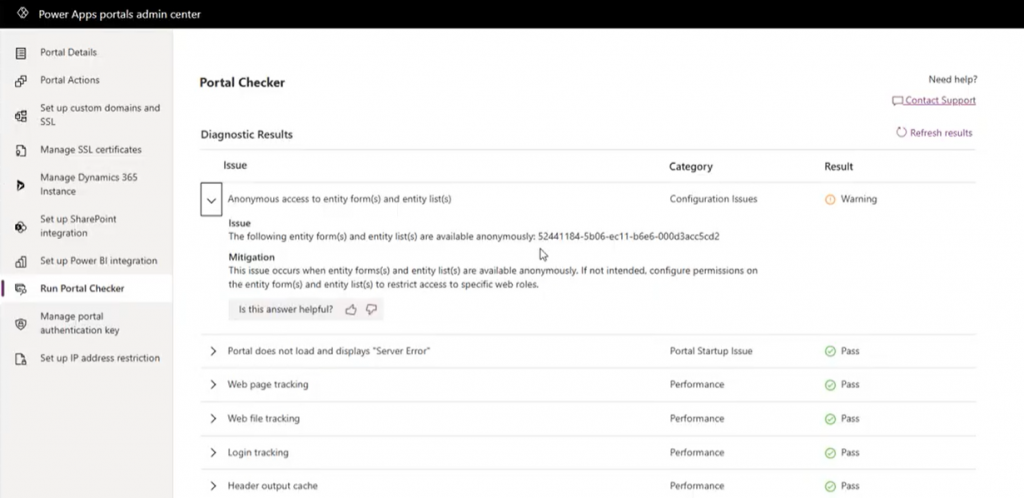
Even if we’d have the same level of telemetry data access as Canvas Apps do, what’s the likelihood of the specific setting in question (Enable Table Permissions) to be exposed and monitored? Well, it is data stored inside Dataverse tables and could be queried via Advanced Find as showed by Nick, so in retrospect we could technically have audit tools built for it. But why would someone built such a third-party product when Microsoft already offers Portal Checker to all customers?
So, there’s unlikely to be an easy & all encompassing solution out there that would address all your Power Platform security and governance concerns. I could even bet that some of the Portals websites that suffered from the OData leak will have been reviewed by security professionals from outside the Microsoft ecosystem and still the issue was not discovered. Probably because they didn’t know where to look.
Because it’s an ever evolving cloud platform, it was possible for Microsoft to quickly react to the incident via a change in their original design, as well as by notifying the customers potentially affected by it. Today the risk of unintentional data exposure is technically lower and the public awareness of such possible misconfiguration among the Power Platform app maker community is much higher.
Yet we have no way to guarantee what will happen tomorrow. Something similar may be discovered in a different part of the platform that will again require attention and action. I think all we can really do is to keep our eyes open and be ready to learn from the new discoveries shared by the network around us.
If you’re serious about leveraging Power Platform low-code tools in your organization, then you definitely should be using the Power Platform Center of Excellence Starter Kit (CoE) from Microsoft. This is the best way to get an understanding of what happens in all the environments across your tenant – ranging from small experiments by citizen developers to enterprise wide systems running on Dataverse, like Dynamics 365 Customer Engagement apps.
The latest CoE update is a big milestone, since it enables the installation of these tools into any Dataverse for Teams environment (DV4T). Why is this a big deal? Because it removes a few licensing blockers that might have previously stopped organizations from deploying the CoE or making the most of its capabilities.
The first upside is you no longer need to consume Dataverse storage capacity for the CoE deployment. That isn’t actually such a big of a deal, since the CoE Starter Kit data usually doesn’t really take much storage space at all (unless you’ve got a huge enterprise tenant). A nice bonus from this is that you can now deploy CoE in a demo / trial environment with no paid capacity available.
You still need some actual Power Platform licenses to run CoE, though. Remember: Microsoft 365 does not contain Power Platform licenses – not even at E5 level. From the CoE setup prerequisites, we can find the following statement about Power Automate licenses:
If you are using the CoE Starter Kit in a Dataverse for Teams environment, a Power Automate per user license will be required for the admin running the sync flows. No additional licenses will be required for users interacting with any of the canvas apps.
Now, the really big thing is that by using Dataverse for Teams as opposed to the full Microsoft Dataverse, every user with a Microsoft Teams license is allowed to interact with the CoE data and processes. This means that you can actually invite all citizen developers in your organization to participate in the governance practices and automations directly – regardless of whether they already have a premium Power Apps license assigned to them.
If you only perceive Power Platform governance to be about restrictions and enforcement of policies by IT admins, then the differences between the old & the new model aren’t that big. If, on the other hand, you believe in the power that low-code has to democratize technology and make it accessible to every developer, be it a pro or a citizen one, then this Teams based deployment option is something you’ll definitely want to explore.
Installation
Let’s try things out in a new DV4T environment, to see how the deployment process differs from the traditional set up of CoE core components. There’s a different solution package aimed at the Teams deployment option. We’ll need to have an environment provisioned in our chosen team before the installation, so just create one dummy app if you’re using a new team for CoE purposes.
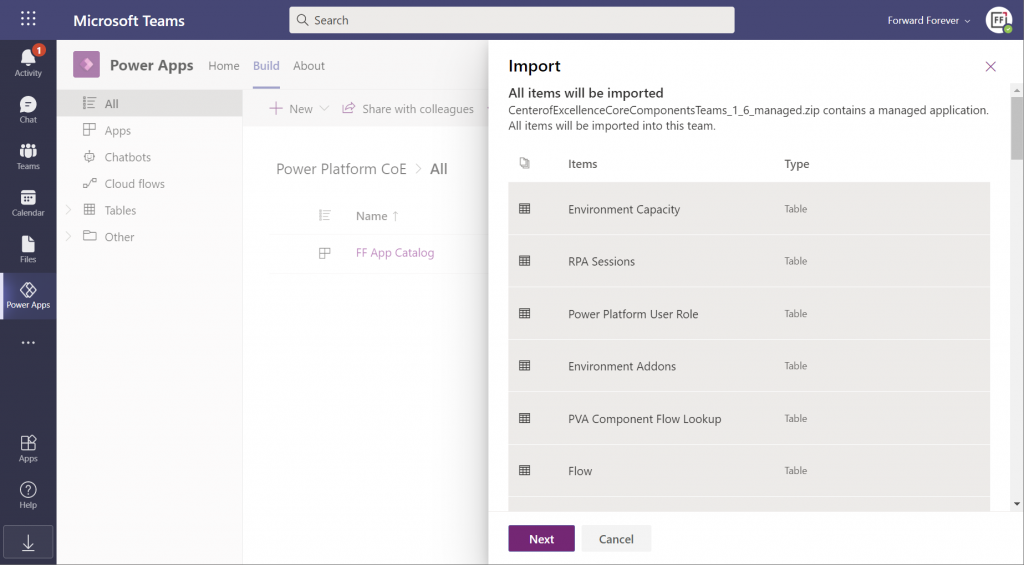
The import (and export) options within the Power Apps app in Microsoft Teams have only recently been enabled. Importing the managed solution zip file into DV4T gives you a bit different experience than what we’ve been accustomed to in the Dataverse side, by listing all the items that are part of the import:
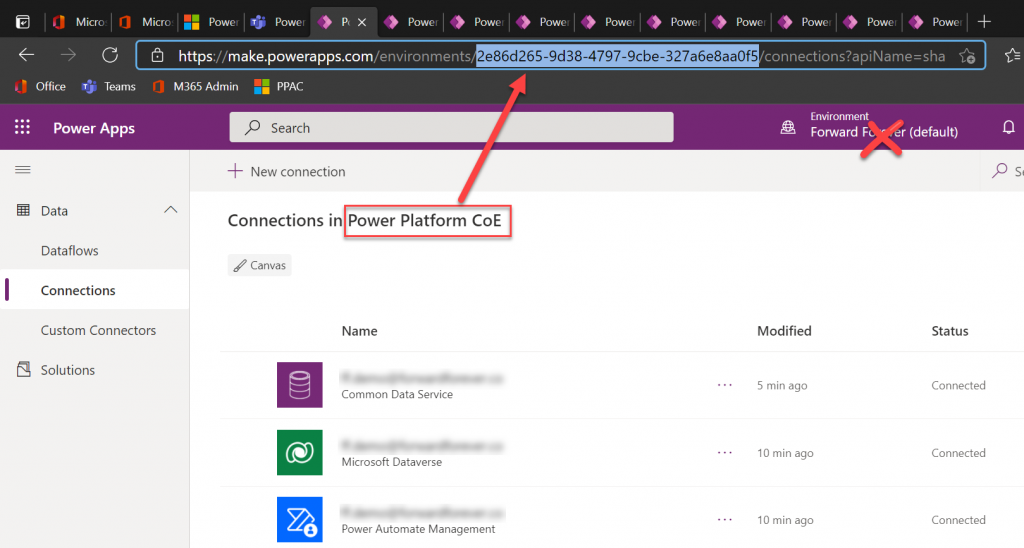
Next we need to create a bunch of connections before proceeding further with the installation, to allow CoE to perform the necessary data retrieval through a wealth of APIs. This process will give you ~10 new browser tabs that show the traditional non-Teams version of the Maker Portal. A bit of a click show – but luckily there’s one upside to it.
While you can’t open the DV4T environment directly in the Power Apps Maker Portal (as of now), you can hack the URL to get access to this full maker UI. So, as you’re adding all the required connections, grab the environment GUID from the address bar in one of the aforementioned tabs. Use that GUID to replace the zeros in the following URL:
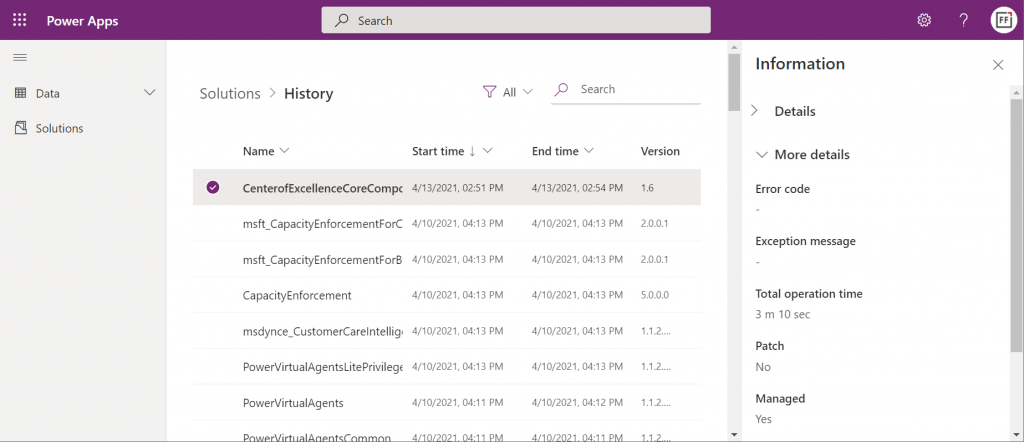
Now you have a proper Power Apps browser tab that’s independent from Teams yet lets you browse through the environment’s components. For instance, we can go and check the solution history view, to verify that the Center of Excellence Core Components solution imported successfully in 3 minutes 10 seconds:
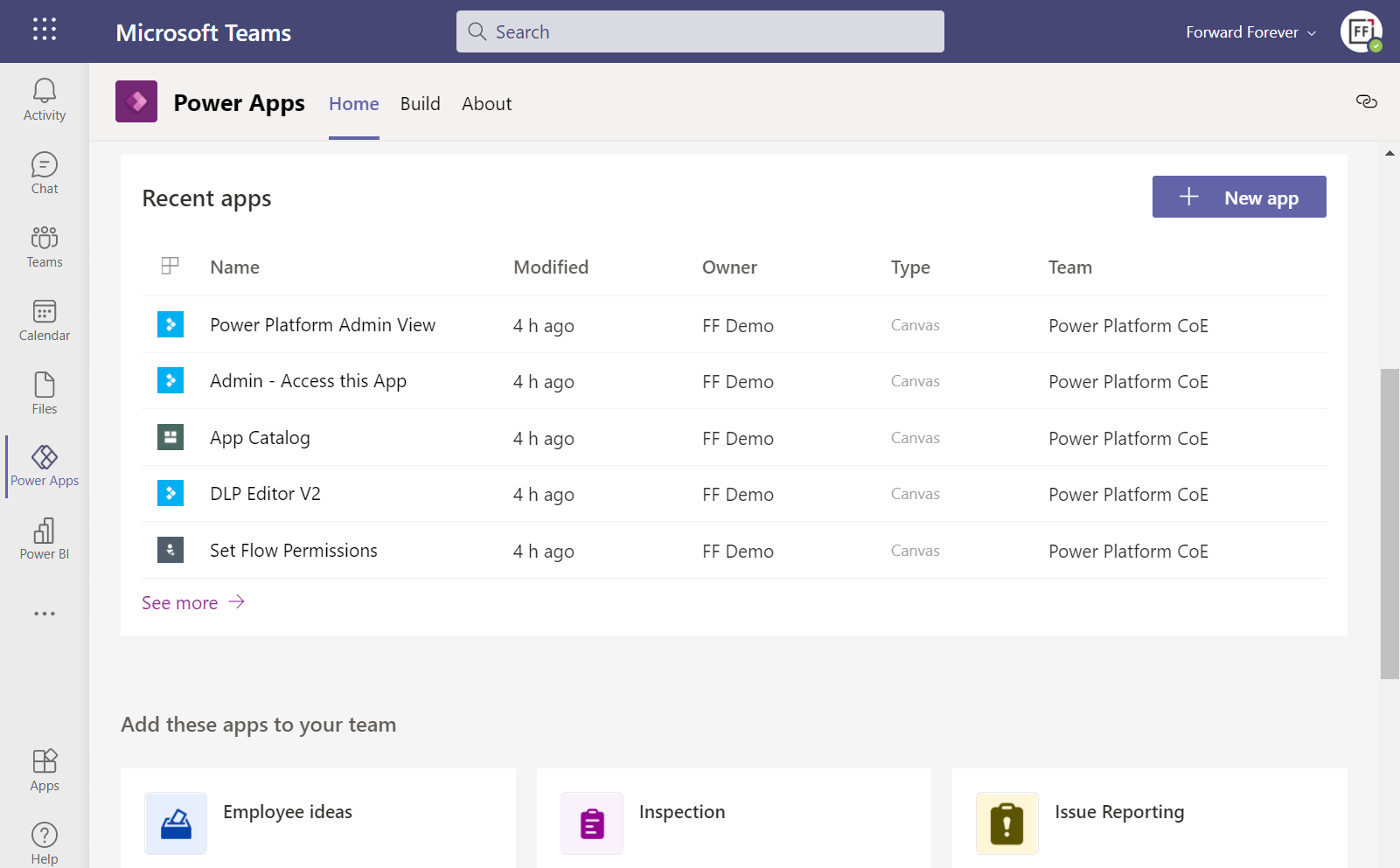
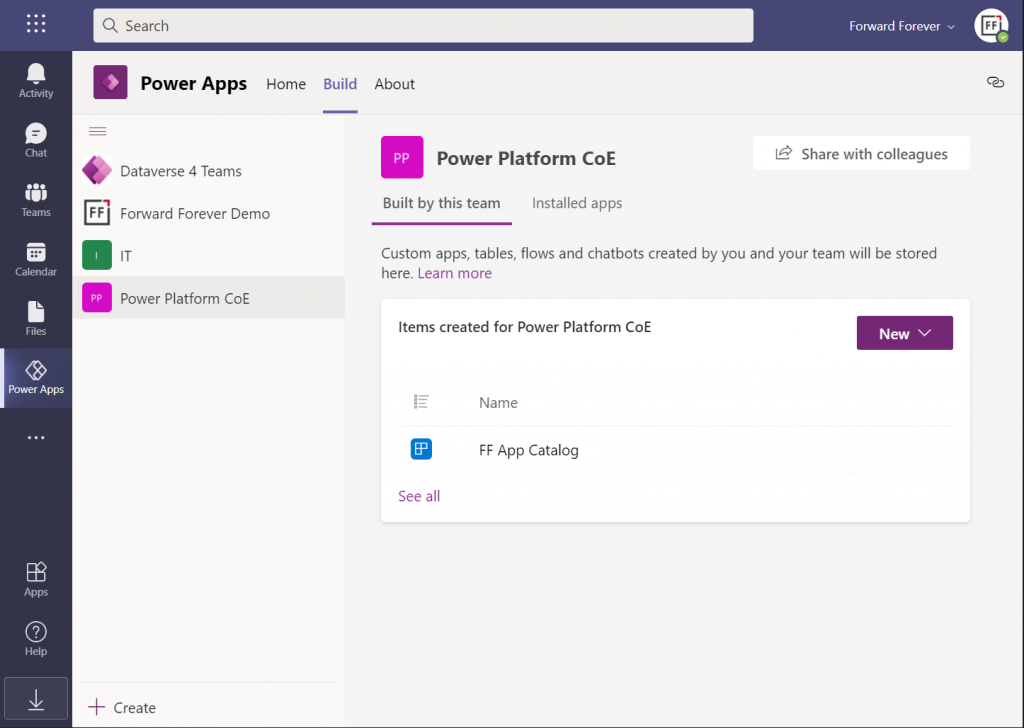
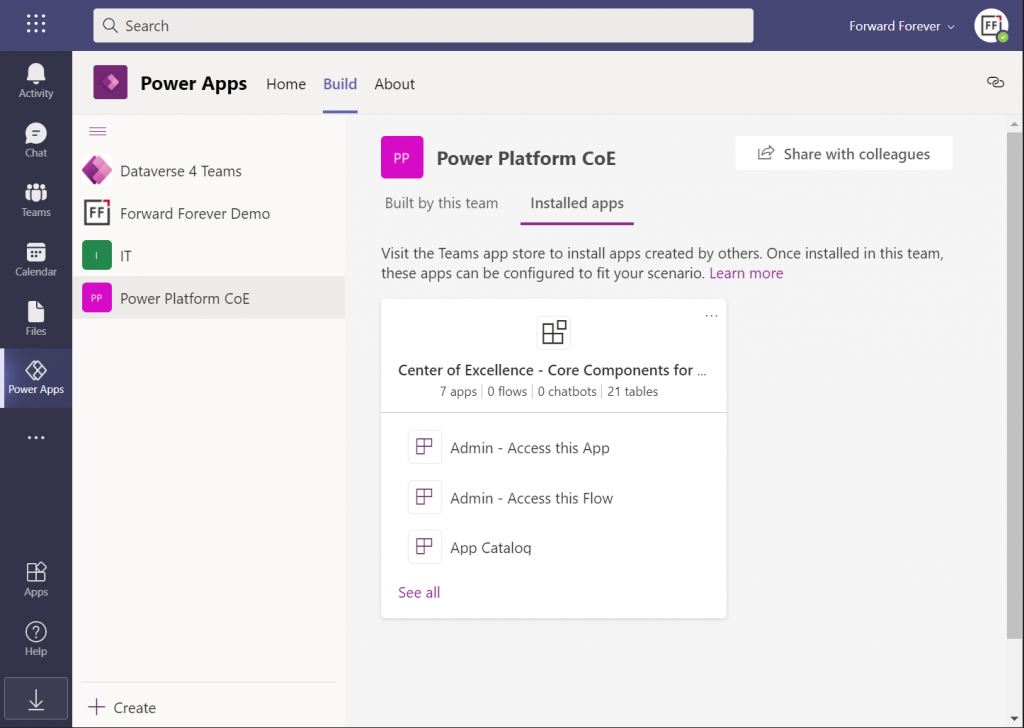
Hmm, but why can’t I see anything yet on the Power Apps Teams UI? Even if I click “See all” then I only see that one dummy app I added earlier, to get the DV4T environment provisioned.
The secret is in you choice of tabs within the Power Apps app. Specifically, instead of the “built by this team” tab you need to have a look at the “installed apps” tab. Ah! So, it looks like the managed solutions that you import into a DV4T environment are actually treated like Teams apps here – rather than just a list of components like we know them from the XRM era.
In fact, while we can import solutions into DV4T, the whole concept of a solution package isn’t actually visible when viewing the world from a Microsoft Teams perspective. Also during the import process, we’re importing “a managed application” rather than a managed solution. Make of that what you will.
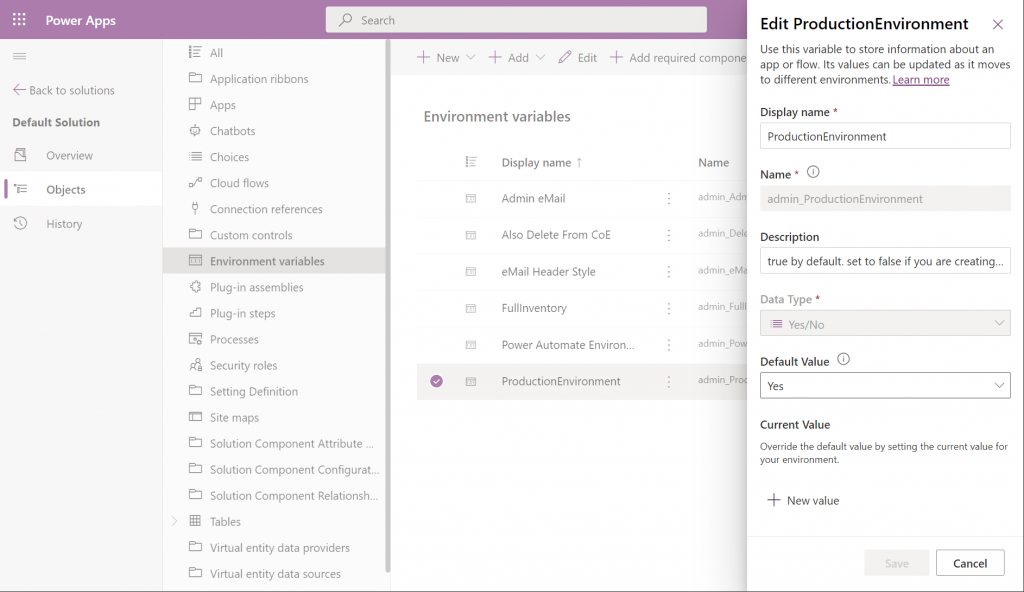
By using the full Power Apps Maker portal we have access to not just individual solutions in the DV4T environment but all the components when accessing them via the Default Solution. For example, managing things like Environment Variables can easily be achieved here:
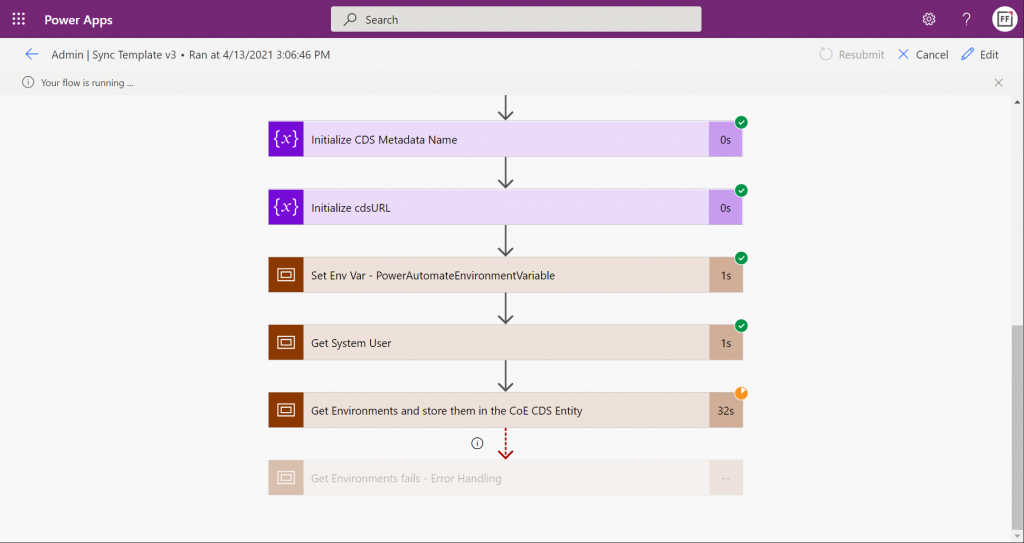
Let’s get everything configured and move into the CoE core components deployment step that’s common to all environments: sync template flows activation. This will populate the tables in our CoE Dataverse environment with information about environments (how recursive…), apps, flows, makers and so on:
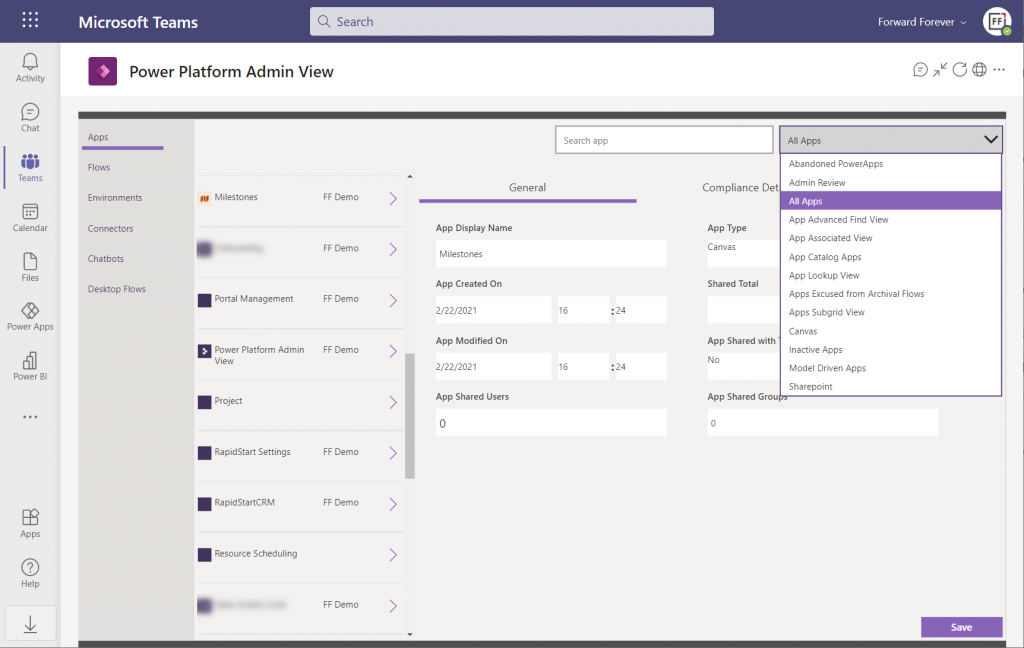
Once the data is in, we can admire it via the Power Platform Admin View app. Oh, but wasn’t that a Model-driven app? And Dataverse for Teams doesn’t currently have support for those, right?
Luckily there’s a new Canvas version of the Admin View available instead. Compared to the full Model-driven version, it’s… Well, how should I say this? “You get what you pay for.” Still, it gives a UI for browsing and editing the contents of your CoE environment’s tables. For those admins with little or no exposure to all goodies that the Model-driven apps and Dynamics 365 products offer, this may be perfectly sufficient for basic data management needs.
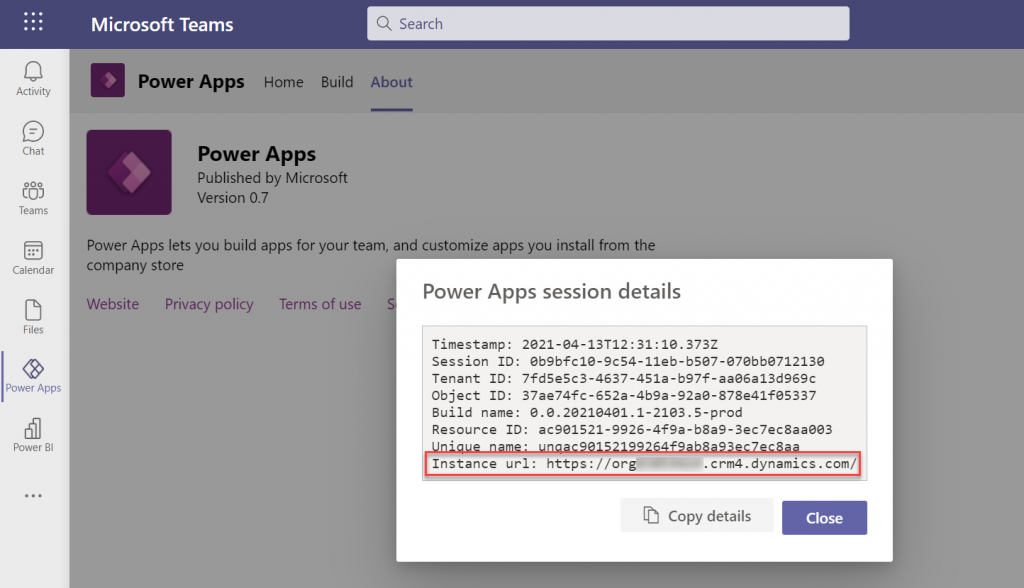
How about the Power BI dashboard then? That has always been a nice tool in the CoE Starter Kit to demonstrate the wealth of different elements and data points of the platform. The good news is, the same version that’s used for the full Dataverse based CoE deployments is applicable also to CoE in Dataverse for Teams. The one trick you need to know, though, is how to find the Org URL for DV4T:
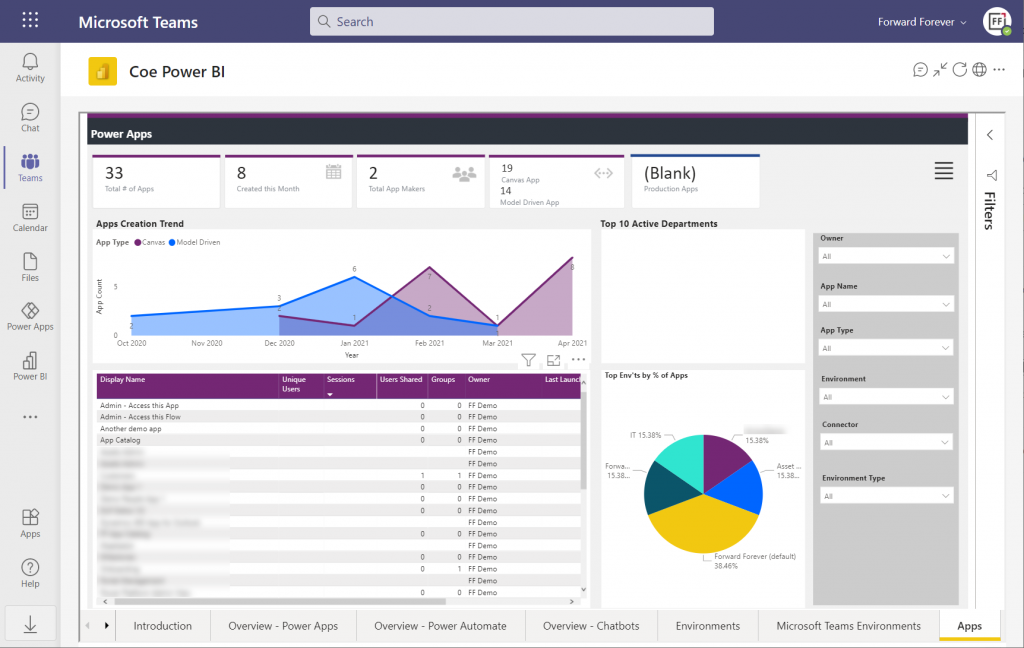
Paste the instance URL without “https://” and trailing “/” into the parameter field when configuring the Power BI dashboard for CoE. Import the .pbix into a new workspace, create a Power BI app from it and publish it to the end users. After pinning it into a Teams channel tab, we now have a lot more visual method for exploring the apps, flows and other elements in our tenant’s Power Platform environments:
There’s of course plenty of other useful apps in the CoE Starter Kit, both in the Core Components solution and further packages. In fact, when you look at the comparison table of what’s supported in Microsoft Dataverse vs. Dataverse for Teams, the differences boil down to the lack of a Model-driven admin app.
Conclusions
Despite of some of the new hoops you need to jump through to work with the simplified maker UI within Teams, the installation process of the Center of Excellence Starter Kit works pretty well in this deployment option, too. I’m actually surprised how well the CoE team has managed to “retrofit” the earlier solutions to work within the limits of DV4T.
This highlights an important question which I’m sure many people in the Power Platform community have been wondering about: how far will Dataverse for Teams actually go? Sure, if we analyze the detailed feature comparison between Dataverse editions, it’s easy to identify limitations in existing business applications that wouldn’t really fit within the Teams edition. At least yet.
While I don’t believe we’ll see the full feature set of Microsoft Dataverse unlocked for usage with Teams licenses alone, I also don’t think it’s going to be severely handicapped – intentionally at least. There’s a lot for MS to gain in pursuing the Teams as a platform story when competing against tools like Zoom or platforms like Salesforce + Slack. By attracting as many app makers and users onto the platform and then upselling them on premium Power Apps & Power Automate licenses when things like 3rd party connectivity or enterprise data platform features are needed, the revenue stream can be pretty darn nice still.
One final thing to keep in mind about CoE is that it’s actually a great showcase in itself of what Microsoft’s low-code tools can do. It’s built with the very same Power Platform tools that it is used for managing. All the APIs, automations, reports and apps use publicly available technology that the customers also could apply for their own scenarios. Put into a different business context, these are the kinds of big systems that could evolve on top of the platform over time, to guide pretty much any digital process.
Licensing remains a topic that no one claims to like yet everyone keeps on talking about. October 2019 saw what was undoubtedly the biggest number of changes to Microsoft Business Applications SKUs (i.e. items that MS sells), with the end of Dynamics 365 Plan licenses and new models for licensing PowerApps & Flow. Not to mention the new structure that ties licenses closely to API call limits. Oh, and we’re still waiting for the new restricted entities definition that should have gone along with October 1st licensing terms.
We’re not even past the month of October and there’s already a new licensing discussion heating up in the MS customer and partner community. The announcement of Self-service purchase capabilities for Power Platform products, made via Microsoft 365 Messaging Center (only visible to admins), seems to have pretty much angered everyone who saw it.
I gotta say, you simply could not find a worse channel to announce something like this, because it’s aimed squarely at getting around a problem that IT administration (and sometimes consultants like me) are a part of. But like we’ve seen so many times before, communication isn’t exactly the strongest part of Microsoft’s software licensing management efforts, so let’s just move on and start analyzing what is happening here, why it is happening and what possible outcomes there might be from it.
Empowering every individual to acquire applications
To get an overview of what exactly is going on, you can read the article from Mary Jo Foley: “Microsoft to enable end users to buy Power Platform licenses without administrative approval”. In short, starting in November 2019 (in the US), any user that has an account in your organization’s Azure AD tenant will be able to go and buy Power BI licenses directly from MS. Later this will expand to PowerApps & Flow, and other regions. Essentially this will be an “insert your credit card here to unlock Power Platform functionality” type of experience.
How is this different from any of the popular SaaS products from other vendors then? It isn’t. That’s the model that every consumer app and most business apps support, since it represents the lowest barrier to entering a commercial relationship. Usually you would start with a free trial period to try out the capabilities of the SaaS product. If it’s a good fit for the problem you’re trying to solve, the next problem you face is the procurement of the app. Buying things for personal use is easy, whereas the bigger the organization you’re working in is, the longer you can expect this purchasing stage to be. During it you’re basically standing behind the store window, staring at the product you know you’d really need, yet the door to the store is being kept shut. Often there’s even no opening hours sign to give you any clue on how long this will take (or if you’ll ever get what you wanted).
In such a scenario, it’s not uncommon for problems to get solved with a credit card and an expense claim. The ease of taking this route is how Shadow IT came to be, and I bet we’re just going to see more & more of this Bring Your Own App (BYOA) activity in organizations as the information workers become more savvy about what’s actually out there in the cloud. If one store is closed, there are tens of other options with 24H service.
But they can’t do this! They’re MICROSOFT!!!
It’s one thing being an enterprise software startup and trying to get onto the radar of potential customers via the Bring Your Own App strategy. When you’re Microsoft, though, the expectation is that things work in a completely different way. Since pretty much every bigger company is a MSFT customer, the licensing game has been a process of long negotiations and complex agreements. This is the procurement norm of how Microsoft software finds its way into the hands of the end users. Well, it sometimes does, and other times it doesn’t, because the needs of individual users may get lost in the big corporate IT machine that’s trying their best to keep things under control, with the growing amount of regulations, systems and requirements.
What’s Microsoft on about here with self-service purchases, specifically with this chosen set of products? Imagine you’re the world’s most valuable company, you happen to be producing software & you’ve recently discovered a huge new market in the Low-code Application Platform space. You’ve built up a strong community of advocates (or addicts even) and your target is to empower the next 10 million application developers to digitally transform their organizations with the help of your global cloud infrastructure and AI driven insights. You’ve got all these key buzzwords lined up, there’s a seemingly endless sea of citizen developer opportunity ahead of you. The only thing standing in the way of your success is this nasty thing that looks like Niagara Falls, sucking in many of the smaller boats that the poor citizens attempt to use to sail to this promised land of Power Platform. That thing has a name and it’s called Enterprise Software Licensing Models. So much for the “no cliffs” experience then – hope you packed a life vest on this journey!
To avoid this vortex that Microsoft themselves have largely caused over the past decades with the swirls of their enterprise software sales strategies, it makes perfect business sense to open up new, alternative routes for those power users who seek to merely use the software tools – instead of catering only to those who are tasked with managing the whole lifecycle of IT tools in the organization.
There’s only so much you can do with the PowerApps and Flow features bundled into Office 365 subscriptions, after which you’ll need a premium plan. Why on earth would Microsoft willingly push the users to look for alternative tools like Zapier or IFTTT to automate processes that connect to data sources that are outside Office 365? Why shouldn’t it be possible to enter the very same credit card details into a form provided by MS, to keep the tools within the same MS cloud that’s already used by the organization? Isn’t this actually a way to reduce the problems resulting from Shadow IT? Keep the rogue users closer to the official IT world and you’ll have a better chance of converting the tools into non-shadow status at some point.
Rogue citizens
Obviously there are some valid concerns with a model that might encourage users to acquire MS software via an alternative channel than the officially sanctioned one. The self-service shop won’t give the same negotiated prices for licenses as the company wide agreements. Handling the expenses from various different sources will be an overhead. The boundaries between supported and unsupported IT will become blurry. Even with the promised central visibility into who’s bought what licenses in the tenant, initially it will all just look like more work to those persons who have traditionally managed Microsoft licenses in the organization. There’s an FAQ document from MS for this self-service purchase model that attempts to address some of these concerns, but with a change like this there’s bound to be far more Q’s than A’s at this point.
There shouldn’t be a need for the self-service purchase channel to exist, but in reality there is. If you have only spent time working in roles that represent the centrally planned deployment of IT systems, you may not realize the challenges that can stand in the way of you and the software license you would need for getting your job done in a larger organization. Sure, there might be a theoretical process in place for how the needs of business users are identified and then eventually turned into a working piece of software that everyone happily uses. In reality a fair share of the people on the business side who live in the world of needs may not be seeing such processes in action. They may well be unaware of any development initiatives on the IT side, nor have contacts with those professionals that could help them navigate these processes. If IT systems can be complex, then the inner workings of an enterprise organization can represent a whole new dimension of complexity. No one is at fault, yet everyone pays the price.