Tag: Flow

  • Price points of Power Platform (2022 pricing and licenses)

    Price points of Power Platform (2022 pricing and licenses)

    NOTE: This post was originally published in March 2020, the last revision of pricing information is from November 2022.

    As of today, there isn’t a single place from where to check the actual prices of the different license types covered by the Microsoft Power Platform suite of products – like there is for Dynamics 365, for example. The information of prices vs. what paying that price actually entitles you to is distributed across several information sources and formats – starting from the individual product pages, to the learn.microsoft.com documentation pages, to the PDF licensing guides.

    To stop myself from having to always use a search engine to discover these pricing details, I decided to compile a list of links to the places where each individual Power Platform product team has made their pricing information public, as well as write out the current subscription prices in US Dollars and Euros. I’ve also included a few relevant licensing model elements that describe what the particular subscription entitles you to do (capacity, features and so on).

    Most of Power Platform product licensing is done via the prepaid subscription model familiar from Microsoft 365 (Office 365). More recently the pay-as-you-go (“PAYG”) option has been introduced for some of the services, allowing payment via an Azure subscription (read more about the November 2021 announcement here). It’s important to note that in general prepaid subscription prices are cheaper than pay-as-you-go. The PAYG option is primarily aimed as an option for customers to use, before they know the true consumption level and are ready to commit to a prepaid subscription. Where applicable, I’ve included the PAYG prices here for comparison.

    Your actual licensing costs will of course depend on the types of agreements your organization has with Microsoft. So, consider the prices on this page as mainly a starting point for understanding the relative costs of different Power Platform services.

    Power Apps / Pages

    Power Apps pricing

    Power Apps per app plan: $5 (€4.20)

    • Allows you to access one Power Apps app (canvas, model-driven, portal/website).
    • The same app in different Power Platform environments (dev/test/prod) requires a per app license for each environment.
    • Pay-as-you-go option: $10/monthly active user/app/month

    Power Apps per user plan: $20 (€16.90)

    • Allows you to access an unlimited number of Power Apps (canvas, model-driven, portal/website) in your tenant.
    • Can also be used for accessing canvas apps shared to guests in another tenant (not applicable to other app types).

    Power Apps pricing change on October 2021

    Before Oct 1st 2021, the Power Apps per app list price was $10 and Power Apps per user $40. See this blog post for more details on the price reduction as well as changes in the per app license entitlements. Note that your license agreement may still apply to the old terms, based on the contract duration.

    Power Pages (formerly Power Apps Portals)

    Power Pages pricing

    • Power Pages authenticated user capacity, 100 monthly active users: $200 (€168.70)(see also discount tiers).
      • Pay-as-you-go option: $4/user/site/month
    • Power Pages anonymous user capacity, 500 monthly active users: $75 (€63.20) (see also discount tiers).
      • Pay-as-you-go option: $0.30/user/site/month
    • Internal users (employees) can be licensed separately, via Power Apps or Dynamics 365 licenses, or as authenticated users.

    Licensing FAQ: Power Pages

    Power Apps portals (old licensing model, before Power Pages)

    Differences between Power Pages and Power Apps portals licensing model

    • Power Apps portals login capacity add-on, 100 logins per month: $200 (€168.79)(see also discount tiers).
    • Power Apps portals page view capacity add-on, 100,000 page views per month: $100 (€84.30).
    • Internal users must be licensed separately, either via Power Apps or Dynamics 365 licenses.

    Dataverse capacity (formerly “Common Data Service” / CDS)

    Power Apps and Power Automate licensing FAQ: Add-ons

    Storage
    • Dataverse Database Capacity (1GB) $40 (€33.70) per month
      • May still show up as “Common Data Service Database Capacity”
      • Pay-as-you-go option: $48 per GB used per month
    • Dataverse File Capacity (1GB) $2 (€1.69) per month
      • May still show up as “Common Data Service File Capacity”
      • Pay-as-you-go option: $2.40 per GB used per month
    • Dataverse Log Capacity (1GB) $10 (€8.40) per month
      • May still show up as “Common Data Service Log Capacity”
      • Pay-as-you-go option: $12 per GB used per month

    See also: What Dataverse capacity is included with the Power Apps and Power Automate plans?

    Power Platform / Dataverse API calls / API requests:
    • Power Platform Requests add-on: 10,000 daily API requests for $50 (€42.20) per month
      • Formerly known as “Power Apps and Power Automate capacity add-on”

    See also: Requests limits and allocations

    Power Automate (formerly “Microsoft Flow”)

    Power Automate Pricing

    Power Automate per user plan: $15 (€12.60)

    • Allows individual users to create unlimited flows, execution is limited based on available API requests per day (40,000 included)
    • Note: while Power Apps per app and per user plans includes similar rights, they are tied to the context of a canvas or model-driven app

    Power Automate per flow plan: $500 (€421.50) for five flows per month

    • Allows the organization to implement 5 flows, regardless of the number of users who trigger them
    • Child flows triggered by a parent flow do not need to be licensed
    • Execution is limited based on available API requests per day (250,000 included)
    • Additional flows can be purchased at $100 (€84.30)per flow per month
    • Pay-as-you-go option: $0.60 per each cloud flow run

    Power Automate per user plan with attended RPA: $40 (€33.70)

    • Allows individual users to run an attended RPA bot on their workstation
    • Presumably also contains similar rights as the standard Power Automate per user plan
    • Pay-as-you-go option: $0.60 per each attended desktop flow run

    Power Automate unattended RPA add-on: $150 (€126.50)

    • Allows the organization to run a single unattended RPA bot, no dependencies to users or workstations
    • Add-on requires either per user plan with attended RPA or per flow plan
    • Pay-as-you-go option: $3 per each unattended desktop flow run

    See also: Power Automate licensing FAQ.

    AI Builder

    Power Apps and Power Automate licensing FAQ: AI Builder

    AI Builder capacity add-on: $500 (€421,70) per unit per month

    • Each unit contains 1 million service credits on the tenant level
    • Allows the organization to use any of the AI model types included in AI Builder
    • AI models consume service credits when they are trained, used in an app or flow, or scheduled to periodically run. The amount of capacity consumed varies based the AI model, as well as the size and complexity of the data set. See AI Builder calculator to estimate the capacity requirement and cost of your model.
    • Add-on requires at least one paid Power Apps, Power Automate or Dynamics 365 license
    • For the built-in Business Card scanning feature in Dynamics 365 Sales, there is free capacity included in Sales Enterprise App licenses: 10 scans per user per month, pooled at tenant level. Sales Insights has a capacity limit for business card scanning of 200/user/month. If additional Business card scanning capacity is required, Sales Enterprise customers may purchase additional Sales Insights licenses. (Taken from Dynamics 365 Licensing Guide PDF document.)

    Power Virtual Agent

    Power Virtual Agents pricing

    Assign licenses and manage access to Power Virtual Agents

    Power Virtual Agent: $1,000 (€843.20) per 2,000 sessions per month

    • Allows the organization to have an unlimited number of bots
    • In addition to the tenant license, internal users will need to be assigned a user license. The tenant license costs money, but the user licenses that are purchased via the same mechanism are apparently free.
    • “A session is an interaction between the customer and the bot, and represents one unit of consumption. The session begins when an authored topic is triggered. These sessions are referred to as ‘billed sessions’ in the product. Sessions are deducted for both testing and production usage.”

    Power BI

    Power BI licensing in your organization

    Power BI Pro: $9.99 (€8.40) per user

    • Included in Office 365 E5 subscriptions for no additional charge
    • Each Pro license gets 10 GB of data storage capacity

    Power BI Premium per capacity: starting from $4,995 (€4,212,30) per organization

    • Offers dedicated compute and storage resources for your organization
    • No per-user license assignment needed for report consumption, report creation and sharing still requires Pro licenses for users
    • Required for advanced features, see comparison table
    • See What is Power BI Premium and Power BI Premium FAQ for more details

    Power BI Premium per user: $20 (€16.90)

    • New option to access premium features without organizational capacity purcahase requirement.

    Dive deeper into the licensing details

    Microsoft usually posts monthly updates to their licensing guide PDF documents. Here’s where you can grab the latest copies: Power Apps and Power Automate Licensing Guide & Dynamics 365 Licensing Guide.

  • Licensing is NOT a security mechanism

    Licensing is NOT a security mechanism

    Licensing remains a topic that no one claims to like yet everyone keeps on talking about. October 2019 saw what was undoubtedly the biggest number of changes to Microsoft Business Applications SKUs (i.e. items that MS sells), with the end of Dynamics 365 Plan licenses and new models for licensing PowerApps & Flow. Not to mention the new structure that ties licenses closely to API call limits. Oh, and we’re still waiting for the new restricted entities definition that should have gone along with October 1st licensing terms.

    We’re not even past the month of October and there’s already a new licensing discussion heating up in the MS customer and partner community. The announcement of Self-service purchase capabilities for Power Platform products, made via Microsoft 365 Messaging Center (only visible to admins), seems to have pretty much angered everyone who saw it.

    I gotta say, you simply could not find a worse channel to announce something like this, because it’s aimed squarely at getting around a problem that IT administration (and sometimes consultants like me) are a part of. But like we’ve seen so many times before, communication isn’t exactly the strongest part of Microsoft’s software licensing management efforts, so let’s just move on and start analyzing what is happening here, why it is happening and what possible outcomes there might be from it.

    Empowering every individual to acquire applications

    To get an overview of what exactly is going on, you can read the article from Mary Jo Foley: “Microsoft to enable end users to buy Power Platform licenses without administrative approval”. In short, starting in November 2019 (in the US), any user that has an account in your organization’s Azure AD tenant will be able to go and buy Power BI licenses directly from MS. Later this will expand to PowerApps & Flow, and other regions. Essentially this will be an “insert your credit card here to unlock Power Platform functionality” type of experience.

    How is this different from any of the popular SaaS products from other vendors then? It isn’t. That’s the model that every consumer app and most business apps support, since it represents the lowest barrier to entering a commercial relationship. Usually you would start with a free trial period to try out the capabilities of the SaaS product. If it’s a good fit for the problem you’re trying to solve, the next problem you face is the procurement of the app. Buying things for personal use is easy, whereas the bigger the organization you’re working in is, the longer you can expect this purchasing stage to be. During it you’re basically standing behind the store window, staring at the product you know you’d really need, yet the door to the store is being kept shut. Often there’s even no opening hours sign to give you any clue on how long this will take (or if you’ll ever get what you wanted).

    In such a scenario, it’s not uncommon for problems to get solved with a credit card and an expense claim. The ease of taking this route is how Shadow IT came to be, and I bet we’re just going to see more & more of this Bring Your Own App (BYOA) activity in organizations as the information workers become more savvy about what’s actually out there in the cloud. If one store is closed, there are tens of other options with 24H service.

    But they can’t do this! They’re MICROSOFT!!!

    It’s one thing being an enterprise software startup and trying to get onto the radar of potential customers via the Bring Your Own App strategy. When you’re Microsoft, though, the expectation is that things work in a completely different way. Since pretty much every bigger company is a MSFT customer, the licensing game has been a process of long negotiations and complex agreements. This is the procurement norm of how Microsoft software finds its way into the hands of the end users. Well, it sometimes does, and other times it doesn’t, because the needs of individual users may get lost in the big corporate IT machine that’s trying their best to keep things under control, with the growing amount of regulations, systems and requirements.

    What’s Microsoft on about here with self-service purchases, specifically with this chosen set of products? Imagine you’re the world’s most valuable company, you happen to be producing software & you’ve recently discovered a huge new market in the Low-code Application Platform space. You’ve built up a strong community of advocates (or addicts even) and your target is to empower the next 10 million application developers to digitally transform their organizations with the help of your global cloud infrastructure and AI driven insights. You’ve got all these key buzzwords lined up, there’s a seemingly endless sea of citizen developer opportunity ahead of you. The only thing standing in the way of your success is this nasty thing that looks like Niagara Falls, sucking in many of the smaller boats that the poor citizens attempt to use to sail to this promised land of Power Platform. That thing has a name and it’s called Enterprise Software Licensing Models. So much for the “no cliffs” experience then – hope you packed a life vest on this journey!

    To avoid this vortex that Microsoft themselves have largely caused over the past decades with the swirls of their enterprise software sales strategies, it makes perfect business sense to open up new, alternative routes for those power users who seek to merely use the software tools – instead of catering only to those who are tasked with managing the whole lifecycle of IT tools in the organization.

    There’s only so much you can do with the PowerApps and Flow features bundled into Office 365 subscriptions, after which you’ll need a premium plan. Why on earth would Microsoft willingly push the users to look for alternative tools like Zapier or IFTTT to automate processes that connect to data sources that are outside Office 365? Why shouldn’t it be possible to enter the very same credit card details into a form provided by MS, to keep the tools within the same MS cloud that’s already used by the organization? Isn’t this actually a way to reduce the problems resulting from Shadow IT? Keep the rogue users closer to the official IT world and you’ll have a better chance of converting the tools into non-shadow status at some point.

    Rogue citizens

    Obviously there are some valid concerns with a model that might encourage users to acquire MS software via an alternative channel than the officially sanctioned one. The self-service shop won’t give the same negotiated prices for licenses as the company wide agreements. Handling the expenses from various different sources will be an overhead. The boundaries between supported and unsupported IT will become blurry. Even with the promised central visibility into who’s bought what licenses in the tenant, initially it will all just look like more work to those persons who have traditionally managed Microsoft licenses in the organization. There’s an FAQ document from MS for this self-service purchase model that attempts to address some of these concerns, but with a change like this there’s bound to be far more Q’s than A’s at this point.

    There shouldn’t be a need for the self-service purchase channel to exist, but in reality there is. If you have only spent time working in roles that represent the centrally planned deployment of IT systems, you may not realize the challenges that can stand in the way of you and the software license you would need for getting your job done in a larger organization. Sure, there might be a theoretical process in place for how the needs of business users are identified and then eventually turned into a working piece of software that everyone happily uses. In reality a fair share of the people on the business side who live in the world of needs may not be seeing such processes in action. They may well be unaware of any development initiatives on the IT side, nor have contacts with those professionals that could help them navigate these processes. If IT systems can be complex, then the inner workings of an enterprise organization can represent a whole new dimension of complexity. No one is at fault, yet everyone pays the price.

    (more…)
  • Licensing by consumption: pricing model of Power Platform online services

    Licensing by consumption: pricing model of Power Platform online services

    On the topic of Dynamics 365 and PowerApps licensing changes coming in October 2019, I earlier wrote about the biggest change in how Microsoft is separating the first party applications and the underlying platform in the new Per App pricing model. There’s another aspect in the coming licensing updates that has also caused a lot of concern among partners and customers: the API call limits. While the existence of limits on how much load one can place on the online service are not an entirely new construct, it’s the first time that the amount of API calls available is directly tied to the type of licenses bought.

    In their August 29 blog post, Microsoft stated the following:

    “A single, integrated approach for daily capacity limits will be implemented to help maintain a consistent quality of service for customers with PowerApps and Flow plans. These capacity limits should not impact standard or reasonable usage of PowerApps or Flow. Organizations that require additional capacity for heavy usage scenarios will be able to purchase add-on capacity and assign it to specific users or processes.”

    Updates to Microsoft 365, Dynamics 365, PowerApps and Flow Licensing

    The finer details of the new model are outlined in the PowerApps and Microsoft Flow licensing FAQs for October 2019 as well as the Requests limits and allocations pages over on docs.microsoft.com. You should keep an eye on these documentation pages, since further information will be made available, based on the incoming questions from customers. There have already been a lot of blog posts around this topic and I’m not expecting the debate to die out anytime soon. Rather than speculating about what the exact policies will be, I will instead try to set this new consumption based licensing into context with what’s happening in the Microsoft Cloud.

    Users aren’t the only thing that matters

    USL, user subscription license, has been the dominant model for pricing applications from Microsoft in the online services era. Of course they’ve been a key component ever since the personal computing revolution started with PCs running DOS, then Windows and many productivity applications like those found in the Office suite. The networked computing era extended the pricing models to server software that wasn’t always purely a per-user play, as the complexity and robustness of your back-end services determined how expensive that side was. In the initial wave of SaaS business applications, we saw a return to the simplicity of just paying a fixed fee like $50 per user and getting all of that server stuff covered for you. Oh bliss! Isn’t this exactly the way the cloud should be sold?

    Those first SaaS services also were in themselves quite simple. A replica of the server software you could have either in your own closet or the data center run by companies like Amazon and MS. You just offloaded the complexity involved in managing hardware redundancy, backups, storage etc. and instead payed for all that in the USL. This is all fine and dandy as long as the value from the applications can be closely linked to the number of licensed users accessing it. Using CRM as a simple tool to improve sales person productivity might map into this type of cost-value structure. But how about when you take a step further on the digital transformation path and start to actually replace those tasks carried out by human employees with something that is almost fully automated? Hmm, perhaps the PC business model isn’t optimal for a future that looks like this.

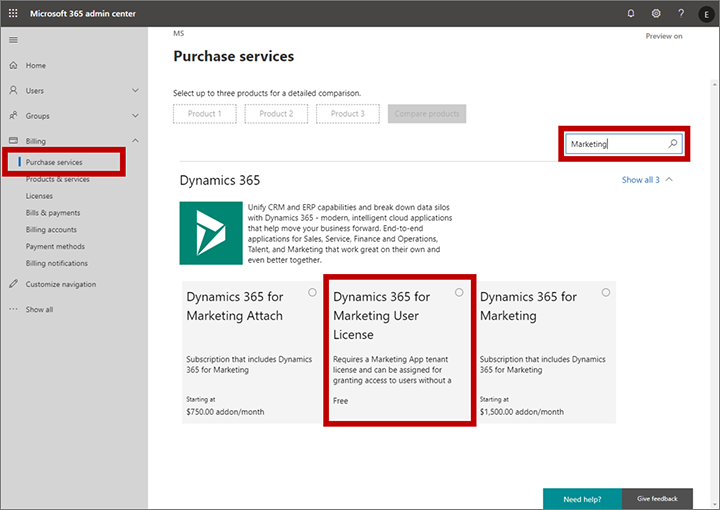
    Let’s look at some of the new services in the Dynamics 365 cloud. The commercial launch of Dynamics 365 for Marketing in Spring 2018 was a bit of a shock for anyone who always though these applications are licensed per user. Instead, Microsoft chose the model that HubSpot any many other vendors in the marketing automation space apply, by setting the pricing per contact. Yes, initially they were way off with this thinking by applying the pricing logic to the entire contents of the CRM database, but based on market feedback the model was adjusted to now count only for marketing contacts actually used by the specific application (i.e. where business value should be generated). Also, you actually don’t need any Dynamics 365 user license for those marketing people who build the customer journeys and analyze the results, since free user licenses are available to unlock the door into the system. Licensing is done on the environment level, after all.

    Purchase a free user license for Marketing

    Dynamics 365 Customer Insights is a CDP (Customer Data Platform, for those not keeping up with the latest acronyms) that allows customers to bring in customer related data from various different sources and unify them into a “customer 360” profile that links all those activity entries into a single view of the customer. You can then leverage big data processing features of a CDP to generate target segments like customers most likely to churn, select them to be a target group in Dynamics 365 for Marketing customer journeys and preserve your revenue streams by holding on to these customers identified by the intelligent machine in the cloud. How is this service priced? Per number of profiles: starting at 100k profiles for $1.5k, so 1.5 cents USD per profile. Any user in the tenant can be simply authorized to access the application, since the dedicated UI doesn’t have any dependency to the USL construct found on the Model-driven application side.

    Forms Pro is a professional version of the personal/team productivity app found in the Office 365 suite, storing its data into CDS entities for process automation and data analysis. Do you need a USL for the Pro features? Nope. The pricing is based on the number of responses to surveys, at $100 per 2k, making it $0.05 per response. If you want to listen to your customers and improve business outcomes as a result of that, it’s not about how many people you have looking at the data but rather how smart and how automated your feedback management processes are.

    AI Builder will go GA in October 2019. Guess how that’s going to be priced? That’s right: not per user. You buy a capacity license at $500/month for 1M “service credits”. When it comes to machine learning models as a service, with no pre-packaged Dynamics 365 app on top of them, there isn’t even any concept like contact or survey response that would tie the pricing to the physical world. You literally extract value directly from the data you put in there, with the help of apps and automation that builds on top of and integrates with your unique business processes.

    The consumption pricing model is already here. Future products in the Business Applications portfolio are more likely to gravitate towards that, rather than finding a user to attach a price tag on.

    Sandcastles in the sky and how to draw the lines

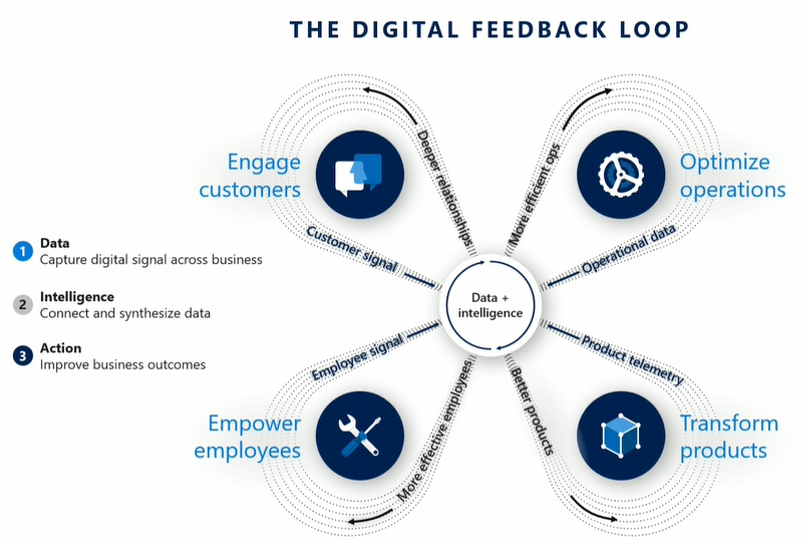
    In the cloud era, Microsoft can see everything. No, they don’t have employees looking at any customer’s private data or anything like that. What I mean is they have telemetry data on everything that happens on the service, because they are hosting all the moving parts involved. This gives them the opportunity to be very data driven in analyzing how products are adopted, what people actually do with them. It is essentially their own implementation of the digital feedback loop that you see James Phillips preaching to Microsoft’s customers and partners in every keynote he does. There’s the “transform products” part that is all about aligning product features to meet customer needs, but you can be sure MSFT also want to “optimize operations” when it comes to the logistics of delivering the cloud services and how to price them appropriately.

    Was gibt es Neues vom Microsoft Business Application Summit?

    Dynamics 365 is claimed to be the biggest service running on Azure today. Now, even though at Microsoft they both fall under the Cloud & AI that Scott Guthrie runs, there’s not a single bucket where all the costs would be thrown. The more Business Applications products are built that consume data storage and compute capacity, the higher the bill from Azure will be. The term COGS (cost of goods sold) is being used frequently when talking about the resources needed to keep cloud services up and running on these platforms like Azure. Power Platform is a platform on top of another, and while it often uses higher levels of abstraction that its raw Azure counterpart, API calls from the citizen developer PowerApps do turn into API calls against Azure services. Whatever product is generating this consumption must also front the bill.

    The vast majority of Dynamics 365 business today is still done based on user licenses, regardless of what our AI & big data driven future may look like. These are sold as SaaS apps you can just sign up and start using, rather than a complex solution that needs a technical architect to build the blueprint for. As such, the message Microsoft wants to get out there (but isn’t always so good in phrasing) is that the app user license should cover all normal usage for real human beings interacting with Dynamics 365 CE. Yes, anytime a user opens a contact form on a Model-driven app there are around 10 API calls made, which count against the quota for that particular user account. All CRUD operations theoretically count, but for an end user you shouldn’t need to count them. This is not the intention of MS.

    What is the idea behind setting the API call limits then? Well, the situation is this: the platform has evolved from the early days of being a simple CRM database for sales user productivity improvement into something that can connect OoB to a vast number of external (non-CDS) data sources and run complex automation on this data without anyone sitting in front of their PC and opening those contact record forms. When sold as Power Platform, there will be a massive amount of this non-CRM style consumption of computing resources running on the platform (unless MS completely fails with capturing this new business potential). Building all of this abstraction on top of the underlying Azure services and then giving it a way with essentially a per-identity flat monthly fee just wouldn’t be a sensible business model.

    (more…)
  • 4 directions for Power Platform business growth

    4 directions for Power Platform business growth

    It’s now roughly one year since Microsoft launched the concept of Power Platform. It’s been extremely interesting in the past 12 months to watch how this new platform strategy starts to play out in the world outside Redmond, as the pieces of this grand puzzle begin to become visible here and there. Having worked in the MS ecosystem on customer & partner side for 14 years now and coming from the Dynamics CRM side originally, this is the biggest single shift I have witnessed in their product strategy to date.

    Putting all the puzzle pieces together is surely not easy for anyone who isn’t devoting a sizable share of their time on consuming information from the various events, announcements, blog posts and documentation released by Microsoft. The thing that really makes it tricky is that this Power Platform thing isn’t confined inside a single bucket. It’s not Dynamics 365, it’s not Office 365, it’s not Azure. It’s all of them and yet none of them. Every MS partner and every customer decision maker will increasingly run into the product messaging, but they’ll hear it presented in a different way – and most likely interpret it uniquely based on what their background is.

    The only reason Microsoft would be investing so heavily in building and promoting the Power Platform is that they see a massive new business opportunity in it. As Steven Guggenheimer wrote in his recent blog post:

    “The Business Applications Total Addressable Market (TAM) is predicted to be at $125B by 2022, and 57 percent of this will be driven by ISVs. Dynamics 365 and the Power Platform are an important area of investment for the company, and represent a significant growth opportunity for partners in this market.”

    Accelerating opportunities for ISVs with new programs and technology – Steven Guggenheimer

    Big numbers, but that’s what they always are in these grandiose statements about global market potential. What I need to understand when talking with customers, partners and internal stakeholders at our company about the strategic direction of Power Platform is from where specifically might this growth come from? To help these discussions I ended up drawing the following diagram about the four different dimensions where I see this Microsoft application platform strategy creating new business:

    The way I see it, the growth will happen both A) inside Microsoft’s product offering and B) the outside world of customers and partners, within 1) the traditional business process management scenarios as well as 2) those processes that you wouldn’t have tried solving with any CRM style application/platform in the past. Let’s dive into each of these areas and I’ll explain what the impact of Power Platform might be in generating new business to run on top of this new Microsoft aPaaS (Application Platform as a Service) foundation.

    1. Dynamics products

    Let’s start from the most familiar ground. The place where the most concrete changes resulting from the Power Platform strategy have been felt during the past year must be Dynamics 365, and the Customer Engagement apps specifically. The platform formerly known as XRM is in the process of being replaced by what is sometimes referred to as “PowerApps platform”, although that may not be any official term that would stick. Regardless of the marketing lingo, the customizers and developers of Dynamics 365 CE solutions are right now facing a lot of pressure to adopt brand new concepts and tools that will replace those ~10 year old building blocks that XRM solutions were made out of. Compared to the earlier transition from on-premises to Online products, that may well have been a much easier shift to adjust to than this new Power Platform whirlwind that’s moving everything around on its path, from licensing to UI to SDK.

    From the perspective of the internal Microsoft world, the Dynamics product teams have previously been somewhat captive of the CRM legacy that came along with the XRM platform. As a commercial software product, it wasn’t originally built to be a pure platform, rather the design choices and customer requirements drove it more towards being an extendable CRM application first and platform second. In the process of migrating Dynamics 365 CE Online to run on Azure services, the platform and the applications were separated from one another. To balance things off, there’s also been a huge unification process initiated with the client side technologies, where the target is to remove the barriers between Model-driven and Canvas apps, to Run One UI. The platform tools like PowerApps Component Framework (PCF) now give also the internal product teams a far more agile path forward in deciding what kind of features and experiences the specific apps like Sales or Customer Service should contain. What this means is that the stagnation period where everyone had to just wait for the new platform capabilities to become available may be coming to an end and in the next release waves we can expect a significant growth in new app functionality being shipped to Dynamics 365 customers. In other words, a growth in application depth.

    Alongside this internal platform development, another huge benefit that Dynamics 365 as a business has gotten from the new direction at Microsoft is the closer connection with the Azure teams. A few years ago there was still the MBS silo to keep up the walls between CRM & ERP business and the mainstream MS product business, which explained a lot why we didn’t see so much of the Azure innovation trickling down to the business applications built by the same corporation. Now the tables have truly turned as we’ve witnessed all of the new applications like Dynamics 365 for Marketing betting heavily on the very latest Azure services. AI is getting infused into every product at Microsoft, but it also gives birth to brand new products like Sales Insights or Virtual Agent for Customer Service. To link all this with the Power Platform story, it’s important to understand that this platform side is what eventually allows customers and partners to customize these new apps and services to meet their real life business requirements. The growth potential in this Dynamics products segment is being amplified by the fact that PowerApps, Flow, Power BI and CDS give it the extension points needed for going beyond packaged SaaS apps. The growth in Dynamics 365 app portfolio width is therefore driven by the Power Platform connectivity with Azure.

    2. Other Microsoft products

    While the merger of Dynamics 365 CE and PowerApps platforms is a great boost for the Dynamics products, that’s not the only area within Microsoft that is touched by the Power Platform strategy. Office 365 has of course been the biggest product display window for PowerApps and Flow, due to how services like SharePoint and OneDrive have been deeply integrated with these tools. There is a Microsoft 365 Business Applications partner program that interestingly enough doesn’t seem to align with the “actual” Microsoft Business Applications group’s activities at this moment, as it sits within a different organizational box, the Modern Workplace solution area. When you think about the origins of how the previous generation apps for information workers were often built on top of the ubiquitous SharePoint Server, this arrangement does make sense, but I wouldn’t expect these separate boxes to remain forever in place. After all, what’s been happening to PowerApps recently in terms of commercial success is “like SharePoint all over again” (according to Charles Lamanna), so all roads here lead to the Power Platform being the growth engine for Office 365 and Microsoft 365 to reach further into the customers’ information management needs.

    (more…)
  • Catching the Wave 2 for 2019 Power Platform Updates

    Catching the Wave 2 for 2019 Power Platform Updates

    Today, June 10th, at Microsoft Business Application Summit 2019 the release plan for the next wave of Dynamics 365 and Power Platform features was announced. It’s of course no surprise that this main event of the year for #MSBizApps would be used as the forum for showing what’s coming next. What kind of did surprise myself was that we actually are already at a point when the focus starts to move to the upcoming release, formerly known as October 2019 release. Wasn’t April 2019 just a few weeks ago? Where did all the time go? And when exactly were we supposed to have taught ourselves all about the current release features, let alone deploy them to real life customers?

    If I had to guess what people working professionally with MS Business Applications would list as their biggest challenge, I bet keeping up the product updates would be on the number one spot – if only for the simple reason that it’s a topic that touches everyone regardless of their role. The pace of change on the technology side isn’t going to slow down, but it’s the breadth of impact from these changes that has grown immensely. The biannual release cadence in itself isn’t anything new, since that’s how the cloud service has been updated from already the Dynamics CRM 2011 days. It’s just that we’re no longer operating within that familiar CRM box, thanks to what Dynamics 365 and Power Platform have become. So, the release waves hit the shore on their steady cadence, but instead of a fun little beach break wave to surf on it may start to look like a tsunami that you should run away from. It’s not, and you shouldn’t, but this can be a very natural reaction when presented with a 350 page release plan document to plough through.

    Lucky for us, this time there’s also a streamlined version of this document, focusing solely on the Power Platform side. If you’re a #PowerAddict like me then this is probably the more exciting part to start from. So, we’ll leave all the first party app goodies for later and have a look at where & how the platform is heading to.

    Release Terminology

    Microsoft has now changed their official terminology on how they speak about these releases for Business Applications products. Instead of the earlier names like October 2018 Release, April 2019 Release, we’re now going to get release waves. Yes, still 2 times a year, so what we’ve now seen a peek of is 2019 Release Wave 2. Nothing actually changed about the process itself, but since the updates covered in these releases are not meant to be delivered on a single date (or one specific month), the terminology is now much better aligned with the reality. 2019 Release Wave 2 will be hitting the shores from October 2019 to March 2020.

    The other tweak in terminology is that now instead of Release Notes we’re getting a Release Plan from the product teams. This is also a much more natural way to describe the intent of the documentation that goes with a release wave. It’s not the exact description of what has been shipped, like you would have seen on a piece of software distributed on a DVD. Rather it’s a near term roadmap of what will be built and delivered, if everything goes as planned. Instead of a static document the Release Plan (and actually the current Release Notes, too) is a living publication reflecting the current status. Have a look at the change history for the current April 2019 release to get an idea of how much things have moved around since V1 of the Release Notes.

    Finally, there’s an added piece of information for each of the items in the Release Plan, referring to the Early Access availability. This will indicate weather the feature will be available to try already on August 2nd. You can read about the latest release schedule and early access policy from this documentation page.

    AI Comes to Power Platform

    The biggest new announcement from 2019 Release Wave 2 is the arrival of the AI Builder. No, PowerApps didn’t become self-aware just yet, but it is nevertheless a major milestone to see the AI capabilities earlier provided via Azure Cognitive Services to now find their way into  the citizen developer world of Power Platform tools. While the data scientists and pro-devs out there probably won’t be resorting to AI Builder in their own projects, the total addressable market for Microsoft’s AI services has now grown significantly thanks to these entry level AI features available in the PowerApps maker portal.

    Is this something that all the PowerApps makes will immediately jump into using then? Probably not at first, since the use cases for machine learning technologies always rely on having a suitable data set to work on. Whereas with a Canvas app you can just start building the features, logic, data model and UI of an application before you’ve got the actual data to be used in it, in AI Builder you’re gonna need to start from the data. It’s going to be hard to fake this thing for a quick technology demo unless it’s tightly linked with a real life business scenario.

    Reaching the people who do have the data and understand its structure and meaning is where a product like AI Builder can undoubtedly lower the barrier for starting to experiment with AI. Just like the earlier PowerApps tools helped people become app makers without any formal training on the subject, why couldn’t something similar happen on the machine learning side, too? As a nice added bonus, coupling the AI Builder configuration and model data with CDS is will help in promoting it as the default storage place for structured business data.

    Features like Form Processing where you can train the machine to understand the contents of documents following a common template (like invoices) offer a way to further digitalize processes that can’t yet jump to 100% structured data interchange via modern APIs. You may not be able to force all your business partners or customers to jump into using the tools and data formats that would be most convenient for your internal processes, but could significantly reduce the need for manual data entry by taking a service like PowerApps AI Builder into use.

    (more…)
  • Why You Should Become a #PowerAddict

    Why You Should Become a #PowerAddict

    Recently I was tagged to do a “confession” in the #WeArePowerAddicts challenge, started by MVP Vivek Bavishi. There’s been a massive amount of support for this over on Twitter, where many of the finest members of the community are enforcing the message that is bringing all of us together. In this post I’ll cover three aspects that I find so intriguing with this movement that is forming around Microsoft Power Platform and why professionals with a Dynamics 365 Customer Engagement / XRM background should seriously consider getting involved with it.

    The Return of the Community

    Community was the biggest single reason why Dynamics CRM became such a defining part of my professional life, starting way back in 2005. Sure, I had already earlier enjoyed the business/marketing side of customer relationship management, but it wasn’t until I had to dive deep into a specific technology that I realized the massive value of an active, global user community. The growing blogosphere around Dynamics CRM and especially the social layer of #MSDynCRM Twitter on top of it first empowered me to turbocharge my own speed of learning, then later presented me a medium for expressing my own thoughts. And here we are now.

    Lately I’ve been having this feeling of premonition combined with dejavu. Like being special agent Dale Cooper, investigating the events that are taking place in a strange town in Pacific Northwest, far away from your normal surroundings, encountering The Giant in a dream sequence and being told that “it is happening again”. Only this time the Giant is Power Platform and the place isn’t Twin Peaks but rather Redmond. Big things are happening and it’s still difficult to see exactly how the story line will play out, but you just can’t wait to see what the next episode will reveal.

    The cast of this show isn’t just made up of Microsofties. Just like in Season 1 that brought us Dynamics CRM (and XRM), the biggest stars are actually the community members who keep you engaged with exploring the many wonders of this new world of Power Platform that Community Season 2 has introduced. They eagerly demonstrate their skills with the cloud toolkit of PowerApps, Flow, Power BI, CDS, Connectors, Azure services, in combination with the more familiar Office and Dynamics products, infecting you with their enthusiasm. Some would call them PowerAddicts.

    Be a Maker, Not a Customizer

    When implementing a CRM system based on Dynamics 365, you’re always more or less adjusting the functionality of an existing application to meet the specific needs of the customer’s business processes. The starting point is always the same, and the end result depends on how much budget you’ve got for customizing the OoB experience. In general, the CRM systems deployed for various different organizations resemble one another far more than you might have initially expected, considering the great amount of effort invested in the projects to build them. It’s not a bad thing – especially since many customization requirements may not end up delivering a positive ROI anyway.

    Switch from the preconfigured first party Dynamics 365 apps into the pure platform play of PowerApps and it’s a completely different ball game. PowerApps Canvas apps start with a blank canvas, just like the name suggests. There is nothing in the tool itself that would dictate how exactly your app is supposed to look like and what features it should contain. With this massive power comes a great deal of responsibility, as you truly are the maker of the application that needs to have a vision of what you’re building as well as the capabilities to make it all come alive.

    To come up with a vision of your own, the most important ingredient is exposure to the work of others. You need to see what the #PowerAddicts community has built, get inspired by it, and then take a shot at building something new from those pieces + the ideas and requirements that are unique to your project. You may well need to have a number of hobby projects, too, since delivering a made-to-order application without first practicing how to work with your tools is going to be tough. The concept of Maker Culture describes the community’s approach to Power Platform quite accurately:

    “Maker culture emphasizes learning-through-doing in a social environment. It emphasizes informal, networked, peer-led, and shared learning motivated by fun and self-fulfillment. Maker culture encourages novel applications of technologies, and the exploration of intersections between traditionally separate domains and ways of working.”


    Wikipedia

    Sure, it’s not like you didn’t need the forums and search engines as a basic survival kit in Dynamics 365 projects, too. That’s still more of a unidirectional way of using the community to get the job done, whereas how this new generation of Power Platform Makers seems to have an intrinsic motivation to build things together.

    Escape from Planet CRM

    Dynamics 365 as a product family is constantly evolving and the number of different applications in it is growing like never before. Despite of all these exciting new opportunities that the technology stack and Microsoft’s commercial offering seem to be opening up, in the everyday life of a consulting organization it’s still frighteningly easy to fall back into doing “just CRM”. What I mean by this is the process of repeatedly solving the same problems for different organizations, through pretty much the same methods as before, just with an updated version of the tools you’ve been using for years. While it may sound like a lucrative business area, in the long run such repeated problem solving via manual labor (i.e. burning your cognitive fuel reserves) really ought to be taken over by machines – be it an app, an “AI”, or simply an innovative, repeatable service offering delivered by a commercial machine instead of a project team.

    After 13 years of Dynamics CRM experience under my belt, I often find myself torn between the value of my accumulated knowledge and the burden that it imposes on me. I pretty much know in advance what challenges a customer will have with Dynamics 365 Customer Engagement when hearing about their expectations for a CRM system and how it should fit with their organization’s existing tools and practices. I’m painfully aware of the ever expanding solution areas I don’t know well enough to give the right answer immediately when presented with a specific problem. Sure, there are the many small victories to celebrate when I can use my prior knowledge to solve problems – be it a blog article by myself on the very topic, or the ability to quickly find the right link where someone else has presented the solution. Still, with the scope of work included in a typical CRM projects it feels like I’m at a saturation point where it’s no longer possible to gain new generalist skills without starting to lose my grip on the skills I’ve gained earlier. This is of course the point where a common sense advise would be to go specialize on a more narrow area to further advance your skills – but what if you just find the role of a generalist more fulfilling in the grand scheme of things?

    What Power Platform offers to people like me is a fresh new start. Here we have a toolkit that comes with zero hard dependencies on doing things the way they’re done in the CRM business. You can take PowerApps and build a solution to pretty much any business problem that revolves around improving the processes between the employees of an organization and the data sources they have access to (or should have). There are no assumptions here about the right way to solve such problems, unlike with CRM where you are in a way competing against the long legacy of prior systems, processes, best practices. It’s not a vacuum of course, as there are always alternative solutions out there.

    The important difference here is that the boundaries of your work are truly undefined at this moment. No one knows how far these things will go, but if you have faith in the competitiveness of Microsoft cloud and its ability to attract both the right kind of commercial players to form an ecosystem as well as those inspired professionals that build up the community around it (hello #PowerAddicts!) then you know it’s going to be far bigger than CRM ever could have reached.

    Power Platform allows the seasoned CRM professionals to return back to the role of a student. With new tools like PowerApps and Flow you are pretty much starting from scratch and you need to ramp up your skills in the same way as you might have done with MSCRM vX.0 back in the days. If you just can mentally position this work the right way and approach it primarily as a learning experience instead of a ToDo item in a project backlog, then OH MY GOD how much fun it is! Seriously, these tools can give a motivated citizen developer the kinds of superpowers that I couldn’t have even imagined just a couple of years ago. It ain’t all just marketing – it’s the real deal.

    Now’s Your Turn

    If what I’ve said here resonates with you and you’ve been hoping to find a way to get back into the game 100%, then you owe it to yourself to get truly involved with the Power Platform. Become an Addict.

  • Building The Platform for Every Developer

    Building The Platform for Every Developer

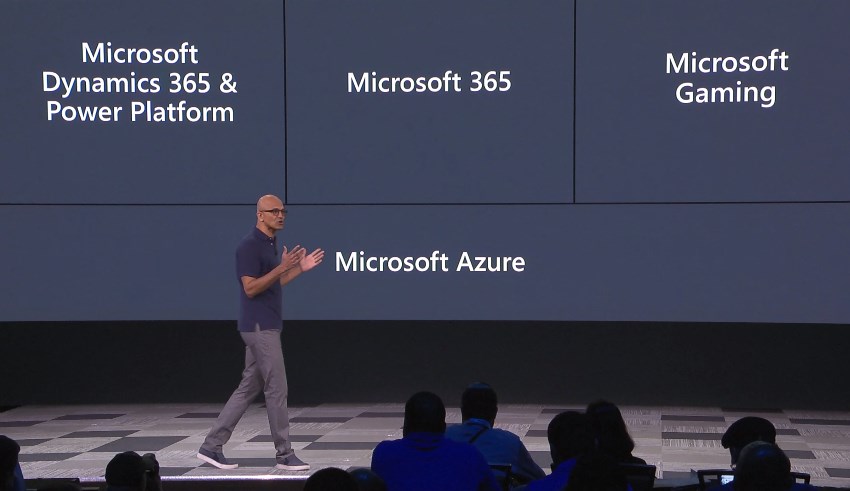
    For the first time ever at Microsoft Build conference, the Power Platform was presented right at the start of Satya’s keynote this year! Woo-hoo!

    Of course this time last year there wasn’t yet the name “Power Platform” to even reference at Build. We had only just seen the merger of XRM and PowerApps into something that was a bit of a puzzle to communicate to partners, let alone customers. Well, the puzzle hasn’t exactly been solved yet, but it is still quite remarkable how far we’ve come in one year already.

    Last year’s sessions at Build 2018 were mostly about introducing the concepts like Common Data Service to a .NET developer audience that probably had zero hands-on experience with any Dynamics product for the most part. Not a whole lot of noise was made about this entry into the #MSBuild space. Fast forward to 2019 and now the vision of uniting pro developers with “every developer” is already touted at the keynote sessions. Not just that, but Satya is saying that recent re-architecting of Dynamics 365 on top of Azure infrastructure and services should be examined as an excellent reference for anyone who’s planning to build their own products on SQL Azure.

    During the week of Build, the product team behind Citizen Application Platform (“CAP”) puts aside their Citizen caps and pulls on the pro dev hoodies to talk about topics like solution management, PCF component development, Azure Functions, DevOps pipelines and all the nerdy stuff that would scare away the folks who normally create PowerApps. It’s inevitable that as the tools for app makers get more mature the next barrier to world domination will be in getting not just the IT admins to build the necessary automation and governance around Power Platform in enterprise environments but also in finding a way to make pro-coders play with low-coders.

    If you look back at XRM, then there’s really nothing new about this division of roles. It has always been the case that code illiterate business analysts do the point & click configuration work for data models and business processes, while the XRM developers spend their time with the SDK enabled client-side extensions, server-side logic and system integration tasks. Fundamentally what the Power Platform does is it enables everyone to level up in their game. Application design on the UI level and interfaces to connected data sources can now be handled by those business analysts who are willing to learn new low-code tricks. Similarly, the developers get to break free from the boundaries of the IIS and SQL Server boxes, to harness the amazing power of The World’s Computer (Microsoft’s nickname for Azure) to hook into new AI services and crunch the contents of The Real Common Data Service.

    If the app builders are about to step up their game, so must the sales machine of Microsoft. The big push from Redmond is now on ensuring that an ecosystem will emerge on top of Power Platform. The new partner program for Business Application ISVs, lead by Steve Guggenheimer, is trying to make a bigger splash by combining the earlier models of Azure Marketplace and the Dynamics 365 focused AppSource into a single channel that could actually serve the grand vision of a no-cliffs development platform. As always, you should check out what The Other Steve has to say about the upsides to the new program, before making your conclusions on whether it’s just a new tax on ISVs or an opportunity worth pursuing for a growing number of MS partners.

    To summarize the announcements and buzz around Power Platform at Microsoft Build 2019 conference, I’ve compiled this handy lil’ Twitter Moment for you to enjoy:

  • What’s Coming in April 2019? Start from PowerApps & Flow

    What’s Coming in April 2019? Start from PowerApps & Flow

    As promised, Microsoft published the release notes for the April 2019 release wave on January 21st. Instead of just a high level blog post, there’s a huge list of items in 16 top level categories at the docs.microsoft.com site. If you want to consume the content in an offline mode, there’s a PDF version available of the same content, with 315 pages of April 2019 release notes.

    315 pages? Ain’t nobody got time for that!

    Yeah, I know. Whether you’re working with Dynamics 365, PowerApps or Power BI, you probably aren’t just sitting around, waiting for some work to come your way. These are all high demand technologies that pull in pretty much all of the available consulting resources into actual project work with the tools. To make things worse, the communities around them grow larger every day and flood our social streams with blog posts, podcasts, videos, webinars, conferences full of “can’t miss this” information.

    The problem is, though, that you haven’t got all that much time to get into grips with April 2019. It may sound far away, but the preview availability of many of these features (but not all) will start already on February 1st – 10 days from now at the time of writing. What’s even more important is that this time the features will be rolled out immediately to all customers, once Microsoft thinks they are ready. There’s also a date available for this particular moment and that is April 5th. You’ve got around 2 months from preview to GA.

    How should an ex-XRM pro / Dynamics 365 Customer Engagement specialist then optimize the available time to learn the important parts about April 2019 release? I’ve got one tip for you, which may sound unintuitive at first, if you spend your working days mostly with things that say “Dynamics”. Here goes: Start reading the release notes from where it says “PowerApps”:

    For real? Yes. We no longer live in a world where PowerApps would refer to the quickly generated mobile apps that you’d connect with SharePoint lists. It is the platform on top of which much of the “Dynamics 365 for X” products listed at the beginning of the release notes now live. Whereas each of these 1st party apps touches just those environments that happen to be using them, PowerApps and Flow are relevant for everyone. Common Data Service for Apps a.k.a. CDS is bundled within those two topics. If you’re operating in Dynamics 365 Online environments, you are working with CDS.

    In the PowerApps section you’ll find platform and customization features like:

    • New form and view designers GA
    • Canvas app embed in model-driven apps GA
    • PowerApps Control Framework (PCF) preview
    • Unified Interface as the default UI
    • Offline data access
    • Azure AD Groups for security roles & record sharing
    • New tooling for plug-ins and solution packaging

    Those are examples of the traditional XRM side of the house being extended under the new PowerApps brand. Microsoft Flow is equally important for any Dynamics 365 CE system customizer going forward, due to enhancements like:

    • Parity with CDS (XRM) asynchronous workflows
    • Calling XRM workflow actions from Flow
    • Batch operations for CDS records
    • Transaction support via change set scopes
    • Calling child Flows
    • Multiple trigger events
    • Flow parameters inside solutions

    Sure, there are great new features and improvements listed for each of the Dynamics 365 apps, too. Also a wealth of opportunities for further expanding our Dynamics pro footprint in business application development on the Office 365 side (thanks to PowerApps, Flow). Not to mention the growing data integration capabilities via CDM, or the whole world of BI and big data. Still, we know that there’s probably not enough time to try and absorb these things right away. Which is why my recommendation is to start by looking at what the common business application platform is forming into. Then once the preview is available, update your sandbox into the latest bits and start experimenting with these things in practice (and possibly hunting down those features that actually shipped in the preview version).

    OK, I have to admit it: even I didn’t dive straight into PowerApps myself, instead spent a bit of time with the full release notes document. If you want to know which items caught my eye, then you’ll find them in this Twitter Moment collection.

  • Winter in July: Release Notes for Next Dynamics 365 Version

    Winter in July: Release Notes for Next Dynamics 365 Version

    While I’m over in Finland enjoying the biggest and longest heatwave ever, some of my fellow MVPs and Dynamics 365 community members were attending the first ever Microsoft Business Applications Summit this week on the other side of the globe in Seattle. As much as I would have enjoyed sitting in cold & dark conference rooms instead of trying to hide from the burning sunlight, this time I had to rely on the others to share the latest news from #MSBizAppsSummit while I attempt to enjoy the summer vacation.

    A large share of the conference’s announcements are covered in the October ’18 Release Notes, which you can download in PDF format right here. This is a massive “drop” that follows the format of what we already saw with the previous April ’18 release. Even though it’s been made available during the summer heat, it’s actually a list of features that Microsoft intends to (mostly) make available between October 2018 and March 2019. So, winter came early this year, which is a positive thing, since now we have several months of advance notice of what’s in the product team’s pipeline. These release notes essentially replace the earlier roadmap.dynamics.com website, which in itself was kinda cool (running on top of Dynamics 365 Portals and all) but didn’t communicate the actual road ahead all that well. So, these twice a year PDF releases with ongoing updates to their detailed content is the thing you need to pay attention to now.

    One small but notable difference is that Microsoft is no longer calling it “Dynamics 365 Release Notes” but “Business Applications Release Notes”, which together with the Summit’s name reflects the new context in which we all should approach whatever parts of the toolkit we use in our end user solutions. Recently also the Microsoft Most Valuable Professional program updated its terminology, and now the previous Business Solutions MVPs are in the Business Applications MVP category.

    The previous April 2018 release was the first time when we saw the new organizational structure of Microsoft Business Applications Group (“BAG”) bringing previously separate product offerings under one roof, with CRM & ERP products being represented in the same release notes list as PowerApps, Flow, Power BI. That also was the time when things like the Common Data Service for Apps were announced as replacements for what XRM previously stood for. However, from a raw functionality level there appeared to be a greater urgency in reaching GDPR compliance before the May 25th deadline than to actually push out new integrated features for the CDS for Apps platform.

    Reading through the October 2018 release notes, this time it’s very different. There are huge steps being take to bring together the “ex-XRM” technologies with the newer products and make it truly one Power Platform. Here are selected highlights:

    • PowerApps Canvas Apps and Flows can now been included inside CDS for Apps solutions, giving them the ALM story for enterprise grade deployment across different dev/test/UAT/prod instances. This clearly makes them no longer a “power user” focus tool but a building block for credible business applications.
    • PowerApps Canvas Apps can be embedded inside the model-driven app entity forms. The traditional UI of XRM apps that was generated from metadata will get a touch of pixel-perfect design options that the Canvas Apps have always been about. This ability coincides with the new options to freely set the app size instead of earlier phone/tablet format limitations.
    • Flow is promised to reach parity with async workflows. Even though the transactional capabilities of real-time workflows (similar to plug-ins) is not yet within October 2018 scope, that’s one bold step to make the XRM workflows history and move their logic into Flows.
    • Power BI reports & tiles can be embedded onto CDS for Apps entity forms and the record context as well as any record attribute can be passed to them for data query and visualization filtering. Surely pretty much anyone has at one time wished “gee, wouldn’t it be sweet if instead of working with this limited ASP.NET chart XML from Dynamics CRM 2011 we could leverage those modern Power BI charts instead”. Well, that day is getting closer!
    • PowerApps Canvas Apps will FINALLY offer native support for lookups, option sets and datetime fields. For anyone who’s tried to replicate pretty much any CRM functionality with PowerApps, this will have been a very early stumbling block. Not so easy to solve with separate product teams inside MSFT apparently, but within the new Business Applications Group these gaps for real life solutions can now be filled.
    • There will be a single mobile “player” for both Model-driven Apps and Canvas Apps. When previously the Dynamics 365 Customer Engagement mobile app for Unified Interface and the PowerApps apps lived behind separate app icons on your phone, soon the users may no longer see any difference when switching between different business applications.

    These are only a few items in the long list of upcoming features that the 239 pages of October 2018 release notes contain. A lot of important unification is also taking place in the author and admin experience of how Dynamics 365 Customer Engagement apps, CDS for Apps platform, PowerApps Canvas Apps and Flow can be used together for your solution design needs. Similarly, a lot of advances are being made on the UCI front, with the legacy web client being more and more replace with Unified Interface. Then there’s the whole CDS for Analytics side of things coming up, with promises for new AI apps and capabilities. You’re going to need to read through a wealth of blog posts to grasp the full spectrum of what Microsoft is planning to launch, so a good place to start is the Scott Durow Top 10 favourite features in this release.

    The April 2018 release for Dynamics 365 CE was a bit of a surprise due to the fact that it wasn’t officially a major release like v10 or even v9.1, instead it was only a v9.0.2 update. Deployed automatically to your v9 instances, with no CDU process to schedule the update from the available time slots. Now in July we got a confirmation from Microsoft that this reflects the way all future updates will be rolled out, in the blog post Modernizing the way we update Dynamics 365. Looking at how the Power Platform will increasingly be consisting of functionality that isn’t found in the “XRM server”, the automatic updates make a whole lot of sense. It remains to be seen how the remaining on-premises customers will be serviced with the updates and to what extent there will be feature parity. At least we now got a confirmation at the Business Applications Summit 2018 that there will be a new on-prem release this fall, so there appears to be a plan to bring things like UCI available for those who still prefer to run their own business application servers.

  • Business Application Platform at Microsoft Build 2018

    Business Application Platform at Microsoft Build 2018

    Build is the lead event for all things developer related in the Microsoft ecosystem. This year was the first time that the Business Applications side of MS’s stack also had dedicated tracks in the event agenda. While I didn’t attend the event myself (the Elisa Microsoft developer community was of course represented in Seattle), I was quite curious to see what kind of story is being told to the dev crowd about CDS for Apps, Dynamics 365, PowerApps, Flow and Power BI. Luckily there’s the virtual Build Live experience for viewing the live streams from the event these days.

    What’s not so fortunate is that the Build site doesn’t seem to provide a very good experience for discovering the specific content from a particular technology. At least the content selector for “Business Apps” doesn’t really show all too many relevant sessions at the time of writing:

    The good news is that us virtual attendees can also access the session catalog for My Build, which allows to perform either free text searches or filter the content to products in the Business Application Platform category:

    Once we know the IDs for the sessions we’re interested in, we can then dig the content from from Channel 9’s Build 2018 page. There we can continue our journey to the YouTube videos of session recordings and SlideShare for the presentation decks. Not really all that hard for anyone who’s accustomed to navigating the maze of portals that MS partners encounter, but of course it might be a bit tricky for newcomers into the ecosystem. So, just for the sake of convenience I though it might be useful to have the most relevant Business Applications content fro Build 2018 collected onto a single page. Which is what this blog post essentially is about.

    Accelerate your SaaS App development using the power of the Business Application Platform (BRK3411)

    “Join this session to learn how the Business Application Platform can accelerate the time to market for your next Line of Business SaaS app. Through the lens of an ISV/software developer, we will walk you through the entire application development process showcasing what it takes to build a new, composite app from the ground up using out of the box no-code/no-code tooling, to extending with custom code and connectors through to packaging and publishing to AppSource allowing you to reach 120M+ monthly active users. During this session we will also touch upon the value of the Common Data Service for Apps as it applies specifically to you as an ISV, how you can extend and contribute to the ISV ecosystem flywheel and greatly reduce both cost and time to market for new SaaS apps.”

    A good introduction to what the steps for app development are when working on the Business Application Platform (BAP) as opposed to other environments. Includes a demo of the development path as well as discussion on what investments are being made to deliver a more seamless app delivery experience in the future.

    Be sure to check out the slides if you want to see the “before” and “after” architecture of XRM, PowerApps + CDS 1.0, and the final Common Data Service for Apps (a.k.a. CDS 2.0):

    There are more ways than ever for partners to work with the platform, now that it also encompasses PowerApps and CDM:

    Watch the session recording on YouTube, then view the presentation on SlideShare:

    Extending PowerApps and the Common Data Service for Apps with custom controls and server side logic (BRK3403)

    “Professional developer extensibility is a key capability to the Business Application Platform. We’ll focus on enriching model-driven PowerApps solutions with server-side code and custom controls on the Common Data Service for Apps. We’ll utilize the developer toolkit and write code for native plugin development, use of functions and logic apps, Web API, Administration API, and the Virtual Entity subsystem.”

    Whenever Matt Barbour delivers a session, you’re going to want to pay close attention. This session is no exception, as Matt talks through the story how XRM evolved into CDS for Apps in his candid manner and explains to us what decisions and choices were made along the way. No matter if you’re an XRM old timer or only starting to look deeper into app development story of CDS for Apps, you need to watch this session.

    While the logical architecture of CDS is quite familiar to friends of the XRM SDK, the important bits are about how plug-ins will eventually be replaced by Azure Functions, how Microsoft Flow now owns the Business Rules story, and all these details about future investment areas that you can pick up from Matt’s presentation. After all, the former XRM solution management system will be how you’ll deploy also Canvas Apps, Flows, connections and gateways from one instance to another in the future, so it’s far more relevant to an ever larger audience.

    Watch the session recording on YouTube. No slides available so far, but Matt only had a few anyway and mostly focused on the demo side.

    Build and extend applications for Office 365 with PowerApps and Flow (BRK2303)

    “Come discover the capabilities of PowerApps and Flow as the unified high productivity application development and workflow platform across Office 365 and Dynamics 365. As the successor to InfoPath and Access Web Apps, PowerApps enables users to build both simple forms to advanced, feature-rich apps, while Flow as the successor to SharePoint Designer Workflow, enables users to build automated workflows for a range of scenarios from notifications to approvals. In this session, we’ll cover integrations with SharePoint, Dynamics 365, Microsoft Teams, Microsoft Graph, Excel, and more. Start extending and building apps and workflows for Office 365 and Dynamics 365 today!”

    If the earlier presentations were more developer focused platform discussion, this is a more citizen developer themed session that demonstrates the built-in integration points of where the different MS provided apps meet each other. If you have less hands-on experience with the non-Dynamics side of things, then have a look at these demonstrations to catch up on things.

    The slide deck contains a lot of good reference material for you to store on your hard drive for customer facing presentations. There are also updated product roadmaps for PowerApps and Flow that are always interesting:

    Watch the session recording on YouTube, then view the presentation on SlideShare:

    Automating business processes and approvals with Microsoft Flow (BRK2302)

    “Use Microsoft Flow to easily add business process automation and approval processes to your solutions. You’ll learn to build Flows with a few simple clicks and extend your learnings to more advanced techniques and expressions used to build complex workflows. Finally discover how you can take it up to Azure Logic Apps when it makes sense.”

    Stephen Siciliano has been doing great presentations on Microsoft Flow that sort of work as the missing manual to how us citizen developers can approach scenarios where Flow doesn’t quite offer any obvious ready-made features – yet there are capabilities hidden in the tool that could solve the problem. Judging by the slides, this looks like another information session where you’re bound to learn many things you thought Flow couldn’t even do.

    Funnily enough, Stephen’s deck actually seems to offer the best answer to the question that most Microsoft Build attendees probably would present when encountering this Business Applications side of MSFT for the first time: how does the Business Application Platform differ from the Azure platform?

    Check out the slides below, and the session recording on YouTube.

    Deep dive into building apps on Common Data Service for Apps (BRK3404)

    “In this session, we’ll deep dive into the concepts needed to build applications on CDS for Apps, whether you leverage it PowerApps or in your custom built solutions. We’ll cover all the fundamentals like entity modelling, business rules, business processes, and include an introduction to extensibility options like Plugins, Virtual Entities, and more.”

    No one can escape the Digital Feedback Loop slide, not even the developers. This is a demo-heavy presentation where a sample app is built and the various capabilities of Model-driven Apps are explained. All pretty familiar to anyone who’s done app building with XRM.

    Video only, no slides.

    More Business Application Platform content from Build

    For session recordings that touch upon parts of the platform we’re working with, here are some more that I picked up from the Build 2018 catalog:

    Did I miss any session that you think is worth watching? Then be sure to leave a comment!