Tag: ExtremeCRM

  • A Million Voices: VoC Survey Results Analysis

    A Million Voices: VoC Survey Results Analysis

    A few weeks ago I launched a demo survey built on Voice of the Customer, the brand new survey tool from Microsoft. The goals I had for this exercise were twofold: 1) see how these type of interactive tools could be used in live events like eXtremeCRM 2016 Warsaw, and 2) gain some experience on what it is actually like to work with incoming survey response data inside Dynamics CRM. In this post I’ll mainly be focusing on the latter one, although the example data we’ll be looking at are the live answers you & other readers of this blog submitted via the eXtreme MVP Survey.

    VoC_survey_page

    As you may know, Voice of the Customer (or VoC as we’ll refer to it from now on) is a pure XRM solution. Although the actual customer facing survey forms are of course not presented via the Dynamics CRM client UI, everything that you use for configuring the survey questions and logic, as well as the incoming survey responses, is managed with CRM entities and stored into the CRM database. The reason this is such a big deal is that most of you will already possess the skills needed for leveraging such data via views, charts and dashboards as it’s just XRM all the way. Furthermore, you’re free to design business processes around the survey functionality with tools like real-time workflows or business rules. Naturally you’re also able to interact with the survey entities and records via the latest CRM Web API, should you come across some integration scenarios where data needs to either flow in or out to another system.

    The flip side of this coin is that VoC is unfortunately very XRM-ish to work with. If you compared it to dedicated survey apps that do nothing but questionnaire design (like SurveyMonkey, Surveypal and the likes), survey publishing and response data analysis, then there’s still quite a big gap for Microsoft to work on bridging when it comes to the end user experience of this tool. In a way this is quite understandable since the value proposition of VoC really is all about the tight integration with your customer data and the ability to send survey invitations automatically as a part of your customer facing processes; such as a survey link being emailed to a customer after a support case is closed in CRM, to gather quick ratings and design automatic escalation paths if the KPI’s are not met. Nevertheless, since VoC does also support creating pretty advanced surveys for collecting quantitative data from a broad target group in more traditional campaign style satisfaction surveys, as well as anonymous survey links presented on website, it’s good to understand what it’s like analyzing such data inside Dynamics CRM.

    VoC_Survey_Summary_report

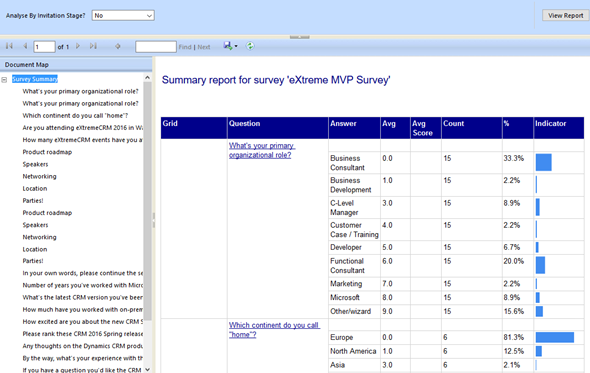
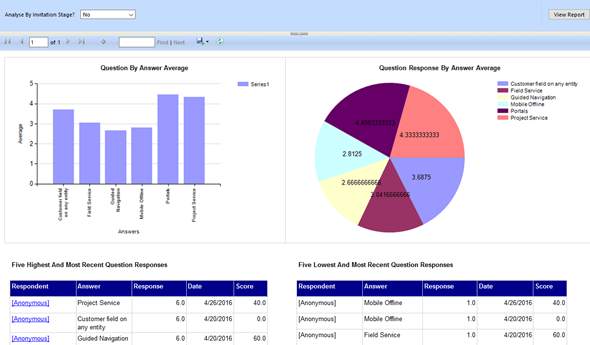
    There are a lot of components in the VoC solution right out of the box. First off, there are four SSRS reports: Survey Summary, Question Summary, Net Promoter Score and Survey Export. The first two are general purpose reports with tables and charts summarizing the data either across a single survey or a specific question, as illustrated in the screenshots shown here. The NPS report is naturally aimed for this particular survey type, whereas the export one is a single huge matrix for dumping out the raw survey response data into Excel for further manipulation.

    VoC_Question_Summary_report

    For more interactive data analysis there are eight dashboards in the VoC solution. However, these may not be all that useful for many real life scenarios, since they suffer from the same limitation as all Dynamics CRM dashboards: there are no global filters you can apply for all the dashboard components. Meaning, unlike with an SSRS report launched from CRM, you can’t set the context of the dashboard to be a specific survey. Yes, with the new “interactive experience dashboards” introduced in CRM 2016 you do get this type of filters, but since right now those features are limited to the Interactive Service Hub only (which in turn has a fair number of limitations for general use), it’s not exactly the kind of solution we’d need right here.

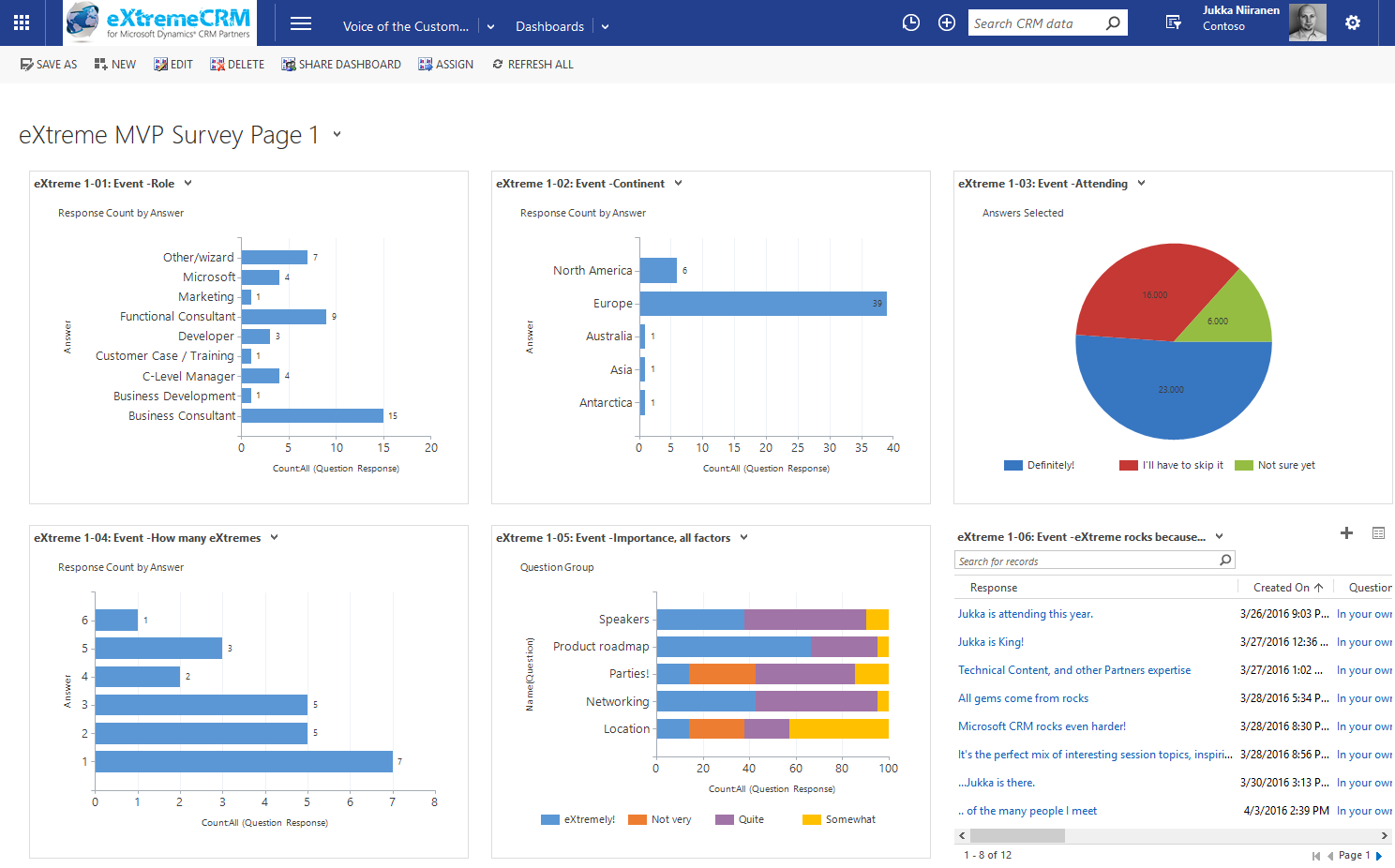
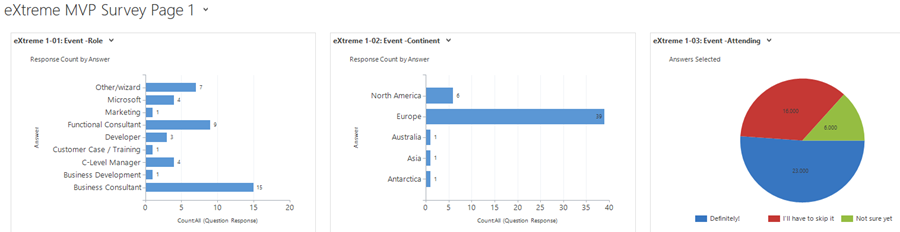
    That doesn’t mean we couldn’t build pretty dashboards to summarize our survey responses, though. I had a go at this with the eXtreme MVP Survey and it turned out pretty well. Have a look (click for a larger image):

    VoC_eXtremeMVP_dashboard_page_1_small

    In the survey form I had three pages full of questions and I constructed the corresponding pages as personal CRM dashboards. This allowed me to both monitor the incoming responses during the survey data collection period as well as present the results to the audience at the MVP Showcase session in eXtremeCRM. It looks good, it appears very familiar to existing CRM users and it gets the job done without having to resort to any complex report development. (more…)

  • My CRM User Experience Presentation at eXtremeCRM 2016 Warsaw

    My CRM User Experience Presentation at eXtremeCRM 2016 Warsaw

    If you’re a Microsoft Dynamics CRM partner in EMEA then eXtremeCRM is definitely an event you don’t want to miss. This spring the event was arranged in Warsaw, Poland, and I had the pleasure of not only attending but also contributing to some of the content at the conference. Together with 8 other CRM MVPs, we all presented in our own sessions, did a joint “ask the MVPs” showcase and also got the chance to talk with many of the awesome Dynamics CRM community members at our Team eXtreme Pitcrew booth. Thanks to everyone who came around to compete in a lap of Forza 6 with the MVPs!

    eXtremeCRM2016Warsaw_Team_eXtreme_Pitcrew

    It was the first eXtremeCRM event where I was not only attending the breakout sessions but also speaking at one session of my own. The topic that I ended up covering was something that has been touched upon also in this blog a few times: user experience of CRM systems. In addition, the focus of my presentation was specifically on the no-code configuration possibilities and how they can impact the solution UX, in good and bad. (It seems to be a common misconception among the MVP’s that I would know something about writing custom code, when in fact I’m almost illiterate when it comes to the CRM SDK. But anyway…). You can find my presentation slides below, or access them via this direct link to Docs.com.

    In my session I covered quite a wide variety of topics. To start with, I wanted to address the business impact of CRM system UX and provide some tools for demonstrating why user experience not just about application usability but really about the organization’s ability to deliver great customer experiences. Then I reviewed some of the basic CRM customization best practices that we all should keep in mind when configuring our solutions (but which are all too easy to forget when dealing with schedule constraints in CRM deployment projects). I then explored the concept of how Dynamics CRM could be made to feel more responsive to the end user’s actions via tools like Business Rules, Quick View Forms and Real-time Workflows. Finally I highlighted the importance of continuously maintaining the UX of a CRM environment when both the platform, the usage patterns as well as the ecosystem around it keep on evolving at an ever increasing pace in the cloud.

    At eXtremeCRM there’s never a shortage of interesting sessions to attend, nor the amount of great new CRM roadmap insights that Jujhar Singh and the other members of Microsoft’s organization are there to share with the community. In an attempt to capture some of the highlights from the event, I compiled them into the following Sway presentation that includes content shared on Twitter via the #eXtremeCRM hashtag.

    That’s all for today, but do check back for the next blog post where I’ll be sharing some of the results from the Voice of the Customer survey that we did for the MVP session at eXtremeCRM.

  • eXtremeCRM 2016 in Warsaw – See You There!

    eXtremeCRM 2016 in Warsaw – See You There!

    As you may have heard, the long running Microsoft Dynamics CRM & ERP conference Convergence is no more. Microsoft has revised their event catalog and is now instead encouraging people to attend either the brand new Envision conference for business level discussions or Ignite for the technology platform updates. However, since both these events are much more generic in nature than the Dynamics focused Convergence used to be, it does leave quite a gap in the market for the CRM application deep dive content. Also, there’s nothing in the MSFT event calendar that would directly cater to the Envision and Ignite crowd in Europe, so anyone from around here who doesn’t want to spend too much time on a plane (and mentally in between time zones for the relatively short period of the conference) may not be quite as excited about these changes as the marketing message coming from Redmond might want them to feel.

    Luckily the Dynamics CRM ecosystem isn’t dependent on only the events that Microsoft arranges. CRMUG has been building up their presence also on this side of the Atlantic and is now launching their first European Congress this spring in Stuttgart. eXtremeCRM is a long running event that has been catering to both the US and Europe partner audience for many years already and they’ll also have an event nearby very soon, as eXtremeCRM 2016 Warsaw takes place on April 18-21. So, whether you’re working on the customer’s side of the table or consulting a variety of different organizations on how to best take advantage of Dynamics CRM, there’s bound to be the right event for you where you can meet professionals like yourself, exchange ideas with them and hear presentations from knowledgeable members of the #MSDynCRM community on what’s hot (and not) in the CRM space.

    It’s been a while since I’ve been to a CRM conference myself but this year I decided to make room in my customer projects calendar for attending one, since one doesn’t simply survive in this business with content you can find from online sources and social channels. So, I registered for the eXtremeCRM Warsaw event early on and then decided to also suggest a topic I could do a presentation on. The suggestion got approved, which means… well, the picture of yours truly right underneath Jujhar Singh says it all!

    eXtremeCRM2016_speakers

    I’m honored to have the opportunity to join such a prestigious list of speakers in the eXtremeCRM 2016 Warsaw event. I wont of course be competing on the level of Jujhar (who BTW seems like exactly the right man for the Dynamics CRM GM position, based on our encounters at the MVP Summit) but will rather be focused on preaching what I know. Which is all about how to make the most of the XRM platform when you don’t know how (or just don’t want to) work with the API’s but rather need to leverage the built-in customization tools. My session is titled “Killer UX: Delivering a Great CRM User Experience without Custom Code” and what I’ll try to do is show how anyone who knows his or her way around the solution configuration UI can make a real difference in what Dynamics CRM as an application feels like for the end users to work with.

    Now, I should of course be working feverishly on my presentation slides already, but here I am just reading and writing blog posts like I always do. If you’ve ever encountered a situation where instead of focusing on completing the important work that has a deadline approaching in the distant but all too inevitable future, you find yourself wondering around between Twitter and YouTube instead, then you know the feeling. Well, speaking of online videos, there just happens to be an excellent TED Talk from Tim Urban on the topic “Inside the mind of a master procrastinator”. You really should watch it because A) the Instant Gratification Monkey inside your brain will totally love the distraction, and B) it’ll help you better understand the dynamics of (not CRM but) procrastination.

    Instant_gratification_monkey

    “Hey, get off the wheel, you Monkey! We haven’t even finished this blog post yet! Grrr…”

    In addition to myself, there are also eight other awesome CRM MVP’s who are coming to Warsaw. We’ll all be having our own sessions of course, but in addition to that, there will be a joint session where the audience can present questions to all the CRM MVP’s in the room on the latest CRM 2016 Spring Release in particular. Now, as we were thinking about what’s a good way to coordinate such a session, it occurred to me that “hey, why couldn’t we use CRM for this?” More specifically, wouldn’t this be a great opportunity to showcase the new Voice of the Customer functionality that’s very recently been made generally available for CRM Online customers?

    eXtremeCRM_MVP_survey

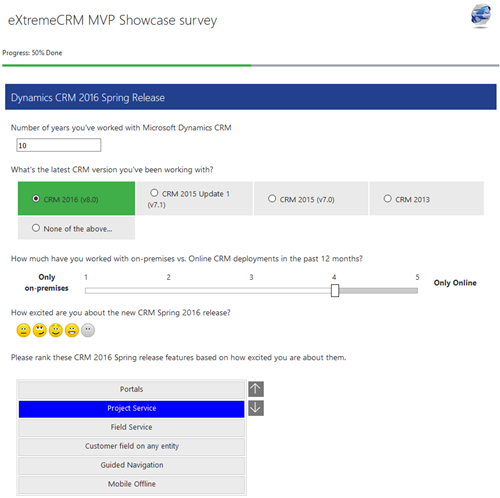
    As it turns out, Voice of the Customer (or “VoC” as we’ll all end up calling it) allows you to easily design surveys on any topic that you’re interested in collecting data on. If you haven’t yet explored this great new addition to the XRM family of add-ons that Microsoft has integrated into the core Dynamics CRM product offering, you could start by watching this introductory VoC video on YouTube. Or, you could see a VoC survey live in action by answering our eXtreme MVP Survey.

    eXtreme_MVP_button_1

    The survey is mainly targeted at those who are planning to attend the eXtremeCRM 2016 Warsaw event, but there’s nothing stopping you from taking it if you can’t make it there. The survey starts with some questions about the event and closes with a “feedback form” that you can use for submitting your questions to the CRM MVPs in advance, to be answered in the live event (time permitting). It also contains a few questions about how you feel about the upcoming CRM 2016 Spring Release, so I’m planning to also experiment with some of the analytics capabilities that these XRM style surveys offer us. I might even write a blog article about how the VoC experiment worked (unless the ‘Monkey gets its way again), so it’s all conducted in the name of science! (No marketing spam will come from this survey, it’s my personal CRM Online trial org that will disintegrate within a couple of months.)

  • eXtreme CRM Tool Challenge Winner: Tanguy!

    Unfortunately I wasn’t able to attend the eXtremeCRM event in Barcelona this year (“the Woodstock for CRM Rockstars”), but I’ve been keeping an eye on the buzz in Twitter around the #eXtremeCRM hashtag. Although it’s not exactly the same as enjoying live CRM geek talk over some tapas & cerveza, for anyone interested in hearing the latest news and tips around Dynamics CRM this is certainly a better pastime than any reality shows on TV.

    There’s a bit of a reality TV style competition every year at eXtremeCRM, called the the eXtreme App Challenge, where the participants have 24 hours to build an application leveraging the Dynamics CRM platform. The idea is of course to showcase the potential for extremely rapid app development where an idea can transform into a functional application overnight, thanks to all the “plumbing” that CRM platform already provides you. Well, I’d like to just point out that it’s not just the technical platform of Dynamics CRM that makes it such an excellent tool for delivering real life business solutions. There’s also an awesome community formed around Dynamics CRM that at the end of the day powers the platform in an equally important way as the SDK or the bits of code delivered by Microsoft. Here’s one excellent example of it:

    While spending the afternoon coffee break on Tweetdeck yesterday (like I far too often do), I came across one picture tweeted by Jonas Rapp from an eXtremeCRM session that demonstrated how to manipulate the CRM 2013 default dashboard setting via the Sitemap XML. The dashboard settings behavior is one of the less known areas of the latest Dynamics CRM version, although it has been covered in CRM Team Blog (which I was of course quick to point out, being the “certified Smar As*” that I am).

    The guru of CRM, Adam Vero, jumped in on the discussion and pinged the lord of the rings CRM tools, Tanguy Touzard, with a suggestion on making this setting a part of his Sitemap Editor, included in the ever growing XrmToolBox. Things kind of escalated from there and just a moment ago there was a new blog post published: Change the default dashboard in Dynamics CRM 2013 with XrmToolBox SiteMap Editor plugin.

    XrmToolbox default dashboard

    What just happened there? Let me summarize it for you:

    10.2.2014 12:47 – A tweet about a less known feature in CRM 2013 Sitemap XML presented at eXtremeCRM.

    11.2.2014 16:39 – The announcement of a free tool to configure the setting via a graphical, user friendly UI.

    That’s 27 hours and 52 minutes “from tweet to complete”. Folks, we have a winner and you all should know him by now:  Tanguy! Please show him the appreciation he deserves by dropping by his sponsor page on your way to collect the latest XrmToolBox download. Thank you.

    We’ve all heard (and some of us even blogged) about the rapid release cadence that Microsoft is nowadays pursuing via their cloud-first strategy of pushing out new releases of Dynamics CRM every 6 months (12 for on-premises). Still, all of this pales in comparison to the speed at which the community around the product, powered by social networks like Twitter and open source galleries like CodePlex, can deliver their own little “hotfixes” to the platform.

    While browsing through my stacks of CRM blog feeds and weeding through the #MSDYNCRM tweets, it’s sometimes too easy to forget that not everyone knows about the great tips and time saving tools that are available out there. It’s almost scary to think that in reality there are many people working with Dynamics CRM professionally who haven’t yet discovered the many ways in which the CRM platform could more easily be leveraged to deliver better solutions for customers in a shorter period of time – if only they knew how.

    There’s a very simple way how each and every one of us can make a difference here: if you come across a useful piece of information that helped you solve a problem you’ve faced while working with Dynamics CRM, please pass it on. You don’t have to develop a set of advanced configuration tools, or even build an app in 24 hours – just share what you’ve seen, heard or discovered. Then we can all be the winners.

  • eXtreme CRM 2013 Rome takeaways

    eXtremeCRMThere are no more Microsoft Convergence events held in Europe, but luckily the eXtreme CRM organization has stepped in to arrange a bi-annual conference where all the Dynamics CRM professionals can meet up and share information & thoughts on what’s happening around the product and the surrounding ecosystem. Last year in Berlin was the first time I attended the eXtreme CRM conference and this year it was time to head down south to Rome for eXtreme CRM 2013. Here’s my travel report from the event, focusing on the product roadmap details that were revealed and the direction that Microsoft Dynamics CRM seems to be heading towards, based on my interpretation.

    It’s been a bit rough

    The opening keynote by Bob Stutz, corporate vice president of Microsoft Dynamics CRM, was a somewhat unusual appearance compared to the traditional Microsoft way of highlighting their past achievements and future opportunities. From the European viewpoint, the typical US style keynotes often go over the top in building up hype for the success of the products, but Bob came onto the stage with a different kind of a message. Basically he apologized for all the problems that have surrounded Dynamics CRM recently: the delay of cross-browser support, CRM Online performance/reliability issues and the sad saga of recent Update Rollups being pulled.

    Bob_Stutz_eXtremeCRM_keynoteI think most of the MS partners in the room had shared the pain from these issues, especially when having to explain them on a day-to-day basis while working with customers. In the software business it’s of course nothing unheard of that  such problems may occur, but there’s been an elevated sense of frustration recently with the lack of information given to partners on what’s going on at Microsoft. Communication is the most effective cure in recovering from such events and I bet that it would have been far easier for all parties if there had been more transparent exchange of information on each of these issues earlier on, but it’s good to see the top management acknowledge this now and hopefully do what is necessary to straighten these things out.

    One thing that Bob Stutz promised to change was to return the Update Rollups back to pure hotfix packages instead of vehicles for new feature delivery that they’ve turned into after Microsoft adopted the agile release policy for Dynamics CRM shortly after the 2011 version came out. What this means in practice is that MS will need to come up with a new delivery vehicle for introducing the new features into on-premise CRM environments at least once a year. While this can potentially improve the stability of those environments, the gap between CRM Online and on-premise feature release schedule can also grow even larger as a result of this, which could introduce it’s own challenges through an increased platform fragmentation.

    The mobility story

    This time last year Microsoft made a big announcement of their upcoming “CRM Anywhere” prodcut offering. Following the aforementioned turn of events, the cross-browser support got eventually delayed up until Polaris / Update Rollup 12 while the mobile strategy was gradually revised, scrapping their planned partnership with CWR Mobility and opting to develop in-house mobile apps instead. Individual pieces of news around the mobility offering have become available during the past fall and now at eXtreme CRM 2013 Rome the following mobility roadmap slide was presented:

    Dynamics CRM Mobility Roadmap & Vision

    From this slide and the accompanying presentation I was able to pick out the following pieces of data:

    • The iPad Safari web client that was postponed from the actual Polaris rollout is arriving this month for CRM Online customers, on-premise support will be in Orion
    • Tablet devices will receive a dedicated app, not only the Windows 8 Sales Workspace but also a similar iPad native app appears to be scheduled for Orion, with further Service and Marketing apps in the horizon
    • iPhone and Android support will be limited to the Mobile Express client even after Orion, all the way until Leo
    • No details on whether Windows Phone will receive any new features in addition to the WP7 Activity Feeds app that was released a bit over year ago
    • Customization options as well as offline data support will be rolled out gradually to these clients

    One thing that Bob was emphasizing during the keynote was Microsoft’s decision not to charge additional licenses for access to these mobile and tablet applications. Choosing to take the longer route of build vs. buy in the mobile CRM gives MS a wider range of options to adjust their commercial offering to market needs, but the prolonged period of uncertainty means that many customers will also be postponing their investment decisions on mobile CRM deployment until they have facts available on what level of functionality is going to be baked into the core platform. At the same time ISV’s like Resco and more recently also CWR Mobility are working hard to be able to offer a HTML5 platform for developing customized mobile and tablet apps for Dynamics CRM for those customers who need to equip their mobile workforce with CRM solutions already today.

    Update 2013-02-16: Microsoft partners can now download the Microsoft Dynamics CRM Mobility Roadmap slide deck from PartnerSource (login required).

    From Polaris to Orion via Gemini

    The new “Flow” UI of Dynamics CRM has been rolled out to existing CRM Online customers. This has caused both a lot of excitement as well as anxiety, since the new design and integrations (Bing Maps, Yammer etc.) are very tempting to be demonstrated as the next generation user experience, but the feature set of Polaris takes away many of the standard customization options that rely on form event scripting. I’ve covered the Polaris new features & gotchas in a previous post, in case you haven’t had a chance to dig deeper into the updated CRM Online version yet. Just to repeat once more what I’ve been trying to emphasize ever since latest Statement of Direction document was released: on-premise customers won’t get the new UI with Update Rollup 12, it arrives in the Orion release.

    Orion_the_next_version_of_Dynamics_CRMWith that in mind, let’s get the big news out of the way before digging any deeper: Orion is not an Update Rollup or even Service Update type of a release, it is the next major version of Dynamics CRM. In his closing keynote Bill Patterson pretty much confirmed that it would be called “Microsoft Dynamics CRM 2013” (or 2014) for the on-premise customers. Not a whole lot of other details were shared, apart from the fact that the target release date is in Q3 2013. Although Bob Stutz was hesitant on giving any dates in his speech, July was mentioned more than once, but whether that refers to general availability or CRM Online is anybody’s guess as of now.

    Before that, we’ll have time for another star in the spring sky: Gemini. Yes, it looks like there will be even more frequent releases for CRM Online than previously communicated. Gemini arrives in Q2 2013 and will focus on bringing the Marketing Pilot features acquired last October available to Dynamics CRM users. The feature set was shown in a very brief run through of slides, since the network issues that plagued the whole eXtreme CRM 2013 Rome event held at Marriott Park Hotel forced Bill to skip the live demo and resort to screenshots instead. Not much can be said about what to expect from Marketing Pilot at this stage, but here are some facts I picked up: (more…)

  • Future stars: Dynamics CRM roadmap news from Las Vegas

    We didn’t yet get a new Statement of Direction or Release Preview Guide for the future releases of Microsoft Dynamics CRM from today’s eXtreme CRM 2012 Las Vegas keynote by Craig Dewar, titled “Microsoft Dynamics CRM – Now and In the Future”. That is scheduled to happen next week, but who wants to wait around for the information that has been shared to the privileged few who attended the eXtreme CRM session?

    Lucky for us who weren’t able to go to Vegas, the best new bits revealed at the session were tweeted out by outstanding #MSDYNCRM community contributors like Neil Benson, Shawn Tabor, Brad Koontz, Bob Hatcher and Eric W Cahoon. Here’s a “best of #eXtremeCRM tweets” collection that tries to summarize what was presented in Dewar’s session.

    Q4 2012: Polaris

    Let’s start with the updates coming in the very near future. The next release is codenamed “Polaris” will be out in Q4 2012, so this is the “Fall 2012” release we saw on an earlier roadmap slide. More specifically, the new functionality will be delivered as a part of Update Rollup 12 during December 2012 for both on-premise and for CRM Online customers.

    Polaris will contain upgrades to the browser UI as seen in the WPC 2012 session in July. It will include the Process Driven Refresh UI and deliver a more “flat” user experience to better match the look & feel of Office 2013. Also, the cross-browser support originally scheduled for Q2 2012 Service Update will now be delivered in December with UR12 and this part will affect also on-premise and hosted CRM environments. The previously delayed custom workflow activity support for CRM Online will be delivered within the same UR12 update schedule.

    New announcements made at the eXtreme CRM keynote for Q4 2012 include click-to-call integration with Lync and Skype (both of which are Microsoft products these days, in case you forgot). CRM Online customers will get a simple Bing Maps integration with maps embedded on the customer forms. Presumably the CRM Online subscription will in the future include a license to use Bing Maps on an internal application whereas customers who’ve bought perpetual server and client licenses from Microsoft need to acquire a separate license to use the mapping functionality through the API (remember: it’s not a free service, like the Bing Maps or Google Maps website).

    Q2 2013: Orion

    The release after Polaris carries the codename “Orion” and is scheduled for Q2 2013. What’s special about this release is that it will be CRM Online only. Whether on-premises and hosted CRM clients will be completely left without updates in Q2 remains to be seen, but the new release cadence suggest only a single major update for on-premises customers per year. The Update Rollup release schedule with an 8 week cycle should still remain unchanged, though, so it’s likely to be a bit of a mixed bag of what’s really “Online only” in terms of new or changed functionality. Update: it’s actually the Q4 2012 Polaris that will be Online only, see the comments at the end from Craig Dewar.

    As I’ve already speculated for a long time, the new Agaves in Office 2013 apps will be used as the means to deliver Dynamics CRM support for Outlook Web Access, both in OWA and MOWA (mobile app). This will finally enable tracking content from your inbox into CRM without having to live with the Outlook desktop client legacy. Also the synchronizing of items from Exchange will be possible on the server side with the Orion release in Q2 2013.

    Yammer integration, which presumably goes much deeper than the current integration solution built by Yammer before being acquired by Microsoft, is scheduled for Q2 2013. Other than this, concreted evidence of bringing social channels into Dynamics CRM was not leaked from Vegas, so we’ll need to wait a bit longer to see how Microsoft intends to deliver on the social story they’ve been promoting for CRM since this time last year. Back when we were still talking about Polaris as the R9 release this was supposed to connect Dynamics CRM with the external communities in a big way, but no major announcements have so far been made on this front.

    Ok, I did spot one physical evidence of social CRM from the Extreme CRM announcements, in the form of a new Social CRM solution built by Sonoma Partners. It’s baked into the updated version of CRM Demo Builder, which now allows you to provision CRM + SharePoint on the same, shared Office 365 platform, thus achieving single sign-on. Whether this particular Social CRM app will be made available to all CRM customers is something I’m not yet sure, but it looks like quite a solid little app for bringing Twitter feeds into CRM by using the same look & feel as the previous Activity Feeds solution. You can promote tweets into new/existing leads, contacts, accounts, cases or opportunities, after which you see the original tweet in CRM as an Activity Feed post. Nothing revolutionary in itself, but a welcome feature, if something like this is actually on Microsoft’s roadmap.

    That’s all of the news I picked up so far from the event by following the social networks. Did I miss any interesting tweet from #eXtremeCRM or an important piece of news? Leave a comment & let’s assemble the pieces of the Dynamics CRM roadmap together!

    Update 2012-09-04: I received clarification on the release roadmap from Craig Dewar himself, here’s the update:

    • “Polaris due Q4 2012 is online only with one exception. There is one capability in Polaris namely cross browser that is of such high interest we will release that capability on premise also.”
    • “Orion due Q2 2013 is online and on premise. It will include all Polaris functionality in addition to many new capabilities.”

    Based on my interpretation of the above, CRM Online customers will get the Polaris functionality first, while on premise and hosted CRM customers receive these updates 6 months later when Orion comes out.

  • To the eXtreme, part 2: The future of the web caught up with IE and Dynamics CRM

    One great thing about Microsoft Dynamics CRM as a business application platform has been that it’s modern enough to have been born into the browser window from day one. With no legacy from the pre-web era, the product has been able to stay relevant with no major disruptions in the client side development and also supported the eventual move of the server side functionality to the data centers in the cloud.

    A history of Internet ExplorerInternet Explorer market share peaked in 2003, when 95% of all Internet usage was on IE. Coincidentally, Microsoft CRM 1.0 was released in January 2003. At the time, providing support for any other browser than your in-house product would have certainly sounded like a requirement you could de-prioritize. Today Internet Explorer commands a market share of less than 40%. There are now more iPads sold than any brand of desktop PCs combined. If that doesn’t signal the move to a post-PC era, I don’t know what does. If you’d be a company manufacturing an IE only product for PCs in the year 2012, you could soon be out of business.

    This is a fate Microsoft intends to avoid, which is why the cross-browser support for Microsoft Dynamics CRM was officially announced in the Q2 2012 Service Update release preview guide, released at the beginning of Extreme CRM 2012 conference in Berlin. We had already seen the promise of non-IE browser clients for Dynamics CRM presented in Microsoft’s May 2011 Statement of Direction and now we finally have details about what to expect in Dynamics CRM R8 release exactly one year later. As with my previous post on mobile CRM, I won’t rephrase all the content of the official announcement but I’ll rather try and reflect on the topic with some personal observations and thoughts.

    There’s Supported and then there’s “supported”

    If you’ve glanced at the table of supported browser and OS combinations, you’ll have noticed that Microsoft does not guarantee support on every browser out there on every operating system. This is not too surprising, as any web application developer surely knows what a nightmare the differences in interpretation of web standards between various browsers can be for application development and testing. In the words of Craig Dewar (Director of Product Management for MSDYNCRM), browser testing is a “gigantic effort” for Microsoft, which is why official support is not all encompassing.

    Microsoft Dynamics CRM browser and OS support

    Just because a browser or OS is not listed in Microsoft’s documentation as supported, doesn’t mean Dynamics CRM won’t work on it. So, even though there are no supported options for using Microsoft Dynamics CRM on Linux, you might not notice any problems if you access it with Firefox on Ubuntu. In fact, Craig mentioned in his keynote at Extreme CRM 2012 Berlin that even if you’re using a client that’s not officially supported, Microsoft will allow you to open support tickets on issues that are not specific to the browser/OS combination you’re running. I guess you’ll just want to have at least one Win/IE or Mac/Safari device around to make sure you can reproduce the issue when dealing with Microsoft Support representatives.

    “Macbooks for everyone!”

    In case you’ve been drooling over the cool Apple hardware that all the opinion leaders seem to carry with them these days, the future does indeed look brighter for people working on/with Dynamics CRM. Before you jump head first into the OSX & iOS world and format all your Windows partitions, it’s important to remember that what Microsoft is talking about here is just the browser client support for CRM end users.

    Outlook 2011 for Mac: sorry, no Microsoft Dynamics CRM clientWhile you can get Microsoft Office for OSX and run Outlook on you Mac, what you can’t do is use the Microsoft Dynamics CRM for Outlook client. This means you can’t track emails to CRM, synchronize your calendar appointments between Outlook and CRM, get CRM task and call reminders from your Outlook, synchronize your contacts from CRM to Outlook to your iPhone, or have any offline support for CRM data and application functionality when your Macbook doesn’t have WiFi or 3G data connectivity. All in all, you lose quite a bit of that seamless productivity tools magic that Dynamics CRM promises to deliver for all Windows users. I haven’t seen any announcements about a CRM Outlook client for Mac, so it’s pretty safe to assume that we won’t see one released for the Outlook 2011 for Mac version currently available.

    OK, so how about the support of Apple’s mobile devices then? It says Dynamics CRM will run on iPad 2 with iOS 5.x, so that should at least deliver the full flavor of the browser experience on a tablet, right? Well, the problem is you might get more than you bargained for in that deal, since (as far as I’m aware of) the browser client will look and work exactly the same on all supported platforms and devices. If you’ve ever tried running the Dynamics CRM web client on a Windows 7 tablet, you’ll know that simply replacing the mouse cursor with your index finger will not magically “touchify” the user experience. What works nicely on a 24″ screen with mouse & keyboard input may not scale/transform into the tablet environment of 10″ screens and touch UI. If you’ve used a remote desktop app on your iPad, then I’d imagine this is pretty much what you can expect from a browser client on an iPad. Unless you go for the $30 per month subscription of Microsoft Dynamics CRM Mobile app or purchase a perpetual license from CWR Mobility, TenDigits or other ISV’s that develop mobile clients optimized specifically for the touch UI. The same goes for Android tablets, only with the exception that the browser client falls into the “not officially supported” territory.

    Finally, if you’re not only using Dynamics CRM but also administering or customizing it, I’ve read that you’ll still need Internet Explorer in order to access these areas in the web client.

    ‘Reimagining’ Windows, should we also reimagine Dynamics CRM?

    WinRT architectureIt’s important to note that the web client coming out in Q2 2012 is not a HTML5 product, rather it’s a trimmed version of the previous IE only client with removed dependencies on Microsoft’s proprietary extensions that only IE supports (.htc files etc.). The future is not here yet, but there is little doubt on the direction Microsoft is heading towards, with the upcoming WinRT framework and the big push for HTML, Javascript and CSS as the foundation for future Windows apps.

    Which brings us to Silverlight. It’s been widely speculated that Silverlight 5 released at the end of 2011 will be the last of it’s kind, the end of the road. Porting existing Silverlight apps to run on Win RT is said to be easy, which should naturally be in the interest of Microsoft to ensure. As I’m not a developer, I’m looking at the discussion more from the point of view of someone who needs to examine all the available technologies out there, evaluate how they fit together and build a working business solution out of them. From this perspective, there are some concerns regarding Silverlight that very much affect Dynamics CRM users as well.

    While Dynamics CRM might work on a browser/OS combination that is not officially supported, the game is different if you’re using Silverlight web parts in your CRM. If a Silverlight plugin is not available for the client, it will not work, period. This includes combinations such as Chrome/OSX, any machine running Linux and most notably the iPad. Ok, so what about making the same UI with a different technology, like HTML, Javascript and CSS? In theory everything should work on every platform in this case. You’re free to draw your conclusions on which approach is better for starting your next Dynamics CRM add-on project.

    Looking further ahead to Windows 8, we’ve already received the announcement that there will actually be a completely different edition of the operating system, called Windows On ARM (WOA), that will the basis for building always on, always connected, low power consumption devices to rival the iPad. The Internet Explorer 10 browser on WOA will not allow any plug-ins whatsoever, be it Flash or Silverlight. Furthermore, the Office 15 package that is available for WOA tablets will include only Word, Excel, PowerPoint and OneNote, but not Outlook. By now you should have figured out that the Microsoft Dynamics CRM experience on WOA will need to be quite different from what we have on Windows 7 today.

    If there will not be Outlook on the “real” Windows tablets, what does the future hold for the CRM Outlook client? I previously wrote about the legacy of Outlook and how it will be increasingly more difficult to carry all that legacy when moving to the Post-PC era of iPad-esque devices for every knowledge worker. By the looks of things, Outlook could possibly get split into Metro Mail, Contacts and Calendar apps. If this happens, then it’s easy to envision a separate Dynamics CRM Metro app sitting alongside them, integrating into all the other installed apps through a simple share contract. After all, isn’t that the way it should really be? Link contacts/friends/followers from any social network app to CRM contacts, track any type of status update/post/tweet from the same app as a custom activity type into your CRM database. There’s no reason why customer relationship management tasks should be any more complex or inflexible than that.

    It’s great to have Dynamics CRM available soon on (almost) any browser. Still, if Microsoft truly is reimagining Windows the way they claim to be and if their business customers buy into their new story, perhaps running Dynamics CRM on Safari won’t seem all that exciting anymore this time next year.
  • To the eXtreme: thoughts on Dynamics CRM Mobile

    This is my first post on news and gossip that the eXtreme CRM 2012 Berlin conference brought to us. As there’s so many posts out there already that review the contents of the Q2 2012 Service Update (aka Dynamics CRM R8), I’m going to try and reflect on the topics based on my own observations and questions that these latest announcements have brought up. The first stop is mobile CRM.

    Every consultant knows that Microsoft’s initial offering, the Dynamics CRM Mobile Express client, wasn’t really something you wanted to draw the customers’ attention to. It was just barely good enough to tick the feature box of “yes, we have mobile CRM”. On a non-touch smartphone like the popular business products from Nokia or RIM the user experience might have matched the native apps and device capabilities, but in the age of the iPhone this wasn’t at all what the users had come to expect from their mobile apps.

    When Microsoft released the new Windows Phone 7 client application in CRM R7 release (2011 Q4 Service Update), we saw a glimpse of a brighter mobile future, but there was still hardly reason for true celebration. Ok, so we had a mobile optimized client now available, but it had it’s issues:

    • Only available for one niche (yet growing) smartphone platform
    • No ability to create or update any CRM records (except Activity Feed posts)
    • No offline support

    The path towards a credible mobile offering would have been quite long for Microsoft to walk all on its own. Therefore it wasn’t really a surprise that they chose to team up with an existing partner and rebrand their mobile applications and services to the new “CRM Anywhere” solution (which is still officially called Microsoft Dynamics CRM Mobile). Out of all the possible mobile CRM ISV’s out there, their partner of choice turned out to be CWR Mobility.

    This could of course be seen as a big blow to the other Dynamics CRM mobile ISV’s, who now have to compete against Microsoft’s own offering. However, in the long term this may actually be a positive turn of events for the whole ecosystem. The fact that there will be an official mobile app available from Microsoft to all the major smartphone platforms will surely drive up customer awareness as well as interest towards the possible use cases for “CRM on the road”.

    Considering how much talk there’s been around the mobile use of CRM applications in the past few years, in my opinion we haven’t yet seen it really bloom the way many of us would have expected it to. I think one of the reasons is that mobile CRM has often been considered mainly as “CRM lite” that offers a subset of the features the full application delivers, for those awkward moments when your “CRM full” is not available to you. If mobile CRM is an optional feature that does not tie into the processes you absolutely need to execute, how likely is it that companies will choose to invest in such an additional cost factor? Ben Mitchell from TenDigits said it really well in his presentation:

    “You’ve got a perfectly working address book on your phone already. If that’s all you’re trying to replace with mobile CRM, it’s always going to be too expensive. Always attach the price of a mobile CRM solution to the business value the customer is trying to achieve by deploying the solution. Mobile functionality pricing must be delivered in the context of business objectives, not just as a last minute addition to the quotation.”

    Mobile CRM is like Social CRM in this sense: companies know why they need to embrace it sooner or later, but they’re still having difficulties in articulating exactly how they plan to go about it. As the limitations of available software are quickly fading away, the focus on real life use cases must rise on top. No, mobile CRM isn’t just about replicating the desktop experience on a smaller device. It must support the mode of working in infrequent bursts and dealing with specific scenarios, such as order entry or survey answer recording while the user is at the customer’s site. The UI needs to be optimized for the process in question, not just equipped with big icons to be poked with your fingers. Whether it’s going to be packaged apps like the Microsoft Dynamics CRM Mobile growing beyond their current feature sets in customizability, platforms like the Resco Mobile CRM Studio gaining popularity as the basis for mobile app development, or even a future release of a HTML5 compliant version of the core Dynamics CRM browser app stealing the show with responsive web design, the playing field for a true CRM Anywhere solution that takes the “mobile first” thinking into everyday practice still looks wide open to me.

    One interesting thing to keep an eye on is what’s going to happen to the Microsoft developed Windows Phone 7 CRM client. The R8 release preview guide states that there will not yet be offline functionality available for Windows Phone devices when the new service launches. This means that Microsoft Dynamics CRM will initially work better on pretty much any other mobile platforms compared to Microsoft Windows Phone 7 (doh!). I’m assuming that the current client version will receive some minor feature updates (new Activity Feeds filters etc.) but a full integration into the CWR Mobile platform will take more time. I’ve noticed in some occasions the WP7 client has actually been referred to as the “Activity Feeds Mobile App”, but I’m not sure if Microsoft could get away with renaming product X to product Y, then launching a new product X and charging extra money for it.

    This leads us to the pricing model. Whereas the Windows Phone 7 client is a free download from the Marketplace, the CWR clients are based on a subscription fee. A company who buys licenses for Dynamics CRM, be it on-premises or CRM Online, will not receive any mobile client functionality as a part of the core product. Microsoft Dynamics CRM Mobile will therefore remain as an add-on that customers must purchase licenses for separately. Considering the price is $30 per user per month, compared to the base product price of CRM Online of $44, this means in many cases not all CRM users will be given mobile client licenses. Or perhaps they’ll just be given a midprice Windows Phone device, such as the Nokia Lumia 710, and access to the free WP7 version of Dynamics CRM Mobile. With a number of Dynamics CRM apps already out there in iOS and Android marketplaces that any user can purchase for themselves and point it to a CRM Online or IFD organization, I’m not even sure companies can effectively standardize on a single official mobile app anymore, thanks to the BYOD culture and shadow IT.

    The official Microsoft Dynamics CRM Mobile service won’t be able to match the 40 markets / 41 languages level of the core CRM product, as it will initially be available only in 24 markets and 10 languages. The explanation offered by Microsoft was that there are such regulatory limitations for mobile services in many markets that they simply can’t roll out their mobile CRM offering as quickly as a cloud app like CRM Online. We’ll see how fast they can catch up and bring the service to markets like Finland. It will also be interesting to see whether the initial unavailability will simply mean the lack of local languages or if MS will actually not offer the mobile app for download at all in these tier 2 regions’ marketplaces. I sure hope it won’t be the latter option, even if it would mean I’d have to temporarily return from WP7 to Android for doing proper presales demos of the new mobile service with offline capability. The sacrifices one needs to make for the love of CRM… 😉