Tag: ERP

  • Renewed Dynamics 365 Licensing Guide for October 2020

    Renewed Dynamics 365 Licensing Guide for October 2020

    On the first business day of each month, I have one routine that I’ve been following for quite some time now: check the latest Licensing Guides that Microsoft has published. I have two short URLs that I use for quickly downloading them:

    I also have a habit of storing each historical version of these documents (and other licensing materials from MS) onto my OneDrive. I’ve found this to be the only way you can actually keep track of what’s going on in the rapidly moving world of BizApps licensing. Well, these days there is also the GitHub history of commits made on Microsoft Docs pages covering licensing (like this one), if you’re into comparing the diffs of each change made in the detailed wording.

    Fresh new look for October 2020

    This time the latest PDF for Dynamics 365 Licensing Guide offered quite significant changes, which are clearly visible right from opening the document:
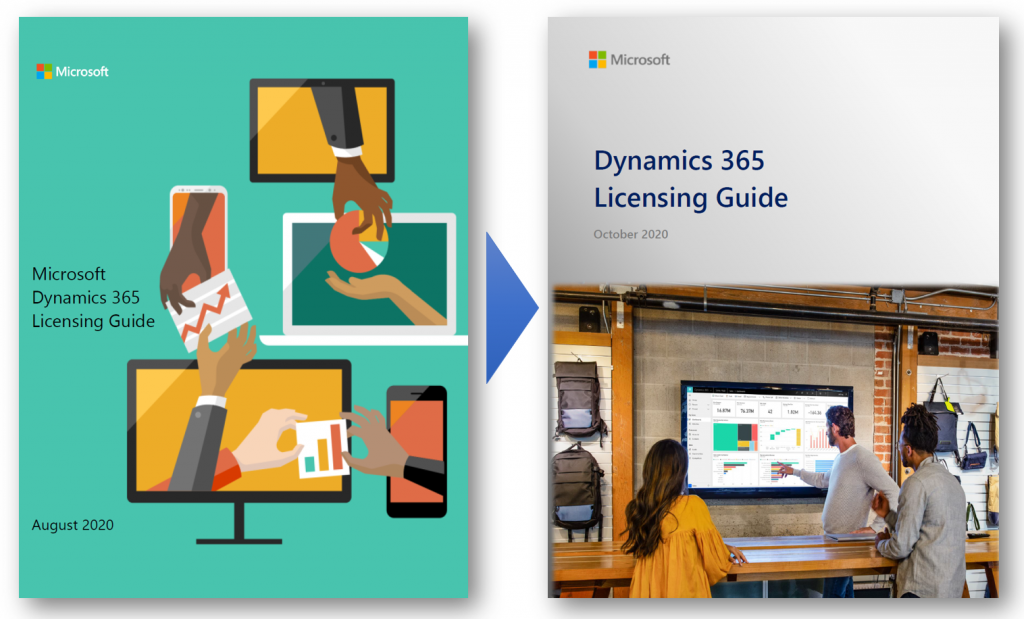
    “Big deal, just another cover page update like they do with Release Plans.” This time there’s more to it, though. Here’s what MS says:

    The Dynamics 365 Licensing Guide has been reformatted and renewed for October 2020. We hope you will find it consistent and easier to consume. Applications are presented in alphabetical order, and each section covers the full story including licensing model, additional applications, and user rights. Dynamics 365 Business Central and Mixed Reality offers are now included in this guide and duplicative information has been removed. Product licensing information that is legally binding is presented in the Product Terms and Online Services Terms (OST). Power Platform licensing information is referenced in Power Platform licensing documents.

    Previously Business Central was excluded from the Dynamics 365 Licensing Guide, which of course sounded a bit strange. After all, the historical plans for having separate Business Edition and Enterprise Edition product tiers for Dynamics 365 were scrapped before these products ever launched, so preserving such division in the licensing documentation did not seem justified.

    This was not the only division that existed in the earlier Dynamics 365 Licensing Guide, though. For old time’s sake, here’s how the last August 2020 version of the Guide illustrated the different types of Base and Attach licenses available:
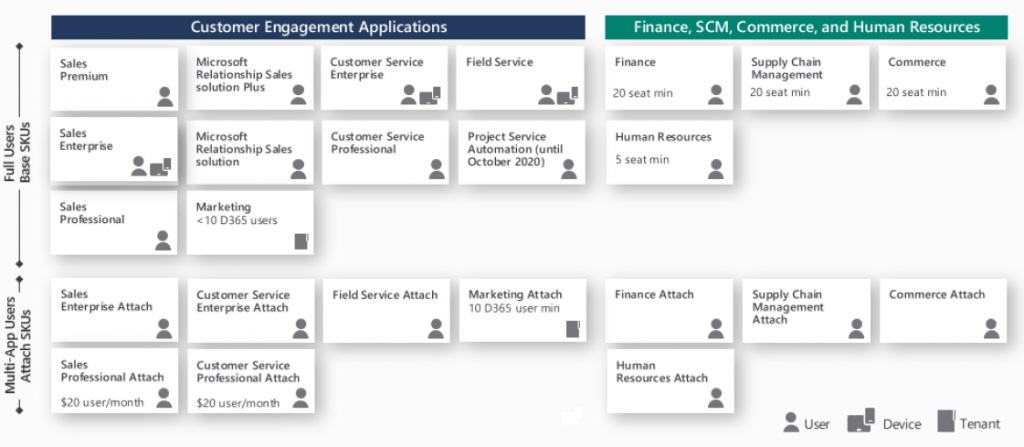
    We had a split between “Customer Engagement Applications” and “Finance, SCM, Commerce and Human Resources”. Go back a full year and the right side said “Finance and Operations, Retail, and Talent” – because it’s apparently a great idea to change software product names at least as often as their licensing model… Anyway, the logical grouping was still the same, meaning we had the XRM/CRM apps on the left and AX/ERP on the right.

    This wasn’t exactly the way Microsoft would like to present their Dynamics 365 suite of products, as instead of CRM on one side and ERP on the other it should be one seamless plaform. Related to this, MS had stated in October 2019 already that they would no longer be using the term “Dynamics 365 for Customer Engagement apps” to refer to any cloud services, leaving CE as the term for legacy on-prem versions only. Despite of this, up until the August 2020 version the Licensing Guide for these cloud apps still had 47 occurrences of the term “Customer Engagement” in it.

    Customer Engagement is gone for good

    Now in the lastest Licensing Guide version we have a truly flat list of all the different Dynamics 365 apps presented in an alphabetical order. If you didn’t know the origin of each application and what technical platform it actually runs on, there wouldn’t be anything in the Licensing Guide to highlight this.
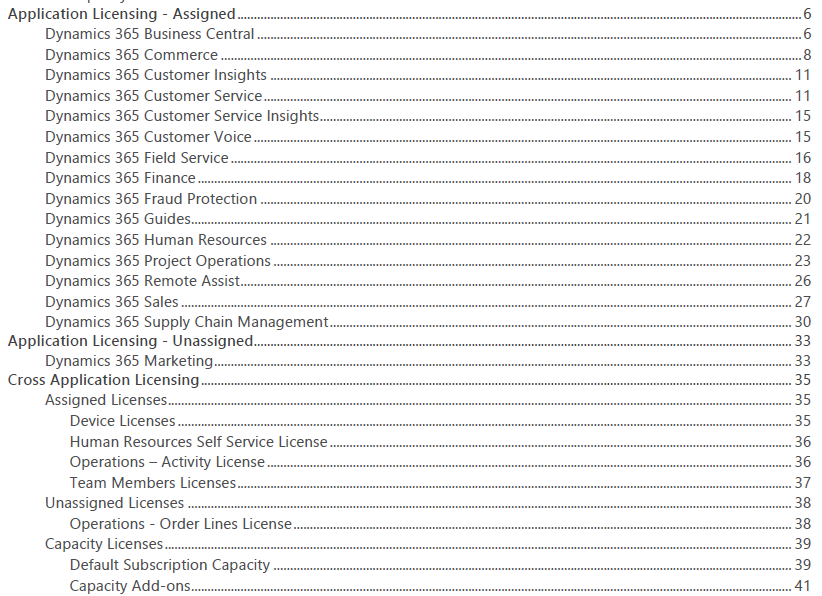
    From a commercial perspective this makes a lot of sense. The whole idea behind Dynamics 365 today is that instead of subscribing to a “plan” that opens on set of apps that share a common server origin, your organization’s users could subscribe to any combination of apps that suit the needs of a particular subset of your users. The Base/Attach licensing model makes the cost of additional apps an attractive option to explore. While not all data might be in the same physical place for each app, this may not even be an issue for unrelated business processes like Sales and Human Resources.

    From a technical perspective, things aren’t necessarily getting any easier to grasp by this removal of a familiar layer like CE (or CRM). Yet on a factual level the Dynamics 365 suite hasn’t been about the combination of CRM and ERP for a while anymore.

    Think about Customer Insights, for example. That’s a service built to ingest data from multiple different systems (like CRM or ERP) and manage it on Azure Data Lake. Or how about Customer Voice. It was born from the feature set of Microsoft Forms, then merged with the legacy of now-deprecated Voice of the Customer. The resulting product isn’t exactly pure XRM nor is it an extended Office app.

    We can expect most new Dynamics 365 products to be hybrids built out of multiple technologies. In the process it’s becoming difficult to assign them into buckets based on established enterprise systems.

    What’s my name again…?

    People with a Dynamics CRM background have fairly broadly adopted CE as the descriptor to identify which part of Dynamics 365 they specialize in. As Microsoft erases the last instances of Customer Engagement from their terminology, this can cause some further identify crisis for long time professionals who are experienced with XRM yet can’t quite place themselves on the long list of current Dynamics 365 app names.

    The way I see it, there isn’t any need for a new replacement term to cover what used to be CE, and XRM before that. It’s just simply Power Apps! All of the common features of the platform are essentially included under the Power Apps umbrella, and there’s a data platform called Common Data Service as one key element of it. Everything up from there is the app specific layer where the Dynamics 365 X product team has implemented functionality with a business process in mind. CE isn’t such a useful concept here anymore, because knowing about Sales doesn’t guarantee you’re fluent in Marketing or Field Service apps.

    So that things wouldn’t be all too simple, Power Apps does of course cover a wide array of functionality that CE professionals may not be familiar with. For starters, alongside the Model-driven apps there are Canvas apps and Portals – each with very specific logic that could be compared to CRM vs. ERP. Power Automate as the candidate for replacing traditional CE process automation is a fair bit wider than just workflows. If you’d then expand beyond Power Apps and call yourself a Power Platform specialist, would that indicate fluency in Power Virtual Agents and Power BI, too?

    Licensing just Dynamics 365 ain’t enough

    The extensive list of apps and their pricing elements in the current Dynamics 365 Licensing Guide is a bit like the Terms & Conditions of any online service: no one is going to read through it all. At the same time, though, it doesn’t go deep enough in explaining how the first-party Dynamics 365 apps relate to the platform capabilities licensed via Power Apps. Unfortunately there is no single Power Platform Licensing Guide document to provide answers, because no such product is actually being sold by Microsoft. You license various pieces of it and then assemble them into your own unique structures.

    The trickiest questions around business applications licensing aren’t usually about the app specific details that you can read from the Dynamics 365 Licensing Guide. It’s about those scenarios which involve using the Power Platform as the means to customize, extend and integrate Dynamics 365 apps. On this front nothing has really changed nor improved, as Microsoft continues to treat these two sides as separate products (see my blog post on why Power Platform licensing is complex). Often you’re left between browsing the two separate Licensing Guides, digging through FAQ answers and sometimes tracing the underlying intent of the licensing model into something that a MS representative has informally stated in an interview.
    As it just so happens, I’ll be speaking at the CDS Saturday event on October 24th about Making Sense of CDS Licensing. This will be a live event with no recording to catch later so be sure to sign up and be there if you’re interested in diving deeper into the key aspects of licensing Dynamics 365 & Power Apps when building CDS based solutions.

  • United at last: Dynamics 365 Dual-write goes GA

    United at last: Dynamics 365 Dual-write goes GA

    On March 27 2020, Microsoft announced that the Dual-write feature is generally available. After being in preview for over a year, the functionality itself isn’t necessarily a surprise to anyone who’s actively following what’s taking place in the Dynamics 365 product portfolio. The GA does however mark a milestone where it makes sense to reflect on what the broader impact of Dual-write is to business applications built on top of Microsoft Power Platform.

    The very short answer to “what is Dual-write” would be that it’s a built-in feature for making business data available across Dynamics CRM & ERP products without any additional integration tools. It may come as a surprise to people outside the MS ecosystem that even though the Dynamics 365 brand was announced already in the summer of 2016, the practical work of bringing the different apps from this product suite together has not yet changed that much from the early days of custom integration projects. Putting things into context, the effort to unify the 1 CRM & N ERP products in Microsoft’s portfolio originally targeted its first deliverables in 2004 (as “Project Green”). This proved to be impossible (or rather not feasible from a business perspective) in the on-premises era, but now when the Dynamics products are services hosted in the global MS cloud, the unification has actually been doable.

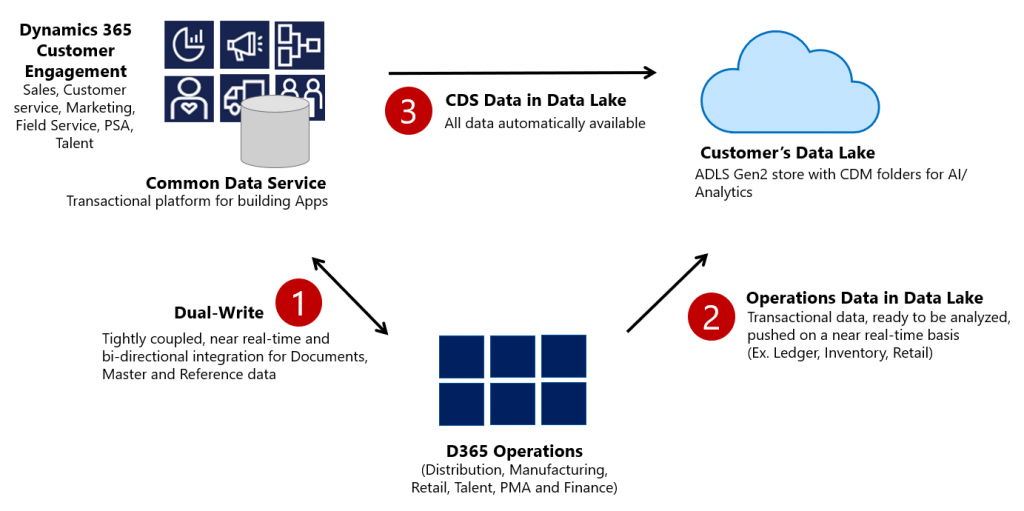
    Dual-write isn’t your everyday CRM-ERP integration, though. It is a near real-time synchronization of data between the Finance and Operations database and the Common Data Service that powers the low-code application and automation development story of Power Platform. Looking at the even broader data story that Microsoft is building around it’s business apps, BI and AI capabilities, we can also see that Dual-write is just one of the mechanisms that will move business data around:

    Taken from the Ignite 2019 session “Common Data Service with Dynamics 365 Finance and Operations”, this slide highlights the role of Azure Data Lake Gen2 in the analytical features that will be offered both as preconfigured features from Microsoft as well as customer specific implementations, to derive new insights from the business data. When it comes to the more operational side of doing business in the digital world, having the SCM and Finance app data available in CDS is what opens up plenty of new interesting scenarios. What if anyone could easily build Power Apps that work directly with the enterprise master data from ERP like customers, products and pricing information? If CDS indeed could lower this data integration barrier and bring task based experiences with pixel-perfect Canvas apps into the hands of frontline workers, that could surely be a transformative service worthy of its name. Not just a single database like XRM was but a connecting layer across many Microsoft cloud technologies.

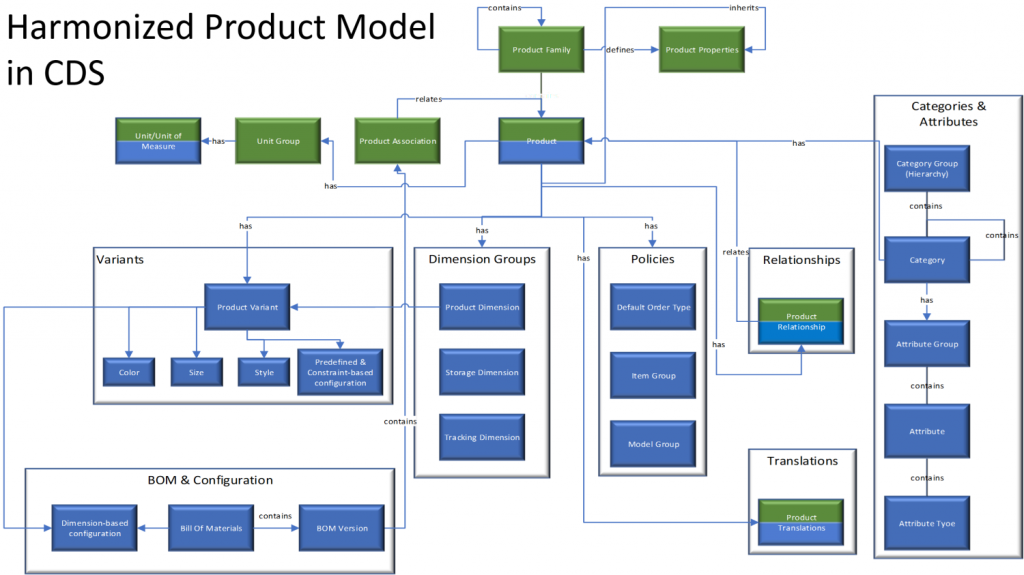
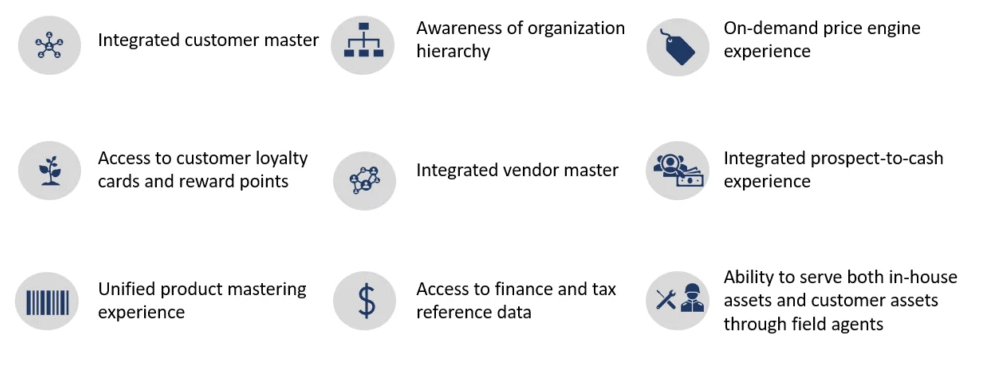
    In order to bring the ERP data into CDS, Microsoft needed to design harmonized data models that align with what used to be the independent products of Dynamics CRM and Dynamics AX originally and define how the schema of each system maps to the other. As an example, the CRM product data model has understandably been considerably more limited than that of an actual ERP application. Now with Dual-write, these two must come together in a unified product experience:

    No two businesses operate exactly alike when it comes to data and processes, so the logic of Dual-write has been built to allow no-code configuration to adjust the details of specific implementations. However, this new depth of application integration within the Dynamics 365 portfolio now means that you should have very good reasons if you decide to deviate from the standard model. Let’s look at Microsoft’s guidance for the above mentioned product data model as an example:

    The dual-write entity maps for products have been designed to flow data one-way only, in near-real time from Finance and Operations apps to Common Data Service. However, the product infrastructure has been made open to make it bi-directional if required. Although you can customize it, it’s at your own risk, as Microsoft does not recommend this approach.

    Anyone who’s worked with Dynamics CRM / Dynamics 365 Customer Engagement implementations in the past has surely come across the need to extend or modify the overly simplistic product and pricing data model that hasn’t been flexible enough to accomodate many real life sales scenarios. Jumping from such a customized environment in production use into Dual-write may not be all that easy, nor will the new data model defined by Microsoft just magically solve everyone’s problems. Dynamics 365 consultants working on data integration between systems aren’t likely going to be out of jobs just yet.

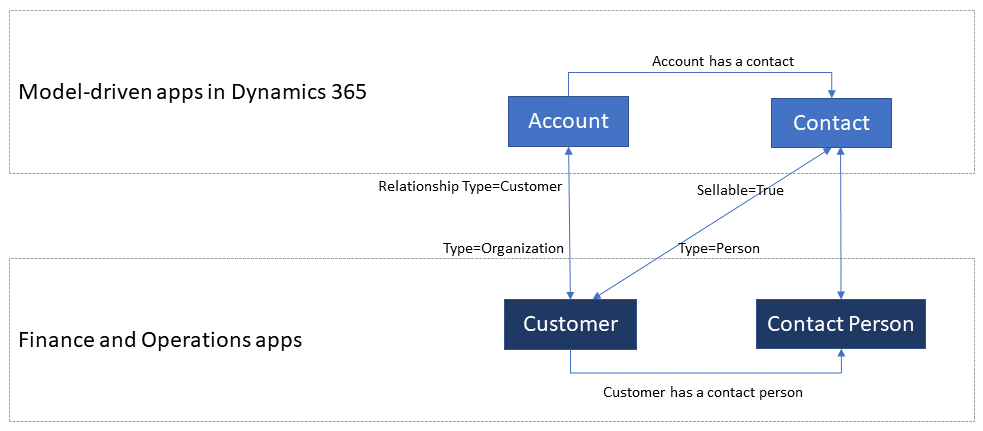
    Whether you’ll be jumping into deploying Dual-write or not, everyone needs to educate themselves on the implications of this new piece in the Dynamics 365 puzzle. From the DW documentation, have a look at the chapter “What does dual-write mean for users and architects of CRM products?” to understand why. There will be several new concepts introduced over on the CDS side like “company” and “party” that will affect all apps built on top of it – such as Dynamics 365 Sales, Marketing or Customer Service. Foundational elements like how customers of the organization or the internal units within that organization are defined have different data models in CDS vs. FinOps, so it’s important that everyone working on either side will use the new common documentation for Dual-write as the starting point to try and understand eachother’s perspectives on the world.

    There are also other dimensions affecting future solution architecture listed out in the documentation. According to MS, initially Dual-write will be shipped as separate solutions (notice that DW is solution-aware right from GA, highlighting the role of CDS as the cross-product ALM foundation in Power Platform). “In future releases, those solutions will become part of Common Data Service”, which I presume translates to every Dynamics 365 customer getting the core components, regardless of whether they already have Finance and Operations apps deployed in their tenant or not. Data types in CDS are also about to get extended to accomodate the enterprise ERP needs arising from this out-of-the-box FinOps integration.

    Of course not everyone is using the ERP solution based on AX, Finance & Operations, Unified Operations, Finance/SCM or whatever name Microsoft comes up next for it. A large share of the customer base will be a better fit for Dynamics 365 Business Central, which isn’t at least publicly yet targeted with Dual-write. Is there going to be an impact to SMB implementations where CDS is part of the solution architecture in some way and is this going to be positive or negative? According to the documentation, “in future releases, concepts in model-driven apps in Dynamics 365 (for example, customer, contact, quotation, and order) will be scaled to mid-market and upper-mid-market customers.” If Microsoft is really aiming to have a Common Data Model that should serve not just all Dynamics 365 products but also software providers from outside the immediate MS ecosystem, there are bound to be trade-offs between the complexity of the required schema for enterprise ERP and the ease of use for how citizen developers can tap into the Common Data Service for building simple business apps.

    Finally, there’s the ever interesting licensing aspect, of course. From the Ignite 2019 presentation, we can find the following statement on Dual-write licensing implications:

    When Microsoft customers (ISV, Partners, End Users, etc.) possess a valid Dynamics 365 for Finance and Operations license, they are entitled to replicate data between the Common Data Service and Dynamics 365 for Finance and Operations.  This entitlement does not include capacity consumed by the replicated data; if necessary, this is purchased separately.  This entitlement does not include use rights for the Dynamics 365 for Customer Engagement applications, including Sales, Service, Marketing, etc; if necessary, this is purchased separately.

    I’m expecting that the upcoming versions of the Dynamics 365 Licensing Guide would include documentation about the licensing scenarios for Dual-write, as at the time of writing there isn’t any public guidance available yet to address the concerns of multiplexing that inherently arise from the real-time synchronization of ERP data into CDS.

    As we know, having Power Apps licenses allows you to read all of CDS data. If you read through the GA announcement of Dual-write and its documentation, you’ll notice that MS is following its own guidance and not mentioning Customer Engagement even once, since CE now refers to on-premises software only. The new term, “Model-driven apps in Dynamics 365”, is a representation of Microsoft app teams themselves ship as the Sales app, Customer Service app and so on. When it comes to the customer specific business apps tailored to their needs, meaning Power Apps, these can be Model-driven or Canvas, ranging from simple “one click” mobile experiences to advanced information worker UI’s for desktop environments. They are all backed by the Common Data Service and running on the Microsoft Power Platform. How will these custom apps be treated in the licensing documentation that traditionally assumes customers would just be using the Dynamics 365 Apps as-is rather than adapting them to their unique needs and real life processes? This remains to be seen.

    Now that we are gradually getting over the age old divide between CRM and ERP, I hope the next area of unification would be a common licensing story that doesn’t draw artificial lines between Dynamics 365 and Power Apps. Splitting these into different licensing guides and different pricing publication formats isn’t all that helpful for the customers nor the partner ecosystem. A Common Data Service based on a Common Data Model should preferably be backed by a Common Licensing Model, don’t you think?