
Tag: enterprise software

  • Why Power Platform licensing is complex, part 3: light use scenarios

    Why Power Platform licensing is complex, part 3: light use scenarios

    In this series we’ve talked about the complexity that arises from how Microsoft defines (and re-defines) their product structure, as well as the concept of multiplexing where indirect usage of software (or data) needs to be licensed just like direct usage is. In this third chapter it’s time to look at the varying depth of software usage and how the licensing models out there don’t always take this into consideration the way people would expect them to.

    “I only need to do X, why do I have to pay full price?”

    For any business application deployed within an organization there’s bound to be a group of heavy users who spend a significant share of their working hours using the broad range of features offered by it. They might be administrators of a process that is managed with this app, or users whose tasks are either handed out via the app or facilitated by the information that the app can provide them. A service technician might have his or her day planned out in detail via Dynamics 365 Field Service. A salesperson could be using customer information and activities to keep track of their pipeline and prioritize actions via Dynamics 365 Sales.

    Then there are those employees whose roles aren’t primarily focused on the aforementioned processes but who need to participate in them in some stage, or consume the outputs from these processes as one ingredient of their work. It might be merely signing off on an approval or completing a task that has been generated from the end-to-end business process. Again we could use here the same example as in Part 2 where merely submitting a new lead via a web form that has fully automated connectivity with Dynamics 365 will mean that these employees must be equipped with a type of license that would essentially allow them to also work with the lead qualification process of an full-time inside sales role. Hmm, why are these two very different personas treated the same, when one is a very light touch scenario and the other a heavy use of the system?

    Whether you perform the task once a year or a hundred times a day doesn’t make a difference, due to the way how these business applications licensing models are constructed. It’s not a consumption model where you’d pay for the number of events and computing capacity like in Azure, rather it’s all based on purchasing the rights for a specific user to access feature X in the application. Underneath the app UI there is of course the same Azure technology being consumed to keep the bits running, but products like Dynamics 365 are quite a thick value-add layer of SaaS on top of it that removes the need for you to pay for the infrastructure. Similarly it removes the need for a custom software development project to manage your sales process, as an example, because you can simply subscribe to the Dynamics 365 Sales product and gain access to all of the business logic, UI, security models, auditing, APIs and numerous other features you’d eventually need for your digital business to operate in a sustainable way. You get a lot, so it’s only fair that it should cost something, too.

    Still, it’s very common to run into a scenario where the idea of licensing every actor involved in the business process with the same flat monthly fee just doesn’t feel justifiable. In the Dynamics 365 world it might involve working with a single entity that’s not covered by the Team Member license. On the Power Platform side it might be a Flow that would need to do one step that inolves a Premium connector. All of a sudden the cost of allowing users to touch these tools might multiply the monthly fee, just because of that one thing. Couldn’t we, you know, just make that one thing be excluded from the Premium category and solve this dilemma?

    Virtual borders vs. platform unions

    It’s not like Microsoft wouldn’t be aware of the issues with these functionality borders and how they end up blocking many otherwise valid scenarios for leveraging their software products. Obviously there could be more money to be grabbed from the table if only there was a suitable licensing card to be played in these occasions. The problem is that every customer’s problem tends to be slightly different. Moving one feature checkbox from this license type to that license type isn’t therefore the answer. It would be like trying to adjust the borders of a country to follow a slightly different pattern so that you could optimize where you live, work, shop, go fishing, use medical services, and so on. A border will by definition limit your freedom in some ways, in exchange for offering you rights to (hopefully) exercise your freedom within the area covered by it. You gain some, you lose some.

    In an interview by MVP Steve Mordue, Steven “Guggs” Guggenheimer described these light use / light touch scenarios and the licensing demands around them as “the most complex thing you’ll ever see”. Be it Dynamics 365 or Office 365, there doesn’t seem to be a satisfactory way to draw a line between heavy use and light use for the software products because when it comes to licensing everyone wants both A) simplicity and B) flexibility, which are C) a paradox.

    There is a collective challenge, which is how do you build a licensing framework where you can’t tell between the two, light touch or light use, or you can tell but there’s no consistency. If I ask the question, “What does light touch mean to one ISV or light use?” I’ll get a very different answer than what I get from another one, so you can’t design a licensing type that works for everyone.

    Looking at the evolution of Dynamics 365 products that used to be called CRM, then Customer Engagement and now “Model-driven apps in Dynamics 365”, they’ve been moving towards an “á la carte motion” where instead of subscribing to the whole software suite (Plan) you instead buy individual Apps. While initially this might sound like something that addresses the aforementioned customer pain points, I believe it’s mainly aimed at allocating the revenue more accurately between Microsoft product teams (and thus creating clear incentives for new product development) rather than making Business Applications less complex for customers to license. After all, you’ll often still need to buy a minimum of one Enterprise app at a list price of $95 per user per month, which isn’t exactly a figure that’s a great fit for the light use territory.

    The platform SKU, meaning Power Apps Per User Plan, is closer to solving some of the challenges for customers that are ready to consider broadly licensing their work force for the business application platform rather than individual apps. Sure, a $40 list price is still more than Microsoft 365 E3, for example, so not an insignificant cost by any means. The more app scenarios you can cover in your organization with that flat platform fee, the cheaper it becomes. The first time you need to cross the border to the Premium territory it’s still a costly visa to acquire, but the more you travel the cheaper the relative investment becomes. You could compare this to a political and economic union like the EU, where benefits of having a single market that allows free movement of people, goods and services can outweigh the cost of forming and running this union. The application platform opens up opportunities by removing some (but not all) borders for your organization’s employees to participate in the digital processes runnign on top of it, regardless of if it’s just an occasional holiday trip to the neighbouring business unit or a permanent role of deep co-operation.

    Alternative pricing methods

    The Power Platform today requires you to purchase a license for each internal user, but there already is a mechanism available that would in theory allow paying for the actual usage. It’s the new pricing model of Power Apps Portals, where instead of buying the Portal application itself you purchase capacity to be consumed by the usage of the portal. This covers unauthenticated usage like page views, which isn’t all that relevant for real business application use cases. However, the concept of paying for each login of an authenticated user would be very applicable to many light use scenarios with infrequent but still valuable application usage.
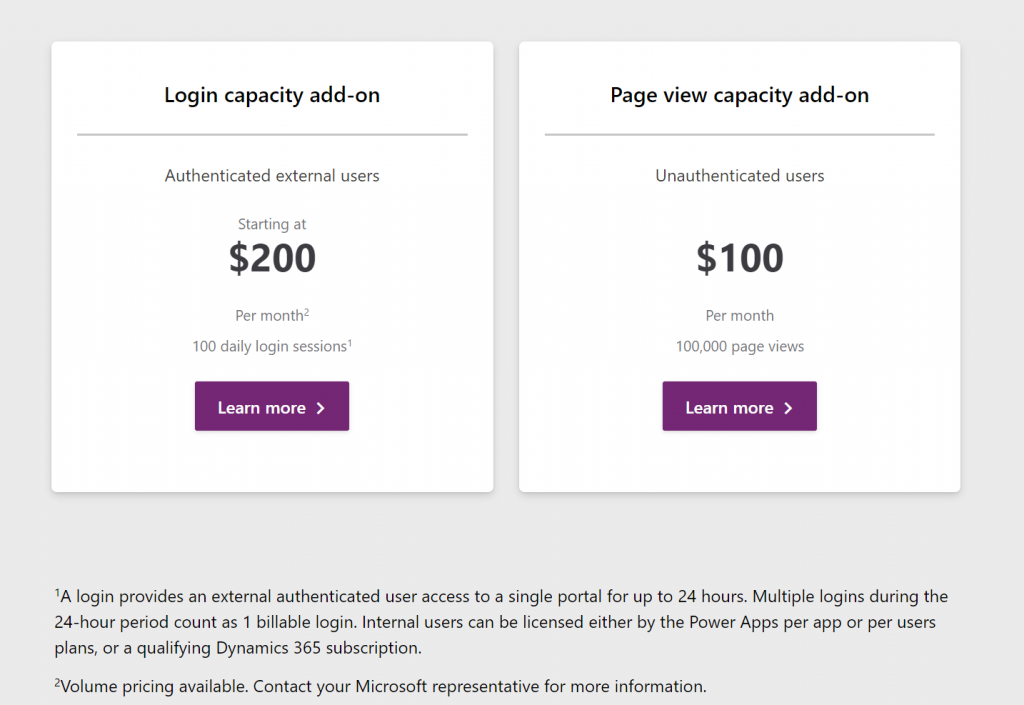
    The beauty of a consumption based pricing model like this would be that you wouldn’t need to purchase a full licenses for each and every user that might or might not use the system during any given week. However, when there would be a valid business need for them to access the system and use some of it’s features, they could be assigned a “day pass” that grants them the license for a 24h period. If on the next day they again need to do the same thing, it’s a new pass to be consumed. Doesn’t this sound like exactly the sort of a mechanism that could…?

    Unfortunately as of today there isn’t yet a way for customers to purchase these type of day passes for their internal employees. The Portals licensing model is limited to only external users, whereas internal users must be assigned either a Power Apps license or an applicable Dynamics 365 App license (note: Team Member license does not apply here). There is some irony here because the per-login pricing model is actually making Portals a tough sell for some of the intended external audiences. Buying pre-paid packages of login capacity that would cover you entire potential user base of customers that might or might not log in to your public website can quickly become so costly that it makes more commercial sense to build a custom portal with custom integration into CDS instead of leveraging this product capability built by Microsoft (at least with the list price).

    Regardless of these current challenges with aligning the license terms, I do believe the roads in Power Platform are eventually leading more and more towards the model of licensing by consumption. Not as the primary mechanism, but as something that will complement the user based licenses. This is because ultimately the goal should be value-based pricing. How do you measure the value generated by the business applications that are running on your shared cloud platform and used by millions of people out there for their own specific business processes? Well, the usage of the software products is a nice concrete way to gauge the potential sources of value – as well as idetifying places where the value is certainly not being captured (due to lack of usage/adoption).

    In the on-prem era where some of the enterprise software licenses practices we still see today were originally drafted, you were selling a big system that the customer would acquire the server & user licenses for and then deploy the whole thing behind their own firewalls. The cloud has changed this model whereby the SaaS vendors are now able to see in much more detail the metrics for active usage (DAU, WAU, MAU) from the customer environments running on systems that they operate. In addition to ensuring that the customers keep renewing their subscriptions, access to this usage data also opens up possibilities for offering alternative pricing models that would make the many light use scenarios more attractive for large pools of potential users. The example of charging for app access by every 24h may not be the model that will be offered to internal users, but at least it represents a much less complex mechanism for customers to digest than the earlier models of drawing licensing lines between entities, features or access types.

    Other parts in this article series can be found here:

    Read more about Microsoft Business Applications licensing

    View all my blog posts in the licensing category.

  • Why Power Platform licensing is complex, part 2: multiplexing

    Why Power Platform licensing is complex, part 2: multiplexing

    In my previous post in this series on Power Platform’s sources of licensing complexity I explored the internal product structure at Microsoft and why changes in this commercial packaging of different technnologies may lead to confusing messages. Now it’s time to move further into the actual usage of these products and discuss how the depth of integration that you – the customer – build between the systems can affect the licensing requirements.

    Multiplexing is a term that isn’t necessarily familiar to anyone who hasn’t worked with either selling or buying enterprise software. This is the core definition that Microsoft is using in all of its documentation:

    “Multiplexing refers to the use of hardware or software that a customer uses to pool connections, reroute information, or reduce the number of devices or users that directly access or use the [X] service. Multiplexing does NOT reduce the number of subscription licenses of any type required to access the [X] service. Any user or device that accesses the [X] service – whether directly or indirectly – must be properly licensed.”

    There’s has never been that much information made publicly available by Microsoft on how the multiplexing topic – probably because it’s a hairy beast that no one would want to let out of the closet. But the beast is there nonetheless, an if you’re not careful in how you design the technical solution architecture and the software products included in it, that beast may jump at you when you’re not ready and mess up all your plans.

    The price of data entry

    Let’s look at a simple example first, one that is a very common requirement from customers. Imagine there are employees out there in the field that work with customers and may hear about their future plans or identify current needs for which the organization could offer services or products to. They’re not in a sales role themselves but would love to pass on the info to the actual salespersons who manage these customer accounts. The lead entity in Dynamics 365 would be the obvious place to record such information, but this would require the employee in question to have the necessary license for creating new records into it. So, even if these field employees would be equipped with a Team Member licenses or even the Field Serivce Enterprise app, this is not an operation that they’re allowed to perform, according to the Dynamics 365 licensing guide.

    “But wait, we don’t need to actually have the users themselves interact with the lead record in the Dynamics 365 application in order to achieve this!” you might think, if you’d be viewing it purely as a functional requirement. Yes, technically we could create a custom entity like “Incoming Sales Information” and store its records into CDS, then run a workflow or Power Automate to copy that data into the lead entity’s corresponding fields automatically. Commercially speaking this would not reduce the need for licensing the users who are initiating the process. You’ve just designed a software solution that does the multiplexing, but the end result is still exactly the same, thus the actual problem remains. First of all, you are automating the data entry into CDS, and second, you are indirectly using an entity that is not covered by all Dynamics 365 license types (funnily enough, it IS covered by Power Apps, but that’s another story).

    The important thing to remember about multiplexing is that it essentially only concerns the internal users of an organization (this includes employees, contractors, vendors, agents). You can have a “Contact Us” web form on a public site with the same fields as you have on your Dynamics 365 lead entity, then have that form call a webhook and use Power Automate to write the submitted form’s data as a new lead record. Everyone else in the world can use that, but if any of your internal users would go onto this public web form and use it for data entry into Dynamics 365, they would have to have a user license that grants them sufficient privileges. (How would you in practice stop employees from using a web form that requires no user identification? Good question.)

    Multiplexing within Dynamics 365

    As Microsoft is making their Dynamics 365 apps more & more tightly integrated, we’re encountering scenarios where the traditional boundaries between the CRM product and the ERP product get very much blurred. The GA launch of the Dual-write feature means that Microsoft now provides an out-of-the-box way for entities common to both sides to have near real-time two-way synchronization. For example, you might modify the field of an account record in CRM (or “model-driven apps in Dynamics 365”) and this will right away be reflected on the customer record in ERP (“Dynamics 365 for Finance & Operations apps”). From an end user perspective, there is only a single system to work with. Awesome!

    How does this align with Dynamics 365 product licensing then? As of today, I haven’t seen Microsoft make any announcements on the multiplexing definition being relaxed as a result of their Dual-write feature. So, if a user creates or edits any record in one of the entities on the CRM side that gets almost instantaneously replicated over on the ERP side, they are using two systems at once and should be licensed for them both. All of a sudden, that $95 Sales Enterprise app license isn’t enough and you’d need something bigger. With Dynamics 365 Finance or SCM App starting at $180 as the base licenses, then adding a bit more of attach licenses to cover the Sales App, you’d be looking at a doubling in costs for the users who are stil working in the one and the same user interface but leveraging functionality that now connects seamlessly with another Dynamics 365 system behind the scenes.

    Setting the licensing dilemma aside for a moment, there are scenarios with very clear benefits from having the CRM and ERP side work together hand in hand, where the cost from the current way of working may well be higher. For example, being able to transiently call the product data and pricing engine of the ERP system to produce the details needed for quoting a customer on the CRM side can potentially remove a lot of context switching from the end users as well as reduce the amount of custom code you need to build and maintain. In the far end of the spectrum, brand new product offerings like Project Operations can emerge from this unified platform that can now replace the prior mix of apps like PSA, Finance and MS Project. They don’t actually need to suffer from the multiplexing “tax”, since all Microsoft needs to do is design a targeted commercial model for offering this functionality.

    Power Multiplexing

    The concept of charging for access to data that has originated from of flowing to another system has been invented at a time when software was deployed to dedicated servers and data had clear boundaries of the system in which it resided. Back when the old Dynamics CRM era rules on multiplexing were defined, I bet most of the Microsoft people working with the product surely couldn’t have imagined that the data used in managing the business processes for sales, marketing or service might one day also be stored elsewhere than the application’s own SQL database. We are living in very different times today.

    With Power Platform the whole purpose of these new cloud native tools is to combine data sources and manipulate their contents by sometimes bypassing the original application altogether – at least on an UI level, when talking to an API via Connectors. It’s effectively a whole platform designed to multiplex all the things!

    In today’s world many of us no longer perceive the value of a software application to be delivered only via the user direclty interacting with the user inteface. Especially in the context of business processes, we’re more concerned with the outcomes from the digital orchestration of data, business logic, and users – both the internal ones and the actual end customer. Despite of this, on commercial level we still need to pay attention to the number of individual systems involved in a process that’s triggered by the user. In a recent interview, Charles Lamanna from Microsoft stated that you should be able to instinctively know when you’re crossing the line to multiplexing.

    “At its core, if you’re using or doing something to circumvent a user license and you’ll know you’re doing it because it will feel unnatural because the system’s not built to behave that way, that’s multiplexing and not allowed. Everything else, the intent is to have it be allowed.”

    The question of whether data is replicated between systems in real-time or in scheduled batches used to be a reasonable criteria for evaluating whether something was multiplexing or not. Today when any citizen developer can build a Flow that pushes data across systems almost immediately, or construct a custom app that pulls & pushes data via Connectors and presents it in potentially a much better UI than the originating enterprise systems, the lines have blurred down to a level where they become almost useless in trying to navigate the licensing maze. The systems are built one way but the business users are now armed with low-code tools that they’re going to use to try and get the systems to work their way. Governance of remaining compliant in this new world is certainly going to become more and more challenging for organizations as a result.

    The business of software

    We can’t escape the fact that while the code based PaaS of Azure is mainly charged by API and resource consumption, the low-code application platform (aPaaS) of Microsof Power Platform is founded on the per-user licensing model. The pricing dynamics of a platform are such that the more workloads you can move away from individual applications (be it legacy on-prem systems or SaaS point solutions) onto a common app platform with a Per User licensing model, the more cost savings you can achieve. However, if you were to try and automate the processes up to a level where the number of licensed employees needed in total is reducing as a result, then that’s actually not a favourable result to the platform provider financially. Hence the strong stance on requiring every user involved in the business process someway to have a license.

    It’s not only Microsoft that has this complexity built into its product licensing. SAP is known for chasing the Indirect Access of data that has touched their system. Oracle talks about Named User Plus. It is one of the core principles through which enterprise software vendors have traditionally defined the rules under which their IPR can be made to be a part of the digital processes of an organization. What this means is that any modern platform which strives to connect these type of systems as data sources or targets in the new application UIs or automations built as low-code solutions is subject to the same licensing impact. Creating new avenues to use the data and business logic of these third party systems may well incur new costs as a result of extended usage.

    It’s tempting to argue that systems like CRM and ERP should not be able to place down a commercial lock on access to core information like the organization’s customers or the pricing of the products they sell. We should still keep in mind that often there would be no such single source of valid records that reflect the business reality in a digital form, had there not been the design and implementation of an enterprise system that can govern all the various processes around it. The API to any system may look deceptively simple, precisely because it abstracts the complexity behind it. Managing that data and process complexity is one of the key reasons why these systems exist, and why companies are usually willing to pay their licensing fees in exchange for the value they get. Unfortunately this tends to push down the complexity to those scenarios where power users and citizen developers might want to build new, creative solutions to that tap into the data managed in these systems.

    Other parts in this article series can be found here:

    Read more about Microsoft Business Applications licensing

    There are plenty of articles in my blog for you to browse in this category: Licensing.