Tag: Dataverse for Teams

  • The state of Teams as a platform

    The state of Teams as a platform

    Two years ago I wrote one blog post that became fairly popular – possibly because the idea explored in it was still a bit like science fiction. At that time we were only 6 months into COVID pandemic and most people were still scrambling to adjust to their new working lives, now spent largely inside digital tools like Microsoft Teams rather than physical workplaces.

    Microsoft Teams as a platform was not the first thing that organizations were looking for back then. Yet the huge spike in Teams usage and similarly in the amount of money Microsoft started allocating to the product made it seem like a logical future state. In my blog post I even predicted that Teams could become the next Windows – an OS level fabric that brings Microsoft back into the game now dominated by Android and iOS.

    Has science fiction turned into reality since then? Are we now living in the future with cars driving themselves and apps running inside of Teams? Not just yet. Although I bet we’re closer to the latter vision becoming mainstream than the former one. In this post I’ll round up some of Microsoft’s announcements from the past few months and combine them with my personal observations on where we are today in regards to the Teams as a platform vision.

    Innovation delayed

    My general thoughts on the direction where things are headed with Teams haven’t changed. Yet it has become obvious that the pace of change will not be as dramatic as the sudden shift to remote work might have lead us to believe. This isn’t necessarily a bad thing for any of the parties involved.

    Not only are the software end users often overwhelmed with how product features change and how capabilities tend to shift from one tool to another. The simple question of “where do I go to find this information” has an incredible number of possible answers in the Microsoft cloud. Yesterday your file was in Windows Explorer, today it is in SharePoint, tomorrow you’ll use it via Teams, and the day after your file will be gone and transformed into a Loop. Oh, and that Office thing doesn’t exist anymore, it’s now Microsoft 365.
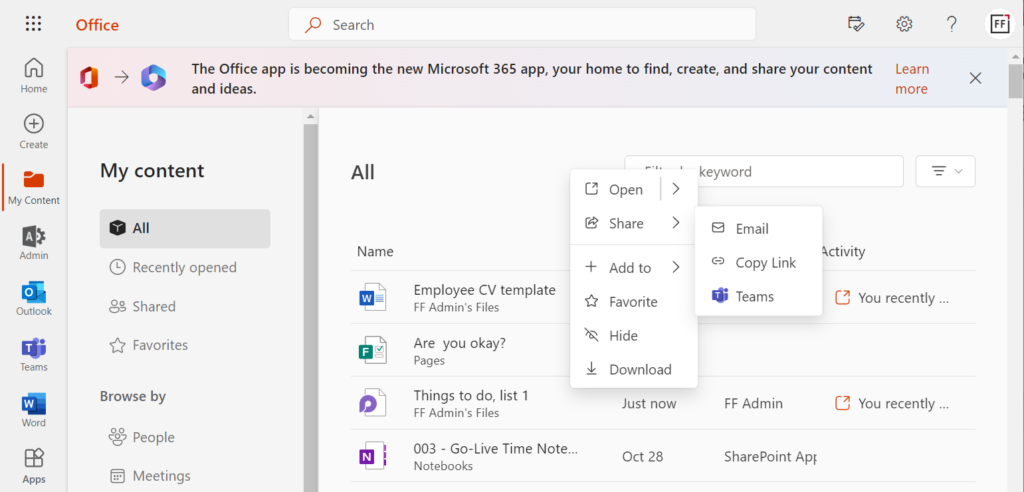
    Umm, what?😦 Imagine taking a longer break, such as parental leave, then returning back to work to discover all the core tools and vocabulary of the information processing tools have changed.

    Then there is the product development side. Microsoft isn’t just building a single mega product called Teams, rather they are assembling several existing capabilities to serve as the foundation for modern work. These will usually take a few years. Just like Power Apps wasn’t born to work together with Dataverse (the 2015-2018 era), Teams wasn’t designed to host all your Power Platform apps initially.

    It has easily taken 3-4 years from the announcement of Power Platform for the technology to actually start working like a unified platform from app development perspective (and you still run into 10+ years old legacy Dynamics CRM areas inside it on a daily basis). Trying to squeeze all of it to work within the frame given by Teams while this unification is going on… – well, the metaphor of replacing parts of an airplane mid-air comes to mind.

    Dataverse for Teams

    The idea of allowing Microsoft Teams users to independently provision Dataverse environments within the teams they manage was radical 2 years ago – and it still is. Today in every organization to where I’ve deployed the CoE Starter Kit to start analyzing the platform usage, the number of Teams based environments created has been high.
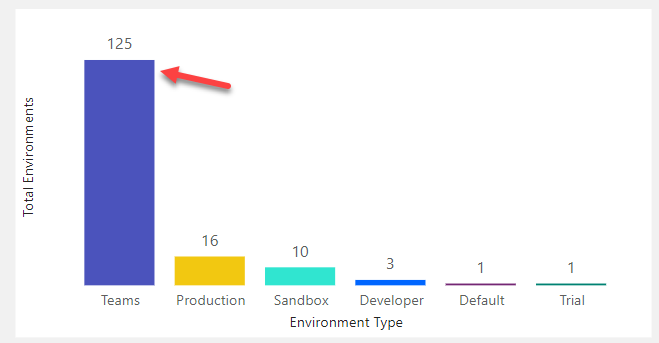
    Whether the citizen developers have actually done more than install the sample apps or do quick tests with Power Apps – that’s a different question. What I do know is that at our company (Forward Forever) we’ve built several apps on Dataverse for Teams for our customers when a broad use / light touch scenario hasn’t warranted a premium license for all uses. I’ve been preaching the Dataverse for Teams gospel in many occasions (like Teams Nation 2022), to help raise awareness for all the cool things you can do with just a Teams license.

    I gotta admit: it hasn’t been easy. The tools available for solution management in Dataverse for Teams are quite frankly unfit for purpose. What we have available today are more like a combination of temporary workarounds. It’s now 2 years since Dataverse for Teams GA launch and we don’t really have any formal ALM story around how to manage apps and environments on this platform. Which leads me to believe the investments nor ownership for Dataverse fo Teams at MS simply aren’t there today. Not at the level compared to 2 years ago, at least.

    The co-existence of full Dataverse and the lite version in Dataverse for Teams has been a struggle also for the Power CAT team at Microsoft who develop and maintain the Power Platform CoE Starter Kit. A Dataverse for Teams edition was launched in April 2021, containing most of the features from the full Kit. This was to date the best demonstration of how complex solutions you could technically run inside Teams, while making them accessible to anyone with just a Teams license. In September 2022 it was announced that the team could no longer justify making the required investments in maintaining the Dataverse for Teams version:

    In addition to the data platform side, there are plenty of quirks in the Power Apps studio experience, too. The product team has been aiming to unify the Maker experiences of these different studios for quite some time already. I get the feeling that there’s just so much unification efforts going around, ranging from things like Fluent UI support to the general “Run One UI” initiative (from 3 years ago already). It’s turning into one of those “in the fullness of time” episodes where we need to draw our own conclusions on what are the reasonable choices to make in the present moment.

    Still, there is certain beauty to how Dataverse for Teams has been constructed from only the modern elements of the stack. Leaving away all those old layers that depend on the legacy web client infrastructure and who knows what ancient XRM bits the full Dataverse environments contain – that’s a brave goal to pursue. Shutting off direct access to the Dataverse APIs (used in every XrmToolBox plugin, for example) is surely necessary if the feature set of a “free” Dataverse for Teams edition needs to be restricted to differentiate it from the premium edition.

    In theory these design choices make sense, yet what we see as the practical outcome from them as the “Power Apps in Teams” product today is… incomplete, for the lack of a better word.

    Your business data accessible via Teams

    Let’s move on from the app maker scenario in Teams and explore how existing business applications from Microsoft align with Teams today. In Summer 2021 there was a big statement made by Satya Nadella himself that Teams customers would receive access to Dynamics 365 data at no extra cost. I blogged quite extensively about the possible means through which such a capability might be implemented in practice.
    So far, it all remains speculation only. It’s been over a year now and these capabilities have not materialized as product features that would support the licensing or security model required to make things real. Microsoft has been actively promoting the collaborative apps theme, though, and we’ve seen some demos of how Teams could better expose business data within the context of conversations.

    After you see the high level product vision in a demo video, it’s always a good idea to search for the product release plans for any matching items to answer what exactly might be arriving into which product and when. Recently I noticed that in the latest release plans for Dynamics 365 pretty much all the Teams and Outlook related new features under Sales had been removed from the plan. It was later clarified by a MS employee that these were in fact moving under the Microsoft Viva Sales app:

    Microsoft Viva of course is a huge topic of its own. In a way, it is all about bringing apps within the context of Teams. Yet all those Viva apps will be built by Microsoft. It is therefore not a similar platform story nor an opportunity as what Power Platform represents to customers or partners.

    There’s a lot of resemblance between the Dynamics 365 and Viva brands, in the sense that they are 1st party apps designed in Redmond. A few years ago we saw the Dynamics 365 product family rapidly grow with new apps being announced every few months (remember all those “AI for X” products?). A lot of them seemed quite experimental in nature. I suspect we’re about to see the same phenomenon within Microsoft Teams as new Viva apps will be arriving for various business processes. These will demonstrate how MS themselves are using Teams as the platform for their products.

    Viva Sales

    The first Viva product with a business application focus to reach GA status is Viva Sales. It is marketed as “the app that removes the burden from your sales people to work with your big, clunky CRM system directly”. The notion here is that CRM tends to evolve into a tool for sales management and customer master data integration across other big systems, which can be at odds with what the persons doing the real interaction with customers would need to get their jobs done.

    The three main areas where the Viva Sales app manifests itself are 1) Outlook side pane for emails, 2) Teams chat/channel messages and 3) Teams meetings. The app itself doesn’t store customer data, rather it connects with either Salesforce or Dynamics 365 to pull this information.
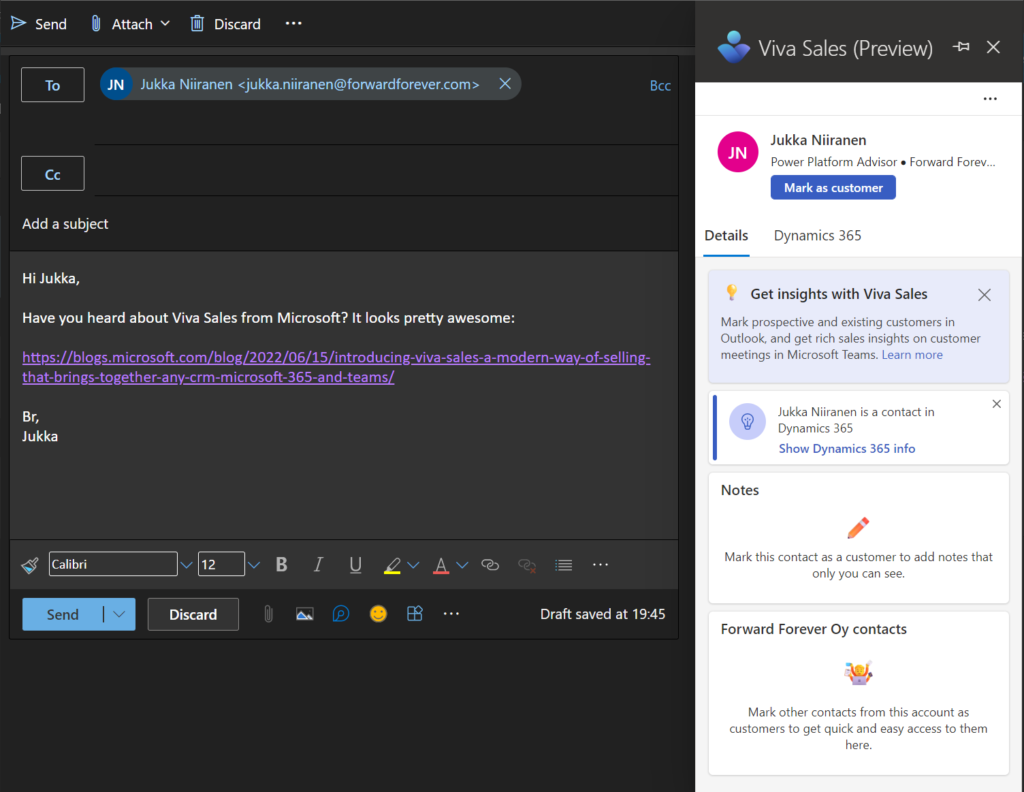
    If you’re a Salesforce customer, than the purpose of Viva Sales today is pretty clear: helping your sales people to use CRM data across Microsoft’s Teams and Outlook apps. If you’re using Dynamics products, then this will sound pretty familiar and obvious to you. You might be wondering: “isn’t that something we can already do today?” To a large extent, yes. Much of what Viva Sales represents to existing MS customers is the promise of a better tomorrow with future integrations and experiences that may deliver new value.

    This leads us to the commercial positioning question. Salesforce customers will need to pay $40/user/month to access Viva Sales features. Dynamics 365 Sales Enterprise or Premium users will get it bundled into their existing subscription. For everyone else, Viva Sales is not relevant / available today. Maybe in the future we’ll see more CRM systems supported, who knows. I think it will depend a lot on whether the Salesforce audience buys into this or not.

    So, how would Dynamics 365 Sales professionals users get access to Viva Sales? By upgrading from their $65 subscription to the $95 Enterprise version. What about users of other Dynamics 365 CE apps like Customer Service Enterprise? By paying $20 more to add Sales Enterprise into their plan. OK, then what if you’ve built a custom business app on top of Dataverse? It’s not supported today by Viva Sales, although Charles Lamanna suggested it was in the works. We’ll see.

    For everyone working with business data in Dataverse, the existing Dynamics 365 App for Outlook remains an option. It’s one of those “hidden gems” of Power Apps that MS avoids bringing up too much, yet the Outlook integration is fully supported and working with a Power Apps license. As for the Teams integration part, we have the Dynamics 365 app that hasn’t seen much love recently but also hasn’t yet been announced as deprecated.

    Microsoft has said they are working on bringing more Viva apps to support customers’ business processes. It’s likely that we’ll see a customer service focused app at least. While these targeted experiences sound sensible from a single user persona perspective, it’s unclear to me what the targeted state for collaboration scenarios across departments should look like. Will a sales rep share an account in a Teams channel via the Viva Sales app and then for the customer service rep this somehow switches to be the “Viva Service” app data instead? Multiply this with all the other departments plus custom business apps on top of Power Platform and we’re going to need bigger navigation bars to accommodate all the different app icons…

    The Viva Sales price point of $40 is something I personally see as a tough sale. For perspective, back when Dynamics CRM Online was launched globally, the whole CRM cloud suite covering sales, service and marketing cost less than that. It also included the XRM platform, which has since then been split into a dedicated SKU called Power Apps Per User – at $20. Comparison of empty platforms vs. readymade apps isn’t that fruitful, though. Perhaps the sticker price is set intentionally the way it is, to then allow MS account managers to negotiate sweet deals with customers running Salesforce today and get them more deeply hooked into the Teams platform story, instead of Slack.

    Teams infrastructure for applications

    The more people do their work inside Teams, the more demands there are for it to work like an operating system rather than just a meeting app. The current framework we have in Teams right now, based on Electron, is a known resource hog and a performance bottleneck that doesn’t scale into the future vision of the Teams platform. There is also great challenges in enabling cross-organization collaboration today, given how painful the tenant switching process is for accessing resources as a guest user in a team.

    We’ve heard Microsoft say that Teams 2.0 will eventually arrive, built on Edge WebView2, yet the timeline remains unknown. The next Teams version might be tightly integrated with Windows 11. At least the Teams Linux client was recently retired and users are instructed to move to the Progressive Web App (PWA) version once available. This all points to MS being quite serious about turning Teams into something that isn’t merely a Zoom alternative for meetings but more like an extension of the OS. If that means the best experience is available only via modern Windows devices, maybe it’s not such a bad trade-off with the current market share of Teams.

    Performance isn’t the only infrastructure issue that may stand in the way of Teams becoming more of a platform. If a growing number of applications and services are consumed via Teams rather than via a native app or the browser, this inevitably turns the eyes of IT professionals into the security implications of such a shift. A recent study has revealed that the app model used by Slack and Teams is potentially “six years behind that of iOS and Android”. Once organizations wake up to the possibilities of how individual Teams users can authorize third party apps to run code from external servers and potentially impersonate them for phishing purposes, for example, Microsoft will be forced to spend a lot more energy on platform security topics.

    One might think that while allowing 3rd party applications with custom code running in external services could be problematic, allowing the low-code apps built on Microsoft’s own services inside Teams would be an easy choice to make. Yet it’s in fact the opposite. External apps from third parties have been in the app store for many years now, while the publishing of Power Apps into Teams store has been explicitly forbidden. Distributing low-code collaborative apps across organizations has therefore been a bit of a dead end. Presumably the Power Apps based solutions wouldn’t have met the Microsoft Teams store validation guidelines.

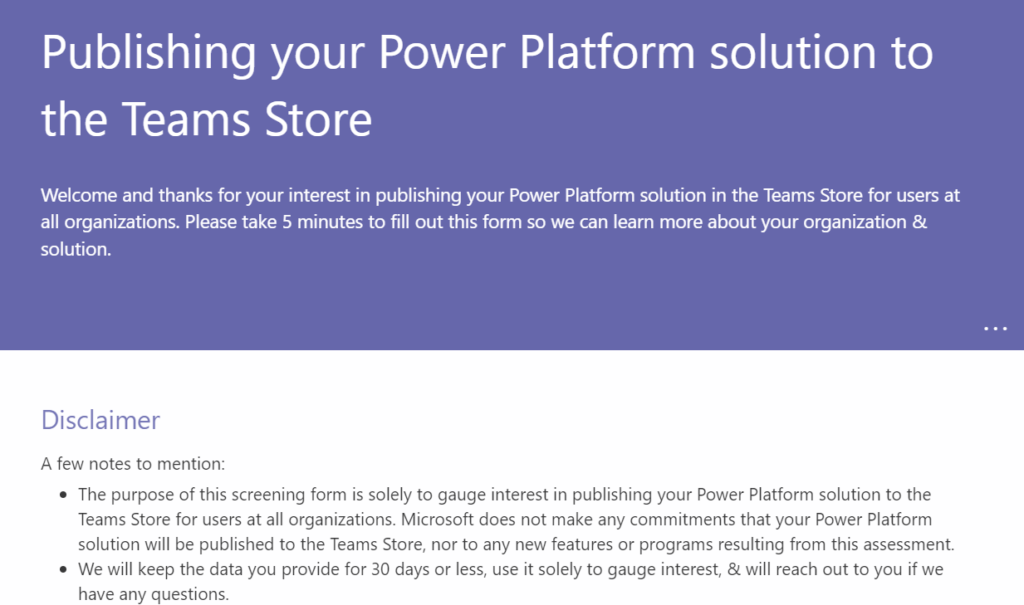
    A few months ago the wording in the documentation was changed and now it says: “If you’re interested in publishing your power apps in the Teams store for users across all organizations, please fill out this form.” It seems the product team is now gathering data on which scenarios to prioritize for the app store publishing route. Getting the road open for partners to distribute Power Platform solutions via the Teams apps store may still take some time.
    The final topic which I want to touch upon before closing this “state of the Teams platform” analysis is technically not about Teams, yet in practice I think it’s very much intertwined with it. I’m talking about Loop components.

    It’s a bit over a year now since Microsoft announced Loop at Ignite 2021. One year later, at Ignite 2022, the Microsoft Loop app was again announced – as private preview. I bet not many people outside the MS geeks ecosystem have interacted with a Loop component (at least intentionally). While the product documentation tries really hard to get you excited, claiming “the possibilities for collaboration are endless”, in fact you reach the end of possibilities with Loops today quite quickly. You might create a quick list in a Teams chat, then that component gets pushed into history as new stuff arrives – and you never see it again.
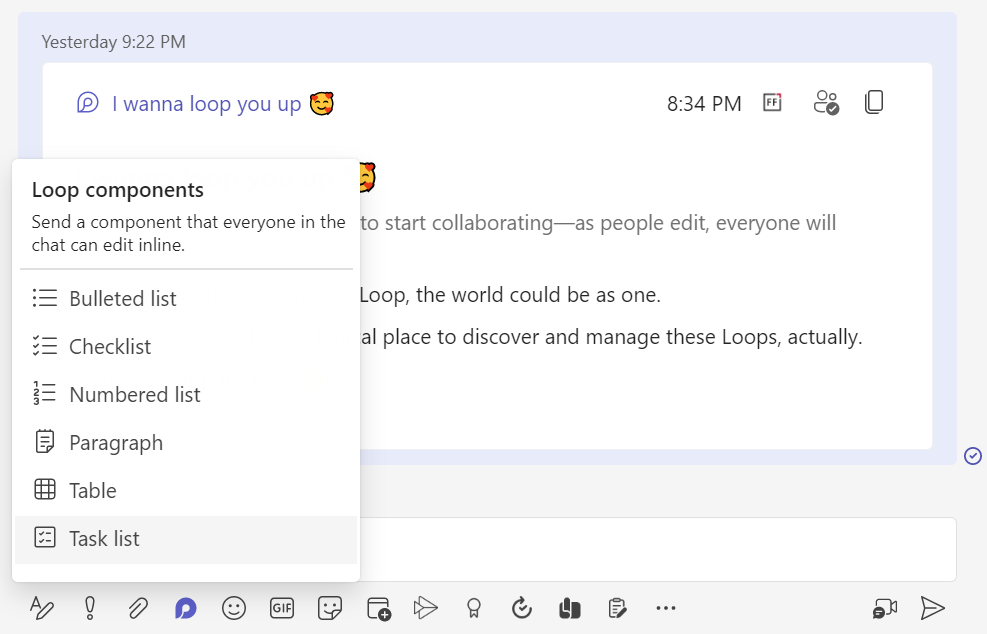
    I think this has not been the optimal way to build up authentic excitement towards the technology. What MS could have been putting more emphasis on is showing how data can be pulled from an existing source, like CRM or other systems of record, and then shared as dynamic cards in the context of a discussion. These scenarios have of course also been included in Microsoft’s product vision videos for a long time already, with Context IQ linking you to any business record via a simple at-mention. Yet the problem is: it’s been a while and all we still can do with Loop is type text into lists and tables.

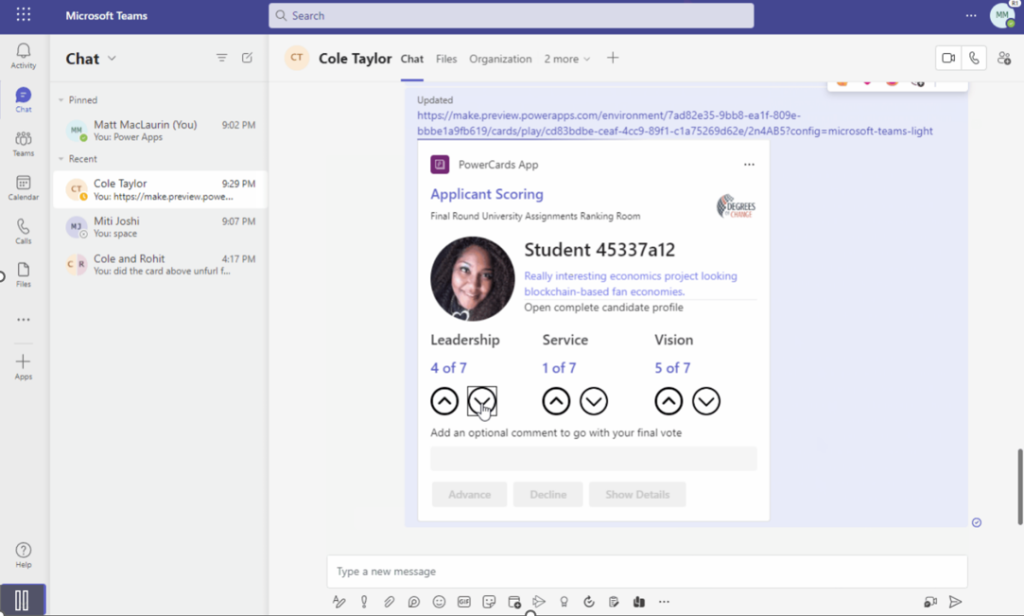
    Coming from the low-code side, I was pretty excited the first time I saw the feature that has now been given the name Cards for Power Apps. Technically it isn’t anything revolutionary, rather it is a citizen developer friendly way to utilize the concept more familiar to pro-devs: Adaptive Cards. It’s not a flashy real-time co-editing experience of data like Loop aims to be, yet it is something that’s much easier to find real business use cases for. Interactive notifications that allow you to complete a quick data entry task without opening any other apps – the world is full of scenarios where these could replace the daunting of system generated emails.
    The idea of sharing a live Loop instead of a link to a document or an app in the cloud is something most information workers probably wouldn’t explore on their own. It will take many consecutive and consistent nudges from MS to get people to change their ways – which is why Teams probably plays a more important role in this shift than the dedicated Microsoft Loop app itself.

    Cards for Power Apps today are a very rough preview still, yet I think these might be the middle ground that can actually push the idea of Teams as an application platform forward. We’ve seen Microsoft promote the concept of Adaptive Card-based Loop components for partners like SAP, Zoho, Smartsheets to bring their business data inside the context of a Teams chat. No, it’s not built on the futuristic co-authoring experience of Microsoft’s Fluid Framework – and that’s just fine.

    For that future to eventually arrive, I believe we should first get a working intermediate version of the technology out there into the hands of the Makers. I really hope Microsoft could find a way to promote the makers of Power Apps to become “first-class citizens” inside the Teams world. Unlike the commercial ISV solutions from keynote demos that merely integrate with Teams, the citizen developer solutions could be born inside it – if only it didn’t require extra effort and compromises like it does today.

    Header photo by Fallon Michael on Unsplash.
  • Sharing Dataverse for Teams apps outside the team

    Sharing Dataverse for Teams apps outside the team

    When you’re building Power Apps within a Microsoft Teams based Dataverse environment, the most common target group of app users is obviously people who belong to that team. This is very logical when the purpose of the app is to collaborate as a team on something that might have otherwise been an Excel sheet shared with all team members.

    The simplified table security model of Dataverse for Teams with Owner/Member/Guest (“OMG”) levels instead of custom security roles makes things easy to manage when everyone is equal. But what about when you’d need to have more granularity on who gets to do what? What if in addition to the owners (app admins) and members (managers) you also need a level further down this hierarchy: the “normal” users?

    Colleagues with access

    This is where the concept of a “broad distribution app” comes in handy. It allows you to grant access to the app for users who are not part of the team that’s hosting the Dataverse for Teams environment. Here’s how the Docs on Dataverse for Teams table permissions describe this:

    “With Power Apps for Teams, you can share an app with Azure AD security group whose members need not be part of the Teams team where the app was built. This enables you to add users to the application without having to add them to the specific team, and opens up “Broad Distribution” scenarios. For example, you may want to build an app that is enabled for every accountant in the organization, or even every employee in that organization.”

    The ability to share an app with one Azure AD security group makes Dataverse for Teams quite an attractive platform for low-code apps that have a high number of potential users. Not many organizations have yet committed to covering all their employees with a Power Apps Per User license that unlocks premium features like Dataverse. Since every user who’s licensed for Teams via Office 365 / Microsoft 365 is allowed to use apps running on Dataverse for Teams, this option significantly lowers the barrier to start building apps on top of a true relational database designed for business applications – as opposed to running your complex processes on top of several SharePoint / Microsoft Lists.

    Sharing with colleagues in practice

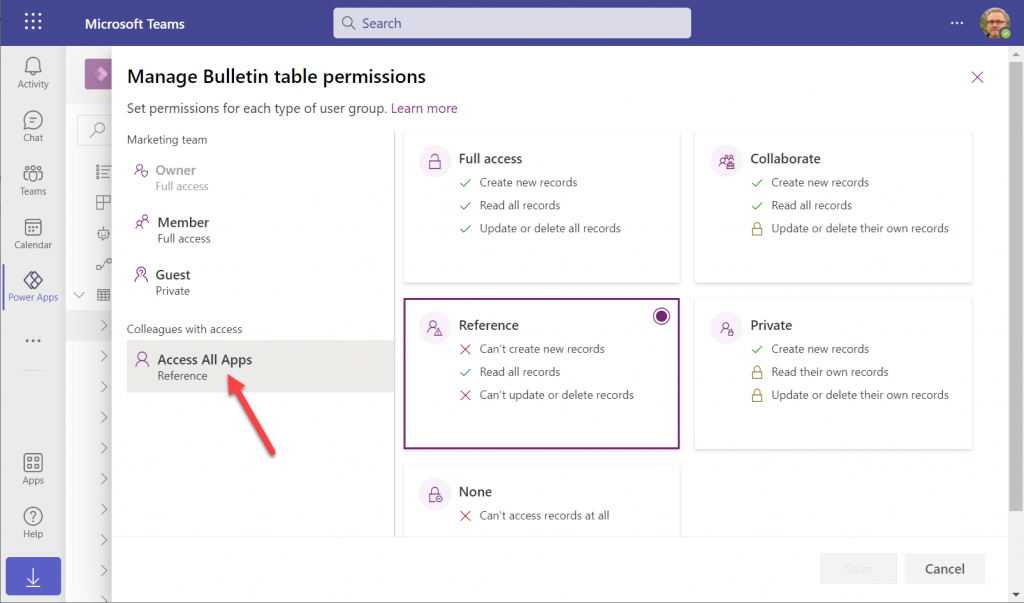
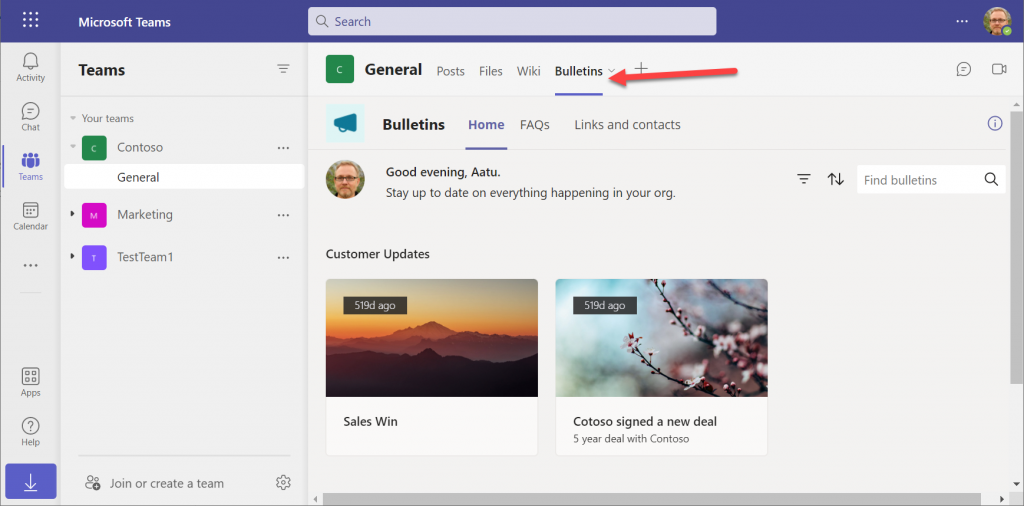
    Let’s say you’ve built an app within a Dataverse for Teams environment and are ready to publish it to the whole organization. In this demo scenario we are using the Bulletins sample app for Teams. We’ve created an Azure AD security group called “Access All Apps”. The first thing we need to do is go an add the necessary access rights to each table used by the app. For example, when it comes to the Bulletin table, users should be able to read all records but not create/modify/delete them, so we grant the “Reference” level to this group:

    You’ll need to do a lot of clicking for an app like Bulletins that has 11 tables, so be sure you’re selecting the “colleagues with access” section before assigning the permission level on each page.

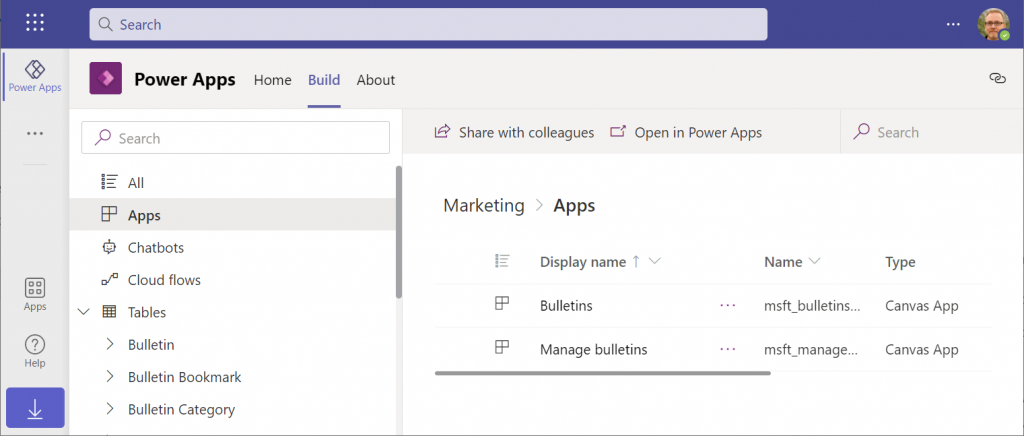
    Next, let’s share the Power Apps canvas app itself with this group. Again, you’ll need to be careful with where to click in the navigation maze that is the Power Apps for Teams app. Go to the Apps list of the Dataverse for Teams environment but don’t select the app. Otherwise you won’t see the “share with colleagues” toolbar button.

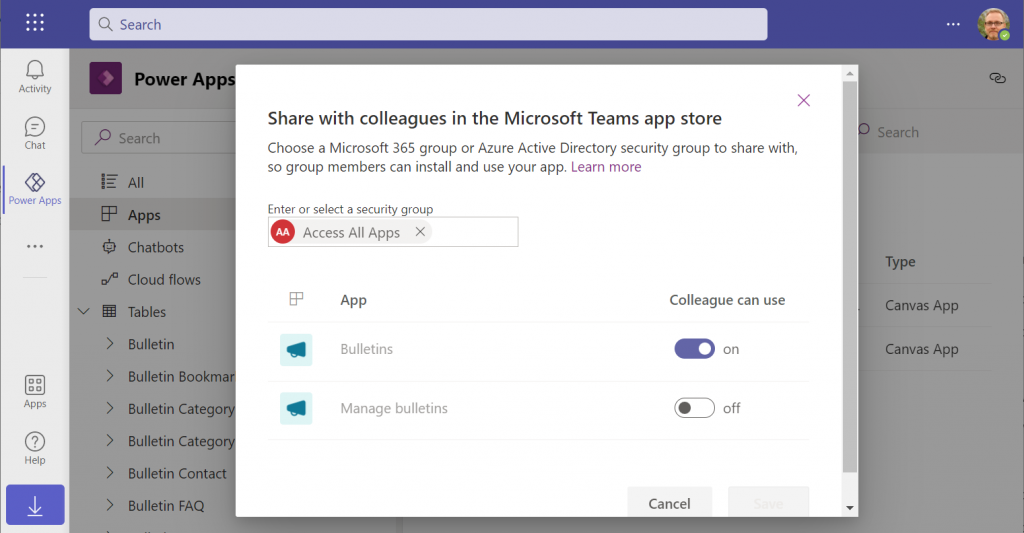
    In the modal dialog window, choose which apps from this Dataverse for Teams environment you wish to make accessible with the chosen security group. This is where you’ll notice that while you could have tens of different apps within on environment, there’s no ability to choose which Azure AD security group gets to see which apps – since there can only be one.

    Adding apps to Teams channels

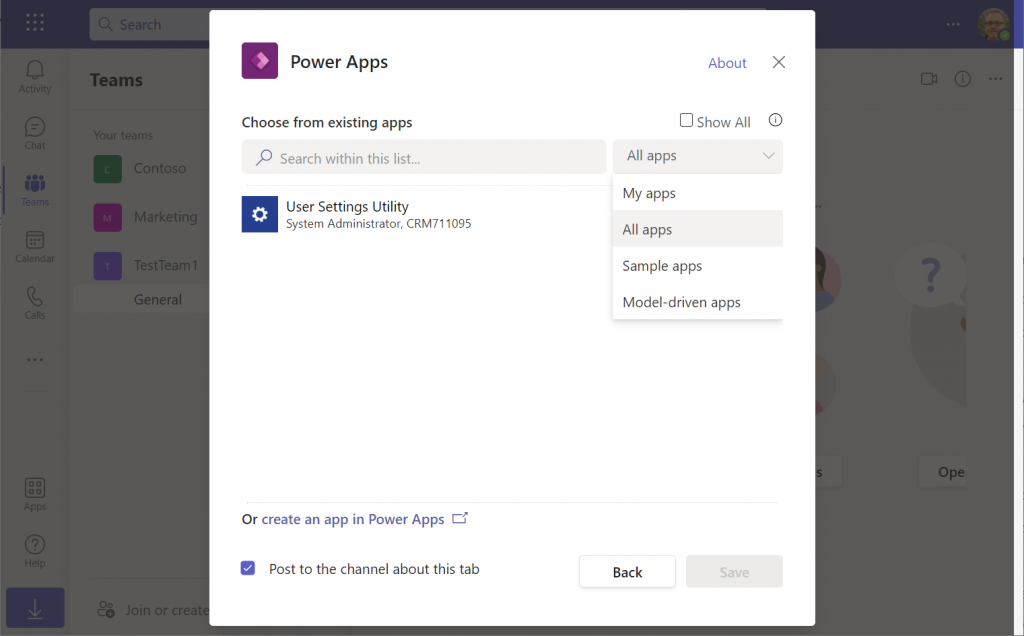
    If we were to now go to our target team and add a new Power Apps tab to the channel, we would not find our Bulletins app there. Nope, not even under that “sample apps” filter, since that actually shows a list of Power Apps sample apps like Asset Checkout that are part of all Power Apps environments. Dataverse for Teams sample apps like Bulletins are a completely separate thing, of course.

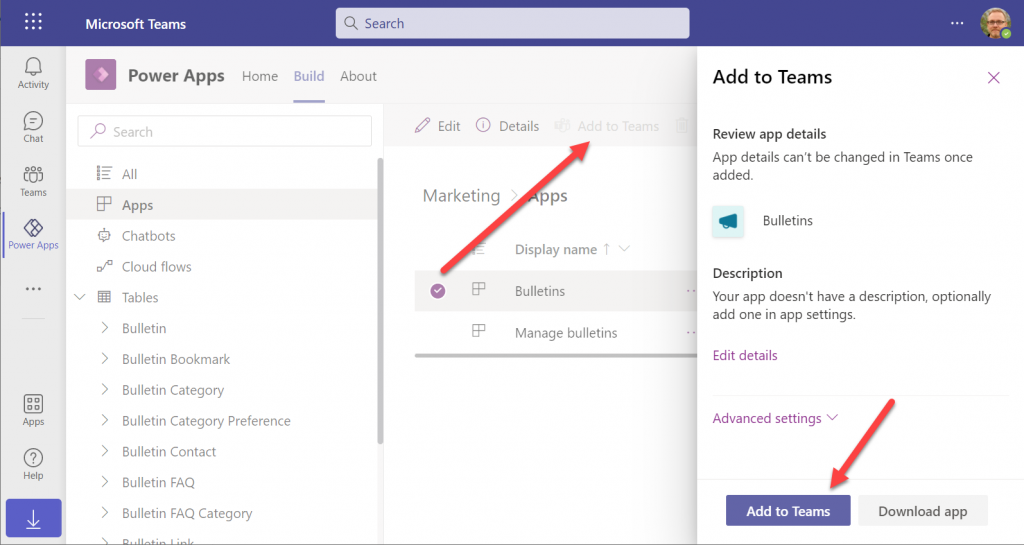
    The logic is different when it comes to Power Apps that have been built within Dataverse for Teams. You need to go back to the Power Apps for Teams app, i.e. the Maker experience. Click on the Build tab, choose your environment, find your app, select it for real this time, then choose “Add to Teams”.

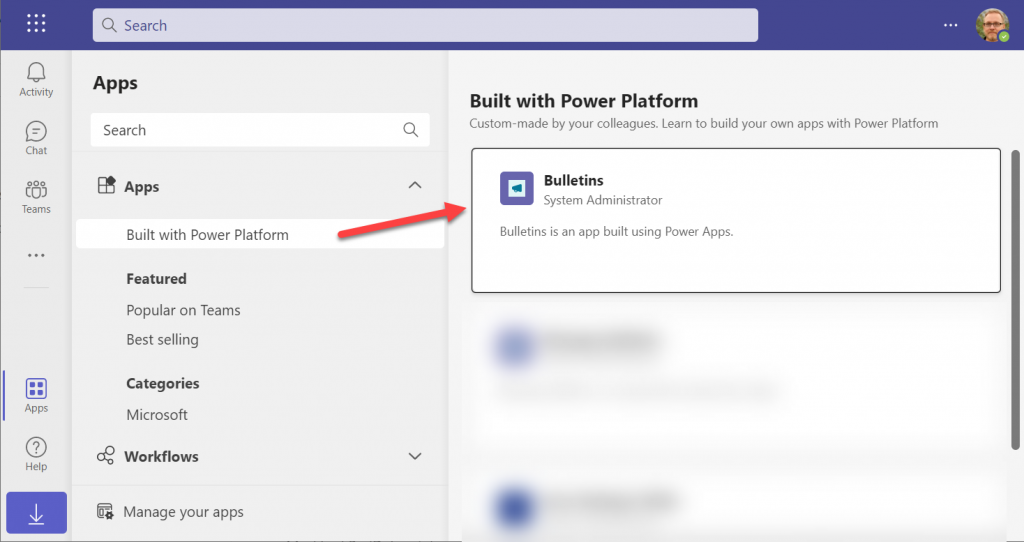
    You don’t get to choose a team or a channel, though. That’s because this process actually publishes your app into the Teams app store. It will become available under the “Built with Power Platform” section:

    OK, fair enough. It’s an app built within Teams, so it makes sense to use the same distribution mechanism as apps developed with custom code. The other Power Apps in your tenant are “external content” that you can freely pin to channel tabs. Dataverse for Teams apps are same but different.

    Blocked by Teams permissions

    This is actually the reason why I started writing this blog post in the first place. Ever since the broad distribution apps were announced in January 2021, adding them to a team from the app store worked without any additional hoops to jump through. Recently that has changed in a way that is not yet reflected in any MS documentation.

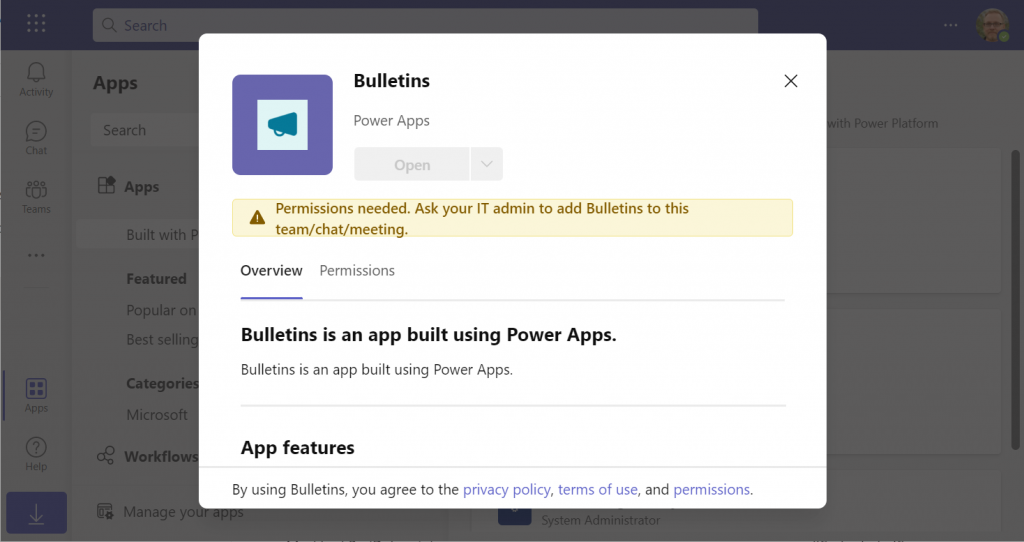
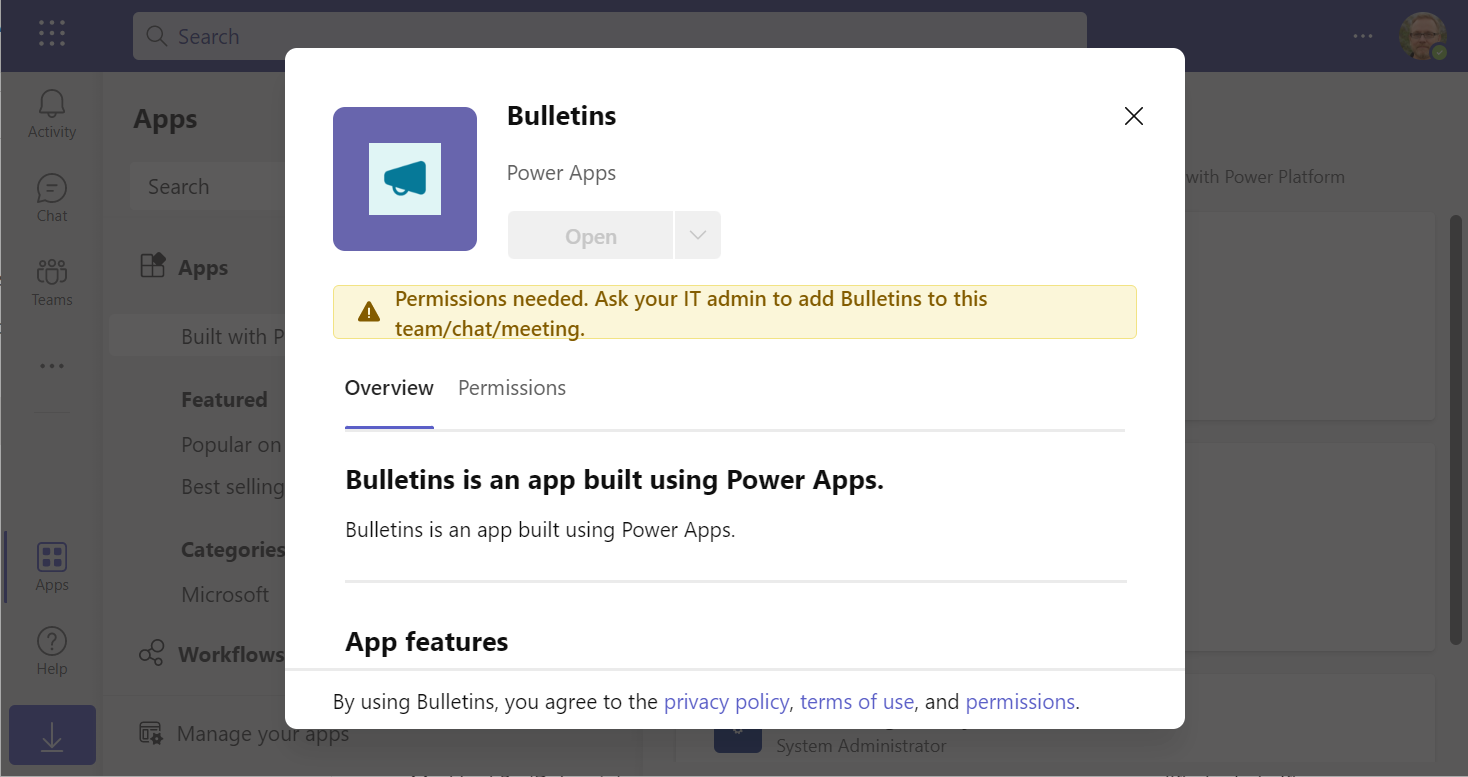
    In a new tenant with the default settings for Microsoft Teams, you may be blocked from installing the Dataverse for Teams based apps after doing the “Add to Teams” dance. Instead the app store may present you with the following error message:

    Permissions needed. Ask your IT admin to add [app name] to this team/chat/meeting.

    You will get this message even if you are the Global Administrator of the tenant, so it’s not about the user permissions. It is rather the Teams policies that are blocking the deployment of Power Apps created within Teams.

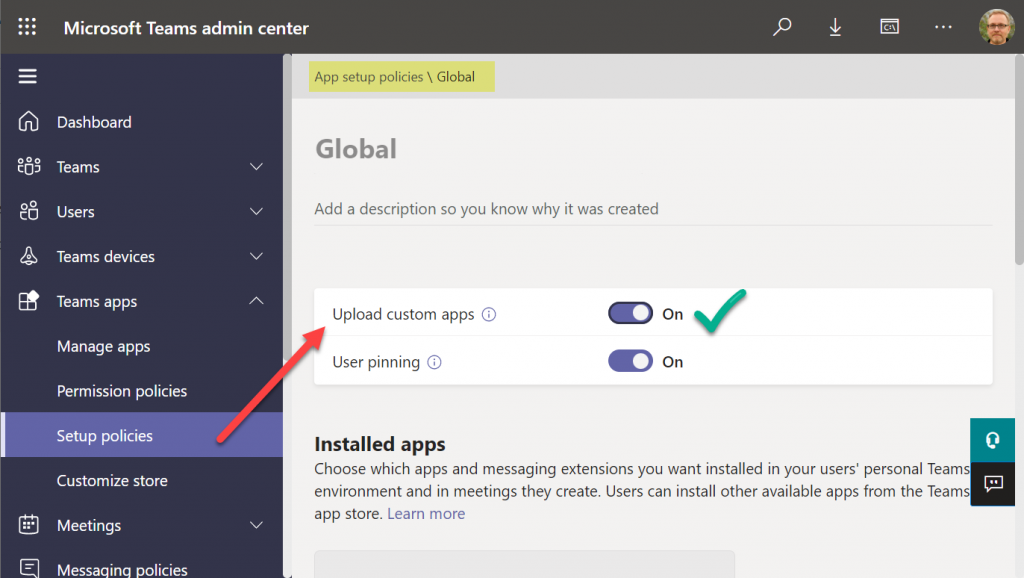
    To solve this issue, you’ll need to contact the Teams administrator of your tenant and ask them to verify that the following setting is turned on:

    Teams apps – Setup policies – Global (Org-wide default) – Upload custom apps – On

    After this change, you’ll be able to open the Bulletins app in the Teams app store, select “add to team” and create a channel tab in any team that you are a member of.

    I can tell for a fact that the requirement for the “upload custom apps” policy didn’t always used to be required (or it was enabled by default). In one of our demo tenants I had previously used the “share with colleagues” feature to add Dataverse for Teams apps outside the hosting team. The existing tabs worked just fine, but adding new apps became blocked until the apps policy in the Microsoft Teams Admin Center was modified.

    It’s a bit unfortunate if this will indeed become a permanent requirement for IT admins to grant the permission for “upload custom apps”, just to share the Dataverse for Teams app into a different team. Compared to normal Power Apps, there are a number of quirks like this that the app makers need to be aware of. Be sure to also check out my earlier blog post where I explore what it’s like to work with solutions in Dataverse for Teams.

    Update 2022-06-17: In case you’re wondering how the general approval process would actually work for Teams store apps where the approval request prompt is shown, check out this great blog post from Tony Redmond: “Users Can Request Access to Teams Store Apps”.

    Update 2022-08-11: there’s a new feature rolling out, called “Microsoft Teams user request configuration to external systems (URL redirect)”, allowing Teams admins to configure a custom URL + message for the app requests in the Teams app store. Read more here.

  • Dataverse meets Teams: my presentation at #TeamsNation 2022

    Dataverse meets Teams: my presentation at #TeamsNation 2022

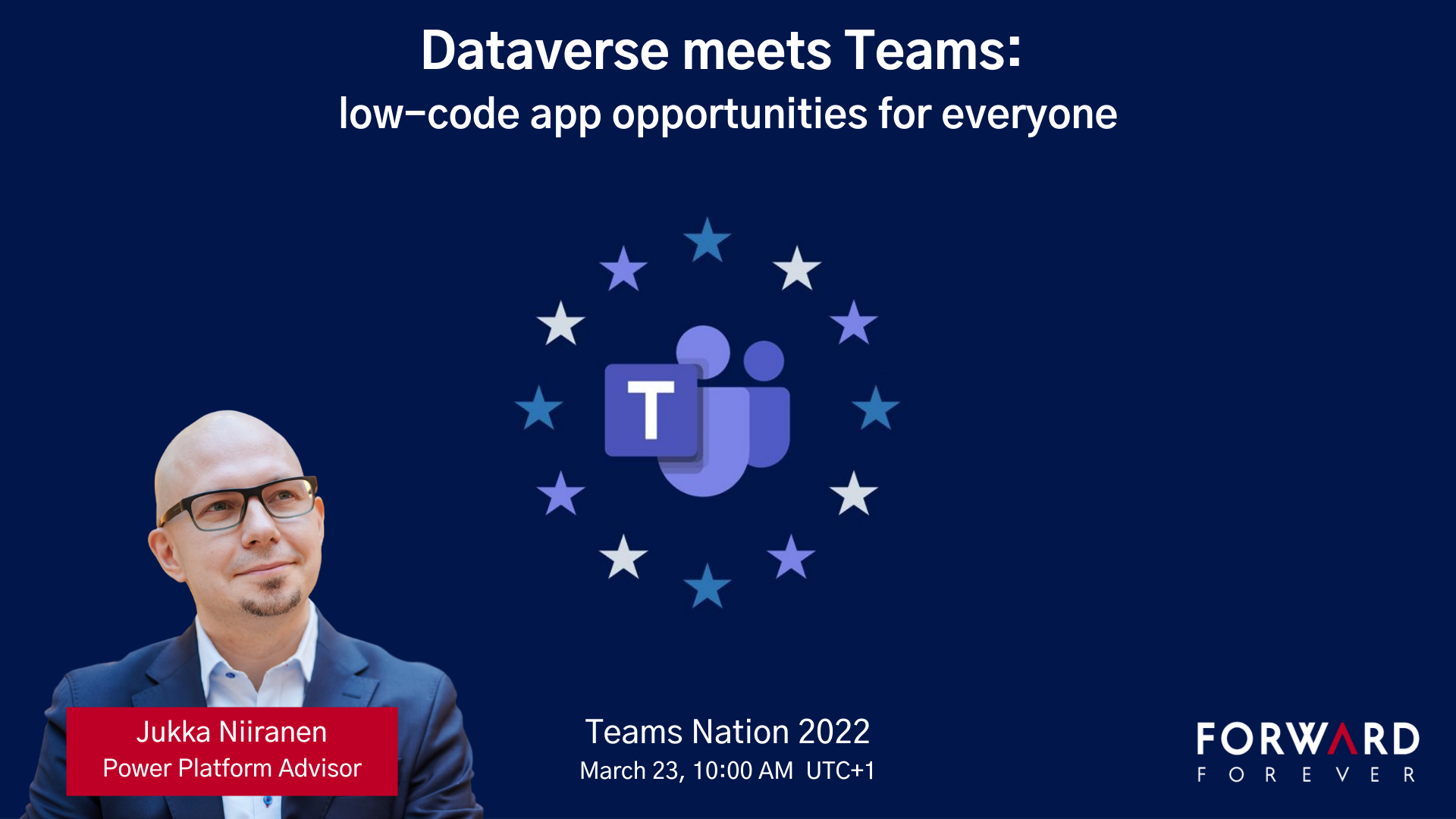
    I had the pleasure of attending the Teams Nation conference on March 23rd, alongside more than 4000 Microsoft Teams community members. Not only that, they also allowed a former XRM geek like me to do a presentation on the Power Platform track. So I did.😄

    Since I’ve recenly been working a lot with Dataverse for Teams, that was a natural topic to cover in a Teams related event. My session was titled “Dataverse meets Teams: low-code app opportunities for everyone”.

    I first explained the big picture of what Dataverse means, the demonstrated three different apps our team has built on top of DV4T. Finally, a few words on the known limitations of the Teams based Dataverse environments and how you need to take them into consideration in your solution architecture design.

    The slides are available for download on SlideShare, or you can browse through them in the embedded version below:

    The session recording from Teams Nation 2022 is also now available on YouTube:

    If you’re planning to build apps into a Dataverse for Teams environment, then be sure to also check out my earlier blog post on the solution management experience in DV4T.

  • Working with solutions in Dataverse for Teams

    Working with solutions in Dataverse for Teams

    For over a year now, we’ve been living in a world where Microsoft has two separate offerings of Dataverse. When it comes to the tools especially around solution management, there are certain differences app makers should be aware of.

    In this article I’ll go through the peculiarities I’ve ran into when building solutions in Dataverse for Teams (DV4T). But first, a few words on why you should care about the Teams based environments when building Power Apps.

    Positioning of Dataverse for Teams

    Understandably, not everyone is a fan of the Teams version of Dataverse. After all, it’s a cut-down version of the full Microsoft Dataverse that many have been using for Dynamics 365 and XRM scenarios for ages. However, there’s that one unbeatable feature in Dataverse for Teams that’s hard to ignore: it’s FREE!!! (*With capacity limits, though.)

    If you are building a complex business application for a specific audience, it’s almost always sensible to pay a little more and get the Power Apps Per App or Per User license to unlock the full Dataverses platform capabilities. But when you need an app with a casual usage pattern that applies to a huge number of individual users, sometimes it just ain’t feasible to go premium all at once. So, to avoid falling back to SharePoint lists, Dataverse for Teams a.k.a. DV4T can be a well justified choice from an architecture perspective.

    Just because you’re using Teams as a platform for your low-code apps doesn’t mean you don’t need to plan for ALM (application lifecycle management). A single production environment ain’t going to be sustainable in the long run for the more important business processes. There are good news and bad news when it comes to Dataverse for Teams in this regard.

    Let’s get this one bad news out of the way first: all of the APIs to programmatically interact with Dataverse are not available when working in a Teams environment. So, any pro-dev ALM processes that involves automation via DevOps pipelines and such is out of the question.

    That leaves us manual ALM, meaning export and import of solutions by a human being. Nothing wrong with that, since surely the vast majority of business apps running on the platform globally are developed and maintained this way. After all, there really isn’t a low-code specific ALM process available in Microsoft’s world today that wouldn’t require at least some pro-code developer skills in the delivery team.

    The secret life of solutions in DV4T

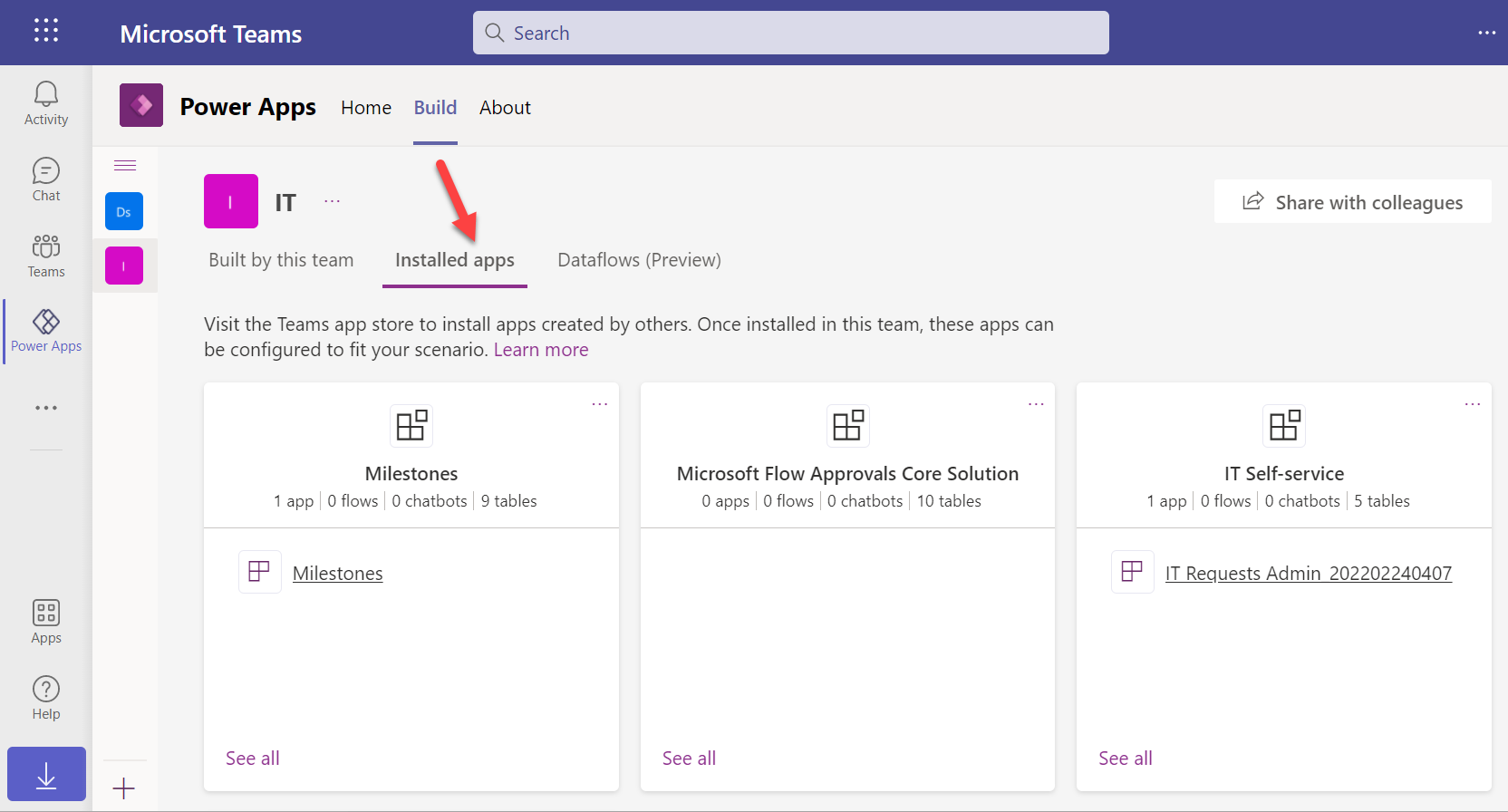
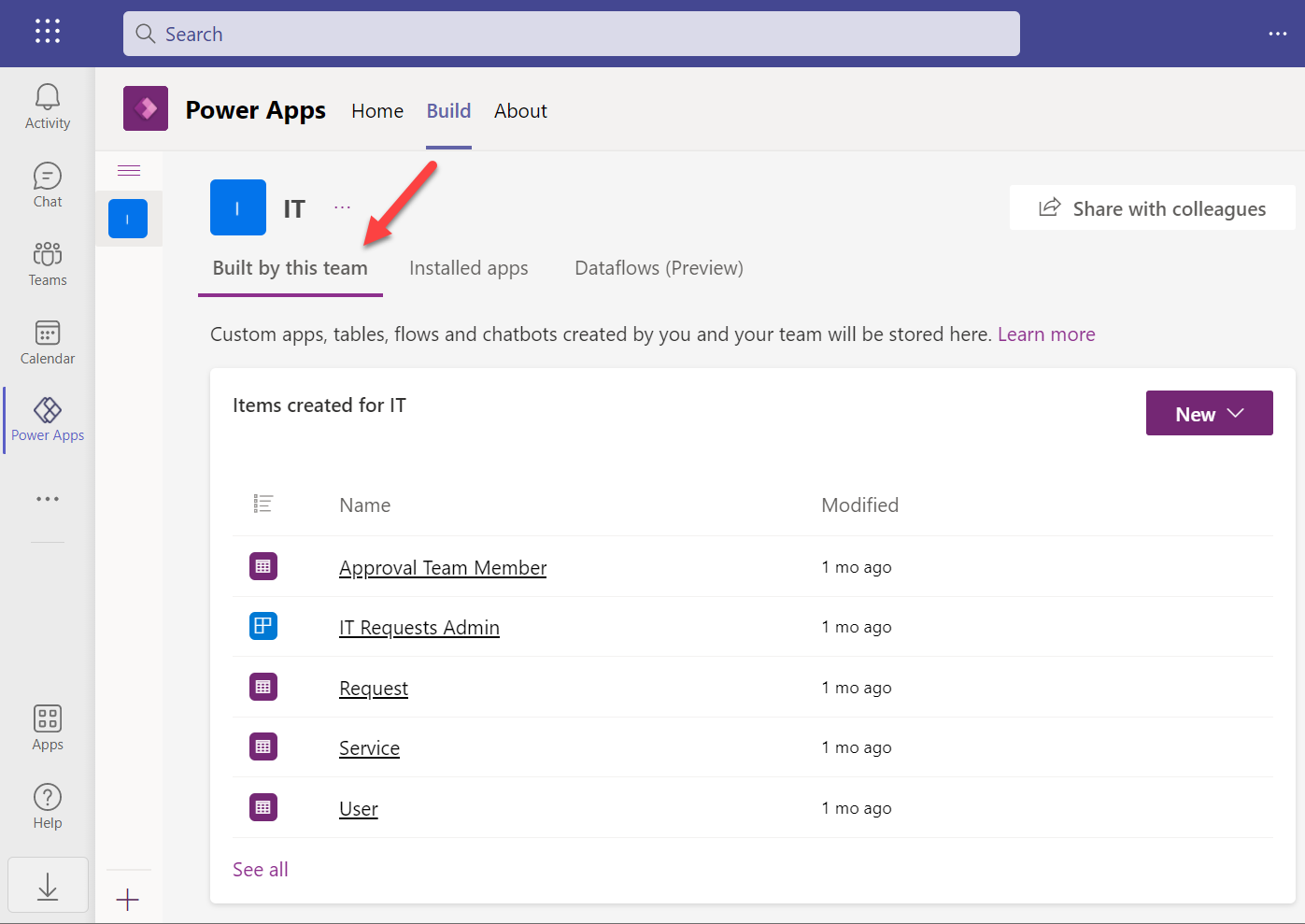
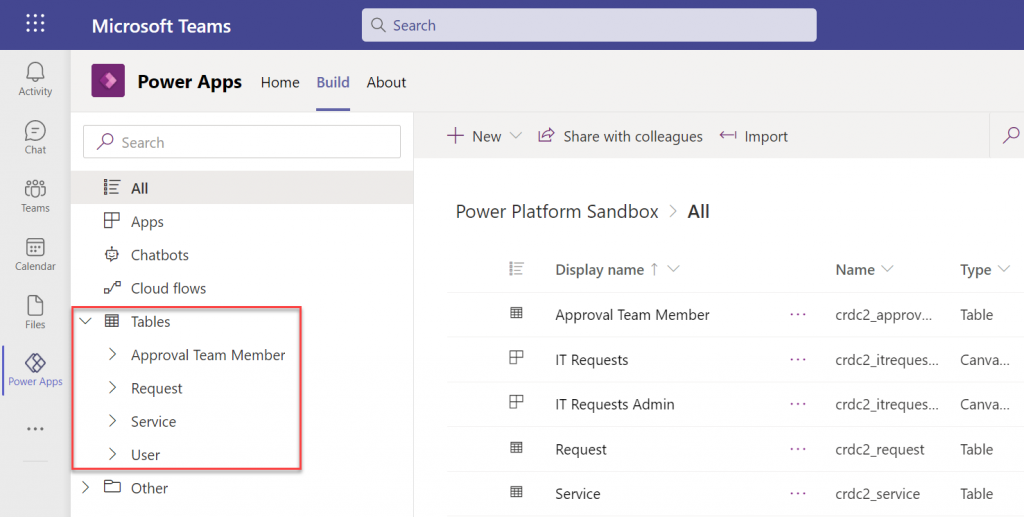
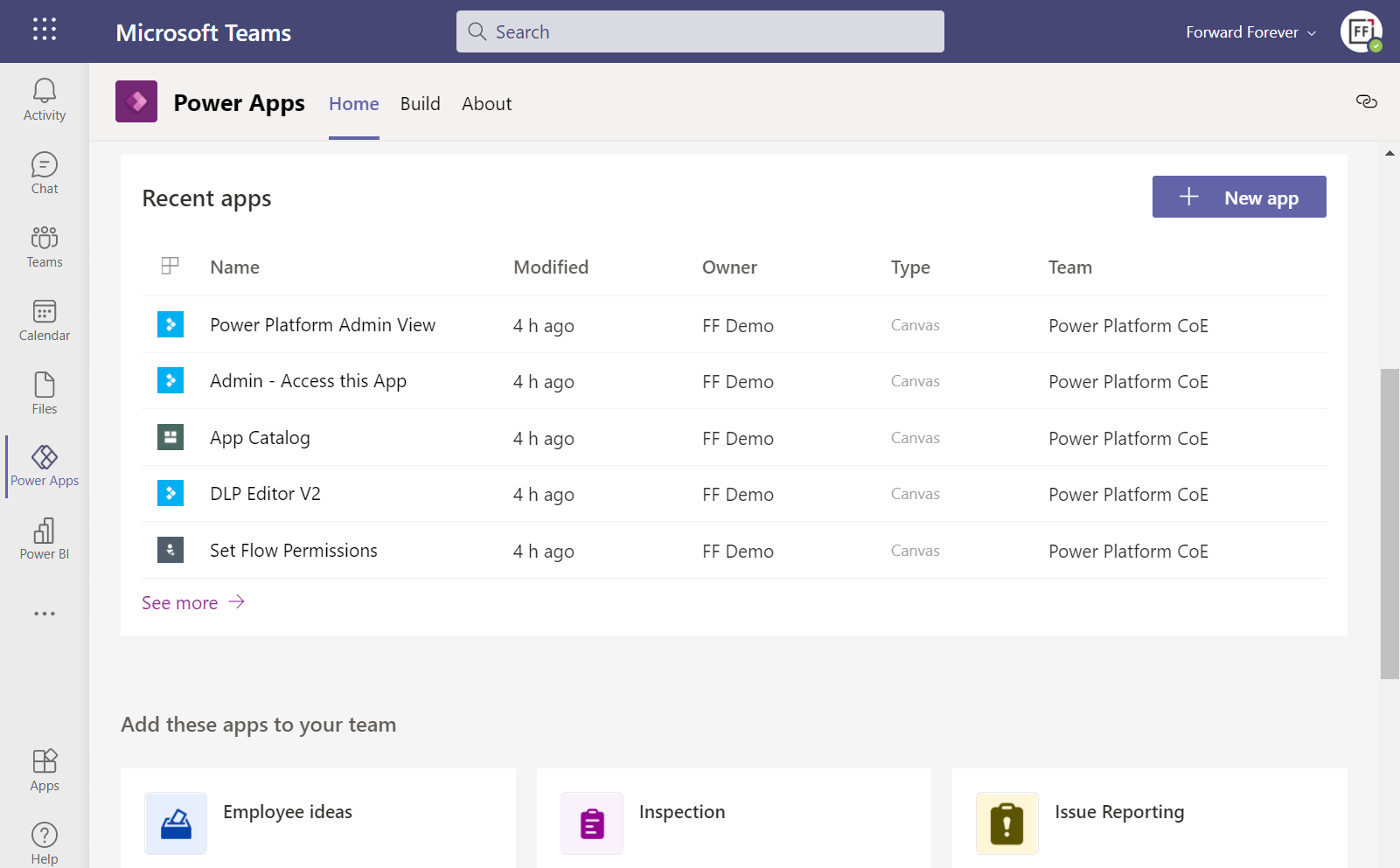
    When you build apps from within the Teams UI, you will never encounter the word “solution” in the app maker experience. The Power Apps app inside Microsoft Teams will instead show you tabs called “built by this team” and “installed apps”:

    How does one create new apps here alongside the already installed ones? By importing managed solutions into the DV4T environment. Of the three apps in the above example, IT Self-service has been imported as a managed solution package from another environment. Milestones is a sample app from MS with its own proprietary install experience, whereas Flow Approvals is just the raw infrastructure bits that get auto-provisioned when you create your first approval request in an environment.

    All the unmanaged components in this environment will be found under the “built by this team” tab. Looking at the source DV4T environment from where the above IT Self-service app has been exported from, here’s how its bits and pieces show up in that environment:

    When you click “see all” you’re taken to what looks a bit like the modern solution explorer in Dataverse, except it’s missing most of the features you’d expect to find there. When you consider for a moment that this experience is aimed at new citizen developers who aren’t really even aware of what “Dataverse” means, it does make a lot of sense.

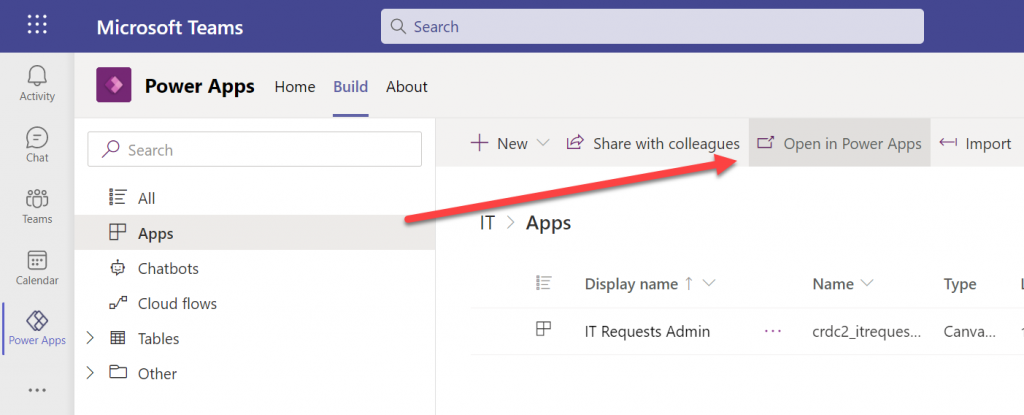
    We’re not like them, though. We are advanced low-code app makers who know what we want to achieve with these tools. Our escape hatch from this simplified world is the “Open in Power Apps” button that can be found when selecting “Apps” from the tree view.

    We’re then taken into a special version of the Power Apps Maker portal that cannot be accessed directly from make.powerapps.com. This is because the DV4T environments do not show up in the environment picker of the usual Maker portal (they do on the Power Automate side, though). Time to add a browser bookmark for this URL, to keep you from having to always remember the curious navigation acrobatics required to land here.

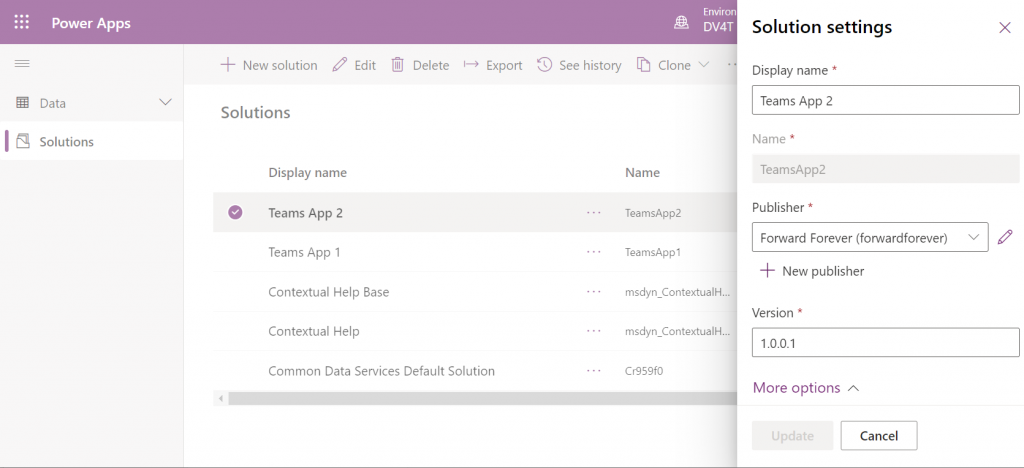
    Anyway, at least we’re now in a place where the good ol’ solutions can be created:

    You’ll quickly notice that only a subset of the full solution explorer features are available here. I’ll next demonstrate how this can lead to some challenges in your app development tasks.

    Choices in a DV4T world with less… choices

    The IT Self-service app that was mentioned above is a fairly straightforward app with a few tables, a canvas app and a cloud flow. After getting the initial version ready in the development environment and preparing to configure it for another Dataverse for Teams environment, I ran into an interesting issue. This example reflects some of the “gotchas” you should be aware of when working without access to the full Dataverse tools.

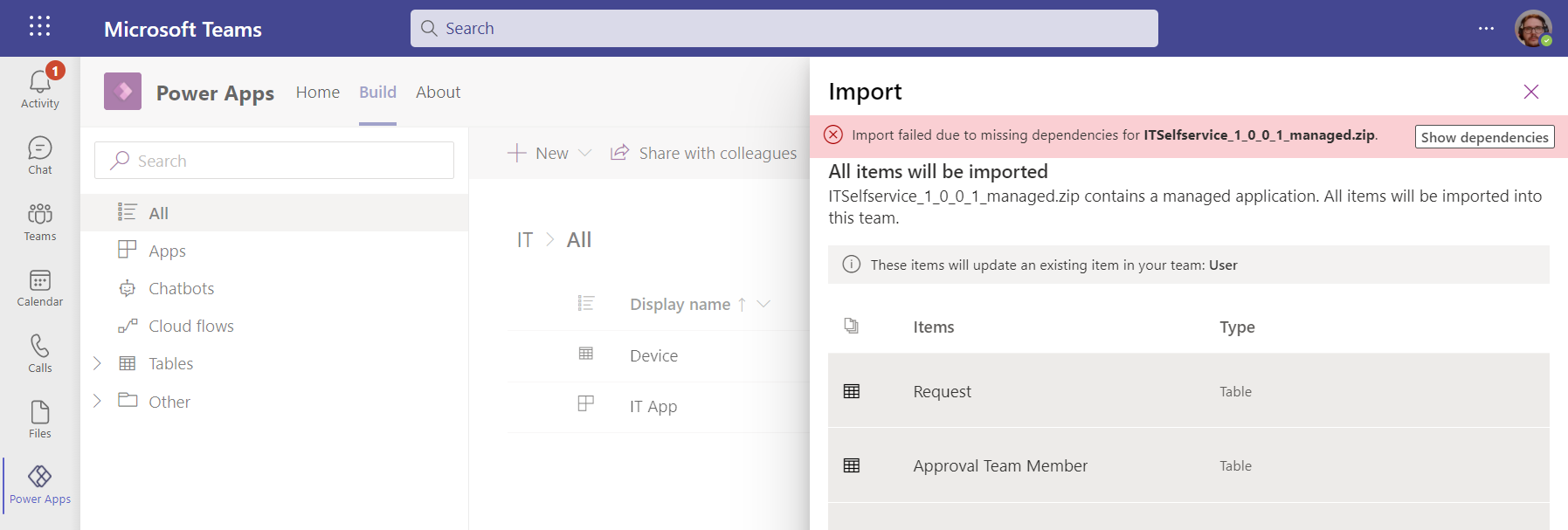
    We can import solution files from the Power Apps experience within Microsoft Teams, too – even if the word “solution” is avoided. When importing my test app from here I encountered the error “import failed due to missing dependencies”. Clicking on the “show dependencies” button didn’t do anything at all.

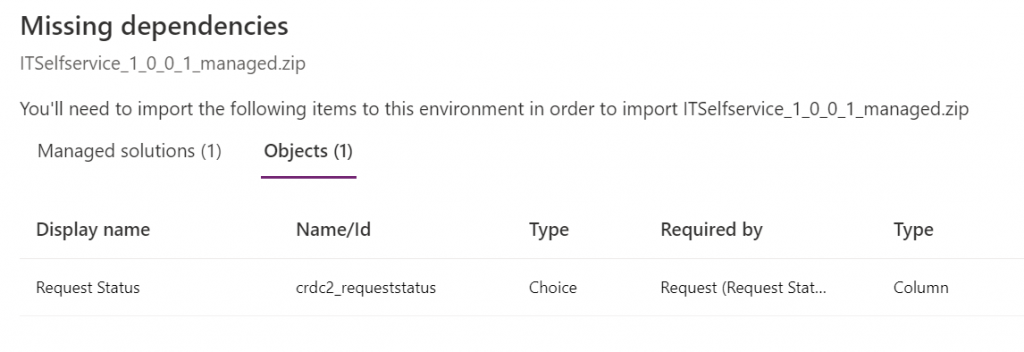
    Switching over to the Maker portal UI for this DV4T environment, then initiating the traditional solution import process, I was able to see the that my solution package was apparently missing a Choice:

    Ah, the awkward naming choices that Microsoft has recently made with our beloved platform… Ok, I’m now switching back to the old terminology that makes more sense.

    So: I had added an option set field for my entity. However, it was a global option set, and now the solution package was missing the actual list of values that are stored within this separate solution component.

    How did I end up in this situation? I’m not actually sure. I did a test with a different app, to see whether it makes any difference if I create the table columns from the Teams experience (which is very citizen friendly in its Microsoft Lists type UI) or the Maker portal. It is different in the sense that Teams creates a local choice vs. the global choice that the Maker portal defaults to (as recommended by Microsoft’s own Docs). Still, the solution export/import worked without any dependency errors on both versions.

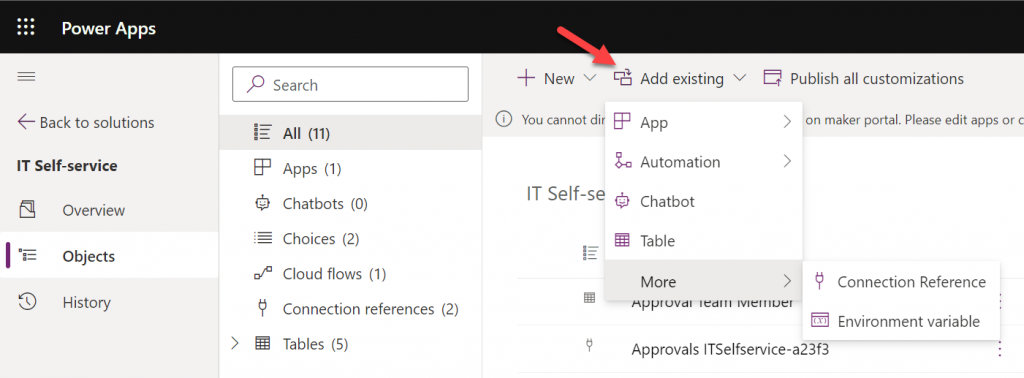
    No big deal, I’ll just add the missing component into the solution… Not so fast, Mr. Advanced Maker! Just because you’re working in a UI that resembles the full Dataverse solution explorer, doesn’t mean you have the same features at your disposal. Although Choices is one of the nodes that does show up in the tree view, you can’t actually find it in the “Add existing” menu:

    Those of you who work with full Dataverse know that the “Add existing” menu contains well over a hundred items. The official Docs on solution component types only list 90 values at the time of writing but MS is adding internal components there all the time. We sure don’t need most of them in DV4T, but this omission sounds a bit unfortunate.

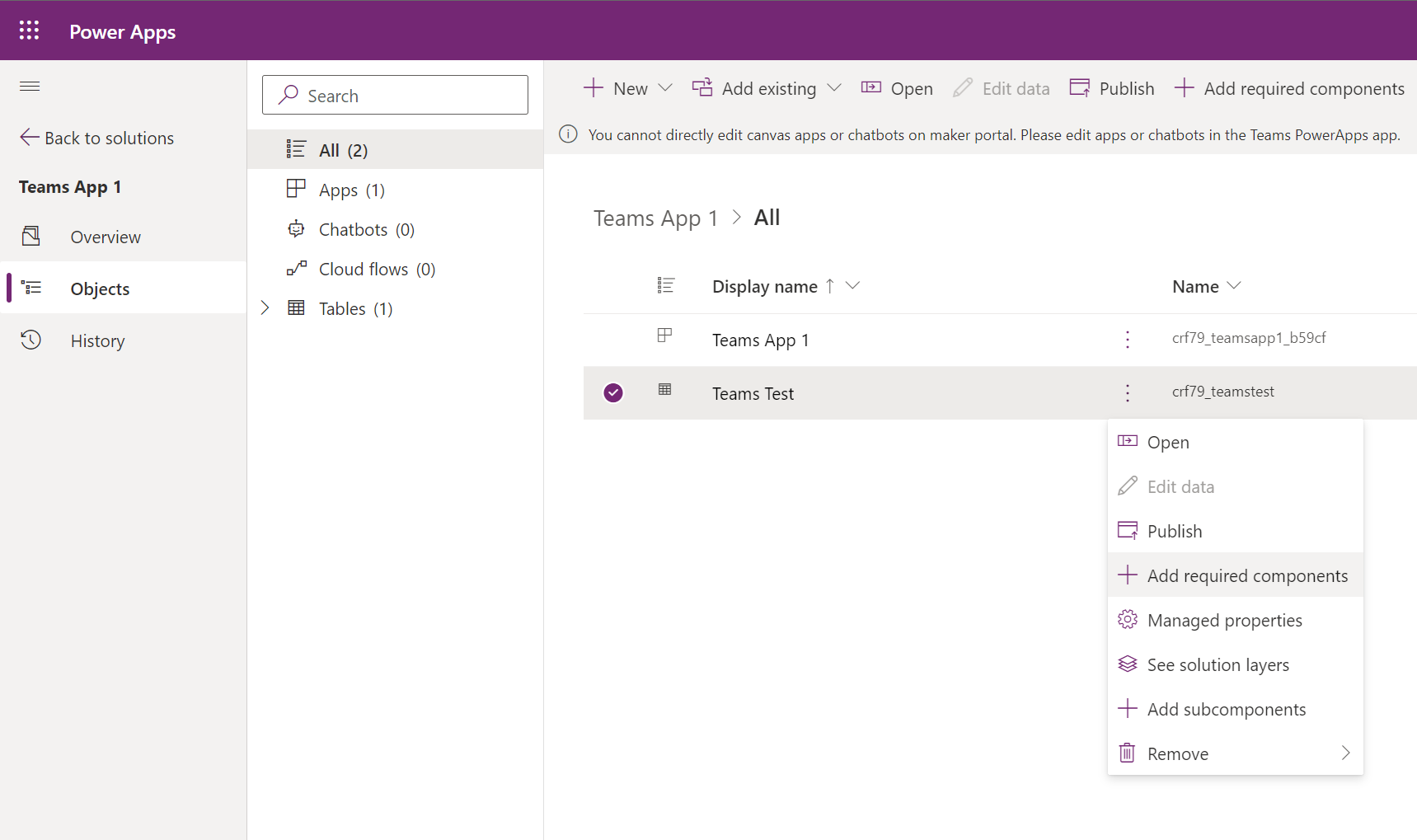
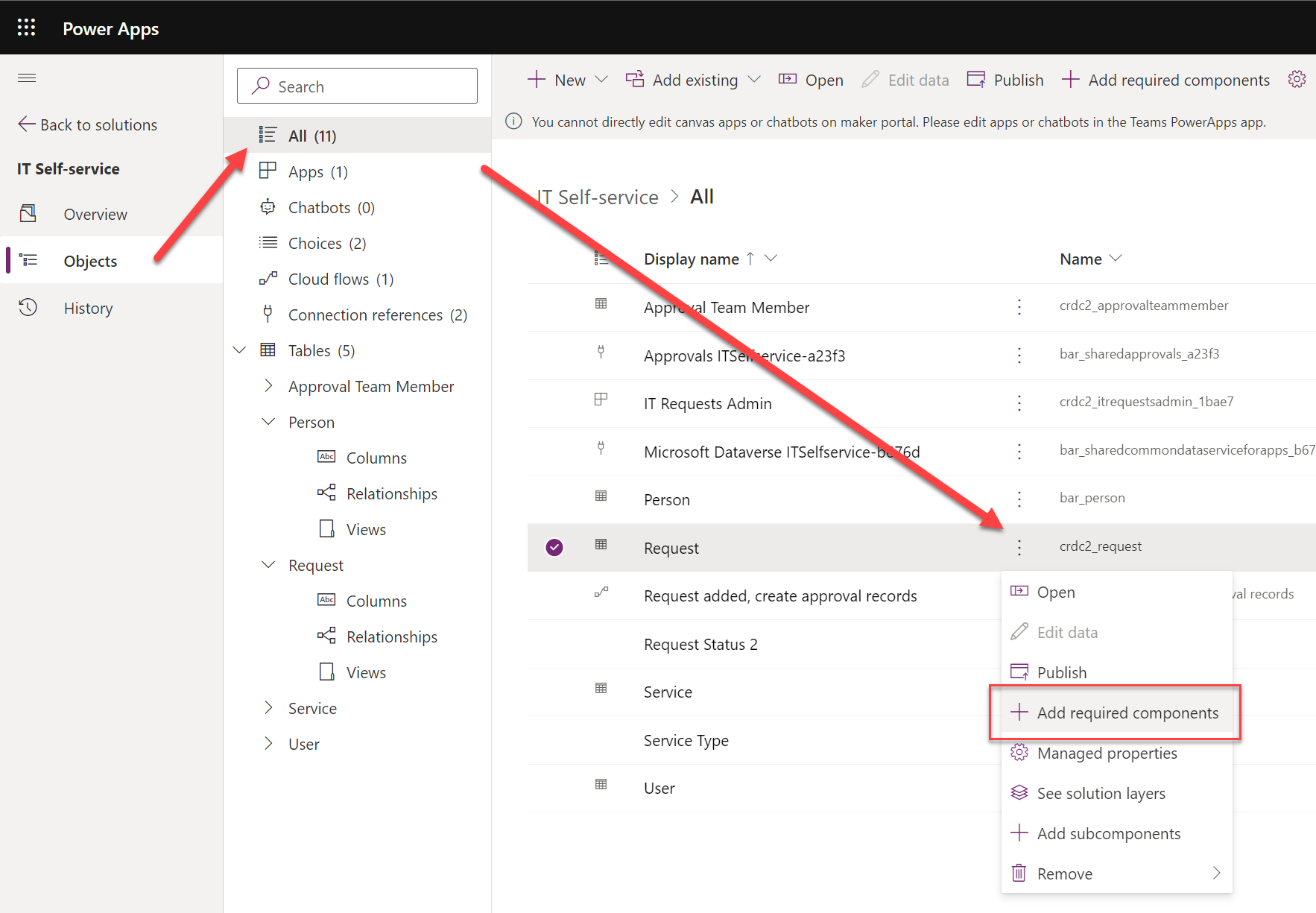
    I had already done all sorts of debugging and hacking to find a way around this annoying limitation until I discovered a UI based way out. I saw that the existing Choices in the solution had the “Add required components” option behind the three dots. Unfortunately the Tables view didn’t include the same option. In the full Dataverse solution explorer we’ve got it in the main toolbar, but DV4T is different in this regard, too.

    Finally I found the place where the option does apply to tables, too: the all objects view. Success!

    It took a few hours for an experienced low-code developer to discover how to do what he wants to do in this simplified environment. It was still faster than replacing everything with a new column at this point, though. I had almost accepted the fact that I had simply clicked on the wrong navigation path somewhere in building the app and managed to break the boundaries of the DV4T sandbox. Luckily that wasn’t the case today.

    Solution publishers

    When you start adding items into a Dataverse for Teams environment via the Teams UI, they will get created under the CDS Default Publisher. The prefix for new solution components will be something like “crdc2”, meaning a random value that’s different in each environment. At least it isn’t the dreaded “new_” prefix…

    You can create a your own custom publisher when creating a new solution via the DV4T edition of the Maker portal, similar to how the full solution explorer works. As long as you create the items from under this solution in the Maker UI rather than the Teams UI, the correct prefixes get assigned to them. However, since you cannot create a new canvas app (or chatbot) via the Maker UI, this means your app schema names will always get the CDS Default Publisher prefixes.

    There are nice new features like the table editor in the Teams UI, which you might be tempted to use for quick editing of demo data while building your app. If you’ve created your tables from the Maker portal side, though, you won’t find them in the Teams UI:

    The reason for this is that the Power Apps app inside Teams will only display the unmanaged solution components for the environment’s default publisher. So, if you tried to follow solution management best practices and created your own solution publisher, the doors will be closed over on the DV4T native app building experience.

    Unmanaged, invisible solutions

    This leads us to another gotcha on how DV4T treats solutions that come from outside the current environment. We already saw the differences in how the managed solutions imported into the environment are listed under “installed apps” and unmanaged stuff is under “built by this team”. That’s how the Teams experience shows things, and as we’ve come to now understand, it isn’t always sufficient for advanced makers.

    When we do the equivalent of “switch to classic” in the Teams world and hop over to the Maker portal view of the environment, are things in their right places again? Well, not if you imported an unmanaged solution into the environment. Here, try and find the unmanaged IT Self-service solution from this list below:

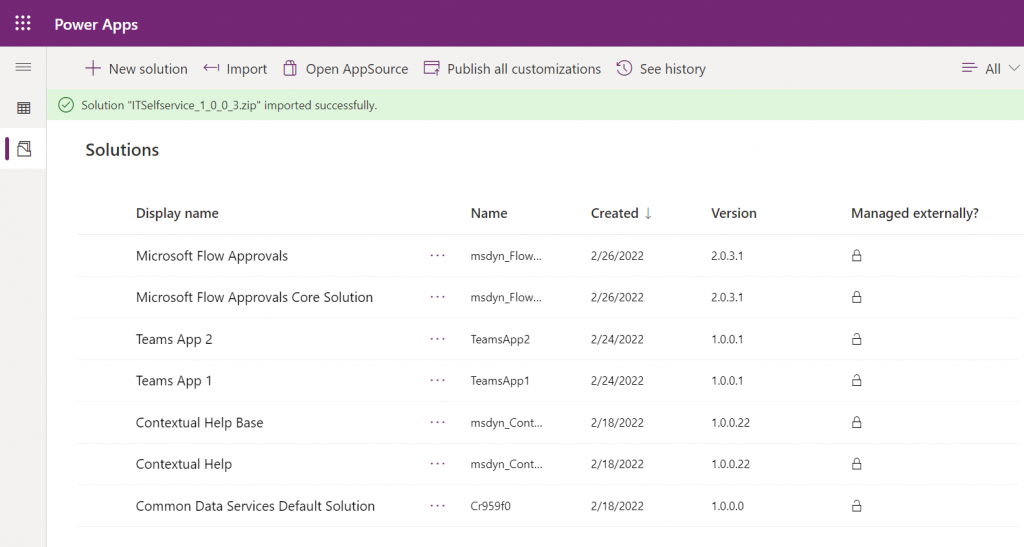
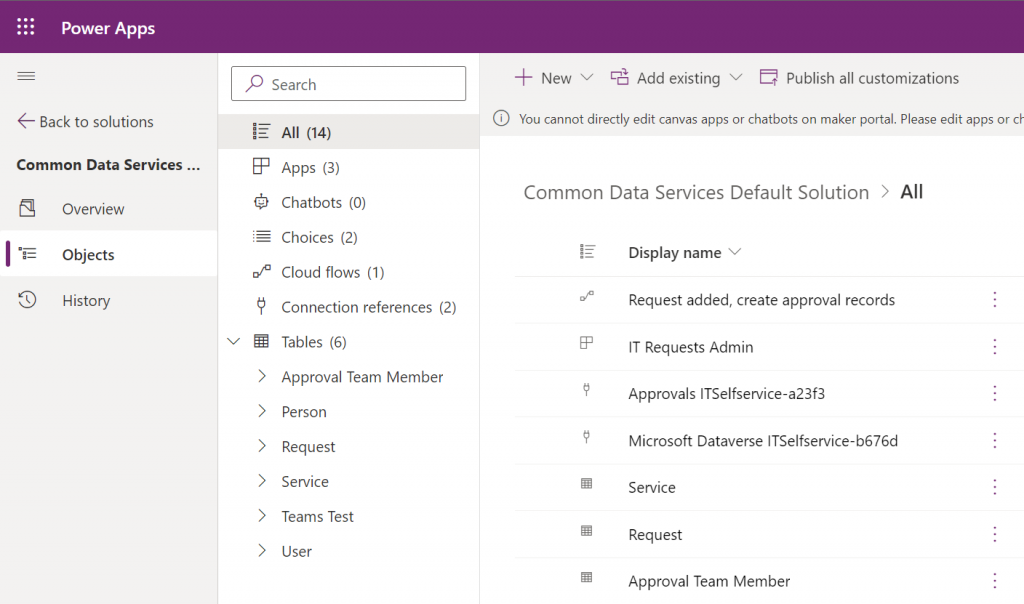
    No matter how many times you hit refresh on that page, your imported solution won’t show up. All the imported components do exist in the environment, though. You can access them via the Common Data Services Default Solution:

    Why isn’t the solution visible then? Because Microsoft decided that you don’t need to see it, apparently. Deep down in the database all the solution metadata is stored. You can tell this from the fact that if you try to re-import the same solution, you’ll see a message “this version of the solution package is already installed”.

    The limitation isn’t technical then, just a UI level filter. Yet from a practical point of view it is very real in a DV4T environment. This is because all the standard Dataverse APIs are blocked, so using tools like XrmToolBox to work around UI limitations and improve app maker/developer productivity are out of the question.

    Closing thoughts

    Dataverse for Teams has capabilities for running quite extensive business applications (just look at the CoE Starter Kit for reference). Many internal low-code apps could benefit from having a proper relational database behind them, yet they may not be feasible to be implemented with features requiring Power Apps premium licenses due to their usage patterns. The current app packaging story of DV4T raises some concerns on how solid this foundation will be for applications that will need ongoing maintenance and development.

    Ultimately it would be best if we had a clear path for using the full Dataverse as our development environment, then publish the final app into DV4T for testing and production. As it stands today, the Canvas app editor experiences between the two environments are technically different. Also, it can be all too easy to “infect” your solution with some dependencies to features of full Dataverse that are going to block importing it into a DV4T environment, based on my experiences.

    Update 2022-10-20: Today I learned about one more gotcha with Dataverse for Teams that involves Power BI reporting. If you build your tables from within the Teams Power Apps UI, you won’t see a “publish all customizations” button. However, unless you publish your customizations, the TDS endpoint won’t pick up the choice column labels. You’ll only have the ID values but the “name” fields will be blank. So, as a best practice, always keep the full Power Apps Maker portal open while building Teams apps/tables and remember to publish your customizations from there – just like you always have in the XRM days.

  • Year 2021 in Power Platform

    Year 2021 in Power Platform

    Time to start wrapping up another eventful year in the Microsoft Power Platform ecosystem. Here are the highlights that came to my mind when reflecting on 2021, looking at my own articles and social media posts.

    Power Fx: a programming language for low-code

    This is an announcement from 2021 that will grow up to be a much bigger deal in the years to come. When Microsoft launched Power Fx in March, the only thing we initially had was a new name for the formulas that Canvas app makers had already been working with for years.

    The more impactful side of Power Fx is the grand vision of an open source language built specifically for the low-code app makers and solution developers. Power Fx is a sign of things to come: a world where the concept of code is democratized and any unnecessary barriers for people to act as developers are actively torn down by the platform providers.

    Building Power Fx based command bar buttons was the most fun topic I had to blog about in 2021 (see posts one, two and three). Much of the functionality in modern commanding is still way too early for production use, yet the progress that’s going to happen on this front is inevitable. This is how the business logic that goes beyond the options available via a GUI will largely be written in the near-ish future.

    CoE Starter Kit: the admin product on top of the platform

    It never ceases to amaze me how something like the Center of Excellence Starter Kit can be built purely on top of the Power Platform – to administer and govern that very same platform. In 2021 CoE was updated to be compatible with Dataverse for Teams, which is a small miracle on its own. All you now need is one premium license to unlock the vast feature set of The Kit.

    Officially it of course still isn’t a Microsoft product, rather the CoE Starter Kit is delivered as a template on GitHub that is actively maintained by the Power CAT team. Yet in many ways this is a much better model than what “real” Microsoft software products have. There’s a public backlog of potential and upcoming features, you can get notified of the monthly releases, plus the team is incredibly responsive on triaging the reported issues. This level of transparency gained via working through open source tools and methods is something you can only dream of having for the commercial MS products for Power Platform or Dynamics 365.

    Teams as an application platform

    Dataverse for Teams was launched in late 2020, so 2021 was its first year for us to see the impact from empowering every Microsoft Teams user to build Power Apps with a Dataverse back-end.

    Today there are 10 sample apps from Microsoft that any team member can easily provision from the Teams app store. They’ll end up creating a new Dataverse for Teams environment in that process, which is certainly going to put some governance pressure on your Power Platform environments in general.

    I don’t think we’ve yet seen a huge explosion in more advanced apps being built on top of Dataverse for Teams. However, due to its attractive price point (“free!!!”), it has definitely become an option we always need to evaluate before deciding on full Dataverse or (*gasp*) SharePoint Microsoft Lists.

    With Microsoft Teams being the hub for teamwork in most organizations using MS tools, there’s growing pressure for all business app developers to understand how their solutions should exist and operate within the Teams context. The very least you should do is to consider how Teams can be leveraged for publishing your apps to end users.

    As for the Teams + Power Platform story on a commercial level, we didn’t yet reach a point in 2021 where partners could distribute their Power Apps based products via the public Teams app store. In fact, it is explicitly called out that you shouldn’t submit any such apps to the Teams team to evaluate. Let’s keep an eye on this in 2022 and see how the Teams app store will align with the traditional AppSource channel (that didn’t receive much love in 2021).

    Pay-as-you-go licensing

    You asked for it – you got it! There have been constant demands coming especially from people working on Azure based app development that we should have a way to pay for Power Platform resources on the same Azure bill. The announcement of PAYG for Power Apps app passes and Power Platform capacity was therefore the biggest news that came from November 2021 Ignite event.

    Is the PAYG model going to replace the earlier prepaid licensing options in real life, though? Probably not on a wider scale, since committing to a certain number of Power Apps seats upfront is naturally going to give you a better price point in your Microsoft licensing negotiations. The 100% premium in the Per App price when using PAYG highlights that this model is aimed at serving those app scenarios where the actual consumption volume isn’t well known yet. Great for new experiments, maybe not so great for established app usage patterns.

    With the 30 day minimum duration for the once activated Per App passes, PAYG as it stands today isn’t yet very close to a pure consumption based pricing model like raw Azure services are using. Still, it may be flexible enough to convince customers that the licensing risks in building Power Platform based apps aren’t that high anymore, compared to the more rigid MS Business Apps based model that used to be the only option.

    50% price cut for Power Apps

    As if the PAYG model wasn’t enough, in 2021 we also saw a rare moment when Microsoft slashed the price of Power Apps Per User and Per App licenses in half. In that process, the latter was also redefined to mean “Per 1 App” and not “1+1+1 Apps”, but that just made perfect sense in order to clarify the terminology. You could say in most scenarios the list price for running premium apps got reduced by 50%.

    Those of us who’ve worked with Power Platform on a daily basis have always known the crazy value for money that you could get from the platform, already before this price cut. When it comes to convincing the customers in large organizations that they should license every user with Power Apps premium, in the same way they’ve bought Microsoft 365 licenses, there’s probably been a need to move the price point a little lower still to make such deals happen.

    Looking at the global playing field of low-code application platform vendors, customers’ concerns over pricing and licensing are a common issue listed for all leading vendors in Gartner’s Magic Quadrant. MS may not be able to completely alleviate these concerns, yet it certainly helps to have a list price that isn’t an obstacle for starting the talks with anyone.

    Hello Azure Synapse, bye Data Export Service

    OK, so this doesn’t actually affect pure Power Apps environments but rather Dynamics 365 customers. However, since DES has been so widely utilized as the mechanism to gain SQL style access to the Dataverse tables for building reports, the announcement of its deprecation has to be considered one major event for the year 2021.

    This deprecation will mean many customers need to re-architect their reporting solutions, even when existing reports are happily running in production and possibly meeting all the current business requirements already. Thankfully you can still push the Dataverse data into the same SQL database. Using three Azure products (Synapse, Data Lake, Data Factory) instead of one DES can feel like more complexity to achieve the same results, though.

    There’s a bright side to this change, though. The old DES was always just a stop-gap solution that MS had to put in place, to address (primarily) the reporting concerns that CRM customers had when moving to the cloud. The new Azure Synapse Link, on the other hand, is a critical element for Microsoft’s vision of how customers will make better use of their business data via a multitude of new and future services in Azure. The incentives for maintaining and expanding such a service are obviously much higher. This should lead to positive outcomes for both customers and solution developers in the long term.

    Fusion Teams story

    The term “Fusion Team” in itself doesn’t tell very much at all, but in the context of Power Platform I would categorize pretty much all the integrations between Azure developer tools and Power Platform app maker tools under this umbrella. Much like the PAYG licensing model, this movement is crucial in evolving low-code development techniques beyond the citizen developer domain. People with an XRM background already know the enterprise level capabilities within the platform, but Microsoft needs to convince everyone that also pure Power Apps are credible in this territory.

    In 2021 we saw a Microsoft make a big push in promoting the techy side of Power Platform to the traditional software developer audience. Not only did we get the Power Fx programming language in isolation, there were also plenty of examples shown on how this will support source code versioning and manipulation inside VS Code. Screenshots of command-line interfaces became a regular part of product team blog posts. Supporting the pro-dev workflow via CI/CD pipelines in Azure DevOps remained a high priority, with still no signs of any citizen-friendly ALM story.

    The role where Microsoft seems to want the professional developers to focus on at the start of their Power Platform journey is in connecting to new data sources and custom APIs. This is what their Fusion Development e-book emphasized at least, which ended up becoming my tweet with most impressions in 2021:

    Inevitable complexity of low-code

    This leads us into the last topic I wanted to mention, which is more of a top-of-the-mind phenomenon rather than any individual event that happened in 2021. When we put together all these different growth directions of Power Platform (from Teams to Azure) and its expanding capabilities (from governance to software development), one can rightfully ask: at which point will all this spiral out of control?

    We have a broad variety of audiences that this platform wants to cater to. In one corner we have those heroic citizen app makers who’ve been empowered by the Power Apps & Automate icons found under the Office 365 menu, allowing them to solve business problems via new digital tools that no one expected them to deliver. In another corner we have the folks actually tasked with delivering enterprise wide software solutions – now looking for ways to keep the amount of custom code somehow manageable, by leveraging low-code alternatives where they’re a good enough replacement. More and more corners of this arena will get populated as ISVs and other players will join Microsoft’s low-code game.

    Creating your first apps and flows will remain an easy task. The problem is that the boundaries for what you can’t do and what isn’t supported with Power Platform keep moving further and further out. The rising complexity of apps built on low-code can already be seen everywhere and it will just keep growing in 2022. We need to stop endorsing the misconception that these would be “easy tools for creating simple solutions”. While low-code apps are easy to approach and can delivery quick results, in the end we’ll be faced with the same key task as with any business application landscape – managing the inevitable complexity.

    Could we expect to see some new innovation come along to help us address this growing pool of low-code complexity? Following the familiar People-Process-Technology framework, the biggest requirement I see out there in the real world is establishing the right kind of organization structure around low-code. Once we have people with dedicated roles in place, planning the delivery, admin and governance processes will then become possible. Finally, this will allow the new advancements in technological innovation – to bring better visibility into our growing app portfolio, reduce manual/duplicate configuration work, automate the recurring process and alert humans when their attention is required to address new exceptional events.

    As an example, by turning the low-code of Power Apps canvas apps into actual source code managed in GitHub repos, Microsoft has a chance to feed all this data to their machine learning algorithms. Things like GPT-3 from OpenAI may one day become smart enough to analyze what on earth all these millions of apps are trying to achieve and then offer suggestions to us mere mortals on what modifications and updates we should apply.

  • Dataverse for Teams as your CoE platform

    Dataverse for Teams as your CoE platform

    If you’re serious about leveraging Power Platform low-code tools in your organization, then you definitely should be using the Power Platform Center of Excellence Starter Kit (CoE) from Microsoft. This is the best way to get an understanding of what happens in all the environments across your tenant – ranging from small experiments by citizen developers to enterprise wide systems running on Dataverse, like Dynamics 365 Customer Engagement apps.

    The latest CoE update is a big milestone, since it enables the installation of these tools into any Dataverse for Teams environment (DV4T). Why is this a big deal? Because it removes a few licensing blockers that might have previously stopped organizations from deploying the CoE or making the most of its capabilities.

    The first upside is you no longer need to consume Dataverse storage capacity for the CoE deployment. That isn’t actually such a big of a deal, since the CoE Starter Kit data usually doesn’t really take much storage space at all (unless you’ve got a huge enterprise tenant). A nice bonus from this is that you can now deploy CoE in a demo / trial environment with no paid capacity available.

    You still need some actual Power Platform licenses to run CoE, though. Remember: Microsoft 365 does not contain Power Platform licenses – not even at E5 level. From the CoE setup prerequisites, we can find the following statement about Power Automate licenses:

    If you are using the CoE Starter Kit in a Dataverse for Teams environment, a Power Automate per user license will be required for the admin running the sync flows. No additional licenses will be required for users interacting with any of the canvas apps.

    CoE setup prerequisites

    Now, the really big thing is that by using Dataverse for Teams as opposed to the full Microsoft Dataverse, every user with a Microsoft Teams license is allowed to interact with the CoE data and processes. This means that you can actually invite all citizen developers in your organization to participate in the governance practices and automations directly – regardless of whether they already have a premium Power Apps license assigned to them.

    If you only perceive Power Platform governance to be about restrictions and enforcement of policies by IT admins, then the differences between the old & the new model aren’t that big. If, on the other hand, you believe in the power that low-code has to democratize technology and make it accessible to every developer, be it a pro or a citizen one, then this Teams based deployment option is something you’ll definitely want to explore.

    Installation

    Let’s try things out in a new DV4T environment, to see how the deployment process differs from the traditional set up of CoE core components. There’s a different solution package aimed at the Teams deployment option. We’ll need to have an environment provisioned in our chosen team before the installation, so just create one dummy app if you’re using a new team for CoE purposes.

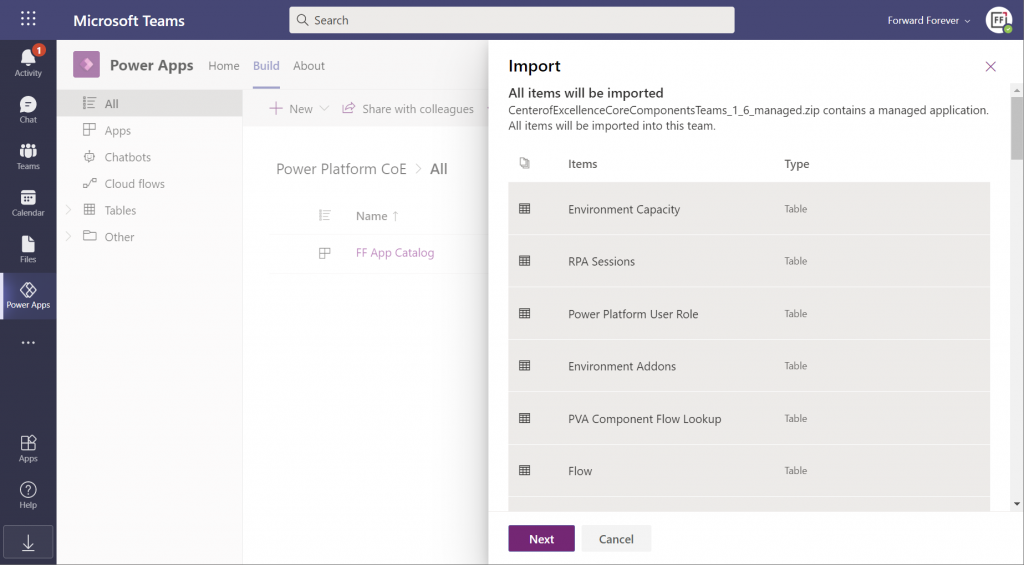
    The import (and export) options within the Power Apps app in Microsoft Teams have only recently been enabled. Importing the managed solution zip file into DV4T gives you a bit different experience than what we’ve been accustomed to in the Dataverse side, by listing all the items that are part of the import:

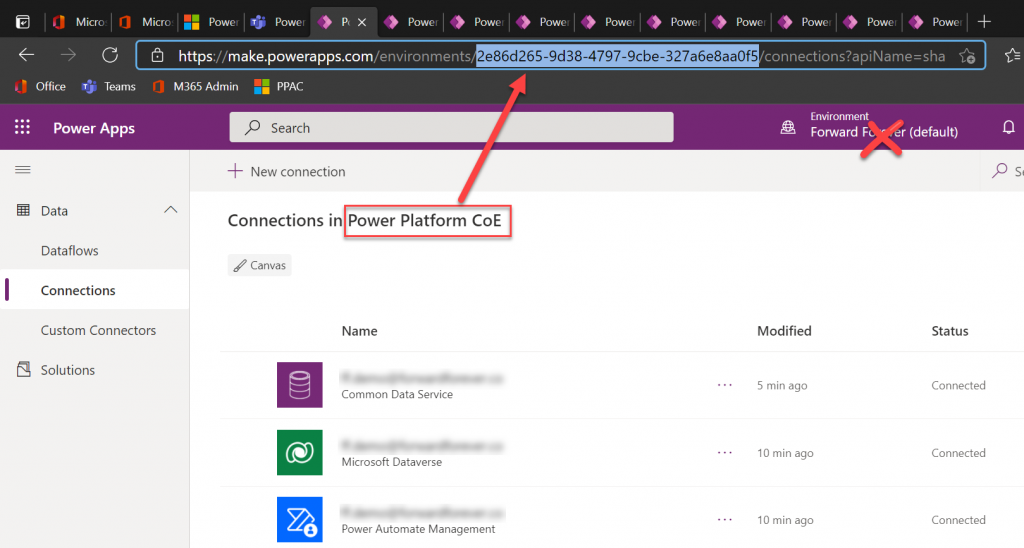
    Next we need to create a bunch of connections before proceeding further with the installation, to allow CoE to perform the necessary data retrieval through a wealth of APIs. This process will give you ~10 new browser tabs that show the traditional non-Teams version of the Maker Portal. A bit of a click show – but luckily there’s one upside to it.

    While you can’t open the DV4T environment directly in the Power Apps Maker Portal (as of now), you can hack the URL to get access to this full maker UI. So, as you’re adding all the required connections, grab the environment GUID from the address bar in one of the aforementioned tabs. Use that GUID to replace the zeros in the following URL:

    https://make.preview.powerapps.com/environments/00000000-0000-0000-0000-000000000000/home

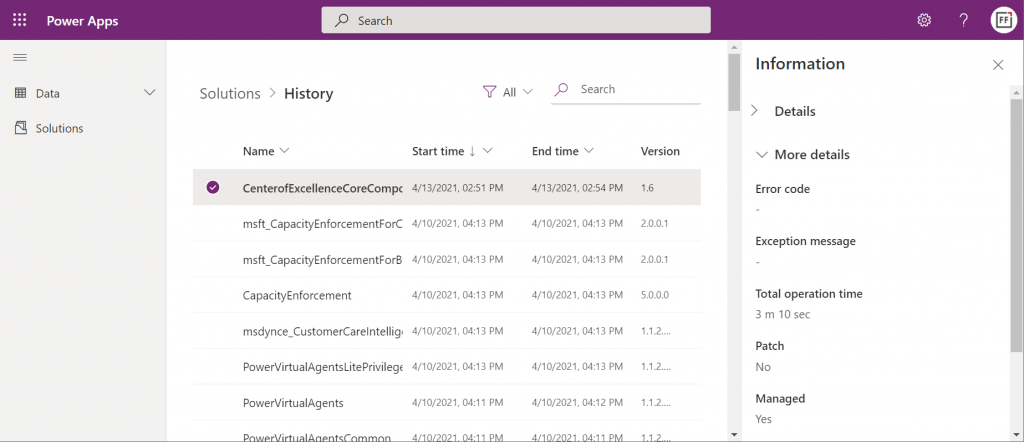
    Now you have a proper Power Apps browser tab that’s independent from Teams yet lets you browse through the environment’s components. For instance, we can go and check the solution history view, to verify that the Center of Excellence Core Components solution imported successfully in 3 minutes 10 seconds:

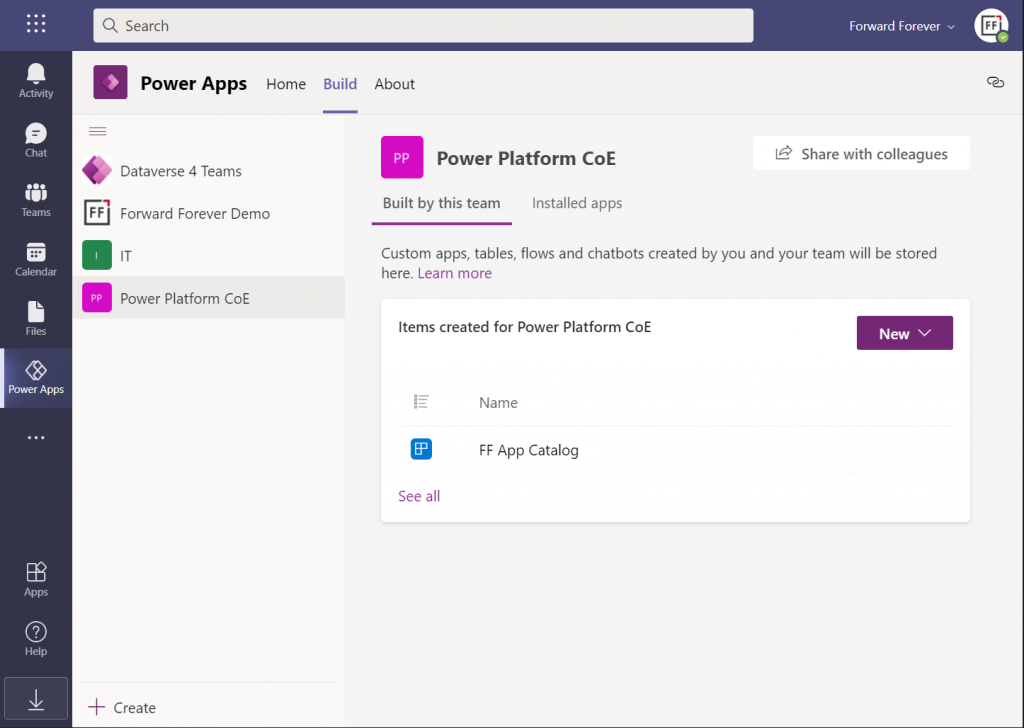
    Hmm, but why can’t I see anything yet on the Power Apps Teams UI? Even if I click “See all” then I only see that one dummy app I added earlier, to get the DV4T environment provisioned.

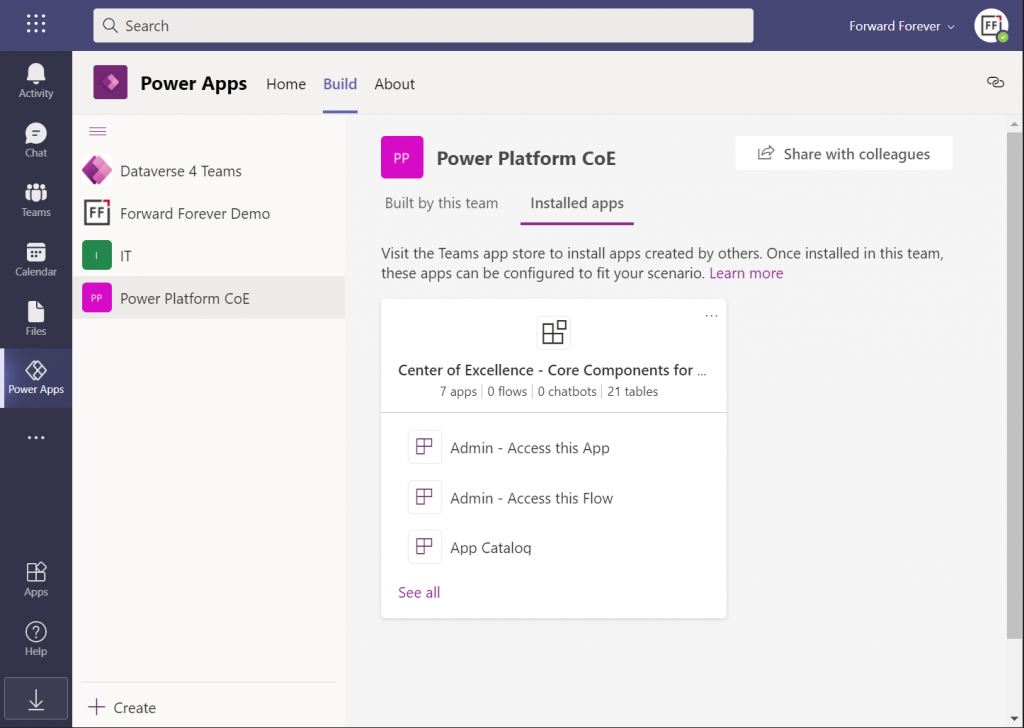
    The secret is in you choice of tabs within the Power Apps app. Specifically, instead of the “built by this team” tab you need to have a look at the “installed apps” tab. Ah! So, it looks like the managed solutions that you import into a DV4T environment are actually treated like Teams apps here – rather than just a list of components like we know them from the XRM era.

    In fact, while we can import solutions into DV4T, the whole concept of a solution package isn’t actually visible when viewing the world from a Microsoft Teams perspective. Also during the import process, we’re importing “a managed application” rather than a managed solution. Make of that what you will.

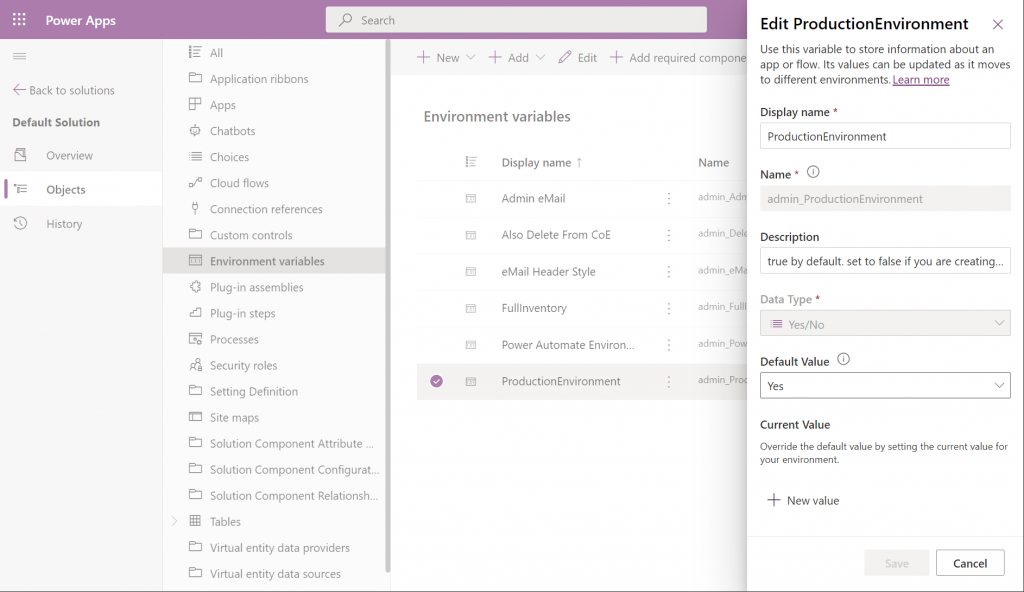
    By using the full Power Apps Maker portal we have access to not just individual solutions in the DV4T environment but all the components when accessing them via the Default Solution. For example, managing things like Environment Variables can easily be achieved here:

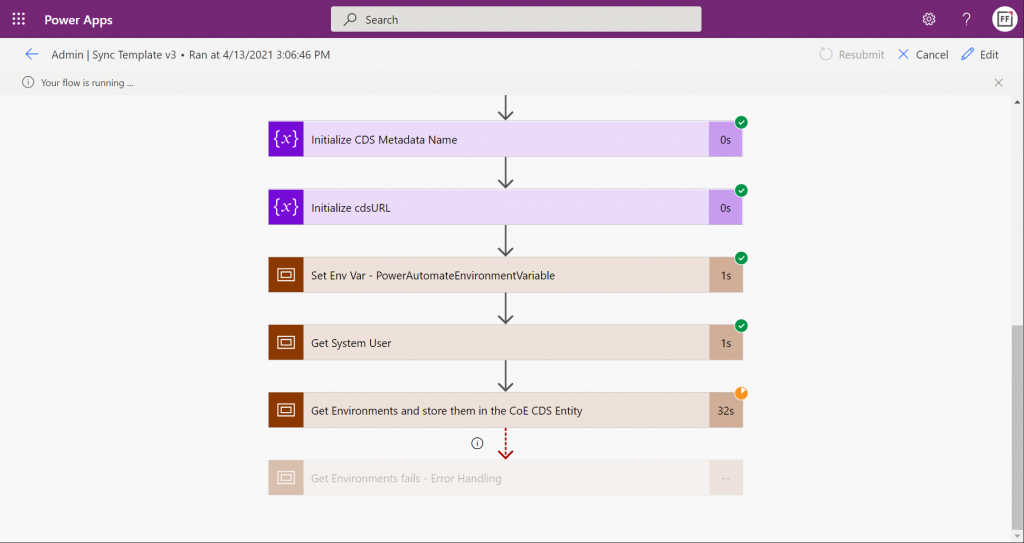
    Let’s get everything configured and move into the CoE core components deployment step that’s common to all environments: sync template flows activation. This will populate the tables in our CoE Dataverse environment with information about environments (how recursive…), apps, flows, makers and so on:

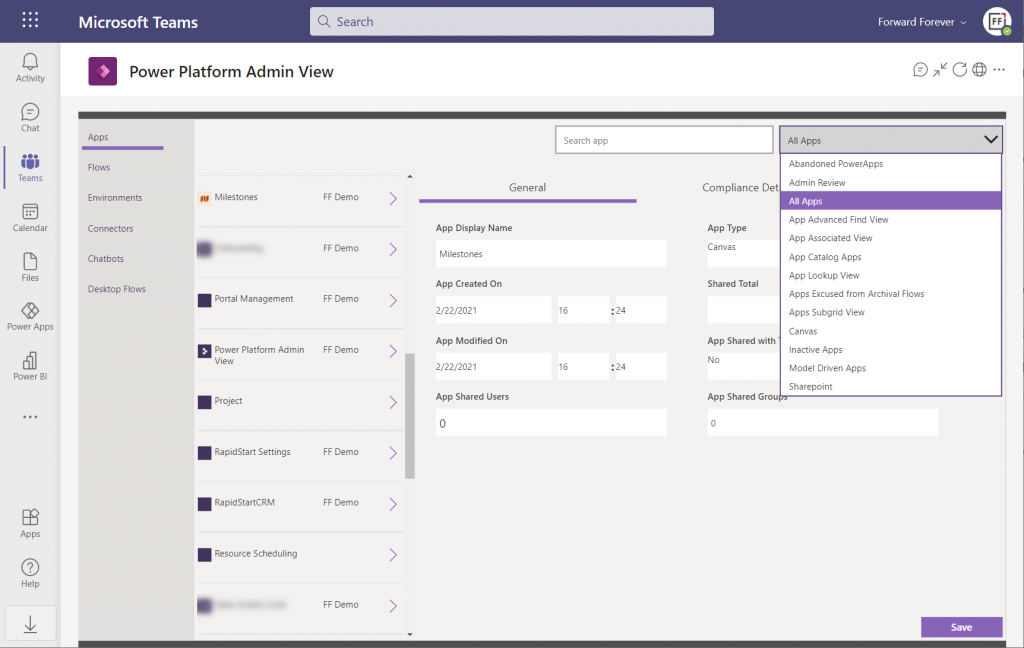
    Once the data is in, we can admire it via the Power Platform Admin View app. Oh, but wasn’t that a Model-driven app? And Dataverse for Teams doesn’t currently have support for those, right?

    Luckily there’s a new Canvas version of the Admin View available instead. Compared to the full Model-driven version, it’s… Well, how should I say this? “You get what you pay for.” Still, it gives a UI for browsing and editing the contents of your CoE environment’s tables. For those admins with little or no exposure to all goodies that the Model-driven apps and Dynamics 365 products offer, this may be perfectly sufficient for basic data management needs.

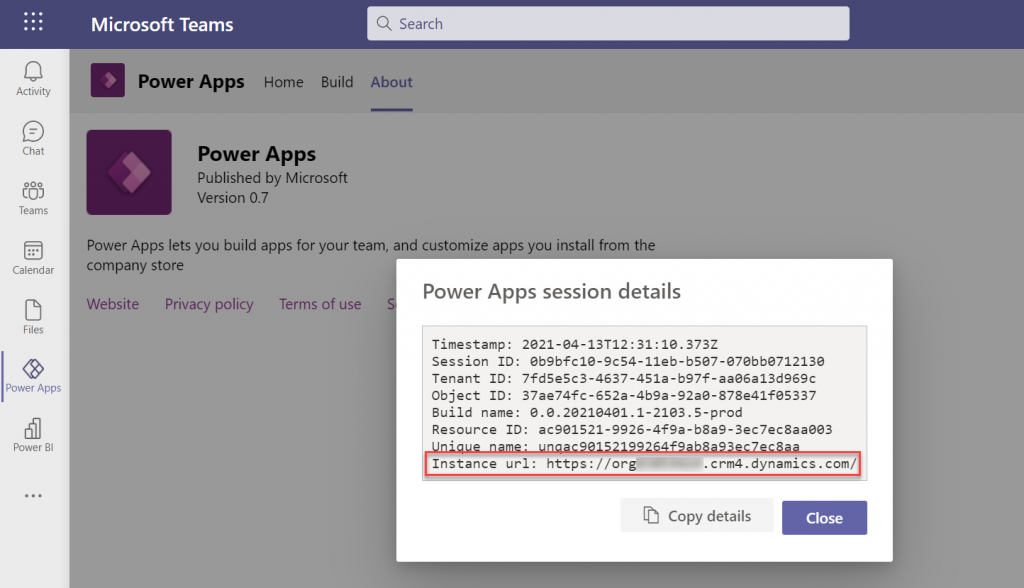
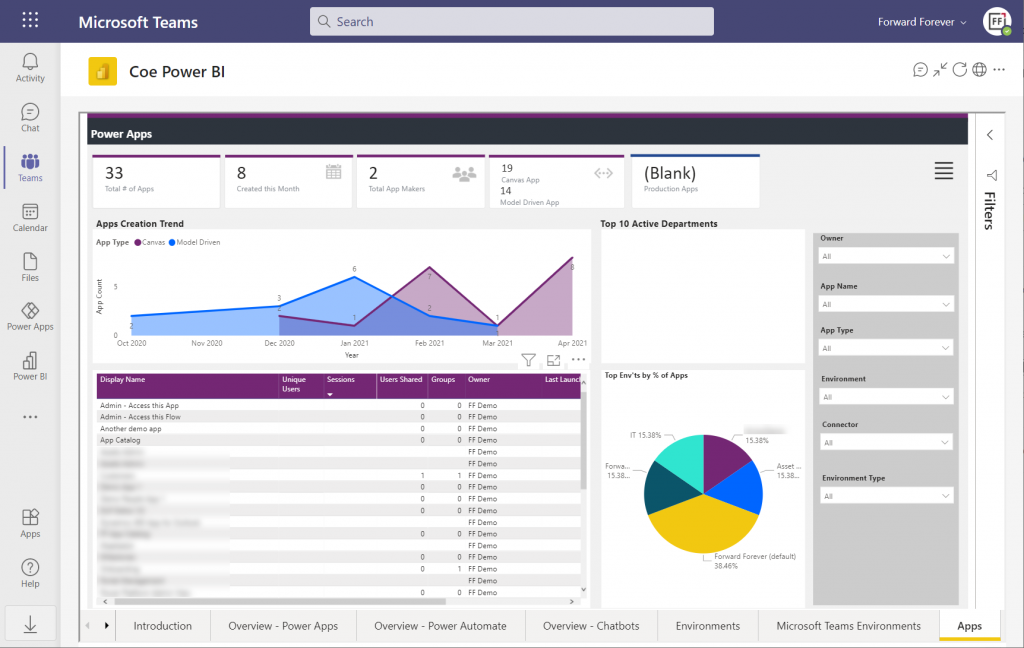
    How about the Power BI dashboard then? That has always been a nice tool in the CoE Starter Kit to demonstrate the wealth of different elements and data points of the platform. The good news is, the same version that’s used for the full Dataverse based CoE deployments is applicable also to CoE in Dataverse for Teams. The one trick you need to know, though, is how to find the Org URL for DV4T:

    Paste the instance URL without “https://” and trailing “/” into the parameter field when configuring the Power BI dashboard for CoE. Import the .pbix into a new workspace, create a Power BI app from it and publish it to the end users. After pinning it into a Teams channel tab, we now have a lot more visual method for exploring the apps, flows and other elements in our tenant’s Power Platform environments:

    There’s of course plenty of other useful apps in the CoE Starter Kit, both in the Core Components solution and further packages. In fact, when you look at the comparison table of what’s supported in Microsoft Dataverse vs. Dataverse for Teams, the differences boil down to the lack of a Model-driven admin app.

    Conclusions

    Despite of some of the new hoops you need to jump through to work with the simplified maker UI within Teams, the installation process of the Center of Excellence Starter Kit works pretty well in this deployment option, too. I’m actually surprised how well the CoE team has managed to “retrofit” the earlier solutions to work within the limits of DV4T.

    This highlights an important question which I’m sure many people in the Power Platform community have been wondering about: how far will Dataverse for Teams actually go? Sure, if we analyze the detailed feature comparison between Dataverse editions, it’s easy to identify limitations in existing business applications that wouldn’t really fit within the Teams edition. At least yet.

    While I don’t believe we’ll see the full feature set of Microsoft Dataverse unlocked for usage with Teams licenses alone, I also don’t think it’s going to be severely handicapped – intentionally at least. There’s a lot for MS to gain in pursuing the Teams as a platform story when competing against tools like Zoom or platforms like Salesforce + Slack. By attracting as many app makers and users onto the platform and then upselling them on premium Power Apps & Power Automate licenses when things like 3rd party connectivity or enterprise data platform features are needed, the revenue stream can be pretty darn nice still.

    One final thing to keep in mind about CoE is that it’s actually a great showcase in itself of what Microsoft’s low-code tools can do. It’s built with the very same Power Platform tools that it is used for managing. All the APIs, automations, reports and apps use publicly available technology that the customers also could apply for their own scenarios. Put into a different business context, these are the kinds of big systems that could evolve on top of the platform over time, to guide pretty much any digital process.